Equity Protect Pro (Technical Manual)
1. Interface Introduction
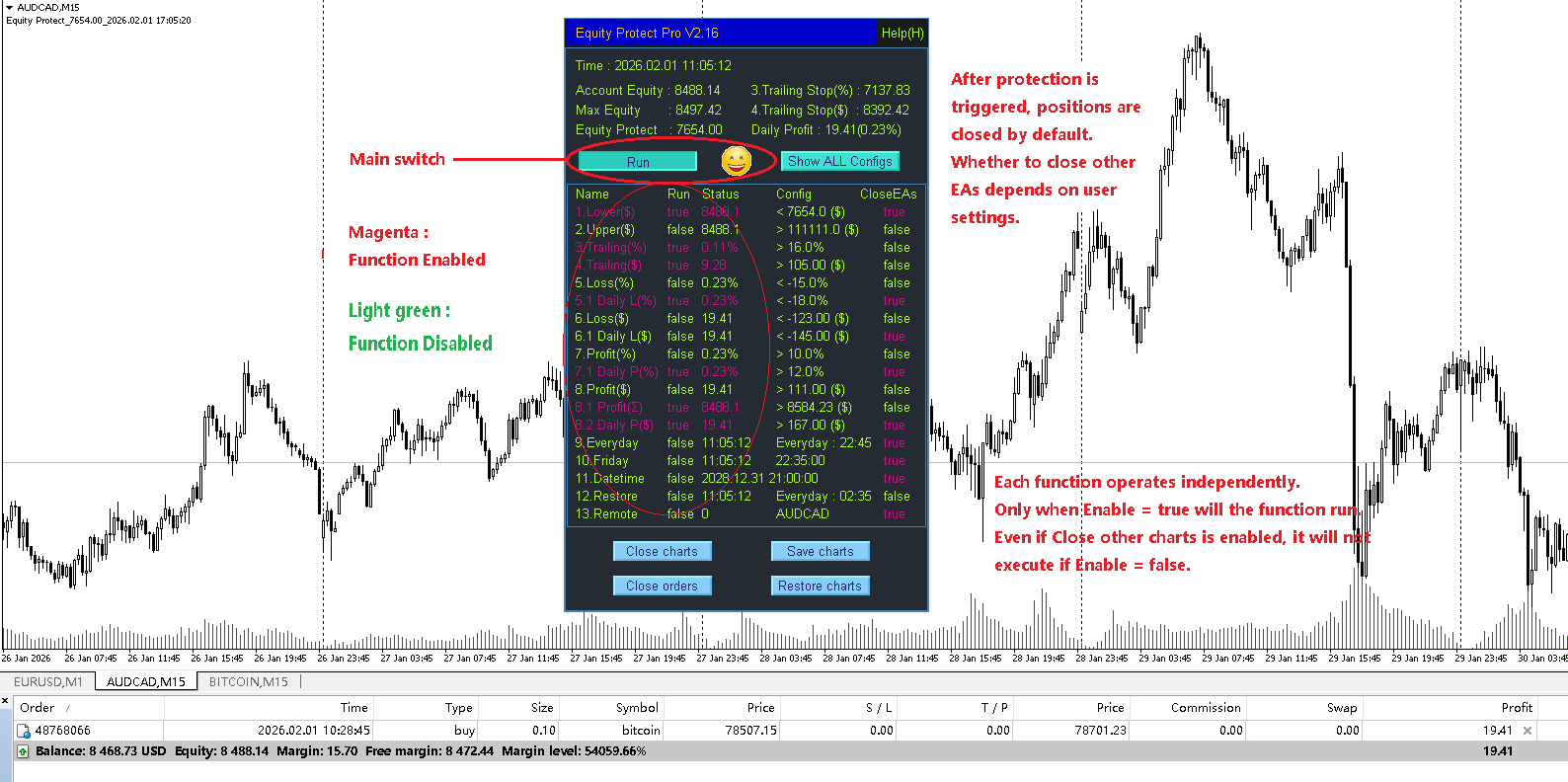
2. Function Description
1. Equity Lower Limit
Equity lower limit protection:
Protection is triggered when account equity falls below the preset value.
This function is suitable for all scenarios and is strongly recommended to be configured in all cases.
2. Equity Upper Limit
Equity upper limit protection:
Why does this function exist?
Some EAs are extremely profitable. In certain cases, traders use this function to stop trading after reaching a specific equity level to avoid being targeted by brokers.
3. Trailing Stop Percentage Limit
Equity trailing stop based on percentage.
The stop level continuously rises with account equity fluctuations.
After the trailing stop is triggered, the setting is reset and the function continues running.
How it works (example from the screenshot):
-
The program records the maximum equity since startup
Max Equity: 8497.42 -
After enabling this function, the panel displays:
3. Trailing Stop (%) : 7137.83
Status : 0.11%
Config : >16.0%
Meaning of each value:
-
Trailing Stop (%) : 7137.83
This is the equity level at which protection will be triggered.
Formula:
MaxEquity × (1 − 16.0%) = 7137.83
This value increases automatically as Max Equity increases. -
Status : 0.11%
This represents the current drawdown percentage relative to Max Equity.
Formula:
1 − AccountEquity / MaxEquity
1 − 8488.14 / 8497.42 = 0.109%Its purpose is to show how far the current drawdown is from the configured limit.
4. Trailing Stop Amount Limit
Equity trailing stop based on fixed amount.
The stop level rises with equity growth.
After triggering, the setting is reset and continues running.
Example explanation:
-
Max Equity: 8497.42
-
Panel display:
4. Trailing Stop ($) : 8392.42
Status : 9.28
Config : >105.00 ($)
Meaning:
-
Trailing Stop ($) : 8392.42
The equity level at which protection will be triggered.
Formula:
MaxEquity − 105.00 = 8392.42
This value rises automatically with Max Equity. -
Status : 9.28
Current drawdown amount relative to Max Equity.
Formula:
MaxEquity − AccountEquity
8497.42 − 8488.14 = 9.28This indicates how close the current drawdown is to the configured limit.
5. Loss Percentage Limit
Account stop loss based on percentage.
Formula:
(Equity − Balance) / Balance
(8488.14 − 8468.73) / 8468.73 = 0.229%
Protection is triggered when this value is less than the configured threshold.
5.1 Daily Loss Limit (%)
Daily loss limit based on percentage.
Designed to limit the maximum loss per trading day.
-
When the loss exceeds the configured value, protection is triggered.
-
After triggering, the program stops for the rest of the day.
-
It automatically resumes on the next trading day.
Because this scenario usually closes other EA charts, it should be used together with 12. Restore Everyday.
After enabling, the panel displays:
Daily Profit : 19.41 (0.23%)
Formula:
DailyHistoryProfit + AccountProfit
In this example:
DailyHistoryProfit = 0
AccountProfit = 19.41
Note:
-
Day rollover is based on broker server time.
-
Daily historical profit is calculated using order close time.
6. Loss Amount Limit
Account stop loss based on fixed amount.
Formula:
Equity − Balance
8488.14 − 8468.73 = 19.41
Protection is triggered when this value is less than the configured threshold.
6.1 Daily Loss Limit ($)
Refer to 5.1 Daily Loss Limit (%).
7. Profit Percentage Limit
Account take-profit based on percentage.
Formula:
(Equity − Balance) / Balance
(8488.14 − 8468.73) / 8468.73 = 0.229%
Protection is triggered when this value is greater than the configured threshold.
7.1 Daily Profit Limit (%)
Refer to 5.1 Daily Loss Limit (%).
8. Profit Amount Limit
Account take-profit based on fixed amount.
Formula:
Equity − Balance
8488.14 − 8468.73 = 19.41
Protection is triggered when this value is greater than the configured threshold.
8.1 Accumulated Profit Limit
Accumulated profit protection.
Typically used in multi-strategy portfolio trading.
Protection is triggered when total accumulated account profit exceeds the configured value.
8.2 Daily Profit Limit ($)
Refer to 5.1 Daily Loss Limit (%).
9. Everyday Config
Daily scheduled liquidation to avoid overnight risk.
Usually used together with 12. Restore Everyday so EAs can resume the next day.
10. Friday Config
Friday scheduled liquidation to avoid weekend risk.
11. Datetime Config
Liquidation at a specified date and time to avoid specific risks.
12. Restore Everyday Config
Daily chart (EA) restoration.
When no other charts are running in the terminal, the program will automatically restore the previously closed charts (EAs) at the specified time.
Symbol, timeframe, and parameters will be exactly the same.
13. Remote Manual Protection
When you are away and the market becomes highly volatile, mobile trading may allow you to close positions but not stop running EAs, causing continuous losses.
After enabling this function, simply placing any type of pending order on the current symbol from your mobile phone will trigger protection immediately.
3. Important Notes
-
Equity Protect Pro is an account-level risk control EA.
It does not place trades or predict the market. -
Each function operates independently.
Only when Enable = true will the function run.
Even if Close other charts is enabled, it will not execute if Enable = false . -
After protection is triggered, positions are closed by default.
Whether to close other EAs depends on user settings. -
This EA can only close trading programs running on the current terminal.
It cannot control programs running on other terminals using the same account.
To achieve full protection, run all trading programs on a single terminal. -
Disable this EA when making deposits or withdrawals to avoid unintended triggers.
-
This program is highly flexible.
It is strongly recommended to perform thorough testing on a demo account, adjust parameters, and fully understand its behavior before using it in live trading.