Alain Verleyen
Alain Verleyen
4.9 (253)
  • 情報
13+ 年
経験
11
製品
78
デモバージョン
302
ジョブ
0
シグナル
0
購読者
Innovative and creative developer において Home
毎日の分析チャンネルをフォローしてください( https://www.mql5.com/en/channels/morningbriefing )。

こんにちは、

私のプロフィールを見て興味を持っていただきありがとうございます。私は最近(2020年6月)、自分のプロジェクトに集中するために、フリーランサーとしての仕事をやめました。ダニエル・スタインとのパートナーシップでプロフェッショナルなトレーディングツールを開発しています。こちらでご確認ください https://www.mql5.com/en/users/blueball/seller
残念ながら私は推薦できる人がいないので、良いプログラマーを見つけるには、難しい方法を使う必要があります。

がんばってください、よろしくお願いします、

アラン

_________________________________________________________________________________________________

mql5.comマーケットで最もプロフェッショナルで、協力的で、正直で、真剣な販売者であるDaniel Steinとのパートナーシップを発表することを誇りに思います。製品ポートフォリオは https://www.mql5.com/en/users/blueball/seller でご覧いただけます。

ダニエルがとてもうまく発表してくれたので、引用させていただきます:

「スタイン・インベストメントのお客様、フォロワーの皆様へ、

今日は、このような品質のツールを最初に実現したStein Investmentsの特別なパートナーであり、mql5で彼を知った方もいらっしゃるかもしれませんので、この機会に紹介したいと思います。

アランと私は2014年から時々一緒に仕事をしてきましたが、2019年、私たちは信頼できる協力関係を拡大し、より速く動き、最高のトレーディングツールを皆さんに提供することにしました。

彼は私たちの取引ツールを支える技術的な天才であり、今やスタイン・インベストメンツの固定された一部となっています。私たちは共に、より速く、より効率的に、そしてトレーディングと私たちが提供するソフトウェアソリューションにまつわる技術的な可能性とサービスのより広い範囲をカバーすることができます。"

_________________________________________________________________________________________________
Eleni Anna Branou - Juvenille Emperor Limited
Eleni Anna Branou
Matrix Arrow Indicator MT4/5© is a unique 10 in 1 trend following 100% non-repainting multi-timeframe indicator that can be used on all symbols/instruments: forex, commodities, cryptocurrencies, indices, stocks. Matrix Arrow Indicator MT4/5© will determine the current trend at its early stages, gathering information and data from up to 10 standard indicators, which are: Average Directional Movement Index (ADX), Commodity Channel Index (CCI), Classic Heiken Ashi candles, Moving Average, Moving Average Convergence Divergence (MACD), Relative Vigor Index (RVI), Relative Strength Index (RSI), Parabolic SAR, Stochastic Oscillator, Williams' Percent Range.

When all indicators give a valid buy or sell signal, a corresponding arrow will be printed on the chart, at the opening of the next candle/bar indicating a strong uptrend/downtrend. The user can choose which indicators will use and can adjust the parameters of each indicator separately. Matrix Arrow Indicator MT4/5© gathers information only from the selected indicators and prints the arrow based only on their data. Matrix Arrow Indicator MT4/5© can also send terminal, push notification or email alerts for all new signals. Matrix Arrow Indicator MT4/5© is a super friendly & efficient solution whether you are a scalper, intraday or swing trader!

Matrix Arrow Indicator MT4/5© comes with a free add on, the Matrix Arrow Indicator Multi Timeframe Panel MT4/5© that offers the option to show the Matrix Arrow Indicator signals for 5 customizable timeframes of 16 modifiable symbols/instruments. It gives also the option to change the current chart it is attached onto, by clicking any one of the 16 modifiable symbol buttons. This will allow you to work much faster between different symbols and never miss a trading opportunity again.

✔️ 100% Non-Repainting indicator
✔️ 10 in 1 unique and extremely efficient Matrix and Arrow indicator
✔️ Works on all timeframes and all symbols/instruments
✔️ Super accurate entry Arrow signals that indicate a strong trend
✔️ Exit dot signals define neutral periods with no clear trend
✔️ Equally effective in trending and ranging markets
✔️ Each one indicator can be turned ON/OFF
✔️ Each and every parameter of all 10 indicators are fully adjustable
✔️ Matrix and Arrow colors are fully customizable
✔️ Free add on Panel with Matrix Arrow signals for 16 symbols and 5 timeframes
✔️ Terminal, Push Notification and Email Alerts available
✔️ Ideal for beginners but also a great asset for experienced traders

🔥🔥🔥🔥🔥 Matrix Arrow Indicator MT4/5© Demonstration Video: https://www.youtube.com/watch?v=-teba5v_90I

⭐️⭐️⭐️⭐️⭐️ Matrix Arrow Indicator MT4©: https://www.mql5.com/en/market/product/69726

⭐️⭐️⭐️⭐️⭐️ Matrix Arrow Indicator MT5©: https://www.mql5.com/en/market/product/69725

👉 Matrix Arrow Indicator MT4/5© Real Trading Examples: https://www.mql5.com/en/blogs/post/745715

✅ Matrix Arrow Indicator MT4/5© Installation Guide: https://www.mql5.com/en/blogs/post/745711

✅ Matrix Arrow Indicator MT4/5© Settings/Inputs: https://www.mql5.com/en/blogs/post/745707

💎💎💎💎💎 Check out all my Expert Advisors, Indicators and Utilities: https://www.mql5.com/en/users/eleanna74/seller

30 October 2026
Rahman Pavaleh
Rahman Pavaleh
How to Configure Multi Risk Manager Pro in MT5 / 4: First-Time Setup, Settings, Presets and Backups Getting started with a new trading Expert Advisor can feel complicated, especially when the software includes multiple risk-management, order-execution, and position-management features...
Eusebiu Dascalu
Eusebiu Dascalu
TALON Gold Scalper V2.0 is 90% complete.
Eleni Anna Branou - Juvenille Emperor Limited
Eleni Anna Branou
Basket EA MT4/5© is a powerful profit-harvesting tool and a comprehensive account protection system, all combined into a simple and easy-to-use solution. Its core purpose is to give you complete control over your trading account’s overall profit and loss by managing all open positions at the basket level, rather than individually. The EA offers a full range of basket-level features, including take profit, stop loss, break even, and trailing stop loss. These can be configured as a percentage of your account balance, a fixed amount in your account’s currency, or a target in average points across all managed trades. This flexibility allows traders to tailor risk and profit strategies to their unique needs. Basket EA MT4/5© also supports intelligent trade filtering, allowing you to include or exclude specific trades from management based on their magic number, symbol, or comment. This ensures that only the trades you want managed by the EA are affected, while others are left untouched.

For added protection, the EA includes advanced account safeguarding mechanisms. When a specified equity take profit or stop loss level or a maximum drawdown from the account's balance high is reached, the EA can automatically close all open trades, delete any pending orders, and shut down all charts, removing any Expert Advisors running on them. This feature helps protect your capital during unexpected market movements or when reaching your predefined account targets.

✔️ Does not use Martingale, Grid, Averaging, or other high-risk techniques
✔️ Allows exclusion of specific Magic Numbers, trade comments, or symbol trades from management
✔️ Basket Take Profit in % for all managed trades combined
✔️ Basket Stop Loss in % for all managed trades combined
✔️ Basket Break Even in % for all managed trades combined
✔️ Basket Trailing Stop Loss in % for all managed trades combined
✔️ Basket Take Profit in money for all managed trades combined
✔️ Basket Stop Loss in money for all managed trades combined
✔️ Basket Break Even in money for all managed trades combined
✔️ Basket Trailing Stop Loss in money for all managed trades combined
✔️ Basket Take Profit in average points for all managed trades combined
✔️ Basket Stop Loss in average points for all managed trades combined
✔️ Basket Break Even in average points for all managed trades combined
✔️ Basket Trailing Stop Loss in average points for all managed trades combined
✔️ Option to reset all Basket settings after each account balance update or after a Basket target is hit
✔️ Option to close all managed trades at break even after recovering from a drawdown
✔️ Option to close all managed trades at a specific time on a chosen day or daily
✔️ Account protection feature that closes all trades and charts when equity-based TP or SL is reached
✔️ Maximum drawdown % from balance high that closes all trades and charts/EAs if triggered
✔️ Optional on-chart panel to monitor profit/loss and close trades by type or all at once
✔️ Terminal, push notification, and email alerts when any Basket or protection condition is triggered
✔️ 100% automated Expert Advisor
✔️ Fully compatible with MQL5 VPS

⭐️⭐️⭐️⭐️⭐️ Basket EA EA MT4©: https://www.mql5.com/en/market/product/45192

⭐️⭐️⭐️⭐️⭐️ Basket EA EA MT5©: https://www.mql5.com/en/market/product/72782

📥 Download the Basket EA MT4© demo version in your demo account now: https://c.mql5.com/6/988/Basket_EA_MT4_2_20_Demo.ex4

📥 Download the Basket EA MT5© demo version in your demo account now: https://c.mql5.com/6/988/Basket_EA_MT5_2_00_Demo.ex5

✅ Basket EA MT4/5© detailed Settings/Inputs guide: https://www.mql5.com/en/blogs/post/746117

💎💎💎💎💎 Check out all my Expert Advisors and Utilities: https://www.mql5.com/en/users/eleanna74/seller

30 October 2026
Zahid Hussain
Zahid Hussain
One Chart, Three Markets: How Gold Behaves Across Asia, London, and New York

Gold looks like the same chart all day, but it does not behave the same way all day. It has three personalities, one per major session, and most of the frustration traders feel comes from using the wrong session's rules at the wrong time.

The Asian session is usually the quiet one. With London and New York closed, gold tends to drift inside a range rather than trend. Moves are smaller, breakouts often fail, and a level that looks broken in Asia is frequently reclaimed a few hours later. The mistake here is treating a quiet range like a trend: chasing a small Asian breakout usually means buying the top of a range that was never going anywhere.

London changes the character completely. When London opens, real volume arrives, and gold often expands out of the Asian range. This is where the day's direction usually starts to show. A clean break of the Asian range during London, backed by a strong close rather than a single wick, is worth far more attention than anything that happened in the quiet hours. But even here, patience matters: the first push out of the range is sometimes a false start, and the real move begins after price comes back and holds the broken edge.

New York is the wild card. It can extend London's move with even more force, especially around US economic data — or it can reverse it entirely. A trend that looked certain at midday can unwind in the afternoon as New York traders take profit or react to new information. The lesson is simple: a London trend is a plan, not a promise, and it stays valid only while New York keeps confirming it.

Three practical rules follow from this. First, match your expectations to the session: range tactics in Asia, breakout confirmation in London, and respect for reversals in New York. Second, never judge a session by another session's standards — a failed Asian breakout is normal, not a broken strategy. Third, if you missed London's move, do not chase it in New York at a worse price; a missed move costs nothing, while a chased entry costs real money.

Gold does not change between sessions. The participants do — and when you know who is in the market, you know what kind of move to expect.
Eleni Anna Branou - Juvenille Emperor Limited
Eleni Anna Branou
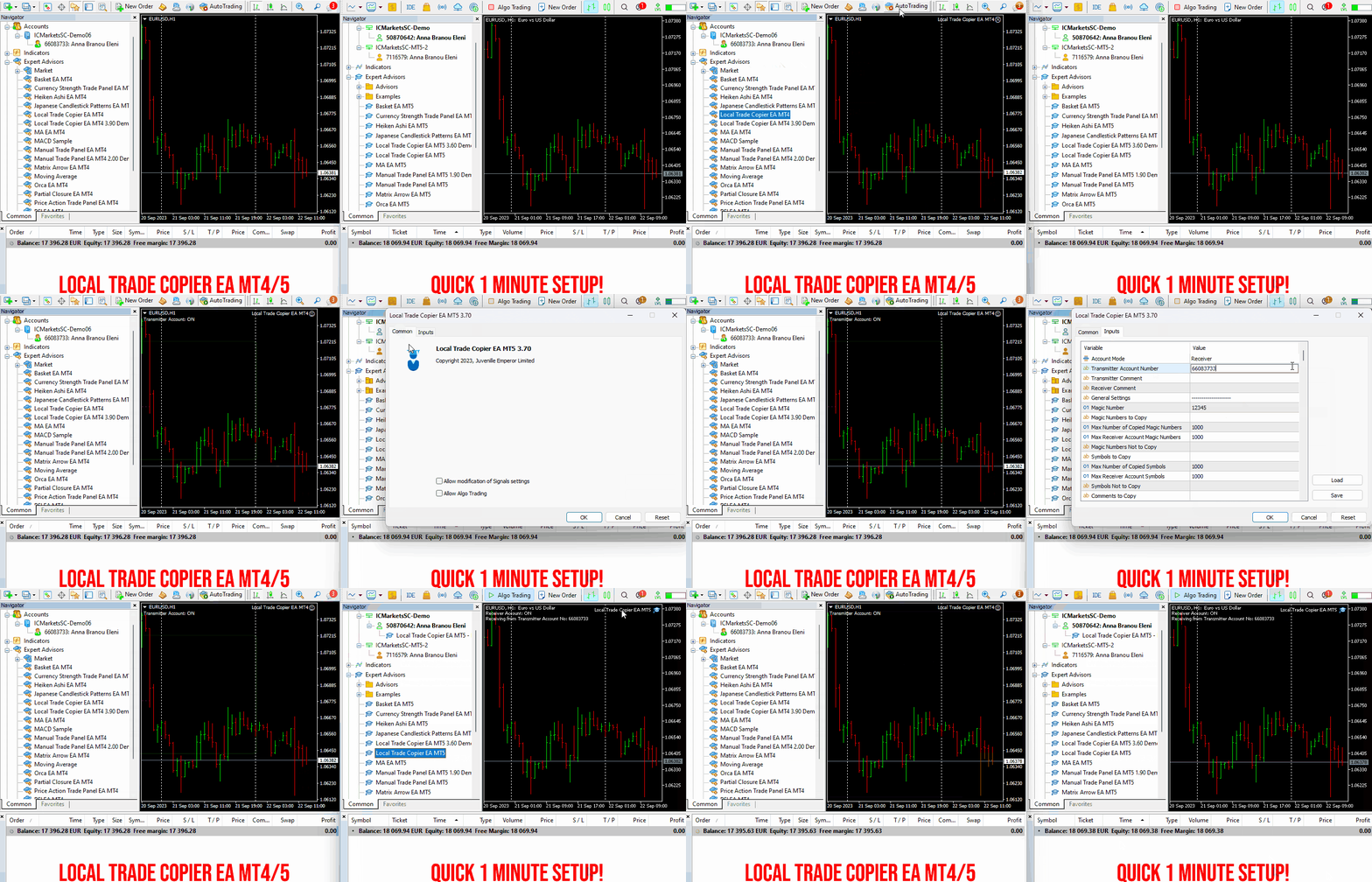
Local Trade Copier EA MT4/5© is a fast and flexible trade copier for copying and managing trades between multiple MetaTrader 4 and MetaTrader 5 accounts on the same Windows computer or Windows VPS.

Set up your Transmitter and Receiver terminals in about 1 minute and copy manual or EA trades between accounts at the same or different brokers. Under suitable conditions, trade information can be synchronized between local MetaTrader terminals in under 0.5 seconds. Actual trade execution depends on broker latency, network conditions, computer/VPS performance and terminal workload.

Each Receiver account can use its own lot sizing, risk management, trade filtering, symbol mapping, trade management and account-protection settings. This allows the same trading activity to be synchronized across multiple accounts while each Receiver can be configured according to its own requirements.

✔️ Copying & Connectivity: Copy between multiple MT4/MT5 accounts* on the same Windows computer or VPS, across different brokers and real/demo accounts.
✔️ Lot Sizing & Risk Management: Choose from 18 lot size and risk options, with independent sizing and risk settings for each Receiver.
✔️ Trade Filtering & Copying Controls: Filter copied trades by symbol, magic number, comment, ticket, volume, direction, day and time.
✔️ Trade Management: Manage market and pending orders, TP/SL, partial closures, reopening, reverse copying, better-price conditions and trade splitting.
✔️ Account Protection: Control lot limits, risk, daily drawdown/profit, copying restrictions and emergency protection independently for each Receiver.
✔️ Broker Compatibility & Symbol Mapping: Copy between different brokers and configure suffixes and special symbol mappings when symbol names differ.
✔️ Notifications & Reliability: Use email/push notifications, persistent settings and MetaTrader logs for monitoring and troubleshooting.
✔️ 20 Activations: Each MT4/MT5 version includes 20 activations, allowing you to install and use it on multiple Windows computers or VPSs.

* MT4 → MT5 and MT5 → MT4 copying requires both LTC versions. Both terminals must run on the same Windows computer or Windows VPS.

🔥🔥🔥🔥🔥 Watch the Local Trade Copier EA MT4/5© Quick Setup Video: https://www.youtube.com/watch?v=zhc9s56QhlE

⭐️⭐️⭐️⭐️⭐️ Local Trade Copier EA MT4©: https://www.mql5.com/en/market/product/68950

⭐️⭐️⭐️⭐️⭐️ Local Trade Copier EA MT5©: https://www.mql5.com/en/market/product/68951

📥 Download the Local Trade Copier EA MT4© Free Demo: https://c.mql5.com/6/1030/Local_Trade_Copier_EA_MT4_4_60_Demo.ex4

📥 Download the Local Trade Copier EA MT5© Free Demo: https://c.mql5.com/6/1030/Local_Trade_Copier_EA_MT5_4_40_Demo.ex5

✅ Local Trade Copier EA MT4/5© Purchase, Installation & Quick Setup Guide: https://www.mql5.com/en/blogs/post/745683

✅ Local Trade Copier EA MT4/5© Detailed Inputs/Settings Guide: https://www.mql5.com/en/blogs/post/745681

✅ Local Trade Copier EA MT4/5© Troubleshooting Guide: https://www.mql5.com/en/blogs/post/746561

💎💎💎💎💎 View all my Expert Advisors, Indicators and Utilities: https://www.mql5.com/en/users/eleanna74/seller

30 October 2026
.
Mohamed Samsudeen
Mohamed Samsudeen
🤖 Advance AI Scanner MT5 — Complete Beginner Guide (Install → Settings → Read the Panel → Analyse → Decide) Welcome, and congratulations on choosing Advance AI Scanner ! 🎉 This guide is made for complete beginners . Simply follow the steps from top to bottom...
Osama Echchakery
Osama Echchakery パブリッシュされたプロダクト

Inverted Hammer ProLab MT5 A flexible MetaTrader 5 Expert Advisor built around the Inverted Hammer candlestick pattern. Build your own rules instead of using one fixed strategy. Pattern control: tune candle range, body size, wick limits, body ratios, signal direction and pattern timeframe. Detection looks for a small body, an upper wick at least twice the body, and a lower wick no longer than the body plus tolerance. Either candle color is allowed; downtrend context is optional. Signals use

Osama Echchakery
Osama Echchakery パブリッシュされたプロダクト

Dark Cloud Cover ProLab MT5 A flexible MetaTrader 5 Expert Advisor built around the Dark Cloud Cover candlestick pattern. Build your own rules instead of using one fixed strategy. Pattern control: tune candle range, body size, wick limits, body ratios, signal direction and pattern timeframe. Detection looks for a bullish candle followed by a bearish candle opening at or above the prior high (within tolerance) and closing below the prior body's midpoint. Uptrend context is optional. Signals use

Osama Echchakery
Osama Echchakery パブリッシュされたプロダクト

Piercing Line ProLab MT5 A flexible MetaTrader 5 Expert Advisor built around the Piercing Line candlestick pattern. Build your own rules instead of using one fixed strategy. Pattern control: tune candle range, body size, wick limits, body ratios, signal direction and pattern timeframe. Detection looks for a bearish candle followed by a bullish candle opening at or below the prior close (within tolerance) and closing above the prior body's midpoint but below the prior open. Signals use completed

Eleni Anna Branou - Juvenille Emperor Limited
Eleni Anna Branou
Matrix Arrow Indicator MT4/5© is a unique 10 in 1 trend following 100% non-repainting multi-timeframe indicator that can be used on all symbols/instruments: forex, commodities, cryptocurrencies, indices, stocks. Matrix Arrow Indicator MT4/5© will determine the current trend at its early stages, gathering information and data from up to 10 standard indicators, which are: Average Directional Movement Index (ADX), Commodity Channel Index (CCI), Classic Heiken Ashi candles, Moving Average, Moving Average Convergence Divergence (MACD), Relative Vigor Index (RVI), Relative Strength Index (RSI), Parabolic SAR, Stochastic Oscillator, Williams' Percent Range.

When all indicators give a valid buy or sell signal, a corresponding arrow will be printed on the chart, at the opening of the next candle/bar indicating a strong uptrend/downtrend. The user can choose which indicators will use and can adjust the parameters of each indicator separately. Matrix Arrow Indicator MT4/5© gathers information only from the selected indicators and prints the arrow based only on their data. Matrix Arrow Indicator MT4/5© can also send terminal, push notification or email alerts for all new signals. Matrix Arrow Indicator MT4/5© is a super friendly & efficient solution whether you are a scalper, intraday or swing trader!

Matrix Arrow Indicator MT4/5© comes with a free add on, the Matrix Arrow Indicator Multi Timeframe Panel MT4/5© that offers the option to show the Matrix Arrow Indicator signals for 5 customizable timeframes of 16 modifiable symbols/instruments. It gives also the option to change the current chart it is attached onto, by clicking any one of the 16 modifiable symbol buttons. This will allow you to work much faster between different symbols and never miss a trading opportunity again.

✔️ 100% Non-Repainting indicator
✔️ 10 in 1 unique and extremely efficient Matrix and Arrow indicator
✔️ Works on all timeframes and all symbols/instruments
✔️ Super accurate entry Arrow signals that indicate a strong trend
✔️ Exit dot signals define neutral periods with no clear trend
✔️ Equally effective in trending and ranging markets
✔️ Each one indicator can be turned ON/OFF
✔️ Each and every parameter of all 10 indicators are fully adjustable
✔️ Matrix and Arrow colors are fully customizable
✔️ Free add on Panel with Matrix Arrow signals for 16 symbols and 5 timeframes
✔️ Terminal, Push Notification and Email Alerts available
✔️ Ideal for beginners but also a great asset for experienced traders

🔥🔥🔥🔥🔥 Matrix Arrow Indicator MT4/5© Demonstration Video: https://www.youtube.com/watch?v=-teba5v_90I

⭐️⭐️⭐️⭐️⭐️ Matrix Arrow Indicator MT4©: https://www.mql5.com/en/market/product/69726

⭐️⭐️⭐️⭐️⭐️ Matrix Arrow Indicator MT5©: https://www.mql5.com/en/market/product/69725

👉 Matrix Arrow Indicator MT4/5© Real Trading Examples: https://www.mql5.com/en/blogs/post/745715

✅ Matrix Arrow Indicator MT4/5© Installation Guide: https://www.mql5.com/en/blogs/post/745711

✅ Matrix Arrow Indicator MT4/5© Settings/Inputs: https://www.mql5.com/en/blogs/post/745707

💎💎💎💎💎 Check out all my Expert Advisors, Indicators and Utilities: https://www.mql5.com/en/users/eleanna74/seller

29 October 2026
Chacha Ian Maroa
Chacha Ian Maroa パブリッシュされたMetaTrader 5シグナル
USD 100 to USD 10000
価格: 30USD, 成長: -68.83%
Eleni Anna Branou - Juvenille Emperor Limited
Eleni Anna Branou
Matrix Arrow EA MT4/5© is a unique expert advisor that can trade the Matrix Arrow Indicator's MT4/5© signals with a trade panel on the chart, manually or 100% automatically. Matrix Arrow Indicator MT4/5© will determine the current trend at its early stages, gathering information and data from up to 10 standard indicators, which are: Average Directional Movement Index (ADX), Commodity Channel Index (CCI), Classic Heiken Ashi candles, Moving Average, Moving Average Convergence Divergence (MACD), Relative Vigor Index (RVI), Relative Strength Index (RSI), Parabolic SAR, Stochastic Oscillator, Williams' Percent Range.

When all indicators give a valid buy or sell signal, a corresponding arrow will be printed on the chart, at the opening of the next candle/bar indicating a strong uptrend/downtrend. The user can choose which indicators will use and can adjust the parameters of each indicator separately. With Matrix Arrow EA MT5 you can trade the Matrix Arrow Indicator MT4/5© signals, directly from a trade panel on the chart manually or 100% automatically with a 100% algorithmic trading option!

✔️ Martingale, Grid, Averaging or other dangerous techniques are not used
✔️ Features on chart Trade Panel for manual or 100% algorithmic trading
✔️ SL, TP, BE and Trailing SL levels in Points and in Percentage of the Average Daily Range
✔️ New optimized set files for trading 12 popular symbols/instruments
✔️ Based on the 100% Non-Repainting Matrix Arrow Indicator MT5
✔️ Working, Entry & Exit Confirmation timeframes available
✔️ Works on all timeframes and all symbols/instruments
✔️ Super accurate Arrow signals that indicate a strong trend
✔️ Exit dot signals define neutral periods with no clear trend
✔️ Equally effective in trending and ranging markets
✔️ Each one indicator can be turned ON/OFF
✔️ Each and every parameter of all 10 indicators are fully adjustable
✔️ Ideal for beginners but also a great asset for experienced traders
✔️ 100% automated Expert Advisor
✔️ MQL5 VPS compatible

🔥🔥🔥🔥🔥 Matrix Arrow EA MT4/5© Backtests & Optimized Set Files: https://www.mql5.com/en/blogs/post/745695

⭐️⭐️⭐️⭐️⭐️ Matrix Arrow EA MT4©: https://www.mql5.com/en/market/product/70812

⭐️⭐️⭐️⭐️⭐️ Matrix Arrow EA MT5©: https://www.mql5.com/en/market/product/70813

✅ How to Test the Matrix Arrow EA MT4/5©: https://www.mql5.com/en/blogs/post/745701

✅ Matrix Arrow EA MT4/5© Installation Guide: https://www.mql5.com/en/blogs/post/745703

📢📢📢📢📢 ATTENTION: If you want to trade the Matrix Arrow signals with your Matrix Arrow EA MT4/5©, you must purchase the Matrix Arrow Indicator MT4/5© separately! Otherwise the Matrix Arrow EA MT4/5© will work as a manual trade panel only.

Buy now the Matrix Arrow Indicator MT4©: https://www.mql5.com/en/market/product/69726

Buy now the Matrix Arrow Indicator MT5©: https://www.mql5.com/en/market/product/69725

💎💎💎💎💎 Check out all my Expert Advisors, Indicators and Utilities: https://www.mql5.com/en/users/eleanna74/seller

29 October 2026
Rodrigo Arana Garcia
Rodrigo Arana Garcia パブリッシュされたプロダクト

Local Copier – MetaTrader 4・MetaTrader 5用トレードコピーツール MetaTrader 4とMetaTrader 5のためのローカルトレードコピーツールです。同じWindowsパソコンまたはVPS上で動作するターミナル間で、方向を問わず取引をコピーします。MetaTrader 4からMetaTrader 4、MetaTrader 5からMetaTrader 5、そして2つのプラットフォーム間でもコピーできます。 こちらはMetaTrader 5版です。 MetaTrader 4版 は別の製品です。2つのプラットフォーム間でコピーするには、各ターミナルにそれぞれ対応するバージョンをインストールしてください。 追加資料と説明書 インストールガイド - ユーザーマニュアル(パート1) - ユーザーマニュアル(パート2) 無料デモ版 ご購入前に、 無料デモ版 を使ってご自身のデモ口座でコピーツールをお試しいただけます。製品版のすべての機能を備え、デモ口座でのみ動作し、2時間ごとのセッションでコピーを行います。 インストール: ターミナルで「ファイル

Rodrigo Arana Garcia
Rodrigo Arana Garcia パブリッシュされたプロダクト

Local Copier – MetaTrader 4・MetaTrader 5用トレードコピーツール MetaTrader 4とMetaTrader 5のためのローカルトレードコピーツールです。同じWindowsパソコンまたはVPS上で動作するターミナル間で、方向を問わず取引をコピーします。MetaTrader 4からMetaTrader 4、MetaTrader 5からMetaTrader 5、そして2つのプラットフォーム間でもコピーできます。 こちらはMetaTrader 4版です。 MetaTrader 5版 は別の製品です。2つのプラットフォーム間でコピーするには、各ターミナルにそれぞれ対応するバージョンをインストールしてください。 追加資料と説明書 インストールガイド - ユーザーマニュアル(パート1) - ユーザーマニュアル(パート2) 無料デモ版 ご購入前に、 無料デモ版 を使ってご自身のデモ口座でコピーツールをお試しいただけます。製品版のすべての機能を備え、デモ口座でのみ動作し、2時間ごとのセッションでコピーを行います。 インストール: ターミナルで「ファイル

Rodrigo Arana Garcia
[ English ] [ Русский ] [ 中文 ] [ Español ] [ Português ] [ 日本語 ] [ Deutsch ] [ 한국어 ] [ Français ] [ Italiano ] [ Türkçe ] Bu kılavuz, Local Copier'ı MQL5 Market'ten nasıl kuracağınızı, Transmitter'ı (verici) ve Receiver'ı (alıcı) nasıl başlatacağınızı ve işlemlerin kopyalandığını nasıl kontrol ed...
Rodrigo Arana Garcia
[ English ] [ Русский ] [ 中文 ] [ Español ] [ Português ] [ 日本語 ] [ Deutsch ] [ 한국어 ] [ Français ] [ Italiano ] [ Türkçe ] İçindekiler 1. Local Copier nasıl çalışır 2. Gereksinimler ve sınırlamalar 3. Kurulum ve ilk başlatma 3.1 Transmitter 3.2 Receiver 3.3 Self Copier 3.4 Birden fazla örnek 4...
Rodrigo Arana Garcia
[ English ] [ Русский ] [ 中文 ] [ Español ] [ Português ] [ 日本語 ] [ Deutsch ] [ 한국어 ] [ Français ] [ Italiano ] [ Türkçe ] Local Copier, aynı Windows bilgisayarında veya VPS'te çalışan MetaTrader 4 ve MetaTrader 5 terminalleri arasında işlemleri kopyalar...
Rodrigo Arana Garcia
[ English ] [ Русский ] [ 中文 ] [ Español ] [ Português ] [ 日本語 ] [ Deutsch ] [ 한국어 ] [ Français ] [ Italiano ] [ Türkçe ] Questa guida spiega come installare Local Copier dal Market MQL5, avviare il Transmitter (trasmettitore) e il Receiver (ricevitore) e verificare che le operazioni vengano copi...
Rodrigo Arana Garcia
[ English ] [ Русский ] [ 中文 ] [ Español ] [ Português ] [ 日本語 ] [ Deutsch ] [ 한국어 ] [ Français ] [ Italiano ] [ Türkçe ] Indice 1. Come funziona Local Copier 2. Requisiti e limitazioni 3. Installazione e primo avvio 3.1 Transmitter 3.2 Receiver 3.3 Self Copier 3.4 Più istanze 4. Il pannello 5...