ApeX Journal MT5

📚 View User Manual      ApeX Trade Manager 

Your broker keeps a list of your trades. It does not keep a record of your trading.
ApeX Journal turns the history already sitting in MetaTrader into the journal you keep meaning to write.

Powered by ApeX Journal
A complete trading journal, built directly inside MetaTrader 5.

____________________________________________

ApeX Journal is a trading journal, statistics engine, trade review tool and performance analyser for MetaTrader 5.

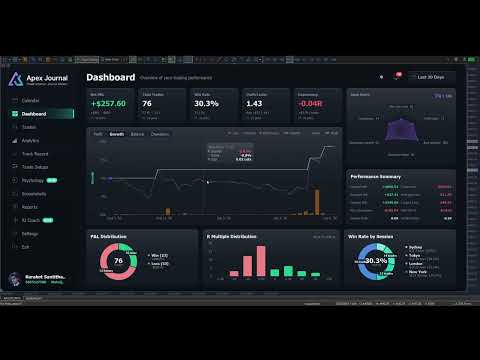
Drop it on a chart and it reads every trade you have ever closed, builds its own database, and opens eleven pages over the top of your chart: a calendar of your days, a dashboard of your numbers, a searchable table of every trade, four analytics tabs, a month-by-month track record, your setups and checklists, your psychology, your screenshots, exportable reports, and an optional AI coach that runs on your own AI account.
Nothing is typed in by hand. Nothing is uploaded anywhere. No subscription.

_________________________________________________________

🚀 Launch Promotion — Lifetime License for  $49

Special introductory price available for a limited time.


🔥 This is just the beginning.

ApeX Journal is continuously evolving.

More analysis, more ways to review, and deeper integration with ApeX Trading Console are on the way.


Get the Lifetime License at the special launch price while it's available.

__________________________________________________


Demo Mode Notice

The built-in MQL5 Demo runs in the Strategy Tester.

Because of this limitation, the interactive journal window is not fully functional in Demo mode. Buttons, mouse interactions and drag operations may not respond as they do on a live chart. This is expected behavior and not a bug.

To experience the full functionality of ApeX Journal, please run it on a regular MT5 chart.


ℹ️ Good to know
ApeX Journal is an indicator. It never places, modifies or closes an order — it only reads. It works on hedging and netting accounts alike, on any broker and any symbol.

_________________________________________________________


Why a journal inside MetaTrader beats a journal in a browser

  • Nothing to type in. Every closed trade is already there — entry, exit, lots, commission, swap, duration, session, partial closes. The blank spreadsheet that killed your last three attempts at journaling does not exist here.
  • It opens where you already are. One click on the chart, and the journal is over your chart. No browser, no login, no export-import round trip, no monthly fee.
  • Your data stays on your machine. One database file in your MetaTrader folder. No cloud, no account to create, nothing uploaded. Delete the folder and it is gone.
  • It counts your deposits and withdrawals. Without them a growth curve and every drawdown percentage is wrong — which is exactly the mistake most journals make.
  • It says "I don't know" instead of guessing. Too few trades to rank a setup, no stop loss so no R, a period that cannot be measured — the pages tell you, rather than printing a confident number you would have believed.
  • One purchase, one program. ApeX Journal is complete on its own. If you also run ApeX Trading Console it goes further — but nothing here depends on owning it.


1. See it

  • Calendar — Your month as a grid, with each day's result and trade count, a weekly summary column, and a panel for any day you click: its score out of 100 on a six-axis radar, its cumulative line trade by trade, its best and worst trade, its top symbol and best hour.
  • Dashboard — Net, trades, win rate, profit factor, expectancy and average R, each compared with the previous window of the same length. Balance with drawdown shaded underneath and deposits and withdrawals marked. Win/loss and R-multiple distributions, and your trades by session.
  • Trades — Every closed trade in one sortable, searchable table. Filter by symbol, direction, session, result, setup, hold time and date range, then export exactly what you filtered to CSV.
  • Trade Detail — One trade on real candles, on a timeframe chosen from how long the trade lasted. Risk, lot, R:R, R multiple, maximum run-up, exit efficiency, every partial close, how the last piece left, your notes, your checklist and your mindset.


2. Understand it

  • MFE / MAE — How far price went your way and against you while each trade was open, plotted as a scatter. Average missed move, how often price reached your target, and how often you were up 1R before closing at a loss.
  • Exit efficiency — Your winners graded Excellent, Good, Poor or Very Poor by how much of the available move they actually captured — and one plain sentence saying which of those is costing you: stops too wide, winners cut early, targets too far out, or profit given back.
  • Time — A 7 × 24 heatmap of result by day and hour, by session, and by day of week, in your local time or GMT.
  • DurationThe question nothing else answers: how long should you be holding? Nine hold-time bands scored on expectancy, the median hold of your winners against your losers, and where price actually peaked in your favour compared with where you got out.
  • Setups — Which of your patterns actually makes money, ranked by result per trade. What a second confluence tag does to a base setup. And, per checklist rule, your average R when you kept it against when you did not.
  • Psychology — Tag how you felt before you entered, and find out what each state costs you per trade. Flag the mistakes — no stop, overtrading, revenge, moved stop, cut winner early — and see the median result of the trades carrying each one against the rest.
  • Track Record — Every month or week side by side as a returns heatmap, your deepest drawdown episodes with how long each lasted, and a breakdown table showing whether you are actually getting better.


3. Keep it

  • Setups and checklists you write yourself — No fixed list to trade around. Add the rules that must be true, mark the ones the trade is off without, and tick them per trade. Editing a rule that has already been answered asks whether you are fixing a typo or changing its meaning, so your history stays honest.
  • Tag a backlog in minutes — The queue lists every untagged trade oldest first. Tick a dozen, pick a setup, save once.
  • Notes on any trade — What you saw and why you took it, in any keyboard layout, with copy and paste.
  • Screenshots — A gallery of every chart image attached to a trade, newest first, filtered by symbol and result, with a viewer that lets you keep scrolling.
  • Reports — Close the day, week or month and review it against the period before. Export to CSV for Excel, or to a self-contained HTML report you can send to anyone.
  • English and Thai — Switched in one click.


4. Ask it

  • AI Coach — Optional, off by default, and it runs on your own AI account: Anthropic, OpenAI, Google, xAI, DeepSeek — or Ollama entirely on your own PC with no key and no internet at all.
  • Analyse the period — It reads the trades you have selected and writes back what to fix, with the leaks ranked by what they cost and how many trades they hit. A leak that fires on nearly every trade is labelled as your style, not as a mistake.
  • Ask it questions — About your own closed trades. No market predictions, no entry calls, by design.
  • You can read what leaves the machine — Press "View full text" before anything is sent. Never sent: your balance, your login, your broker's name, or any image. Your key is encrypted on this PC and reaches only the provider you picked, and you are billed by that provider — set a daily request cap so you decide what it can cost.


Better together with ApeX Trading Console

Journal works on its own. With the Console on the same terminal, three things appear that no journal reading broker history can produce:

  • The plan, not just the result — Your setup and your checklist are ticked before the order exists, and follow the plan through to the trade. So the journal knows what you meant to do, not only what happened.
  • SL / TP history — Every time a stop or target moved, with the time and the distance. MetaTrader keeps no history of this, so for any trade managed outside ApeX it simply cannot be reconstructed.
  • Screenshots taken at entry — One button on the trade card captures the chart and attaches it to that trade, with the card hiding itself first so it is not in the picture.


Getting started

  1. Attach ApeX Journal to any chart.
  2. Wait a moment while it reads your account history — this happens once.
  3. Click Calendar on the bar. Press ESC to close it again.


Good to know

  • MetaTrader 5, any broker, any symbol — forex, metals, indices, crypto. Hedging and netting accounts both supported.
  • It is an indicator: it reads your account and never sends an order.
  • Trades taken without a stop loss have no R. Every R figure is calculated only from trades that had one, and the pages say so rather than counting a missing stop as zero. You can type in the stop you actually had in mind on any trade — it is always labelled "typed", so a figure you supplied is never mistaken for one the broker reported.
  • The growth chart is balance with drawdown shaded, not an equity curve — MetaTrader keeps no history of floating profit and loss, so no program can reconstruct one after the fact.
  • Sharpe and Sortino here are per trade — no risk-free rate, not annualised. Compare your own periods with each other, not with a fund's published figures.
  • Stops held inside ApeX Trading Console (Virtual) do not appear in the broker's records, so those trades show no planned SL or TP unless the Console recorded the plan.
  • The AI Coach is optional, needs your own provider account, and requires one line of setup: allow the provider's address under Tools > Options > Expert Advisors > Allow WebRequest for listed URL. The program shows you the exact address to paste. Everything else works with no internet connection at all.
  • Screenshots are captured from the trade card, which requires ApeX Trading Console. The gallery and viewer work either way.
おすすめのプロダクト
Fox Wave Pro Copier - Professional Multi-Master Trade Copier Copy trades from multiple Master accounts simultaneously with advanced risk management Key Features Multi-Master Architecture Copy from unlimited master accounts simultaneously Automatic master account detection or manual configuration Real-time trade synchronization via file system Independent risk management for each master Advanced Risk Management Individual risk settings per master account Automatic lot size calculation based
Trade Copier Local MT5 is a fast local trade copier for copying trades between multiple MT4 and MT5 accounts. One EA works in both Master and Slave modes. Simply select the required Copier Mode and use the same product on your MetaTrader terminals. Copy trades between: • MT5 → MT5 • MT5 → MT4 • MT4 → MT5 • MT4 → MT4 Perfect for: • Trading multiple accounts at once • Linking multiple trading accounts • Personal account mirroring • Signal providers • Account managers • Prop trading setups #
Copy Local Pro — Ultra Fast MT5 Local Trade Copier Copy Local Pro is a high-speed local trade copier for MetaTrader 5 that instantly replicates trades between multiple MT5 accounts on the same PC or VPS. Overview Execute trades on one account and automatically copy them to multiple accounts in real time. The copier runs entirely locally, providing ultra-low latency, stable execution, and full control over risk management without external servers. Key Features Fast local trade copying with near-
Auto Trade Copier is designed to copy trades to multiple MT4, MT5 and cTrader accounts/terminals with 100% accuracy. The provider and receiver accounts must be on the same PC/VPS. With this tool, you can copy trades to receiver accounts on the same PC/VPS. All trading actions will be copied from provider to receiver perfectly. This version can be used on MT5 accounts only. For MT4 accounts, you must use Auto Trade Copier (for MT4). Reference: - For MT4 receiver, please download Trade Receiver Fr


SmartEntry EA
Saksit Pawapootanont
Overview SmartEntry EA gives traders full control over any trading symbol — Gold (XAUUSD), Indices, Crypto, and Forex — with both manual and automated entry modes. The EA automatically detects the symbol type and adjusts pip/unit calculations accordingly. The built-in panel allows real-time control of every feature without restarting the EA.   Key Features Auto HG Trigger •   Automatically detects bullish M1 candles exceeding a configurable size threshold •   Mode 1 — HG Sure-Fire: Opens BUY an
QuickCopy – Simple MT5 Local Trade Copier with Volume Factor QuickCopy is a lightweight and efficient MT5 local trade copier designed for traders who want to copy trades between accounts on the same computer quickly and reliably. With its simple setup and intuitive interface, QuickCopy makes managing multiple accounts easier than ever. Key Features: Local Account Copying: Instantly copies trades from your master account to one or more client accounts running on the same computer. Volume Factor A
SCALPING GOLD DIGGER EA Intelligent Gold Trading Robot for XAUUSD Free Demo Version =   https://c.mql5.com/6/1028/GoldDigger_DEMO.zip Trade Gold with Confidence SCALPING GOLD DIGGER EA is an advanced Expert Advisor designed exclusively for XAUUSD (Gold) traders. Combining intelligent market analysis with adaptive trade management, it automatically identifies high-quality trading opportunities while maintaining strict risk control. Built for both beginners and experienced traders, SCALPING GOLD
Gold Hunter Pro Gold Hunter Pro is a specialized XAUUSD Expert Advisor designed for the M15 timeframe. Unlike dangerous grid bots, this algorithm uses a fixed Stop Loss on every trade and a smart partial close system to secure profits early. It is optimized specifically to assist in consistent growth for smaller balance accounts. Key Features High Profit Factor: Validated on high-quality real tick data. Capital Protection: Focuses on maintaining a low historical drawdown (under 2%) to protect yo
King Trade Copier
Mohammed Maher Al-sayed Mohammed Ahmed Saleh
KingCopier – Lightning-Fast Local Trade Copier for MetaTrader (Master + Slave) KingCopier is a professional local trade copier that mirrors every trading action from one Master account to unlimited Slave accounts on the same PC or VPS — with an internal copy latency of just a few milliseconds. It was built by a real trader for daily real-money use, with one goal: whatever happens on the Master must happen on the Slave, instantly and without exceptions. Watch the demo video to see the real cop
SUPREME COPY TRADE - ALL IN ONE MetaTrader 5 で最速かつ最も完全なトレードコピーツール わずか100msのレイテンシー、一般的なコピーツールより最大20倍高速。 他のコピーツールがトレードを複製するのに2秒、3秒、 あるいは5秒かかる間に、SUPREME COPY TRADEはわずか 100ミリ秒で動作します。 速度比較 一般的なコピーツール:2000ms 競合他社:500ms SUPREME COPY TRADE:100ms(最大20倍高速) この速度を実現する方法 トレードの瞬間に反応する即時イベント検出技術。 実際の変化がある場合にのみ処理するインテリジェントな 検証システムで無駄がゼロ。フリーズなしで1秒間に10回の チェックを実行する最適化された100msループ。 ディスクやCPUに負荷をかけない条件付きデータ書き込み。 結果:コピーされたアカウントはほぼリアルタイムで動作し、 マスターと同じ価格を捉え、あなたの結果を最大化します。 SUPREME COPY TRADEとは SUPREME COPY TRADE - ALL IN O
NEW: A Fully Automated strategy using price action and candle patterns to trade Gold (XAUUSD).   This EA can be used on any currency but recommended for XAUUSD, EURUSD and BTCUSD Safe stop loss option for FTMO and other funded accounts.  REAL BACKTEST DATA - no manipulation or backtest conditioning like other EAs! 100% Modelling Quality Backtest!  USE: Default settings on XAUUSD & XAUAUD on the M15 timeframe. Use ECN account for best results. MAIN SETTINGS Setting Value Description          Ma
Trade Assistant 38 in 1
Makarii Gubaydullin
4.91 (23)
多機能ツール:ロット計算、グリッド注文、R/R比率、トレードマネージャー、サプライ&デマンドゾーン、プライスアクションなど デモ版   |   ユーザーマニュアル トレードアシスタント   はストラテジーテスターでは動作しません :   こちらからデモ版をダウンロード  して ユーティリティ をテストできます。 ご質問、改善のご提案、バグ発見の場合は ご連絡ください MT4版が必要な場合は こちら から入手できます トレード   プロセス を簡素化、高速化、自動化。   ダッシュボード で標準端末の機能を拡張。 トレードパネルは  あらゆる取引商品で動作:外国為替、株式、インデックス、暗号通貨など。 1. 新規トレードの実行 :ロット / リスク / R/R計算 :手動トレードのためのリスク管理 ロット計算機(リスクサイズに基づく取引量計算) リスク計算機(ロットサイズに基づくリスク額) リスクリワード   比率 グリッド注文:  + 動的間隔オプション、スプリットロットオプション 注文のアクティベーショントリガー、+ バイストップリミット / セルストップリミット 仮想SL、仮想
### EQUINOX SESSION SCALPER MT5 — The Triple-Filter Momentum Engine Trade XAUUSD Only Are you tired of Expert Advisors that use dangerous grid systems, hold massive drawdowns, or blow up accounts during high-impact news?  **Equinox Session Scalper** is a professional-grade, data-driven algorithmic trading system engineered for stable portfolio compounding. It is built strictly around **Multi-Timeframe Trend Alignment** and **Intraday Momentum Breakouts**.  Equinox does NOT trade blindly 24/
MT5 to MT5 Trade Copier – Fast and Reliable Trade Copying Solution The MT5 Trade Copier is a powerful tool designed to copy trades seamlessly between MetaTrader 5 accounts with minimal latency and high accuracy. Built for speed, flexibility, and ease of use, the copier works across different brokers, even when symbols use different prefixes or suffixes. This Expert Advisor is suitable for professional traders, signal providers, fund managers, and traders who manage multiple accounts. Key Featur
PHANTOM ICT MTF EA is an automated trading system designed for XAUUSD (Gold), using a multi-timeframe analysis approach. The system focuses on identifying structured market conditions and executing trades based on selective entry logic. It is not designed for frequent trading, but instead waits for specific conditions before opening positions. Core Features Multi-timeframe analysis (D1 / H4 / M5) Selective trade entry based on structured conditions Designed for short-term execution on M5 timefr
FREE
Gold Flow Seconds Chart transforms MetaTrader 5 into a fast and convenient workspace for manual trading. The utility builds 5-second and 10-second candles from the tick data provided by your broker. M1, M5, M7, M15, M30, H1 and H4 views are also available in the same interface. MOUSE-DRIVEN CHART NAVIGATION • Drag the chart horizontally and vertically with the left mouse button. • Use the mouse wheel to change candle width. • Use Ctrl + mouse wheel to adjust the vertical scale. • Return to t
Trade copier MT5
Alfiya Fazylova
4.61 (56)
Trade Copierは、取引口座間の取引をコピーして同期するように設計された専門的なユーティリティです。 コピーは、同じコンピューターまたはvps にインストールされている、サプライヤーのアカウント/端末から受信者のアカウント/端末に行われます。 キャンペーン - すでに「Trade copier MT5」をご購入の方は、「Trade copier MT4」を無料で入手できます(MT4 → MT5 および MT4 ← MT5 のコピー用)。詳細な条件については、どうぞ個別メッセージでお問い合わせください。 購入する前に、デモ アカウントでデモ バージョンをテストできます。 デモ版 こちら 。 詳細な説明は こちら 。 主な機能と利点: MT5ネッティングアカウントを含む、MT5> MT5、MT4> MT5、MT5> MT4のコピーをサポートします。 高いコピー速度(0.5秒未満)。 ベンダーモードと受信者モードは同じ製品内に実装されています。 チャートから直接リアルタイムでコピーを制御できる、簡単で直感的なインターフェイス。 接続が切断されたり、端末が再起動されたりしても、設定と位
MetaTrader 4、MetaTrader 5、および無料トライアル版のすべての製品をご覧ください: https://www.mql5.com/es/users/urocio/seller EAには2つのバージョンがあります: フルバージョン:無制限のシンボルと機能を利用可能。 トライアル版(無料):EAの動作をテストするためのものです。EURUSDのみで稼働し、5回の連続サイクルを実行した後、7日間一時停止してから再開します。 完全な柔軟性で独自のトレーディング戦略を作成しましょう! このエキスパートアドバイザー(EA)は、スキャルピング、グリッドシステム、ヘッジ、マーチンゲール、アンチマーチンゲール、ニューストレード、保留注文の管理、アービトラージ、トレンドフォロー、ブレイクアウト戦略、プライスアクションに基づくトレードなど、さまざまなトレーディング手法に対応するよう設計されています。 Forex(EURUSD、GBPUSD、USDJPY)、暗号資産(BTC、Bitcoin)、指数(NAS100、US30、USA500、Dow Jones)、および金(XAUUSD)な
Server Link >> h ttps://www.mql5.com/en/market/product/160109 CopyTrade Slave is a lightweight, reliable local trade copier for MetaTrader 5 that mirrors positions from a Master account to one or more Slave accounts using a fast shared-file mechanism. It is designed for signal providers, account managers, and traders who need precise synchronization of trades with flexible delay and lot control. ​ Main concept Role: Works as the Slave side of a local copy trading setup and receives trades fr
MetaTrader 4、MetaTrader 5、および無料トライアル版のすべての製品をご覧ください: https://www.mql5.com/es/users/urocio/seller EAには2つのバージョンがあります: フルバージョン:無制限のシンボルと機能を利用可能。 トライアル版(無料):EAの動作をテストするためのものです。EURUSDのみで稼働し、5回の連続サイクルを実行した後、7日間一時停止してから再開します。 完全な柔軟性で独自のトレーディング戦略を作成しましょう! このエキスパートアドバイザー(EA)は、スキャルピング、グリッドシステム、ヘッジ、マーチンゲール、アンチマーチンゲール、ニューストレード、保留注文の管理、アービトラージ、トレンドフォロー、ブレイクアウト戦略、プライスアクションに基づくトレードなど、さまざまなトレーディング手法に対応するよう設計されています。 Forex(EURUSD、GBPUSD、USDJPY)、暗号資産(BTC、Bitcoin)、指数(NAS100、US30、USA500、Dow Jones)、および金(XAUUSD)な
Just Copier MT5
Agung Imaduddin
4.75 (4)
"Just copier" is designed to copy trading without any complicated settings. The copy can be done in one PC. One EA can be set as master (provider) or slave (receiver). The receiver lot can be set to multiple providers lots. Please also check this product at fxina.hostingerapp.com.  Any type of copy is available. MT4 -> MT5 MT4 -> MT4 MT5 -> MT5 MT5 -> MT4 If you want to copy MT4 -> MT5 or MT5 -> MT4, please purchase "Just copier" for MT4 and "Just copier" for MT5 separately. Just Copier can copy
Free Slave Version – Remote Trade Receiver MT5. This is the FREE Slave version of our professional Remote Trade Copier system. It allows you to receive trades from a Master account running our full Copy Trade solution. Designed for simplicity and reliability, this version is read-only and cannot send trades or operate independently. Key Features: One-click setup – simply connect to the Master. Fast and accurate order copying. Supports all symbols, order types, and brokers. Minimal resource us
FREE
EA Local Trade Copier Pro MT5: The Ultimate DLL-Free Trade Duplicator Are you tired of complicated trade copiers that require unsafe external DLLs, crash your terminal, or confuse you with separate "Master" and "Client" files? Experience the next generation of trade copying with EA Local Trade Copier Pro MT4. Engineered for maximum stability, lightning-fast execution, and ultimate simplicity, this utility allows you to seamlessly copy trades between multiple MetaTrader terminals on the same Wind
Madura Gold Scalper is an Expert Advisor developed for automated gold trading on MetaTrader 5. The EA is designed Only for XAUUSD and GOLD on the H1 timeframe. It uses a proprietary multi-factor decision engine to identify qualified trading For stable operation, MetaTrader 5 and Algo Trading must remain active. A VPS located close to the broker’s trading server is recommended. Risk Management Madura Gold Scalper uses a relatively short Stop Loss. Because of this trading approach, several consecu
トレードコピー - 投資家パスワード - コピートレード - MT4 x MT5 クロスプラットフォーム 注: クライアントアカウントがフォローするマスターアカウントに「ミラーコピーマスター」、マスターアカウントがフォローするクライアントアカウントに「ミラーコピークライアント」の両方が必要です ブログ: https://www.mql5.com/en/blogs/post/756897 仕組み: https://www.youtube.com/watch?v=V7FNpuzrg5M MT4 バージョン マスター: https://www.mql5.com/en/market/product/114774 クライアント: https://www.mql5.com/en/market/product/114843 MT5 バージョン マスター: https://www.mql5.com/en/market/product/114775 クライアント: https://www.mql5.com/en/market/product/114844 「ミラー コピー」エキス
FREE
MetaTrader 4、MetaTrader 5、および無料トライアル版のすべての製品をご覧ください: https://www.mql5.com/es/users/urocio/seller EAには2つのバージョンがあります: フルバージョン:無制限のシンボルと機能を利用可能。 トライアル版(無料):EAの動作をテストするためのものです。EURUSDのみで稼働し、5回の連続サイクルを実行した後、7日間一時停止してから再開します。 完全な柔軟性で独自のトレーディング戦略を作成しましょう! このエキスパートアドバイザー(EA)は、スキャルピング、グリッドシステム、ヘッジ、マーチンゲール、アンチマーチンゲール、ニューストレード、保留注文の管理、アービトラージ、トレンドフォロー、ブレイクアウト戦略、プライスアクションに基づくトレードなど、さまざまなトレーディング手法に対応するよう設計されています。 Forex(EURUSD、GBPUSD、USDJPY)、暗号資産(BTC、Bitcoin)、指数(NAS100、US30、USA500、Dow Jones)、および金(XAUUSD)な
CopyIQ
Stephen Sanjeeve Sahayam
CopyIQ mirrors your trades between MetaTrader 5 terminals running on the same Windows PC - one source account feeding as many receiver accounts as you need. Everything happens locally on the one machine: no VPS, no DLLs, and no internet link between terminals to lag or break. A trade on your source account reaches every receiver in milliseconds. CopyIQ was built by studying where other local copiers let traders down - copies that arrive late, lot sizes that ignore the receiving account, symbols
Trade Copier This tool copies trades between MT5 or MT4 platforms running on the same computer. For example: MT5 --> MT4 & MT4 & MT4 etc. MT5 --> MT5 & MT5 & MT5 etc. MT5 --> MT4 & MT5 & MT4 & MT5 etc. Also download the version for   MT4 Parameters ID - is not required. If you want to use multiple MASTERs on one PC or on one MT5, each MASTER must have a different ID (alphanumeric). Then SLAVE must have the same ID as the MASTER. Mode MASTER - for a provider account; in this mode, the tool transm
Instructions for the Dynamic_DOM_Labels indicator Dynamic_DOM_Labels is a professional analytical tool for the MetaTrader 5 terminal, designed to analyze the Order Flow in real time. The indicator connects directly to the broker's Depth of Market /DOM, finds large limit orders from buyers (Buy Limit) and sellers (Sell Limit) and projects them onto the work schedule. The tool is designed specifically for liquid markets such as Gold (XAUUSD) and major currency pairs (for example, GBPUSD), where la
FREE
このプロダクトを購入した人は以下も購入しています
Trade Assistant MT5
Evgeniy Kravchenko
4.41 (216)
取引 ごとのリスクの 計算、新規注文 の 簡単 な 設置、部分的 な 決済機能 を 持 つ 注文管理、 7 種類 のトレーリングストップなど 、便利 な 機能 を 備 えています 。 追加の資料と説明書 インストール手順   -   アプリケーションの手順   -   デモアカウント用アプリケーションの試用版 ライン機能 チャート上にオープニングライン、ストップロス、テイクプロフィットを表示します。この機能により、新規注文を簡単に設定することができ、注文を出す前にその特徴を確認することができます。   リスク計算 リスク計算機能は、設定されたリスクとストップロス注文のサイズを考慮して、新規注文のボリュームを計算します。ストップロスの大きさを自由に設定できると同時に、設定したリスクを守ることができます。 Lot calc ボタン - リスク 計算 を 有効 / 無効 にします 。 Risk フィールドでは 、必要 なリスクの 値 を 0 から 100 までのパーセンテージまたは 預金通貨 で 設定 します 。 設定」 タブで 、 リスク 計算 の 種類 を 選択 します :「 $ 通
Trade Manager EAへようこそ。これは、取引をより直感的、正確、そして効率的にするために設計された究極の リスク管理ツール です。これは単なるオーダー実行ツールではなく、包括的な取引計画、ポジション管理、リスク管理のためのソリューションです。初心者から上級者、迅速な実行を必要とするスキャルパーまで、Trade Manager EAはあらゆるニーズに対応し、為替、指数、商品、暗号通貨などさまざまな市場で柔軟に対応します。 Trade Manager EAを使用すると、複雑な計算が過去のものになります。市場を分析し、エントリーポイント、ストップロス、テイクプロフィットのレベルをチャート上のラインでマークし、リスクを設定するだけで、Trade Managerが最適なポジションサイズを即座に計算し、SLとTPをピップ、ポイント、口座通貨でリアルタイムに表示します。すべての取引が簡単かつ効果的に管理されます。 主な機能: ポジションサイズ計算機 :定義されたリスクに基づいて取引サイズを瞬時に決定します。 簡単な取引計画 :エントリー、ストップロス、テイクプロフィットを設定するためのド
Farmed Hedge Yield Farming | All Markets (Manual - Hybrid - Semi/Automated EA) VERIFIED TRADING RESULTS - Farmed Hedge Yield Axi Copy:  https://www.mql5.com/en/signals/2356376 - Farmed Hedge Yield Exn Copy:   https://www.mql5.com/en/signals/2356404 - Farmed Hedge Yield V Copy:  https://www.mql5.com/en/signals/2357156 * Before purchasing, please feel free to send me a message if you have any questions about the product or setup. - You can test the system using Strategy Tester: Visual Mode , a
ベータリリース Telegram to MT5 Signal Trader はまもなく正式なアルファ版をリリースします。いくつかの機能はまだ開発中で、小さな不具合に遭遇する可能性があります。問題が発生した場合はぜひご報告ください。皆さまのフィードバックがソフトウェア改善に役立ちます。 Telegram to MT5 Signal Trader は、 Telegram のチャンネルやグループからの取引シグナルを自動的に MetaTrader 5 にコピーする強力なツールです。 パブリックおよびプライベートの両方のチャネルに対応し、複数のシグナル提供元を複数のMT5口座に接続可能です。ソフトウェアは高速で安定し、すべての取引を細かく制御できます。 インターフェースは直感的で、ダッシュボードとチャートは見やすく設計されており、リアルタイムで動作状況をモニターできます。 必要環境 MQL の制限により、EA は Telegram と通信するためのデスクトップアプリが必要です。 インストーラーは公式の インストールガイド にあります。 主な機能 マルチプロバイダー: 複数の Telegram
================================================================================ POC BREAKOUT - V20.72. Full Professional Grade Toolkit ================================================================================ POC Breakout is a full MetaTrader 5 trading dashboard for discretionary traders who want breakout signals, Point of Control (POC) context, volume profiles, order flow, market structure, news, alerts, and advanced trade planning in one professional workspace. Attached directly to you
TradePanel MT5
Alfiya Fazylova
4.88 (167)
Trade Panelは多機能なトレーディングアシスタントです。アプリには手動取引用の50以上のトレーディング機能が搭載されており、ほとんどの取引作業を自動化することができます。 アプリの説明書+ビデオガイド: https://www.mql5.com/en/blogs/post/772292 デモ口座用アプリの試用版: https://www.mql5.com/en/blogs/post/750865 アプリのインストール方法: https://www.mql5.com/en/blogs/post/756239 アプリをビジュアルモードでテストする方法: https://www.mql5.com/en/blogs/post/770277 VPSのMetaTraderにアプリをインストールする方法: https://www.mql5.com/en/blogs/post/770190 取引。 ワンクリックで取引操作を行うことができます: リスクを自動計算して指値注文やポジションを開く。 複数の注文やポジションをワンクリックで開く。 注文のグリッドを開く。 保留中の注文やポジションをグルー
Local Trade Copier EA MT5
Juvenille Emperor Limited
4.94 (148)
Local Trade Copier EA MT5 による、驚くほど高速な取引コピーを体験してください。1分で簡単にセットアップできるこの取引コピー機は、同じWindowsコンピュータまたはWindows VPS上の複数のMetaTrader端末間で取引をコピーすることができ、0.5秒未満の高速コピースピードを実現します。 初心者であろうとプロのトレーダーであろうと、 Local Trade Copier EA MT5 には、あなたの特定のニーズに合わせてカスタマイズするための幅広いオプションが用意されています。これは、利益の可能性を高めたい人にとって究極のソリューションです。 今すぐ試してみて、これが市場で最も速くて簡単なトレードコピー機である理由を理解してください。 ヒント: デモアカウントで Local Trade Copier EA MT5 デモバージョンをダウンロードして試すことができます: ここ ダウンロードした無料のデモ ファイルを MT5 >> ファイル >> データ フォルダを開く >> MQL5 >> Experts フォルダに貼り付けて、ターミナルを再起動しま
EA Overfitter
Stephen J Martret
5 (1)
That backtest looks great. But will it still be making money tomorrow, next week, next month? EA Overfitter re-runs your EA on 100 price histories it has never seen. One score tells you if the edge is real. A backtest tells you what an EA did on one price history — the one that happened to occur. What you cannot tell from it is how much of that result was the strategy and how much was the particular path. EA Overfitter answers that. It builds up to 100 synthetic price histories your EA has n
Telegram to MT5 Multi-Channel Copier   は、Telegram チャンネルのトレードシグナルを MetaTrader 5 へ自動コピーします。ボット不要、ブラウザ拡張不要、手動コピー不要。Telegram にシグナルが届くと、EA が数秒であなたのターミナルに注文を出します。 さらに、チャンネルをコピーする前に、内蔵バックテスターでそのチャンネルがあなたの口座でどう動いたかを確認できます。 製品は 2 つのコンポーネントで構成されます:Telegram チャンネルを監視する Windows アプリと、MT5 ターミナルでシグナルを執行する本 EA です。MT4 版もあります   こちら . セットアップガイドとアプリのダウンロード:   https://www.mql5.com/en/blogs/post/768988 現在の価格は今後値上げされます。 仕組み Windows アプリは、ボットではなくあなた自身の API 認証情報で Telegram に接続します。そのため、プライベートや VIP を含む、購読中のあらゆるチャンネル・グループ・トピッ
25% discount on the release of the tool: only for the next 3 buyers Send a message to receive a demo version. AstroTrade Trading Assistant AstroTrade is a comprehensive multi-functional trading utility developed for the MetaTrader 5 platform. It integrates essential tools for trade execution, risk management, and technical monitoring into a single unified interface. The application is designed to assist traders in managing their daily operations through a visual and structured environment. Vi
HINN MAGIC ENTRY – the ultimate tool for entry and position management! SIMPLE. FASTEST. INTUITIVE. MAX AUTOMATED. Place orders by selecting a level directly on the chart! full description   ::  demo-version  :: 60-sec-video-description Key features: - Market, limit, and pending orders - Automatic lot size calculation - Automatic spread and commission accounting - Unlimited partitial take-profits  - Breakeven and trailing stop-loss and take-profit  functions - Invalidation leves - Intuitive, a
Exp COPYLOT CLIENT for MT5
Vladislav Andruschenko
3.97 (35)
MetaTrader 5 用のプロフェッショナル取引コピー機 MetaTrader 向けの高速・高性能・信頼性の高い 取引コピー機 です。 COPYLOT は、MT4 と MT5 のターミナル間で Forex 取引をコピーでき、 Hedge 口座と Netting 口座の両方に対応しています。 COPYLOT MT5 版の対応構成: - MT5 Hedge → MT5 Hedge - MT5 Hedge → MT5 Netting - MT5 Netting → MT5 Hedge - MT5 Netting → MT5 Netting - MT4 → MT5 Hedge - MT4 → MT5 Netting MT4 版 完全な説明 + DEMO + PDF 購入方法 インストール方法 ログファイルの取得方法 テストと最適化の方法 Expforex のすべての製品 MT4 ターミナルへのコピーも可能です(MT4 → MT4、MT5 → MT4): COPYLOT CLIENT for MT4 COPYLOT は、2台、3台、さらには10台のターミナル間で同時に動作できる、プロフェッ
Premium Trade Manager - コーチ内蔵型トレードパネル Premium Trade Manager は、AIトレーディングコーチをあなたのチャートの中に置き、その下に完全な執行エンジンを備えたツールです。いつも通りにトレードをセットアップし、あなた専任のAIトレーディングコーチ Max にそのセットアップをそのまま読み取らせて、発注前に率直な見解を伝えてもらいましょう。ストップの幅が規律あるアプローチに合っているか、リスクサイズは適切か、高影響のニュースイベントが数分後に迫っていないか、プロップファームの制限に近づいていないか。その下には、クリックの後をすべて処理するエンジンが備わっています。ワンクリックのリスクサイズ計算による発注、チャート上でドラッグして組み立て、発注後も動かせるプラン、最大4段階の分割利確、7種類のトレール方式、リアルタイムのプロップファームコンプライアンス、ニュースガード、そしてコストを自ら採点するスプレッド機能。判断はあなたが下す。Max がもう一度確認する。後のことはすべてパネルが担う。 購入前に実際に触れて試せます。 ブラウザ上でライブ
Your EAs cannot see each other, but Anchor can. Anchor gives you one place to coordinate your EAs, manage risk, and decide when trading is allowed. It works alongside the trading bots you already use without any changes to them. The Problem One EA opens a trade. Then another starts trading. The next thing you know, you wake up to multiple grids built across your account. Each EA may be doing exactly what it was designed to do, but together they can place far more risk on your account than you in
Power Candles Strategy Scanner - 自動最適化型マルチシンボル設定ファインダー パワーキャンドル・ストラテジー・スキャナーは 、パワーキャンドル・インジケーターを駆動するのと全く同じ自己最適化エンジンを、マーケットウォッチに登録されているすべての銘柄に対して並行して実行します。1つのパネルで、現在統計的に取引可能な銘柄、各銘柄で勝率の高い戦略、最適なストップロス/テイクプロフィットの組み合わせが表示され、新たなシグナルが発生した瞬間に通知が届きます。 このツールは、Stein Investmentsのエコシステムの一部です。  18種類以上のツールをすべて閲覧し、AIを活用したセットアップの推奨を受け取り、  https://stein.investments でコミュニティに参加しましょう 市場動向を網羅。銘柄ごとに3,000件以上の自動最適化。2種類のアラート。ワンクリックでチャートを切り替えて即座にアクション。 なぜこれが必要なのか 多くのマルチ銘柄スキャナーは、 価格の動き (ボラティリティ、変動率、銘柄ごとのRSI)を表示するだけです。それ
MT5 to Telegram Signal Provider は、Telegramのチャット、チャンネル、またはグループに 指定された シグナルを送信することができる、完全にカスタマイズ可能な簡単なユーティリティです。これにより、あなたのアカウントは シグナルプロバイダー になります。 競合する製品とは異なり、DLLのインポートは使用していません。 [ デモ ] [ マニュアル ] [ MT4版 ] [ Discord版 ] [ Telegramチャンネル ]  New: [ Telegram To MT5 ] セットアップ ステップバイステップの ユーザーガイド が利用可能です。 Telegram APIの知識は必要ありません。必要な全ては開発者から提供されます。 主な特長 購読者に送信する注文の詳細をカスタマイズする機能 例えば、Bronze、Silver、Goldといった階層型のサブスクリプションモデルを作成できます。Goldサブスクリプションでは、すべてのシグナルが提供されます。 id、シンボル、またはコメントによって注文をフィルターできます 注文が実行されたチャート
Grid Manual MT5
Alfiya Fazylova
4.73 (22)
「Grid Manual」は、注文のグリッドを操作するための取引パネルです。 ユーティリティはユニバーサルで、柔軟な設定と直感的なインターフェイスを備えています。 それは、損失を平均化する方向だけでなく、利益を増やす方向でも注文のグリッドで機能します。 トレーダーは注文のグリッドを作成して維持する必要はありません。 すべてが「Grid Manual」によって行われます。 注文を開くだけで十分であり、「Grid Manual」は注文のグリッドを自動的に作成し、非常に閉じるまでそれに付随します。 完全な説明とデモバージョン ここ。 ユーティリティの主な機能と機能 ユーティリティは、モバイル端末から開かれた注文を含め、あらゆる方法で開かれた注文を処理します。 「制限」と「停止」の2種類のグリッドで機能します。 グリッド間隔の計算には、固定と動的(ATRインジケーターに基づく)の2つの方法で機能します。 オープンオーダーグリッドの設定を変更できます。 チャート上の各注文グリッドの損益分岐点を表示します。 各注文グリッドの利益率を表示します。 ワンクリックでグリッドから収益性の高い注文を閉じるこ
この製品は、ニュースタイム中にすべてのエキスパートアドバイザーと手動チャートをフィルタリングするため、急激な価格変動によるマニュアルトレードのセットアップの破壊や他のエキスパートアドバイザーによって入力された取引について心配する必要はありません。この製品には、ニュースのリリース前にオープンポジションとペンディングオーダーを処理できる完全な注文管理システムも付属しています。 The News Filter  を購入すると、将来のエキスパートアドバイザーのためにビルトインのニュースフィルターに頼る必要はなく、今後はすべてのエキスパートアドバイザーをここからフィルタリングできます。 ニュース選択 ニュースソースは、Forex Factoryの経済カレンダーから取得されます。 USD、EUR、GBP、JPY、AUD、CAD、CHF、NZD、CNYなど、任意の通貨数に基づいて選択できます。 Non-Farm(NFP)、FOMC、CPIなどのキーワード識別に基づいて選択することもできます。 影響レベルによってフィルタリングするニュースを選択することができ、低、中、高の影響範囲から選択できます。
Signal TradingView to MT5 Pro Automator TradingViewとMetaTrader 5間の即時プロフェッショナル実行 TradingViewのシグナル(アラート)とMT5での実際の約定を繋ぐ、最も強固なコミュニケーションブリッジで、取引戦略を自動化します。スピード、柔軟性、そして完璧なリスク管理を求めるトレーダー向けに設計されたこのExpert Advisorは、あらゆるアラートメッセージを正確な成行または指値注文に変換します。 強みと利点 ユニバーサルパーシングエンジン(独自技術): あらゆるアラート形式からデータを自動的に認識し、抽出できる高度なテクノロジー。単一の固定フォーマットに制限されることはありません。システムはシンボル(銘柄)、アクション、価格、SL(ストップロス)、TP(テイクプロフィット)を自動的に理解します。 リアルタイム実行: レイテンシ(遅延)を最小限に抑えるよう最適化された、1秒未満の超高速ポーリング技術。シグナルを受信してから数ミリ秒以内に注文が実行されます。 機関投資家レベルのリスク管理: 以下に基づく自動かつ正確
Footprint Chart Pro — Professional OrderFlow EA for MetaTrader 5 Version 6.34 | Professional tool for real traders | Institutional-Grade Visualization DEMO USERS - PLEASE SELECT EVERY TICK / REAL TICK WHEN TESTING AND YOU HAVE DOWNLOADED HISTORICAL DATA. IF YOU SEE A WAITING SCREEN AND IT IS NOT DOWNLOADING, IT MEANS YOU HAVE LOW HISTORICAL DATA. TRY 1 MIN AND 5 MIN FIRST ON 1 DAY DATA. ONE DAY DATA SHOULD BE THE NEWEST AND MOST CURRENT DATE. PLEASE WAIT UNTIL THE MARKET HAS ROLLED OVER PERIOD.
Trade Dashboard simplifies how you open, manage, and control your trades, with built-in lot size calculation. It allows you to execute trades, manage risk, and control positions directly on the chart, with tools such as partial close, breakeven, and trailing stop. Designed to reduce manual work and help you stay focused on your trading decisions. A demo version is available for testing. Detailed explanations of features are provided within the MQL5 platform. Installation instructions are include
FUTURES ORDERFLOW FOOTPRINT CHART Professional OrderFlow EA for MetaTrader 5 Version 1.01| Professional tool for real traders | Institutional-Grade Visualization STRATEGY TESTER USERS - PLEASE SELECT EVERY REAL TICK WHEN TESTING AND YOU HAVE DOWNLOADED HISTORICAL DATA. IF YOU SEE A WAITING SCREEN AND IT IS NOT DOWNLOADING, IT MEANS YOU HAVE LOW HISTORICAL DATA. TRY 1 MIN AND 5 MIN FIRST ON 1 DAY DATA. ONE DAY DATA SHOULD BE THE NEWEST AND MOST CURRENT DATE. PLEASE WAIT UNTIL THE MARKET HAS ROL
Ultimate Extractor - Professional Trading Analytics for MT5 *****this is the local HTML version of Ultimate Extractor. !!!!!it is not compatible with Cloud!!!! For the online version please reach out to me directly****** Ultimate EA manager also now available when you use cloud pro and above for free!! Ultimate Extractor transforms your MetaTrader 5 trading history into actionable insights with comprehensive analytics, interactive charts, and real-time performance tracking. What It Does Automa
Risk Manager Pro MT5 is an account protection Expert Advisor for traders who want strict risk control inside MetaTrader 5. The utility monitors your account equity, daily and weekly results, drawdown, open positions, trade count, consecutive losses, and trading hours. When a configured limit is reached, it can automatically close positions, cancel pending orders, stop other EAs, send notifications, or close the terminal. Instead of relying on discipline during a stressful trading session, you de
Seconds Chart - MetaTrader 5で秒足チャートを作成するユニークなツールです。 Seconds Chart を使用すると、秒単位のタイムフレームでチャートを構築でき、標準的な分足や時間足チャートでは得られない柔軟性と分析精度を実現します。例えば、 S15 は15秒足を表します。カスタムシンボルをサポートしているインジケーターやEAをすべて使用できます。標準的なチャートと同様に便利に操作できます。 標準的なツールとは異なり、 Seconds Chart は超短期のタイムフレームでも高い精度と遅延なく作業できるように設計されています。 Free Demo: Seconds Chart v2.29 Demo.ex5 無料デモをダウンロードしてご自身でお確かめください: 完全機能版 - すべての機能が利用可能 24時間テスト - 精度と利便性を評価するのに十分な時間 デモ口座のみ - ほとんどのブローカーで簡単に開設可能 GBPCADチャートのみ - ほとんどの端末で利用可能 これらの制限はデモ版のみに適用されます。製品版は、あらゆる口座タイプ(リアル、デモ、コンテス
あなたがメンバーである任意のチャネルから(プライベートおよび制限されたものを含む)シグナルを直接あなたのMT5にコピーします。  このツールは、トレードを管理し監視するために必要な多くの機能を提供しながら、ユーザーを考慮して設計されています。 この製品は使いやすく、視覚的に魅力的なグラフィカルインターフェースで提供されています。設定をカスタマイズして、数分で製品を使用を開始できます! ユーザーガイド + デモ  | MT4版 | Discord版 デモを試してみたい場合は、ユーザーガイドにアクセスしてください。 Telegram To MT5 受信機は、ストラテジーテスターで動作しません! Telegram To MT5の特徴 複数のチャネルから一度にシグナルをコピー プライベートおよび制限されたチャネルからシグナルをコピー BotトークンまたはChat IDは必要ありません   (必要に応じて使用することができます) リスク%または固定ロットを使用して取引 特定のシンボルを除外 すべてのシグナルをコピーするか、コピーするシグナルをカスタマイズするかを選択 すべてのシグナルを認
高速。正確。革新的。テクノロジー駆動。画期的なX2 Copy MT5で、瞬時のトレードコピーを体験してください。わずか10秒の簡単セットアップで、一台のコンピューターまたはWindows VPS上のMetaTrader端末間でトレードをかつてない速度で同期する強力なツールを手に入れられます。 複数の口座を管理している場合、シグナルに従っている場合、または戦略を拡大している場合でも、X2 Copy MT5は比類のない精度と制御でワークフローに適応します。最もテクノロジー駆動なトレードコピーソリューションで、より速く、より確実に作業できます。無料トライアル版をお試しいただき、お使いのシステムでその速度を体感してください。 *重要:MT4端末での作業には、別途 X2 Copy MT4 バージョンが必要です X2 Copy MT4/5 の設定と機能の説明 | X2 Copy トライアル版のインストール方法 特徴 高速コピー — 0.1秒未満でのトレード転送 すべてのコピータイプをユニバーサルサポート: MT4>MT4, MT4>MT5, MT5>MT4, MT5>MT5 直感的なインターフェー
Trade Copier Ultimate
Janitha Sandaruwan Amaradasa Wickramasingha Arachchilage
5 (5)
Trade Copier Ultimate - Telegram to MT5 Signal Copier Trade Copier Ultimate automatically copies Telegram trading signals into MetaTrader 5. The EA can read signal messages, detect the symbol, order type, entry price, Stop Loss, Take Profit levels and selected update commands, then execute or manage the trade in MT5 using your lot and risk settings. It is more than a basic Telegram to MT5 copier. TCU also supports Bot API and user-account Bridge workflows, Discord signal routing, local MT5 to MT
The product will copy all telegram signal to MT5 ( which you are member) , also it can work as remote copier.  Easy to set up, copy order instant, can work with almost signal formats, image signal,  s upport to translate other language to English Work with all type of channel or group, even channel have "Restrict Saving Content", work with  multi channel, multi MT5 Work as remote copier: with signal have ticket number, it will copy exactly via ticket number. Support to backtest signal. How to s
Prop Firm Os
Gayathiri Gopalakrishnan
5 (1)
PROP FIRM OS Structured Trading Assistant for MetaTrader 5 PROP FIRM OS is a structured trading assistant designed for MetaTrader 5 users who prefer rule-based market analysis and organized trading workflows. The Expert Advisor combines market analysis tools, scanner functions, dashboard monitoring, alerts, risk-control settings, and trade management features inside one system. PROP FIRM OS is designed to help traders follow selected rules, filters, and monitoring conditions during trading activ
作者のその他のプロダクト
ユーザーマニュアル1を見る       ユーザーマニュアル2を見る ApeX Trading Console は、MetaTrader 5向けのプロフェッショナルなトレードマネージャー、トレードアシスタント、リスクマネージャー、ポジションサイズ計算機です。 チャート上でトレードを計画すれば、あとはコンソールが実行します:設定したリスクに基づく自動ロット計算、部分的なテイクプロフィットとストップロス、ブレイクイーブン、トレーリングストップ、OCO、サーバーではなくEA内部に保持するストップ、そしてファンド口座のためのリアルタイムなドローダウン監視まで。 エントリー、ストップ、目標をボックスとして描き、Executeを押すだけで、パネルがロット計算、注文、出口管理、そして後の記録までをすべて処理します——多くのトレーダーが十数個のツールで行っていることを、一つのツールでこなします。 発売記念キャンペーン — 永久ライセンスがわずか  $100 期間限定の特別な導入価格です。 デモモードに関する注意事項 内蔵のMQL5デモは、ストラテジーテスターで動作します。 この制約
フィルタ:
レビューなし
レビューに返信




















