ApeX Journal MT5

📚 View User Manual      ApeX Trade Manager 

Your broker keeps a list of your trades. It does not keep a record of your trading.
ApeX Journal turns the history already sitting in MetaTrader into the journal you keep meaning to write.

Powered by ApeX Journal
A complete trading journal, built directly inside MetaTrader 5.

____________________________________________

ApeX Journal is a trading journal, statistics engine, trade review tool and performance analyser for MetaTrader 5.

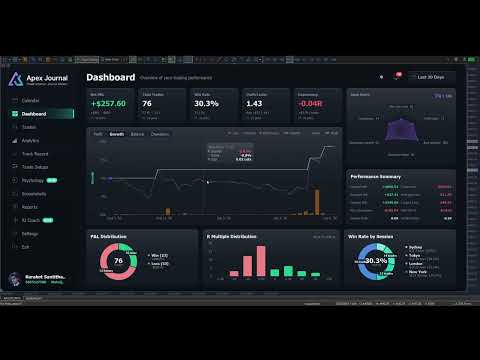
Drop it on a chart and it reads every trade you have ever closed, builds its own database, and opens eleven pages over the top of your chart: a calendar of your days, a dashboard of your numbers, a searchable table of every trade, four analytics tabs, a month-by-month track record, your setups and checklists, your psychology, your screenshots, exportable reports, and an optional AI coach that runs on your own AI account.
Nothing is typed in by hand. Nothing is uploaded anywhere. No subscription.

_________________________________________________________

🚀 Launch Promotion — Lifetime License for  $49

Special introductory price available for a limited time.


🔥 This is just the beginning.

ApeX Journal is continuously evolving.

More analysis, more ways to review, and deeper integration with ApeX Trading Console are on the way.


Get the Lifetime License at the special launch price while it's available.

__________________________________________________


Demo Mode Notice

The built-in MQL5 Demo runs in the Strategy Tester.

Because of this limitation, the interactive journal window is not fully functional in Demo mode. Buttons, mouse interactions and drag operations may not respond as they do on a live chart. This is expected behavior and not a bug.

To experience the full functionality of ApeX Journal, please run it on a regular MT5 chart.


ℹ️ Good to know
ApeX Journal is an indicator. It never places, modifies or closes an order — it only reads. It works on hedging and netting accounts alike, on any broker and any symbol.

_________________________________________________________


Why a journal inside MetaTrader beats a journal in a browser

  • Nothing to type in. Every closed trade is already there — entry, exit, lots, commission, swap, duration, session, partial closes. The blank spreadsheet that killed your last three attempts at journaling does not exist here.
  • It opens where you already are. One click on the chart, and the journal is over your chart. No browser, no login, no export-import round trip, no monthly fee.
  • Your data stays on your machine. One database file in your MetaTrader folder. No cloud, no account to create, nothing uploaded. Delete the folder and it is gone.
  • It counts your deposits and withdrawals. Without them a growth curve and every drawdown percentage is wrong — which is exactly the mistake most journals make.
  • It says "I don't know" instead of guessing. Too few trades to rank a setup, no stop loss so no R, a period that cannot be measured — the pages tell you, rather than printing a confident number you would have believed.
  • One purchase, one program. ApeX Journal is complete on its own. If you also run ApeX Trading Console it goes further — but nothing here depends on owning it.


1. See it

  • Calendar — Your month as a grid, with each day's result and trade count, a weekly summary column, and a panel for any day you click: its score out of 100 on a six-axis radar, its cumulative line trade by trade, its best and worst trade, its top symbol and best hour.
  • Dashboard — Net, trades, win rate, profit factor, expectancy and average R, each compared with the previous window of the same length. Balance with drawdown shaded underneath and deposits and withdrawals marked. Win/loss and R-multiple distributions, and your trades by session.
  • Trades — Every closed trade in one sortable, searchable table. Filter by symbol, direction, session, result, setup, hold time and date range, then export exactly what you filtered to CSV.
  • Trade Detail — One trade on real candles, on a timeframe chosen from how long the trade lasted. Risk, lot, R:R, R multiple, maximum run-up, exit efficiency, every partial close, how the last piece left, your notes, your checklist and your mindset.


2. Understand it

  • MFE / MAE — How far price went your way and against you while each trade was open, plotted as a scatter. Average missed move, how often price reached your target, and how often you were up 1R before closing at a loss.
  • Exit efficiency — Your winners graded Excellent, Good, Poor or Very Poor by how much of the available move they actually captured — and one plain sentence saying which of those is costing you: stops too wide, winners cut early, targets too far out, or profit given back.
  • Time — A 7 × 24 heatmap of result by day and hour, by session, and by day of week, in your local time or GMT.
  • DurationThe question nothing else answers: how long should you be holding? Nine hold-time bands scored on expectancy, the median hold of your winners against your losers, and where price actually peaked in your favour compared with where you got out.
  • Setups — Which of your patterns actually makes money, ranked by result per trade. What a second confluence tag does to a base setup. And, per checklist rule, your average R when you kept it against when you did not.
  • Psychology — Tag how you felt before you entered, and find out what each state costs you per trade. Flag the mistakes — no stop, overtrading, revenge, moved stop, cut winner early — and see the median result of the trades carrying each one against the rest.
  • Track Record — Every month or week side by side as a returns heatmap, your deepest drawdown episodes with how long each lasted, and a breakdown table showing whether you are actually getting better.


3. Keep it

  • Setups and checklists you write yourself — No fixed list to trade around. Add the rules that must be true, mark the ones the trade is off without, and tick them per trade. Editing a rule that has already been answered asks whether you are fixing a typo or changing its meaning, so your history stays honest.
  • Tag a backlog in minutes — The queue lists every untagged trade oldest first. Tick a dozen, pick a setup, save once.
  • Notes on any trade — What you saw and why you took it, in any keyboard layout, with copy and paste.
  • Screenshots — A gallery of every chart image attached to a trade, newest first, filtered by symbol and result, with a viewer that lets you keep scrolling.
  • Reports — Close the day, week or month and review it against the period before. Export to CSV for Excel, or to a self-contained HTML report you can send to anyone.
  • English and Thai — Switched in one click.


4. Ask it

  • AI Coach — Optional, off by default, and it runs on your own AI account: Anthropic, OpenAI, Google, xAI, DeepSeek — or Ollama entirely on your own PC with no key and no internet at all.
  • Analyse the period — It reads the trades you have selected and writes back what to fix, with the leaks ranked by what they cost and how many trades they hit. A leak that fires on nearly every trade is labelled as your style, not as a mistake.
  • Ask it questions — About your own closed trades. No market predictions, no entry calls, by design.
  • You can read what leaves the machine — Press "View full text" before anything is sent. Never sent: your balance, your login, your broker's name, or any image. Your key is encrypted on this PC and reaches only the provider you picked, and you are billed by that provider — set a daily request cap so you decide what it can cost.


Better together with ApeX Trading Console

Journal works on its own. With the Console on the same terminal, three things appear that no journal reading broker history can produce:

  • The plan, not just the result — Your setup and your checklist are ticked before the order exists, and follow the plan through to the trade. So the journal knows what you meant to do, not only what happened.
  • SL / TP history — Every time a stop or target moved, with the time and the distance. MetaTrader keeps no history of this, so for any trade managed outside ApeX it simply cannot be reconstructed.
  • Screenshots taken at entry — One button on the trade card captures the chart and attaches it to that trade, with the card hiding itself first so it is not in the picture.


Getting started

  1. Attach ApeX Journal to any chart.
  2. Wait a moment while it reads your account history — this happens once.
  3. Click Calendar on the bar. Press ESC to close it again.


Good to know

  • MetaTrader 5, any broker, any symbol — forex, metals, indices, crypto. Hedging and netting accounts both supported.
  • It is an indicator: it reads your account and never sends an order.
  • Trades taken without a stop loss have no R. Every R figure is calculated only from trades that had one, and the pages say so rather than counting a missing stop as zero. You can type in the stop you actually had in mind on any trade — it is always labelled "typed", so a figure you supplied is never mistaken for one the broker reported.
  • The growth chart is balance with drawdown shaded, not an equity curve — MetaTrader keeps no history of floating profit and loss, so no program can reconstruct one after the fact.
  • Sharpe and Sortino here are per trade — no risk-free rate, not annualised. Compare your own periods with each other, not with a fund's published figures.
  • Stops held inside ApeX Trading Console (Virtual) do not appear in the broker's records, so those trades show no planned SL or TP unless the Console recorded the plan.
  • The AI Coach is optional, needs your own provider account, and requires one line of setup: allow the provider's address under Tools > Options > Expert Advisors > Allow WebRequest for listed URL. The program shows you the exact address to paste. Everything else works with no internet connection at all.
  • Screenshots are captured from the trade card, which requires ApeX Trading Console. The gallery and viewer work either way.
Produits recommandés
Fox Wave Pro Copier - Professional Multi-Master Trade Copier Copy trades from multiple Master accounts simultaneously with advanced risk management Key Features Multi-Master Architecture Copy from unlimited master accounts simultaneously Automatic master account detection or manual configuration Real-time trade synchronization via file system Independent risk management for each master Advanced Risk Management Individual risk settings per master account Automatic lot size calculation based
Trade Copier Local MT5 is a fast local trade copier for copying trades between multiple MT4 and MT5 accounts. One EA works in both Master and Slave modes. Simply select the required Copier Mode and use the same product on your MetaTrader terminals. Copy trades between: • MT5 → MT5 • MT5 → MT4 • MT4 → MT5 • MT4 → MT4 Perfect for: • Trading multiple accounts at once • Linking multiple trading accounts • Personal account mirroring • Signal providers • Account managers • Prop trading setups #
Copy Local Pro
Algori Systems FZ-LLC
Copy Local Pro — Ultra Fast MT5 Local Trade Copier Copy Local Pro is a high-speed local trade copier for MetaTrader 5 that instantly replicates trades between multiple MT5 accounts on the same PC or VPS. Overview Execute trades on one account and automatically copy them to multiple accounts in real time. The copier runs entirely locally, providing ultra-low latency, stable execution, and full control over risk management without external servers. Key Features Fast local trade copying with near-
Auto Trade Copier is designed to copy trades to multiple MT4, MT5 and cTrader accounts/terminals with 100% accuracy. The provider and receiver accounts must be on the same PC/VPS. With this tool, you can copy trades to receiver accounts on the same PC/VPS. All trading actions will be copied from provider to receiver perfectly. This version can be used on MT5 accounts only. For MT4 accounts, you must use Auto Trade Copier (for MT4). Reference: - For MT4 receiver, please download Trade Receiver Fr


SmartEntry EA
Saksit Pawapootanont
Overview SmartEntry EA gives traders full control over any trading symbol — Gold (XAUUSD), Indices, Crypto, and Forex — with both manual and automated entry modes. The EA automatically detects the symbol type and adjusts pip/unit calculations accordingly. The built-in panel allows real-time control of every feature without restarting the EA.   Key Features Auto HG Trigger •   Automatically detects bullish M1 candles exceeding a configurable size threshold •   Mode 1 — HG Sure-Fire: Opens BUY an
QuickCopy – Simple MT5 Local Trade Copier with Volume Factor QuickCopy is a lightweight and efficient MT5 local trade copier designed for traders who want to copy trades between accounts on the same computer quickly and reliably. With its simple setup and intuitive interface, QuickCopy makes managing multiple accounts easier than ever. Key Features: Local Account Copying: Instantly copies trades from your master account to one or more client accounts running on the same computer. Volume Factor A
SCALPING GOLD DIGGER EA Intelligent Gold Trading Robot for XAUUSD Free Demo Version =   https://c.mql5.com/6/1028/GoldDigger_DEMO.zip Trade Gold with Confidence SCALPING GOLD DIGGER EA is an advanced Expert Advisor designed exclusively for XAUUSD (Gold) traders. Combining intelligent market analysis with adaptive trade management, it automatically identifies high-quality trading opportunities while maintaining strict risk control. Built for both beginners and experienced traders, SCALPING GOLD
Welcome to ENTRY IN THE ZONE WITH SMC MULTI TIMEFRAME Entry In The Zone and SMC Multi Timeframe is a real-time market analysis tool based on Smart Money Concepts (SMC), designed to analyze market structure, price direction, and key trading zones. It supports both Single-Timeframe Analysis and Multi-Timeframe Analysis, providing a clearer view of the overall market structure across multiple timeframes, with real-time BUY / SELL signals that do not repaint. It is designed to help filter trading op
Gold Hunter Pro Gold Hunter Pro is a specialized XAUUSD Expert Advisor designed for the M15 timeframe. Unlike dangerous grid bots, this algorithm uses a fixed Stop Loss on every trade and a smart partial close system to secure profits early. It is optimized specifically to assist in consistent growth for smaller balance accounts. Key Features High Profit Factor: Validated on high-quality real tick data. Capital Protection: Focuses on maintaining a low historical drawdown (under 2%) to protect yo
King Trade Copier
Mohammed Maher Al-sayed Mohammed Ahmed Saleh
KingCopier – Lightning-Fast Local Trade Copier for MetaTrader (Master + Slave) KingCopier is a professional local trade copier that mirrors every trading action from one Master account to unlimited Slave accounts on the same PC or VPS — with an internal copy latency of just a few milliseconds. It was built by a real trader for daily real-money use, with one goal: whatever happens on the Master must happen on the Slave, instantly and without exceptions. Watch the demo video to see the real cop
SUPREME COPY TRADE - ALL IN ONE The Fastest and Most Complete Copier for MetaTrader 5 Latency of only 100ms, up to 20x faster than common trade copiers. While other copiers take 2, 3 or even 5 seconds to replicate a trade, SUPREME COPY TRADE acts in just 100 milliseconds. Speed Comparison Common copiers: 2000ms Competitors: 500ms SUPREME COPY TRADE: 100ms (up to 20x faster) How We Achieve This Speed Instant event detection technology that reacts at the exact moment of the trade. Intelligent ver
Candle Surfer EA
AutoPip Trading Ltd
NEW: A Fully Automated strategy using price action and candle patterns to trade Gold (XAUUSD).   This EA can be used on any currency but recommended for XAUUSD, EURUSD and BTCUSD Safe stop loss option for FTMO and other funded accounts.  REAL BACKTEST DATA - no manipulation or backtest conditioning like other EAs! 100% Modelling Quality Backtest!  USE: Default settings on XAUUSD & XAUAUD on the M15 timeframe. Use ECN account for best results. MAIN SETTINGS Setting Value Description          Ma
Trade Assistant 38 in 1
Makarii Gubaydullin
4.91 (23)
Outil multifonctionnel : Calculateur de Lot, Ordres Grid, Ratio R/R, Gestionnaire de Trades, Zones d'Offre et de Demande, Price Action et bien plus Version Démo   |   Manuel d'Utilisation L'Assistant de Trading   ne fonctionne pas dans le testeur de stratégies : vous pouvez télécharger la   Version Démo ICI  pour tester l' utilitaire . Contactez-moi   pour toute question  / idée d'amélioration / en cas de bug détecté Si vous avez besoin d'une version MT4, elle est disponible ici Simplifiez, acc
Equinox Session Scalper MT5
Panupong Suparatchadech
### EQUINOX SESSION SCALPER MT5 — The Triple-Filter Momentum Engine Trade XAUUSD Only Are you tired of Expert Advisors that use dangerous grid systems, hold massive drawdowns, or blow up accounts during high-impact news?  **Equinox Session Scalper** is a professional-grade, data-driven algorithmic trading system engineered for stable portfolio compounding. It is built strictly around **Multi-Timeframe Trend Alignment** and **Intraday Momentum Breakouts**.  Equinox does NOT trade blindly 24/
MT5 to MT5 Trade Copier – Fast and Reliable Trade Copying Solution The MT5 Trade Copier is a powerful tool designed to copy trades seamlessly between MetaTrader 5 accounts with minimal latency and high accuracy. Built for speed, flexibility, and ease of use, the copier works across different brokers, even when symbols use different prefixes or suffixes. This Expert Advisor is suitable for professional traders, signal providers, fund managers, and traders who manage multiple accounts. Key Featur
Phantom ICT
Thanaphat Jantawee
PHANTOM ICT MTF EA is an automated trading system designed for XAUUSD (Gold), using a multi-timeframe analysis approach. The system focuses on identifying structured market conditions and executing trades based on selective entry logic. It is not designed for frequent trading, but instead waits for specific conditions before opening positions. Core Features Multi-timeframe analysis (D1 / H4 / M5) Selective trade entry based on structured conditions Designed for short-term execution on M5 timefr
FREE
Gold Flow Seconds Chart transforms MetaTrader 5 into a fast and convenient workspace for manual trading. The utility builds 5-second and 10-second candles from the tick data provided by your broker. M1, M5, M7, M15, M30, H1 and H4 views are also available in the same interface. MOUSE-DRIVEN CHART NAVIGATION • Drag the chart horizontally and vertically with the left mouse button. • Use the mouse wheel to change candle width. • Use Ctrl + mouse wheel to adjust the vertical scale. • Return to t
Trade copier MT5
Alfiya Fazylova
4.61 (56)
Trade Copier est un utilitaire professionnel conçu pour copier et synchroniser les commandesentre les comptes de trading. Les commandes sont copiées du compte/terminal du fournisseur vers le compte/terminal du destinataire, qui sont installés sur le même ordinateur ou vps. PROMOTION - Si vous avez déjà acquis le "Trade copier MT5", vous pouvez obtenir le "Trade copier MT4" gratuitement (pour la copie MT4 > MT5 et MT4 < MT5). Pour obtenir des informations plus détaillées sur les conditions, veuil
Découvrez tous mes produits pour MetaTrader 4, MetaTrader 5 ainsi que les versions d’essai gratuites : https://www.mql5.com/es/users/urocio/seller Vous disposez de deux versions de l’EA : Version complète avec symboles et fonctionnalités illimités. Version d’essai (gratuite) pour tester le fonctionnement de l’EA : elle fonctionne uniquement sur EURUSD, exécute 5 cycles consécutifs puis se met en pause pendant 7 jours avant de redémarrer. Créez vos propres stratégies de trading avec une fle
Server Link >> h ttps://www.mql5.com/en/market/product/160109 CopyTrade Slave is a lightweight, reliable local trade copier for MetaTrader 5 that mirrors positions from a Master account to one or more Slave accounts using a fast shared-file mechanism. It is designed for signal providers, account managers, and traders who need precise synchronization of trades with flexible delay and lot control. ​ Main concept Role: Works as the Slave side of a local copy trading setup and receives trades fr
Découvrez tous mes produits pour MetaTrader 4, MetaTrader 5 ainsi que les versions d’essai gratuites : https://www.mql5.com/es/users/urocio/seller Vous disposez de deux versions de l’EA : Version complète avec symboles et fonctionnalités illimités. Version d’essai (gratuite) pour tester le fonctionnement de l’EA : elle fonctionne uniquement sur EURUSD, exécute 5 cycles consécutifs puis se met en pause pendant 7 jours avant de redémarrer. Créez vos propres stratégies de trading avec une fle
Just Copier MT5
Agung Imaduddin
4.75 (4)
"Just copier" is designed to copy trading without any complicated settings. The copy can be done in one PC. One EA can be set as master (provider) or slave (receiver). The receiver lot can be set to multiple providers lots. Please also check this product at fxina.hostingerapp.com.  Any type of copy is available. MT4 -> MT5 MT4 -> MT4 MT5 -> MT5 MT5 -> MT4 If you want to copy MT4 -> MT5 or MT5 -> MT4, please purchase "Just copier" for MT4 and "Just copier" for MT5 separately. Just Copier can copy
Free Slave Version – Remote Trade Receiver MT5. This is the FREE Slave version of our professional Remote Trade Copier system. It allows you to receive trades from a Master account running our full Copy Trade solution. Designed for simplicity and reliability, this version is read-only and cannot send trades or operate independently. Key Features: One-click setup – simply connect to the Master. Fast and accurate order copying. Supports all symbols, order types, and brokers. Minimal resource us
FREE
EA Local Trade Copier Pro MT5: The Ultimate DLL-Free Trade Duplicator Are you tired of complicated trade copiers that require unsafe external DLLs, crash your terminal, or confuse you with separate "Master" and "Client" files? Experience the next generation of trade copying with EA Local Trade Copier Pro MT4. Engineered for maximum stability, lightning-fast execution, and ultimate simplicity, this utility allows you to seamlessly copy trades between multiple MetaTrader terminals on the same Wind
Madura Gold Scalper is an Expert Advisor developed for automated gold trading on MetaTrader 5. The EA is designed Only for XAUUSD and GOLD on the H1 timeframe. It uses a proprietary multi-factor decision engine to identify qualified trading For stable operation, MetaTrader 5 and Algo Trading must remain active. A VPS located close to the broker’s trading server is recommended. Risk Management Madura Gold Scalper uses a relatively short Stop Loss. Because of this trading approach, several consecu
COPIEUR COMMERCIAL - MOT DE PASSE INVESTISSEUR - COPIE COMMERCIAL - MT4 x MT5 CROSS PLATFORM Remarque : Vous avez besoin à la fois de "Mirror Copier Master" sur le compte principal qui sera suivi du compte client et de "Mirror Copier Client" sur le compte client qui suivra le compte principal. Blogues : https://www.mql5.com/en/blogs/post/756897 COMMENT ÇA FONCTIONNE : https://www.youtube.com/watch?v=V7FNpuzrg5M Version MT4 Maître : https://www.mql5.com/en/market/product/114774 Client :
FREE
Découvrez tous mes produits pour MetaTrader 4, MetaTrader 5 ainsi que les versions d’essai gratuites : https://www.mql5.com/es/users/urocio/seller Vous disposez de deux versions de l’EA : Version complète avec symboles et fonctionnalités illimités. Version d’essai (gratuite) pour tester le fonctionnement de l’EA : elle fonctionne uniquement sur EURUSD, exécute 5 cycles consécutifs puis se met en pause pendant 7 jours avant de redémarrer. Créez vos propres stratégies de trading avec une fle
CopyIQ
Stephen Sanjeeve Sahayam
CopyIQ mirrors your trades between MetaTrader 5 terminals running on the same Windows PC - one source account feeding as many receiver accounts as you need. Everything happens locally on the one machine: no VPS, no DLLs, and no internet link between terminals to lag or break. A trade on your source account reaches every receiver in milliseconds. CopyIQ was built by studying where other local copiers let traders down - copies that arrive late, lot sizes that ignore the receiving account, symbols
Trade Copier This tool copies trades between MT5 or MT4 platforms running on the same computer. For example: MT5 --> MT4 & MT4 & MT4 etc. MT5 --> MT5 & MT5 & MT5 etc. MT5 --> MT4 & MT5 & MT4 & MT5 etc. Also download the version for   MT4 Parameters ID - is not required. If you want to use multiple MASTERs on one PC or on one MT5, each MASTER must have a different ID (alphanumeric). Then SLAVE must have the same ID as the MASTER. Mode MASTER - for a provider account; in this mode, the tool transm
Dynamic DOM
Artem Bezmenov
Instructions for the Dynamic_DOM_Labels indicator Dynamic_DOM_Labels is a professional analytical tool for the MetaTrader 5 terminal, designed to analyze the Order Flow in real time. The indicator connects directly to the broker's Depth of Market /DOM, finds large limit orders from buyers (Buy Limit) and sellers (Sell Limit) and projects them onto the work schedule. The tool is designed specifically for liquid markets such as Gold (XAUUSD) and major currency pairs (for example, GBPUSD), where la
FREE
Les acheteurs de ce produit ont également acheté
Trade Assistant MT5
Evgeniy Kravchenko
4.41 (216)
It helps to calculate the risk per trade, the easy installation of a new order, order management with partial closing functions, trailing stop of 7 types and other useful functions. Additional materials and instructions Installation instructions - Application instructions - Trial version of the application for a demo account Line function -   shows on the chart the Opening line, Stop Loss, Take Profit. With this function it is easy to set a new order and see its additional characteristics bef
Bienvenue sur Trade Manager EA, l’outil ultime de gestion des risques conçu pour rendre le trading plus intuitif, précis et efficace. Ce n’est pas seulement un outil d’exécution d’ordres ; c’est une solution complète pour la planification des trades, la gestion des positions et le contrôle des risques. Que vous soyez débutant, trader expérimenté ou scalpeur ayant besoin d’une exécution rapide, Trade Manager EA s’adapte à vos besoins, offrant une flexibilité sur tous les marchés, des devises et i
Farmed Hedge Yield Farming | All Markets (Manual - Hybrid - Semi/Automated EA) VERIFIED TRADING RESULTS - Farmed Hedge Yield Axi Copy:  https://www.mql5.com/en/signals/2356376 - Farmed Hedge Yield Exn Copy:   https://www.mql5.com/en/signals/2356404 - Farmed Hedge Yield V Copy:  https://www.mql5.com/en/signals/2357156 * Before purchasing, please feel free to send me a message if you have any questions about the product or setup. - You can test the system using Strategy Tester: Visual Mode , a
Version Bêta Le Telegram to MT5 Signal Trader est presque prêt pour la sortie officielle en version alpha. Certaines fonctionnalités sont encore en développement et vous pourriez rencontrer de petits bugs. Si vous rencontrez des problèmes, merci de les signaler, vos retours aident à améliorer le logiciel pour tout le monde. Telegram to MT5 Signal Trader est un outil puissant qui copie automatiquement les signaux de trading depuis des chaînes ou groupes Telegram vers votre compte MetaTrader 5 .
================================================================================ POC BREAKOUT - V20.72. Full Professional Grade Toolkit ================================================================================ POC Breakout is a full MetaTrader 5 trading dashboard for discretionary traders who want breakout signals, Point of Control (POC) context, volume profiles, order flow, market structure, news, alerts, and advanced trade planning in one professional workspace. Attached directly to you
TradePanel MT5
Alfiya Fazylova
4.88 (167)
Trade Panel est un assistant commercial multifonction. L'application contient plus de 50 fonctions de trading pour le trading manuel et permet d'automatiser la plupart des tâches commerciales. Instructions d'utilisation + tutoriel vidéo : https://www.mql5.com/fr/blogs/post/772371 Version d'essai de l'application pour un compte démo : https://www.mql5.com/fr/blogs/post/762644 Comment installer l'application : https://www.mql5.com/fr/blogs/post/762645 Comment tester l'application en mode visuel :
Local Trade Copier EA MT5
Juvenille Emperor Limited
4.94 (148)
Découvrez une expérience exceptionnellement rapide de copie de trades avec le   Local Trade Copier EA MT5 . Avec sa configuration facile en 1 minute, ce copieur de trades vous permet de copier des trades entre plusieurs terminaux MetaTrader sur le même ordinateur Windows ou Windows VPS avec des vitesses de copie ultra-rapides de moins de 0.5 seconde. Que vous soyez un trader débutant ou professionnel, le   Local Trade Copier EA MT5   offre une large gamme d'options pour le personnaliser en fonc
EA Overfitter
Stephen J Martret
5 (1)
That backtest looks great. But will it still be making money tomorrow, next week, next month? EA Overfitter re-runs your EA on 100 price histories it has never seen. One score tells you if the edge is real. A backtest tells you what an EA did on one price history — the one that happened to occur. What you cannot tell from it is how much of that result was the strategy and how much was the particular path. EA Overfitter answers that. It builds up to 100 synthetic price histories your EA has n
Telegram to MT5 Multi-Channel Copier   copie automatiquement les signaux de trading de vos canaux Telegram directement vers MetaTrader 5. Pas de bots, pas d'extensions de navigateur, pas de copie manuelle. Un signal arrive sur Telegram et l'EA ouvre le trade dans votre terminal en quelques secondes. Et avant de copier un canal, le backtester intégré vous montre ce que ce canal aurait fait sur votre compte. Le produit comprend deux composants : une application Windows qui écoute vos canaux Telegr
Astro Trade MT5
Indra Maulana
5 (6)
25% discount on the release of the tool: only for the next 3 buyers Send a message to receive a demo version. AstroTrade Trading Assistant AstroTrade is a comprehensive multi-functional trading utility developed for the MetaTrader 5 platform. It integrates essential tools for trade execution, risk management, and technical monitoring into a single unified interface. The application is designed to assist traders in managing their daily operations through a visual and structured environment. Vi
HINN MagicEntry Extra
ALGOFLOW OÜ
4.74 (19)
HINN MAGIC ENTRY – the ultimate tool for entry and position management! SIMPLE. FASTEST. INTUITIVE. MAX AUTOMATED. Place orders by selecting a level directly on the chart! full description   ::  demo-version  :: 60-sec-video-description Key features: - Market, limit, and pending orders - Automatic lot size calculation - Automatic spread and commission accounting - Unlimited partitial take-profits  - Breakeven and trailing stop-loss and take-profit  functions - Invalidation leves - Intuitive, a
Exp COPYLOT CLIENT for MT5
Vladislav Andruschenko
3.97 (35)
Copieur professionnel de trades pour MetaTrader 5 Un copieur de trades rapide, professionnel et fiable pour MetaTrader . COPYLOT permet de copier des trades Forex entre les terminaux MT4 et MT5 avec prise en charge des comptes Hedge et Netting . La version MT5 de COPYLOT prend en charge : - MT5 Hedge → MT5 Hedge - MT5 Hedge → MT5 Netting - MT5 Netting → MT5 Hedge - MT5 Netting → MT5 Netting - MT4 → MT5 Hedge - MT4 → MT5 Netting Version MT4 Description complète + DEMO + PDF Comment acheter Comme
Premium Trade Manager - Le panneau de trading avec un coach intégré Premium Trade Manager intègre un coach de trading directement dans votre graphique, avec un moteur d'exécution complet en dessous. Configurez le trade comme vous le faites toujours, puis laissez Max, votre coach de trading IA, analyser ce setup exact par rapport à votre compte en direct et vous donner un verdict clair avant de vous engager : le stop est-il discipliné, le risque est-il raisonnable, une publication à fort impact e
Anchor Trade Manager
Kalinskie Gilliam
5 (9)
Your EAs cannot see each other, but Anchor can. Anchor gives you one place to coordinate your EAs, manage risk, and decide when trading is allowed. It works alongside the trading bots you already use without any changes to them. The Problem One EA opens a trade. Then another starts trading. The next thing you know, you wake up to multiple grids built across your account. Each EA may be doing exactly what it was designed to do, but together they can place far more risk on your account than you in
Power Candles Strategy Scanner - Outil de recherche de configurations multi-symboles à optimisation automatique Le Power Candles Strategy Scanner utilise le même moteur d'auto-optimisation que celui qui alimente l'indicateur Power Candles, pour chaque symbole de votre Market Watch, en parallèle. Un panneau vous indique quels symboles sont statistiquement négociables à l'instant, quelle stratégie est la plus performante pour chacun, la paire Stop Loss / Take Profit optimale, et vous alerte dès qu
MT5 to Telegram Signal Provider est un utilitaire facile à utiliser et entièrement personnalisable qui permet l'envoi de signaux spécifiés vers un chat, un canal ou un groupe Telegram, transformant ainsi votre compte en fournisseur de signaux. Contrairement à la plupart des produits concurrents, il n'utilise pas d'importations DLL. [ Démonstration ] [ Manuel ] [ Version MT4 ] [ Version Discord ] [ Canal Telegram ]  New: [ Telegram To MT5 ] Configuration Un guide utilisateur étape par étape est
Grid Manual MT5
Alfiya Fazylova
4.73 (22)
Grid Manual est un panneau de trading permettant de travailler avec une grille d'ordres. L'utilitaire est universel, possède des paramètres flexibles et une interface intuitive. Il fonctionne avec une grille d'ordres non seulement dans le sens des pertes, mais aussi dans le sens de l'augmentation des profits. Le commerçant n'a pas besoin de créer et de maintenir une grille d'ordres, l'utilitaire le fera. Il suffit d'ouvrir une ordre et "Grid Manual" créera automatiquement une grille de ordres po
The News Filter MT5
Leolouiski Gan
4.78 (23)
Ce produit filtre tous les conseillers experts et les graphiques manuels pendant les heures de publication des actualités, de sorte que vous n'avez pas à vous soucier des pics de prix soudains qui pourraient détruire vos configurations de trading manuelles ou les transactions entrées par d'autres conseillers experts. Ce produit est également livré avec un système de gestion des ordres complet qui peut gérer vos positions ouvertes et vos ordres en attente avant la publication de toute actualité.
Signal Trading View to MT5 Pro
Mirel Daniel Gheonu
4.5 (2)
Signal TradingView to MT5 Pro Automator Exécution professionnelle instantanée entre TradingView et MetaTrader 5 Automatisez votre stratégie de trading avec le pont de communication le plus robuste entre les alertes TradingView et l'exécution réelle sur MT5. Conçu pour les traders qui exigent vitesse, flexibilité et une gestion des risques impeccable, cet Expert Advisor transforme tout message d'alerte en un ordre au marché ou à cours limité précis. POINTS FORTS ET AVANTAGES Moteur d'analyse univ
Footprint Chart Pro — Professional OrderFlow EA for MetaTrader 5 Version 6.34 | Professional tool for real traders | Institutional-Grade Visualization DEMO USERS - PLEASE SELECT EVERY TICK / REAL TICK WHEN TESTING AND YOU HAVE DOWNLOADED HISTORICAL DATA. IF YOU SEE A WAITING SCREEN AND IT IS NOT DOWNLOADING, IT MEANS YOU HAVE LOW HISTORICAL DATA. TRY 1 MIN AND 5 MIN FIRST ON 1 DAY DATA. ONE DAY DATA SHOULD BE THE NEWEST AND MOST CURRENT DATE. PLEASE WAIT UNTIL THE MARKET HAS ROLLED OVER PERIOD.
Trade Dashboard MT5
Fatemeh Ameri
4.95 (132)
Trade Dashboard simplifies how you open, manage, and control your trades, with built-in lot size calculation. It allows you to execute trades, manage risk, and control positions directly on the chart, with tools such as partial close, breakeven, and trailing stop. Designed to reduce manual work and help you stay focused on your trading decisions. A demo version is available for testing. Detailed explanations of features are provided within the MQL5 platform. Installation instructions are include
FUTURES ORDERFLOW FOOTPRINT CHART Professional OrderFlow EA for MetaTrader 5 Version 1.01| Professional tool for real traders | Institutional-Grade Visualization STRATEGY TESTER USERS - PLEASE SELECT EVERY REAL TICK WHEN TESTING AND YOU HAVE DOWNLOADED HISTORICAL DATA. IF YOU SEE A WAITING SCREEN AND IT IS NOT DOWNLOADING, IT MEANS YOU HAVE LOW HISTORICAL DATA. TRY 1 MIN AND 5 MIN FIRST ON 1 DAY DATA. ONE DAY DATA SHOULD BE THE NEWEST AND MOST CURRENT DATE. PLEASE WAIT UNTIL THE MARKET HAS ROL
Ultimate Extractor
Clifton Creath
5 (8)
Ultimate Extractor - Professional Trading Analytics for MT5 *****this is the local HTML version of Ultimate Extractor. !!!!!it is not compatible with Cloud!!!! For the online version please reach out to me directly****** Ultimate EA manager also now available when you use cloud pro and above for free!! Ultimate Extractor transforms your MetaTrader 5 trading history into actionable insights with comprehensive analytics, interactive charts, and real-time performance tracking. What It Does Automa
Risk Manager Pro MT5 is an account protection Expert Advisor for traders who want strict risk control inside MetaTrader 5. The utility monitors your account equity, daily and weekly results, drawdown, open positions, trade count, consecutive losses, and trading hours. When a configured limit is reached, it can automatically close positions, cancel pending orders, stop other EAs, send notifications, or close the terminal. Instead of relying on discipline during a stressful trading session, you de
Seconds Chart MT5
Boris Sedov
4.61 (18)
Seconds Chart - un outil unique pour créer des graphiques en secondes dans MetaTrader 5 . Grâce à Seconds Chart , vous pouvez créer un graphique avec une période définie en secondes, offrant une flexibilité et une précision idéales pour l'analyse, indisponibles sur les graphiques standards en minutes ou en heures. Par exemple, la période S15 indique un graphique avec des bougies d'une durée de 15 secondes. Vous pouvez utiliser n'importe quels indicateurs et experts advisors compatibles avec les
Telegram To MT5 Receiver
Levi Dane Benjamin
4.53 (15)
Copiez les signaux de n'importe quel canal dont vous êtes membre (y compris les canaux privés et restreints) directement sur votre MT5.  Cet outil a été conçu en pensant à l'utilisateur et offre de nombreuses fonctionnalités nécessaires pour gérer et surveiller les trades. Ce produit est présenté dans une interface graphique conviviale et attrayante. Personnalisez vos paramètres et commencez à utiliser le produit en quelques minutes ! Guide de l'utilisateur + Démo  | Version MT4 | Version Disc
X2 Copy MT5
Liubov' Shkandrii
Rapide. Précis. Innovant. Technologique. Découvrez la copie instantanée de transactions avec le révolutionnaire X2 Copy MT5. Avec seulement 10 secondes d'installation simple, vous obtenez un outil puissant pour synchroniser les transactions entre les terminaux MetaTrader sur un seul ordinateur ou Windows VPS avec une vitesse sans précédent. Que vous gériez plusieurs comptes, suiviez des signaux ou déployiez votre stratégie, X2 Copy MT5 s'adapte à votre flux de travail avec une précision et un co
Trade Copier Ultimate
Janitha Sandaruwan Amaradasa Wickramasingha Arachchilage
5 (5)
Trade Copier Ultimate - Telegram to MT5 Signal Copier Trade Copier Ultimate automatically copies Telegram trading signals into MetaTrader 5. The EA can read signal messages, detect the symbol, order type, entry price, Stop Loss, Take Profit levels and selected update commands, then execute or manage the trade in MT5 using your lot and risk settings. It is more than a basic Telegram to MT5 copier. TCU also supports Bot API and user-account Bridge workflows, Discord signal routing, local MT5 to MT
The product will copy all telegram signal to MT5 ( which you are member) , also it can work as remote copier.  Easy to set up, copy order instant, can work with almost signal formats, image signal,  s upport to translate other language to English Work with all type of channel or group, even channel have "Restrict Saving Content", work with  multi channel, multi MT5 Work as remote copier: with signal have ticket number, it will copy exactly via ticket number. Support to backtest signal. How to s
Prop Firm Os
Gayathiri Gopalakrishnan
5 (1)
PROP FIRM OS Structured Trading Assistant for MetaTrader 5 PROP FIRM OS is a structured trading assistant designed for MetaTrader 5 users who prefer rule-based market analysis and organized trading workflows. The Expert Advisor combines market analysis tools, scanner functions, dashboard monitoring, alerts, risk-control settings, and trade management features inside one system. PROP FIRM OS is designed to help traders follow selected rules, filters, and monitoring conditions during trading activ
Plus de l'auteur
Voir le manuel utilisateur 1       Voir le manuel utilisateur 2         Voir le manuel utilisateur 3 ApeX Trading Console est un gestionnaire de trades professionnel, un assistant de trading, un gestionnaire de risque et un calculateur de taille de position pour MetaTrader 5. Planifiez le trade sur le graphique et laissez la console l'exécuter : calcul automatique du lot selon le risque que vous définissez, take profits et stop losses partiels, break-even, trailing stop, OCO, stops cons
Filtrer:
Aucun avis
Répondre à l'avis




















