ApeX Journal MT5
- Utilitários
- Versão: 5.16
- Atualizado: 6 outubro 2026
- Ativações: 10

📚 View User Manual ApeX Trade Manager MT5 → ApeX Journal MT5 → ApeX Indicator SMC MT5 → ApeX Indicator ICT Concepts MT5 → ApeX Indicator Volume Profile MT5 → ApeX Indicator ICT Macros MT5 →
Your broker keeps a list of your trades. It does not keep a record of your trading.
ApeX Journal turns the history already sitting in MetaTrader into the journal you keep meaning to write.
Powered by ApeX Journal
A complete trading journal, built directly inside MetaTrader 5.
____________________________________________
ApeX Journal is a trading journal, statistics engine, trade review tool and performance analyser for MetaTrader 5.
Drop it on a chart and it reads every trade you have ever closed, builds its own database, and opens eleven pages over the top of your chart: a calendar of your days, a dashboard of your numbers, a searchable table of every trade, four analytics tabs, a month-by-month track record, your setups and checklists, your psychology, your screenshots, exportable reports, and an optional AI coach that runs on your own AI account.
Nothing is typed in by hand. Nothing is uploaded anywhere. No subscription.
_________________________________________________________
Demo Mode Notice
The built-in MQL5 Demo runs in the Strategy Tester.
Because of this limitation, the interactive journal window is not fully functional in Demo mode. Buttons, mouse interactions and drag operations may not respond as they do on a live chart. This is expected behavior and not a bug.
To experience the full functionality of ApeX Journal, please run it on a regular MT5 chart.
ℹ️ Good to know
ApeX Journal is an indicator. It never places, modifies or closes an order — it only reads. It works on hedging and netting accounts alike, on any broker and any symbol.
_________________________________________________________
Why a journal inside MetaTrader beats a journal in a browser
- Nothing to type in. Every closed trade is already there — entry, exit, lots, commission, swap, duration, session, partial closes. The blank spreadsheet that killed your last three attempts at journaling does not exist here.
- It opens where you already are. One click on the chart, and the journal is over your chart. No browser, no login, no export-import round trip, no monthly fee.
- Your data stays on your machine. One database file in your MetaTrader folder. No cloud, no account to create, nothing uploaded. Delete the folder and it is gone.
- It counts your deposits and withdrawals. Without them a growth curve and every drawdown percentage is wrong — which is exactly the mistake most journals make.
- It says "I don't know" instead of guessing. Too few trades to rank a setup, no stop loss so no R, a period that cannot be measured — the pages tell you, rather than printing a confident number you would have believed.
- One purchase, one program. ApeX Journal is complete on its own. If you also run ApeX Trading Console it goes further — but nothing here depends on owning it.
1. See it
- Calendar — Your month as a grid, with each day's result and trade count, a weekly summary column, and a panel for any day you click: its score out of 100 on a six-axis radar, its cumulative line trade by trade, its best and worst trade, its top symbol and best hour.
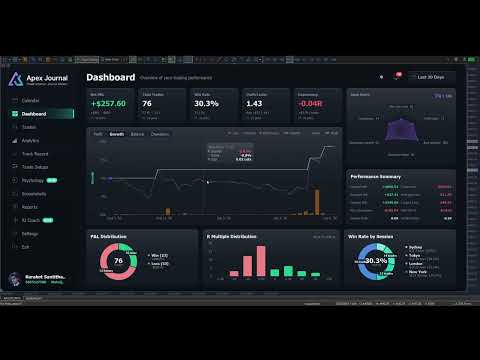
- Dashboard — Net, trades, win rate, profit factor, expectancy and average R, each compared with the previous window of the same length. Balance with drawdown shaded underneath and deposits and withdrawals marked. Win/loss and R-multiple distributions, and your trades by session.
- Trades — Every closed trade in one sortable, searchable table. Filter by symbol, direction, session, result, setup, hold time and date range, then export exactly what you filtered to CSV.
- Trade Detail — One trade on real candles, on a timeframe chosen from how long the trade lasted. Risk, lot, R:R, R multiple, maximum run-up, exit efficiency, every partial close, how the last piece left, your notes, your checklist and your mindset.
2. Understand it
- MFE / MAE — How far price went your way and against you while each trade was open, plotted as a scatter. Average missed move, how often price reached your target, and how often you were up 1R before closing at a loss.
- Exit efficiency — Your winners graded Excellent, Good, Poor or Very Poor by how much of the available move they actually captured — and one plain sentence saying which of those is costing you: stops too wide, winners cut early, targets too far out, or profit given back.
- Time — A 7 × 24 heatmap of result by day and hour, by session, and by day of week, in your local time or GMT.
- Duration — The question nothing else answers: how long should you be holding? Nine hold-time bands scored on expectancy, the median hold of your winners against your losers, and where price actually peaked in your favour compared with where you got out.
- Setups — Which of your patterns actually makes money, ranked by result per trade. What a second confluence tag does to a base setup. And, per checklist rule, your average R when you kept it against when you did not.
- Psychology — Tag how you felt before you entered, and find out what each state costs you per trade. Flag the mistakes — no stop, overtrading, revenge, moved stop, cut winner early — and see the median result of the trades carrying each one against the rest.
- Track Record — Every month or week side by side as a returns heatmap, your deepest drawdown episodes with how long each lasted, and a breakdown table showing whether you are actually getting better.
3. Keep it
- Setups and checklists you write yourself — No fixed list to trade around. Add the rules that must be true, mark the ones the trade is off without, and tick them per trade. Editing a rule that has already been answered asks whether you are fixing a typo or changing its meaning, so your history stays honest.
- Tag a backlog in minutes — The queue lists every untagged trade oldest first. Tick a dozen, pick a setup, save once.
- Notes on any trade — What you saw and why you took it, in any keyboard layout, with copy and paste.
- Screenshots — A gallery of every chart image attached to a trade, newest first, filtered by symbol and result, with a viewer that lets you keep scrolling.
- Reports — Close the day, week or month and review it against the period before. Export to CSV for Excel, or to a self-contained HTML report you can send to anyone.
- English and Thai — Switched in one click.
4. Ask it
- AI Coach — Optional, off by default, and it runs on your own AI account: Anthropic, OpenAI, Google, xAI, DeepSeek — or Ollama entirely on your own PC with no key and no internet at all.
- Analyse the period — It reads the trades you have selected and writes back what to fix, with the leaks ranked by what they cost and how many trades they hit. A leak that fires on nearly every trade is labelled as your style, not as a mistake.
- Ask it questions — About your own closed trades. No market predictions, no entry calls, by design.
- You can read what leaves the machine — Press "View full text" before anything is sent. Never sent: your balance, your login, your broker's name, or any image. Your key is encrypted on this PC and reaches only the provider you picked, and you are billed by that provider — set a daily request cap so you decide what it can cost.
Better together with ApeX Trading Console
Journal works on its own. With the Console on the same terminal, three things appear that no journal reading broker history can produce:
- The plan, not just the result — Your setup and your checklist are ticked before the order exists, and follow the plan through to the trade. So the journal knows what you meant to do, not only what happened.
- SL / TP history — Every time a stop or target moved, with the time and the distance. MetaTrader keeps no history of this, so for any trade managed outside ApeX it simply cannot be reconstructed.
- Screenshots taken at entry — One button on the trade card captures the chart and attaches it to that trade, with the card hiding itself first so it is not in the picture.
Getting started
- Attach ApeX Journal to any chart.
- Wait a moment while it reads your account history — this happens once.
- Click Calendar on the bar. Press ESC to close it again.
Good to know
- MetaTrader 5, any broker, any symbol — forex, metals, indices, crypto. Hedging and netting accounts both supported.
- It is an indicator: it reads your account and never sends an order.
- Trades taken without a stop loss have no R. Every R figure is calculated only from trades that had one, and the pages say so rather than counting a missing stop as zero. You can type in the stop you actually had in mind on any trade — it is always labelled "typed", so a figure you supplied is never mistaken for one the broker reported.
- The growth chart is balance with drawdown shaded, not an equity curve — MetaTrader keeps no history of floating profit and loss, so no program can reconstruct one after the fact.
- Sharpe and Sortino here are per trade — no risk-free rate, not annualised. Compare your own periods with each other, not with a fund's published figures.
- Stops held inside ApeX Trading Console (Virtual) do not appear in the broker's records, so those trades show no planned SL or TP unless the Console recorded the plan.
- The AI Coach is optional, needs your own provider account, and requires one line of setup: allow the provider's address under Tools > Options > Expert Advisors > Allow WebRequest for listed URL. The program shows you the exact address to paste. Everything else works with no internet connection at all.
- Screenshots are captured from the trade card, which requires ApeX Trading Console. The gallery and viewer work either way.