MTF Trend Matrix Panel With Heatmap

Trend Matrix Panel is a multi-timeframe technical indicator for MetaTrader 5 that compresses an entire trading session's structural picture into a single panel. Rather than flipping between charts to read M1, M15, H1, and D1 separately, the panel shows the trend state of three configurable moving averages across twelve timeframes simultaneously, with a heatmap that draws your eye to the genuinely strong signals and away from noise.
The core idea is simple: every cell in the matrix tells you how many bars a moving average has been trending in its current direction on a given timeframe. Five bars of bullish slope on M15 is meaningful; eighty bars of bullish slope on D1 is structural. The heatmap fades weak counts toward the background and saturates strong counts to full color, so a glance at the panel tells you which timeframes are doing real work and which are just chopping.
The indicator surfaces information through four complementary channels — the matrix tells you what's structural across timeframes, the volume tags on the chart tell you what's significant in the moment, the MA lines and their right-edge labels tell you which trend is which, and the heatmap fade keeps the noise quiet. None of the channels overlap, and the panel is designed so a single glance gives you the read.

The matrix:
The matrix is a grid of timeframes (rows) by MA columns. The first column is split into TF and Volume cells — the timeframe label paired with that timeframe's volume ratio versus its rolling average. The next three columns are the configured moving averages, each cell showing the count of consecutive bars the MA has been trending in its current direction.
Cells are colored bull (default green) or bear (default red) based on slope, then heatmap-faded by their count. A count of 1 means the trend just flipped this bar; the cell shows as a faint tint. A count of 10 or more means the trend is well-established; the cell shows at full saturation. The transition is smooth, not stepped, so you read the matrix as a heatmap rather than a binary on/off grid.

The two-row column header — bias gradient and split votes:
Each MA column has a header that occupies two rows. The top row shows the MA name (e.g. "EMA-20") on a background that tints continuously based on the column's directional bias: dark grey when there's no clear lean, gradually shifting to bull or bear color as alignment builds, reaching full saturation when every qualifying timeframe agrees. The text auto-flips between black and white based on background brightness to stay readable across the full color range.
The bottom row is split into three sub-cells — bull · bear · total — showing the live qualifying votes. The bull number renders in the column's bull color, the bear number in its bear color, the total in the default font color. Crucially, this row's background stays at a fixed neutral grey regardless of bias state, which keeps the numbers always legible and forms a static visual anchor between the dynamic top header and the matrix below. When consensus pulses, the contrast between the moving top row and the still bottom row makes it stand out like a neon sign rather than blending into a continuous gradient.
This separation also fixes a class of misreads. Earlier versions showed a single 9/12 ratio, which was easy to misinterpret as "9 of 12 in directional consensus" when it actually meant "9 of 12 had enough bar history to vote." The new bull/bear/total split makes vote alignment unambiguous: 5/2/12 cannot be mistaken for consensus, and 11/0/12 is clearly a strong directional signal.

Moving average lines and their chip labels:
The three configured moving averages are drawn directly on the chart in their column colors, each at a configurable line width. At the right edge of the chart pane, a small dark chip with a colored border identifies each line by name (e.g. "EMA-20"). The chip text is rendered in the line's color so the text itself matches the line — your eye picks up correspondence at a glance. The chip's vertical position tracks each MA's current value, so labels glide with the moving averages as the market moves; the X coordinate stays anchored to the chart pane in screen-space, so labels remain visible regardless of how far you pan or zoom.

Per-bar volume tags:
On the chart itself, bars whose tick volume meets a configurable ratio threshold get a small tag below their wick showing that bar's ratio (e.g. "1.4x"). Tags are placed only on the most recent N bars (default 60), forming a rolling window that walks forward as new bars print — the oldest tag drops off, new qualifying bars get tagged. This deliberately avoids cluttering the chart with tags on every bar; only the bars where volume actually mattered get marked.
The tags are particularly useful for spotting climactic volume sequences. A run of escalating tags (1.2x, 1.5x, 2.0x) into a swing high tells you distribution; a steady stream of moderate tags (1.1x, 1.2x, 1.1x, 1.3x) along a trending move tells you healthy participation. These are signatures you cannot read from the candles alone.
Tags update only on bar transitions — historical data doesn't change intra-bar, so updating every tick would be wasted work. This keeps performance light even on lower timeframes.

The footer: volume snapshots, spread, and timer:
Below the matrix, two compact rows display live market state. The top footer row shows three volume snapshots side by side: the current bar's tick count and ratio, the previous bar's, and the bar before that. Each is colored independently based on its own ratio against the rolling average — so you can see at a glance whether volume is building, fading, or stable across three consecutive bars.
The bottom footer row splits into spread on the left (with a configured threshold visible inline and three-tier color coding — green well below, amber approaching, red over) and the next-bar countdown on the right (also three-tier — green most of the bar, amber in the final 20%, red in the final 10%).

How to read the panel at a glance:
There's a natural reading order once you've used the panel for a while:
Scan the column headers first: are they tinted? Which way? Strongly?
Read the split row beneath each header to confirm the directional split — strong consensus shows imbalanced numbers (e.g. 11/0/12).
Scan the column you care about top-to-bottom: are the cells consistent in color and saturation, or mixed?
Glance at the TF/Vol column on the left: which timeframes are showing high volume right now (Lavender to Lime tints)?
Check the volume footer: is current volume building or fading versus the previous two bars?
Check the chart for recent volume tags: where did high-volume bars cluster?
Confirm spread is acceptable before trading.
The panel is designed to deliver this read in under two to five seconds. If you find yourself studying it for longer than that, the market itself is probably ambiguous and waiting is usually the right move.


The settings:
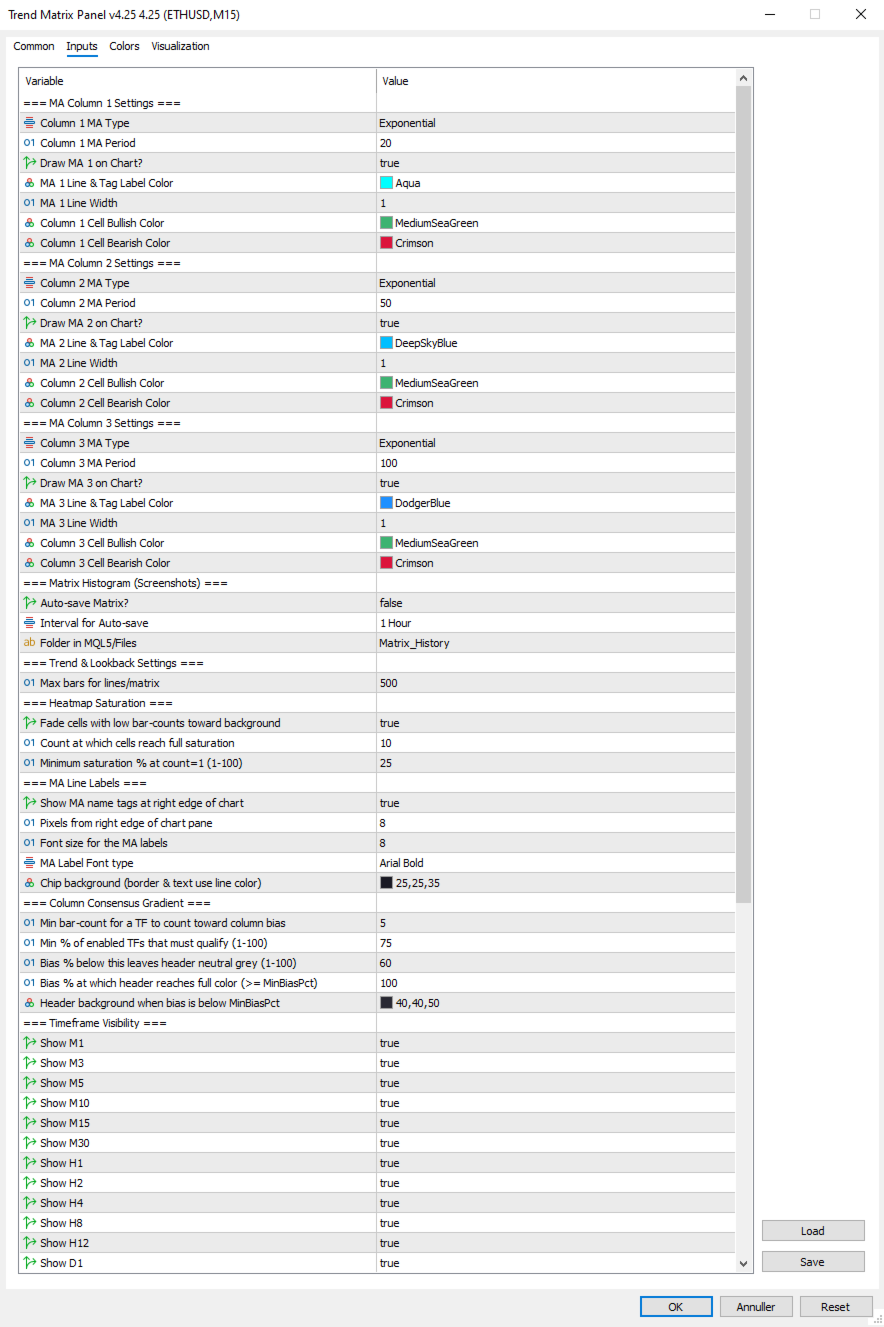
=== MA Column 1 Settings ===
  1. Column 1 MA Type: Select MA type for Column 1 (SMA/EMA/SMMA/LWMA).
  2. Column 1 MA Period: Select the period (lookback bars) for the Column 1 MA calculation.
  3. Draw MA 1 on Chart?: Set true to draw MA 1 on the chart, false to hide the line and its right-edge label.
  4. MA 1 Line & Tag Label Color: Select the color for the MA 1 line on the chart and its right-edge chip label.
  5. MA 1 Line Width: Select the width in pixels for the MA 1 line.
  6. Column 1 Cell Bullish Color: Select the color for matrix cells in Column 1 when the MA is sloping up.
  7. Column 1 Cell Bearish Color: Select the color for matrix cells in Column 1 when the MA is sloping down.

=== MA Column 2 Settings ===
  1. Column 2 MA Type: Select MA type for Column 2 (SMA/EMA/SMMA/LWMA).
  2. Column 2 MA Period: Select the period (lookback bars) for the Column 2 MA calculation.
  3. Draw MA 2 on Chart?: Set true to draw MA 2 on the chart, false to hide the line and its right-edge label.
  4. MA 2 Line & Tag Label Color: Select the color for the MA 2 line on the chart and its right-edge chip label.
  5. MA 2 Line Width: Select the width in pixels for the MA 2 line.
  6. Column 2 Cell Bullish Color: Select the color for matrix cells in Column 2 when the MA is sloping up.
  7. Column 2 Cell Bearish Color: Select the color for matrix cells in Column 2 when the MA is sloping down.

=== MA Column 3 Settings ===
  1. Column 3 MA Type: Select MA type for Column 3 (SMA/EMA/SMMA/LWMA).
  2. Column 3 MA Period: Select the period (lookback bars) for the Column 3 MA calculation.
  3. Draw MA 3 on Chart?: Set true to draw MA 3 on the chart, false to hide the line and its right-edge label.
  4. MA 3 Line & Tag Label Color: Select the color for the MA 3 line on the chart and its right-edge chip label.
  5. MA 3 Line Width: Select the width in pixels for the MA 3 line.
  6. Column 3 Cell Bullish Color: Select the color for matrix cells in Column 3 when the MA is sloping up.
  7. Column 3 Cell Bearish Color: Select the color for matrix cells in Column 3 when the MA is sloping down.

=== Matrix Histogram (Screenshots) ===
  1. Auto-save Matrix?: Set true to automatically capture chart screenshots at regular intervals.
  2. Interval for Auto-save: Select the timeframe interval between automatic screenshots (e.g. PERIOD_H1 = one per hour).
  3. Folder in MQL5/Files: Subfolder name under MQL5/Files where screenshots are saved (created automatically if absent).

=== Trend & Lookback Settings ===
  1. Max bars for lines/matrix: Maximum bar history used for line drawing and trend-count detection (cap, not minimum).

=== Heatmap Saturation ===
  1. Fade cells with low bar-counts toward background: Master toggle for the heatmap effect; false reverts to flat full-saturation cells.
  2. Count at which cells reach full saturation: Bar count at which a cell shows at full color; lower = matrix lights up faster.
  3. Minimum saturation % at count=1 (1-100): Saturation percentage for freshly-flipped trends; lower = weaker cells fade more toward invisible.

=== MA Line Labels ===
  1. Show MA name tags at right edge of chart: Master toggle for the colored chip labels next to each MA line.
  2. Pixels from right edge of chart pane: Horizontal padding between the chip's right edge and the chart pane's right edge.
  3. Font size for the MA labels: Font size for the chip text.
  4. InpMALabelFont: Font face dropdown for the chip labels (Arial / Arial Bold / Tahoma Bold / Verdana Bold / Segoe UI Bold / Consolas).
  5. Chip background (border & text use line color): Background color for the chip pill; border and text always match the MA line color.

=== Column Consensus Gradient ===
  1. Min bar-count for a TF to count toward column bias: Timeframes below this count abstain from the directional vote.
  2. Min % of enabled TFs that must qualify (1-100): Minimum quorum of enabled TFs that must have enough history before any bias is registered.
  3. Bias % below this leaves header neutral grey (1-100): Directional bias percentage below which the column header stays neutral.
  4. Bias % at which header reaches full color (>= MinBiasPct): Directional bias percentage at which the header reaches full saturation.
  5. Header background when bias is below MinBiasPct: Background color for the column header in neutral state and for the split-vote row.

=== Timeframe Visibility ===
  1. Show M1: Set true to include the M1 row in the matrix.
  2. Show M3: Set true to include the M3 row in the matrix.
  3. Show M5: Set true to include the M5 row in the matrix.
  4. Show M10: Set true to include the M10 row in the matrix.
  5. Show M15: Set true to include the M15 row in the matrix.
  6. Show M30: Set true to include the M30 row in the matrix.
  7. Show H1: Set true to include the H1 row in the matrix.
  8. Show H2: Set true to include the H2 row in the matrix.
  9. Show H4: Set true to include the H4 row in the matrix.
  10. Show H8: Set true to include the H8 row in the matrix.
  11. Show H12: Set true to include the H12 row in the matrix.
  12. Show D1: Set true to include the D1 row in the matrix.

=== Panel Aesthetics ===
  1. Panel Background Color: Background color for the panel; also serves as the heatmap fade target.
  2. Panel Text Color: Default text color for non-tinted panel areas (cell counts, TF labels, total-vote number, footer).
  3. Matrix Font Size: Base font size for the matrix cells.
  4. Panel Anchor Point: Which corner of the chart the panel anchors to (top-left / top-right / bottom-left / bottom-right).
  5. X-Axis Offset: Horizontal pixel offset of the panel from its anchor corner.
  6. Y-Axis Offset: Vertical pixel offset of the panel from its anchor corner.

=== Volume Settings ===
  1. Volume Average Lookback (bars): Number of prior bars used to compute the rolling volume average for ratio calculations.
  2. Low-volume Threshold (ratio vs avg): Ratio at or below which volume is classified as Low (e.g. 0.7 = 70% of average).
  3. High-volume Threshold (ratio vs avg): Ratio at or above which volume is classified as High (e.g. 1.5 = 150% of average).
  4. Color: Above Average Threshold: Text color used for volume readings above the High threshold.
  5. Color: Below Average Threshold: Text color used for volume readings below the Low threshold.
  6. Color: Average Threshold : Text color used for volume readings between the Low and High thresholds.

=== Per-Bar Volume Tags ===
  1. Show ratio tags below high-volume bars: Master toggle for the per-bar volume tags on the chart.
  2. How many recent bars to consider for tagging: Size of the rolling window of recent bars eligible for tagging.
  3. Min ratio to tag (>=); 1.1 = anything 110% of average: Minimum volume ratio for a bar to receive a tag.
  4. Tag text color: Color used for the volume tag text below qualifying bars.
  5. Tag font size: Font size for the volume tag text.
  6. Tag Font type: Font face dropdown for the volume tags (same options as MA label font).

=== Spread Settings ===
  1. Max Spread Treshold: Spread threshold in raw points; spread above this turns the spread display red.
  2. % of threshold at which spread tints amber (1-100): Percentage of the spread threshold at which the display tints amber instead of green (1-100).atrix Cell when in Bearish Trend.


Tips & Operational Notes
First attach behavior
On a fresh attach, the indicator needs a moment for the MA sub-indicator handles to warm up across all twelve timeframes. The matrix may briefly show "SYNC" cells, the MA lines may take a tick or two to draw, and volume tags will populate after the first bar transition. Higher timeframes (especially D1) may take longer if the broker is still loading history. The panel will fully populate within seconds on a live market and within a second or two on closed markets — the OnTimer retry path handles both cases automatically.

Closed market behavior
The panel works correctly on weekends and holidays. The matrix and MA lines update from the most recently completed data; the volume footer shows the last live bars; spread reads as broker-reported (often zero on closed markets). The next-bar timer continues to count down assuming the next bar will arrive on schedule. Volume tags remain in place from the last live session.

Re-attach optimization
Removing and re-adding the indicator is safe and clean — all panel objects, MA chips, and volume tags are removed in OnDeinit, and they all rebuild fresh on OnInit. Use this if you change settings that affect layout (timeframe visibility, anchor corner, etc.) and want to see the updated panel immediately.

Multiple instances
The indicator uses a single shared object name prefix ("TMTX_"), which means running two instances on the same chart is not supported — they would collide. Running one instance per chart is fully supported.

Recommended timeframe choices
The default 12 timeframes are intentionally broad. Common refinements:
Scalping: hide H8, H12, D1 (rarely relevant for sub-15-minute trades). Keep M1 through H4.
Intraday/swing: hide M1, M3 (mostly noise for trades held longer than a few minutes). Focus on M5 through D1.
Position trading: hide M1, M3, M5, M10, M15. Focus on M30 through D1, where structural moves play out.

Tuning the heatmap
The default settings (FullCount=10, MinSaturation=25) balance detail with focus on a typical liquid market. Adjust based on personal taste:
If the matrix feels too washed out: lower FullCount to 6–8 (cells reach full color sooner) or raise MinSaturation to 35–40 (weak cells more visible).
If the matrix feels too loud: raise FullCount to 15–20 (full color requires longer trends) or lower MinSaturation to 10–15 (weak cells almost vanish).
Heatmap off entirely: set InpHeatmapEnabled = false. Useful for verifying raw signal direction before tuning.

Tuning the consensus gradient
Two knobs control how aggressively the column header announces directional bias:
MinBiasPct higher (e.g. 75): headers stay neutral longer, only tinting on stronger leans. Calmer panel, fewer false alarms.
MaxSatAt lower (e.g. 80): headers reach full color at 80% bias instead of 100%. More dramatic, fires earlier.
Tightening the band (e.g. MinBias=80, MaxSat=100): creates a sharper transition — headers stay grey until clearly aligned, then quickly saturate. "On/off" feel within a continuous system.

Tuning the volume tags
The default threshold of 1.1x is permissive enough that you'll see most participating bars get marked. Tune based on chart density and your trading style:
Threshold 1.0: tags every average-or-above bar — useful for studying full sessions, but busy.
Threshold 1.3 or 1.5: only tags bars with notable volume — great for spotting climactic moves and absorption.
Window 30 bars: tighter focus on the immediate session — old tags drop off faster.
Window 200 bars: longer history for after-the-fact session review. Watch the object count if you push much beyond 200.

Spread threshold per instrument
The default 20-point threshold is appropriate for major forex pairs on tight-spread brokers. For other instruments, tune accordingly: 10–15 for very tight pairs, 30–50 for indices and metals, 50+ for exotics. The amber warning tier at 80% of threshold gives you advance notice when spread is widening — useful around news events when costs spike before liquidity dries up entirely.

Knowing when to ignore the panel
The matrix is a structural read; it cannot tell you about news, session changes, or imminent reversals. Three situations where the panel's signal should be ignored or weighted down:
Around scheduled high-impact news (NFP, FOMC, CPI). The matrix's recent counts reflect pre-news structure that the news will likely break.
During session transitions (Asian → London, London → New York). Volume regime changes can flip multi-TF alignment within a few bars.
On illiquid instruments or off-session hours. A perfect-looking matrix on a thin market means very little — wait for real participation.
The volume footer is the panel's primary tool for catching these situations. Three consecutive low-ratio bars in the footer should temper any structural signal the matrix is showing. The volume tags on the chart give you a longer view of the same — a stretch of recent bars with no tags at all suggests low-conviction action you should treat with caution.
おすすめのプロダクト
Algo Trading Indicaor MT5 The ATC ALGO indicator has been developed to work on the MetaTrader 5 platform. It has the same specifications and zones as the MetaTrader 4 version. There may be slight lag, which we believe is due to differences in MetaTrader 5 programming. We will work on improving it, God willing. MT5 Version                    https://www.mql5.com/en/market/product/170028 MT4 Version                    https://www.mql5.com/en/market/product/88034 With this indicator , you’ll have
Smart Currency Strength is a powerful yet simple indicator that measures the strength of individual currencies. It features a graphic panel that lists the main currencies and their strength in each timeframe, ranging from 0 (most oversold) to 100 (most overbought). The strength for all currencies in the current timeframe is also shown in a separate window as a multi-line graph, where each currency is represented with a different color, this allows you to monitor the evolution of strength trend
Hybrid Assisted Trading Engine Manual Trading. Machine Discipline. The Hybrid Assisted Trading Engine is an institutional-grade manual trade management system designed to protect traders from emotional mistakes — without taking control away from them. You decide when to enter . The engine decides how the trade is managed . What It Does This system continuously monitors your manual trades and enforces professional-level trade management rules in real time: Smart Breakeven logic R-based trai
MQL5ブログ: https://www.mql5.com/en/blogs/post/761446 MT4版: https://www.mql5.com/en/market/product/136790 MT5版: https://www.mql5.com/en/market/product/136791 Time Wizardは、スピード、タイミング、そして執行コントロールを一つの洗練されたダッシュボードで実現したいトレーダーのために開発された、プロフェッショナルなトレーディングアシスタントです。 このエキスパートアドバイザーは、イベントベースのトレーディング、スケジュール執行、そして高速な半自動注文管理のために設計されています。注文を事前に準備し、正確な執行時間を設定し、複数の指値注文を発注し、ストップロスとテイクプロフィットでリスクを管理し、チャート上のコンパクトなインターフェースからすべてを監視できます。 経済イベント、セッション開始、ブレイクアウト、あるいは独自のカスタムスケジュールなど、どのようなタイミングで取引を行う場合でも、Time Wizardは構造と規律に
TRILLION PIPS ELITE PRO INDICATOR  Advanced Wave-Based Auto Trend System Built with   12+ Years of Real Market Experience , this is not just an indicator — it’s a   complete market intelligence system   designed to give   accurate levels + auto trend direction with precision and confidence .    UNIQUE POWER OF THIS INDICATOR Proprietary Strategy – Only from Trillion Pips Advanced   Wave-Based Market Structure Engine   Auto Trend Detection System   (No manual analysis needed) Built-in   Tr
CONTACT AND SUPPORT At TPFX, we understand that every trader has unique requirements and that efficiency is the key to success. Therefore, I cordially invite you to send me a private message regarding any questions, functional errors, or needs for personalized adjustments. I am committed to providing fast and decisive technical assistance, ensuring your tool is always in perfect condition. Personalized adjustments to adapt the system to your specific strategy can be made at no additional cost
Price Alerts - Advanced Price Target Notifications Never miss important price levels again! Price Alert Pro lets traders: • Set unlimited price target alerts • Receive instant desktop and mobile notifications • Visually track progress to each target • Customize alert sounds and frequencies • Manage all alerts from an intuitive panel Perfect for: - Breakout traders waiting for key levels - News traders monitoring reaction points - Position traders managing multiple targets - All traders who c
Live broadcast of the indicator on YouTube. Please click on the link below for more credibility. There are also videos of the indicator that you can watch. Note that the broadcast is late, do not rely on it. Only a review of the indicator is only a review of the indicator’s accuracy, which does not lose almost and the profit rate reaches 95%. I will work with great accuracy on the CRASH coin 1000 INDICES
KIOBI VISION KIOBI VISION is a multi-factor analysis indicator designed for professional traders who want a clear and structured view of the market across multiple time frames. Objective The indicator offers a unique summary table that combines several technical tools (RSI, MACD, Stochastics, Vortex, Momentum, PSAR, DMI, MFI, Fisher, and general trend) to provide reliable and quick-to-interpret buy and sell signals. Key Features Multi-timeframe analysis (M1 → MN): a consolidated view of the
Volume Data on Candles Indicator for MetaTrader 5 Maximize your trading insights with the Volume Data on Candles indicator for MetaTrader 5. This powerful tool provides real-time volume data directly on each candle, allowing you to identify significant shifts in market activity. When the volume of a candle exceeds the average of the last 50 candles, it will be clearly highlighted , ensuring you don't miss out on potential high-volume movements. Key Features: Real-Time Volume Data : Displays volu
FREE
FULL FOREX MARKET VIEW ダッシュボードインジケーター MT5 これは、トレーダーに市場の全体像を提供するためにMT5プラットフォーム用に作成されたカスタムインジケーターです。リアルタイムデータを使用して市場を分析し、成功するために必要なすべての情報を表示します。 インストール方法: このインジケーターをチャートに適用する前に、MT5の「気配値表示」パネルで、不要または取引しない通貨ペアを非表示にし、必要なものだけを残してください。理由は、FFMVダッシュボードはMT5の「気配値表示」にあるすべての通貨ペアを表示するためです。最大で26ペアまで表示可能です。それ以上あると、FFMVダッシュボードのフォントや画像がぼやけ、崩れてしまいます!正しく表示されません。 使用目的: 単独取引用 バスケット取引用(スクリーンショット参照) 複数注文取引にも使用可能 自分の取引システムからのシグナルの確認 構成要素: 時間足: M1からMN1までの現在のローソク足の状態(買い/売り) トレンド: 通貨の全体的な傾向 インパクト: 通貨の動きの強さ/ボラティリティ(以下参照) Bu
You can see Binance Spot data instantly in Metatrader 5 and it allows you to use all the features that Metatrader has provided to you. You can access the data of all symbols listed on Binance Futures. Don't forget to set the timezone. Binance it's 00:00 UTC. You need to fix it according to your own country You need to install the free Binance Spot Symbol List plugin. https://www.mql5.com/tr/market/product/83507 After loading, it automatically downloads the data of the cryptos in the market obser
Introducing the 'Global Forex Session Highlighter' , a powerful tool designed to enhance your trading strategy by providing a visual representation of the Three major Forex trading sessions: Tokyo, London, and New York. This indicator is designed to help traders understand the dynamics of the global Forex market by highlighting the trading sessions directly on your MT5 chart. It provides a clear view of when each session starts and ends, allowing you to strategize your trades around the most act
This cluster indicator is MT5 version of SuperIndices for MT4. It allows for processing mixed clusters, where symbols from various markets can be included. For example, it can handle Forex, indices, CFDs, spot at the same time. Number of visible lines increased to 16. An interactive ruler can be enabled to measure signals' strength on the history. The indicator creates a set of embedded cluster indicators (CCFpExtraIndices) with carefully selected periods and combines their results using smart w
G Channels – Efficient Adaptive Channel Indicator Introduction Channel indicators are widely used in technical analysis, offering valuable insights into price movements, trend identification, and volatility. Most channel-based indicators, such as Bollinger Bands and Keltner Channels, rely on a central tendency estimator (e.g., a moving average) combined with a volatility component to define upper and lower bands. The G Channels indicator takes this concept further by leveraging a highly efficie
EAs Manager
Abdeljalil El Kedmiri
5 (1)
The   Ultimate EAs Manager   is a professional risk management and trade assistance tool designed to monitor, control, and optimize all trading activities on your MT5 account. It acts as a   central command center   that oversees every trade - whether opened by other Expert Advisors or manually by you. How it's work with other EAs : Blog post  MT4 version:  https://www.mql5.com/en/market/product/167007 Only 10 copies will be sold at the early-bird price. After 10 copies, the price jumps directly
Stop guessing and start executing with precision. Learning complex trading methodologies takes years of screen time—until now. The Propfolio Strategy Mentor OS is an elite, on-chart analytical dashboard that acts as your live digital trading mentor. It doesn't just draw lines on your chart; it actively scans the market, identifies high-probability setups across 8 different institutional strategies , and tells you exactly what to look for in real-time via the Live Mentorship Terminal. Whether you
Powerful trend indicator provided with all necessary for trade and it is very easy to use. Everyone has probably come across indicators or Expert Advisors that contain numerous input parameters that are difficult to understand. But here, input parameters are simple and it is no need to configure anything — neural network will do all for you. Difference from a classic version The real-time multi time frame panel is added, so you can check a trend for other timeframes without switching the schedu
革新的な Trades Time Manager を使用して、取引ルーチンを簡単に管理できます。この強力なツールは、指定された時間に注文執行を自動化し、取引アプローチを変革します。 購入から注文の設定まで、すべて手動介入なしで、さまざまな取引アクションのためのパーソナライズされたタスク リストを作成します。 Trades Time Manager のインストールと入力ガイド EA に関する通知を受け取りたい場合は、MT4/MT5 ターミナルに URL を追加してください (スクリーンショットを参照)。 MT4のバージョン     https://www.mql5.com/en/market/product/103716 MT5のバージョン     https://www.mql5.com/en/market/product/103715 手動監視に別れを告げ、合理化された効率を採用します。直感的なインターフェイスにより、シンボル、約定時間、価格、ストップロス (SL)、テイクプロフィット (TP) ポイント、ロットサイズなどの正確なパラメーターを設定できます。 このツールの柔軟性は、市
これは取引の管理に役立つツールです。ターゲット1、2、3をポイントで設定し、これらのターゲットで決済したいロットサイズの割合を設定できます。例えば、ターゲット1、2、3を5ドル、10ドル、15ドルに設定し、サイズを40%、30%、30%とします。xauusdの4220で0.1ロットでエントリーすると、ターゲット5ドルで0.04ロット、ターゲット10ドルで0.03ロット、ターゲット15ドルで残り数量が決済されます。 ストップロスもポイントで設定できます。 ストップロスとターゲットは、取引を行うと自動的に設定されます。 また、トレーリングストップロス条件があり、tp1に到達した後はエントリーポイントに移動し、tp2に到達した後はtp1に移動します。この条件はオン/オフにできます。 チャートにはすべての TP と SL の詳細を表示するパネルが表示されるので、ポイントを簡単に確認できます。 Kore wa torihiki no kanri ni yakudatsu tsūrudesu. Tāgetto 1, 2, 3 o pointo de settei shi, korera
Gann Box MT5
Frederic Jacques Collomb
Gann Box インジケーターは、トレーダーが市場の重要なレベルを特定し、活用するのを支援するために設計された強力で多機能なツールです。このインジケーターを使用すると、チャート上に長方形を描くことができ、それが自動的に 0, 0.25, 0.50, 0.75, 1 の戦略的レベルを持つ複数のゾーンに分割されます。価格がこれらのレベルのいずれかに達すると、アラートがトリガーされ、トレーディングの意思決定に貴重な支援を提供します。描いたゾーンに対する市場の動きを即座に把握できます。ゾーンをトレースするには、単純な長方形を描いて名前を GannBox に変更するだけです。 このインジケーターは、 サポートとレジスタンス の概念を使用するトレーダー、 サプライとデマンド 、 ICTテクニック 、または**公正価値ギャップ(FVG)**の専門家など、すべてのタイプのトレーダー向けに設計されています。 デイトレーダー、スイングトレーダー、またはポジショントレーダーであろうと、 Gann Box は市場の動きをより良く理解し予測する手助けをし、反応性とパフォーマンスを向上させます。 MT4バージョ
The Institutional Flow Sentinel (Net Sentiment Volume AKA NSV) SEE VOLUME HAPPENING ON THE GO!!!!!!! Overview Retail traders look at price. Institutions look at order flow . The Institutional Flow Sentinel is a high-precision algorithmic system designed to decode the hidden battle between buyers and sellers. By analyzing real-time volume delta and identifying supply/demand imbalances, this system allows you to stop guessing and start trading with the "Smart Money." Why Order Flow? Price charts
N/B: All our product purchase comes with our free ‘’DAILY   SCALPER EA’’ Whatsapp Developer for yours after successful purchase   THE ARCHITECTURE OF A PERFECT TRADING SYSTEM Let me break down how all the components in this Ultimate Semafor system work together like a Swiss watch mechanism. This is a multi-layered confirmation system where each piece validates the others.   SYSTEM PHILOSOPHY: "TRIPLE CONFIRMATION" This system follows a simple but powerful principle: No single indicator can
SweetSpot Gold Units MT5 Indicator – Precision Psychological Levels for Gold Scalping and Intraday Trading If you are looking for profitable Gold EA checkout my best EA so far -  https://www.mql5.com/en/market/product/167535? SweetSpot Gold Units is a professional-grade MetaTrader 5 indicator designed to automatically plot dynamic psychological price levels directly on your chart. Built specifically for XAUUSD (Gold) traders, this MT5 indicator draws clean, structured minor and major unit levels
Ai Breakout X
Aleksandr Makarov
5 (1)
リアルトレーディングアカウントからのライブシグナル: 完全な透明性を確保するため、ライブ投資家アカウントへのアクセスを提供します。これにより、操作なしでリアルタイムでパフォーマンスを監 注文は1つだけ 損切り:200ピップ 利益確定:2500ピップ トレーリングスタート:200ピップ LIVE SIGNAL: XAUUSD   Ai Breakout X M5 Broker : Exness Server : Exness-MT5Real25 Account Number : 183814864 Investor Password:   GBp(N/5y5T51 購入後、必ず私に連絡して、エキスパートアドバイザーのインストール手順を受け取ってください! エキスパートアドバイザーのインストールは、当方での実施を推奨します。お客様のVPS(仮想サーバー)のログイン情報をお送りいただければ、正しくインストールを行います。 Ai Breakout X — あなたのゴールドトレーディングの最高のアシスタント 完全自動化されたエキスパートアドバイザーで、追加設定は不要です。ゴールド(XAUU
Trade Utility Pro is a bot utility designed to help you manage trades more easily, quickly, and accurately. This utility features a control panel interface and supports MetaTrader 5 exclusively. This utility does not link to any account information or external sources, ensuring safety. Main Features: Open Trade Support: Lot size calculation Fixed Lot: Custom input lot required Money Risk Lot: Automatically calculated based on stop loss and money risk Account % Risk Lot: Automatically calculated
FREE
The Supply and Demand Zone Indicator is a powerful and easy-to-use tool designed to help traders identify critical supply and demand zones on the chart. These zones can provide valuable insight into potential market reversals, breakouts, and important price levels where buyers or sellers are likely to take control. The best   FREE Trade Manager . If you want to create your own Hedging or Grid strategies without any coding make sure to check out the   ManHedger Key Features: Automatic Zone Detect
FREE
Correlation Matrix Pro - マルチ通貨ヘッジスキャナー 通貨ペア間の相関関係をリアルタイムで把握! 最大6つの通貨ペア間の統計的関係を同時に可視化する強力な分析ツールです。ポートフォリオ管理、リスク分散、ヘッジ戦略に最適です。 主な機能 - 対数リターンを使用したリアルタイムピアソン相関 - 最大6通貨ペアを同時監視 - 自動タイムフレーム検出 - 調整可能な遡及期間(5-200本) - ヘッジ機会の自動検出 - ミニマルで折りたたみ可能なパネルデザイン - 即座に解釈できるカラーコード付きマトリックス カラーコード 緑 (+0.70 〜 +1.00) = 強い正の相関 薄緑 (+0.50 〜 +0.69) = 中程度の正の相関 グレー (-0.49 〜 +0.49) = 弱い/相関なし オレンジ (-0.50 〜 -0.69) = 中程度の負の相関 赤 (-0.70 〜 -1.00) = 強い負の相関(ヘッジ) なぜ相関分析が重要? リスク管理 高相関ポジションによるリスクの二重化を回避。 ヘッジ戦略 効果的なヘッジのため、強い負の相関を持つペアを自動検出。
FREE
Hard Scalping Assistant is a semi-automatic Expert Advisor for MetaTrader 5 created for traders who want to keep making their own decisions, but with a much more advanced, organized and professional execution. It does not enter the market on its own: you choose the direction, define the trade idea and adjust the zone directly on the chart, while the assistant automatically calculates the risk, lot size and the full execution structure. With just a few clicks, you can prepare BUY or SELL trades
Ea does not use martingale or grid and has a stop loss for every position.  Symbols: EURCHF, EURCAD, USDCHF and other. Time frame: M15 Best results on EURCAD M15. Live signals and other products here -  https://www.mql5.com/ru/users/leron34/seller#products The EA should run on a VPS continuously without interruption.  Multicurrency advisor. You can enter pairs in the EA settings for tests. I recommend the default settings. You can install an adviser on any pair on M15. The EA has a news filter

このプロダクトを購入した人は以下も購入しています
SignalTech MT5 is a trading system for EURUSD, USDCHF, USDJPY, AUDUSD, NZDUSD, EURJPY, AUDJPY, NZDJPY, CADJPY H2 and H3 Timeframe.  All the winning trades with chart setups are published on the comments page. 2025-12 1174 Pips 2026-01 2624 Pips 2026-02 2937 Pips 2026-03 2165 Pips 2026-04 2243 Pips It can generate signals with Buy/Sell Arrows and Pop-Up/Sound Alerts. Each signal has clear Entry and Stop Loss levels, which should be automatically flagged on the chart, as well as potential Targets
Azimuth Pro
Ottaviano De Cicco
5 (7)
Azimuth Pro V2:MT5向けシンセティック・フラクタル構造分析と確認済みエントリー 概要 Azimuth Pro は Merkava Labs によるマルチレベルスイング構造インジケーターです。4つのネストされたスイングレイヤー、スイングアンカーVWAP、ABCパターン検出、3タイムフレーム構造フィルタリング、そして確定バーでの確認済みエントリー — 1つのチャートで、ミクロスイングからマクロサイクルまでを網羅するワークフロー。 これはブラインドシグナル製品ではありません。ロケーション、コンテキスト、タイミングを重視するトレーダーのための構造ファーストワークフローです。 V2発売記念オファー — Azimuth Pro V2をUSD 399で(次の100本)。最終価格:USD 499。 1. V2での変更点 シンセティック・マルチタイムフレームエンジン 上位タイムフレーム分析をMeridian Proと同じ独自のシンセティックアーキテクチャで一から再構築。よりクリーンなHTFコンテキスト、安定したライブ動作、従来のMTF同期問題なし。シンセティックエンジンは 固定比率タ
OmniSync Projection
Antonio-alin Teculescu
5 (1)
Chronos Fractal Engine is an innovative price projection indicator for MetaTrader 5, designed to transform your technical analysis by intelligently identifying and projecting historical price patterns. Built upon an advanced correlation algorithm and the fractal principles of the market, this powerful tool visualizes potential future price movements, giving you a unique edge in your trading decisions. What is Chronos Fractal Engine? At its core, the Chronos Fractal Engine employs a sophisticat
多くの矢印インジケーターは、シグナルだけを表示して、その後の判断をすべてトレーダーに任せてしまいます。KT Alpha Hunter Arrows は、完整なトレードプランをチャート上に提示します。 各シグナル矢印が表示されるたびに、エントリーライン、ストップロス、4つのテイクプロフィット水準、そして現在の銘柄と時間足が今トレードに値するかどうかを示すリアルタイムのエッジ判定が、すでに描画された状態で表示されます。付属の Trade Manager EA は、あなたが手動でエントリーした後の実行管理を担当し、相場が荒れて判断がぶれやすい場面でも規律あるトレードを保ちやすくします。リペイントなし。確定足シグナルのみ。Forex、ゴールド、指数、その他あなたが取引するあらゆる銘柄に対応します。 主な機能 リペイントしない買い矢印と売り矢印を、足の確定後にのみ表示。 各シグナルに、エントリーライン、構造的ストップロス、4つのテイクプロフィット水準を表示。 Edge Dashboard が、現在のチャートで買いセットアップと売りセットアップを別々に評価。 判定システム:No Edge、Mar
ARICoin is a powerful trading companion designed to generate high-probability entry signals with dynamic TP/SL/DP levels based on volatility. Built-in performance tracking shows win/loss stats, PP1/PP2 hits, and success rates all updated live. Key Features: Buy/Sell signals with adaptive volatility bands Real-time TP/SL/DP levels based on ATR Built-in MA Filter with optional ATR/StdDev volatility Performance stats panel (Success, Profit/Loss, PP1/PP2) Alerts via popup, sound, push, or email Cust
マーケットメーカーのためのツール。 Meravith は次の機能を提供します: すべての時間足を分析し、現在有効なトレンドを表示します。 強気と弱気の出来高が等しくなる流動性ゾーン(出来高均衡)を強調表示します。 異なる時間足のすべての流動性レベルをチャート上に直接表示します。 テキスト形式の市場分析を生成し、参考情報として表示します。 現在のトレンドに基づいて目標値、サポートレベル、ストップロスを計算します。 取引のリスクリワード比を算出します。 口座残高に基づいてポジションサイズを計算し、潜在的な利益を推定します。 また、市場に大きな変化があった場合には警告を表示します。 インジケーターの主要ライン: 強気/弱気の出来高エグゾーストライン ― 目標値として機能します。 市場のトレンドを示すライン。市場が強気か弱気かによって色が変わり、トレンドのサポートとして機能します。主にその色が市場センチメントを示します。 出来高均衡ライン(Eq)。Eq(Volume Equilibrium)ラインはシステムの中核です。これは買い手と売り手の出来高のバランスポイントを表します。市場の流動性を示し
RelicusRoad Pro: 定量的市場オペレーティングシステム 【期間限定】無制限アクセス 70% OFF - 2,000人超のトレーダーと共に なぜ多くのトレーダーは「完璧な」インジケーターを使っても失敗するのでしょうか? それは、文脈を無視して 単一の概念 だけでトレードしているからです。文脈のないシグナルは単なるギャンブルです。勝ち続けるには、 根拠の重なり(コンフルエンス) が必要です。 RelicusRoad Proは単なる矢印インジケーターではありません。完全な 定量的市場エコシステム です。独自のボラティリティモデリングを用いて、価格が推移する「適正価値の道(Fair Value Road)」をマッピングし、ノイズと真の構造的ブレイクを判別します。 推測はやめましょう。機関投資家レベルの「ロード・ロジック」でトレードを。 コアエンジン:「Road」アルゴリズム システムの中心となる Road Algo は、市場環境にリアルタイムで適応するダイナミックなボラティリティチャネルです。 安全ライン(平衡点) と、価格が数学的に反転しやすい 拡張レベル を投影します。 Si
CGE Trading Suite
Carl Gustav Johan Ekstrom
5 (2)
Institutional-Grade Analytics for MT5 C GE Trading Suite delivers the analytical edge typically reserved for professional trading desks. The platform integrates a full suite of analytical tools into one seamless workflow: dynamic grid mapping, liquidity behavior analysis, ECM, trend lines, MIDAS, trade cycles, and directional channel projections. Together, these provide a unified view of market structure and momentum. Directional clarity is further enhanced by the capital flow index, which meas
AriX
Temirlan Kdyrkhan
1 (4)
AriX Indicator for MT5 A powerful trend-following and signal-evaluation tool AriX is a custom MT5 indicator that combines Moving Averages and ATR-based risk/reward logic to generate clear buy/sell signals. It visualizes dynamic SL/TP levels, evaluates past trade outcomes, and displays win/loss statistics in a clean on-chart panel. Key features include: Buy/Sell signals based on MA crossovers ATR-based SL/TP1/TP2/TP3 levels with visual lines and labels Signal outcome tracking with real-time stat
「 Dynamic Scalper System MT5 」インジケーターは、トレンド波の中でスキャルピング取引を行う手法のために設計されています。 主要通貨ペアと金でテスト済みで、他の取引商品との互換性があります。 トレンドに沿った短期的なポジションオープンのシグナルを提供し、追加の価格変動サポートも提供します。 インジケーターの原理 大きな矢印はトレンドの方向を決定します。 トレンド波の中では、小さな矢印の形でスキャルピングシグナルを生成するアルゴリズムが機能します。 赤い矢印は強気方向、青い矢印は弱気方向です。 トレンドの方向には敏感な価格変動ラインが描かれ、小さな矢印のシグナルと連動します。 シグナルは次のように機能します。適切なタイミングでラインが現れるとエントリーシグナルが形成され、ラインが開いている間はポジションが保持され、完了すると取引が終了します。 推奨される動作時間枠はM1~H4です。 矢印は現在のローソク足に形成され、次のローソク足が開いている場合は、前のローソク足の矢印は再描画されません。 入力パラメータ Trend Wave Period - トレ
Footprint は、オーダーフロー(Order Flow)と出来高分析のためのインジケーターです。 クラスターレベルでの市場構造の特定、アクティビティの高い主要ゾーンの発見、そして設定ウィンドウを毎回開くことなくチャート上で直接フィルター操作を行うのに役立ちます。 Footprintインジケーターの機能 Bid x Ask、Deltaのクラスターチャート; チャート上のコントロールパネル; フィルター調整用のスライダー; Absorption; Initiative; Stacked Imbalances; Big Trades; dPOC / Dynamic Point of Control; Delta; サイドマーケットプロファイル; 累積デルタ(Cumulative Delta)。 主な利点 高密度のティックフローに対する高速な計算とデータ表示; チャート内管理 — 設定を開くことなく、主要モードとフィルターを直接切り替え可能; 重要な価格レベルとクラスターを強調するためのフィルタリング; シグナルの視覚的ハイライト:吸収、主導権、インバランス、大口取引; 日、週、または現
A tool for on-chart strategy backtesting and performance analysis. A utility for developing, debugging, and testing custom trading ideas and indicator functions. An indicator designed to quickly test trading concepts and visualize the effectiveness of different input parameters. An all-in-one sandbox for testing everything from simple crossovers to complex, multi-condition trading systems.
このインジケーターは、市場で 関心が示されたゾーン をハイライトし、その後に 注文の蓄積ゾーン を表示します。 これは、大規模な**板情報(オーダーブック)**のように機能します。 これは、 巨大な資金 のためのインジケーターです。その性能は卓越しています。 市場にどんな関心が存在していても、 必ず目に見えるようになります 。 (これは 完全に再設計され、自動化されたバージョン です。もはや手動分析は必要ありません。) トランザクションスピード(取引速度) は新しい概念のインジケーターで、市場で大口注文が どこに・いつ 集中しているかを示し、それに基づいたチャンスを提供します。 トレンドの変化を 非常に早い段階 で察知することができます。 FXでは「出来高」と呼ばれているものは誤解されています。実際には、これは 時間あたりの価格変動量 です。したがって、正しい名称は トランザクションスピード です。 考え方・行動・分析の仕方すべてが問われます。 分析パラダイムの転換は非常に重要です。 このインジケーターは、FXにおける出来高の考え方を 根本から再定義 し、論理的な形で正確に活用する、
note: this indicator is for METATRADER4, if you want the version for METATRADER5 this is the link:  https://www.mql5.com/it/market/product/108106 TRENDMAESTRO ver 2.5 TRENDMAESTRO recognizes a new TREND from the start, he never makes mistakes. The certainty of identifying a new TREND is priceless. DESCRIPTION TRENDMAESTRO identifies a new TREND in the bud, this indicator examines the volatility, volumes and momentum to identify the moment in which there is an explosion of one or more of these da
IVISTscalp5
Vadym Zhukovskyi
5 (6)
iVISTscalp5 — 時間ベースの市場予測システム iVISTscalp5は一般的なインジケーターではありません。 MetaTrader 5向けの時間ベースの予測システムであり、 市場がいつ動く可能性が高いかを特定します。 ⸻ 特徴  • 正確なタイミング  • BUY / SELL予測  • 平均利益の可能性  • 週間予測  • 120以上の金融商品 ⸻ コンセプト 市場は価格だけでなく時間によっても動く ⸻ iVISTscalp5 — 時間による優位性 iVISTscalp5インジケーターをご紹介します。このインジケーターは、トレーディングにおいて独自でありながら効果的です。時間データに基づくこのインジケーターは、多年にわたる経験と金融市場の深い分析の結果です。iVISTscalp5インジケーターは、手動トレーディングにとって優れたツールです。便利さ、簡単さ、可視化 - すべての複雑さが内部に隠されています。私たちは、iVISTscalp5インジケーターの設定と使用を最大限に簡素化しました。このインジケーターは、MT5ターミナルにあるすべての金融商品
プレミアムレベルは、正しい予測の精度が80%を超える独自の指標です。 この指標は、最高のトレーディングスペシャリストによって2か月以上テストされています。 あなたが他のどこにも見つけられない作者の指標! スクリーンショットから、このツールの正確さを自分で確認できます。 1は、1キャンドルの有効期限を持つバイナリーオプションの取引に最適です。 2はすべての通貨ペア、株式、商品、暗号通貨で機能します 手順: 赤い矢印が表示されたらすぐにダウントレードを開き、青い矢印が表示されたら閉じます。青い矢印の後に開くこともできます。 試してテストしてください!推奨設定はデフォルトです! 日足チャートで最高の精度を示します! インディケータは、2600 Pipsの収益性に対して、約10Pipsという非常に小さなマージンを使用します。
ZIVA Signal Intelligence
Hassan Abdullah Hassan Al Balushi
ZIVA Signal Intelligence An Adaptive, Modular Market Intelligence System ZIVA Signal Intelligence is not positioned as a conventional trading indicator. It is a fully integrated, proprietary market intelligence system engineered to deliver structured, high-precision interpretation of price behavior within a controlled analytical environment. Developed through an independent architectural approach, ZIVA does not rely on, derive from, or replicate existing indicators. It represents a standalone
FX Analysis is an all-in-one MT5 indicator dashboard that combines eight analytical tools in a single panel, helping traders identify high-probability setups without switching between charts or indicators. Designed for standard forex pairs on MetaTrader 5. Best results on M15 - H4 timeframes when all components are used together as part of the included workflow. Components Volatility Analyzer Displays historical average movement by hour and by day of the week. A real-time Pip Balance shows the
TraderHUD — トレーダーのための完全パネル TraderHUD は、トレーダーがチャート上で必要なすべての情報を1つのファイルにまとめた完全なビジュアルインジケーターです:ローソク足タイマー、リアルタイムスプレッド、カスタマイズ可能なウォーターマーク、価格記録付きの毎時マーク、M5ローソク足開始マーカー。高度にカスタマイズ可能で、チャートをごちゃごちゃにしません。 機能 タイマーとスプレッド 現在のローソク足の残り時間のカウントダウン、500msごとに更新 — 新しいティックに依存しない リアルタイムスプレッドをタイマーの横に表示 チャートの価格ラインに追従 スマートアンカー:価格が画面の下端に近づくと、テキストが自動的に上に移動して見えるように維持 フォント、サイズ、色、区切り文字を完全にカスタマイズ可能 毎時マーク 次の毎時を示すチャート上の垂直線 — 市場への新資金流入が予想される瞬間 ラインの上部に時刻ラベルを表示 時刻が変わる瞬間に価格が自動的に記録される 記録された価格に永続的な水平線を描画 — 各前の時間帯の価格位置を比較可能 価格はラベルに時刻とともに表示 設
Introduction to X3 Chart Pattern Scanner X3 Cherart Pattern Scanner is the non-repainting and non-lagging indicator detecting X3 chart patterns including Harmonic pattern, Elliott Wave pattern, X3 patterns, and Japanese Candlestick patterns. Historical patterns match with signal patterns. Hence, you can readily develop the solid trading strategy in your chart. More importantly, this superb pattern scanner can detect the optimal pattern of its kind. In addition, you can switch on and off individu
SunSignal ML — AI Gold Signals with Multi-Timeframe Confluence SunSignal ML is an advanced AI-powered signal indicator purpose-built for XAUUSD gold trading. It combines a proprietary adaptive trend algorithm with six machine learning models trained on confirmed price pivots to produce high-confidence entry signals with multi-timeframe validation. The indicator runs efficiently on M1, M5 and M15 timeframes and is designed for traders who want precision entries guided by data rather than guesswor
PredictHUD_GOLD — AIが先に動く、未来指向のトレンドライン PredictHUD_GOLD は、 秒足レベルのAIモデルを内部でリアルタイム動作させ、 1分足チャート上に “先行するトレンドライン” を描画する金専用のインジケータです。 ローソク足が動く前にラインが反応するため、 反転ポイントや加速ポイントを視覚的に捉えることができます。 特徴 1. 時期による調整不要(マーケットコンディション非依存) PredictHUD_GOLD は、 GOLD(XAUUSD)の秒足データ 41万件以上を用いて学習されたAIモデル を搭載しています。 ボラティリティの変化 セッションの違い 時間帯の偏り トレンド / レンジの切り替わり こうした “市場の季節性” をモデル内部で吸収しているため、 ユーザー側でパラメータ調整を行う必要はありません。 どの時期でも、同じ設定で安定した性能を発揮します。 2. 1分足でも動作するが、本来の真価は「秒足チャート」で発揮 PredictHUD_GOLD は 1分足でも動作しますが、 内部では 1秒足のAIモデル が動い
ARIScalp is a powerful trading companion designed to generate high-probability entry signals with dynamic TP/SL/DP levels based on volatility. Built-in performance tracking shows win/loss stats, PP1/PP2 hits, and success rates all updated live. Key Features: Buy/Sell signals with adaptive volatility bands Real-time TP/SL/DP levels based on ATR Built-in MA Filter with optional ATR/StdDev volatility Performance stats panel (Success, Profit/Loss, PP1/PP2) Alerts via popup, sound, push, or email Cus
もちろんです。以下は、提供いただいたテキストの日本語への翻訳です: MT4用の天文学指標をご紹介します:究極の天体トレーディングコンパニオン トレーディング体験を天空の高みに高める準備はできていますか?私たちの革命的なMT4用の天文学指標をご紹介します。この革新的なツールは、複雑なアルゴリズムの力を借りて、類まれなる天文学的洞察と精密な計算を提供します。 あなたの指先で宇宙の情報を:   宝のような天文学的データが明らかになる包括的なパネルをご覧ください。惑星の地理的/太陽中心座標、太陽と地球の距離、星の大きさ、伸び、星座、黄道座標および赤道座標、さらには水平座標まで、それぞれが綿密に計算され美しく表示されています。指標によって生成される垂直線は時間値に対応し、トレーディングの旅に宇宙の視点を提供します。 惑星のラインと関係:   グラフを飾る惑星のラインの魔法を体験し、スケールと角度をカスタマイズできます。直感的なコントロールパネルを介して各惑星のラインの表示を簡単に切り替えることができます。指定された時刻範囲内での合会、六分会、四分会、三分会、対会、逆行の指標で天体の関係の芸術を発
Kalman Adaptive Zones — 量的確率バンド 価格がどこへ向かうのかを推測するのはやめましょう。統計的に「どこにあるべきか」を理解しましょう。 Kalman Adaptive Zones(KAZ)は、価格の周囲にインテリジェントな確率バンドを描画するプロフェッショナルな量的インジケーターです。これらのバンドは市場環境に応じてリアルタイムで自動適応します。 Bollinger Bands や Keltner Channels のような固定された過去期間に依存する指標とは異なり、KAZは複数層の量的分析を組み合わせ、現在の市場の状態をより正確に反映するバンドを生成します。 仕組み KAZの中核は適応型フィルターであり、ノイズを除去しながらも実際の価格変動には敏感に反応しつつ、真の基礎価格を継続的に推定します。 この中心線の周囲に、確率ゾーンが構築されます。その幅は2つの要因によって同時に決定されます: 市場の不確実性 :フィルターの信頼区間が広いほどゾーンは拡大 レジームの不安定性 :単なるボラティリティではなく、その変化自体の大きさ その結果、市場とともに「呼吸する」バ
Pointer Trend Switch — precision trend reversal indicator Pointer Trend Switch is a high-precision arrow indicator designed to detect key moments of trend reversal based on asymmetric price behavior within a selected range of bars. It identifies localized price impulses by analyzing how far price deviates from the opening level, helping traders find accurate entry points before a trend visibly shifts. This indicator is ideal for scalping, intraday strategies, and swing trading, and performs equa
Weis Wave with Alert MT5
Trade The Volume Waves Single Member P.C.
4.94 (17)
Rental/Lifetime Package Options and Privileges  Rent Monthly Six Months   Yearly/Lifetime Weis Wave with Speed with Alert+Speed Index x x x Manual  x x x Quick Set up Video x x x Blog x x x Lifetime Updates x x x Setup and Training Material x x Discord Access Channel "The SI traders"          x Rectangle Break Alert Tool      x How to trade with it:    http://www.tradethevolumewaves.com   ** If you purchase please contact me to setup your  : Training Room and  complete manual access.  Wei
GEM Signal Pro GEM Signal Pro は、MetaTrader 5 向けのトレンドフォロー型インジケーターです。より明確なシグナル、より整理されたトレードセットアップ、そして実用的なリスク管理をチャート上で確認したいトレーダーのために設計されています。 単純な矢印だけを表示するのではなく、GEM Signal Pro はトレード全体の考え方を、より見やすく分かりやすい形で表示します。条件が確認されると、インジケーターはエントリー価格、ストップロス、利確目標をチャート上に表示し、トレードセットアップをより効率的に確認できるようにします。 動作の仕組み このインジケーターは、まず内部ロジックに基づいて有効なシードシグナルを検出します。 確認条件が満たされると、GEM Signal Pro はチャート上に完全なセットアップを表示します。これにより、トレーダーはトレード構造をより明確に把握し、手作業による分析を減らすことができます。 チャート上のトレードレベル 確認済みシグナルに対して、GEM Signal Pro は以下を表示できます。 エントリー価格 ストップロス テ
VTrende Pro
Andrii Diachenko
5 (1)
VTrende Pro - MTF indicator for trend trading with a display panel for MT5 *** Videos can be translated into any language using subtitles (video language - Russian) Although the signals of the VTrende Pro indicator can be used as signals of a full-fledged trading system, it is recommended to use them in conjunction with the Bill Williams TS. VTrende Pro is an extended version of the VTrende indicator. Difference between Pro version and VTrende: - Time zones - Signal V - signal 1-2 waves -    S
この位置が買いに適しているかどうかの判断をサポートします。 この位置が売りに適しているかどうかの判断をサポートします。 4つの指標が同時に底に達した場合は、反発のチャンスに注目してください。 4つの指標が同時に天井付近にある場合は、下落のチャンスに注目してください。 本システムは、中国の先進的なアルゴリズム技術と高度な数学モデリング体系に基づいて構築されています。 私は主に XAUUSD M5 でこの指標を使用しており、この時間足が最も良い結果を示します。 この指標のアルゴリズムと数式は非常に複雑なため、テスト時に動作が遅くなる場合があります。テストでは、リペイントの有無と遅れの有無を確認してください。正式版では実際の使用時により安定します。 この指標システムはリペイントせず、未来データも使用しません。ご購入前にご自身でテストしてご確認いただけます。 この指標には完全にカスタマイズ可能なアラートシステムが搭載されており、以下のリンクからご確認いただけます。 正式に使用する前に、完全な使用説明を十分にお読みください。 ご不明な点がございましたら、どうぞお早めにご連絡ください。できるだけ早
作者のその他のプロダクト
The Simple Manual Trading Panel (v2.11) Is a professional trade management tool designed with a clean, movable UI to streamline manual execution and automated exit strategies. Core Features Dynamic Visual Interface: A movable GUI panel that provides real-time information including a bar countdown timer, live spread, and advanced volume analysis. Flexible Lot Size setting, with 2 decimals (If broker supports it). Multi-Stage Take Profit: Supports three distinct Take Profit (TP) levels in either
This script is an Intelligence Gathering Utility designed to give you full control over your data exports from MetaTrader 5. It allows you to synchronize up to three different symbols into a single file with precise timestamping. 1. Setting the Data Range (Range) You can define exactly which historical period you want to capture: Date Mode : If Last N bars (0 = use date range above) is set to 0 , the script will export all data between your chosen start and end dates. Bar Mode : By entering a nu
フィルタ:
レビューなし
レビューに返信