Omni Signal Copier for Telegram and Discord

Omni Signal Copier – Telegram, Discord, Slack and TradingView signals into MetaTrader

Omni Signal Copier reads trading signals from Telegram, Discord, Slack, TradingView alerts (via ntfy), text files and manual input, understands them with a multi-language parser and trades them on your MetaTrader account – with multi-TP, break-even, trailing, a prop-firm guard and a live dashboard with 8 tabs. Everything runs inside the Expert Advisor: no extra program, no DLL, no external server of ours.

The same product exists for MetaTrader 4 and MetaTrader 5 with identical functions.

Why it is different

  • 6 sources in one EA: Telegram bot, Discord bot, Slack bot, ntfy (TradingView webhooks and any other webhook), file bridge, manual LAB.
  • Universal parser: English, German, Spanish, Portuguese, French, Italian, Russian, Turkish, Indonesian, Arabic and Chinese keywords, emojis (🛑 🎯 ✅), 𝐛𝐨𝐥𝐝 / Ⓒⓘⓡⓒⓛⓔⓓ / fullwidth fonts, zones (2350-2345), pips and points, shortened prices ("SL 40" = 2340), decimal commas (1,0850), thousands separators (4,103.50), JSON alerts and key=value.
  • Follows the channel: close, close half, close 70 %, break-even, move SL, new TP, cancel, "TP1 hit", "SL hit", replies to the original signal and edited messages.
  • Channel Trust Score: every channel gets a grade (A+ to F) from its real results – profit factor in R, expectancy, win rate, drawdown and sample size.
  • Paper mode per channel: test a new channel with virtual trades before you risk money.
  • Ghost tracking: signals that your filters skip are followed virtually – you see whether your filters cost or saved you money.
  • Channel backtester: export a Telegram or Discord chat and replay it in the Strategy Tester with the real execution engine.
  • Multi-terminal hub: one terminal fetches the messages, every MT4/MT5 terminal on the same PC copies them – one bot token, many accounts.
  • Prop-firm guard: daily loss limit, max drawdown from the equity peak, equity floor, daily target – closes and blocks automatically.
  • Remote control: /status /pause /resume /closeall /be /report /channels from your phone (Telegram).

Quick start (5 minutes)

  1. Attach the EA to one chart (any symbol, any timeframe). Enable Algo Trading.
  2. Menu Tools → Options → Expert Advisors: tick "Allow WebRequest for listed URL" and add the sources you use:
    https://api.telegram.org · https://discord.com · https://slack.com · https://ntfy.sh (or your own ntfy server).
  3. Fill in the source you want (see the setup guides below) and press OK.
  4. Open the LAB tab and press a sample button → PARSE shows exactly what the copier understands.
  5. Start with the channel in PAPER mode (CHANNELS tab) and switch it to LIVE when you trust it.

Setup guides

Telegram

  1. In Telegram open @BotFather → /newbot → copy the token (looks like 123456789:AAH... ).
  2. Add the bot to the channel or group you want to copy. In a channel the bot must be an administrator (read messages is enough). In a group add it as admin or disable the privacy mode with @BotFather ( /setprivacy → Disable ).
  3. Inputs: Telegram: enable = true, bot token. Leave chats to copy empty to copy every chat the bot sees, or enter chat IDs / @usernames separated by commas. Forum topics: -100123456:7 (chat:topic).
  4. Important: a bot can only read chats it is a member of. For channels where you cannot add a bot you can forward the signals to your bot in a private chat – private chats are read as well.
  5. Only one program may read a bot token at the same time. Use the hub (default) when you run the copier in several terminals.

Telegram reports + remote control

Send any message to your bot, then enter your chat ID (e.g. from @userinfobot) in Telegram chat ID for reports. You receive every opened / closed trade, guard events and a daily report, and you can send /status /pause /resume /closeall /be /report /channels /guardreset .

Discord

  1. Discord Developer Portal → New Application → Bot → Reset Token → copy it. Turn Message Content Intent ON.
  2. OAuth2 → URL Generator → scope bot, permissions View Channels + Read Message History → open the URL and add the bot to the server (you need the "Manage Server" right, or ask the admin).
  3. Discord settings → Advanced → Developer Mode ON → right-click the signal channel → Copy Channel ID.
  4. Inputs: Discord enable, bot token, channel IDs (comma separated). Embeds (title, description, fields) are read too, edits are followed.

Slack

Create a Slack app with a bot token ( xoxb-... ) and the scopes channels:history, groups:history, channels:read. Invite the bot to the channel ( /invite @yourbot ) and enter the channel IDs (C0123...).

TradingView alerts (ntfy)

  1. Think of a long, secret topic name, e.g. omni-7f3k29xq-gold .
  2. In the TradingView alert set the Webhook URL to https://ntfy.sh/omni-7f3k29xq-gold and write the signal in the message, e.g. {{ticker}} buy sl={{plot_0}} tp={{plot_1}} or JSON {"symbol":"XAUUSD","action":"buy","sl":2340,"tp":2360} .
  3. Inputs: ntfy enable, server https://ntfy.sh , topics. Any other tool that can call a webhook works the same way (Zapier, Make, scripts, other platforms).

File bridge

Every .txt file placed in Terminal\Common\Files\OmniSignal\inbox is read as one message and deleted. Optional first lines: #chan: Name , #id: 123 , #reply: 120 . Use it with any program that can write a file.

The dashboard (8 tabs)

Header: animated logo, copier state (COPYING LIVE / PAUSED / GUARD STOP / ALGO TRADING OFF), server time, hub role. Source strip: one tile per source with status light, messages, latency and the last error. KPI ribbon: balance, equity, today P/L, open P/L, open/pending, signals today → executed, win rate, profit factor, average latency, average R, ghost result. Hover over anything to get an explanation. Drag the header to move it, X folds it into a small pill. The panel automatically avoids other panels.

  • DASHBOARD – live signal cards with a price ladder (SL, entry, every TP, live price), P/L, legs, age; animated signal radar of the last 30 minutes; equity curve of the copied trades; last execution.
  • LIVE FEED – every message of every source with the parser verdict (SIGNAL, OPENED, PENDING, TP HIT, BREAK-EVEN, DUPLICATE, CHAT, OLD …) and the reason.
  • SIGNALS – the journal: live, paper, ghost and skipped signals with entry, SL, TPs, result in money and pips, R, latency, slippage, MFE/MAE.
  • CHANNELS – leaderboard with trust grade, mode button (LIVE / PAPER / OFF), lot multiplier (x0.25 … x3), REVERSE switch, win rate, PF, net, virtual pips, latency and an R sparkline.
  • RISK – gauges for daily loss, max drawdown, daily target and margin level; exposure per symbol; "if every SL hits now"; CLOSE ALL, ALL TO BE, RESET GUARD.
  • ANALYTICS – equity curve, heat map of signal arrival (weekday × hour, colour = result), latency histogram, R distribution, symbol performance, streaks, best/worst.
  • SOURCES – requests, errors, latency and last error of every source, hub terminals, setup checklist.
  • LAB – type or paste a signal (3 lines), PARSE shows symbol, direction, entry, SL in pips, every TP with its R, lot plan and risk money; SEND feeds it into the copier.

How a signal is traded

  1. The message is cleaned (fonts, emojis), the symbol is mapped to your broker (GOLD → XAUUSD.m, NAS → USTEC, DAX → GER40 …; prefixes and suffixes are found automatically).
  2. Prices are checked against the live quote: wrong side SL/TP, far away entries and "too late" signals (price beyond TP1) are rejected.
  3. Filters: channel mode, pause, guard, symbol lists, trading hours, weekend, news (MT5), max open, per symbol, per day, spread, spread vs SL.
  4. Entry: Auto (market inside the zone, otherwise pending at the nearest zone edge), Market, Pending at the best price, or Split (half market, half pending).
  5. Lot: fixed, risk % of balance / equity, fixed money, lot per 1000, or the lot written in the signal × multiplier. Risky signals ("high risk") get half the lot.
  6. Multi-TP: one position per TP (lot split with optional weights like 50,30,20) or one position with partial closes. If the lot is too small for every TP, fewer positions are used (first and last TP).
  7. Management: break-even after TP1 (only when the price allows it – never a stop inside the spread), ladder trailing (TP2 → SL to TP1 …) or classic trailing, time exit, Friday close.

Strategy Tester

  • Without settings the tester runs a built-in demo signal stream (a signal every few hours in changing formats) so you can see the whole engine and dashboard.
  • Channel backtest: Telegram Desktop → open the channel → ⋮ → Export chat history → format JSON → copy result.json to Terminal\Common\Files\OmniSignal\backtest\ → input Tester: channel backtest file = result.json . DiscordChatExporter JSON files and simple text files ( 2026.09.02 10:15:00|XAUUSD BUY NOW SL 2340 TP 2360 , optional #chan=Name|#id=5|#reply=3|#edit| ) work too. Choose your broker time zone in Tester: broker time zone.

Inputs

1–4 Sources: enable switch, token, chats / channel IDs / topics and poll interval for Telegram, Discord, Slack and ntfy.
5 Local sources + hub: file bridge, manual signals, hub mode (Auto = first terminal fetches, all copy · Standalone · Master · Follower).
6 Channels: mode of new channels (LIVE / PAPER / OFF) and rules like VIP Gold=PAPER;TG:-100123=LIVE x0.5 REV .
7 Parser: signals without SL (skip = wait 2 minutes for an SL message / default SL / none), default SL and TP in pips, shortened prices, small numbers = pips, gold pip size, extra aliases ( GOLD=XAUUSD.m ), symbol prefix / suffix, ignore words, required words, max message age.
8 Entry: entry mode, max distance for market orders (0 = auto), skip when TP1 is passed, max spread, pending lifetime, slippage, reverse all, SL / TP padding.
9 Lot + take profit: lot mode and values, max lot, multi-TP mode, TP weights, max TPs.
10 Trade management: break-even after TP1 + lock pips, trailing (off / ladder / pips), follow channel commands, command scope (last signal / symbol / all), reaction to "TP hit" messages, follow edits, time exit, Friday close.
11 Filters: symbol white / black list, max open, per symbol, per day, trading hours, Monday–Friday, news filter (MT5 calendar).
12 Prop-firm guard: daily loss %, max drawdown %, daily target %, equity floor, action, scope (copier / whole account), day reset hour.
13 Notifications: Telegram report chat, remote control, Discord webhook, push, alerts, sounds, daily report hour.
14 Panel + general: panel on/off and size, chart overlay, hover help, magic number, order comment.
15 Strategy Tester: demo stream, channel backtest file, broker time zone.

FAQ

Do I need a VPS? The copier works while MetaTrader runs. For 24/5 copying use a VPS.
Can it read images? No – the text and the caption of image posts are read. Pure screenshots without text cannot be copied.
Can it read a channel without a bot? A Telegram/Discord bot only sees chats it was added to. Use your own channels, ask the admin to add your bot, or forward the signals to your bot.
Hedging or netting? Both. On netting accounts every signal uses one position (partial closes at the TPs).
Several accounts? Yes – run it in each terminal; with the hub one terminal fetches and all copy.
Does it trade my manual trades? No – it only manages its own trades (magic number). The guard can measure the whole account.

Trading involves risk. Past results of a signal channel do not guarantee future results. Test every channel in PAPER mode first.

おすすめのプロダクト
Strategy Health Monitorは、保存済みのベースラインスナップショットと、その後の取引履歴を比較し、選択した設定に基づく統計的な差異シグナルを報告します。 本製品は、手動で必要な時点に実行するMT5ユーティリティです。ユーザーが用意したStrategy TesterのHTMLまたはHTMレポート、もしくは認識可能な損益列を含むカンマ区切りの取引CSVを1件読み込みます。口座を継続的に監視することも、口座履歴を自動取得することもありません。 動作の流れ 1. 初回実行時に、入力されたクリーニング済み取引履歴からベースラインスナップショットを作成します。 2. 後日の実行時に、同じベースラインファイルを読み込み、新しい履歴と比較します。 3. 平易な英語によるHuman Reportと、再現可能なEvidence Packを出力します。 比較する内容 - 確率的シャープレシオ(PSR)の変化 - 方向を前提としない置換法による平均系列の差の検定 - 設定されたベースライン帯に対する最大ドローダウン率 - クリーニング済み比較系列と入力ファイルのハッシュ - 各
UMNi-CMND MT5 Remote Command & Trade Control System UMNi-CMND turns Telegram into a full remote control panel for your MetaTrader terminal. Send commands from your phone to open trades, manage positions, query account status, and receive complete trade telemetry — all without touching the platform. KEY FEATURES Full remote trade execution via Telegram Open, close, and manage positions by command Move SL/TP, set breakeven, partial close Live status, account, and position q
Keyboard Scalper Pro
Mauricio Eduardo Lara Perez
Keyboard Scalper Pro is a customizable keyboard trading utility for MetaTrader 5. It is designed for traders who want direct manual control of order execution without being limited to a fixed keyboard layout. Every trading hotkey can be configured to match the user's preferred workflow, while the default layout is built around the numeric keypad for fast operation. The utility does not generate signals and does not decide when to trade. The trader chooses the setup, direction and timing. Keyb
VENIQOR Smart Trade Copier PRO is more than a simple MT5 trade copier. It combines fast local trade synchronization with flexible risk management, Account Protection and optional News Protection for every Receiver account. As with our other VENIQOR products, we welcome useful customer feedback and are happy to implement meaningful improvements and new features whenever possible. The same EA works as both Master and Receiver . One Master can copy trades to multiple Receivers running on the same
Tick Chart Constant Volume Generator
Trade The Volume Waves Single Member P.C.
1. Overview   The Tick Chart Toolset is a pair of tightly coupled MQL5 files that generate and control professional Constant Volume charts inside MetaTrader 5 as custom symbols. Unlike time-based charts, each bar closes only when a target volume threshold is reached, giving you a noise-filtered, activity-proportional view of the market. Free "Tick Chart Monitor Indicator" to control the generator EA:  https://www.mql5.com/en/market/product/17104   Component Type Role Tick_Chart_Generator_AI_MT5
MQL5ブログ: https://www.mql5.com/en/blogs/post/761446 MT4版: https://www.mql5.com/en/market/product/136790 MT5版: https://www.mql5.com/en/market/product/136791 Time Wizardは、スピード、タイミング、そして執行コントロールを一つの洗練されたダッシュボードで実現したいトレーダーのために開発された、プロフェッショナルなトレーディングアシスタントです。 このエキスパートアドバイザーは、イベントベースのトレーディング、スケジュール執行、そして高速な半自動注文管理のために設計されています。注文を事前に準備し、正確な執行時間を設定し、複数の指値注文を発注し、ストップロスとテイクプロフィットでリスクを管理し、チャート上のコンパクトなインターフェースからすべてを監視できます。 経済イベント、セッション開始、ブレイクアウト、あるいは独自のカスタムスケジュールなど、どのようなタイミングで取引を行う場合でも、Time Wizardは構造と規律に
Gold Scalping Matrix MT5
Mohamed Abdulmohsen Mohamed Saeed Ali
The Gold Scalping Matrix is an advanced trading algorithm designed to capitalize on market action and price reversals in the gold market. This innovative bot employs real time market behavior trading strategy, intelligently placing buy and sell orders at predetermined intervals around the current market price.  All Configuration Set Files for back-test and live accounts   All Experts for back-Test find the new free versions before change to paid Recommended Broker Support group   or DM for any
MT5 history exporter for accurate trade analysis and CSV export. Export trades to Excel from MetaTrader 5 with full performance metrics. Advanced MT5 trade analyzer with MAE, trade duration, and reconstruction. Usually platforms hide critical information about how your trades actually behave. History Downloader and Trade Analyzer solves this. It rebuilds your trades from raw deal history and exports a clean, structured dataset with accurate metrics MT5 does not provide. What You Get A fully s
Hybrid Assisted Trading Engine Manual Trading. Machine Discipline. The Hybrid Assisted Trading Engine is an institutional-grade manual trade management system designed to protect traders from emotional mistakes — without taking control away from them. You decide when to enter . The engine decides how the trade is managed . What It Does This system continuously monitors your manual trades and enforces professional-level trade management rules in real time: Smart Breakeven logic R-based trai
これは取引の管理に役立つツールです。ターゲット1、2、3をポイントで設定し、これらのターゲットで決済したいロットサイズの割合を設定できます。例えば、ターゲット1、2、3を5ドル、10ドル、15ドルに設定し、サイズを40%、30%、30%とします。xauusdの4220で0.1ロットでエントリーすると、ターゲット5ドルで0.04ロット、ターゲット10ドルで0.03ロット、ターゲット15ドルで残り数量が決済されます。 ストップロスもポイントで設定できます。 ストップロスとターゲットは、取引を行うと自動的に設定されます。 また、トレーリングストップロス条件があり、tp1に到達した後はエントリーポイントに移動し、tp2に到達した後はtp1に移動します。この条件はオン/オフにできます。 チャートにはすべての TP と SL の詳細を表示するパネルが表示されるので、ポイントを簡単に確認できます。 Kore wa torihiki no kanri ni yakudatsu tsūrudesu. Tāgetto 1, 2, 3 o pointo de settei shi, korera
米国東部時間(ET)を表示するシンプルな時計。米国市場の営業時間と自動同期。毎秒更新。 Full description: ClockET — 現在の米国東部時間(ET)の日付と時刻をチャート上に直接表示する軽量インジケーター。手動でタイムゾーンを計算する必要なく、米国セッションの進行状況を常に正確に把握できます。 表示内容 • リアルタイム時計 — 曜日、月、日、ETの時刻を毎秒更新して表示(例:"Thu Jul 24  07:36:45 ET") • 中央配置ラベル — チャート下部に表示、チャートサイズ変更時も自動で中央に再配置 • 自動サマータイム検出 — 米国の公式サマータイム制度(3月第2日曜日〜11月第1日曜日)に基づき、EDT(UTC-4)とEST(UTC-5)を自動切替 — 年2回の手動調整は不要 設定項目 • フォントサイズ・色・名前 — 時計の見た目をカスタマイズ • Y軸オフセット — チャート下端からの垂直位置 • Auto DST — EDT/ESTの自動検出のオン/オフ • 手動ETオフセット — Auto DSTを無効にした場合のみ使用される
FREE
Limiter Drawdown EA – Automatic Account Protection for MetaTrader 5 Description Limiter Drawdown EA is a lightweight risk management tool for MetaTrader 5. It monitors your account drawdown in real time and will automatically close all open trades once the threshold you define is reached. This provides a reliable safeguard for any trading strategy. Main Functions Monitors equity versus balance continuously Closes all positions when your chosen drawdown percentage is reached Optionally removes
FREE
Liquidity Structure &  Flow  Mt4 Here indicator visualizes institutional market depth, volume concentration, and whale order flow directly on your MT5  cumulative volume engine . Core Components & Meanings Visual Element Meaning Orange Horizontal Line ( POC ) Point of Control : The exact price level where the highest volume was traded. Acts as a price magnet and institutional support/resistance. Background Heatmap Glow (Teal / Red) Liquidity Nodes : Bright areas indicate heavy liquidity/acceptan
ティックレベルの価格追跡とチャートの遅延ゼロを実現した、軽量でリアルタイムなトレーディングセッション・ビジュアライザー。 Session Overlays Mastery Core は、チャートを雑多にすることなく、またターミナルを重くすることなく、アジア、ロンドン、ニューヨークのトレーディングセッションをクリーンかつ機関投資家レベルのビューで表示します。 ローソク足が確定するたびに削除、再描画、チラつきを繰り返す従来のセッションインジケーターとは異なり、Session Overlays Mastery Core は過去のセッションを一度だけ処理し、アクティブなセッションを毎ティックリアルタイムで追跡します。激しい市場のボラティリティやインパクトの大きいニュースによるスパイクが発生した場合でも、価格がアクティブなオーバーレイの境界線を突き破って外に漏れ出すことはありません。 主な機能 リアルタイム・ティックレベルの価格収容機能: アクティブなセッションボックスが、リアルタイムの価格スパイクに合わせて瞬時に動的に伸縮します。ローソク足がオーバーレイの境界外に漏れ出ることはありません。 チ
FREE
The real‑time view of what is happening inside the market. Footprint Secrets brings detailed analysis directly into MetaTrader 5. It shows where volume is trading, how buyers and sellers are interacting, and how liquidity shifts as the market evolves. Designed for traders who want a precise, real‑time understanding of market behavior. Check out the free preview version here:  https://www.mql5.com/en/market/product/172398 Benefits for the Trader See the real activity behind price . Footprint ch
Algo Trading Indicaor MT5 The ATC ALGO indicator has been developed to work on the MetaTrader 5 platform. It has the same specifications and zones as the MetaTrader 4 version. There may be slight lag, which we believe is due to differences in MetaTrader 5 programming. We will work on improving it, God willing. MT5 Version                    https://www.mql5.com/en/market/product/170028 MT4 Version                    https://www.mql5.com/en/market/product/88034 With this indicator , you’ll have
ApexForge Quote Paused Notification is a lightweight monitoring utility designed for MetaTrader 5 that detects when market quotes stop updating and immediately alerts you when abnormal quote interruptions occur. Whether caused by server issues, network disconnections, market closures, or temporary liquidity interruptions, the tool helps traders recognize quote freezes before they lead to missed opportunities or unexpected trading behavior. A notification is also generated once normal price upda
FREE
FxBears Matrix Pro – Institutional Order Flow, Footprint & CME L2 DOM Terminal FxBears Matrix Pro   is a next-generation institutional trading terminal developed natively for   MetaTrader 5 . It bridges the gap between traditional retail technical analysis and hedge-fund-level order execution by revealing what happens   inside and behind every candlestick . By visualizing true market depth (DOM Level-2), real-time Footprint clusters with imbalance detection, dynamic Cumulative Delta, and an aggr
KChrono Timer
Okechukwu Maxwell Okeke
KChrono Timer is a four-mode timing utility for MetaTrader 5. It keeps candle, countdown and trading-session time information visible directly on the chart. Timer modes 1. Candle Close Timer Displays the remaining time and progress of the active candle. The current chart timeframe or another candle timeframe can be selected. 2. Custom Countdown Runs a user-defined countdown with optional automatic restart or reset when a new candle begins. Pause, Resume and Reset controls are available dire
FREE
VP-MTF PRO - Institutional Volume Profile Multi-Timeframe                               OVERVIEW VP-MTF PRO is a professional-grade Volume Profile indicator designed for serious traders who want institutional-level analysis. It combines multi-timeframe volume profiling with automated signal generation, VPOC migration tracking, and HVN/
FREE
Broker Environment Inspector is a professional MetaTrader 5 compatibility and diagnostics utility for examining the current terminal, account and symbol environment. It presents trading permissions, quote conditions, contract settings and supported execution capabilities in a clear technical dashboard. MAIN FEATURES • Terminal connection and trading-permission flags • Quote freshness and current spread inspection • Trading-session availability • Contract size, tick size and tick value details •
This Program will not execute any trades! Works on any chart and any time frame! This is the MT5 version. MT4 version: https://www.mql5.com/en/market/product/125496?source=Site+Market+My+Products+Page#description This Program will produce a comment box at the top left of the chart and show you your equity % difference throughout the day. Updating constantly in real time. The daily resets back to zero on open of a new market open day. Using new current equity at start of day as reference for
FREE
GoldEdge US30 — Dedicated Indices Edition for US30, DE40 / GER40 and FRA40 / F40 , powered by the GE ATR Price Border system, dual-layer hedging, ATR volatility control and per-symbol cut loss protection. GoldEdge US30 is a next-generation MT5 Expert Advisor built specifically for major index markets. It uses structured grid-style entries and adaptive position scaling, guided by ATR Ratio, GE ATR Price Border levels, spread control, and mechanical direction logic. Instead of adding positions bl
1. Overview Trading Email Alert monitors the trading account and automatically sends an email whenever a buy or sell position is opened and/or closed on the symbol (instrument) it is attached to. The email subject line is fully configurable, along with several filters that determine which events trigger a notification. Key features: • Separate email subject line for trade opening and trade closing. • Filter to notify only openings, only closings, or both. • Filter to notify only buy trades, onl
Risk Calculator EA – Utility for Precise Trade Sizing If you find this tool useful consider to  Buy me a coffee!   The Ultimate Risk Calculator is a lightweight in-chart Expert Advisor (EA) designed to help you easily and quickly calculate position size and set stop-loss / take-profit levels with full control over risk management directly on the chart. What it does? It turns manual risk decisions into fast, visual, and accurate calculations. You draw or adjust the Entry, Stop-Loss and Take-P
FREE
Trend Matrix Panel is a multi-timeframe technical indicator for MetaTrader 5 that compresses an entire trading session's structural picture into a single panel. Rather than flipping between charts to read M1, M15, H1, and D1 separately, the panel shows the trend state of three configurable moving averages across twelve timeframes simultaneously, with a heatmap that draws your eye to the genuinely strong signals and away from noise. The core idea is simple: every cell in the matrix tells you how
================================================================================ POC BREAKOUT - V20.72. Full Professional Grade Toolkit ================================================================================ POC Breakout is a full MetaTrader 5 trading dashboard for discretionary traders who want breakout signals, Point of Control (POC) context, volume profiles, order flow, market structure, news, alerts, and advanced trade planning in one professional workspace. Attached directly to you
Info Exporter MT5は、ターミナル情報、アカウント情報、取引履歴、注文履歴をローカルCSVファイルへエクスポートし、メールを送信したり、Apps ScriptでデプロイされたURLを使用してGoogleスプレッドシートに直接エクスポートしたりできます。 CSVへのエクスポート、メールを使用したエクスポート、Googleスプレッドシートへのエクスポートから選択できます。また、エクスポートしたファイル名やスプレッドシート名を変更することもできます。 使用する入力パラメータ: export terminal informations ? : 端末情報をエクスポートするかどうかを選択します。値は true または false に変更できます。 terminal info file or sheet name : デフォルトは「 Terminal_Info 」ですが、入力プロンプトで変更できます。 export historical deals ? : 取引履歴をエクスポートするかどうかを選択します。値は true または false に変更できます。デフォルトは false で、
FREE
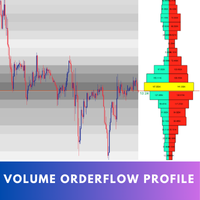
Introducing   Volume Orderflow Profile , a versatile tool designed to help traders visualize and understand the dynamics of buying and selling pressure within a specified lookback period. Perfect for those looking to gain deeper insights into volume-based market behavior! MT4 Version -  https://www.mql5.com/en/market/product/122656/ The indicator gathers data on high and low prices, along with buy and sell volumes, over a user-defined period. It calculates the maximum and minimum prices during t
# Ronin Copier - Tactical Prop Sync **プロップトレーダーのための完全ローカル・DLL不要・超低遅延コピーツール** **アーリーアダプター特別価格(数量限定):** - **先着10本:** **$99**(現在のステージ) - **次の10本:** **$149** - **定価:** **$199** *※レビューおよび販売マイルストーン達成ごとに自動で値上げされます。* --- 複数のプロップファーム(FTMO、FundedNext、Alpha Capital等)やプライベートブローカー口座を運用していませんか?   **Ronin Copier** は、同一PCまたはWindows VPS上の複数のMT5ターミナル間で、複雑なネットワーク設定、WebRequest、危険な外部DLLを一切使わずにミリ秒レベルの高速トレード同期を実現します。 状態整合(State Reconciliation)アーキテクチャと極薄のタクティカルHUDを搭載し、注文の取りこぼし、実行遅延、証拠金変動によるロット再計算エラーを徹底的に排除しました
このプロダクトを購入した人は以下も購入しています
Floor Watch
Syed Tauqeer Hussain Shah
Floor Watch One number, watched every thirty seconds: how far equity has fallen since the day began — or since its highest point, if it's told to trail the peak instead of the open. Cross the line and it doesn't argue. Every open position closes, every pending order vanishes, and anything that slips through afterward gets shut the moment it appears. Not asked. Removed. The floor holds until the clock turns 5 AM Pakistan time — then, and only then, does the day start over. One rule. No except
一度の購入で、現在提供中および今後リリースする私のすべての MT4・MT5 インジケーターを追加料金なしで受け取れます。 購入後、受け取り方法について私にお問い合わせください。 10 件の購入ごとに 50$ ずつ、最大 999$ まで値上げする予定です。購入手続き時に Market に表示される価格が適用されます。 信頼するインジケーターをそのままに。周辺の取引作業を自動化。 あなたのシグナル。あなたのルール。あなたの取引執行。 信頼する MT5 インジケーターはあるのに、チャートの監視、シグナル待ち、ロット計算、発注、各ポジションの管理を手作業で行っていませんか? Stratiora Signal Engine MT5 は、これらの作業をつなぎます。対応する買い・売りバッファのシグナルを、エントリー、取引量計算、Stop Loss、Take Profit、フィルター、ポジション管理、口座保護までの自動処理に変換できます。 インジケーターや取引アイデアを変えるたびに別の EA を依頼する代わりに、柔軟な一つのエンジンで各シグナルの取引方法を決められます。 あなたのシグナル。あなたのル
Trading Chaos Expert
Hennadii Stanilevych
5 (11)
This software has no equals in the world and represents a universal trade "console" covering trading signals, automated market entry, setting of Stop Loss and Take Profit, as well as Trailing Profit for multiple trades at the same time in a single open window. Intuitive control of the Expert Advisor in "three clicks" ensures a comprehensive use of all its functions on different computers, including tablets PCs. Interacting with additional signal indicators that mark the chart to give a real mark
Copy your MT5 trades to Interactive Brokers You keep using MT5. Every order you open or close is sent to your IB account. In real time. No coding. No changes to your strategy or EA. Try it first Rent 1 month: $30. Test on a live or paper account. What it does Real-time copying: same direction, reverse, or one side only. Map any MT5 symbol to any IB symbol. Set a lot ratio for each. Forex, Futures, Stocks, CFDs, Metals and Crypto. Position sync: both accounts checked, any difference fixed. Optio
Farmed Hedge Yield Farming | All Markets (Manual - Hybrid - Semi/Automated EA) VERIFIED TRADING RESULTS - Farmed Hedge Yield Axi Copy:  https://www.mql5.com/en/signals/2356376 - Farmed Hedge Yield Exn Copy:   https://www.mql5.com/en/signals/2356404 - Farmed Hedge Yield V Copy:  https://www.mql5.com/en/signals/2357156 IMPORTANT NOTICE: FarmedHedge is a MANUAL-FOCUSED TRADING UTILITY ,not a fully automated EA. Results shown on this Signal include manual trades and overall strategic management.
YuClusters
Yury Kulikov
4.93 (43)
Attention: You can view the program operation in the free version  YuClusters DEMO .  YuClusters is a professional market analysis system. The trader has unique opportunities to analyze the flow of orders, trade volumes, price movements using various charts, profiles, indicators, and graphical objects. YuClusters operates on data based on Time&Sales or ticks information, depending on what is available in the quotes of a financial instrument. YuClusters allows you to build graphs by combining da
FUTURES ORDERFLOW FOOTPRINT CHART Professional OrderFlow EA for MetaTrader 5 Version 1.01| Professional tool for real traders | Institutional-Grade Visualization STRATEGY TESTER USERS - PLEASE SELECT EVERY REAL TICK WHEN TESTING AND YOU HAVE DOWNLOADED HISTORICAL DATA. IF YOU SEE A WAITING SCREEN AND IT IS NOT DOWNLOADING, IT MEANS YOU HAVE LOW HISTORICAL DATA. TRY 1 MIN AND 5 MIN FIRST ON 1 DAY DATA. ONE DAY DATA SHOULD BE THE NEWEST AND MOST CURRENT DATE. PLEASE WAIT UNTIL THE MARKET HAS ROL
AI Arbitron — an MT5 Spot vs Future Gold Arbitrage Bot designed to capture price discrepancies between correlated Spot and Future instruments through hedged, non-directional trading. Platform: MT5 Asset: Mainly Gold (XAUUSD) using Spot + Future/CFD price feeds. Core strategy: It monitors the price gap between Spot and Future. When the gap reaches your defined threshold, it opens hedged positions—typically Buy Spot + Sell Future (or the reverse depending on the gap). Exit: Positions are closed
EASY Insight AIO – スマートで手間いらずな取引のオールインワンソリューション 概要 数秒で市場全体——FX、ゴールド、暗号資産、指数、さらには株式まで——を、手作業のチャート確認や複雑なセットアップ・インジケーター導入なしにスキャンできたらどうでしょうか? EASY Insight AIO はAIトレードのための究極のプラグ&プレイ型エクスポートツールです。市場全体のスナップショットを、クリーンなCSVファイルで一括出力。ChatGPT、Claude、Gemini、Perplexityなど、さまざまなAIプラットフォームで即座に解析できます。 ウィンドウの切り替えやグラフのごちゃごちゃしたオーバーレイはもう不要。自動エクスポートされる純粋で構造化されたインサイトだけで、無駄なチャート監視に悩まされず、スマートなデータ主導の判断に集中できます。 なぜEASY Insight AIOなのか? 本当のオールインワン • セットアップ不要、インジケーターのインストール不要、チャートへのオーバーレイ不要。インストールして起動し、エクスポートするだけです。 マルチアセット対
One button. One trade. MT5 Trading Deck is a hotkey trading panel for MetaTrader 5 that turns the platform into a keyboard-driven execution cockpit. Stop loss, take profit and lot size are pre-calculated for every key; the moment you press, a market order is live on the broker. A complete technical user manual is attached in the product Comments section. It documents every input parameter, the full hotkey map, the recommended Stream Deck XL layout, and the advanced workflows for Pre-Limit orders
Quant Panel
Kevin Craig E Gittins
QUANT PANEL Independent per-algo analytics, protected MT5 history and professional PDF reporting Quant Panel is built for traders who run several Expert Advisors or strategies on one MT5 account and need to know how each algo is actually performing. Instead of treating the terminal as one combined portfolio, Quant Panel groups closed positions by EA comment or magic number and calculates every strategy independently. It gives you one clear dashboard for comparing algos, finding weak systems and
Mentfx Mmanage mt5
Anton Jere Calmes
4.25 (8)
The added video will showcase all functionality, effectiveness, and uses of the trade manager. Drag and Drop Trade Manager. Draw your entry and have the tool calculate the rest. Advanced targeting and close portions of a trade directly available in tool (manage trades while you sleep). Market order or limit order on either side with factored spread. Just draw the entry, the tool does the rest. Hotkey setup to make it simple. Draw where you want to enter, and the stop loss, the tool calculates al
VERON LINK MASTER MT5 — Real-time Multi-Account Dashboard & Sync Controller Veron Link Master is a high-performance, centralized monitoring and synchronization control center designed for MetaTrader 5. Built specifically for traders managing multiple accounts, prop firm portfolios, grid/martingale EAs, or client networks, Veron Link Master provides a seamless, ultra-modern dark-themed GUI dashboard directly on your MT5 terminal. Pricing Structure: Take advantage of our early-bird pricing before
Veron Link Slave – Synchronized Grid, Martingale & Breakout Management Short Description Advanced synchronization tool designed to manage Grid, Martingale, and Breakout EAs. Automatically sends close-basket signals to the Master account upon profit target completion, minimizing slippage across different brokers. Full Description Veron Link Slave is a specialized utility developed to enhance the execution efficiency and risk management of multi-account or multi-broker trading setups. It is desig
The core idea: using the user interface, you configure the parameters the chart must meet before entering a position (or positions), choose which entry models to use, and set the rules for when trading and planning should end. Lazy Trader  handles the rest: it  takes over all the routine chart watching and execution! full description  :: 3 key videos [1] ->  [2]   ->  [3] What can it do? - Understands Larry Williams market structure - Understands swing market structure by Michael Huddleston
Quant AI Agents are independent trading Expert Advisors. Instead of trading using a fixed strategy like other conventional EAs, Quant AI Agents   is a   multi-agent AI trading framework   that turns natural-language strategy prompts into live.  WANT THE SAME RESULTS AS MY LIVE SIGNAL?   Use the exact same brokers I do:   IC MARKETS , IC TRADING   .  Unlike the centralized stock market, Forex has no single, unified price feed.  Every broker sources liquidity from different providers, creating un
Features   With MT5 to Interactive Brokers(IB) Trader, you can: 1. Load chart data from IB to MT5, and Analyze with all standard or customer Indicators. 2. Place Orders to IB Account Directly in MT5. 3. Make your Own EAs upon IB Securities by only making minus changes of the trading function. Usage 1) Installation Copy the "Mt5ToIBTraderEn.ex4" and sample files to [MT5 Data Folder]->MQL5->Experts.  2)  MT5 Settings Add the IP Address to the MT5 Allowed URLs in 'Tools->Options->Expert Adviso
Advanced Daily Trading Limiter PRO Professional Risk Management. Uncompromising Trading Discipline. One undisciplined trading session can erase weeks of consistent profits. Whether it's overtrading, revenge trading, or exceeding a prop firm's daily risk limits, emotional decisions often become a trader's biggest obstacle—not the market itself. Advanced Daily Trading Limiter PRO is a comprehensive risk management and discipline enforcement utility for MetaTrader 5, designed to help traders stay
Telegram to MT5 Pro — 高度なTelegramシグナルコピー機(自動修正・マルチTP・リスク管理・完全トレード管理) Telegram to MT5 Pro — プロフェッショナル Telegram シグナルコピーツール Telegram to MT5 Pro は、TelegramのシグナルをMetaTrader 5アカウントへ自動で直接実行する高性能トレードコピーシステムです。リスク管理、執行、トレード管理を完全に制御できます。 本システムは2つのコンポーネントで構成されています: • MetaTrader 5内で動作するExpert Advisor(EA) • Telegramと接続しシグナルをローカルでEAへ送信するコンパニオンデスクトップアプリ 両方は同じPC上で動作する必要があります。MQL5の制限によりEAはTelegramへ直接接続できません。ブリッジがTelegram処理を担当し、EAが取引を実行します。 サポートとインストール支援 完全なPDFインストール&ユーザーガイドが提供されます。 サポート内容: • 完全PDFユーザーガイド(全設定説明)
Global Investing FX Terminal
Santiago Nicolas Pla Casuriaga
5 (1)
Global Investing FX Terminal は、MetaTrader 5 向けのオールインワン FX ダッシュボードです——中央銀行政策金利、CFTC COT ポジション、キャリーランキング、経済サプライズ、オプションスキュー、リテールセンチメント、相関まで、合計 13 のアナリティクスパネルを、ちらつきのない単一キャンバス上に表示し、単一の EA から 10 秒ごとに更新します。外部ソフトウェア不要です。 プロの FX 分析には、通常は別々のプラットフォームに分散しているデータへの同時アクセスが欠かせません。レートデリバティブ、政府統計ポータル、ブローカーのスワップ仕様、オプションデスク——このEAはそれらすべてを、実際に売買判断を下すトレーディングターミナルの単一画面に集約します。 ダッシュボードの表示内容 マーケットオーバービュー FX ペアテーブル — G10 全 28 ペアに加え、ブローカーの Market Watch に NOK/SEK クロスが存在する場合はそれも含めた最大 36 ペアのリアルタイム Bid/Ask。各行にはスプレッド、日次・週次変化、pip
Unlimited Trade Copier Pro MT5 is a tool to copy trade remotely to multiple MT4, MT5 and cTrader accounts at different computers/locations over internet. This is an ideal solution for you if you are a signal provider and want to copy your trades to other receivers globally on your own rules. One provider can copy trades to multiple receivers and one receiver can get trade from multiple providers as well. The provider can even set the subscription expiry for each receiver, so that receiver will n
# If you have any other requirements or are interested in collaboration, please contact  dev.quantech.london@gmail.com . Flash Trade (FT) Most friendly manual trading tool. Easy operation to secure your funds. Features of FT Click the chart to trade fast FT supports market orders and pending orders Click twice to complete the order and set SL and TP Click trice to complete the pending order and set SL and TP Automatically set the stop-loss amount of each order to a fixed percentage of the bala
Custom Alerts AIO:マルチマーケット監視を一括で実現 — 設定不要ですぐに使えるインテリジェントツール 概要 Custom Alerts AIO は、追加のインジケーター設定が不要で、インストール後すぐに利用できる高機能マーケットスキャナーです。FX Power、FX Volume、FX Dynamic、FX Levels、IX Power を内部にすべて統合し、主要なすべての資産クラス(為替、金属、指数、暗号資産)を一括監視できます。MetaTrader の仕様により、株式は個別のシンボルとして追加可能ですが、一般的には利用頻度は低めです。 1. なぜ Custom Alerts AIO を選ぶべきか 追加ライセンス不要 • 必要なすべての Stein Investments インジケーターが内蔵されており、すぐに使用可能です。 • チャートに表示されるグラフィックは省略されており、アラート生成に特化した構成です。 市場を広範囲にカバー • 為替、金属、暗号資産、株価指数に対応(株式は手動追加可能)。 • シンボル名を入力する必要はなく、プロパティで資産クラス
Adam FTMO MT5
Vyacheslav Izvarin
5 (2)
ADAM EA Special Version for FTMO Please use ShowInfo= false for backtesting ! Our 1st EA created using ChatGPT technology Trade only GOOD and checked PROP FIRMS  Default parameters for Challenge $100,000 Tested on EURUSD and GBPUSD only  Use 15MIN Time Frame Close all deals and Auto-trading  before Weekend at 12:00 GMT+3  Friday For Prop Firms MUST use special Protector  https://www.mql5.com/en/market/product/94362 --------------------------------------------------------------------------------
ManHedger MT5
Peter Mueller
4.83 (6)
THIS EA IS A SEMI-AUTO EA, IT NEEDS USER INPUT. Manual & Test Version Please TEST this product before BUYING  and watch my video about it. The price of the ManHedger will increase to 250$ after 20 copies sold. Contact me for user support or bug reports or if you want the MT4 version! MT4 Version  I do not guarantee any profits or financial success using this EA. With this Expert Advisor, you can: Implement your own Zone Recovery strategy to capitalize on trending markets. Create Grid trading s
Royal Copier
Janet Abu Khalil
5 (1)
Royal Copier — プロフェッショナル MT5 トレードコピー EA Royal Copier は、MetaTrader 5 用のプロフェッショナルなローカルリアルタイムトレードコピー EA です。 現在は 1 つの MT5 Expert Advisor の中に両方の機能が統合されています。 入力設定から、EA を Master モード または Client モード のどちらで動作させるかを選ぶだけです。 つまり、同じ EA を送信元口座でも受信先口座でも使用でき、元のコピー動作をそのまま維持します。 Royal Copier は以下の一般的な組み合わせで口座間コピーをサポートします。 MT5 から MT5 MT5 から MT4 MT4 から MT4 MT4 から MT5 MT4 とコピーする場合は、 MT4_Copier を使用してください。 仕組み Royal Copier は、同じ Windows PC 上の共有ファイルを使用して動作するローカルコピー EA です。 EA が Master モード に設定されている場合、送信元口座を監視し、すべての取引アクティビティを共
Prop Firm Os
Gayathiri Gopalakrishnan
5 (1)
PROP FIRM OS Structured Trading Assistant for MetaTrader 5 PROP FIRM OS is a structured trading assistant designed for MetaTrader 5 users who prefer rule-based market analysis and organized trading workflows. The Expert Advisor combines market analysis tools, scanner functions, dashboard monitoring, alerts, risk-control settings, and trade management features inside one system. PROP FIRM OS is designed to help traders follow selected rules, filters, and monitoring conditions during trading activ
The product will copy all  Discord  signal   to MT5   ( which you are member  ) , also it can work as remote copier.  Easy to set up. Work with almost signal formats, support to translate other language to English Work with multi channel, multi MT5. Work with Image signal. Copy order instant, auto detect symbol. Work as remote copier: with signal have ticket number, it will copy exactly via ticket number. How to setup and guide: Let read all details about setup and download Discord To MetaTrader
QCML Assistant
Maxime Turcotte-lafreniere
QCML Assistant MT5 Your Trading. Our Assistant. Your Edge. Looking for a tool that completely transforms your experience on MetaTrader 5? QCML Assistant is the all-in-one solution built by traders, for traders. Just one tool installed on your chart, and you get access to an ultra-complete, ultra-fast, and ultra-simple trading platform. No more hours wasted setting up your workspace. No more complicated trade entries. With QCML Assistant, everything becomes simple, smooth, and efficient right fro
Crystal Trade Manager – Advanced MT5 Risk and Trade Control Utility Overview Crystal Trade Manager (CTM) is a professional MetaTrader 5 utility designed for risk management, trade automation, and instant execution control. It provides traders with an integrated system for protecting equity, managing daily drawdowns, controlling lot sizes, and applying automation features such as automatic SL/TP, break-even, and trailing stop. The tool is suitable for manual traders, prop-firm challenge particip
作者のその他のプロダクト
Gold Killzone Sweep Matrix trades the most famous ICT idea for gold. Every kill zone (Asia, London, New York) leaves a high and a low . Stop orders sit beyond them, and that is liquidity . Smart money takes this liquidity (the sweep ) and then turns the market (the change of character, CHoCH ). Most kill zone indicators only draw the lines and leave the rest to you. This one does the whole job. It finds the sweep, confirms the CHoCH and prints a buy or sell arrow with entry, stop loss and target
Footprint Matrix Pro turns your MetaTrader 5 chart into an order-flow footprint chart . Every column shows who traded at each price: aggressive buyers lifting the ask against aggressive sellers hitting the bid. It is built from the real tick history of your broker, and every number is recorded tick by tick from the market data. You can see absorption, exhaustion, imbalances and real displacement as they happen, inside the candle and not only after it closes. Five footprint modes (one click) Bi
Omni Signal Copier – Telegram, Discord, Slack and TradingView signals into MetaTrader 4 Omni Signal Copier reads trading signals from Telegram, Discord, Slack, TradingView alerts (via ntfy), text files and manual input , understands them with a multi-language parser and trades them on your MetaTrader account – with multi-TP, break-even, trailing, a prop-firm guard and a live dashboard with 8 tabs. Everything runs inside the Expert Advisor: no extra program, no DLL, no external server of ours . T
️ TRADE ESCORT COMMANDER – Your trades never walk alone The trade manager + account shield in one. Open your trades the way you like – by hand, with any Expert Advisor or with a signal copier. Trade Escort Commander takes them over within a second and escorts every single one: automatic stop loss, break-even incl. fees, 5 staggered partial take profits , 5 trailing methods , hidden stops – and a prop-firm shield that protects the whole account against daily loss and drawdown. All symbols fro
QUARTER ZONE SCALPER Pullback signals · 25 % quarter zone target · live hit-rate lab · MT4 + MT5 Quarter Zone Scalper turns a simple pullback scalping method into clear, non-repainting signals. A trend ribbon sets the side, price pulls back through the EMA 20 and closes back on the trend side, and a stochastic 8 / 5 / 3 cross confirms. Every signal comes with the pullback swing, a stop and four targets - with the 25 % "quarter zone" as the main target. The idea: the less of a move you ask
Signal Verdict Pro reads the indicators that are already on your chart, finds the signal that just fired and gives it a verdict : does this signal have substance, or is it noise? Every signal gets a score from 0 to 100 from 17 scenario checks, the indicator's own track record on this chart and a live repaint test. You keep your indicators and your strategy. Signal Verdict Pro adds the second opinion: STRONG , VALID , WEAK or REJECT , with the reasons for and against the trade. Works with the i
Currency Velocity Matrix shows the strength of the 8 major currencies ( EUR, GBP, AUD, NZD, USD, CAD, CHF, JPY ), calculated from all 28 pairs . It also shows the rate of change : which currency is gaining strength the fastest and which one is losing it the fastest. Knowing which currency is strong is not enough. A strong currency may already be losing momentum. The best opportunities usually appear when the currency gaining strength the fastest meets the currency losing strength the fastest . T
Market Maker Cycle Matrix shows the daily market maker cycle on your MetaTrader 5 chart. The Asian session builds a range. The London open often runs the stops on one side of it. Then the real move starts, room after room, until the market maker reaches the target and the cycle turns. The indicator tracks this cycle for you: the Asian range , the kill zones , the level count L1 / L2 / L3+ , the peak formation that turns the cycle, and five M15 entry types with entry, stop loss and two targets. A
Triple Edge Prop – three rule-based NASDAQ-100 intraday strategies in one Expert Advisor. Each engine has its own logic, its own magic number, its own timeframe and its own trading window. Together they cover three different market situations: a volatility breakout , an institutional VWAP pullback and an overnight bias breakout . Built for prop-firm challenges and funded accounts, with a full challenge guard on board. Why three strategies instead of one? A single strategy goes through losing
Volatility Range Compass is a volatility dashboard for MetaTrader 5. It answers the questions every trader has before entering a trade: How far does this market normally move in a day, a week, a month? (ADR, AWR, AMR) How much of today's normal move is already done, and is there still room? (% of ADR used, ADR targets) How volatile is each timeframe right now compared with its own history? (ATR matrix M1 to W1 with regime) Which hours of the day move the most? (volatility clock) How big should m
Momentum Decoupling Scalper turns a popular 1-minute scalping method for gold into clear, non-repainting signals. A signal on the 15-minute chart arms the setup, the first momentum candle on the 1-minute chart is the entry, and every trade comes with a stop loss, three targets (TP1 / TP2 / TP3) and an automatic break-even . The part most traders skip is the one that matters: the market must move on its own momentum against the US dollar . The indicator measures the dollar for you (the broker's d
Trend Exhaustion Radar answers one question that every trader asks in a strong move: is this trend running out of strength? Instead of watching three oscillators at the same time and missing the moment, the indicator reads DI+ / DI-, ADX and RSI for you, finds the classic warning signs - extreme zones, divergences, ADX hooks - and combines them into one traffic light with a rule score from 0 to 6. You get three windows in one product: the price chart with a 9/21 EMA cloud, warning markers and di
️ TRADE ESCORT COMMANDER – Your trades never walk alone The trade manager + account shield in one. Open your trades the way you like – by hand, with any Expert Advisor or with a signal copier. Trade Escort Commander takes them over within a second and escorts every single one: automatic stop loss, break-even incl. fees, 5 staggered partial take profits , 5 trailing methods , hidden stops – and a prop-firm shield that protects the whole account against daily loss and drawdown. All symbols fro
️ SECONDS CANDLE FORGE – See what the M1 chart hides One M1 candle can hide a spike, a stop hunt, a fake breakout and the real entry – all in 60 seconds. MetaTrader 5 stops at M1. Seconds Candle Forge opens real 1-second to 3600-second candle charts built from your broker's own ticks, live, tick by tick. And they are not pictures: they are normal MT5 charts . Your indicators, drawings, templates and even your Expert Advisors run on them. S1 … S3600 – any seconds timeframe   Real tick data,
QUARTER ZONE SCALPER Pullback signals · 25 % quarter zone target · live hit-rate lab · MT4 + MT5 Quarter Zone Scalper turns a simple pullback scalping method into clear, non-repainting signals. A trend ribbon sets the side, price pulls back through the EMA 20 and closes back on the trend side, and a stochastic 8 / 5 / 3 cross confirms. Every signal comes with the pullback swing, a stop and four targets - with the 25 % "quarter zone" as the main target. The idea: the less of a move you ask
フィルタ:
レビューなし
レビューに返信