MTF Trend Matrix Panel With Heatmap

Trend Matrix Panel is a multi-timeframe technical indicator for MetaTrader 5 that compresses an entire trading session's structural picture into a single panel. Rather than flipping between charts to read M1, M15, H1, and D1 separately, the panel shows the trend state of three configurable moving averages across twelve timeframes simultaneously, with a heatmap that draws your eye to the genuinely strong signals and away from noise.
The core idea is simple: every cell in the matrix tells you how many bars a moving average has been trending in its current direction on a given timeframe. Five bars of bullish slope on M15 is meaningful; eighty bars of bullish slope on D1 is structural. The heatmap fades weak counts toward the background and saturates strong counts to full color, so a glance at the panel tells you which timeframes are doing real work and which are just chopping.
The indicator surfaces information through four complementary channels — the matrix tells you what's structural across timeframes, the volume tags on the chart tell you what's significant in the moment, the MA lines and their right-edge labels tell you which trend is which, and the heatmap fade keeps the noise quiet. None of the channels overlap, and the panel is designed so a single glance gives you the read.

The matrix:
The matrix is a grid of timeframes (rows) by MA columns. The first column is split into TF and Volume cells — the timeframe label paired with that timeframe's volume ratio versus its rolling average. The next three columns are the configured moving averages, each cell showing the count of consecutive bars the MA has been trending in its current direction.
Cells are colored bull (default green) or bear (default red) based on slope, then heatmap-faded by their count. A count of 1 means the trend just flipped this bar; the cell shows as a faint tint. A count of 10 or more means the trend is well-established; the cell shows at full saturation. The transition is smooth, not stepped, so you read the matrix as a heatmap rather than a binary on/off grid.

The two-row column header — bias gradient and split votes:
Each MA column has a header that occupies two rows. The top row shows the MA name (e.g. "EMA-20") on a background that tints continuously based on the column's directional bias: dark grey when there's no clear lean, gradually shifting to bull or bear color as alignment builds, reaching full saturation when every qualifying timeframe agrees. The text auto-flips between black and white based on background brightness to stay readable across the full color range.
The bottom row is split into three sub-cells — bull · bear · total — showing the live qualifying votes. The bull number renders in the column's bull color, the bear number in its bear color, the total in the default font color. Crucially, this row's background stays at a fixed neutral grey regardless of bias state, which keeps the numbers always legible and forms a static visual anchor between the dynamic top header and the matrix below. When consensus pulses, the contrast between the moving top row and the still bottom row makes it stand out like a neon sign rather than blending into a continuous gradient.
This separation also fixes a class of misreads. Earlier versions showed a single 9/12 ratio, which was easy to misinterpret as "9 of 12 in directional consensus" when it actually meant "9 of 12 had enough bar history to vote." The new bull/bear/total split makes vote alignment unambiguous: 5/2/12 cannot be mistaken for consensus, and 11/0/12 is clearly a strong directional signal.

Moving average lines and their chip labels:
The three configured moving averages are drawn directly on the chart in their column colors, each at a configurable line width. At the right edge of the chart pane, a small dark chip with a colored border identifies each line by name (e.g. "EMA-20"). The chip text is rendered in the line's color so the text itself matches the line — your eye picks up correspondence at a glance. The chip's vertical position tracks each MA's current value, so labels glide with the moving averages as the market moves; the X coordinate stays anchored to the chart pane in screen-space, so labels remain visible regardless of how far you pan or zoom.

Per-bar volume tags:
On the chart itself, bars whose tick volume meets a configurable ratio threshold get a small tag below their wick showing that bar's ratio (e.g. "1.4x"). Tags are placed only on the most recent N bars (default 60), forming a rolling window that walks forward as new bars print — the oldest tag drops off, new qualifying bars get tagged. This deliberately avoids cluttering the chart with tags on every bar; only the bars where volume actually mattered get marked.
The tags are particularly useful for spotting climactic volume sequences. A run of escalating tags (1.2x, 1.5x, 2.0x) into a swing high tells you distribution; a steady stream of moderate tags (1.1x, 1.2x, 1.1x, 1.3x) along a trending move tells you healthy participation. These are signatures you cannot read from the candles alone.
Tags update only on bar transitions — historical data doesn't change intra-bar, so updating every tick would be wasted work. This keeps performance light even on lower timeframes.

The footer: volume snapshots, spread, and timer:
Below the matrix, two compact rows display live market state. The top footer row shows three volume snapshots side by side: the current bar's tick count and ratio, the previous bar's, and the bar before that. Each is colored independently based on its own ratio against the rolling average — so you can see at a glance whether volume is building, fading, or stable across three consecutive bars.
The bottom footer row splits into spread on the left (with a configured threshold visible inline and three-tier color coding — green well below, amber approaching, red over) and the next-bar countdown on the right (also three-tier — green most of the bar, amber in the final 20%, red in the final 10%).

How to read the panel at a glance:
There's a natural reading order once you've used the panel for a while:
Scan the column headers first: are they tinted? Which way? Strongly?
Read the split row beneath each header to confirm the directional split — strong consensus shows imbalanced numbers (e.g. 11/0/12).
Scan the column you care about top-to-bottom: are the cells consistent in color and saturation, or mixed?
Glance at the TF/Vol column on the left: which timeframes are showing high volume right now (Lavender to Lime tints)?
Check the volume footer: is current volume building or fading versus the previous two bars?
Check the chart for recent volume tags: where did high-volume bars cluster?
Confirm spread is acceptable before trading.
The panel is designed to deliver this read in under two to five seconds. If you find yourself studying it for longer than that, the market itself is probably ambiguous and waiting is usually the right move.


The settings:
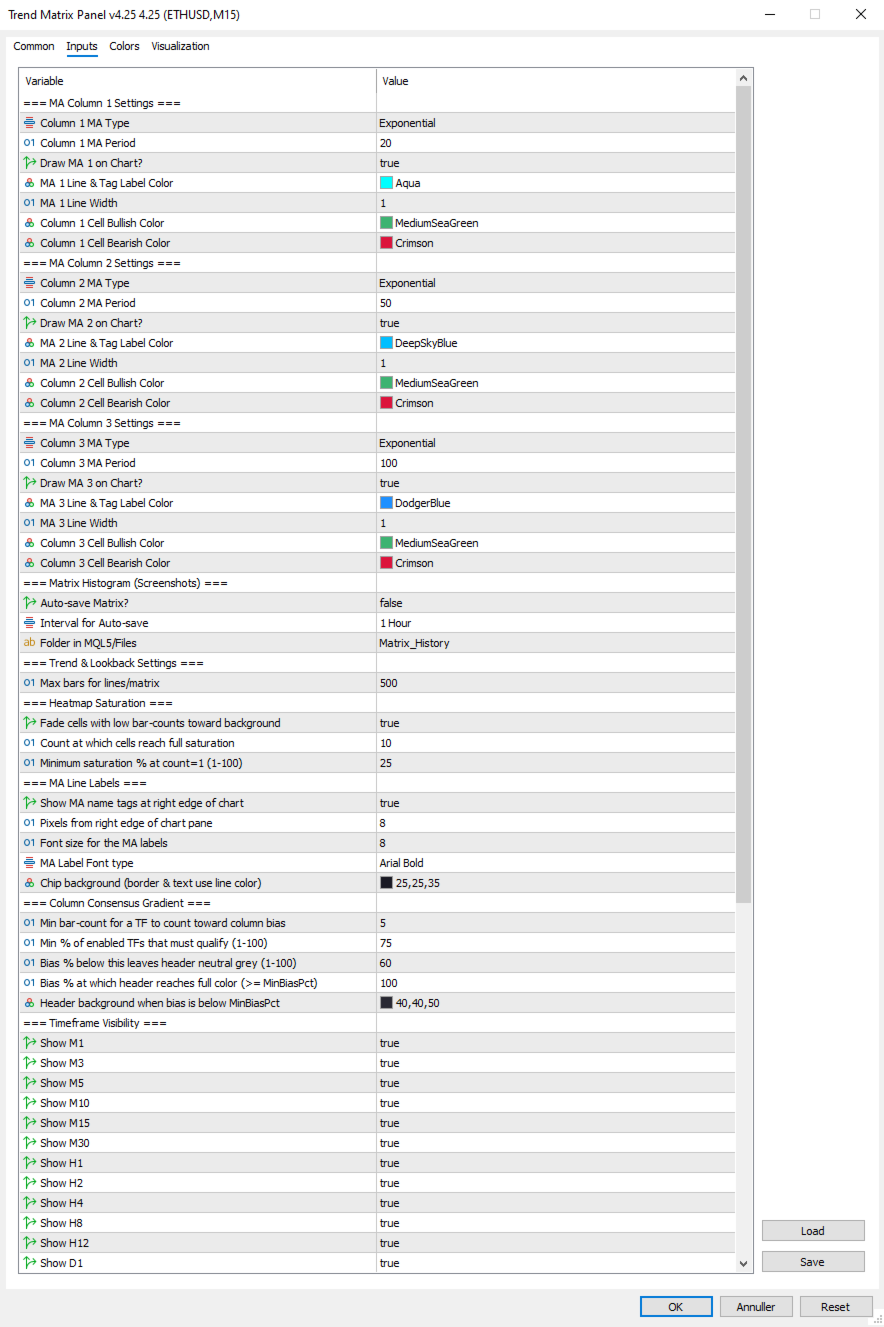
=== MA Column 1 Settings ===
  1. Column 1 MA Type: Select MA type for Column 1 (SMA/EMA/SMMA/LWMA).
  2. Column 1 MA Period: Select the period (lookback bars) for the Column 1 MA calculation.
  3. Draw MA 1 on Chart?: Set true to draw MA 1 on the chart, false to hide the line and its right-edge label.
  4. MA 1 Line & Tag Label Color: Select the color for the MA 1 line on the chart and its right-edge chip label.
  5. MA 1 Line Width: Select the width in pixels for the MA 1 line.
  6. Column 1 Cell Bullish Color: Select the color for matrix cells in Column 1 when the MA is sloping up.
  7. Column 1 Cell Bearish Color: Select the color for matrix cells in Column 1 when the MA is sloping down.

=== MA Column 2 Settings ===
  1. Column 2 MA Type: Select MA type for Column 2 (SMA/EMA/SMMA/LWMA).
  2. Column 2 MA Period: Select the period (lookback bars) for the Column 2 MA calculation.
  3. Draw MA 2 on Chart?: Set true to draw MA 2 on the chart, false to hide the line and its right-edge label.
  4. MA 2 Line & Tag Label Color: Select the color for the MA 2 line on the chart and its right-edge chip label.
  5. MA 2 Line Width: Select the width in pixels for the MA 2 line.
  6. Column 2 Cell Bullish Color: Select the color for matrix cells in Column 2 when the MA is sloping up.
  7. Column 2 Cell Bearish Color: Select the color for matrix cells in Column 2 when the MA is sloping down.

=== MA Column 3 Settings ===
  1. Column 3 MA Type: Select MA type for Column 3 (SMA/EMA/SMMA/LWMA).
  2. Column 3 MA Period: Select the period (lookback bars) for the Column 3 MA calculation.
  3. Draw MA 3 on Chart?: Set true to draw MA 3 on the chart, false to hide the line and its right-edge label.
  4. MA 3 Line & Tag Label Color: Select the color for the MA 3 line on the chart and its right-edge chip label.
  5. MA 3 Line Width: Select the width in pixels for the MA 3 line.
  6. Column 3 Cell Bullish Color: Select the color for matrix cells in Column 3 when the MA is sloping up.
  7. Column 3 Cell Bearish Color: Select the color for matrix cells in Column 3 when the MA is sloping down.

=== Matrix Histogram (Screenshots) ===
  1. Auto-save Matrix?: Set true to automatically capture chart screenshots at regular intervals.
  2. Interval for Auto-save: Select the timeframe interval between automatic screenshots (e.g. PERIOD_H1 = one per hour).
  3. Folder in MQL5/Files: Subfolder name under MQL5/Files where screenshots are saved (created automatically if absent).

=== Trend & Lookback Settings ===
  1. Max bars for lines/matrix: Maximum bar history used for line drawing and trend-count detection (cap, not minimum).

=== Heatmap Saturation ===
  1. Fade cells with low bar-counts toward background: Master toggle for the heatmap effect; false reverts to flat full-saturation cells.
  2. Count at which cells reach full saturation: Bar count at which a cell shows at full color; lower = matrix lights up faster.
  3. Minimum saturation % at count=1 (1-100): Saturation percentage for freshly-flipped trends; lower = weaker cells fade more toward invisible.

=== MA Line Labels ===
  1. Show MA name tags at right edge of chart: Master toggle for the colored chip labels next to each MA line.
  2. Pixels from right edge of chart pane: Horizontal padding between the chip's right edge and the chart pane's right edge.
  3. Font size for the MA labels: Font size for the chip text.
  4. InpMALabelFont: Font face dropdown for the chip labels (Arial / Arial Bold / Tahoma Bold / Verdana Bold / Segoe UI Bold / Consolas).
  5. Chip background (border & text use line color): Background color for the chip pill; border and text always match the MA line color.

=== Column Consensus Gradient ===
  1. Min bar-count for a TF to count toward column bias: Timeframes below this count abstain from the directional vote.
  2. Min % of enabled TFs that must qualify (1-100): Minimum quorum of enabled TFs that must have enough history before any bias is registered.
  3. Bias % below this leaves header neutral grey (1-100): Directional bias percentage below which the column header stays neutral.
  4. Bias % at which header reaches full color (>= MinBiasPct): Directional bias percentage at which the header reaches full saturation.
  5. Header background when bias is below MinBiasPct: Background color for the column header in neutral state and for the split-vote row.

=== Timeframe Visibility ===
  1. Show M1: Set true to include the M1 row in the matrix.
  2. Show M3: Set true to include the M3 row in the matrix.
  3. Show M5: Set true to include the M5 row in the matrix.
  4. Show M10: Set true to include the M10 row in the matrix.
  5. Show M15: Set true to include the M15 row in the matrix.
  6. Show M30: Set true to include the M30 row in the matrix.
  7. Show H1: Set true to include the H1 row in the matrix.
  8. Show H2: Set true to include the H2 row in the matrix.
  9. Show H4: Set true to include the H4 row in the matrix.
  10. Show H8: Set true to include the H8 row in the matrix.
  11. Show H12: Set true to include the H12 row in the matrix.
  12. Show D1: Set true to include the D1 row in the matrix.

=== Panel Aesthetics ===
  1. Panel Background Color: Background color for the panel; also serves as the heatmap fade target.
  2. Panel Text Color: Default text color for non-tinted panel areas (cell counts, TF labels, total-vote number, footer).
  3. Matrix Font Size: Base font size for the matrix cells.
  4. Panel Anchor Point: Which corner of the chart the panel anchors to (top-left / top-right / bottom-left / bottom-right).
  5. X-Axis Offset: Horizontal pixel offset of the panel from its anchor corner.
  6. Y-Axis Offset: Vertical pixel offset of the panel from its anchor corner.

=== Volume Settings ===
  1. Volume Average Lookback (bars): Number of prior bars used to compute the rolling volume average for ratio calculations.
  2. Low-volume Threshold (ratio vs avg): Ratio at or below which volume is classified as Low (e.g. 0.7 = 70% of average).
  3. High-volume Threshold (ratio vs avg): Ratio at or above which volume is classified as High (e.g. 1.5 = 150% of average).
  4. Color: Above Average Threshold: Text color used for volume readings above the High threshold.
  5. Color: Below Average Threshold: Text color used for volume readings below the Low threshold.
  6. Color: Average Threshold : Text color used for volume readings between the Low and High thresholds.

=== Per-Bar Volume Tags ===
  1. Show ratio tags below high-volume bars: Master toggle for the per-bar volume tags on the chart.
  2. How many recent bars to consider for tagging: Size of the rolling window of recent bars eligible for tagging.
  3. Min ratio to tag (>=); 1.1 = anything 110% of average: Minimum volume ratio for a bar to receive a tag.
  4. Tag text color: Color used for the volume tag text below qualifying bars.
  5. Tag font size: Font size for the volume tag text.
  6. Tag Font type: Font face dropdown for the volume tags (same options as MA label font).

=== Spread Settings ===
  1. Max Spread Treshold: Spread threshold in raw points; spread above this turns the spread display red.
  2. % of threshold at which spread tints amber (1-100): Percentage of the spread threshold at which the display tints amber instead of green (1-100).atrix Cell when in Bearish Trend.


Tips & Operational Notes
First attach behavior
On a fresh attach, the indicator needs a moment for the MA sub-indicator handles to warm up across all twelve timeframes. The matrix may briefly show "SYNC" cells, the MA lines may take a tick or two to draw, and volume tags will populate after the first bar transition. Higher timeframes (especially D1) may take longer if the broker is still loading history. The panel will fully populate within seconds on a live market and within a second or two on closed markets — the OnTimer retry path handles both cases automatically.

Closed market behavior
The panel works correctly on weekends and holidays. The matrix and MA lines update from the most recently completed data; the volume footer shows the last live bars; spread reads as broker-reported (often zero on closed markets). The next-bar timer continues to count down assuming the next bar will arrive on schedule. Volume tags remain in place from the last live session.

Re-attach optimization
Removing and re-adding the indicator is safe and clean — all panel objects, MA chips, and volume tags are removed in OnDeinit, and they all rebuild fresh on OnInit. Use this if you change settings that affect layout (timeframe visibility, anchor corner, etc.) and want to see the updated panel immediately.

Multiple instances
The indicator uses a single shared object name prefix ("TMTX_"), which means running two instances on the same chart is not supported — they would collide. Running one instance per chart is fully supported.

Recommended timeframe choices
The default 12 timeframes are intentionally broad. Common refinements:
Scalping: hide H8, H12, D1 (rarely relevant for sub-15-minute trades). Keep M1 through H4.
Intraday/swing: hide M1, M3 (mostly noise for trades held longer than a few minutes). Focus on M5 through D1.
Position trading: hide M1, M3, M5, M10, M15. Focus on M30 through D1, where structural moves play out.

Tuning the heatmap
The default settings (FullCount=10, MinSaturation=25) balance detail with focus on a typical liquid market. Adjust based on personal taste:
If the matrix feels too washed out: lower FullCount to 6–8 (cells reach full color sooner) or raise MinSaturation to 35–40 (weak cells more visible).
If the matrix feels too loud: raise FullCount to 15–20 (full color requires longer trends) or lower MinSaturation to 10–15 (weak cells almost vanish).
Heatmap off entirely: set InpHeatmapEnabled = false. Useful for verifying raw signal direction before tuning.

Tuning the consensus gradient
Two knobs control how aggressively the column header announces directional bias:
MinBiasPct higher (e.g. 75): headers stay neutral longer, only tinting on stronger leans. Calmer panel, fewer false alarms.
MaxSatAt lower (e.g. 80): headers reach full color at 80% bias instead of 100%. More dramatic, fires earlier.
Tightening the band (e.g. MinBias=80, MaxSat=100): creates a sharper transition — headers stay grey until clearly aligned, then quickly saturate. "On/off" feel within a continuous system.

Tuning the volume tags
The default threshold of 1.1x is permissive enough that you'll see most participating bars get marked. Tune based on chart density and your trading style:
Threshold 1.0: tags every average-or-above bar — useful for studying full sessions, but busy.
Threshold 1.3 or 1.5: only tags bars with notable volume — great for spotting climactic moves and absorption.
Window 30 bars: tighter focus on the immediate session — old tags drop off faster.
Window 200 bars: longer history for after-the-fact session review. Watch the object count if you push much beyond 200.

Spread threshold per instrument
The default 20-point threshold is appropriate for major forex pairs on tight-spread brokers. For other instruments, tune accordingly: 10–15 for very tight pairs, 30–50 for indices and metals, 50+ for exotics. The amber warning tier at 80% of threshold gives you advance notice when spread is widening — useful around news events when costs spike before liquidity dries up entirely.

Knowing when to ignore the panel
The matrix is a structural read; it cannot tell you about news, session changes, or imminent reversals. Three situations where the panel's signal should be ignored or weighted down:
Around scheduled high-impact news (NFP, FOMC, CPI). The matrix's recent counts reflect pre-news structure that the news will likely break.
During session transitions (Asian → London, London → New York). Volume regime changes can flip multi-TF alignment within a few bars.
On illiquid instruments or off-session hours. A perfect-looking matrix on a thin market means very little — wait for real participation.
The volume footer is the panel's primary tool for catching these situations. Three consecutive low-ratio bars in the footer should temper any structural signal the matrix is showing. The volume tags on the chart give you a longer view of the same — a stretch of recent bars with no tags at all suggests low-conviction action you should treat with caution.
推荐产品
Algo Trading Indicaor MT5 The ATC ALGO indicator has been developed to work on the MetaTrader 5 platform. It has the same specifications and zones as the MetaTrader 4 version. There may be slight lag, which we believe is due to differences in MetaTrader 5 programming. We will work on improving it, God willing. MT5 Version                    https://www.mql5.com/en/market/product/170028 MT4 Version                    https://www.mql5.com/en/market/product/88034 With this indicator , you’ll have
Smart Currency Strength is a powerful yet simple indicator that measures the strength of individual currencies. It features a graphic panel that lists the main currencies and their strength in each timeframe, ranging from 0 (most oversold) to 100 (most overbought). The strength for all currencies in the current timeframe is also shown in a separate window as a multi-line graph, where each currency is represented with a different color, this allows you to monitor the evolution of strength trend
Hybrid Assisted Trading Engine Manual Trading. Machine Discipline. The Hybrid Assisted Trading Engine is an institutional-grade manual trade management system designed to protect traders from emotional mistakes — without taking control away from them. You decide when to enter . The engine decides how the trade is managed . What It Does This system continuously monitors your manual trades and enforces professional-level trade management rules in real time: Smart Breakeven logic R-based trai
MQL5 博客: https://www.mql5.com/en/blogs/post/761446 MT4 版本: https://www.mql5.com/en/market/product/136790 MT5 版本: https://www.mql5.com/en/market/product/136791 Time Wizard 是一款专业的交易助手,专为需要在简洁的控制面板上实现速度、时机和执行控制的交易者而设计。 这款智能交易系统 (EA) 专为事件驱动交易、定时执行和快速半自动订单管理而设计。它允许您提前准备订单、定义精确的执行时间、设置分层挂单、通过止损和止盈管理风险,并通过图表上的简洁界面监控所有信息。 无论您是围绕经济事件、开盘、突破点还是您自己的自定义计划进行交易,Time Wizard 都能帮助您以结构化和纪律性的方式执行交易。 主要功能 1. 基于时间的订单执行 设置具体的执行日期和时间,EA 即可在需要时精准下单。 此功能非常适合: 新闻交易 突破交易设置 预先计划的市场执行 定时下单 2. 挂单阶梯 创建多层挂单,层间距和
Trillion Pips Pro MT5
Sivaramakrishnan Natarajan
TRILLION PIPS ELITE PRO INDICATOR  Advanced Wave-Based Auto Trend System Built with   12+ Years of Real Market Experience , this is not just an indicator — it’s a   complete market intelligence system   designed to give   accurate levels + auto trend direction with precision and confidence .    UNIQUE POWER OF THIS INDICATOR Proprietary Strategy – Only from Trillion Pips Advanced   Wave-Based Market Structure Engine   Auto Trend Detection System   (No manual analysis needed) Built-in   Tr
CONTACT AND SUPPORT At TPFX, we understand that every trader has unique requirements and that efficiency is the key to success. Therefore, I cordially invite you to send me a private message regarding any questions, functional errors, or needs for personalized adjustments. I am committed to providing fast and decisive technical assistance, ensuring your tool is always in perfect condition. Personalized adjustments to adapt the system to your specific strategy can be made at no additional cost
Price Alerts Advanced Price Target Notifications
Elsayed Mohamed Kamal Elsayed Abdelwadod
Price Alerts - Advanced Price Target Notifications Never miss important price levels again! Price Alert Pro lets traders: • Set unlimited price target alerts • Receive instant desktop and mobile notifications • Visually track progress to each target • Customize alert sounds and frequencies • Manage all alerts from an intuitive panel Perfect for: - Breakout traders waiting for key levels - News traders monitoring reaction points - Position traders managing multiple targets - All traders who c
Boom coins indicator and crash coins
Waleed Hamood Said Al Rawahi
YouTube上的指標直播。更多可信度請點擊下面的鏈接。還有指標的視頻可以觀看。注意直播晚了,不要依賴,只有對指標的回顧僅回顧指標的準確性,幾乎不輸,利潤率達到 95%。我將在 CRASH coin 1000 INDICES 上非常準確地工作 YouTube上的指標直播。更多可信度請點擊下面的鏈接。還有指標的視頻可以觀看。注意直播晚了,不要依賴,只有對指標的回顧僅回顧指標的準確性,幾乎不輸,利潤率達到 95%。我將在 CRASH coin 1000 INDICES 上非常準確地工作 YouTube上的指標直播。更多可信度請點擊下面的鏈接。還有指標的視頻可以觀看。注意直播晚了,不要依賴,只有對指標的回顧僅回顧指標的準確性,幾乎不輸,利潤率達到 95%。我將在 CRASH coin 1000 INDICES 上非常準確地工作
Kiobi
Firas Al-qasimi
KIOBI VISION KIOBI VISION is a multi-factor analysis indicator designed for professional traders who want a clear and structured view of the market across multiple time frames. Objective The indicator offers a unique summary table that combines several technical tools (RSI, MACD, Stochastics, Vortex, Momentum, PSAR, DMI, MFI, Fisher, and general trend) to provide reliable and quick-to-interpret buy and sell signals. Key Features Multi-timeframe analysis (M1 → MN): a consolidated view of the
Volume Data on Candles Indicator for MetaTrader 5 Maximize your trading insights with the Volume Data on Candles indicator for MetaTrader 5. This powerful tool provides real-time volume data directly on each candle, allowing you to identify significant shifts in market activity. When the volume of a candle exceeds the average of the last 50 candles, it will be clearly highlighted , ensuring you don't miss out on potential high-volume movements. Key Features: Real-Time Volume Data : Displays volu
FREE
FFXMV Forex Dashboard Indicator MT5
Opengates Success International
FULL FOREX MARKET VIEW 仪表盘指标 MT5 这是一个为 MT5 平台开发的自定义指标,旨在为交易者提供对市场的全面了解。它使用实时数据来分析市场,并显示成功交易所需的所有信息。 安装: 在将此指标附加到图表窗口之前,请进入 MT5 的“市场报价”面板,隐藏所有不需要或不交易的货币对,只保留你交易的那些。原因是 FFMV 仪表盘会显示 MT5 市场报价中的所有货币对,最多可显示 26 种。如果超过 26 种,FFMV 仪表盘上的字体和图像会变得模糊并失真!将无法正确显示。 用途: 单一交易 组合交易(请参阅截图) 也可用于多订单交易 用于确认来自你交易系统的信号等 组件: 时间框架:从 M1 到 MN1 当前蜡烛状态(买/卖) 趋势:货币整体趋势 影响:货币波动的幅度/波动性(见下): Build-up: 货币刚开始形成趋势 Good: 货币走势逐渐增强 High: 值得关注 Strong: 方向应予以考虑 Very strong: 接近完美 Excellent: 信号达到最佳,可以交易 变化:货币横盘、上涨或下跌 评级:交易可靠性 如何使用仪表盘: 所有时间框架从
You can see Binance Spot data instantly in Metatrader 5 and it allows you to use all the features that Metatrader has provided to you. You can access the data of all symbols listed on Binance Futures. Don't forget to set the timezone. Binance it's 00:00 UTC. You need to fix it according to your own country You need to install the free Binance Spot Symbol List plugin. https://www.mql5.com/tr/market/product/83507 After loading, it automatically downloads the data of the cryptos in the market obser
Introducing the 'Global Forex Session Highlighter' , a powerful tool designed to enhance your trading strategy by providing a visual representation of the Three major Forex trading sessions: Tokyo, London, and New York. This indicator is designed to help traders understand the dynamics of the global Forex market by highlighting the trading sessions directly on your MT5 chart. It provides a clear view of when each session starts and ends, allowing you to strategize your trades around the most act
SuperIndices MT5
Stanislav Korotky
5 (1)
This cluster indicator is MT5 version of SuperIndices for MT4. It allows for processing mixed clusters, where symbols from various markets can be included. For example, it can handle Forex, indices, CFDs, spot at the same time. Number of visible lines increased to 16. An interactive ruler can be enabled to measure signals' strength on the history. The indicator creates a set of embedded cluster indicators (CCFpExtraIndices) with carefully selected periods and combines their results using smart w
G Channels – Efficient Adaptive Channel Indicator Introduction Channel indicators are widely used in technical analysis, offering valuable insights into price movements, trend identification, and volatility. Most channel-based indicators, such as Bollinger Bands and Keltner Channels, rely on a central tendency estimator (e.g., a moving average) combined with a volatility component to define upper and lower bands. The G Channels indicator takes this concept further by leveraging a highly efficie
EAs Manager
Abdeljalil El Kedmiri
5 (1)
The   Ultimate EAs Manager   is a professional risk management and trade assistance tool designed to monitor, control, and optimize all trading activities on your MT5 account. It acts as a   central command center   that oversees every trade - whether opened by other Expert Advisors or manually by you. How it's work with other EAs : Blog post  MT4 version:  https://www.mql5.com/en/market/product/167007 Only 10 copies will be sold at the early-bird price. After 10 copies, the price jumps directly
Stop guessing and start executing with precision. Learning complex trading methodologies takes years of screen time—until now. The Propfolio Strategy Mentor OS is an elite, on-chart analytical dashboard that acts as your live digital trading mentor. It doesn't just draw lines on your chart; it actively scans the market, identifies high-probability setups across 8 different institutional strategies , and tells you exactly what to look for in real-time via the Live Mentorship Terminal. Whether you
Powerful trend indicator provided with all necessary for trade and it is very easy to use. Everyone has probably come across indicators or Expert Advisors that contain numerous input parameters that are difficult to understand. But here, input parameters are simple and it is no need to configure anything — neural network will do all for you. Difference from a classic version The real-time multi time frame panel is added, so you can check a trend for other timeframes without switching the schedu
使用革命性的交易时间管理器轻松控制您的交易程序。这个强大的工具可以在指定时间自动执行订单,从而改变您的交易方式。 为不同的交易行为(从购买到设置订单)制定个性化任务列表,所有这些都无需人工干预。 交易时间管理器安装和输入指南 如果您想获取有关 EA 的通知,请将我们的 URL 添加到 MT4/MT5 终端(参见屏幕截图)。 MT4版本     https://www.mql5.com/en/market/product/103716 MT5版本     https://www.mql5.com/en/market/product/103715 告别人工监控,拥抱精简效率。直观的界面允许您设置精确的参数,包括交易品种、执行时间、价格、止损 (SL)、止盈 (TP) 点和手数大小。 该工具的灵活性通过与市场行为相匹配的适应性重复选项来凸显。通过视觉主题个性化您的体验,并减少长时间交易期间的眼睛疲劳。 摆脱手动交易程序,拥抱“交易时间管理器”的强大功能。提高交易的准确性、组织性和自由度。简化您的日常工作并重新体验交易。 主要特点: 自动订单执行:按指定时间间隔无缝自动执行订单,从而节省您的
此工具可帮助您管理交易。您可以设置目标 1、2、3(以点数为单位)以及您希望在这些目标位平仓的手数百分比。例如,您已将目标 1、2、3 设置为 5$、10$ 和 15$,大小分别为 40%、30%、30%。现在,如果您在 xauusd 4220 上入场,交易量为 0.1 手,那么它将在 5$ 目标位平仓 0.04 手,在 10$ 目标位平仓 0.03 手,剩余交易量将在 15$ 目标位平仓。 您也可以设置止损点(以点数为单位)。 止损点和目标位将在您交易时自动设置。 此外,还有追踪止损条件,因此在触及 tp1 后,止损可以移至入场点;在触及 tp2 后,止损可以移至 tp1。您可以打开或关闭此条件。 图表上会有一个面板显示所有止损和止损的详细信息,以便您轻松查看点数。 Cǐ gōngjù kě bāngzhù nín guǎnlǐ jiāoyì. Nín kěyǐ shèzhì mùbiāo 1,2,3(yǐ diǎnshù wèi dānwèi) yǐjí nín xīwàng zài zhèxiē mùbiāo wèi píng cāng de shǒushù bǎifē
Gann Box MT5
Frederic Jacques Collomb
Gann Box 指标是一个强大且多功能的工具,旨在帮助交易者识别和利用市场的关键水平。该指标允许在图表上绘制一个矩形,该矩形会自动划分为多个区域,并带有战略水平 0, 0.25, 0.50, 0.75, 1 。当价格触及其中一个水平时,会触发警报,从而为交易决策提供宝贵的帮助。您可以即时了解市场相对于您绘制区域的变化情况。要绘制一个区域,只需绘制一个简单的矩形并将其命名为 GannBox 。 该指标适用于所有类型的交易者,无论是使用 支撑和阻力 概念、 供需 理论的交易者,还是 ICT 技术或 公平价值缺口 (FVG) 专家。 无论您是 日内交易者 、 波段交易者 还是 趋势交易者 , Gann Box 都可以帮助您更好地理解和预测市场走势,同时提高您的反应能力和交易表现。 MT4 版本 Gann Box 是一个 多时间框架 指标:它可以绘制在更大的时间框架上,比如 H1,同时允许在较小的时间框架(如 15 分钟图表)上进行更精确和快速的交易。 除了其灵活性之外,该工具还可以通过直观的 管理面板 在图表上进行全面自定义。此面板允许根据您的偏好激活或禁用每个级别,并启用或禁用相关的警
Institutional Flow Sentinel
Denis De Oliveira Ramos
The Institutional Flow Sentinel (Net Sentiment Volume AKA NSV) SEE VOLUME HAPPENING ON THE GO!!!!!!! Overview Retail traders look at price. Institutions look at order flow . The Institutional Flow Sentinel is a high-precision algorithmic system designed to decode the hidden battle between buyers and sellers. By analyzing real-time volume delta and identifying supply/demand imbalances, this system allows you to stop guessing and start trading with the "Smart Money." Why Order Flow? Price charts
N/B: All our product purchase comes with our free ‘’DAILY   SCALPER EA’’ Whatsapp Developer for yours after successful purchase   THE ARCHITECTURE OF A PERFECT TRADING SYSTEM Let me break down how all the components in this Ultimate Semafor system work together like a Swiss watch mechanism. This is a multi-layered confirmation system where each piece validates the others.   SYSTEM PHILOSOPHY: "TRIPLE CONFIRMATION" This system follows a simple but powerful principle: No single indicator can
SweetSpot Gold Units MT5 Indicator – Precision Psychological Levels for Gold Scalping and Intraday Trading If you are looking for profitable Gold EA checkout my best EA so far -  https://www.mql5.com/en/market/product/167535? SweetSpot Gold Units is a professional-grade MetaTrader 5 indicator designed to automatically plot dynamic psychological price levels directly on your chart. Built specifically for XAUUSD (Gold) traders, this MT5 indicator draws clean, structured minor and major unit levels
Ai Breakout X
Aleksandr Makarov
5 (1)
来自真实交易账户的实时信号: 为了确保完全透明,我提供一个真实投资者账户的访问权限, 让您可以实时监控其表现,不受任何操纵。 , 仅限1笔订单 止损:200点 止盈:2500点 追踪止盈:200点 LIVE SIGNAL: XAUUSD   Ai Breakout X M5 Broker : Exness Server : Exness-MT5Real25 Account Number : 183814864 Investor Password:  GBp(N/5y5T51 购买后请务必联系我以获取交易机器人的安装说明! 建议由我们为您安装交易机器人,只需将您的VPS登录信息发给我们,我们将为您正确安装。 Ai Breakout X — 您在黄金交易中的最佳助手。 一款完全自动化的交易机器人,无需额外设置,专为在M5时间框架上交易黄金(XAUUSD)而设计。 该策略基于突破关键价位(快速剥头皮)。 这是一个真实的交易算法。结果是一条极其稳定的增长曲线。 可选的受控恢复模式:亏损后,系统可将下一手牌的牌面大小增加至多 1 倍以进行恢复,然后自动恢复至正常牌面大小。这并非马丁格尔策略,
Trade Utility Pro
Sovannara Voan
3.88 (83)
Trade Utility Pro is a bot utility designed to help you manage trades more easily, quickly, and accurately. This utility features a control panel interface and supports MetaTrader 5 exclusively. This utility does not link to any account information or external sources, ensuring safety. Main Features: Open Trade Support: Lot size calculation Fixed Lot: Custom input lot required Money Risk Lot: Automatically calculated based on stop loss and money risk Account % Risk Lot: Automatically calculated
FREE
Supply and Demand Zones MT5
Peter Mueller
4.9 (20)
The Supply and Demand Zone Indicator is a powerful and easy-to-use tool designed to help traders identify critical supply and demand zones on the chart. These zones can provide valuable insight into potential market reversals, breakouts, and important price levels where buyers or sellers are likely to take control. The best   FREE Trade Manager . If you want to create your own Hedging or Grid strategies without any coding make sure to check out the   ManHedger Key Features: Automatic Zone Detect
FREE
Correlation Matrix Pro - 多货币相关性分析 实时了解货币对之间的相关性! 一款强大的分析工具,可帮助您同时可视化多达6个货币对之间的统计关系。非常适合投资组合管理、风险分散和对冲策略。 主要功能 - 使用对数收益率的实时皮尔逊相关性 - 同时监控多达6个货币对 - 自动时间框架检测 - 可调回溯周期(5-200根K线) - 自动对冲机会检测 - 简约可折叠面板设计 - 颜色编码矩阵,即时解读 颜色编码 绿色 (+0.70 至 +1.00) = 强正相关 浅绿色 (+0.50 至 +0.69) = 中等正相关 灰色 (-0.49 至 +0.49) = 弱/无相关 橙色 (-0.50 至 -0.69) = 中等负相关 红色 (-0.70 至 -1.00) = 强负相关(对冲) 为什么要关注相关性? 风险管理 避免通过高度相关的头寸使风险加倍。 对冲策略 自动找到具有强负相关性的货币对进行有效对冲。 投资组合多元化 使用低相关性货币对构建多元化投资组合。 相关性突破 检测背离——通常是即将到来的市场变动信号。 输入参数 显示设置: - 面板 X/Y 位置 - 启动时
FREE
Hard Scalping Assistant
Jorge Javier Catalan Garcia
Hard Scalping Assistant is a semi-automatic Expert Advisor for MetaTrader 5 created for traders who want to keep making their own decisions, but with a much more advanced, organized and professional execution. It does not enter the market on its own: you choose the direction, define the trade idea and adjust the zone directly on the chart, while the assistant automatically calculates the risk, lot size and the full execution structure. With just a few clicks, you can prepare BUY or SELL trades
FF4 Scalper
Valerii Gabitov
Ea does not use martingale or grid and has a stop loss for every position.  Symbols: EURCHF, EURCAD, USDCHF and other. Time frame: M15 Best results on EURCAD M15. Live signals and other products here -  https://www.mql5.com/ru/users/leron34/seller#products The EA should run on a VPS continuously without interruption.  Multicurrency advisor. You can enter pairs in the EA settings for tests. I recommend the default settings. You can install an adviser on any pair on M15. The EA has a news filter

该产品的买家也购买
ARIPoint
Temirlan Kdyrkhan
ARIPoint is a powerful trading companion designed to generate high-probability entry signals with dynamic TP/SL/DP levels based on volatility. Built-in performance tracking shows win/loss stats, PP1/PP2 hits, and success rates all updated live. Key Features: Buy/Sell signals with adaptive volatility bands Real-time TP/SL/DP levels based on ATR Built-in MA Filter with optional ATR/StdDev volatility Performance stats panel (Success, Profit/Loss, PP1/PP2) Alerts via popup, sound, push, or email Cu
Azimuth Pro
Ottaviano De Cicco
5 (7)
Azimuth Pro V2:MT5合成分形结构分析与确认入场 概述 Azimuth Pro 是 Merkava Labs 推出的多层级波段结构指标。四层嵌套波段层级、锚定波段的VWAP、ABC形态识别、三时间框架结构过滤以及收盘确认入场——一个图表,一个从微观波段到宏观周期的完整工作流程。 这不是盲目的信号产品。它是一个以结构为先的工作流程,专为重视位置、背景和时机的交易者打造。 V2上市优惠 — Azimuth Pro V2售价USD 399(接下来的100份)。最终价格:USD 499。 1. V2的变化 合成多时间框架引擎 高时间框架分析从零开始重建,采用与Meridian Pro相同的专有合成架构。更清晰的HTF背景、稳定的实时行为、无经典MTF同步问题。合成引擎还解锁了 固定比率时间框架级联 (x2、x3、x4、x6)——不再在经纪商的固定时间框架之间任意跳转,您可以按图表时间框架的固定倍数分析结构,在每个尺度上保持相同的分形关系。 确认入场箭头 作为稳定且可恢复的执行层而设计的收盘确认箭头。当ABC设置形成且自适应确认逻辑在收盘K线上验证方向时,箭头会写入下一根K线的
SignalTech MT5
Yue Wang
5 (15)
SignalTech MT5 is a trading system for EURUSD, USDCHF, USDJPY, AUDUSD, NZDUSD, EURJPY, AUDJPY, NZDJPY, CADJPY H2 and H3 Timeframe.  All the winning trades with chart setups are published on the comments page. 2025-12 1174 Pips 2026-01 2624 Pips 2026-02 2937 Pips 2026-03 2165 Pips 2026-04 2243 Pips It can generate signals with Buy/Sell Arrows and Pop-Up/Sound Alerts. Each signal has clear Entry and Stop Loss levels, which should be automatically flagged on the chart, as well as potential Targets
OmniSync Projection
Antonio-alin Teculescu
5 (1)
Chronos Fractal Engine is an innovative price projection indicator for MetaTrader 5, designed to transform your technical analysis by intelligently identifying and projecting historical price patterns. Built upon an advanced correlation algorithm and the fractal principles of the market, this powerful tool visualizes potential future price movements, giving you a unique edge in your trading decisions. What is Chronos Fractal Engine? At its core, the Chronos Fractal Engine employs a sophisticat
RelicusRoad Pro MT5
Relicus LLC
5 (24)
RelicusRoad Pro: 量化市场操作系统 终身访问限时 70% 折扣 - 加入 2,000+ 交易员社区 为什么大多数交易者即使拥有“完美”指标也会失败? 因为他们在真空中交易 单一概念 。没有背景的信号是赌博。要持续获胜,您需要 共振 (CONFLUENCE) 。 RelicusRoad Pro 不是一个简单的箭头指标。它是一个完整的 量化市场生态系统 。它描绘价格运行的“公允价值之路”,区分市场噪音和真实的结构性突破。 停止猜测。开始用机构级“路”逻辑进行交易。 核心引擎:“Road” (路) 算法 系统的核心是 Road Algo ,一个实时适应市场条件的动态波动率通道。它投射出 安全线 (平衡) 和价格可能反转的 扩展水平 。 Simple Road: 典型市场的标准结构映射。 Smooth Road: 针对震荡盘整的降噪计算。 Breakout Road: 专为识别波动率扩张和爆发性走势而调整。 1. 算法动量与确认 我们的“剥头皮箭头”不只是简单的交叉。它们利用 高阶多项式逻辑 过滤噪音,确保信号与主周期一致。我们检测动量、价格行为和 Road 结构汇聚的精确入场
KT Alpha Hunter Arrows MT5
KEENBASE SOFTWARE SOLUTIONS
大多数箭头指标只给你一个信号,然后让你自己去判断剩下的一切。KT Alpha Hunter Arrows 为你提供完整的交易计划。 每一个信号箭头出现时,都会同时绘制一套完整计划:入场线、止损位、四个止盈目标,以及实时优势判断,告诉你当前这个交易品种和时间周期是否值得交易。随附的 Trade Manager EA 会在你手动入场后负责后续执行,让你在市场波动剧烈、情绪干扰明显时也能保持交易纪律。不重绘。仅在K线收盘后确认信号。适用于 Forex、黄金、指数以及任何你在 MT5 上交易的品种。 核心功能 不重绘买入和卖出箭头,只在K线收盘后生成。 每个信号都会显示入场线、结构性止损位和四个止盈目标。 Edge Dashboard 会分别评估当前图表上的买入和卖出机会。 判断系统包括:No Edge、Marginal、Tradeable、Good 或 Strong。 一键 Auto Optimize 按钮可根据当前品种和时间周期自动优化设置。 完整套装包含 Trade Manager EA,并提供五种专为本指标设计的预设交易管理方案。 Prop Firm Risk Panel 可在图表上
ARICoins
Temirlan Kdyrkhan
ARICoin is a powerful trading companion designed to generate high-probability entry signals with dynamic TP/SL/DP levels based on volatility. Built-in performance tracking shows win/loss stats, PP1/PP2 hits, and success rates all updated live. Key Features: Buy/Sell signals with adaptive volatility bands Real-time TP/SL/DP levels based on ATR Built-in MA Filter with optional ATR/StdDev volatility Performance stats panel (Success, Profit/Loss, PP1/PP2) Alerts via popup, sound, push, or email Cust
Meravith MT5
Ivan Stefanov
5 (1)
做市商工具。 Meravith 将: 分析所有时间周期并显示当前正在运行的趋势。 标注流动性区域(成交量均衡区),即多头与空头成交量相等的位置。 在您的图表上直接显示来自不同时间周期的所有流动性水平。 生成并展示基于文本的市场分析供您参考。 根据当前趋势计算目标位、支撑位和止损位。 计算交易的风险回报比。 根据您的账户余额计算仓位大小,并估算潜在利润。 在市场出现重大变化时,Meravith 还会发出警告。 指标的主要线条: 多头/空头成交量衰竭线 —— 作为目标位使用。 趋势线 —— 指示市场趋势方向。根据市场是多头还是空头而改变颜色,并作为趋势支撑。其颜色主要反映市场情绪。 成交量均衡线(Eq)—— Eq(Volume Equilibrium)是系统的核心。它表示买卖双方成交量的平衡点,即市场流动性所在位置。向上突破 Eq 表示多头倾向,向下突破 Eq 表示空头倾向。突破后,应等待回调——当价格回到相反趋势的偏离线或衰竭线附近时。 使用方法:只需将其添加到图表中。 Meravith 可以分析一切——趋势和回调。 趋势线与某条成交量衰竭线之间的距离越大,说明该方向的成交量越高。 趋势
CGE Trading Suite
Carl Gustav Johan Ekstrom
5 (2)
Institutional-Grade Analytics for MT5 C GE Trading Suite delivers the analytical edge typically reserved for professional trading desks. The platform integrates a full suite of analytical tools into one seamless workflow: dynamic grid mapping, liquidity behavior analysis, ECM, trend lines, MIDAS, trade cycles, and directional channel projections. Together, these provide a unified view of market structure and momentum. Directional clarity is further enhanced by the capital flow index, which meas
AriX
Temirlan Kdyrkhan
1 (4)
AriX Indicator for MT5 A powerful trend-following and signal-evaluation tool AriX is a custom MT5 indicator that combines Moving Averages and ATR-based risk/reward logic to generate clear buy/sell signals. It visualizes dynamic SL/TP levels, evaluates past trade outcomes, and displays win/loss statistics in a clean on-chart panel. Key features include: Buy/Sell signals based on MA crossovers ATR-based SL/TP1/TP2/TP3 levels with visual lines and labels Signal outcome tracking with real-time stat
“ Dynamic Scalper System MT5 ”指标专为在趋势波内进行剥头皮交易而设计。 已在主要货币对和黄金上进行测试,并可与其他交易工具兼容。 提供顺势短线建仓信号,并提供额外的价格变动支持。 指标原理: 大箭头决定趋势方向。 在趋势波内,我们采用一种生成小箭头形式的剥头皮交易信号的算法。 红色箭头代表看涨方向,蓝色箭头代表看跌方向。 敏感的价格变动线会沿着趋势方向绘制,并与小箭头信号协同作用。 信号运作方式如下:当线在适当时刻出现时,将形成入场信号;在出现线时,持仓;线完成后,平仓。 建议的操作时间范围为M1 - H4。 箭头在当前K线上方形成,如果下一根K线已开仓,则不会重新绘制上一根K线上方的箭头。 输入参数 Trend Wave Period - 趋势方向(大箭头)的周期,改变趋势波的时间间隔。值 1 表示趋势方向的最长持续时间,参数值越大,持续时间越短。 Scalper Arrows Period - 信号箭头(小箭头)的计算周期,改变入场信号的生成频率。值 3 表示最频繁的生成频率,参数值越大,箭头频率越低,准确度越高。 这些参数可以根据不同
Footprint 是一款用于分析订单流 (Order Flow) 和成交量的指标。 它有助于在聚类层面识别市场结构,寻找活动增加的关键区域,并直接在图表上使用过滤器,无需不断打开设置窗口。 Footprint 指标功能 Bid x Ask, Delta 聚类图表; 图表上的控制面板; 用于调整过滤器的滑块; Absorption; Initiative; Stacked Imbalances; Big Trades; dPOC / Dynamic Point of Control; Delta; 侧边市场轮廓 (Market Profile); 累计 Delta (Cumulative Delta)。 核心优势 在密集的 Tick 流上快速计算和渲染数据; 图表内管理 — 主要模式和过滤器可直接在图表上切换,无需打开设置; 通过过滤突出显示重要的价格水平和聚类; 视觉信号高亮:吸收、主动性、失衡和大单交易; 按日、周或当前可见范围显示的侧边轮廓; 包含总成交量、Delta 和累计 Delta 的面板。 Footprint 帮助您确定: 重要成交量集中的位置; 主动性压力出现的位置;
KAZ Kalman Adaptative Zone
Jean Michel A Joffroy
Kalman Adaptive Zones — 量化概率通道(概率带) 不要再猜测价格将走向哪里。开始了解价格在统计意义上“应该”在哪里。 Kalman Adaptive Zones(KAZ)是一款专业量化指标,它在价格周围绘制智能概率通道——这些通道会根据市场环境实时自动适应。 与 Bollinger Bands(布林带)或 Keltner Channels(凯特纳通道)不同,它们依赖固定回溯周期,而 KAZ 结合多层量化分析,使通道真正反映当前市场行为。 工作原理 KAZ 的核心是一个自适应滤波器,它持续估计价格的真实基础趋势,同时过滤噪音,并对真实行情变化保持敏感。 围绕这条中心线,指标构建概率区域,其宽度由两个因素共同决定: 市场不确定性 :滤波器置信区间越大,通道越宽 市场状态不稳定性 :波动结构本身的变化程度,而不仅仅是波动大小 结果是一个“会呼吸”的通道结构:在平稳市场中变窄且精确,在剧烈波动中变宽并更加谨慎。 Stable Bands — 量化优势 KAZ 最独特的功能是 Stable Bands(稳定带)系统 。 大多数通道类指标会在每根K线更新时重新绘制水平,导致交
Pantera Indicator
Temirlan Kdyrkhan
5 (1)
A tool for on-chart strategy backtesting and performance analysis. A utility for developing, debugging, and testing custom trading ideas and indicator functions. An indicator designed to quickly test trading concepts and visualize the effectiveness of different input parameters. An all-in-one sandbox for testing everything from simple crossovers to complex, multi-condition trading systems.
Transaction Speed MT5
Ivan Stefanov
5 (3)
当然,以下是翻译成中文(简体)的版本: 该指标标出市场中显现出 交易兴趣 的区域,并随后显示 订单积累区域 。它的工作方式类似于大规模的订单簿。 这是为 大资金 打造的指标,性能卓越。市场中有任何兴趣,你都能通过它清晰看到。 (这是一个 完全重写的自动化版本 —— 不再需要手动分析。) 交易速度 是一个全新的概念指标,它显示了市场上大订单 何时 、 何地 聚集,并揭示了其背后的意义。它可以在 非常早期 就检测到趋势的变化。 在外汇市场,所谓的“交易量”实际上是误导性的,因为那指的是价格在单位时间内的变化,因此真正的名称应是“交易速度”。 一切都取决于我们如何思考、如何行动、如何分析。 改变分析范式至关重要。 该指标完全重构了外汇市场上“交易量”的概念,用逻辑方式重新定义并应用,从而成为一个 独特而精准的工具 。 使用方法: 默认情况下,指标处于 自动模式 ,可独立用于任何时间周期。如果你希望切换到手动模式,只需点击 Auto / Manual Mode 按钮即可。 在 手动模式 下,所有计算从 2025年1月1日 开始。你可以根据需要更改该日期,以查看不同的分析结果。 最优数据周期
TrendMaestro5
Stefano Frisetti
note: this indicator is for METATRADER4, if you want the version for METATRADER5 this is the link:  https://www.mql5.com/it/market/product/108106 TRENDMAESTRO ver 2.5 TRENDMAESTRO recognizes a new TREND from the start, he never makes mistakes. The certainty of identifying a new TREND is priceless. DESCRIPTION TRENDMAESTRO identifies a new TREND in the bud, this indicator examines the volatility, volumes and momentum to identify the moment in which there is an explosion of one or more of these da
IVISTscalp5
Vadym Zhukovskyi
5 (6)
iVISTscalp5 — 基于时间的市场预测系统 iVISTscalp5 不是一个普通的交易指标。 它是一个用于 MetaTrader 5 的基于时间的预测系统(timing-based forecasting system),专注于判断市场何时最有可能发生变化,而不仅仅是价格的方向。 与传统指标不同,iVISTscalp5 不仅分析价格、成交量或趋势,还专注于时间周期、市场节奏以及重复出现的时间模式。 ⸻ 核心功能  • 提供精确的时间窗口(timing)  • 基于时间给出 BUY / SELL 预测  • 计算每个时间点的平均潜在收益  • 提供一周的预测  • 支持 120+ 金融工具 ⸻ 核心理念 市场不仅由价格驱动,也由时间驱动 ⸻ iVISTscalp5 — 你的时间优势 我们向您介绍iVISTscalp5指标,它不仅独特,而且在交易操作中也非常有效。该指标基于时间数据,是多年金融市场经验和深入分析的结果。iVISTscalp5指标是手动交易的优秀工具。便利性、简单性和可视化 - 所有的复杂性都隐藏在内部。我们将iVISTscal
ZIVA Signal Intelligence
Hassan Abdullah Hassan Al Balushi
ZIVA Signal Intelligence An Adaptive, Modular Market Intelligence System ZIVA Signal Intelligence is not positioned as a conventional trading indicator. It is a fully integrated, proprietary market intelligence system engineered to deliver structured, high-precision interpretation of price behavior within a controlled analytical environment. Developed through an independent architectural approach, ZIVA does not rely on, derive from, or replicate existing indicators. It represents a standalone
FX Analysis
Lee Teik Hong
FX Analysis is an all-in-one MT5 indicator dashboard that combines eight analytical tools in a single panel, helping traders identify high-probability setups without switching between charts or indicators. Designed for standard forex pairs on MetaTrader 5. Best results on M15 - H4 timeframes when all components are used together as part of the included workflow. Components Volatility Analyzer Displays historical average movement by hour and by day of the week. A real-time Pip Balance shows the
TraderHUD
Justino Porto Neto
TraderHUD — 交易者完整面板 TraderHUD 是一款完整的可视化指标,将交易者在图表上需要看到的所有内容整合在单个文件中:K线计时器、实时点差、可自定义水印、整点标记与价格记录,以及M5蜡烛开始标记。高度可配置,不会使图表显得杂乱。 功能 计时器和点差 当前K线剩余时间倒计时,每500毫秒更新一次——与新Tick无关 实时点差显示在计时器旁边 跟随图表上的价格线移动 智能锚定:当价格接近屏幕底部边缘时,文本自动上移以保持可见 字体、大小、颜色和分隔符完全可配置 整点标记 图表上的垂直线标示下一个整点——市场新资金可能入场的时刻 时间标签显示在线条顶部 在整点时刻自动记录当时价格 在记录价格处绘制永久水平线——可比较每个前一小时的价格位置 价格显示在标签中与时间并列 可配置偏移量:提前或延迟标记若干小时 历史价格线数量可配置(默认:3条) 切换时间周期或重新编译时价格线依然保留 线条颜色、样式和宽度均可配置 M5蜡烛开始标记 仅在低于M5的时间周期(M1、M2、M3、M4)上自动显示 直观标记每根5分钟蜡烛的开始——算法和短线交易者重新定位的时刻 可配置符号/文本(默认:^
Introduction to X3 Chart Pattern Scanner X3 Cherart Pattern Scanner is the non-repainting and non-lagging indicator detecting X3 chart patterns including Harmonic pattern, Elliott Wave pattern, X3 patterns, and Japanese Candlestick patterns. Historical patterns match with signal patterns. Hence, you can readily develop the solid trading strategy in your chart. More importantly, this superb pattern scanner can detect the optimal pattern of its kind. In addition, you can switch on and off individu
SunSignal ML — AI Gold Signals with Multi-Timeframe Confluence SunSignal ML is an advanced AI-powered signal indicator purpose-built for XAUUSD gold trading. It combines a proprietary adaptive trend algorithm with six machine learning models trained on confirmed price pivots to produce high-confidence entry signals with multi-timeframe validation. The indicator runs efficiently on M1, M5 and M15 timeframes and is designed for traders who want precision entries guided by data rather than guesswor
PredictHUDxGOLD
Kazutaka Okuno
PredictHUD_GOLD — A Future‑Driven AI Line That Moves Before the Market PredictHUD_GOLD is a GOLD‑specialized indicator that runs a true 1‑second AI model internally and visualizes a “leading trend line” directly on your 1‑minute chart. Because the AI reacts before the candlesticks move, you can visually capture reversals, accelerations, and momentum shifts in advance. Key Features 1. Zero Optimization Needed — Market‑Condition Independent PredictHUD_GOLD is powered by an AI model trained o
ARIScalping
Temirlan Kdyrkhan
ARIScalp is a powerful trading companion designed to generate high-probability entry signals with dynamic TP/SL/DP levels based on volatility. Built-in performance tracking shows win/loss stats, PP1/PP2 hits, and success rates all updated live. Key Features: Buy/Sell signals with adaptive volatility bands Real-time TP/SL/DP levels based on ATR Built-in MA Filter with optional ATR/StdDev volatility Performance stats panel (Success, Profit/Loss, PP1/PP2) Alerts via popup, sound, push, or email Cus
OrderFlow Absorption – 專業級MT5買賣差與吸收訊號指標 釋放真正訂單流分析的力量,OrderFlow Absorption 是MetaTrader 5上最強大的買賣差(Delta)直方圖與吸收訊號指標。專為想看清每一個價格波動背後真相的交易者設計,這個工具揭示了隱藏的買賣壓力與推動市場的吸收事件。 功能特色 買賣差直方圖視覺化:   以清晰的色彩直方圖即時顯示買方與賣方壓力。 吸收訊號偵測:   先進邏輯自動辨識多空吸收事件,及早預警潛在反轉。 圖表標記:   吸收訊號直接標示於主圖表,方便視覺辨識。 彈出式警報:   新吸收訊號出現時即時通知。 自訂門檻:   過濾弱訊號,專注高勝率機會。 資源管理:   高效運算,適用於大型圖表也能流暢運行。 全品種兼容:   適用於任何商品與週期,包括外匯、指數、商品等。 簡易整合:   參數簡單,快速上手與調整。 OrderFlow Absorption 的邏輯說明 OrderFlow Absorption 採用專利演算法,能在沒有完整Tick數據的情況下,估算每根K棒的買賣壓力(Delta)。它分析成交量、價格行為、K
当然可以!以下是您提供的文本的中文翻译: 引入   MT4 / MT5 天文指标:您的终极天体交易伙伴 您准备好将交易体验提升到天文高度了吗?不用再寻找,就在我们的革命性 MT4 天文指标中。这个创新工具超越了传统的交易指标,利用复杂的算法提供无与伦比的天文洞察力和精确计算。 指尖上的宇宙信息:   瞻仰一个详尽的面板,展示了一宝藏般的天文数据。了解行星的地理/太阳心坐标,太阳/地球距离,亮度,伸长度,星座,黄道和赤道坐标,甚至是水平坐标——每个细节都经过精心计算并呈现得美轮美奂。指标生成的垂直线对应于时间值,为您的交易旅程提供了宇宙的视角。 行星线条与关系:   在您的图表上欣赏行星线条的魔力,具有可自定义的比例和角度。通过直观的控制面板轻松切换每个行星线条的可见性。通过连结、六分、四分、三分、对冲和逆行等指标,发现行星关系的艺术。在您选择的时间范围内探索这些宇宙构造,使您能够识别重要的交易机会。 揭示甘恩的智慧:   通过受甘恩启发的平方垂直线揭示潜在的反转时机。这种创新修改将甘恩历经考验的原则带入现实,帮助您提前了解市场的转向和趋势。 月亮引导:   在您的图表上优雅地导航月相,
Pointer Trend Switch — precision trend reversal indicator Pointer Trend Switch is a high-precision arrow indicator designed to detect key moments of trend reversal based on asymmetric price behavior within a selected range of bars. It identifies localized price impulses by analyzing how far price deviates from the opening level, helping traders find accurate entry points before a trend visibly shifts. This indicator is ideal for scalping, intraday strategies, and swing trading, and performs equa
Weis Wave with Alert MT5
Trade The Volume Waves Single Member P.C.
4.94 (17)
Rental/Lifetime Package Options and Privileges  Rent Monthly Six Months   Yearly/Lifetime Weis Wave with Speed with Alert+Speed Index x x x Manual  x x x Quick Set up Video x x x Blog x x x Lifetime Updates x x x Setup and Training Material x x Discord Access Channel "The SI traders"          x Rectangle Break Alert Tool      x How to trade with it:    http://www.tradethevolumewaves.com   ** If you purchase please contact me to setup your  : Training Room and  complete manual access.  Wei
Gem SIGNAL
Shengzu Zhong
GEM Signal Pro GEM Signal Pro 是一款適用於 MetaTrader 5 的趨勢跟隨指標,專為希望在圖表上獲得更清晰訊號、更有結構的交易設定,以及更實用風險管理的交易者而設計。 它不僅僅顯示一個簡單的箭頭,GEM Signal Pro 還能以更清晰、更易讀的方式呈現完整的交易思路。當條件確認完成後,指標可在圖表上顯示進場價、止損價與止盈目標,幫助交易者更有效率地評估交易設定。 運作方式 該指標首先根據其內部邏輯識別有效的初始訊號。 當確認條件滿足後,GEM Signal Pro 會在圖表上顯示完整的交易設定。這讓交易者可以更清楚地看到交易結構,並減少手動分析與計算的工作量。 圖表上的交易價位 對於已確認的訊號,GEM Signal Pro 可顯示: 進場價 止損價 止盈 1 止盈 2 止盈 3 風險報酬比 這讓交易設定更容易理解,也有助於讓圖表分析更有條理。 內建風險管理 風險管理是此指標設計的重要部分。 止損位基於近期市場結構,結合附近的擺動高低點與可選的 ATR 緩衝距離。這能讓交易價位更貼近當前市場條件,而不只是依賴固定距離。 圖表資訊面板 GEM Si
作者的更多信息
This is a simple Trade Manager Panel with a clean UI. Features include: Movable GUI Panel, with changeable background color. Lot Size setting, with 2 decimals (If broker supports it). Stop Loss setting. Take Profit 1 in either Points or Percent. Take Profit 2 in either Points or Percent. Take Profit 3 as either close trade or as Trailing Stop Loss. Auto-Break Even when TP1 is hit. Auto-Stop Loss moved to TP1 when TP2 is hit.  Auto-Stop Loss moved to TP2 when TP3 is hit. Auto (Pair-TF-Direction
筛选:
无评论
回复评论