MTF Trend Matrix Panel With Heatmap

Trend Matrix Panel is a multi-timeframe technical indicator for MetaTrader 5 that compresses an entire trading session's structural picture into a single panel. Rather than flipping between charts to read M1, M15, H1, and D1 separately, the panel shows the trend state of three configurable moving averages across twelve timeframes simultaneously, with a heatmap that draws your eye to the genuinely strong signals and away from noise.
The core idea is simple: every cell in the matrix tells you how many bars a moving average has been trending in its current direction on a given timeframe. Five bars of bullish slope on M15 is meaningful; eighty bars of bullish slope on D1 is structural. The heatmap fades weak counts toward the background and saturates strong counts to full color, so a glance at the panel tells you which timeframes are doing real work and which are just chopping.
The indicator surfaces information through four complementary channels — the matrix tells you what's structural across timeframes, the volume tags on the chart tell you what's significant in the moment, the MA lines and their right-edge labels tell you which trend is which, and the heatmap fade keeps the noise quiet. None of the channels overlap, and the panel is designed so a single glance gives you the read.

The matrix:
The matrix is a grid of timeframes (rows) by MA columns. The first column is split into TF and Volume cells — the timeframe label paired with that timeframe's volume ratio versus its rolling average. The next three columns are the configured moving averages, each cell showing the count of consecutive bars the MA has been trending in its current direction.
Cells are colored bull (default green) or bear (default red) based on slope, then heatmap-faded by their count. A count of 1 means the trend just flipped this bar; the cell shows as a faint tint. A count of 10 or more means the trend is well-established; the cell shows at full saturation. The transition is smooth, not stepped, so you read the matrix as a heatmap rather than a binary on/off grid.

The two-row column header — bias gradient and split votes:
Each MA column has a header that occupies two rows. The top row shows the MA name (e.g. "EMA-20") on a background that tints continuously based on the column's directional bias: dark grey when there's no clear lean, gradually shifting to bull or bear color as alignment builds, reaching full saturation when every qualifying timeframe agrees. The text auto-flips between black and white based on background brightness to stay readable across the full color range.
The bottom row is split into three sub-cells — bull · bear · total — showing the live qualifying votes. The bull number renders in the column's bull color, the bear number in its bear color, the total in the default font color. Crucially, this row's background stays at a fixed neutral grey regardless of bias state, which keeps the numbers always legible and forms a static visual anchor between the dynamic top header and the matrix below. When consensus pulses, the contrast between the moving top row and the still bottom row makes it stand out like a neon sign rather than blending into a continuous gradient.
This separation also fixes a class of misreads. Earlier versions showed a single 9/12 ratio, which was easy to misinterpret as "9 of 12 in directional consensus" when it actually meant "9 of 12 had enough bar history to vote." The new bull/bear/total split makes vote alignment unambiguous: 5/2/12 cannot be mistaken for consensus, and 11/0/12 is clearly a strong directional signal.

Moving average lines and their chip labels:
The three configured moving averages are drawn directly on the chart in their column colors, each at a configurable line width. At the right edge of the chart pane, a small dark chip with a colored border identifies each line by name (e.g. "EMA-20"). The chip text is rendered in the line's color so the text itself matches the line — your eye picks up correspondence at a glance. The chip's vertical position tracks each MA's current value, so labels glide with the moving averages as the market moves; the X coordinate stays anchored to the chart pane in screen-space, so labels remain visible regardless of how far you pan or zoom.

Per-bar volume tags:
On the chart itself, bars whose tick volume meets a configurable ratio threshold get a small tag below their wick showing that bar's ratio (e.g. "1.4x"). Tags are placed only on the most recent N bars (default 60), forming a rolling window that walks forward as new bars print — the oldest tag drops off, new qualifying bars get tagged. This deliberately avoids cluttering the chart with tags on every bar; only the bars where volume actually mattered get marked.
The tags are particularly useful for spotting climactic volume sequences. A run of escalating tags (1.2x, 1.5x, 2.0x) into a swing high tells you distribution; a steady stream of moderate tags (1.1x, 1.2x, 1.1x, 1.3x) along a trending move tells you healthy participation. These are signatures you cannot read from the candles alone.
Tags update only on bar transitions — historical data doesn't change intra-bar, so updating every tick would be wasted work. This keeps performance light even on lower timeframes.

The footer: volume snapshots, spread, and timer:
Below the matrix, two compact rows display live market state. The top footer row shows three volume snapshots side by side: the current bar's tick count and ratio, the previous bar's, and the bar before that. Each is colored independently based on its own ratio against the rolling average — so you can see at a glance whether volume is building, fading, or stable across three consecutive bars.
The bottom footer row splits into spread on the left (with a configured threshold visible inline and three-tier color coding — green well below, amber approaching, red over) and the next-bar countdown on the right (also three-tier — green most of the bar, amber in the final 20%, red in the final 10%).

How to read the panel at a glance:
There's a natural reading order once you've used the panel for a while:
Scan the column headers first: are they tinted? Which way? Strongly?
Read the split row beneath each header to confirm the directional split — strong consensus shows imbalanced numbers (e.g. 11/0/12).
Scan the column you care about top-to-bottom: are the cells consistent in color and saturation, or mixed?
Glance at the TF/Vol column on the left: which timeframes are showing high volume right now (Lavender to Lime tints)?
Check the volume footer: is current volume building or fading versus the previous two bars?
Check the chart for recent volume tags: where did high-volume bars cluster?
Confirm spread is acceptable before trading.
The panel is designed to deliver this read in under two to five seconds. If you find yourself studying it for longer than that, the market itself is probably ambiguous and waiting is usually the right move.


The settings:
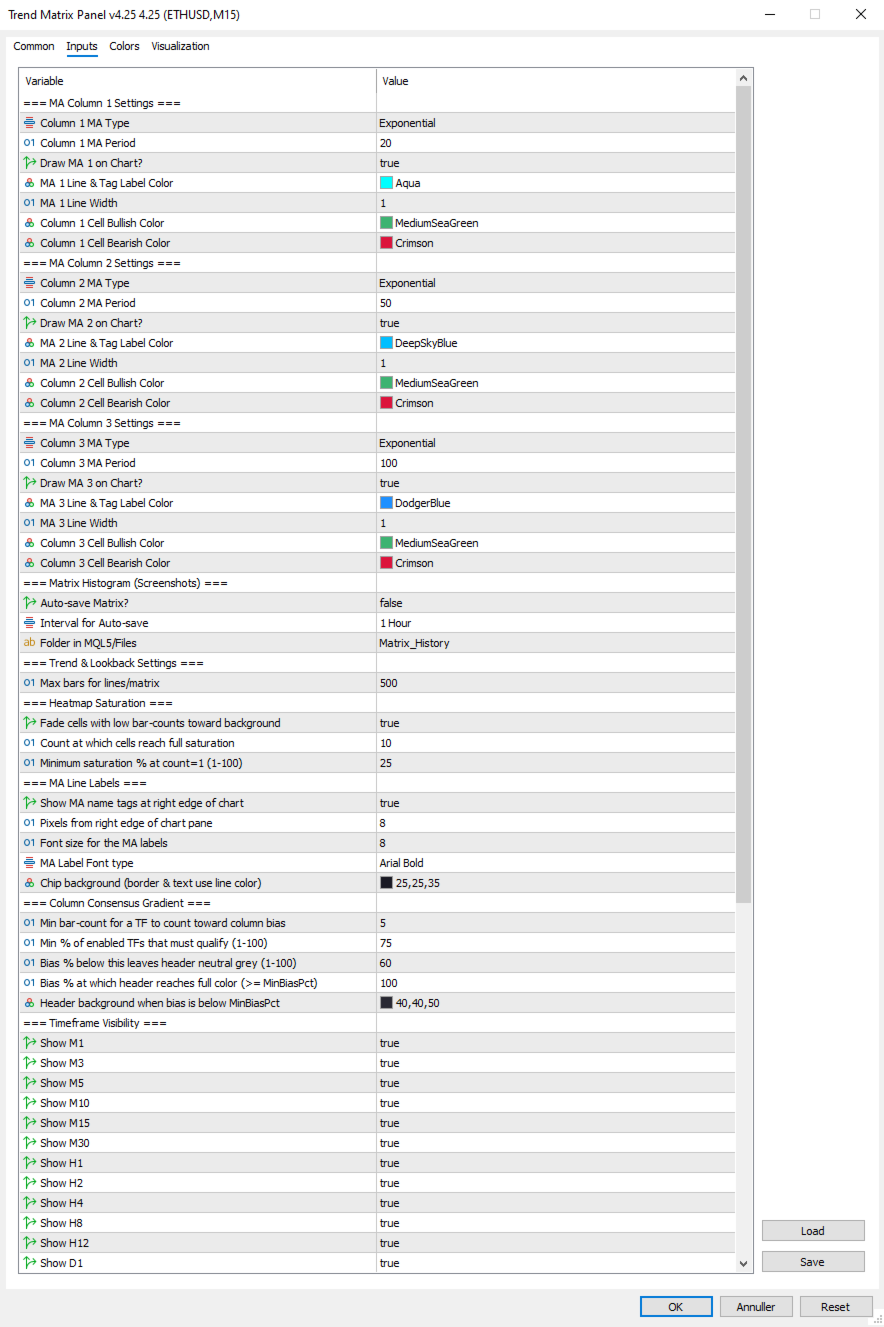
=== MA Column 1 Settings ===
  1. Column 1 MA Type: Select MA type for Column 1 (SMA/EMA/SMMA/LWMA).
  2. Column 1 MA Period: Select the period (lookback bars) for the Column 1 MA calculation.
  3. Draw MA 1 on Chart?: Set true to draw MA 1 on the chart, false to hide the line and its right-edge label.
  4. MA 1 Line & Tag Label Color: Select the color for the MA 1 line on the chart and its right-edge chip label.
  5. MA 1 Line Width: Select the width in pixels for the MA 1 line.
  6. Column 1 Cell Bullish Color: Select the color for matrix cells in Column 1 when the MA is sloping up.
  7. Column 1 Cell Bearish Color: Select the color for matrix cells in Column 1 when the MA is sloping down.

=== MA Column 2 Settings ===
  1. Column 2 MA Type: Select MA type for Column 2 (SMA/EMA/SMMA/LWMA).
  2. Column 2 MA Period: Select the period (lookback bars) for the Column 2 MA calculation.
  3. Draw MA 2 on Chart?: Set true to draw MA 2 on the chart, false to hide the line and its right-edge label.
  4. MA 2 Line & Tag Label Color: Select the color for the MA 2 line on the chart and its right-edge chip label.
  5. MA 2 Line Width: Select the width in pixels for the MA 2 line.
  6. Column 2 Cell Bullish Color: Select the color for matrix cells in Column 2 when the MA is sloping up.
  7. Column 2 Cell Bearish Color: Select the color for matrix cells in Column 2 when the MA is sloping down.

=== MA Column 3 Settings ===
  1. Column 3 MA Type: Select MA type for Column 3 (SMA/EMA/SMMA/LWMA).
  2. Column 3 MA Period: Select the period (lookback bars) for the Column 3 MA calculation.
  3. Draw MA 3 on Chart?: Set true to draw MA 3 on the chart, false to hide the line and its right-edge label.
  4. MA 3 Line & Tag Label Color: Select the color for the MA 3 line on the chart and its right-edge chip label.
  5. MA 3 Line Width: Select the width in pixels for the MA 3 line.
  6. Column 3 Cell Bullish Color: Select the color for matrix cells in Column 3 when the MA is sloping up.
  7. Column 3 Cell Bearish Color: Select the color for matrix cells in Column 3 when the MA is sloping down.

=== Matrix Histogram (Screenshots) ===
  1. Auto-save Matrix?: Set true to automatically capture chart screenshots at regular intervals.
  2. Interval for Auto-save: Select the timeframe interval between automatic screenshots (e.g. PERIOD_H1 = one per hour).
  3. Folder in MQL5/Files: Subfolder name under MQL5/Files where screenshots are saved (created automatically if absent).

=== Trend & Lookback Settings ===
  1. Max bars for lines/matrix: Maximum bar history used for line drawing and trend-count detection (cap, not minimum).

=== Heatmap Saturation ===
  1. Fade cells with low bar-counts toward background: Master toggle for the heatmap effect; false reverts to flat full-saturation cells.
  2. Count at which cells reach full saturation: Bar count at which a cell shows at full color; lower = matrix lights up faster.
  3. Minimum saturation % at count=1 (1-100): Saturation percentage for freshly-flipped trends; lower = weaker cells fade more toward invisible.

=== MA Line Labels ===
  1. Show MA name tags at right edge of chart: Master toggle for the colored chip labels next to each MA line.
  2. Pixels from right edge of chart pane: Horizontal padding between the chip's right edge and the chart pane's right edge.
  3. Font size for the MA labels: Font size for the chip text.
  4. InpMALabelFont: Font face dropdown for the chip labels (Arial / Arial Bold / Tahoma Bold / Verdana Bold / Segoe UI Bold / Consolas).
  5. Chip background (border & text use line color): Background color for the chip pill; border and text always match the MA line color.

=== Column Consensus Gradient ===
  1. Min bar-count for a TF to count toward column bias: Timeframes below this count abstain from the directional vote.
  2. Min % of enabled TFs that must qualify (1-100): Minimum quorum of enabled TFs that must have enough history before any bias is registered.
  3. Bias % below this leaves header neutral grey (1-100): Directional bias percentage below which the column header stays neutral.
  4. Bias % at which header reaches full color (>= MinBiasPct): Directional bias percentage at which the header reaches full saturation.
  5. Header background when bias is below MinBiasPct: Background color for the column header in neutral state and for the split-vote row.

=== Timeframe Visibility ===
  1. Show M1: Set true to include the M1 row in the matrix.
  2. Show M3: Set true to include the M3 row in the matrix.
  3. Show M5: Set true to include the M5 row in the matrix.
  4. Show M10: Set true to include the M10 row in the matrix.
  5. Show M15: Set true to include the M15 row in the matrix.
  6. Show M30: Set true to include the M30 row in the matrix.
  7. Show H1: Set true to include the H1 row in the matrix.
  8. Show H2: Set true to include the H2 row in the matrix.
  9. Show H4: Set true to include the H4 row in the matrix.
  10. Show H8: Set true to include the H8 row in the matrix.
  11. Show H12: Set true to include the H12 row in the matrix.
  12. Show D1: Set true to include the D1 row in the matrix.

=== Panel Aesthetics ===
  1. Panel Background Color: Background color for the panel; also serves as the heatmap fade target.
  2. Panel Text Color: Default text color for non-tinted panel areas (cell counts, TF labels, total-vote number, footer).
  3. Matrix Font Size: Base font size for the matrix cells.
  4. Panel Anchor Point: Which corner of the chart the panel anchors to (top-left / top-right / bottom-left / bottom-right).
  5. X-Axis Offset: Horizontal pixel offset of the panel from its anchor corner.
  6. Y-Axis Offset: Vertical pixel offset of the panel from its anchor corner.

=== Volume Settings ===
  1. Volume Average Lookback (bars): Number of prior bars used to compute the rolling volume average for ratio calculations.
  2. Low-volume Threshold (ratio vs avg): Ratio at or below which volume is classified as Low (e.g. 0.7 = 70% of average).
  3. High-volume Threshold (ratio vs avg): Ratio at or above which volume is classified as High (e.g. 1.5 = 150% of average).
  4. Color: Above Average Threshold: Text color used for volume readings above the High threshold.
  5. Color: Below Average Threshold: Text color used for volume readings below the Low threshold.
  6. Color: Average Threshold : Text color used for volume readings between the Low and High thresholds.

=== Per-Bar Volume Tags ===
  1. Show ratio tags below high-volume bars: Master toggle for the per-bar volume tags on the chart.
  2. How many recent bars to consider for tagging: Size of the rolling window of recent bars eligible for tagging.
  3. Min ratio to tag (>=); 1.1 = anything 110% of average: Minimum volume ratio for a bar to receive a tag.
  4. Tag text color: Color used for the volume tag text below qualifying bars.
  5. Tag font size: Font size for the volume tag text.
  6. Tag Font type: Font face dropdown for the volume tags (same options as MA label font).

=== Spread Settings ===
  1. Max Spread Treshold: Spread threshold in raw points; spread above this turns the spread display red.
  2. % of threshold at which spread tints amber (1-100): Percentage of the spread threshold at which the display tints amber instead of green (1-100).atrix Cell when in Bearish Trend.


Tips & Operational Notes
First attach behavior
On a fresh attach, the indicator needs a moment for the MA sub-indicator handles to warm up across all twelve timeframes. The matrix may briefly show "SYNC" cells, the MA lines may take a tick or two to draw, and volume tags will populate after the first bar transition. Higher timeframes (especially D1) may take longer if the broker is still loading history. The panel will fully populate within seconds on a live market and within a second or two on closed markets — the OnTimer retry path handles both cases automatically.

Closed market behavior
The panel works correctly on weekends and holidays. The matrix and MA lines update from the most recently completed data; the volume footer shows the last live bars; spread reads as broker-reported (often zero on closed markets). The next-bar timer continues to count down assuming the next bar will arrive on schedule. Volume tags remain in place from the last live session.

Re-attach optimization
Removing and re-adding the indicator is safe and clean — all panel objects, MA chips, and volume tags are removed in OnDeinit, and they all rebuild fresh on OnInit. Use this if you change settings that affect layout (timeframe visibility, anchor corner, etc.) and want to see the updated panel immediately.

Multiple instances
The indicator uses a single shared object name prefix ("TMTX_"), which means running two instances on the same chart is not supported — they would collide. Running one instance per chart is fully supported.

Recommended timeframe choices
The default 12 timeframes are intentionally broad. Common refinements:
Scalping: hide H8, H12, D1 (rarely relevant for sub-15-minute trades). Keep M1 through H4.
Intraday/swing: hide M1, M3 (mostly noise for trades held longer than a few minutes). Focus on M5 through D1.
Position trading: hide M1, M3, M5, M10, M15. Focus on M30 through D1, where structural moves play out.

Tuning the heatmap
The default settings (FullCount=10, MinSaturation=25) balance detail with focus on a typical liquid market. Adjust based on personal taste:
If the matrix feels too washed out: lower FullCount to 6–8 (cells reach full color sooner) or raise MinSaturation to 35–40 (weak cells more visible).
If the matrix feels too loud: raise FullCount to 15–20 (full color requires longer trends) or lower MinSaturation to 10–15 (weak cells almost vanish).
Heatmap off entirely: set InpHeatmapEnabled = false. Useful for verifying raw signal direction before tuning.

Tuning the consensus gradient
Two knobs control how aggressively the column header announces directional bias:
MinBiasPct higher (e.g. 75): headers stay neutral longer, only tinting on stronger leans. Calmer panel, fewer false alarms.
MaxSatAt lower (e.g. 80): headers reach full color at 80% bias instead of 100%. More dramatic, fires earlier.
Tightening the band (e.g. MinBias=80, MaxSat=100): creates a sharper transition — headers stay grey until clearly aligned, then quickly saturate. "On/off" feel within a continuous system.

Tuning the volume tags
The default threshold of 1.1x is permissive enough that you'll see most participating bars get marked. Tune based on chart density and your trading style:
Threshold 1.0: tags every average-or-above bar — useful for studying full sessions, but busy.
Threshold 1.3 or 1.5: only tags bars with notable volume — great for spotting climactic moves and absorption.
Window 30 bars: tighter focus on the immediate session — old tags drop off faster.
Window 200 bars: longer history for after-the-fact session review. Watch the object count if you push much beyond 200.

Spread threshold per instrument
The default 20-point threshold is appropriate for major forex pairs on tight-spread brokers. For other instruments, tune accordingly: 10–15 for very tight pairs, 30–50 for indices and metals, 50+ for exotics. The amber warning tier at 80% of threshold gives you advance notice when spread is widening — useful around news events when costs spike before liquidity dries up entirely.

Knowing when to ignore the panel
The matrix is a structural read; it cannot tell you about news, session changes, or imminent reversals. Three situations where the panel's signal should be ignored or weighted down:
Around scheduled high-impact news (NFP, FOMC, CPI). The matrix's recent counts reflect pre-news structure that the news will likely break.
During session transitions (Asian → London, London → New York). Volume regime changes can flip multi-TF alignment within a few bars.
On illiquid instruments or off-session hours. A perfect-looking matrix on a thin market means very little — wait for real participation.
The volume footer is the panel's primary tool for catching these situations. Three consecutive low-ratio bars in the footer should temper any structural signal the matrix is showing. The volume tags on the chart give you a longer view of the same — a stretch of recent bars with no tags at all suggests low-conviction action you should treat with caution.
Рекомендуем также
Algo Trading Indicaor MT5 The ATC ALGO indicator has been developed to work on the MetaTrader 5 platform. It has the same specifications and zones as the MetaTrader 4 version. There may be slight lag, which we believe is due to differences in MetaTrader 5 programming. We will work on improving it, God willing. MT5 Version                    https://www.mql5.com/en/market/product/170028 MT4 Version                    https://www.mql5.com/en/market/product/88034 With this indicator , you’ll have
Smart Currency Strength is a powerful yet simple indicator that measures the strength of individual currencies. It features a graphic panel that lists the main currencies and their strength in each timeframe, ranging from 0 (most oversold) to 100 (most overbought). The strength for all currencies in the current timeframe is also shown in a separate window as a multi-line graph, where each currency is represented with a different color, this allows you to monitor the evolution of strength trend
Hybrid Assisted Trading Engine Manual Trading. Machine Discipline. The Hybrid Assisted Trading Engine is an institutional-grade manual trade management system designed to protect traders from emotional mistakes — without taking control away from them. You decide when to enter . The engine decides how the trade is managed . What It Does This system continuously monitors your manual trades and enforces professional-level trade management rules in real time: Smart Breakeven logic R-based trai
MQL5 Blogs : https://www.mql5.com/en/blogs/post/761446 MT4 Version : https://www.mql5.com/en/market/product/136790 MT5 Version : https://www.mql5.com/en/market/product/136791 Time Wizard is a professional trading assistant built for traders who need speed, timing, and execution control in one clean dashboard. This Expert Advisor is designed for event-based trading, scheduled execution, and fast semi-automatic order management. It allows you to prepare your orders in advance, define the exact
TRILLION PIPS ELITE PRO INDICATOR  Advanced Wave-Based Auto Trend System Built with   12+ Years of Real Market Experience , this is not just an indicator — it’s a   complete market intelligence system   designed to give   accurate levels + auto trend direction with precision and confidence .    UNIQUE POWER OF THIS INDICATOR Proprietary Strategy – Only from Trillion Pips Advanced   Wave-Based Market Structure Engine   Auto Trend Detection System   (No manual analysis needed) Built-in   Tr
CONTACT AND SUPPORT At TPFX, we understand that every trader has unique requirements and that efficiency is the key to success. Therefore, I cordially invite you to send me a private message regarding any questions, functional errors, or needs for personalized adjustments. I am committed to providing fast and decisive technical assistance, ensuring your tool is always in perfect condition. Personalized adjustments to adapt the system to your specific strategy can be made at no additional cost
Price Alerts - Advanced Price Target Notifications Never miss important price levels again! Price Alert Pro lets traders: • Set unlimited price target alerts • Receive instant desktop and mobile notifications • Visually track progress to each target • Customize alert sounds and frequencies • Manage all alerts from an intuitive panel Perfect for: - Breakout traders waiting for key levels - News traders monitoring reaction points - Position traders managing multiple targets - All traders who c
Прямая трансляция индикатора на YouTube. Пожалуйста, нажмите на ссылку ниже для большего доверия. Есть также видео индикатора, которые вы можете посмотреть. Обратите внимание, что трансляция запаздывает, не полагайтесь на нее. Только обзор индикатора только обзор точности индикатора, который почти не проигрывает и доходность доходит до 95%.Буду работать с большой точностью на CRASH монете 1000 INDICES
KIOBI VISION KIOBI VISION is a multi-factor analysis indicator designed for professional traders who want a clear and structured view of the market across multiple time frames. Objective The indicator offers a unique summary table that combines several technical tools (RSI, MACD, Stochastics, Vortex, Momentum, PSAR, DMI, MFI, Fisher, and general trend) to provide reliable and quick-to-interpret buy and sell signals. Key Features Multi-timeframe analysis (M1 → MN): a consolidated view of the
Volume Data on Candles Indicator for MetaTrader 5 Maximize your trading insights with the Volume Data on Candles indicator for MetaTrader 5. This powerful tool provides real-time volume data directly on each candle, allowing you to identify significant shifts in market activity. When the volume of a candle exceeds the average of the last 50 candles, it will be clearly highlighted , ensuring you don't miss out on potential high-volume movements. Key Features: Real-Time Volume Data : Displays volu
FREE
FULL FOREX MARKET VIEW Dashboard Indicator MT5 Это настраиваемый индикатор, созданный для платформы MT5, чтобы предоставить трейдерам полный обзор происходящего на рынке. Он использует данные в реальном времени для анализа рынка и отображения всей необходимой информации для успешной торговли. УСТАНОВКА: Перед тем как прикрепить индикатор к графику, откройте панель «Обзор рынка» в MT5 и СКРОЙТЕ все валютные пары, которые вам не нужны или которыми вы не торгуете, оставив только необходимые. Причин
You can see Binance Spot data instantly in Metatrader 5 and it allows you to use all the features that Metatrader has provided to you. You can access the data of all symbols listed on Binance Futures. Don't forget to set the timezone. Binance it's 00:00 UTC. You need to fix it according to your own country You need to install the free Binance Spot Symbol List plugin. https://www.mql5.com/tr/market/product/83507 After loading, it automatically downloads the data of the cryptos in the market obser
Introducing the 'Global Forex Session Highlighter' , a powerful tool designed to enhance your trading strategy by providing a visual representation of the Three major Forex trading sessions: Tokyo, London, and New York. This indicator is designed to help traders understand the dynamics of the global Forex market by highlighting the trading sessions directly on your MT5 chart. It provides a clear view of when each session starts and ends, allowing you to strategize your trades around the most act
Этот кластерный индикатор - аналог SuperIndices для MT4. Он приспособлен для работы со смешанными кластерами, в которые включены символы с разных рынков. Например, можно одновременно смотреть валюты Forex и биржевые индексы, CFD, товары. Количество отображаемых линий увеличено до 16. Есть возможность включить интерактивную линейку для измерения разницы между линиями. Индикатор создает внутри себя набор встроенных кластерных индикаторов (CCFpExtraIndices) с тщательно подобранными периодами и объе
G Channels – Efficient Adaptive Channel Indicator Introduction Channel indicators are widely used in technical analysis, offering valuable insights into price movements, trend identification, and volatility. Most channel-based indicators, such as Bollinger Bands and Keltner Channels, rely on a central tendency estimator (e.g., a moving average) combined with a volatility component to define upper and lower bands. The G Channels indicator takes this concept further by leveraging a highly efficie
EAs Manager
Abdeljalil El Kedmiri
5 (1)
The   Ultimate EAs Manager   is a professional risk management and trade assistance tool designed to monitor, control, and optimize all trading activities on your MT5 account. It acts as a   central command center   that oversees every trade - whether opened by other Expert Advisors or manually by you. How it's work with other EAs : Blog post  MT4 version:  https://www.mql5.com/en/market/product/167007 Only 10 copies will be sold at the early-bird price. After 10 copies, the price jumps directly
Stop guessing and start executing with precision. Learning complex trading methodologies takes years of screen time—until now. The Propfolio Strategy Mentor OS is an elite, on-chart analytical dashboard that acts as your live digital trading mentor. It doesn't just draw lines on your chart; it actively scans the market, identifies high-probability setups across 8 different institutional strategies , and tells you exactly what to look for in real-time via the Live Mentorship Terminal. Whether you
Мощный трендовый индикатор, снабженный всем необходимым для торговли и при этом очень прост в использовании. Могу поспорить, что вы сталкивались с индикатором или советником, содержащим множество входных параметров и сложных инструкций. Индикатор полностью оправдывает свое название: входные параметры интуитивно просты и подбирать ничего не нужно — за вас все сделает нейронная сеть. Отличия от классической версии Добавлена мультитаймфреймовая панель, чтобы вы могли проверять тренд на других тайм
С легкостью возьмите под контроль свою торговую рутину с революционным менеджером времени сделок. Этот мощный инструмент автоматизирует выполнение ордеров в назначенное время, изменяя ваш подход к торговле. Создавайте персонализированные списки задач для различных торговых действий, от покупки до выставления ордеров, без ручного вмешательства. Руководство по установке и вводу данных Trades Time Manager Если вы хотите получать уведомления о работе советника, добавьте наш URL в терминал MT4/MT5 (с
Это инструмент, который поможет вам управлять вашими сделками. Вы можете установить цели 1, 2, 3 в пунктах и ​​процент от размера лота, который вы хотите закрыть по этим целям. Например, вы установили цели 1, 2, 3 на 5$, 10$ и 15$ с размером 40%, 30%, 30%. Теперь, если вы откроете позицию по XAUUSD на 4220 с лотом 0,1, то она закроется 0,04 лота по цели 5$, 0,03 лота по цели 10$ и оставшимся объемом по цели 15$. Вы также можете установить стоп-лосс в пунктах. Стоп-лосс и цель будут установлен
Gann Box MT5
Frederic Jacques Collomb
aИндикатор Gann Box — это мощный и многофункциональный инструмент, разработанный для помощи трейдерам в выявлении и использовании ключевых уровней на рынке. Этот индикатор позволяет нарисовать на графике прямоугольник, который автоматически разделяется на несколько зон со стратегическими уровнями 0, 0.25, 0.50, 0.75, 1 . Когда цена касается одного из этих уровней, срабатывают предупреждения, что является ценным помощником в принятии торговых решений. Вы мгновенно видите, как развивается рынок п
The Institutional Flow Sentinel (Net Sentiment Volume AKA NSV) SEE VOLUME HAPPENING ON THE GO!!!!!!! Overview Retail traders look at price. Institutions look at order flow . The Institutional Flow Sentinel is a high-precision algorithmic system designed to decode the hidden battle between buyers and sellers. By analyzing real-time volume delta and identifying supply/demand imbalances, this system allows you to stop guessing and start trading with the "Smart Money." Why Order Flow? Price charts
N/B: All our product purchase comes with our free ‘’DAILY   SCALPER EA’’ Whatsapp Developer for yours after successful purchase   THE ARCHITECTURE OF A PERFECT TRADING SYSTEM Let me break down how all the components in this Ultimate Semafor system work together like a Swiss watch mechanism. This is a multi-layered confirmation system where each piece validates the others.   SYSTEM PHILOSOPHY: "TRIPLE CONFIRMATION" This system follows a simple but powerful principle: No single indicator can
SweetSpot Gold Units MT5 Indicator – Precision Psychological Levels for Gold Scalping and Intraday Trading If you are looking for profitable Gold EA checkout my best EA so far -  https://www.mql5.com/en/market/product/167535? SweetSpot Gold Units is a professional-grade MetaTrader 5 indicator designed to automatically plot dynamic psychological price levels directly on your chart. Built specifically for XAUUSD (Gold) traders, this MT5 indicator draws clean, structured minor and major unit levels
Ai Breakout X
Aleksandr Makarov
5 (1)
ЖИВОЙ СИГНАЛ С РЕАЛЬНОГО ТОРГОВОГО СЧЕТА: Для обеспечения полной прозрачности я предоставляю доступ к реальному инвесторскому счёту, что позволяет вам отслеживать его производительность в реальном времени без каких-либо манипуляций. Только 1 ордер Stop-loss: 200 pips Take-profit: 2500 pips Trailing start: 200 pips LIVE SIGNAL: XAUUSD   Скоро! Обязательно напишите мне после покупки для получения инструкции по установке советника! Рекомендуется что бы установку советника провели именно мы, для эт
Trade Utility Pro
Sovannara Voan
3.88 (83)
Trade Utility Pro is a bot utility designed to help you manage trades more easily, quickly, and accurately. This utility features a control panel interface and supports MetaTrader 5 exclusively. This utility does not link to any account information or external sources, ensuring safety. Main Features: Open Trade Support: Lot size calculation Fixed Lot: Custom input lot required Money Risk Lot: Automatically calculated based on stop loss and money risk Account % Risk Lot: Automatically calculated
FREE
The Supply and Demand Zone Indicator is a powerful and easy-to-use tool designed to help traders identify critical supply and demand zones on the chart. These zones can provide valuable insight into potential market reversals, breakouts, and important price levels where buyers or sellers are likely to take control. The best   FREE Trade Manager . If you want to create your own Hedging or Grid strategies without any coding make sure to check out the   ManHedger Key Features: Automatic Zone Detect
FREE
Correlation Matrix Pro - Мультивалютный Анализ Корреляции Понимайте взаимосвязи между валютными парами в реальном времени! Мощный аналитический инструмент, который помогает визуализировать статистические связи между 6 валютными парами одновременно. Идеально подходит для управления портфелем, диверсификации рисков и стратегий хеджирования. ОСНОВНЫЕ ФУНКЦИИ - Корреляция Пирсона в реальном времени с логарифмической доходностью - Мониторинг до 6 валютных пар одновременно - Автоматическое определени
FREE
Hard Scalping Assistant
Jorge Javier Catalan Garcia
Hard Scalping Assistant is a semi-automatic Expert Advisor for MetaTrader 5 created for traders who want to keep making their own decisions, but with a much more advanced, organized and professional execution. It does not enter the market on its own: you choose the direction, define the trade idea and adjust the zone directly on the chart, while the assistant automatically calculates the risk, lot size and the full execution structure. With just a few clicks, you can prepare BUY or SELL trades
Ea does not use martingale or grid and has a stop loss for every position.  Symbols: EURCHF, EURCAD, USDCHF and other. Time frame: M15 Best results on EURCAD M15. Live signals and other products here -  https://www.mql5.com/ru/users/leron34/seller#products The EA should run on a VPS continuously without interruption.  Multicurrency advisor. You can enter pairs in the EA settings for tests. I recommend the default settings. You can install an adviser on any pair on M15. The EA has a news filter

С этим продуктом покупают
SignalTech MT5 is a trading system for EURUSD, USDCHF, USDJPY, AUDUSD, NZDUSD, EURJPY, AUDJPY, NZDJPY, CADJPY H2 and H3 Timeframe.  All the winning trades with chart setups are published on the comments page. 2025-12 1174 Pips 2026-01 2624 Pips 2026-02 2937 Pips 2026-03 2165 Pips 2026-04 2243 Pips It can generate signals with Buy/Sell Arrows and Pop-Up/Sound Alerts. Each signal has clear Entry and Stop Loss levels, which should be automatically flagged on the chart, as well as potential Targets
Azimuth Pro
Ottaviano De Cicco
5 (7)
Azimuth Pro V2: Синтетический фрактальный структурный анализ и подтверждённые входы для MT5 Обзор Azimuth Pro — многоуровневый индикатор свинговой структуры от Merkava Labs . Четыре вложенных уровня свингов, привязанный к свингам VWAP, определение ABC-паттернов, трёхтаймфреймная структурная фильтрация и подтверждённые входы на закрытой свече — один график, один рабочий процесс от микро-свингов до макро-циклов. Это не слепой сигнальный продукт. Это рабочий процесс, основанный на структуре, для т
OmniSync Projection
Antonio-alin Teculescu
5 (1)
Chronos Fractal Engine is an innovative price projection indicator for MetaTrader 5, designed to transform your technical analysis by intelligently identifying and projecting historical price patterns. Built upon an advanced correlation algorithm and the fractal principles of the market, this powerful tool visualizes potential future price movements, giving you a unique edge in your trading decisions. What is Chronos Fractal Engine? At its core, the Chronos Fractal Engine employs a sophisticat
Большинство стрелочных индикаторов дают сигнал и оставляют вас самостоятельно разбираться со всем остальным. KT Alpha Hunter Arrows дает вам полный торговый план. Каждая сигнальная стрелка появляется вместе с уже готовым планом: линия входа, стоп-лосс, четыре уровня тейк-профита и живой вердикт по преимуществу, который показывает, стоит ли сейчас торговать данный символ и таймфрейм. В комплект входит Trade Manager EA, который берет на себя сопровождение сделки после вашего входа, помогая сохраня
ARICoin is a powerful trading companion designed to generate high-probability entry signals with dynamic TP/SL/DP levels based on volatility. Built-in performance tracking shows win/loss stats, PP1/PP2 hits, and success rates all updated live. Key Features: Buy/Sell signals with adaptive volatility bands Real-time TP/SL/DP levels based on ATR Built-in MA Filter with optional ATR/StdDev volatility Performance stats panel (Success, Profit/Loss, PP1/PP2) Alerts via popup, sound, push, or email Cust
Инструмент маркет-мейкеров. Meravith будет: Анализировать все таймфреймы и отображать текущий действующий тренд. Выделять зоны ликвидности (объёмное равновесие), где бычий и медвежий объём равны. Показывать все уровни ликвидности с разных таймфреймов прямо на вашем графике. Генерировать и отображать текстовый анализ рынка для вашего ориентирования. Рассчитывать цели, уровни поддержки и стоп-лосс в соответствии с текущим трендом. Вычислять соотношение риск/прибыль для ваших сделок. Определять раз
RelicusRoad Pro: Квантовая Рыночная Операционная Система СКИДКА 70% ПОЖИЗНЕННЫЙ ДОСТУП (ОГРАНИЧЕНО) - ПРИСОЕДИНЯЙТЕСЬ К 2000+ ТРЕЙДЕРАМ Почему большинство трейдеров теряют деньги даже с «идеальными» индикаторами? Потому что они торгуют Единичными Концепциями в вакууме. Сигнал без контекста — это лотерея. Чтобы выигрывать стабильно, вам нужна КОНФЛЮЭНЦИЯ . RelicusRoad Pro — это не простой стрелочный индикатор. Это полная Количественная Рыночная Экосистема . Она отображает «Дорогу Справедливой Сто
CGE Trading Suite
Carl Gustav Johan Ekstrom
5 (2)
Institutional-Grade Analytics for MT5 C GE Trading Suite delivers the analytical edge typically reserved for professional trading desks. The platform integrates a full suite of analytical tools into one seamless workflow: dynamic grid mapping, liquidity behavior analysis, ECM, trend lines, MIDAS, trade cycles, and directional channel projections. Together, these provide a unified view of market structure and momentum. Directional clarity is further enhanced by the capital flow index, which meas
AriX
Temirlan Kdyrkhan
1 (4)
AriX Indicator for MT5 A powerful trend-following and signal-evaluation tool AriX is a custom MT5 indicator that combines Moving Averages and ATR-based risk/reward logic to generate clear buy/sell signals. It visualizes dynamic SL/TP levels, evaluates past trade outcomes, and displays win/loss statistics in a clean on-chart panel. Key features include: Buy/Sell signals based on MA crossovers ATR-based SL/TP1/TP2/TP3 levels with visual lines and labels Signal outcome tracking with real-time stat
Индикатор " Dynamic Scalper System MT5 " разработан для скальпингового метода торговли внутри трендовых волн. Тестировался на основных валютных парах и золоте, возможна совместимость с другими торговыми инструментами. Дает сигналы для кратковременного открытия позиций по тренду с дополнительным сопровождением движения цены. Принцип действия индикатора. Большие стрелки определяют направление тренда. Внутри трендовых волн действует алгоритм генерации сигналов для скальпинга в виде маленьких ст
Footprint — индикатор для анализа order flow и объёма. Он помогает определять структуру рынка на уровне кластеров, находить ключевые зоны с повышенной активностью и работать с фильтрами прямо на графике, без постоянного открытия окна настроек. Возможности индикатора Footprint кластерный график Bid x Ask, Delta; панель управления на графике; слайдеры для настройки фильтров; Absorption; Initiative; Stacked Imbalances; Big Trades; dPOC / Dynamic Point of Control; Delta; боковой профиль рынка; кумул
A tool for on-chart strategy backtesting and performance analysis. A utility for developing, debugging, and testing custom trading ideas and indicator functions. An indicator designed to quickly test trading concepts and visualize the effectiveness of different input parameters. An all-in-one sandbox for testing everything from simple crossovers to complex, multi-condition trading systems.
Индикатор выделяет зоны, в которых проявляется интерес, а затем показывает зону накопления ордеров. Он работает как биржевой стакан, но в крупном масштабе. Это индикатор для самых крупных денег. Его эффективность исключительна. Какой бы интерес ни возник на рынке — вы его увидите. (Это полностью переписанная и автоматизированная версия — ручной анализ больше не требуется.) Скорость транзакций — это концептуально новый индикатор, который показывает, где и когда накапливаются крупные ордера и как
note: this indicator is for METATRADER4, if you want the version for METATRADER5 this is the link:  https://www.mql5.com/it/market/product/108106 TRENDMAESTRO ver 2.5 TRENDMAESTRO recognizes a new TREND from the start, he never makes mistakes. The certainty of identifying a new TREND is priceless. DESCRIPTION TRENDMAESTRO identifies a new TREND in the bud, this indicator examines the volatility, volumes and momentum to identify the moment in which there is an explosion of one or more of these da
IVISTscalp5
Vadym Zhukovskyi
5 (6)
iVISTscalp5 — система прогнозирования рынка по времени iVISTscalp5 — это не обычный индикатор.  Это система прогнозирования по времени (timing) для MetaTrader 5, которая показывает, когда рынок с наибольшей вероятностью будет двигаться. В чем отличие? Вместо анализа только цены, индикатор работает с:  • временными циклами  • рыночными ритмами  • повторяющимися временными закономерностями Возможности  • точные временные зоны (timing)  • прогноз BUY / SELL  • расчет среднего потенциал
Premium level - это уникальный индикатор с точностью правильных прогнозов  более 80%!  Данный индикатор тестировался более двух месяцев лучшими Специалистами в области Трейдинга!  Индикатор авторский такого вы больше не где не найдете!  По скриншотах можете сами увидеть точностью данного инструмента!  1 отлично подходит для торговли бинарными опционами со временем экспирации на 1 свечу. 2 работает на всех валютных парах, акциях, сырье, криптовалютах Инструкция: Как только появляется красная стре
ZIVA Signal Intelligence
Hassan Abdullah Hassan Al Balushi
ZIVA Signal Intelligence An Adaptive, Modular Market Intelligence System ZIVA Signal Intelligence is not positioned as a conventional trading indicator. It is a fully integrated, proprietary market intelligence system engineered to deliver structured, high-precision interpretation of price behavior within a controlled analytical environment. Developed through an independent architectural approach, ZIVA does not rely on, derive from, or replicate existing indicators. It represents a standalone
FX Analysis is an all-in-one MT5 indicator dashboard that combines eight analytical tools in a single panel, helping traders identify high-probability setups without switching between charts or indicators. Designed for standard forex pairs on MetaTrader 5. Best results on M15 - H4 timeframes when all components are used together as part of the included workflow. Components Volatility Analyzer Displays historical average movement by hour and by day of the week. A real-time Pip Balance shows the
TraderHUD — Полная панель для трейдера TraderHUD — это полноценный визуальный индикатор, который объединяет в одном файле всё, что трейдер должен видеть на графике: таймер свечи, спред в реальном времени, настраиваемый водяной знак, отметку полного часа с зафиксированной ценой и маркер начала свечи M5. Всё гибко настраивается и не загромождает график. Функции Таймер и Спред Обратный отсчёт оставшегося времени текущей свечи, обновляется каждые 500 мс — независимо от новых тиков Спред в реальном в
Introduction to X3 Chart Pattern Scanner X3 Cherart Pattern Scanner is the non-repainting and non-lagging indicator detecting X3 chart patterns including Harmonic pattern, Elliott Wave pattern, X3 patterns, and Japanese Candlestick patterns. Historical patterns match with signal patterns. Hence, you can readily develop the solid trading strategy in your chart. More importantly, this superb pattern scanner can detect the optimal pattern of its kind. In addition, you can switch on and off individu
SunSignal ML — AI Gold Signals with Multi-Timeframe Confluence SunSignal ML is an advanced AI-powered signal indicator purpose-built for XAUUSD gold trading. It combines a proprietary adaptive trend algorithm with six machine learning models trained on confirmed price pivots to produce high-confidence entry signals with multi-timeframe validation. The indicator runs efficiently on M1, M5 and M15 timeframes and is designed for traders who want precision entries guided by data rather than guesswor
PredictHUD_GOLD — AI‑линия, которая движется раньше рынка PredictHUD_GOLD — это специализированный индикатор для GOLD (XAUUSD), который использует настоящую AI‑модель на 1‑секундных данных и отображает опережающую трендовую линию прямо на графике M1. Линия реагирует раньше свечей, позволяя увидеть разворот или ускорение движения заранее. Ключевые особенности 1. Не требует оптимизации — работает стабильно в любых рыночных условиях PredictHUD_GOLD обучен на 410 000+ секундных данных XAUUSD
ARIScalp is a powerful trading companion designed to generate high-probability entry signals with dynamic TP/SL/DP levels based on volatility. Built-in performance tracking shows win/loss stats, PP1/PP2 hits, and success rates all updated live. Key Features: Buy/Sell signals with adaptive volatility bands Real-time TP/SL/DP levels based on ATR Built-in MA Filter with optional ATR/StdDev volatility Performance stats panel (Success, Profit/Loss, PP1/PP2) Alerts via popup, sound, push, or email Cus
Представляем индикатор астрономии для   MT4 / MT5 : Ваш незаменимый небесный товарищ в торговле Готовы ли вы поднять свой опыт торговли до небесных высот? Не ищите дальше, чем наш революционный индикатор астрономии для MT4. Этот инновационный инструмент выходит за рамки традиционных торговых индикаторов, используя сложные алгоритмы для предоставления вам беспрецедентных астрономических понимания и точных расчетов. Вселенская информация под рукой:   Взгляните на обширную панель, раскрывающую сокр
Kalman Adaptive Zones — квантильные вероятностные полосы Перестаньте гадать, куда движется цена. Начните понимать, где она статистически должна находиться. Kalman Adaptive Zones (KAZ) — это профессиональный количественный индикатор, который строит интеллектуальные вероятностные каналы вокруг цены — каналы, автоматически адаптирующиеся к рыночным условиям в реальном времени. В отличие от Bollinger Bands или Keltner Channels, которые используют фиксированные периоды ретроспективного анализа, KAZ о
Pointer Trend Switch — индикатор разворота тренда с высокой точностью Pointer Trend Switch — это мощный стрелочный индикатор, разработанный для точного определения потенциальных точек смены направления тренда. Он идеально подходит для трейдеров, предпочитающих краткосрочную и среднесрочную торговлю, особенно в условиях повышенной волатильности. Индикатор анализирует локальные ценовые экстремумы в заданном количестве баров и сравнивает их с ценой открытия текущего бара, что позволяет выявлять дис
Weis Wave with Alert MT5
Trade The Volume Waves Single Member P.C.
4.94 (17)
Rental/Lifetime Package Options and Privileges  Rent Monthly Six Months   Yearly/Lifetime Weis Wave with Speed with Alert+Speed Index x x x Manual  x x x Quick Set up Video x x x Blog x x x Lifetime Updates x x x Setup and Training Material x x Discord Access Channel "The SI traders"          x Rectangle Break Alert Tool      x How to trade with it:    http://www.tradethevolumewaves.com   ** If you purchase please contact me to setup your  : Training Room and  complete manual access.  Wei
GEM Signal Pro GEM Signal Pro — это трендовый индикатор для MetaTrader 5, созданный для трейдеров, которым нужны более понятные сигналы, более структурированные торговые сетапы и более практичное управление рисками прямо на графике. Вместо того чтобы показывать только простую стрелку, GEM Signal Pro помогает представить всю торговую идею в более наглядной и удобной форме. Когда условия подтверждены, индикатор может отображать на графике цену входа, stop loss и цели take profit, помогая трейдеру
VTrende Pro
Andrii Diachenko
5 (1)
VTrende Pro - МТФ индикатор для трендовой торговли с панелью индикации для МТ5 !!! - Подробное описание на русском языке под видео (на Youtube) - !!! Хотя сигналы индикатора VTrende Pro можно использовать, как сигналы полноценной торговой системы, рекомендуется применять их в связке с ТС Билла Вильямса. VTrende Pro - это расширенная версия индикатора VTrende . Отличие Pro версии от VTrende: - Временные зоны - Сигнал V - сигнал 1-2 волн Основная задача индикатора - определить точки изменения н
Помогает определить, подходит ли эта точка для покупки. Помогает определить, подходит ли эта точка для продажи. Когда все четыре индикатора одновременно находятся внизу, следует обратить особое внимание на возможности отскока. Когда все четыре индикатора одновременно находятся наверху, следует обратить особое внимание на возможности снижения. Эта система создана на основе передовых китайских алгоритмических технологий и высокоуровневой системы математического моделирования. Я в основном использ
Другие продукты этого автора
The Simple Manual Trading Panel (v2.11) Is a professional trade management tool designed with a clean, movable UI to streamline manual execution and automated exit strategies. Core Features Dynamic Visual Interface: A movable GUI panel that provides real-time information including a bar countdown timer, live spread, and advanced volume analysis. Flexible Lot Size setting, with 2 decimals (If broker supports it). Multi-Stage Take Profit: Supports three distinct Take Profit (TP) levels in either
This script is an Intelligence Gathering Utility designed to give you full control over your data exports from MetaTrader 5. It allows you to synchronize up to three different symbols into a single file with precise timestamping. 1. Setting the Data Range (Range) You can define exactly which historical period you want to capture: Date Mode : If Last N bars (0 = use date range above) is set to 0 , the script will export all data between your chosen start and end dates. Bar Mode : By entering a nu
Фильтр:
Нет отзывов
Ответ на отзыв