ManHedger MT5

4.8

THIS EA IS A SEMI-AUTO EA, IT NEEDS USER INPUT.

Manual & Test Version

Please DON'T BUY this product before TESTING and watching my video about it.

The price of the ManHedger will increase to 250$ after 20 copies sold.

Contact me for user support or bug reports or if you want the MT4 version!

MT4 Version 

I do not guarantee any profits or financial success using this EA.

With this Expert Advisor, you can:

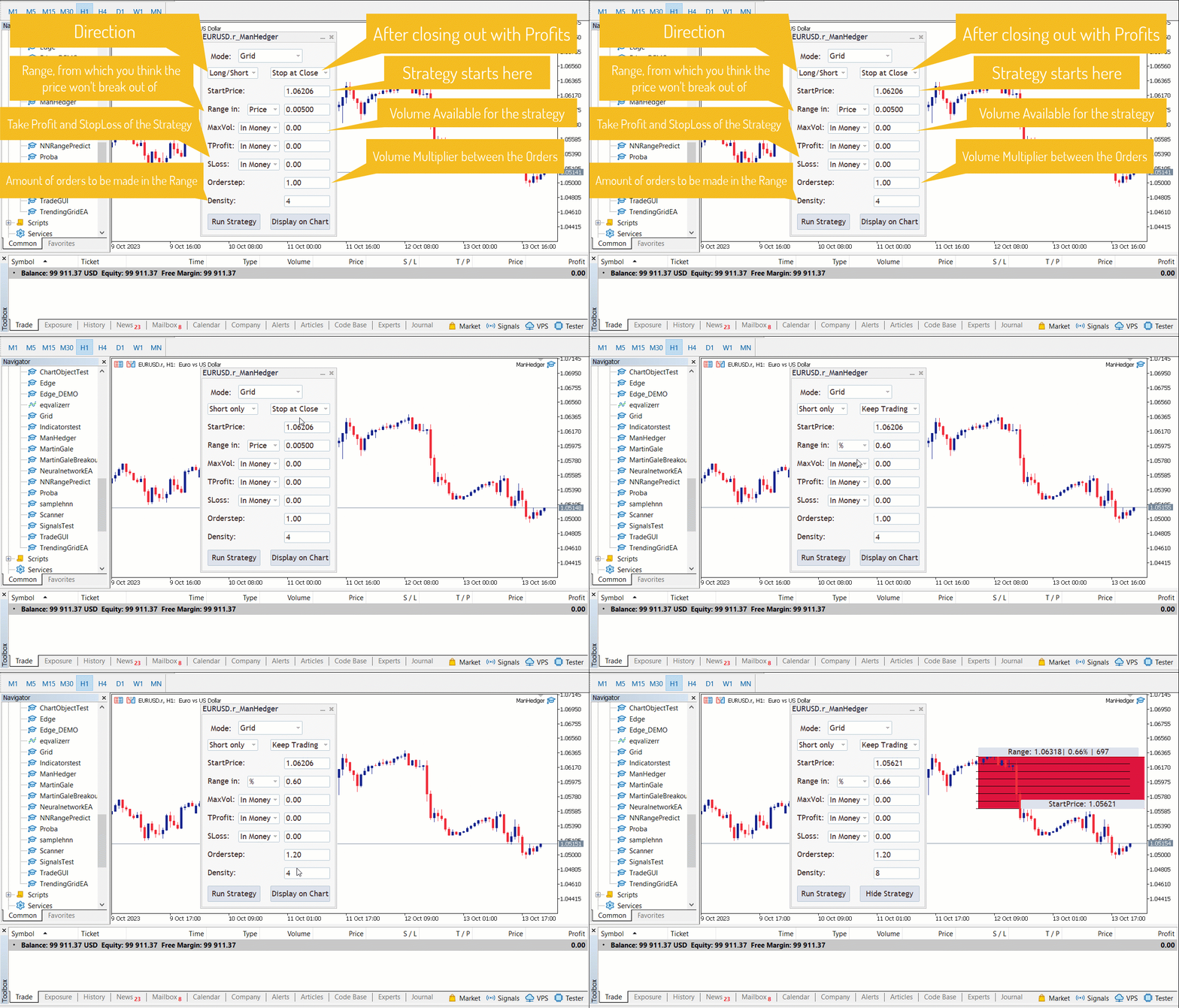
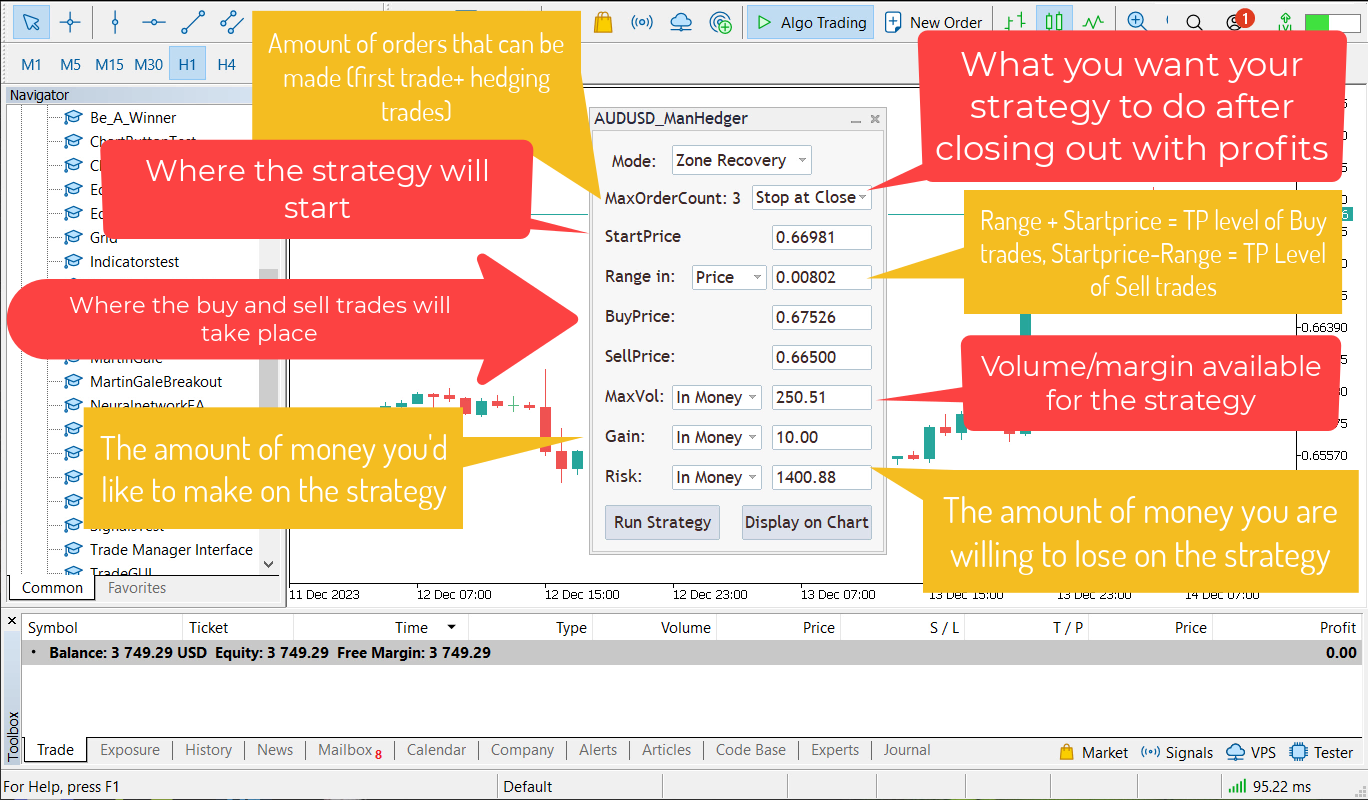
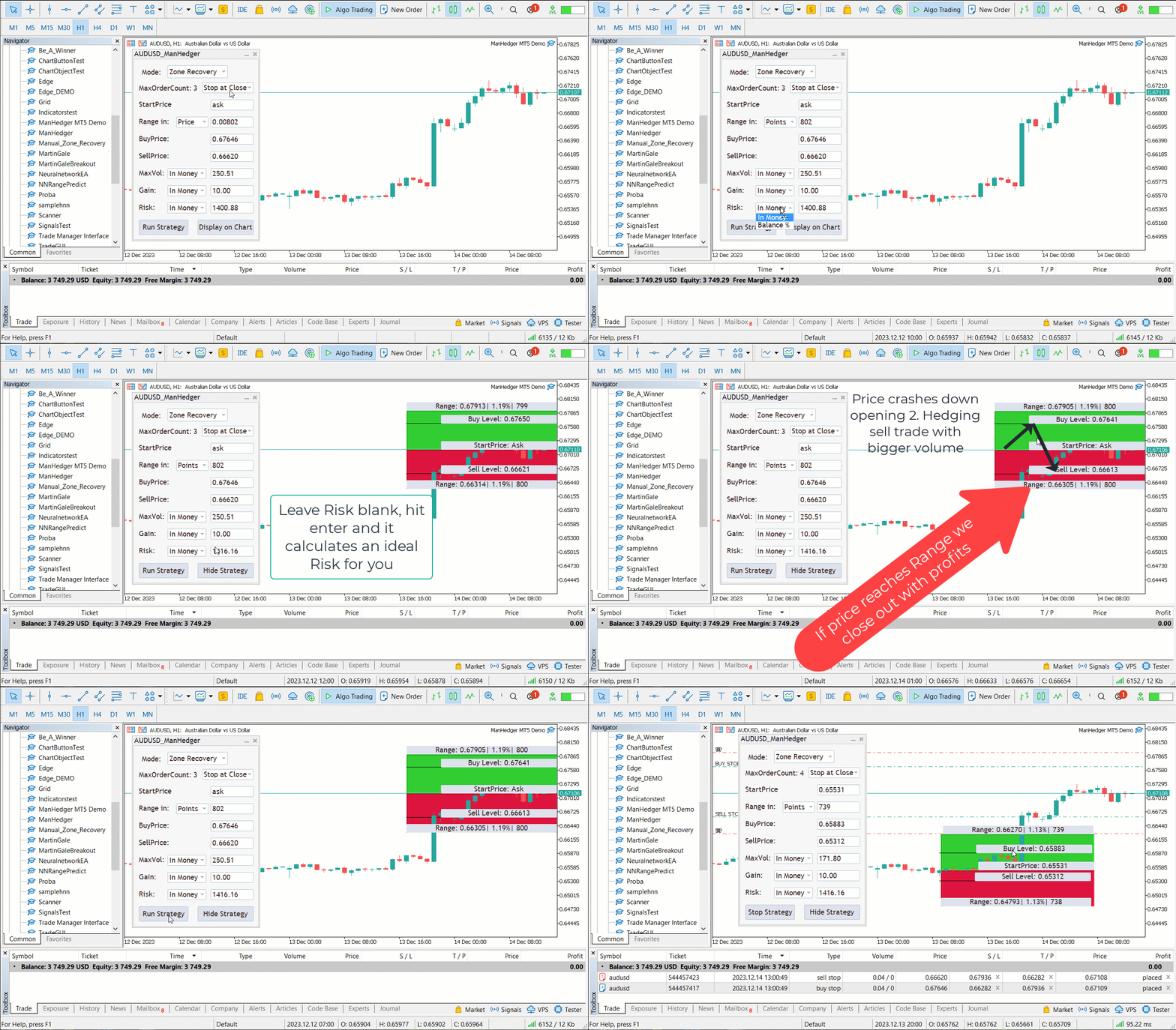
  • Implement your own Zone Recovery strategy to capitalize on trending markets.
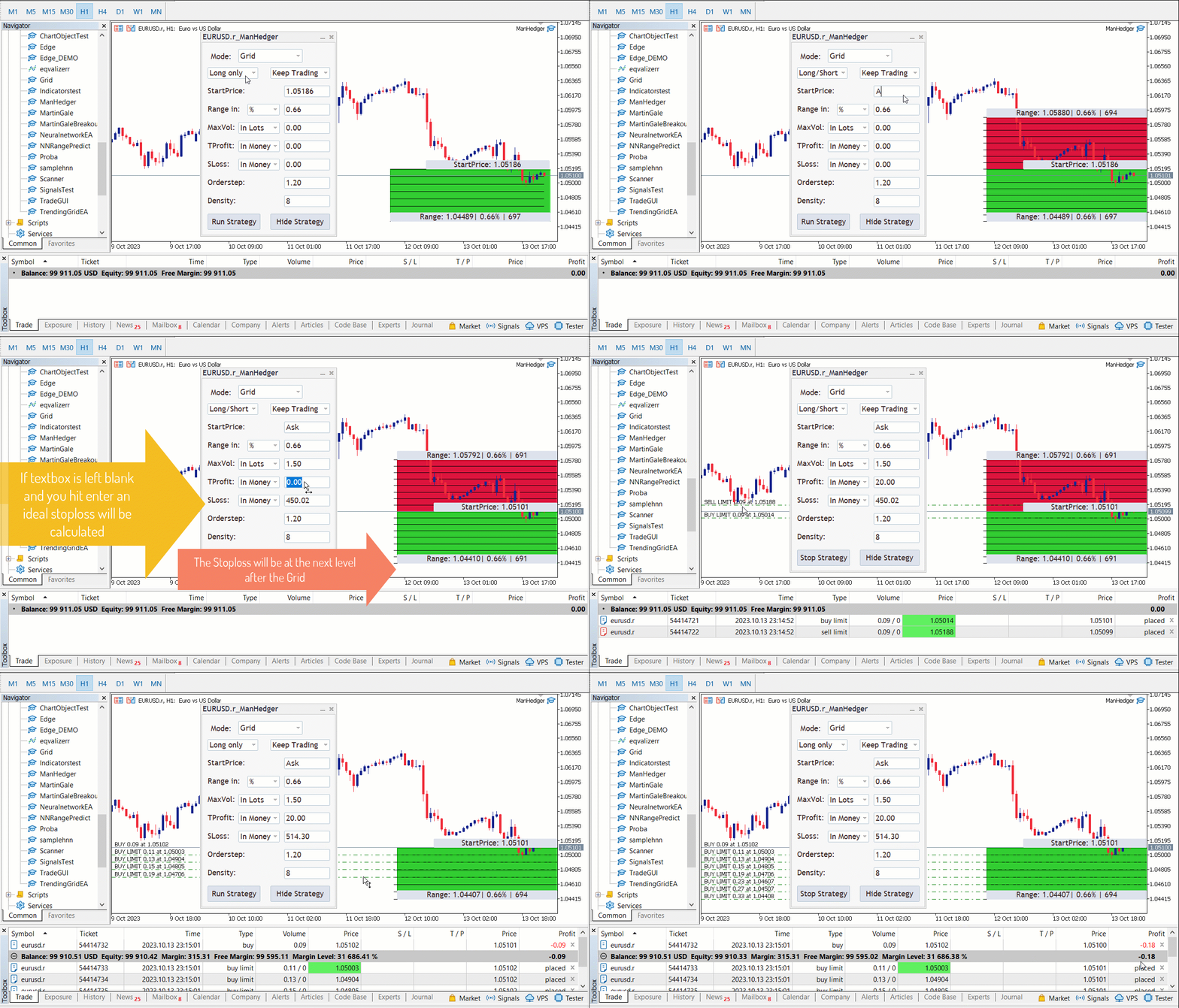
  • Create Grid trading strategies, to profit from ranging markets.
  • Place orders easily and clearly.
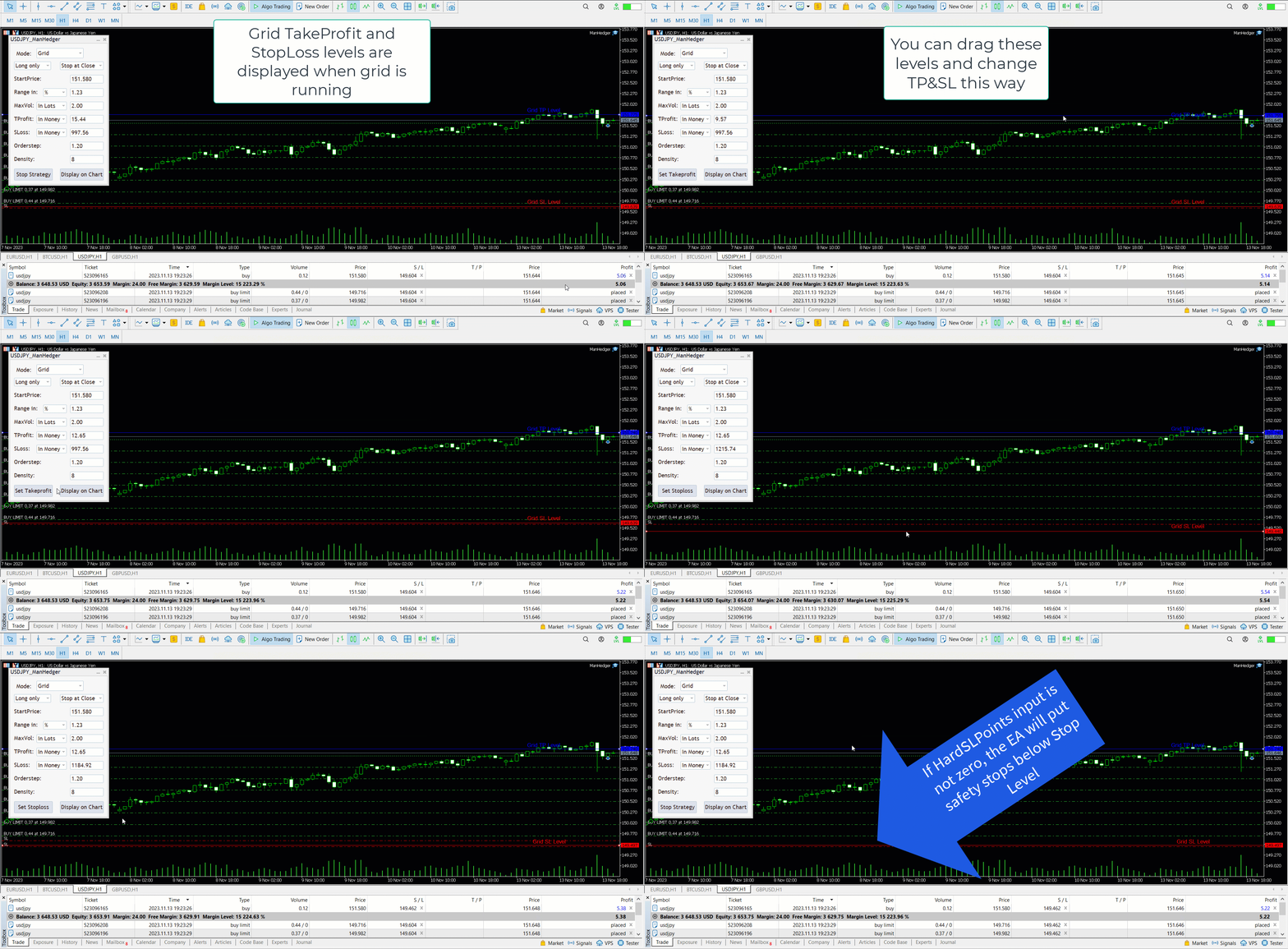
  • Display your trades/strategies on the chart.
  • Display your Take Profits/Stop Losses as a percentage.
  • Display volume in monetary amount.
  • Use Trailing StopLoss and Riskreward ratios.
  • Manage your open trades & pending orders
  • Limit your Drawdown & Profits
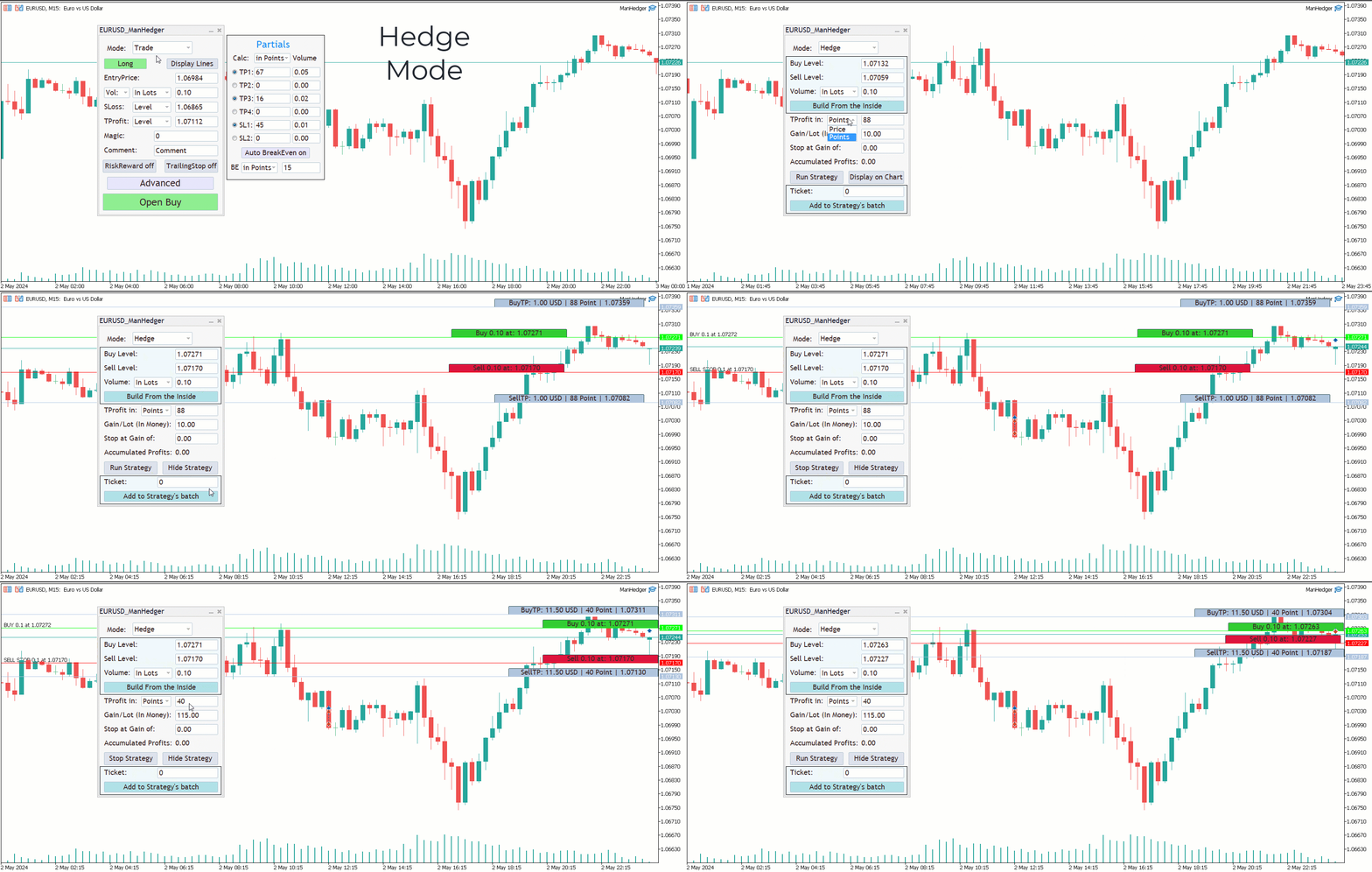
  • Create Hedging Strategies
  • Open trades with partial takeprofits
  • Open trades with automatic breakeven

This tool has helped me solve many of my own problems, and now I'm trying to help others as well. It can function as both a trade manager and a trading bot at the same time.

The trading strategy I use this utility for is based on the following idea: Most people lose trading forex. Betting against the sentiment with grid strategies seemed to be a profitable strategy for me. Zone Recovery strategies excel at trending market conditions. This is a huge advantage, because predicting direction is much harder than predicting high volatility. Initialising Zone Recovery strategies before news events is another key element of my personal trading strategy.

My advice for using the product:
  • When interpreting zone recovery or grid strategies, it is advisable to set a risk much higher than the gain, with a recommended Risk-Reward ratio of at least 15:1.
  • When changing the gain or risk of a running strategy, it is not recommended to set a much higher gain or a much lower risk, as it may have negative effects on the well-calculated strategies.
  • I do not recommend running zone recovery and grid strategies at the same time on the same security.
  • Setting the EA for the same securities multiple times with the same magic numbers may result in unexpected errors. (The EA distinguishes other EAs with the help of symbols and magic numbers).
  • I do not recommend using the grid strategy with an Orderstep or Density set too high, as the starting order may be too small.
  • I recommend using the EA for securities which have the account currency as either the base or margin currency.
  • With price changing the size of a lot in your base currency may change, re-enter the volume if you are calculating in monetary amount.
  • Don't remove Expert/close chart/close MetaTrader, when a strategy is running.
  • If the Balance is 0 the Expert won't work.

If you encounter any issues or have any feedback, recommendations, or questions regarding the program, please do not hesitate to contact me. I am committed to addressing any concerns and fulfilling your requirements to ensure the best possible experience with the product.


I'm constantly trying to improve this product and new versions can be expected.

I hope I could be of assistance, and that you will find this utility useful.
#Tags: Grid Tool Manual Grid Grid Manual Hedge Tool Hedge Manual Manual Hedge Hedging tool Strategy Builder grid strategy creator hedge strategy trade manager order manager visual display order display trade management trailing stop trailing sl riskreward tool prop firm challenge prop challenge trade assistant order grid management grid trading equity protector protect equity risk manager risk tool drawdown protect drawdown limiter  close all sl breakeven partial takeprofit partial tp partial sl modify trade modify, trade manager
レビュー 12
Tohir Dwi
29
Tohir Dwi 2024.06.27 15:51 
 

great project and tools, keep upgrade to be much better...

Jacques Van Echteld
218
Jacques Van Echteld 2024.03.17 10:31 
 

Very good and usefull ea!

Valentin Popa
572
Valentin Popa 2024.02.15 22:20 
 

Very good EA.

おすすめのプロダクト
Advanced Trading Chaos  The main purpose of the indicator is to help the trader detect the signals described by Bill Williams in his books to make a quick and correct trading decision. 1)Bullish/Bearish Reversal Bar(BDB) 2) Divergent Bar(DB) 3) Second Sage Signal — the third consecutive Awesome Oscillator bar  4) Working fractals (Fractals that worked above/below the red forehead  5) Three bar coloring modes 5.1) Coloring of bars according to the AO indicator (Including the squatting bar) 5.2
Bober Real MT5
Arnold Bobrinskii
4.76 (17)
Bober Real MT5 is a fully automatic Forex trading Expert Advisor. This robot was made in 2014 year and did a lot of profitbale trades during this period. So far over 7000% growth on my personal account. There was many updates but 2019 update is the best one. The robot can run on any instrument, but the results are better with EURGBP, GBPUSD, on the M5 timeframe. Robot doesn't show good results in tester or live account if you run incorrect sets. Set files for Live accounts availible only for cu
Introducing the DS Gold Robot, your ultimate companion in navigating the intricate world of XAUUSD trading. Developed with precision and powered by cutting-edge algorithms, DS Gold is a forex robot meticulously crafted to optimize your trading performance with  XAUUSD pairs . With its advanced analytical capabilities,  DS Gold  Robot   constantly monitors the gold market, identifying key trends , patterns, and price movements with lightning speed. The DS Gold Robot opens positions every day from
Moving Average Surfer – MT5向け精密トレンドキャプチャ EA Moving Average Surfer は、正確なエントリー判断・効率性・自動リスク管理を求めるトレーダーのために設計された高度なエキスパートアドバイザーです。高速と低速の移動平均線を組み合わせたトレンド分析に加え、市場環境をさらに精査するための複数のフィルターを搭載し、高確率の取引セットアップだけを選び抜くことを目的としています。 RSI フィルターによるモメンタム判定、ATR ベースのストップロス/テイクプロフィット、資金を保護する動的ロット管理など、実践的な安全機能が豊富に組み込まれています。また、長期・短期を問わずあらゆる時間足で稼働でき、スキャルピングからスイングまで幅広い手法に対応します。ユニークなマジックナンバーにより複数チャート同時運用も安全に行えます。 規律ある自動売買と柔軟なカスタマイズ性を両立した Moving Average Surfer は、高確率エントリーを正確に捉えたいトレーダーに最適なソリューションです。
TradePilotmt5
Hossein Khalil Alishir
TradePilot Expert Advisor (EA) for MetaTrader 5 TradePilot is a professional and user-friendly Expert Advisor (EA) for MetaTrader 5 (MT5) . It simplifies automated trading , risk management , and trade execution with a smart trading panel . Perfect for beginners and experienced traders looking for a reliable trade manager EA with automated lot size calculation and smart position management. Key Advantages User-Friendly Trading Panel: Customizable panel with buttons and hotkeys for fast ex
EnkiSoft Trade Clone EA User description in MQL5 blog New version 1.57 Read updates MT4  version download here With   Trade Clone EA   you can trade on multiple   MetaTrader 4   and  MetaTrader 5  accounts simultaneously, clone the trades of any trading robot from server account to your friends and family accounts.  Note: All MetaTrader 4 and    MetaTrader 5  must run in same computer, or you need copy the trade file to the Client computer. You can run multiple Trade Clone EA as server, and yo
The Trendline Trade Panel was created to make it easier to train forex trading skills in backtester and at the same time make it easier to live trade using trendlines with the push of a button. This ea is perfect for beginners who want to learn to trade manually because all of its features are equipped with basic tools for trading forex. Other uses for Trendline Trade Panel: + Can be used to perform recovering loss positions made by other EA or positions that open manually. Fill in magic number
Description : Rainbow EA MT5 is a simple Expert advisor based on   Rainbow MT5 indicator witch is based on Moving average with period 34. The indicator is incorporated in the EA, therefore, it is not required for the EA to operate, but if you wish, you can download it from   my product page . The Expert Advisor settings are as follows : Suitable for Timeframes up to H1 The parameters below can be set according to your trading rules. StopLoss ( Stop Loss in pips) TakeProfit ( Take Profit in pips
Attention: this is a multicurrency EA, which trades by several pairs from one chart!  Therefore, in order to avoid duplicate trades, it is necessary to attach EA only to one chart, ---> all trading in all pairs is conducted only from one chart! we can trade simultaneously in three different pairs, as by default (EURUSD + GBPUSD + AUDUSD), which take into account the correlation when entering the market for all three; we can trade only EURUSD (or any currency pair) and at the same time take into
インジケーターについて このインジケーターは、金融商品の終値に対するモンテカルロシミュレーションに基づいています。モンテカルロ法とは、以前の観測結果に基づくランダムな数値を使用して、さまざまな結果の確率をモデル化するための統計的手法です。 どのように機能しますか? このインジケーターは、歴史的データに基づき、時間の経過とともにランダムに価格が変動する複数の価格シナリオを生成します。各シミュレーション試行は、 終値 の変動を考慮するためのランダム変数を使用し、与えられた期間における将来の市場変動を効果的に模倣します。 モンテカルロシミュレーションの利点 - モンテカルロシミュレーションは、複数の将来のシナリオに対して戦略をテストすることで、さまざまなトレード戦略のリスクを分析するのに役立ちます。 - 稀な極端なイベント(テールリスク)を含むさまざまな市場状況で戦略のパフォーマンスを把握することができます。 - 単一の予測に依存するのではなく、モンテカルロ法は関連する確率を伴う潜在的な結果の範囲を提供します。これにより、利益や損失の可能性を理解するのに役立ちます。 モンテカルロ法は、
AlphaGain AI – 次世代AIによるエリートトレーディング精度 AlphaGain AIは、MetaTrader 5向けに設計された高性能エキスパートアドバイザー(EA)で、AIと過去10年以上のデータを活用し、マーケット環境に応じた自動適応戦略で正確なシグナルを提供します。 主な特徴: AIコア:ローソク足パターン、ボラティリティゾーン、モメンタムロジックを解析; 10年以上のヒストリカルデータで学習; 高度なエントリー/エグジットロジック:SL/TP、トレーリングストップ、ブレイクイーブン、ボラティリティに応じたTP; 資金保護:ドローダウン制限、エクイティガード、最大スプレッドフィルター、取引時間制限; 完全自動運用:人間の介入不要; 低レイテンシー対応:ECN環境に最適化。 推奨設定: 通貨ペア:EUR/USD 時間足:15分(M15) 最低残高:100ドル アカウントタイプ:ECNまたはRaw Spread レバレッジ:1:100以上 AlphaGain AIを選ぶ理由: 簡単導入:.ex5ファイル、.set設定、PDFガイド付属;
Product name BVCandleStream ##概要 スキャルピングおよびプライスアクション分析のために、カスタムのティックベースシンボル(等ティックバー)を自動生成するバックグラウンドサービスです。 標準シンボルの生ティックを、1本あたりのティック数が固定されたカスタムバーに変換し、これらの合成ティックチャートに対して任意の標準MT5インジケーターやEAを適用できるようにします。 主な特長 1. ティックベースのバー生成 開いているチャートのシンボルを監視し、ティックを指定本数( InpTicksPerBar )ごとにまとめたバーを自動生成 Bid / Ask / Mid いずれかの価格基準を選択可能 TickVolumeの表示で、バーの生成程度を目視判定可能 2. 履歴+リアルのシームレス連結 過去ティックをさかのぼってヒストリカルバーを構築。 ヒストリ生成完了後、リアルタイムティックへ即接続し、バーを継続更新。 3. カスタムシンボルによるチャート表示 標準のインジケータが適用可能。 4. マルチチャート対応 MT5 上で開いた複数チャートを自動スキャンし、対象シン
FREE
SlopeChannelB – 価格の傾斜チャネルを構築するテクニカル分析ツールで、市場の現状を評価し、取引シグナルを見つけるためのユニークな機会を提供します。 インジケーターの主な特徴: 価格の傾斜チャネル : このインジケーターは、サポートとレジスタンスのレベルを視覚化するのに役立ち、トレンドの逆転または継続の可能性を示すことができます。 ラインの色と背景の強調表示が異なる : 傾斜したサポートとレジスタンスのレベルは異なる色で表示され、チャネル自体はさらに背景で強調され、チャートの視覚的分析を簡素化します。 ライン計算のための3つのオプション : このインジケーターは回帰分析を使用してチャネルラインを構築します。3つの方法から選択できます: Robust(デフォルト) – 外れ値に強い方法。 OLS(最小二乗法) . Median(中央値計算) . 最適なモデル選択 : SlopeChannelBは5つの品質基準の分析に基づいて最も適切なチャネルラインのバリエーションを自動的に選択します。 品質パラメータはチャートに直接表示され、結果の評価に役立ちます。また、ボタンを使
Exp TickSniper PRO FULL
Vladislav Andruschenko
3.97 (58)
Exp-TickSniper- 各通貨ペアのパラメーターを自動的に自動選択する高速ティックスカルパー。 取引パラメータを自動的に計算するアドバイザーを夢見ていますか?自動的に最適化および調整されますか? MetaTrader4のシステムのフルバージョン:       MetaTrader4用の TickSniper   スカルパー TickSniper-完全な説明     +デモ+ PDF EAは、ほぼ10年間のEAプログラミングで得られた経験に基づいて開発されました。 EA戦略はどのシンボルでも機能します。 時間枠は関係ありません。 ロボットは、現在の相場、ティックの到着速度、スプレッドサイズ、およびその他の契約仕様パラメーターに基づいています。 システムは、有利なストップロスとテイクプロフィットレベル、平均ポジションの距離、トレーリングストップ距離などを自動的に定義します。 EAは、トレンドに対して追加のオープニングのシステムを適用します(「平均化」)。 その設定は、実際のアカウントでテストするために最適化されています。 Expert Advisorは、絶対にすべての通貨ペアで
SolarTrade Suite 金融ロボット: LaunchPad Market Expert - 取引を開始するために設計されています! これは、革新的で高度なアルゴリズムを使用して値を計算する取引ロボットであり、金融​​市場の世界でのアシスタントです。 SolarTrade Suite シリーズのインジケーター セットを使用して、このロボットを起動するタイミングをより適切に選択してください。 説明の下部にある SolarTrade Suite シリーズの他の製品をご覧ください。 投資と金融市場の世界を自信を持ってナビゲートしたいですか? SolarTrade Suite 金融ロボット: LaunchPad Market Expert は、情報に基づいた投資決定を行い、利益を増やすのに役立つ革新的なソフトウェアです。 SolarTrade Suite 金融ロボット: LaunchPad Market Expert の利点: - 正確な計算: 当社のロボットは、高度なアルゴリズムと分析方法を使用して、市場の動きを正確に予測します。 資産を売買するのに最適なタイミングを
TradePanel EA – Manual + Semi-Auto Trading Dashboard TradePanel EA is a powerful assistant for traders who want precision, speed, and full control over their trades. It combines on-chart execution , basket profit management , drawdown protection , and market/session awareness into one easy-to-use panel. Core Features Click-to-Trade System Place BUY/SELL instantly from the panel Click on the chart to set Stop Loss — TP is auto-calculated by your chosen R:R Risk Control & Lot Sizing Risk
ストキャスティクスマルチカレンシースキャナーダッシュボード MT5 は、ストキャスティクスオシレーターを使用して複数の通貨ペアと時間枠を監視するために設計された強力なツールです。シンボルと時間枠(M1からMN1まで)でシグナルを整理するグリッド形式を提供します。トレーダーは、戦略に合わせて特定の時間枠を有効または無効にできます。 MT4バージョンはこちらで入手できます: Stochastic Oscillator Multicurrency Scanner MT4 詳細なドキュメントはこちらをクリックしてください: ドキュメント このツールは、以下のストキャスティクス戦略に基づいてシグナルを表示します: 過買い/過売り戦略:ストキャスティクスが過買い(上位レベルを超える)または過売り(下位レベルを下回る)ゾーンに入るまたは出る際にシグナルが生成され、潜在的な反転を示します。 逆レベル戦略:ストキャスティクスがユーザー定義または自動計算された上位または下位レベルを逆方向にクロスする際にシグナルがトリガーされ、モメンタムの変化を示唆します。 クロスオーバー戦略:ストキャスティクスの%Kライ
Mine Farm is one of the most classic and time-tested scalping strategies based on the breakdown of strong price levels. Mine Farm is the author's modification of the system for determining entry and exit points into the market... Mine Farm - is the combination of great potential with reliability and safety. Why Mine Farm?! - each order has a short dynamic Stop Loss - the advisor does not use any risky methods (averaging, martingale, grid, locking, etc.) - the advisor tries to get the most
このユーティリティは、水平線( Prof1、Prof2、Loss1、Loss2 )で動作します。 これらの線は厳密に固定された名前を持ち、トレーダーが自分の端末の任意のチャートに独立して描画します。 すべての行を一度に作成するか、4 つのいずれかを選択するオプションがあります。 行の名前を見ると、その行の目的が明らかになります。 Prof1 および Prof2 ラインは、取引のテイクプロフィットレベルを示しますが、視覚的な形式で表示されるため、トレーダーが情報を認識しやすくなります。 Loss1 と Loss2 のラインはストップロス レベルを反映し、リスクを明確かつ視覚的に表現します。 したがって、このツールは主要なレベルを明確に視覚化するのに役立ち、トレーダーはより情報に基づいた意思決定を行うことができます。 このユーティリティのユニークな点は、1 つのチャートにインストールするだけで、どのターミナル チャートでもラインを操作できるようになることです。 エキスパート ユーティリティは、ターミナル内のすべての Prof1、Prof2、Loss1、Loss2 ラインを自動的に検出し
The Goat Scalper EA — Smart, Fast, and Built for Real Market Performance Overview The Goat Scalper EA is a next-generation trading system built to capture decisive market moves with surgical precision. Unlike typical scalpers that rely on risky methods such as martingale, grid, hedging, or arbitrage, The Goat uses a pure breakout logic based on advanced supply and demand zone detection, ensuring stable and transparent results in any condition. Core Strengths Smart Risk Management Stop Loss on
News Trader Pro is a unique robot that allows you to trade the news by your predefined strategy. It loads every piece of news from several popular Forex websites. You can choose any news and preset the strategy to trade it, and then News Trader Pro will trade that news by selected strategy automatically when the news comes. News release gives opportunity to have pips since the price usually has big move at that time. Now, with this tool, trading news becomes easier, more flexible and more exciti
A triangular arbitrage strategy exploits inefficiencies between three related currency pairs, placing offsetting transactions which cancel each other for a net profit when the inefficiency is resolved. A deal involves three trades, exchanging the initial currency for a second, the second currency for a third, and the third currency for the initial. With the third trade, the arbitrageur locks in a zero-risk profit from the discrepancy that exists when the market cross exchange rate is not aligned
EA Auto Martingale MT5の紹介 Auto Martingale は、手動トレードからドルコスト平均法(DCA)トレードを簡単に作成できるエキスパートアドバイザー(EA)です。高度な設定により、EA Auto Martingale は、利益を最適化し、リスクを効果的に管理しながら、独自の方法で完璧なマーチンゲール戦略を作成することができます。 Auto Martingaleの主な機能: Magic Number : デフォルトは0です。この値は最初の手動トレードに基づいて自動的に設定されます。 Maximum Deviation / Slippage : トレードを保護するための最大偏差/スリッページを制限します。 Validate Available Order Margin : 新しいトレードを実行する前に利用可能なマージンを確認します。 Indicator Input : Auto Martingaleは、period=3およびshift=2のパラメータを持つSMAインジケーターを使用して、価格が逆行したときのエントリーポイントを決定し、その後価格が回復する兆候
Majd Qatuni exp
Majd Ahmad Mahmoud Qatuni
MAJD QATUNI Trend Reversal EA v1.27 A fully automated Expert Advisor tested specifically on Gold (XAUUSD) , designed to capture potential market reversals after strong momentum periods. It uses a consecutive candlestick pattern , enhanced by multi-indicator filters and advanced risk management for precise entries and profit protection. Current price is for demo use only. Key Features: Momentum-Based Reversal Strategy: Detects N consecutive bullish/bearish candles, then waits for a correction
ET9 New on the Market, Launch promo! Only a few copies left at: $699 Next price: $799 Final price: $1599 The Best Expert Advisor  on   XAUUSD   any timeframes! ET9  for MT5 Updated v4.80 !!      Important update:  Merge Dragon Ball's H4 breakout strategy, Optimize parameters ,     Add MaxStopLoss and MaxTakeProfit parameters Include Free ET1 for MT5:  https://www.mql5.com/en/market/product/113131 Dragon Ball MT5 Updated v1.80 !!  https://www.mql5.com/en/market/product/116514 Descriptions ET9
Basic working principles of EA will have 2 main systems. 1. Timed order opening means that at the specified time the EA will open 1 Buy order and 1 Sell order. 2. When the graph is strong, the EA will remember the speed of the graph. is the number of points per second which can be determined You can set the number of orders in the function ( Loop Order ). The order closing system uses the trailling moneym Loss system, but I set it as a percentage to make it easier to calculate when the capital
The EA Protection Filter ( MT4 version here ) provides a news filter as well as a stock market crash filter, which can be used in combination with other EAs. Therefore, it serves as an additional protective layer for other EAs that do provide such filters.  During backtest analysis of my own night scalpers, which already use a stock market crash filter, I noticed that the historic drawdown,  especially during stock market crash phases like 2007-2008, was reduced significantly by using such a fil
自動注文とリスク管理のためのユーティリティ。利益を最大化し、損失を抑えることができます。トレーダーのための練習トレーダーによって作成されました。このユーティリティは使いやすく、トレーダーが手動で、またはアドバイザーの助けを借りて開いた成行注文で機能します。マジックナンバーで取引をフィルタリングできます。このユーティリティは、同時に任意の数の注文を処理できます。 次の機能があります。 1.ストップロスとテイクプロフィットレベルの設定; 2. トレーリング ストップ レベルで取引を終了します。 3. 損益分岐点の設定。 ユーティリティは次のことができます。 1. オーダーごとに個別に作業します (レベルはオーダーごとに個別に設定されます)。 2. 一方向注文のバスケットを操作します (レベルはすべての注文に共通に設定され、BUY と SELL は個別に設定されます)。 3. 多方向注文のバスケットを操作します (レベルはすべての注文に共通に設定され、BUY と SELL が一緒に設定されます)。 オプション: STOPLOSS - =-1 が使用されていな
《酒田禅心EA:本間宗久³⁰⁰年ローソク秘術・プライベート波動ハンター》 江戸時代の灯りが三世紀を超え、あなたのチャートで侍の魂が再燃する これは普通の取引ツールではなく、本間宗久直伝のローソク錬金術 【コアエンジン】 酒田戦法復活 18世紀米市場秘技が定量化により涅槃、消えることのない利益エンジンに化身 一本一本のローソクが宗久の富の暗号を物語る 禅的リスク管理術 独自開発「フローメルトダウンメカニズム」 市場の嵐が荒れ狂う時、システムは枯山水庭園のように静寂で精密️ 損失一時停止を発動、あなたは侍️が刀を鞘に収めるように戦機を静待 【全市場征服者】 ️ 金・外国為替・原油・株価指数・暗号通貨 ️ いかなる戦場も制御可能 ️ 深いパラメータ調整で、百年の戦法が現代市場の鼓動に完璧適応 【あなたの絶対取引王国】 スプレッド閾値自由設定 変動ブレイクスルーを精密捕捉 ローソク深度個別調整 専用形態認識精度をカスタマイズ 損益係数柔軟設定 リスクと
Scalper Magic
Claudio Tomas Ellero Fatigatti
Welcome to Scalper Magic! Scalper Magic is an advanced Expert Advisor (EA) specifically designed for scalping the EUR/USD currency pair on the H1 timeframe. This EA is optimized to operate efficiently and effectively in short intervals, maximizing profit opportunities from every small market movement. Key Features: Optimized for Scalping: Designed to capitalize on small price fluctuations in EUR/USD, leveraging scalping opportunities on the H1 timeframe. Proven Strategy: Utilizes a combination o
このプロダクトを購入した人は以下も購入しています
The  Easy Strategy Builder (ESB)  is a " Do It Yourself " solution that allows you to create a wide range of the automated trading strategies without any line of codes. This is the world’s easiest method to automate your strategies that can be used in STP, ECN and FIFO brokers. No drag and drop is needed. Just by set conditions of your trading strategy and change settings on desired values and let it work in your account. ESB has hundreds of modules to define unlimited possibilities of strategi
YuClusters
Yury Kulikov
4.93 (42)
Attention: You can view the program operation in the free version  YuClusters DEMO .  YuClusters is a professional market analysis system. The trader has unique opportunities to analyze the flow of orders, trade volumes, price movements using various charts, profiles, indicators, and graphical objects. YuClusters operates on data based on Time&Sales or ticks information, depending on what is available in the quotes of a financial instrument. YuClusters allows you to build graphs by combining da
Mentfx Mmanage mt5
Anton Jere Calmes
4.25 (8)
The added video will showcase all functionality, effectiveness, and uses of the trade manager. Drag and Drop Trade Manager. Draw your entry and have the tool calculate the rest. Advanced targeting and close portions of a trade directly available in tool (manage trades while you sleep). Market order or limit order on either side with factored spread. Just draw the entry, the tool does the rest. Hotkey setup to make it simple. Draw where you want to enter, and the stop loss, the tool calculates al
Lazy Trader is your personal risk management assistant that independently finds the best market entries, manages positions, and helps you extract maximum profit from every trading idea! It monitors charts from M1 to W1 , finds optimal entry points based on your parameters, and manages trades without your involvement: - Got an idea on the daily chart? No need to wait for lower timeframes to form a signal — Lazy Trader will check everything and open all necessary positions while you live your lif
I present to your attention a powerful utility for predicting the future movement of an asset based on W.D. Ganna’s law of vibration. This utility analyzes the selected market model and provides codes for future possible market movement patterns. If you enter the selected code into the appropriate box, you will receive a forecast of the potential market movement. The utility has the ability to display several potential forecast models. The forecast is not yet tied to time and price and gives th
Trading Chaos Expert
Gennadiy Stanilevych
5 (11)
This software has no equals in the world and represents a universal trade "console" covering trading signals, automated market entry, setting of Stop Loss and Take Profit, as well as Trailing Profit for multiple trades at the same time in a single open window. Intuitive control of the Expert Advisor in "three clicks" ensures a comprehensive use of all its functions on different computers, including tablets PCs. Interacting with additional signal indicators that mark the chart to give a real mark
Mt5 To InterativeBrokers Copier allows you to copy deals from MT5 account to Interactive Brokers. With this, you can run your EA strategy on a MT5 Demo/Real Account, then copy all the deals to Interactive Brokers account real time. Features: 1. Copy or Invert-Copy deals Realtime from MT5 to IB Account. 2. Synchronizing positions of both accounts periodicaly, in case any missing copying. 3. You can choose only Buy position or Sell position. Symbols Setup: General Format:  {MT Symbol} -> {IB S
Trade on crypto exchanges in MT5! GRat_Crypto is a tool for manual and automated trading , including ANY available EA, ANY  cryptocurrency  on most popular crypto exchanges in the familiar MT5 environment 24/7. Features 1. ALL instruments of the 9 most popular crypto exchanges are available: Binance, BingX, Bybit, Coinbase, CoinEx, Kraken,   KuCoin, MEXC and OKX . 2. The ability to place ANY type of order available in MT5, both market and pending, to modify orders and positions, to delete order
PROTECT YOUR FTMO Account in a simplest way Must-Have Account Protector for any Prop-trading Account and Challenge MT4 / MT5 Expert Advisor that protects your Forex Prop Trading account from an unexpected drawdown! FTMO Protector  is a Tool that lets you manage trades and control your profit and loss across multiple Robots and currency pairs using a simple parameters and settings. Use as many EAs and Instruments you need, the Protector will: 1.   Calculate your midnight (01:00 System time) Balan
Professional-Grade Chart Analysis – AI-Powered & Visually Enhanced The AInalyzer is an Expert Advisor for MetaTrader 5 that leverages artificial intelligence to analyze market structures and automatically places visual objects directly on your charts. Instead of spending hours manually examining charts, you'll get a clear overview of support levels, resistance zones, trend structures, and potential trading opportunities in no time – all logically presented, visually marked, and available at you
Best Renko Chart Generator
Mohammad Taher Halimi Tabrizi
5 (1)
This is the Best Renko chart generator ever in the market you can set the box sizes based on ATR or Fixed Size: 1. Fixed Box Size 2. Current ATR Size 3. ATR size of the Chart Start Time. also you can set the Renko chart cut of date and time to start as reference of creating renko charts. you need to attach to a symbol chart that want the renko chart of it, then immediately a new chart will be opened which is based on renko, you can use this generated chart and attach your EA to trade on or you e
Unlimited Trade Copier Pro MT5 is a tool to copy trade remotely to multiple MT4, MT5 and cTrader accounts at different computers/locations over internet. This is an ideal solution for you if you are a signal provider and want to copy your trades to other receivers globally on your own rules. One provider can copy trades to multiple receivers and one receiver can get trade from multiple providers as well. The provider can even set the subscription expiry for each receiver, so that receiver will n
CRT Pro Trading EA Ultimate v10 - プロフェッショナルパターンスキャナー 概要 CRT Pro Trading EA Ultimate v10は、Helios Technologiesが開発した高度なマルチシンボルエキスパートアドバイザーで、インテリジェントなトレンドアライメントを備えたCRT(統合-操作-分配)パターンの検出と取引を専門としています。このEAは、機関投資家の取引コンセプトとスマートシグナル管理を組み合わせ、複数の市場で高確率の取引機会を提供します。 主な機能 トレンドアライメント型シグナル生成 スマートトレンド分析:支配的な市場トレンドに沿ったシグナルのみを生成 マルチタイムフレーム確認:上位タイムフレーム分析を使用して低確率セットアップをフィルタリング アダプティブシグナル方向:強気トレンド = 買いシグナルのみ、弱気トレンド = 売りシグナルのみ、中立トレンド = 両方向許可 マルチシンボル市場スキャナー 12以上の銘柄サポート:EURUSD、GBPUSD、USDJPY、USDCHF、AUDUSD、USDCAD、EURGB
Autogrids
Guilherme Emiliao Ferreira
5 (3)
Autogrids Autogrids EA is a cutting-edge trading automation tool designed to give Forex traders an unparalleled edge in the market. Built on a powerful quantitative strategy, it analyzes the frequency distribution of daily price movements, leveraging historical data to create a highly optimized operational grid. ️ Key Features Dual Strategy Mode: Quantitative or Manual Grid: Choose between the Quantitative Mode, which automatically generates grids based on the statistical distribution of d
Features   With MT5 to Interactive Brokers(IB) Trader, you can: 1. Load chart data from IB to MT5, and Analyze with all standard or customer Indicators. 2. Place Orders to IB Account Directly in MT5. 3. Make your Own EAs upon IB Securities by only making minus changes of the trading function. Usage 1) Installation Copy the "Mt5ToIBTraderEn.ex4" and sample files to [MT5 Data Folder]->MQL5->Experts.  2)  MT5 Settings Add the IP Address to the MT5 Allowed URLs in 'Tools->Options->Expert Adviso
This Utility is designed for price action strategies, trading flags and retests, such as Guerrilla Trading and similar strategies It allows to: place pending orders for retests (on the Retest line or x PIPs away from the retest line) place orders for flag formations calculate lotsizes based on account size, currency pair and risk percentage split trades and place multiple trades if lot size exceeds max lot size given by broker manage trades with a trailing SL/TP behind the most recent highs/lows
Wouldn't it be great if AI had a second look at your trading data — graphics, indicators, and beyond? Introducing AI Trading Station , a revolutionary utility seamlessly integrated with the MetaTrader platform. Powered by the advanced intelligence of OpenAI's ChatGPT, this complete solution covers every step of your trading journey, from data gathering to trade execution. The Complete Trading Process. Reinvented Data Gathering & Visualization: Collect and display vital market data on intuitive
ClusterSecond
Rafil Nurmukhametov
4.78 (32)
The utility allows you to build different types of graphs: Seconds chart from 1 second to 86400 seconds Tick chart from 1 tick and above The volume chart Delta chart Renko chart Range chart Demo version of the utility https://www.mql5.com/ru/channels/clustersecond Built-in indicators for volumetric analysis: daily market profile and market profile of the selected timeframe, Cluster Search Imbalance VWAP Dynamic POC, VAH, VAL the profile depth of the market vertical volume with various display op
FiboPlusWave Series products Ready-made trading system based on Elliott waves and Fibonacci retracement levels . It is simple and affordable. Display of the marking of Elliott waves (main or alternative option) on the chart. Construction of horizontal levels, support and resistance lines, a channel. Superposition of Fibonacci levels on waves 1, 3, 5, A Alert system (on-screen, E-Mail, Push notifications).    Features: without delving into the Elliott wave theory, you can immediately open one of
This is a multipurpose indicator and has the following indicators in it with dashboard ( scanner) and chart indicator on multi time frames . Divergent Bar Market Profile  ( Daily Weekly Monthly Intraday and Custom Period , Market Profile Day type ) Order Block Inside Bars  Higher High Higher Close and Lower Low and Lower Close  Imbalance Finder Scalping Currency Strength Meter Momentum candles VSA Setups Much more  See for your self Who am I? - https://www.linkedin.com/in/adnanreh
エリオット波動カウンターは、エリオット波動を迅速かつユーザーフレンドリーに手動でマークアップするためのパネルです。マークの色とレベルを選択できます。最後のマークアップとツールによって作成されたマークアップ全体を削除する機能もあります。マークアップはワンクリックで作成されます。 5 回クリック - 5 つの波があります。エリオット波動カウンターは、エリオット波動の初心者にもプロのアナリストにも最適なツールです。 エリオット波動カウンターのインストールと入力ガイド 取得したい場合     EA 追加 URL (   http://autofxhub.com   ) MT5 端末に関する 通知 (スクリーンショットを参照)。 MT4 バージョン https://www.mql5.com/en/market/product/14016 MT5 バージョン https://www.mql5.com/en/market/product/15081 一般的な入力: 波の種類ボタン: このボタンを使用すると、ユーザーはチャートで強調表示する波のパターンの種類を選択できます。使用可能なオプションには、イ
If you wish to draw Support and Resistance lines, view: daily market opening, classical pivot levels, Fibonacci pivot levels, trend lines, Fibonacci levels, the remaining time to candle closing, and current spread. If you seek to place your orders with the exact lot that meets your desired stop loss risk. If you wish to do all this and more with just one click, then this is the perfect tool to use. This tool will allow you to feel more relaxed when deciding to open orders, as well as predicting
如果产品有任何问题或者您需要在此产品上添加功能,请联系我 Contact/message me if you encounter any issue using the product or need extra feature to add on the base version. There is Demo version of this panel Dashboard Babon Scalping System MT5 Demo in my product list, please try it out to get familiar with all functionalities for free. Free version: LINK MT4 version: LINK This system basically utilizes TDI, Heiken Ashi Trend, Price Trend on H1 time-frame and TMA on H1&H4 time-frame to generate the trend (big picture). Then
The new version of  MirrorSoftware 2021  has been completely rewriten and optimized.  This version requires to be loaded only on a single chart because  it can detect all actions on every symbol and not only the actions of symbol where it is loaded. Even the  graphics and the configuration mode  have been completely redesigned. The MirrorSoftware is composed of two components (all components are required to work):  MirrorController  (free indicator): This component must be loaded into the MASTER
The script displays info about the share's corporate reports and dividends. The data is downloaded from   investing.com : Report date Profit per share (EPS) Revenue Market capitalization Amount of dividends Date of payment of dividends Dividend income The product cannot be tested in the tester (since it is not possible to receive data from the Internet). Before launching:  Add 2   URL   https://ru.investing.com/earnings-calendar/Service/getCalendarFilteredData  and   https://ru.investing.com/di
Telegram Publisher Agent は、 トレーダーが Telegram チャネルおよびグループにリアルタイムでシグナルを送信できるようにするアドオンです。このツールは、カスタマイズ可能なメッセージ、チャートのスクリーンショット、その他の機能を備えており、トレーダーが取引の洞察や戦略をフォロワーと共有するのに役立ちます。このツールは、明暗のテーマ切り替えを備えた美しいデザインも備えており、ユーザーに美的で機能的な取引体験を提供します。 Telegram Publisher Agent は、すべての取引をチャネルおよびグループ内のシグナルとして公開するように設計されています。あなたがしなければならないことは、取引を提供することだけです。その後、ボタンをクリックするだけで、Telegram Publisher Agent が取引シグナルを取引チャネルまたはグループに送信するためのすべての面倒な作業を実行します。 Telegram パブリッシャーエージェント   インストールと入力ガイド EA に関する通知を受け取りたい場合は、URL (   http://autofxhub.
Telegram Notify MT5 Telegram Notify MT5 is an utility tool to bridge your MetaTrader 5 activities to your Telegram chat/channel. It is useful for monitoring your MetaTrader 5 account by sending a notification to your particular Telegram chat/channel when someone/EA is placing trades, modifying order's TP/SL, closing trades and etc. This EA does not place any trade for your account. This EA also could be a convenient tool for monitoring other's EA trading activities or a tool for publishing your
Telegram ChartSnap MT5 is an utility tool to bridge your MetaTrader 5 activities to your Telegram chat/group/channel. It will screen shot your MetaTrader 5 chart and send it to your dedicated Telegram chat/group/channel through a Telegram bot. The whole process will keep repeating based on a time cycle that predetermined by the user. It is a convenient tool for those who like to get access to their favorite system/dashboard that only available at MetaTrader Desktop. Beside that, trader can easi
半自動取引のためのユーティリティ。ストップオーダー、ストップロス、テイクプロフィット、トレーリングストップをブローカーに見えないように設定するための動的レベルを適用します。 FIFO要件のある米国のブローカーを含むあらゆるブローカーとの連携に適しています。 アドバイザリンクのMT4バージョン 取引はボタンまたは線を使用して開くことができます。アドバイザが線に沿ってポジションを開くには、チャートに線を引き、名前を変更します。価格がそれを超えると、EAは対応するコマンドを実行します。 OPEN_SELL-売り注文を開きます CLOSE_SELL-すべての売り注文を閉じます OPEN_BUY-オープンバイオーダー CLOSE_BUY-すべての購入注文を閉じる コマンドが実行された後、コメント「OK」が書き込まれ、行はコマンドを1回だけ実行します。 チャートには、受け取った利益、現在のオープンポジション(注文数、ロット数、利益)、オープニング注文のボタン、実行速度、スリッページに関する情報が表示されます。 オプション: MAGIC_NUMBER-マジックナンバー; LOT_S
Quick operation, quick purchase, sale, empty operation. Provide three buttons: Buy, Sell, empty. Buy: Quickly place more orders after clicking, default 1 hand, profit point and stop-loss point are 110 points, after successful order can be manually modified. Sell: Quickly place an empty order after clicking, default 1 hand, profit point and stop-loss point are 110 points, can be manually modified after the order is successful. Empty: Quickly clear all orders, including purchase and s
作者のその他のプロダクト
The Trade Manager Interface is a free utility designed to simplify manual trading in MetaTrader. MT4 Version Available Please leave a review, if you like the trade manager. It allows traders to visualize trades directly on the chart, calculate position size automatically, and manage orders with advanced features such as partial take profits, automatic breakeven, and trailing stops. For more advanced features check out: ManHedger This tool focuses on risk control and execution precision, making
FREE
The Supply and Demand Zone Indicator is a powerful and easy-to-use tool designed to help traders identify critical supply and demand zones on the chart. These zones can provide valuable insight into potential market reversals, breakouts, and important price levels where buyers or sellers are likely to take control. The best   FREE Trade Manager . If you want to create your own Hedging or Grid strategies without any coding make sure to check out the   ManHedger Key Features: Automatic Zone Detect


FREE
THIS EA IS A SEMI-AUTO EA, IT NEEDS USER INPUT. Manual & Test Version Please   DON'T BUY   this product before   TESTING  and watching my video about it. Contact me for user support or bug reports, or if you want the MT5 version! MT5 Version I do not guarantee any profits or financial success using this EA. With this Expert Advisor, you can: Implement your own   Zone Recovery   strategy to capitalize on trending markets. Create   Grid   trading strategies, to profit from ranging markets. Place
The   Trade Manager Interface   is a free utility designed to simplify manual trading in MetaTrader. Please leave a review, if you like the trade manager. It allows traders to visualize trades directly on the chart, calculate position size automatically, and manage orders with advanced features such as partial take profits, automatic breakeven, and trailing stops. This tool focuses on risk control and execution precision, making trade management faster and more efficient. For the advanced trade
FREE
The Supply and Demand Zone Indicator is a powerful and easy-to-use tool designed to help traders identify critical supply and demand zones on the chart. These zones can provide valuable insight into potential market reversals, breakouts, and important price levels where buyers or sellers are likely to take control. The best   FREE Trade Manager . If you want to create your own Hedging or Grid strategies without any coding make sure to check out the   ManHedger Key Features: Automatic Zone Detect
FREE
With this easy to set up indicator you can display and set alerts for the following candlestick formations: Bull Breakout, Bear Breakout, Hammer, Pin, Bullish Engulfing, Bearish Engulfing. Input parameters: ShortArrowColor: The color of the Arrows, displaying a Bearish candle formation LongArrowColor: The color of the Arrows displaying a Bullish candle formation BullishEngulfing: Disabled/Enabled/EnabledwithAlert BearishEngulfing: Disabled/Enabled/EnabledwithAlert Pin:  Disabled/Enabled/Enabledw
FREE
With this easy to set up indicator you can display and set alerts for the following candlestick formations: Bull Breakout, Bear Breakout, Hammer, Pin, Bullish Engulfing, Bearish Engulfing. I'd appreciate if you would review the indicator Input parameters: ShortArrowColor: The color of the Arrows, displaying a Bearish candle formation LongArrowColor: The color of the Arrows displaying a Bullish candle formation BullishEngulfing: Disabled/Enabled/EnabledwithAlert BearishEngulfing:   Disabled/Enab
FREE
フィルタ:
Thoriq Jameel
548
Thoriq Jameel 2024.07.28 07:24 
 

This EA have potential to make money, but still need updates to make more stable, need more option in hedge mode, sometimes we need sqeeze, and sometimes sqeeze becomes a problem, if this option is managed to off, in trade running will make more beneficial to trader, just my option, overall great tool to have for every trader. scalping or daytrading.

Peter Mueller
32122
開発者からの返信 Peter Mueller 2024.07.28 14:40
Thank you for your honest review! I can not find a good for all solution for the squeezing in hedge, I'm open for all recommendations
Tohir Dwi
29
Tohir Dwi 2024.06.27 15:51 
 

great project and tools, keep upgrade to be much better...

Peter Mueller
32122
開発者からの返信 Peter Mueller 2024.06.27 18:53
Thanks a lot for the review
Juan Carlos del Carmen
183
Juan Carlos del Carmen 2024.05.22 13:14 
 

It is an useful EA if you understand it properly and definitely I recommend as the same author recommended initially to me from the start to test ManHedger Trader in a demo account to at least get familiar and trained in the different modes available before trading a actual account with trading capital on it. Peter the autor has been very responsive, supportive and open to new suggestions from my side. What's more, I got plenty of support from the very beginning from him even with the demo Man Hedger Trader. So far, hedging was not used yet in my toolbox and I definitely recommend to use hedging in particular cases where for instance you already have loosing trades and your trading systeam has already failed in order to lock in the Equity Drawdown, free up trading margin in your account and mitigate tail risk.

Peter Mueller
32122
開発者からの返信 Peter Mueller 2024.05.22 13:15
Thanks a lot for the review
Jacques Van Echteld
218
Jacques Van Echteld 2024.03.17 10:31 
 

Very good and usefull ea!

Peter Mueller
32122
開発者からの返信 Peter Mueller 2024.03.17 23:10
Thanks for taking your time and writing a review, I appreciate it!
Valentin Popa
572
Valentin Popa 2024.02.15 22:20 
 

Very good EA.

Peter Mueller
32122
開発者からの返信 Peter Mueller 2024.02.16 10:34
Thank you very much for your review, it means a lot to me!
V2DAY
45
V2DAY 2023.12.07 22:03 
 

ユーザーは評価に対して何もコメントを残しませんでした

Darko Licardo
1446
Darko Licardo 2023.11.20 11:06 
 

ユーザーは評価に対して何もコメントを残しませんでした

Peter Mueller
32122
開発者からの返信 Peter Mueller 2023.11.20 11:18
Thank you very much for your review, means a lot to me!
Mustafa Nail Sertoglu
1087
Mustafa Nail Sertoglu 2023.09.19 16:48 
 

ユーザーは評価に対して何もコメントを残しませんでした

Peter Mueller
32122
開発者からの返信 Peter Mueller 2023.09.19 16:52
You can contact me in PM anytime if you have any problems. I'd be happy to help you set the EA up, and help you resolve your problems.
Best regards,
Peter
Hezbon Ogwari Magajo
120
Hezbon Ogwari Magajo 2023.09.17 12:22 
 

ユーザーは評価に対して何もコメントを残しませんでした

Peter Mueller
32122
開発者からの返信 Peter Mueller 2023.09.17 12:44
Thank you very much for the review :)
Grap the Trade
118
Grap the Trade 2023.08.08 13:56 
 

ユーザーは評価に対して何もコメントを残しませんでした

Peter Mueller
32122
開発者からの返信 Peter Mueller 2023.08.08 15:08
Thank you very much!
Andre Schinkel
1722
Andre Schinkel 2023.08.08 08:01 
 

ユーザーは評価に対して何もコメントを残しませんでした

Peter Mueller
32122
開発者からの返信 Peter Mueller 2023.08.08 11:39
Thank you for the review!
Duy Dong Dao
321
Duy Dong Dao 2023.08.07 16:06 
 

ユーザーは評価に対して何もコメントを残しませんでした

Peter Mueller
32122
開発者からの返信 Peter Mueller 2023.08.08 00:17
Thanks for the review
レビューに返信