Daily Telegram Market Briefing

Daily Telegram Market Briefing — Professional FX Session Briefing for MT5

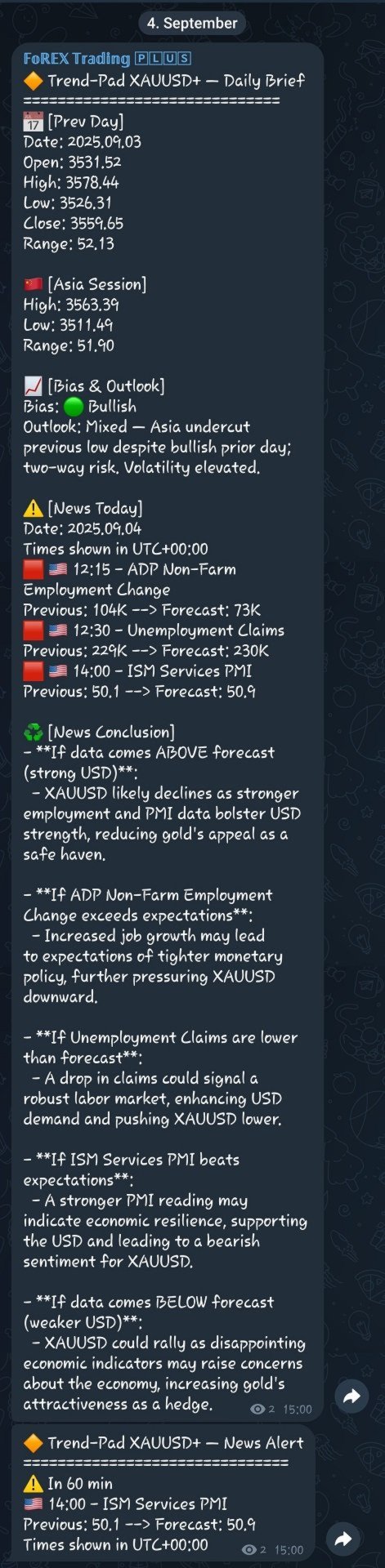
Daily Telegram Market Briefing is a MetaTrader 5 Expert Advisor that compiles a clean, actionable morning brief for the instrument on your chart and delivers it to your Telegram group or channel at a time you choose. It combines previous day OHLC levels, an Asia session range computed in your local time, a directional bias and short outlook, and a curated list of today’s high-impact macro events (from the ForexFactory calendar). Optional pre-event warnings and an automated news conclusion are included to help you prepare for the trading day in minutes.

This EA is designed for traders who want consistent, systematic preparation without juggling multiple tools. It is lightweight, timer-driven (no trades), and built to be robust on live and VPS environments.


1. What it does

    Each day at the configured local time, the EA:

    - Retrieves the previous day’s OHLC for the chart symbol and prints date, open, high, low, close, and full range.

    - Computes the Asia session high, low, and range using your chosen local hours, independent of broker time.

    - Derives a directional bias from the previous day’s candle and adds a concise, context-aware outlook.

    - Lists today’s macro events filtered by impact and by currencies relevant to the instrument (derived from the symbol’s base and quote).

    - Optionally appends a brief news conclusion section, either using a built-in heuristic or an OpenAI summary (You need an OpenAI API Key for that!).

    - Sends the complete brief to Telegram. It can delete the previous brief before posting and optionally pin the new message. Supergroup thread posting is supported.

    - Throughout the day, the EA can also send standalone news warnings a set number of minutes before qualifying events.


    2. Requirements and permissions


    In MetaTrader 5, enable WebRequest and add these domains:

    https://api.telegram.org

    https://nfs.faireconomy.media

    https://api.openai.com (only if you enable the OpenAI summary)


    The EA does not open trades. It should be attached to a single chart per symbol you want reported on. For multi-symbol coverage, attach separate instances.


    3. Installation and setup


    1. Place the EA in your terminal and restart MT5.

    2. In Tools → Options → Expert Advisors, enable WebRequest and add the domains listed above.

    3. Create a Telegram bot via BotFather and add it to your target group or channel with posting rights. Note the chat id and, if using supergroup topics, the thread id.

    4. Attach the EA to the desired chart(s). Configure send time, Asia window, weekdays, and Telegram settings.

    5. If you want AI summaries, set your OpenAI key and model and enable the option.

    6. Optionally enable pre-event warnings and choose the lead time.


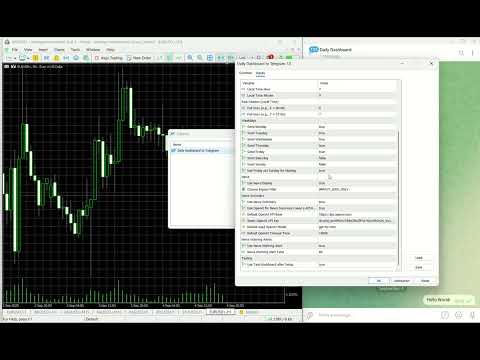
    4. Inputs

    Telegram

    Telegram_Enabled: Enable or disable Telegram delivery.

    Telegram_API_Base: Base URL for the Telegram Bot API.

    Telegram_Bot_Token: Your bot token.

    Telegram_Chat_ID: Target chat or channel id.

    Telegram_Thread_ID: Target thread id for supergroups (0 for none).

    Delete_Previous_Before: Delete the last dashboard before posting a new one.

    Auto_Pin_Message: Pin the newly sent dashboard automatically.

    Pin_Silent: Pin without sending a Telegram notification.


    Display Time (MT5 to Telegram)

    Trigger_Hour_Local: Local hour to send the daily brief.

    Trigger_Minute_Local: Local minute to send the daily brief.


    Asia Session (Local Time)

    Asia_Begin_Hour_Local: Local start hour of the Asia window (inclusive).

    Asia_End_Hour_Local: Local end hour of the Asia window (exclusive; auto-corrected to be at least begin + 1).


    Weekdays

    Send_Monday … Send_Sunday: Choose on which days to send the brief.

    Use_Friday_For_Monday_PrevDay: On Mondays, use Friday’s bar as the previous day instead of Sunday.


    News

    FF_News_Enabled: Include today’s events section.

    FF_Impact_Filter: High only, or high plus medium.


    News Summary

    Enable_News_Summary: Add an end-of-section conclusion.

    Use_OpenAI_Summary: Use OpenAI for a smarter summary instead of the built-in heuristic.

    OpenAI_API_Base: Base URL for OpenAI’s API.

    OpenAI_API_Key: API key used when OpenAI summaries are enabled.

    OpenAI_Model: Model name for the summary.

    OpenAI_Timeout_ms: Request timeout in milliseconds.


    News Warning Alerts

    News_Warnings_Enabled: Enable pre-event alert messages.

    News_Warning_Before_Min: Minutes before event to warn.


    Testing

    Send_Test_On_Init: Send a one-time sample brief on EA start.


    5. Practical tips

    For indices or metals, ensure your broker’s symbol provides consistent D1 and M5 history; on first run, allow a moment for data synchronization.

    If your trading plan focuses on specific releases, keep the filter at high-impact only and enable pre-event warnings at thirty to sixty minutes.

    For multi-symbol coverage in a single chat, use thread ids to separate instruments by topic.

    Support

    If you have questions about setup, permissions or thread posting feel free to reach out. I am happy to help you get the dashboard aligned with your routine.
    おすすめのプロダクト
    This is a simple EA Can only open ONE trade EVER then MUST be reattached to the chart everytime you want to use it. Designed to help manual traders Has lot sizes and stops / targets in pips. For a buy trade the engulfing bar must close above the previous red bars high Includes Alarm and Phone notifications Basically if you find a price zone you like and will take a trade if there is an engulfing bar . use this.
    FREE
    Advisor for hedging trading or pair trading. A convenient panel allows you to open positions on the necessary trading instruments and lots. Automatically determines the type of trading account - netting or hedging. Advisor can close all its positions upon reaching profit or loss (determined in the settings). A negative value is required to control losses (for example, -100, -500, etc.). If the corresponding fields are 0, the EA will not use this function.   Settings: Close profit (if 0 here
    複数のポジション/取引を一度にオープンする必要がありますか?簡単なソリューションを作成しました。一度に複数のポジションを入力できるようになりました。ロットサイズ、ポジション数、テイクプロフィット、ストップロスを設定できます。 例: 特定のロットサイズで 3、5、10 または任意の数のポジションを購入したいとします。 「購入」ボタンをタップするだけで購入できるようになりました。 または 例: 特定のロットサイズで 3、5、10、または任意の数のポジションを売りたいとします。 「販売」ボタンをクリックするだけで販売できます。 Fukusū no pojishon/ torihiki o ichido ni ōpun suru hitsuyō ga arimasu ka? Kantan'na soryūshon o sakusei shimashita. Ichido ni fukusū no pojishon o nyūryoku dekiru yō ni narimashita. Rotto saizu, pojishon-sū, teikupurofitto, sutoppuro
    Gann Box MT5
    Frederic Jacques Collomb
    Gann Box インジケーターは、トレーダーが市場の重要なレベルを特定し、活用するのを支援するために設計された強力で多機能なツールです。このインジケーターを使用すると、チャート上に長方形を描くことができ、それが自動的に 0, 0.25, 0.50, 0.75, 1 の戦略的レベルを持つ複数のゾーンに分割されます。価格がこれらのレベルのいずれかに達すると、アラートがトリガーされ、トレーディングの意思決定に貴重な支援を提供します。描いたゾーンに対する市場の動きを即座に把握できます。ゾーンをトレースするには、単純な長方形を描いて名前を GannBox に変更するだけです。 このインジケーターは、 サポートとレジスタンス の概念を使用するトレーダー、 サプライとデマンド 、 ICTテクニック 、または**公正価値ギャップ(FVG)**の専門家など、すべてのタイプのトレーダー向けに設計されています。 デイトレーダー、スイングトレーダー、またはポジショントレーダーであろうと、 Gann Box は市場の動きをより良く理解し予測する手助けをし、反応性とパフォーマンスを向上させます。 MT4バージョ
    Telegram Broadcast MT5
    Volodymyr Hrybachov
    3.67 (3)
    TELEGRAM BROADCASTユーティリティは、取引をTelegramチャネルに即座に公開するのに役立ちます。あなたが長い間FOREX信号であなた自身のテレグラムチャンネルを作りたいと思っていたなら、これはあなたが必要とするものです。 TELEGRAM BROADCASTはメッセージを送信できます: 取引の開始と終了。 保留中の注文の配置と削除。 ストップロスとテイクプロビジョニングの変更(ラストオーダー); 損失を止め、provをトリガーします。 保留中の注文のアクティブ化と削除: 取引レポートの送信; 入金と出金のメッセージを送信する。 ドローダウンまたは利益がN値に達したときにメッセージを送信します。 アカウントの監視-N分ごとに統計を送信します。 独自のテキストを追加して、各メッセージに分単位で遅延を投稿できます。すべてのメッセージは柔軟です。ユーティリティは1つのチャートにのみインストールされますが、すべてのシンボルからメッセージを送信します。設定で任意の記号を非表示にできます。 ユーティリティ構成: [サービス]-> [設定]-> [エキスパートアドバイザ
    Bneu Smart Money Concepts Pro — All-in-One ICT/SMC Analysis An automated Smart Money Concepts indicator that marks BOS, CHoCH, Order Blocks, Fair Value Gaps, Liquidity Sweeps, OTE Zone, Kill Zones, Asian Range, and Premium/Discount zones in real time. All signals use closed-bar data only. Non-repainting. WHAT IT DRAWS - BOS (Break of Structure) and CHoCH (Change of Character) labels - HH / HL / LH / LL swing point labels - Order Block zones (supply and demand) with midpoint lines - Fair Val
    BossFXTradePanelEA (MT5)  [First 10 copies sold at 50 USD price will increase to 99USD] BossFXTradePanelEA is a fully interactive trade management panel designed for MetaTrader 5, providing traders with an easy-to-use, one-click interface to execute and manage trades. This EA simplifies trade execution , risk management, and position control by combining market orders, stop loss, take profit, trailing stops, and breakeven functionalities into a single, intuitive panel.  Key features include: On
    このユーティリティは、ローソク足が手動で配置されたトレンドラインに触れたときに、より明確な未決注文であるかのように注文をオープンします。  これはどの資産にも使用でき、注文を開くとタッチしたラインが削除され、矢印が作成されます。この場合、これは価格反転操作に使用され、強気のローソク足がボトムアップラインに触れたときに売り注文をオープンし、弱気のローソク足がトップダウンラインに触れたときに買い注文をオープンします。  ストップロスとテイプロフィットを調整できます。このユーティリティは、価格が上昇および下降のサポートラインとレジスタンスライン(両方とも水平線など)に達したときに、注文を開いて画面を終了するようにプログラムできるため、非常に便利です。価格が上昇および下降のサポートラインとレジスタンスラインに達したときに、チャートパターンに非常に機能します。そして垂直。 最新のアップデートでは複数行を配置できるようになりました。 非常に重要: Meta trader 5 には取引履歴があり、注文がクローズされて線が引かれると、この線がロボットのロジックと混同され、不要な注文がオープンさ
    FREE
    概要 外国為替や金融市場では、迅速な反応と正確な意思決定が非常に重要です。しかし、標準のMetaTrader 5端末は最小でも1分のチャートしかサポートしておらず、トレーダーが市場の変動に敏感であることを制限しています。この問題を解決するために、 秒単位チャートキャンドルインジケーター を導入しました。このインジケーターを使用すれば、1秒から30秒の市場の動向をサブチャートで簡単に表示・分析できます。 主な機能 複数の秒単位タイムフレームのサポート :このインジケーターは、以下のタイムフレームを選択でき、さまざまな取引戦略に対応します: S1 : 1秒 S2 : 2秒 S3 : 3秒 S4 : 4秒 S5 : 5秒 S10 : 10秒 S15 : 15秒 S20 : 20秒 S30 : 30秒 リアルタイム更新 :秒単位チャートはリアルタイムで更新され、各瞬間に最新の市場情報を提供します。これにより、迅速な取引判断が可能になります。 ユーザーフレンドリーなインターフェース :インジケーターはサブチャートに表示され、直感的で使いやすいです。異なるタイムフレームに素早く切り替えて市場を迅速
    BullBea Display
    Everton Fernando Da Silva Messias
    1. 基本情報 インジケーター名:   BullBear Display バージョン:   1.00 開発者:   [あなたの名前] 会社:   MT5TOOLSLAB 種類:   チャートインジケーター 市場:   外国為替、株式、先物、暗号通貨 2. 説明 BullBear Display   は以下をリアルタイムで表示する視覚的インジケーターです: ブル(買い手)の強さ ベア(売り手)の強さ 市場支配権(価格をコントロールしている側) このインジケーターはチャートの左上隅に情報を表示し、市場センチメントの迅速な分析を可能にします。 3. インストール BullBear_Display.mq5   を保存:   \MQL5\Indicators\ MetaTrader 5を再起動 「ナビゲータ」ウィンドウで「カスタムインジケーター」を探す 目的のチャートにドラッグ&ドロップ 4. 入力パラメータ PeriodBuySell   (デフォルト: 13): EMA参照計算の期間。低い値はより敏感なシグナルを、高い値はより滑らかなシグナルを生成します。 5. シグナル解釈 支配: ブル
    FOREX Strike EA – Discipline Meets Opportunity FOREX Strike EA is an intelligent automated trading system built to bring structure, control, and consistency to the Forex market. Designed with modern MQL5 standards, it focuses on precision execution and disciplined awareness rather than aggressive exposure. By combining smart order placement with adaptive money management, the system engages the market only when conditions align—allowing you to trade with confidence, not emotion. Operating withi
    EASY Insight – スマートなトレードはここから始まる 概要 もし数秒で市場全体(FX、ゴールド、暗号通貨、指数、株式まで)を、手作業のチャート確認なしでスキャンできたらどうでしょう? EASY Insight は、インジケーターデータを実践的なトレードインテリジェンスに変換する、AI対応のエクスポートツールです。無駄な推測や視覚的な混乱に疲れたトレーダーのために設計されており、市場全体のスナップショットを1つのクリーンなCSVファイルで提供します。 これまでとは全く違う新しいトレード体験です。ウィンドウの切り替えも、グラフのごちゃごちゃしたオーバーレイもありません。FX Power (FXP)、FX Volume (FXV)、FX Dynamic (FXD)、FX Levels (FXL)、そして非FX資産用のIX Power (IXP) ― あなたがすでに知っているツールから得られる、純粋に構造化されたインサイトだけ。 さらに便利さを求めるなら、 EASY Insight AIO を選んでください。すべてが1つのインストールに含まれ、設定不要。チャート上にインジケータ
    EA Nation
    Joseph Anthony Aya-ay Yutig
    Expert Advisorsの戦略は、Facebook Group EANationから生まれました。このグループには4万人以上のメンバーがいます。新しいろうそくごとにヘッジ取引を開始し、ポジションが取引の負け側にあるときにグリッドを開きます。 平均グリッド= N                     =現在の小節の前の6小節の合計/ N 時間枠=新しいバーが表示されたときに新しいヘッジ取引を開始します 自動ロット= 1ロットは、10,000ドルのロットサイズが0.01になることを意味します NO MORE HEDGE =片側がNトレードに達すると、TPになるまでヘッジトレードを開始しません クロージング戦略= TP 1は、トレードの反対側のグリッドサイズです。                                = TP 2-6 =パーセントで パラメーター:  -平均グリッド  -AGタイムフレーム スプレッドフィルター  -最大スプレッド  - 時間枠 資金管理  -オートロット  -最大ロット  -乗数
    Aurum Quant Engine Pro A disciplined execution model designed for decision clarity, trend alignment, and precise signal filtration. Trades are triggered only when price structure, directional context, and pattern strength align cohesively. Aurum Quant Engine Pro is the enhanced Version 2 of the original release Aurum Quant Engine now equipped with advanced filtering layers for improved trade quality, precision entries, and stronger overall performance. Support & Feedback If you have any qu
    Previous Candle Levels MT5
    Wachinou Lionnel Pyrrhus Sovi Guidi
    1 (1)
    Previous Candle Levels MT5 shows the previous candle levels, it shows the previous candle Open High Low Close levels (OHLC Levels) in different time frame. It's designed to help the trader to analyse the market and pay attention to the previous candle levels in different time frame.  We all know that the OHLC Levels in Monthly, Weekly and Daily are really strong and must of the time, the price strongly reacts at those levels. In the technical analysis, the user can use them as a support and res
    FREE
    FX Power: 通貨の強弱を分析して、より賢い取引を実現 概要 FX Power は主要通貨と金の実際の強弱をあらゆる市場状況で理解するための必須ツールです。強い通貨を買い、弱い通貨を売ることで、 FX Power は取引の意思決定を簡素化し、高い確率の取引機会を見出します。トレンドを追従する場合でも、極端なデルタ値を使用して反転を予測する場合でも、このツールはあなたの取引スタイルに完全に適応します。ただ取引するだけではなく、 FX Power で賢く取引をしましょう。 1. なぜ FX Power がトレーダーにとって非常に有益なのか 通貨と金のリアルタイム強弱分析 • FX Power は主要通貨と金の相対的な強弱を計算し、マーケットダイナミクスに関する明確な洞察を提供します。 • どの資産がリードしているか、または後れを取っているかを監視して、取引するペアを賢く選びましょう。 マルチタイムフレームの包括的なビュー • 短期、中期、長期のタイムフレームで通貨と金の強弱を追跡し、マーケットトレンドに基づいて取引戦略を調整できます。 • スキャルピングからスイングトレード
    Introducing the   Elite Chart Navigator   — your ultimate MetaTrader 5 Expert Advisor designed to revolutionize multi-symbol trading with seamless chart navigation and superior usability. Product Overview The   Elite Chart Navigator EA   is a sophisticated trading utility enabling rapid switching between multiple trading pairs through an intuitive on-chart button interface. Built for professional traders managing numerous instruments, this EA dramatically improves workflow efficiency, ensuring
    Metatraderプラットフォームの多くの美しい機能を1か所で見逃すことなく使用したいと思います。 私たちはあなたのためだけにトレーディングパネルをデザインしました。あなたが逃したすべての魔法の機能を満たしています。 Nova Ultimate Trade Panelは、最高の便利な取引体験を提供します。 これは非常に高速に動作する補助パネルであり、すべての要求を満たすようにコード化されています。 すべての貿易取引で簡単に使用でき、最高レベルですべての機能を利用できます。 ダイナミックパネルとして設計されたNovaUltimate Trade Panelは、ドラッグ、移動、サイズの最小化が可能です。 その組み込み機能について話しましょう。 矢印キーとデータ入力付きのボックスを使用して、すばやく取引し、必要に応じて取引のサイズ(ロット)を変更できます。 保留中のトランザクションを作成し、トランザクション設定を変更できます。 矢印キー、トグルボックス、動的な手動ドラッグレベルシフターラインを使用して、すべての取引と保留中の取引のTAKEPROFITとSTOPLOS
    Plug & Play portfolio - series of high-quality EURUSD H1 strategies for maximized success. The 4th out of 8 strategies  portfolio set.  Each EA works well as a standalone, works even better as portfolio. Triple tested  - backtest, robustness tests , portfolio correlation. Uses a well-known CCI indicator combined with an ADX indicator. Why to buy Fully automatic EA with really easy set-up. Only risk amount to be set and you are good to go. Developed using genetic algorithms on 'in sample' data
    Welcome to Smart Algo Trade Panel Manager MT5 - the ultimate   risk management tool designed to make trading more effective based on user needs.  It is a comprehensive solution for seamless trade planning, position management, and enhanced control over risk. It does not matter weather you a beginner or an advanced trader, or a scalper needing rapid executions, SmartAlgo Trade Panel  adapts to your needs offering flexibility across all markets of your choice. You can put SL, Lot and TP of choice
    THIS RISK MANAGER WILL HELP YOU IN YOUR DAILLY TRADING, BY CALCULATING THE RISK AND THE LOTS, AND SET STOPLOSS, AND TAKE PROFIT, AND CAN CLOSE TRADES FOR YOU. RISK PERCENTAGE CASHRISK LOTS STOPLOSS TAKE PROFIT SELL AND BUY BUTTONS LOSE IN PROFIT BUTTON WICH WILL CLOSE ALL TRADES IN PROFIT SET BY THE USER CLOSE ON PROFIT BUTTON WICH WILL CLOSE ALL TRADES WHEN THE EQUALITY IS IN PROFIT SET BY THE USER AS WELL CLOSE TRADES BUTTON
    QuantumXAU Matrix – Smart Gold Trading EA for MetaTrader 5 QuantumXAU Matrix is a powerful, fully automated Expert Advisor specifically designed for XAUUSD (Gold) on the MetaTrader 5 platform. It follows a smart averaging strategy with controlled risk management, aiming for consistent profits through adaptive lot sizing and precise trade timing. Symbol-specific : Trades only on XAUUSD for optimized performance Automated logic : Opens positions based on market distance and profit targets
    Crypto_Forex MT5用インジケーター「 TREND Histogram 」(リペイント不要) - TREND Histogramインジケーターは、標準的な移動平均線クロスよりもはるかに高感度で効率的です。 - インジケーターの色は2色から選択可能:弱気トレンドは黄色(金色)、強気トレンドは緑(色は設定で変更できます)。 - TREND Histogramには、モバイルとPC向けのアラート機能が組み込まれています。 - このインジケーターは、プライスアクション、VSA、その他のインジケーターなど、他の取引手法と組み合わせるのに最適です。 - このヒストグラムは、価格と数量のデータを 1 つの値に結合する主要な指標の 1 つです。 高品質のトレーディングロボットとインジケーターをご覧になるにはここをクリックしてください! これは、このMQL5ウェブサイトでのみ提供されるオリジナル製品です。
    Product Name: Smart Switch Dashboard STOP WASTING SECONDS. SECONDS COST MONEY. Are you losing trades because you're fumbling through the Market Watch? Is your workspace messy and slowing you down? In trading, Speed is everything. If you aren't organized, you are losing money to traders who are. Smart Switch Dashboard is not just a tool—it is your COMMAND CENTER . Designed for serious Scalpers and Day Traders who demand Speed, Precision, and Zero Lag. DOMINATE YOUR WORKFLOW 1. ULTRA-FAST SY
    Algo Trading Indicaor MT5 The ATC ALGO indicator has been developed to work on the MetaTrader 5 platform. It has the same specifications and zones as the MetaTrader 4 version. There may be slight lag, which we believe is due to differences in MetaTrader 5 programming. We will work on improving it, God willing. MT5 Version                    https://www.mql5.com/en/market/product/170028 MT4 Version                    https://www.mql5.com/en/market/product/88034 With this indicator , you’ll have
    Aurum AI Trader – Agentic AI Gold EA for MT5 The Intelligent Neural Consensus Engine for XAUUSD Auto-Trading using Agentic AIs -Use Latest Upgrade Version 10 as of 4th March 2026 Now Integrate External AI agents such as Claude, Gemini,Open AI & GPTs through API key with this EA- Use M1/M15 for Frequent Scalping Trades_Use H4 for Selective few but best Trades Product Overview Aurum AI Trader is a next-generation, Agentic AI–powered Expert Advisor built exclusively for Gold (XAUUSD) trading on M
    Pro Trade Utility for MetaTrader 5 Pro Trade Utility is a professional manual trading assistant designed for traders who want precision, speed and clarity — without automated strategies. This tool does not trade automatically . It helps you execute and manage trades correctly with proper risk control. Key Features  Risk & Position Management Risk-based automatic lot size calculation Risk shown clearly in account currency Adjustable Stop Loss (points) Fixed Risk:Reward display  Trade Executio
    THE QUANTUM UNIFIED BRAIN FOR MT5 The indicator that thinks, adapts, remembers, and dominates across 9 timeframes simultaneously. Most indicators show you one signal. GRID PACMAN TITAN X ESTEROIDES v2.0 runs 17 interconnected intelligence modules in real time — and they vote together before a single arrow appears on your chart. This is not a crossover indicator. This is not a repackaged RSI. This is a complete autonomous analysis engine built for traders who are tired of chasing the market and
    RAZORQUANT AI v3.7 (MT5 EA)  Purpose: Automated trading EA that combines classic technical filters with machine-learning signals and optional external AI (LLM) advice to decide BUY/SELL/HOLD and manage trades. Core trading + risk rules: Runs on a chosen timeframe (default M1 ), with MagicNumber , max trades per symbol/day , minimum minutes between trades , max spread , and daily loss limit (% of balance) . Position sizing supports fixed lot or risk-% . Technical filters (rule-based): Trend/MA s
    Symbol                                       XAUUSD, AUDUSD Period                                        H1 timeframe Retail support                            YES Minimum deposit                       1000 USD (or the equivalent amount in another currency) Compatible with all brokers      YES (supports any account currency) Works without preset                YES Symbol XAUUSD, AUDUSD Period (Timeframe) H1 timeframe Retail support YES Minimum deposit 1000 USD (or the equivalent amount in ano
    FREE
    このプロダクトを購入した人は以下も購入しています
    Trade Assistant MT5
    Evgeniy Kravchenko
    4.42 (209)
    取引 ごとのリスクの 計算、新規注文 の 簡単 な 設置、部分的 な 決済機能 を 持 つ 注文管理、 7 種類 のトレーリングストップなど 、便利 な 機能 を 備 えています 。 追加の資料と説明書 インストール手順   -   アプリケーションの手順   -   デモアカウント用アプリケーションの試用版 ライン機能 チャート上にオープニングライン、ストップロス、テイクプロフィットを表示します。この機能により、新規注文を簡単に設定することができ、注文を出す前にその特徴を確認することができます。   リスク計算 リスク計算機能は、設定されたリスクとストップロス注文のサイズを考慮して、新規注文のボリュームを計算します。ストップロスの大きさを自由に設定できると同時に、設定したリスクを守ることができます。 Lot calc ボタン - リスク 計算 を 有効 / 無効 にします 。 Risk フィールドでは 、必要 なリスクの 値 を 0 から 100 までのパーセンテージまたは 預金通貨 で 設定 します 。 設定」 タブで 、 リスク 計算 の 種類 を 選択 します :「 $ 通
    Trade Manager EAへようこそ。これは、取引をより直感的、正確、そして効率的にするために設計された究極の リスク管理ツール です。これは単なるオーダー実行ツールではなく、包括的な取引計画、ポジション管理、リスク管理のためのソリューションです。初心者から上級者、迅速な実行を必要とするスキャルパーまで、Trade Manager EAはあらゆるニーズに対応し、為替、指数、商品、暗号通貨などさまざまな市場で柔軟に対応します。 Trade Manager EAを使用すると、複雑な計算が過去のものになります。市場を分析し、エントリーポイント、ストップロス、テイクプロフィットのレベルをチャート上のラインでマークし、リスクを設定するだけで、Trade Managerが最適なポジションサイズを即座に計算し、SLとTPをピップ、ポイント、口座通貨でリアルタイムに表示します。すべての取引が簡単かつ効果的に管理されます。 主な機能: ポジションサイズ計算機 :定義されたリスクに基づいて取引サイズを瞬時に決定します。 簡単な取引計画 :エントリー、ストップロス、テイクプロフィットを設定するためのド
    Local Trade Copier EA MT5
    Juvenille Emperor Limited
    4.96 (136)
    Local Trade Copier EA MT5 による、驚くほど高速な取引コピーを体験してください。1分で簡単にセットアップできるこの取引コピー機は、同じWindowsコンピュータまたはWindows VPS上の複数のMetaTrader端末間で取引をコピーすることができ、0.5秒未満の高速コピースピードを実現します。 初心者であろうとプロのトレーダーであろうと、 Local Trade Copier EA MT5 には、あなたの特定のニーズに合わせてカスタマイズするための幅広いオプションが用意されています。これは、利益の可能性を高めたい人にとって究極のソリューションです。 今すぐ試してみて、これが市場で最も速くて簡単なトレードコピー機である理由を理解してください。 ヒント: デモアカウントで Local Trade Copier EA MT5 デモバージョンをダウンロードして試すことができます: ここ ダウンロードした無料のデモ ファイルを MT5 >> ファイル >> データ フォルダを開く >> MQL5 >> Experts フォルダに貼り付けて、ターミナルを再起動しま
    ベータリリース Telegram to MT5 Signal Trader はまもなく正式なアルファ版をリリースします。いくつかの機能はまだ開発中で、小さな不具合に遭遇する可能性があります。問題が発生した場合はぜひご報告ください。皆さまのフィードバックがソフトウェア改善に役立ちます。 Telegram to MT5 Signal Trader は、 Telegram のチャンネルやグループからの取引シグナルを自動的に MetaTrader 5 にコピーする強力なツールです。 パブリックおよびプライベートの両方のチャネルに対応し、複数のシグナル提供元を複数のMT5口座に接続可能です。ソフトウェアは高速で安定し、すべての取引を細かく制御できます。 インターフェースは直感的で、ダッシュボードとチャートは見やすく設計されており、リアルタイムで動作状況をモニターできます。 必要環境 MQL の制限により、EA は Telegram と通信するためのデスクトップアプリが必要です。 インストーラーは公式の インストールガイド にあります。 主な機能 マルチプロバイダー: 複数の Telegram
    TradePanel MT5
    Alfiya Fazylova
    4.87 (153)
    Trade Panelは多機能なトレーディングアシスタントです。アプリには手動取引用の50以上のトレーディング機能が搭載されており、ほとんどの取引作業を自動化することができます。 注意!割引は2026年5月5日まで有効です。2026年5月6日から価格は100ドルになります。 購入前に、デモアカウントでアプリのデモ版をテストすることができます。デモアカウント用のアプリの試用版をダウンロードするには、次のリンクをご利用ください: https://www.mql5.com/en/blogs/post/750865 。 完全な手順 こちら 。 取引。 ワンクリックで取引操作を行うことができます: リスクを自動計算して指値注文やポジションを開く。 複数の注文やポジションをワンクリックで開く。 注文のグリッドを開く。 保留中の注文やポジションをグループごとに閉じる。 ポジションの方向を反転(Buyを閉じてSellを開く、またはSellを閉じてBuyを開く)。 ポジションをブロックする(不足している量のポジションを開くことでBuyとSellのポジション量を等しくする)。 すべてのポジションを部分的に
    ABQ Visual Risk Sizer
    Cristian David Castillo Arrieta
    ABQ Visual Risk Sizer - Institutional Risk & Trade Execution カテゴリ:ユーティリティ / リスク管理 手動によるロット計算は、時間とコストの浪費につながります。 現代のトレーディング、特にプロップファーム(Prop Firms)の口座を運用する場合、ロット計算の誤りや注文入力のわずか5秒の遅れが、デイリードローダウンルールの違反や絶好のエントリーポイントを逃す原因となります。 ABQ Visual Risk Sizer は、この問題を根本的に解決するために設計された機関投資家レベルのツールです。複雑なリスクの数学的計算を、MetaTrader 5のチャート上で直接、直感的かつ迅速、そして100%正確な視覚的体験へと変貌させます。 外部のカレンダ計算機やExcelシートはもう必要ありません。チャート上のラインをドラッグするだけで、ワンクリックで取引を実行できます。 ABQ Visual Risk Sizer が必要な理由 プロップファームのための完全保護: 各取引で、設定した正確なリスク比率(または金額)を維持します。ゴールド
    Farmed Hedge Yield Farming | All Markets (Manual - Hybrid - Semi/Automated EA) MULTI-ASSET SUPPORT Trade any asset available on your broker - Forex: Major, Minor, Exotic pairs - Crypto: BTC, ETH, XRP, SOL, BNB - Stocks: Apple, Tesla, Amazon, Google, etc. - Commodities: Gold, Silver, Oil, Gas - Indices: US30, NAS100, SPX500, DAX40 - Any CFD your broker offers VERIFIED TRADING RESULTS - Farmed Hedge Yield Axi Copy:  https://www.mql5.com/en/signals/2356376 - Farmed Hedge Yield Exn Copy:   https:/
    Power Candles Strategy Scanner - 自動最適化型マルチシンボル設定ファインダー パワーキャンドル・ストラテジー・スキャナーは 、パワーキャンドル・インジケーターを駆動するのと全く同じ自己最適化エンジンを、マーケットウォッチに登録されているすべての銘柄に対して並行して実行します。1つのパネルで、現在統計的に取引可能な銘柄、各銘柄で勝率の高い戦略、最適なストップロス/テイクプロフィットの組み合わせが表示され、新たなシグナルが発生した瞬間に通知が届きます。 このツールは、Stein Investmentsのエコシステムの一部です。  18種類以上のツールをすべて閲覧し、AIを活用したセットアップの推奨を受け取り、  https://stein.investments でコミュニティに参加しましょう 市場動向を網羅。銘柄ごとに3,000件以上の自動最適化。2種類のアラート。ワンクリックでチャートを切り替えて即座にアクション。 なぜこれが必要なのか 多くのマルチ銘柄スキャナーは、 価格の動き (ボラティリティ、変動率、銘柄ごとのRSI)を表示するだけです。それ
    Exp COPYLOT CLIENT for MT5
    Vladislav Andruschenko
    3.82 (34)
    MetaTrader 5 用のプロフェッショナル取引コピー機 MetaTrader 向けの高速・高性能・信頼性の高い 取引コピー機 です。 COPYLOT は、MT4 と MT5 のターミナル間で Forex 取引をコピーでき、 Hedge 口座と Netting 口座の両方に対応しています。 COPYLOT MT5 版の対応構成: - MT5 Hedge → MT5 Hedge - MT5 Hedge → MT5 Netting - MT5 Netting → MT5 Hedge - MT5 Netting → MT5 Netting - MT4 → MT5 Hedge - MT4 → MT5 Netting MT4 版 完全な説明 + DEMO + PDF 購入方法 インストール方法 ログファイルの取得方法 テストと最適化の方法 Expforex のすべての製品 MT4 ターミナルへのコピーも可能です(MT4 → MT4、MT5 → MT4): COPYLOT CLIENT for MT4 COPYLOT は、2台、3台、さらには10台のターミナル間で同時に動作できる、プロフェッ
    Trade Dashboard simplifies how you open, manage, and control your trades, with built-in lot size calculation. It allows you to execute trades, manage risk, and control positions directly on the chart, with tools such as partial close, breakeven, and trailing stop. Designed to reduce manual work and help you stay focused on your trading decisions. A demo version is available for testing. Detailed explanations of features are provided within the MQL5 platform. Installation instructions are include
    Footprint Chart Pro — Professional OrderFlow EA for MetaTrader 5 Version 6.34 | Professional tool for real traders | Institutional-Grade Visualization DEMO USERS - PLEASE SELECT EVERY TICK / REAL TICK WHEN TESTING AND YOU HAVE DOWNLOADED HISTORICAL DATA. IF YOU SEE A WAITING SCREEN AND IT IS NOT DOWNLOADING, IT MEANS YOU HAVE LOW HISTORICAL DATA. TRY 1 MIN AND 5 MIN FIRST ON 1 DAY DATA. ONE DAY DATA SHOULD BE THE NEWEST AND MOST CURRENT DATE. PLEASE WAIT UNTIL THE MARKET HAS ROLLED OVER PERIOD.
    Timeless Charts
    Samuel Manoel De Souza
    5 (4)
    Timeless Charts is an advanced charting solution designed for professional traders seeking for custom charts / custom timeframes , including seconds charts / seconds timeframe, renko charts / renko bars, cluster charts / footprint charts and advanced tools present in most of the popular platforms. Unlike traditional offline charts or simplistic custom indicators, this solution constructs fully custom bars with true timestamp accuracy , down to miliseconds, allowing for a powerful and precise tr
    Trade copier MT5
    Alfiya Fazylova
    4.59 (41)
    Trade Copierは、取引口座間の取引をコピーして同期するように設計された専門的なユーティリティです。 コピーは、同じコンピューターまたはvps にインストールされている、サプライヤーのアカウント/端末から受信者のアカウント/端末に行われます。 キャンペーン - すでに「Trade copier MT5」をご購入の方は、「Trade copier MT4」を無料で入手できます(MT4 → MT5 および MT4 ← MT5 のコピー用)。詳細な条件については、どうぞ個別メッセージでお問い合わせください。 購入する前に、デモ アカウントでデモ バージョンをテストできます。 デモ版 こちら 。 詳細な説明は こちら 。 主な機能と利点: MT5ネッティングアカウントを含む、MT5> MT5、MT4> MT5、MT5> MT4のコピーをサポートします。 高いコピー速度(0.5秒未満)。 ベンダーモードと受信者モードは同じ製品内に実装されています。 チャートから直接リアルタイムでコピーを制御できる、簡単で直感的なインターフェイス。 接続が切断されたり、端末が再起動されたりしても、設定と位
    Trade Manager DashPlus
    Henry Lyubomir Wallace
    5 (13)
    DashPlus は、MetaTrader 5プラットフォーム上での取引効率と効果を向上させるために設計された高度なトレード管理ツールです。リスク計算、注文管理、高度なグリッドシステム、チャートベースのツール、パフォーマンス分析など、包括的な機能を提供します。 主な機能 1. リカバリーグリッド 逆境の市場環境下で取引を管理するための平均化および柔軟なグリッドシステムを実装します。 取引回復のための戦略的なエントリーおよびエグジットポイントを可能にします。 2. スタックグリッド 強い市場の動きの中でポジションを追加することで、有利な取引での潜在的なリターンを最大化するように設計されています。 トレンド市場で利益を得られるよう、勝ち取引を拡大します。 3. 損益(P&L)ライン チャート上に直接、潜在的な利益と損失のシナリオを視覚的に表示します。 設定を調整し、P&Lラインをドラッグして、実行前にさまざまな取引結果を評価します。 4. バスケットモード 同じシンボルでの複数ポジションの管理を簡素化し、それらを単一の集約ポジションにまとめます。 平均価格に基づいて、ストップロスやテイクプ
    Copy Cat More Trade Copier MT5 (コピーキャット MT5) は、今日の取引課題に対応して設計されたローカルトレードコピーシステムと完全なリスク管理・実行フレームワークです。プロップファームのチャレンジから個人ポートフォリオ管理まで、堅牢な実行、資本保護、柔軟な設定、高度な取引処理の組み合わせで、あらゆる状況に適応します。 コピーシステムはマスター(送信側)とスレーブ(受信側)の両方のモードで動作し、成行注文と指値注文、取引修正、部分決済、両建て決済操作のリアルタイム同期を行います。デモ口座とライブ口座、取引ログインまたは投資家ログインの両方に対応し、EA、ターミナル、またはVPSが再起動してもパーシスタント取引メモリシステムを通じて復旧を保証します。複数のマスターとスレーブをユニークIDで同時に管理でき、ブローカー間の違いはプレフィックス/サフィックス調整またはカスタムシンボルマッピングを通じて自動的に処理されます。 マニュアル/設定  | Copy Cat More MT4 | チャンネル  特別機能: 設定が簡単 — わずか30秒で完了(ビデオをご覧
    Seconds Chart - MetaTrader 5で秒足チャートを作成するユニークなツールです。 Seconds Chart を使用すると、秒単位のタイムフレームでチャートを構築でき、標準的な分足や時間足チャートでは得られない柔軟性と分析精度を実現します。例えば、 S15 は15秒足を表します。カスタムシンボルをサポートしているインジケーターやEAをすべて使用できます。標準的なチャートと同様に便利に操作できます。 標準的なツールとは異なり、 Seconds Chart は超短期のタイムフレームでも高い精度と遅延なく作業できるように設計されています。 Seconds Chartの利点 1秒から900秒 までのタイムフレームをサポート。 組み込みのティックデータベースにより、ヒストリカルデータを 瞬時にロード 。 リアルタイムでデータが更新され、 遅延やラグなし 。 複数の秒足チャートを同時に作成可能。 Seconds Chartが最適な用途 スキャルピング や高頻度取引。 正確なエントリーとエグジット。 短期タイムフレームでの取引戦略のテスト。 タイムフレームの設定 デフォルトの設
    Anchor: The EA Manager Run your full EA portfolio without conflicts, without stacked risk, and without watching every chart yourself. Anchor coordinates up to 64 Expert Advisors on a single account so only one trades at a time. Attach Anchor to any chart. Type your EA names and magic numbers in one line. Anchor handles the rest. Built for portfolios. Built for discipline. Built for prop firms. The Problem Running multiple EAs on the same account creates risk. Two gold EAs can open opposite posit
    Custom Alerts AIO:マルチマーケット監視を一括で実現 — 設定不要ですぐに使えるインテリジェントツール 概要 Custom Alerts AIO は、追加のインジケーター設定が不要で、インストール後すぐに利用できる高機能マーケットスキャナーです。FX Power、FX Volume、FX Dynamic、FX Levels、IX Power を内部にすべて統合し、主要なすべての資産クラス(為替、金属、指数、暗号資産)を一括監視できます。MetaTrader の仕様により、株式は個別のシンボルとして追加可能ですが、一般的には利用頻度は低めです。 1. なぜ Custom Alerts AIO を選ぶべきか 追加ライセンス不要 • 必要なすべての Stein Investments インジケーターが内蔵されており、すぐに使用可能です。 • チャートに表示されるグラフィックは省略されており、アラート生成に特化した構成です。 市場を広範囲にカバー • 為替、金属、暗号資産、株価指数に対応(株式は手動追加可能)。 • シンボル名を入力する必要はなく、プロパティで資産クラス
    Poc Breakout Signal: The Ultimate Institutional Order Flow & Price Action System Elevate your trading with Poc Breakout, a comprehensive technical analysis tool designed to bridge the gap between retail trading and institutional market understanding. This all-in-one system combines powerful Buy/Sell signals, advanced Volume Profile analysis, real-time Order Flow (Depth of Market), and critical macroeconomic data to give you a clear, unambiguous edge in the markets. Poc Breakout Signal decodes c
    TelegramからMT5へ: 究極のシグナルコピーソリューション Telegram to MT5 を使えば、取引がシンプルになります。DLL を必要とせず、Telegram のチャンネルやチャットから MetaTrader 5 プラットフォームに取引シグナルを直接コピーできる最新ツールです。この強力なソリューションは、正確なシグナル実行、豊富なカスタマイズオプション、時間の節約、そして効率性の向上を実現します。 [ Instructions and DEMO ] 主な特徴 直接的なTelegram API統合 電話番号とセキュアコードで認証します。 ユーザーフレンドリーな EXE ブリッジを通じてチャット ID を簡単に管理できます。 複数のチャネル/チャットを追加、削除、更新して、同時に信号をコピーします。 高度なフィルターによる信号解析 例外的な単語 (例: 「レポート」、「結果」) を含む不要な信号をスキップします。 柔軟な SL および TP 形式 (価格、ピップ、ポイント) をサポートします。 価格ではなくポイントを指定するシグナルのエントリ ポイントを自動的に計算します。
    EA を買う前に、本当に耐えられるのか、それともバックテストでたまたま良く見えただけなのかを確認してください。 ほとんどのロボットは、見栄えのするバックテストと一緒に売られています。 右肩上がりのカーブ。 良い Profit Factor。 ほとんど疑いのない見た目。 それでも、その多くの EA は、市場がその履歴どおりに動かなくなった瞬間に崩れ始めます。 なぜでしょうか。 それは、バックテストが証明するのは一つだけだからです。 その戦略が、ある特定の価格の流れでは機能したということです。 別の流れでも通用することは証明しません。 頑健であることも証明しません。 もちろん、その EA があなたのお金に値することも証明しません。 なぜなら、あなたが EA を買うのは過去のきれいなカーブを眺めるためではないからです。 変化する市場で使うために買うのです。 AntiOverfit PRO がすること AntiOverfit PRO は、MetaTrader 5 の Expert Advisor が本当にしっかりしているのか、それとも特定の過去データにたまたまうまくはまっているだけなのかを確
    Ultimate Extractor - Professional Trading Analytics for MT5 *****this is the local HTML version of Ultimate Extractor. !!!!!it is not compatible with Cloud!!!! For the online version please reach out to me directly****** Ultimate Extractor transforms your MetaTrader 5 trading history into actionable insights with comprehensive analytics, interactive charts, and real-time performance tracking. What It Does Automatically analyzes your MT5 trading history across all Expert Advisors and generates
    HINN MAGIC ENTRY – the ultimate tool for entry and position management! Place orders by selecting a level directly on the chart! full description   ::  demo-version  :: 60-sec-video-description Key features: - Market, limit, and pending orders - Automatic lot size calculation - Automatic spread and commission accounting - Unlimited partitial take-profits  - Breakeven and trailing stop-loss and take-profit  functions - Invalidation leves - Intuitive, adaptive, and customizable interface - Works
    The core idea: using the user interface, you configure the parameters the chart must meet before entering a position (or positions), choose which entry models to use, and set the rules for when trading and planning should end. Lazy Trader  handles the rest: it  takes over all the routine chart watching and execution! full description  :: 3 key videos [1] ->  [2]   ->  [3] What can it do? - Understands Larry Williams market structure - Understands swing market structure by Michael Huddleston
    あなたがメンバーである任意のチャネルから(プライベートおよび制限されたものを含む)シグナルを直接あなたのMT5にコピーします。  このツールは、トレードを管理し監視するために必要な多くの機能を提供しながら、ユーザーを考慮して設計されています。 この製品は使いやすく、視覚的に魅力的なグラフィカルインターフェースで提供されています。設定をカスタマイズして、数分で製品を使用を開始できます! ユーザーガイド + デモ  | MT4版 | Discord版 デモを試してみたい場合は、ユーザーガイドにアクセスしてください。 Telegram To MT5 受信機は、ストラテジーテスターで動作しません! Telegram To MT5の特徴 複数のチャネルから一度にシグナルをコピー プライベートおよび制限されたチャネルからシグナルをコピー BotトークンまたはChat IDは必要ありません   (必要に応じて使用することができます) リスク%または固定ロットを使用して取引 特定のシンボルを除外 すべてのシグナルをコピーするか、コピーするシグナルをカスタマイズするかを選択 すべてのシグナルを認
    Cerberus Equity Watcher
    Samuel Bandi Roccatello
    5 (3)
    Cerberus the Equity Watcher はリスク管理ツールであり、アカウントの資産を常に監視し、不完全な EA や裁量的なトレーダーの場合は感情的な行動によって引き起こされる大きなドローダウンを回避します。これは、バグを含む可能性のある EA や、予想外の市況でうまく機能しない可能性のある EA に依存するシステマティック トレーダーにとって非常に役立ちます。 Cerberus では、最小エクイティ値と (オプションで) 最大値を設定できます。これらのいずれかに達すると、すべてのポジションがフラットになり、すべての未決注文がクローズされ、すべての EA が「強制終了」されます。すべての位置を平坦化すると、ユーザーの携帯電話に通知が送信され、画面に明確なメッセージが表示されます。 「平坦化」の後、Cerberus は株式価値を監視し続け、再初期化されるまでそれ以上の取引の試みを停止し続けます。 Cerberus によって実行されるすべての操作は、画面に明確に表示され、Expert advisor タブに報告され、通知がユーザーに送信されます。ユーザーのミスを避けるために、
    The product will copy all telegram signal to MT5 ( which you are member) , also it can work as remote copier.  Easy to set up, copy order instant, can work with almost signal formats, image signal,  s upport to translate other language to English Work with all type of channel or group, even channel have "Restrict Saving Content", work with  multi channel, multi MT5 Work as remote copier: with signal have ticket number, it will copy exactly via ticket number. Support to backtest signal. How to s
    MT5 to Telegram Signal Provider は、Telegramのチャット、チャンネル、またはグループに 指定された シグナルを送信することができる、完全にカスタマイズ可能な簡単なユーティリティです。これにより、あなたのアカウントは シグナルプロバイダー になります。 競合する製品とは異なり、DLLのインポートは使用していません。 [ デモ ] [ マニュアル ] [ MT4版 ] [ Discord版 ] [ Telegramチャンネル ]  New: [ Telegram To MT5 ] セットアップ ステップバイステップの ユーザーガイド が利用可能です。 Telegram APIの知識は必要ありません。必要な全ては開発者から提供されます。 主な特長 購読者に送信する注文の詳細をカスタマイズする機能 例えば、Bronze、Silver、Goldといった階層型のサブスクリプションモデルを作成できます。Goldサブスクリプションでは、すべてのシグナルが提供されます。 id、シンボル、またはコメントによって注文をフィルターできます 注文が実行されたチャート
    Trade Assistant 38 in 1
    Makarii Gubaydullin
    4.91 (23)
    多機能ツール:ロット計算、グリッド注文、R/R比率、トレードマネージャー、サプライ&デマンドゾーン、プライスアクションなど デモ版   |   ユーザーマニュアル トレードアシスタント   はストラテジーテスターでは動作しません :   こちらからデモ版をダウンロード  して ユーティリティ をテストできます。 ご質問、改善のご提案、バグ発見の場合は ご連絡ください MT4版が必要な場合は こちら から入手できます トレード   プロセス を簡素化、高速化、自動化。   ダッシュボード で標準端末の機能を拡張。 トレードパネルは  あらゆる取引商品で動作:外国為替、株式、インデックス、暗号通貨など。 1. 新規トレードの実行 :ロット / リスク / R/R計算 :手動トレードのためのリスク管理 ロット計算機(リスクサイズに基づく取引量計算) リスク計算機(ロットサイズに基づくリスク額) リスクリワード   比率 グリッド注文:  + 動的間隔オプション、スプリットロットオプション 注文のアクティベーショントリガー、+ バイストップリミット / セルストップリミット 仮想SL、仮想
    YuClusters
    Yury Kulikov
    4.93 (43)
    Attention: You can view the program operation in the free version  YuClusters DEMO .  YuClusters is a professional market analysis system. The trader has unique opportunities to analyze the flow of orders, trade volumes, price movements using various charts, profiles, indicators, and graphical objects. YuClusters operates on data based on Time&Sales or ticks information, depending on what is available in the quotes of a financial instrument. YuClusters allows you to build graphs by combining da
    作者のその他のプロダクト
    XAUUSD MT5-EA トレンドフォロー戦略 Golden Trend Expert は、XAUUSD の H1 タイムフレームでの取引に特化した自動売買ロボット(EA)です。MACD のエントリーシグナルを基に、さまざまな**(ボラティリティ)フィルター**を考慮し、より高いシグナル精度でポジションをオープンします。 この EA の目的は、明確なトレンドフェーズのみを取引し、市場が不安定なレンジ相場での誤ったシグナルを回避することです。 EAの特徴 シンプルで直感的な設定(デフォルト値は最適化済み) 調整が必要なのはロットサイズのみ 推奨事項: 最初の 2~3 週間は 0.01 - 0.05 ロットで取引し、リアル市場で EA の戦略に慣れる。その後、以下の推奨ロットサイズに調整可能: 推奨ロットサイズ(USD 資金別): 500 - 1000 USD = 0.05 ロット 1000 - 3000 USD = 0.1 ロット > 3000 USD = 0.2 ロット EAの主な機能 どのブローカーでも動作可能  隠れた「AIアルゴリズム」はなし、危険なマーチンゲールや
    AUDCAD MT5 EA with Fully Automated Martingale Strategy The AUDCAD Double Grid Expert is an Expert Advisor (EA) specifically optimized for the AUD/CAD Forex currency pair on the M15 timeframe. Regardless of the current trend, the EA continuously opens buy and sell positions (0.01 lot), which are managed using an innovative grid system. The EA is designed for hedging accounts with a 1:500 leverage. How Does the EA Work? The EA continuously opens new buy and sell positions, provided that a gri
    XAUUSD MT5 EA with Fully Automated Martingale Strategy The Golden PowerShot Expert is an Expert Advisor specifically optimized for the Forex currency pair XAUUSD on the M5 chart. The EA opens positions against strong trends in extremely overbought or oversold market conditions, managed using an innovative grid system. The EA is designed for hedging accounts with a leverage of 1:500. Features of the EA Martingale strategies are traditionally extremely risky—especially when used in gold trading,
    TrumpFeed to Telegram – Lightweight News Forwarder especially for Gold-Trader This Expert Advisor reads the Trump Truth Social RSS (mirror feed) , classifies new posts via OpenAI , neatly shortens the quote, and forwards it to your Telegram group/topic – including a compact XAUUSD impact summary . Ideal if you want to be notified immediately of potentially market-moving statements. Key Features Fetch: EA reads the RSS feed https://trumpstruth.org/feed every 30 seconds. Parse & Clean: Removes HTM
    フィルタ:
    レビューなし
    レビューに返信