TradeAssist Risk Panel MT5

4
  • Utilità
  • Yang Yu Qun
    Yang Yu Qun
    4.5 (2)
    MetaTrader 4/5 Indicator & EA Developer
    Experienced in developing trading tools and automated strategies for MT4/MT5. Skilled in MQL4/MQL5 programming, custom indicators, EA development, and risk management modules.
    Expertise includes:
    Custom indicator development (MT4/MT5)
  • Versione: 1.30
  • Aggiornato: 29 maggio 2026
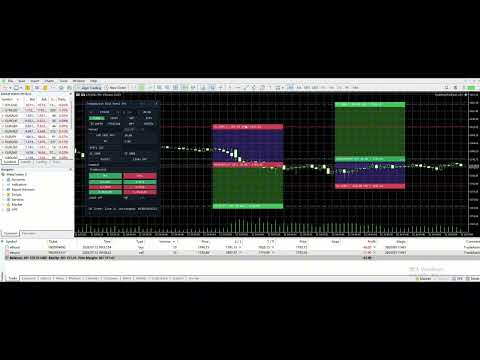
TradeAssist Risk Panel MT5 is a manual trading utility for MetaTrader 5. It helps traders calculate risk, plan Entry, Stop Loss and Take Profit on the chart, place orders from a panel, and manage open positions.


Additional materials and instructions

 - Application instructions - 

Chart Lines

The chart line function displays Entry, Stop Loss and Take Profit price levels directly on the chart.

With these lines, traders can see planned entry price, stop loss, take profit, risk zone, reward zone, planned lot size and reward/risk ratio before opening a trade.

TP, Entry and SL label boxes can be dragged to adjust the corresponding prices. Market orders can use the current SL/TP lines, and pending orders can use Entry/SL/TP lines. Lines can also remain on the chart after order execution for continued planning.


Risk Management

The risk calculation function can calculate a new order lot size from selected risk and stop loss distance.

Supported risk modes:

Risk % - calculate lot size from a percentage of account Balance or Equity.
Fixed Money - calculate lot size from a fixed risk amount.
Manual Lot - enter lot size manually and still display estimated risk.

The panel shows planned lot size, estimated risk, estimated margin and reward/risk ratio, helping traders check whether the trade fits their risk plan before placing an order.


Order Tools

The panel supports market orders and pending orders:

Buy
Sell
Buy Limit
Buy Stop
Sell Limit
Sell Stop

Before execution, the panel can check spread, lot size, SL/TP direction and risk information. Trading confirmations are enabled by default, so the action is executed only after user confirmation.


Position Management

The Manage tab is used to manage positions and pending orders inside the current scope.

Available management tools:

View position summary.
Open Position Details window.
Close current-symbol positions.
Close all positions in current scope.
Close profitable positions only.
Close losing positions only.
Partial close by 25%, 50% or custom percentage.
Set position SL/TP from chart lines.
Move positions to break even now.
Delete pending orders inside the current scope.

The Position Details window shows ticket, direction, lots, entry price, stop loss, take profit, profit/loss points, floating profit/loss and magic number.


Break Even and Trailing Stop

Break Even can move Stop Loss near the entry price after a position reaches the configured profit points.

BE Now allows the trader to trigger break-even movement manually.

Trailing Stop can move Stop Loss after price moves in a favorable direction, helping protect floating profit.


Notifications

TradeAssist supports optional notifications:

WeChat notifications.

Telegram Bot notifications.

Notifications are disabled by default. When enabled, they can be used to receive trading action or status messages. Notification failure does not block order placement, closing, break even, partial close or trailing stop actions.


Interface and Safety Scope

The panel has three main tabs:

Trade - risk calculation, chart lines, market orders and pending orders.
Manage - position details, close actions, partial close, Set SL/TP, BE Now and delete pending orders.
Notify - WeChat and Telegram tests.

The interface supports English and Chinese, plus Light, Dark and Auto themes.

By default, TradeAssist manages only the current chart symbol + current magic number. Manual positions are not managed by default unless the user explicitly enables manual position management.


Important Notes

TradeAssist is a manual trading utility, not an automatic trading strategy.
Trading involves risk. Test on a demo account first.
Broker minimum lot, volume step, tick value, stop level and freeze level may differ.
SL/TP must follow broker rules.
Keep confirmation dialogs enabled until you are familiar with the workflow.

Recensioni 1
OsipovKonstantin
24
OsipovKonstantin 2026.05.22 16:03 
 

When installed on a chart, the working area is smaller than in the developer's screenshots. This causes symbols and labels to be misaligned. This is due to the misalignment of the "collapse" and "close" symbols. When attempting to collapse the panel, the assistant freezes. It then disappears from the list of assistants and can only be removed from the window along with the chart window. When attempting to restore the chart window, all the labels from the panel appear, but without the panel itself, it still doesn't appear in the list of assistants. Therefore, I have to delete the entire chart window, reopen it, and redo all the markup. Demo account.

При установке на график размер рабочего поля меньше, чем на скринах разработчика. Из-за этого смещены символы и подписи. Из-за того, что смещены символы "свернуть" и "закрыть". При попытке свернуть панель, происходит зависание помощника. При этом он пропадает из списка помощников и его можно удалить из окна только вместе с окном графика. При попытке восстановить окно графика, в нём появляются все надписи из панели, но без самой панели и в списке помощников его по прежнему нет. Поэтому, приходится удалять окно графика полностью, открывать его заново и заново делать всю разметку. Демо-счет.

Скрин: https://s1.radikal.cloud/2026/05/22/2000127954---AlfaForexRU-Real_-DEMO-SCET---Hedge2db0b4c417e612b8.jpg

Prodotti consigliati
Haunted Risk Calculator is a visual risk management panel for MT5 that calculates the correct lot size in real time based on your account balance, risk percentage, and stop-loss distance. HOW IT WORKS Set your risk percentage or dollar amount, drag the SL and TP lines to your desired levels on the chart, and the panel instantly shows the calculated lot size, risk in dollars, reward-to-risk ratio, and expected profit. Execute with one click or a keyboard shortcut. FEATURES Draggable panel — grab
FREE
Breakeven Bot
Gabriel Paul Ange Perrin
Optimize your trading management with Breakeven Bot, the essential tool for active traders managing multiple positions at once. No more wasting time manually adjusting your stops—one click is all it takes to secure your profits! Main Feature: ️ "BREAKEVEN" Button – Instantly set all profitable positions to breakeven and protect your gains quickly. ️ Customization Options: Set breakeven in pips or currency, depending on your preference. Choose whether breakeven should be at the entr
FREE
Smart Position Manager
Jonathan Mboya Kinaro
Helios Smart Position Manager Panoramica Helios Smart Position Manager è uno strumento professionale di sincronizzazione delle operazioni per MetaTrader 5. Quando si modifica lo stop loss o il take profit di qualsiasi posizione, l'EA rileva automaticamente la modifica e la applica a tutte le altre posizioni sullo stesso simbolo. Questo elimina la necessità di aggiornare manualmente ogni posizione singolarmente, risparmiando tempo e prevenendo errori nella gestione di più operazioni sullo stesso
FREE
Easy and simple tool which close all trades in defined point of time. It can also close all open trades when opened positions reach defined target profit or stop loss. For all pairs, indexes etc. Works with all instruments. All types of orders. All charts. Users inputs: - close time (hour,min,sec) - take profit (in users currency) - stop loss (in users currency) Save & Load settings option. Fast, simple and reliable. Check out other tools provided by our team!
FREE
MT5 AccountInfoEA
Nikolaos Pantzos
Account Info EA It is a tool that presents on the graph all the positions of the account, and specific information concerning the positions, but also the account. It enables the user to have an image of his account at a glance. Use like any expert advisor. You can't attach it in the same chart with other expert advisor. It does not have the ability to open or manage positions. You can attach it on any chart and any timeframe.
FREE
Equitypanel
Timo Mario Hoffmann
5 (1)
Equity Panel for MT5 Equity Panel is a free MT5 indicator that gives you a fast and convenient live overview of your account directly from the chart. Monitor balance, equity, floating P/L, drawdown, daily performance, margin data, and warning levels in one compact dashboard. Built for traders who want better control, faster risk awareness, and clearer account monitoring in live market conditions. Equity Panel is a lightweight and practical account monitoring indicator for MetaTrader 5 that helps
FREE
Trade assistant pro v8
Ahmed Mohammed Bakr Bakr
FREE FREE FREE Trade Assistant MT5 – Professional Trading & Risk Management Panel Trade Assistant MT5 is an advanced trading panel designed to help traders execute orders faster, safer, and more professionally . It simplifies manual trading by combining smart order management , precise risk control , and one-click execution , making it ideal for both beginners and advanced traders. This tool does not trade automatically . Instead, it empowers you with full control while applying professional-gra
FREE
FiT Panel Pro
Thonglak Janyakorn
Overview FiT Panel Pro is a professional-grade trade management panel designed for MetaTrader 5 traders who demand speed, precision, and full control over their trades. Built with a modern dark-theme UI, it combines one-click execution with advanced risk management, visual SL/TP drag lines, automatic Fibonacci-based levels, and comprehensive order management — all in a single, compact panel. Whether you are a scalper, day trader, or swing trader, FiT Panel Pro gives you the edge you need to exec
FREE
Lot by Risk MT5
Sergey Vasilev
4.87 (15)
Il pannello di trading Lot by Risk è progettato per il trading manuale. È un mezzo alternativo per inviare ordini. La prima caratteristica del pannello è la comoda emissione di ordini utilizzando linee di controllo. La seconda caratteristica è il calcolo del volume della transazione per un determinato rischio in presenza di una linea stop loss. Le linee di controllo sono impostate utilizzando i tasti di scelta rapida: take profit-tasto T predefinito; price-tasto P predefinito; stop loss-tasto
FREE
Seredina
Oleksandr Kashyrnyi
SEREDINA è il tuo strumento versatile per la valutazione e il controllo delle posizioni! Questo script calcola automaticamente il prezzo medio delle posizioni di acquisto (BUY) e di vendita (SELL) aperte per qualsiasi strumento di trading sulla piattaforma MetaTrader 5, mostrando non solo dati precisi ma anche livelli visivi sul grafico, che ti aiutano a vedere immediatamente il livello medio di ingresso delle tue posizioni. Con SEREDINA puoi: Identificare il punto di "prezzo medio" per gli ordi
FREE
JM Trademanger
Melvin Brouwer
The free trade manager — simple but effective. Quickly open positions with preset take profit and stop loss levels. Set everything to breakeven or close all trades with one click. Get plenty of information on your chart about your account, trades, and profit/loss. It speaks for itself — that’s how simple this manager is to use. Check out our other EAs and our Telegram for more information! By traders, for traders!
FREE
Click Trading
Jawad Tauheed
5 (2)
One Click Trading – Auto TP SL Developer TraderLinkz Version 1.00 Category Utility What it does Adds missing TP and SL to your manual trades and pending orders Sets them once per ticket Lets you move TP and SL afterward Works on hedging and netting accounts Scans on every tick and reacts on trade events Why you want it You place faster entries You get consistent risk and exit targets You reduce fat finger errors You keep full manual control Quick start Attach the EA to any chart Keep TP and SL e
FREE
Core function Intelligent transaction management one-click opening and closing operation, which supports user-defined lots to set multiple closing modes: all closing, closing by direction and closing by profit and loss status. Professional risk control, real-time risk monitoring and spread control to avoid high-cost trading environment. Visual control panel has an intuitive graphical interface, and all functions can be operated with one button to display position information, profit and loss sta
FREE
================================================================ MATRIX CONDITION MONITOR Live Trade Condition Panel for MetaTrader 5 Fully Automatic -- Works with ALL Matrix EAs ================================================================ NEVER MISS A TRADE SETUP AGAIN Matrix Condition Monitor is a free utility that attaches to any chart and automatically checks all 10 trade conditions in real time -- showing you exactly why a trade will or will not open, and alerting you the moment ever
FREE
Equity monitor
Vasiliy Pritchin
Equity monitor This is a simple means change informer. I wrote it for myself, maybe someone will need it... 1. Displays the change in funds for the day. Every day, when the terminal is first launched, it remembers the current funds and monitors changes throughout the day. 2. The first day of the month, well remembers the money and, within months, to monitor changes. 3. Well, it displays the profit of the open position. To work, you need to create 4 global variables: gvarEqityDay , gvarEq
FREE
Recluse FX
Michael Prescott Burney
3 (2)
Recluse FX is the ultimate trading system for US30 on the H1 chart. With dedicated stop-loss and take-profit for each order, it guarantees optimal performance and risk management. Validated across over 1200 trades since 2021 with a 100% win rate, Recluse FX delivers unmatched stability and consistent gains under all market conditions. Its progressive pricing means that after 50 copies are sold, the system becomes exclusive to its owners. Purchase Recluse FX now and message for free access to th
FREE
TradeViz Tri
Ebdallh Aljlwaxh
This tool is designed to visualize the position and trades history and its information, such as the entry and exit points, sizes of the trades, Reward to risk ratio, Risk percent, Profit, Target and stop-loss on the chart. it makes showing trades on the chart more informative and easier to use. it's a strategic tool that enhances your trading experience on MT5 platforms. By providing a clear visual representation of your trades and customizable settings, it empowers traders to make informed deci
FREE
Boleta Easy Trade
Silvio Garcia Wohl
When executing an order, whether through the Metatrader ticket on a computer or the Metatrader app on a mobile device, either manual or pending, Easy Trade will automatically set the take profit and stop loss levels, as well as a limit order with its respective take profit and stop loss levels. It follows the trading strategy for market open (US30, US100, US500), but it can be applied to any market asset.
FREE
Virtual Basket TP SL Manager
Moh Nugraha Kusuma
5 (1)
"Manage multiple positions as a single unit with hidden targets." The Virtual Basket TP SL Manager is a professional MetaTrader 5 utility designed to automate the closing of positions based on the total profit or loss of a group of orders (a "basket"). By utilizing Virtual Levels , all Take Profit (TP) and Stop Loss (SL) targets are stored locally within the EA's memory and are not sent to the broker's server, keeping your strategy safe from stop-hunting and price manipulation. Key Features Virt
FREE
This is not an EA – it’s a simple and powerful MT5 indicator designed to help you manage trades quickly and easily.   Key Features: TP1 Auto-Set   – Fixed at 1RR TP2 Auto-Set   – Set at 2RR Fast Lot Calculation   – Calculates lot size based on SL in 1 second Quick Actions: Close All Trades Move to Breakeven Set TP at RR1 / RR2 User-Friendly   – No complex setup, just attach to chart and start using   Support: Telegram – @inForexVIP WhatsApp – +923118409597   MT4 Version Coming Soon W
FREE
Professional Trading Dashboard Un pannello professionale di monitoraggio del conto per MetaTrader 5 che consolida dati del conto in tempo reale, storico giornaliero delle operazioni e statistiche mensili in un'unica visualizzazione direttamente sul grafico. Professional Trading Dashboard è un indicatore utilitario per MetaTrader 5 progettato per offrire ai trader una visione chiara e strutturata del proprio conto in qualsiasi momento. Invece di navigare tra più finestre del terminale, tutte le i
FREE
Risk Manager – Account Protection Tool Risk Manager is an Expert Advisor for MetaTrader 5 designed to protect your trading account by applying automatic risk management rules. This tool does not open trades . It continuously monitors your account and enforces predefined limits to help prevent excessive losses and maintain disciplined trading. Risk Manager works in the background and can manage positions opened by manual trading or other Expert Advisors. It is particularly useful for: • Manual tr
FREE
ZyloFx Position Size Calculator MT5 is a free risk management utility for MetaTrader 5 designed to help traders calculate the appropriate position size based on account risk and stop loss distance. This tool helps traders determine how many lots to trade before entering a position, supporting more consistent risk management and better trading discipline. Main Features Automatic position size calculation Risk percentage mode Fixed money risk mode Balance and equity-based calculations Suggested lo
FREE
Trade mgr
Roberto Mubonane Muiambo
This Tool is designed to automate one of the most critical aspects of trade management — setting and managing Stop Loss, Take Profit , and Trailing Stop levels — directly on your MetaTrader 5 platform. Key Features: Automatic SL, TSL and TP Placement: Instantly sets initial Stop Loss and Take Profit levels on any new position based on customizable parameters, helping to enforce disciplined risk and reward management. Dynamic Trailing Stop: Automatically moves the Stop Loss to lock in profits
FREE
Smart Trading Copilot MT5
Issam Kassas
3.83 (12)
Smart Trading Copilot:   È un assistente di trading intelligente che ti aiuterà nella gestione quotidiana delle tue operazioni. Lo Smart Trading Copilot è dotato di un pannello di trading intuitivo, con design moderno e tecnologia all'avanguardia. Smart Trading Copilot offre numerose funzionalità: 1. Supporto per la gestione del rischio: calcola automaticamente la dimensione del lotto appropriata in base alla percentuale di rischio specificata e allo stop loss, aiutando i trader a gestire eff
FREE
Step trailing stop
Evgenii Zhivogliadov
5 (1)
Passo dopo passo "Trailing Stop" L'utilità consente di impostare la fase di spostamento dello "Stop Loss" seguendo il prezzo quando si utilizza lo strumento "Trailing Stop". A differenza del "normale" "Trailing Stop" disponibile nel terminale "MetaTrader", che consente di impostare il movimento "Stop Loss" in incrementi di 1 pip, questo "Trailing Stop" è configurato con qualsiasi incremento. Questa impostazione consente di evitare di chiudere posizioni durante false inversioni di tendenza, quand
FREE
Lot Calculator MT5
Ibrahim Olalekan Ganiu
CALCOLA IL TUO LOTTO PROPRIO QUI SU METATRADER!!! Ciao trader. Siete trader orientati alla gestione del rischio? Se sì, allora questo è per voi. Mi chiamo Ibrahim e ho sviluppato uno strumento che può aiutarvi a calcolare il vostro lotto in base alla percentuale di rischio rispetto al saldo del vostro conto. Questo strumento può anche aiutarvi a calcolare il vostro lotto se avete un valore assoluto che desiderate rischiare, invece di specificare il rischio in percentuale. Ad esempio, potete sp
FREE
FTU Auto Trade with on Chart Panel Mt5 (basic version) This EA will improve your trading, lower work load and improve risk management Adjust Lot size, entry based on at market or by price input EA will manage entry, stop loss, partial close and adjust stop loss after tp1, partial Designed to be compact and efficient, small layout for multiple chart trading Features: Lot groups - Allows for fast change to various risk models Tp, Partial and SL management Multiple No Trade Times - Various time i
FREE
MAFX Trading Manager
Mark Anthony Noblefranca Nazarrea
5 (1)
MAFX Trading Manager Pannello professionale di gestione manuale delle operazioni per MetaTrader 5 Panoramica del prodotto MAFX Trading Manager è un pannello professionale di gestione manuale delle operazioni per MetaTrader 5, progettato per aiutare i trader a eseguire e gestire le operazioni in modo più efficiente. Offre esecuzione rapida degli ordini e strumenti essenziali di gestione in un’interfaccia compatta e intuitiva. Questo prodotto è pensato per trader manuali che desiderano maggiore co
FREE
Trade Launch è un pannello di trading intuitivo progettato per i trader che apprezzano la velocità e il controllo durante l'apertura manuale delle operazioni. Viene visualizzato direttamente sul grafico e consente di gestire tutti i parametri principali dell'ordine in un'unica finestra. Caratteristiche principali: Inserimento istantaneo degli ordini:   Apri posizioni di Acquisto e Vendita con la semplice pressione di un pulsante. I nomi dei pulsanti mostrano dinamicamente i prezzi Ask e Bid corr
FREE
Gli utenti di questo prodotto hanno anche acquistato
Trade Assistant MT5
Evgeniy Kravchenko
4.43 (213)
It helps to calculate the risk per trade, the easy installation of a new order, order management with partial closing functions, trailing stop of 7 types and other useful functions. Additional materials and instructions Installation instructions - Application instructions - Trial version of the application for a demo account Line function -   shows on the chart the Opening line, Stop Loss, Take Profit. With this function it is easy to set a new order and see its additional characteristics bef
Forex Trade Manager MT5
InvestSoft
4.98 (664)
Benvenuto a Trade Manager EA, lo strumento definitivo per la gestione del rischio , progettato per rendere il trading più intuitivo, preciso ed efficiente. Non è solo uno strumento per l'esecuzione degli ordini, ma una soluzione completa per la pianificazione delle operazioni, la gestione delle posizioni e il controllo del rischio. Che tu sia un principiante, un trader avanzato o uno scalper che necessita di esecuzioni rapide, Trade Manager EA si adatta alle tue esigenze, offrendo flessibilità s
TradePanel MT5
Alfiya Fazylova
4.87 (159)
Trade Panel è un assistente commerciale multifunzionale. L'applicazione contiene più di 50 funzioni di trading per il trading manuale e permette di automatizzare la maggior parte delle attività commerciali. Prima dell'acquisto, è possibile testare la versione dimostrativa su un conto demo. Scaricare la versione di prova dell'applicazione per un account dimostrativo: https://www.mql5.com/it/blogs/post/762419 . Istruzioni complete qui . Commercio. Consente di effettuare operazioni di trading con u
Local Trade Copier EA MT5
Juvenille Emperor Limited
4.96 (141)
Sperimenta una copia di trading eccezionalmente veloce con il   Local Trade Copier EA MT5 . Con la sua facile configurazione in 1 minuto, questo copiatore di trading ti consente di copiare i trades tra diversi terminali di MetaTrader sullo stesso computer Windows o su Windows VPS con velocità di copia ultra veloci inferiori a 0.5 secondi. Che tu sia un trader principiante o professionista,   Local Trade Copier EA MT5   offre una vasta gamma di opzioni per personalizzarlo alle tue esigenze speci
Versione Beta Telegram to MT5 Signal Trader è quasi pronto per il rilascio ufficiale in versione alpha. Alcune funzionalità sono ancora in fase di sviluppo e potresti riscontrare piccoli bug. Se riscontri problemi, ti preghiamo di segnalarli, il tuo feedback aiuta a migliorare il software per tutti. Telegram to MT5 Signal Trader è uno strumento potente che copia automaticamente segnali di trading da canali o gruppi Telegram al tuo account MetaTrader 5 . Supporta canali pubblici e privati e cons
Quant AI Agents
Ho Tuan Thang
5 (1)
Quant AI Agents are independent trading Expert Advisors. Instead of trading using a fixed strategy like other conventional EAs, Quant AI Agents   is a   multi-agent AI trading framework   that turns natural-language strategy prompts into live.  WANT THE SAME RESULTS AS MY LIVE SIGNAL?   Use the exact same brokers I do:   IC MARKETS , IC TRADING   .  Unlike the centralized stock market, Forex has no single, unified price feed.  Every broker sources liquidity from different providers, creating un
Power Candles Strategy Scanner - Strumento di ricerca configurazioni multi-simbolo con ottimizzazione automatica Power Candles Strategy Scanner utilizza lo stesso motore di auto-ottimizzazione che alimenta l'indicatore Power Candles, applicandolo a tutti i simboli presenti nel tuo Market Watch, uno accanto all'altro. Un unico pannello ti indica quali simboli sono statisticamente negoziabili in questo momento, quale strategia è vincente su ciascuno di essi, la coppia ottimale di Stop Loss / Take
Premium Trade Manager - Il pannello di trading con un coach integrato Premium Trade Manager porta un coach di trading direttamente nel tuo grafico, con un motore di esecuzione completo al di sotto. Imposta il trade come fai sempre, poi lascia che Max, il tuo coach di trading IA, legga esattamente quel setup rispetto al tuo conto live e ti dia un verdetto chiaro prima che tu confermi: lo stop rispetta un approccio disciplinato, il rischio è ragionevole, c'è un evento ad alto impatto tra pochi min
Trade Dashboard MT5
Fatemeh Ameri
4.95 (129)
Trade Dashboard simplifies how you open, manage, and control your trades, with built-in lot size calculation. It allows you to execute trades, manage risk, and control positions directly on the chart, with tools such as partial close, breakeven, and trailing stop. Designed to reduce manual work and help you stay focused on your trading decisions. A demo version is available for testing. Detailed explanations of features are provided within the MQL5 platform. Installation instructions are include
Exp COPYLOT CLIENT for MT5
Vladislav Andruschenko
3.94 (34)
Copiatore professionale di trade per MetaTrader 5 Un copiatore di trade veloce, professionale e affidabile per MetaTrader . COPYLOT consente di copiare operazioni Forex tra terminali MT4 e MT5 con supporto per conti Hedge e Netting . La versione MT5 di COPYLOT supporta: - MT5 Hedge → MT5 Hedge - MT5 Hedge → MT5 Netting - MT5 Netting → MT5 Hedge - MT5 Netting → MT5 Netting - MT4 → MT5 Hedge - MT4 → MT5 Netting Versione MT4 Descrizione completa + DEMO + PDF Come acquistare Come installare Come ot
FarmedHedge Pair Trading Dashboard
Tanapisit Tepawarapruek
5 (3)
Farmed Hedge Yield Farming | All Markets (Manual - Hybrid - Semi/Automated EA) MULTI-ASSET SUPPORT Trade any asset available on your broker - Forex: Major, Minor, Exotic pairs - Crypto: BTC, ETH, XRP, SOL, BNB - Stocks: Apple, Tesla, Amazon, Google, etc. - Commodities: Gold, Silver, Oil, Gas - Indices: US30, NAS100, SPX500, DAX40 - Any CFD your broker offers VERIFIED TRADING RESULTS - Farmed Hedge Yield Axi Copy:  https://www.mql5.com/en/signals/2356376 - Farmed Hedge Yield Exn Copy:   https:/
Seconds Chart MT5
Boris Sedov
4.61 (18)
Seconds Chart - uno strumento unico per creare grafici in secondi su MetaTrader 5 . Con Seconds Chart , puoi generare grafici con timeframe definiti in secondi, ottenendo una flessibilità e una precisione d'analisi ideali, non disponibili nei grafici standard in minuti o ore. Ad esempio, il timeframe S15 indica un grafico con candele di 15 secondi. Puoi utilizzare qualsiasi indicatore e Expert Advisor con supporto per simboli personalizzati. Lavorare con loro è comodo quanto operare sui grafici
Grid Manual MT5
Alfiya Fazylova
4.9 (21)
Grid Manual è un pannello di trading per lavorare con una griglia di ordini. L'utilità è universale, ha impostazioni flessibili e un'interfaccia intuitiva. Funziona con una griglia di ordini non solo nella direzione delle perdite, ma anche nella direzione dell'aumento dei profitti. Il trader non ha bisogno di creare e mantenere una griglia di ordini, lo farà l'utilità. È sufficiente aprire un ordine e il manuale di Grid creerà automaticamente una griglia di ordini per esso e lo accompagnerà fino
Trade copier MT5
Alfiya Fazylova
4.57 (46)
Trade Copier è un'utilità professionale progettata per copiare e sincronizzare le transazioni tra conti di trading. La copiatura avviene dal conto/terminale del fornitore al conto/terminale del destinatario, che sono installati sullo stesso computer o vps. PROMOZIONE - Se avete già acquistato il "Trade copier MT5", potete ottenere gratuitamente il "Trade copier MT4" (per la copia MT4 > MT5 e MT4 < MT5). Per maggiori informazioni sulle condizioni, vi preghiamo di contattarci tramite messaggi priv
AI Agents Supervisor
Ho Tuan Thang
5 (1)
AI Agent Supervisor is NOT an Expert Advisor. AI Agent Supervisor   is a   multi-agent AI risk & portfolio supervisor   that watches every EA on your account and intervenes in real time.  WANT AN AI PORTFOLIO MANAGER WATCHING YOUR FLEET 24/7?   Run your fleet on the same brokers I do:   IC MARKETS , IC TRADING   .  Unlike the centralized stock market, Forex has no single, unified price feed.  Every broker sources liquidity from different providers, creating unique data streams. The Supervisor r
Telegram to MT5 Multi-Channel Copier copia automaticamente i segnali di trading dai tuoi canali Telegram direttamente in MetaTrader 5. Niente bot, niente estensioni del browser, niente copia manuale. Ricevi un segnale su Telegram e l'EA apre l'operazione sul tuo terminale in pochi secondi. Il prodotto include due componenti: un'applicazione Windows che ascolta i tuoi canali Telegram, e questo Expert Advisor che esegue i segnali sul tuo terminale MT5. È disponibile anche la versione MT4. Guida di
================================================================================ POC BREAKOUT - V20.72. Full Professional Grade Toolkit ================================================================================ POC Breakout is a full MetaTrader 5 trading dashboard for discretionary traders who want breakout signals, Point of Control (POC) context, volume profiles, order flow, market structure, news, alerts, and advanced trade planning in one professional workspace. Attached directly to you
# If you have any other requirements or are interested in collaboration, please contact  dev.quantech.london@gmail.com . Flash Trade (FT) Most friendly manual trading tool. Easy operation to secure your funds. Features of FT Click the chart to trade fast FT supports market orders and pending orders Click twice to complete the order and set SL and TP Click trice to complete the pending order and set SL and TP Automatically set the stop-loss amount of each order to a fixed percentage of the bala
FUTURES ORDERFLOW FOOTPRINT CHART Professional OrderFlow EA for MetaTrader 5 Version 1.01| Professional tool for real traders | Institutional-Grade Visualization STRATEGY TESTER USERS - PLEASE SELECT EVERY REAL TICK WHEN TESTING AND YOU HAVE DOWNLOADED HISTORICAL DATA. IF YOU SEE A WAITING SCREEN AND IT IS NOT DOWNLOADING, IT MEANS YOU HAVE LOW HISTORICAL DATA. TRY 1 MIN AND 5 MIN FIRST ON 1 DAY DATA. ONE DAY DATA SHOULD BE THE NEWEST AND MOST CURRENT DATE. PLEASE WAIT UNTIL THE MARKET HAS ROL
Timeless Charts
Samuel Manoel De Souza
5 (7)
Timeless Charts è un'utilità di trading completa progettata per trader professionisti. Combina tipi di grafici personalizzati come Grafici a Secondi e Renko con analisi avanzata del flusso ordini tramite Footprints , Clusters , Profili di Volume , studi VWAP e strumenti di analisi ancorata per una visione più approfondita del mercato. Il trading e la gestione delle posizioni vengono eseguiti direttamente dal grafico tramite un pannello integrato di gestione delle operazioni , mentre Market Repla
Trade Manager DaneTrades
Levi Dane Benjamin
4.28 (29)
Trade Manager per aiutarti a entrare e uscire rapidamente dalle operazioni calcolando automaticamente il tuo rischio. Incluse funzionalità che ti aiutano a prevenire l'eccessivo trading, il vendetta trading e il trading emotivo. Le operazioni possono essere gestite automaticamente e i parametri di performance del conto possono essere visualizzati in un grafico. Queste caratteristiche rendono questo pannello ideale per tutti i trader manuali e aiuta a migliorare la piattaforma MetaTrader 5. Suppo
Double X Trade
Gayathiri Gopalakrishnan
5 (2)
DOUBLE X TRADE  SIGNAL MULTIPLIER DOUBLE X TRADE is a MetaTrader 5 Expert Advisor designed to operate alongside existing Expert Advisors and provide additional trade-management functionality. The EA can monitor trading activity on the account and perform actions according to user-defined settings, risk parameters, and operating mode configuration. DOUBLE X TRADE is intended for traders who want an additional management layer while continuing to use their existing Expert Advisors. The product doe
Footprint Chart Pro — Professional OrderFlow EA for MetaTrader 5 Version 6.34 | Professional tool for real traders | Institutional-Grade Visualization DEMO USERS - PLEASE SELECT EVERY TICK / REAL TICK WHEN TESTING AND YOU HAVE DOWNLOADED HISTORICAL DATA. IF YOU SEE A WAITING SCREEN AND IT IS NOT DOWNLOADING, IT MEANS YOU HAVE LOW HISTORICAL DATA. TRY 1 MIN AND 5 MIN FIRST ON 1 DAY DATA. ONE DAY DATA SHOULD BE THE NEWEST AND MOST CURRENT DATE. PLEASE WAIT UNTIL THE MARKET HAS ROLLED OVER PERIOD.
The product will copy all telegram signal to MT5 ( which you are member) , also it can work as remote copier.  Easy to set up, copy order instant, can work with almost signal formats, image signal,  s upport to translate other language to English Work with all type of channel or group, even channel have "Restrict Saving Content", work with  multi channel, multi MT5 Work as remote copier: with signal have ticket number, it will copy exactly via ticket number. Support to backtest signal. How to s
HINN MagicEntry Extra
ALGOFLOW OÜ
4.73 (15)
HINN MAGIC ENTRY – the ultimate tool for entry and position management! Place orders by selecting a level directly on the chart! full description   ::  demo-version  :: 60-sec-video-description Key features: - Market, limit, and pending orders - Automatic lot size calculation - Automatic spread and commission accounting - Unlimited partitial take-profits  - Breakeven and trailing stop-loss and take-profit  functions - Invalidation leves - Intuitive, adaptive, and customizable interface - Works
MT5 to Telegram Signal Provider è un'utilità facile da usare e completamente personalizzabile che consente l'invio di segnali specificati a una chat, canale o gruppo Telegram, rendendo il tuo account un fornitore di segnali. A differenza della maggior parte dei prodotti concorrenti, non utilizza importazioni DLL. [ Dimostrativo ] [ Manuale ] [ Versione MT4 ] [ Versione Discord ] [ Canale Telegram ]  New: [ Telegram To MT5 ] Configurazione Una guida utente passo-passo è disponibile. Nessuna cono
EA Auditor
Stephen J Martret
5 (3)
EA Auditor is an independent analysis tool for traders evaluating Expert Advisors and trading signals on MetaTrader 5. It audits backtest reports, reviews posted developer signals, and cross-verifies the two against each other to help traders assess strategies before committing capital. The MQL5 market offers a wide range of Expert Advisors from many developers, with varying approaches, quality, and transparency. EA Auditor provides a consistent, data-driven framework for reviewing them, answer
Scarica la demo funzionante Copy Cat More (Gatto Copione) — Copiatore di Trade (Trade Copier) MT5 è un copiatore locale di trade e un framework completo di gestione del rischio e di esecuzione, progettato per le sfide di trading di oggi. Dalle challenge delle prop firm alla gestione di portafogli personali, si adatta a ogni situazione con una combinazione di esecuzione robusta, protezione del capitale, configurazione flessibile e gestione avanzata dei trade. Il copiatore funziona in entrambe l
Anchor Trade Manager
Kalinskie Gilliam
5 (3)
Anchor: The EA Manager Run your full EA portfolio without conflicts, without stacked risk, and without watching every chart yourself. Anchor coordinates up to 64 Expert Advisors on a single account. Attach Anchor to any chart. Type your EA names and magic numbers in one line. Click OK. Anchor begins coordinating immediately. Built for portfolios. Built for discipline. Built for prop firms. The Problem Running multiple EAs on the same account creates risk. Two gold EAs can open opposite positions
Signal Trading View to MT5 Pro
Mirel Daniel Gheonu
4 (1)
Signal TradingView to MT5 Pro Automator Esecuzione professionale istantanea tra TradingView e MetaTrader 5 Automatizza la tua strategia di trading con il ponte di comunicazione più robusto tra gli alert di TradingView e l'esecuzione reale in MT5. Progettato per i trader che richiedono velocità, flessibilità e una gestione del rischio impeccabile, questo Expert Advisor trasforma qualsiasi messaggio di avviso in un preciso ordine a mercato o limite. PUNTI DI FORZA E VANTAGGI Motore di Parsing Univ
Altri dall’autore
` Account Limit Guard MT5 ` is a free account-level daily limit protection utility for MetaTrader 5. It is not a trading strategy, does not open trades, does not generate signals, and does not rely on any specific indicator. Its purpose is simple: monitor your account-level daily loss and automatically apply protection once your configured limit is reached. The Lite version is intentionally focused. It does not try to cover every account-risk rule. It is built to solve one clear problem: **H
FREE
` Emergency Webhook Alert ` is an MT5 Expert Advisor for trade event notifications. It monitors position opening, closing, stop loss, take profit, partial close, and reversal events, then sends trade events through a notification relay server to WeChat and Telegram. The EA includes an on-chart panel, supports English and Chinese UI, and is designed for real-time status, pairing status, and pending event monitoring. The EA does not open, close, or modify trades. It only reads account trade even
FREE
Risk Guardian Pro MT5 is an account-level risk protection utility for MetaTrader 5.   It does not open trades, generate signals or replace your strategy. Instead, it acts as a safety layer above your account and helps   enforce risk discipline across manual trading and other Expert Advisors.   This tool is designed for traders who want clear account protection rules, visible risk status and automatic response when limits are   reached.   Main Features   - Daily loss limit   - Total drawdo
Filtro:
OsipovKonstantin
24
OsipovKonstantin 2026.05.22 16:03 
 

When installed on a chart, the working area is smaller than in the developer's screenshots. This causes symbols and labels to be misaligned. This is due to the misalignment of the "collapse" and "close" symbols. When attempting to collapse the panel, the assistant freezes. It then disappears from the list of assistants and can only be removed from the window along with the chart window. When attempting to restore the chart window, all the labels from the panel appear, but without the panel itself, it still doesn't appear in the list of assistants. Therefore, I have to delete the entire chart window, reopen it, and redo all the markup. Demo account.

При установке на график размер рабочего поля меньше, чем на скринах разработчика. Из-за этого смещены символы и подписи. Из-за того, что смещены символы "свернуть" и "закрыть". При попытке свернуть панель, происходит зависание помощника. При этом он пропадает из списка помощников и его можно удалить из окна только вместе с окном графика. При попытке восстановить окно графика, в нём появляются все надписи из панели, но без самой панели и в списке помощников его по прежнему нет. Поэтому, приходится удалять окно графика полностью, открывать его заново и заново делать всю разметку. Демо-счет.

Скрин: https://s1.radikal.cloud/2026/05/22/2000127954---AlfaForexRU-Real_-DEMO-SCET---Hedge2db0b4c417e612b8.jpg

Yang Yu Qun
681
Risposta dello sviluppatore Yang Yu Qun 2026.05.25 07:37
Thank you for the detailed report and screenshot. I found that this can happen on smaller chart work areas or with different Windows/MetaTrader DPI scaling settings, where the panel title controls may be visually shifted from their clickable areas. Version 1.02 is now available. This update improves the collapse/close controls, keeps the panel inside the chart area, improves cleanup, and adds Compact/DPI settings for font size and panel width. Please update to the latest version and try the default settings first. If the text is still too large on your terminal, try: InpPanelFontSizeOffset = -1 or -2 InpPanelWidth = 260 Thank you again for reporting this and helping improve the product.
Rispondi alla recensione