TradeAssist Risk Panel MT5

4
  • Utilitaires
  • Yang Yu Qun
    Yang Yu Qun
    MetaTrader 4/5 Indicator & EA Developer
    Experienced in developing trading tools and automated strategies for MT4/MT5. Skilled in MQL4/MQL5 programming, custom indicators, EA development, and risk management modules.
    Expertise includes:
    Custom indicator development (MT4/MT5)
  • Version: 2.0
  • Mise à jour: 12 juillet 2026
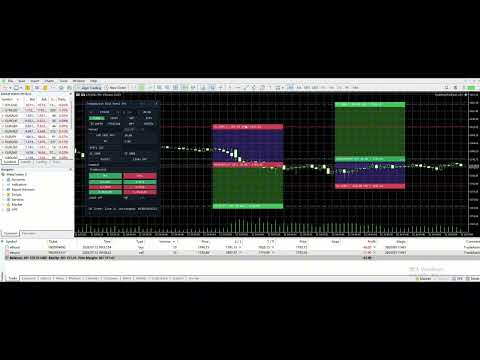
TradeAssist Risk Panel MT5 — a professional manual-trading panel for MetaTrader 5: risk-based lot sizing, draggable Entry/SL/TP chart lines, multi-level partial close, 6 trailing-stop variants, automatic break even and full on-chart order management.

Additional materials and instructions

 - Application instructions - 
RISK MANAGEMENT
- Automatic lot calculation from the risk amount and the SL distance
- 8 risk modes: Fixed $, % Balance, % Equity, % Free Margin, % Custom base, % Balance of previous Day / Week / Month — plus fixed manual lot
- TP by Risk/Reward ratio; SL/TP by points, exact price, or the high/low of the last N bars
- Live preview of lot, money risk and RR before the order is sent
- Spread filter; profit/loss threshold auto close of all positions

TRADING AND POSITION MANAGEMENT
- Market orders, Limit / Stop pending orders, Buy / Sell Stop Limit
- Batch close by direction / profit / loss / all; batch deletion of pending orders by type
- Multi-level partial close: up to 10 TP and 10 SL levels per position, 3 lot methods, 6 price methods, dynamic levels
- Trailing stop with 6 variants: Points, Fractals, MA, Parabolic SAR, ATR, High/Low of previous bar
- Automatic break even (4 trigger units, spread+commission offset) and one-click manual breakeven
- Trailing of pending Limit / Stop orders behind the price
- Hide SL TP: stealth stops monitored inside the EA, invisible to the broker
- Apply any automation per position, per symbol or to all positions; new positions inherit the template
- Settings presets: save, load and switch complete configurations

ON THE CHART
- Draggable Entry / SL / TP lines with live labels and green/red profit-risk zones
- An order line with a "..." menu for every position and pending order: close, reverse, breakeven, partial close %, edit SL/TP, hide SL/TP, comment
- In-chart confirmation overlay before every trading action
- Two-row 8-tab panel: Trade / Close / Set / Info + In parts / Trailing / BE+ / Notify
- Light / dark theme, HiDPI support, adjustable width and font size, English / Chinese interface
- Optional WeChat and Telegram push notifications

IMPORTANT
- Recommended usage: one chart, one instance per symbol.
- Automation (break even, trailing, partial close, hidden SL/TP) works only while the terminal and the EA are running — use a VPS for 24/5 operation.
- This utility helps with execution and risk control. It does not guarantee trading results.
Avis 1
OsipovKonstantin
24
OsipovKonstantin 2026.05.22 16:03 
 

When installed on a chart, the working area is smaller than in the developer's screenshots. This causes symbols and labels to be misaligned. This is due to the misalignment of the "collapse" and "close" symbols. When attempting to collapse the panel, the assistant freezes. It then disappears from the list of assistants and can only be removed from the window along with the chart window. When attempting to restore the chart window, all the labels from the panel appear, but without the panel itself, it still doesn't appear in the list of assistants. Therefore, I have to delete the entire chart window, reopen it, and redo all the markup. Demo account.


При установке на график размер рабочего поля меньше, чем на скринах разработчика. Из-за этого смещены символы и подписи. Из-за того, что смещены символы "свернуть" и "закрыть". При попытке свернуть панель, происходит зависание помощника. При этом он пропадает из списка помощников и его можно удалить из окна только вместе с окном графика. При попытке восстановить окно графика, в нём появляются все надписи из панели, но без самой панели и в списке помощников его по прежнему нет. Поэтому, приходится удалять окно графика полностью, открывать его заново и заново делать всю разметку. Демо-счет.

Скрин: https://s1.radikal.cloud/2026/05/22/2000127954---AlfaForexRU-Real_-DEMO-SCET---Hedge2db0b4c417e612b8.jpg

Produits recommandés
Haunted Risk Calculator is a visual risk management panel for MT5 that calculates the correct lot size in real time based on your account balance, risk percentage, and stop-loss distance. HOW IT WORKS Set your risk percentage or dollar amount, drag the SL and TP lines to your desired levels on the chart, and the panel instantly shows the calculated lot size, risk in dollars, reward-to-risk ratio, and expected profit. Execute with one click or a keyboard shortcut. FEATURES Draggable panel — grab
FREE
Breakeven Bot
Gabriel Paul Ange Perrin
Optimize your trading management with Breakeven Bot, the essential tool for active traders managing multiple positions at once. No more wasting time manually adjusting your stops—one click is all it takes to secure your profits! Main Feature: ️ "BREAKEVEN" Button – Instantly set all profitable positions to breakeven and protect your gains quickly. ️ Customization Options: Set breakeven in pips or currency, depending on your preference. Choose whether breakeven should be at the entr
FREE
Helios Smart Position Manager Présentation Helios Smart Position Manager est un outil professionnel de synchronisation de trades pour MetaTrader 5. Lorsque vous modifiez le stop loss ou le take profit d'une position, l'EA détecte automatiquement le changement et l'applique à toutes les autres positions sur le même symbole. Cela élimine la nécessité de mettre à jour manuellement chaque position individuellement, en économisant du temps et en évitant les erreurs lors de la gestion de plusieurs tra
FREE
Easy and simple tool which close all trades in defined point of time. It can also close all open trades when opened positions reach defined target profit or stop loss. For all pairs, indexes etc. Works with all instruments. All types of orders. All charts. Users inputs: - close time (hour,min,sec) - take profit (in users currency) - stop loss (in users currency) Save & Load settings option. Fast, simple and reliable. Check out other tools provided by our team!
FREE
Account Info EA It is a tool that presents on the graph all the positions of the account, and specific information concerning the positions, but also the account. It enables the user to have an image of his account at a glance. Use like any expert advisor. You can't attach it in the same chart with other expert advisor. It does not have the ability to open or manage positions. You can attach it on any chart and any timeframe.
FREE
Equitypanel
Timo Mario Hoffmann
5 (1)
Equity Panel for MT5 Equity Panel is a free MT5 indicator that gives you a fast and convenient live overview of your account directly from the chart. Monitor balance, equity, floating P/L, drawdown, daily performance, margin data, and warning levels in one compact dashboard. Built for traders who want better control, faster risk awareness, and clearer account monitoring in live market conditions. Equity Panel is a lightweight and practical account monitoring indicator for MetaTrader 5 that helps
FREE
Trade assistant pro v8
Ahmed Mohammed Bakr Bakr
FREE FREE FREE Trade Assistant MT5 – Professional Trading & Risk Management Panel Trade Assistant MT5 is an advanced trading panel designed to help traders execute orders faster, safer, and more professionally . It simplifies manual trading by combining smart order management , precise risk control , and one-click execution , making it ideal for both beginners and advanced traders. This tool does not trade automatically . Instead, it empowers you with full control while applying professional-gra
FREE
FiT Panel Pro
Thonglak Janyakorn
Overview FiT Panel Pro is a professional-grade trade management panel designed for MetaTrader 5 traders who demand speed, precision, and full control over their trades. Built with a modern dark-theme UI, it combines one-click execution with advanced risk management, visual SL/TP drag lines, automatic Fibonacci-based levels, and comprehensive order management — all in a single, compact panel. Whether you are a scalper, day trader, or swing trader, FiT Panel Pro gives you the edge you need to exec
FREE
Lot by Risk MT5
Sergey Vasilev
4.88 (16)
La barre de trading Lot by Risk est conçue pour le trading manuel. C'est un moyen alternatif d'envoyer des ordres. La première caractéristique du panneau est l'affichage pratique des ordres à l'aide de lignes de contrôle. La deuxième caractéristique est le calcul du volume de la transaction à un risque donné en présence d'une ligne stop loss. Les lignes de contrôle sont affichées à l'aide de raccourcis clavier: take profit-touche T Par défaut; price-touche P par Défaut; stop loss – touche s p
FREE
Signalator Trade Summary Panel MT5 is a free local MetaTrader 5 utility that gives traders a clear account and open-trade overview directly on the chart. It is part of the Signalator Trading and Analysis Ecosystem — a growing set of practical MetaTrader tools for account monitoring, market analysis, symbol scanning, alerts and trader workflow improvement. This panel focuses on the account and position side of the workflow. It helps you quickly understand floating profit or loss, account status,
FREE
Seredina
Oleksandr Kashyrnyi
SEREDINA est votre outil polyvalent pour l’évaluation et le contrôle des positions ! Ce script calcule automatiquement le prix moyen des positions ouvertes d'achat (BUY) et de vente (SELL) pour tout instrument de trading sur la plateforme MetaTrader 5, affichant non seulement des données précises mais aussi des niveaux visuels sur le graphique, vous permettant de voir instantanément le niveau moyen d'entrée de vos positions. Avec SEREDINA , vous pouvez : Identifier le point de "prix moyen" pour
FREE
The free trade manager — simple but effective. Quickly open positions with preset take profit and stop loss levels. Set everything to breakeven or close all trades with one click. Get plenty of information on your chart about your account, trades, and profit/loss. It speaks for itself — that’s how simple this manager is to use. Check out our other EAs and our Telegram for more information! By traders, for traders!
FREE
Click Trading
Jawad Tauheed
5 (2)
One Click Trading – Auto TP SL Developer TraderLinkz Version 1.00 Category Utility What it does Adds missing TP and SL to your manual trades and pending orders Sets them once per ticket Lets you move TP and SL afterward Works on hedging and netting accounts Scans on every tick and reacts on trade events Why you want it You place faster entries You get consistent risk and exit targets You reduce fat finger errors You keep full manual control Quick start Attach the EA to any chart Keep TP and SL e
FREE
Core function Intelligent transaction management one-click opening and closing operation, which supports user-defined lots to set multiple closing modes: all closing, closing by direction and closing by profit and loss status. Professional risk control, real-time risk monitoring and spread control to avoid high-cost trading environment. Visual control panel has an intuitive graphical interface, and all functions can be operated with one button to display position information, profit and loss sta
FREE
================================================================ MATRIX CONDITION MONITOR Live Trade Condition Panel for MetaTrader 5 Fully Automatic -- Works with ALL Matrix EAs ================================================================ NEVER MISS A TRADE SETUP AGAIN Matrix Condition Monitor is a free utility that attaches to any chart and automatically checks all 10 trade conditions in real time -- showing you exactly why a trade will or will not open, and alerting you the moment ever
FREE
Equity monitor
Vasiliy Pritchin
Equity monitor This is a simple means change informer. I wrote it for myself, maybe someone will need it... 1. Displays the change in funds for the day. Every day, when the terminal is first launched, it remembers the current funds and monitors changes throughout the day. 2. The first day of the month, well remembers the money and, within months, to monitor changes. 3. Well, it displays the profit of the open position. To work, you need to create 4 global variables: gvarEqityDay , gvarEq
FREE
Recluse FX
Michael Prescott Burney
3 (2)
Recluse FX is the ultimate trading system for US30 on the H1 chart. With dedicated stop-loss and take-profit for each order, it guarantees optimal performance and risk management. Validated across over 1200 trades since 2021 with a 100% win rate, Recluse FX delivers unmatched stability and consistent gains under all market conditions. Its progressive pricing means that after 50 copies are sold, the system becomes exclusive to its owners. Purchase Recluse FX now and message for free access to th
FREE
TradeViz Tri
Ebdallh Aljlwaxh
This tool is designed to visualize the position and trades history and its information, such as the entry and exit points, sizes of the trades, Reward to risk ratio, Risk percent, Profit, Target and stop-loss on the chart. it makes showing trades on the chart more informative and easier to use. it's a strategic tool that enhances your trading experience on MT5 platforms. By providing a clear visual representation of your trades and customizable settings, it empowers traders to make informed deci
FREE
Boleta Easy Trade
Silvio Garcia Wohl
When executing an order, whether through the Metatrader ticket on a computer or the Metatrader app on a mobile device, either manual or pending, Easy Trade will automatically set the take profit and stop loss levels, as well as a limit order with its respective take profit and stop loss levels. It follows the trading strategy for market open (US30, US100, US500), but it can be applied to any market asset.
FREE
GDS RiskLab TradeDesk Free Manual Trading Desk and Risk-Control Utility for MetaTrader 5 GDS RiskLab TradeDesk is a free chart-based utility for traders who want a cleaner manual trading workspace in MetaTrader 5. It is designed as a simple execution-support and risk-control panel. The goal is to keep the trading process more organized: review the chart, plan the trade, keep risk visible and execute manually with more structure. This tool does not generate buy or sell signals. It does not predic
FREE
"Manage multiple positions as a single unit with hidden targets." The Virtual Basket TP SL Manager is a professional MetaTrader 5 utility designed to automate the closing of positions based on the total profit or loss of a group of orders (a "basket"). By utilizing Virtual Levels , all Take Profit (TP) and Stop Loss (SL) targets are stored locally within the EA's memory and are not sent to the broker's server, keeping your strategy safe from stop-hunting and price manipulation. Key Features Virt
FREE
This is not an EA – it’s a simple and powerful MT5 indicator designed to help you manage trades quickly and easily.   Key Features: TP1 Auto-Set   – Fixed at 1RR TP2 Auto-Set   – Set at 2RR Fast Lot Calculation   – Calculates lot size based on SL in 1 second Quick Actions: Close All Trades Move to Breakeven Set TP at RR1 / RR2 User-Friendly   – No complex setup, just attach to chart and start using   Support: Telegram – @inForexVIP WhatsApp – +923118409597   MT4 Version Coming Soon W
FREE
Professional Trading Dashboard Un panneau professionnel de surveillance de compte pour MetaTrader 5 qui regroupe les données de compte en temps réel, l'historique quotidien des transactions et les statistiques mensuelles dans un affichage unique directement sur le graphique. Professional Trading Dashboard est un indicateur utilitaire pour MetaTrader 5 conçu pour offrir aux traders une vision claire et structurée de leur compte à tout moment. Plutôt que de naviguer entre plusieurs fenêtres du ter
FREE
Risk Manager – Account Protection Tool Risk Manager is an Expert Advisor for MetaTrader 5 designed to protect your trading account by applying automatic risk management rules. This tool does not open trades . It continuously monitors your account and enforces predefined limits to help prevent excessive losses and maintain disciplined trading. Risk Manager works in the background and can manage positions opened by manual trading or other Expert Advisors. It is particularly useful for: • Manual tr
FREE
ZyloFx Position Size Calculator MT5 is a free risk management utility for MetaTrader 5 designed to help traders calculate the appropriate position size based on account risk and stop loss distance. This tool helps traders determine how many lots to trade before entering a position, supporting more consistent risk management and better trading discipline. Main Features Automatic position size calculation Risk percentage mode Fixed money risk mode Balance and equity-based calculations Suggested lo
FREE
Trade mgr
Roberto Mubonane Muiambo
This Tool is designed to automate one of the most critical aspects of trade management — setting and managing Stop Loss, Take Profit , and Trailing Stop levels — directly on your MetaTrader 5 platform. Key Features: Automatic SL, TSL and TP Placement: Instantly sets initial Stop Loss and Take Profit levels on any new position based on customizable parameters, helping to enforce disciplined risk and reward management. Dynamic Trailing Stop: Automatically moves the Stop Loss to lock in profits
FREE
Step trailing stop
Evgenii Zhivogliadov
5 (1)
Pas à pas "Trailing Stop" L'utilitaire vous permet de définir l'étape de déplacement du "Stop Loss" suivant le prix lors de l'utilisation de l'outil "Trailing Stop". Contrairement au "Trailing Stop" "normal" disponible dans le terminal "MetaTrader", qui vous permet de définir le mouvement "Stop Loss" par incréments de 1 pip, ce "Trailing Stop" est configuré avec n'importe quel incrément. Ce paramètre vous permet d'éviter de fermer des positions lors de fausses inversions de tendance, lorsque le
FREE
Lot Calculator MT5
Ibrahim Olalekan Ganiu
CALCULEZ LA TAILLE DE VOS LOTS DIRECTEMENT SUR METATRADER ! Bonjour à tous les traders. La gestion des risques est-elle importante pour vous ? Si oui, cet outil est fait pour vous. Je m'appelle Ibrahim et j'ai développé un outil qui vous permet de calculer la taille de vos lots en fonction de votre pourcentage de risque par rapport au solde de votre compte. Cet outil peut également vous aider à calculer la taille de vos lots si vous avez une valeur absolue à risquer, au lieu de spécifier votre
FREE
MAFX Trading Manager
Mark Anthony Noblefranca Nazarrea
5 (1)
MAFX Trading Manager Panneau professionnel de gestion manuelle des trades pour MetaTrader 5 Présentation du produit MAFX Trading Manager est un panneau professionnel de gestion manuelle des trades pour MetaTrader 5, conçu pour aider les traders à exécuter et gérer leurs positions plus efficacement. Il offre une exécution rapide des ordres et des outils essentiels de gestion dans une interface compacte et conviviale. Ce produit s’adresse aux traders manuels souhaitant davantage de contrôle, de ra
FREE
Trade Launch est un panneau de trading intuitif conçu pour les traders qui apprécient la vitesse et le contrôle lors de l'ouverture manuelle des transactions. Il s'affiche directement sur le graphique et permet de gérer tous les paramètres principaux d'un ordre dans une seule fenêtre. Principales fonctionnalités : Passation instantanée d'ordres :   Ouvrez des positions Buy et Sell en une seule pression sur un bouton. Les noms des boutons affichent dynamiquement les prix Ask et Bid actuels. Gesti
FREE
Les acheteurs de ce produit ont également acheté
Trade Assistant MT5
Evgeniy Kravchenko
4.43 (214)
It helps to calculate the risk per trade, the easy installation of a new order, order management with partial closing functions, trailing stop of 7 types and other useful functions. Additional materials and instructions Installation instructions - Application instructions - Trial version of the application for a demo account Line function -   shows on the chart the Opening line, Stop Loss, Take Profit. With this function it is easy to set a new order and see its additional characteristics bef
Bienvenue sur Trade Manager EA, l’outil ultime de gestion des risques conçu pour rendre le trading plus intuitif, précis et efficace. Ce n’est pas seulement un outil d’exécution d’ordres ; c’est une solution complète pour la planification des trades, la gestion des positions et le contrôle des risques. Que vous soyez débutant, trader expérimenté ou scalpeur ayant besoin d’une exécution rapide, Trade Manager EA s’adapte à vos besoins, offrant une flexibilité sur tous les marchés, des devises et i
Local Trade Copier EA MT5
Juvenille Emperor Limited
4.96 (142)
Découvrez une expérience exceptionnellement rapide de copie de trades avec le   Local Trade Copier EA MT5 . Avec sa configuration facile en 1 minute, ce copieur de trades vous permet de copier des trades entre plusieurs terminaux MetaTrader sur le même ordinateur Windows ou Windows VPS avec des vitesses de copie ultra-rapides de moins de 0.5 seconde. Que vous soyez un trader débutant ou professionnel, le   Local Trade Copier EA MT5   offre une large gamme d'options pour le personnaliser en fonc
Version Bêta Le Telegram to MT5 Signal Trader est presque prêt pour la sortie officielle en version alpha. Certaines fonctionnalités sont encore en développement et vous pourriez rencontrer de petits bugs. Si vous rencontrez des problèmes, merci de les signaler, vos retours aident à améliorer le logiciel pour tout le monde. Telegram to MT5 Signal Trader est un outil puissant qui copie automatiquement les signaux de trading depuis des chaînes ou groupes Telegram vers votre compte MetaTrader 5 .
TradePanel MT5
Alfiya Fazylova
4.88 (160)
Trade Panel est un assistant commercial multifonction. L'application contient plus de 50 fonctions de trading pour le trading manuel et permet d'automatiser la plupart des tâches commerciales. Avant l'achat, vous pouvez tester la version de démonstration sur un compte de démonstration. Télécharger la version d'essai de l'application pour un compte de démonstration : https://www.mql5.com/fr/blogs/post/762644 . Instructions complètes ici . Commerce. Permet d'effectuer des opérations commerciales e
Power Candles Strategy Scanner - Outil de recherche de configurations multi-symboles à optimisation automatique Le Power Candles Strategy Scanner utilise le même moteur d'auto-optimisation que celui qui alimente l'indicateur Power Candles, pour chaque symbole de votre Market Watch, en parallèle. Un panneau vous indique quels symboles sont statistiquement négociables à l'instant, quelle stratégie est la plus performante pour chacun, la paire Stop Loss / Take Profit optimale, et vous alerte dès qu
Farmed Hedge Yield Farming | All Markets (Manual - Hybrid - Semi/Automated EA) MULTI-ASSET SUPPORT Trade any asset available on your broker - Forex: Major, Minor, Exotic pairs - Crypto: BTC, ETH, XRP, SOL, BNB - Stocks: Apple, Tesla, Amazon, Google, etc. - Commodities: Gold, Silver, Oil, Gas - Indices: US30, NAS100, SPX500, DAX40 - Any CFD your broker offers VERIFIED TRADING RESULTS - Farmed Hedge Yield Axi Copy:  https://www.mql5.com/en/signals/2356376 - Farmed Hedge Yield Exn Copy:   https:/
Exp COPYLOT CLIENT for MT5
Vladislav Andruschenko
3.94 (34)
Copieur professionnel de trades pour MetaTrader 5 Un copieur de trades rapide, professionnel et fiable pour MetaTrader . COPYLOT permet de copier des trades Forex entre les terminaux MT4 et MT5 avec prise en charge des comptes Hedge et Netting . La version MT5 de COPYLOT prend en charge : - MT5 Hedge → MT5 Hedge - MT5 Hedge → MT5 Netting - MT5 Netting → MT5 Hedge - MT5 Netting → MT5 Netting - MT4 → MT5 Hedge - MT4 → MT5 Netting Version MT4 Description complète + DEMO + PDF Comment acheter Comme
HINN Lazy Trader
ALGOFLOW OÜ
5 (1)
LIMITED SUMMER SALE -40% ! ONLY $470 insead of $790!  Maximum real discount! The core idea: using the user interface, you configure the parameters the chart must meet before entering a position (or positions), choose which entry models to use, and set the rules for when trading and planning should end. Lazy Trader  handles the rest: it  takes over all the routine chart watching and execution! full description  :: 3 key videos [1] ->  [2]   ->  [3] What can it do? - Understands Larry Williams
Telegram to MT5 Multi-Channel Copier copie automatiquement les signaux de trading de vos canaux Telegram directement vers MetaTrader 5. Pas de bots, pas d'extensions de navigateur, pas de copie manuelle. Vous recevez un signal sur Telegram et l'EA ouvre l'opération sur votre terminal en quelques secondes. Le produit comprend deux composants : une application Windows qui écoute vos canaux Telegram, et cet Expert Advisor qui exécute les signaux sur votre terminal MT5. Une version MT4 est également
Anchor Trade Manager
Kalinskie Gilliam
5 (4)
Anchor: The EA Manager Run your full EA portfolio without conflicts, without stacked risk, and without watching every chart yourself. Anchor coordinates up to 64 Expert Advisors on a single account — including daily loss protection built for prop firm rules. Attach Anchor to any chart. Type your EA names and magic numbers in one line. Click OK. Anchor begins coordinating immediately. Built for portfolios. Built for prop firms. Built for discipline. The Problem Running multiple EAs on the same ac
Trade copier MT5
Alfiya Fazylova
4.59 (49)
Trade Copier est un utilitaire professionnel conçu pour copier et synchroniser les commandesentre les comptes de trading. Les commandes sont copiées du compte/terminal du fournisseur vers le compte/terminal du destinataire, qui sont installés sur le même ordinateur ou vps. PROMOTION - Si vous avez déjà acquis le "Trade copier MT5", vous pouvez obtenir le "Trade copier MT4" gratuitement (pour la copie MT4 > MT5 et MT4 < MT5). Pour obtenir des informations plus détaillées sur les conditions, veuil
Quant AI Agents
Ho Tuan Thang
5 (1)
Quant AI Agents are independent trading Expert Advisors. Instead of trading using a fixed strategy like other conventional EAs, Quant AI Agents   is a   multi-agent AI trading framework   that turns natural-language strategy prompts into live.  WANT THE SAME RESULTS AS MY LIVE SIGNAL?   Use the exact same brokers I do:   IC MARKETS , IC TRADING   .  Unlike the centralized stock market, Forex has no single, unified price feed.  Every broker sources liquidity from different providers, creating un
EA Auditor
Stephen J Martret
5 (4)
EA Auditor is an independent analysis tool for traders evaluating Expert Advisors and trading signals on MetaTrader 5. It audits backtest reports, reviews posted developer signals, and cross-verifies the two against each other to help traders assess strategies before committing capital. The MQL5 market offers a wide range of Expert Advisors from many developers, with varying approaches, quality, and transparency. EA Auditor provides a consistent, data-driven framework for reviewing them, answer
Trade Dashboard MT5
Fatemeh Ameri
4.95 (131)
Trade Dashboard simplifies how you open, manage, and control your trades, with built-in lot size calculation. It allows you to execute trades, manage risk, and control positions directly on the chart, with tools such as partial close, breakeven, and trailing stop. Designed to reduce manual work and help you stay focused on your trading decisions. A demo version is available for testing. Detailed explanations of features are provided within the MQL5 platform. Installation instructions are include
Premium Trade Manager - Le panneau de trading avec un coach intégré Premium Trade Manager intègre un coach de trading directement dans votre graphique, avec un moteur d'exécution complet en dessous. Configurez le trade comme vous le faites toujours, puis laissez Max, votre coach de trading IA, analyser ce setup exact par rapport à votre compte en direct et vous donner un verdict clair avant de vous engager : le stop est-il discipliné, le risque est-il raisonnable, une publication à fort impact e
Timeless Charts
Samuel Manoel De Souza
5 (7)
Timeless Charts est un utilitaire de trading tout-en-un destiné aux traders professionnels. Il combine des types de graphiques personnalisés tels que les graphiques en secondes et Renko avec une analyse avancée du flux d’ordre s utilisant Footprints , Clusters , Profils de Volume , études VWAP et outils d’analyse ancrés pour une compréhension plus approfondie du marché. Le trading et la gestion des positions sont effectués directement depuis le graphique via un panneau intégré de gestion des ord
EasyInsight AIO MT5
Alain Verleyen
4.92 (12)
EASY Insight AIO – La solution tout-en-un pour un trading intelligent et sans effort Présentation Imaginez pouvoir analyser l’ensemble du marché — Forex, Or, Crypto, Indices et même Actions — en quelques secondes, sans aucune analyse manuelle de graphiques, sans installation complexe ni configuration d’indicateurs. EASY Insight AIO est votre outil d’exportation ultime, prêt à l’emploi, pour un trading alimenté par l’IA. Il fournit une vue d’ensemble du marché dans un fichier CSV propre — prêt
HINN MagicEntry Extra
ALGOFLOW OÜ
4.73 (15)
LIMITED SUMMER SALE -40% !   ONLY $30 insead of $50!  Maximum real discount! HINN MAGIC ENTRY – the ultimate tool for entry and position management! Place orders by selecting a level directly on the chart! full description   ::  demo-version  :: 60-sec-video-description Key features: - Market, limit, and pending orders - Automatic lot size calculation - Automatic spread and commission accounting - Unlimited partitial take-profits  - Breakeven and trailing stop-loss and take-profit  functions -
================================================================================ POC BREAKOUT - V20.72. Full Professional Grade Toolkit ================================================================================ POC Breakout is a full MetaTrader 5 trading dashboard for discretionary traders who want breakout signals, Point of Control (POC) context, volume profiles, order flow, market structure, news, alerts, and advanced trade planning in one professional workspace. Attached directly to you
Trade Manager DaneTrades
Levi Dane Benjamin
4.28 (29)
Trade Manager pour vous aider à entrer et sortir rapidement des transactions tout en calculant automatiquement votre risque. Y compris des fonctionnalités pour vous aider à éviter le sur-trading, le trading de vengeance et le trading émotionnel. Les transactions peuvent être gérées automatiquement et les mesures de performances du compte peuvent être visualisées dans un graphique. Ces fonctionnalités rendent ce panneau idéal pour tous les traders manuels et contribuent à améliorer la plateforme
The product will copy all telegram signal to MT5 ( which you are member) , also it can work as remote copier.  Easy to set up, copy order instant, can work with almost signal formats, image signal,  s upport to translate other language to English Work with all type of channel or group, even channel have "Restrict Saving Content", work with  multi channel, multi MT5 Work as remote copier: with signal have ticket number, it will copy exactly via ticket number. Support to backtest signal. How to s
Trading View ToMT5
Mirel Daniel Gheonu
The Ultimate TradingView to MT5 Bridge Automation Arrêtez le trading manuel et les problèmes de latence. TradingView to MT5 Copier PRO est la passerelle (bridge) la plus rapide et la plus fiable pour exécuter vos alertes TradingView directement sur MetaTrader 5. Que vous utilisiez des indicateurs personnalisés, des scripts du Testeur de Stratégie ou des dessins manuels, cet Expert Advisor (EA) exécute vos trades instantanément grâce à la technologie WebSocket Haute Vitesse . Contrairement aux co
Seconds Chart MT5
Boris Sedov
4.61 (18)
Seconds Chart - un outil unique pour créer des graphiques en secondes dans MetaTrader 5 . Grâce à Seconds Chart , vous pouvez créer un graphique avec une période définie en secondes, offrant une flexibilité et une précision idéales pour l'analyse, indisponibles sur les graphiques standards en minutes ou en heures. Par exemple, la période S15 indique un graphique avec des bougies d'une durée de 15 secondes. Vous pouvez utiliser n'importe quels indicateurs et experts advisors compatibles avec les
Signal TradingView to MT5 Pro Automator Exécution professionnelle instantanée entre TradingView et MetaTrader 5 Automatisez votre stratégie de trading avec le pont de communication le plus robuste entre les alertes TradingView et l'exécution réelle sur MT5. Conçu pour les traders qui exigent vitesse, flexibilité et une gestion des risques impeccable, cet Expert Advisor transforme tout message d'alerte en un ordre au marché ou à cours limité précis. POINTS FORTS ET AVANTAGES Moteur d'analyse univ
Footprint Chart Pro — Professional OrderFlow EA for MetaTrader 5 Version 6.34 | Professional tool for real traders | Institutional-Grade Visualization DEMO USERS - PLEASE SELECT EVERY TICK / REAL TICK WHEN TESTING AND YOU HAVE DOWNLOADED HISTORICAL DATA. IF YOU SEE A WAITING SCREEN AND IT IS NOT DOWNLOADING, IT MEANS YOU HAVE LOW HISTORICAL DATA. TRY 1 MIN AND 5 MIN FIRST ON 1 DAY DATA. ONE DAY DATA SHOULD BE THE NEWEST AND MOST CURRENT DATE. PLEASE WAIT UNTIL THE MARKET HAS ROLLED OVER PERIOD.
Risk Manager Pro MT5 is an account protection Expert Advisor for traders who want strict risk control inside MetaTrader 5. The utility monitors your account equity, daily and weekly results, drawdown, open positions, trade count, consecutive losses, and trading hours. When a configured limit is reached, it can automatically close positions, cancel pending orders, stop other EAs, send notifications, or close the terminal. Instead of relying on discipline during a stressful trading session, you de
DrawDown Limiter
Haidar Lionel Haj Ali
5 (20)
Expert Advisor "Drawdown Limiter"  Vous êtes au bon endroit si vous recherchez un contrôle de drawdown, un limiteur de drawdown, une protection du solde, une protection de l'équité ou une limite quotidienne de drawdown en rapport avec les entreprises de gestion de capitaux (Prop Firm), FTMO, My Forex Fund, ou si vous souhaitez protéger votre compte de trading. Avez-vous déjà eu du mal à contrôler votre drawdown en tradant sur des comptes financés ? Cet EA est fait pour vous. Les entreprises de
Entry In The Zone with SMC Multi Timeframe is a real-time 2-in-1 market analysis tool that combines market structure analysis and a No Repaint BUY / SELL signal system into a single indicator, built on Smart Money Concepts (SMC) — a widely adopted framework used by professional traders to understand market structure. This indicator helps you see the market more clearly, make decisions based on structure rather than guesswork, and focus on high-probability zones where price is more likely to reac
YuClusters
Yury Kulikov
4.93 (43)
Attention: You can view the program operation in the free version  YuClusters DEMO .  YuClusters is a professional market analysis system. The trader has unique opportunities to analyze the flow of orders, trade volumes, price movements using various charts, profiles, indicators, and graphical objects. YuClusters operates on data based on Time&Sales or ticks information, depending on what is available in the quotes of a financial instrument. YuClusters allows you to build graphs by combining da
Plus de l'auteur
` Account Limit Guard MT5 ` is a free account-level daily limit protection utility for MetaTrader 5. It is not a trading strategy, does not open trades, does not generate signals, and does not rely on any specific indicator. Its purpose is simple: monitor your account-level daily loss and automatically apply protection once your configured limit is reached. The Lite version is intentionally focused. It does not try to cover every account-risk rule. It is built to solve one clear problem: **H
FREE
` Emergency Webhook Alert ` is an MT5 Expert Advisor for trade event notifications. It monitors position opening, closing, stop loss, take profit, partial close, and reversal events, then sends trade events through a notification relay server to WeChat and Telegram. The EA includes an on-chart panel, supports English and Chinese UI, and is designed for real-time status, pairing status, and pending event monitoring. The EA does not open, close, or modify trades. It only reads account trade even
FREE
Risk Guardian Pro MT5 is an account-level risk protection utility for MetaTrader 5.   It does not open trades, generate signals or replace your strategy. Instead, it acts as a safety layer above your account and helps   enforce risk discipline across manual trading and other Expert Advisors.   This tool is designed for traders who want clear account protection rules, visible risk status and automatic response when limits are   reached.   Main Features   - Daily loss limit   - Total drawdo
Filtrer:
OsipovKonstantin
24
OsipovKonstantin 2026.05.22 16:03 
 

When installed on a chart, the working area is smaller than in the developer's screenshots. This causes symbols and labels to be misaligned. This is due to the misalignment of the "collapse" and "close" symbols. When attempting to collapse the panel, the assistant freezes. It then disappears from the list of assistants and can only be removed from the window along with the chart window. When attempting to restore the chart window, all the labels from the panel appear, but without the panel itself, it still doesn't appear in the list of assistants. Therefore, I have to delete the entire chart window, reopen it, and redo all the markup. Demo account.

При установке на график размер рабочего поля меньше, чем на скринах разработчика. Из-за этого смещены символы и подписи. Из-за того, что смещены символы "свернуть" и "закрыть". При попытке свернуть панель, происходит зависание помощника. При этом он пропадает из списка помощников и его можно удалить из окна только вместе с окном графика. При попытке восстановить окно графика, в нём появляются все надписи из панели, но без самой панели и в списке помощников его по прежнему нет. Поэтому, приходится удалять окно графика полностью, открывать его заново и заново делать всю разметку. Демо-счет.

Скрин: https://s1.radikal.cloud/2026/05/22/2000127954---AlfaForexRU-Real_-DEMO-SCET---Hedge2db0b4c417e612b8.jpg

Yang Yu Qun
704
Réponse du développeur Yang Yu Qun 2026.05.25 07:37
Thank you for the detailed report and screenshot. I found that this can happen on smaller chart work areas or with different Windows/MetaTrader DPI scaling settings, where the panel title controls may be visually shifted from their clickable areas. Version 1.02 is now available. This update improves the collapse/close controls, keeps the panel inside the chart area, improves cleanup, and adds Compact/DPI settings for font size and panel width. Please update to the latest version and try the default settings first. If the text is still too large on your terminal, try: InpPanelFontSizeOffset = -1 or -2 InpPanelWidth = 260 Thank you again for reporting this and helping improve the product.
Répondre à l'avis