
Strategy Ledger Pro
- Utilità
-
Abdullah Uygar Tuna
 Professionista IT specializzato nel trading algoritmico, nell’analisi quantitativa e nello sviluppo di strumenti pratici per MetaTrader 5.
 - Versione: 4.43
- Aggiornato: 13 ottobre 2026
- Attivazioni: 10
Ora disponibile in italiano.
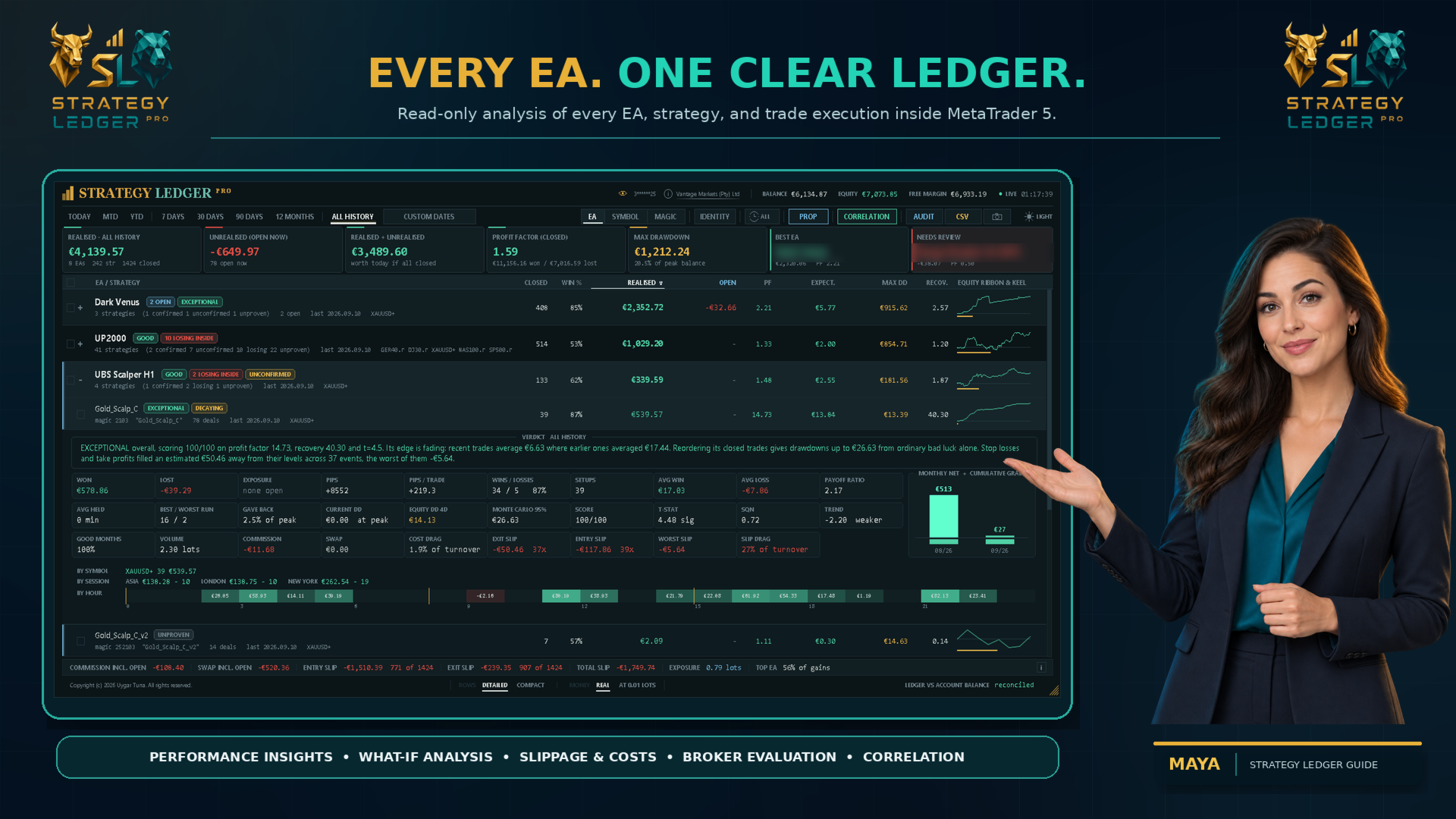
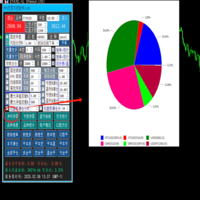
Strategy Ledger Pro è un pannello di analisi del conto in sola lettura per MetaTrader 5. Separa i risultati del conto per Expert Advisor, strategia, simbolo e numero magic, così puoi vedere quanto contribuisce davvero ciascuno.
Il pannello è disponibile in 11 lingue: English, Français, Deutsch, Español, Italiano, Português, Русский, Türkçe, 中文, 日本語 e 한국어.
Prima di scaricare la demo. Il Market esegue la demo di qualsiasi prodotto a pagamento solo nello Strategy Tester. Questo pannello analizza le operazioni del tuo conto, e un'esecuzione nello Strategy Tester non ha alcuno storico del conto da leggere: la demo si apre quindi con il pannello vuoto e lo segnala. È il funzionamento del meccanismo delle demo, non un limite del prodotto.
Il video in questa descrizione mostra il pannello su un conto reale.
Un manuale dettagliato (in inglese) spiega ogni funzione, e il gruppo AureusAI Trading Suite è aperto a discussioni e annunci.
MetaTrader mostra un unico saldo per l'intero conto. Quando più Expert Advisor operano insieme, quel saldo non mostra il contributo di ciascuno. Strategy Ledger Pro legge lo storico del conto, ricostruisce le posizioni chiuse, le assegna alle strategie e presenta i risultati in un unico pannello.
Il prodotto non apre, modifica né chiude ordini. Non contiene alcuna strategia di trading, non crea indicatori e non legge i prezzi del grafico.
Funzioni principali
- Risultati per Expert Advisor, singola strategia, simbolo o numero magic.
- Periodi predefiniti, un intervallo di date personalizzato e un filtro di sessione per Asia, Londra o New York.
- Risultati realizzati e fluttuanti, esposizione aperta, statistiche delle operazioni, pips, drawdown e curve di equity.
- Commissioni, swap, peso dei costi e slippage stimato in ingresso e in uscita, con un totale combinato.
- Valutazioni delle prestazioni, riepiloghi scritti e segnali di stato basati su regole fisse.
- Setup: le posizioni aperte insieme, o chiuse insieme come un paniere, contano come un'unica decisione per gli indicatori di confidenza.
- Monitoraggio in tempo reale del drawdown di equity per il conto e per ogni riga.
- Rinomina, raggruppamento, spostamento, nascondimento, ripristino, espansione e ordinamento interattivi.
- Identità: dichiara un numero magic come una strategia o più, e togli numeri magic o dimensioni di lotto dal pannello indicando quanto valevano.
- Modalità lotto fisso: ogni operazione riprodotta con un'unica dimensione di lotto, chiaramente indicata come simulazione.
- Risultati per sessione e per ora del giorno, per ogni strategia.
- Limiti delle prop firm: perdita giornaliera, drawdown massimo e obiettivo di profitto, con il margine rimasto per ciascuno.
- Report di esecuzione: quanto costano le tue esecuzioni, se ti favoriscono tanto spesso quanto ti penalizzano, quanto sono rapide e quanto paghi per lotto e per lotto-giorno.
- Segni di variazione giornaliera che mostrano cosa ha fatto ogni riga dall'inizio della giornata di trading.
- Guida integrata che descrive ogni segno, colonna e scorciatoia da tastiera.
- Correlazione tra Expert Advisor, strategie o simboli, dai risultati chiusi giornalieri.
- Storico delle valutazioni: la valutazione di ogni riga mese per mese, ricostruita dallo storico delle operazioni.
- Report dello Strategy Tester: uno o più report HTML letti sullo stesso pannello, indicati come simulati e mai mescolati con il conto.
- Share Card: un clic salva un'immagine pulita dei risultati di un Expert Advisor, senza numero di conto né nome del broker.
- Un'interfaccia in 11 lingue, scelta una volta nelle impostazioni.
- Esportazioni dettagliate delle misure e di audit in formato CSV, e screenshot del pannello in formato PNG.
Come vengono costruiti i dati del conto
Strategy Ledger Pro conta posizioni complete anziché singoli deal. MetaTrader può aprire o chiudere una posizione tramite più deal. Il pannello raggruppa questi deal per identificativo di posizione e registra un'operazione quando il volume di chiusura corrisponde a quello di apertura. Le chiusure parziali restano parte della stessa posizione.
Profitto, commissioni, costi e swap sono inclusi in ogni risultato. Depositi, prelievi, crediti, rettifiche, bonus, addebiti, interessi, dividendi e imposte rientrano nella riconciliazione del conto quando il broker li riporta nello storico. Ogni posizione riporta anche il risultato in pips — l'uscita media rispetto all'ingresso medio —, che non dipende dalla dimensione del lotto.
Una strategia è di norma identificata dal suo numero magic e dal commento ripulito del deal di apertura. Questo supporta gli Expert Advisor che usano un numero magic per più strategie interne. Le operazioni copiate da un segnale MQL5 restano unite come un'unica strategia con il nome del segnale. Possono essere incluse anche le operazioni manuali e da mobile con numero magic zero.
Non ogni posizione è una decisione separata. Un Expert Advisor che apre quattro posizioni su un segnale ha preso una decisione, e una griglia che chiude un paniere in un colpo ha prodotto un solo risultato. Per questo, le posizioni dello stesso numero magic e simbolo aperte in un breve intervallo, o chiuse insieme a scala — una direzione, prezzi di ingresso scaglionati in un ordine —, contano come un unico setup. Gli importi contano sempre le posizioni; gli indicatori di confidenza — confidenza statistica, campione minimo, valutazione, punteggio e drawdown Monte Carlo — usano i setup, così che un paniere aperto come un'unica decisione non venga trattato come quaranta risultati indipendenti.
Il piè di pagina confronta il risultato realizzato ricostruito e le operazioni di saldo con il saldo e il credito riportati da MetaTrader. Qualsiasi differenza viene mostrata. I deal di inversione sui conti netting possono rendere incerti i confini esatti delle operazioni, quindi le righe interessate sono segnate come Non verificato e non ricevono una valutazione.
Viste, periodi e organizzazione
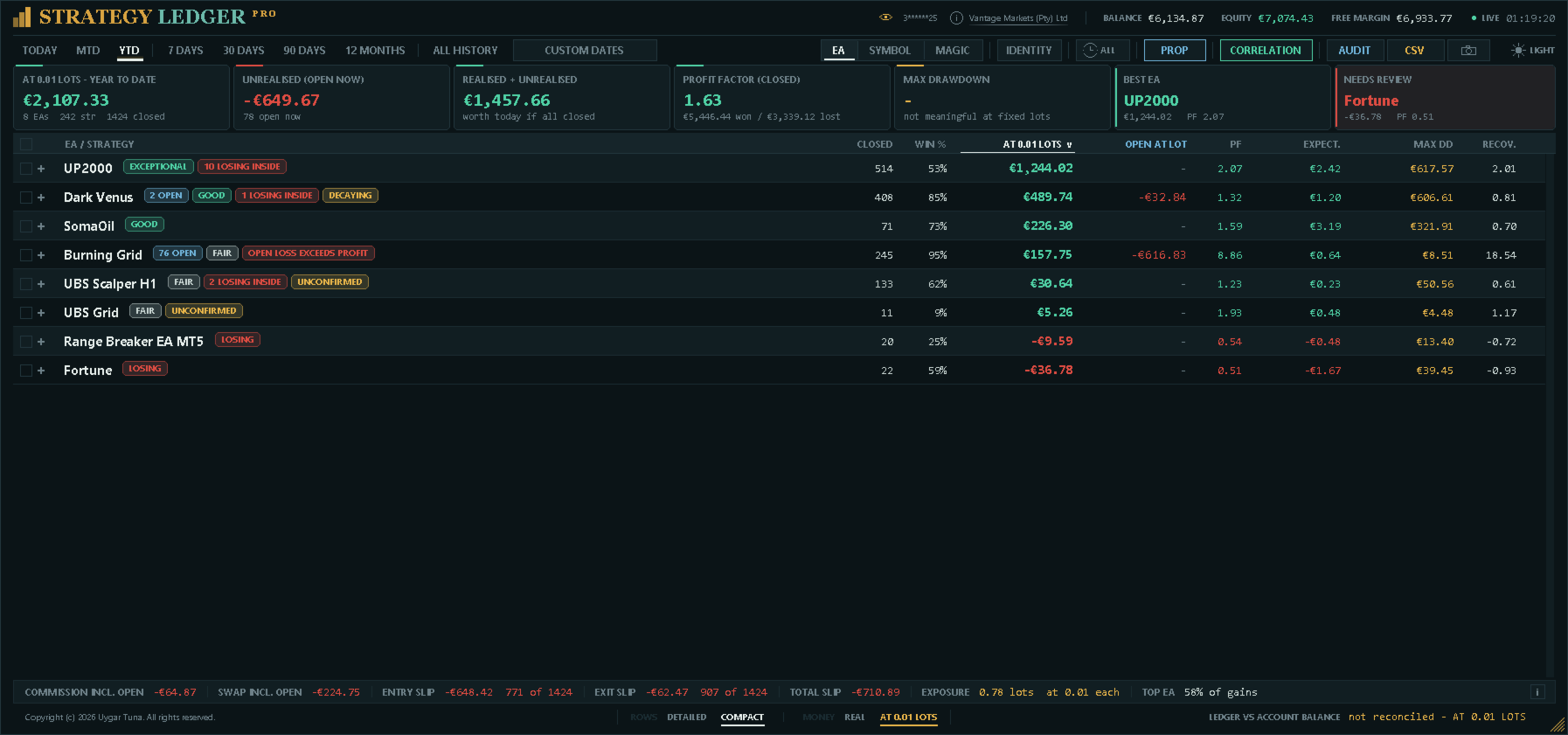
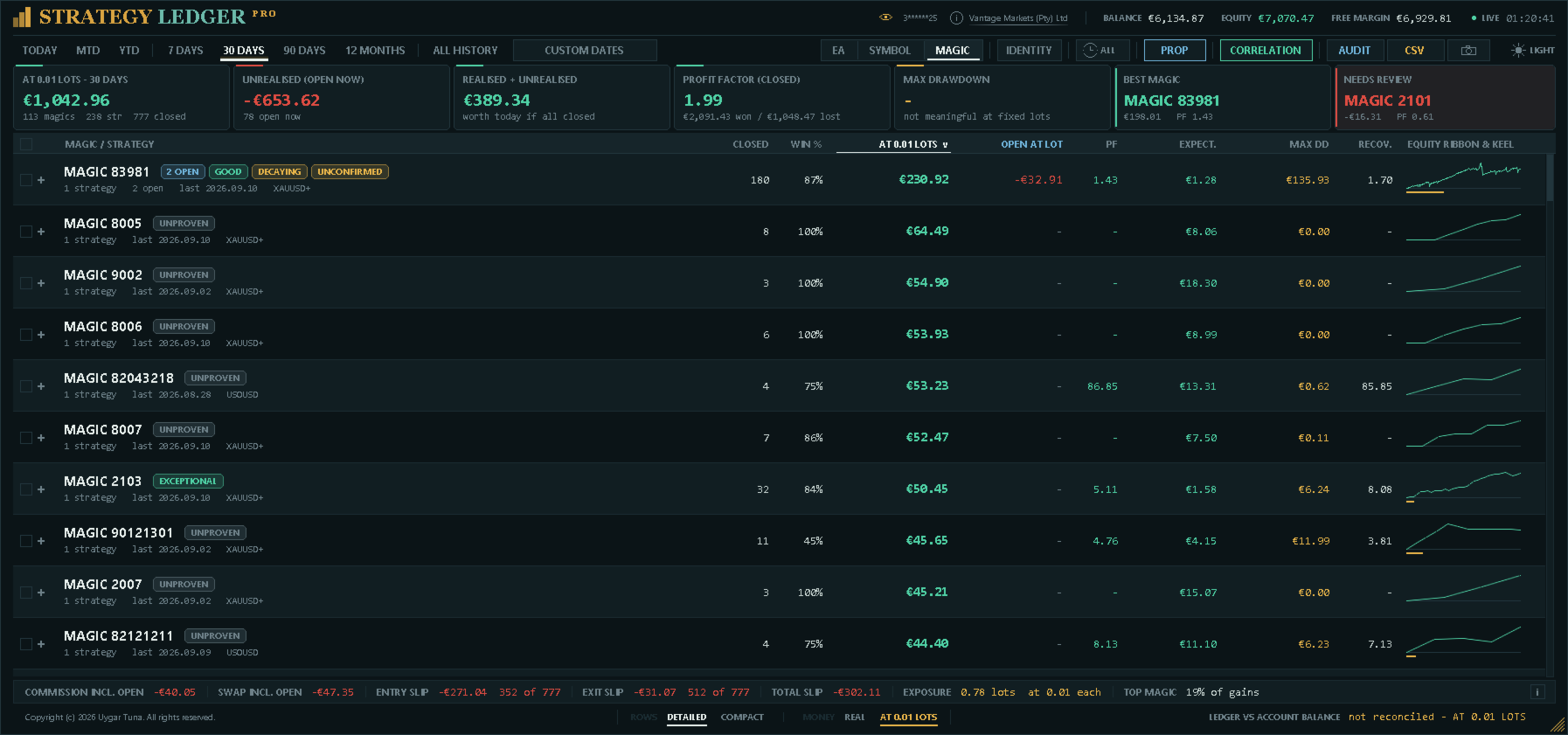
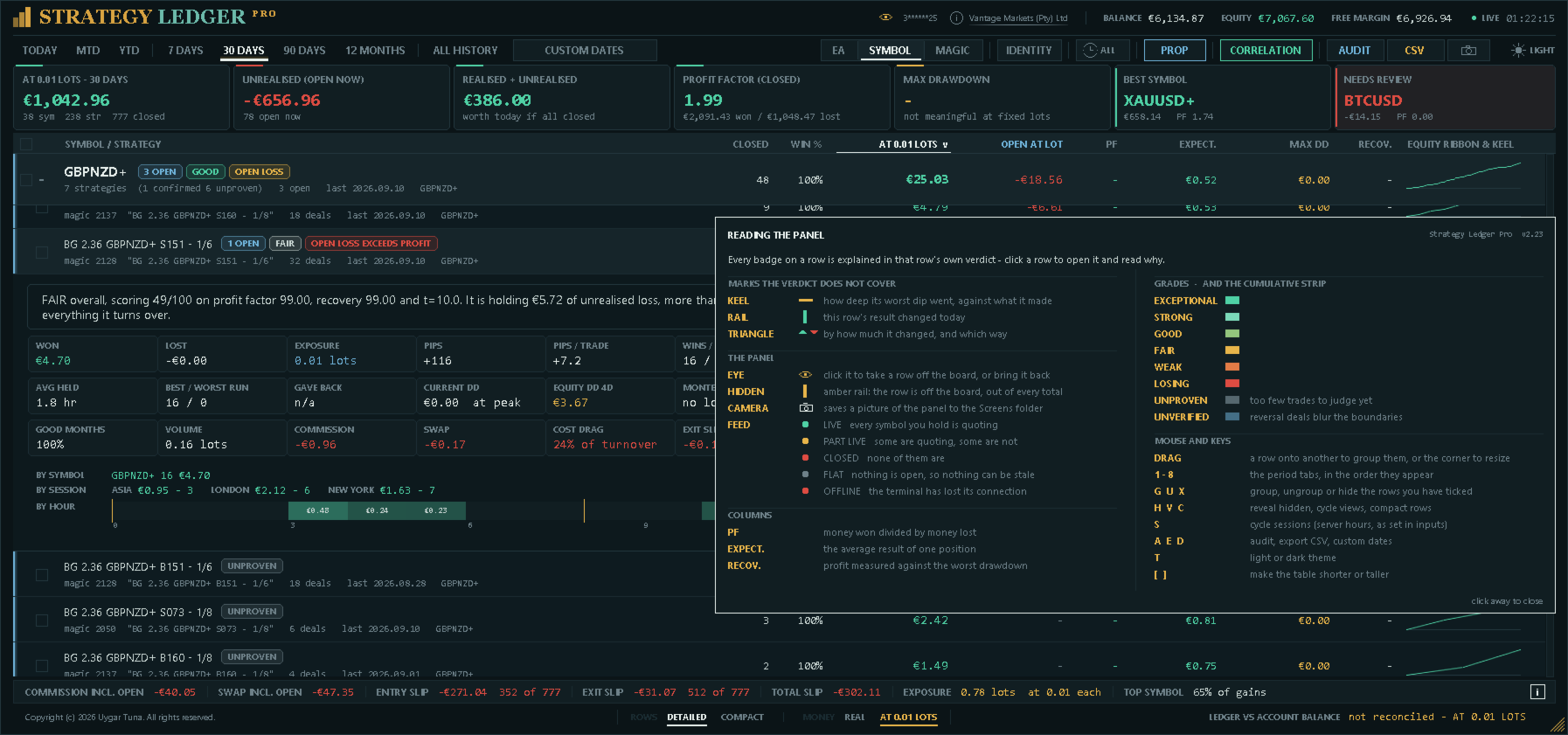
La vista per Expert Advisor raggruppa le strategie sotto l'Expert Advisor assegnato. La vista per simbolo raggruppa gli stessi dati per strumento. La vista per magic li raggruppa per il numero che ogni Expert Advisor ha inviato, con i suoi commenti come strategie sottostanti; è il posto dove guardare quando i commenti di un Expert Advisor fanno qualcosa di inatteso. Più righe possono restare espanse contemporaneamente.
I periodi disponibili sono oggi, mese corrente, anno corrente, 7 giorni, 30 giorni, 90 giorni, 12 mesi, tutto lo storico e un intervallo di date personalizzato. Una posizione può essere assegnata a un periodo in base all'ora di chiusura o di apertura.
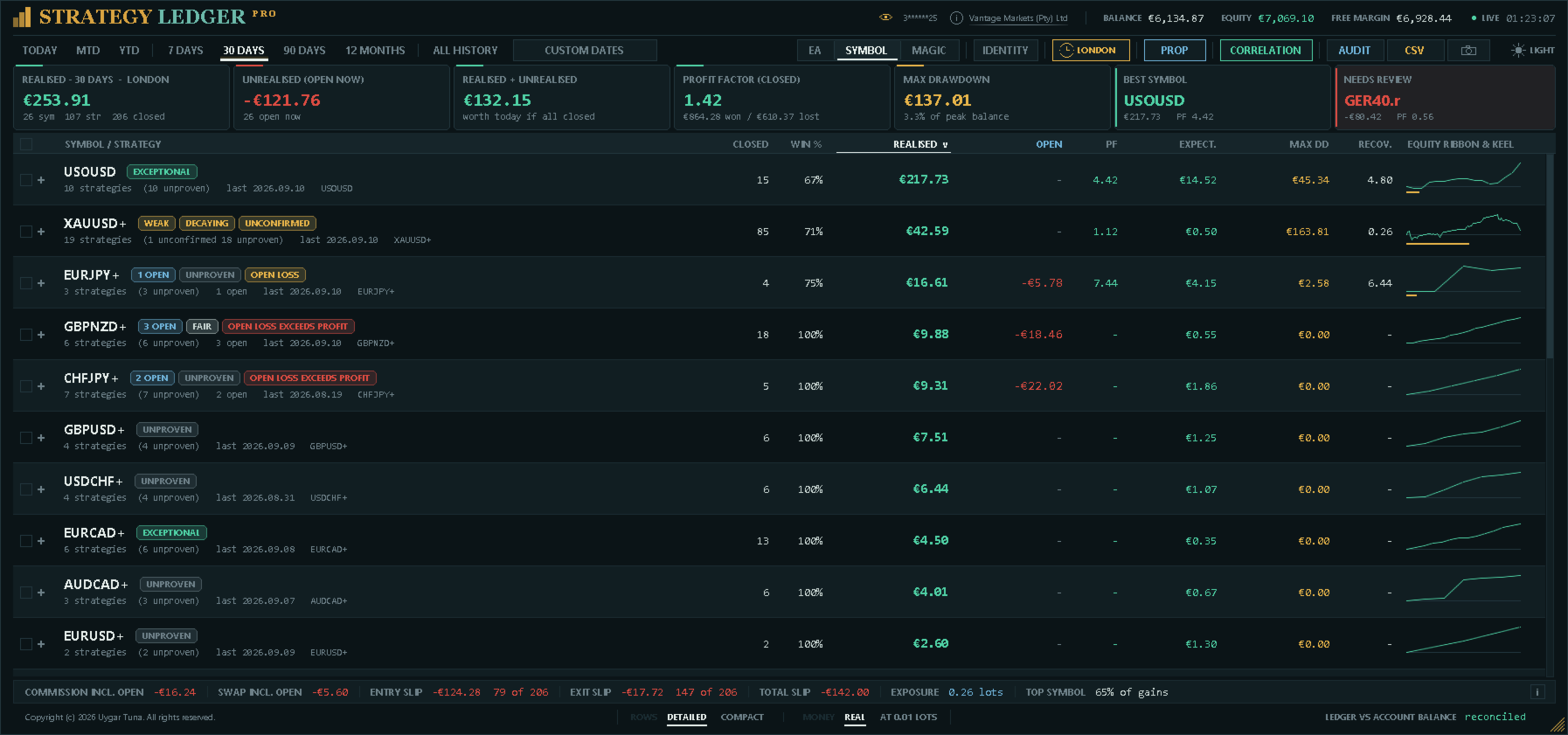
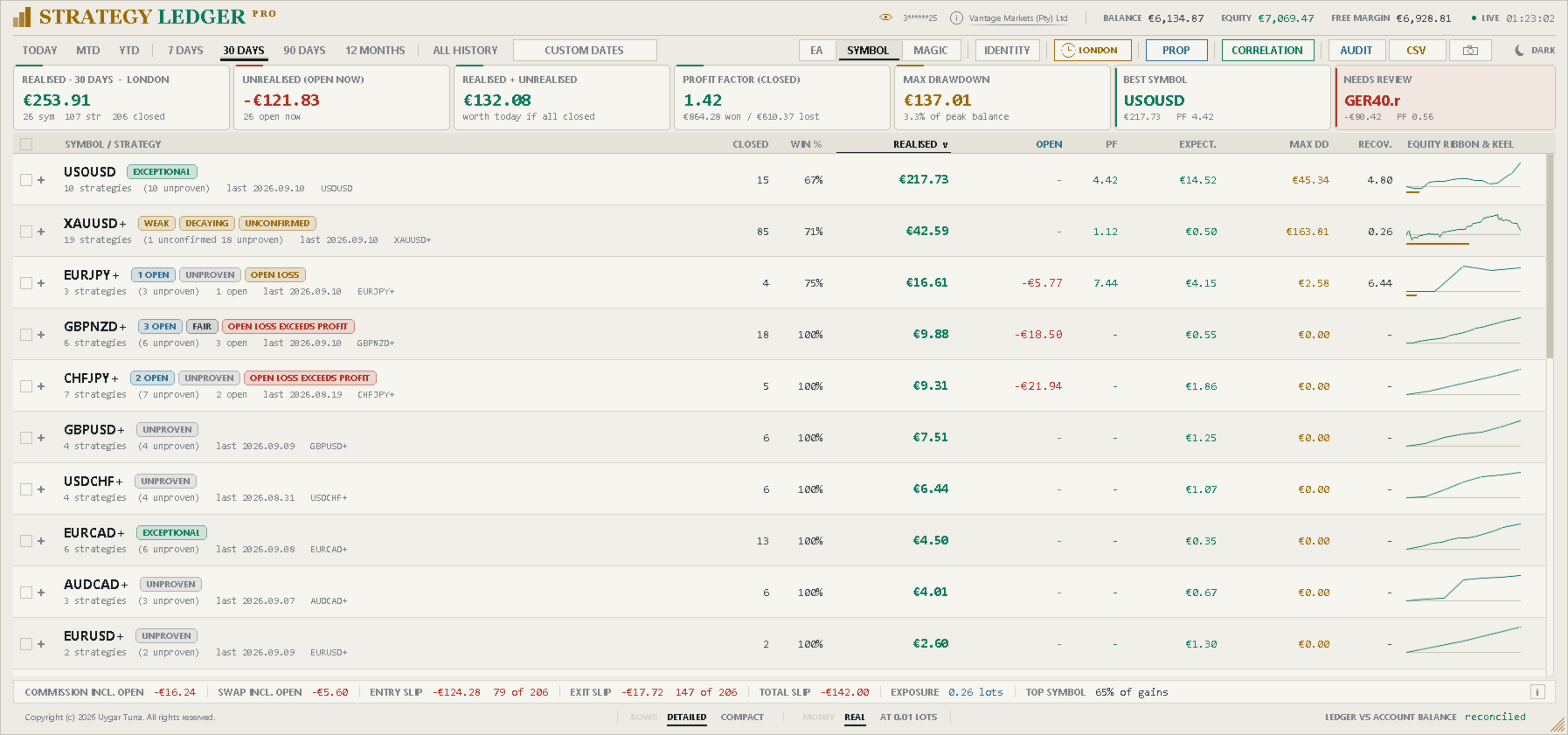
Un orologio nell'intestazione filtra l'intero pannello su una sessione di trading — Asia, Londra o New York — in qualsiasi vista e periodo. Una posizione appartiene alla sessione in cui è stata aperta. Gli orari di inizio delle sessioni sono impostazioni, in ora del server, e l'etichetta del periodo indica ovunque quale sessione è attiva.
I nomi possono essere appresi dai commenti dei deal o impostati manualmente. Le strategie possono essere rinominate, raggruppate da una selezione, trascinate sotto un altro Expert Advisor, unite o separate. Trascinare una riga che fa parte di una selezione spuntata sposta l'intera selezione. I commenti identici possono essere uniti tra numeri magic, con un elenco di eccezioni per quelli che devono restare separati.
Le righe possono essere nascoste singolarmente o in selezione e ripristinate in seguito. Ogni riga di Expert Advisor ha due controlli in una colonna dedicata sul bordo destro: un occhio, che nasconde la riga e poi diventa ambra per ripristinarla, e una fotocamera, che salva la Share Card della riga. Entrambi sono sempre visibili, in modo discreto, e si illuminano al passaggio del mouse. Le righe nascoste sono memorizzate separatamente per ogni vista. Sono escluse dai totali visibili e dalla curva di saldo filtrata. Un Expert Advisor con tutte le strategie nascoste non mostra cifre, perché non ne ha, e viene posto sotto le righe che contano ancora, per non spostarsi quando queste cambiano.
Le colonne possono essere ordinate per nome, risultato, profit factor, posizioni chiuse, drawdown o aspettativa.
Identità
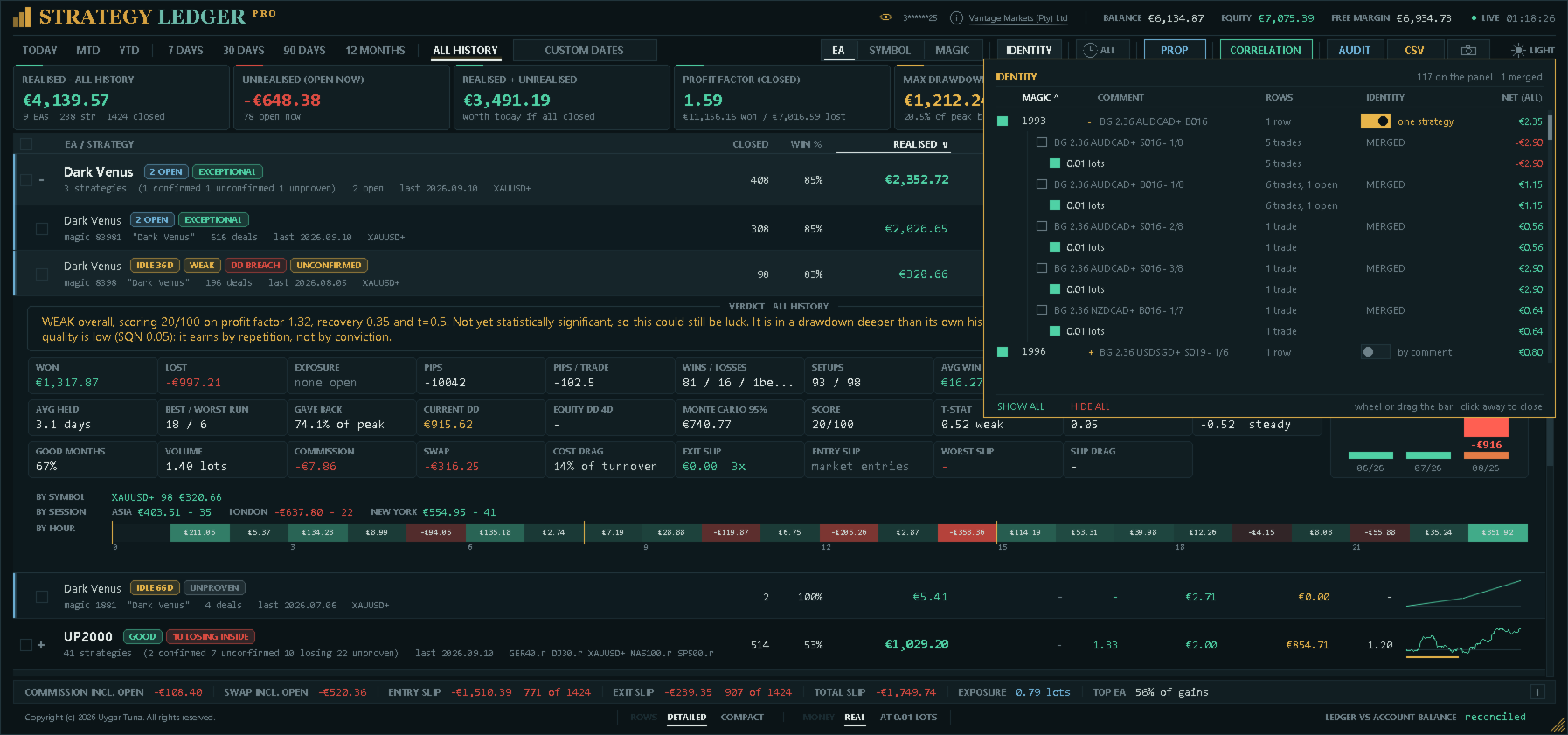
Il riquadro identità elenca ogni numero magic del conto con le sue righe, il risultato su tutto lo storico e un selettore. Per commento è la regola normale: una strategia è un numero magic insieme al suo commento. Una strategia unisce tutti i commenti di quel numero magic in un'unica riga, per gli Expert Advisor che scrivono diagnostica o numeri dei livelli di griglia nel commento; qualsiasi commento può tornare ad avere una propria riga. Il selettore non è offerto per i segnali MQL5, che sono già una strategia secondo la regola dei segnali.
Ogni numero magic si apre nei suoi commenti e, sotto ciascun commento, nelle dimensioni di lotto, dalla più piccola, ciascuna con operazioni e risultato. Una dimensione di lotto può essere tolta dal pannello come un numero magic; la stessa dimensione sotto due commenti può essere tolta separatamente. Tutto ciò che viene tolto è riportato in fondo al riquadro con le operazioni e il denaro esclusi, così un risultato migliorato non è mai mostrato senza il suo costo. I filtri per magic e lotto sono lenti: non vengono salvati e si azzerano insieme. Il selettore di identità e le promozioni sono decisioni e vengono ricordati con il layout.
Modalità lotto fisso
Un selettore nel piè di pagina riproduce ogni operazione chiusa e ogni posizione aperta come se fossero state aperte con un'unica dimensione di lotto (un'impostazione, 0,01 per impostazione predefinita). La scala di una griglia si appiattisce, mostrando se il vantaggio stava negli ingressi o solo nel dimensionamento; un segnale mostra quanto avrebbe reso alla dimensione con cui verrebbe copiato. Poiché ogni importo sullo schermo diventa una simulazione, il pannello lo indica ovunque si legga denaro: l'intestazione del realizzato e la prima cella del riepilogo riportano la dimensione del lotto, la riga di riconciliazione indica non riconciliato, le esportazioni vengono nominate e segnate come riscalate, l'audit non viene eseguito, lo storico delle valutazioni e il monitoraggio dell'equity si sospendono e nulla viene salvato. La modalità è disattivata ogni volta che il pannello viene collegato. Il lotto fisso uguaglia la dimensione, non il rischio; i pips uguagliano solo il movimento del prezzo.
Pannello e dettagli della strategia
L'intestazione mostra conto, broker, saldo, equity, margine libero, ora del server e stato delle quotazioni. Lo stato è indicato come Live, Parziale, Chiuso, Senza posizioni od Offline, così che le cifre che non possono aggiornarsi non vengano scambiate per attuali. Un occhio accanto al numero di conto lo nasconde, per gli screenshot da condividere.
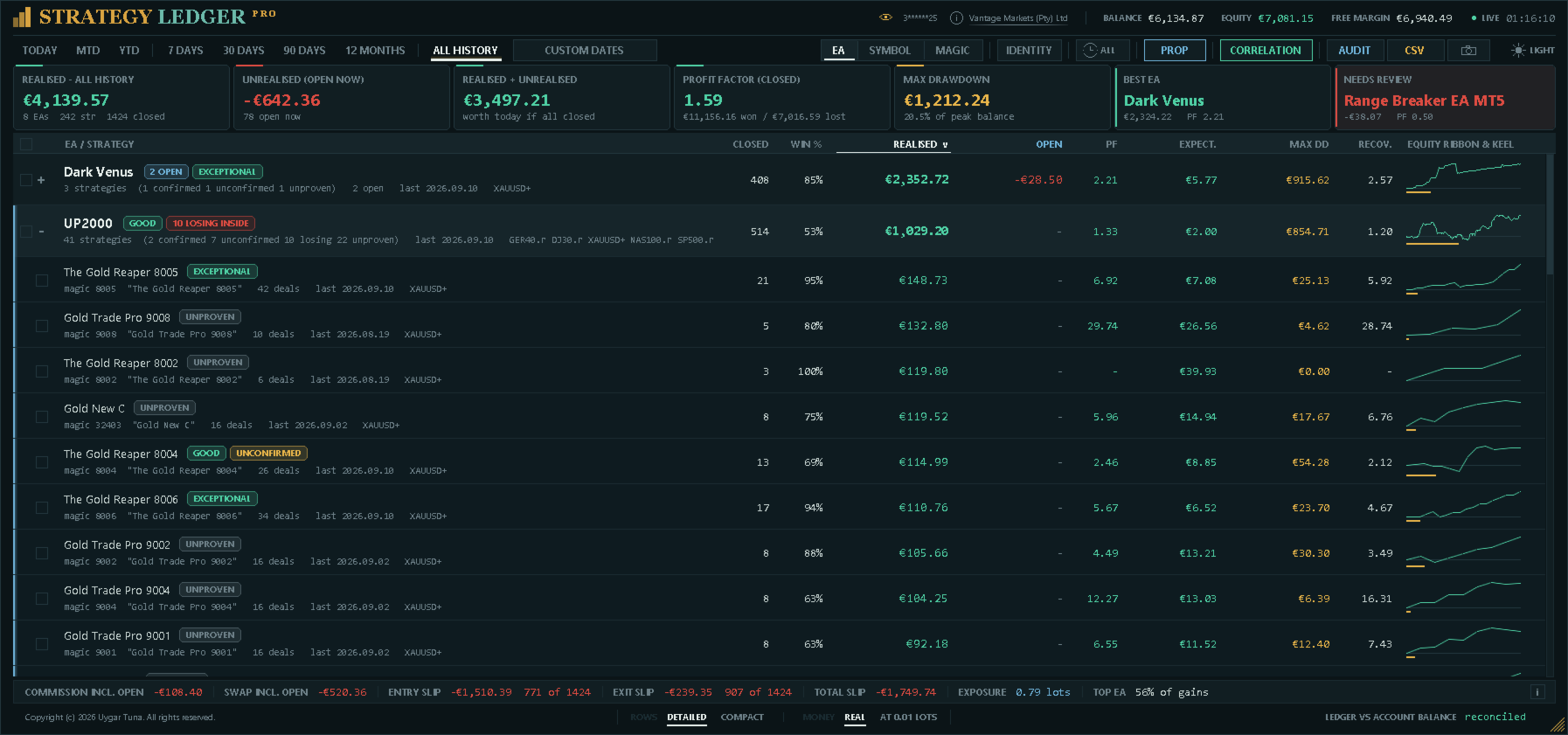
Il riepilogo mostra il risultato realizzato, il risultato fluttuante attuale, la loro somma, il profit factor delle posizioni chiuse, il drawdown massimo del saldo, la riga più forte per valore attuale e la riga selezionata per la revisione dalle regole di attenzione del pannello. Le ultime due schede indicano il motivo della scelta, e ciascuna ha un segno che apre la regola: per la riga in revisione, ogni componente del punteggio di attenzione con i punti ottenuti e ciò che ha rilevato; per la più forte, la regola e le cifre a cui è stata applicata.
La tabella mostra posizioni chiuse, percentuale di vincite, risultato realizzato, risultato fluttuante, profit factor, aspettativa, drawdown massimo delle posizioni chiuse, fattore di recupero e una curva di equity compatta con il percorso del drawdown. Quando ci sono righe nascoste, queste cifre descrivono la selezione visualizzata.
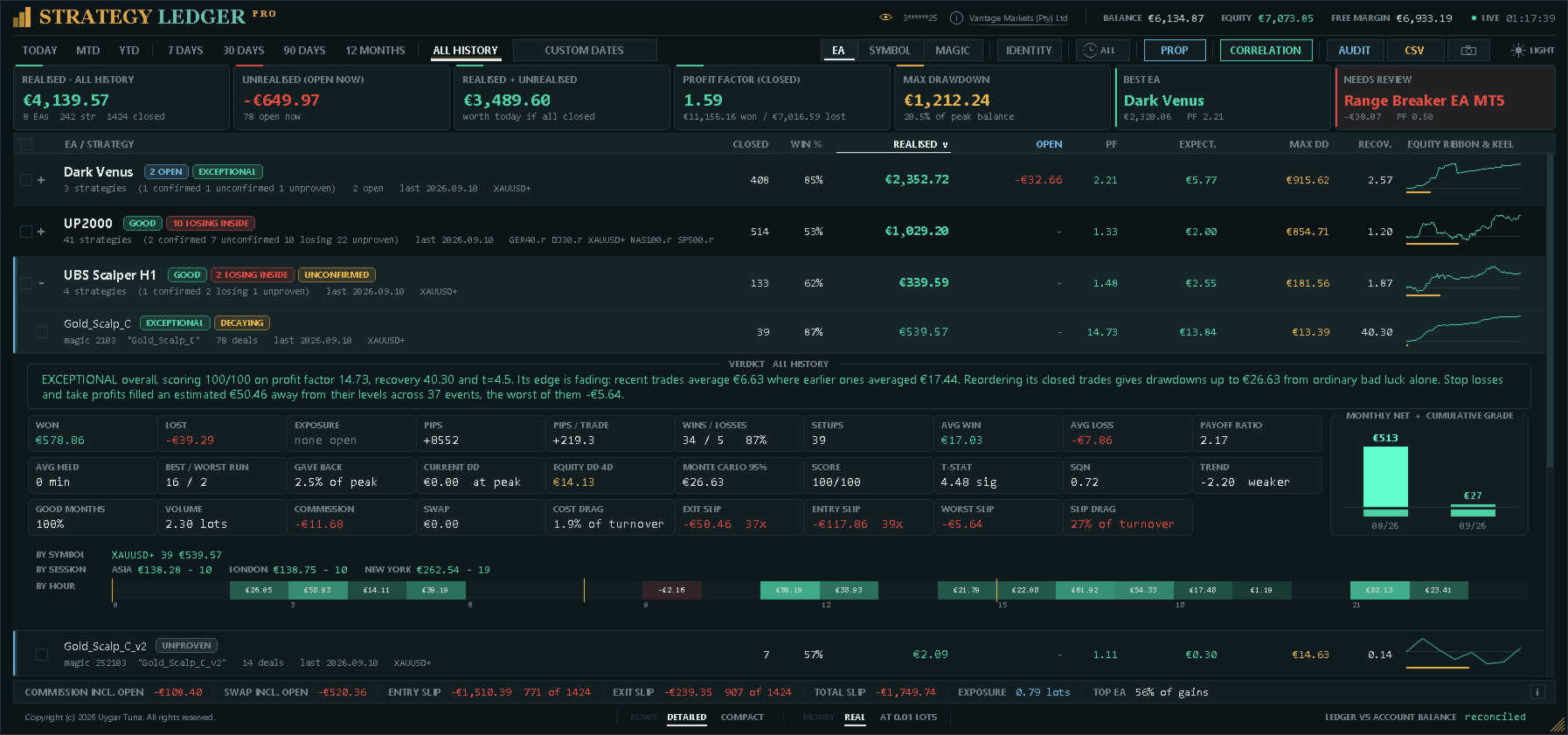
Il dettaglio espanso contiene il totale vinto e perso, l'esposizione aperta, i pips e i pips per operazione, vincite e perdite, i setup, il tempo medio di mantenimento, vincita e perdita medie, il payoff ratio, le serie consecutive migliori e peggiori, la percentuale di drawdown, il drawdown attuale, il periodo più lungo sott'acqua, il volume e la percentuale di mesi positivi.
Il periodo più lungo sott'acqua è il tratto più lungo in cui il risultato chiuso cumulato della riga è rimasto sotto il suo massimo precedente, da un massimo al successivo. Non è la durata di una posizione: un Expert Advisor le cui operazioni durano minuti può restare per settimane sotto il suo massimo. Un tratto che non ha ancora recuperato il massimo viene contato fino a oggi e indicato come «finora».
Il dettaglio mostra anche il punteggio, la confidenza statistica, il System Quality Number, la tendenza dei risultati recenti, la stima di drawdown Monte Carlo, il drawdown di equity in tempo reale, commissioni, swap, peso dei costi, slippage in ingresso e in uscita, il peggior slippage misurato e il peso dello slippage. Include un grafico del netto mensile, una suddivisione per simbolo, il risultato della riga in ogni sessione e una striscia di ventiquattro celle colorate in base a quanto ogni ora del giorno ha guadagnato o perso.
Valutazioni e segnali di rischio
Il punteggio combina confidenza statistica, profit factor e fattore di recupero. Ogni componente è limitato prima della media. Una perdita fluttuante può limitare il punteggio, perché le statistiche delle posizioni chiuse non includono quella perdita aperta.
Il campione minimo predefinito è di 20 setup. Le righe al di sotto sono segnate come Non provato. Le altre valutazioni vanno da In perdita a Eccezionale secondo il punteggio e la soglia di perdita configurata. Le valutazioni descrivono dati registrati del conto; non sono segnali di trading né previsioni.
I segnali di stato indicano posizioni aperte, assenza di operazioni chiuse, inattività, un risultato in perdita, perdita aperta, perdita aperta superiore al profitto contabilizzato, risultati recenti più deboli, conferma statistica insufficiente, drawdown superiore alla stima dello storico rimescolato, strategie in perdita dentro un Expert Advisor redditizio e un drawdown di equity nettamente superiore a quello delle posizioni chiuse. Espandendo una riga compaiono i segnali applicabili e una spiegazione scritta con le cifre di quella riga.
Sessioni e ore
Il filtro di sessione agisce sull'intero pannello; inoltre, il dettaglio di ogni strategia riporta il suo risultato nelle tre sessioni affiancate, così il confronto si legge senza cambiare nulla. Sotto, ventiquattro celle — una per ogni ora della giornata del server in cui è stata aperta una posizione — sono colorate in base a quanto quell'ora ha guadagnato o perso ed etichettate con l'importo, con i confini delle sessioni segnati perché i due coincidano.
Limiti delle prop firm
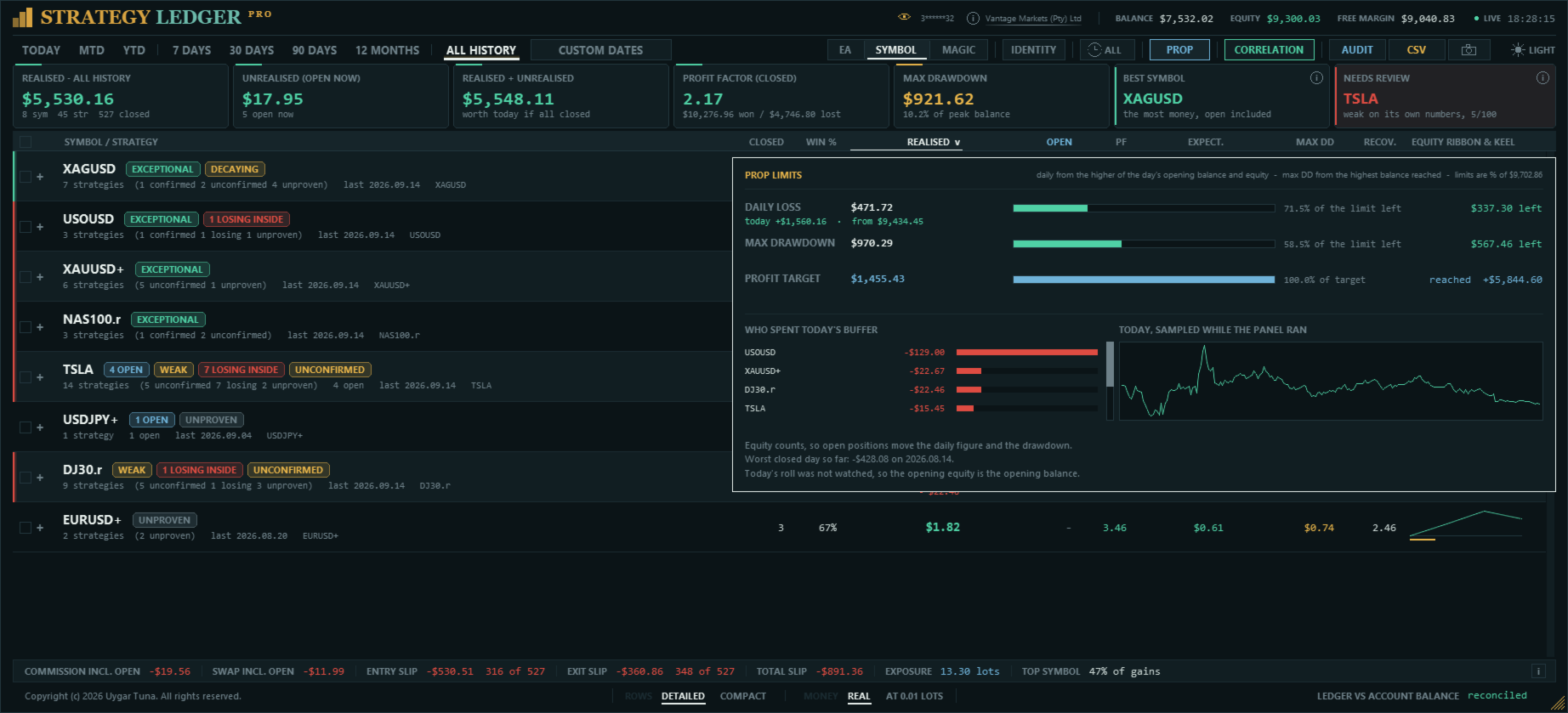
Perdita giornaliera, drawdown massimo e obiettivo di profitto possono essere inseriti nella valuta del conto o in percentuale, e il pannello indica il margine rimasto per ciascuno con una barra che diventa ambra e poi rossa man mano che si esaurisce. Un limite superato è indicato come violato, non come importo residuo negativo.
Le società misurano il drawdown in modi diversi, quindi un'unica impostazione copre entrambi i limiti: statico dal saldo iniziale, trailing dal saldo massimo raggiunto o trailing dall'equity massima osservata. Il limite giornaliero applica la stessa regola nella giornata e si azzera con essa: dal saldo di apertura del giorno, dal maggiore tra saldo ed equity di apertura, o dall'equity massima del giorno. La riga giornaliera mostra anche il risultato della giornata finora, e il riquadro indica le cifre da cui parte il conto alla rovescia.
Viene usata l'equity, quindi le posizioni aperte muovono la cifra giornaliera. L'equity al momento del cambio di giorno non può essere ricostruita dallo storico, perciò viene rilevata mentre il pannello è in esecuzione; se non è stata rilevata, il riquadro lo indica e ricorre al saldo di apertura del giorno, ricostruito esattamente dallo storico dei deal.
Report di esecuzione
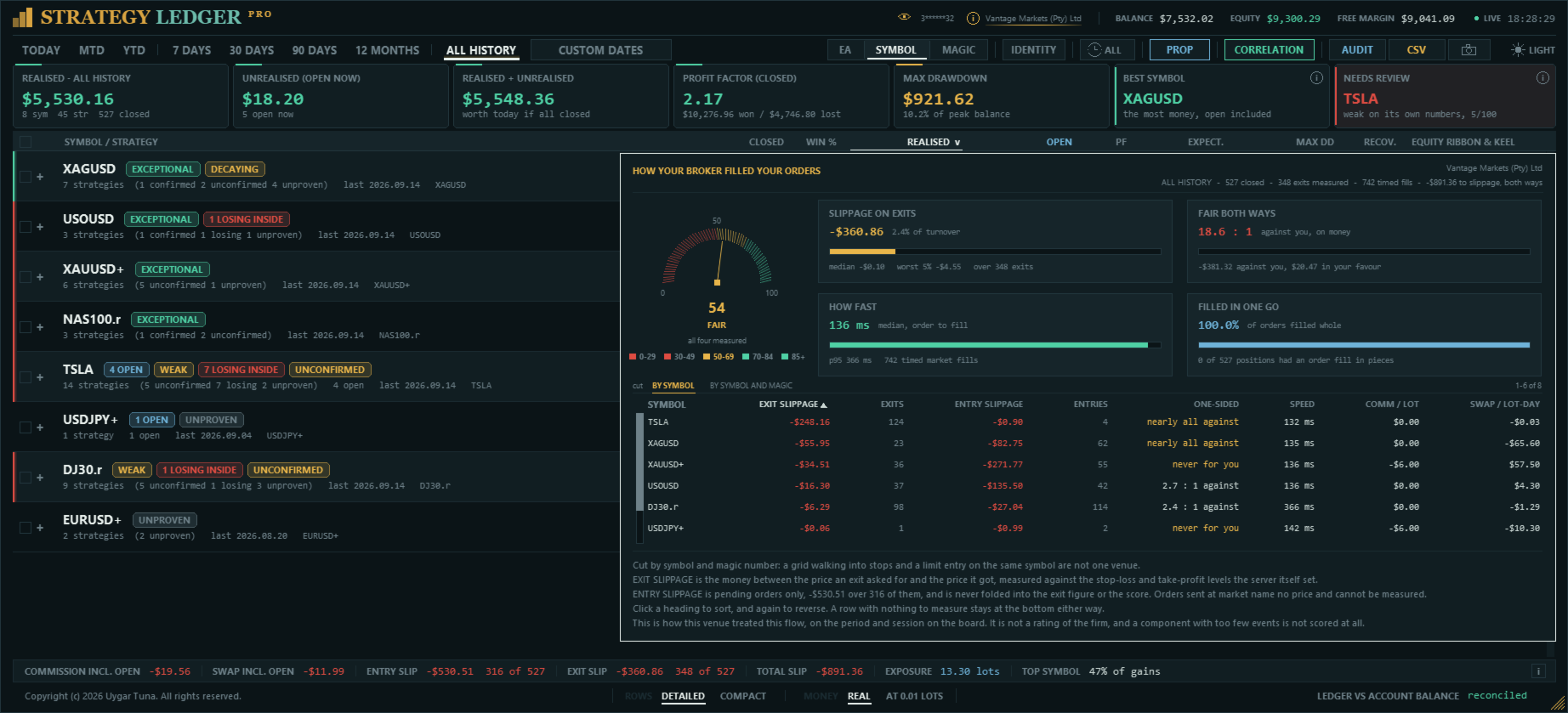
Il nome del broker nell'intestazione apre un report su come sono stati eseguiti i tuoi ordini. Un quadrante valuta quattro aspetti controllati dalla sede di esecuzione, venticinque punti ciascuno: quanto è costato lo slippage in proporzione a tutto ciò che il conto ha movimentato, se le esecuzioni ti favoriscono tanto spesso quanto ti penalizzano, quanto tempo ha impiegato il broker tra la ricezione e l'esecuzione di un ordine, e quanto spesso un ordine è stato eseguito in più parti. Ogni parte è mostrata con la sua barra e una frase che spiega cosa l'ha determinata.
Sotto il quadrante compaiono le stesse cifre per simbolo, con commissione per lotto e swap per lotto-giorno. Lo slippage in uscita è misurato rispetto ai livelli di stop loss e take profit impostati dal server stesso, quindi il prezzo mirato è noto; lo slippage in ingresso è misurato sugli ordini pendenti, mentre gli ordini a mercato non hanno un prezzo richiesto e non possono essere misurati. La velocità di esecuzione deriva dai timestamp dell'ordine stesso.
È una descrizione delle tue esecuzioni su questo conto, non una valutazione della società, e il report lo dice: lo slippage dipende in gran parte dalla strategia — un breakout con ingresso tramite ordine stop lo paga ovunque —, mentre commissioni e swap dipendono dal tipo di conto che hai scelto.
Drawdown, costi e slippage
Il drawdown delle posizioni chiuse non può mostrare l'intero movimento delle posizioni finché restano aperte. Strategy Ledger Pro può rilevare l'equity in tempo reale una volta al secondo e memorizzare il calo più ampio osservato da un massimo precedente per il conto, ogni Expert Advisor e ogni strategia. Il monitoraggio inizia quando la funzione viene attivata la prima volta, e la data di inizio è mostrata. La registrazione segue la vita di una riga, mai la scheda del periodo, lo stato nascosto o la modalità lotto fisso: cambiare vista non scrive un drawdown.
Quando il monitoraggio in tempo reale è disattivato, il dettaglio può mostrare una stima del drawdown al 95° percentile ottenuta rimescolando i risultati chiusi. Il rimescolamento riordina i setup anziché le singole posizioni, così un paniere che poteva avvenire solo come blocco viene modellato come un blocco. Questa stima e tutte le valutazioni descrivono solo dati storici.
Commissioni e swap sono riportati separatamente, e ciascuno include l'importo già addebitato sulle posizioni aperte. Il peso dei costi è mostrato come percentuale del volume lordo quando i dati necessari sono disponibili.
Lo slippage in uscita è stimato quando l'ordine di uscita contiene un prezzo richiesto, inclusi stop loss, take profit e uscite tramite ordini pendenti. Lo slippage in ingresso è stimato per gli ordini pendenti con un prezzo di ingresso richiesto. Gli ordini a mercato non hanno un prezzo richiesto da confrontare, quindi il pannello indica copertura non disponibile o parziale. Entrambe le cifre indicano quante posizioni sono state misurate su quelle chiuse, così un campione parziale non viene letto come completo. È mostrato anche un totale combinato; non riporta un conteggio, perché le sue due parti coprono sottoinsiemi diversi delle stesse posizioni. I valori sono convertiti nella valuta del conto usando il valore del tick attuale del simbolo.
Correlazione
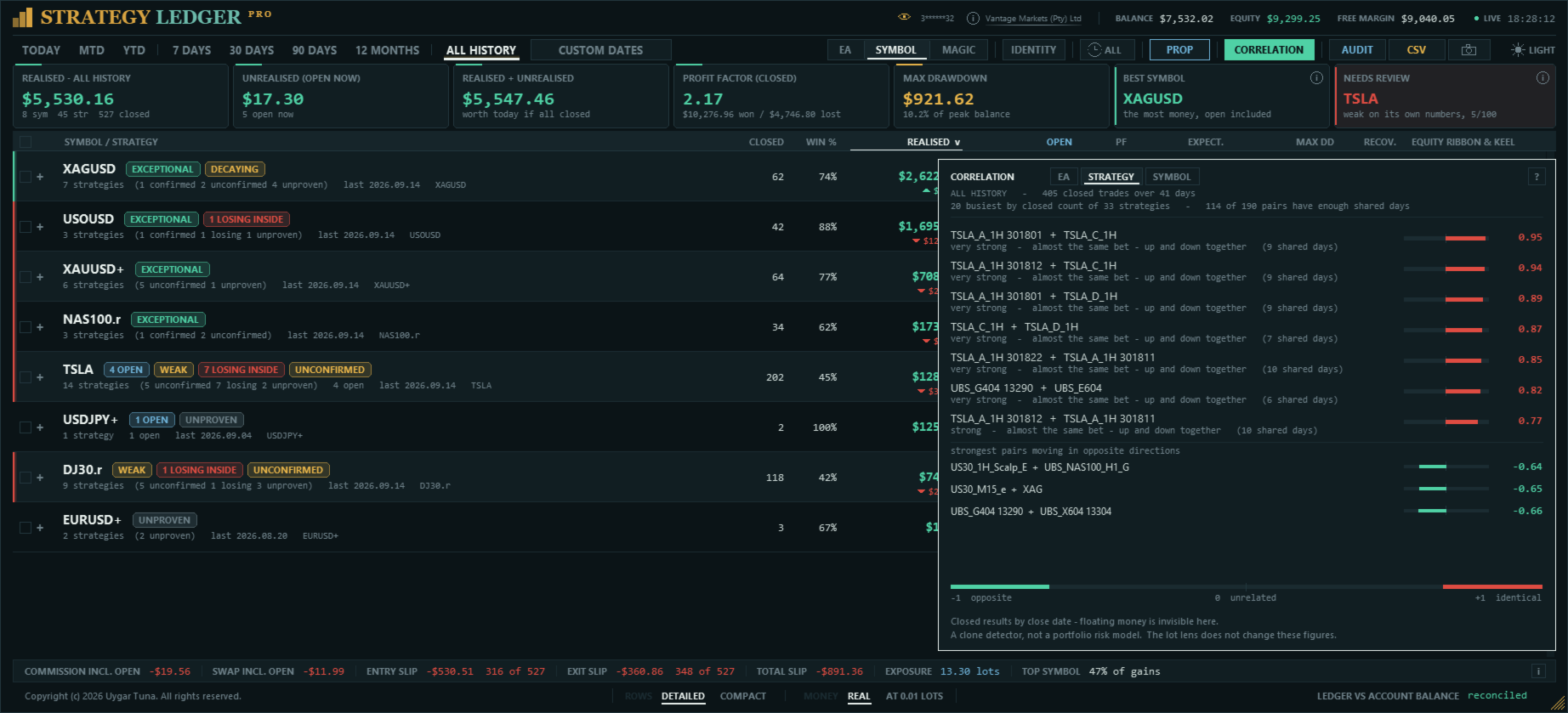
Ogni riga è misurata da sola, quindi più Expert Advisor possono sembrare solidi singolarmente pur reagendo alle stesse condizioni. L'elenco di correlazione confronta le righe tra loro invece di valutarle separatamente, e indica quali si muovono allo stesso modo negli stessi giorni.
I risultati chiusi di ogni riga sono sommati per giorno. Due righe vengono poi confrontate nei giorni in cui hanno operato entrambe; i giorni in cui ha operato solo una sono esclusi, perché non offrono una base di confronto. La cifra riportata è il coefficiente di correlazione di Pearson, che va da +1 (movimento identico) a 0 (nessuna relazione) fino a -1 (movimento opposto).
L'elenco può essere generato per Expert Advisor, numeri magic, singole strategie o simboli. Vengono confrontate solo le venti righe con più posizioni chiuse, e una coppia è mostrata solo se le due righe condividono almeno tanti giorni di trading quanto il campione minimo configurato. Le coppie che si muovono in direzioni opposte sono elencate a parte per restare visibili.
Storico delle valutazioni
Il dettaglio espanso di una riga include una striscia di blocchi mensili sotto il grafico del netto mensile, allineata agli stessi mesi. Ogni blocco mostra la valutazione della riga alla fine di quel mese.
I blocchi sono cumulativi: ciascuno è calcolato su tutte le posizioni chiuse dalla riga fino alla fine di quel mese, non solo su quel mese, perché un singolo mese raramente contiene abbastanza posizioni chiuse per una valutazione. Una riga oggi valutata Eccezionale può quindi mostrare mesi indeterminati all'inizio del suo storico, segno che in quel momento erano state chiuse troppo poche posizioni per trarre una conclusione.
Report dello Strategy Tester
Il pannello legge i report salvati dallo Strategy Tester. Salva un report in HTML in MQL5\Files\StrategyLedgerPro\Backtests, premi BACKTEST nell'intestazione, spunta uno o più report e caricali. Ogni report diventa un Expert Advisor sul pannello, con il nome del report; i suoi commenti diventano le sue strategie e i suoi simboli si separano nella vista per simbolo, esattamente come le operazioni reali. Più report possono essere caricati insieme.
Mentre un report è sul pannello, l'intestazione indica SIMULATO, con il numero di report, le loro strategie e simboli, le date coperte e l'origine del numero magic, e una linea dorata corre lungo il bordo superiore del pannello. Il piè di pagina riconcilia le posizioni ricostruite con la colonna del saldo del report stesso, al centesimo. Per un backtest, le schede mostrano il saldo del report, il periodo del test, il rendimento annualizzato, il tratto più lungo sotto un massimo precedente e, con più report, il migliore per recupero. Le schede dei periodi contano dall'ultima chiusura del report, quindi 12 MESI è l'ultimo anno del test.
Conto reale e backtest non vengono mai mostrati insieme. Passare a un report sostituisce il conto in tutte le schermate, e tornare indietro lo ripristina. Nulla di ciò che viene letto da un report viene scritto nei nomi, gruppi, righe nascoste, registro dell'equity o segno prop firm del conto; i nomi e le righe nascoste propri di un report sono conservati in file separati. Esecuzioni, latenza, slippage e il segno prop firm del giorno non possono essere misurati in un backtest, e i riquadri che li mostrerebbero lo indicano. Un report non contiene identificativi di posizione, quindi le uscite sono abbinate agli ingressi per volume e poi per il profitto indicato dal tester stesso; l'intestazione indica quanti abbinamenti, se ce ne sono, sono stati dedotti.
Share Card
La fotocamera su ogni riga di Expert Advisor salva una Share Card: un'unica immagine di 1240 × 844 con i risultati di quell'Expert Advisor nel periodo visualizzato, pronta da pubblicare. Mostra il risultato netto con i costi di trading (commissioni e swap, e la loro quota sul profitto lordo), le serie migliori e peggiori, la curva di equity, dieci misure chiave, gli ultimi dodici mesi, i risultati per sessione, per giorno della settimana e per ora del giorno, e il verdetto.
Una scheda non contiene numero di conto né nome del broker, quindi nulla su di essa ti identifica. Ogni scheda indica il periodo coperto e se proviene da un conto reale, da un report dello Strategy Tester o da una riproduzione a lotto fisso, così un risultato simulato non può mai essere scambiato per reale.
Le schede sono salvate in MQL5\Files\StrategyLedgerPro\Cards, in una cartella per ogni data, con il nome dell'Expert Advisor, il periodo e l'ora nel nome del file; una scheda esistente non viene mai sovrascritta. Ogni scheda riporta per impostazione predefinita il marchio Strategy Ledger, disattivabile nelle impostazioni.
Controlla le regole di ogni piattaforma prima di pubblicare una scheda. MQL5.com non consente di pubblicare questo tipo di immagini di prodotto sul sito; condividi le schede sui tuoi canali.
Lingue
La lingua del pannello è la prima impostazione dei parametri di input: English, Français, Deutsch, Español, Italiano, Português, Русский, Türkçe, 中文, 日本語 o 한국어. Tutto ciò che il pannello mostra come etichetta la segue: l'intestazione, le schede dei periodi, le schede di riepilogo, le intestazioni delle colonne, il riquadro dei dettagli, i badge, il piè di pagina, i riquadri di correlazione e identità e le Share Card. I termini sono quelli usati dai trader di ciascun mercato, non traduzioni letterali, e cinese, giapponese e coreano sono mostrati con i caratteri che Windows fornisce per queste lingue.
I verdetti scritti, la seconda riga di ogni voce e il messaggio di rinomina sono ancora in inglese. Esportazioni, nomi dei file e log restano sempre in inglese, così script e strumenti di supporto li leggono allo stesso modo in ogni lingua.
Esportazioni
L'esportazione delle misure scrive i gruppi e le strategie visualizzati, con risultati, statistiche, pips, setup, costi, slippage, valutazioni e riepiloghi scritti. L'esportazione automatica può essere eseguita dopo ogni aggiornamento.
L'esportazione di audit elenca le posizioni chiuse ricostruite, le posizioni aperte, lo stato di periodo e di riga nascosta e controlli indipendenti delle posizioni rispetto ai deal. Serve a indagare su storico mancante o differenze di calcolo.
Layout e impostazioni salvate
Il pannello supporta temi scuro e chiaro, scorrimento con la rotella del mouse, larghezza e altezza della tabella personalizzate, adattamento automatico al grafico, ridimensionamento della visualizzazione, ridimensionamento manuale del testo e un orologio in tempo reale opzionale. Le colonne vengono rimosse progressivamente quando il pannello si restringe troppo. Nell'intestazione i controlli si fanno da parte interi invece di restringersi, in un ordine fisso — fotocamera, CSV, AUDIT, CORRELATION, PROP, IDENTITY, l'orologio di sessione, le date personalizzate e il selettore del tema —, così le schede dei periodi sono le ultime a sparire e nulla viene mai disegnato sopra di esse. Le scorciatoie da tastiera agiscono sul pannello quando il cursore è sopra di esso; sopra il grafico, il grafico mantiene i suoi tasti.
Configurazione e limitazioni
- Nella scheda Cronologia di MetaTrader, seleziona Tutta la cronologia.
- Collega Strategy Ledger Pro a un grafico separato. Va bene qualsiasi simbolo e timeframe.
- Scegli l'italiano nel primo parametro di input.
- Controlla la riga di riconciliazione dopo la prima scansione.
Il pannello legge le operazioni di un conto, quindi funziona su un conto reale o demo. Nello Strategy Tester non c'è alcuno storico del conto da leggere; il pannello lo indica e non fa altro. Lì mostra il selettore dei report ma non li carica.
Risultati completi richiedono uno storico del conto completo. Registrazioni mancanti del broker, strutture di deal insolite e inversioni sui conti netting possono creare differenze o righe non verificate.
I valori di slippage sono stime. La conversione usa il valore del tick attuale del simbolo anziché il valore al momento dell'esecuzione. Lo slippage non può essere misurato quando un ordine non specificava un prezzo richiesto.
Il drawdown di equity in tempo reale, il massimo del giorno e l'equity più alta osservata sono rilevati mentre il pannello è in esecuzione e non possono essere ricostruiti per i periodi in cui non lo era. Le cifre ricostruite dallo storico dei deal — saldi, risultati chiusi, drawdown del saldo — sono esatte.
Se un Expert Advisor scrive un commento diverso a ogni operazione, i commenti creano righe di strategia separate. Numeri comuni e riferimenti degli ordini vengono rimossi automaticamente; il riquadro identità può dichiarare quel numero magic come un'unica strategia, e le righe rimanenti possono essere raggruppate manualmente.
Nomi, gruppi, righe nascoste e storico dell'equity salvati da installazioni precedenti sullo stesso conto vengono mantenuti. Non è consigliato eseguire due copie del pannello sullo stesso conto contemporaneamente, perché ciascuna sovrascriverebbe il layout salvato dell'altra.
Domande, suggerimenti e segnalazioni di problemi sono benvenuti nei commenti del prodotto, tramite messaggio privato MQL5 o nel canale AureusAI Trading Suite, dove la maggior parte degli aggiornamenti nasce da un commento. Allega l'esportazione di audit quando segnali una differenza di calcolo.



















































Amazing tool, developer continues to improve it. Recommended