TradeAssist Risk Panel MT5

4
  • Yardımcı programlar
  • Yang Yu Qun
    Yang Yu Qun
    4.5 (2)
    MetaTrader 4/5 Indicator & EA Developer
    Experienced in developing trading tools and automated strategies for MT4/MT5. Skilled in MQL4/MQL5 programming, custom indicators, EA development, and risk management modules.
    Expertise includes:
    Custom indicator development (MT4/MT5)
  • Sürüm: 1.30
  • Güncellendi: 29 Mayıs 2026
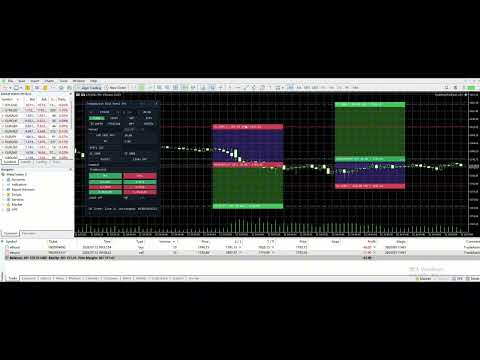
TradeAssist Risk Panel MT5 is a manual trading utility for MetaTrader 5. It helps traders calculate risk, plan Entry, Stop Loss and Take Profit on the chart, place orders from a panel, and manage open positions.


Additional materials and instructions

 - Application instructions - 

Chart Lines

The chart line function displays Entry, Stop Loss and Take Profit price levels directly on the chart.

With these lines, traders can see planned entry price, stop loss, take profit, risk zone, reward zone, planned lot size and reward/risk ratio before opening a trade.

TP, Entry and SL label boxes can be dragged to adjust the corresponding prices. Market orders can use the current SL/TP lines, and pending orders can use Entry/SL/TP lines. Lines can also remain on the chart after order execution for continued planning.


Risk Management

The risk calculation function can calculate a new order lot size from selected risk and stop loss distance.

Supported risk modes:

Risk % - calculate lot size from a percentage of account Balance or Equity.
Fixed Money - calculate lot size from a fixed risk amount.
Manual Lot - enter lot size manually and still display estimated risk.

The panel shows planned lot size, estimated risk, estimated margin and reward/risk ratio, helping traders check whether the trade fits their risk plan before placing an order.


Order Tools

The panel supports market orders and pending orders:

Buy
Sell
Buy Limit
Buy Stop
Sell Limit
Sell Stop

Before execution, the panel can check spread, lot size, SL/TP direction and risk information. Trading confirmations are enabled by default, so the action is executed only after user confirmation.


Position Management

The Manage tab is used to manage positions and pending orders inside the current scope.

Available management tools:

View position summary.
Open Position Details window.
Close current-symbol positions.
Close all positions in current scope.
Close profitable positions only.
Close losing positions only.
Partial close by 25%, 50% or custom percentage.
Set position SL/TP from chart lines.
Move positions to break even now.
Delete pending orders inside the current scope.

The Position Details window shows ticket, direction, lots, entry price, stop loss, take profit, profit/loss points, floating profit/loss and magic number.


Break Even and Trailing Stop

Break Even can move Stop Loss near the entry price after a position reaches the configured profit points.

BE Now allows the trader to trigger break-even movement manually.

Trailing Stop can move Stop Loss after price moves in a favorable direction, helping protect floating profit.


Notifications

TradeAssist supports optional notifications:

WeChat notifications.

Telegram Bot notifications.

Notifications are disabled by default. When enabled, they can be used to receive trading action or status messages. Notification failure does not block order placement, closing, break even, partial close or trailing stop actions.


Interface and Safety Scope

The panel has three main tabs:

Trade - risk calculation, chart lines, market orders and pending orders.
Manage - position details, close actions, partial close, Set SL/TP, BE Now and delete pending orders.
Notify - WeChat and Telegram tests.

The interface supports English and Chinese, plus Light, Dark and Auto themes.

By default, TradeAssist manages only the current chart symbol + current magic number. Manual positions are not managed by default unless the user explicitly enables manual position management.


Important Notes

TradeAssist is a manual trading utility, not an automatic trading strategy.
Trading involves risk. Test on a demo account first.
Broker minimum lot, volume step, tick value, stop level and freeze level may differ.
SL/TP must follow broker rules.
Keep confirmation dialogs enabled until you are familiar with the workflow.

Değerlendirmeler 1
OsipovKonstantin
24
OsipovKonstantin 2026.05.22 16:03 
 

When installed on a chart, the working area is smaller than in the developer's screenshots. This causes symbols and labels to be misaligned. This is due to the misalignment of the "collapse" and "close" symbols. When attempting to collapse the panel, the assistant freezes. It then disappears from the list of assistants and can only be removed from the window along with the chart window. When attempting to restore the chart window, all the labels from the panel appear, but without the panel itself, it still doesn't appear in the list of assistants. Therefore, I have to delete the entire chart window, reopen it, and redo all the markup. Demo account.

При установке на график размер рабочего поля меньше, чем на скринах разработчика. Из-за этого смещены символы и подписи. Из-за того, что смещены символы "свернуть" и "закрыть". При попытке свернуть панель, происходит зависание помощника. При этом он пропадает из списка помощников и его можно удалить из окна только вместе с окном графика. При попытке восстановить окно графика, в нём появляются все надписи из панели, но без самой панели и в списке помощников его по прежнему нет. Поэтому, приходится удалять окно графика полностью, открывать его заново и заново делать всю разметку. Демо-счет.

Скрин: https://s1.radikal.cloud/2026/05/22/2000127954---AlfaForexRU-Real_-DEMO-SCET---Hedge2db0b4c417e612b8.jpg

Önerilen ürünler
Haunted Risk Calculator is a visual risk management panel for MT5 that calculates the correct lot size in real time based on your account balance, risk percentage, and stop-loss distance. HOW IT WORKS Set your risk percentage or dollar amount, drag the SL and TP lines to your desired levels on the chart, and the panel instantly shows the calculated lot size, risk in dollars, reward-to-risk ratio, and expected profit. Execute with one click or a keyboard shortcut. FEATURES Draggable panel — grab
FREE
Breakeven Bot
Gabriel Paul Ange Perrin
Optimize your trading management with Breakeven Bot, the essential tool for active traders managing multiple positions at once. No more wasting time manually adjusting your stops—one click is all it takes to secure your profits! Main Feature: ️ "BREAKEVEN" Button – Instantly set all profitable positions to breakeven and protect your gains quickly. ️ Customization Options: Set breakeven in pips or currency, depending on your preference. Choose whether breakeven should be at the entr
FREE
Helios Smart Position Manager Genel Bakış Helios Smart Position Manager, MetaTrader 5 için profesyonel bir işlem senkronizasyon aracıdır. Herhangi bir pozisyonun stop loss veya take profit değerini değiştirdiğinizde, EA değişikliği otomatik olarak algılar ve aynı sembol üzerindeki diğer tüm pozisyonlara uygular. Bu sayede her pozisyonu tek tek manuel olarak güncelleme ihtiyacı ortadan kalkar; aynı enstrümanda birden fazla işlem yönetilirken hem zaman kazanılır hem de hatalar önlenir. Nasıl Çalış
FREE
Easy and simple tool which close all trades in defined point of time. It can also close all open trades when opened positions reach defined target profit or stop loss. For all pairs, indexes etc. Works with all instruments. All types of orders. All charts. Users inputs: - close time (hour,min,sec) - take profit (in users currency) - stop loss (in users currency) Save & Load settings option. Fast, simple and reliable. Check out other tools provided by our team!
FREE
Account Info EA It is a tool that presents on the graph all the positions of the account, and specific information concerning the positions, but also the account. It enables the user to have an image of his account at a glance. Use like any expert advisor. You can't attach it in the same chart with other expert advisor. It does not have the ability to open or manage positions. You can attach it on any chart and any timeframe.
FREE
Equitypanel
Timo Mario Hoffmann
5 (1)
Equity Panel for MT5 Equity Panel is a free MT5 indicator that gives you a fast and convenient live overview of your account directly from the chart. Monitor balance, equity, floating P/L, drawdown, daily performance, margin data, and warning levels in one compact dashboard. Built for traders who want better control, faster risk awareness, and clearer account monitoring in live market conditions. Equity Panel is a lightweight and practical account monitoring indicator for MetaTrader 5 that helps
FREE
FREE FREE FREE Trade Assistant MT5 – Professional Trading & Risk Management Panel Trade Assistant MT5 is an advanced trading panel designed to help traders execute orders faster, safer, and more professionally . It simplifies manual trading by combining smart order management , precise risk control , and one-click execution , making it ideal for both beginners and advanced traders. This tool does not trade automatically . Instead, it empowers you with full control while applying professional-gra
FREE
Overview FiT Panel Pro is a professional-grade trade management panel designed for MetaTrader 5 traders who demand speed, precision, and full control over their trades. Built with a modern dark-theme UI, it combines one-click execution with advanced risk management, visual SL/TP drag lines, automatic Fibonacci-based levels, and comprehensive order management — all in a single, compact panel. Whether you are a scalper, day trader, or swing trader, FiT Panel Pro gives you the edge you need to exec
FREE
Lot by Risk MT5
Sergey Vasilev
4.87 (15)
Lot by Risk ticaret paneli elle işlem yapmak üzere tasarlanmıştır. Bu, emir göndermek için alternatif bir araçtır. Panelin ilk özelliği, kontrol hatlarını kullanarak siparişlerin uygun bir şekilde düzenlenmesidir. İkinci özellik, stop loss hattı mevcut olduğunda belirli bir risk için işlem hacminin hesaplanmasıdır. Kontrol hatları kısayol tuşları kullanılarak ayarlanır: kar al - varsayılan olarak T tuşu; price - varsayılan olarak P tuşu; kaybı durdur - varsayılan olarak S tuşu; Tuşları ticar
FREE
Seredina
Oleksandr Kashyrnyi
SEREDINA , pozisyonları değerlendirme ve kontrol etme için çok yönlü bir araçtır! Bu script, MetaTrader 5 platformundaki herhangi bir işlem enstrümanı için açık alış (BUY) ve satış (SELL) pozisyonlarının ortalama fiyatını otomatik olarak hesaplar ve yalnızca doğru verileri sunmakla kalmaz, aynı zamanda pozisyonlarınızın ortalama giriş seviyesini anında görmenizi sağlayan görsel seviyeleri grafik üzerinde gösterir. SEREDINA ile şunları yapabilirsiniz: Mevcut varlıkta açık BUY ve SELL emirleri içi
FREE
The free trade manager — simple but effective. Quickly open positions with preset take profit and stop loss levels. Set everything to breakeven or close all trades with one click. Get plenty of information on your chart about your account, trades, and profit/loss. It speaks for itself — that’s how simple this manager is to use. Check out our other EAs and our Telegram for more information! By traders, for traders!
FREE
Click Trading
Jawad Tauheed
5 (2)
One Click Trading – Auto TP SL Developer TraderLinkz Version 1.00 Category Utility What it does Adds missing TP and SL to your manual trades and pending orders Sets them once per ticket Lets you move TP and SL afterward Works on hedging and netting accounts Scans on every tick and reacts on trade events Why you want it You place faster entries You get consistent risk and exit targets You reduce fat finger errors You keep full manual control Quick start Attach the EA to any chart Keep TP and SL e
FREE
Core function Intelligent transaction management one-click opening and closing operation, which supports user-defined lots to set multiple closing modes: all closing, closing by direction and closing by profit and loss status. Professional risk control, real-time risk monitoring and spread control to avoid high-cost trading environment. Visual control panel has an intuitive graphical interface, and all functions can be operated with one button to display position information, profit and loss sta
FREE
================================================================ MATRIX CONDITION MONITOR Live Trade Condition Panel for MetaTrader 5 Fully Automatic -- Works with ALL Matrix EAs ================================================================ NEVER MISS A TRADE SETUP AGAIN Matrix Condition Monitor is a free utility that attaches to any chart and automatically checks all 10 trade conditions in real time -- showing you exactly why a trade will or will not open, and alerting you the moment ever
FREE
Equity monitor This is a simple means change informer. I wrote it for myself, maybe someone will need it... 1. Displays the change in funds for the day. Every day, when the terminal is first launched, it remembers the current funds and monitors changes throughout the day. 2. The first day of the month, well remembers the money and, within months, to monitor changes. 3. Well, it displays the profit of the open position. To work, you need to create 4 global variables: gvarEqityDay , gvarEq
FREE
Recluse FX
Michael Prescott Burney
3 (2)
Recluse FX is the ultimate trading system for US30 on the H1 chart. With dedicated stop-loss and take-profit for each order, it guarantees optimal performance and risk management. Validated across over 1200 trades since 2021 with a 100% win rate, Recluse FX delivers unmatched stability and consistent gains under all market conditions. Its progressive pricing means that after 50 copies are sold, the system becomes exclusive to its owners. Purchase Recluse FX now and message for free access to th
FREE
This tool is designed to visualize the position and trades history and its information, such as the entry and exit points, sizes of the trades, Reward to risk ratio, Risk percent, Profit, Target and stop-loss on the chart. it makes showing trades on the chart more informative and easier to use. it's a strategic tool that enhances your trading experience on MT5 platforms. By providing a clear visual representation of your trades and customizable settings, it empowers traders to make informed deci
FREE
When executing an order, whether through the Metatrader ticket on a computer or the Metatrader app on a mobile device, either manual or pending, Easy Trade will automatically set the take profit and stop loss levels, as well as a limit order with its respective take profit and stop loss levels. It follows the trading strategy for market open (US30, US100, US500), but it can be applied to any market asset.
FREE
"Manage multiple positions as a single unit with hidden targets." The Virtual Basket TP SL Manager is a professional MetaTrader 5 utility designed to automate the closing of positions based on the total profit or loss of a group of orders (a "basket"). By utilizing Virtual Levels , all Take Profit (TP) and Stop Loss (SL) targets are stored locally within the EA's memory and are not sent to the broker's server, keeping your strategy safe from stop-hunting and price manipulation. Key Features Virt
FREE
This is not an EA – it’s a simple and powerful MT5 indicator designed to help you manage trades quickly and easily.   Key Features: TP1 Auto-Set   – Fixed at 1RR TP2 Auto-Set   – Set at 2RR Fast Lot Calculation   – Calculates lot size based on SL in 1 second Quick Actions: Close All Trades Move to Breakeven Set TP at RR1 / RR2 User-Friendly   – No complex setup, just attach to chart and start using   Support: Telegram – @inForexVIP WhatsApp – +923118409597   MT4 Version Coming Soon W
FREE
Professional Trading Dashboard Gerçek zamanlı hesap verilerini, günlük işlem geçmişini ve aylık istatistikleri doğrudan grafik üzerinde tek bir ekranda birleştiren MetaTrader 5 için profesyonel bir hesap izleme paneli. Professional Trading Dashboard, trader'ların hesaplarını her zaman net ve yapılandırılmış biçimde görüntüleyebilmesi için tasarlanmış bir MetaTrader 5 yardımcı göstergesidir. Birden fazla terminal penceresi arasında geçiş yapmak yerine, tüm temel bilgiler doğrudan grafik üzerinde
FREE
Risk Manager – Account Protection Tool Risk Manager is an Expert Advisor for MetaTrader 5 designed to protect your trading account by applying automatic risk management rules. This tool does not open trades . It continuously monitors your account and enforces predefined limits to help prevent excessive losses and maintain disciplined trading. Risk Manager works in the background and can manage positions opened by manual trading or other Expert Advisors. It is particularly useful for: • Manual tr
FREE
ZyloFx Position Size Calculator MT5 is a free risk management utility for MetaTrader 5 designed to help traders calculate the appropriate position size based on account risk and stop loss distance. This tool helps traders determine how many lots to trade before entering a position, supporting more consistent risk management and better trading discipline. Main Features Automatic position size calculation Risk percentage mode Fixed money risk mode Balance and equity-based calculations Suggested lo
FREE
Trade mgr
Roberto Mubonane Muiambo
This Tool is designed to automate one of the most critical aspects of trade management — setting and managing Stop Loss, Take Profit , and Trailing Stop levels — directly on your MetaTrader 5 platform. Key Features: Automatic SL, TSL and TP Placement: Instantly sets initial Stop Loss and Take Profit levels on any new position based on customizable parameters, helping to enforce disciplined risk and reward management. Dynamic Trailing Stop: Automatically moves the Stop Loss to lock in profits
FREE
Smart Trading Copilot:   Günlük işlem yönetiminizde size yardımcı olacak akıllı bir işlem asistanıdır. Smart Trading Copilot, kullanıcı dostu bir işlem paneli ile modern bir tasarım ve ileri teknoloji kullanmaktadır. Smart Trading Copilot, birçok özellik sunmaktadır: 1. Risk Yönetimi Desteği: Belirtilen risk yüzdesine ve stop loss seviyesine göre uygun lot büyüklüğünü otomatik olarak hesaplayarak, yatırımcıların risklerini etkili bir şekilde yönetmelerine yardımcı olur.   2. Risk-Kazanç Önizl
FREE
Step trailing stop
Evgenii Zhivogliadov
5 (1)
Adım adım "Trailing Stop" Yardımcı program, "Trailing Stop" aracını kullanırken fiyatı takip eden "Zararı Durdur" hareket adımını ayarlamanıza olanak tanır. "MetaTrader" terminalinde bulunan ve "Kaybı Durdur" hareketini 1 pip'lik artışlarla ayarlamanıza izin veren "normal" "İzleyen Durdurma"nın aksine, bu "İzleyen Durdurma" herhangi bir artışla yapılandırılır. Bu ayar, fiyat bir yönde uzun bir hareketten sonra küçük bir düzeltme için tersine döndüğünde ve ardından tekrar aynı yönde hareket etme
FREE
LOTSIZE'INIZI HEMEN METATRADER'DA HESAPLAYIN!!! Merhaba yatırımcılar. Risk yönetimi odaklı bir yatırımcı mısınız? Evet ise, bu tam size göre. Benim adım İbrahim, hesap bakiyenize göre risk yüzdesine göre lotsize'inizi hesaplamanıza yardımcı olabilecek bir araç geliştirdim. Bu araç, riskinizi % olarak belirtmek yerine riske atmak istediğiniz mutlak bir değer varsa, lotsize'inizi hesaplamanıza da yardımcı olabilir. Örneğin, bakiyenizden 100$ riske atmak istediğinizi belirtebilirsiniz. MT4 sürüm
FREE
FTU Auto Trade with on Chart Panel Mt5 (basic version) This EA will improve your trading, lower work load and improve risk management Adjust Lot size, entry based on at market or by price input EA will manage entry, stop loss, partial close and adjust stop loss after tp1, partial Designed to be compact and efficient, small layout for multiple chart trading Features: Lot groups - Allows for fast change to various risk models Tp, Partial and SL management Multiple No Trade Times - Various time i
FREE
MAFX Trading Manager
Mark Anthony Noblefranca Nazarrea
5 (1)
MAFX Trading Manager MetaTrader 5 için profesyonel manuel işlem yönetim paneli Ürün Genel Bakışı MAFX Trading Manager, MetaTrader 5 için geliştirilmiş profesyonel bir manuel işlem yönetim panelidir. Traderların işlemleri daha verimli şekilde açıp yönetmelerine yardımcı olur. Hızlı emir yürütme ve temel işlem yönetim araçlarını kompakt ve kullanıcı dostu bir arayüzde sunar. Bu ürün, otomatik stratejilere veya işlem sinyallerine bağlı kalmadan, işlemlerini daha fazla kontrol, hız ve tutarlılıkla y
FREE
Trade Launch, manuel olarak işlem açarken hıza ve kontrole değer veren yatırımcılar için tasarlanmış sezgisel bir işlem panelidir. Doğrudan grafik üzerinde görüntülenir ve tüm ana emir parametrelerini tek bir pencerede yönetmenize olanak tanır. Ana Özellikler: Anında Emir Gönderimi:   Tek bir düğmeye basarak Al ve Sat pozisyonları açın. Düğme adları, geçerli Ask ve Bid fiyatlarını dinamik olarak görüntüler. Dahili Risk Yönetimi:   Lot hacmi, ayrıca Stop Loss (SL) ve Take Profit (TP) değerlerini
FREE
Bu ürünün alıcıları ayrıca şunları da satın alıyor
Trade Assistant MT5
Evgeniy Kravchenko
4.43 (213)
It helps to calculate the risk per trade, the easy installation of a new order, order management with partial closing functions, trailing stop of 7 types and other useful functions. Additional materials and instructions Installation instructions - Application instructions - Trial version of the application for a demo account Line function -   shows on the chart the Opening line, Stop Loss, Take Profit. With this function it is easy to set a new order and see its additional characteristics bef
Trade Manager EA’ye hoş geldiniz! Ticaretin daha sezgisel, hassas ve verimli hale gelmesi için tasarlanmış nihai risk yönetim aracı ile tanışın. Bu sadece bir emir verme aracı değil; ticaret planlaması, pozisyon yönetimi ve risk kontrolü için kapsamlı bir çözüm. İster yeni başlayan bir yatırımcı olun, ister deneyimli bir trader ya da hızlı emir gerektiren bir scalper, Trade Manager EA ihtiyaçlarınıza uyum sağlar ve forex, endeksler, emtialar ve kripto paralar dahil tüm piyasalarda esneklik sunar
Local Trade Copier EA MT5
Juvenille Emperor Limited
4.96 (141)
Local Trade Copier EA MT5   ile olağanüstü hızlı işlem kopyalama deneyimi yaşayın. Kolay 1 dakikalık kurulumuyla bu işlem kopyalayıcısı, aynı Windows bilgisayarda veya Windows VPS'te birden fazla MetaTrader terminali arasında işlemleri kopyalamanıza olanak tanır ve 0.5 saniyenin altındaki şimşek hızında kopyalama hızları sunar. Başlangıç seviyesinde veya profesyonel bir tüccar olsanız da,   Local Trade Copier EA MT5 , spesifik ihtiyaçlarınıza göre özelleştirmek için geniş bir seçenek yelpazesi s
Beta Sürümü Telegram to MT5 Signal Trader resmi alfa sürümüne neredeyse hazır. Bazı özellikler hâlâ geliştirilmekte olup küçük hatalarla karşılaşabilirsiniz. Sorun yaşarsanız lütfen bildirin, geri bildiriminiz yazılımın herkes için gelişmesine yardımcı olur. Telegram to MT5 Signal Trader , Telegram kanallarından veya gruplarından gelen işlem sinyallerini otomatik olarak MetaTrader 5 hesabınıza kopyalayan güçlü bir araçtır. Herkese açık ve özel kanalları destekler ve birden fazla sinyal sağlayıc
TradePanel MT5
Alfiya Fazylova
4.87 (159)
Trade Panel, çok işlevli bir ticaret asistanıdır. Uygulama, manuel ticaret için 50'den fazla ticaret fonksiyonu içerir ve çoğu ticaret görevini otomatikleştirmeyi mümkün kılar. Satın almadan önce demo hesapta demo sürümü test edebilirsiniz. Demo hesap için uygulamanın deneme sürümünü indirin: https://www.mql5.com/en/blogs/post/750865 . Talimatların tamamı buraya . Ticaret. Tek tıklamayla ticaret işlemleri yapmayı sağlar: Risk otomatik hesaplaması ile bekleyen emirleri ve pozisyonları açmak. Bird
Quant AI Agents are independent trading Expert Advisors. Instead of trading using a fixed strategy like other conventional EAs, Quant AI Agents   is a   multi-agent AI trading framework   that turns natural-language strategy prompts into live.  WANT THE SAME RESULTS AS MY LIVE SIGNAL?   Use the exact same brokers I do:   IC MARKETS , IC TRADING   .  Unlike the centralized stock market, Forex has no single, unified price feed.  Every broker sources liquidity from different providers, creating un
Power Candles Strateji Tarayıcısı - Kendi Kendini Optimize Eden Çoklu Sembol Kurulum Bulucu Power Candles Strateji Tarayıcısı , Power Candles göstergesini çalıştıran aynı kendinden optimize edici motoru, Piyasa İzleyicinizdeki her sembol üzerinde yan yana çalıştırır. Tek bir panel, şu anda istatistiksel olarak hangi sembollerin işlem yapılabilir olduğunu, her birinde hangi stratejinin kazandığını, en uygun Stop Loss / Take Profit çiftini gösterir ve yeni bir sinyal geldiği anda size bildirim gön
Premium Trade Manager - İçine Koç Yerleştirilmiş İşlem Paneli Premium Trade Manager , grafiğinizin içine bir trading koçu yerleştirir; altında tam bir yürütme motoru çalışır. İşlemi her zamanki gibi kurun, ardından yapay zeka trading koçunuz Max, o kurulumu tam olarak okusun ve canlı hesabınıza göre taahhüt etmeden önce size net bir değerlendirme sunsun: stop disiplinli bir yaklaşıma uyuyor mu, risk büyüklüğü makul mü, yüksek etkili bir haber dakikalar sonra mı geliyor, prop firm limitinize yakl
Exp COPYLOT CLIENT for MT5
Vladislav Andruschenko
3.94 (34)
MetaTrader 5 için profesyonel işlem kopyalayıcı MetaTrader için hızlı, profesyonel ve güvenilir bir işlem kopyalayıcı . COPYLOT , MT4 ve MT5 terminalleri arasında Forex işlemlerini kopyalamanıza olanak tanır ve Hedge ile Netting hesaplarını destekler. COPYLOT MT5 sürümü şunları destekler: - MT5 Hedge → MT5 Hedge - MT5 Hedge → MT5 Netting - MT5 Netting → MT5 Hedge - MT5 Netting → MT5 Netting - MT4 → MT5 Hedge - MT4 → MT5 Netting MT4 sürümü Tam açıklama + DEMO + PDF Nasıl satın alınır Nasıl kurul
Telegram to MT5 Multi-Channel Copier 는 Telegram 채널의 트레이딩 시그널을 MetaTrader 5로 자동으로 직접 복사합니다. 봇도, 브라우저 확장 프로그램도, 수동 복사도 필요 없습니다. Telegram에서 시그널을 받으면 EA가 몇 초 안에 터미널에서 거래를 엽니다. 제품은 두 가지 구성 요소를 포함합니다: Telegram 채널을 듣는 Windows 애플리케이션과 MT5 터미널에서 시그널을 실행하는 이 Expert Advisor입니다. MT4 버전도 사용할 수 있습니다. 설치 가이드 및 애플리케이션 다운로드: https://www.mql5.com/en/blogs/post/768988 작동 방식 Windows 애플리케이션은 봇이 아닌 사용자 본인의 API 자격 증명을 사용하여 Telegram에 연결합니다. 즉, 비공개 및 VIP 채널을 포함하여 가입한 모든 채널, 그룹 또는 포럼 토픽을 읽을 수 있습니다. 시그널을 감지하면 이를 파싱하여 EA로
Trade Dashboard simplifies how you open, manage, and control your trades, with built-in lot size calculation. It allows you to execute trades, manage risk, and control positions directly on the chart, with tools such as partial close, breakeven, and trailing stop. Designed to reduce manual work and help you stay focused on your trading decisions. A demo version is available for testing. Detailed explanations of features are provided within the MQL5 platform. Installation instructions are include
Farmed Hedge Yield Farming | All Markets (Manual - Hybrid - Semi/Automated EA) MULTI-ASSET SUPPORT Trade any asset available on your broker - Forex: Major, Minor, Exotic pairs - Crypto: BTC, ETH, XRP, SOL, BNB - Stocks: Apple, Tesla, Amazon, Google, etc. - Commodities: Gold, Silver, Oil, Gas - Indices: US30, NAS100, SPX500, DAX40 - Any CFD your broker offers VERIFIED TRADING RESULTS - Farmed Hedge Yield Axi Copy:  https://www.mql5.com/en/signals/2356376 - Farmed Hedge Yield Exn Copy:   https:/
Üye olduğunuz herhangi bir kanaldan (özel ve kısıtlı olanlar dahil) sinyalleri doğrudan MT5'inize kopyalayın.  Bu araç, kullanıcıyı göz önünde bulundurarak tasarlanmış olup işlemleri yönetmek ve izlemek için ihtiyacınız olan birçok özelliği sunar. Bu ürün, kullanıcı dostu ve görsel olarak çekici bir arayüzde sunulmaktadır. Ayarlarınızı özelleştirin ve ürünü dakikalar içinde kullanmaya başlayın! Kullanıcı Kılavuzu + Demo  | MT4 Sürümü | Discord Sürümü Demo denemek isterseniz lütfen kullanıcı kı
FUTURES ORDERFLOW FOOTPRINT CHART Professional OrderFlow EA for MetaTrader 5 Version 1.01| Professional tool for real traders | Institutional-Grade Visualization STRATEGY TESTER USERS - PLEASE SELECT EVERY REAL TICK WHEN TESTING AND YOU HAVE DOWNLOADED HISTORICAL DATA. IF YOU SEE A WAITING SCREEN AND IT IS NOT DOWNLOADING, IT MEANS YOU HAVE LOW HISTORICAL DATA. TRY 1 MIN AND 5 MIN FIRST ON 1 DAY DATA. ONE DAY DATA SHOULD BE THE NEWEST AND MOST CURRENT DATE. PLEASE WAIT UNTIL THE MARKET HAS ROL
Trade copier MT5
Alfiya Fazylova
4.57 (46)
Trade Copier, ticaret hesapları arasındaki işlemleri kopyalamak ve senkronize etmek için tasarlanmış profesyonel bir yardımcı programdır. Kopyalama, tedarikçinin hesabından/terminalinden alıcının aynı bilgisayarda veya vps'de kurulu olan hesabına/terminaline gerçekleşir. KAMPANYA - Eğer zaten "Trade copier MT5" aldıysanız, "Trade copier MT4"ü ücretsiz olarak alabilirsiniz (MT4 > MT5 ve MT4 < MT5 kopyalamalar için). Koşullar hakkında daha fazla bilgi almak için lütfen bizimle özel mesaj yoluyla i
Grid Manual MT5
Alfiya Fazylova
4.9 (21)
Grid Manual, sipariş ızgarasıyla çalışmak için kullanılan bir ticaret yardımcı programıdır. Yardımcı program evrenseldir, esnek ayarlara ve sezgisel bir arayüze sahiptir. Sadece kayıpların ortalaması yönünde değil, aynı zamanda kazanç artışı yönünde de bir emir ızgarası ile çalışır. Tüccarın bir emir ızgarası oluşturmasına ve eşlik etmesine gerek yoktur, bu yardımcı programı yapacaktır. Emri açmanız yeterlidir ve Grid manual otomatik olarak ona bir emir ızgarası oluşturacak ve kapanana kadar ona
Seconds Chart - MetaTrader 5 için saniye bazlı grafikler oluşturmanıza olanak sağlayan eşsiz bir araçtır. Seconds Chart sayesinde saniye cinsinden zaman dilimleriyle grafik oluşturabilir, standart dakika veya saatlik grafiklerde mümkün olmayan esneklik ve analiz hassasiyetine ulaşabilirsiniz. Örneğin, S15 zaman dilimi 15 saniyelik mum çubuklarını ifade eder. Desteklenen özel sembollerle herhangi bir gösterge ve danışman kullanabilirsiniz. Onlarla çalışmak, standart grafiklerde işlem yapmak kadar
Telegram to MT5 Pro — Advanced Telegram Signal Copier with Auto-Fix, Multi-TP, Risk Control and Full Trade Management Telegram to MT5 Pro — Profesyonel Telegram Sinyal Kopyalayıcı Telegram to MT5 Pro, Telegram’dan gelen sinyalleri MetaTrader 5 hesabına otomatik olarak doğrudan uygulayan yüksek performanslı bir trade kopyalayıcıdır ve risk, işlem yürütme ve trade yönetimi üzerinde tam kontrol sağlar. Sistem iki bileşenden oluşur: • MetaTrader 5 içinde çalışan Expert Advisor (EA) • Telegram’a bağ
EA Auditor
Stephen J Martret
5 (3)
EA Auditor is an independent analysis tool for traders evaluating Expert Advisors and trading signals on MetaTrader 5. It audits backtest reports, reviews posted developer signals, and cross-verifies the two against each other to help traders assess strategies before committing capital. The MQL5 market offers a wide range of Expert Advisors from many developers, with varying approaches, quality, and transparency. EA Auditor provides a consistent, data-driven framework for reviewing them, answer
AI Agent Supervisor is NOT an Expert Advisor. AI Agent Supervisor   is a   multi-agent AI risk & portfolio supervisor   that watches every EA on your account and intervenes in real time.  WANT AN AI PORTFOLIO MANAGER WATCHING YOUR FLEET 24/7?   Run your fleet on the same brokers I do:   IC MARKETS , IC TRADING   .  Unlike the centralized stock market, Forex has no single, unified price feed.  Every broker sources liquidity from different providers, creating unique data streams. The Supervisor r
Çalışan Demo İndir Copy Cat More (Taklitçi Kedi) — İşlem Kopyalayıcı (Trade Copier) MT5 , yerel bir işlem kopyalayıcı ve bugünün ticaret zorlukları için tasarlanmış eksiksiz bir risk yönetimi ve yürütme çerçevesidir. Prop firm challenge'larından kişisel portföy yönetimine kadar, sağlam yürütme, sermaye koruması, esnek yapılandırma ve gelişmiş işlem yönetimi karışımıyla her duruma uyum sağlar. Kopyalayıcı hem Master (Master, gönderen) hem de Slave (Slave, alıcı) modlarında çalışır; piyasa ve be
The product will copy all telegram signal to MT5 ( which you are member) , also it can work as remote copier.  Easy to set up, copy order instant, can work with almost signal formats, image signal,  s upport to translate other language to English Work with all type of channel or group, even channel have "Restrict Saving Content", work with  multi channel, multi MT5 Work as remote copier: with signal have ticket number, it will copy exactly via ticket number. Support to backtest signal. How to s
Footprint Chart Pro — Professional OrderFlow EA for MetaTrader 5 Version 6.34 | Professional tool for real traders | Institutional-Grade Visualization DEMO USERS - PLEASE SELECT EVERY TICK / REAL TICK WHEN TESTING AND YOU HAVE DOWNLOADED HISTORICAL DATA. IF YOU SEE A WAITING SCREEN AND IT IS NOT DOWNLOADING, IT MEANS YOU HAVE LOW HISTORICAL DATA. TRY 1 MIN AND 5 MIN FIRST ON 1 DAY DATA. ONE DAY DATA SHOULD BE THE NEWEST AND MOST CURRENT DATE. PLEASE WAIT UNTIL THE MARKET HAS ROLLED OVER PERIOD.
================================================================================ POC BREAKOUT - V20.72. Full Professional Grade Toolkit ================================================================================ POC Breakout is a full MetaTrader 5 trading dashboard for discretionary traders who want breakout signals, Point of Control (POC) context, volume profiles, order flow, market structure, news, alerts, and advanced trade planning in one professional workspace. Attached directly to you
Royal Copier
Janet Abu Khalil
5 (1)
Royal Copier — Profesyonel MT5 Trade Copier Royal Copier, MetaTrader 5 için profesyonel, gerçek zamanlı yerel bir trade copier çözümüdür. Artık her iki işlev de tek bir MT5 Expert Advisor içinde yer almaktadır. Giriş ayarlarından EA’nın Master Modu veya Client Modu ile çalışmasını seçmeniz yeterlidir. Bu, aynı EA’nın kaynak hesapta da alıcı hesapta da kullanılabileceği ve orijinal copier davranışının korunacağı anlamına gelir. Royal Copier, hesaplar arasında en yaygın tüm kopyalama kombinasyonla
HINN MAGIC ENTRY – the ultimate tool for entry and position management! Place orders by selecting a level directly on the chart! full description   ::  demo-version  :: 60-sec-video-description Key features: - Market, limit, and pending orders - Automatic lot size calculation - Automatic spread and commission accounting - Unlimited partitial take-profits  - Breakeven and trailing stop-loss and take-profit  functions - Invalidation leves - Intuitive, adaptive, and customizable interface - Works
Anchor: The EA Manager Run your full EA portfolio without conflicts, without stacked risk, and without watching every chart yourself. Anchor coordinates up to 64 Expert Advisors on a single account. Attach Anchor to any chart. Type your EA names and magic numbers in one line. Click OK. Anchor begins coordinating immediately. Built for portfolios. Built for discipline. Built for prop firms. The Problem Running multiple EAs on the same account creates risk. Two gold EAs can open opposite positions
MetaTrader 5 için Trading Panel — grafik ve klavyeden profesyonel tek tıkla işlem kontrolü Aktif traderlar için geliştirilmiş güçlü bir Trading Panel; işlemleri standart MetaTrader arayüzüne göre çok daha hızlı açmanıza, yönetmenize ve kapatmanıza yardımcı olur. Bu çözüm; pozisyonları, bekleyen emirleri, toplam kârı ve işlem yürütmesini tek bir profesyonel çalışma alanında kontrol etmek isteyen kullanıcılar için tasarlanmıştır. Bu sadece sıradan bir yardımcı araç değildir. MetaTrader 5 için ger
Signal TradingView to MT5 Pro Automator TradingView ve MetaTrader 5 arasında anında profesyonel uygulama TradingView alarmları ile MT5'teki gerçek uygulama arasındaki en güçlü iletişim köprüsüyle ticaret stratejinizi otomatikleştirin. Hız, esneklik ve kusursuz risk yönetimi talep eden yatırımcılar için tasarlanan bu Uzman Danışman (Expert Advisor), herhangi bir alarm mesajını hassas bir piyasa (market) veya limit emrine dönüştürür. GÜÇLÜ YÖNLER VE AVANTAJLAR Evrensel Ayrıştırma Motoru (Tescilli)
Bu ürün, haber saatlerinde tüm uzman danışmanları ve manüel grafikleri filtreler, böylece manüel ticaret kurulumlarınızı veya diğer uzman danışmanlar tarafından girilen işlemleri yok edebilecek ani fiyat dalgalanmaları konusunda endişelenmenize gerek kalmaz. Bu ürün, herhangi bir haber yayınlanmadan önce açık pozisyonlarınızı ve bekleyen emirlerinizi yönetebilen tam bir sipariş yönetim sistemi ile birlikte gelir.   The News Filter'ı   satın aldığınızda, gelecekteki uzman danışmanlar için yerleşi
Yazarın diğer ürünleri
` Account Limit Guard MT5 ` is a free account-level daily limit protection utility for MetaTrader 5. It is not a trading strategy, does not open trades, does not generate signals, and does not rely on any specific indicator. Its purpose is simple: monitor your account-level daily loss and automatically apply protection once your configured limit is reached. The Lite version is intentionally focused. It does not try to cover every account-risk rule. It is built to solve one clear problem: **H
FREE
` Emergency Webhook Alert ` is an MT5 Expert Advisor for trade event notifications. It monitors position opening, closing, stop loss, take profit, partial close, and reversal events, then sends trade events through a notification relay server to WeChat and Telegram. The EA includes an on-chart panel, supports English and Chinese UI, and is designed for real-time status, pairing status, and pending event monitoring. The EA does not open, close, or modify trades. It only reads account trade even
FREE
Risk Guardian Pro MT5 is an account-level risk protection utility for MetaTrader 5.   It does not open trades, generate signals or replace your strategy. Instead, it acts as a safety layer above your account and helps   enforce risk discipline across manual trading and other Expert Advisors.   This tool is designed for traders who want clear account protection rules, visible risk status and automatic response when limits are   reached.   Main Features   - Daily loss limit   - Total drawdo
Filtrele:
OsipovKonstantin
24
OsipovKonstantin 2026.05.22 16:03 
 

When installed on a chart, the working area is smaller than in the developer's screenshots. This causes symbols and labels to be misaligned. This is due to the misalignment of the "collapse" and "close" symbols. When attempting to collapse the panel, the assistant freezes. It then disappears from the list of assistants and can only be removed from the window along with the chart window. When attempting to restore the chart window, all the labels from the panel appear, but without the panel itself, it still doesn't appear in the list of assistants. Therefore, I have to delete the entire chart window, reopen it, and redo all the markup. Demo account.

При установке на график размер рабочего поля меньше, чем на скринах разработчика. Из-за этого смещены символы и подписи. Из-за того, что смещены символы "свернуть" и "закрыть". При попытке свернуть панель, происходит зависание помощника. При этом он пропадает из списка помощников и его можно удалить из окна только вместе с окном графика. При попытке восстановить окно графика, в нём появляются все надписи из панели, но без самой панели и в списке помощников его по прежнему нет. Поэтому, приходится удалять окно графика полностью, открывать его заново и заново делать всю разметку. Демо-счет.

Скрин: https://s1.radikal.cloud/2026/05/22/2000127954---AlfaForexRU-Real_-DEMO-SCET---Hedge2db0b4c417e612b8.jpg

Yang Yu Qun
686
Geliştiriciden yanıt Yang Yu Qun 2026.05.25 07:37
Thank you for the detailed report and screenshot. I found that this can happen on smaller chart work areas or with different Windows/MetaTrader DPI scaling settings, where the panel title controls may be visually shifted from their clickable areas. Version 1.02 is now available. This update improves the collapse/close controls, keeps the panel inside the chart area, improves cleanup, and adds Compact/DPI settings for font size and panel width. Please update to the latest version and try the default settings first. If the text is still too large on your terminal, try: InpPanelFontSizeOffset = -1 or -2 InpPanelWidth = 260 Thank you again for reporting this and helping improve the product.
Değerlendirmeye yanıt