
TradeAssist Risk Panel MT5
- Utilitários
-
Yang Yu Qun
 Risk control and trade management tools for MetaTrader 4 & 5.
I build one kind of thing, and I build it properly: utilities that protect
accounts. Risk panels, drawdown guards, prop-firm rule enforcement, and
trade-event notifications — for manual traders, funded-challenge traders, - Versão: 2.2
- Atualizado: 13 agosto 2026
TradeAssist Risk Panel MT5 — a professional manual-trading panel for MetaTrader 5: risk-based lot sizing, draggable Entry/SL/TP chart lines, multi-level partial close, 6 trailing-stop variants, automatic break even and full on-chart order management.
TradeAssist Risk Panel MT4 (click to download) TradeAssist Risk Panel MT5 (click to download)
Application instructions -
Application instructions -
▶ Trading a prop firm challenge?
This panel helps you plan entries, stops and lot size by hand — but one slip can breach your challenge's drawdown line. Prop Firm
Risk Guardian (MT5) enforces it for you: daily loss + overall drawdown + session/time limits + loss-projection guard, auto-closing
all positions and canceling pending orders before you cross the limit. Pure protection — it never trades for you. Built for
FTMO-style challenges.
RISK MANAGEMENT - Automatic lot calculation from the risk amount and the SL distance
- 8 risk modes: Fixed $, % Balance, % Equity, % Free Margin, % Custom base, % Balance of previous Day / Week / Month — plus fixed manual lot
- TP by Risk/Reward ratio; SL/TP by points, exact price, or the high/low of the last N bars
- Live preview of lot, money risk and RR before the order is sent
- Spread filter; profit/loss threshold auto close of all positions
- ATR-based default SL: enable the InpUseAtrSL input to have the default stop-loss for new trades sized as ATR × indent (when no SL line is drawn on the chart). Priority: chart SL line > Bars method > ATR > fixed points.
- ATR-based default SL: enable the InpUseAtrSL input to have the default stop-loss for new trades sized as ATR × indent (when no SL line is drawn on the chart). Priority: chart SL line > Bars method > ATR > fixed points.
TRADING AND POSITION MANAGEMENT
- Market orders, Limit / Stop pending orders, Buy / Sell Stop Limit
- Batch close by direction / profit / loss / all; batch deletion of pending orders by type
- Multi-level partial close: up to 10 TP and 10 SL levels per position, 3 lot methods, 6 price methods, dynamic levels
- Trailing stop with 6 variants: Points, Fractals, MA, Parabolic SAR, ATR, High/Low of previous bar
- Automatic break even (4 trigger units, spread+commission offset) and one-click manual breakeven
- Trailing of pending Limit / Stop orders behind the price
- Hide SL TP: stealth stops monitored inside the EA, invisible to the broker
- Apply any automation per position, per symbol or to all positions; new positions inherit the template
- Settings presets: save, load and switch complete configurations
ON THE CHART
- Draggable Entry / SL / TP lines with live labels and green/red profit-risk zones
- An order line with a "..." menu for every position and pending order: close, reverse, breakeven, partial close %, edit SL/TP, hide SL/TP, comment
- In-chart confirmation overlay before every trading action
- Two-row 8-tab panel: Trade / Close / Set / Info + In parts / Trailing / BE+ / Notify
- Light / dark theme, HiDPI support, adjustable width and font size, English / Chinese interface
- Optional WeChat and Telegram push notifications
IMPORTANT
- Recommended usage: one chart, one instance per symbol.
- Automation (break even, trailing, partial close, hidden SL/TP) works only while the terminal and the EA are running — use a VPS for 24/5 operation.
- This utility helps with execution and risk control. It does not guarantee trading results.
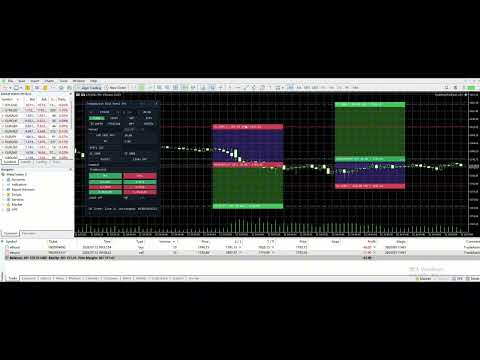













































When installed on a chart, the working area is smaller than in the developer's screenshots. This causes symbols and labels to be misaligned. This is due to the misalignment of the "collapse" and "close" symbols. When attempting to collapse the panel, the assistant freezes. It then disappears from the list of assistants and can only be removed from the window along with the chart window. When attempting to restore the chart window, all the labels from the panel appear, but without the panel itself, it still doesn't appear in the list of assistants. Therefore, I have to delete the entire chart window, reopen it, and redo all the markup. Demo account.
При установке на график размер рабочего поля меньше, чем на скринах разработчика. Из-за этого смещены символы и подписи. Из-за того, что смещены символы "свернуть" и "закрыть". При попытке свернуть панель, происходит зависание помощника. При этом он пропадает из списка помощников и его можно удалить из окна только вместе с окном графика. При попытке восстановить окно графика, в нём появляются все надписи из панели, но без самой панели и в списке помощников его по прежнему нет. Поэтому, приходится удалять окно графика полностью, открывать его заново и заново делать всю разметку. Демо-счет.
Скрин: https://s1.radikal.cloud/2026/05/22/2000127954---AlfaForexRU-Real_-DEMO-SCET---Hedge2db0b4c417e612b8.jpg