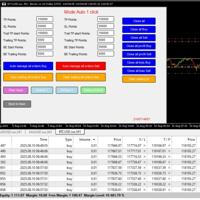
Trade Execution Panel
- Utilità
- Cem Aytemiz
- Versione: 3.3
- Aggiornato: 12 gennaio 2026
- Attivazioni: 5
ROBOV3 – Manual Entry Manager with Multi-Order, Guard & Debug System
General Overview
ROBOV3 is a manual trade execution and management Expert Advisor designed for traders who want full control over entry decisions while automating position handling, protection, and monitoring.
The EA does not generate trading signals.
All trades are opened manually via the on-chart control panel.
IF you have any features you'd like me to improve or add, or if you'd like to develop another EA (Expert Advisor) system, please feel free to write to me.
Working on Features:
-Profitable Position Close
-Moving SL via Guard
-Adaptive Trailing Profit System
-Visual upgrades.
Core Features
All trades are opened manually via the on-chart control panel.
IF you have any features you'd like me to improve or add, or if you'd like to develop another EA (Expert Advisor) system, please feel free to write to me.
-Profitable Position Close
-Moving SL via Guard
-Adaptive Trailing Profit System
-Visual upgrades.
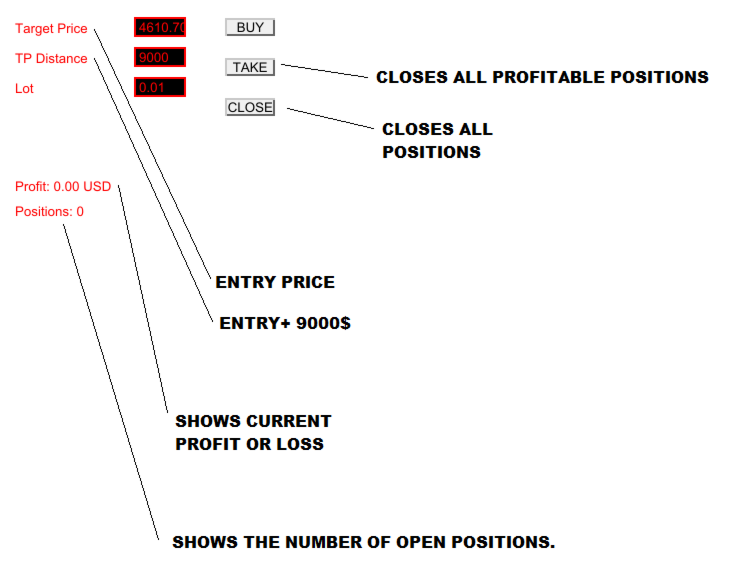
1. Manual Buy Execution with Price Control
-
The trader enters a desired entry price in the panel.
-
When the BUY button is pressed:
-
The EA checks the current Ask price.
-
If the market price is above the entered price, the trade is not opened.
-
If the market price is equal to or below the entered price, trades are executed.
-
This ensures the trader never enters at a worse price than intended.
2. Multi-Order Execution
-
When BUY is pressed, the EA opens multiple Buy positions simultaneously.
-
The number of orders is controlled by the input:
MultiOrderCount -
All orders:
-
Use the same lot size
-
Open at the same market price
-
Share the same Take Profit logic
-
This allows position stacking without manual repetition.
3. Take Profit Based on Entry Price (USD Logic)
-
Take Profit is calculated as:
TP = Entered Entry Price + TP_USD -
The TP is NOT based on the execution price.
-
This guarantees consistent risk/reward planning regardless of spread or slippage.
4. Guard Button – Instant Profit Protection
-
The GUARD button applies a manual profit lock:
-
Only profitable Buy positions are affected.
-
Stop Loss is moved to:
Current Bid Price – GuardUSD
-
-
Each position receives its own dynamically calculated SL.
-
This is a manual action, giving the trader full discretion over when protection is applied.
5. Close All Positions Instantly
-
The CLOSE ALL button:
-
Closes all open positions for the symbol.
-
Uses asynchronous execution for maximum speed.
-
-
Designed for fast exits during volatility or risk events.
6. Real-Time Monitoring Panel
The panel continuously displays:
-
Total floating profit (USD)
-
Number of open positions
-
Current system status
All values update on every tick.
7. Debug & Transparency System
When DebugMode = true , the EA displays:
-
Guard activation results (profit, SL value, broker response)
-
Trailing configuration values
-
Real-time profit tracking
This makes the EA fully observable and diagnosable, eliminating hidden behavior.
What This EA Does NOT Do
-
❌ No automatic trade signals
-
❌ No martingale
-
❌ No grid
-
❌ No forced trailing stop
-
❌ No hidden logic or risk escalation
Every action is explicit, visible, and trader-controlled.
Intended Use Case
ROBOV1 v3 is ideal for:
-
Manual scalpers
-
News traders
-
Gold & crypto traders
-
Traders who want speed + control
-
Traders who prefer manual decisions with automated execution
Design Philosophy
“The trader decides when to enter.
The EA decides how fast and how clean the trade is managed.”