Epic Flow
- Utilità
- Versione: 1.4
- Aggiornato: 3 gennaio 2026

Join WhatsApp Group for Free Signals & More Discussion
https://chat.whatsapp.com/IWc1CaxviFw8Bu94JGRIQv
https://www.mql5.com/en/signals/2352564?source=Site+Profile+Seller
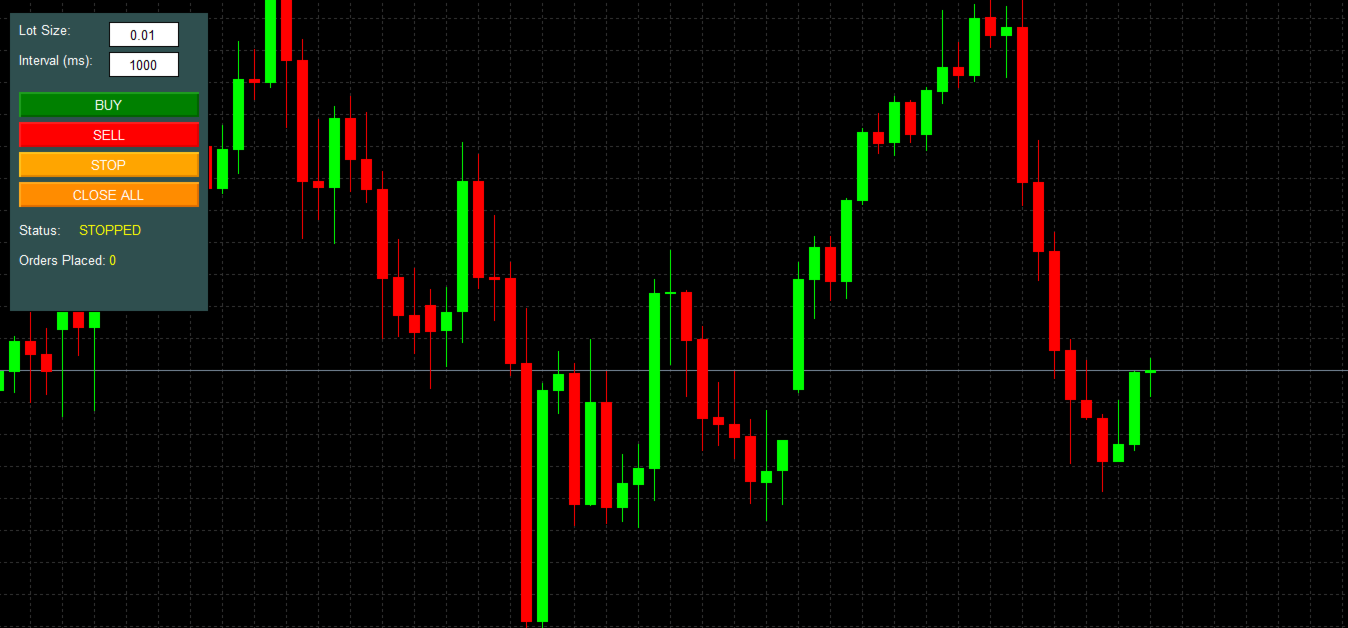
1. Manual-Assisted Trading via On-Chart Dashboard
-
Fully graphical dashboard panel rendered directly on the chart.
-
Customizable panel size and colors via input parameters.
-
All trading actions are controlled by buttons and edit fields, not automatic indicators.
2. Ultra-Fast Interval-Based Order Execution
-
Trades are opened using a millisecond-level timer ( EventSetMillisecondTimer(1) ).
-
User-defined order interval in milliseconds (10 ms to 60,000 ms).
-
Orders are placed strictly based on elapsed time, not price conditions or indicators.
-
Uses GetTickCount() for precise timing control.
3. Buy / Sell Toggle Trading Modes
-
BUY mode: continuously opens buy trades at the specified interval.
-
SELL mode: continuously opens sell trades at the specified interval.
-
Buy and Sell modes are mutually exclusive (activating one disables the other).
-
Visual button color changes indicate active mode.
4. Real-Time Parameter Editing (Without Restart)
-
Lot size editable directly on the dashboard.
-
Order interval editable in real time (milliseconds).
-
Input validation ensures:
-
Lot size is within broker limits and respects volume step.
-
Interval remains within safe execution bounds.
-
5. Centralized Trading Control Buttons
-
BUY – starts timed buy execution.
-
SELL – starts timed sell execution.
-
STOP – halts all trading activity instantly.
-
CLOSE ALL – immediately closes all open positions for the current symbol.
6. Ultra-Fast “Close All Positions” Mechanism
-
Closes all positions without waiting for responses.
-
Sends close requests in a loop for maximum speed.
-
Uses higher price deviation for faster execution.
-
Filters positions by current symbol only.
-
Designed for emergency exit scenarios.
7. Session-Level Trade Tracking
-
Counts and displays:
-
Current EA status (BUY RUNNING / SELL RUNNING / STOPPED).
-
Total orders placed in the current session.
-
-
Counters reset automatically when a new mode is activated.
8. Robust Trade Request Handling
-
Uses MqlTradeRequest / MqlTradeResult (no deprecated trade functions).
-
Supports:
-
IOC filling mode.
-
Magic number isolation.
-
Proper bid/ask price selection.
-
-
Includes error logging for failed order submissions.
9. No Indicator or Market Logic Dependency
-
No indicators
-
No signals
-
No strategy logic
-
Trading is purely time-driven and user-controlled
This makes the EA suitable for:
-
Manual grid trading
-
Latency testing
-
Execution stress testing
-
Broker behavior analysis
-
High-frequency manual strategies
10. Clean Lifecycle Management
-
Proper object cleanup on deinitialization.
-
Timer safely started and stopped.
-
Dashboard objects managed using a consistent prefix.