PropBlaster Trade Panel Lot Size and Trade Manager
- Utilities
- Version: 1.2
- Updated: 11 November 2026
- Activations: 10

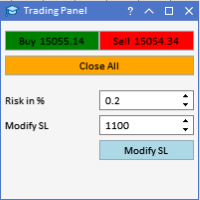
PropBlaster Trade Panel lets you plan a trade directly on the chart. Drag the stop loss line, and the panel calculates the lot size from your risk. It then manages the open trade for you: break-even, trailing stop and partial close.
The panel only sends the orders you click. It never trades on its own. 100 % native MQL5 - no DLLs, no web requests. Every screenshot on this page is from a live demo chart.
Quick start
1. Drag the EA onto the chart of the symbol you trade and allow Algo Trading.
2. In the inputs, set your risk per trade, your commission per lot and the hard limits (max. lot, max. risk %). Break-even, trailing and take-profit levels are set once and apply to every trade.
3. Click Plan BUY or Plan SELL (or Shift+B / Shift+S), drag the stop loss line, check lot, risk and costs, then send. The panel manages the trade from there.
It is made for prop-firm traders who must never risk more than planned.
Plan and size the trade
- Click Plan BUY or Plan SELL: entry, stop loss and take profit lines appear on the chart
- Drag the lines; lot size, risk in money and in percent, and R:R update instantly
- Risk as % of balance, % of equity, a fixed amount or % Day room: a share of the daily loss budget that is left today (closed and open loss counted) - made for prop firm daily loss rules
- The lot is always rounded down, so the risk is never exceeded
- Commission per lot is included in the risk (input "Commission per lot")
- Cost line: spread, commission and expected slippage in money and as a share of your risk, plus the win rate you need to break even
- Market orders, or pending orders (limit or stop is chosen automatically from the entry line)
- Take profit by R:R, free (drag the line) or off
Up to 3 take-profit levels
- Switch "TP levels" to 2 or 3: the panel splits the lot into separate positions with their own take profit, for example 50 % at 1 R, 25 % at 2 R, 25 % at 3 R (adjustable in the inputs)
- If the lot is too small to split, the panel automatically uses fewer levels
- Needs a hedging account; on netting accounts the panel uses one take profit
Hard limits for prop accounts
- Max. lot per trade: larger lots are capped
- Max. risk per trade in % of balance (default 2 %): a trade above this limit is blocked, so a typo like 10 instead of 1 cannot cost you the account
- The panel also blocks trades with the stop loss on the wrong side, not enough margin, a stop loss closer than the broker minimum, or Algo Trading switched off
Trade management
- Auto break-even: at X R profit the stop loss moves to entry plus an offset
- Trailing stop in pips, starting from break-even
- Auto stop loss: positions without a stop loss (for example opened in the mobile app) get one after a few seconds
- BE now and partial close (X %) for all positions of the chart symbol with one click
- Management works for all symbols or only the chart symbol (input)
Hotkeys (chart must have focus)
- Shift+B plan buy, Shift+S plan sell, Shift+X execute (with confirmation, can be switched off), Esc cancel, Shift+E break-even now
Good to know
- All settings are remembered across symbol changes and terminal restarts
- Works on forex, metals, indices and other CFDs (lot size from the broker's tick value)
- Hedging and netting accounts
- No DLLs, no internet connection, no external files
Free version: PropBlaster Position Sizer contains the planning panel with lot size, one take profit, commission and the lot and risk limits, without trade management, take-profit levels and hotkeys.
Important
The panel calculates and sends orders, it does not generate trading signals. Swap is not included in the risk. Slippage at the stop is included as far as you set it in the input "Expected slippage at the stop in points". Check the rules of your prop firm. Trading involves risk.
Strategy Tester note
The panel needs a live chart, so it cannot be operated in the Strategy Tester. In the tester, the EA opens one small demonstration position at a time with stop loss and take profit. This happens only in the tester.
PropBlaster tools for MetaTrader 5
Free: Daily Loss Guard (daily loss limit) · Position Sizer (lot size from your risk) · Copier Duo (one master, one slave) · Stats (trading statistics) · Drawdown Meter (prop firm rule dashboard)
Paid: Guard (prop firm presets and full rule set) · Trade Panel (lot size and trade management) · Copier (any number of accounts) · Stats Pro (breakdown by EA, consistency check, CSV export)
You find them all under "More from author" on this page.
PropBlaster Cockpit is a separate Windows desktop app by the same author: trade journal, rule book and pre-trade check for several accounts. It is not sold in the Market, and this product works without it.