VDivergence Pro
- Indicators
- Version: 2.10
- Updated: 26 October 2026
- Activations: 10

VDivergence Pro - Price / OsMA Divergence on Confirmed Swings
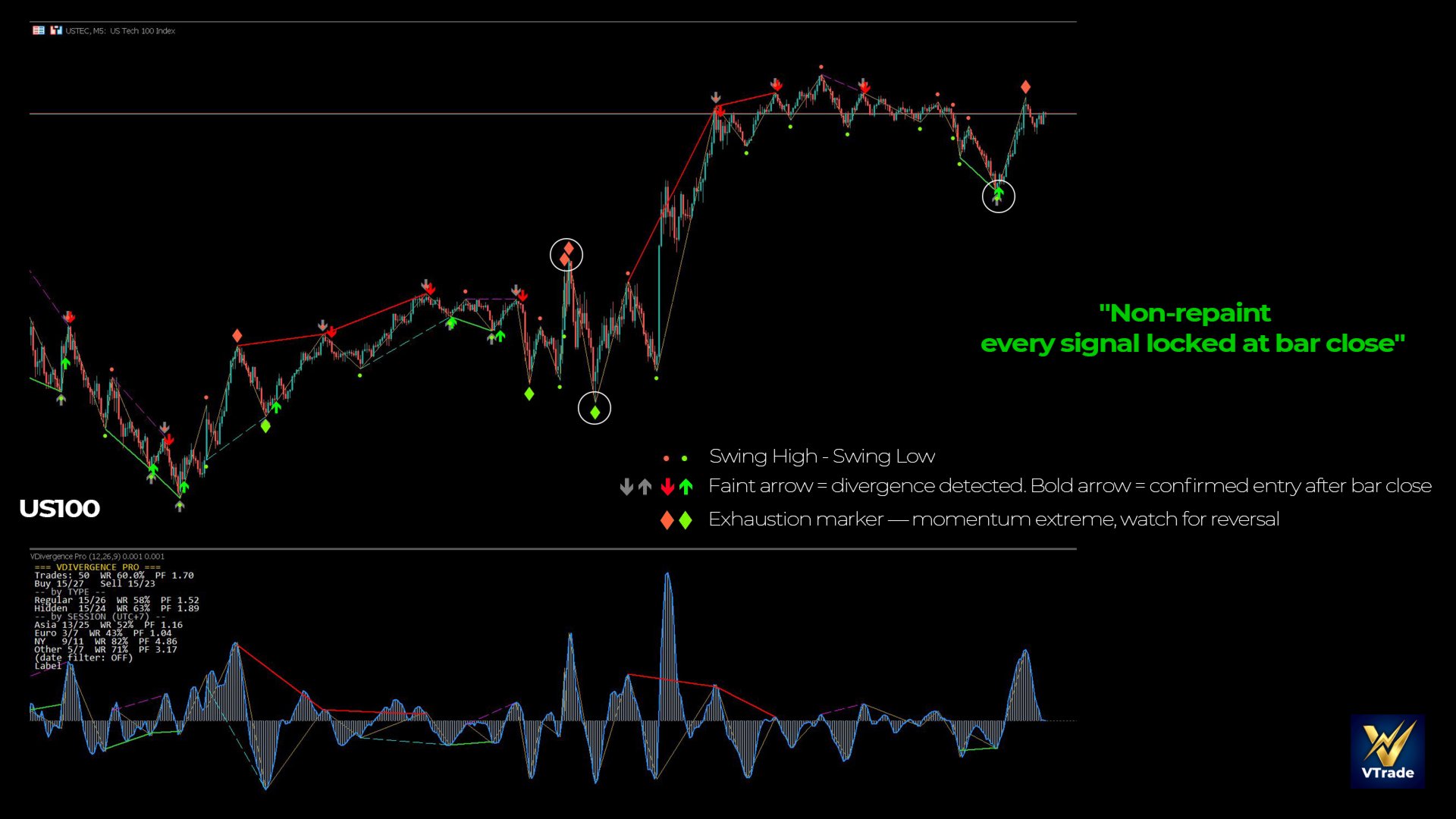
VDivergence Pro finds Regular and Hidden divergence between price and OsMA (MACD minus Signal) on swings from an ATR-based ZigZag. It works on closed bars only, and every signal is placed on the bar where it actually became known. What you see on history is what you would have seen live.
HOW A SIGNAL IS BUILT
- Swing: the ZigZag locks a swing high/low only after price has reversed by N x ATR (default 2.5) on a closed bar.
- Divergence: the new swing is compared with the previous swing of the same type (low with low, high with high):
- Regular buy: price lower low, OsMA higher low. Regular sell: price higher high, OsMA lower high.
- Hidden buy: price higher low, OsMA lower low. Hidden sell: price lower high, OsMA higher high. - Entry bar: either the bar that confirmed the swing, or (default) the first later bar that closes beyond the previous bar's high/low, within a few bars.
ON THE CHART
- Grey arrow: the divergence swing. It is drawn on the swing bar, but only appears once the swing is confirmed - that is always some bars after the swing itself.
- Coloured arrow (green buy / red sell): the entry bar, i.e. the bar where the signal became known. Alerts fire when this bar closes.
- Lines connect the two swings on the price chart and in the OsMA window (solid = Regular, dashed = Hidden).
- Small dots mark every ZigZag swing. A diamond marks a swing where |OsMA| is at least 70% of its recent maximum (OsMA extreme).
- Hover an entry arrow to see entry, TP, SL and the result used by the statistics.
KEY FEATURES
- Closed bars only, fixed scan start: arrows and lines never move or disappear once drawn
- Regular and Hidden divergence, each can be switched off
- Two entry modes: swing-confirm bar or break bar
- Popup and mobile push alerts on the closed entry bar
- Small, adjustable icon sizes; grouped inputs
- Buy/Sell buffers for Expert Advisors (iCustom buffers 2 and 3: not EMPTY_VALUE on an entry bar)
- Light on CPU: indicator data copied incrementally, signals rebuilt once per new bar
STATISTICS PANEL (OPTIONAL, OFF BY DEFAULT)
Shows how the signals behaved on the scanned history of your symbol and timeframe, using a virtual TP / SL in ATR (default TP 2 x ATR, SL 1.5 x ATR), with the bar spread included:
- Wins / trades, win rate, profit factor and net result (points, pips or price)
- Split by Buy / Sell, Regular / Hidden and session (Asia, London, New York, Other - hours in UTC, server offset detected automatically)
- Optional date filter and CSV export, to compare settings in Excel
These are historical counts on the scanned bars - not a forecast, and results change with symbol, timeframe, period and settings.
KEY SETTINGS
- Swing reversal (N x ATR) - the main knob. Higher = fewer, larger swings. Lower = more swings and more signals.
- Regular / Hidden - choose the divergence types.
- Entry bar - swing-confirm bar, or break bar (close beyond the previous bar's high/low).
- History bars to scan - default 1500.
- OsMA 12 / 26 / 9 - standard values.
INSTALLATION
- Buy or download the demo - the indicator appears in Navigator -> Indicators -> Market.
- Drag VDivergence Pro onto any chart. It opens in a sub-window (OsMA histogram); arrows and lines are drawn on the price chart.
- Push alerts: Tools -> Options -> Notifications, enable and enter the MetaQuotes ID from the MT5 mobile app.
AN HONEST NOTE
Divergence describes what price and momentum have done; it does not predict what comes next. VDivergence Pro shows divergence objectively and without repainting - every trading decision, position size and stop loss is yours. Use the statistics panel to see how the signals behaved on your own symbol and timeframe before you rely on them.