VDivergence Pro
- Indicatori
- Versione: 2.0
- Attivazioni: 10

VDivergence Pro — Non-Repaint Price/Momentum Divergence Detector
Signals locked at bar close. No repaint. No lag.
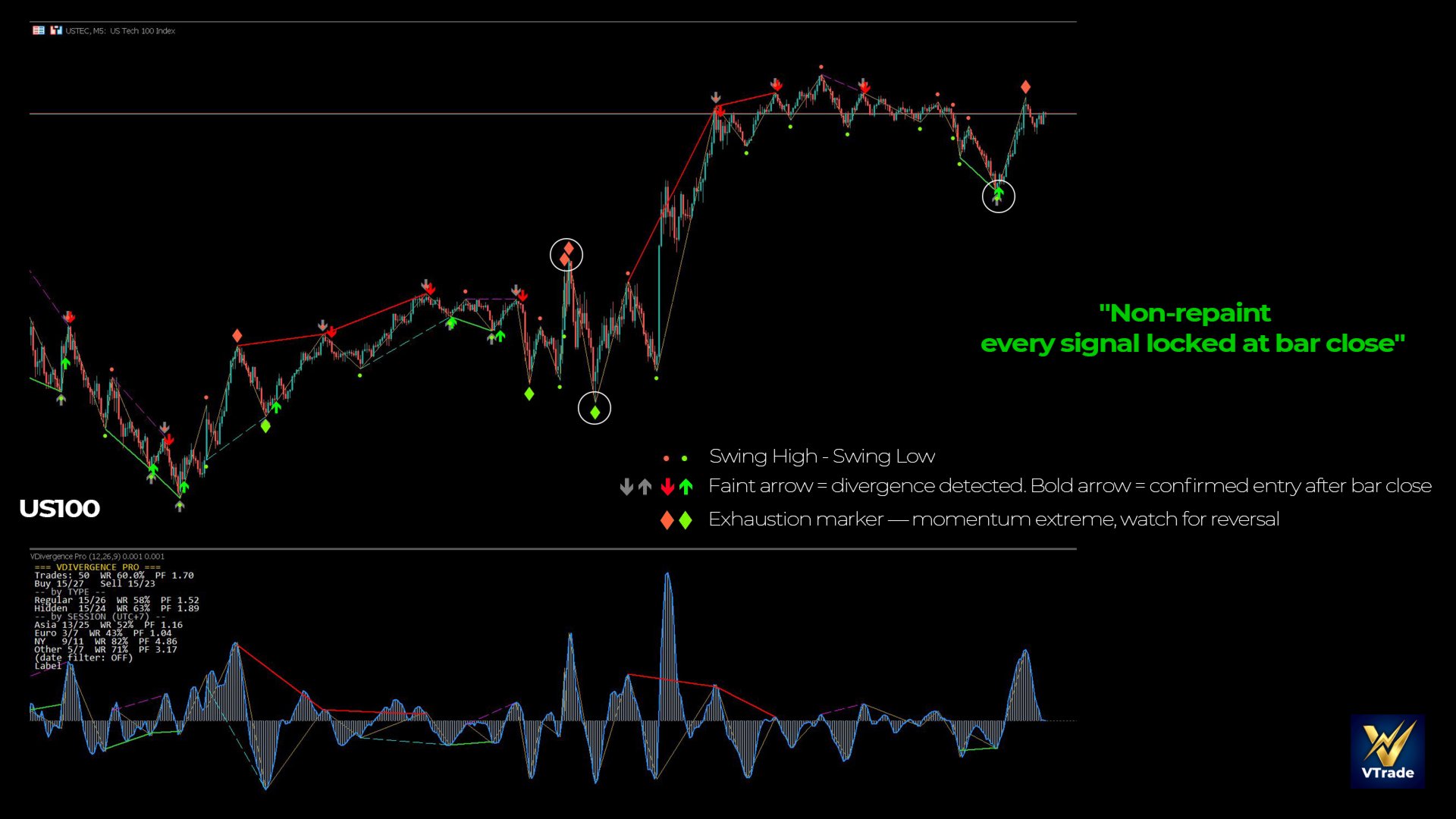
Most divergence indicators on the market repaint — the arrows look perfect on history but shift once price moves live. VDivergence Pro is different: every swing is confirmed and locked at bar close using an ATR-based ZigZag algorithm. What you see on history is what you get in real time.
What Sets It Apart
True non-repaint. Swings are only locked once price reverses by a full ATR threshold and the bar has closed. Signals never disappear or jump to a new position — unlike many other divergence tools.
Clear, readable divergence. Detects both Regular and Hidden divergence on OsMA (MACD − Signal). Swing-connecting lines and arrows are drawn directly on the chart — you instantly see where price and momentum fall out of sync.
Entry confirmation filter. Optionally wait for a bar to close beyond the prior high/low before printing the bold entry arrow — helps filter out failed divergence signals.
Momentum exhaustion detection. Marks points where OsMA reaches a recent amplitude extreme, where momentum is likely fading and price is prone to reverse.
Instant alerts. Terminal popup and mobile push notification the moment a new signal forms — never miss a setup when you step away from the screen.
Key Features
- Regular and Hidden divergence on OsMA, non-repaint
- ATR-based ZigZag swings, locked at bar close
- Swing-connecting lines + visual arrows on the chart
- Entry confirmation-bar filter (toggle on/off)
- Momentum exhaustion markers
- Popup + mobile push alerts
- Performance optimized — recalculates on new bar only, smooth, no lag
- Fully customizable: colors, ZigZag sensitivity, divergence threshold
Advanced Features (Optional)
For traders who want to verify before trading live:
- Built-in statistics panel — toggle on to display the Win Rate and Profit Factor of signals (measured against virtual ATR-based TP/SL), split by divergence type and by trading session. Lets you objectively assess how the indicator behaves on your symbol.
- CSV export — write results to a file so you can compare multiple configurations in Excel.
Both features are off by default to keep the chart clean — enable them when needed.
Recommended Use
- Instruments: XAUUSD, US100, US500, major Forex pairs
- Timeframes: M5, M15 and above
- Best for: momentum/volume traders who want disciplined divergence confirmation
An Honest Note
No indicator makes you profitable on its own — including this one. VDivergence Pro is a tool that helps you spot divergence objectively, without repainting, with clear signals for disciplined entries. Combine it with your own risk management and analysis. That's how an indicator should be used.
Installation & User Guide
Installation
- Buy or download the demo from the MQL5 Market — the indicator appears automatically in MetaTrader 5 under Navigator → Indicators → Market.
- Drag and drop VDivergence Pro onto your chart (XAUUSD or indices recommended, M5/M15 timeframe).
- The settings window opens — click OK to use the defaults, or adjust to your needs (see below).
- The indicator appears in a sub-window below the chart (OsMA histogram), with arrows and divergence lines drawn directly on the price chart.
To receive push notifications on your phone: in MT5 go to Tools → Options → Notifications, enable it, and enter the MetaQuotes ID from the MT5 app on your phone.
Reading the Signals
Connecting line + faint (gray) arrow: The indicator has detected a divergence between price and OsMA. This is an early warning — the divergence has formed but is not yet confirmed for entry.
Bold arrow (green/red): A confirmation bar has closed beyond the prior high/low. This is the entry signal per the confirmation filter. Buy = green arrow below the bar, Sell = red arrow above the bar.
Swing high/low diamonds: Each ZigZag reversal point, locked at bar close.
Highlighted diamond (Exhaustion): OsMA has reached an amplitude extreme — momentum may be fading, watch for a reversal.
Key Settings
The indicator has many options, but you only need to understand a few key knobs:
ZigZag Threshold (ZZ_ATR) — The main knob. It controls the size of the swings:
- Higher (e.g. 3.0–4.0) → fewer swings, captures only large divergences, fewer but "cleaner" signals
- Lower (e.g. 1.5–2.0) → more swings, more signals, more sensitive
- The default of 2.5 is balanced for XAUUSD M5/M15
Enable Regular / Hidden Divergence — Toggle each divergence type. Regular divergence signals a reversal; Hidden divergence signals trend continuation.
Entry Confirmation — Enable to print the bold arrow only when a confirmation bar appears (fewer false signals). Disable for earlier entries as soon as a divergence forms.
OsMA settings (Fast/Slow/Signal: 12/26/9) — Standard OsMA parameters. Leave as-is unless you know exactly what you want.
Usage Tips
- Use divergence as a point of attention, not a blind entry signal. Combine it with support/resistance, volume, or your own market structure.
- On XAUUSD/indices M5, enabling Entry Confirmation is recommended to filter noise.
- A divergence accompanied by an Exhaustion mark is a stronger signal than divergence alone.
- Always set a Stop Loss. The indicator marks entry points — it does not replace risk management.
Advanced Options (Not Required)
If you want to evaluate performance yourself: enable Show Panel to view the Win Rate / Profit Factor table, or enable Export CSV to export results to Excel. Both are off by default and do not affect the signals — they are verification tools for those who want them.