New MetaTrader 5 Platform build 2265: DirectX functions for 3D visualization in MQL5 and symbol settings in Strategy Tester
Forum on trading, automated trading systems and testing trading strategies
SQLite in MQL5: New Features and Performance Testing
Renat Fatkhullin , 2019.12.07 09:24
In build 2265, we implemented regular functions for working with databases based on SQLite 3.30.1:
- DatabaseOpen
- Databaseclose
- DatabaseTableExists
- DatabaseExecute
- DatabasePrepare
- DatabaseRead
- DatabaseFinalize
- DatabaseTransactionBegin
- DatabaseTransactionCommit
- DatabaseTransactionRollback
- DatabaseColumnsCount
- DatabaseColumnName
- DatabaseColumnType
- DatabaseColumnSize
- DatabaseColumnText
- DatabaseColumnInteger
- DatabaseColumnLong
- DatabaseColumnDouble
- DatabaseColumnBlob
Bases can be stored both on disk and only in memory using the DATABASE_OPEN_MEMORY flag .
Wrapping massive inserts / changes in a DatabaseTransactionBegin / Commit / Rollback transaction speeds up operations hundreds
of times.
Windows 10 x64, Intel Xeon  E5-2690 v3 @ 2.60GHz
                                                        LLVM   MQL5
---------------------------------------------------------------------------------
Test  1: 1000 INSERTs:                                 11572   8488
Test  2: 25000 INSERTs in a transaction:                  59     60
Test  3: 25000 INSERTs into an indexed table:            102    105
Test  4: 100 SELECTs without an index:                   142    150
Test  5: 100 SELECTs on a string comparison:             391    390
Test  6: Creating an index:                               43     33
Test  7: 5000 SELECTs with an index:                     385    307
Test  8: 1000 UPDATEs without an index:                   58      54
Test  9: 25000 UPDATEs with an index:                    161    165
Test 10: 25000 text UPDATEs with an index:               124    120
Test 11: INSERTs from a SELECT:                           84     84
Test 12: DELETE without an index:                         25     74
Test 13: DELETE with an index:                            70     72
Test 14: A big INSERT after a big DELETE:                 62     66
Test 15: A big DELETE followed by many small INSERTs:     33     33
Test 16: DROP TABLE: finished.                            42     40
The speed in MQL5 is absolutely the same as in native C ++ with one of the best compilers. A benchmark package for playback is attached.
We also implemented the unique DatabaseReadBind function, which allows you to read records directly into the structure,
which simplifies and speeds up bulk operations.
Here is a simple example:
 struct Person
  {
   int                id;
   string             name;
   int                age;
   string             address;
   double             salary;
  };

//+------------------------------------------------------------------+
//| Test                                                             |
//+------------------------------------------------------------------+
bool TestDB( string filename, int flags)
  {
   int db;
//--- open
   db=DatabaseOpen(filename,flags);
   if (db== INVALID_HANDLE )
     {
       Print ( "DB: " ,filename, " open failed with code " , GetLastError ());
       return ( false );
     }
//--- create a table
   if (!DatabaseTableExists(db, "COMPANY" ))
       if (!DatabaseExecute(db, "CREATE TABLE COMPANY("
                           "ID INT PRIMARY KEY     NOT NULL,"
                           "NAME           TEXT    NOT NULL,"
                           "AGE            INT     NOT NULL,"
                           "ADDRESS        CHAR(50),"
                           "SALARY         REAL );" ))
        {
         Print ( "DB: " ,filename, " create table failed with code " , GetLastError ());
         DatabaseClose(db);
         return ( false );
        }
//--- insert data
   if (!DatabaseExecute(db, "INSERT INTO COMPANY (ID,NAME,AGE,ADDRESS,SALARY) VALUES (1, 'Paul', 32, 'California', 20000.00 ); "
                       "INSERT INTO COMPANY (ID,NAME,AGE,ADDRESS,SALARY) VALUES (2, 'Allen', 25, 'Texas', 15000.00 ); "
                       "INSERT INTO COMPANY (ID,NAME,AGE,ADDRESS,SALARY) VALUES (3, 'Teddy', 23, 'Norway', 20000.00 );"
                       "INSERT INTO COMPANY (ID,NAME,AGE,ADDRESS,SALARY) VALUES (4, 'Mark', 25, 'Rich-Mond ', 65000.00 );" ))
     {
       Print ( "DB: " ,filename, " insert failed with code " , GetLastError ());
      DatabaseClose(db);
       return ( false );
     }
//--- prepare the request
   int request=DatabasePrepare(db, "SELECT * FROM COMPANY WHERE SALARY>15000" );

   if (request== INVALID_HANDLE )
     {
       Print ( "DB: " ,filename, " request failed with code " , GetLastError ());
      DatabaseClose(db);
       return ( false );
     }
//--- выводим записи
   Person person;

   for ( int i= 0 ; DatabaseReadBind(request,person); i++)
       Print (i, ":  " ,person.id, " " , person.name, " " ,person.age, " " ,person.address, " " ,person.salary);

   Print ( "" );
//--- close all
   DatabaseFinalize(request);
   DatabaseClose(db);
   return ( true );
  }

//+------------------------------------------------------------------+
//| Script program start function                                    |
//+------------------------------------------------------------------+
void OnStart ()
  {
   TestDB( "test.sqlite" ,DATABASE_OPEN_READWRITE | DATABASE_OPEN_CREATE |DATABASE_OPEN_COMMON);
  }


Output:
0 :   1 Paul 32 California 20000.0
1 :   3 Teddy 23 Norway 20000.0
2 :   4 Mark 25 Rich-Mond   65000.0
Forum on trading, automated trading systems and testing trading strategies
Renat Fatkhullin , 2019.12.07 08:28
Look at the new features of 3D graphics with examples in release 2265:
- / include / canvas - lots of functions for DirectX
- / experts / examples / Correlation Matrix 3D
- / experts / examples / Math 3D Morph
- / scripts / examples / Remnant 3D
Hi all,
I have seen that, with long file names of your EA, mine had 16 characters, and using the CCanvas class.
When a Create method is used, the ResourceCreate (...) may return with error 4018.
Be careful!
Bye Manuele
Great update and features. I appreciate that, but I want some more for UI designs.
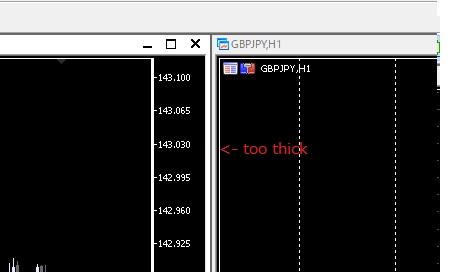
We can change sub-window's caption bar width and font size from registry editor but can not modify sub-window's border thickness.
MT5's default sub-window border width might annoy users.
Please improve this.

- www.mql5.com
Great update and features. I appreciate that, but I want some more for UI designs.
We can change sub-window's caption bar width and font size from registry editor but can not modify sub-window's border thickness.
MT5's default sub-window border width might annoy users.
Please improve this.
Can you put what registry keys are for change subwindows width?
Can you put what registry keys are for change subwindows width?
HKEY_CURRENT_USER\Control Panel\Desktop\WindowMetrics

- Free trading apps
- Over 8,000 signals for copying
- Economic news for exploring financial markets
You agree to website policy and terms of use
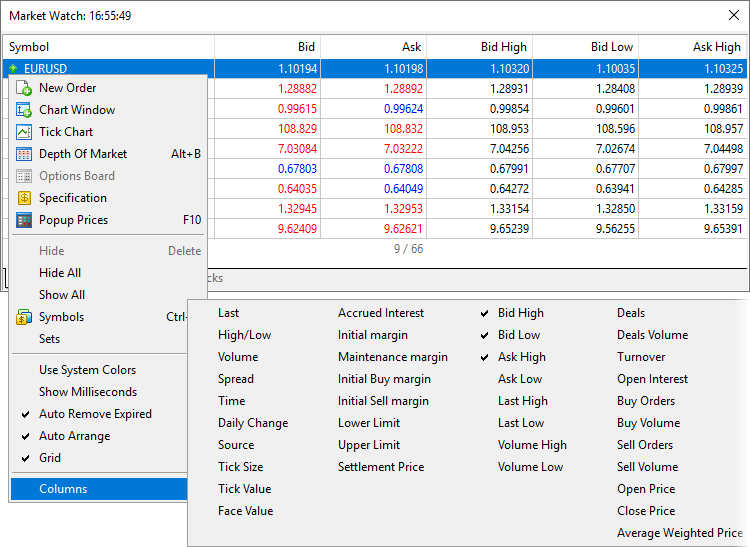
- Terminal: More columns have become available in Market
Watch. The main section now features 40 additional symbol parameters, which were previously available only under the Details tab.
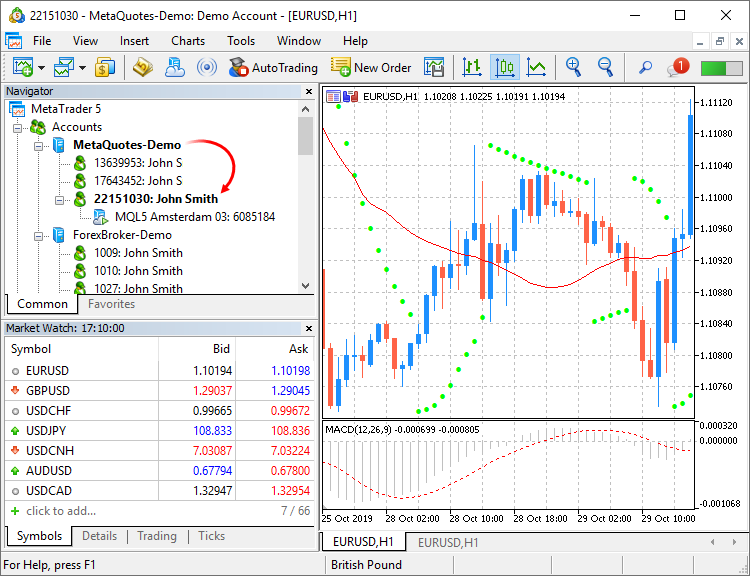
- Terminal: Added highlighting of the currently connected account and the current server in the Navigator. The function will be useful if you
have multiple accounts with different brokers.
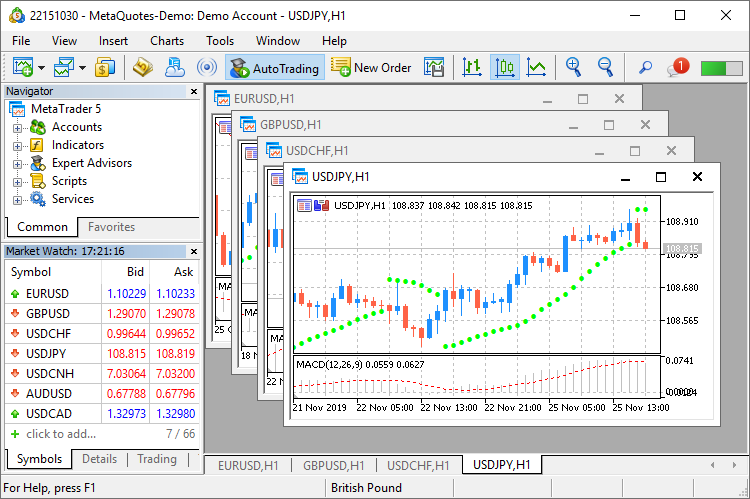
- Terminal: Updated frame design for charts. Frames have become smaller and thus more space is now available for useful information.
- Terminal: Modified algorithm for calculating trading totals when displaying the trading
history as positions. The values are now calculated based on actual records.
- Terminal: Implemented faster launching of MQL5 programs.
- Terminal: New /beta key has been added for the terminal installation file, which allows downloading the beta version. In normal mode, the
release version should be installed first, which can then be updated till a beta version. By skipping this step, you can save time and
traffic. Installation start example:
C:\mt5setup.exe /beta
- Terminal: Fixed display of margin requirements for instruments with the "Exchange Stocks" type.
- Terminal: Accelerated operation of all platform components through the use of the Clang/LLVM compiler. In some cases compilation is 20%
faster.
- MQL5: Added new DirectX 11 functions and shaders for 3D visualization. Now powerful three-dimensional graphics can be created directly
in MQL5.
- Create — creates a scene.
- Attach — binds a scene to a chart.
- Destroy — destroys a scene.
- ObjectAdd — adds to the scene a descendant object inherited from the base CDXObject class.
- Render — the full render loop, with buffer clearing and rendering of all CDXObject, added via the ObjectAdd method.
- RenderBegin — starts scene rendering, fills the render buffer with the specified color (if DX_CLEAR_COLOR flag is set) and the depth
buffers (when using DX_CLEAR_DEPTH), as well as sets the DXInputScene scene buffer for default shaders.
- RenderEnd — completes scene rendering and receives a result to an internal buffer. If redraw==true, displays the image on the chart, on
which it is running.
- ViewMatrixGet — receives a view matrix.
- ViewMatrixSet — sets a view matrix. The matrix is not compatible with ViewPositionSet, ViewRotationSet, ViewTargetSet and
ViewUpDirectionsSet methods.
- ViewPositionSet — sets camera position.
- ViewRotationSet — sets camera rotation matrix.
- ViewTargetSet — sets the point the camera is pointing at. Together with ViewUpDirectionsSet, it is an alternative to ViewRotationSet.
- ViewUpDirectionsSet — sets the vertical position of the camera. Together with ViewTargetSet, it is an alternative to ViewRotationSet.
- ProjectionMatrixGet — receives a projection matrix.
- ProjectionMatrixSet — sets a projection matrix.
- MQL5: Added support for operations with SQLite databases
directly from MQL5. This enables easy execution of SQL queries without creating complex instructions. The internal operation is
implemented by the new standard library extension.
- DatabaseOpen — opens or creates a database in the specified file
- DatabaseClose — closes a database
- DatabaseTableExists — checks if there is a table in the database
- DatabaseExecute — executes a query to the specified database
- DatabasePrepare — creates a query handle, which can be further executed using DatabaseRead()
- DatabaseRead — jumps to the next record in the query result
- DatabaseFinalize — deletes a query which was created in DatabasePrepare()
- DatabaseTransactionBegin — starts the execution of a transaction
- DatabaseTransactionCommit — completes the execution of a transaction
- DatabaseTransactionRollback — rolls back a transaction
- DatabaseColumnsCount — receives the number of fields in a query
- DatabaseColumnName — receives field name by number
- DatabaseColumnType — receives field type by number
- DatabaseColumnSize — receives field size in bytes
- DatabaseColumnText — receives a string value of a field from the current record
- DatabaseColumnInteger — receives an int value from the current record
- DatabaseColumnLong — receives a long value from the current record
- DatabaseColumnDouble — receives a double value from the current record
- DatabaseColumnBlob — receives an array of field values from the current record
- ERR_MQL_DATABASE_INTERNAL (5120) — internal database error
- ERR_MQL_DATABASE_INVALID_HANDLE (5121) — invalid database handle
- ERR_MQL_DATABASE_TOO_MANY_OBJECTS (5122) — maximum number of Database objects exceeded
- ERR_MQL_DATABASE_CONNECT (5123) — database connection error
- ERR_MQL_DATABASE_EXECUTE (5124) — request execution error
- ERR_MQL_DATABASE_PREPARE (5125) — request creation error
- ERR_MQL_DATABASE_NO_MORE_DATA (5126) — no more data to read
- ERR_MQL_DATABASE_STEP (5127) — error moving to the next query record
- ERR_MQL_DATABASE_NOT_READY (5128) — data to read query results is not yet ready
- ERR_MQL_DATABASE_BIND_PARAMETERS (5129) — SQL query auto-substitution error
- MQL5: Added new property of MQL5 programs, which enables the selection of a default visualization method.
- MQL5: New MathArctan2 function. Returns the radian value of the angle, the tangent of which is equal to the ratio of the two specified
numbers.
- MQL5: We have performed the general optimization of programs to improve performance and reduce resource consumption.
- MQL5: Added examples of math calculations which can be performed in the strategy tester. They are available under the
\MQL5\Experts\Examples\Math 3D\ directory.
- MQL5: Introduced tighter control of namespaces.
- MQL5: Added loading of linked libraries when using .NET libraries in MQL5 programs. If the used .NET library requires other libraries for
operation, the compiler will try to download required libraries automatically from \MQL5\Libraries.
- MQL5: Fixed time operations in the MetaTrader
module for Python integration. Now all output data use the time of the trading server to which the terminal is connected.
- Tester: A plethora of new features and improvements:
- MetaEditor: Added ability to work with C/C++ and Python projects directly from MetaEditor. Now, multi-lingual projects can be managed using
the built-in editor.
- MetaEditor: Added support for sub-projects inside the Shared Projects directory intended for shared project development via MQL5
Storage. Previously, only single projects could be created at the top level.
- MetaEditor: Built-in debugger updates.
- MetaEditor: Fixed addition of a function header when using a code styler.
- MetaEditor: 'Jump to previous/next cursor position' commands are now available not only in the View menu, but also on the toolbar.
- MetaEditor: Spaces can now be used in project names.
- Android: Added ability to quickly switch to deposit/withdrawal pages on the broker website.
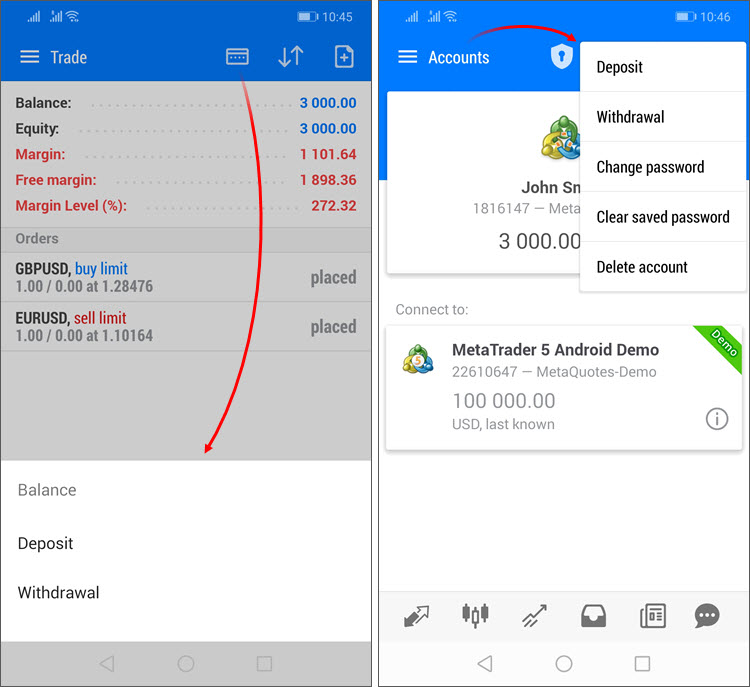
- Deposit/withdrawal operations are only available if appropriate functions are enabled for the trading account on the broker side.
- The trading terminal does not perform any account deposit/withdrawal operations. The integrated functions redirect the
user to the appropriate broker website pages.
- Android: Positions in history are sorted now by closing date.
- Android: Added marking of positions closed by Stop Loss or Take Profit with red and green vertical lines in the history
section.
- Android: Added new fields in the trading
symbol specification:
- Category — the property is used for additional marking of financial instruments. For example, this can be the market sector to which the
symbol belongs: Agriculture, Oil & Gas and others. The category is displayed only if the appropriate information is provided
by the broker.
- Exchange — the name of the exchange in which the security is traded. The category is displayed only if the appropriate information is
provided by the broker.
- Android: Added Margin Call state indication in the trading
section. Upon the emergence of this state, Margin, Free Margin and Margin Level parameters will be shown in red.
- Android: Fixed display of the OTP
section opening button in tablets.
- Android: Other fixes and improvements.
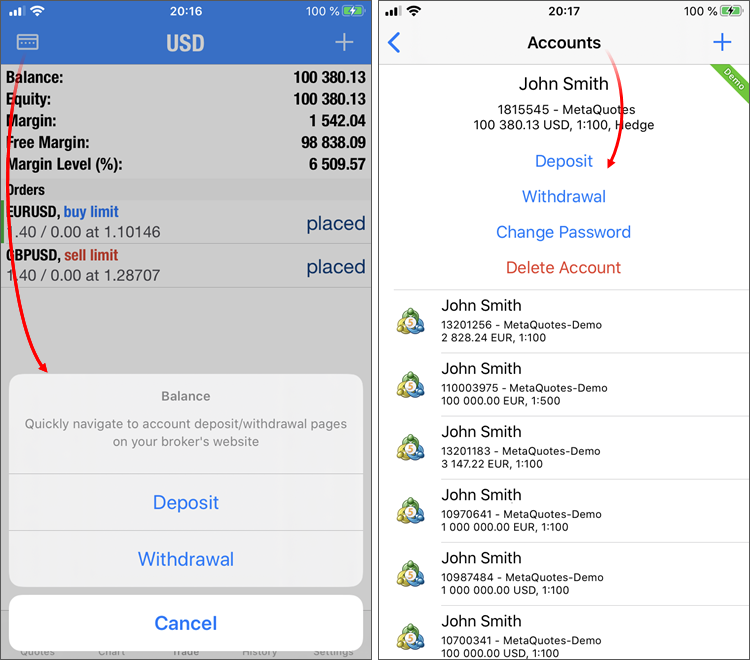
- iPhone/iPad: Added ability to quickly switch to deposit/withdrawal pages on the broker website. For further details, please see the What's New
list of MetaTrader 5 for Android.
- iPhone/iPad: Added dark mode support for iOS/iPadOS.
- iPhone/iPad: The one-time
password section has become available in the iPad version.
- iPhone/iPad: The positions closed by Stop Loss or Take Profit are marked with red and green vertical lines in the history
section.
- iPhone/iPad: Positions in history are sorted now by closing date. If the position has not yet been closed, its opening date is used for sorting.
- iPhone/iPad: Other fixes and improvements.
- Fixes based on crash logs.
The update will be available through the Live Update system.To display the trading history as positions, the terminal uses information about deals executed during the requested period. Only the positions closed within this period will be shown in history. If the position is still open or its close time does not fall within the selected interval, it will not be displayed in the history. Therefore, the total profit and commission in the 'positions' mode can differ from those in the 'orders/deals' history mode.
For example, you are viewing the past week history. During this period, 100 deals were executed, 98 of which participated in the opening and closing of 20 positions. The last two deals opened new positions, which have not been closed up to now. In this case, the history of deals contains 100 records and appropriate total values calculated based on these deals. When viewing the history as positions, you will see 20 records collected based on 98 deals. Only this data will be taken into account when calculating total values. If the broker charges entry deal fees, the final commission value in the deals history will differ from the commissions shown in the positions history, because the two last deals will be ignored in the latter case.
The new CCanvas3D class is an extension of the CCanvas custom graphics class. It is available in the \MQL5\Include\Canvas\ directory. The class features functions for rendering three-dimensional objects via DirectX API.
Detailed documentation for the new library will be published soon.
The following functions are available:
The following error codes have been added for function operations:
The property allows setting the type of chart which opens at the end of optimization, as well as program parameters for the X and Y axes.
The property only sets the default chart view. It can be changed manually at any time, using the context menu.
Custom settings for financial instruments
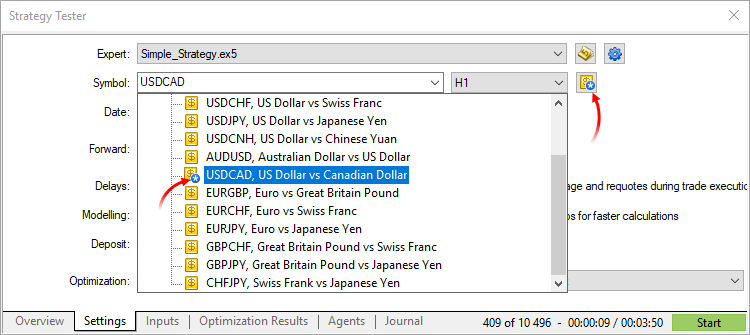
Now you can change settings of the main trading instrument, for which testing/optimization is performed. Almost all specification parameters can be overwritten: volumes, trading modes, margin requirements, execution mode and other settings. Thus, if you need to check an Expert Advisor under different conditions, there is no need to create a separate custom symbol and download its history. This can be done by changing standard symbol settings.
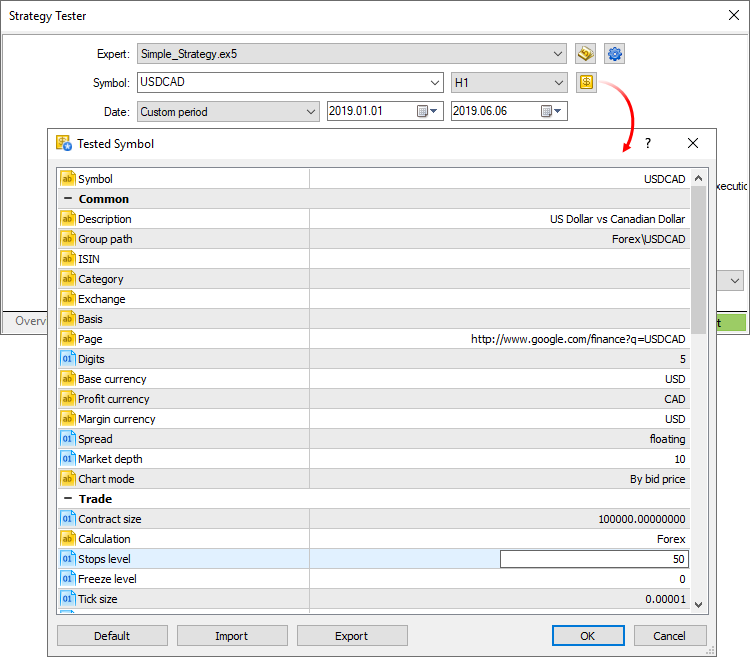
If the symbol specification is customized, the gear icon and the symbol icon are marked with an asterisk. This shows that custom parameters are used for the current test.Last settings/Expert Advisors/charts
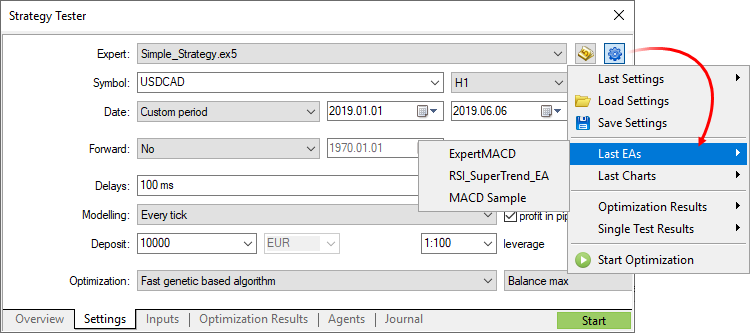
Use the new context menu commands for fast testing or optimization setup. Choose the last used tester settings, recent charts or applications:
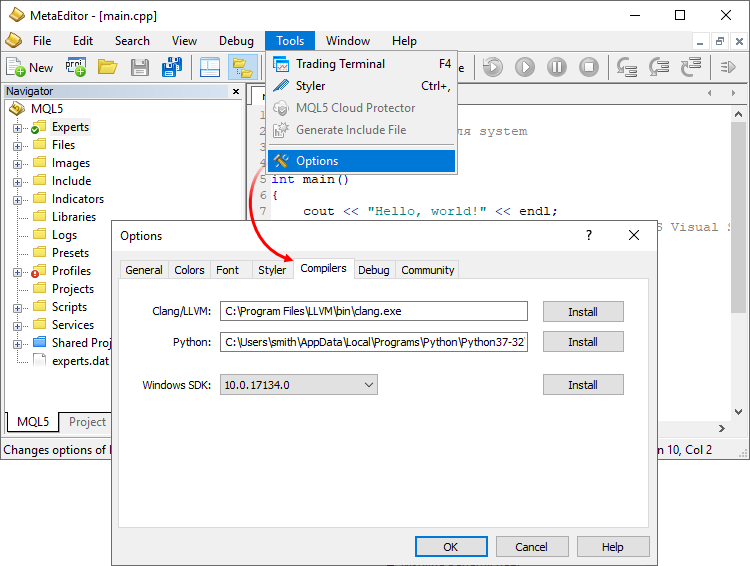
If appropriate compilers are installed on your PC, MetaEditor will detect them and add to settings. Optionally, you can specify paths to required components under the Compilers tab. From the same tab, you can download the components by clicking Install next to the appropriate field.
After that you can work with C/C++ and Python projects similarly to MQL5 programs.
There is no need to search for appropriate functions in a trader's room on the broker site. Fast navigation commands are available directly in terminals: users can switch to deposit and withdrawal pages from the Accounts and Trading sections: