
Which prop firm rules end a challenge besides the daily loss limit?

Most traders who start an evaluation can recite two prop firm rules from memory: the daily loss limit and the overall drawdown. Far fewer can say, without opening the firm dashboard, how many trading days they still need, whether a position may stay open over the weekend, or how short a trade is allowed to be. This post goes through the prop firm rules that are easy to lose sight of, how to track them by hand, and how I keep them on the chart in MetaTrader 5.
The prop firm rules that sit outside the loss limit
Rule sets differ from firm to firm, so always read the terms of your own firm. Still, the same group of conditions appears again and again:
- Consistency: the profit of your best day as a share of your total profit. Most firms treat it as a payout condition rather than a live failure, which is why it is often noticed late.
- News blackout: a window around high-impact economic events.
- Minimum hold time: a position closed faster than the firm permits.
- Weekend hold: a position still open after the Friday cut-off.
- Minimum trading days and the evaluation deadline: two counters that run in opposite directions.
- Inactivity: an account left idle for longer than the firm allows.
- Max open positions, max risk per trade and consecutive losing days: limits on how you trade, not only on how much you lose.
The terminal shows balance, equity and floating profit. It does not show how much of a firm limit is already used, or how many days are left.
Tracking prop firm challenge rules by hand
A spreadsheet can do this. Write down the day-start balance at every daily reset and work out the daily loss limit from it in account currency. During the day, compare that figure with your closed loss plus your floating loss. Keep one column for trading days and one for daily results, so you can calculate the share of your best day. Note the Friday cut-off, and check the economic calendar each morning.
The weak point is time. The firm day does not always start at midnight on your broker server, and daylight saving moves the reset by an hour twice a year. A spreadsheet is also only as current as its last update, while floating loss changes with every tick.
How Fortress Compliance Monitor handles it
Fortress Compliance Monitor is a utility I published in the MQL5 Market for this job. It is a monitor, not a trading robot. It contains no order functions and never opens, closes or modifies a position. You attach it to one chart, it reads the whole account and the trade history, and it reports.
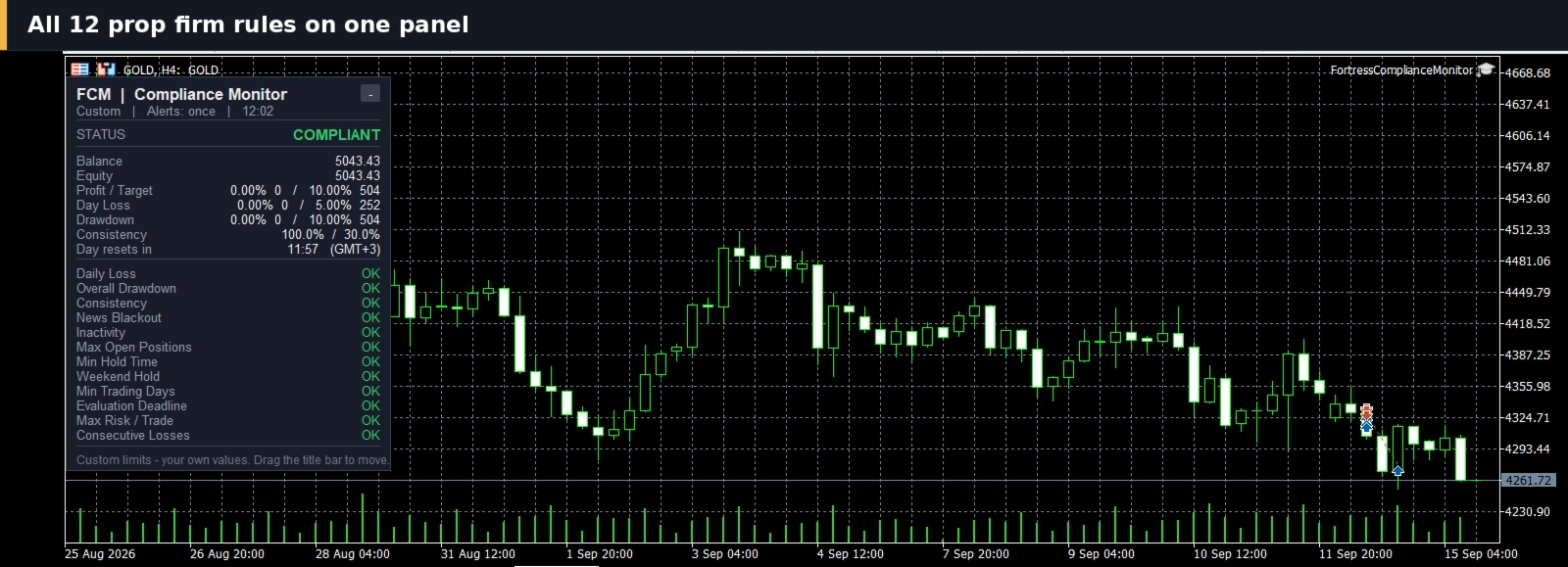
- Twelve rules on one panel. Each rule has its own line with the actual figure behind it, marked OK, WATCH, BLACKOUT or BREACH.
- Percent and account currency together. Enter a limit in one unit and the other is calculated. Daily Loss, Overall Drawdown and Profit Target show what is used and what the limit is in both units.
- A reset that follows the clock you choose. The daily reset uses broker server time or a time zone you select, with daylight saving applied, and the panel shows a countdown to the next reset.
- Three alert modes. Alert once, repeat at an interval you set, or stay silent. Every alert names the rule and the figure behind it.
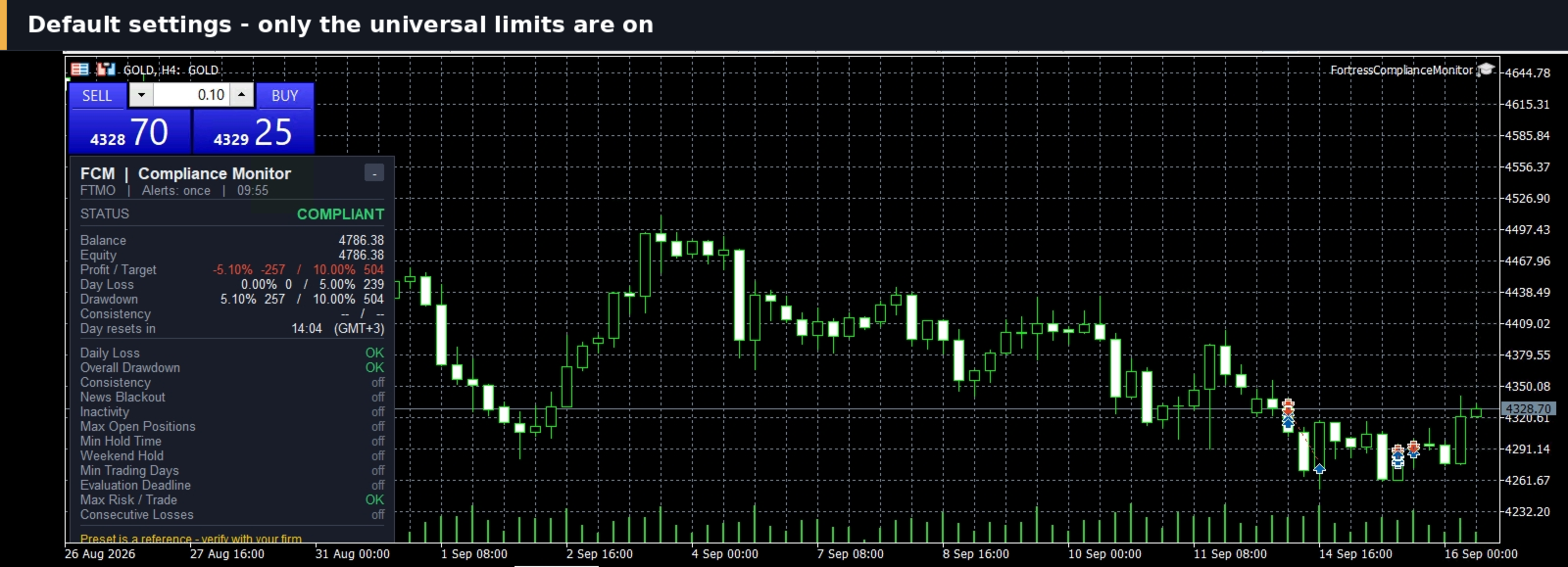
- Presets and switches. Nine presets are available: eight firm profiles and a Custom mode. Any rule you do not need is set to -1 and stays quiet.
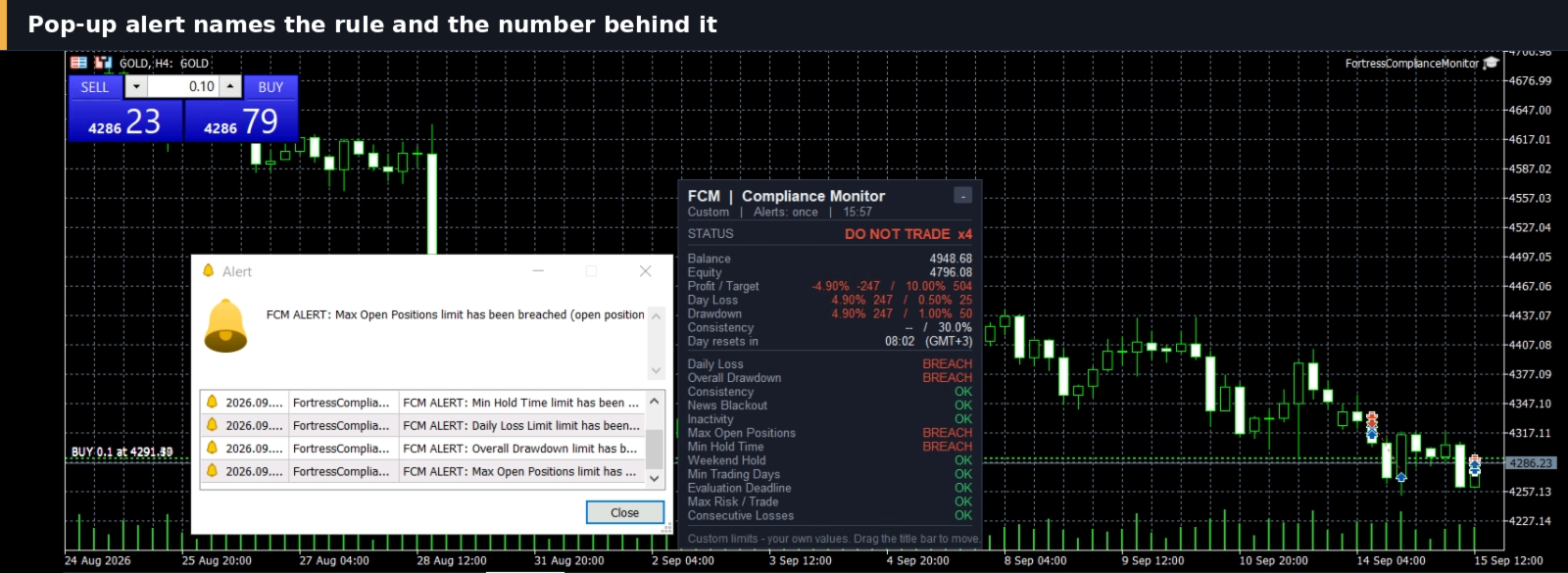
Preset values are a researched reference, not a promise. Verify them against your own firm dashboard and use Custom mode if anything differs. In the default settings only the limits that every firm applies are switched on, and you enable the rest to match your firm.
Where to find Fortress Compliance Monitor
Fortress Compliance Monitor is available in the MQL5 Market: https://www.mql5.com/en/market/product/196305
It warns you. It does not block, close or modify anything, and no profit is promised or implied. Every trading decision stays yours.




