Castlist Management Manual — From Portfolio to the Next Review

Overview | Castlist | Spotlight | Backstage
Castlist Management Manual — From Portfolio to the Next Review
Castlist turns a large portfolio into a focused management worklist. Search makes the group relevant, filters make strategies comparable, sorting determines what you inspect first, and Status, Notes and Reviews make the next action explicit.
Result of this guide
You will reduce the overview to one relevant worklist, record a Status and Note for one Magic#, schedule a Review and verify that these management choices remain visible.
Before you begin
Complete the Castlist Quick Start, know at least one Magic# and confirm the intended Source and period. Castlist is available free and works without Backstage; persistent CSV history becomes available after Backstage has exported it.
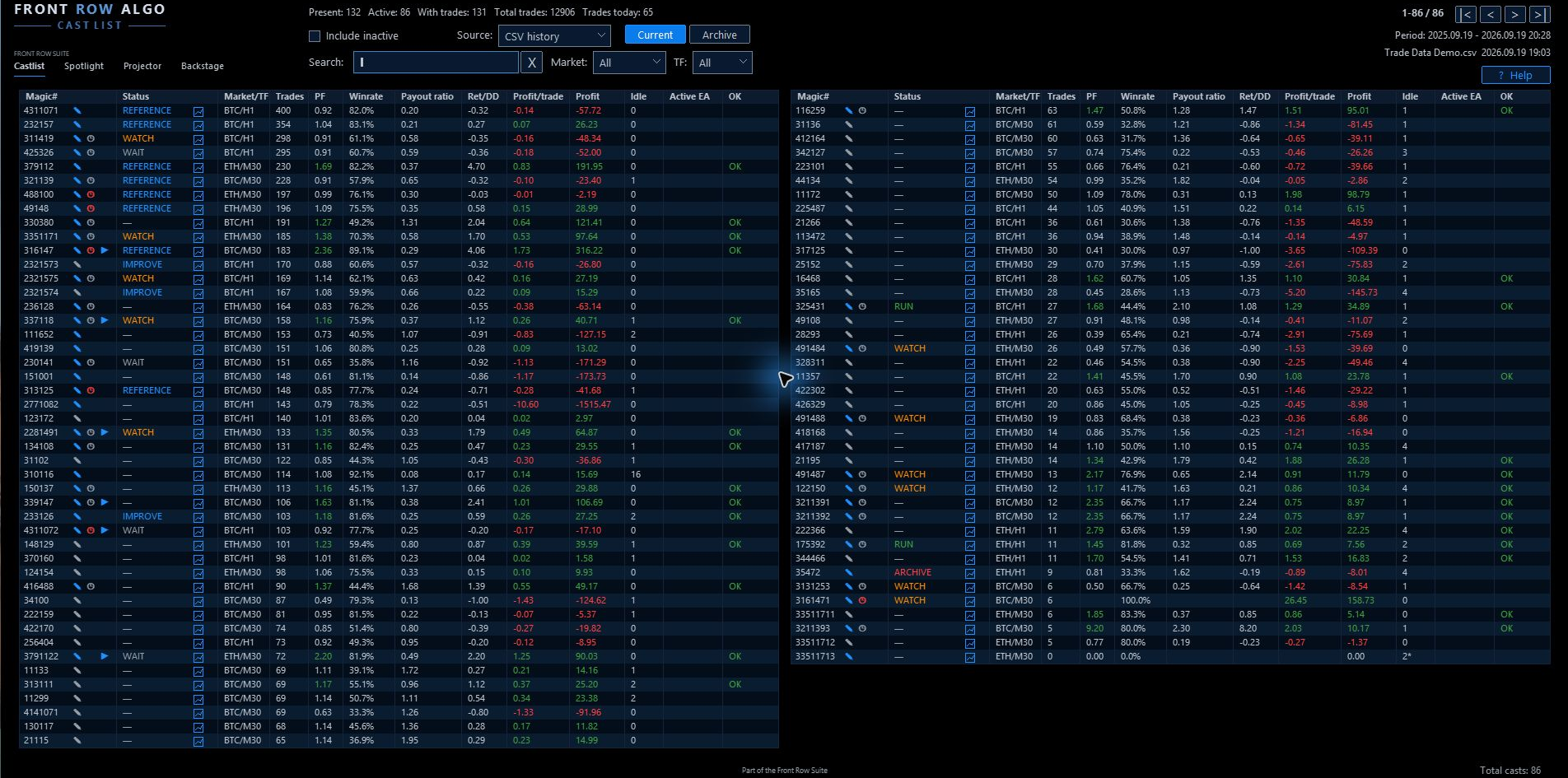
The complete Castlist workspace provides orientation before you narrow the worklist.
Start with a trader question
- Which Live strategies need attention today?
- Which active EA has been idle unusually long?
- Which reviews are due?
- Which variants in one Magic# family should be compared?

Use Source, Search, Market, timeframe and work-area controls to make the list relevant.
Search, filter and sort
Search supports Magic#, status, live , notlive , idle and review/due information. Use Market and TF filters to avoid judging unlike strategies against the same expectation. Include inactive strategies for maintenance and investigation.
Sort by Trades to compare evidence, PF for a targeted ratio scan, or Magic to group related versions. Never treat the top PF row as automatically the best strategy.
Castlist remembers the worklist. For a broad recovery check, clear Search, set Market and TF to All , enable Include inactive and inspect both Current and Archive.
Status describes the management phase
| Status | Practical meaning | Next action |
|---|---|---|
| WAIT | More trades, a market condition or an agreed moment is needed | Let evidence grow and plan a review if useful |
| RUN | Strategy operates as intended | Monitor normally |
| WATCH | Extra attention, but no stop decision | Record what to watch and when to review |
| PAUSE | Deliberately not running temporarily | Record reason and resume condition |
| REVIEW | Substantive analysis is due | Investigate in Spotlight |
| IMPROVE | Development or research is required | Define and test the issue outside production |
| REFERENCE | Preserved as a benchmark | Keep stable for comparison |
| ARCHIVE | Label only | Use the separate Archive action to store it |
Keep Status, Live and Archive separate
Live describes portfolio role, not performance or current EA activity. A Live strategy can be RUN , WATCH , PAUSE or REVIEW .
Archive removes a Magic# from Current while preserving context. It does not stop an EA, close positions or delete history. The ARCHIVE status alone does not move the strategy.

Status, note, review and Live signals remain visible beside the Magic#.
Notes explain why
Write a testable observation:
Review after 100 new trades: check whether average loss is still increasing.
This is more useful than “drawdown feels bad” because the next analysis has a defined evidence threshold and metric.
Reviews define when
A review can trigger after new trades, a total trade count or a number of days. When trade and day limits are both configured, the review becomes due when either condition is reached.
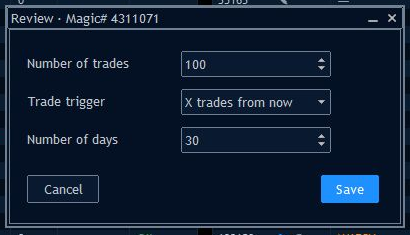
A review can be scheduled by new trades, total trades and/or elapsed days.
A review belongs to the Magic#, even if the EA is not currently active.
Repeatable cycle
- Record the concrete observation.
- Select WATCH or REVIEW when appropriate.
- Schedule the review by trades and/or days.
- Investigate the trade development in Spotlight when due.
- Record the conclusion and next action.
- Return to Castlist and update the status.
Perform one complete management action
- Clear an old Search and choose Current.
- Set Market and TF to the strategy context, or use All for a deliberate broad scan.
- Search for the known Magic# and sort the visible set according to your question.
- Open the row action and select the appropriate Status.
- Add a short, testable note, for example: Review after 100 new trades: check whether average loss is still increasing.
- Schedule the Review by new trades, total trades and/or days.
- Close and reopen the panel and verify the Status, Note and Review indicators.
- When deeper analysis is due, investigate in Spotlight and return to Castlist to update the management phase.
Settings that influence this workflow
LookbackDays, MinTradesToShow, ExcludedMagicNumbers, Source and Include inactive determine which strategies enter the worklist. Search, Market, TF and Current/Archive determine which rows you see. The Notes, Live, Status, Archive and Review paths determine where shared management context is stored.
Verify the result
- The correct Magic# remains in the intended Current or Archive list.
- Status, Note and Review signals are visible on the same strategy.
- Reopening Castlist restores the worklist and saved management context.
- A Review becomes due when either its configured trade condition or day condition is reached.
If the result is not visible
Clear Search, set Market and TF to All, enable inactive strategies and inspect Current and Archive. Confirm the data Source and lookback. ARCHIVE status is only a label; the separate Archive action moves the strategy. The suite selector works only while product charts remain docked inside MT5.
Notes and reviews are shared with Spotlight. A due review requests reassessment; it is never an automatic command to stop or change a strategy.
Continue through the manual
Next: Castlist Settings Manual — verify which settings and saved choices control the worklist.
Other useful follow-ups:
- Spotlight Quick Start Manual — investigate a strategy when a Review becomes due.
- Backstage Quick Start Manual — add persistent history to the management workflow.
- Castlist Quick Start Manual — repeat the initial identity and saved-action checks.



