

💎 TL;DR
Gold One Click Trader MT5 is a manual execution panel built specifically for XAUUSD traders who need fast, clean entries without fumbling through MT5's standard order dialog. It calculates your real dollar risk before you trade, warns you when spread conditions are unfavorable, and gives you one-button access to breakeven, partial close, and directional exit controls - all from a single panel that adapts to your chart layout. No automation. No signals. Pure execution discipline.

🔔 The Problem
You've been there. Gold is in a clean rejection. Volume is in. The candle is forming exactly where your bias said it would. You move to the order window, start typing lot size, second-guess your SL distance, tab through the fields, and by the time you click Send - the spread has spiked, the candle has closed, and the setup is gone.
Or worse: you get in fast. But your lot size is wrong because you did the math in your head during a volatile moment. Your SL is 40 points tighter than planned because you misread the field. Now you're managing a position that was already broken before the first tick.
XAUUSD is unforgiving at execution time. With gold trading at historically elevated prices, even a small mistake in stop distance or lot size can materially change your actual dollar risk compared to what your plan intended. And MT5's standard order dialog prioritizes flexibility and configuration over rapid execution - which is fine for deliberate order entry, but creates real friction when you're trading a fast-moving lower-timeframe setup.
For manual traders working gold on M5, M15, and M30, the gap between "seeing the setup" and "being in the trade at the right size" is where otherwise valid trading opportunities are often missed. Not from bad analysis. From execution friction that compounds under pressure.
🏆 The Real Engine
What separates this panel from a basic one-click script is that it combines pre-trade risk calculation with post-entry trade management in a single workflow.
Before you touch BUY or SELL, the panel already knows your real dollar risk, your reward-to-risk ratio, and your precise lot size - based on your current SL setting, your chosen lot mode, and your live account balance. That number is displayed in the panel in plain text before execution. You're not guessing. You're confirming.
Three lot modes cover the full range of how serious XAUUSD traders actually size positions: Fixed Lot for traders who prefer direct control, Risk Percent for those who size relative to account equity, and Fixed Money for those who think in dollar terms per trade. Switching between them takes one click and the panel recalculates instantly.
An integrated spread guard monitors XAUUSD spread in real time. If spread is elevated above your defined threshold, the panel warns you before you execute - so you're not inadvertently entering during a news spike at 3× normal spread without realising it.
Under the hood, every order passes through OrderCheck validation with an automatic filling-mode fallback before it reaches the broker. This matters more than it sounds - many retail MT5 traders encounter TRADE_RETCODE_INVALID_FILL errors when their panel sends orders in a fill mode incompatible with their broker's account type. This tool handles that automatically, so you don't get a silent rejection when it counts.
Confirmation gates protect the high-consequence buttons. "Close All" doesn't fire on the first click - it asks you to confirm within a three-second window. Fast enough for real trading. Enough of a pause that a misclick doesn't close your open book.
🎖️ What the Panel Gives You
Before the trade: Live dollar risk, RR ratio, and lot size are displayed before any button is pressed. Three lot modes are switchable on the fly without reopening input settings. Three preset lot buttons let traders who use fixed tiers enter a size with one click. SL, TP, and pending order distance are all editable directly inside the panel - no dialog, no menu navigation.
At entry: Single-click BUY and SELL for immediate market execution. Buy Limit, Sell Limit, Buy Stop, and Sell Stop are all accessible from the same panel. Every order is validated through OrderCheck with filling-mode fallback before hitting the broker. The spread guard warns you if current conditions fall outside your acceptable range.
After entry: Breakeven controls for all positions, buy-only, or sell-only - one click each, with a configurable buffer above entry to ensure the SL move is meaningful. Partial close at a user-defined percentage (default 50%, adjustable in the panel). Close Profit Only, Close Loss Only, Close Buy, Close Sell, and Close All are all available as separate buttons - directionally separated so you never accidentally act on the wrong side of your book. A live summary shows buy float, sell float, net P&L, position count, and pending count at all times.
Across sessions: The responsive layout system detects your chart footprint and adjusts the panel scale for laptop, VPS, and RDP environments automatically. All edit fields remain adjustable inside the panel throughout the session - no need to reload parameters to change your sizing approach mid-session.
🔎 What This Looks Like in Real Trading
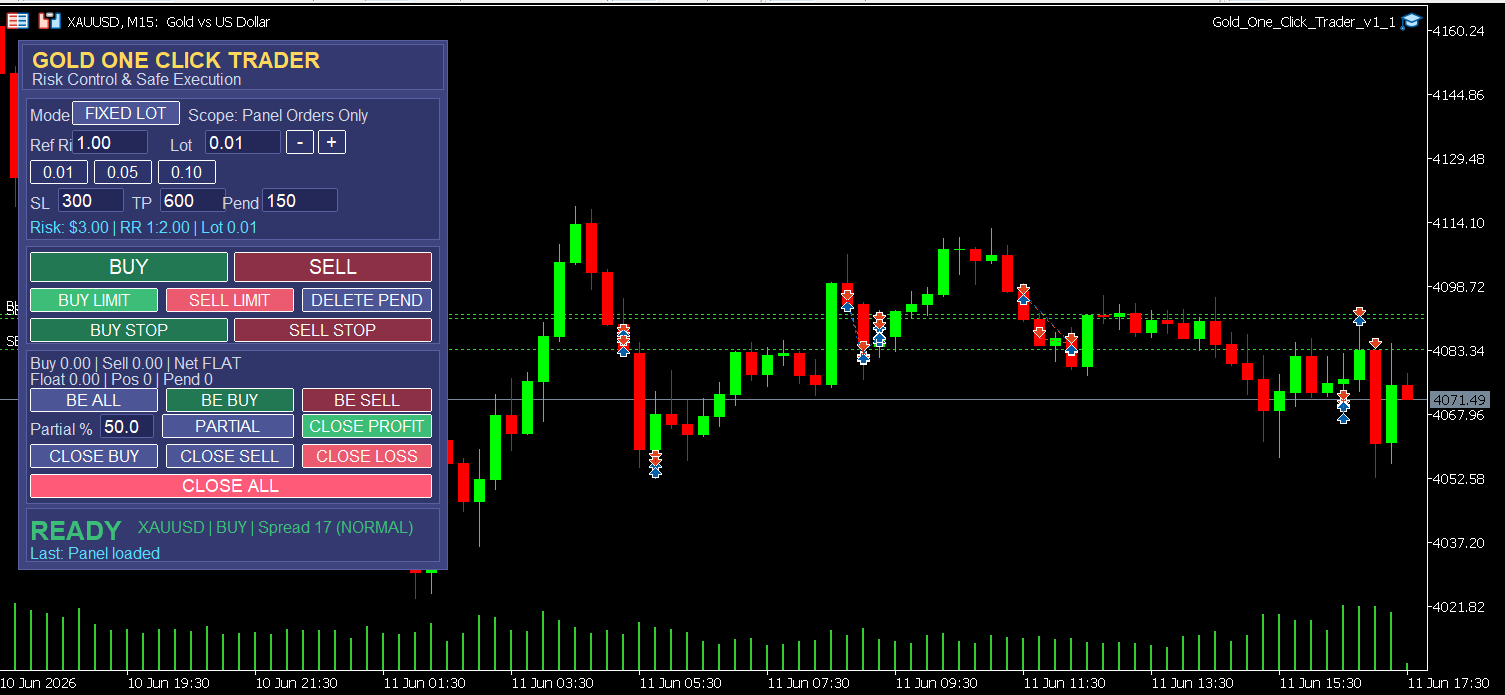
The screenshot shows the panel live on an M15 XAUUSD chart during an active session. With SL at 300 points and TP at 600 points in the current configuration, the risk line reads: Risk: $3.00 | RR 1:2.00 | Lot 0.01 - at the chart's price level, that arithmetic is exact. That is the full trade math, visible before any button is pressed.
The status bar shows: XAUUSD | BUY | Spread 17 (NORMAL) - the spread guard has checked conditions and confirmed they're within acceptable range. "READY" appears in green, meaning the panel has passed its pre-trade validation and is cleared to execute.
The trade markers distributed across the chart reflect what this type of panel is designed to support: staying in execution mode throughout the session rather than navigating dialogs between each trade. You spend less time interacting with menus and more time managing positions.
🚀 Practical Advantages Worth Noting
No settings reload required for in-session adjustments. If your plan changes mid-session and you want to trade a different lot size or a tighter SL on the next setup, you change it directly in the panel. The risk preview updates immediately.
Scope control keeps panel actions isolated. By default, the panel manages only positions opened through it, identified by its own magic number (Panel Orders Only mode). On accounts that also run EAs or have positions from other tools, the panel buttons will not close positions they didn't open. This is a detail that matters a lot in practice.
The panel rebuilds on chart resize. On VPS or RDP sessions where chart dimensions change, the layout recalculates to maintain readability without manual repositioning.
Action cooldown prevents accidental double-execution. A 700ms lockout after each button press means a double-click does not send two orders.
Last-action feedback. A dedicated status line tells you exactly what the panel just did - entry confirmation, breakeven result, partial close count, or any warning - so you always know the outcome of the last action without checking the terminal log.
🎁 Who This Is For
- Manual XAUUSD traders on lower timeframes who execute from charts and need speed without sacrificing position sizing discipline
- Discretionary traders who use risk-percent or fixed-dollar sizing and want that calculation handled automatically before every entry
- Traders managing multiple positions per session who need directional exits, partial closes, and breakeven controls in one accessible place
- Traders on VPS or RDP who need a panel that stays readable when chart resolution changes
📢 Who This Is NOT For
- Traders looking for automated signals, pattern recognition, or any form of algorithm-driven entry - this tool does not trade for you
- Set-and-forget traders who open one position per week and have no need for in-session management controls
- Traders on strict netting accounts - the panel is designed and tested on MT5 hedging accounts; behavior on netting configurations is outside its primary scope
📒 What It Doesn't Do
This is a manual execution utility. It does not generate buy or sell signals. It does not analyze price action, detect structure, or tell you when to trade. It will not protect you from bad analysis - only from execution friction.
It does not manage trailing stops or move SL dynamically after entry. Breakeven is one-click and requires your initiation; there is no automated SL migration logic running in the background.
It is designed and tested on XAUUSD hedging accounts on MT5. Other instruments may function but are outside the tested scope.
No backtest results are attached because there is nothing to backtest - it submits and manages the orders you instruct it to place, according to its documented functionality and your configured settings. Actual fills, slippage, and execution outcomes depend on your broker, market conditions, and MT5 order handling.
🎁 Get the Tool
👉 Gold One Click Trader MT5 on MQL5 Market: https://www.mql5.com/en/market/product/169653
If execution friction has been the gap between your analysis and your results, this panel is designed to help reduce that gap. One panel. Full session coverage. Risk calculated before every trade.
🧰 Related Tools
If you're using Gold One Click Trader for execution, these tools address the workflow around it:
👉 Gold ATR Risk Calculator MT5 - If you prefer to derive your SL distance from ATR rather than a fixed point value, this calculator does that math before you set up the execution panel. Useful for volatility-adjusted sizing on gold across different session conditions.
👉 Equity Protector Pro MT5 - For traders running active sessions with multiple positions open, this tool monitors your account-level drawdown and can close all positions automatically if a daily loss threshold is breached. It operates independently from the execution panel and adds a safety net at the account level.
👉 Gold Session Box MT5 - Displays the high/low range of each major trading session directly on your chart. Useful as a context layer for traders using the One Click Trader to place entries around session boundaries or range extremes.
👉 Gold Bias Regime Filter - If your manual entries are informed by a directional bias, this indicator helps you stay aligned with the prevailing market phase and avoid placing setups that contradict the dominant structure.
❓ FAQ
✅ Does it work on a live account? Yes. It is designed for live trading on MT5 hedging accounts. Standard risk management applies - size positions according to your own risk tolerance and do not trade with capital you cannot afford to lose.
✅ How does it handle point values - do I need to configure anything for XAUUSD? The panel reads the broker's symbol specification directly and calibrates its lot sizing and risk calculations to the asset's actual tick value and point definition. This means the dollar risk figures displayed should be accurate for your specific broker's XAUUSD contract without manual adjustment.
✅ What happens if I accidentally click Close All? A confirmation gate requires you to confirm the action within a three-second window. If you don't confirm in time, the action is cancelled. This is a mitigation against accidental misclicks, not a guarantee - a deliberate confirm within the window will still execute the close.
✅ Can I run this alongside an EA on the same account? Yes. In Panel Orders Only scope mode, the panel manages only the positions it opened itself, identified by its magic number. It will not interfere with positions opened by other EAs or manually from other tools.
✅ Does it support Risk Percent lot sizing or only Fixed Lot? It supports three modes: Fixed Lot, Risk Percent (based on account equity), and Fixed Money (fixed dollar risk per trade). You can switch between them inside the panel at any point during a session.
✅ Does it work on VPS or Remote Desktop? Yes. The responsive layout system detects your chart footprint and adjusts the panel scale for VPS and RDP environments where DPI and screen resolution differ from a local desktop. If the chart is resized, the panel rebuilds automatically.
🎁 New to Gold Algo Lab?
Start with the Gold Algo Lab Tool Map - a practical guide that organizes our MT5 tools into 6 connected stages: market context, setup selection, risk planning, trade execution, position management and account protection.
→ Gold Algo Lab Tool Map: Where to Actually Start With MT5 Tools for XAUUSD
https://www.mql5.com/en/blogs/post/771930
Do not choose a tool by its name alone. Start with the part of your trading process that needs the most control, then build your workflow one layer at a time.
Gold Algo Lab builds practical, risk-first MT5 tools for serious XAUUSD traders, shaped by 8 years of developing and trading real systems to help traders identify clearer setups, manage risk with greater confidence and execute with more discipline.


