💎 TL;DR
Gold Risk Calculator MT5 is a visual risk planning utility built exclusively for XAUUSD traders on MetaTrader 5. You drag three lines - Entry, SL, and TP - and the panel instantly calculates your exact lot size, real dollar risk, reward target, and risk-to-reward ratio using your broker's live symbol specifications. It checks margin, spread, stop levels, and freeze rules before you commit. When the panel displays READY, you have a fully validated plan. No manual math. No guesswork going in.
Gold Algo Lab builds practical, risk-first MT5 tools for serious XAUUSD traders, shaped by 8 years of developing and trading real systems to help traders identify clearer setups, manage risk with greater confidence and execute with more discipline. 
🔔 The Problem
You've done the analysis. Structure looks good. You've identified your entry zone, you know where you'd be wrong, and price is sitting right where you want it.
Then comes the part nobody talks about in trading courses: the math.
What lot size keeps me at 1% risk on this trade? If gold is at $4,450 and my SL is 300 points away, is that even a legal stop given my broker's minimum? How much margin does this size actually require - do I have enough free margin right now, or am I one volatility spike away from a force-close on an existing position?
Most traders answer these questions with a calculator app, a rough mental estimate, or a fixed lot they've been using for years regardless of where the SL actually sits. None of those approaches automatically reflects your broker's current trading conditions. All of them introduce hidden risk into trades that already carry enough of it.
The bigger issue with XAUUSD specifically: gold moves fast. A 300-point SL at 0.1 lot is a very different dollar exposure than a 300-point SL at 0.5 lot, and the lot size that keeps you at 1% risk shifts constantly as your account balance changes through the session. Mental math doesn't keep up.
And then there's the broker layer. Spread widens. Stop levels vary. Your broker may have a minimum stop distance that makes your planned SL technically invalid - you won't find out until the order gets rejected. By then, price has moved.
This is the planning gap that most XAUUSD traders have learned to accept. Gold Risk Calculator MT5 closes it.
🏆 The Real Engine
Most position size calculators use a static formula: take your risk amount, divide by pip value, done. The problem is that pip value, contract size, and margin requirements differ significantly between brokers - and for XAUUSD specifically, contract sizes can range from 1 oz to 100 oz depending on the provider.
Gold Risk Calculator MT5 reads your broker's live symbol specifications directly from MetaTrader 5 - including contract size, tick value, margin requirements, stop level, and freeze level - and runs them through MT5's native calculation engine to produce figures that closely reflect your broker's actual trading conditions at that moment.
That distinction matters more than it sounds. When you change the SL distance or adjust your risk percentage, the required lot size and expected dollar exposure update instantly, always anchored to your broker's real numbers rather than a generic assumption. If spread spikes during news, the panel flags it. If your SL is too close to satisfy your broker's stop rule, the READY status disappears before you can act on a bad plan.
The plan persists between sessions too. Close MT5, reopen it tomorrow, and your previous Entry/SL/TP configuration loads automatically - the next session starts with your previous plan already restored and revalidated.
🚀 What the Tool Shows
Real lot size, calibrated to your broker. The panel calculates the lot that exposes your chosen risk percentage - defaulting to 1% of equity - based on your actual SL distance and your broker's live contract conditions. Because XAUUSD contract sizes vary between brokers, pulling specifications directly from MT5 ensures the output reflects your specific setup, not a generic gold template.
Target Risk vs Actual Risk - both visible. This is a distinction most calculators skip. Target Risk is what you asked for. Actual Risk is what you'll get after the lot size is rounded to your broker's minimum volume step. On most accounts these are nearly identical. On smaller accounts with larger lot steps, they can diverge noticeably - and you want to know that before you enter, not after.
SL and TP distance in points. No mental conversion needed. The panel shows both distances in points, which is the unit that matters for XAUUSD planning. On standard 2-decimal gold pricing, 300 points represents a $3.00 price move - exactly the kind of clear reference that helps you size sensibly across different market conditions.
Live RR ratio with preset buttons. Real RR updates as you drag lines. The preset buttons - 1.0R, 1.5R, 2.0R, 3.0R - let you snap the TP to a target ratio with one click. Auto TP mode keeps the TP anchored to your chosen RR as you adjust Entry and SL.
Broker health checks, live. Spread (in points, with a custom warning threshold), required margin vs available free margin, stop level validation, and freeze level - all displayed and color-coded by status. Green means clean. Orange or red means something needs attention before you commit.
Risk Meter. A visual bar at the bottom of the panel that fills proportionally to your current risk percentage. At a glance, you know whether you're within your own rule.
Status line. A single READY / WARNING / BLOCKED indicator that reflects all built-in validation checks. If any condition the tool monitors is violated - margin too tight, spread too wide, stop level breach - the status changes. When the panel displays READY, the tool found no issues with the current trade plan.
🔎 What This Looks Like in Real Trading
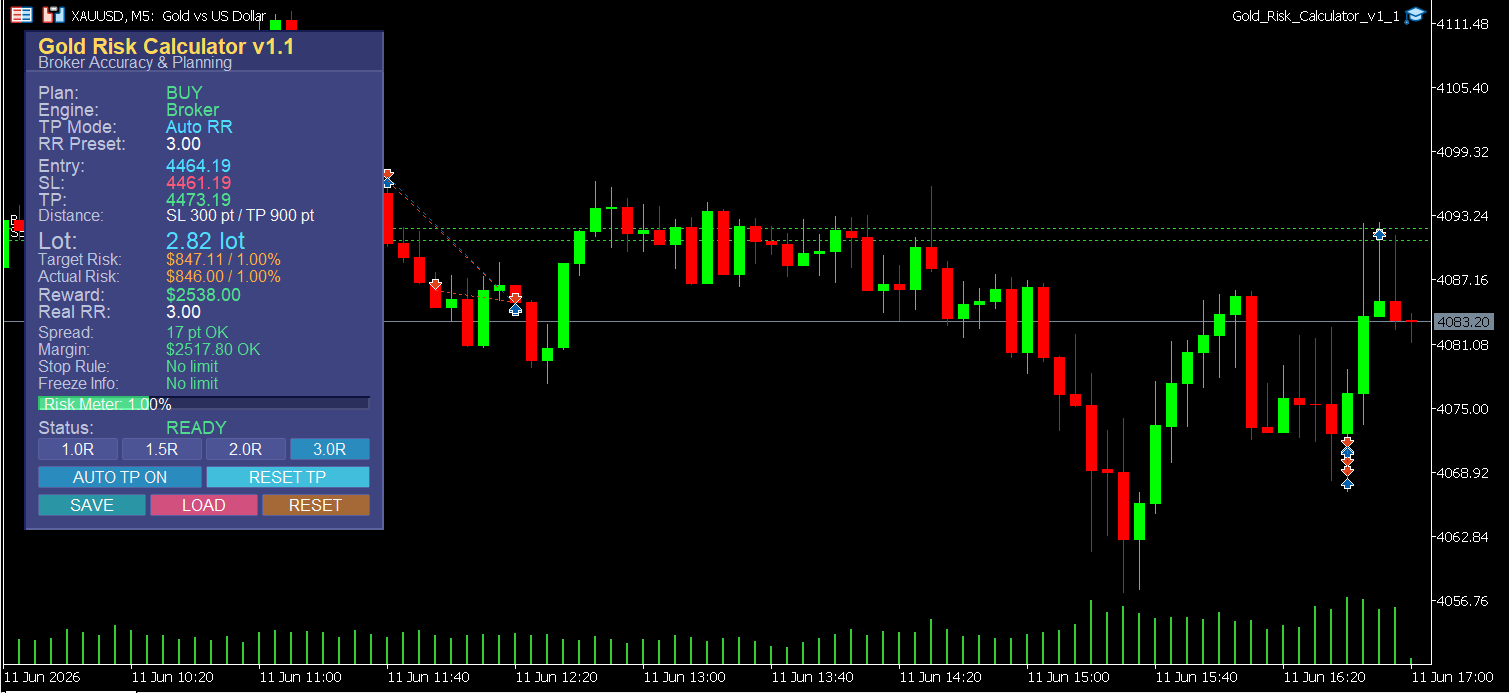
The screenshot shows a BUY plan on XAUUSD M5 from June 11, 2026. The chart price was around $4,083 at the time of capture, while the panel was displaying a pre-planned setup at a higher price level - which is exactly how the tool is designed to work. You can build and save a plan at any price level, then load it when conditions align, without having to re-drag every line from scratch.
The plan on the panel: Entry: 4464.19 | SL: 4461.19 | TP: 4473.19 SL distance: 300 points | TP distance: 900 points Calculated lot: 2.82 | Risk: $847.11 / 1.00% | Reward: $2,538.00 | Real RR: 3.00
Spread at the time: 17 points - well within the warning threshold. Margin required: $2,517.80 with sufficient free margin available. Stop rule: no limit. Freeze level: no limit. Status: READY.
All the key pre-trade information needed to either take the trade with conviction or reject it cleanly was on one panel - without a separate calculator, without opening broker documentation, without estimating whether margin was sufficient. The tool handled that in the background.
That's the workflow difference. Not faster math - a cleaner decision before execution.
🌟 Practical Advantages Worth Noting
Draggable lines, not typed inputs. You plan visually on the chart, which is how you actually read the market. Drag your Entry to a key level. Drag your SL below the structural low. The panel recalculates instantly.
Auto TP mode with manual override. When Auto TP is on, moving your Entry or SL line automatically repositions the TP to maintain your chosen RR. When you want to target a specific structural level for TP instead, drag the TP line and the tool switches to manual mode - no settings to change.
Save and Load plan. One click saves your current Entry/SL/TP configuration to disk. One click loads it back. Useful when you've planned a trade before the session opens and want to restore it exactly when the market reaches your level.
Responsive panel for any setup. The AUTO_SAFE layout mode measures your actual chart workspace and scales the panel proportionally - adapting to different chart sizes, DPI settings, screen resolutions, and VPS environments. It also refits automatically after RDP reconnect, which is a known pain point on remote trading setups. The panel stays readable without covering your price action.
Spread alert with your own threshold. Set your own spread warning level - when spread crosses it, you get a popup and optional sound alert. You'll know the moment execution conditions become unfavorable, without having to monitor the spread row manually.
🎁 Who This Is For
This tool is built for XAUUSD manual traders who plan their trades before entering - scalpers, intraday traders, and session traders who have an edge in reading structure but lose precision at the position sizing step.
It's also particularly relevant for prop firm traders. Prop firm accounts typically enforce hard daily loss limits and require strict adherence to risk-per-trade rules - often 0.5% or 1% per position. The Risk Meter and live dollar risk display make it straightforward to verify you're within your firm's rules before entering, rather than calculating after the fact when it's too late to adjust.
It works equally well for discretionary traders who want to build consistent risk habits and experienced traders who simply want to remove the mental overhead of pre-trade math.
📢 Who This Is NOT For
If you run automated strategies or EAs and don't manually plan individual trades, this utility won't add value - it's a planning tool, not a trade execution engine. If you trade a fixed lot without any interest in risk percentage management, the panel information won't change your behavior. And if you primarily trade instruments other than XAUUSD, the tool will work on other symbols but wasn't designed or optimized for their specific contract structures.
📝 What It Doesn't Do
Gold Risk Calculator MT5 does not open, manage, or close trades. It has no signal logic, no entry filter, and no opinion about whether your setup is valid. It won't tell you where to put your SL - that's your job as a trader.
It also doesn't eliminate execution risk. Spread can widen between the moment you plan and the moment you click. Slippage occurs. Margin levels shift with floating positions. The tool gives you a validated plan based on conditions at the moment you check - what happens at the instant of execution is between you and your broker.
It doesn't work around broker rules either: if your broker has a minimum stop level and your planned SL violates it, the tool will flag it, but it won't bypass it.
It is a planning tool. What you decide to do with the plan is entirely yours.
🎁 Get the Tool
👉 Gold Risk Calculator MT5 on MQL5 Market: https://www.mql5.com/en/market/product/169595
If you've ever clicked into a trade and wondered whether your position size was actually right, this tool answers that question before the trade opens - using your broker's live specifications pulled directly from MetaTrader 5.
🧰 Related Tools
👉 Gold ATR Risk Calculator MT5 - If you size your SL based on ATR volatility rather than a fixed point distance, this companion tool automates that calculation with the same broker-accurate engine. A natural pairing for sessions where average true range is your primary stop anchor.
👉 Equity Protector Pro MT5 - Once your trade is open, this utility monitors account equity and enforces drawdown limits in real time. Risk Calculator handles pre-trade planning; Equity Protector Pro handles live capital defense. Prop firm traders running both tools cover the two most common points of failure: entry sizing and drawdown breach.
👉 Gold Trade Manager PRO - For traders who want to manage open positions with partial closes, trailing stops, and breakeven automation after entry. The logical next step after a clean pre-trade plan is a clean in-trade management layer.
❓ FAQ
✅ Does this tool open trades for me? No. It's a planning utility only. You plan the trade on the panel, verify the numbers, then execute manually. The tool has no connection to order execution.
✅ Will it work on my broker's gold symbol if it's named differently - like GOLD or XAU/USD? Yes. The tool reads specifications from whatever symbol the indicator is attached to. As long as you load it onto your broker's gold chart, it uses that symbol's live contract conditions.
✅ What happens if I move the panel to another corner or resize my chart? The AUTO_SAFE responsive mode detects chart size changes and rebuilds the panel proportionally. On VPS setups or after RDP reconnect, the panel re-fits automatically without requiring a manual restart.
✅ Can I use fixed dollar risk instead of percentage risk? Yes. The Risk Mode input lets you choose between percent of account and a fixed dollar amount. Both use the same broker-accurate calculation engine.
✅ I trade multiple sessions - London open, New York open, Asian range. Does the plan carry over? Yes. If you save a plan before a session ends, the Load button restores your exact Entry, SL, and TP lines at the start of the next session. The Auto Restore on Init option also loads the last saved plan automatically when MT5 opens.
✅ Is this useful for prop firm traders with strict drawdown rules? It can be particularly useful, yes - provided you use it consistently as part of your pre-trade routine. Prop firm traders typically have hard daily loss limits and require exact 1% or 0.5% risk per trade. The Risk Meter and live dollar risk display make it straightforward to verify compliance before entering. That said, the tool surfaces the information; applying the discipline is still on you.
🎁 New to Gold Algo Lab?
Start with the Gold Algo Lab Tool Map - a practical guide that organizes our MT5 tools into 6 connected stages: market context, setup selection, risk planning, trade execution, position management and account protection.
→ Gold Algo Lab Tool Map: Where to Actually Start With MT5 Tools for XAUUSD
https://www.mql5.com/en/blogs/post/771930
Do not choose a tool by its name alone. Start with the part of your trading process that needs the most control, then build your workflow one layer at a time.
Gold Algo Lab builds practical, risk-first MT5 tools for serious XAUUSD traders, shaped by 8 years of developing and trading real systems to help traders identify clearer setups, manage risk with greater confidence and execute with more discipline.