Alpha Pointer Indicator: Non-Repainting CCI + ATR Adaptive Trend Detection for MetaTrader 4 and MetaTrader 5

Introduction
Trend identification is one of the oldest and most studied problems in technical analysis. Traders need to know not only the direction of the dominant move but also when that direction has changed, and they need that information delivered in a form that is stable enough to act on. A trend tool that flips back and forth on every minor noise spike is unusable; one that lags too heavily misses the meaningful turns. The Alpha Pointer Indicator addresses both problems by combining two complementary calculations — Average True Range bands for adaptive distance, and the Commodity Channel Index for momentum direction — and locking the resulting state at bar close so that nothing on the chart ever moves once it has been printed.
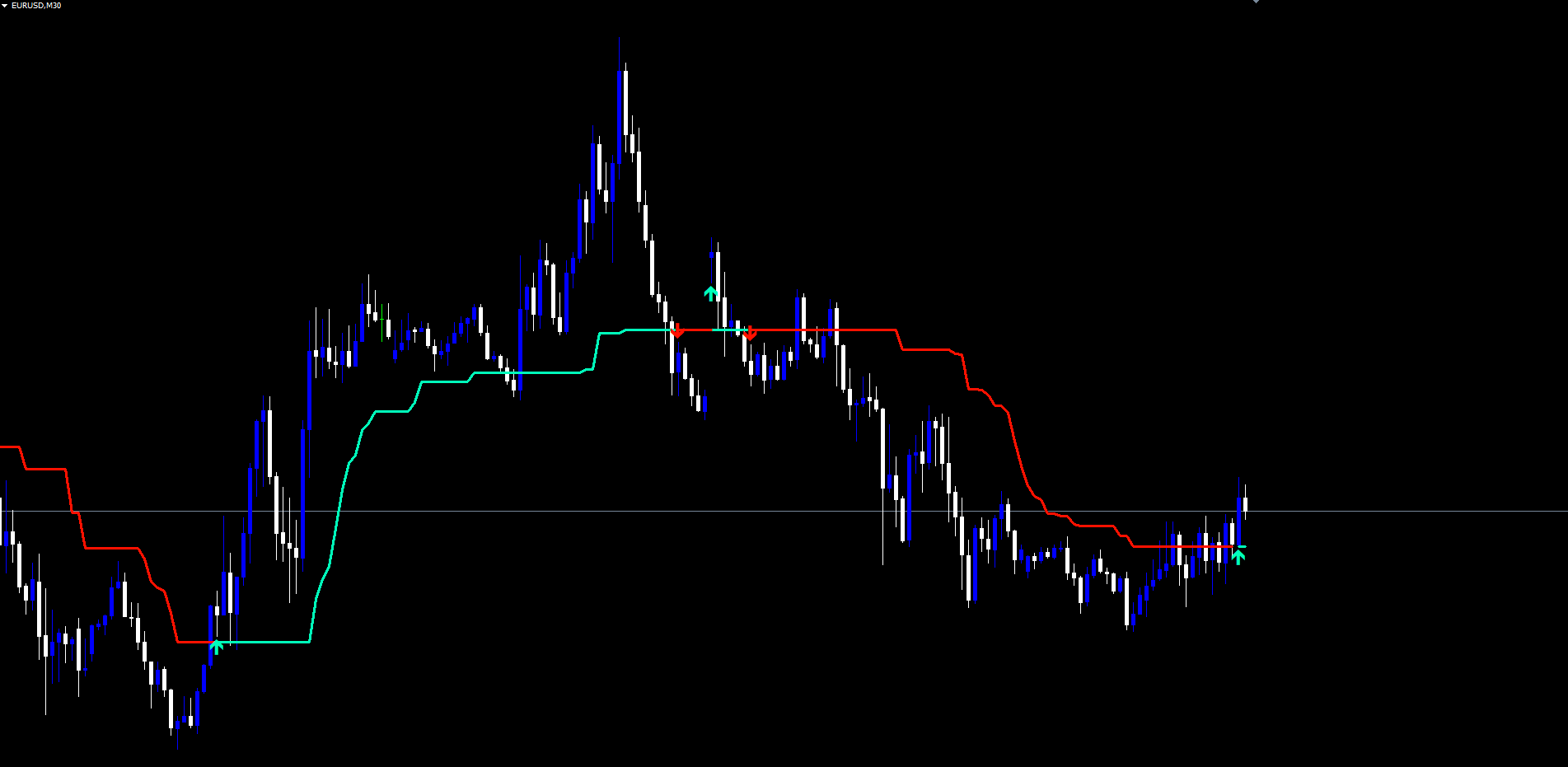
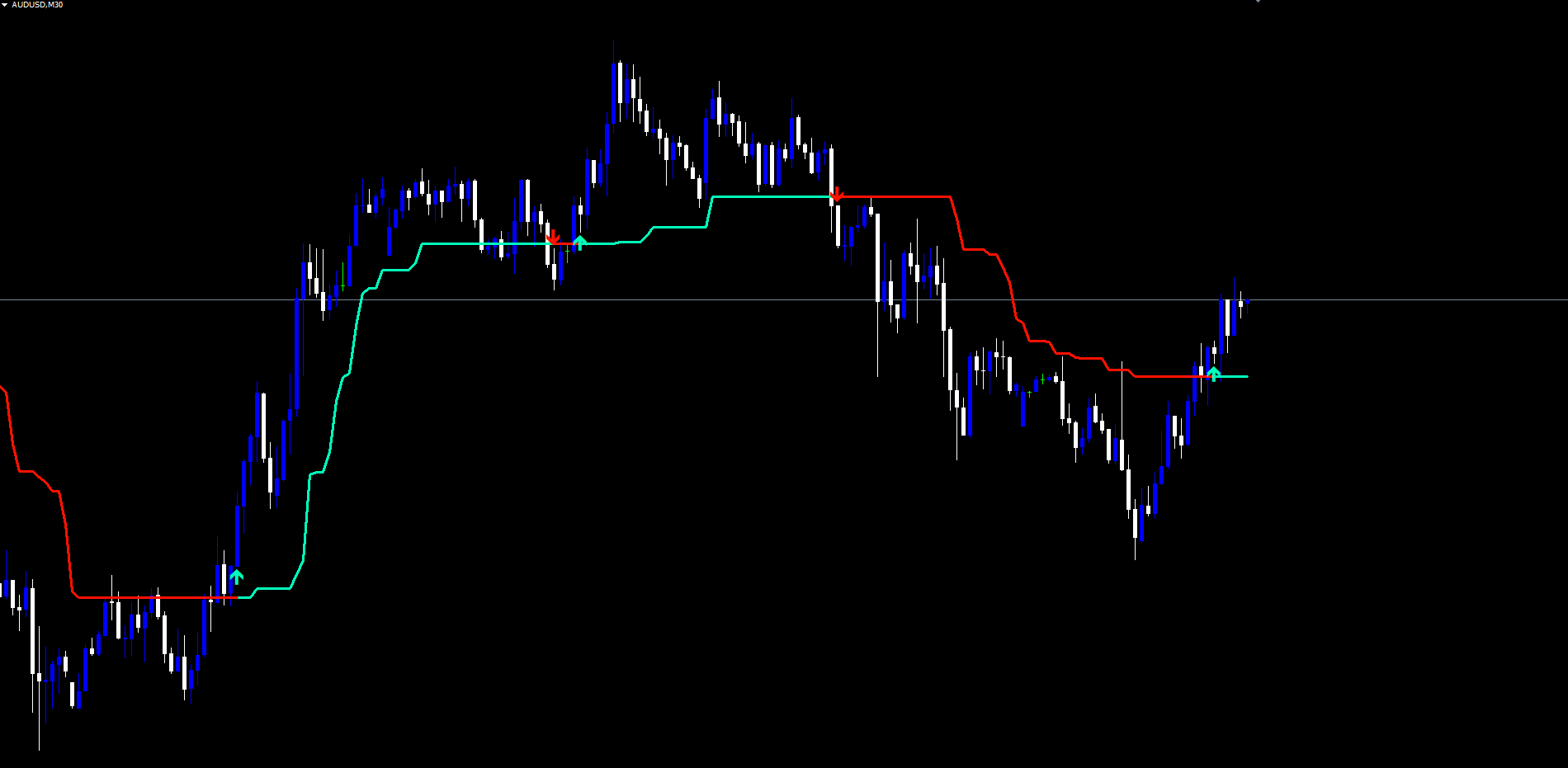
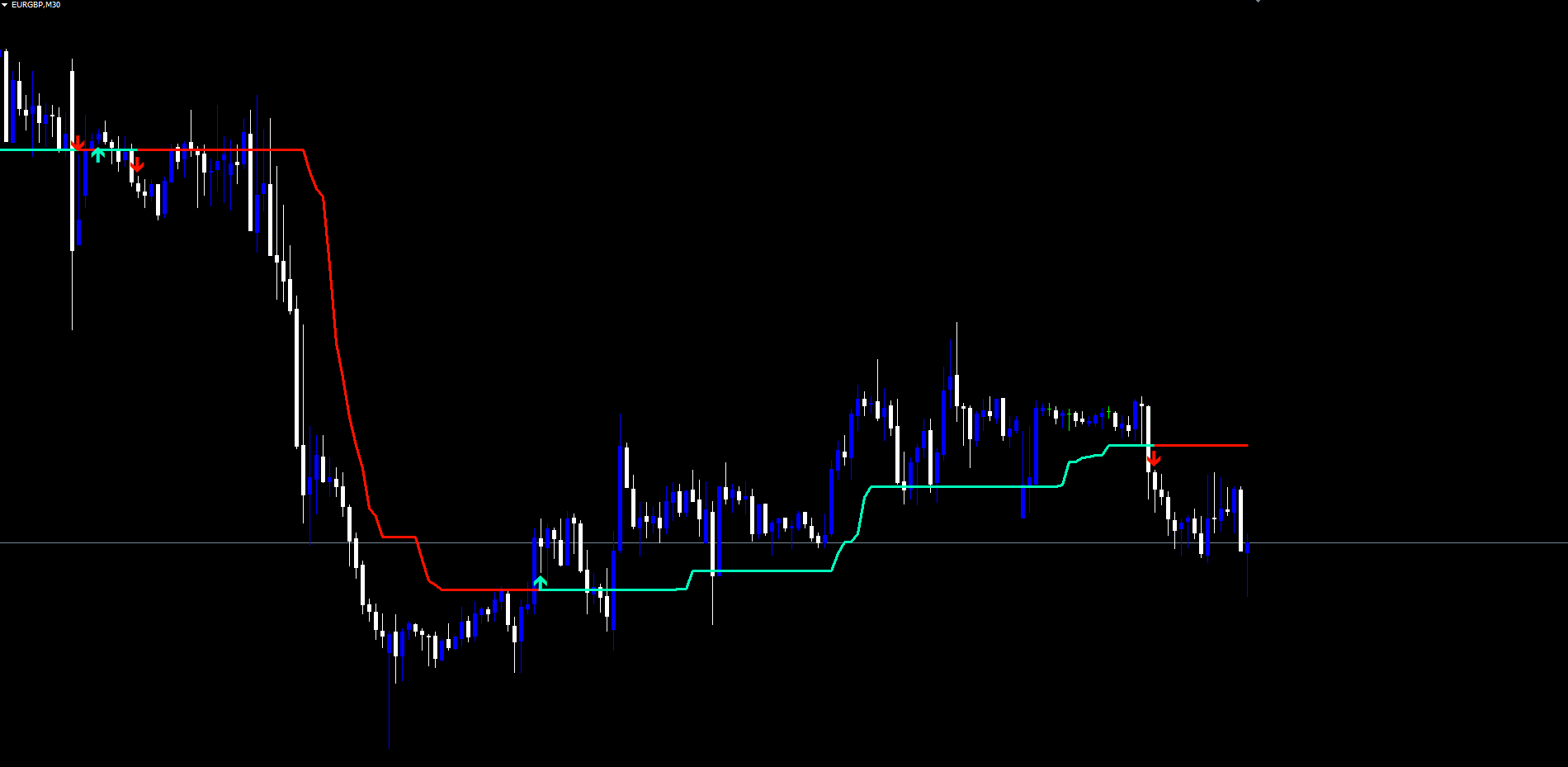
The indicator draws a single line that ratchets upward in bullish regimes, ratchets downward in bearish regimes, and changes color the moment a confirmed crossover signals a regime flip. Up and down arrows are anchored at the swing extremes of a configurable lookback window so that signal markers always sit at structurally meaningful points. Three alert events delivered through four independent channels round out the package, making the indicator usable as either a primary trend filter or as a confirmation tool layered alongside other analysis.
The indicator is available for both MetaTrader 4 and MetaTrader 5 with identical mathematics, identical visual output, and identical signals on both platforms.
Download the indicator:
- MetaTrader 5: Alpha Pointer MT5
- MetaTrader 4: Alpha Pointer MT4
This article explains the concepts behind the Trend Magic technique, walks through every component of the indicator implementation, documents all input parameters with their default values, and provides recommended configurations for different trading styles.
What Is the Trend Magic Concept
The "Trend Magic" technique, originally formulated by author Vitali Apirine and refined by several Pine Script implementations on TradingView, is a hybrid trend tool that asks two separate questions on every bar.
The first question is how far should the trend line sit from current price? This is a volatility question, and the answer is supplied by a fixed multiple of the recent Average True Range. On a quiet, low-volatility instrument the trend line sits close to price; on a volatile pair it sits much farther away. The same multiplier produces appropriate distances across instruments and timeframes without manual tuning.
The second question is which direction should the line track? This is a momentum question, and the answer is supplied by the Commodity Channel Index. When CCI is at or above zero, momentum is biased to the upside, and the trend line is anchored to the lower band (computed below the bar's low). When CCI is below zero, momentum is biased to the downside, and the line is anchored to the upper band (computed above the bar's high). The two bands are mathematical mirrors of each other, but the CCI selects which one is active.
What makes the technique useful in practice is the ratchet rule applied to the chosen band. During an upward regime, the line is allowed to rise but never fall — each new bar takes the maximum of the previous line value and the new lower band. During a downward regime, the line is allowed to fall but never rise — each new bar takes the minimum of the previous line value and the new upper band. This produces the characteristic stair-step trend line that climbs through bullish phases and descends through bearish phases without backtracking.
The Alpha Pointer Indicator implements this engine exactly, then layers on top of it a strict non-repainting evaluation rule, a crossover-based direction latch, optional smoothing across five MA types, swing-anchored arrow markers, and a complete alert system.
The Adaptive ATR Bands
The Average True Range is one of the most reliable volatility measures in technical analysis. It captures the typical bar range over a lookback window, and it accounts for gaps because True Range factors in the previous close. Alpha Pointer uses the original Trend Magic formulation, which is a Simple Moving Average of True Range over the configured ATR period (default: 5 bars). This is slightly more responsive than the Wilder smoothing used in the standard iATR() function — a 5-bar SMA reacts quickly when volatility expands or contracts.
With ATR computed, two candidate bands are constructed on every bar:
- Lower Band = Low - ATR x Multiplier
- Upper Band = High + ATR x Multiplier
The default multiplier is 2.0. On EURUSD H1 with an ATR of roughly 30 pips, the bands sit 60 pips below the bar low and 60 pips above the bar high respectively. On GBPJPY H1 with ATR around 100 pips, the bands sit 200 pips away. Because the distance scales with volatility, the indicator does not need to be retuned for each instrument.
The multiplier is the single most important parameter for adjusting the indicator's responsiveness. Lower multipliers (1.0 to 1.5) produce a tighter band that flips more often. Higher multipliers (2.5 to 3.5) produce a wider band that holds longer through pullbacks before flipping. The default of 2.0 is a balanced setting suitable for most Forex pairs on H1 and H4.
The CCI then selects which of the two bands the trend line will ratchet against. When CCI ≥ 0 the line uses the lower band; when CCI < 0 the line uses the upper band. This is what gives the trend line its distinctive geometry — it sits below price during bullish phases (because it ratchets up off the lower band) and above price during bearish phases (because it ratchets down off the upper band). Price almost always trades on the same side as the dominant trend direction, with the line acting as a natural support or resistance reference.
CCI as the Momentum Selector
The Commodity Channel Index, developed by Donald Lambert in 1980, measures how far the current price has deviated from its statistical mean, scaled by mean absolute deviation. The standard CCI formula is (Source - SMA(Source, n)) / (0.015 x MAD(Source, n)) , where MAD is the mean of |Source - SMA| over the lookback period.
CCI fluctuates around zero. Positive readings indicate that the source is trading above its recent mean — a momentum-up condition. Negative readings indicate that the source is trading below its recent mean — a momentum-down condition. The conventional CCI thresholds of +100 and -100 are not used in Alpha Pointer; only the sign of the CCI matters, because the indicator is using it as a binary direction selector rather than as an overbought/oversold oscillator.
The default CCI period is 20, which matches the most common configuration in published research and produces stable directional readings across most timeframes. Shorter periods (10 to 14) make the band selection more responsive but introduce more frequent direction flips during sideways markets. Longer periods (30 to 50) produce a more stable directional bias at the cost of slower reaction to genuine regime changes.
The source for the CCI is configurable. The default Close reflects the most common usage. Alternatives include Open , High , Low , HL2 = (High + Low) / 2 , HLC3 = (High + Low + Close) / 3 , and OHLC4 = (Open + High + Low + Close) / 4 . Median and weighted sources tend to smooth out single-bar wicks that might otherwise push the CCI through zero on a noisy bar. Traders working on volatile instruments — especially crypto on lower timeframes — often prefer HL2 or HLC3 to suppress wick-driven false flips.
The Direction Latch
The CCI determines which band drives the trend line, but it does not by itself determine the displayed direction of the indicator. That decision is made by a separate crossover engine that watches how price interacts with the trend line.
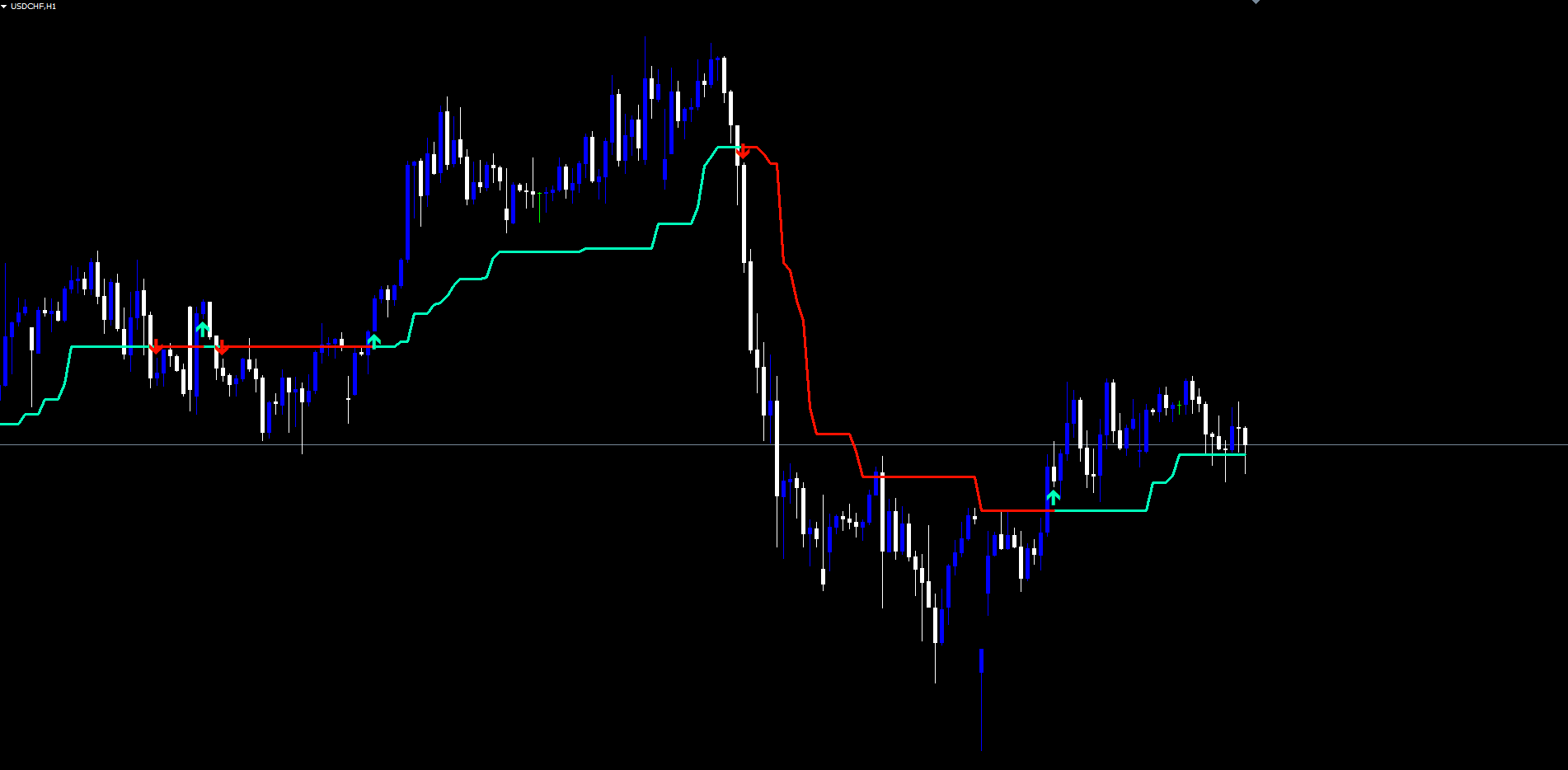
The latched direction starts at zero (no signal). It changes to bullish when the bar low crosses above the trend line — meaning the previous bar's low was at or below the line and the current bar's low is now strictly above it. It changes to bearish when the bar high crosses below the line — meaning the previous bar's high was at or above the line and the current bar's high is now strictly below it.
Between crossovers, the direction simply persists. A run of one hundred bars without any crossover produces one hundred bars of unchanged direction. This is by design: trend regimes typically last far longer than individual bars, and the indicator should not be flipping its color on every CCI fluctuation around zero. The crossover requirement enforces a meaningful price interaction before the regime is considered to have changed.
This separation between the CCI's role (band selection) and the crossover's role (direction latching) is what gives the indicator its stability. The trend line itself is determined by CCI; the color of the line — and therefore the publicly displayed regime — is determined by an actual crossover event. A bar where the CCI flips back and forth across zero will produce a line that wobbles slightly, but the displayed color and any signal arrows will only change when the line itself is decisively crossed.
Non-Repainting Architecture
The single most common complaint about trend indicators in retail trading is that signals which appeared during the bar's formation disappear once the bar closes. Repainting indicators give the impression of being uncannily accurate when reviewed in historical mode because every bad signal was retroactively erased. In live trading they are useless — the trader sees a green flip, opens a long, and then watches the green flip become a red flip a few minutes later as the bar closes lower.
Alpha Pointer is engineered to be non-repainting in the strictest practical sense. Three rules enforce this:
Rule 1: state evaluation only on closed bars. The CCI, the True Range, the ATR, the candidate bands, the ratchet trend line, and the direction latch are all computed using bars that have already closed. The internal state arrays for the live forming bar are mirrored from the most recent closed bar — they are not updated using the bar's developing high, low, or close.
Rule 2: the live bar copies the closed bar. Whatever the trend line value and direction were at the previous bar's close, those exact values are displayed for the current forming bar. The line does not move within a bar based on intra-bar price action. When the current bar finally closes, its values are computed once, locked, and become the baseline for the next bar.
Rule 3: signals fire only at bar close. When a direction change is detected between the most recently closed bar and the bar before it, an arrow is placed at the closed bar's swing low or swing high. Once placed, the arrow object never moves and never disappears. Subsequent ticks within the next forming bar have no effect on it.
The practical consequence is a small confirmation delay. A regime change that triggers at a bar's close is announced at exactly that close — not earlier. A trader running the indicator live will see the same signal at the same bar that anyone reviewing historical data sees. There is no intra-bar version of the chart that secretly differs from the historical record.
This is the only honest way to implement a trend indicator. Some retail tools take shortcuts to make signals appear earlier, but those shortcuts always come at the cost of repainting. The one-bar confirmation delay is the price of integrity.
Optional MA Smoothing
In its raw form, the trend line responds quickly to direction changes but can produce small wobbles when bars print mixed CCI signals around zero. Optional smoothing replaces the raw trend line with a moving average of itself, taken over the configured Magic Trend Length (default: 14).
Five MA types are available, each with different responsiveness characteristics:
- SMA (Simple Moving Average). Equal weighting across the window. Maximally lagged but maximally smooth. Use when the goal is regime stability over reaction speed.
- EMA (Exponential Moving Average). Weights recent values more heavily. Faster reaction than SMA but less smoothing. The classic compromise.
- SMMA / RMA (Smoothed / Wilder Moving Average). Heavily weights history. Produces the smoothest line of the five; common in trend-following systems where stability is paramount.
- WMA (Weighted Moving Average). Linear weighting from oldest (lowest weight) to newest (highest weight). More responsive than SMA, less aggressive than EMA.
- VWMA (Volume-Weighted Moving Average). Each bar weighted by its tick volume. Gives more weight to high-participation bars and less to thin bars. On instruments without reliable volume data the VWMA falls back to a simple average.
Smoothing is disabled by default. Enabling it produces a cleaner-looking trend line and reduces the frequency of brief direction flips during chop, but it also delays the response to legitimate regime changes by approximately half the smoothing length. On a 14-period SMA, the lag is roughly 7 bars. On lower timeframes where fast reaction matters, leave smoothing off. On higher timeframes where regime stability matters more than entry timing, enable it.
When smoothing is enabled, the crossover detection engine uses the smoothed values rather than the raw values to determine direction. This means the latched direction reflects price interaction with the smoothed line, not with the underlying ratchet line.
Source Selection
The CCI is computed against a configurable price source. The same source feeds both the CCI calculation and any internal source-derived metrics. Seven options are available:
- Close — the standard choice. Reflects the consensus end-of-bar price.
- Open — useful when entries are taken at bar open and the indicator should reflect that anchoring.
- High / Low — bias the direction selection toward bullish or bearish extremes respectively. Specialized use only.
- HL2 = (High + Low) / 2 — the median of the bar's range. Suppresses wick noise on instruments where the close is volatile.
- HLC3 = (High + Low + Close) / 3 — the typical price used in many oscillator formulations. A balanced compromise between range center and end-of-bar.
- OHLC4 = (Open + High + Low + Close) / 4 — the bar's full mean. Maximally smoothed source.
In practice, traders should start with the default Close. If false flips are visible during otherwise clean trends, switching to HL2 or HLC3 typically reduces them. OHLC4 is useful for very long-term trend identification where intra-bar wicks should be discounted entirely.
Visual Components on the Chart
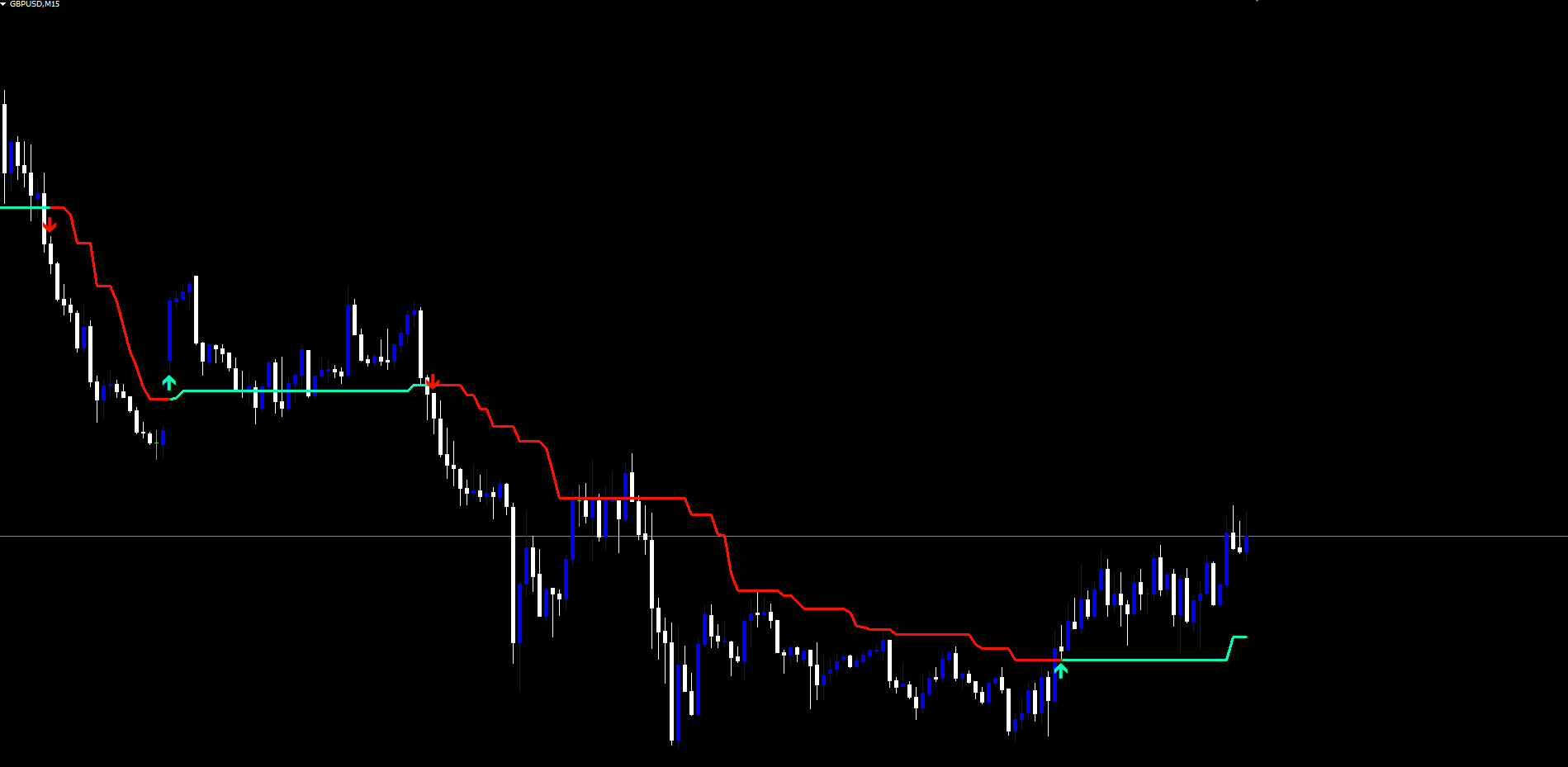
Alpha Pointer produces a deliberately minimalist chart presentation. Every visual element serves a specific information purpose, and there are no decorative flourishes.
The Trend Line. A single line is drawn at the trend value for every bar with a non-zero direction. Mint-green ( #00ffbb ) when bullish, red ( #ff1100 ) when bearish. The line uses a fixed width of 3 pixels. When the latched direction flips, the colors switch instantly with a one-bar bridge to avoid visual gaps at the transition. The trend line is the primary read on the indicator — its slope, its position relative to price, and its color all convey information at a glance.
Color Boundaries. When direction is zero (the very first bars of the chart, before any crossover has occurred), no line is drawn. As soon as the first crossover happens, the line begins. From that point forward there is always either a green or a red line, never both simultaneously, never neither.
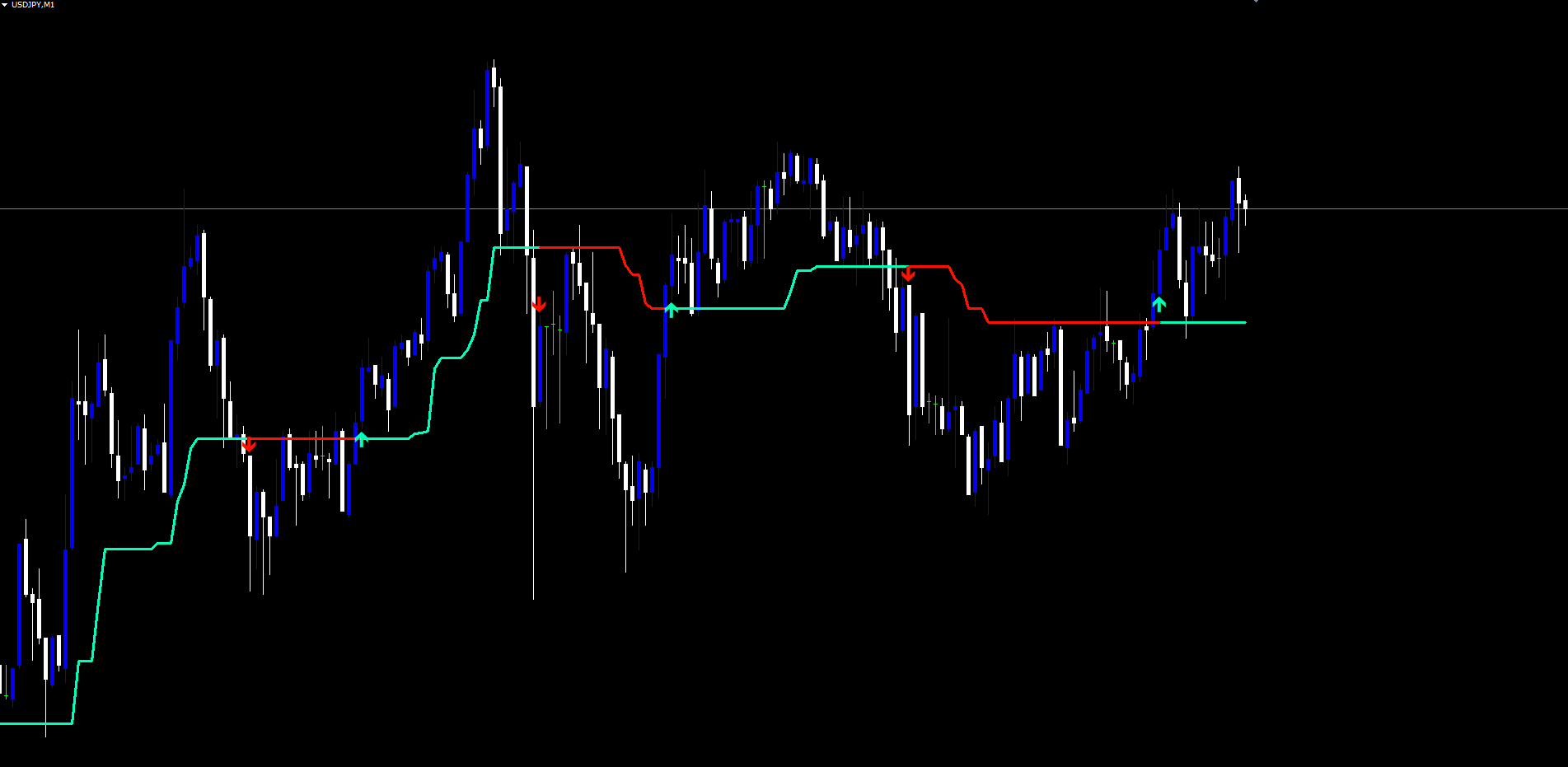
Arrow Signals. When the latched direction changes, an arrow is placed at the swing extreme of the lookback window. Bullish flips produce a Wingdings 233 (up arrow) anchored at the swing low. Bearish flips produce a Wingdings 234 (down arrow) anchored at the swing high. Both arrows use a width of 2 and are colored to match their regime — mint-green for bull, red for bear. Arrows are non-selectable and are hidden from the Object List by default to avoid cluttering the trader's workspace.
No Cloud, No Background Tint. The indicator does not fill the area between the line and price. This is a deliberate choice for visual clarity on dark MetaTrader backgrounds. The single colored line is sufficient to convey the regime and provides cleaner overlap with other indicators the trader may be running on the same chart.
Signal Arrows at Swing Extremes
When the latched direction changes from bear to bull, the indicator scans backward across the configured swing lookback (default: 21 bars) and finds the lowest low in that window. The bullish arrow is placed at that bar's time and price. When the latched direction changes from bull to bear, the engine finds the highest high over the same window and places the bearish arrow there.
The motivation is structural. The bar where the line itself flipped color may not be the most informative point on the recent price action — it is simply the bar where the crossover happened. The actual swing low (for a bull flip) or swing high (for a bear flip) is the structural extreme that the new regime is rejecting. Anchoring the arrow there places the marker at a level that traders commonly use as stop-loss reference, breakeven target, or invalidation point.
The lookback can be tuned. Smaller values (10 to 15) produce arrows closer to the actual flip bar — useful when the trader wants signals tightly aligned with the line color change. Larger values (30 to 50) produce arrows at more distant historical extremes — useful when the trader is interested in the broader swing structure rather than the immediate flip context. The default of 21 matches the original Pine Script implementation.
Arrows are not redrawn or repositioned. Once placed, an arrow stays at exactly the bar and price where it was first drawn. If the chart is reloaded or the indicator is reattached, all historical arrows are rebuilt at their original positions using the same algorithm.
The Alert System
Three distinct alert events cover the lifecycle of the indicator's regime detection:
- Bullish Trend. Fires when the latched direction flips from non-bullish to bullish on bar close.
- Bearish Trend. Fires when the latched direction flips from non-bearish to bearish on bar close.
- Trend Shift. Fires on every direction change, regardless of which way it goes. Useful when the trader wants a single alert that captures both bullish and bearish flips without subscribing to each individually.
Each event can be enabled or disabled independently via the InpAlertBull , InpAlertBear , and InpAlertShift inputs. Bullish and bearish alerts are enabled by default; the global trend shift alert is disabled by default to avoid double-firing alongside the directional alerts.
Four delivery channels are available, each independently toggleable:
| Channel | Default | Parameter |
|---|---|---|
| Popup (on-screen dialog) | Enabled | InpAlertPopup = true |
| Sound (configurable file) | Enabled | InpAlertSound = true |
| Disabled | InpAlertEmail = false | |
| Push notification (mobile) | Disabled | InpAlertPush = false |
The sound file defaults to alert.wav and can be changed via InpSoundFile . Email requires a one-time SMTP setup in Tools > Options > Email. Push notifications require a MetaQuotes ID configured in Tools > Options > Notifications plus the MetaTrader mobile app installed and signed in on the same account.
A duplicate-firing guard ensures that no alert is fired more than once per bar. If the same closed bar is reprocessed during a tick (which happens routinely as MetaTrader recalculates), the indicator notices the bar's timestamp matches the last fired signal and silently skips re-emitting the alert. This prevents the inbox spam and audio repetition that other indicators sometimes produce.
Alerts also do not fire during initial chart load. When the indicator first attaches to a chart, the entire history is reprocessed in one pass — historical arrows are placed correctly but no alerts are fired for past events. Only fresh, real-time direction changes produce alerts.
Practical Trading Workflow
Step 1: Attach the indicator. Find Alpha Pointer Indicator in the Navigator panel under Indicators > Market and drag it onto the chart. Defaults are designed to work on most instruments without modification.
Step 2: Tune for the instrument. For Forex majors on H1 and H4, defaults work well. For Crypto on lower timeframes, switch InpSource to HL2 or HLC3 to suppress wick noise. For very volatile instruments increase InpAtrMultiplier to 2.5 or 3.0; decrease to 1.5 for quieter pairs.
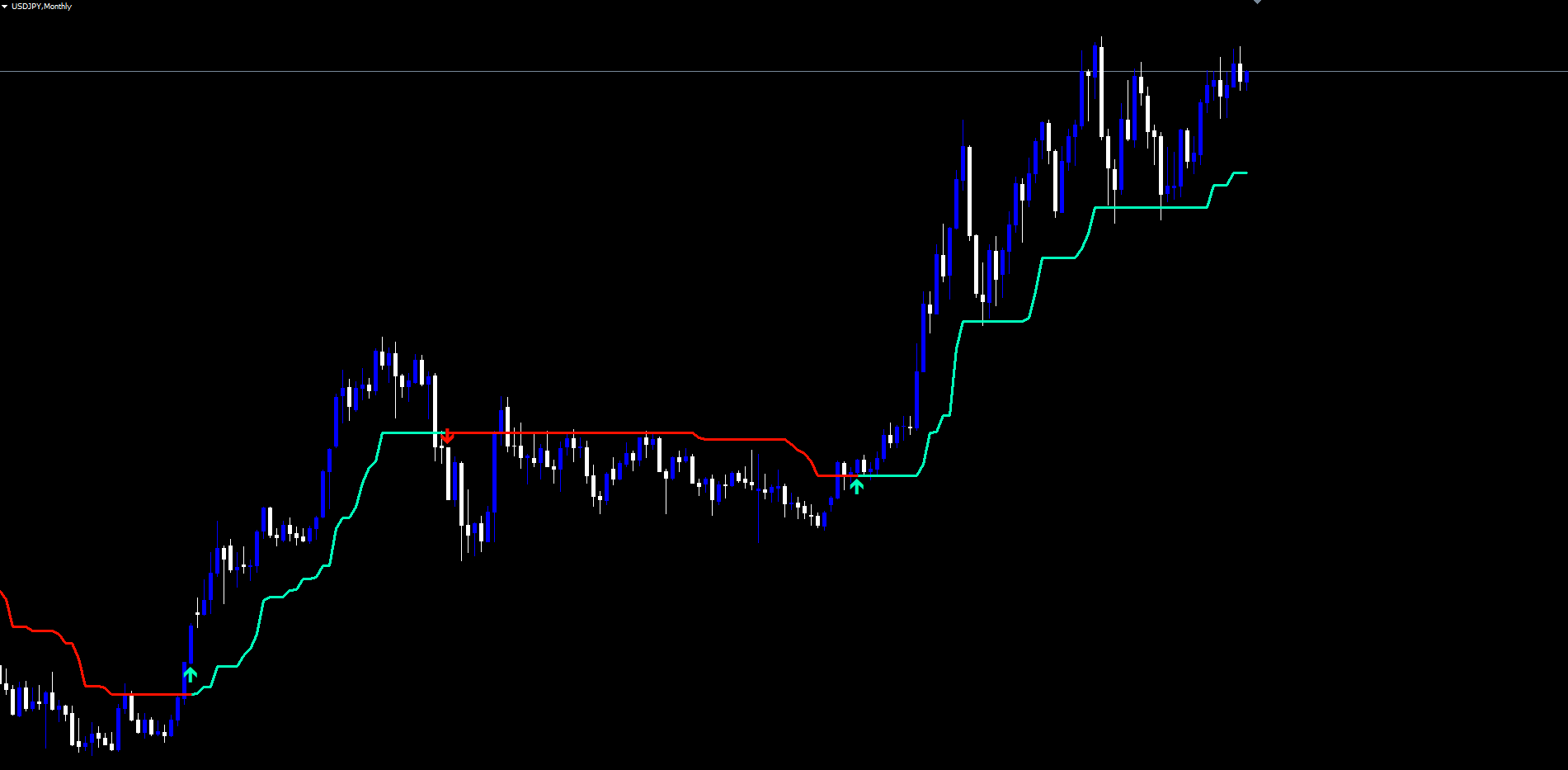
Step 3: Read the trend line. Mint-green = bullish regime, red = bearish. The line's position relative to price shows where current support (bull) or resistance (bear) sits. Slope shows how quickly the regime is gaining ground.
Step 4: Watch for arrows. When the line color changes an arrow appears at the swing extreme. Use it as a structural stop-loss anchor or as confirmation of the flip.
Step 5: Configure alerts. Enable push notifications when running across multiple charts; keep popup and sound for active monitoring.
Timeframe Considerations
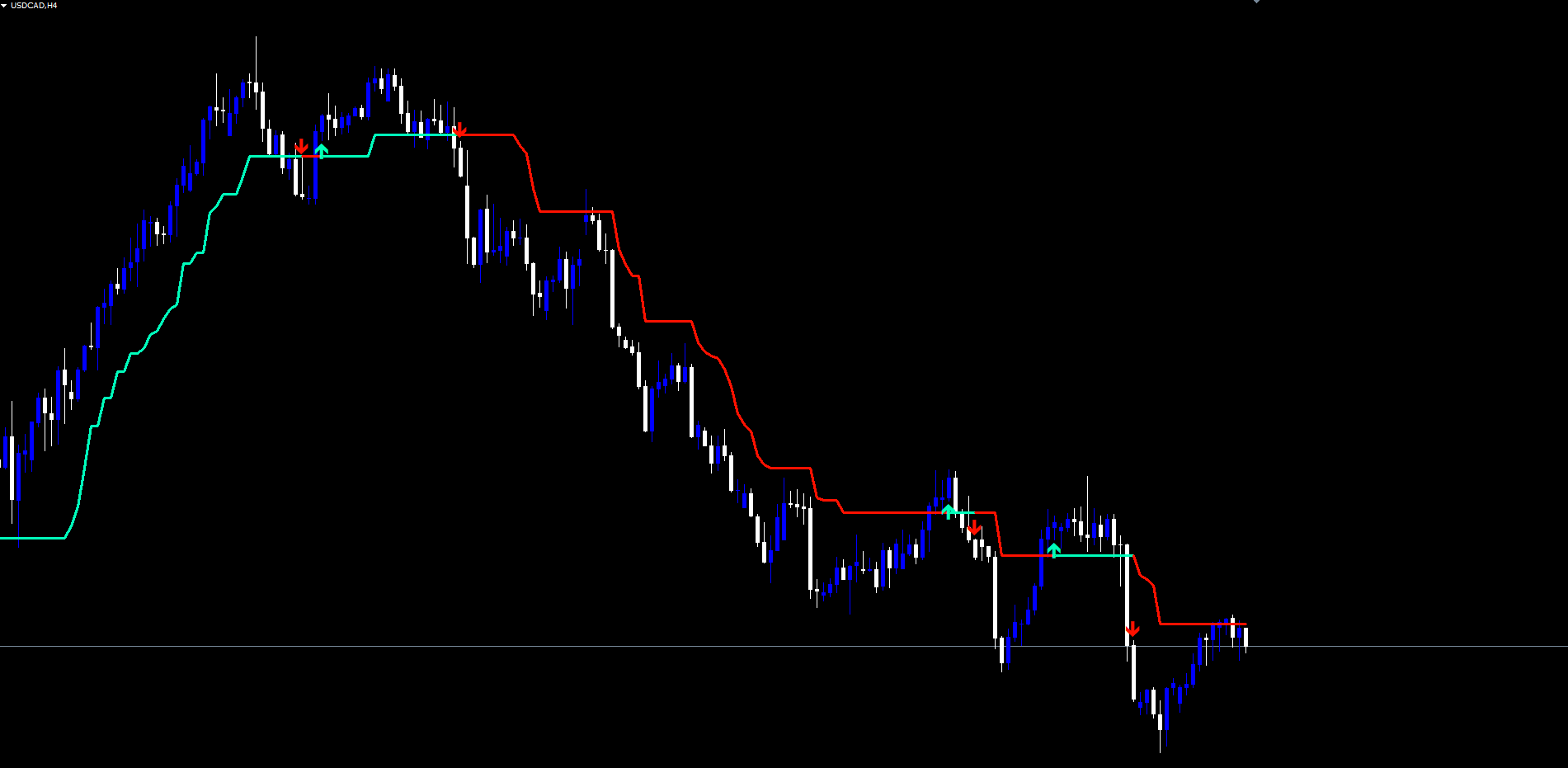
On M5 and M15 the trend line flips more frequently; consider increasing the ATR multiplier to 2.5 to reduce flip frequency. On M30 to H4 the defaults are tuned for swing trading. On D1 and W1 each regime persists for weeks or months — arrows are infrequent but mark major turning points.
Parameter Reference
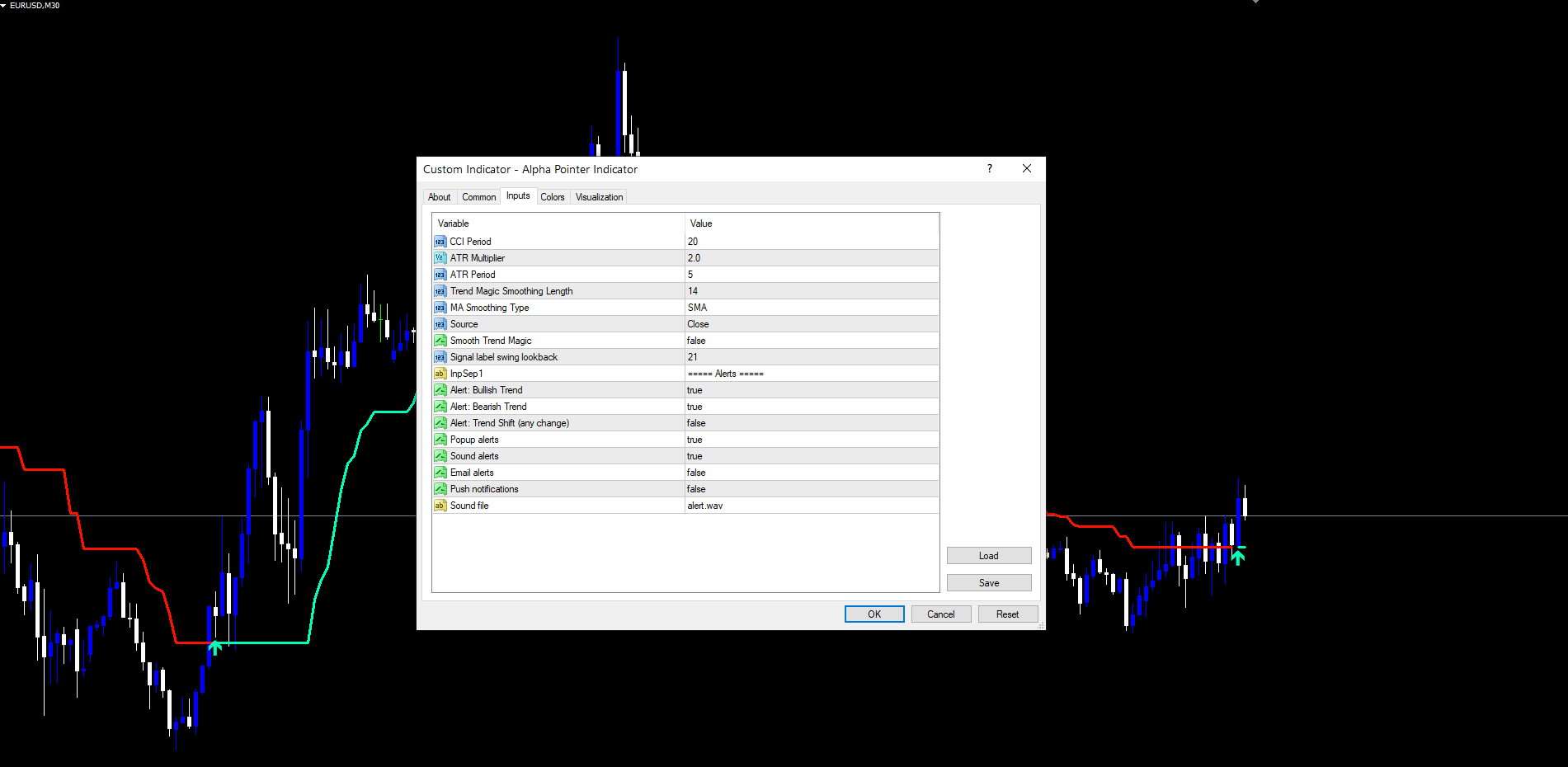
All input parameters are listed below grouped by function. Default values match the source code exactly.
Core Engine
| Parameter | Default | Description |
|---|---|---|
| InpCciPeriod | 20 | Period for the Commodity Channel Index |
| InpAtrMultiplier | 2.0 | ATR distance multiplier for the bands |
| InpAtrPeriod | 5 | Period for the ATR (Simple MA of True Range) |
| InpMagicTrendLength | 14 | Length used when smoothing is enabled |
| InpMaType | SMA | Smoothing MA type: SMA, EMA, SMMA (RMA), WMA, VWMA |
| InpSource | Close | Source for the CCI: Close, Open, High, Low, HL2, HLC3, OHLC4 |
| InpSmooth | false | Enable smoothing on the trend line |
| InpSwingLookback | 21 | Lookback bars for arrow swing low / swing high |
Alerts
| Parameter | Default | Description |
|---|---|---|
| InpAlertBull | true | Fire alert on bullish trend flips |
| InpAlertBear | true | Fire alert on bearish trend flips |
| InpAlertShift | false | Fire alert on every direction change |
| InpAlertPopup | true | Popup dialog |
| InpAlertSound | true | Sound playback |
| InpAlertEmail | false | Email delivery |
| InpAlertPush | false | Push notification |
| InpSoundFile | alert.wav | Sound filename |
Recommended Configuration Profiles
Default (balanced). Use all defaults. CCI 20, ATR multiplier 2.0, ATR period 5, source Close, smoothing off. Suitable for Forex majors on M30 to H4. Produces a responsive but stable trend line with arrow signals at structural swing points.
Conservative (higher timeframe). Set InpAtrMultiplier = 2.5 and InpSource = HLC3 . Enable smoothing with InpSmooth = true and InpMaType = SMMA . Produces a slower-reacting line that holds regimes longer, well-suited for D1 and W1 position trading.
Aggressive (lower timeframe). Set InpAtrMultiplier = 1.5 and InpSwingLookback = 15 . Keep smoothing off. Produces more frequent flips and tighter arrow placement, suitable for M5 and M15 scalping.
Smoothed swing. Keep all engine defaults but set InpSmooth = true and InpMagicTrendLength = 21 with InpMaType = WMA . Adds visible smoothing to the trend line without excessive lag. Useful when the trader wants a clean visual line for screenshots and shared analysis.
Installation
Alpha Pointer Indicator is distributed through the MQL5.com Market and installs automatically after purchase.
- Purchase the indicator from the MQL5.com Market product page.
- The indicator downloads and installs automatically into MetaTrader.
- Open the Navigator panel (Ctrl+N) and expand the Indicators section.
- Find Alpha Pointer Indicator under Indicators > Market.
- Drag the indicator onto any chart.
- Adjust input parameters if needed, then click OK.
The indicator works on all timeframes and all instruments supported by your broker. No manual file copying is required.
For best results, allow the indicator a brief warmup period the first time it is applied to a chart. The warmup depends on the CCI period and ATR period, and is typically completed within the first 30 to 50 bars of available history. After warmup, subsequent ticks process incrementally with no perceptible delay.
The indicator uses 2 visible chart buffers (the bullish line and the bearish line) and creates OBJ_ARROW objects for the swing-anchored signals. All objects use the prefix AlphaPointer_ and are automatically cleaned up when the indicator is removed from the chart.
CONTACT & SUPPORT
- Email: info@forexobroker.com
- Questions: Use the Comments section on the product page or send a private message
- Bug Reports: Please include your broker name, account type, and a screenshot
-
✅ All MQL Tools: https://www.mql5.com/en/users/forexobroker/ ✅
--------------------------------------------------------------------------------------------------------------
🏦 **Broker I use**: https://icmarkets.com/?camp=55869
🏦 **Broker For EU Traders I use 1**: https://www.ictrading.com?camp=91414
🏦 **Broker I use 2**: https://one.exnessonelink.com/boarding/sign-up/a/c_thuv62ocfq
💻 **VPS**: https://chocoping.com/processing/aff.php?aff=738
💼 **Companies I use for getting funded**:
Fundednext: https://fundednext.com/?fpr=kestutis39
The5ers: https://www.the5ers.com/?afmc=16kl
FTMO: https://trader.ftmo.com/?affiliates=nRAyOhmFRnEnFdOpdLeh
Risk Disclaimer
Trading foreign exchange and CFDs on margin carries a high level of risk and may not be suitable for all investors. You may sustain a loss exceeding your initial investment. Trend Quorum is a technical analysis tool and does not guarantee profitable trades. Past performance is not indicative of future results. The authors accept no liability for any loss arising from use of the indicator. By using Trend Quorum you acknowledge sole responsibility for your trading decisions.




