
Introduction
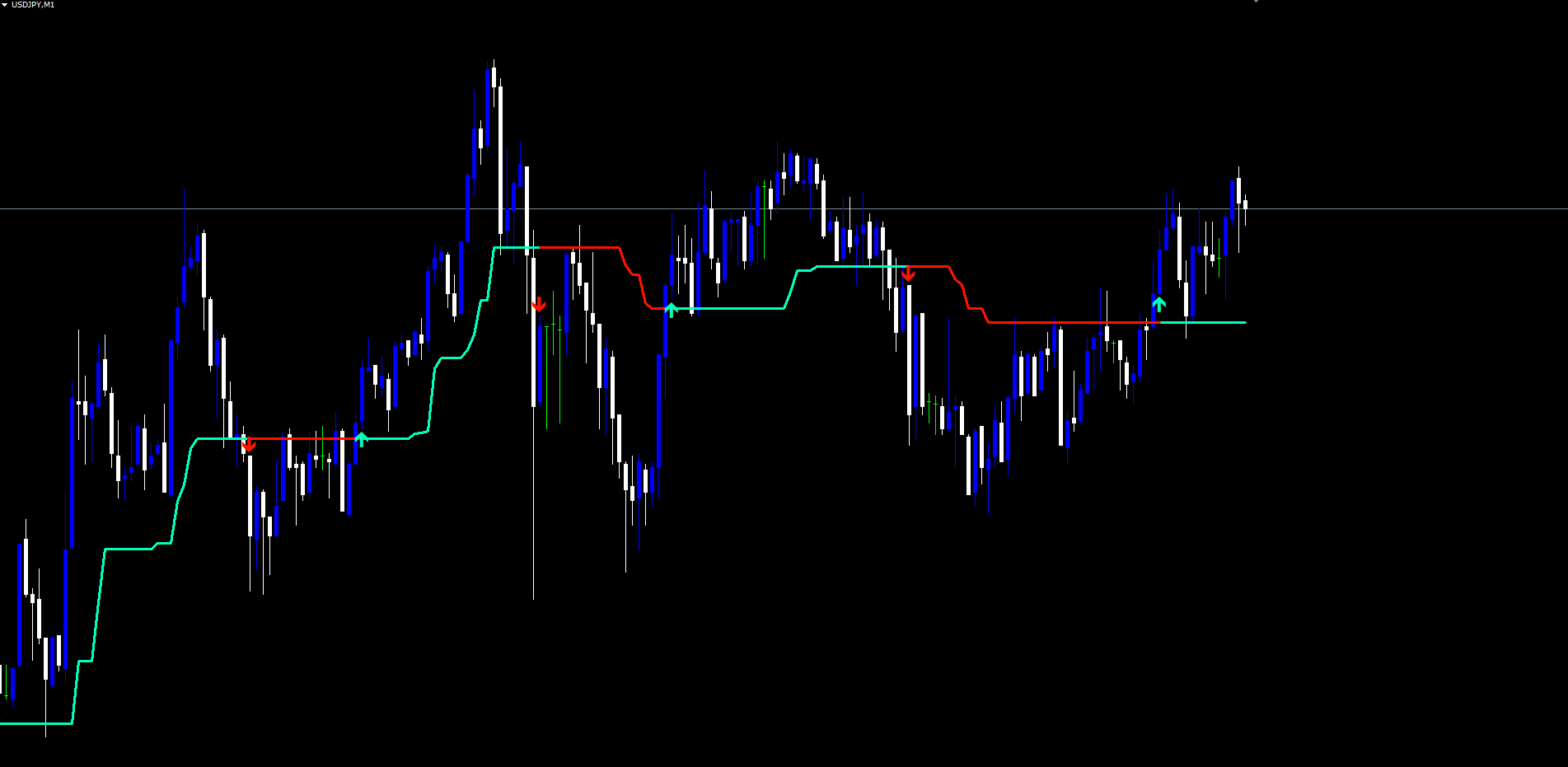
The Alpha Pointer Indicator is a non-repainting adaptive trend tool for MetaTrader 4 and MetaTrader 5. It plots a single colored line that ratchets upward during bullish regimes and downward during bearish regimes, switches color at confirmed price-versus-line crossovers, and prints up or down arrows at the swing extremes of a configurable lookback window.
Key Features:
- Adaptive ATR-displaced bands feeding a CCI-driven trend selector
- Mint-green line during bullish regimes, red line during bearish regimes
- Strict non-repaint engine — every value is finalized at bar close
- Crossover-based direction latch decoupled from CCI sign changes
- Optional smoothing across 5 MA types: SMA, EMA, SMMA (RMA), WMA, VWMA
- 7 source options: Close, Open, High, Low, HL2, HLC3, OHLC4
- Up/down arrow signals at the swing extremes of the lookback window
- 3 alert events × 4 alert channels (popup, sound, email, push)
Download the indicator:
- MetaTrader 5: Alpha Pointer MT5
- MetaTrader 4: Alpha Pointer MT4
TIP: This indicator is designed for traders who want a responsive yet stable trend tool that they can trust not to repaint. It works on any symbol and any timeframe available in MetaTrader.
Understanding the Trend Magic Engine
Alpha Pointer uses two complementary calculations to determine the trend line and its direction.
Step 1 — Compute the adaptive ATR distance. A Simple Moving Average is taken over the True Range across the configured ATR period (default: 5 bars). This produces an adaptive distance that scales automatically to the instrument's volatility.
Step 2 — Build the candidate bands. Two bands are formed every bar:
- Lower band = Low - ATR × InpAtrMultiplier
- Upper band = High + ATR × InpAtrMultiplier
Step 3 — Select the active band with CCI. The Commodity Channel Index of the chosen source (default: Close, period 20) decides which band drives the trend line. When CCI ≥ 0 the line tracks the lower band; when CCI < 0 the line tracks the upper band.
Step 4 — Apply the ratchet. The trend line never falls during a bullish regime and never rises during a bearish regime. Each new bar takes either the maximum (bull) or minimum (bear) of the previous trend line value and the new candidate band.
Step 5 — Latch the displayed direction. A separate engine watches for price crossing the trend line. When the bar low crosses above the line, direction flips bullish. When the bar high crosses below the line, direction flips bearish.
Step 6 — Print arrows on flips. When direction changes, an up arrow is placed at the swing low (bull flip) or a down arrow is placed at the swing high (bear flip) over the configured lookback window.
NOTE: The CCI selects which band the line ratchets against, but the displayed color depends on actual price-versus-line crossovers. CCI fluctuating around zero does not flip the color — only an actual crossover does.
Installation Guide
Alpha Pointer Indicator is distributed through the MQL5.com Market. Installation is automatic.
Steps:
- Purchase the indicator from the MQL5 Market product page
- The indicator installs automatically into your MetaTrader terminal
- Open MetaTrader and press Ctrl+N to open the Navigator panel
- Expand Indicators > Market
- Locate Alpha Pointer Indicator in the list
- Drag the indicator onto any chart, or double-click its name
- The settings dialog appears -- adjust parameters as needed (see sections below)
- Click OK to apply
After loading you will see:
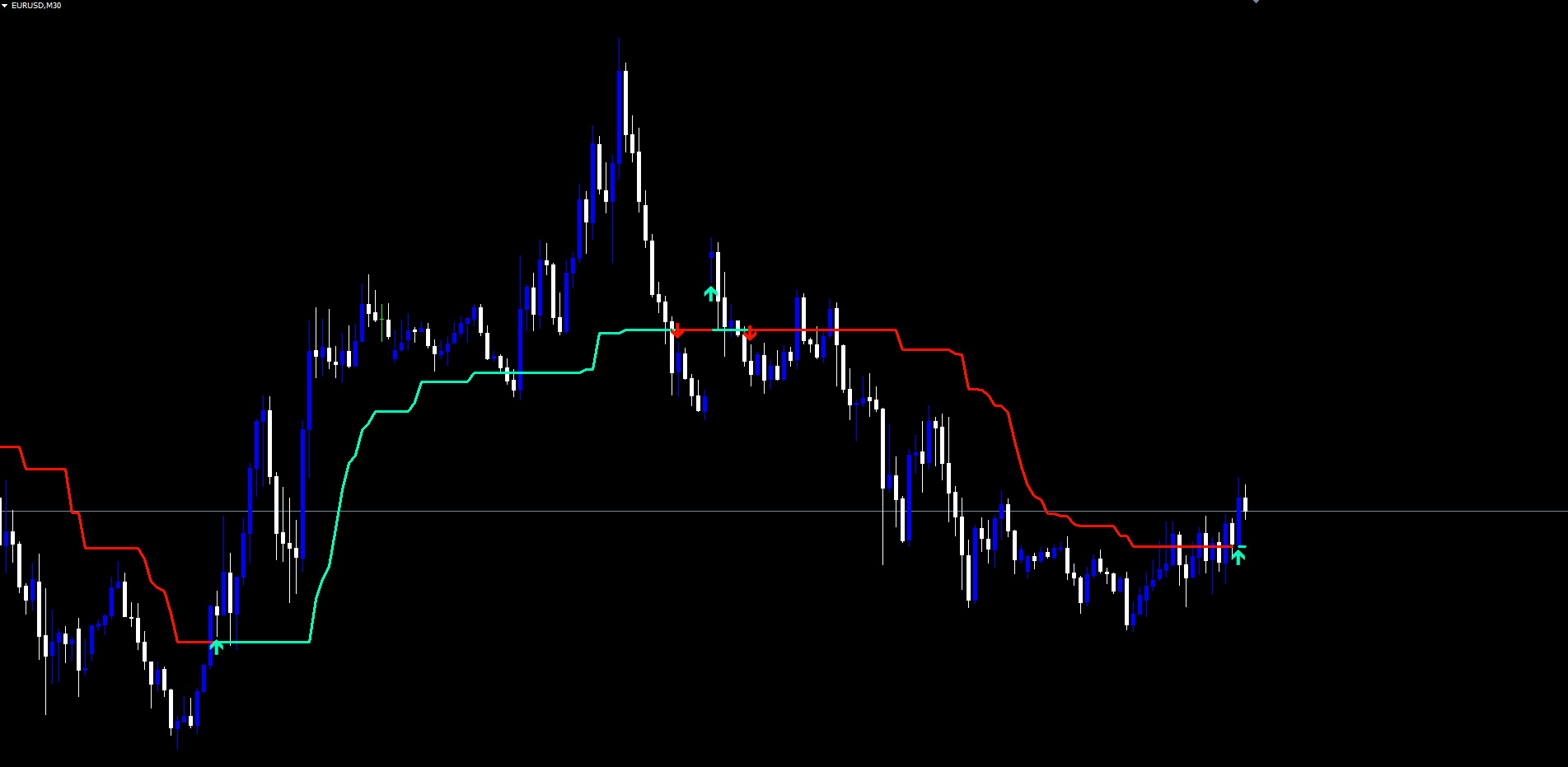
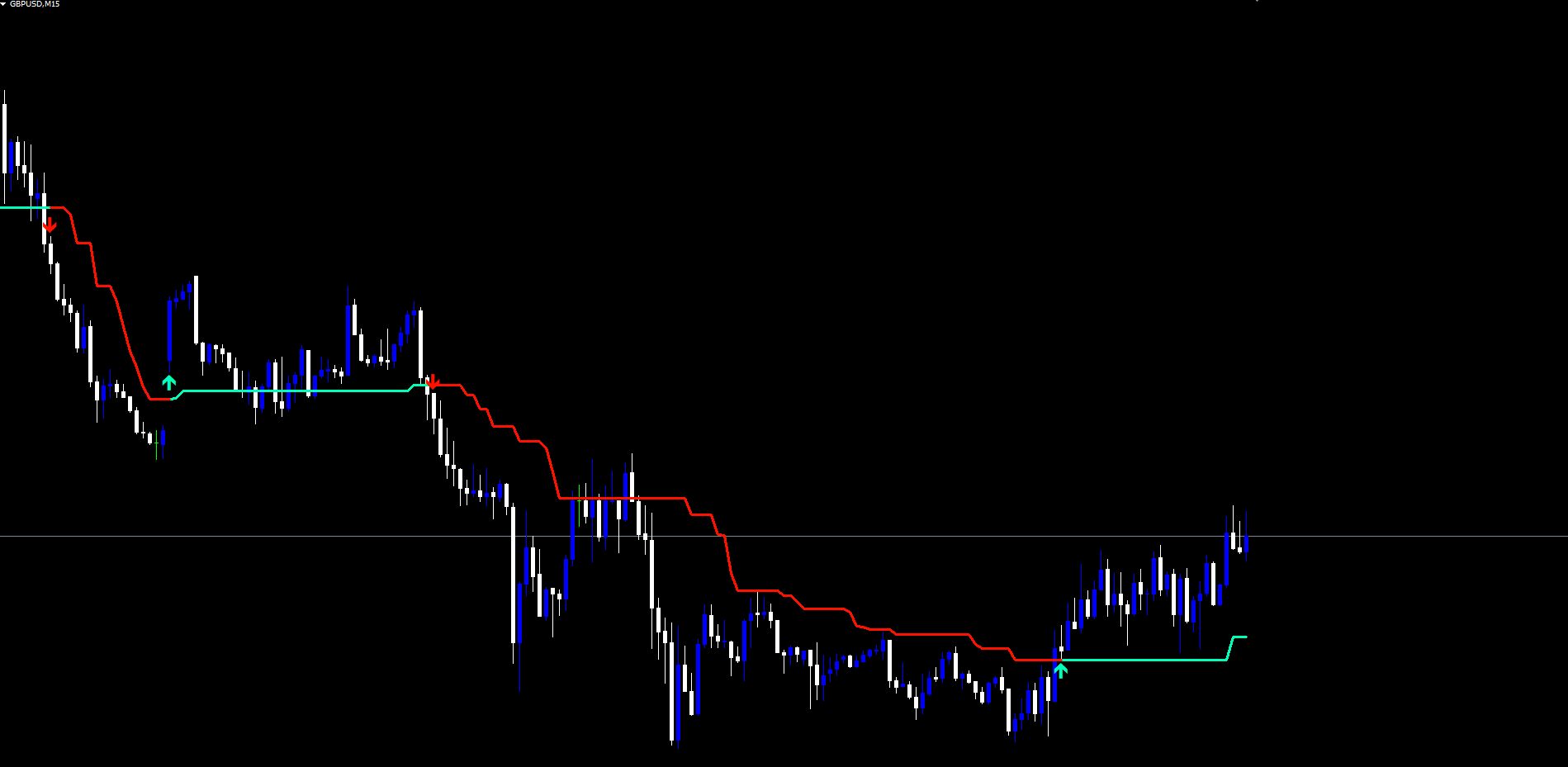
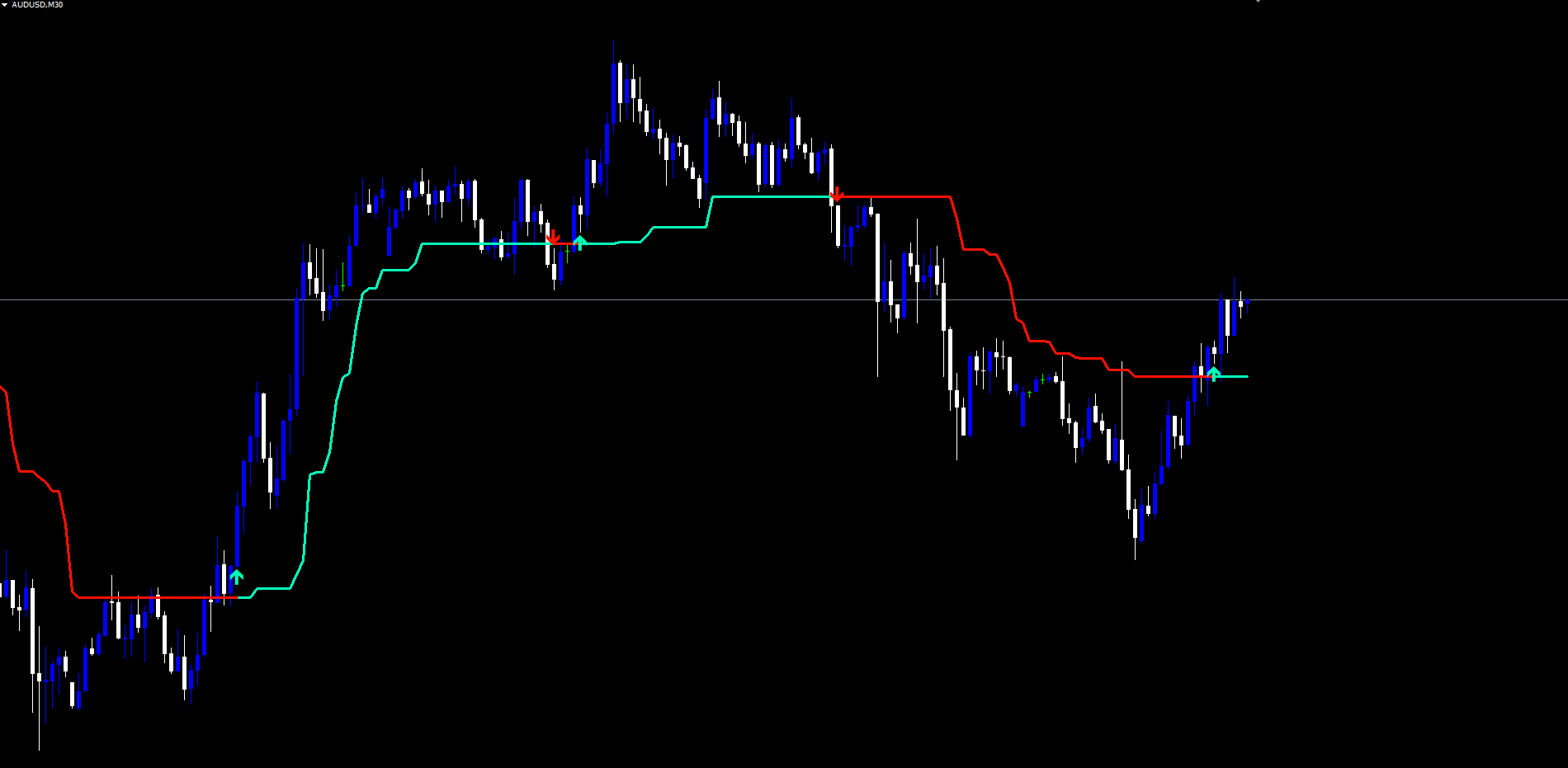
- The trend line drawn on the chart, colored mint-green when the latched direction is bullish or red when bearish
- Up/down arrow markers placed at the swing extremes whenever the regime flips
- Indicator label in the chart's top-left corner showing the current parameter set
IMPORTANT: Do not manually copy files to the data folder. The MQL5 Market handles all file placement and updates automatically.
Visual Components
Each chart applies three visual elements:
1. Trend Line
The trend line is plotted with a fixed width of 3 pixels.
- Bullish regime: mint-green color ( #00ffbb )
- Bearish regime: red color ( #ff1100 )
The line is the primary read on the indicator. Its slope indicates the strength of the regime; its position relative to price indicates where current dynamic support (bull) or resistance (bear) sits.
2. Arrow Signals
Arrows are drawn as OBJ_ARROW objects with Wingdings symbols.
- Up arrow (Wingdings 233): mint-green, anchored at the swing low. Placed when direction flips from non-bullish to bullish.
- Down arrow (Wingdings 234): red, anchored at the swing high. Placed when direction flips from non-bearish to bearish.
Arrows are non-selectable, hidden from the Object List by default, and never moved or removed once placed.
3. Non-Repainting Confirmation
- All calculations run on confirmed (closed) bars only
- The current forming bar mirrors the value of the most recently closed bar
- Arrows fire at bar close and stay permanent
Parameter Reference
The following table lists all input parameters with their defaults.
Core Engine
| Parameter | Default | Description |
|---|---|---|
| InpCciPeriod | 20 | Period of the Commodity Channel Index used to select trend direction |
| InpAtrMultiplier | 2.0 | ATR distance applied above High and below Low |
| InpAtrPeriod | 5 | Period of the ATR (Simple Moving Average of True Range) |
| InpMagicTrendLength | 14 | Smoothing length applied to the trend line when smoothing is enabled |
| InpMaType | SMA | Smoothing MA type: SMA, EMA, SMMA (RMA), WMA, VWMA |
| InpSource | Close | Price source for the CCI: Close, Open, High, Low, HL2, HLC3, OHLC4 |
| InpSmooth | false | Enable smoothing on the trend line |
| InpSwingLookback | 21 | Lookback for swing extremes used to anchor signal arrows |
Alerts
| Parameter | Default | Description |
|---|---|---|
| InpAlertBull | true | Fire alert on bullish trend events |
| InpAlertBear | true | Fire alert on bearish trend events |
| InpAlertShift | false | Fire alert on every direction change (any direction) |
| InpAlertPopup | true | Show on-screen popup dialog |
| InpAlertSound | true | Play the sound file specified by InpSoundFile |
| InpAlertEmail | false | Send email alert (requires SMTP setup in MetaTrader) |
| InpAlertPush | false | Send push notification (requires MetaQuotes ID setup) |
| InpSoundFile | alert.wav | Sound filename used by the alert system |
TIP: For most users on H1 to H4 the defaults need no adjustment. The two parameters that most directly change the indicator's character are InpAtrMultiplier and InpSmooth .
Smoothing MA Types Explained
Alpha Pointer offers five smoothing modes when InpSmooth = true . Each has a different responsiveness profile.
| MA Type | Response Speed | Smoothness | Notes |
|---|---|---|---|
| SMA (Simple) | Slow | High | Equal weighting, maximally smooth, maximally lagged |
| EMA (Exponential) | Fast | Medium | Recent values weighted more, the classic compromise |
| SMMA / RMA (Wilder) | Slowest | Highest | Heavily weights history, smoothest line of the five |
| WMA (Weighted) | Medium | Medium | Linear weighting from oldest to newest |
| VWMA (Volume-Weighted) | Variable | Variable | Tick-volume weighted; falls back to SMA when volume is zero |
Smoothing is disabled by default. Enable it when the goal is regime stability over reaction speed (longer-term swing trading on H4/D1). Keep it disabled when fast reaction matters (M5/M15 scalping or active intraday work on H1).
TIP: When smoothing is enabled, the crossover detection uses the smoothed values rather than the raw ratchet values. This means the latched direction reflects price interaction with the smoothed line.
Source Options Explained
The CCI is computed against a configurable source. Seven options are available:
| Source | Formula | Use Case |
|---|---|---|
| Close | Close[i] | Default. End-of-bar consensus price |
| Open | Open[i] | When entries are taken at next bar open |
| High | High[i] | Specialized — biases toward bullish extremes |
| Low | Low[i] | Specialized — biases toward bearish extremes |
| HL2 | (High + Low) / 2 | Suppresses wick noise; good for volatile pairs |
| HLC3 | (High + Low + Close) / 3 | Typical price; balanced compromise |
| OHLC4 | (Open + High + Low + Close) / 4 | Maximum smoothing of the source |
Start with Close. If false flips appear during otherwise clean trends — especially on Crypto or volatile pairs with long wicks — switch to HL2 or HLC3.
Alert Configuration
Alpha Pointer supports four alert delivery channels and three distinct alert events.
Alert Channels
| Parameter | Default | Description |
|---|---|---|
| InpAlertPopup | true | Show a popup dialog in MetaTrader |
| InpAlertSound | true | Play the configured sound file |
| InpAlertEmail | false | Send email notification |
| InpAlertPush | false | Send push notification to the MetaTrader mobile app |
| InpSoundFile | alert.wav | Filename in MetaTrader's Sounds folder |
Alert Events
| Event | Trigger |
|---|---|
| Bullish Trend | Latched direction flips from non-bullish to bullish on bar close |
| Bearish Trend | Latched direction flips from non-bearish to bearish on bar close |
| Trend Shift | Any direction change (bullish or bearish) — convenience event |
Each alert message includes the symbol, timeframe, event name, and bar timestamp. Alerts fire only once per bar per event — repeated tick processing of the same closed bar will not produce duplicate notifications.
Alerts also do not fire during initial chart load. Historical arrows are placed correctly when the indicator first attaches to a chart, but no alerts are emitted for those past events. Only fresh, real-time direction changes produce alerts.
Enabling Push Notifications
- Install the MetaTrader mobile app on your phone (iOS or Android)
- Open the app and navigate to Settings > Messages
- Copy your MetaQuotes ID
- In the desktop MetaTrader, go to Tools > Options > Notifications
- Enter your MetaQuotes ID and enable notifications
- Set InpAlertPush = true in the indicator settings
Enabling Email Notifications
- In MetaTrader, go to Tools > Options > Email
- Check Enable
- Enter your SMTP server, port, login, password, and destination email address
- Click Test to verify the configuration works
- Set InpAlertEmail = true in the indicator settings
Trading Strategies
The following three approaches demonstrate different ways to use Alpha Pointer.
WARNING: Trading involves significant risk of loss. These strategies are provided for educational purposes only. Always test on a demo account first and never trade with money you cannot afford to lose.
Strategy A: Trend Continuation
Goal: Enter in the direction of the latched regime after a pullback.
Setup:
- Wait for the trend line to be a clear color and direction (mint-green or red, with consistent slope)
- Look for price to pull back toward the trend line without crossing it
- Enter in the direction of the line color when price bounces off the line
- Stop loss beyond the most recent swing extreme (the arrow location)
- Target the next significant structural level or trail with the trend line itself
Best for: H1 and H4 swing trading on trending instruments.
Strategy B: Reversal Entry
Goal: Enter at the moment the regime flips.
Setup:
- Wait for an arrow to print on the chart
- Confirm the line color has changed
- Enter in the new direction at the next bar open
- Stop loss at the swing extreme marked by the arrow
- Take partial profit at predetermined risk-reward levels (1:1, 1:2)
Best for: Markets with frequent regime changes; typically lower timeframes or instruments in transition.
Strategy C: Multi-Chart Alert Workflow
Goal: Monitor multiple instruments without watching every chart.
Setup:
- Open charts for every symbol and timeframe you want to monitor
- Apply Alpha Pointer Indicator to each chart with your preferred settings
- Enable InpAlertPush = true and configure your MetaQuotes ID
- When a push notification arrives, open the chart to evaluate the signal
- Use the line color and arrow placement to assess the regime change before entering
TIP: For Strategy C, consider disabling the Trend Shift alert and keeping only Bullish + Bearish to reduce notification volume.
Parameter Tuning Presets
The following presets provide starting points for different trading styles.
Scalping Preset (M5 - M15)
| Parameter | Value |
|---|---|
| InpCciPeriod | 14 |
| InpAtrMultiplier | 1.5 |
| InpAtrPeriod | 5 |
| InpSource | HL2 |
| InpSmooth | false |
| InpSwingLookback | 15 |
Faster band reaction with HL2 source to suppress wicks. Smoothing off for maximum responsiveness.
Swing Trading Preset (H1 - H4)
| Parameter | Value |
|---|---|
| InpCciPeriod | 20 |
| InpAtrMultiplier | 2.0 |
| InpAtrPeriod | 5 |
| InpSource | Close |
| InpSmooth | false |
| InpSwingLookback | 21 |
Default settings. Balanced responsiveness and stability for most Forex pairs.
Conservative / Position Preset (H4 - D1)
| Parameter | Value |
|---|---|
| InpCciPeriod | 30 |
| InpAtrMultiplier | 2.5 |
| InpAtrPeriod | 7 |
| InpSource | HLC3 |
| InpSmooth | true |
| InpMaType | SMMA (RMA) |
| InpMagicTrendLength | 21 |
| InpSwingLookback | 30 |
Wider bands, smoothed line, longer swing lookback. Holds regimes for weeks at a time on D1.
TIP: Start with the Swing Trading preset and modify one parameter at a time to observe its effect on signal quality and frequency.
Troubleshooting
Trend Line Not Visible
- Verify there is sufficient chart history. The indicator needs at least InpCciPeriod + InpAtrPeriod + 5 bars before the line can begin.
- Check that the line color is not being hidden behind another indicator. Right-click the chart, choose Indicators List, and verify Alpha Pointer is loaded.
- If only one color appears (only mint-green or only red) over the visible window, the chart is showing a long persistent regime — scroll back to find the most recent flip.
No Arrows Appearing
- Arrows only print at regime changes. If the chart has been in a single direction for a long time, the most recent arrow may be hundreds of bars back. Scroll left to locate it.
- Reduce InpAtrMultiplier to make the indicator flip more often, which produces more arrows.
- Verify the arrow is not hidden by an oversized candle drawing or another chart object.
Alerts Not Firing
- Confirm the master event toggles ( InpAlertBull , InpAlertBear , InpAlertShift ) include the event you expect.
- For push notifications: verify your MetaQuotes ID in Tools > Options > Notifications and that InpAlertPush = true .
- For email alerts: verify SMTP settings in Tools > Options > Email and click the Test button.
- Alerts do not fire on initial chart load — only on real-time direction changes after the indicator is already running.
Smoothed Mode Looks Identical to Raw
- Verify InpSmooth = true . The default is false .
- Try a longer InpMagicTrendLength (21 or 30) for more visible smoothing.
- Switch InpMaType to SMMA (RMA) for the heaviest smoothing effect.
Different Results Between MT4 and MT5 at the Edge of History
- Minor differences in early-history warmup are expected and converge to identical values within a few hundred bars.
- The bulk of the chart will be identical between platforms.
VWMA Looks the Same as SMA
- On instruments where the broker does not provide tick volume (some indices and CFDs), VWMA falls back to a simple average.
- Try the indicator on a Forex major (where tick volume is reliably reported) to see VWMA's true effect.
Support and Contact
If you need assistance with Alpha Pointer Indicator:
| Contact Method | Details |
|---|---|
| support@forexobroker.com | |
| Website | www.forexobroker.com |
| MQL5 Market | Use the Comments section on the product page |
When contacting support, please include:
- Your MetaTrader version (MT4 or MT5)
- Broker name and symbol format
- A description of the issue
- Screenshots of the chart and the indicator settings dialog
- The exact parameter values you are using
CONTACT & SUPPORT
- Email: info@forexobroker.com
- Questions: Use the Comments section on the product page or send a private message
- Bug Reports: Please include your broker name, account type, and a screenshot
-
✅ All MQL Tools: https://www.mql5.com/en/users/forexobroker/ ✅
--------------------------------------------------------------------------------------------------------------
🏦 **Broker I use**: https://icmarkets.com/?camp=55869
🏦 **Broker For EU Traders I use 1**: https://www.ictrading.com?camp=91414
🏦 **Broker I use 2**: https://one.exnessonelink.com/boarding/sign-up/a/c_thuv62ocfq
💻 **VPS**: https://chocoping.com/processing/aff.php?aff=738
💼 **Companies I use for getting funded**:
Fundednext: https://fundednext.com/?fpr=kestutis39
The5ers: https://www.the5ers.com/?afmc=16kl
FTMO: https://trader.ftmo.com/?affiliates=nRAyOhmFRnEnFdOpdLeh
Risk Disclaimer
Trading foreign exchange and CFDs on margin carries a high level of risk and may not be suitable for all investors. You may sustain a loss exceeding your initial investment. Trend Quorum is a technical analysis tool and does not guarantee profitable trades. Past performance is not indicative of future results. The authors accept no liability for any loss arising from use of the indicator. By using Trend Quorum you acknowledge sole responsibility for your trading decisions.




