
Trend Quorum — Complete User Manual for MetaTrader 4 and MetaTrader 5

1. Introduction
Trend Quorum is an adaptive trend-following indicator combining a dynamically modulated SuperTrend engine with a proprietary Trend Quality Index (TQI), three confluence filters, signal strength ratings, and built-in risk management. It runs on any symbol and timeframe, from M1 scalping to monthly swing setups, with five presets that auto-tune every parameter.
Key Features:
- Adaptive SuperTrend with dynamic band compression driven by the Trend Quality Index
- TQI -- 4-factor composite (Efficiency, Volatility, Structure, Momentum) measuring trend quality 0-1
- EMA Cloud confluence filter with visual cloud fill
- ADX Trend Strength filter with configurable threshold
- Multi-Timeframe confirmation with auto-select or manual HTF override
- Signal strength: Strong (4/4), Medium (3/4), Weak (1-2/4)
- Three ATR-based TP levels + pivot-based SL with configurable R-multiples
- TP hit detection with turquoise color change
- On-chart dashboard with 10 sections
- 11 alert conditions (popup, push, email)
- Five presets: Auto, Scalping, Default, Swing, Crypto 24/7
Download the indicator:
- MetaTrader 5: Trend Quorum MT5
- MetaTrader 4: Trend Quorum MT4
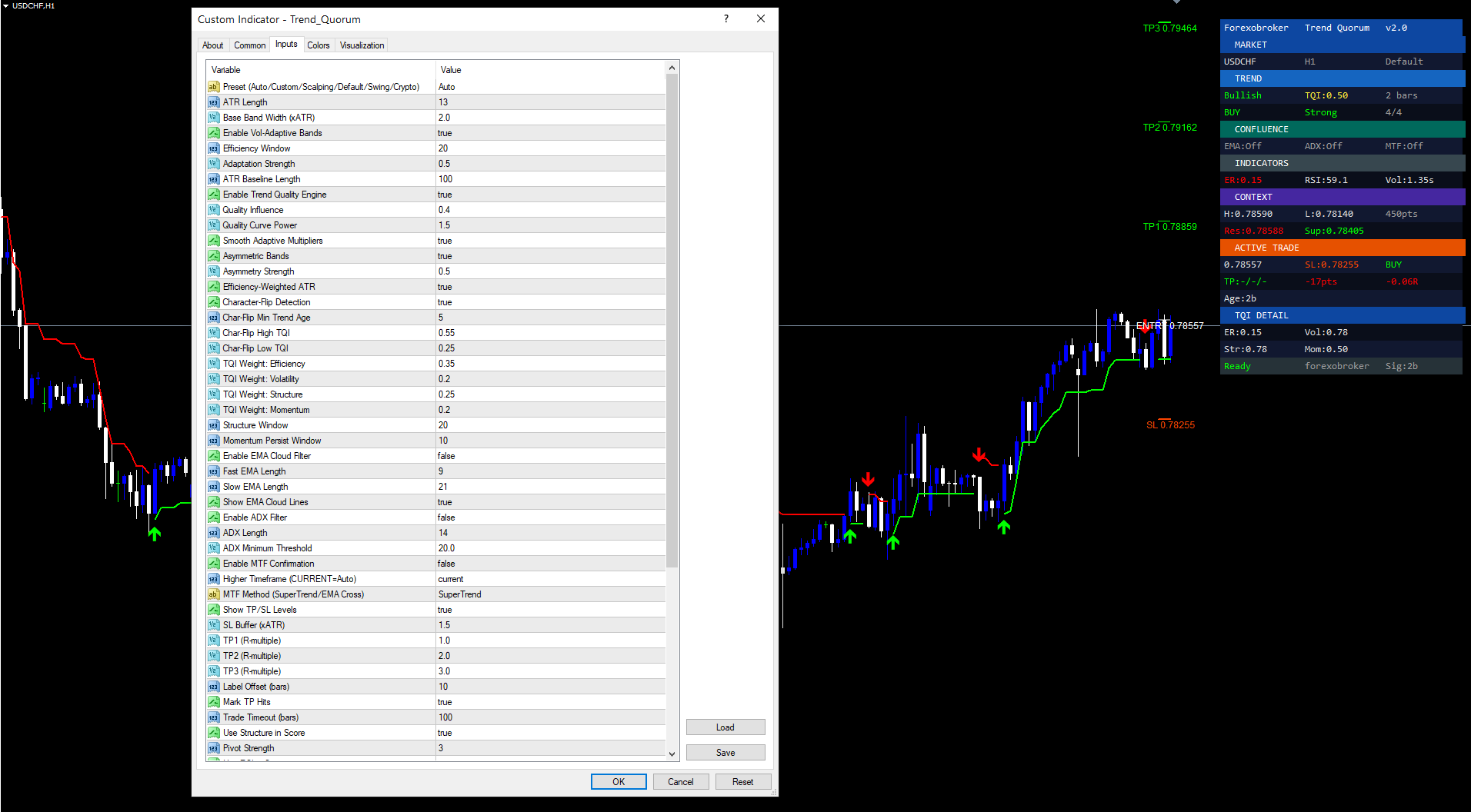
2. Understanding Adaptive SuperTrend + TQI
The core engine modulates SuperTrend band width continuously via the Trend Quality Index. Tight bands in clean trends, wide bands in chop. The signal pipeline:
-
ATR Calculation -- Baseline volatility measurement (default 13 bars).
-
Efficiency Ratio -- Compares net directional movement to total bar-to-bar movement. ER near 1.0 = straight-line trend; near 0.0 = noise.
-
TQI Computation -- Four normalized factors weighted into a 0-1 score:
- Efficiency (0.35): Directional purity
- Volatility (0.20): Current volatility vs baseline
- Structure (0.25): Orderly swing-point progression
- Momentum (0.20): Persistent directional movement across recent bars
-
Band Modulation -- TQI feeds through a power curve and adjusts the SuperTrend multiplier. High TQI compresses bands; low TQI widens them. Asymmetric mode further tightens the active side and widens the passive side (ratchet effect).
-
Direction Change -- SuperTrend flips on price break OR Character-Flip (rapid TQI collapse from >0.55 to <0.25 signals reversal before price formally breaks the band).
-
Confluence Gating -- The flip must pass all enabled filters (EMA Cloud, ADX, MTF). Only then does an arrow appear with a strength rating.
3. Installation Guide
Trend Quorum installs automatically from the MQL5.com Market:
- Purchase from MQL5.com Market (XXXXX)
- Product auto-installs -- no manual file copying required
- Open MetaTrader 4 or MetaTrader 5
- Open Navigator (Ctrl+N)
- Expand Indicators > Market
- Find Trend Quorum
- Drag onto any chart
- Configure parameters and click OK
Allow 100-200 bars warmup before expecting reliable signals.
4. Signal System Overview
Arrow
- Green Up Arrow (233) = BUY -- SuperTrend flipped bullish, all confluence gates passed
- Red Down Arrow (234) = SELL -- SuperTrend flipped bearish, all gates passed
Strength Rating
| Confluence | Rating | Interpretation |
|---|---|---|
| 4/4 | Strong | SuperTrend + all 3 filters -- highest probability |
| 3/4 | Medium | SuperTrend + 2 filters -- good probability |
| 1-2/4 | Weak | SuperTrend + 0-1 filters -- exercise caution |
The SuperTrend always counts as one source. Each enabled filter adds one more. Disabled filters don't count against the score.
Non-Repainting
All signals fire on confirmed closed bars only via a new-bar guard. Once an arrow appears, it never moves or disappears.
5. Trend Quality Engine Configuration
TQI Weights
| Factor | Weight | Measures |
|---|---|---|
| Efficiency | 0.35 | Directional purity |
| Volatility | 0.20 | Volatility vs baseline ATR |
| Structure | 0.25 | Orderly swing progression |
| Momentum | 0.20 | Persistent directional bars |
Weights must sum to 1.0.
Quality Influence (0.4)
Controls TQI-to-band modulation strength. 0 = standard SuperTrend. 1 = maximum compression/expansion.
Quality Curve Power (1.5)
Non-linearity. 1.0 = linear. >1 = bands stay tight for mild TQI drops, expand rapidly for severe drops.
Asymmetric Bands (ON)
Active side tightens to lock profit; passive side widens for pullback room. Asymmetry Strength (0.5) controls intensity.
Character-Flip Detection (ON)
TQI collapse from >0.55 to <0.25 triggers reversal even before price breaks the band. Catches reversals 2-5 bars earlier. Min Trend Age (5) prevents false flips on new trends.
Efficiency-Weighted ATR (ON)
Raw ATR scaled by (0.5 + 0.5*ER). Clean trends use full ATR; noisy periods use half. Results in better band widths for both conditions.
Multiplier Smoothing (ON)
EMA-smooths band multipliers to prevent abrupt jumps. Creates gradual transitions matching real regime shifts.
6. Confluence Filter Configuration
Each filter is an independent gate. When enabled, signals must pass ALL active gates.
EMA Cloud Filter
| Parameter | Default | Description |
|---|---|---|
| Enable | false | Master switch |
| Fast EMA | 9 | Fast EMA period |
| Slow EMA | 21 | Slow EMA period |
| Show Cloud | true | Draw lines + fill |
BUY requires fast > slow (bullish cloud). SELL requires fast < slow. Excellent at eliminating counter-trend signals.
ADX Trend Strength
| Parameter | Default | Description |
|---|---|---|
| Enable | false | Master switch |
| Length | 14 | ADX period |
| Threshold | 20.0 | Minimum ADX |
ADX < 20 = ranging. ADX > 25 = strong trend. Raising threshold produces fewer, higher-quality signals.
Multi-Timeframe Confirmation
| Parameter | Default | Description |
|---|---|---|
| Enable | false | Master switch |
| Timeframe | Auto | HTF selection |
| Method | SuperTrend | SuperTrend or EMA Cross |
Auto-Select: M1-M5 -> H1 | M15 -> H4 | H1 -> D1 | H4 -> W1 | D1 -> MN1
BUY requires HTF also bullish. SELL requires HTF bearish.
How They Combine
- 0 filters: SuperTrend alone triggers signal
- 1 filter: SuperTrend + that filter agree
- 2 filters: SuperTrend + both agree
- 3 filters: SuperTrend + all three agree
7. Risk Management Setup
Stop-Loss
- BUY: SL = recent swing low - (SL Buffer x ATR)
- SELL: SL = recent swing high + (SL Buffer x ATR)
- Default buffer: 1.5x ATR
Take-Profit Levels
| Level | Default | Calculation |
|---|---|---|
| TP1 | 1.0R | Entry +/- risk x 1.0 |
| TP2 | 2.0R | Entry +/- risk x 2.0 |
| TP3 | 3.0R | Entry +/- risk x 3.0 |
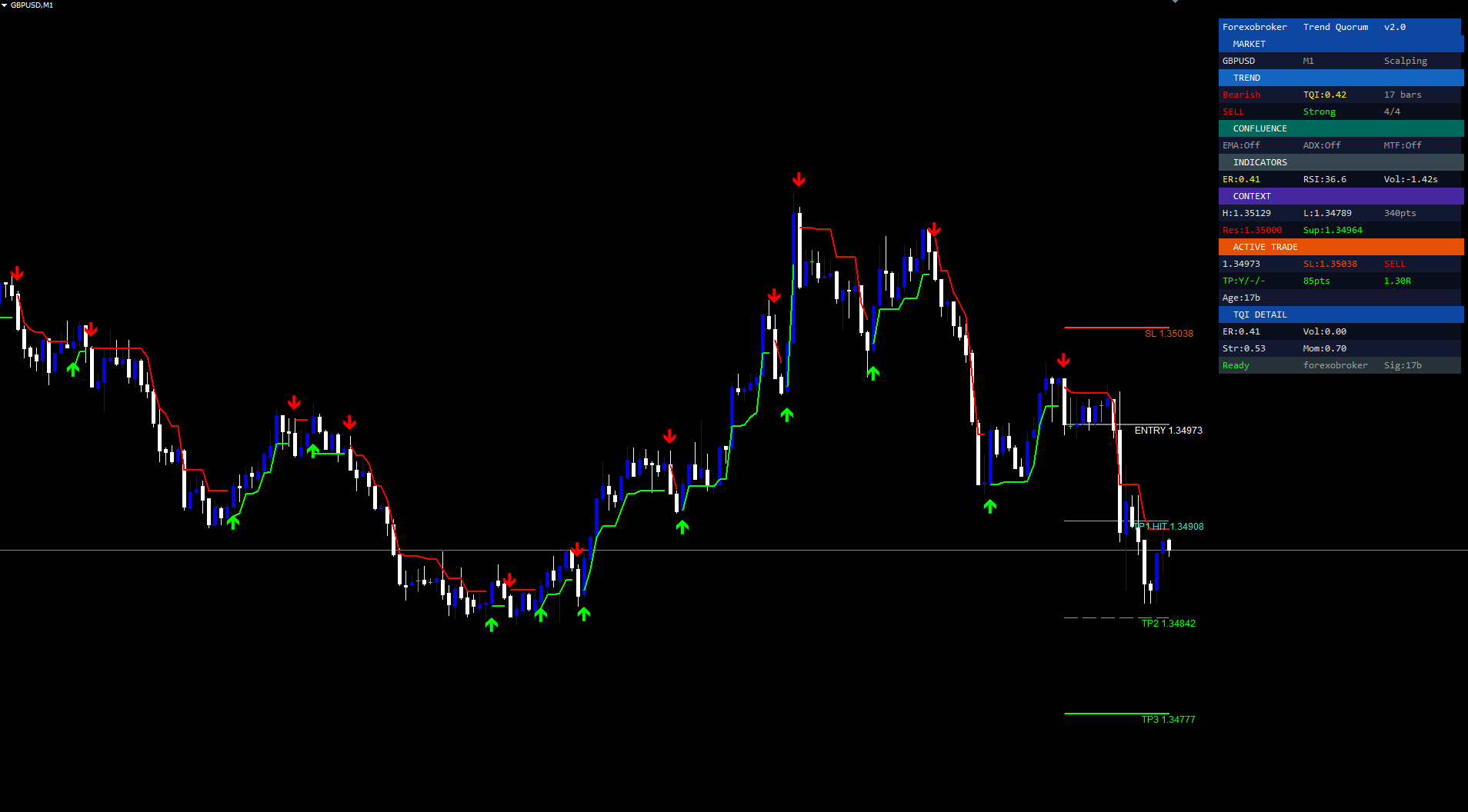
Visual Lines
Red line = SL. Green lines = TP1/2/3. Price labels at Label Offset distance (default 10 bars).
Hit Tracking
Lines turn turquoise when TP is reached. Dashboard shows status as checkmarks.
Trade Timeout
After 100 bars (configurable), trade tracking resets for the next signal.
8. Complete Parameter Reference
| # | Parameter | Type | Default | Category |
|---|---|---|---|---|
| 1 | Preset | string | Auto | Main |
| 2 | ATR Length | int | 13 | Main |
| 3 | Base Band Width | double | 2.0 | Main |
| 4 | Enable Vol-Adaptive | bool | true | Adaptive |
| 5 | Efficiency Window | int | 20 | Adaptive |
| 6 | Adaptation Strength | double | 0.5 | Adaptive |
| 7 | ATR Baseline Length | int | 100 | Adaptive |
| 8 | Enable TQI | bool | true | TQI |
| 9 | Quality Influence | double | 0.4 | TQI |
| 10 | Quality Curve Power | double | 1.5 | TQI |
| 11 | Smooth Multipliers | bool | true | TQI |
| 12 | Asymmetric Bands | bool | true | TQI |
| 13 | Asymmetry Strength | double | 0.5 | TQI |
| 14 | Efficiency-Weighted ATR | bool | true | TQI |
| 15 | Character-Flip Detection | bool | true | TQI |
| 16 | Char-Flip Min Age | int | 5 | TQI |
| 17 | Char-Flip High TQI | double | 0.55 | TQI |
| 18 | Char-Flip Low TQI | double | 0.25 | TQI |
| 19 | Weight: Efficiency | double | 0.35 | TQI |
| 20 | Weight: Volatility | double | 0.20 | TQI |
| 21 | Weight: Structure | double | 0.25 | TQI |
| 22 | Weight: Momentum | double | 0.20 | TQI |
| 23 | Structure Window | int | 20 | TQI |
| 24 | Momentum Window | int | 10 | TQI |
| 25 | Enable EMA Cloud | bool | false | EMA |
| 26 | Fast EMA Length | int | 9 | EMA |
| 27 | Slow EMA Length | int | 21 | EMA |
| 28 | Show EMA Lines | bool | true | EMA |
| 29 | Enable ADX Filter | bool | false | ADX |
| 30 | ADX Length | int | 14 | ADX |
| 31 | ADX Threshold | double | 20.0 | ADX |
| 32 | Enable MTF | bool | false | MTF |
| 33 | Higher Timeframe | TF | Auto | MTF |
| 34 | MTF Method | string | SuperTrend | MTF |
| 35 | Show TP/SL | bool | true | Risk |
| 36 | SL Buffer (xATR) | double | 1.5 | Risk |
| 37 | TP1 R-multiple | double | 1.0 | Risk |
| 38 | TP2 R-multiple | double | 2.0 | Risk |
| 39 | TP3 R-multiple | double | 3.0 | Risk |
| 40 | Label Offset | int | 10 | Risk |
| 41 | Mark TP Hits | bool | true | Risk |
| 42 | Trade Timeout | int | 100 | Risk |
| 43 | Show Dashboard | bool | true | Visual |
| 44 | Show SuperTrend | bool | true | Visual |
| 45 | Show Arrows | bool | true | Visual |
| 46 | Bull Color | color | Lime | Colors |
| 47 | Bear Color | color | Red | Colors |
| 48 | SL Color | color | OrangeRed | Colors |
| 49 | TP Color | color | Lime | Colors |
| 50 | Enable Alerts | bool | true | Alerts |
| 51 | Push Notifications | bool | true | Alerts |
| 52 | Email Alerts | bool | false | Alerts |
Preset overrides parameters 2-42 with optimized values. TQI weights (19-22) must sum to 1.0.
9. Dashboard Guide
MARKET
Symbol, Timeframe, active Preset name.
TREND
- Direction: Bullish (green) or Bearish (red)
- TQI: Quality score 0.00-1.00
- Trend Age: Bars since last direction change
SIGNAL
Signal direction (BUY/SELL/---), Strength (Strong/Medium/Weak), Confluence count (X/4).
CONFLUENCE
Individual filter states: EMA Cloud (Bullish/Bearish/OFF), ADX (value + Strong/Weak/OFF), MTF (direction/OFF).
INDICATORS
ER value, RSI value, Volume Z-score.
CONTEXT
Session High/Low, Range in points, nearest Resistance, nearest Support.
ACTIVE TRADE (visible when tracking)
Entry price, SL price, TP status (checkmarks), P&L in points and R-multiple, Trade age in bars.
TQI DETAIL
Component values: ER, Volatility, Structure, Momentum.
FOOTER
Status (Ready / Warming up), Bars since last signal.
10. Alert Configuration
11 Alert Types
| # | Alert | Fires When |
|---|---|---|
| 1 | Buy Signal | Bullish flip + all confluence gates pass |
| 2 | Sell Signal | Bearish flip + all gates pass |
| 3 | Any Signal | Either buy or sell |
| 4 | Trend Change Bull | SuperTrend flips bullish (ungated) |
| 5 | Trend Change Bear | SuperTrend flips bearish (ungated) |
| 6 | TP1 Hit | Price reaches TP1 |
| 7 | TP2 Hit | Price reaches TP2 |
| 8 | TP3 Hit | Price reaches TP3 |
| 9 | SL Hit | Price reaches stop-loss |
| 10 | TQI High (>0.7) | Strong trend environment |
| 11 | TQI Low (<0.3) | Choppy/reversal warning |
Channels
| Channel | Function | Setup |
|---|---|---|
| Popup | Alert() | Works by default |
| Push | SendNotification() | Configure MetaQuotes ID |
| SendMail() | Configure SMTP settings |
Example Message
TQ BUY | EURUSD | H1 | Price: 1.08550 | Strong 4/4 | TQI: 0.72 | SL: 1.08200 | TP1: 1.08900
Trend Change vs Signal: Trend Change alerts fire on every SuperTrend flip regardless of confluence. Signal alerts fire only when all gates pass. Use Trend Change for early warning; Signal for actionable entries.
11. Trading Strategies
Scalping (M1-M15)
Settings: Preset=Scalping, EMA Cloud ON, ADX ON (25), MTF OFF. Trade Strong signals only. TP1=1.0R, TP2=1.5R, TP3=2.0R.
Workflow: Enter at signal bar close. Take 50% at TP1, move SL to breakeven. Close remainder at TP2/TP3. Best on EURUSD, GBPUSD M1-M5.
Day Trading (M15-H4)
Settings: Preset=Default, all 3 filters ON, MTF auto-select. Strong signals only. TP1=1.0R, TP2=2.0R, TP3=3.0R.
Workflow: Confirm HTF alignment on dashboard. Enter at close. Take 1/3 at each TP level, trailing stop after TP1. Best on M15-H1.
Swing Trading (H4-D1)
Settings: Preset=Swing, all filters ON, EMA=21/50, MTF=Weekly. Strong only. TP1=1.5R, TP2=3.0R, TP3=5.0R.
Workflow: Enter at close. Take 1/4 at TP1, trail to breakeven. Let majority run to TP3. Monitor TQI -- tighten stops if TQI drops below 0.3. Best on H4-D1.
12. Parameter Presets
| Parameter | Scalping | Default | Swing |
|---|---|---|---|
| ATR Length | 10 | 13 | 21 |
| Band Width | 1.5 | 2.0 | 2.5 |
| ER Window | 14 | 20 | 30 |
| Quality Influence | 0.3 | 0.4 | 0.5 |
| Curve Power | 1.2 | 1.5 | 1.8 |
| SL Buffer | 1.0 | 1.5 | 2.0 |
| TP1 | 1.0R | 1.0R | 1.5R |
| TP2 | 1.5R | 2.0R | 3.0R |
| TP3 | 2.0R | 3.0R | 5.0R |
| Timeout | 50 | 100 | 200 |
Scalping: M1-M15. Tight bands, fast adaptation, conservative targets. Default: M15-H4. Balanced responsiveness and noise filtering. Swing: H4-D1. Wide bands, slow adaptation, generous multi-day targets.
13. Troubleshooting
No signals: Allow 100-200 bars warmup. Try disabling confluence filters one at a time. Check dashboard CONFLUENCE section for blocking filters.
Dashboard missing: Verify Show Dashboard = true. Resize chart to trigger redraw. Reset offset parameters to defaults.
Signals delayed: By design. Signals fire on confirmed closed bars only (non-repainting). Arrow appears when the signal bar closes.
MTF not working: Ensure HTF has sufficient history. Open the HTF chart once to force history download, then return to your chart.
Download the indicator:
- MetaTrader 5: Trend Quorum MT5
- MetaTrader 4: Trend Quorum MT4
CONTACT & SUPPORT
- Email: info@forexobroker.com
- Questions: Use the Comments section on the product page or send a private message
- Bug Reports: Please include your broker name, account type, and a screenshot
-
✅ All MQL Tools: https://www.mql5.com/en/users/forexobroker/ ✅
--------------------------------------------------------------------------------------------------------------
🏦 **Broker I use**: https://icmarkets.com/?camp=55869
🏦 **Broker For EU Traders I use 1**: https://www.ictrading.com?camp=91414
🏦 **Broker I use 2**: https://one.exnessonelink.com/boarding/sign-up/a/c_thuv62ocfq
💻 **VPS**: https://chocoping.com/processing/aff.php?aff=738
💼 **Companies I use for getting funded**:
Fundednext: https://fundednext.com/?fpr=kestutis39
The5ers: https://www.the5ers.com/?afmc=16kl
FTMO: https://trader.ftmo.com/?affiliates=nRAyOhmFRnEnFdOpdLeh
15. Risk Disclaimer
Trading foreign exchange and CFDs on margin carries a high level of risk and may not be suitable for all investors. You may sustain a loss exceeding your initial investment. Trend Quorum is a technical analysis tool and does not guarantee profitable trades. Past performance is not indicative of future results. The authors accept no liability for any loss arising from use of the indicator. By using Trend Quorum you acknowledge sole responsibility for your trading decisions.




