ORB Evolution - V1.8
ORB Evolution is the commercial evolution of my freely available Advanced Range Breakout EA.
Feel free to take advantage of this free opportunity to familiarize yourself with the basic functionality of range breakouts.
Link to the basic version: https://www.mql5.com/de/market/product/166036
Link to the Pro version: https://www.mql5.com/de/market/product/166033
ORB Evolution expands the free basic system into a complete platform for robust multi-symbol trading.
In addition to AB/PR, the Pro version brings a significantly expanded rule set for Timing, filters, risk and exposure control as well as News Management and Visualization options .
Use the EA in single-symbol mode to optimize your settings for a single setup, and apply the generated profile string to your portfolio in multi-symbol mode.
Use the visualizations in the strategy tester for analysis and display your range and trading zones along with stats, as well as your set SL and TP.
This allows you to see at a glance whether your filters or risk management are set too hard or too soft, and whether your range and trading zones are compatible.
You can use ORB Evolution with freely definable range and trading times (server/broker times) or you can use predefined sessions such as the London or New York opening times.
Note regarding the session models:
The session models currently only work with brokers that use GMT+2 (standard time) / GMT+3 (summer time).
Many ECN brokers use this setting to align their server time with the opening hours of the New York market.
Before using automatic sessions, please ensure that your broker uses the time zone mentioned above.
Note regarding the attached settings:
All settings were tested with the broker "Pepperstone".
Tests with other brokers revealed that some symbols (especially indices) require completely different settings, particularly for the spread guard and in M1 or M5 timeframes.
I will regularly publish my own settings, at the latest with every update.
The settings provided are intended only as a guide and in no way guarantee sustainable profit in the future.
Feel free to share your own settings and experiences with the community.
Overview of all parameter inputs
News management
| Parameter name | Unit | Description | Example value(s) |
|---|---|---|---|
| MinimumEventImportance | enum | Importance level of an economic event at which the News Guard becomes active. | CALENDAR_IMPORTANCE_MODERATE |
| MinutesFutureEvents | min | Number of minutes before an event after which the guard no longer allows new trades. | 150 |
| MinutesNearEvents | min | Number of minutes before an event from which the guard terminates ongoing trades. | 30 |
| MinutesPreviousEvents | min | Number of minutes after an event until the Guard does not allow any new trades. | 30 |
| ImportanceThresholdFutureEvents | Threshold at which "Future Events" take effect (see note below). | 2 | |
| Importance Threshold Near Events | Threshold at which "Near Events" are triggered (see note below). | 2 | |
| ImportanceThresholdPreviousEvents | Threshold at which "Previous Events" take effect (see note below). | 2 | |
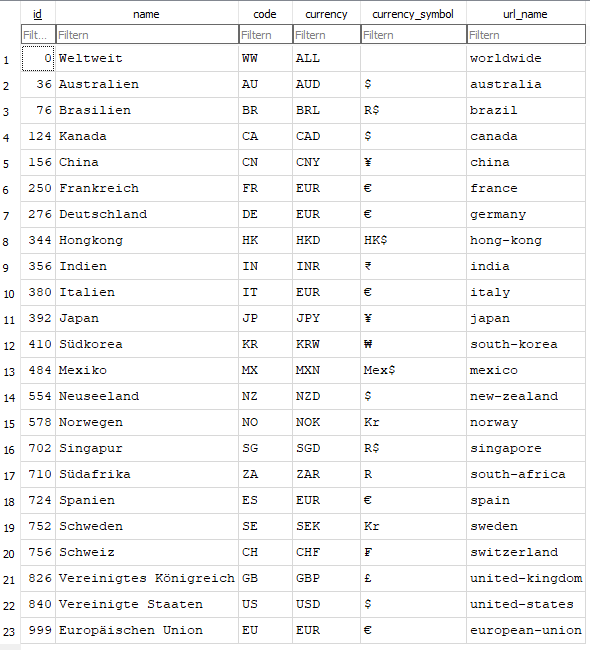
| RelevantCurrencies | Semicolon-separated list of currencies for which events should be checked. Can be combined with "RelevantCountries" or used individually. If both fields are left blank, the currency(ies) will be determined based on the asset class. Relevant values can be found in the screenshot at the end of the blog. | EUR; USD; CHF | |
| RelevantCountries | Semicolon-separated list of countries for which events should be checked. Can be combined with "RelevantCurrencies" or used individually. If both fields are left blank, the currency(ies) will be determined based on the asset class. Relevant values can be found in the screenshot at the end of the blog. | DE;US;ES;CH |
Notes on the threshold values:
Each importance type (low, moderate, high) is assigned a fixed value.
Low = 2, Moderate = 5, High = 10
The values of all events that meet at least the rating level and are included in the rating period are added together and checked against the threshold of the respective rating period.
Example:
The rating level is set to "Moderate" and it is being checked for "Future Events".
Seven US economic events are scheduled for the "Future Events" period. Four of these are considered low, two moderate, and one high.
Due to their rating level, the four events marked "low" are not rated. The values of the other events are added together:
2 x 5 (value of "Moderate") = 10
1 x 10 (value of "High") = 10
Total: 10 + 10 = 20
If the threshold for "FutureEvents" is set to 20 or lower, no new orders will be executed and no breakout checks will take place until these events are over.
If the threshold for "FutureEvents" is set to 21 or higher, the system continues to check for breakouts and execute new orders.
For most assets, a Moderate or High valuation level is recommended, depending on how news-sensitive the asset is.
The threshold values of 10 for Future, 5 for Near and 10 for Previous have proven to be a good measure in this regard.
Note on using News-Guard in backtesting:
The News Guard requires an offline database in the strategy tester containing previously exported data from the economic calendar.
You can use my free tool News Extractor for this: https://www.mql5.com/de/market/product/166210
Single-Symbol Classification
| Parameter name | Unit | Description | Example value(s) |
|---|---|---|---|
| Asset Category | enum | Asset class for classification (e.g., for News Guard). "Autodetect" attempts to identify the correct asset class based on the symbol. to determine and is heavily dependent on the broker. | Auto/Unknown |
| Trading Session | enum | Session class for session-based timing/protection logic. | Auto/Unknown |
ORB Timing Settings
| Parameter name | Unit | Description | Example value(s) |
|---|---|---|---|
| Range Starttime Mode | enum | Specifies how the range start time is determined. | Midnight Offset |
| Range Start Offset | min | Start offset relative to the selected start time logic. | 0, 60, 420 |
| Range Build Duration | min | Duration of the range formation phase. | 15, 30, 60 |
| Trade Starttime Mode | enum | Specifies how the trade start time is determined. | After Range End |
| Trade Start Offset | min | Delay after the range ends before trading is allowed. | 0, 5, 15 |
| Trade Window Duration | min | Length of the time window in which new trades may be opened. | 60, 90, 180 |
Session Management
| Parameter name | Unit | Description | Example value(s) |
|---|---|---|---|
| Enable News-Guard | on/off | Blocked entries during relevant news periods (calendar database). | on / off |
| One trade per day | on/off | Maximum one trade per day (per symbol). | on / off |
| Close on end of day | on/off | Closes open positions at the end of the day. | on / off |
| Fixed daily closing time | min | Fixed daily closing time from midnight (0 = disabled). | 0, 1320, 1380 |
| Close on selected session end | on/off | Closes positions at the end of the selected session. | on / off |
Timeframe Settings
| Parameter name | Unit | Description | Example value(s) |
|---|---|---|---|
| Breakout Timeframe | TF | Timeframe for signal/breakout evaluation. | M5, M15 |
| ATR Timeframe Mode | enum | Automatically derive or manually define the ATR timeframe. | Auto, Fixed |
| ATR Timeframe | TF | Timeframe for ATR (if fixed). | M5, M15 |
| ADX Timeframe Mode | enum | Automatically derive or manually specify the ADX timeframe. | Auto, Fixed |
| ADX Timeframe | TF | Timeframe for ADX/DI (if fixed). | M5, M15 |
General Setup Settings
| Parameter name | Unit | Description | Example value(s) |
|---|---|---|---|
| Active Breakout Setup | enum | Select the active setup (AB or PR). | AB, PR |
| Require Close Outside Range | on/off | Signal is only valid if a candle closes outside the range (fakeout reduction). | on / off |
Acceptance Breakout
| Parameter name | Unit | Description | Example value(s) |
|---|---|---|---|
| AB Confirmation Window | bars | Number of closing candles that must remain outside the range (confirmation). | 0, 1, 2 |
| AB Allow continuation | on/off | Allows entries even if the market has already closed (Continuation on/off). | on / off |
Pullback Retest
| Parameter name | Unit | Description | Example value(s) |
|---|---|---|---|
| PR Retest Depth | % | Minimum depth of the pullback towards the range to evaluate a retest. | 20, 30, 50 |
| PR Retest Window | bars | Maximum number of bars where the retest must take place. | 3, 4, 6 |
| PR Rebreak Window | bars | Maximum number of bars after retest in which the rebreak must occur. | 2, 3, 5 |
| PR Invalidation Depth | % | Invalidation depth (0 = off, 100 = opposite range limit). | 0, 50, 100 |
Risk & Position Management
| Parameter name | Unit | Description | Example value(s) |
|---|---|---|---|
| Maximum Risk Per Trade | % | Maximum risk per trade; lot size is calculated from the stop loss distance. | 0.25, 0.50, 1.00 |
| Risk-Reward Ratio | x | Take-profit as a multiplier: TP = SL × RR. | 1.5, 1.8, 2.0 |
| Stop-Loss to Range Ratio | x | SL distance relative to range size (1.0 = full range). | 0.8, 1.0, 1.2 |
| Stop-loss anchor point | enum | SL anchor relative to the entry or the ORB edge (with the same range-ratio logic). | Entry, ORB Edge |
Range Quality Filters
| Parameter name | Unit | Description | Example value(s) |
|---|---|---|---|
| Min ORB Range | points | Minimum size of the ORB range (0 = off). | 0, 80, 150 |
| Max ORB Range | points | Maximum size of the ORB range (0 = off). | 0, 400, 700 |
| Minimum ORB Range vs. ATR | % | Minimum ratio of Range to ATR (0 = off). | 0, 30, 60 |
| Max ORB Range vs ATR | % | Maximum ratio of Range to ATR (0 = off). | 0, 150, 250 |
| Max Spread vs ORB Range | % | Spread guard relative to the range. | 2, 4, 6 |
Breakout Candle Quality
| Parameter name | Unit | Description | Example value(s) |
|---|---|---|---|
| Min body | % | Minimum body size of the signal/breakout candle (0 = off). | 0, 20, 35 |
| Min close location | % | Minimum close position within the candle in signal direction (0 = off). | 0, 60, 75 |
| Minimum close distance | points | Minimum distance of the close beyond the range limit (0 = off). | 0, 10, 25 |
Entry Momentum Filters
| Parameter name | Unit | Description | Example value(s) |
|---|---|---|---|
| ATR Period | bars | Period length for ATR. | 14, 18, 21 |
| Min close beyond ORB level | x ATR | Minimum impulses: Close must be at least x·ATR beyond the ORB level (0 = off). | 0.0, 0.15, 0.30 |
| ATR Rising Lookback | bars | Optional Guard: ATR must "rise" above Lookback (0 = off). | 0, 3, 5 |
Trade Lifetime & Stagnation
| Parameter name | Unit | Description | Example value(s) |
|---|---|---|---|
| ADX Period | bars | Period length for ADX/DI (for TRF/Trend response). | 14, 18 |
| Min ATR Progress (Alive Check) | x ATR | Minimum progress in ATR units to avoid stagnant trades (0 = off). | 0.20, 0.30, 0.40 |
| Max Trade Duration | min | Hard maximum hold time (0 = off). | 0, 120, 240 |
| Dead Trade Timeout | min | Timeout for "dead trades" (0 = off). | 0, 30, 60 |
| TRF Extension | min | Extension window of the TRF logic. | 3, 5, 10 |
| TRF ADX Threshold | value | Minimum ADX at which TRF/trend reaction becomes active. | 12, 15, 20 |
Exposure Overlay
| Parameter name | Unit | Description | Example value(s) |
|---|---|---|---|
| Exposure Mode | enum | Enables symbol-based exposure/entry gating and risk modulation. | None (off) |
| Same-Direction Winner Action | enum | Behavior upon further signal in the same direction, if position is "Winner". | Reject |
| Same-Direction Loser Action | enum | Behavior upon further signal in the same direction when position is "Loser". | Reject |
| Opposite-Direction Action | enum | Behavior in the event of a contrary signal (e.g., blocking / close & reverse). | Reject |
| Neutral Action | enum | Behavior in a neutral state (e.g., scaling risk). | Scale Risk |
| Winner Threshold | R | From what point is a position considered a "Winner" (in R). | 0.20, 0.30, 0.50 |
| Loser Threshold | R | From what point is a position considered a "loser" (in R). | 0.10, 0.20, 0.30 |
| Use ATR Thresholds | on/off | Optionally switches from R-thresholds to ATR-thresholds. | on / off |
| Winner Threshold | x ATR | Winner threshold in ATR (when enabled). | 0.30, 0.50, 0.80 |
| Loser Threshold | x ATR | Loser threshold in ATR (when activated). | 0.20, 0.30, 0.50 |
| Winner Add-On Risk Multiplier | x | Risk multiplier for add-on at Winner. | 0.10, 0.25, 0.50 |
| Scale-In Base Risk Multiplier | x | Base risk per additional layer (scale-in). | 0.25, 0.50, 0.75 |
| Scale-In Risk Decay per Layer | x | Reduction factor per additional layer. | 0.40, 0.50, 0.70 |
| Neutral Risk Multiplier | x | Risk multiplier in a neutral state. | 0.50, 1.00, 1.25 |
| Maximum layers per symbol | count | Maximum number of additional layers per symbol. | 1, 2, 3 |
| Maximum Total Risk per symbol | % | Total risk cap per symbol across all layers. | 0.5, 1.0, 1.5 |
| Layer Distance Basis | enum | Basis for minimum distance between layers (e.g., range/TR-based). | Range/TR |
| Minimum Layer Distance Multiplier | x | Minimum distance = base × multiplier. | 0.25, 0.50, 1.00 |
Profiles / Multi-Symbol Configurations
| Parameter name | Unit | Description | Example value(s) |
|---|---|---|---|
| Enable Multi-Symbol | on/off | Enables multi-symbol operation via profiles. | on / off |
| Active Configurations | text | List of active profiles, separated by semicolons. This allows profiles to be switched on and off without having to delete the entries in the profile string. | 1;2;3 |
| Profile NN (part 1) | text | Profile string part 1 (NN = 01..20). | Sym=GER40;...; |
| Profile NN (part 2) | text | Profile string part 2 (continued). | ...; |
| Profile NN (part 3) | text | Profile string part 3 (continued). | ...; |
Note on the use of the profiles:
After running a test using the strategy tester, the current settings are saved in the common path under ".\ORB Evolution Vx.x\Settings".
The filename consists of the symbol name, the entry timeframe, and the ATR timeframe, e.g., GBPUSD_PERIOD_M1_PERIOD_M5.cfg.
Open the file in an editor that displays the length of the current line. Divide the parameters into approximately 3 equal parts, with each part being a maximum of 255 characters long.
Now enter the individual components in a profile setting. To activate the profile, add the new profile number to the "Active Configurations" parameter.
It doesn't matter whether you cut off the text in the middle or always take whole parameters, parts 1-3 of each profile will be seamlessly assembled.
The only important thing is that you don't cut off any semicolons and that no part is longer than 255 characters.
You can also omit parameters if they correspond to the current settings. For each profile, the current input parameters are set first and only then overwritten with the settings from the profile string.
Note : After trying numerous other multi-symbol parameterization methods that worked perfectly locally, such as reading .set files or saving settings in a database, but repeatedly failed with certain hosting solutions, I opted for this method. While it may seem somewhat cumbersome, it always works. I hope writing this down after testing has made it a bit easier.
If you have any knowledge that also works in lifetime hosting, please feel free to leave me a comment or send me a private message.
Global Settings
| Parameter name | Unit | Description | Example value(s) |
|---|---|---|---|
| Protect Margin Level | on/off | Pre-Trade Check: prevents trades in critical margin situations. | on / off |
| Log Level | level | Log detail level (0 = errors only). | 0, 1, 2 |
| Enable Journal Logging | on/off | Enables/disables journal logging. | on / off |
Visualization: ORB Range Boxes
| Parameter name | Unit | Description | Example value(s) |
|---|---|---|---|
| Show ORB Boxes | on/off | Displays ORB range and trade boxes in the chart. | on / off |
| Update Trade Box Each Bar | on/off | Updates the trade box per bar (otherwise only final). | on / off |
| Max Visualizations Per Symbol | count | Maximum number of historical visualizations (0 = unlimited). | 0, 10, 20 |
| Range Phase Box Color | color | Color of the range-phase box. | Blue (default) |
| Trade Phase Box Color | color | Color of the trade phase box. | Orange/Red (default) |
| Trade Range Band Color | color | Color of the trade range band. | Gray (default) |
| Range Phase Box Color | color | Color of the range box in case of quality failure. | Red (default) |
| News-Time Color | color | Color of the vertical newstime line (shows start/stop of news) | Gold (default) |
| Draw Boxes Behind Candles | on/off | Render boxes behind candles. | on / off |
| Keep Box History | on/off | Keep history (do not delete). | on / off |
| Show ORB Range Band During Trade Window | on/off | Display range band during trade window. | on / off |
A notice:
When a range box is clicked during live operation, a label with additional information is displayed.
Unfortunately, the strategy tester does not respond to clicks, therefore the stats are displayed here in abbreviated form in one line.
Visualization: Levels & Stats
| Parameter name | Unit | Description | Example value(s) |
|---|---|---|---|
| Show SL/TP Levels | on/off | Display SL/TP levels in the chart. | on / off |
| SL Line Color | color | Color of the SL line. | Red (default) |
| TP Line Color | color | Color of the TP line. | Green (default) |
| Level Line Style | enum | Line style of the level lines. | Solid |
| Level Line Width | width | Line width (1..5). | 1, 2, 3 |
| Show Range/ATR Stats Panel | on/off | Display Stats Panel (Range/ATR/Quality etc.). | on / off |
| Stats Font Size | px | Font size in the Stats panel. | 8, 9, 10 |
| Stats Text Color | color | Text color of the Stats panel. | White (default) |
Feature Matrix: Free vs. Paid (DE)
| feature | Advanced Range Breakout (FREE) | ORB Evolution (PAID) |
|---|---|---|
| Operating mode | Single symbol | Multi-symbol + Single |
| Setups | AB + PR | AB + PR |
| Orders | Market Orders | Market Orders |
| Range/Trade Time Window | ✅ | ✅ |
| Advanced startup modes & session options (Start modes, session end/close, auto-session/asset derivation) | ❌ | ✅ |
| One-Trade-per-Day / End-of-day / Fixed Close | ✅ | ✅ |
| Close at the end of the session | ❌ | ✅ |
| Risk-based Lot Sizing (Risk%) | ✅ | ✅ |
| TP via RR, SL via Range Ratio | ✅ | ✅ |
| Stop Loss Anchor (ORB Edge vs. Entry) | ❌ | ✅ |
| AB “No-Continuation” (fresh-only) | ❌ | ✅ |
| Range Quality Filter | ❌ | ✅ |
| Breakout Candle Quality Filter | ❌ | ✅ |
| Momentum/ATR Filters | ❌ | ✅ |
| ATR/ADX Timeframe Modes | ❌ | ✅ |
| Trade Lifetime / Dead Trade / Alive Check | ❌ | ✅ |
| TRF (ADX/DI + Extension) | ❌ | ✅ |
| News Guard (Calendar DB / SQLite) | ❌ | ✅ |
| Exposure Overlay (Risk Mod / Scale-In / Layers) | ❌ | ✅ |
| Profile system (up to 20) | ❌ | ✅ |
| Visualization & Stats Panel | ❌ | ✅ (especially Single-Symbol View) |
| Profile Export after Tester Run | ❌ | ✅ |
(❌ = not included in the free basic version)
Preview for future versions:
-
ADR Guard : Reject if there is "too much daily movement", optional TP cap + RR gate
-
Cost/spread guards : more robust, context-dependent
-
Continuation protection : Chase Guard + Follow-Through Check
-
Tier system expansion : adaptive confirmation, later risk-adaptive
-
Context/Monitoring : Approach/Chop/Failed Attempts filter
-
Swing Impulse & Overextension : additional quality gates
-
Stability/Comfort : State recovery after restart, weekday filter
Risk Disclaimer / No Investment Advice
This Expert Advisor (EA) is a software tool for informational and automation purposes only and does not constitute investment advice. Trading Forex/CFDs and other leveraged products involves substantial risk and may result in the loss of all invested capital. Past performance, backtests and optimizations are not indicative of future results. Live trading results may differ significantly due to spread, slippage, commissions, execution speed, data quality, broker feeds, VPS/latency, trading sessions, symbol specifications and parameter selection.You are solely responsible for setup, parameters, risk/money management, and compliance with local laws and broker rules. Use at your own risk. It is strongly recommended to test on a demo account first and to use conservative risk settings.
Attachments:
1) Overview of currencies and country codes for news management
2) Visualizations in the strategy tester
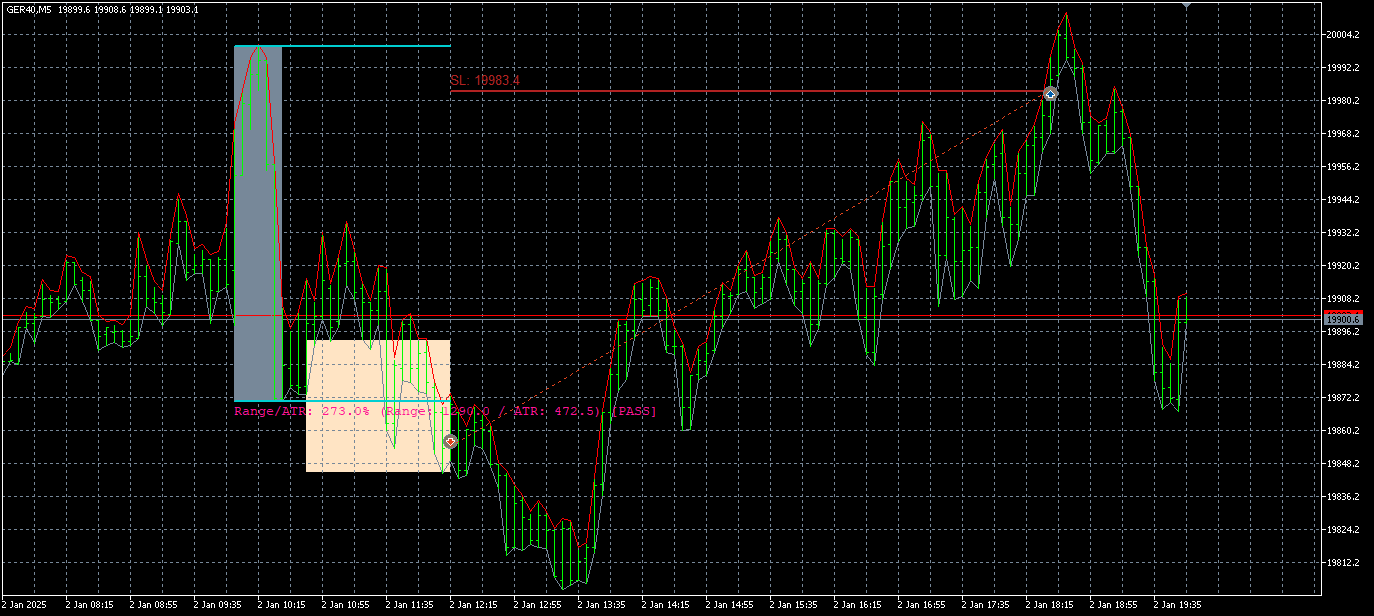
Legend:
grey rectangle = range
Salmon-colored rectangle = trading period and trading range
blue line = lower range limit for visualizing breakouts
Magenta font = information on range size and ATR
3) Backtests my multi-symbol-settings 2025