DISCLAIMER:
This blog does not encourage nor promote binary trading. The tool is provided "AS IS", use it on your own risks. No warranty, no liability. Binary trading is an extremely high-risk financial activity. Please be aware of your local legal requirements.
Prelude
One might ask, how relevant is MT5 Terminal to trade binary option on Binomo when we consider the following:
- Policy limitation
Binomo does not like automated trading, they even state it on their policy https://binomo.com/information/agreement as quoted below:
"12.12. If during the conducting of Trading Operations on the Website, the Client makes a profit using not directly approved by the Company trading bots, artificial intelligence, specialized software or vulnerabilities in stock exchange software or the Company Server, such profits are not the Company’s financial responsibility and are not paid to the Client."
In case you might ignore this, keep on reading ;) - Technical limitation
MT5 Terminal has limited accuracy in displaying assets price, which at the time of this writing, it is limited to 8 digits only. There is also limitation in displaying subminute timeframe chart. Like it or not, MT5 is aging and lacking modern charting features. Let's hope that it will improve sooner to catch up with its competitors.
In case you can live with these technical limitations, keep on reading then ;) - Any other limitations ?
Well, it might be too boring to list more limitations. The point is YOU should know what you're doing. It might cost you some fortune.
The binomo-mt5 connector
The following solution will allow you to create any automated binary trading options experts easily. Its interface is simple and it runs in real-time utilizing websocket connections, just like binomo's own browser platform.
It has built-in martingale feature with optional support for on-profit martingale (or some people call it, reverse martingale). Another useful feature is the LOSS and PROFIT limit, which will alert you when the limit is reached and further trading will be disabled. Last but not least, it also has active orders limit, so that you do not place too many orders at once. Currently binomo FTT and 5ST trading are supported.

Figure 1. binomo-mt5 connector
As you can see in Figure 1, binomo-mt5 connector provides simple and clean user interface. It display some latest active and completed orders. It also put markers on chart when orders are placed using binomo-mt5 connector to help you analyze decision made for the orders.
Binomo custom symbols
binomo-mt5 creates and updates selected binomo asset as MT5 custom symbols with following timeframes:
- 1 second, required for 5st trading
- 5, 15, and 30 seconds
- M1 which is based for other higher timeframe chart as supported by MT5
All timeframes are updated in real-time as you can see in Figure 2.
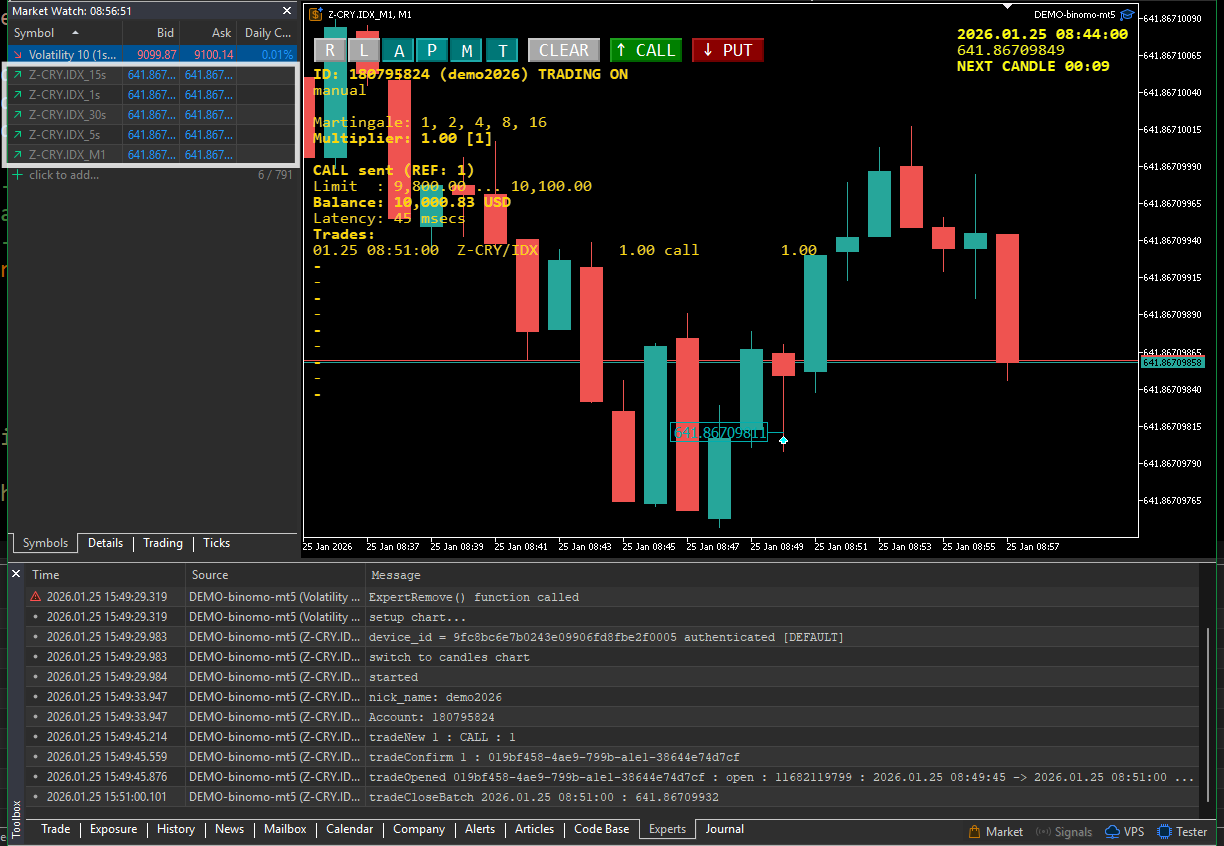
Figure 2. Binomo custom symbols
User interface
Let's have a closer look at the user interface in Figure 3. 
Figure 3. user interface
The buttons have following function respectively:
- R: Reconnect
It allows you to disconnect and reconnect to binomo server without closing the chart. You might want to do this in case you experience large latency in current connection. - L: Limit reload
Pressing this button will update the LOSS and PROFIT limit base on current balance. In case you have the need to move these limits during a trading session without restarting the binomo-mt5 expert. - A: Alert sound toggle
This button enable / disable alert sound when LOSS / PROFIT limit is reached. - P: Profit martingale toggle
To toggle between normal / reverse martingale, press this button. Please notice the note displayed on the chart to indicate the "on profit" martingale. - M: Martingale ON/OFF toggle
Enable / disable martingale, which can be turned on/off at any time as you like. - T: Trading ON/OFF toggle
You can manually disable/enable trading using this button. - [CLEAR] remove all markers
Pressing this button will remove all orders' markers on the chart. - [CALL] place a CALL order
To place a CALL order using default amount and default expire time. - [PUT] place a PUT order
To place a PUT order using default amount and default expire time.
Keyboard shortcuts
binomo-mt5 also support keyboard shortcuts as follow:
- Key 'c' or key 'b'
Place a CALL order using default amount and default expire time. - Key 'p' or key 's'
Place a PUT order using default amount and default expire time. - Key 'r'
To disconnect and reconnect to binomo server - Key 'y'
To disconnect and reconnect to binomo server and rebuild the binomo's custom symbols - Key 'a'
To toggle the alert sound ON/OFF - Key 't'
To test alert sound manually - Key '0' (zero)
To reset current martingale - Key 'm'
To toggle martingale ON/OFF - Key 'w'
Toggle reverse martingale. W as in winning (profit) - Key 'x'
Clear orders' markers on chart - Escape-Key
Disable trade - Tab-Key
Enable trade
Interfacing with other Expert / Indicator
To support advance trading and or own custom trading algorithm you can use MT5 global variables as you set in binomo-mt5 inputs, as shown in Figure 4.
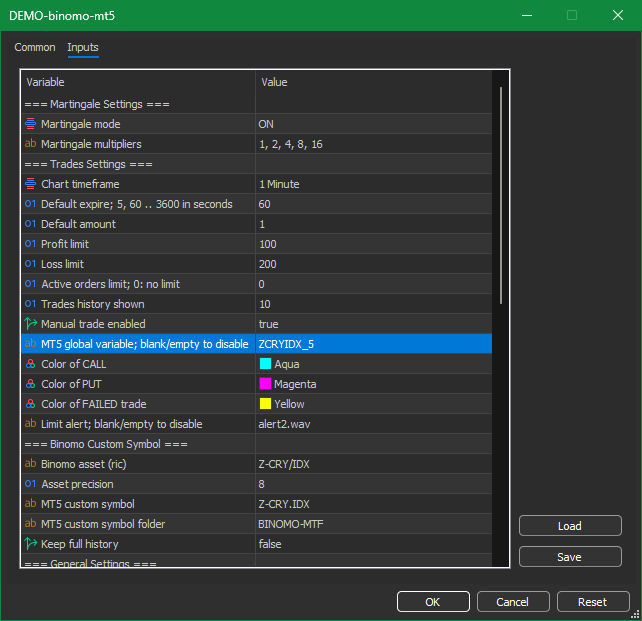
Figure 4. binomo-mt5 inputs
In this example the global variable is set to ZCRYIDX_5, then following global variables are used to place order:
- ZCRYIDX_5
place an order as following: - set to positive value (greater than zero) to place CALL order
- set to negative value (less than zero) to place PUT order
- a zero will be ignored
- ZCRYIDX_5_AMOUNT
set to zero to use default amount as set in the expert input, or any other positive value as valid binomo order amount. - ZCRYIDX_5_EXPIRE
set to zero to use default expire period as set in the expert input, or any of following value as allowed by binomo order expiry period: - 5 seconds for 5ST trading
- 60, and any other valid seconds up to 3600 seconds
It is recommended to first set ZCRYIDX_5_AMOUNT, ZCRYIDX_5_EXPIRE and then as last set ZCRYIDX_5 to place the order. This will make sure the the correct amount and expire period are used for the placed order.
Please make sure there are no conflicting experts and/or indicators that might change the same global variables.
CLOSURE
I hope you find this blog informative and useful to give the attached DEMO-binomo-mt5.ex5 expert a try. It only allow binomo DEMO account for testing.
Feel free to contact me to acquire full version subscription which allow to trade using REAL account.
The subscription will allow me to maintain this tool to adapt changes on binomo server and keep it functioning.
You can reach me at https://t.me/sefjkt or by telegram @sefjkt
TEASER:
In my next blog, I'll provide a simple example how to write an automated binary trading to utilize binomo-mt5.
See you soon and looking forward hearing for your feedbacks and suggestions.
CREDITS:
- I would like to thank Aleksandr Slavskii (https://www.mql5.com/en/users/s22aa) for his excellent "Comment - library for MetaTrader 5" (https://www.mql5.com/en/code/53499)
- And thumbs-up for the excellent "AlgoBook" by Stanislav Korotky (https://www.mql5.com/en/book).
IMPORTANT
1. Please allow following domains in MT5 Terminal as shown in Figure 5:
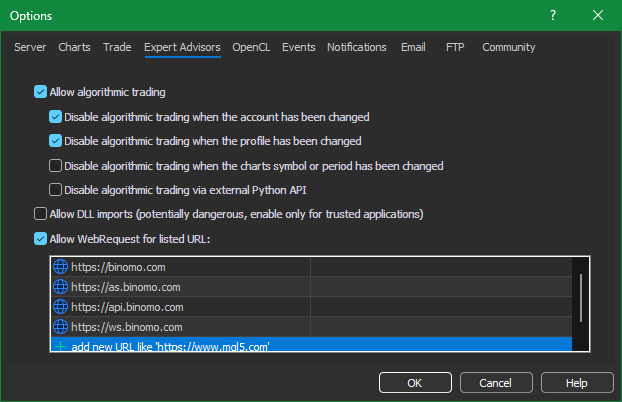
Figure 5. Required binomo domains
2. Please set your binomo LOGIN EMAIL and PASSWORD in binomo-mt5 inputs as show in Figure 6.
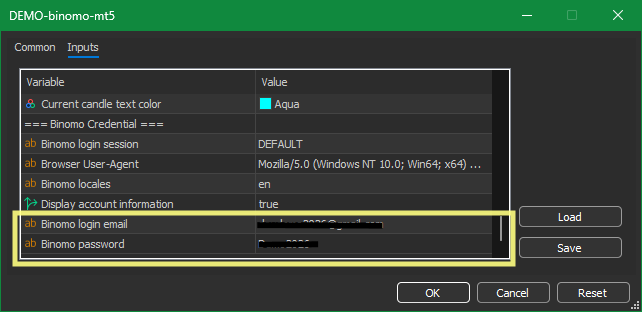
Figure 6. Binomo LOGIN and PASSWORD
Good luck and enjoy.
Update:
- 2026-01-27
posted a simple auto trading code example here https://www.mql5.com/en/code/68693
(Binary tradng based on candle colors - indicator for MetaTrader 5)