
[ Русский ]— [ 中文 ]— [ Español ]— [ Português ]— [ 日本語 ]— [ Deutsch ]— [ 한국어 ]— [ Français ]— [ Italiano ]— [ Türkçe ]
Download the demo version:
GridManual_MT4_Demo - download
GridManual_MT5_Demo - download
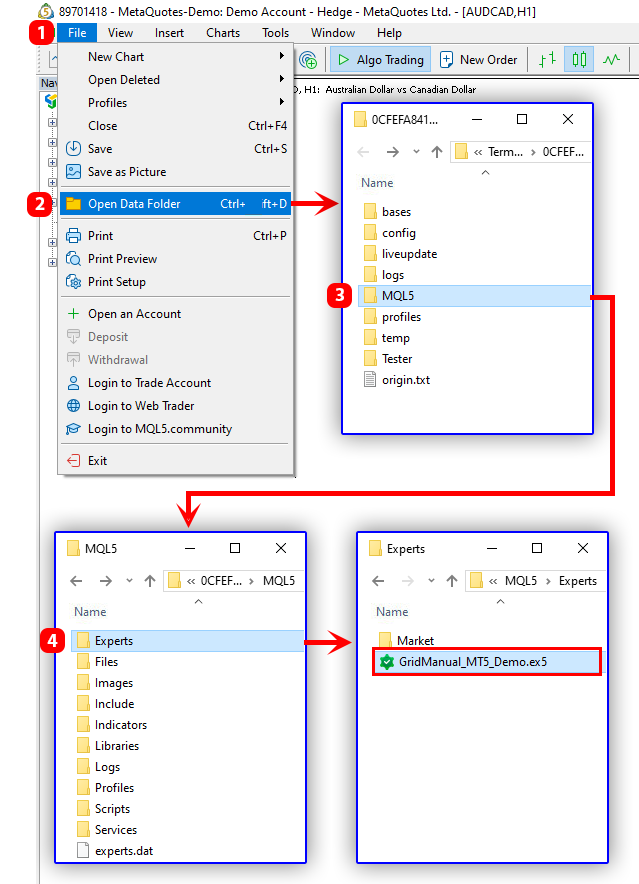
Open the MetaTrader 4 or 5 platform and go to the "Experts" folder:
- for MT5 - "File" button in the terminal menu > "Open Data Folder" > "MQL5" > "Experts"
- for MT4 - "File" button in the terminal menu > "Open Data Folder" > "MQL4" > "Experts"
Copy the downloaded demo version to the "Experts" folder.
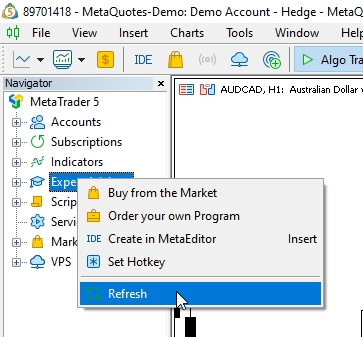
Refresh the "Expert Advisors" tab in the "Navigator" window (right-click on the "Expert Advisors" tab and select "Refresh" in the context menu).
Full instructions here.
The demo version has the following limitations: it only works for 14 days on a demo account.
If you have any questions, please ask them in the comments below.
Files:
GridManual_MT4_Demo294.ex4
1631 kb
GridManual_MT5_Demo294.ex5
1506 kb




