Three Little Birds EA is on MT5: honest notes on a grid and hedge EA

I don’t code to sell. I code to survive.
Before you read on: don’t use money you can’t afford to lose. Not for 3LB, not for any EA. If you need quick money, close this page. This isn’t it.
I started 3LB in 2019 and I’m still fixing it. Most of what’s inside is there because something went wrong once, and a lot of that was my own money. So when I list the bad parts below, I’m not guessing.
The MT5 version is out now, and MT4 got an update. Same features, same logic on both.
MT4 updates: https://www.mql5.com/en/market/product/103535/updates
MT5: https://www.mql5.com/en/market/product/199070#!tab=overview
What is it, really
3LB is a grid and hedge EA for H4. It opens a cycle, works it back when price goes the wrong way, and gets out through a stack of exit rules. It’s set up for gold, silver, Bitcoin, oil, the dollar index, US30, US100, US500, Tesla and Google.
It has no stop-loss. A hedge does that job. I explain what that means further down, and you need to understand it before you touch anything else.
What you need
H4 (the EA sets it itself), $10,000 minimum, and a hedging account on MT5. Double EA mode needs $10,000 per chart, $20,000 in total. Netting accounts aren’t supported in this version. Other pairs run too, but test them first. Brokers spell symbol names their own way, so check that the EA picked up yours.
Don’t take my word for it
I won’t post my own backtests. Any screenshot I show you would be the best one I have, so I show none. Check it yourself, on your own broker.
Start with the free demo on this page. It runs in the Strategy Tester only, which is plenty to see how it behaves. Use your broker’s symbol and your own dates, switch on visual mode and watch the orders come and go. Set Debug to true and read the Experts tab. It tells you what the EA is doing and why. Test more than one period, and go find the ugliest stretch you can. History shows how it behaved, never how it will behave.
Double EA mode is the exception. It can’t be tested in the Strategy Tester or the free demo, so for that mode the first step is a demo account, then a cent account.
The demo can’t run on a live chart, so the next step means renting or buying. Put it on a demo account first. Then a cent account, which people skip and shouldn’t. Same settings, same lot sizes. A result of 50 on a standard account shows as 50 on a cent account, just in cents. You get real fills, real spreads and real nerves, and you see what the same run would be in dollars and how deep the drawdown goes, with a hundredth of the money. On a cent account, 10,000 units is about a hundred real dollars. Ask your broker first whether the cent account uses the smaller contract size and the same minimum lot. If not, the numbers won’t line up.
Standard account last.
One note on renting. The rental fee doesn’t count toward the purchase price, that’s how the Market works. And if a rental runs out while a cycle is open, the EA comes off the chart and the positions stay. Renew in time, or close the cycle first.
About risk
The defaults are set for high return, so the risk is high too. They come as a pair. There’s no holy grail. I don’t have one and neither does anyone else.
How it trades
Three parts work together.
Grid opens the position in steps and works it back when price goes against you.
Hedge is the lifeboat. You want one when the ship is going down, but the best trip is the one where you never need it. That’s why the entry gets so much work.
Brute Force is the pushy one. It only wakes up when a cycle is already in profit and price is moving fast. Then it adds on the winning side, within a limit and only if your margin allows. If the move keeps going, the cycle pays sooner. If it turns, you’ve just added size into the turn. Better you hear that from me than find out on a live chart.
Use all three or only the ones you want. Every value is yours to change.
No stop-loss
Where another EA puts a stop-loss, 3LB puts a hedge. I did that on purpose, and it costs you something.
Here’s a bad day. Price goes against the cycle, grid orders pile on, the position gets heavy. At the spot where a stop would normally sit, the hedge opens on the other side. The loss stops growing, but it hasn’t gone anywhere. It’s still floating. Then the cycle waits for a way out at break-even or better. That can take days, and all that time your equity shows red and your margin is working.
If you can’t live with that, don’t run this.
How it gets out
There isn’t one exit. There are layers.
The cycle has its own take-profit. Then trailing SL watches each order and only ever moves stops toward safety. A Director decides whether trailing is allowed right now. The answer is no when a hedge is open, when you’ve paused it, when price is racing, or when the trend is strong enough that cutting early would be a mistake. If it says yes, a Manager runs the layers in order, and it takes a lock first so two routines never fight over the same stop. There’s a basic trail, a trail that waits for a candle to close, a smart one that reads volatility and structure, a re-alignment after each move, and a faster move when the market speeds up.
Trailing DD watches the whole basket on equity, not single orders. Once profit reaches its activation level, it follows the highest equity the cycle has seen. If equity falls back from that peak by more than the allowed width, the whole basket closes in profit. The width adjusts to the lot size, and the peak survives a terminal restart. In a strong trend it holds back and lets the cycle run.
Force Close is the one that says “enough.” It’s on by default. Once a cycle is far enough in profit, it watches how fast the market is moving. If price starts running hard against the heavier side of the cycle, it closes the whole basket in profit and resets. If trailing is already working and no hedge is open, it tightens the trail instead of closing. It never closes a cycle that’s in the red. You can also set the next cycle to start the other way round.
Then there’s break-even, and a smart close for hedged cycles.
The downside: trailing sometimes closes a good move earlier than you’d like. I can live with that. A banked cycle beats a good one that came back.
Guardian Mode
On by default. Open a trade yourself, from the chart or your phone, and 3LB looks after it as if it were its own. It does that for every manual trade on that symbol, so if you want one left alone, turn Guardian off or trade it on another symbol.
Limits, reports and buttons
Grid, Brute Force and Boom each have their own margin level filter. The Grid one is off by default, the Brute Force one is on. You pick how much room to keep.
You also get limits per session, day, week and month, plus a drawdown limiter. They’re all off until you turn them on. They’re there for people who trade under daily and total drawdown rules, like many prop firm accounts. Careful, though. When the drawdown limiter fires it closes positions at a loss, and some prop firms don’t allow hedging or martingale at all. Read your firm’s rules first.
Turn on Telegram and 3LB reports to you every so often with a chart screenshot, and pings you when a trade opens, closes or trails. You shouldn’t have to stare at a screen. The EA can tell you. It’s off by default. You need your own bot, and you have to allow Telegram’s address in the terminal’s WebRequest list.
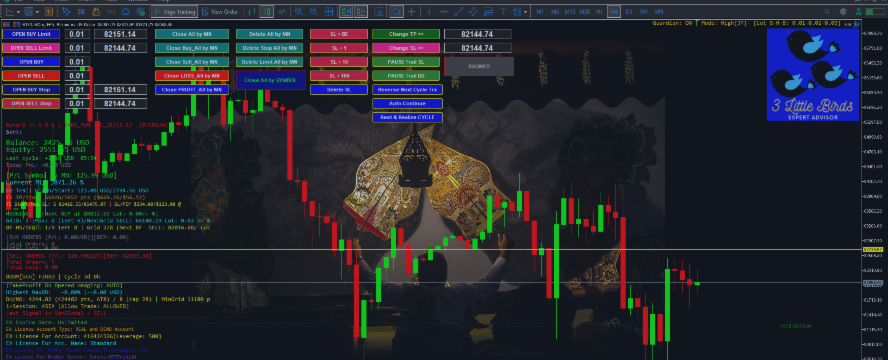
The chart has buttons for most of what you’d do by hand: open and close trades, close by side or by profit or loss, delete pending orders, break-even, shift or delete SL and TP, switch trailing, reverse the next cycle, auto-continue, rest and realize, and send a Boom Trade.
Boom Trade
Off by default. It only works on a cycle that’s already winning. It never starts one and never tries to save a losing one. It adds one more position in the winning direction. Right after it opens, the winning side gets a stop at break-even or better, the Boom order included. If that stop can’t be placed yet and the Boom starts losing, the Boom order is cut and the cycle stays.
The SEND BOOM TRADE button works even with the automatic version off, and it tells you whether it’s safe. Gold means wait. Blinking green means ready. Gray means one is already running. Press it too early and a box pops up with the reason.
A manual Boom has a second step. Once price has moved far enough, the stop moves up to the Boom entry. After that the trailing takes over.
On my own gold data, Boom doesn’t create an edge. It only makes a failed attempt cheaper.
OneShot
Also off by default. One trade at a time, with a stop-loss and a take-profit. No grid, no hedge. It takes entries from the same logic as the main EA. It checks the spread before it enters, respects your limits, and can take a break after a losing stop. You set how long. Smart Close moves the stop to break-even once the trade goes your way, then trails it. With Guardian on, a manual trade without SL or TP gets the missing ones. That’s handy when you’re away from your desk and open a trade from your phone.
No hedge behind it. When the stop is hit, you take the loss.
Double EA mode
Also off by default. Think of a small company with two units. One unit only buys and the other only sells. Each does its own job and keeps its own orders, but they share one set of books. When the books show enough profit to cover the cost of starting again, both units close, both reset, and a new round begins.
When the market runs one way, one unit is under pressure while the other is ahead. The books stay open until the two together are enough. Every round that closes, closes in profit by design. What the design can’t tell you is how long a round takes, or how much margin it uses while it waits.
You open two charts on the same symbol, one set to buy only and one to sell only, each with its own magic number. The exit is shared. You can let the EA decide when to close the pair, or set a fixed profit for it. While a close is running, no new orders are sent, and both charts reset before the next round. If one chart or terminal drops out, the other takes over the close, and the one that comes back resets on its first tick.
It needs $10,000 per chart, $20,000 in total.
It can’t be backtested. The Strategy Tester runs one EA on one chart, so the link between the two never exists there, and the free demo can’t show it either. The only way to check it is a forward test on a demo or cent account. To see it at all, you have to rent or buy first.
What you won’t like
It needs real capital, and the minimum is not a suggestion. Grid, martingale and hedging can pull a position back, and they can also eat a lot of margin when the market stays against you. A cycle can sit open for days with a big floating loss. Brute Force adds size, sometimes right into a reversal. There are many settings, and the defaults fit the listed instruments only. Your broker, spread and execution change the result. Double EA mode can’t be backtested, so there’s nothing to check before you rent or buy. Forward test it first, on a demo or cent account. I show no results, so the checking is on you. And no EA wins every cycle. This one doesn’t either.
Who this is for
I priced 3LB high and I won’t defend the number. You’re paying for years of fixes, for control over every part of it, and for me answering when you write. I’d rather have a few buyers and renters who know what they’re holding than a lot who don’t.
If you run it, tell people what really happened, good or bad, in the reviews. I won’t ask you for five stars. A bad honest review helps the next buyer more than a good one that was invented.
Start with the free demo on this page. Your symbol, your dates, Debug on. If you still like what you see, welcome.
Thanks to everyone who has stuck with 3LB. Questions go in the comments or my messages here on mql5.com. I answer.
Aan Isnaini