

Building a Dynamic Drop List in MQL5
 79
 0

Introduction
Most of us have worked with drop-down lists. When we want to select one item from a list within the same category, we need a control such as a drop-down list. The main challenge is creating and managing a drop-down list made of multiple chart objects (background, selected item, open list, etc.).A drop-down list is a composite control made of several chart objects. Each part must be positioned, shown/hidden, and removed in coordination with the others. This coordination becomes even harder when the control must also work alongside other objects on the chart. In addition, specific action codes must be returned when the list is opened and closed. Therefore, the goal of CDropList is to make this type of control easier for programmers to manage and to simplify that task through a set of methods and properties. By the end of this article, you should be able to create a drop-down list, manage it, and finally destroy it.
How the Drop-Down List is Built
Before looking at the code, the reader needs a clear mental model. Although a drop-down list appears to be a single control, it is actually a composite of several chart objects. CDropList hides these objects behind a unified interface and coordinates them internally.
The control has two parts:
- Main control—always visible: border, background, description label, chosen item, and drop button.
- Drop-down list—visible only when opened: list background, up/down arrows, and the item objects stored in m_drop_items.
This composite design is necessary because each part is a separate chart object with its own name, position, visibility, and event behavior. Managing them directly would require manual creation, positioning, showing, hiding, updating, and deletion. CDropList encapsulates that coordination and exposes a single API.
For example, opening the list shows the list background, arrows, and items; closing it hides them again, while changing the selection updates both the chosen edit box and m_current_mode.
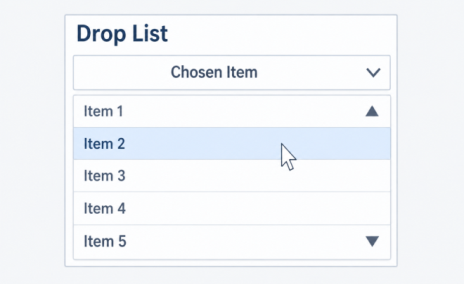
Figure 1: Components of the drop-down object.
Preparing the Class Environment
The class requires two arrow bitmaps, a return-code enum (not custom MQL5 events), a set of dimension constants, and two include files. The arrows were taken from Anatoli Kazharski’s articles. Images of all the other controls can be found in the attachments to these articles.
//+------------------------------------------------------------------+
//| Resources                                                        |
//+------------------------------------------------------------------+
#resource "\\Images\\EasyAndFastGUI\\Controls\\DropOff_white.bmp"
#resource "\\Images\\EasyAndFastGUI\\Controls\\DropOn_white.bmp"
//+------------------------------------------------------------------+
//| Enumerations                                                     |
//+------------------------------------------------------------------+
enum ENUM_CHARTEVENT_DROPLIST
  {
   DROPLIST_EVENT_NO         = 0, //No action
   DROPLIST_EVENT_LIST_OPEN  = 1, //List opened
   DROPLIST_EVENT_LIST_CLOSE = 2, //List closed
   DROPLIST_EVENT_HOVER_OVER = 3, //Hover over an item
   DROPLIST_EVENT_ITEM_CLICK = 4, //Item clicked
   DROPLIST_EVENT_LIST_ROLL  = 5, //List scrolled
   DROPLIST_EVENT_SCROLL_OFF = 6, //Cursor entered: request scroll off
   DROPLIST_EVENT_SCROLL_ON  = 7  //Cursor left: request scroll restore
  };
//+------------------------------------------------------------------+
//| Defines                                                          |
//+------------------------------------------------------------------+
//--- Group 1: appearance only. Safe to change, every position is calculated from them
#define BORDER_MARGIN              3   //Border thickness around the background
#define DROPLIST_LABEL_MARGIN      5   //Gap between the background edge and the description label
#define DROPLIST_CHOSEN_BOX_MARGIN 5   //Gap between the background edge and the chosen box

//--- Group 2: tied to text height and bitmaps. Change these together
#define DROPLIST_TEXT_HEIGHT       20  //Height of the chosen box and of one list row. It must suit the font size
#define BITMAP_SIZE                16  //Width and height of the .bmp resources. It must match the real image size
#define DROPLIST_BUTTON_MARGIN     2   //Gap around the button in the chosen box (20-16)/2, also the gap above the open list

//--- Group 3: limits. Chosen for a compact control that fits a typical chart
#define DROPLIST_MINIMUM_WIDTH     150 //Minimum width of the main block, leaves a 134-pixel chosen box. Keep it below the chart width
#define DROPLIST_MINIMUM_HEIGHT    60  //Minimum height of the main block (the open list is sized separately). Keep it below the chart height
#define DROPLIST_MAX_VISIBLE_ITEMS 6   //Maximum number of rows shown when the list is open (6 x 20 = 120 pixels)
#define DROPLIST_MIN_OPEN_ROWS     2   //Fewest rows the list may be shortened to when space is short (room for both arrows)
//+------------------------------------------------------------------+
//| Include files                                                    |
//+------------------------------------------------------------------+
#include <ChartObjects\ChartObjectsTxtControls.mqh>
#include <ChartObjects\ChartObjectsBmpControls.mqh>
The constants fall into three groups. Appearance only ( BORDER_MARGIN , DROPLIST_LABEL_MARGIN , DROPLIST_CHOSEN_BOX_MARGIN ) can be changed freely, since every position is calculated from them. Text height and bitmaps ( DROPLIST_TEXT_HEIGHT , BITMAP_SIZE , DROPLIST_BUTTON_MARGIN ) must be changed together: BITMAP_SIZE has to match the real size of the .bmp files, and a 16-pixel button with 2 pixels on each side fills the 20-pixel box. Limits (the minimum width and height, the maximum visible rows and the minimum open rows) are chosen for a compact control; the minimums apply to the main block only.
To adapt the control, change the colors first, then the width if your item names are long, then the visible rows with ShowItems() . Change DROPLIST_TEXT_HEIGHT only together with the font size, and leave BITMAP_SIZE alone unless you replace the images. The includes provide the text and bitmap control classes.
Class Structure and State Management
The class members are grouped by purpose. The excerpt below shows the main state fields and private helper method declarations, rather than the complete class declaration. The public methods are described in the following sections, and the full source is available in the attached CDropList.mqh file.
   CChartObjectRectLabel m_border_label;                     //Border of the drop-down object
   CChartObjectRectLabel m_background_label;                 //Background of the drop-down object
   CChartObjectLabel     m_name_label;                       //Name of the description label of the drop-down control
   CChartObjectEdit      m_chosen_edit;                      //The chosen item of the drop-down object
   CChartObjectBmpLabel  m_drop_button;                      //The drop button on the edit box
   CChartObjectRectLabel m_drop_back;                        //Background of the drop-down list
   CChartObjectBmpLabel  m_drop_uparrow;                     //The up arrow of the drop-down list
   CChartObjectBmpLabel  m_drop_downarrow;                   //The down arrow of the drop-down list
   CChartObjectEdit      m_drop_items[];                     //Items in the drop-down list

   int                   m_x_coordinate;                     //Drop-down object's X coordinate
   int                   m_y_coordinate;                     //Drop-down object's Y coordinate
   int                   m_width;                            //Drop-down object width
   int                   m_height;                           //Drop-down object height

   string                m_prefix;                           //The prefix
   string                m_description;                      //The drop-down object description
   string                m_current_mode;                     //Current mode of the drop-down object

   color                 m_color_border;                     //Border color of the drop-down object
   color                 m_color_background;                 //Background color of the drop-down object
   color                 m_color_text;                       //Text color of the drop-down object
   color                 m_color_box;                        //Drop-down list box color
   color                 m_color_hoverover;                  //Items hover color

   int                   m_show_items_number;                //Number of items displayed in the drop-down list when opened
   int                   m_drop_cell_height;                 //Height of one item in the drop-down list

   string                m_items_names[];                    //Items of the drop-down list

   bool                  m_created_main;                     //Indicates whether the drop-down objects have been created
   bool                  m_created_drop;                     //Indicates whether the drop-down list objects have been created

   bool                  m_event_handled;                    //A variable to control other events in the chart event function
   bool                  m_cursor_inside;                    //A variable to control mouse move

   bool                  CreateDrop(void);                   //Create the drop-down list
   bool                  DestroyDrop(bool destroy_by_event); //Delete the drop-down list
   bool                  Refresh(void);                      //Refresh the drop-down object
Group overview:
- Visual objects — border, background, name label, chosen edit, drop button, list background, up/down arrows, item cells.
- Layout state — X/Y coordinates, width, height.
- Logical state — prefix, description, current mode, item names.
- Appearance — border, background, text, box, and hover colors.
- List configuration — visible item count, cell height.
- Flags — main created, list created, event handled, cursor inside.
- Private helpers — CreateDrop(), DestroyDrop(), Refresh().
Non-obvious members:
- m_prefix distinguishes chart objects belonging to different CDropList instances. Each instance on the same chart must use a unique prefix; otherwise object names collide,
- m_current_mode stores the exact text of the selected item. When the list is empty, it holds the sentinel "EMPTY",
- m_created_main and m_created_drop track whether the main control and the opened list exist on the chart,
- m_event_handled helps prevent duplicate handling when a physical click generates both an object-click event and a chart-click event,
- m_cursor_inside tracks whether the cursor is inside the control or its open list, so scroll-off and scroll-on codes are reported once per transition.
Creating and Destroying the Control
The CDropList lifecycle is managed through Create() and Destroy(). Before examining these methods, we review the constructor's default settings. The destructor calls Destroy() to remove the chart objects when the control instance is deleted.
//+------------------------------------------------------------------+
//| Constructor of CDropList class                                   |
//+------------------------------------------------------------------+
CDropList::CDropList(void)
  {
   m_x_coordinate      = 25;
   m_y_coordinate      = 25;
   m_width             = DROPLIST_MINIMUM_WIDTH;
   m_height            = DROPLIST_MINIMUM_HEIGHT;
   m_prefix            = "Drop List";
   m_description       = "Drop List";
   m_show_items_number = 3;
   m_drop_cell_height  = DROPLIST_TEXT_HEIGHT;
   m_current_mode      = "EMPTY";
   m_color_border      = clrGray;
   m_color_background  = clrNavy;
   m_color_text        = clrWhite;
   m_color_box         = clrDarkSlateGray;
   m_color_hoverover   = clrCrimson;
   m_created_main      = false;
   m_created_drop      = false;
   m_event_handled     = false;
   m_cursor_inside     = false;
  }
//+------------------------------------------------------------------+
//| Destructor of CDropList class                                    |
//+------------------------------------------------------------------+
CDropList::~CDropList(void)
  {
   Destroy();
  }
The Create() method then builds the control on the chart.
//+------------------------------------------------------------------+
//| Create the drop-down object on the chart                         |
//+------------------------------------------------------------------+
bool CDropList::Create(void)
  {
//--- Return if already created
   if(m_created_main)
      return(false);
//--- Initialize the creation status
   bool created = true;
//--- Create the border
   if(m_border_label.Create(ChartID(), m_prefix+"-Border", 0,
                            m_x_coordinate, m_y_coordinate,
                            m_width, m_height))
     {
      m_border_label.BorderType(BORDER_FLAT);
      m_border_label.BackColor(m_color_border);
      m_border_label.Color(m_color_border);
     }
   else
      created = false;
//--- Create the background
   if(m_background_label.Create(ChartID(), m_prefix+"-Background", 0,
                                m_x_coordinate+BORDER_MARGIN, m_y_coordinate+BORDER_MARGIN,
                                m_width-(2*BORDER_MARGIN), m_height-(2*BORDER_MARGIN)))
     {
      m_background_label.BorderType(BORDER_FLAT);
      m_background_label.BackColor(m_color_background);
      m_background_label.Color(m_color_background);
     }
   else
      created = false;
//--- Create the name label
   if(m_name_label.Create(ChartID(), m_prefix+"-Name", 0,
                          m_x_coordinate+BORDER_MARGIN+DROPLIST_LABEL_MARGIN, m_y_coordinate+BORDER_MARGIN+DROPLIST_LABEL_MARGIN))
     {
      m_name_label.Color(m_color_text);
      m_name_label.Description(m_description);
     }
   else
      created = false;
//--- Create the chosen label
   if(m_chosen_edit.Create(ChartID(), m_prefix+"-Chosen", 0,
                           m_x_coordinate+BORDER_MARGIN+DROPLIST_CHOSEN_BOX_MARGIN, m_y_coordinate+BORDER_MARGIN+DROPLIST_TEXT_HEIGHT+DROPLIST_CHOSEN_BOX_MARGIN,
                           m_width-(2*BORDER_MARGIN)-(DROPLIST_CHOSEN_BOX_MARGIN*2), DROPLIST_TEXT_HEIGHT))
     {
      m_chosen_edit.BackColor(m_color_box);
      m_chosen_edit.BorderColor(m_color_border);
      m_chosen_edit.Color(m_color_text);
      m_chosen_edit.TextAlign(ALIGN_CENTER);
      m_chosen_edit.ReadOnly(true);
      m_chosen_edit.Description(m_current_mode);
     }
   else
      created = false;
//--- Create the drop button
   if(m_drop_button.Create(ChartID(), m_prefix+"-dropbutton", 0,
                           m_x_coordinate+BORDER_MARGIN+DROPLIST_CHOSEN_BOX_MARGIN+m_width-(2*BORDER_MARGIN)-(DROPLIST_CHOSEN_BOX_MARGIN*2)-BITMAP_SIZE-DROPLIST_BUTTON_MARGIN,
                           m_y_coordinate+BORDER_MARGIN+DROPLIST_TEXT_HEIGHT+DROPLIST_CHOSEN_BOX_MARGIN+DROPLIST_BUTTON_MARGIN))
     {
      m_drop_button.BmpFileOff("::Images\\EasyAndFastGUI\\Controls\\DropOff_white.bmp");
      m_drop_button.BmpFileOn("::Images\\EasyAndFastGUI\\Controls\\DropOn_white.bmp");
     }
   else
     {
      created = false;
     }
//--- Return the result
   if(created)
     {
      m_created_main = true;
      return(true);
     }
   else
     {
      m_created_main = false;
      Destroy(); //Since the creation failed, delete all objects
      Print("Create function failed to create the objects");
      return(false);
     }
  }
Create()
Create() builds the always-visible part of the control: border, background, name label, chosen edit box, and drop button. It uses a cumulative created flag, so any partial failure triggers full cleanup via Destroy(). The chosen edit box is initialized from m_current_mode, which remains synchronized with SelectedItem() and survives destruction. On success, m_created_main becomes true.
//+------------------------------------------------------------------+
//| Destroy the drop-down object from the chart                      |
//+------------------------------------------------------------------+
bool CDropList::Destroy(void)
  {
//--- Define variables
   bool deleted = true;
//--- Delete the border object
   if(ObjectFind(ChartID(), m_border_label.Name())>=0 &&
      !m_border_label.Delete())
      deleted = false;
//--- Delete the background object
   if(ObjectFind(ChartID(), m_background_label.Name())>=0 &&
      !m_background_label.Delete())
      deleted = false;
//--- Delete the name label
   if(ObjectFind(ChartID(), m_name_label.Name())>=0 &&
      !m_name_label.Delete())
      deleted = false;
//--- Delete the chosen edit box
   if(ObjectFind(ChartID(), m_chosen_edit.Name())>=0 &&
      !m_chosen_edit.Delete())
      deleted = false;
//--- Delete the drop button
   if(ObjectFind(ChartID(), m_drop_button.Name())>=0 &&
      !m_drop_button.Delete())
      deleted = false;
//--- Delete the drop-down list objects
   if(m_created_drop)
     {
      //--- Delete the drop-down list background
      if(ObjectFind(ChartID(), m_drop_back.Name())>=0)
         if(!m_drop_back.Delete())
            deleted = false;
      //--- Delete the drop-down list up arrow if it exists
      if(ObjectFind(ChartID(), m_drop_uparrow.Name())>=0)
         if(!m_drop_uparrow.Delete())
            deleted = false;
      //--- Delete the drop-down list down arrow if it exists
      if(ObjectFind(ChartID(), m_drop_downarrow.Name())>=0)
         if(!m_drop_downarrow.Delete())
            deleted = false;
      //--- Delete all the items one by one
      for(int a=0; a<ArraySize(m_drop_items); a++)
        {
         if(ObjectFind(ChartID(), m_drop_items[a].Name())>=0)
            if(!m_drop_items[a].Delete())
               deleted = false;
        }
      if(deleted)
         m_created_drop = false;
     }
//--- If all objects were deleted
   if(deleted)
     {
      ArrayFree(m_drop_items);
      m_created_main = false;
      return(true);
     }
   else
     {
      Print("Destroy function failed to delete all the objects");
      return(false);
     }
  }
Destroy()
Destroy() removes the main control. If the list is open (m created drop == true), it also removes the drop-down list objects. Each object is checked with ObjectFind() before deletion, making repeated calls safe. On success, ArrayFree(m_drop_items) releases the item array, m_created_main is set to false, and the function returns true. If any deletion fails, the state flag is preserved so a later call can retry, and a diagnostic message is printed. List cleanup relies on m created drop matching the actual chart state. If the flag diverges, orphaned list objects may remain.
//+------------------------------------------------------------------+
//| Create the drop-down list items                                  |
//+------------------------------------------------------------------+
bool CDropList::CreateDrop(void)
  {
//--- Return if the drop-down object is not created or the drop button is OFF
   if(!m_created_main)
      return(false);
   if(!m_drop_button.State())
      return(false);
   int total = ArraySize(m_items_names);
   if(total==0)
      return(false);
//--- Define the variables
   bool created = true;
//--- Number of rows we would like to show
   int visible = MathMin(m_show_items_number, total);
//--- A scrollable list shows both arrows on the same background, so it needs at least
//--- DROPLIST_MIN_OPEN_ROWS rows. Otherwise ShowItems(1) would make the arrows overlap
   if(total>visible)
      visible = MathMin(MathMax(visible, DROPLIST_MIN_OPEN_ROWS), total);
//--- Cell height: the taller cell is used only for a list with a single row (one item, no arrows)
   if(visible==1)
      m_drop_cell_height = DROPLIST_TEXT_HEIGHT+5;
   else
      m_drop_cell_height = DROPLIST_TEXT_HEIGHT;
//--- Lowest row count allowed when the space is short
   int min_rows = MathMin(DROPLIST_MIN_OPEN_ROWS, visible);
//--- Measure the free space below and above the chosen box
   int chart_height = (int)ChartGetInteger(ChartID(), CHART_HEIGHT_IN_PIXELS);
   int top_below    = m_chosen_edit.Y_Distance()+DROPLIST_TEXT_HEIGHT+DROPLIST_BUTTON_MARGIN;
   int space_below  = chart_height-top_below;
   int space_above  = m_chosen_edit.Y_Distance()-DROPLIST_BUTTON_MARGIN;
   bool open_up     = false;
//--- If the list does not fit below, open it upward or reduce the visible rows
   if(chart_height>0 && visible*m_drop_cell_height>space_below)
     {
      //--- Prefer the side where the full list fits; otherwise the larger side
      open_up = (visible*m_drop_cell_height<=space_above || space_above>space_below);
      int space = open_up ? space_above : space_below;
      visible = MathMin(visible, space/m_drop_cell_height);
      if(visible<min_rows)
        {
         m_drop_button.State(false); //No room on either side
         return(false);
        }
     }
//--- Final list geometry
   int height = visible*m_drop_cell_height;
   int list_y = open_up ? m_chosen_edit.Y_Distance()-DROPLIST_BUTTON_MARGIN-height : top_below;
//--- Create the drop-down list background
   if(m_drop_back.Create(ChartID(), m_prefix+"-DropBack", 0,
                         m_chosen_edit.X_Distance(), list_y,
                         m_chosen_edit.X_Size(), height))
     {
      m_drop_back.BorderType(BORDER_FLAT);
      m_drop_back.BackColor(m_color_box);
      m_drop_back.Color(m_color_box);
     }
   else
      created = false;
//--- Create navigation arrows if not all items fit in the visible rows
   bool scrollable = (total>visible);
   if(scrollable)
     {
      if(m_drop_uparrow.Create(ChartID(), m_prefix+"-DropUpArrow", 0,
                               m_drop_back.X_Distance()+m_drop_back.X_Size()-BITMAP_SIZE,
                               m_drop_back.Y_Distance()))
        {
         m_drop_uparrow.BmpFileOff("::Images\\EasyAndFastGUI\\Controls\\DropOn_white.bmp");
         m_drop_uparrow.BmpFileOn("::Images\\EasyAndFastGUI\\Controls\\DropOn_white.bmp");
        }
      else
         created = false;
      if(m_drop_downarrow.Create(ChartID(), m_prefix+"-DropDownArrow", 0,
                                 m_drop_back.X_Distance()+m_drop_back.X_Size()-BITMAP_SIZE,
                                 m_drop_back.Y_Distance()+m_drop_back.Y_Size()-BITMAP_SIZE))
        {
         m_drop_downarrow.BmpFileOff("::Images\\EasyAndFastGUI\\Controls\\DropOff_white.bmp");
         m_drop_downarrow.BmpFileOn("::Images\\EasyAndFastGUI\\Controls\\DropOff_white.bmp");
        }
      else
         created = false;
     }
//--- Create the drop-down list items
   ArrayFree(m_drop_items); //Clear the array to prevent duplicate items
   int item_width = scrollable ? m_drop_back.X_Size()-BITMAP_SIZE : m_drop_back.X_Size();
   for(int a=0; a<visible; a++)
     {
      ArrayResize(m_drop_items, ArraySize(m_drop_items)+1);
      if(m_drop_items[a].Create(ChartID(), m_prefix+"-DropItem"+IntegerToString(a), 0,
                                m_drop_back.X_Distance(), m_drop_back.Y_Distance()+m_drop_cell_height*a,
                                item_width, m_drop_cell_height))
        {
         m_drop_items[a].BackColor(m_color_box);
         m_drop_items[a].BorderColor(m_color_box);
         m_drop_items[a].Color(m_color_text);
         m_drop_items[a].TextAlign(ALIGN_CENTER);
         m_drop_items[a].ReadOnly(true);
         m_drop_items[a].Description(m_items_names[a]);
        }
      else
         created = false;
     }
//--- Check if the objects were created successfully
   if(created)
     {
      m_created_drop = true;
      return(true);
     }
   DestroyDrop(false);
   if(m_drop_button.State())
      m_drop_button.State(false);
   return(false);
  }
CreateDrop()
CreateDrop() builds the opened list. It requires the main control to exist, the drop button to be ON, and at least one item in m_items_names. When the item count exceeds the requested rows, the row count is first raised to two, so both arrows always fit. Before creating anything, it measures the free vertical space below the chosen box. If the full list fits, it opens downward. If not, it opens upward when the full list fits there; otherwise it uses the side with more room and reduces the number of visible rows to fit, never below two rows when two or more are shown. The reduction applies only to that opening: m_show_items_number is not modified. Cell height is 25 only when the list shows a single row, otherwise 20. Up/down arrows are created whenever the total item count exceeds the rows actually shown, and item width is reduced by BITMAP_SIZE to avoid overlap. If there is not enough room on either side, the button is reset and the function returns false. On success, m_created_drop is set to true. On failure, DestroyDrop(false) removes any partial objects.
//+------------------------------------------------------------------+
//| Delete the drop-down list items                                  |
//+------------------------------------------------------------------+
bool CDropList::DestroyDrop(bool destroy_by_event)
  {
//--- Return if the main object is not created
   if(!m_created_main)
      return(true);
//--- Prevent destruction while the button is ON when called from an event
   if(destroy_by_event && m_drop_button.State())
      return(true);
//--- Define variables
   bool deleted = true;
//--- Delete the drop-down list objects
   if(ObjectFind(ChartID(), m_drop_back.Name())>=0      && !m_drop_back.Delete())
      deleted = false;
   if(ObjectFind(ChartID(), m_drop_uparrow.Name())>=0   && !m_drop_uparrow.Delete())
      deleted = false;
   if(ObjectFind(ChartID(), m_drop_downarrow.Name())>=0 && !m_drop_downarrow.Delete())
      deleted = false;
//--- Delete drop-down list items
   for(int a=0; a<ArraySize(m_drop_items); a++)
     {
      if(ObjectFind(ChartID(), m_drop_items[a].Name())>=0 && !m_drop_items[a].Delete())
         deleted = false;
     }
   if(deleted)
      ArrayFree(m_drop_items);
//--- Update the creation state and return
   if(deleted)
     {
      m_created_drop = false;
      return(true);
     }
   else
     {
      return(false);
     }
  }
DestroyDrop()
DestroyDrop() removes the opened list. It returns immediately if the main control does not exist. When called from a chart event (destroy_by_event is true) and the drop button is ON, it returns without destroying, preserving the open state. Each list object is checked with ObjectFind() before deletion, making the function safe against repeated calls and missing arrows. If deletion fails, m_created_drop remains true so a later call can retry.
Managing Items and Selection
The control needs methods to add, delete, and select items. These methods keep m_items_names and m_current_mode synchronized with the visible chart objects.
//+------------------------------------------------------------------+
//| Add an item to the drop-down list                                |
//+------------------------------------------------------------------+
void CDropList::AddItem(string name)
  {
//--- Return if the name is empty
   if(name=="")
      return;
//--- Prevent duplicate items
   bool found = false;
   for(int a=0; a<ArraySize(m_items_names); a++)
     {
      if(name==m_items_names[a])
        {
         found = true;
         break;
        }
     }
   if(found)
      return;
//--- If the drop-down object is created on the chart
   if(m_created_main)
     {
      if(m_created_drop)
        {
         DestroyDrop(false);
         if(m_drop_button.State())
            m_drop_button.State(false);
        }
      //--- If this is the first item
      if(ArraySize(m_items_names)==0)
        {
         ArrayResize(m_items_names, ArraySize(m_items_names)+1);
         m_items_names[ArraySize(m_items_names)-1] = name;
         m_current_mode = name;
         m_chosen_edit.Description(name);
         ChartRedraw();
        }
      else
        {
         ArrayResize(m_items_names, ArraySize(m_items_names)+1);
         m_items_names[ArraySize(m_items_names)-1] = name;
        }
     }
//--- If the drop-down object is not created on the chart
   else
     {
      ArrayResize(m_items_names, ArraySize(m_items_names)+1);
      m_items_names[ArraySize(m_items_names)-1] = name;
      //--- The current mode changes only when adding the first item
      if(ArraySize(m_items_names)==1)
        {
         m_current_mode = name;
        }
     }
  }
AddItem()
AddItem() rejects empty strings and duplicates. Duplicates are rejected silently because item descriptions serve as unique keys; identical labels would break scrolling, selection, and display. If the control exists and the list is open, it closes first. The first item added becomes the current selection, updates the chosen edit box, and triggers a redraw. If the control is not yet created, the item is simply stored; the first item still sets m_current_mode.
//+------------------------------------------------------------------+
//| Delete an item from the drop-down list by name                   |
//| Returns true if the selection changed                            |
//+------------------------------------------------------------------+
bool CDropList::DeleteItem(string name)
  {
//--- Find the item
   int index = -1;
   for(int a=0; a<ArraySize(m_items_names); a++)
      if(m_items_names[a]==name)
        {
         index = a;
         break;
        }
//--- Nothing to delete
   if(index<0)
      return(false);
//--- First, switch the drop-down list to the OFF state
   if(m_drop_button.State())
     {
      m_drop_button.State(false);
      DestroyDrop(false);
     }
//--- Change the selected item if the item we want to delete is currently selected
   bool changed = false;
   if(m_current_mode==name)
     {
      //--- If there is only one item
      if(ArraySize(m_items_names)==1)
        {
         if(m_created_main)
            m_chosen_edit.Description("EMPTY");
         m_current_mode = "EMPTY";
         changed = true;
        }
      //--- If there is more than one item
      else
         if(ArraySize(m_items_names)>1)
           {
            //--- If the item is at index 0
            if(name==m_items_names[0])
              {
               if(m_created_main)
                  m_chosen_edit.Description(m_items_names[1]);
               m_current_mode = m_items_names[1];
               changed = true;
              }
            //--- If the item is at an index greater than 0
            else
              {
               if(m_created_main)
                  m_chosen_edit.Description(m_items_names[0]);
               m_current_mode = m_items_names[0];
               changed = true;
              }
           }
     }
//--- Copy the array except the item we want to delete
   for(int a=index; a<ArraySize(m_items_names)-1; a++)
      m_items_names[a] = m_items_names[a+1];
   ArrayResize(m_items_names, ArraySize(m_items_names)-1);
//--- Return the value
   if(changed)
      return(true);
   else
      return(false);
  }
DeleteItem()
DeleteItem() finds an item by name and returns false if it does not exist. If the list is open, it closes first. If the deleted item was selected, selection is reassigned:
- to "EMPTY" if it was the only item,
- to the next item if it was the first,
- otherwise to the first item.
The array is shifted and resized. The function returns true if the selection changed.
//+------------------------------------------------------------------+
//| Set the current mode of the drop-down object                     |
//+------------------------------------------------------------------+
bool CDropList::SelectedItem(string name)
  {
//--- Check for the existence of this name in different modes
   bool check = false;
   for(int a=0; a<ArraySize(m_items_names); a++)
     {
      if(m_items_names[a]==name)
         check = true;
     }
   if(!check)
      return(false);
//--- Destroy drop-down list if it is open
   if(m_created_drop)
     {
      DestroyDrop(false);
      m_drop_button.State(false);
     }
//--- Change the current mode
   m_current_mode = name;
   if(m_created_main)
      m_chosen_edit.Description(name);
   return(true);
  }
//+------------------------------------------------------------------+
//| Get the current mode of the drop-down object                     |
//+------------------------------------------------------------------+
string CDropList::SelectedItem(void)
  {
//--- Return the current mode
   return(m_current_mode);
  }
SelectedItem()
The setter validates the name against m_items_names and returns false if invalid. If the list is open, it closes first. It then sets m_current_mode and updates the chosen edit box if the control exists. The getter returns m_current_mode. When the list is empty, this is the sentinel "EMPTY."
Configuring and Refreshing the Control
Most setters follow the same pattern: store the value; if the control is not created, return true; otherwise call Refresh(). A few setters are exceptions: Prefix() rebuilds the control, ShowItems() rebuilds the open list, and HoverOverColor() does not call Refresh().
//+------------------------------------------------------------------+
//| Set the X coordinate of the drop-down object                     |
//+------------------------------------------------------------------+
bool CDropList::XCoordinate(int x)
  {
   int width = (int)ChartGetInteger(ChartID(), CHART_WIDTH_IN_PIXELS);
//--- Clamp the coordinate to the valid range
   if(x<0)
      x = 0;
//--- Try to keep the drop-down object inside the chart boundaries if the width is less than the chart width
   if(m_width!=0 && x+m_width>width && m_width<width)
      x = width - m_width;
//--- Set the X coordinate
   m_x_coordinate = x;
//--- Return the value
   if(!m_created_main)
      return(true);
   else
      if(m_created_main && Refresh())
         return(true);
      else
         return(false);
  }
//+------------------------------------------------------------------+
//| Get the X coordinate of the drop-down object                     |
//+------------------------------------------------------------------+
int CDropList::XCoordinate(void)
  {
//--- Return the value of m_x_coordinate
   return(m_x_coordinate);
  }
//+------------------------------------------------------------------+
//| Set the Y coordinate of the drop-down object                     |
//+------------------------------------------------------------------+
bool CDropList::YCoordinate(int y)
  {
   int height = (int)ChartGetInteger(ChartID(), CHART_HEIGHT_IN_PIXELS);
//--- Correct invalid value
   if(y<0)
      y = 0;
//--- Try to keep the drop-down object inside the chart boundaries if the height is less than the chart height
   if(m_height!=0 && y+m_height>height && m_height<height)
      y = height - m_height;
//--- Set the Y coordinate
   m_y_coordinate = y;
//--- Return the value
   if(!m_created_main)
      return(true);
   else
      if(m_created_main && Refresh())
         return(true);
      else
         return(false);
  }
//+------------------------------------------------------------------+
//| Get the Y coordinate of the drop-down object                     |
//+------------------------------------------------------------------+
int CDropList::YCoordinate(void)
  {
//--- Return the value of m_y_coordinate
   return(m_y_coordinate);
  }
//+------------------------------------------------------------------+
//| Set the width of the drop-down object                            |
//+------------------------------------------------------------------+
bool CDropList::Width(int w)
  {
   int width = (int)ChartGetInteger(ChartID(), CHART_WIDTH_IN_PIXELS);
//--- Correct the value if the input width is below the minimum or above the chart width
   if(w<DROPLIST_MINIMUM_WIDTH)
      w = DROPLIST_MINIMUM_WIDTH;
   if(w>width && width>DROPLIST_MINIMUM_WIDTH)
      w = width;
//--- Set the value of the width
   m_width = w;
//--- Reset the x coordinate based on the new value of m_width
   if(m_x_coordinate+w>width && w<=width)
      m_x_coordinate = width - m_width;
//--- Return a result
   if(!m_created_main)
      return(true);
   else
      if(m_created_main && Refresh())
         return(true);
      else
         return(false);
  }
//+------------------------------------------------------------------+
//| Get the width of the drop-down object                            |
//+------------------------------------------------------------------+
int CDropList::Width(void)
  {
//--- Return the value of the width
   return(m_width);
  }
//+------------------------------------------------------------------+
//| Set the height of the drop-down object                           |
//+------------------------------------------------------------------+
bool CDropList::Height(int h)
  {
   int height = (int)ChartGetInteger(ChartID(), CHART_HEIGHT_IN_PIXELS);
//--- Correct invalid value if input height is less than minimum or more than chart height
   if(h<DROPLIST_MINIMUM_HEIGHT)
      h = DROPLIST_MINIMUM_HEIGHT;
   if(h>height && height>DROPLIST_MINIMUM_HEIGHT)
      h = height;
//--- Set the value of the height
   m_height = h;
//--- Reset the y coordinate based on the new value of m_height
   if(m_y_coordinate+h>height && h<=height)
      m_y_coordinate = height - m_height;
//--- Return a result
   if(!m_created_main)
      return(true);
   else
      if(m_created_main && Refresh())
         return(true);
      else
         return(false);
  }
//+------------------------------------------------------------------+
//| Get the height of the drop-down object                           |
//+------------------------------------------------------------------+
int CDropList::Height(void)
  {
//--- Return the value of the height
   return(m_height);
  }
Geometry()
XCoordinate, YCoordinate, Width, and Height keep the control inside the chart when the chart is large enough to hold it. Coordinates are clamped to zero, and the control is moved back from the right or bottom edge when it would otherwise extend past it. Width and height are first raised to DROPLIST_MINIMUM_WIDTH and DROPLIST_MINIMUM_HEIGHT, which the internal layout needs, and are limited to the chart size only when the chart is larger than those minimums. If the chart is smaller than the minimum size, the control keeps its minimum size and is clipped by the chart edge.
These checks run when a setter is called, using the chart size at that moment; they are not re-applied if the chart is resized later. When the control already exists, Refresh() applies the new geometry to all dependent chart objects. These setters protect the main control only; the open list is positioned separately by CreateDrop(), which checks the available space each time the list opens.
//+------------------------------------------------------------------+
//| Set the prefix                                                   |
//+------------------------------------------------------------------+
bool CDropList::Prefix(string prefix)
  {
//--- Use the default prefix when an empty string is provided
   if(prefix=="")
      prefix = "Drop List";
//--- Check for invalid character '-' and replace with '_'
   StringReplace(prefix, "-", "_");
//--- If the control is not yet created, just store the prefix
   if(!m_created_main)
     {
      m_prefix = prefix;
      return(true);
     }
//--- Close the drop-down list if it is open
   if(m_drop_button.State())
     {
      m_drop_button.State(false);
      if(!DestroyDrop(false))
         return(false);
     }
//--- Save the current prefix so we can roll back if re-creation fails
   string old_prefix = m_prefix;
//--- Destroy the current objects
   if(!Destroy())
      return(false);
//--- Apply the new prefix and try to recreate the control
   m_prefix = prefix;
   if(!Create())
     {
      //--- Roll back to the old prefix and try to restore the control
      m_prefix = old_prefix;
      if(!Create())
         Print("Prefix: failed to restore the control after a failed prefix change");
      return(false);
     }
   return(true);
  }
//+------------------------------------------------------------------+
//| Get the prefix                                                   |
//+------------------------------------------------------------------+
string CDropList::Prefix(void)
  {
//--- Return the prefix value
   return(m_prefix);
  }
//+------------------------------------------------------------------+
//| Set the description and update the name label                    |
//+------------------------------------------------------------------+
bool CDropList::Description(string descrip)
  {
//--- Correct invalid value
   if(descrip=="")
      descrip = "Drop List";
//--- Set the description variable
   m_description = descrip;
//--- Return a result
   if(!m_created_main)
      return(true);
   else
      if(m_created_main && Refresh())
         return(true);
      else
         return(false);
  }
//+------------------------------------------------------------------+
//| Get the description value                                        |
//+------------------------------------------------------------------+
string CDropList::Description(void)
  {
//--- Return the description value
   return(m_description);
  }
Text and Identity Functions
Description() updates the name label in place through Refresh(), because it affects a single chart object. Prefix() cannot use Refresh(): it changes the names of every chart object, so it destroys the control and recreates it under the new prefix. If recreation fails, it rolls back to the previous prefix and tries to restore the control. Prefix uniqueness is the caller’s responsibility; - is replaced with _ to keep generated names consistent.
//+------------------------------------------------------------------+
//| Set the number of items shown in the drop-down list              |
//+------------------------------------------------------------------+
bool CDropList::ShowItems(int items)
  {
//--- Correct invalid value
   if(items<=0)
      items = 1;
   if(items>DROPLIST_MAX_VISIBLE_ITEMS)
      items = DROPLIST_MAX_VISIBLE_ITEMS;
//--- Assign the number of visible items
   m_show_items_number = items;
//--- If the list is currently open, rebuild it with the new count
   if(m_created_drop)
     {
      DestroyDrop(false);
      m_drop_button.State(false);
      if(m_created_main)
        {
         //--- Turn the button ON so CreateDrop() will rebuild the list
         m_drop_button.State(true);
         if(!CreateDrop())
            return(false);
        }
     }
   return(true);
  }
//+------------------------------------------------------------------+
//| Get the number of items shown in the drop-down list              |
//+------------------------------------------------------------------+
int CDropList::ShowItems(void)
  {
//--- Return the number of items shown
   return(m_show_items_number);
  }
List Behavior Functions
ShowItems() controls how many items are visible when the list is opened, not how many are stored. Values are clamped to DROPLIST_MAX_VISIBLE_ITEMS. If the list is already open, it is destroyed and rebuilt immediately so the user sees the new visible count without a stale list.
//+------------------------------------------------------------------+
//| Set the border color of the drop-down object                     |
//+------------------------------------------------------------------+
bool CDropList::BorderColor(color clr)
  {
//--- Correct invalid value
   if(clr==clrNONE)
      clr = clrGray;
//--- Assign clr to the class variable
   m_color_border = clr;
//--- Return a result
   if(!m_created_main)
      return(true);
   else
      if(m_created_main && Refresh())
         return(true);
      else
         return(false);
  }
//+------------------------------------------------------------------+
//| Get the border color of the drop-down object                     |
//+------------------------------------------------------------------+
color CDropList::BorderColor(void)
  {
//--- Return the border color of the  drop-down object
   return(m_color_border);
  }
//+------------------------------------------------------------------+
//| Set the background color of the drop-down object                 |
//+------------------------------------------------------------------+
bool CDropList::BackColor(color clr)
  {
//--- Correct invalid value
   if(clr==clrNONE)
      clr = clrNavy;
//--- Assign clr to the class variable
   m_color_background = clr;
//--- Return a result
   if(!m_created_main)
      return(true);
   else
      if(m_created_main && Refresh())
         return(true);
      else
         return(false);
  }
//+------------------------------------------------------------------+
//| Get the background color of the drop-down object                 |
//+------------------------------------------------------------------+
color CDropList::BackColor(void)
  {
//--- Return the background color of the drop-down object
   return(m_color_background);
  }
//+------------------------------------------------------------------+
//| Set the text color of the drop-down object                       |
//+------------------------------------------------------------------+
bool CDropList::TextColor(color clr)
  {
//--- Correct invalid value
   if(clr==clrNONE)
      clr = clrWhite;
//--- Assign the color to the class variable
   m_color_text = clr;
//--- Return a result
   if(!m_created_main)
      return(true);
   else
      if(m_created_main && Refresh())
         return(true);
      else
         return(false);
  }
//+------------------------------------------------------------------+
//| Get the text color of the drop-down object                       |
//+------------------------------------------------------------------+
color CDropList::TextColor(void)
  {
//--- Return the text color of the object
   return(m_color_text);
  }
//+------------------------------------------------------------------+
//| Set the color of the chosen label                                |
//+------------------------------------------------------------------+
bool CDropList::BoxColor(color clr)
  {
//--- Correct invalid value
   if(clr == clrNONE)
      clr = clrDarkSlateGray;
//--- Reject the color if it matches the hover color
   if(clr == m_color_hoverover)
      return(false);
//--- Destroy the drop-down list if it is open
   if(m_created_drop)
     {
      DestroyDrop(false);
      m_drop_button.State(false);
     }
//--- Assign the color to the class variable
   m_color_box = clr;
//--- Return a result
   if(!m_created_main)
      return(true);
   else
      if(Refresh())
         return(true);
      else
         return(false);
  }
//+------------------------------------------------------------------+
//| Get the color of the chosen label                                |
//+------------------------------------------------------------------+
color CDropList::BoxColor(void)
  {
//--- Return the box color of the object
   return(m_color_box);
  }
//+------------------------------------------------------------------+
//| Set the hover color                                              |
//+------------------------------------------------------------------+
bool CDropList::HoverOverColor(color clr)
  {
//--- Correct invalid value
   if(clr==clrNONE)
      clr = clrCrimson;
//--- Reject the color if it matches the box color
   if(clr==m_color_box)
      return(false);
//--- Destroy drop-down list if it is open
   if(m_created_drop)
     {
      DestroyDrop(false);
      m_drop_button.State(false);
     }
//--- Assign the color to the class variable
   m_color_hoverover = clr;
   return(true);
  }
//+------------------------------------------------------------------+
//| Get the hover color                                              |
//+------------------------------------------------------------------+
color CDropList::HoverOverColor(void)
  {
//--- Return the hover over color of the object
   return(m_color_hoverover);
  }
Appearance Functions
BorderColor, BackColor, TextColor, BoxColor, and HoverOverColor store colors and fall back to defaults when clrNONE is passed. BoxColor and HoverOverColor must differ; each setter rejects a color equal to the other. This constraint keeps the hover logic unambiguous: an item’s background is either the box color or the hover color, never both. BoxColor() calls Refresh(); HoverOverColor() does not, because it is applied dynamically during mouse move and never at rest.
//+------------------------------------------------------------------+
//| Refresh the drop-down object                                     |
//+------------------------------------------------------------------+
bool CDropList::Refresh(void)
  {
//--- Close the drop-down list if it is open
   if(m_drop_button.State())
     {
      m_drop_button.State(false);
      if(!DestroyDrop(false))
         return(false);
     }
//--- Check X coordinate
   if(m_x_coordinate!=m_border_label.X_Distance())
     {
      m_border_label.X_Distance(m_x_coordinate);
      m_background_label.X_Distance(m_x_coordinate+BORDER_MARGIN);
      m_name_label.X_Distance(m_x_coordinate+BORDER_MARGIN+DROPLIST_LABEL_MARGIN);
      m_chosen_edit.X_Distance(m_x_coordinate+BORDER_MARGIN+DROPLIST_CHOSEN_BOX_MARGIN);
      m_drop_button.X_Distance(m_x_coordinate+BORDER_MARGIN+DROPLIST_CHOSEN_BOX_MARGIN+m_width-(2*BORDER_MARGIN)-(DROPLIST_CHOSEN_BOX_MARGIN*2)-BITMAP_SIZE-DROPLIST_BUTTON_MARGIN);
     }
//--- Check Y coordinate
   if(m_y_coordinate!=m_border_label.Y_Distance())
     {
      m_border_label.Y_Distance(m_y_coordinate);
      m_background_label.Y_Distance(m_y_coordinate+BORDER_MARGIN);
      m_name_label.Y_Distance(m_y_coordinate+BORDER_MARGIN+DROPLIST_LABEL_MARGIN);
      m_chosen_edit.Y_Distance(m_y_coordinate+BORDER_MARGIN+DROPLIST_CHOSEN_BOX_MARGIN+DROPLIST_TEXT_HEIGHT);
      m_drop_button.Y_Distance(m_y_coordinate+BORDER_MARGIN+DROPLIST_CHOSEN_BOX_MARGIN+DROPLIST_TEXT_HEIGHT+DROPLIST_BUTTON_MARGIN);
     }
//--- Check the width
   if(m_width!=m_border_label.X_Size())
     {
      m_border_label.X_Size(m_width);
      m_background_label.X_Size(m_width-(2*BORDER_MARGIN));
      m_name_label.X_Distance(m_x_coordinate+BORDER_MARGIN+DROPLIST_LABEL_MARGIN);
      m_chosen_edit.X_Size(m_width-(2*BORDER_MARGIN)-(2*DROPLIST_CHOSEN_BOX_MARGIN));
      m_drop_button.X_Distance(m_x_coordinate+BORDER_MARGIN+DROPLIST_CHOSEN_BOX_MARGIN+m_width-(2*BORDER_MARGIN)-(DROPLIST_CHOSEN_BOX_MARGIN*2)-BITMAP_SIZE-DROPLIST_BUTTON_MARGIN);
     }
//--- Check the height
   if(m_height!=m_border_label.Y_Size())
     {
      m_border_label.Y_Size(m_height);
      m_background_label.Y_Size(m_height-(2*BORDER_MARGIN));
      m_name_label.Y_Distance(m_y_coordinate+BORDER_MARGIN+DROPLIST_LABEL_MARGIN);
      m_chosen_edit.Y_Size(DROPLIST_TEXT_HEIGHT);
      m_drop_button.Y_Distance(m_y_coordinate+BORDER_MARGIN+DROPLIST_TEXT_HEIGHT+DROPLIST_CHOSEN_BOX_MARGIN+DROPLIST_BUTTON_MARGIN);
     }
//--- Check the description
   if(m_description!=m_name_label.Description())
     {
      m_name_label.Description(m_description);
     }
//--- Check border color
   if(m_color_border!=m_border_label.Color()      ||
      m_color_border!=m_border_label.BackColor()  ||
      m_color_border!=m_chosen_edit.BorderColor())
     {
      m_border_label.Color(m_color_border);
      m_border_label.BackColor(m_color_border);
      m_chosen_edit.BorderColor(m_color_border);
     }
//--- Check background color
   if(m_color_background!=m_background_label.Color() ||
      m_color_background!=m_background_label.BackColor())
     {
      m_background_label.Color(m_color_background);
      m_background_label.BackColor(m_color_background);
     }
//--- Check text color
   if(m_color_text!=m_name_label.Color() ||
      m_color_text!=m_chosen_edit.Color())
     {
      m_name_label.Color(m_color_text);
      m_chosen_edit.Color(m_color_text);
     }
//--- Check box color
   if(m_color_box!=m_chosen_edit.BackColor())
     {
      m_chosen_edit.BackColor(m_color_box);
     }
   return(true);
  }
Refresh()
Refresh() is the central synchronization point for the main control. It closes the open list first, because the list depends on the same geometry and colors that are about to change. It then compares each stored attribute with the corresponding chart object and updates only the properties that differ. Changes cascade to dependent objects: for example, a new X coordinate repositions the background, name label, chosen edit, and drop button.
Handling User Interaction and Dynamic List Display
//+------------------------------------------------------------------+
//| Handle chart events                                              |
//+------------------------------------------------------------------+
ENUM_CHARTEVENT_DROPLIST CDropList::ChartEvents(int id, long lparam, double dparam, string sparam)
  {
//--- Define the return code
   ENUM_CHARTEVENT_DROPLIST return_code = DROPLIST_EVENT_NO;
//--- Check whether the drop-down object is created
   if(m_created_main)
     {
      //--- Handle mouse move events
      if(id==CHARTEVENT_MOUSE_MOVE)
        {
         //--- Is the cursor inside the control (main background or the open list)?
         bool inside_main = (lparam>=m_background_label.X_Distance() && lparam<=m_background_label.X_Distance()+m_background_label.X_Size()  &&
                             dparam>=m_background_label.Y_Distance() && dparam<=m_background_label.Y_Distance()+m_background_label.Y_Size());
         bool inside_drop = (m_drop_button.State() &&
                             lparam>=m_drop_back.X_Distance() && lparam<=m_drop_back.X_Distance()+m_drop_back.X_Size()  &&
                             dparam>=m_drop_back.Y_Distance() && dparam<=m_drop_back.Y_Distance()+m_drop_back.Y_Size());
         //--- Determine if the cursor is inside the control or the open list
         bool inside = (inside_main || inside_drop);
         //--- Notify the caller when the cursor enters or leaves the control
         if(inside && !m_cursor_inside)
           {
            m_cursor_inside = true;
            return_code = DROPLIST_EVENT_SCROLL_OFF;
            return(return_code);
           }
         else
            if(!inside && m_cursor_inside)
              {
               m_cursor_inside = false;
               return_code = DROPLIST_EVENT_SCROLL_ON;
               return(return_code);
              }
         //--- If the drop button is in the ON state, Update hover state on mouse move events
         if(m_drop_button.State())
           {
            for(int a=0; a<ArraySize(m_drop_items); a++)
              {
               if(m_drop_items[a].BackColor()==m_color_box)
                 {
                  if(lparam>m_drop_items[a].X_Distance() && lparam<m_drop_items[a].X_Distance()+m_drop_items[a].X_Size()  &&
                     dparam>m_drop_items[a].Y_Distance() && dparam<m_drop_items[a].Y_Distance()+m_drop_items[a].Y_Size())
                    {
                     m_drop_items[a].BackColor(m_color_hoverover);
                     return_code = DROPLIST_EVENT_HOVER_OVER;
                    }
                 }
               else
                  if(m_drop_items[a].BackColor()==m_color_hoverover)
                    {
                     if(!(lparam>m_drop_items[a].X_Distance() && lparam<m_drop_items[a].X_Distance()+m_drop_items[a].X_Size()  &&
                          dparam>m_drop_items[a].Y_Distance() && dparam<m_drop_items[a].Y_Distance()+m_drop_items[a].Y_Size()))
                       {
                        m_drop_items[a].BackColor(m_color_box);
                        return_code = DROPLIST_EVENT_HOVER_OVER;
                       }
                    }
              }
            if(return_code!=DROPLIST_EVENT_NO)
               return(return_code);
           }
         //--- Reset the m_event_handled flag
         m_event_handled = false;
        }
      //--- Handle chart click events
      if(id==CHARTEVENT_CLICK)
        {
         if(m_drop_button.State() && !m_event_handled)
           {
            if(lparam<m_drop_back.X_Distance() || lparam>m_drop_back.X_Distance()+m_drop_back.X_Size() ||
               dparam<m_drop_back.Y_Distance() || dparam>m_drop_back.Y_Distance()+m_drop_back.Y_Size())
              {
               m_drop_button.State(false);
               if(DestroyDrop(true))
                 {
                  return_code = DROPLIST_EVENT_LIST_CLOSE;
                 }
              }
           }
         m_event_handled = false;
         return(return_code);
        }
      //--- Handle object click events
      if(id==CHARTEVENT_OBJECT_CLICK)
        {
         //--- If the object is the drop button
         if(sparam==m_drop_button.Name())
           {
            //--- If the button is in the OFF state
            if(!m_drop_button.State())
              {
               if(DestroyDrop(true))
                  return_code = DROPLIST_EVENT_LIST_CLOSE;
               m_event_handled = true;
               if(return_code!=DROPLIST_EVENT_NO)
                  return(return_code);
              }
            //--- If the button is in the ON state
            if(m_drop_button.State())
              {
               if(ArraySize(m_items_names)==0)
                 {
                  m_drop_button.State(false);
                  return(DROPLIST_EVENT_LIST_CLOSE);
                 }
               if(CreateDrop())
                  return_code = DROPLIST_EVENT_LIST_OPEN;
               m_event_handled = true;
               if(return_code!=DROPLIST_EVENT_NO)
                  return(return_code);
              }
           }
         //--- If the object is the chosen label
         if(sparam==m_chosen_edit.Name())
           {
            bool destroyed = false;
            //--- If the state is OFF
            if(m_drop_button.State())
              {
               m_drop_button.State(false);
               if(DestroyDrop(true))
                  return_code = DROPLIST_EVENT_LIST_CLOSE;
               m_event_handled = true;
               destroyed = true;
               if(return_code!=DROPLIST_EVENT_NO)
                  return(return_code);
              }
            //--- If the state is ON
            if(!m_drop_button.State() && !destroyed)
              {
               if(ArraySize(m_items_names)==0)
                  return(DROPLIST_EVENT_NO);
               m_drop_button.State(true);
               if(CreateDrop())
                  return_code = DROPLIST_EVENT_LIST_OPEN;
               m_event_handled = true;
               if(return_code!=DROPLIST_EVENT_NO)
                  return(return_code);
              }
           }
         //--- If the drop button is in the ON state
         if(m_drop_button.State())
           {
            if(ObjectFind(ChartID(), m_drop_uparrow.Name())>=0 && sparam==m_drop_uparrow.Name())
              {
               //--- Find the index of the first visible item
               int index = 0;
               for(int a=0; a<ArraySize(m_items_names) && ArraySize(m_drop_items)>0; a++)
                 {
                  if(m_drop_items[0].Description()==m_items_names[a])
                    {
                     index = a;
                     break;
                    }
                 }
               //--- Move the visible range up if the first visible item is not the first item
               if(index!=0)
                 {
                  for(int a=0; a<ArraySize(m_drop_items); a++)
                    {
                     m_drop_items[a].Description(m_items_names[index-1+a]);
                     m_drop_items[a].BackColor(m_color_box);  //Clear stale hover state
                    }
                  return_code = DROPLIST_EVENT_LIST_ROLL;
                  m_event_handled = true;
                  if(return_code!=DROPLIST_EVENT_NO)
                     return(return_code);
                 }
              }
            if(ObjectFind(ChartID(), m_drop_downarrow.Name())>=0 && sparam==m_drop_downarrow.Name())
              {
               //--- Find the index of the last visible item
               int index = 0;
               for(int a=ArraySize(m_items_names)-1; a>=0 && ArraySize(m_drop_items)>0; a--)
                 {
                  if(m_drop_items[ArraySize(m_drop_items)-1].Description()==m_items_names[a])
                    {
                     index = a;
                     break;
                    }
                 }
               //--- Last visible item should not be the last item in the list
               if(index!=ArraySize(m_items_names)-1)
                 {
                  int counter = 0;
                  for(int a=ArraySize(m_drop_items)-1; a>=0; a--)
                    {
                     m_drop_items[a].Description(m_items_names[index+1-counter]);
                     m_drop_items[a].BackColor(m_color_box);  //Clear stale hover state
                     counter++;
                    }
                  return_code = DROPLIST_EVENT_LIST_ROLL;
                  m_event_handled = true;
                  if(return_code!=DROPLIST_EVENT_NO)
                     return(return_code);
                 }
              }
           }
         //--- Check if an item of the drop-down list was clicked
         if(m_drop_button.State())
           {
            for(int a=0; a<ArraySize(m_drop_items); a++)
              {
               if(sparam==m_drop_items[a].Name())
                 {
                  m_current_mode = m_drop_items[a].Description();
                  m_chosen_edit.Description(m_current_mode);
                  m_drop_button.State(false);
                  DestroyDrop(true);
                  return_code = DROPLIST_EVENT_ITEM_CLICK;
                  break;
                 }
              }
            if(return_code!=DROPLIST_EVENT_NO)
               return(return_code);
           }
        }
     }
//--- Return a result
   return(return_code);
  }
ChartEvents()
ChartEvents() is the public entry point for user interaction. It is called from the EA's OnChartEvent() and returns an ENUM_CHARTEVENT_DROPLIST code—a return code, not an MQL5 custom event. The local return_code starts as DROPLIST_EVENT_NO, and the entire body is guarded by if(m_created_main). If the main control does not exist, the function returns DROPLIST_EVENT_NO immediately.
Only one code can be returned per call, so the function returns immediately after detecting a significant action. Actions that would produce a second code in the same event are deferred to the next event.
Mouse move. The function determines whether the cursor is inside the control (inside_main) or inside the open list (inside_drop, only when the drop button is ON). If the cursor has just entered, it sets m_cursor_inside = true and returns DROPLIST_EVENT_SCROLL_OFF. If it has just left, it sets m_cursor_inside = false and returns DROPLIST_EVENT_SCROLL_ON. This ensures each transition is reported once; handling CHART_MOUSE_SCROLL is left to the caller.
Because these transitions return before the hover logic runs, a scroll request always takes priority over a hover update in the same event. The hover state is updated on the next mouse-move, which is not visible to the user since mouse-move events are continuous.
If the list is open and the cursor has not just crossed the boundary, the function loops over visible items. An item under the cursor with a box-colored background is highlighted with m_color_hoverover; a previously highlighted item no longer under the cursor is restored to m_color_box. Any such change sets return_code to DROPLIST_EVENT_HOVER_OVER and returns immediately. If no hover change occurred, m_event_handled is reset to false, and the function falls through.
Chart click. If the list is open, the click has not been handled, and the click is outside the list background, the drop button is turned off and DestroyDrop(true) is called. On success, return_code becomes DROPLIST_EVENT_LIST_CLOSE. m_event_handled is then reset to false, and return_code is returned.
Object click. The clicked object is identified by comparing sparam with the control's object names. Each branch returns as soon as it produces a code.
- Drop button: if OFF, DestroyDrop(true) is called, m_event_handled is set, and LIST_CLOSE is returned if a list was destroyed. If ON, the list is created via CreateDrop() and LIST_OPEN is returned—unless no items exist, in which case the button is turned off and LIST_CLOSE is returned.
- Chosen edit box: behaves the same way, opening or closing the list depending on its current state. A destroyed flag prevents the ON branch from running after the OFF branch already handled the click.
- Up/down arrows (only when the list is open): the up arrow finds the index of the first visible item and, if it is not the first item, shifts the visible range up by one. The down arrow finds the index of the last visible item and, if it is not the last item, shifts the visible range down. Both reset every visible item's background to the normal box color to clear the stale hover state, set m_event_handled, and return LIST_ROLL.
- Item click: the item's description is copied to m_current_mode, the chosen edit box is updated, the drop button is turned off, DestroyDrop(true) is called, and ITEM_CLICK is returned.
The m_event_handled flag helps prevent duplicate processing when a physical click generates both an object-click event and a chart-click event. It is set in the relevant branches handling the drop button, chosen edit box, and navigation arrows. Selecting a list item is handled differently: the selection is applied and the list is closed without setting this flag. The flag is reset in the chart-click branch or during mouse-move processing when no earlier return occurs.
At the end, the function returns return_code.
A Real-World Example
The CDropList control can be used anywhere the user needs to choose one option from a group of related choices. A practical example is a panel with money-management options, but building such a panel requires extensive code. For this article, we use a complete example that fits in one section: a drop-down that changes the chart background color. The EA demonstrates creating the control, populating it with items, reacting to selection, and cleaning up on exit.
//+------------------------------------------------------------------+
//| Include files and define object                                  |
//+------------------------------------------------------------------+
#include <Object Controls\CDropList.mqh>
CDropList drop;
//+------------------------------------------------------------------+
//| Global variables                                                 |
//+------------------------------------------------------------------+
int  g_scroll_off_count          = 0;
bool g_scroll_original           = true;
bool g_scroll_applied            = false; // whether we have changed it from original
bool g_previous_mouse_move_event = false;
The above code includes the CDropList class and declares a single global instance named drop. The instance is created once during initialization and then reused by every event handler in the EA. Here we define four global variables: the reference counter g_scroll_off_count, the saved original scroll state g_scroll_original, the flag g_scroll_applied, and the saved mouse-move event state g_previous_mouse_move_event.
//+------------------------------------------------------------------+
//| Expert initialization function                                   |
//+------------------------------------------------------------------+
int OnInit()
  {
//--- Set chart properties and save previous states
   g_previous_mouse_move_event = ChartGetInteger(ChartID(), CHART_EVENT_MOUSE_MOVE, 0);
   g_scroll_original           = (bool)ChartGetInteger(ChartID(), CHART_MOUSE_SCROLL, 0);
   ChartSetInteger(ChartID(), CHART_EVENT_MOUSE_MOVE, true);

//--- Set the prefix before creating the control so that the objects
//--- are created with the correct names from the start.
   if(!drop.Prefix("asadi"))
     {
      Print("OnInit: failed to set prefix");
      return(INIT_FAILED);
     }

//--- Create the drop-down object
   if(!drop.Create())
     {
      Print("OnInit: failed to create drop-down control");
      return(INIT_FAILED);
     }

//--- Configure the number of visible items
   if(!drop.ShowItems(3))
     {
      Print("OnInit: failed to set visible item count");
      return(INIT_FAILED);
     }

//--- Add items
   drop.AddItem("White Chart");
   drop.AddItem("Black Chart");
   drop.AddItem("Blue Chart");
   drop.AddItem("Brown Chart");
   drop.AddItem("Other");

//--- Determine the desired initial selection from the chart background
   color bg = (color)ChartGetInteger(ChartID(), CHART_COLOR_BACKGROUND, 0);
   string desired_mode = "Other";
   switch(bg)
     {
      case clrWhite:  desired_mode = "White Chart";  break;
      case clrBlack:  desired_mode = "Black Chart";  break;
      case clrBlue:   desired_mode = "Blue Chart";   break;
      case clrBrown:  desired_mode = "Brown Chart";  break;
      default:        desired_mode = "Other";        break;
     }

//--- Sync the control selection with the chart background
   if(drop.SelectedItem() != desired_mode)
     {
      if(!drop.SelectedItem(desired_mode))
        {
         Print("OnInit: failed to set initial selection to ", desired_mode);
         // Not fatal; the control will keep its default selection.
        }
     }

   ChartRedraw();

//--- Return the initialization result
   return(INIT_SUCCEEDED);
  }
OnInit()
OnInit() saves the current chart settings, enables mouse-move events, and sets the prefix before creating the control. If Prefix(), Create(), or ShowItems() fails, initialization aborts with INIT_FAILED.
After Create(), five items are added. Because Create() has already run, the first item becomes the current selection, and the chosen edit box displays it. The final step synchronizes the control with the chart's actual background: the color is read, mapped to an item name, and applied through SelectedItem(desired_mode). A failure here is not fatal, so initialization continues with a diagnostic message. ChartRedraw() draws the control, and the function returns INIT_SUCCEEDED.
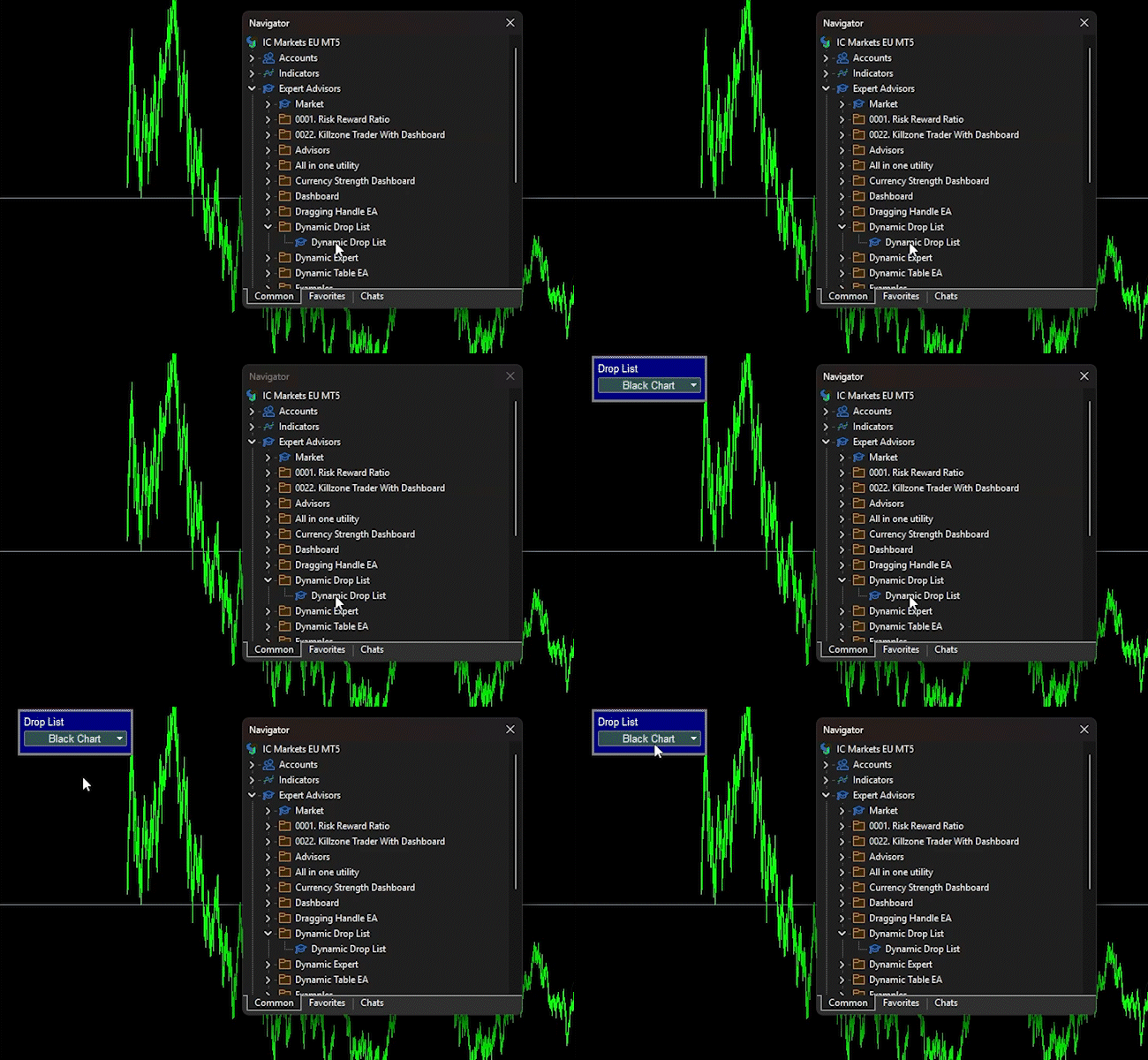
Figure 2: The EA is uploaded onto the chart, and the current chart background color is read during initialization.
//+------------------------------------------------------------------+
//| ChartEvent function                                              |
//+------------------------------------------------------------------+
void OnChartEvent(const int     id,
                  const long   &lparam,
                  const double &dparam,
                  const string &sparam)
  {
//--- Change the chart background color based on the selection
   ENUM_CHARTEVENT_DROPLIST droplist_retcode = drop.ChartEvents(id, lparam, dparam, sparam);
   string mode = drop.SelectedItem();
   if(droplist_retcode==DROPLIST_EVENT_ITEM_CLICK)
     {
      if(mode=="White Chart")
         ChartSetInteger(ChartID(), CHART_COLOR_BACKGROUND, clrWhite);
      else
         if(mode=="Black Chart")
            ChartSetInteger(ChartID(), CHART_COLOR_BACKGROUND, clrBlack);
         else
            if(mode=="Blue Chart")
               ChartSetInteger(ChartID(), CHART_COLOR_BACKGROUND, clrBlue);
            else
               if(mode=="Brown Chart")
                  ChartSetInteger(ChartID(), CHART_COLOR_BACKGROUND, clrBrown);
     }
//--- Keep the drop-down in sync if the user changes the chart background manually
   if(id==CHARTEVENT_CHART_CHANGE)
     {
      color bg = (color)ChartGetInteger(ChartID(), CHART_COLOR_BACKGROUND, 0);
      string new_mode = "Other";
      switch(bg)
        {
         case clrWhite:
            new_mode = "White Chart";
            break;
         case clrBlack:
            new_mode = "Black Chart";
            break;
         case clrBlue:
            new_mode = "Blue Chart";
            break;
         case clrBrown:
            new_mode = "Brown Chart";
            break;
         default:
            new_mode = "Other";
            break;
        }
      if(mode != new_mode)
         drop.SelectedItem(new_mode);
     }
   if(id==CHARTEVENT_MOUSE_MOVE)
     {
      //--- Handle the request to disable chart scrolling
      if(droplist_retcode==DROPLIST_EVENT_SCROLL_OFF)
        {
         g_scroll_off_count++;
         //--- If this is the first control to request it, save the original state
         //--- and actually disable chart scrolling
         if(g_scroll_off_count == 1)
           {
            g_scroll_original = (bool)ChartGetInteger(ChartID(), CHART_MOUSE_SCROLL, 0);
            ChartSetInteger(ChartID(), CHART_MOUSE_SCROLL, false);
            g_scroll_applied = true;
           }
        }
      //--- Handle the request to re-enable chart scrolling
      else
         if(droplist_retcode==DROPLIST_EVENT_SCROLL_ON)
           {
            //--- Decrement the counter, but never below zero
            if(g_scroll_off_count > 0)
               g_scroll_off_count--;
            //--- If no control needs scrolling disabled anymore and we had changed it,
            //--- restore the original chart scroll state
            if(g_scroll_off_count == 0 && g_scroll_applied)
              {
               ChartSetInteger(ChartID(), CHART_MOUSE_SCROLL, g_scroll_original);
               g_scroll_applied = false;
              }
           }
     }
   if(droplist_retcode!=DROPLIST_EVENT_NO)
     ChartRedraw();
  }
OnChartEvent()
OnChartEvent() is the bridge between the terminal and the control. Every chart event is delivered here, and the function's first action is to forward it to drop.ChartEvents(), storing the returned code in droplist_retcode. The current selection is then read into mode using drop.SelectedItem(). This is done after the call so that, if the user just clicked an item, the mode already reflects the new selection rather than the old one.
If droplist_retcode is DROPLIST_EVENT_ITEM_CLICK, the selected item is mapped to a chart background color and applied through ChartSetInteger() with CHART_COLOR_BACKGROUND. Only the four named colors have a mapping; "Other" deliberately falls through with no action.
If the event is CHARTEVENT_CHART_CHANGE, the control is kept in sync with changes made outside the EA, such as through the chart properties dialog. The current background is read, and mapped back to an item name through a switch statement, and if it differs from mode, drop.SelectedItem(new_mode) updates the control. Because SelectedItem() validates the name against the item list, the call is safe even when the new name is "Other."
If the event is CHARTEVENT_MOUSE_MOVE, the two scroll-related codes are handled. DROPLIST_EVENT_SCROLL_OFF increments g_scroll_off_count. When the counter goes from 0 to 1, the EA saves the current CHART_MOUSE_SCROLL value into g_scroll_original, disables scrolling, and sets g_scroll_applied to true. DROPLIST_EVENT_SCROLL_ON decrements the counter, but never below zero. When the counter reaches 0 and g_scroll_applied is still true, the EA restores g_scroll_original and clears the flag. This reference-counting scheme lets several controls share the chart scroll property without one restoring scrolling while another still needs it disabled. The property is only modified on the 0↔1 transitions, not on every mouse-move event.
At the end, if droplist_retcode is not DROPLIST_EVENT_NO, the EA calls ChartRedraw() so the change is applied to the chart.
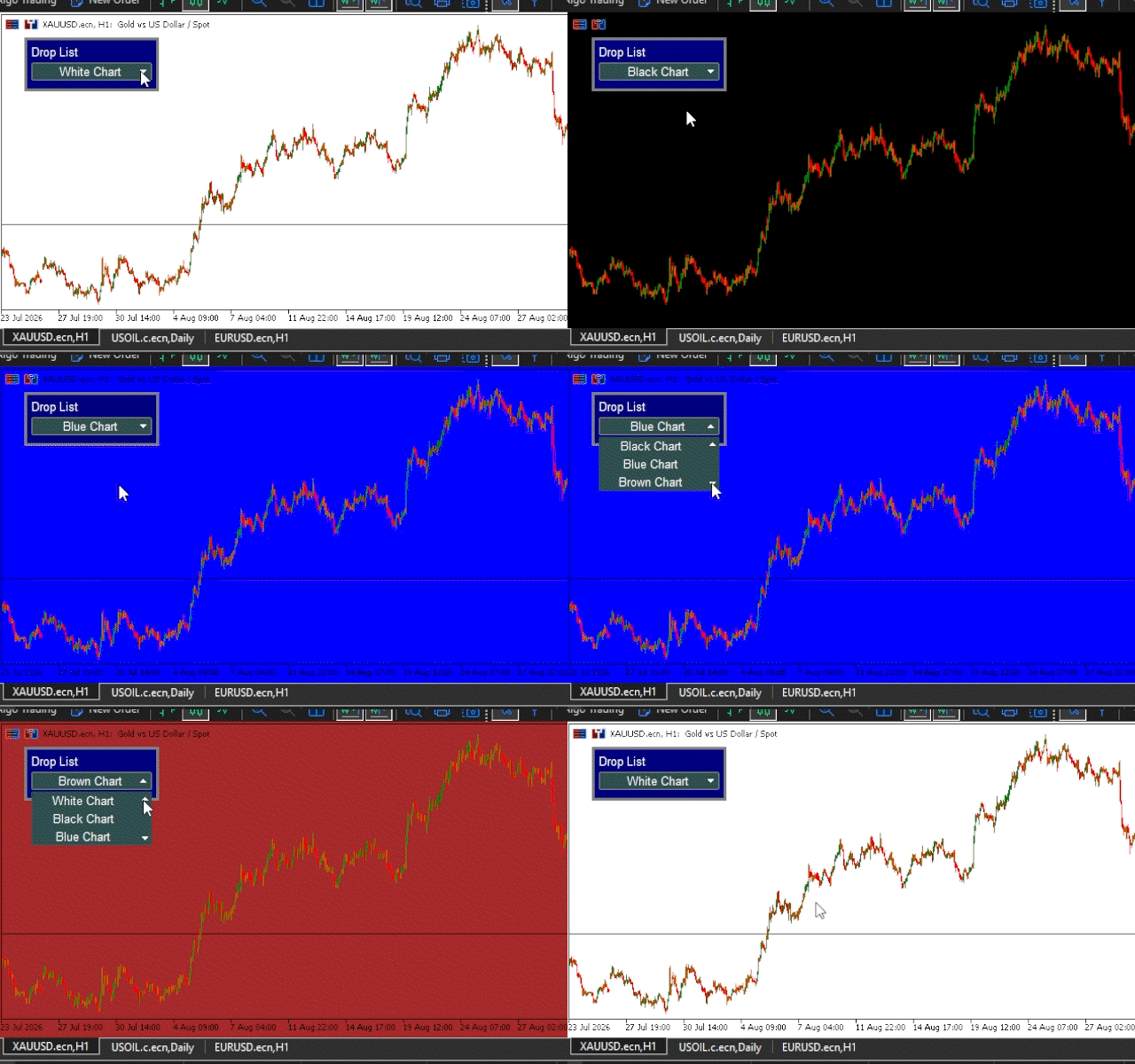
Figure 3: The user selects Black Chart and then White Chart from the drop-down, changing the chart background accordingly.
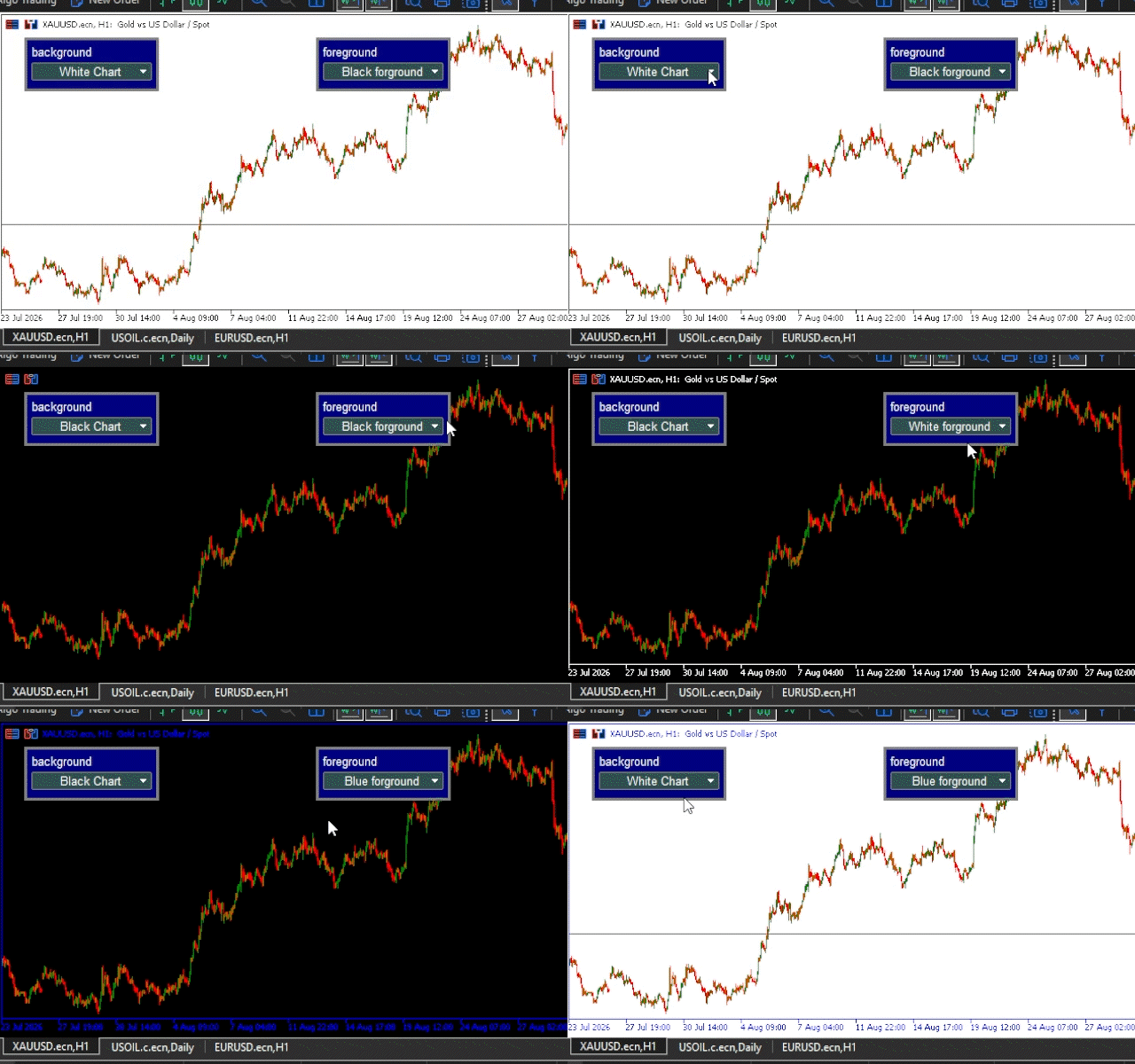
Figure 4: Two controls in an EA. One controls the background, and the other controls the foreground.
//+------------------------------------------------------------------+
//| Expert deinitialization function                                 |
//+------------------------------------------------------------------+
void OnDeinit(const int reason)
  {
//--- Delete the drop-down object
   drop.Destroy();
//--- Restore default mouse move event and chart scroll
   ChartSetInteger(ChartID(), CHART_MOUSE_SCROLL, g_scroll_original);
   ChartSetInteger(ChartID(), CHART_EVENT_MOUSE_MOVE, g_previous_mouse_move_event);
  }
OnDeinit()
OnDeinit() removes every chart object the control created. The explicit Destroy() call is technically redundant when the EA is removed cleanly, since the destructor also calls it, but it guarantees the objects are gone before proceeding regardless of how the EA was terminated. The two ChartSetInteger() calls restore the chart settings saved earlier, so the terminal does not keep sending mouse-move events to a chart that no longer has a control, and the scroll property returns to its saved value. Restoring these settings keeps the EA from leaving side effects behind.
Conclusion
In this article, we built CDropList, a complete drop-down control for MQL5, from the ground up. The control is a composite object: it hides several chart objects behind a single interface, and the programmer interacts with it through a small set of methods instead of managing each object manually. Everything in the class follows from this idea—the constructor and destructor for the control's lifecycle; Create() and Destroy() for building and removing the chart objects; CreateDrop() and DestroyDrop() for the opened list; and Refresh() for keeping the stored attributes and the chart objects in sync.
We then examined the methods that make the control useful: AddItem() and DeleteItem() for managing items; SelectedItem() for reading and changing the selection; the setters for position, size, text, prefix, and colors; and finally ChartEvents()—the single entry point for all user interaction, handling mouse-scroll behavior, hover highlighting, list navigation, and item selection. The real-world example tied everything together in a working EA that creates the control, reacts to selection, keeps itself in sync with the chart, and cleans up properly on exit.
The complete source of CDropList is provided with the article. It can be adapted for a variety of MQL5 chart-based interfaces, but it is not dependency-free: the required bitmap resources must be present, the hosting program must forward chart events to ChartEvents() and enable CHART_EVENT_MOUSE_MOVE, and each instance on the same chart must use a unique prefix. Shared chart properties like CHART_MOUSE_SCROLL also need coordination with other components.
Whether the goal is a simple settings panel or a larger dashboard with several controls, the same principles apply: identify the individual chart objects, group them behind a coherent interface, and let the class handle the coordination that would otherwise fall to the programmer.
Attached Files
| # | File Name | Directory |
|---|---|---|
| 1 | DropOff_white.bmp | MQL5\Images\EasyAndFastGUI\Controls\DropOff_white.bmp |
| 2 | DropOn_white.bmp | MQL5\Images\EasyAndFastGUI\Controls\DropOn_white.bmp |
| 3 | CDropList.mqh | MQL5\Include\Object Controls\CDropList.mqh |
| 4 | Dynamic Drop List.mq5 | MQL5\Experts\Dynamic Drop List\Dynamic Drop List.mq5 |
| 5 | Test EA.mq5 | MQL5\Experts\Dynamic Drop List\Test EA.mq5 |
Warning: All rights to these materials are reserved by MetaQuotes Ltd. Copying or reprinting of these materials in whole or in part is prohibited.
This article was written by a user of the site and reflects their personal views. MetaQuotes Ltd is not responsible for the accuracy of the information presented, nor for any consequences resulting from the use of the solutions, strategies or recommendations described.


