

CSV Data Analysis (Part 8): Building an SQLite Strategy Registry from Accumulated CSV Exports
 549
549
 0
0

Introduction
The CSV-based pipeline built across Parts 1 through 7 is well-suited to the natural rhythm of a single research campaign: run an optimization sweep, export a result file, process it with Python, draw conclusions, and move on. For that workflow, flat files are not just adequate — they are optimal. They require no infrastructure, open in any text editor, and load into pandas with a single function call.
The structural limitations of flat files emerge at a different scale. After six months of active strategy development across multiple instruments, timeframes, and indicator variants, the research directory typically contains dozens of CSV files from dozens of separate campaigns. Finding all EURUSD H1 results where the SAMA filter period was between 10 and 20 and the Sortino Ratio exceeded 1.5 requires either manually scanning multiple files or writing an ad-hoc script to concatenate them first. CSV files do not preserve run history after the session ends. They cannot reliably show which parameter set was tested in which run, which EA version produced a row, or when a result was first observed and later replicated.
Three specific failure modes emerge as the flat-file archive grows. The first is query friction: there is no way to ask a structured question across multiple files without writing a script that loads all of them into memory simultaneously. On a machine with modest RAM, a large archive may not fit at all. The second is provenance loss: each CSV file contains its result rows but carries no reliable record of when it was produced, which EA version generated it, or which optimization run it belongs to. Once a file is renamed, moved, or its timestamp overwritten, that context is permanently gone. The third is duplication without detection: if the same optimization run is accidentally exported twice into files with different names, both copies will be loaded and double-counted in any analysis, silently corrupting the results.
An SQLite registry resolves all three failure modes in a single artifact. It provides a single, queryable store for every result row ever exported from the MQL5 pipeline, indexed for fast retrieval, with full provenance metadata recording when each row arrived and which export file it came from. Adding a new export file is a single function call. Querying across all historical results for any combination of filters is an SQL statement. The database is a single portable file. It can be backed up, versioned, or shared with collaborators using only Python's standard library.
Note: This article builds directly on the export schemas established in Part 7, which is available here.
Section 1: SQLite as the Right Database for This Problem
SQLite is embedded directly in Python's standard library via the sqlite3 module, requiring no installation, no server process, and no configuration files. The database lives in a single .db file that is fully portable across operating systems. For a research workflow producing tens of thousands of rows per month, SQLite's performance is more than sufficient: it handles millions of rows with sub-second query times on indexed columns and supports full SQL including window functions, CTEs, and aggregation.
The alternative most commonly considered is PostgreSQL or MySQL, but both require a running server process, user authentication management, and a more complex deployment. For a single-developer quantitative research pipeline running on a local workstation, the operational complexity of a server-based database is not justified by any performance gain. SQLite is the correct choice here.
The one meaningful limitation of SQLite is that it does not support concurrent writes from multiple processes simultaneously. Since the registry's write operations happen in a controlled, sequential Python process rather than from multiple simultaneous agents, this limitation does not apply to this use case.
Section 2: Registry Architecture Overview
The registry consists of four components:
- The SQLite database file (strategy_registry.db): Contains all result rows, run metadata, schema version history, and computed indexes. This file is the single source of truth for all historical research results.
- The Python registry module (strategy_registry.py): Provides all database operations: initialization, schema migration, CSV ingestion, watch-folder automation, and the query interface. Every interaction with the database goes through this module.
- The MQL5 export companion (RegistryMetadata.mqh): Extends the existing export schema with run-level metadata fields — EA version string, run timestamp, and a unique run ID — that allow the registry to distinguish rows from different sessions even when they carry identical parameter values.
- The query interface: A set of Python functions that translate common research questions into SQL and return pandas DataFrames, insulating the analyst from writing raw SQL for routine lookups while preserving the option to execute arbitrary SQL for advanced queries.
Section 3: Schema Design
Core Tables
The registry uses three tables. Each ingestion event creates one row in ingest_runs. Each CSV row from that file creates one row in strategy_results linked to the parent ingest_run_id. Each unique strategy configuration creates or updates one row in strategy_configs.
-- ── schema_version ───────────────────────────────────────────────────────────
-- Tracks applied schema migrations. One row per migration.
CREATE TABLE IF NOT EXISTS schema_version (
    version_id    INTEGER PRIMARY KEY,
    version_tag   TEXT    NOT NULL UNIQUE,
    applied_at    TEXT    NOT NULL,
    description   TEXT
);

-- ── ingest_runs ───────────────────────────────────────────────────────────────
-- One row per CSV file ingested into the registry.
CREATE TABLE IF NOT EXISTS ingest_runs (
    run_id          INTEGER PRIMARY KEY AUTOINCREMENT,
    source_file     TEXT    NOT NULL,
    file_hash_sha1  TEXT    NOT NULL,
    ingest_at_utc   TEXT    NOT NULL,
    row_count       INTEGER NOT NULL DEFAULT 0,
    ea_version      TEXT,
    notes           TEXT
);

-- ── strategy_results ─────────────────────────────────────────────────────────
-- One row per strategy result record, mirroring the CSV export schema.
CREATE TABLE IF NOT EXISTS strategy_results (
    result_id             INTEGER PRIMARY KEY AUTOINCREMENT,
    ingest_run_id         INTEGER NOT NULL REFERENCES ingest_runs(run_id),
    test_phase            TEXT,
    symbol                TEXT,
    timeframe             TEXT,
    indicator_name        TEXT,
    filter_period         INTEGER,
    param_sama_lr         REAL,
    net_profit_usd        REAL,
    sortino_ratio         REAL,
    max_drawdown_pct      REAL,
    profit_factor         REAL,
    expected_payoff       REAL,
    win_rate_pct          REAL,
    total_trades          INTEGER,
    sharpe_ratio          REAL,
    recovery_factor       REAL,
    false_flips_whipsaws  INTEGER,
    avg_lag_on_turn_bars  REAL,
    avg_dist_points       REAL,
    intersection_freq_pct REAL,
    avg_trade_duration_hrs REAL,
    market_share_time_pct  REAL,
    stability_over_years   INTEGER,
    broker_server         TEXT,
    account_currency      TEXT,
    commission_bps        REAL,
    avg_slippage_points   REAL,
    run_timestamp_utc     TEXT,
    ea_version            TEXT,
    run_unique_id         TEXT
);

-- ── strategy_configs ─────────────────────────────────────────────────────────
-- Deduplicated index of unique strategy configurations.
CREATE TABLE IF NOT EXISTS strategy_configs (
    config_id         INTEGER PRIMARY KEY AUTOINCREMENT,
    symbol            TEXT    NOT NULL,
    timeframe         TEXT    NOT NULL,
    indicator_name    TEXT    NOT NULL,
    filter_period     INTEGER NOT NULL,
    param_sama_lr     REAL    DEFAULT 0.0,
    first_seen_utc    TEXT    NOT NULL,
    last_seen_utc     TEXT    NOT NULL,
    total_runs        INTEGER NOT NULL DEFAULT 1,
    UNIQUE(symbol, timeframe, indicator_name, filter_period, param_sama_lr)
);
The Schema Version Table and Migration Pattern
The schema_version table implements a lightweight forward-only migration system. Each migration is a Python function that applies a set of ALTER TABLE or CREATE TABLE statements and then inserts a row into schema_version with a unique version tag. On every application startup, the registry checks which migrations have already been applied and runs only the ones that have not. This pattern allows the schema to evolve across the lifetime of the research project without requiring the database to be rebuilt from scratch.
The version tags use the format v{major}_{minor}_{description}, for example v1_0_initial, v1_1_add_run_uid_index, v1_2_add_broker_fields. Each tag is unique and immutable once applied.
Index Strategy
Three composite indexes cover the most common query patterns:
-- Fast lookup by instrument, phase, and indicator
CREATE INDEX IF NOT EXISTS idx_results_core
    ON strategy_results(symbol, test_phase, indicator_name);

-- Fast lookup by indicator and parameter for walk-forward matching
CREATE INDEX IF NOT EXISTS idx_results_params
    ON strategy_results(indicator_name, filter_period, param_sama_lr);

-- Fast lookup of best results by Sortino Ratio
CREATE INDEX IF NOT EXISTS idx_results_sortino
    ON strategy_results(sortino_ratio DESC);
Section 4: The MQL5 Export Companion: RegistryMetadata.mqh
The registry requires each CSV row to carry a unique run identifier that allows it to distinguish rows produced by different sessions even when all parameter values are identical. Three fields are added to the export row to support this: Run_Timestamp_UTC, EA_Version, and Run_Unique_ID.
//+------------------------------------------------------------------+
//|                                             RegistryMetadata.mqh |
//|        Adds run provenance fields to the CSV export row schema   |
//+------------------------------------------------------------------+
#property strict

#ifndef REGISTRY_METADATA_MQH
#define REGISTRY_METADATA_MQH

input group "--- Registry Metadata ---";
input string InpEAVersion = "v1.0.0"; // EA version string for registry tagging

//+------------------------------------------------------------------+
//| Generates a short run unique ID from key identifying fields      |
//+------------------------------------------------------------------+
string GenerateRunUID(const string symbol,
                      const string tf_str,
                      const string indicator,
                      const int    period,
                      const string timestamp)
  {
   string raw = symbol + tf_str + indicator + IntegerToString(period) + timestamp;
   ulong  hash = 0;
   int    len  = StringLen(raw);

   for(int i = 0; i < len; i++)
      hash = (hash * 31 + (ulong)StringGetCharacter(raw, i)) % 99991UL;

   return(StringFormat("RUN%05d", (int)hash));
  }

//+------------------------------------------------------------------+
//| Returns the current UTC time as a formatted string               |
//+------------------------------------------------------------------+
string GetUTCTimestamp()
  {
   datetime utc_now = TimeGMT();
   return(TimeToString(utc_now, TIME_DATE | TIME_MINUTES | TIME_SECONDS));
  }

//+------------------------------------------------------------------+
//| Appends registry metadata columns to an existing CSV row string  |
//+------------------------------------------------------------------+
string AppendRegistryMetadata(const string base_row,
                              const string symbol,
                              const string tf_str,
                              const string indicator,
                              const int    period)
  {
   string ts  = GetUTCTimestamp();
   string uid = GenerateRunUID(symbol, tf_str, indicator, period, ts);
   return(base_row + "," + ts + "," + InpEAVersion + "," + uid);
  }

//+------------------------------------------------------------------+
//| Returns the three additional column header names                 |
//+------------------------------------------------------------------+
string GetRegistryMetadataHeader()
  {
   return("Run_Timestamp_UTC,EA_Version,Run_Unique_ID");
  }

#endif // REGISTRY_METADATA_MQH
//+------------------------------------------------------------------+
Section 5: The Python Registry Module: strategy_registry.py
Database Initialization and Schema Migration
The file opens with the configuration constants, schema SQL, and migration definitions. These three groups of definitions together describe the entire database contract. The MIGRATIONS list is the single place where all schema changes accumulate over the lifetime of the project.
import os
import sqlite3
import hashlib
import logging
import warnings
import glob
import time
import shutil
from datetime import datetime, timezone
from typing import Optional, List, Dict

import pandas as pd

warnings.filterwarnings("ignore", category=UserWarning)

# ── Configuration ─────────────────────────────────────────────────────────────
DEFAULT_DB_PATH  = "strategy_registry.db"
REGISTRY_VERSION = "v1_2_add_broker_fields"

logging.basicConfig(
    filename="registry_audit.log",
    level=logging.INFO,
    format="%(asctime)s  %(levelname)s  %(message)s",
    datefmt="%Y-%m-%d %H:%M:%S"
)


# ── Schema SQL ────────────────────────────────────────────────────────────────
SQL_CREATE_SCHEMA_VERSION = """
CREATE TABLE IF NOT EXISTS schema_version (
    version_id   INTEGER PRIMARY KEY,
    version_tag  TEXT    NOT NULL UNIQUE,
    applied_at   TEXT    NOT NULL,
    description  TEXT
);
"""

SQL_CREATE_INGEST_RUNS = """
CREATE TABLE IF NOT EXISTS ingest_runs (
    run_id         INTEGER PRIMARY KEY AUTOINCREMENT,
    source_file    TEXT    NOT NULL,
    file_hash_sha1 TEXT    NOT NULL,
    ingest_at_utc  TEXT    NOT NULL,
    row_count      INTEGER NOT NULL DEFAULT 0,
    ea_version     TEXT,
    notes          TEXT
);
"""

SQL_CREATE_STRATEGY_RESULTS = """
CREATE TABLE IF NOT EXISTS strategy_results (
    result_id              INTEGER PRIMARY KEY AUTOINCREMENT,
    ingest_run_id          INTEGER NOT NULL REFERENCES ingest_runs(run_id),
    test_phase             TEXT,
    symbol                 TEXT,
    timeframe              TEXT,
    indicator_name         TEXT,
    filter_period          INTEGER,
    param_sama_lr          REAL,
    net_profit_usd         REAL,
    sortino_ratio          REAL,
    max_drawdown_pct       REAL,
    profit_factor          REAL,
    expected_payoff        REAL,
    win_rate_pct           REAL,
    total_trades           INTEGER,
    sharpe_ratio           REAL,
    recovery_factor        REAL,
    false_flips_whipsaws   INTEGER,
    avg_lag_on_turn_bars   REAL,
    avg_dist_points        REAL,
    intersection_freq_pct  REAL,
    avg_trade_duration_hrs REAL,
    market_share_time_pct  REAL,
    stability_over_years   INTEGER,
    broker_server          TEXT,
    account_currency       TEXT,
    commission_bps         REAL,
    avg_slippage_points    REAL,
    run_timestamp_utc      TEXT,
    ea_version             TEXT,
    run_unique_id          TEXT
);
"""

SQL_CREATE_STRATEGY_CONFIGS = """
CREATE TABLE IF NOT EXISTS strategy_configs (
    config_id      INTEGER PRIMARY KEY AUTOINCREMENT,
    symbol         TEXT    NOT NULL,
    timeframe      TEXT    NOT NULL,
    indicator_name TEXT    NOT NULL,
    filter_period  INTEGER NOT NULL,
    param_sama_lr  REAL    DEFAULT 0.0,
    first_seen_utc TEXT    NOT NULL,
    last_seen_utc  TEXT    NOT NULL,
    total_runs     INTEGER NOT NULL DEFAULT 1,
    UNIQUE(symbol, timeframe, indicator_name, filter_period, param_sama_lr)
);
"""

SQL_CREATE_INDEXES = [
    """CREATE INDEX IF NOT EXISTS idx_results_core
       ON strategy_results(symbol, test_phase, indicator_name);""",
    """CREATE INDEX IF NOT EXISTS idx_results_params
       ON strategy_results(indicator_name, filter_period, param_sama_lr);""",
    """CREATE INDEX IF NOT EXISTS idx_results_sortino
       ON strategy_results(sortino_ratio DESC);""",
    """CREATE INDEX IF NOT EXISTS idx_results_symbol_tf
       ON strategy_results(symbol, timeframe);""",
    """CREATE INDEX IF NOT EXISTS idx_ingest_hash
       ON ingest_runs(file_hash_sha1);""",
]

# ── Migration Definitions ─────────────────────────────────────────────────────
MIGRATIONS = [
    (
        "v1_0_initial",
        "Initial schema: schema_version, ingest_runs, "
        "strategy_results, strategy_configs",
        [
            SQL_CREATE_SCHEMA_VERSION,
            SQL_CREATE_INGEST_RUNS,
            SQL_CREATE_STRATEGY_RESULTS,
            SQL_CREATE_STRATEGY_CONFIGS,
        ] + SQL_CREATE_INDEXES
    ),
    (
        "v1_1_add_run_uid_index",
        "Add index on run_unique_id for fast deduplication lookups",
        [
            """CREATE INDEX IF NOT EXISTS idx_results_run_uid
               ON strategy_results(run_unique_id);"""
        ]
    ),
    (
        "v1_2_add_broker_fields",
        "Ensure broker_server and commission_bps columns exist",
        [
            "ALTER TABLE strategy_results ADD COLUMN broker_server TEXT;",
            "ALTER TABLE strategy_results ADD COLUMN commission_bps REAL;",
        ]
    ),
]
The connection factory enables WAL journal mode and foreign key enforcement on every connection. WAL mode lets readers and a single writer run concurrently without blocking. This matters when the analyst queries the database while the watch-folder ingestor writes to it.
def get_connection(db_path: str = DEFAULT_DB_PATH) -> sqlite3.Connection:
    conn = sqlite3.connect(db_path, detect_types=sqlite3.PARSE_DECLTYPES)
    conn.row_factory = sqlite3.Row
    conn.execute("PRAGMA journal_mode = WAL;")
    conn.execute("PRAGMA foreign_keys = ON;")
    conn.execute("PRAGMA synchronous = NORMAL;")
    return conn


def _applied_migrations(conn: sqlite3.Connection) -> set:
    try:
        rows = conn.execute(
            "SELECT version_tag FROM schema_version;"
        ).fetchall()
        return {r["version_tag"] for r in rows}
    except sqlite3.OperationalError:
        return set()


def apply_migrations(conn: sqlite3.Connection):
    applied = _applied_migrations(conn)
    for version_tag, description, sql_list in MIGRATIONS:
        if version_tag in applied:
            continue
        print(f"  [Migration] Applying: {version_tag}")
        with conn:
            for sql in sql_list:
                try:
                    conn.execute(sql)
                except sqlite3.OperationalError as exc:
                    if "duplicate column" in str(exc).lower():
                        continue
                    raise
            conn.execute(
                "INSERT INTO schema_version "
                "(version_tag, applied_at, description) VALUES (?,?,?);",
                (version_tag,
                 datetime.now(timezone.utc).isoformat(),
                 description)
            )
        logging.info(f"Migration applied: {version_tag}")
        print(f"  [Migration] Applied: {version_tag}")


def initialize_registry(db_path: str = DEFAULT_DB_PATH) -> sqlite3.Connection:
    is_new = not os.path.isfile(db_path)
    conn   = get_connection(db_path)
    apply_migrations(conn)
    if is_new:
        print(f"[Registry] New database created: {db_path}")
    else:
        print(f"[Registry] Opened: {db_path}")
    return conn
The CSV Ingestor
The ingestor is the only write path into strategy_results. It performs SHA-1 duplicate detection at the file level before reading a single row, normalizes column names against the COLUMN_MAP, and bulk-inserts all rows in a single transaction. The flexible encoding reader handles the ANSI encoding that MetaTrader writes on Windows as well as UTF-8 files produced on other platforms.
def _sha1_of_file(file_path: str) -> str:
    h = hashlib.sha1()
    with open(file_path, "rb") as f:
        for chunk in iter(lambda: f.read(65536), b""):
            h.update(chunk)
    return h.hexdigest()


def ingest_csv(conn       : sqlite3.Connection,
               file_path  : str,
               ea_version : str  = "",
               notes      : str  = "",
               skip_dupes : bool = True) -> int:
    """
    Ingests a CSV export file into strategy_results.
    Returns the number of rows inserted, or 0 if skipped as duplicate.
    """
    if not os.path.isfile(file_path):
        print(f"[Ingestor] File not found: {file_path}")
        return 0

    file_hash = _sha1_of_file(file_path)

    if skip_dupes:
        existing = conn.execute(
            "SELECT run_id FROM ingest_runs WHERE file_hash_sha1 = ?;",
            (file_hash,)
        ).fetchone()
        if existing:
            print(f"[Ingestor] Skipped (duplicate): "
                  f"{os.path.basename(file_path)}")
            logging.info(f"Duplicate skip: {file_path} "
                         f"(hash={file_hash[:8]})")
            return 0

    for enc in ("cp1252", "utf-8", "latin-1"):
        try:
            df = pd.read_csv(file_path, encoding=enc, low_memory=False)
            break
        except (UnicodeDecodeError, LookupError):
            continue
    else:
        print(f"[Ingestor] Could not decode: {file_path}")
        return 0

    if df.empty:
        print(f"[Ingestor] Empty file: {file_path}")
        return 0

    df.columns = [c.strip().lower().replace(" ", "_") for c in df.columns]
    rename_map = {k: v for k, v in COLUMN_MAP.items() if k in df.columns}
    df         = df.rename(columns=rename_map)

    now_utc = datetime.now(timezone.utc).isoformat()

    with conn:
        cursor = conn.execute(
            "INSERT INTO ingest_runs "
            "(source_file, file_hash_sha1, ingest_at_utc, "
            " row_count, ea_version, notes) "
            "VALUES (?,?,?,?,?,?);",
            (os.path.abspath(file_path), file_hash,
             now_utc, len(df), ea_version, notes)
        )
        run_id = cursor.lastrowid

    insert_rows = []
    for _, row in df.iterrows():
        record = {"ingest_run_id": run_id}
        for col in RESULT_COLUMNS:
            if col == "ingest_run_id":
                continue
            val = row.get(col, None)
            try:
                if pd.isna(val):
                    val = None
            except (TypeError, ValueError):
                pass
            record[col] = val
        insert_rows.append(record)

    if not insert_rows:
        return 0

    placeholders = ", ".join(["?" for _ in RESULT_COLUMNS])
    col_str      = ", ".join(RESULT_COLUMNS)
    sql_insert   = (f"INSERT INTO strategy_results ({col_str}) "
                    f"VALUES ({placeholders});")

    with conn:
        conn.executemany(
            sql_insert,
            [[r.get(c) for c in RESULT_COLUMNS] for r in insert_rows]
        )
        conn.execute(
            "UPDATE ingest_runs SET row_count = ? WHERE run_id = ?;",
            (len(insert_rows), run_id)
        )

    _upsert_strategy_configs(conn, insert_rows, now_utc)

    logging.info(f"Ingested: {os.path.basename(file_path)} "
                 f"| {len(insert_rows)} rows | run_id={run_id}")
    print(f"[Ingestor] {os.path.basename(file_path)}: "
          f"{len(insert_rows)} rows ingested (run_id={run_id}).")

    return len(insert_rows)
The _upsert_strategy_configs helper maintains the deduplicated configuration index. It uses SQLite's INSERT OR IGNORE pattern to create a new config entry on first observation, then unconditionally updates last_seen_utc and increments total_runs so the config row reflects every ingestion that matched it.
The Watch-Folder Ingestor
def watch_folder(conn          : sqlite3.Connection,
                 watch_dir     : str,
                 pattern       : str = "*.csv",
                 poll_interval : int = 30,
                 ea_version    : str = "") -> None:
    """
    Monitors a directory for new CSV files and ingests them automatically.
    SHA-1 deduplication ensures each file is ingested only once.
    Press Ctrl+C to stop.
    """
    print(f"[WatchFolder] Monitoring: {watch_dir}")
    print(f"[WatchFolder] Pattern: {pattern}  |  Poll: {poll_interval}s")
    print(f"[WatchFolder] Press Ctrl+C to stop.\n")

    total_ingested = 0

    while True:
        try:
            candidates = sorted(
                glob.glob(os.path.join(watch_dir, pattern))
            )
            for file_path in candidates:
                rows = ingest_csv(conn, file_path,
                                  ea_version=ea_version,
                                  notes="auto-ingested by watch_folder",
                                  skip_dupes=True)
                total_ingested += rows
            time.sleep(poll_interval)
        except KeyboardInterrupt:
            print(f"\n[WatchFolder] Stopped. "
                  f"Total rows ingested: {total_ingested:,}")
            break
        except Exception as exc:
            print(f"[WatchFolder] Error: {exc}")
            logging.error(f"WatchFolder error: {exc}")
            time.sleep(poll_interval)
watch_folder() removes the need to manually call ingest_csv() after each optimization run. It polls a directory on a configurable interval, attempts to ingest every CSV file it finds, and relies entirely on SHA-1 deduplication to ensure each file is only processed once regardless of how many polling cycles observe it. The loop runs until the analyst presses Ctrl+C, at which point it prints the total rows ingested during the session and exits cleanly. The practical deployment pattern is to point it at the MT5 common files directory so that new exports are picked up automatically the moment MetaTrader writes them to disk.
The Query Interface
The query interface wraps every common research question in a named Python function that returns a pandas DataFrame, so the analyst never writes raw SQL for routine lookups. The query() function is the foundation: it executes any SQL string directly against the registry and returns the result as a DataFrame, preserving the option for arbitrary queries when the named functions do not cover a specific need.
def query(conn : sqlite3.Connection, sql : str,
          params: tuple = ()) -> pd.DataFrame:
    """Executes arbitrary SQL and returns a pandas DataFrame."""
    return pd.read_sql_query(sql, conn, params=params)


def get_all_results(conn        : sqlite3.Connection,
                    symbol      : str   = None,
                    timeframe   : str   = None,
                    test_phase  : str   = None,
                    indicator   : str   = None,
                    min_sortino : float = None,
                    min_trades  : int   = None) -> pd.DataFrame:
    """Returns strategy_results rows matching the supplied filters."""
    conditions = ["1=1"]
    params     = []

    if symbol:
        conditions.append("symbol = ?")
        params.append(symbol)
    if timeframe:
        conditions.append("timeframe = ?")
        params.append(timeframe)
    if test_phase:
        conditions.append("test_phase = ?")
        params.append(test_phase)
    if indicator:
        conditions.append("indicator_name = ?")
        params.append(indicator)
    if min_sortino is not None:
        conditions.append("sortino_ratio >= ?")
        params.append(min_sortino)
    if min_trades is not None:
        conditions.append("total_trades >= ?")
        params.append(min_trades)

    where = " AND ".join(conditions)
    sql   = (f"SELECT * FROM strategy_results WHERE {where} "
             f"ORDER BY sortino_ratio DESC;")

    return query(conn, sql, tuple(params))


def get_best_per_indicator(conn        : sqlite3.Connection,
                            symbol     : str,
                            timeframe  : str,
                            test_phase : str = "InSample") -> pd.DataFrame:
    """Returns the single best result (by Sortino) per indicator."""
    sql = """
        SELECT r.*
        FROM strategy_results r
        INNER JOIN (
            SELECT indicator_name, MAX(sortino_ratio) AS max_sortino
            FROM strategy_results
            WHERE symbol     = ?
              AND timeframe  = ?
              AND test_phase = ?
              AND sortino_ratio IS NOT NULL
            GROUP BY indicator_name
        ) best
          ON r.indicator_name = best.indicator_name
         AND r.sortino_ratio  = best.max_sortino
         AND r.symbol         = ?
         AND r.timeframe      = ?
         AND r.test_phase     = ?
        ORDER BY r.sortino_ratio DESC;
    """
    return query(conn, sql,
                 (symbol, timeframe, test_phase,
                  symbol, timeframe, test_phase))


def get_walk_forward_pair(conn       : sqlite3.Connection,
                           symbol    : str,
                           timeframe : str,
                           indicator : str,
                           period    : int,
                           lr        : float = 0.0) -> pd.DataFrame:
    """Retrieves the InSample and OutSample rows for an exact
    parameter combination."""
    sql = """
        SELECT *
        FROM strategy_results
        WHERE symbol         = ?
          AND timeframe      = ?
          AND indicator_name = ?
          AND filter_period  = ?
          AND (param_sama_lr = ? OR param_sama_lr IS NULL)
          AND test_phase IN ('InSample', 'OutSample')
        ORDER BY test_phase ASC, run_timestamp_utc DESC;
    """
    return query(conn, sql, (symbol, timeframe, indicator, period, lr))


def get_stability_trend(conn      : sqlite3.Connection,
                         symbol   : str,
                         indicator: str,
                         period   : int) -> pd.DataFrame:
    """Returns the time-ordered performance history of a specific
    configuration across all ingested runs."""
    sql = """
        SELECT r.run_timestamp_utc, r.ea_version, r.test_phase,
               r.sortino_ratio, r.net_profit_usd, r.max_drawdown_pct,
               r.false_flips_whipsaws, i.source_file, i.ingest_at_utc
        FROM strategy_results r
        JOIN ingest_runs i ON r.ingest_run_id = i.run_id
        WHERE r.symbol         = ?
          AND r.indicator_name = ?
          AND r.filter_period  = ?
        ORDER BY r.run_timestamp_utc ASC;
    """
    return query(conn, sql, (symbol, indicator, period))


def get_config_summary(conn: sqlite3.Connection) -> pd.DataFrame:
    """Returns the strategy_configs table with run count statistics."""
    sql = """
        SELECT symbol, timeframe, indicator_name,
               filter_period, param_sama_lr,
               total_runs, first_seen_utc, last_seen_utc
        FROM strategy_configs
        ORDER BY total_runs DESC, last_seen_utc DESC;
    """
    return query(conn, sql)
get_all_results() is the general-purpose retrieval function. Every filter parameter is optional and combined with AND logic, so passing only symbol="EURUSD" returns every row for that instrument while passing both symbol and min_sortino=1.0 narrows to only the high-performing configurations. The result is always sorted by sortino_ratio descending, placing the strongest candidates at the top.
get_best_per_indicator() addresses a specific and recurring need in walk-forward analysis: finding the single peak InSample row for each indicator on a given instrument and timeframe. It uses a subquery to compute the maximum Sortino per indicator group, then inner-joins back to the full strategy_results table to retrieve the complete row for each peak. This avoids the ambiguity of selecting a maximum from an aggregated result and ensures that all columns from the winning row are available for downstream use.
get_walk_forward_pair() retrieves exactly two rows for a specific parameter combination: the InSample row and the OutSample row. The param_sama_lr IS NULL clause in the filter ensures that non-SAMA indicators, which legitimately carry no learning rate value, are not silently excluded. The result set ordered by test_phase ASC places the InSample row first in every call, making it straightforward to extract both rows positionally.
get_stability_trend() joins strategy_results against ingest_runs to retrieve the source file name and ingest timestamp alongside the performance metrics. This join is what makes the stability query genuinely useful: it shows not just how a configuration's Sortino changed over time, but which CSV file each data point came from and when it was ingested, producing a traceable lineage for every observation in the trend.
get_config_summary() reads from strategy_configs rather than strategy_results. Because strategy_configs holds one row per unique parameter combination regardless of how many times that combination has been ingested, this function produces a compact census of the entire research history. The total_runs column immediately surfaces which configurations have been tested most frequently, and the first_seen_utc and last_seen_utc timestamps show how long each configuration has been part of the research campaign.
Cross-Run Comparative Lookups
def rank_by_robustness(conn         : sqlite3.Connection,
                        symbol      : str,
                        timeframe   : str,
                        min_runs    : int   = 2,
                        min_sortino : float = 0.0) -> pd.DataFrame:
    """
    Ranks configurations by mean Sortino across multiple InSample
    runs. Configurations with fewer than min_runs appearances are
    excluded.
    """
    sql = """
        SELECT indicator_name,
               filter_period,
               param_sama_lr,
               COUNT(*)                            AS run_count,
               ROUND(AVG(sortino_ratio),   4)      AS mean_sortino,
               ROUND(AVG(net_profit_usd),  2)      AS mean_profit_usd,
               ROUND(AVG(max_drawdown_pct),2)      AS mean_dd_pct,
               ROUND(AVG(false_flips_whipsaws), 1) AS mean_whipsaws,
               ROUND(AVG(avg_lag_on_turn_bars), 2) AS mean_lag_bars
        FROM strategy_results
        WHERE symbol       = ?
          AND timeframe    = ?
          AND test_phase   = 'InSample'
          AND sortino_ratio IS NOT NULL
        GROUP BY indicator_name, filter_period, param_sama_lr
        HAVING COUNT(*) >= ?
           AND AVG(sortino_ratio) >= ?
        ORDER BY mean_sortino DESC;
    """
    return query(conn, sql, (symbol, timeframe, min_runs, min_sortino))


def compare_ea_versions(conn      : sqlite3.Connection,
                         symbol   : str,
                         indicator: str) -> pd.DataFrame:
    """Compares mean performance metrics across EA version strings
    for a specific symbol and indicator."""
    sql = """
        SELECT r.ea_version,
               COUNT(*)                           AS run_count,
               ROUND(AVG(r.sortino_ratio),  4)   AS mean_sortino,
               ROUND(AVG(r.net_profit_usd), 2)   AS mean_profit_usd,
               ROUND(AVG(r.max_drawdown_pct),2)  AS mean_dd_pct,
               MIN(r.run_timestamp_utc)           AS first_run,
               MAX(r.run_timestamp_utc)           AS last_run
        FROM strategy_results r
        WHERE r.symbol         = ?
          AND r.indicator_name = ?
          AND r.ea_version IS NOT NULL
          AND r.ea_version != ''
        GROUP BY r.ea_version
        ORDER BY MIN(r.run_timestamp_utc) ASC;
    """
    return query(conn, sql, (symbol, indicator))
These two functions operate across multiple ingestion runs rather than within a single one, which is what makes them qualitatively different from the query interface functions above.
rank_by_robustness() answers the question a developer asks after accumulating several months of optimization campaigns: which parameter combinations have consistently performed well across multiple separate runs, rather than just peaking once? It groups InSample rows by indicator_name, filter_period, and param_sama_lr, then computes the mean Sortino across all matching rows. The HAVING COUNT(*) >= min_runs clause filters out configurations that have only been tested once, since a single observation carries no information about consistency. The result ranks by mean_sortino descending so the most reliably strong configurations appear first. A strategy that posts a mean Sortino of 1.4 across six independent campaigns is a stronger deployment candidate than one that posted 2.1 once and has never been tested again.
compare_ea_versions() groups results by the ea_version string and computes mean performance metrics within each group. It is designed for before-and-after analysis: when a meaningful change is made to the EA's signal logic, the version string is incremented, and this function immediately shows whether the change improved or degraded mean Sortino, profit, and drawdown across all tests run under each version. The ORDER BY MIN(r.run_timestamp_utc) ASC clause ensures the version history is displayed chronologically, making the performance trajectory across development iterations immediately readable.
Section 6: Registry Maintenance: Deduplication, Pruning, and Backup
def find_duplicate_rows(conn: sqlite3.Connection) -> pd.DataFrame:
    """Identifies rows sharing identical values across all key columns.
    A sign that the same CSV was ingested twice under different names."""
    sql = """
        SELECT symbol, timeframe, indicator_name,
               filter_period, param_sama_lr,
               test_phase, run_timestamp_utc,
               COUNT(*) AS duplicate_count
        FROM strategy_results
        GROUP BY symbol, timeframe, indicator_name,
                 filter_period, param_sama_lr,
                 test_phase, run_timestamp_utc
        HAVING COUNT(*) > 1
        ORDER BY duplicate_count DESC;
    """
    return query(conn, sql)


def prune_old_runs(conn      : sqlite3.Connection,
                   keep_days : int  = 90,
                   dry_run   : bool = True) -> int:
    """
    Removes ingest_runs and their strategy_results older than
    keep_days days. Defaults to dry_run=True so no data is deleted
    without explicit confirmation.
    """
    from datetime import timedelta
    cutoff = (datetime.now(timezone.utc)
              - timedelta(days=keep_days)).isoformat()

    old_runs = query(
        conn,
        "SELECT run_id, source_file, row_count, ingest_at_utc "
        "FROM ingest_runs WHERE ingest_at_utc < ?;",
        (cutoff,)
    )

    if old_runs.empty:
        print(f"[Prune] No runs older than {keep_days} days found.")
        return 0

    total_rows = int(old_runs["row_count"].sum())
    print(f"[Prune] Found {len(old_runs)} runs ({total_rows:,} rows) "
          f"older than {keep_days} days.")

    if dry_run:
        print(f"[Prune] Dry-run mode: no rows deleted. "
              f"Pass dry_run=False to execute.")
        return total_rows

    run_ids      = tuple(old_runs["run_id"].tolist())
    placeholders = ",".join(["?" for _ in run_ids])

    with conn:
        conn.execute(
            f"DELETE FROM strategy_results "
            f"WHERE ingest_run_id IN ({placeholders});",
            run_ids
        )
        conn.execute(
            f"DELETE FROM ingest_runs WHERE run_id IN ({placeholders});",
            run_ids
        )
        conn.execute("VACUUM;")

    logging.info(f"Pruned {len(old_runs)} runs / {total_rows} rows.")
    print(f"[Prune] Deleted {total_rows:,} rows from {len(old_runs)} runs.")
    return total_rows


def backup_registry(db_path    : str = DEFAULT_DB_PATH,
                    backup_dir : str = "registry_backups") -> str:
    """Creates a timestamped copy of the registry database file."""
    os.makedirs(backup_dir, exist_ok=True)
    ts          = datetime.now(timezone.utc).strftime("%Y%m%d_%H%M%S")
    backup_name = f"strategy_registry_{ts}.db"
    backup_path = os.path.join(backup_dir, backup_name)
    shutil.copy2(db_path, backup_path)
    size_mb = os.path.getsize(backup_path) / (1024 * 1024)
    print(f"[Backup] Registry backed up: {backup_path} ({size_mb:.2f} MB)")
    logging.info(f"Backup created: {backup_path}")
    return backup_path
Three maintenance operations keep the registry healthy over a long research timeline.
find_duplicate_rows() detects rows in strategy_results that share identical values across all key identifying and performance columns. This is distinct from the SHA-1 file-level duplicate detection in the ingestor. The file-level check prevents the same physical file from being ingested twice. This row-level check catches a subtler problem: two different filenames that contain identical rows, which happens when a result set is accidentally exported to two differently named files on the same day. The query groups by the identifying columns and returns only groups where the count exceeds one, along with how many copies of each duplicate exist.
prune_old_runs() removes both the ingest_runs records and their associated strategy_results rows for campaigns older than a configurable number of days. The dry_run=True default is deliberate and important. Running the function without confirming the output first is the most common way to accidentally discard data that is still relevant. With dry run enabled, the function prints how many runs and rows would be affected and then stops without deleting anything. Only after the analyst passes dry_run=False does deletion occur. The VACUUM call at the end reclaims the disk space freed by the deletions, since SQLite does not release storage automatically when rows are removed.
backup_registry() performs a simple file copy using shutil.copy2, which preserves the file's metadata timestamps alongside the content. The copy is written to a registry_backups/ subdirectory with a UTC datetime stamp embedded in the filename. This naming convention creates an ordered archive of snapshots instead of overwriting one file. To roll back, copy the required dated backup into the working directory. The function is called at the end of every entry-point session by default, ensuring that a clean backup exists after every productive interaction with the registry.
Section 7: Validating the Registry Pipeline
This section describes how to run the registry from scratch, confirm that every component behaves correctly, and interpret the output at each stage. Validation uses generate_sample_exports.py, a synthetic data generator that produces two CSV files in the exact schema the registry expects. This allows the full pipeline to be exercised without needing a live MetaTrader 5 export.
Step 1: Install the dependency
pip install pandas
All other dependencies (sqlite3, hashlib, os, glob, shutil, logging) are Python standard-library modules and require no installation.
Step 2: Arrange the working directory
Place both Python files in the same folder:
/MT5_Analytics_Part8/
├── strategy_registry.py
├── generate_sample_exports.py
└── exports/               ← created automatically by the generator
Step 3: Generate synthetic CSV exports
python generate_sample_exports.py
Expected console output:
[Generator] 24 InSample rows  -> exports/MultiFilter_InSample_EURUSD_H1.csv
[Generator] 24 OutSample rows -> exports/MultiFilter_OutSample_EURUSD_H1.csv
[Generator] Done. Run strategy_registry.py to ingest.
Open either CSV in a text editor and verify that the column headers match the schema defined in Section 3. The Indicator_Name, Filter_Period, Sortino_Ratio, and Net_Profit_USD columns should be clearly visible.
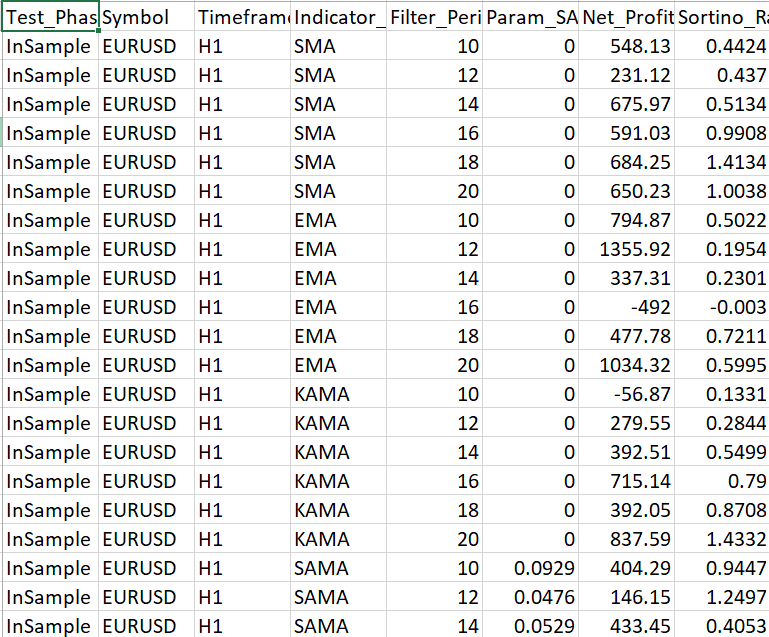
Fig. 1: One of the generated synthetic CSV files open in a text editor, showing the column headers and the first several data rows with indicator names, parameter values, and performance metrics.
Step 4: Run the registry for the first time
python strategy_registry.py
Expected console output:
 [Migration] Applying: v1_0_initial
  [Migration] Applied:  v1_0_initial
  [Migration] Applying: v1_1_add_run_uid_index
  [Migration] Applied:  v1_1_add_run_uid_index
  [Migration] Applying: v1_2_add_broker_fields
  [Migration] Applied:  v1_2_add_broker_fields
[Registry] New database created: strategy_registry.db
[Ingestor] MultiFilter_InSample_EURUSD_H1.csv: 24 rows ingested (run_id=1).
[Ingestor] MultiFilter_OutSample_EURUSD_H1.csv: 24 rows ingested (run_id=2).

── Strategy Config Summary ──────────────────────────────────
  [table of unique configuration rows]

── Total Rows in Registry: 48 ──────────────────────────────
  [top 10 rows sorted by Sortino Ratio]

── No duplicate rows detected. ──────────────────────────────
[Backup] Registry backed up: registry_backups/strategy_registry_YYYYMMDD_HHMMSS.db
[Registry] Session complete.
Verify the following at each stage:
| Stage | What to confirm |
|---|---|
| All three migrations applied | Each shows Applying then Applied on first run |
| New database created | strategy_registry.db appears in the working folder |
| Both CSV files show 24 rows | Row counts match the generator output |
| Config summary table printed | Unique strategy configurations listed |
| Total rows = 48 | 24 InSample + 24 OutSample |
| No duplicates detected | Expected on a clean first run |
| Backup file created | registry_backups/ folder appears with a .db file |
Step 5: Verify duplicate detection
Run the registry a second time without regenerating the CSV files:
python strategy_registry.py
Expected output:
[Registry] Opened: strategy_registry.db
[Ingestor] Skipped (duplicate): MultiFilter_InSample_EURUSD_H1.csv
[Ingestor] Skipped (duplicate): MultiFilter_OutSample_EURUSD_H1.csv
The SHA-1 hash of each file is compared against the ingest_runs table. Since neither file changed, both are skipped without inserting any rows. This confirms the file-level duplicate guard works correctly. The total row count in strategy_results remains 48.
Step 6: Verify migration idempotency
Delete the database and re-run to confirm migrations replay cleanly:
rm strategy_registry.db
python strategy_registry.py
All three migrations should apply again from scratch and produce the same result as Step 4. This confirms that the migration system initializes correctly on a new database and is safe to run on an existing one.
Step 7: Inspect the database in DB Browser for SQLite
Open strategy_registry.db in DB Browser for SQLite (cross-platform). Navigate to the Browse Data tab and verify the row counts in each table:
| Table | Expected row counts |
|---|---|
| schema_version | 3 rows (one per migration) |
| ingest_runs | 2 rows (one per CSV file) |
| strategy_results | 48 rows (24 InSample + 24 OutSample) |
| strategy_configs | Varies (unique parameter combinations) |
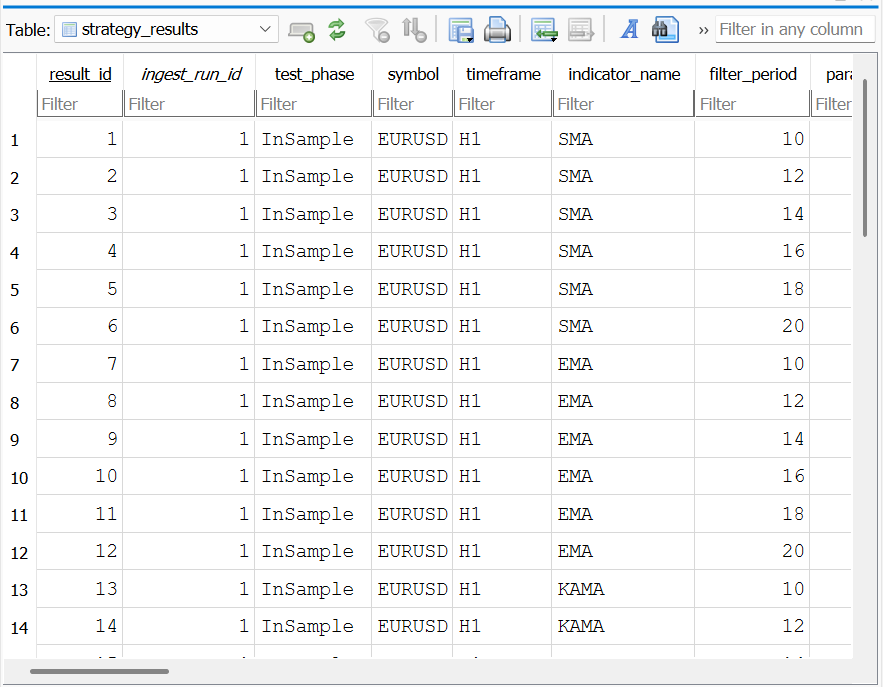
Fig. 2: DB Browser for SQLite showing the strategy_results table.
You can also run SQL directly in the Execute SQL tab to test the query interface:
SELECT indicator_name,
       COUNT(*)               AS run_count,
       ROUND(AVG(sortino_ratio), 4) AS avg_sortino,
       ROUND(AVG(net_profit_usd),2) AS avg_profit
FROM strategy_results
WHERE test_phase = 'InSample'
GROUP BY indicator_name
ORDER BY avg_sortino DESC;
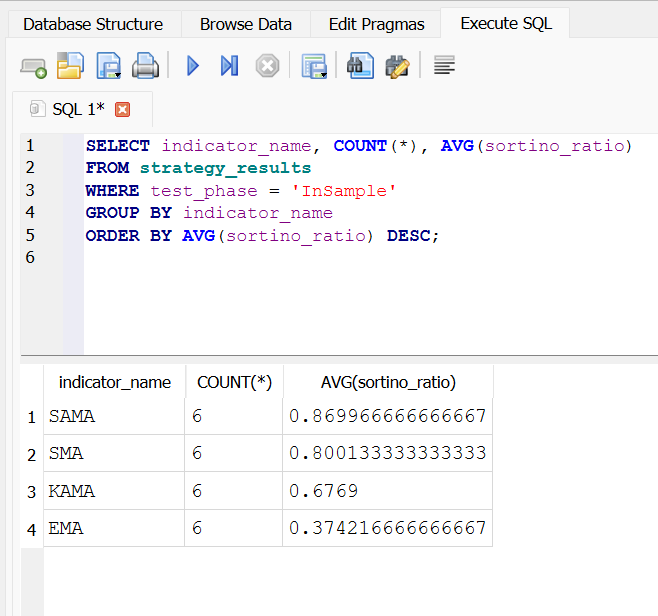
Fig. 3: The Execute SQL tab in DB Browser showing the cross-indicator aggregation query above and its results, with indicator names ranked by average Sortino Ratio across all ingested InSample runs.
Step 8: Check the audit log
cat registry_audit.log The log records every migration applied, every file ingested, every duplicate skipped, and every backup created, each with a UTC timestamp. If anything fails silently during a future run on real data, this log is the first place to investigate.
Step 9: Validate with real MetaTrader exports
Drop a real CSV export from your MT5 optimization runs into the exports/ folder alongside the synthetic files and re-run:
python strategy_registry.py
The registry will ingest the real file and skip the synthetic ones (already recorded by SHA-1 hash). If your real CSV uses different column names than the canonical schema, add the mappings to the COLUMN_MAP dictionary at the top of strategy_registry.py. The flexible encoding reader handles ANSI-encoded MetaTrader files on Windows and UTF-8 files on any other platform without any configuration change.
Section 8: Integrating the Registry with the Prior Series Pipeline
The registry is a drop-in persistence layer beneath every Python function written in Parts 3 through 7. No existing function signatures change. The integration point is at the data-loading step: instead of calling pd.read_csv() on a single file or pd.concat() across multiple files, the analyst calls get_all_results() or a targeted query function to retrieve a DataFrame from the registry. That DataFrame then flows into the existing visualization, normalization, and robustness testing functions without modification.
The following entry point demonstrates a complete session:
if __name__ == "__main__":
    # ── Initialize or open the registry ──────────────────────────────────────
    conn = initialize_registry("strategy_registry.db")

    # ── Ingest one or more CSV exports ───────────────────────────────────────
    ingest_csv(conn, "exports/MultiFilter_InSample_EURUSD_H1.csv",
               ea_version="v2.4.1",
               notes="EURUSD H1 optimization sweep")

    ingest_csv(conn, "exports/MultiFilter_OutSample_EURUSD_H1.csv",
               ea_version="v2.4.1")

    # ── Cross-run robustness ranking ──────────────────────────────────────────
    robustness_df = rank_by_robustness(
        conn,
        symbol      = "EURUSD",
        timeframe   = "H1",
        min_runs    = 2,
        min_sortino = 0.5
    )
    print("\n── Cross-Run Robustness Ranking ─────────────────────────────")
    print(robustness_df.to_string(index=False))

    # ── Walk-forward pair lookup ──────────────────────────────────────────────
    wf_pair = get_walk_forward_pair(
        conn, "EURUSD", "H1", "SAMA", period=14, lr=0.05
    )
    print("\n── Walk-Forward Pair for SAMA P=14 LR=0.05 ─────────────────")
    print(wf_pair[["test_phase", "sortino_ratio",
                   "net_profit_usd",
                   "run_timestamp_utc"]].to_string(index=False))

    # ── Stability trend ───────────────────────────────────────────────────────
    trend_df = get_stability_trend(conn, "EURUSD", "SAMA", 14)
    print("\n── SAMA P=14 Performance History ────────────────────────────")
    print(trend_df[["run_timestamp_utc", "test_phase",
                    "sortino_ratio", "ea_version"]].to_string(index=False))

    # ── EA version comparison ─────────────────────────────────────────────────
    version_df = compare_ea_versions(conn, "EURUSD", "SAMA")
    print("\n── EA Version Comparison (EURUSD / SAMA) ────────────────────")
    print(version_df.to_string(index=False))

    # ── Backup before closing ─────────────────────────────────────────────────
    backup_registry("strategy_registry.db", "registry_backups")

    conn.close()
The unified_canonical.csv output from Part 6's broker normalization layer is directly compatible with the registry's ingestor. The column aliases in COLUMN_MAP already handle the Net_Profit_USD naming convention produced by the normalization layer, so a multi-broker unified dataset ingests without any schema adjustment.
Conclusion
A flat-file archive is a natural first structure for an evolving research pipeline. It grows organically, requires no setup, and imposes no overhead during the early phase of a project when the number of result files is small and the analysis workflow is still being defined. The point at which it becomes a liability is gradual rather than sudden, but it is predictable: the moment a research question cannot be answered without writing a script to load and concatenate multiple files, the infrastructure cost of flat files has exceeded the infrastructure cost of a proper database.
The registry built in this article does not replace the CSV export pipeline. The CSVs remain the source of record: they are produced by MetaTrader 5, they carry the raw optimization results, and they remain on disk after ingestion. What the registry adds is a structured query layer above them. Every result row, from every campaign, across every instrument and indicator variant, becomes queryable through a single SQL statement the moment it is ingested.
The migration system is the feature that determines whether a registry is genuinely maintainable over a long research timeline. Without it, adding a new column to the schema means rebuilding the database from scratch and re-ingesting every historical CSV. With it, a new column is a one-line ALTER TABLE statement in a new migration entry, applied automatically the next time the registry opens, with no disruption to the rows already stored.
These features serve one goal: making research history as queryable as the results. They include SHA-1 deduplication, RegistryMetadata.mqh provenance fields, the stability-trend query, and the EA-version comparison query. A strategy that passes the robustness battery from Part 7 is a more credible candidate for deployment when the registry can show that it has passed that battery across three separate campaigns over two months, using two different EA versions, on two different brokers. That is the kind of evidence a flat-file archive cannot produce on demand.
Programs used in the article:
| # | Name | Type | Description |
|---|---|---|---|
| 1 | strategy_registry.py | Python Module | The complete registry module. Handles database initialization, schema migrations, CSV ingestion with SHA-1 duplicate detection, watch-folder automation, and a full query interface returning pandas DataFrames. A flexible encoding reader makes it compatible with ANSI-encoded MetaTrader exports on Windows and UTF-8 files on all other platforms. |
| 2 | RegistryMetadata.mqh | Include File | Extends the existing CSV export schema with three run-level provenance fields: Run_Timestamp_UTC, EA_Version, and Run_Unique_ID. These fields allow the registry to distinguish rows from different sessions even when all parameter values are identical. Integrates into any EA with a single #include and one append call per export row. |
| 3 | generate_sample_exports.py | Python Script | A synthetic data generator for validating the registry pipeline without a live MetaTrader export. Produces two CSV files — one InSample and one OutSample — in the canonical schema, populated with four indicator variants across six filter periods. Allows the full ingestion, migration, deduplication, and query workflow to be exercised immediately after installation. |
| 4 | CSV_Data_Analysis_Part_8.zip | Zip Archive | Zip archive containing all the attached files and their paths relative to the terminal's root folder. |
Warning: All rights to these materials are reserved by MetaQuotes Ltd. Copying or reprinting of these materials in whole or in part is prohibited.
This article was written by a user of the site and reflects their personal views. MetaQuotes Ltd is not responsible for the accuracy of the information presented, nor for any consequences resulting from the use of the solutions, strategies or recommendations described.

 Enhancing the MQL5 Portfolio Analyzer Dashboard: Active Mitigation, Data Exports, and AI Integration
 Market Heat Map Indicator Based on Prime-Number Density
 Building a Dynamic ATR-Based Trend Channel Indicator in MQL5
 Neural Networks in Trading: Adaptive Periodic Segmentation (Creating Tokens)

- Free trading apps
- Over 8,000 signals for copying
- Economic news for exploring financial markets
You agree to website policy and terms of use