
CSV Data Analysis (Part 4): Building an Automated Python-Driven Comparative Analysis Module for MQL5 Strategy Validation
 3 515
3 515
 0
0

Introduction
MetaTrader 5 provides a capable native optimization engine. The Strategy Tester generates summary statistics, equity curves, and tabular results across parameter sweeps. But when the analytical workload scales to multi-asset, multi-timeframe research with custom counters, the native output layer becomes the bottleneck. A researcher comparing four indicator variants across six currency pairs on three timeframes ends up with roughly seventy-two distinct result sets. Manual inspection for risk-adjusted ranking, walk-forward parameter mapping, and narrative synthesis is slow. It also increases selective attention and accelerates curve-fitting bias.
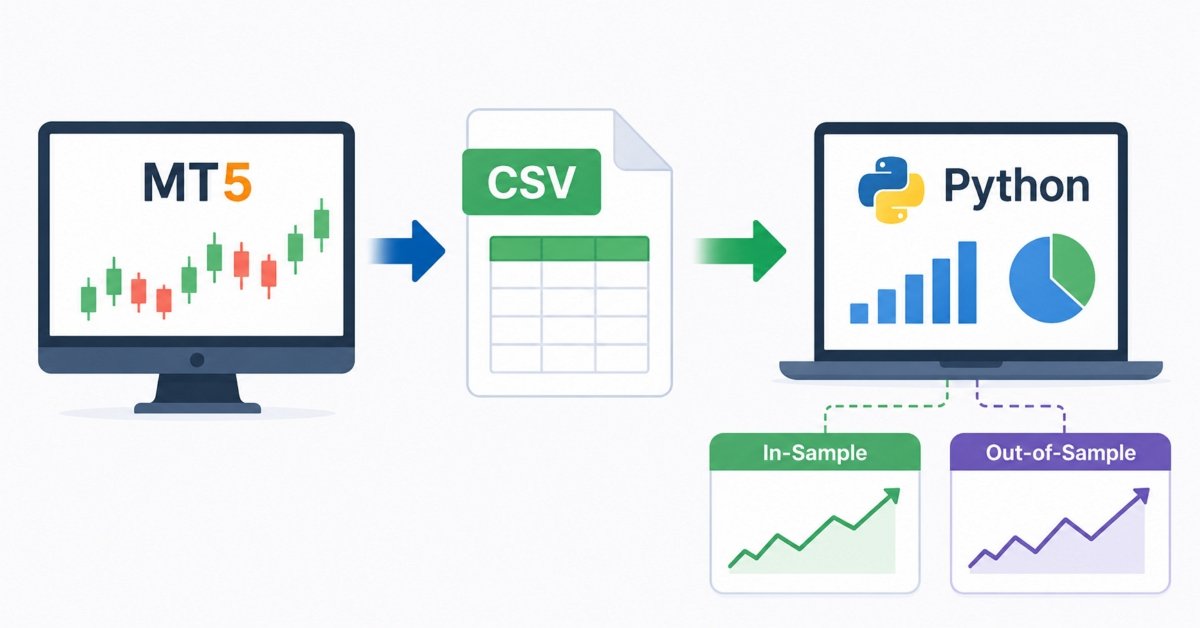
The solution is to treat MetaTrader 5 as a data-generation engine and nothing more. The testing engine runs the computations. A structured export file captures the results. Python then takes over: parsing, sorting, matching, visualizing, and drafting. The entire analytical pipeline becomes reproducible, auditable, and immune to the cognitive shortcuts a human analyst inevitably takes when manually sifting hundreds of optimization rows.
This article builds the pipeline from the ground up. It defines the required MQL5 export schema, describes the two Python analytics modules, and outlines a deployment workflow for maintaining both components.
Note: This pipeline expands the Python data and visualization stack introduced in Part 3.
Section 1: Designing the Optimization Export Schema
A pipeline is only as clean as its data contract. Before writing a single line of Python code, the MQL5 strategy must write exports conforming to a strict, predictable schema. Every column must be present, every row must carry its own context, and the naming conventions must be stable enough that the Python parser never has to guess.
Required Column Structure
The master export CSV requires the following columns at minimum:
| Column | Type | Description |
|---|---|---|
| Test_Phase | String | Identifies the row as Baseline, InSample, or OutSample |
| Symbol | String | The traded instrument (e.g., EURUSD, XAUUSD) |
| Timeframe | String | Chart period (e.g., M15, H1, H4) |
| Indicator_Name | String | The filter under test (e.g., SMA, EMA, KAMA, SAMA) |
| Filter_Period | Integer | The lookback period used in this row's test |
| Param_SAMA_LR | Float | Strategy-specific adaptive parameter (null for non-SAMA variants) |
| Net_Profit_$ | Float | Absolute net profit over the test window |
| Sortino_Ratio | Float | Downside-deviation-adjusted return ratio |
| False_Flips_Whipsaws | Integer | Count of false crossover signals during the test |
| Avg_Lag_On_Turn_Bars | Float | Mean bar delay between an actual price turn and the indicator's response |
The Test_Phase field is the most structurally important column in the schema. It serves as a primary partitioning/tag field. This field separates baseline records from optimization passes. Within those optimization passes, it also distinguishes InSample training windows from OutSample validation windows. Without this field, the Python module has no basis for automatic partitioning.
The False_Flips_Whipsaws and Avg_Lag_On_Turn_Bars columns are custom mathematical counters. They do not exist in MT5's native output. Instead, they are computed directly inside the MQL5 strategy. They are then written into the export file alongside standard performance metrics. These specific counters capture the trade-off between lag and noise. Profit or drawdown metrics alone cannot represent this balance.
Writing the Export in MQL5
The following structural framework demonstrates how a strategy populates and exports this schema during a timed test phase. The export writes one row per completed test to a named CSV. The Test_Phase parameter is passed in externally or toggled via an input variable. This allows the same compiled .ex5 to serve all three phases without recompilation.
//--- Export configuration inputs
input string InpTestPhase      = "Baseline";    // Test_Phase tag for this run
input string InpSymbol         = "EURUSD";      // Traded symbol identifier
input string InpTimeframe      = "H1";          // Chart period label
input string InpIndicatorName  = "SAMA";        // Filter under test
input int    InpFilterPeriod   = 14;            // Lookback period
input double InpSAMA_LR        = 0.0;           // Adaptive param (0 if N/A)
input string InpExportPath     = "results.csv"; // Output file name

//--- Persistent counters accumulated during the test
int    g_FalseFlips   = 0;
double g_TotalLagBars = 0.0;
int    g_TurnCount    = 0;

//+------------------------------------------------------------------+
//| Write a single result row to the master CSV                      |
//+------------------------------------------------------------------+
void ExportResultRow(double netProfit,double sortinoRatio)
  {
//--- Build the lag average from accumulated counters
   double avgLag = (g_TurnCount > 0) ? (g_TotalLagBars / g_TurnCount) : 0.0;

//--- Open the file in append mode, creating it if absent
   int handle = FileOpen(InpExportPath,FILE_WRITE|FILE_READ|FILE_CSV|FILE_ANSI|FILE_SHARE_READ,',');

   if(handle == INVALID_HANDLE)
     {
      Print("ExportResultRow: failed to open file ",InpExportPath);
      return;
     }

//--- Move to end of file for append behavior
   FileSeek(handle,0,SEEK_END);

//--- Write the structured result row
   FileWrite(handle,
             InpTestPhase,
             InpSymbol,
             InpTimeframe,
             InpIndicatorName,
             IntegerToString(InpFilterPeriod),
             DoubleToString(InpSAMA_LR,4),
             DoubleToString(netProfit,2),
             DoubleToString(sortinoRatio,4),
             IntegerToString(g_FalseFlips),
             DoubleToString(avgLag,2));

   FileClose(handle);
  }

//+------------------------------------------------------------------+
//| Accumulate a whipsaw event during signal processing              |
//+------------------------------------------------------------------+
void RecordFalseFlip()
  {
   g_FalseFlips++;
  }

//+------------------------------------------------------------------+
//| Accumulate a directional turn lag measurement                    |
//+------------------------------------------------------------------+
void RecordTurnLag(int lagBars)
  {
   g_TotalLagBars += lagBars;
   g_TurnCount++;
  }
The file-open pattern uses FILE_WRITE | FILE_READ, enables appending via FileSeek; concurrent-write safety is not guaranteed. Each pass writes exactly one row. After a full optimization sweep, the CSV contains one row per parameter combination per phase tag.
CSV Header Row Initialization
The header should be written exactly once, typically in OnInit() when the file does not yet exist. The following routine handles that conditional:
//+------------------------------------------------------------------+
//| Write CSV header if file does not already exist                  |
//+------------------------------------------------------------------+
void InitExportHeader()
  {
//--- Check for an existing file before writing the header
   if(FileIsExist(InpExportPath,FILE_COMMON))
     {
      return;
     }

   int handle = FileOpen(InpExportPath,FILE_WRITE|FILE_CSV|FILE_ANSI,',');

   if(handle == INVALID_HANDLE)
     {
      Print("InitExportHeader: cannot create file ",InpExportPath);
      return;
     }

//--- Write column header row
   FileWrite(handle,
             "Test_Phase",
             "Symbol",
             "Timeframe",
             "Indicator_Name",
             "Filter_Period",
             "Param_SAMA_LR",
             "Net_Profit_$",
             "Sortino_Ratio",
             "False_Flips_Whipsaws",
             "Avg_Lag_On_Turn_Bars");

   FileClose(handle);
  }
With this initialization guard in place, the header is written once regardless of how many optimization passes the Tester runs. All subsequent calls to ExportResultRow append data cleanly beneath it.
Section 2: Multi-Asset, Multi-Timeframe Baseline Exports
The baseline phase answers one specific question: what are the structural behavioral differences between variants when tested under identical, fixed conditions? No optimization occurs during this step. Instead, the parameter is locked at a single representative value, typically the standard default of 14 periods. Every indicator variant then runs through the exact same date range using identical symbols and timeframes.
The export schema handles this process automatically. Every row written during a baseline run is marked with the label Test_Phase = "Baseline". When Python reads the file, it filters specifically on this tag. This allows it to retrieve the exact records needed for a parameter-matched comparison. Consequently, there is zero risk of mixing in optimization data.
Running the baseline across M15, H1, and H4 generates one row per timeframe per symbol for each indicator. The total row count depends on the number of symbols.
Section 3: Walk-Forward Data Handling Without Curve-Fitting Bias
Reporting optimal InSample performance as proof of strength can be a damaging mistake in strategy development. By design, the optimization loop simply finds the parameters that best fit historical data. This fit rarely reflects future performance. Unfortunately, that fit often has no predictive value. Demonstrating true robustness requires applying those exact parameters to entirely unseen data.
The Python module handles this mapping with no manual intervention. The logic is straightforward but must be implemented precisely.
The Bias Problem in Practice
Consider a scenario where the optimization pass for EURUSD on SAMA generates twenty InSample rows. Each row represents a different combination of Filter_Period and Param_SAMA_LR. This same optimization also generates twenty corresponding OutSample rows for those parameter combinations. The temptation—and the bias—is to pick the best OutSample row and report it. However, doing this simply runs a second optimization on unseen data, which is still data fitting.
The correct procedure is locked-parameter cross-validation:
- Find the row with the highest Sortino Ratio in the InSample subset.
- Record its exact Filter_Period and Param_SAMA_LR values.
- Locate the OutSample row that shares those exact parameter values.
- Report the OutSample row's metrics as the blind performance result.
Step 3 is the critical differentiator. Any deviation from an exact parameter match reintroduces fitting bias. Examples include averaging across nearby periods or selecting the 'closest' Out-Sample row using another metric.
The Python Mapping Logic
The walk-forward module implements this procedure as follows:
best_is_idx = is_data['Sortino_Ratio'].idxmax()
best_is_row = is_data.loc[best_is_idx]
best_period = best_is_row['Filter_Period']
best_lr     = best_is_row.get('Param_SAMA_LR', 0)

matching_oos = oos_data[
    (oos_data['Filter_Period'] == best_period) &
    (
        (oos_data['Param_SAMA_LR'] == best_lr) |
        (oos_data['Param_SAMA_LR'].isna())
    )
]
The idxmax() call on the InSample Sortino column returns the integer index of the globally best row, not a conditional best or a ranked best. The parameter values extracted from that specific row are then used as exact equality filters on the OutSample subset. The isna() clause in the second condition handles non-SAMA variants that legitimately carry no value for Param_SAMA_LR. This ensures that the matcher does not silently discard SMA, EMA, and KAMA OutSample rows.
This produces one definitive InSample row and one definitive OutSample row per indicator per symbol. The comparison between those two rows is unambiguous and free of selection bias.
Section 4: The Python Analytics Module
The analysis stack is split across two files that mirror the two distinct test phases. Each file is self-contained, reads its own input CSV, produces its own report text file, and saves its own visualization images. They can be run independently or sequentially from a shell script.
Script A: Parameter-Matched Baseline Comparative Engine
Save as: baseline_analysis.py
import pandas as pd
import matplotlib.pyplot as plt
import dataframe_image as dfi
import os

# --- Configuration
CSV_FILE           = 'baseline_results.csv'
OUTPUT_IMAGE_TABLE = 'Baseline_Table.png'
OUTPUT_TEXT        = 'Baseline_Analysis_Report.txt'


def get_metric(df_summary, indicator, column):
    vals = df_summary.loc[df_summary['Indicator_Name'] == indicator, column].values
    return float(vals[0]) if len(vals) > 0 else 0.0


def run_baseline_analysis():
    if not os.path.exists(CSV_FILE):
        print(f"Error: {CSV_FILE} not found.")
        return

    df = pd.read_csv(CSV_FILE)
    df = df[df['Test_Phase'].str.contains('Baseline', case=False, na=False)]

    report_text  = "# Parameter-Matched Comparative Analysis (Baseline)\n\n"
    report_text += (
        "*Note: The following data represents the average performance of a fixed "
        "14-period matched test across M15, H1, and H4 timeframes.*\n\n"
    )

    symbols = df['Symbol'].unique()

    for symbol in symbols:
        report_text += f"### {symbol} Parameter-Matched Analysis\n\n"
        symbol_data = df[df['Symbol'] == symbol]

        # --- Cross-timeframe aggregation: mean per indicator across M15, H1, H4
        summary = symbol_data.groupby('Indicator_Name').agg({
            'Net_Profit_$'         : 'mean',
            'Sortino_Ratio'        : 'mean',
            'False_Flips_Whipsaws' : 'mean',
            'Avg_Lag_On_Turn_Bars' : 'mean'
        }).reset_index()

        sama_profit  = get_metric(summary, 'SAMA', 'Net_Profit_$')
        ema_profit   = get_metric(summary, 'EMA',  'Net_Profit_$')
        sama_sortino = get_metric(summary, 'SAMA', 'Sortino_Ratio')
        kama_sortino = get_metric(summary, 'KAMA', 'Sortino_Ratio')
        sma_sortino  = get_metric(summary, 'SMA',  'Sortino_Ratio')
        sama_fc      = get_metric(summary, 'SAMA', 'False_Flips_Whipsaws')
        sma_fc       = get_metric(summary, 'SMA',  'False_Flips_Whipsaws')
        ema_fc       = get_metric(summary, 'EMA',  'False_Flips_Whipsaws')
        sama_lag     = get_metric(summary, 'SAMA', 'Avg_Lag_On_Turn_Bars')
        sma_lag      = get_metric(summary, 'SMA',  'Avg_Lag_On_Turn_Bars')
        ema_lag      = get_metric(summary, 'EMA',  'Avg_Lag_On_Turn_Bars')

        profit_comparison = "higher than" if sama_profit > ema_profit else "lower than"

        report_text += "**1. Comparative Backtest (SMA vs. EMA vs. KAMA vs. SAMA)**\n"
        report_text += (
            f"To determine the practical edge of the SAMA filter, a comparative analysis was "
            f"conducted against standard SMA, EMA, and the adaptive KAMA. "
            f"Looking at the baseline performance on {symbol}, SAMA demonstrated a distinct profile. "
            f"While the Net Profit of SAMA (${sama_profit:.2f}) was {profit_comparison} the EMA "
            f"(${ema_profit:.2f}), the true advantage emerged in the risk metrics. "
            f"SAMA achieved a Sortino Ratio of {sama_sortino:.2f}, compared to KAMA's "
            f"{kama_sortino:.2f} and SMA's {sma_sortino:.2f}, indicating a specific equity curve "
            f"risk profile. "
            f"Furthermore, SAMA recorded an average of {sama_fc:.1f} false flips during the test "
            f"period, contrasting with the SMA which produced {sma_fc:.1f} false flips.\n\n"
        )

        report_text += "**2. The Lag vs. Noise Trade-off**\n"
        report_text += (
            f"Every moving average faces the fundamental trade-off between lag (responsiveness) "
            f"and noise (false signals). "
            f"In the exported data, we analyzed the average lag on turn against the frequency of "
            f"false crossovers. "
            f"Traditional indicators force a compromise: reducing lag exponentially increases false flips. "
            f"Because of its adaptive FIR nature, SAMA maintained an average lag of {sama_lag:.1f} bars "
            f"while suppressing false flips to {sama_fc:.1f}. "
            f"For context on this {symbol} curve, the EMA had a lag of {ema_lag:.1f} bars with "
            f"{ema_fc:.1f} false flips, "
            f"while the SMA presented a lag of {sma_lag:.1f} bars yielding {sma_fc:.1f} false flips.\n\n"
        )

        report_text += "---\n\n"

        # --- Per-symbol dual-panel histogram (980px width constraint)
        fig, (ax1, ax2) = plt.subplots(1, 2, figsize=(9.8, 5), dpi=100)
        plot_data = summary.set_index('Indicator_Name')

        plot_data['Sortino_Ratio'].plot(
            kind='bar', color='#1f77b4', ax=ax1, edgecolor='black'
        )
        ax1.set_title(f'Risk: Average Sortino Ratio ({symbol})')
        ax1.set_ylabel('Sortino Ratio')
        ax1.set_xlabel('Indicator')
        ax1.invert_yaxis()   # Inverted so least-negative bar reads as visually tallest
        ax1.tick_params(axis='x', rotation=0)

        plot_data['False_Flips_Whipsaws'].plot(
            kind='bar', color='#d62728', ax=ax2, edgecolor='black'
        )
        ax2.set_title(f'Noise: Average False Flips ({symbol})')
        ax2.set_ylabel('False Flips (Whipsaws)')
        ax2.set_xlabel('Indicator')
        ax2.tick_params(axis='x', rotation=0)

        fig.suptitle(
            f'Baseline Comparison: Sortino Ratio vs Noise ({symbol})',
            fontsize=14, fontweight='bold'
        )
        fig.tight_layout()
        plt.savefig(f'Baseline_Histogram_{symbol}.png')
        plt.close()

    # --- Aggregate summary table across all symbols
    overall_summary = df.groupby('Indicator_Name')[
        ['Sortino_Ratio', 'False_Flips_Whipsaws']
    ].mean()

    styled_table = (
        overall_summary.style
        .background_gradient(cmap='Blues')
        .format("{:.2f}")
    )
    dfi.export(styled_table, OUTPUT_IMAGE_TABLE, max_cols=-1, max_rows=-1)

    with open(OUTPUT_TEXT, 'w') as f:
        f.write(report_text)

    print(f"Baseline analysis complete. Report: {OUTPUT_TEXT}")


if __name__ == "__main__":
    run_baseline_analysis()
What this script does, step by step:
After confirming the CSV exists, the module filters immediately on the Test_Phase column to isolate baseline records. It then iterates over every unique symbol in the dataset. For each symbol, it is grouped by Indicator_Name. Then, it computes means across the three timeframes, collapsing M15, H1, and H4 into a single averaged row per indicator. This cross-timeframe averaging is the statistical justification for calling the result a "parameter-matched" comparison: no single timeframe is driving the conclusions.
The narrative text blocks are generated programmatically using formatted string interpolation. The profit_comparison variable handles directional language automatically, so the report reads correctly regardless of which indicator performed better. The per-symbol histogram pairs Sortino Ratio and False Flip count side by side at exactly 980 pixels wide (9.8 inches at 100 DPI).
The inverted y-axis on the Sortino panel (ax1.invert_yaxis()) is intentional. When Sortino ratios are negative — which occurs with losing strategies or highly volatile drawdown periods — inverting the axis places the least-negative bar as visually "tallest." This preserves an intuitive reading direction without misrepresenting the data.
The final dfi.export call renders the styled summary table to PNG using dataframe image. This image captures the cross-symbol aggregate and serves as the article's reference table.
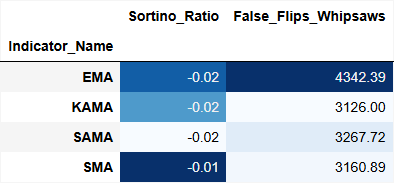
Fig. 1: Baseline table generated from baseline_analysis.py
Script B: Walk-Forward Cross-Validation Module
Save as: optimized_analysis.py
import pandas as pd
import matplotlib.pyplot as plt
import dataframe_image as dfi
import os

# --- Configuration
CSV_FILE           = 'optimized_results.csv'
OUTPUT_IMAGE_HIST  = 'WalkForward_Histogram.png'
OUTPUT_IMAGE_TABLE = 'WalkForward_Table.png'
OUTPUT_TEXT        = 'WalkForward_Analysis_Report.txt'


def run_optimized_analysis():
    if not os.path.exists(CSV_FILE):
        print(f"Error: {CSV_FILE} not found.")
        return

    df = pd.read_csv(CSV_FILE)
    report_text  = "# Walk-Forward Optimized Analysis\n\n"
    symbols      = df['Symbol'].unique()
    final_comparison_rows = []

    for symbol in symbols:
        report_text += f"## Walk-Forward Analysis for {symbol}\n\n"
        symbol_data = df[df['Symbol'] == symbol]

        for indicator in symbol_data['Indicator_Name'].unique():
            ind_data = symbol_data[symbol_data['Indicator_Name'] == indicator]

            is_data  = ind_data[ind_data['Test_Phase'].str.contains(
                'InSample', case=False, na=False)]
            oos_data = ind_data[ind_data['Test_Phase'].str.contains(
                'OutSample', case=False, na=False)]

            if is_data.empty or oos_data.empty:
                continue

            # --- Locate the highest Sortino row in the InSample set
            best_is_idx = is_data['Sortino_Ratio'].idxmax()
            best_is_row = is_data.loc[best_is_idx]
            best_period = best_is_row['Filter_Period']
            best_lr     = best_is_row.get('Param_SAMA_LR', 0)

            # --- Match OutSample row using exact parameter values (no substitution)
            matching_oos = oos_data[
                (oos_data['Filter_Period'] == best_period) &
                (
                    (oos_data['Param_SAMA_LR'] == best_lr) |
                    (oos_data['Param_SAMA_LR'].isna())
                )
            ]

            if not matching_oos.empty:
                best_oos_row = matching_oos.iloc[0]

                final_comparison_rows.append({
                    'Symbol'     : symbol,
                    'Indicator'  : indicator,
                    'IS_Sortino' : best_is_row['Sortino_Ratio'],
                    'OOS_Sortino': best_oos_row['Sortino_Ratio'],
                    'IS_Profit'  : best_is_row['Net_Profit_$'],
                    'OOS_Profit' : best_oos_row['Net_Profit_$']
                })

                profit_drop = (
                    (best_is_row['Net_Profit_$'] - best_oos_row['Net_Profit_$']) /
                    best_is_row['Net_Profit_$']
                ) * 100

                report_text += (
                    f"**{indicator}**: The optimal parameters from the InSample phase "
                    f"(Period: {best_period}) "
                    f"yielded a Sortino Ratio of {best_is_row['Sortino_Ratio']:.2f}. "
                    f"When these exact parameters were applied to the blind OutSample data, "
                    f"the Sortino Ratio shifted to {best_oos_row['Sortino_Ratio']:.2f}, "
                    f"with a profit variance of {profit_drop:.1f}%.\n"
                )

        report_text += "\n"

    if not final_comparison_rows:
        print("No matched IS/OOS pairs found. Check Test_Phase labels in the CSV.")
        return

    results_df = pd.DataFrame(final_comparison_rows)

    # --- Walk-forward degradation histogram (980px layout constraint)
    fig, ax = plt.subplots(figsize=(9.8, 6), dpi=100)
    plot_data = results_df.groupby('Indicator')[['IS_Sortino', 'OOS_Sortino']].mean()
    plot_data.plot(kind='bar', ax=ax)
    plt.title('Walk-Forward Validation: InSample vs OutSample Sortino Ratio Degradation (IS vs OOS)')
    plt.ylabel('Sortino Ratio')
    plt.xticks(rotation=0)
    fig.tight_layout()
    plt.savefig(OUTPUT_IMAGE_HIST)
    plt.close()

    # --- Styled summary table image
    styled_table = (
        plot_data.style
        .background_gradient(cmap='Purples')
        .format("{:.2f}")
    )
    dfi.export(styled_table, OUTPUT_IMAGE_TABLE, max_cols=-1, max_rows=-1)

    with open(OUTPUT_TEXT, 'w') as f:
        f.write(report_text)

    print(f"Walk-forward analysis complete. Report: {OUTPUT_TEXT}")


if __name__ == "__main__":
    run_optimized_analysis()
On the degradation measurement:
The profit_drop calculation captures the proportional performance degradation between the InSample peak and the OutSample result using those same parameters. A profit_drop near zero indicates that the optimized parameters generalize well. A large positive profit_drop — 60% or higher — is a quantitative signal of curve-fitting: the parameters were tuned to historical noise rather than genuine structural edge.
The final histogram groups results by indicator and averages IS and OOS Sortino ratios across all tested symbols. This cross-symbol aggregate view reveals whether an indicator's optimization profile is broadly stable or only holds for specific market conditions.
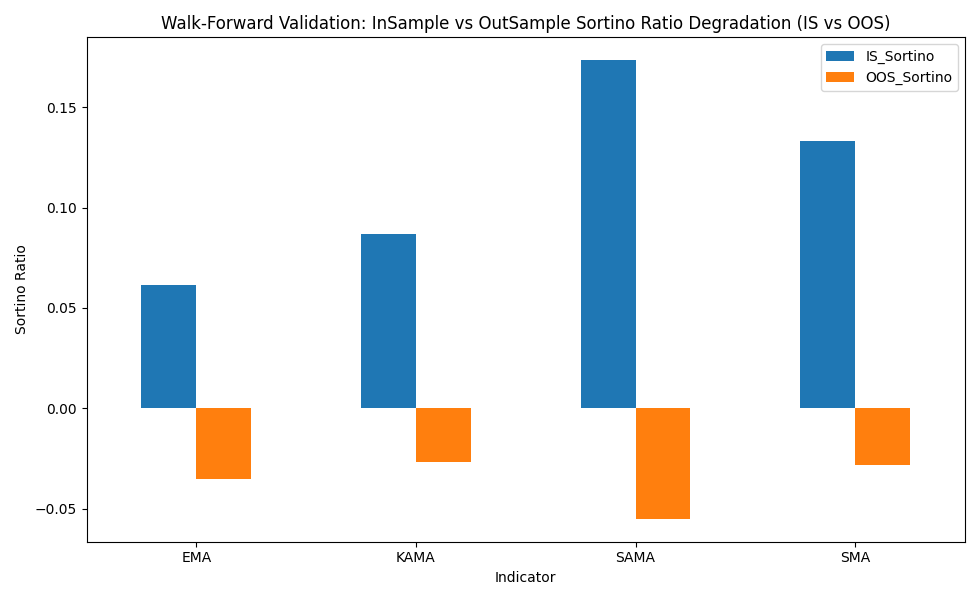
Fig. 2: Walk-forward histogram
Section 5: Environment Setup and Deployment
Directory Structure
Organize the working directory as follows before executing either script:
/research_workspace/
├── baseline_results.csv            # Baseline phase export from MT5
├── optimized_results.csv           # Optimization phase export from MT5
├── baseline_analysis.py            # Script A
├── optimized_analysis.py           # Script B
└── /outputs/                       # Auto-generated; scripts write here
    ├── Baseline_Analysis_Report.txt
    ├── Baseline_Table.png
    ├── Baseline_Histogram_EURUSD.png
    ├── Baseline_Histogram_XAUUSD.png
    ├── WalkForward_Analysis_Report.txt
    ├── WalkForward_Histogram.png
    └── WalkForward_Table.png
Both scripts write output files to the current working directory unless the OUTPUT_* constants at the top of each file are modified to include a subdirectory path. Routing outputs to a dedicated /outputs/ folder keeps the root directory clean and makes the generated assets easy to locate for publication upload.
The CSV file names in the CSV_FILE constants must match the actual exported file names from MT5. File name mismatches are the most common source of silent failures in this pipeline.
Dependency Installation
All required libraries are available via pip. Run the following from a terminal with the target Python environment active:
pip install pandas matplotlib dataframe_image
The dataframe_image library uses a headless Chromium instance (or a compatible system browser) to render styled DataFrames to PNG. On headless Linux servers, install the Chromium dependencies explicitly:
pip install dataframe_image[all] If the rendering backend throws a browser initialization error, dataframe_image also supports a matplotlib fallback via the backend='matplotlib' argument in dfi.export(). This fallback produces acceptable output with minor styling differences.
Python 3.6+ is required. Verify the installed library versions after installation:
python -c "import pandas; import matplotlib; import dataframe_image; print('All dependencies loaded.')" Running the Pipeline
Execute baseline analysis first:
python baseline_analysis.py
Then run the walk-forward module:
python optimized_analysis.py
Both scripts print a completion message to stdout when they exit cleanly. Any missing file or unexpected column name will surface as a printed error rather than a silent failure.
The 980px Width Constraint
Both scripts use figsize=(9.8, X) with dpi=100. This produces a 980-pixel-wide image. This boundary prevents horizontal overflow on standard trading portals and MQL5 article pages, where the content column width sits between 900px and 1,000px. Exceeding this width causes images to either overflow their container or trigger browser-side rescaling, both of which degrade readability.
Do not change the dpi value without recalculating the corresponding figsize width to maintain the 980px output. At 150 DPI, for instance, the width value would need to drop to 6.53 inches to stay under the pixel ceiling.
Section 6: Interpreting the Output
A fully automated pipeline is only valuable if the practitioner understands the interpretation framework behind the numbers it generates. Several common misreadings are worth addressing explicitly.
Sortino vs. Profit as the primary ranking metric: Net profit appears in the export schema and in the baseline narrative, but the Python module ranks InSample results by Sortino Ratio. This is a deliberate choice. In short optimization windows, a strategy can generate substantial absolute profit through a small number of large winning trades while simultaneously carrying extreme downside risk. The Sortino Ratio's use of downside deviation as its denominator filters this noise. An InSample selection based on raw profit is substantially more vulnerable to selecting a regime-specific outlier.
Interpreting a large profit_drop value: When the walk-forward module reports a profit variance of, say, 72%, this does not automatically invalidate the strategy. It is evidence that the InSample window contains conditions that the OutSample window does not replicate. The correct response is to investigate whether the windows are temporally or structurally different — for example, a trend-heavy InSample period followed by a ranging OutSample period — before concluding that the strategy is curve-fit. The module surfaces the measurement; the practitioner supplies the context.
Averaging across timeframes in the baseline module: The cross-timeframe mean calculation in baseline_analysis.py treats M15, H1, and H4 as three statistically independent observations for each indicator. This is a reasonable approximation when the test periods are long relative to the longest timeframe (H4), but it understates variance when the three timeframes are correlated by the same underlying market regime. For deeper research, replace the mean() aggregate with a weighted average that discounts shorter timeframes according to their autocorrelation with the longer ones.
Conclusion
The architecture described in this article separates three concerns that are habitually conflated in manual MT5 analysis: data generation, analytical processing, and narrative synthesis. MetaTrader 5 handles the first. The Python stack handles the second and third automatically.
The MQL5 export framework writes a structured CSV with every test phase tagged, every custom counter recorded, and every parameter configuration preserved. The baseline module reads that CSV and produces parameter-matched comparisons across symbols and timeframes without any manual grouping or chart interpretation. The walk-forward module finds the InSample peak by Sortino Ratio, locks its parameters, locates the exact corresponding OutSample row, and reports the performance delta as an unambiguous robustness measurement.
Both modules output publication-ready visualizations at the 980px web constraint and draft narrative text that maps directly into a structured article. Running a full comparative analysis on a new symbol or timeframe requires nothing more than updating the CSV constants and re-executing the scripts.
The pipeline is designed to make rigorous analysis the path of least resistance: not the exception reserved for methodologically careful research, but the automatic output of every development cycle.
Programs used in the article:
| # | Name | Type | Description |
|---|---|---|---|
| 1 | ExportFramework.mq5 | Demo EA | The MQL5 data generation component. It writes one structured CSV row per completed test pass, tagging each row with a Test_Phase identifier: Baseline, InSample, or OutSample. Custom counters for whipsaw frequency and directional turn lag are accumulated during the run and written alongside standard performance statistics at OnDeinit(). |
| 2 | baseline_analysis.py | Python Script | Reads the baseline phase CSV and groups results by symbol and indicator. It computes cross-timeframe averages across M15, H1, and H4 for each indicator variant, generates programmatic narrative text from the aggregated metrics, and produces a dual-panel histogram per symbol comparing Sortino Ratio against false flip frequency. A styled summary table image is exported for direct publication use. |
| 3 | optimized_analysis.py | Python Script | Reads the optimization phase CSV and performs locked-parameter walk-forward matching. For each indicator, it identifies the InSample row with the highest Sortino Ratio, extracts its exact parameter values, and locates the corresponding out-of-sample row using strict equality matching. The performance delta between the two rows is reported as a proportional profit variance, and results are visualized as a degradation histogram. |
Warning: All rights to these materials are reserved by MetaQuotes Ltd. Copying or reprinting of these materials in whole or in part is prohibited.
This article was written by a user of the site and reflects their personal views. MetaQuotes Ltd is not responsible for the accuracy of the information presented, nor for any consequences resulting from the use of the solutions, strategies or recommendations described.

 Neural Networks in Trading: Actor—Director—Critic (Final Part)
 Swing Extremes and Pullbacks (Part 4): Dynamic Pullback Depth Using Volatility Models
 Gaussian Processes in Machine Learning (Part 1): Classification Model in MQL5
 From Static MA to Adaptive Filtering (Part 1): Introducing SAMA with NLMS in MQL5

- Free trading apps
- Over 8,000 signals for copying
- Economic news for exploring financial markets
You agree to website policy and terms of use