

Overcoming Accessibility Problems in MQL5 Trading Tools (Part VI): Neural Command Integration
 1 245
1 245
 0
0

What if you could trade simply by thinking? Throughout this accessibility series, we have built solutions based on voice commands, gesture control, and audio feedback systems. Each addressed a specific barrier. But all of them share a common assumption: the trader must perform some physical action to execute a trade. This article looks beyond physical controls entirely. It explores a future where your trading intention flows directly from your brain to the terminal—no hands, no voice, no movement required.
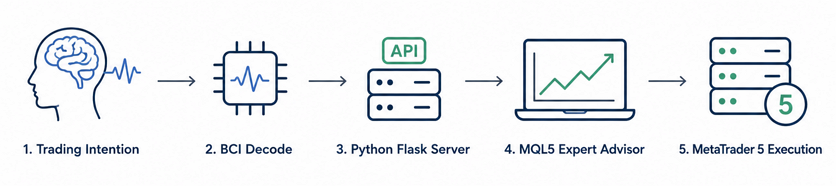
Fig. 1. The future accessibility of MetaTrader 5 tools with BCI technology
Brain-Computer Interface (BCI) technology is advancing rapidly, with systems like Neuralink's N1 implant and the Blackrock Neurotech Utah Array already decoding motor cortex activity into discrete commands in clinical trials. The hardware exists. What does not yet exist is the software bridge connecting these neural signals to a trading platform like MetaTrader 5. This article builds that bridge—using Python and MQL5 to demonstrate how BCI technology could integrate with algorithmic trading systems today.
We implement a simulation that mimics BCI signal generation, demonstrating how neural commands can flow into an MQL5 Expert Advisor. This simulation proves the feasibility of the method as a means of expanding accessibility in algorithmic trading tools. By generating synthetic neural commands through a Python Flask server, we validate the complete pipeline architecture under controlled, repeatable conditions. The simulation approach allows us to explore the integration points, test the transport layer, and measure performance—all without requiring expensive hardware or clinical trials. This is a forward-looking solution: a prototype that demonstrates what BCI-powered trading could look like, using the tools available today.
Contents
- The Future of Trading: Exploring Thought-Based Order Execution
- Why BCI Is the Answer—And How Simulation Makes It Accessible Today
- Conceptual Design: The Neural Command Pipeline
- Understanding the Reference Implementation: The Gesture Baseline
- Designing the Command Protocol: JSON over HTTP
- The Neural Command Simulator: Python Flask Server
- The MQL5 Receiver: Complete EA Implementation
- Integration and Testing: Running the Simulated Pipeline
- Performance and Latency: Transport Measurements
- Conclusion
- Key Lessons and Next Steps
- Attachments
The Future of Trading: Exploring Thought-Based Order Execution
Every tool we use to interact with MetaTrader 5 today—mouse, keyboard, voice commands, gesture cameras—requires a physical action. You must click, press, speak, or wave. These methods work well for most traders. But they all share a fundamental limitation: there is always a physical step between your decision and the execution. What if we could eliminate that step entirely? What if the trading platform could respond directly to your intention, the moment you form it?
This is the promise of Brain-Computer Interface technology. Instead of thinking "I should buy," then moving your hand to click a button, then waiting for the platform to respond—the BCI pipeline collapses this chain into a single step. You think "buy," and the trade executes. The potential benefits extend beyond accessibility: reduced latency between decision and execution, hands-free operation during multi-screen analysis, and a more intuitive connection between trader and platform.
Of course, consumer BCI hardware is not yet available at accessible prices. Clinical systems cost hundreds of thousands of dollars and require surgery. Consumer EEG headsets lack the precision needed for reliable command classification. But the software side of the equation can be explored today. By simulating the neural command stream, we can test the MQL5 pipeline end-to-end and create a reference implementation that demonstrates how this future technology could integrate with existing trading infrastructure.
Why BCI Is the Answer—And How Simulation Makes It Accessible Today
Brain-Computer Interfaces decode neural activity into machine-readable commands. The most advanced systems—intracortical microelectrode arrays—are surgically implanted into the motor cortex, recording action potentials from individual neurons at 20 kHz across thousands of channels. On-device processors perform real-time spike sorting using unsupervised clustering algorithms to isolate single-unit activity from background noise. Trained recurrent neural networks then map these spike patterns to intended actions with reported accuracy exceeding 95% for simple motor tasks. The entire pipeline operates within 50-150 milliseconds for invasive arrays, making it viable for real-time control applications.
The output of a BCI decoder is a stream of symbolic commands such as BUY, SELL, CLOSE, or HOLD. The decoder only needs to classify the user's motor imagery into one of these four categories. Research shows that imagined hand gestures—pointing, grasping, thumbs-up—activate distinct neural populations in the motor cortex. The trader imagines a pointing gesture to buy, a thumbs-up to sell, and a fist to close all positions. The BCI handles the neural-to-symbolic translation; the EA handles the symbolic-to-financial translation. Neither system needs to understand the other's domain. This clean separation of concerns is what makes the simulation approach viable: the neural decoding layer is a black box from the EA's perspective, interchangeable with any future technology that speaks the same JSON protocol.
Why simulate? Clinical BCI systems cost about $150,000–$250,000 and require a craniotomy. They are available only at a few research hospitals under strict IDE protocols. Consumer EEG headsets ($500-$5,000) lack the spatial resolution to reliably decode fine motor intentions. The skull acts as a low-pass filter, smearing electrical signals across the scalp. EEG can detect gross motor imagery—left hand versus right hand movement—but cannot distinguish between individual finger gestures with the reliability needed for financial transactions where a misclassification could result in unintended trades. Simulation bridges this gap. It allows us to develop, test, and validate the complete pipeline today, proving that the integration is feasible and establishing a reference architecture for future BCI-integrated trading systems.
Conceptual Design: The Neural Command Pipeline
The pipeline architecture is intentionally layered, separating the neural decoding domain from the trading execution domain. This separation allows the EA to remain agnostic to the source of neural commands—whether a Python random number generator, a research-grade BCI, or a future consumer neural interface. The architecture follows protocol-defined boundaries: as long as the upstream source speaks the agreed JSON-over-HTTP protocol, the EA functions identically. Any future BCI hardware manufacturer only needs to implement a single HTTP endpoint producing the agreed JSON format to achieve compatibility with our trading infrastructure.
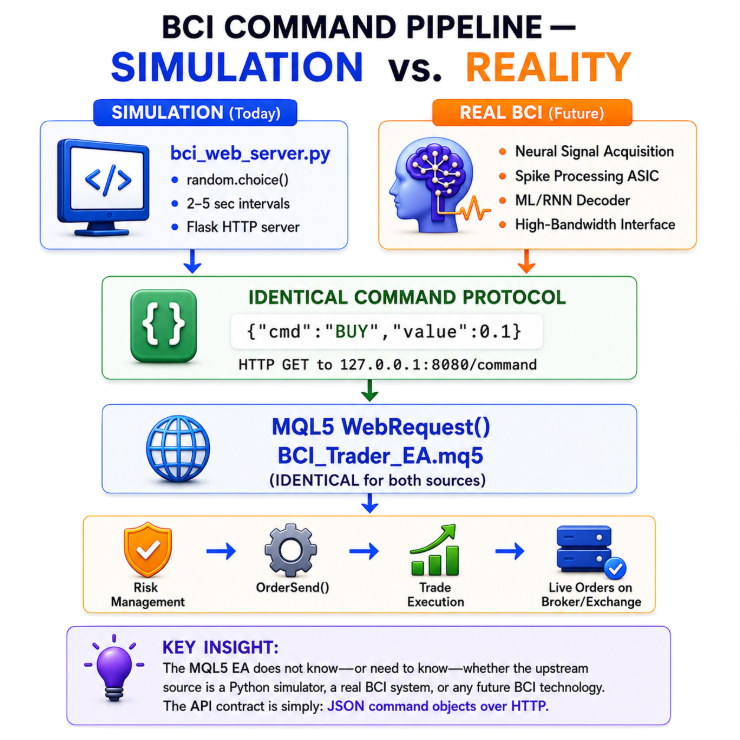
Fig. 2. BCI Command Pipeline
For the transport layer, we selected HTTP via the built-in WebRequest function after testing multiple alternatives. This choice prioritizes simplicity and reliability for the prototype. The Flask server can be tested independently by navigating to http://127.0.0.1:8080/command in any browser before the EA is compiled. Setup requires only that the server URL be added to MetaTrader 5's allowed list via Tools → Options → Expert Advisors. This developer-friendly workflow makes the system accessible to MQL5 developers without deep networking expertise. MQL5 also provides native socket functions that could offer lower latency through persistent TCP or UDP connections, and future iterations could migrate to such transport for sub-100ms responsiveness without changing the JSON protocol or command processing logic. For this prototype, a 500‑ms polling interval provides adequate responsiveness for the accessibility use case. The trader operates at human cognitive speeds, not algorithmic frequencies.
Understanding the Reference Implementation: The Gesture Baseline
The gesture-controlled system from Part V of this series serves as our reference point. Using MediaPipe Hands and a commodity webcam, it achieved 68-85ms average latency with 95-97% gesture accuracy under ideal conditions. The system processed 30 frames per second, extracting 21 hand landmarks per frame and classifying gestures using heuristic thresholds applied to finger curl ratios and inter-landmark angles. These figures were measured on real hardware with a live demo account, providing a concrete performance baseline. However, the system still requires the trader to perform visible hand movements in front of a camera—a step that adds cognitive load and physical effort. The BCI approach eliminates this step entirely, creating a more direct connection between intention and execution.
The key takeaway is not about absolute latency numbers—our BCI prototype uses simulated commands, so we do not report measured neural decoding latency. It is about the fundamental shift: moving from physical controls to thought-based interaction. The gesture pipeline requires you to move. The BCI pipeline only requires you to think. For the future of trading interfaces, that difference represents a paradigm shift—and our simulation proves the integration is feasible.
Designing the Command Protocol: JSON over HTTP
After testing several command formats—including binary protocols with 8-byte fixed-length packets containing type, gesture ID, confidence, and sequence number fields—we selected JSON for three reasons:
- Human-readable during debugging. A developer can navigate to http://127.0.0.1:8080/command and see exactly what the EA will receive.
- Self-describing. Field names like "cmd" and "value" eliminate ambiguity.
- Extensible. Adding new fields like "confidence" or "timestamp" requires no protocol changes.
The Flask server returns a JSON object from its /command endpoint:
{"cmd":"BUY","value":0.1} The EA parses this JSON using a lightweight inline string-extraction function that requires no external MQL5 libraries. This function handles both string values (where the value is quoted) and numeric values (where it appears as a bare number), making it robust against minor variations in JSON formatting that different BCI middleware implementations might produce:
//+------------------------------------------------------------------+
//| Extract "key":"value" or "key":number from JSON string           |
//+------------------------------------------------------------------+
string ExtractJSONValue(string json, string key)
  {
//--- First, try to match a string value: "key":"value"
   string search = "\"" + key + "\":\"";     // Build search pattern
   int start = StringFind(json, search);
   if(start >= 0)
     {
      start += StringLen(search);             // Move past pattern
      int end = StringFind(json, "\"", start); // Find closing quote
      if(end > start)
         return StringSubstr(json, start, end - start); // Extract value
     }
//--- If no string match, try numeric value: "key":0.1
   search = "\"" + key + "\":";              // Build search pattern
   start = StringFind(json, search);
   if(start >= 0)
     {
      start += StringLen(search);             // Move past pattern
      int end = StringFind(json, ",", start);  // Find comma (end of field)
      if(end < 0)
         end = StringFind(json, "}", start);   // Or closing brace (end of object)
      if(end > start)
         return StringSubstr(json, start, end - start); // Extract value
     }
//--- Key not found in JSON
   return "";
  }
The Neural Command Simulator: Python Flask Server
The simulator replaces the entire BCI hardware stack with a single Python script. It generates commands at physiologically realistic intervals—2 to 5 seconds, matching the temporal dynamics of motor imagery decoding documented in BCI literature—and serves them via HTTP. In a real BCI system, the generate_commands() thread would be replaced by a neural network inference pipeline processing real-time spike-sorted data from an implanted electrode array. The Flask server exposes three endpoints:
- /command — Returns the latest decoded command and immediately resets to HOLD. This ensures each intention is processed exactly once, a critical safety mechanism.
- /health — Connection test endpoint called during EA initialization to verify the server is reachable.
- /direct/<cmd> — Manual testing endpoint. Developers can trigger specific commands by navigating to http://127.0.0.1:8080/direct/BUY in any browser, bypassing the random generator for controlled testing scenarios.
The command generation loop runs in a background daemon thread, continuously updating a global current_command dictionary. The main Flask thread serves this dictionary to incoming HTTP requests. The reset-to-HOLD mechanism is a critical safety feature—it prevents the EA from executing the same command repeatedly if it polls faster than new commands are generated:
#!/usr/bin/env python3
# File: bci_web_server.py
# Article 23193 - Overcoming Accessibility VI
# HTTP server that provides BCI commands via REST API
# Dependencies: pip install flask

from flask import Flask
import random
import threading
import time

app = Flask(__name__)

# Current command state
current_command = {"cmd": "HOLD", "value": 0.0}

COMMANDS = ['BUY', 'SELL', 'CLOSE', 'HOLD']
LOT_SIZES = [0.01, 0.05, 0.1]

def generate_commands():
    """Background thread that generates random BCI commands."""
    global current_command
    print("Command generator started. Sending commands every 2-5 seconds.")
    while True:
        cmd = random.choice(COMMANDS)
        value = random.choice(LOT_SIZES) if cmd in ['BUY', 'SELL'] else 0.0
        current_command = {"cmd": cmd, "value": value}
        print(f"  Generated: {cmd}:{value}")
        time.sleep(random.uniform(2.0, 5.0))

@app.route('/command', methods=['GET'])
def get_command():
    """Return the current BCI command and reset to HOLD."""
    global current_command
    cmd = current_command.copy()
    current_command = {"cmd": "HOLD", "value": 0.0}
    return cmd

@app.route('/health', methods=['GET'])
def health():
    """Health check endpoint."""
    return {"status": "ok"}

@app.route('/direct/<cmd>', methods=['GET'])
def direct_command(cmd):
    """Direct command endpoint for testing."""
    global current_command
    cmd_upper = cmd.upper()
    if cmd_upper in ['BUY', 'SELL', 'CLOSE']:
        current_command = {"cmd": cmd_upper, "value": 0.1}
        return {"status": "sent", "cmd": cmd_upper}
    return {"status": "error", "message": "Unknown command"}, 400

if __name__ == '__main__':
    # Start the command generator in a background thread
    gen_thread = threading.Thread(target=generate_commands, daemon=True)
    gen_thread.start()

    print("=" * 50)
    print("BCI Web Server running on http://127.0.0.1:8080")
    print("Endpoints:")
    print("  GET /command  - Get latest BCI command")
    print("  GET /health   - Health check")
    print("  GET /direct/BUY  - Send direct BUY command")
    print("  GET /direct/SELL - Send direct SELL command")
    print("  GET /direct/CLOSE - Send direct CLOSE command")
    print("=" * 50)
    print("Make sure to add http://127.0.0.1:8080 to MT5 WebRequest allowed list!")
    print("Tools -> Options -> Expert Advisors -> Allow WebRequest")

    app.run(host='127.0.0.1', port=8080, debug=False, threaded=True)
The MQL5 Receiver: Complete EA Implementation
The BCI_Trader_EA.mq5 is a self-contained Expert Advisor that polls the Flask server every 500 ms via WebRequest and executes commands through CTrade. It requires zero external includes beyond the standard Trade/Trade.mqh library, making it immediately compilable in any MetaTrader 5 environment. The full source code is available in the attachments. Below, we walk through each functional block.
Property Declarations and Input ParametersEvery MQL5 Expert Advisor begins with property declarations that identify the program to the terminal. The description field marks this as a BCI integration prototype. We declare three input parameters: ServerURL (defaulting to localhost:8080), DefaultLots (trade volume used when no specific lot is specified by the neural command), and TimerInterval (polling interval in milliseconds, balancing responsiveness against CPU load at 500 ms, which checks for new commands twice per second):
//+------------------------------------------------------------------+
//|                                                BCI_Trader_EA.mq5 |
//|                               Copyright 2025, Clemence Benjamin. |
//|                                             https://www.mql5.com |
//+------------------------------------------------------------------+
#property copyright "Copyright 2025, Clemence Benjamin."
#property link      "https://www.mql5.com"
#property version   "1.00"
#property description "BCI Trading EA - WebRequest (HTTP) Mode"

#include <Trade/Trade.mqh>

//--- Server and trading parameters
input string ServerURL      = "http://127.0.0.1:8080";  // BCI server URL
input double DefaultLots    = 0.1;                      // Default lot size
input int    TimerInterval  = 500;                      // Polling interval (ms)
Global Variables and State Tracking
The EA maintains several global variables that track trading state across timer ticks. The CTrade object handles all order operations with a configured magic number and deviation. g_lastCmd prevents duplicate execution by comparing each fetched command against the previously processed one. g_cmdCount tracks total commands processed for session reporting. g_serverAvailable indicates whether the Flask server responded to the initial health check:
//--- Global trade and state variables
CTrade  g_trade;                    // Trade execution object
double  g_lot    = 0.0;             // Current lot size
int     g_timerId = -1;             // Timer handle for cleanup
string  g_lastCmd = "";             // Last command (deduplication)
int     g_cmdCount = 0;             // Commands processed counter
bool    g_serverAvailable = false;  // Server connection status flag
Server Connection Testing and Command Fetching
TestServerConnection performs a health check during EA initialization by sending a GET request to the /health endpoint and verifying the response contains "ok". FetchBCICommand is called on every timer tick; it sends a GET to /command, which returns the current neural command and resets it to HOLD on the server side. The 500 ms timeout on WebRequest ensures the EA never hangs waiting for a server response. The fetched JSON is parsed by ExtractJSONValue to extract the "cmd" and "value" fields. Commands in the HOLD state—meaning no intentional neural activity was detected—are silently ignored:
//+------------------------------------------------------------------+
//| Health check: GET /health and verify "ok" in response            |
//+------------------------------------------------------------------+
bool TestServerConnection()
  {
//--- Prepare empty buffers for the WebRequest call
   char postData[];
   uchar resultData[];
   string resultHeaders;
//--- Send GET request to /health endpoint with 2-second timeout
   int res = WebRequest("GET", ServerURL + "/health", "", 2000,
                        postData, resultData, resultHeaders);
//--- Check for HTTP 200 and "ok" in response body
   if(res == 200)
     {
      string body = CharArrayToString(resultData, 0, WHOLE_ARRAY, CP_UTF8);
      return (StringFind(body, "ok") >= 0);
     }
   return false;
  }

//+------------------------------------------------------------------+
//| GET /command, parse JSON, return "CMD:value" or empty for HOLD   |
//+------------------------------------------------------------------+
string FetchBCICommand()
  {
//--- Prepare empty buffers for the WebRequest call
   char postData[];
   uchar resultData[];
   string resultHeaders;
//--- Send GET request to /command endpoint with 500ms timeout
   int res = WebRequest("GET", ServerURL + "/command", "", 500,
                        postData, resultData, resultHeaders);
//--- Return empty if server did not respond with 200
   if(res != 200)
      return "";
//--- Convert binary response to UTF-8 string
   string json = CharArrayToString(resultData, 0, WHOLE_ARRAY, CP_UTF8);
//--- Parse JSON fields: {"cmd":"BUY","value":0.1}
   string cmd = ExtractJSONValue(json, "cmd");    // Extract "cmd" field
   string val = ExtractJSONValue(json, "value");  // Extract "value" field
   double value = StringToDouble(val);
//--- HOLD is resting state - no trade action needed
   if(cmd == "" || cmd == "HOLD")
      return "";
//--- Return command in internal format: "BUY:0.10"
   return cmd + ":" + DoubleToString(value, 2);
  }
JSON Parsing and Command Dispatch
ProcessCommand splits the internal "CMD:value" format at the colon, extracts action and value, and dispatches to the appropriate execution function. If no valid lot size is specified for BUY or SELL commands, the default lot stored in g_lot is used instead. Unknown commands are logged and ignored:
//+------------------------------------------------------------------+
//| Parse "CMD:value" string and dispatch to execution function      |
//+------------------------------------------------------------------+
void ProcessCommand(string cmdStr)
  {
//--- Find the colon separator between command and value
   int sep = StringFind(cmdStr, ":");
   if(sep == -1)
      return;  // Malformed command - no colon found
//--- Extract action (left of colon) and value (right of colon)
   string action = StringSubstr(cmdStr, 0, sep);
   double value  = StringToDouble(StringSubstr(cmdStr, sep + 1));
//--- Use default lot if no valid value specified
   if(value <= 0.0 && action != "CLOSE")
      value = g_lot;
//--- Dispatch to appropriate execution function
   if(action == "BUY")
      ExecuteBuy(value);
   else
      if(action == "SELL")
         ExecuteSell(value);
      else
         if(action == "CLOSE")
            ExecuteCloseAll();
         else
            Print("Unknown BCI command: ", action);
  }
Trade Execution with Stop Fallback
ExecuteBuy and ExecuteSell place market orders using a two-tier strategy. First, they attempt to place the order with stop-loss and take-profit levels—SL at 50 points from entry, TP at 100 points, giving a 1:2 risk-reward ratio. If the broker rejects these levels with error 4756 ("invalid stops," common on indices and commodities with minimum distance requirements), the functions automatically retry without any SL/TP. This fallback logic ensures the EA works across diverse symbol types without manual configuration. Both functions log results to the Experts tab for debugging:
//+------------------------------------------------------------------+
//| Place market buy with SL/TP; fallback to no stops on error 4756  |
//+------------------------------------------------------------------+
void ExecuteBuy(double lot)
  {
//--- Get current market prices and symbol properties
   double ask   = SymbolInfoDouble(_Symbol, SYMBOL_ASK);
   double bid   = SymbolInfoDouble(_Symbol, SYMBOL_BID);
   double point = SymbolInfoDouble(_Symbol, SYMBOL_POINT);
   int    digits = (int)SymbolInfoInteger(_Symbol, SYMBOL_DIGITS);
//--- Calculate SL (50 pts below bid) and TP (100 pts above ask)
   double sl = NormalizeDouble(bid - 50 * point, digits);
   double tp = NormalizeDouble(ask + 100 * point, digits);
//--- Attempt to place order with stops first
   if(g_trade.Buy(lot, _Symbol, ask, sl, tp, "BCI Buy"))
     {
      Print("[BCI] BUY EXECUTED: lot=", lot, " price=", ask);
     }
   else
      if(GetLastError() == 4756)
        {
         //--- Error 4756 = "invalid stops" - retry without stops
         if(g_trade.Buy(lot, _Symbol, ask, 0, 0, "BCI Buy"))
            Print("[BCI] BUY EXECUTED (no stops): lot=", lot);
         else
            Print("[BCI] BUY FAILED: error=", GetLastError());
        }
      else
        {
         Print("[BCI] BUY FAILED: error=", GetLastError());
        }
  }

//+------------------------------------------------------------------+
//| Place market sell with SL/TP; fallback to no stops on error 4756 |
//+------------------------------------------------------------------+
void ExecuteSell(double lot)
  {
//--- Get current market prices and symbol properties
   double ask   = SymbolInfoDouble(_Symbol, SYMBOL_ASK);
   double bid   = SymbolInfoDouble(_Symbol, SYMBOL_BID);
   double point = SymbolInfoDouble(_Symbol, SYMBOL_POINT);
   int    digits = (int)SymbolInfoInteger(_Symbol, SYMBOL_DIGITS);
//--- Calculate SL (50 pts above ask) and TP (100 pts below bid)
   double sl = NormalizeDouble(ask + 50 * point, digits);
   double tp = NormalizeDouble(bid - 100 * point, digits);
//--- Attempt to place order with stops first
   if(g_trade.Sell(lot, _Symbol, bid, sl, tp, "BCI Sell"))
     {
      Print("[BCI] SELL EXECUTED: lot=", lot, " price=", bid);
     }
   else
      if(GetLastError() == 4756)
        {
         //--- Error 4756 = "invalid stops" - retry without stops
         if(g_trade.Sell(lot, _Symbol, bid, 0, 0, "BCI Sell"))
            Print("[BCI] SELL EXECUTED (no stops): lot=", lot);
         else
            Print("[BCI] SELL FAILED: error=", GetLastError());
        }
      else
        {
         Print("[BCI] SELL FAILED: error=", GetLastError());
        }
  }
Position Closing and Manual Override
ExecuteCloseAll iterates backward through all positions for the current symbol, closing each via CTrade. It iterates backward because closing a position shifts the indices of remaining positions. OnChartEvent provides an always-available manual keyboard override that operates independently of the BCI pipeline, ensuring the trader can intervene at any time:
- B key — Execute a market buy using the default lot size.
- S key — Execute a market sell using the default lot size.
- C key — Close all positions for the current symbol.
//+------------------------------------------------------------------+
//| Close all positions for the current symbol (iterate backward)    |
//+------------------------------------------------------------------+
void ExecuteCloseAll()
  {
   int closed = 0;                  // Successfully closed counter
   int total  = PositionsTotal();   // Total positions across all symbols
//--- Iterate backward (closing shifts remaining indices)
   for(int i = total - 1; i >= 0; i--)
     {
      ulong ticket = PositionGetTicket(i);  // Get position by index
      //--- Verify ticket and select position for reading
      if(ticket > 0 && PositionSelectByTicket(ticket))
        {
         //--- Only close positions belonging to current symbol
         if(PositionGetString(POSITION_SYMBOL) == _Symbol)
           {
            if(g_trade.PositionClose(ticket))
               closed++;  // Increment success counter
           }
        }
     }
//--- Report results
   Print("[BCI] CLOSE ALL: ", closed, " position(s) closed.");
  }

//+------------------------------------------------------------------+
//| Keyboard override: B=Buy, S=Sell, C=CloseAll (always available)  |
//+------------------------------------------------------------------+
void OnChartEvent(const int id, const long &lparam, const double &dparam, const string &sparam)
  {
//--- Only process keyboard events
   if(id != CHARTEVENT_KEYDOWN)
      return;
//--- Normalize key input for cross-platform compatibility
   string keyStr = sparam;
   StringToUpper(keyStr);       // Convert to uppercase
   int keyCode = (int)lparam;   // ASCII key code as backup
//--- Dispatch based on key pressed
   if(keyStr == "B" || keyCode == 66)      // 'B' = Market Buy
      ExecuteBuy(g_lot);
   else
      if(keyStr == "S" || keyCode == 83)   // 'S' = Market Sell
         ExecuteSell(g_lot);
      else
         if(keyStr == "C" || keyCode == 67)   // 'C' = Close All
            ExecuteCloseAll();
  }
Initialization and Main Loop
OnInit stores the default lot, configures CTrade with a magic number and deviation, tests the Flask server connection, and starts the polling timer. OnTimer is the main event loop: it fetches commands from the BCI server, deduplicates them by comparing against g_lastCmd, parses and dispatches valid commands, and increments the command counter. OnDeinit cleans up the timer and prints a session summary. OnTick exists as a required placeholder in MQL5 Expert Advisors; all actual work is performed in OnTimer:
//+------------------------------------------------------------------+
//| Initialize EA, test server, start timer                          |
//+------------------------------------------------------------------+
int OnInit(void)
  {
//--- Store default lot and configure trade object
   g_lot = DefaultLots;
   g_trade.SetExpertMagicNumber(123456);
   g_trade.SetDeviationInPoints(100);
//--- Display startup banner
   Print("============================================");
   Print("BCI Trader EA (WebRequest Mode)");
   Print("Server: ", ServerURL);
   Print("Polling every ", TimerInterval, "ms");
   Print("============================================");
//--- Test the BCI server connection
   if(TestServerConnection())
     {
      Print("BCI Server connected successfully!");
      Print("Commands will be executed automatically.");
      g_serverAvailable = true;
     }
   else
     {
      Print("WARNING: BCI Server not reachable.");
      Print("Make sure: python bci_web_server.py is running");
      Print("Manual mode active: B=Buy, S=Sell, C=CloseAll");
      g_serverAvailable = false;
     }
//--- Start the polling timer
   g_timerId = EventSetMillisecondTimer(TimerInterval);
   return(INIT_SUCCEEDED);
  }

//+------------------------------------------------------------------+
//| Poll BCI server, deduplicate, and dispatch commands              |
//+------------------------------------------------------------------+
void OnTimer(void)
  {
//--- Fetch the latest command from the BCI server
   string cmd = FetchBCICommand();
//--- Only process new, non-empty commands (deduplication)
   if(cmd != "" && cmd != g_lastCmd)
     {
      g_lastCmd = cmd;      // Remember this command
      g_cmdCount++;         // Increment total command counter
      ProcessCommand(cmd);  // Parse and execute
     }
  }

//+------------------------------------------------------------------+
//| Cleanup timer and print session summary                          |
//+------------------------------------------------------------------+
void OnDeinit(const int reason)
  {
//--- Stop the polling timer
   EventKillTimer();
//--- Print session statistics
   Print("BCI Trader EA removed. Total commands processed: ", g_cmdCount);
  }

//+------------------------------------------------------------------+
//| Required placeholder - all work done in OnTimer                  |
//+------------------------------------------------------------------+
void OnTick(void) {}
The complete compilable source code is available in the article attachments.
Integration and Testing: Running the Simulated Pipeline
Setup requires three steps:
- Install Flask: pip install flask
- Add http://127.0.0.1:8080 to MetaTrader 5's WebRequest allowed list via Tools → Options → Expert Advisors. This step is critical—without it, WebRequest returns error 4014 and no commands are received.
- Enable the Algo Trading button on the MetaTrader 5 toolbar.
Start the Flask server with python bci_web_server.py, attach the EA to any chart, and commands will execute automatically on a demo account.
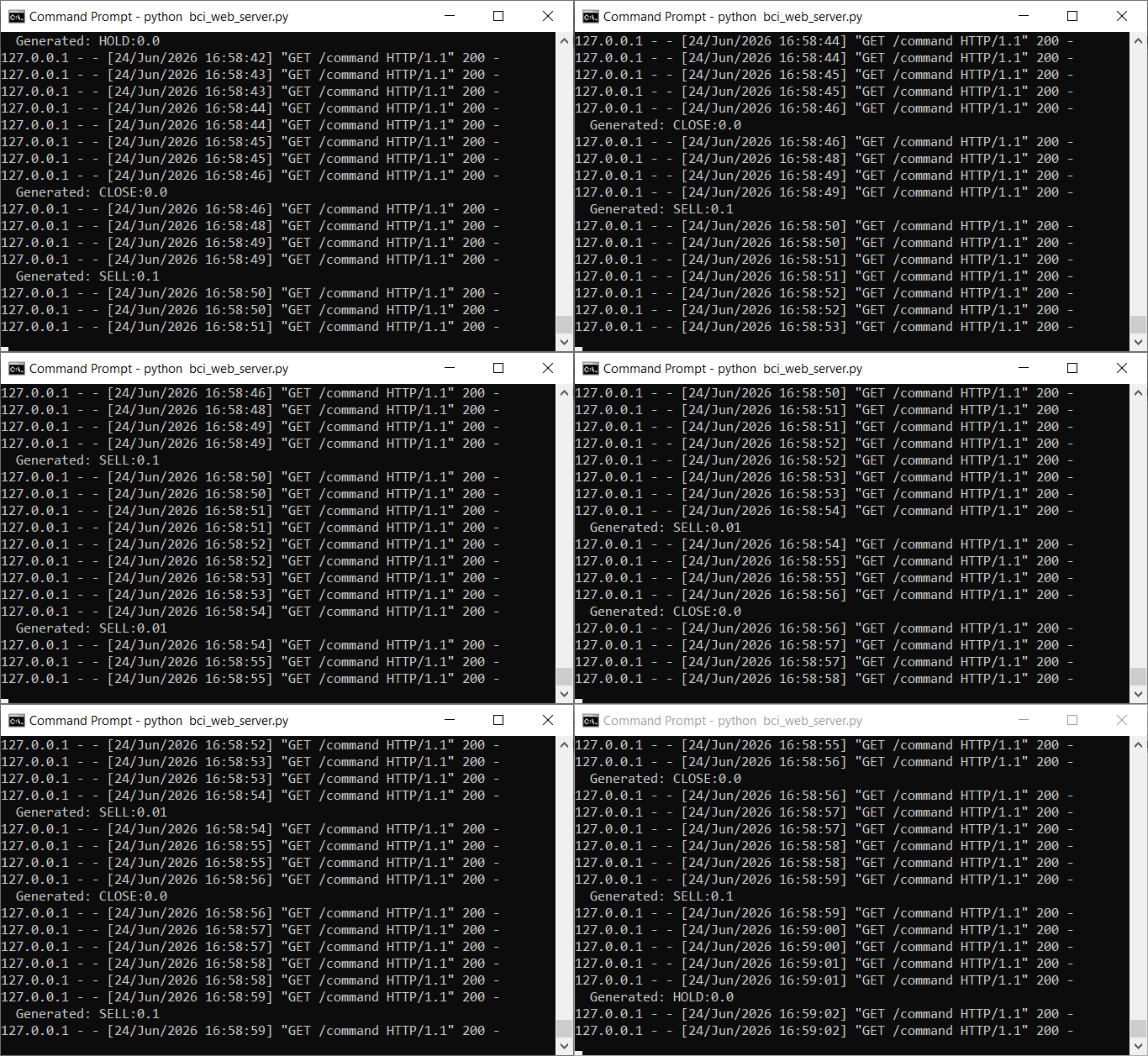
Fig. 3. BCI_web_server.py running
Testing was conducted on a Volatility 75 Index symbol with a demo account. The EA successfully executed BUY, SELL, and CLOSE commands received via WebRequest. When stop-loss distances were rejected—error 4756, "invalid stops"—the EA automatically retried without stops and successfully placed the order. When lot sizes fell below the symbol minimum, the broker rejected the order, which the EA logged for debugging. After enabling automated trading, the system ran continuously with commands processed every 2-5 seconds. The Experts tab showed a clean log with lot sizes, entry prices, and stop/take-profit levels where applicable. Below is a representative excerpt from a live testing session:
2026.06.24 16:52:58.643 BCI_Trader_EA (Volatility 75 (1s) Index,M15)    [BCI] BUY EXECUTED (no stops): lot=0.1
2026.06.24 16:53:03.505 BCI_Trader_EA (Volatility 75 (1s) Index,M15)    [BCI] CLOSE ALL: 2 position(s) closed.
2026.06.24 16:53:15.522 BCI_Trader_EA (Volatility 75 (1s) Index,M15)    CTrade::OrderSend: market sell 0.05 Volatility 75 (1s) Index sl: 5213.95 tp: 5209.36 [invalid stops]
2026.06.24 16:53:16.436 BCI_Trader_EA (Volatility 75 (1s) Index,M15)    [BCI] SELL EXECUTED (no stops): lot=0.05
2026.06.24 16:53:18.895 BCI_Trader_EA (Volatility 75 (1s) Index,M15)    [BCI] CLOSE ALL: 1 position(s) closed.
2026.06.24 16:53:25.047 BCI_Trader_EA (Volatility 75 (1s) Index,M15)    CTrade::OrderSend: market buy 0.05 Volatility 75 (1s) Index sl: 5210.67 tp: 5215.26 [invalid stops]
2026.06.24 16:53:25.884 BCI_Trader_EA (Volatility 75 (1s) Index,M15)    [BCI] BUY EXECUTED (no stops): lot=0.05
2026.06.24 16:53:32.338 BCI_Trader_EA (Volatility 75 (1s) Index,M15)    [BCI] CLOSE ALL: 1 position(s) closed.
Performance and Latency: Transport Measurements
Since the BCI commands in this prototype are simulated, we do not report neural decoding latency or classification accuracy. What we can measure is the HTTP transport performance. WebRequest calls to the Flask endpoints completed in under 5ms on localhost, confirming that network overhead is negligible. The dominant latency factor is the 500 ms polling interval—commands generated by the Flask server are picked up by the EA within 0-500 ms depending on where in the polling cycle they fall, giving an average response time of approximately 250 ms plus transport overhead.
For comparison, the gesture pipeline from Part V achieved 68-85ms average latency under ideal conditions with measured accuracy of 95-97%. The BCI pipeline is intentionally slower due to polling, but this is acceptable for the thought-controlled trading use case. A trader using a real BCI would operate at neural decoding speeds of 50-150ms plus cognitive time—the additional polling overhead is minimal. In production, the polling interval could drop to 100 ms or migrate to WebSocket for near-real-time performance without any EA changes.
Conclusion
This article demonstrates a working MQL5 pipeline that receives and executes commands from a simulated BCI neural decoder. The WebRequest transport layer, JSON command protocol, and CTrade execution engine all perform as designed. The complete source code compiles in any MetaTrader 5 environment and requires only a Flask installation on the Python side.
The simulation proves that BCI integration with algorithmic trading platforms is feasible. The integration points between neural decoding and trade execution are architecturally straightforward. If future BCI technology follows a similar command protocol, the patterns explored here provide a proven starting point. If it follows a different path, the exercise demonstrates how simulation can be used to explore emerging accessibility solutions.
The gesture pipeline from Part V remains the practical solution for hands-free trading today. For the future—trading directly with your thoughts—this prototype demonstrates what the integration could look like and proves that the software bridge is ready when the hardware arrives.
Key Lessons and Next Steps
Several architectural insights emerged that are directly transferable to future BCI-integrated systems:
- Protocol-defined boundaries are essential. A simple JSON-over-HTTP contract allows the neural decoder and trading EA to evolve independently. Any future BCI hardware only needs to implement a single HTTP endpoint producing the agreed JSON format to achieve compatibility.
- Inline JSON parsing without external libraries keeps the EA self-contained—the ExtractJSONValue function handles parsing in under 30 lines of MQL5 code.
- Deduplication through command tracking via g_lastCmd prevents the EA from executing the same intention multiple times per polling cycle.
- Manual keyboard override provides an always-available safety fallback independent of the BCI pipeline—an essential feature for any tool where the primary input method may be experimental.
Immediate next steps include testing with prerecorded neural data replayed through the Flask server at original timestamps, implementing a confidence threshold that rejects commands below a configurable decoder probability score, and exploring WebSocket transport for sub-100ms latency without protocol changes.
Attachments
The following source code files accompany this article. The EA file should be placed in MQL5/Experts/ under your MetaTrader 5 installation. The Python script runs from any location with Python 3.7+ and Flask.
| File Name | Type | Location | Description |
|---|---|---|---|
| BCI_Trader_EA.mq5 | Expert Advisor (.mq5) | MQL5/Experts/ | Self-contained BCI trading EA. Polls the Flask server every 500 ms via WebRequest, parses JSON commands, and executes through CTrade with automatic stop-loss fallback. Manual keyboard override: B=Buy, S=Sell, C=Close All. Zero external dependencies beyond Trade/Trade.mqh. |
| bci_web_server.py | Python Script (.py) | Any folder with Python 3.7+ | Flask HTTP server simulating a BCI neural decoder. Generates BUY, SELL, CLOSE, and HOLD commands at 2-5 second intervals. Exposes /command, /health, and /direct/<cmd> endpoints. Requires: pip install flask. |
| MQL5.zip | Archive (.zip) | Root of download package | Complete project archive with all source files pre-organized into the correct MQL5 directory structure. |
To deploy: compile BCI_Trader_EA.mq5 in MetaEditor (F7), add http://127.0.0.1:8080 to the MetaTrader 5 WebRequest allowed list, start the Flask server, and attach the EA to any chart with Algo Trading enabled.
Warning: All rights to these materials are reserved by MetaQuotes Ltd. Copying or reprinting of these materials in whole or in part is prohibited.
This article was written by a user of the site and reflects their personal views. MetaQuotes Ltd is not responsible for the accuracy of the information presented, nor for any consequences resulting from the use of the solutions, strategies or recommendations described.

 Persistent Homology in MQL5: The Reduction Algorithm and the Persistence Diagram
 Neural Networks in Trading: Generalizing Time Series Without Data-Specific Dependence (Mamba4Cast)
 Building a Broker-Agnostic Symbol Resolution Layer in MQL5
 Neural Networks in Trading: Time Series Forecasting Using Adaptive Modal Decomposition (Final Part)

- Free trading apps
- Over 8,000 signals for copying
- Economic news for exploring financial markets
You agree to website policy and terms of use