

CSV Data Analysis (Part 5): Real-Time CSV Streaming from Live MetaTrader 5 Sessions
 1 476
1 476
 0
0

From Backtest Artifacts to Live Data Streams
The first four parts of this series addressed a specific problem: exporting structured metric data from the MetaTrader 5 Strategy Tester into a Python analytics pipeline for post‑hoc analysis. The data in those implementations was historical by definition; each row in a CSV represented a completed test pass. That pipeline was designed for execution latencies measured in minutes or hours, meaning no component had to process data in real time.
Live terminal operation introduces a fundamentally different set of requirements. An Expert Advisor or indicator running on a live chart processes ticks continuously for days or weeks. The data it generates — real‑time indicator readings, session‑level trade metrics, signal quality counters, and equity snapshots — holds significant analytical value as it accumulates. Waiting for a trading session to end before exporting data creates an operational visibility gap during live market hours.
To bridge that gap, this article introduces a streaming export architecture. The system has two components: an MQL5 exporter that writes structured metric rows to a rotating CSV file, and a Python daemon that continuously tails the file to maintain a live analytical view. Together they transform an opaque live trading session into an observable, auditable, real‑time data stream.
This article builds the streaming framework in full. It explains (1) the constraints of live export vs. backtests, (2) write-buffer and file-rotation strategies, and (3) the Python daemon design for a rolling dashboard.
Note: If you missed Part 4 of this series, you can read it here.
Architectural Overview: Three-Layer Pipeline
The complete live streaming pipeline consists of three independently deployable layers:
Layer 1 — The MQL5 Streaming Exporter (LiveCSVStreamer.mqh)
An include file that attaches to any indicator or EA running on a live chart. It accumulates metric records in an in‑memory buffer during each bar, flushes the buffer to disk at configurable intervals, and rotates the output file at midnight UTC to prevent unbounded growth. This layer owns all file I/O and minimizes latency impact on the host program's signal logic.
Layer 2 — The Output CSV Stream
A rotating flat file written to the MetaTrader 5 common files directory. Each file covers exactly one calendar day of data and is named with a date suffix (e.g., LiveStream_ETHUSD_M1_20260613.csv). The Python daemon locates the current active file by date and automatically transitions to the next file at the daily rotation boundary. The file remains open for appending throughout the session; the Python daemon reads it concurrently using a read‑only, non‑exclusive file handle.
Layer 3 — The Python Tail Daemon (live_stream_daemon.py)
A long‑running Python process that monitors the active CSV file using a tail‑style read loop. It parses each new row as it arrives, maintains rolling windows of key metrics in memory, and emits analytical summaries to the console at configurable intervals. Signal anomalies — such as sudden spikes in whipsaw frequency or a sharp deterioration in rolling equity — are flagged to a separate alert log.
The three layers are deliberately decoupled. The MQL5 exporter has no knowledge of whether the Python daemon is running. The Python daemon has no control over the MQL5 exporter. Either component can restart independently without corrupting the data contract between them.
The Live Export Engine: Design Constraints and Behavioral Contracts
Why Backtest Export Patterns Break in Live Sessions
The export patterns established in Parts 1 through 4 share a common structural assumption: the write operation happens once, at the very end of the test run, inside OnDeinit(). This assumption is safe in the Strategy Tester because the entire test lifecycle — initialization, data processing, and deinitialization — is bounded and synchronous. The exporter writes one row, the file closes, and the process ends.
In live terminal operation three conditions break this assumption:
- Session duration is unbounded: An EA or indicator on a live chart may run continuously for days, weeks, or months. There is no predictable end point. A sudden terminal restart or connectivity interruption would completely discard all accumulated data if it had not yet been committed to disk.
- Per‑tick write frequency must be managed: A live terminal processes ticks in real time at whatever rate the broker delivers them. Writing to a file on every single tick introduces major I/O overhead that causes calculation latency. A write‑buffer that batches records before flushing eliminates this problem.
- File handles must not be held open indefinitely: Keeping a handle open for hours risks improper recovery during terminal crashes and can cause lock conflicts with antivirus scans. The correct pattern is to open the handle, write the buffered batch, and immediately close it.
The Write-Buffer Model for High-Frequency Data
The write‑buffer maintains a fixed‑size, in‑memory array of row strings. Each new metric record is appended to this array instead of being written immediately to disk. When the array reaches its configurable flush threshold (default 20 rows), the exporter opens the file, writes all buffered rows in a single operation, closes the file, and resets the buffer index.
This consolidates 20 separate open‑write‑close cycles into a single cycle, reducing total I/O operations by roughly 95% compared to a per‑record write pattern. The trade‑off is that up to flush_threshold – 1 records exist only in memory at any given moment and are lost on an abnormal shutdown. For live behavioral monitoring, this is an acceptable price for the massive gain in I/O efficiency. For use cases requiring complete data fidelity, set the flush threshold to 1 to effectively disable buffering.
File Rotation: Preventing Unbounded File Growth
Without rotation, file size grows quickly. H1 produces ~24 rows/day, M15 ~96 rows/day, and tick‑level streaming can reach tens of thousands of rows/day. A single unrotated file quickly becomes unwieldy.
File rotation solves this by creating a new output file at midnight UTC and appending a date suffix to the filename. The rotation logic checks the current UTC date against the date embedded in the active file’s name at the start of each flush cycle. If they differ, the current file is closed and a new one is opened with today’s date suffix. This produces a clean archive: each file contains exactly one day of streaming data, naturally bounded by the instrument’s tick frequency. The Python daemon can later reconstruct any historical session by loading the files from the archive directory in date order.
Thread Safety in Live Terminals
MetaTrader 5 executes each chart's EA/indicator independently; a single indicator instance typically does not face parallel write contention, so the spin‑lock mechanism required for multi‑agent Tester scenarios in Part 1 is unnecessary here. The single‑agent pattern — open, seek‑to‑end, write, close — is sufficient.
However, running the streaming component on multiple charts simultaneously can cause file conflicts if naming is too generic. The implementation below resolves this by embedding the symbol and timeframe in every filename, guaranteeing that each chart instance writes to a unique file regardless of how many instances run concurrently.
The MQL5 Live Export Implementation: LiveCSVStreamer.mqh
The streaming engine is delivered as a single include file that attaches to any indicator or EA. We will now walk through its components sequentially, following the order in which they appear in the source code.
Configuration Inputs
The host program’s inputs block is extended with five new parameters:
- InpStreamingEnabled – master on/off switch for the entire streaming system.
- InpFlushThreshold – number of rows to buffer before a forced flush (default 20).
- InpStreamTicks – if true, a tick‑level record is emitted on every incoming price update.
- InpStreamBars – if true, a bar‑level record is emitted at every bar close.
- InpUseCommonFolder – if true, output files are written to the MetaTrader 5 Common files directory; otherwise to the terminal’s local MQL5\Files folder.
These inputs are declared inside the include file itself, so they automatically appear in the host program’s "Inputs" tab without any duplication. The tick‑level flag defaults to false because tick streaming generates far more data than bar‑level streaming and should only be enabled when sub‑bar resolution is genuinely needed.
The SLiveBarRecord and SLiveTickRecord Structures
Two structs define the shape of the exported data.
SLiveBarRecord holds the fields written at each bar close:
| Field | Description |
|---|---|
| bar_time | Open time of the closed bar (UTC) |
| symbol | Chart symbol |
| timeframe | Timeframe label (e.g., "M1", "H1") |
| open, high, low, close | OHLC values of the closed bar |
| volume | Tick volume for the closed bar |
| filter_value | Indicator value at bar close |
| filter_slope | 1 = rising, –1 = falling, 0 = flat |
| false_flips | Cumulative whipsaw count since session start |
| avg_lag_bars | Rolling average lag (bars) since session start |
| session_equity | Terminal equity at bar close |
SLiveTickRecord is a lightweight struct for per‑tick output:
| Field | Description |
|---|---|
| tick_time | Tick timestamp (UTC) |
| symbol | Chart symbol |
| bid, ask | Current bid and ask prices |
| spread_points | Current spread in points |
| filter_value | Indicator value at this tick |
The Write-Buffer and Flush Mechanism
The entire buffer management is encapsulated in the CStreamBuffer class. Its private members include a dynamic string array m_rows[] (resized to STREAMER_MAX_BUFFER, 500 elements), a counter m_count, the flush threshold, and the active file identity.
- Constructor (CStreamBuffer::CStreamBuffer): initializes all state variables and resizes the row buffer.
- Destructor (~CStreamBuffer): on teardown, any rows still in memory are forced to disk via FlushToFile().
- Initialize(): must be called once before any Push() calls. It sets the symbol, timeframe string, flush threshold, common‑folder flag, and computes the initial active date and filename.
- Push(const string row): appends a formatted CSV row to the buffer. Before appending, it calls CheckRotation(). If the buffer count reaches the flush threshold or the hard ceiling (STREAMER_MAX_BUFFER - 1), FlushToFile() is triggered automatically.
- FlushToFile(): opens the active file for appending (creating it with a header if it doesn’t exist), seeks to the end, writes all buffered rows in a single pass, closes the handle, and resets m_count to zero.
- ForceFlush(): forces an immediate flush regardless of threshold; called from the host program’s OnDeinit().
- ActiveFile(): returns the name of the currently targeted output file.
The design ensures that file I/O only occurs when the buffer is full or when the component shuts down.
File Rotation Logic
File rotation is driven by the private method CheckRotation(). On every Push(), the method computes the current UTC date (midnight floor) and compares it with m_active_date. If today_utc > m_active_date, any remaining buffered rows are flushed to the old day’s file, then m_active_date and m_active_file are updated to point to the new day.
The filename is built by BuildFileName(datetime utc_date) using the pattern:
LiveStream_<symbol>_<timeframe>_YYYYMMDD.csv
This ensures that every chart instance has a unique, date‑identified file, and that rotation happens seamlessly without manual intervention.
Bar-Level Metric Capture in OnCalculate()
Once the CStreamBuffer class and its global instance g_stream_buffer are defined, the file provides two global helper functions that format and push records:
//+------------------------------------------------------------------+
//| Transform and pass structured bar records to operational frames  |
//+------------------------------------------------------------------+
void StreamBarRecord(const SLiveBarRecord &rec)
  {
   if(!InpStreamingEnabled || !InpStreamBars)
      return;

   string row = ::StringFormat("%s,%s,%s,%.5f,%.5f,%.5f,%.5f,%.0f,%.5f,%d,%d,%.2f,%.2f",
                               ::TimeToString(rec.bar_time, TIME_DATE | TIME_MINUTES),
                               rec.symbol,
                               rec.timeframe,
                               rec.open, rec.high, rec.low, rec.close,
                               rec.volume,
                               rec.filter_value,
                               rec.filter_slope,
                               rec.false_flips,
                               rec.avg_lag_bars,
                               rec.session_equity);

   g_stream_buffer.Push(row);
  }
The host indicator calls StreamBarRecord() after it updates all signal‑quality accumulators for the new bar. The indicator’s own signal logic — computing the EMA, detecting slope changes, counting whipsaws — executes first, guaranteeing the struct fields reflect fully computed values.
Tick-Level Metric Capture
A second global helper, StreamTickRecord(), handles per‑tick output:
//+------------------------------------------------------------------+
//| Transform and pass structured tick records to operational frames |
//+------------------------------------------------------------------+
void StreamTickRecord(const SLiveTickRecord &rec)
  {
   if(!InpStreamingEnabled || !InpStreamTicks)
      return;

   string row = ::StringFormat("%s,%s,%.5f,%.5f,%.1f,%.5f",
                               ::TimeToString(rec.tick_time, TIME_DATE | TIME_SECONDS),
                               rec.symbol,
                               rec.bid,
                               rec.ask,
                               rec.spread_points,
                               rec.filter_value);

   g_stream_buffer.Push(row);
  }
When InpStreamTicks is enabled, the host program calls this function on every incoming price update, providing the latest bid, ask, spread, and indicator value.
Finally, two lifecycle functions — InitStreamer() and ShutdownStreamer() — are supplied for the host program to wire into its OnInit() and OnDeinit(), respectively. They initialize the global buffer instance and force a final flush on shutdown.
The Demo Indicator: LiveStream_Indicator.mq5
The demonstration indicator attaches to a chart and streams bar‑level data using an EMA as the reference filter. It serves as a minimal integration reference showing exactly where InitStreamer(), ShutdownStreamer(), and the record‑streaming calls appear in the indicator lifecycle.
The full indicator code is shown below, with commentary following the logical flow of the implementation.
//+------------------------------------------------------------------+
//|                                         LiveStream_Indicator.mq5 |
//|        Live streaming indicator using LiveCSVStreamer.mqh        |
//+------------------------------------------------------------------+

#property indicator_chart_window
#property indicator_buffers 1
#property indicator_plots   1

//--- Plot attributes
#property indicator_label1  "Filter"
#property indicator_type1   DRAW_LINE
#property indicator_color1  clrDodgerBlue
#property indicator_width1  2

//--- Include dependencies
#include <CSV_Data_Analysis_Part_5/LiveCSVStreamer.mqh>

//--- Indicator input parameters
input int InpFilterPeriod = 14; // EMA lookback period

//--- Indicator buffer allocation
double g_filter_buf[];

//--- Signal quality metrics trackers
int      g_current_slope   = 0;
int      g_false_flips     = 0;
long     g_sum_lag_bars    = 0;
int      g_slope_changes   = 0;
int      g_bars_since_flip = 0;

//--- Native handles and tracking metrics
int      g_ema_handle        = INVALID_HANDLE;
double   g_last_filter_value = 0.0;
datetime g_last_bar_time     = 0;
bool     g_live_confirmed    = false;
The indicator begins with the usual property declarations and includes the streaming engine. The global variables track the EMA filter, its slope, cumulative false flips (whipsaws), the rolling average lag, and a g_live_confirmed flag used to log the detection of the first live bar.
//+------------------------------------------------------------------+
//| Custom indicator initialization function                         |
//+------------------------------------------------------------------+
int OnInit()
  {
//--- Bind linear output buffer mappings
   SetIndexBuffer(0, g_filter_buf, INDICATOR_DATA);
   ArraySetAsSeries(g_filter_buf, true);

//--- Instantiate exponential moving average system handler
   g_ema_handle = iMA(_Symbol, _Period, InpFilterPeriod, 0, MODE_EMA, PRICE_CLOSE);
   if(g_ema_handle == INVALID_HANDLE)
      return(INIT_FAILED);

//--- Parse cleanly formatted period label strings for path targets
   string tf_str = EnumToString(_Period);
   StringReplace(tf_str, "PERIOD_", "");
   InitStreamer(_Symbol, tf_str);

   return(INIT_SUCCEEDED);
  }
In OnInit(), the indicator buffer is prepared, the EMA handle is obtained, and the streaming engine is initialized with the current symbol and a cleaned‑up timeframe string (e.g., "H1" instead of "PERIOD_H1").
//+------------------------------------------------------------------+
//| Custom indicator iteration function                              |
//+------------------------------------------------------------------+
int OnCalculate(const int      rates_total,
                const int      prev_calculated,
                const datetime &time[],
                const double   &open[],
                const double   &high[],
                const double   &low[],
                const double   &close[],
                const long     &tick_volume[],
                const long     &volume[],
                const int      &spread[])
  {
//--- Verify minimum operational lookback threshold bounds
   if(rates_total < InpFilterPeriod + 2)
      return(0);

//--- Explicitly set system array indexing as reverse chronological series
   ArraySetAsSeries(time,        true);
   ArraySetAsSeries(open,        true);
   ArraySetAsSeries(high,        true);
   ArraySetAsSeries(low,         true);
   ArraySetAsSeries(close,       true);
   ArraySetAsSeries(tick_volume, true);

//--- Pull indicator array segments out of internal buffer registers
   double ema_vals[3];
   if(CopyBuffer(g_ema_handle, 0, 0, 3, ema_vals) < 3)
      return(prev_calculated);

   g_filter_buf[0]     = ema_vals[2];
   g_last_filter_value = ema_vals[2];
First, OnCalculate() sets the incoming price arrays to series mode (index 0 = current bar). This is critical because by default MetaTrader 5 passes these arrays in non‑series order during a full history recalculation, which would cause the indicator to read the wrong bars. Once set, the EMA values for the three most recent bars are copied; the most recent (index 0) is drawn, and the last two are used for slope detection.
//--- Gate 1: skip the entire historical recalculation pass.
//--- Skip computational routines during historical parsing iterations
   if(prev_calculated == 0)
      return(rates_total);
When the indicator is first attached or the terminal starts, prev_calculated equals zero. During this initial pass, MetaTrader 5 calculates the indicator for the entire available history. The streaming engine should not emit rows for this historical backfill, because the Python daemon expects real‑time data and because flooding the buffer with potentially thousands of historical bars would distort rolling windows and waste disk space. The gate if(prev_calculated == 0) return rates_total; ensures the streaming logic is completely bypassed during the historical load. Only after the first full calculation pass, when prev_calculated > 0, will the streaming code run.
//--- Tick-level streaming (if enabled)
   if(InpStreamTicks)
     {
      SLiveTickRecord tick_rec;
      tick_rec.tick_time     = TimeCurrent();
      tick_rec.symbol        = _Symbol;
      tick_rec.bid           = SymbolInfoDouble(_Symbol, SYMBOL_BID);
      tick_rec.ask           = SymbolInfoDouble(_Symbol, SYMBOL_ASK);
      tick_rec.spread_points = (tick_rec.ask - tick_rec.bid) / SymbolInfoDouble(_Symbol, SYMBOL_POINT);
      tick_rec.filter_value  = g_last_filter_value;
      StreamTickRecord(tick_rec);
     }
If tick‑level streaming is enabled, a record is pushed on every call to OnCalculate() (i.e., on every new tick). The bid/ask and spread are sampled in real time.
//--- Bar-level logic: execute only once per newly closed bar.
//--- time[0] is the current forming bar; a change in time[0]
//--- means a new bar has opened and time[1] just closed.
   datetime current_bar_time = time[0];
   if(current_bar_time <= g_last_bar_time)
      return(rates_total);

   g_last_bar_time = current_bar_time;
Bar‑level processing is triggered only when time[0] advances, indicating that a new bar has opened and the previous bar (time[1]) is now fully closed.
//--- Confirm the first live bar close in the Experts log
   if(!g_live_confirmed)
     {
      PrintFormat("[LiveCSVStreamer] First live bar close detected: %s",
                  TimeToString(time[1], TIME_DATE | TIME_MINUTES));
      g_live_confirmed = true;
     }
A one‑time log message marks the transition from historical loading to live bar capture, providing a clear audit point in the terminal’s Experts tab.
//--- Slope detection and signal quality accumulation
   int new_slope = (ema_vals[2] > ema_vals[1]) ?  1
                   : (ema_vals[2] < ema_vals[1]) ? -1
                   : 0;

   g_bars_since_flip++;

//--- Accumulate metrics testing noise versus meaningful momentum swings
   if(new_slope != 0 && new_slope != g_current_slope && g_current_slope != 0)
     {
      g_slope_changes++;
      g_sum_lag_bars += g_bars_since_flip;

      if(g_bars_since_flip <= 3)
         g_false_flips++;

      g_bars_since_flip = 0;
     }

   g_current_slope = (new_slope != 0) ? new_slope : g_current_slope;
The slope‑detection logic mirrors the pattern introduced in Part 1: a whipsaw is counted whenever the EMA slope flips sign and the preceding trend lasted three bars or fewer.
//--- Populate and stream the bar-close record (time[1] = last closed bar)
   SLiveBarRecord bar_rec;
   bar_rec.bar_time = time[1];
   bar_rec.symbol   = _Symbol;

   string tf_str = EnumToString(_Period);
   StringReplace(tf_str, "PERIOD_", "");
   bar_rec.timeframe = tf_str;

   bar_rec.open           = open[1];
   bar_rec.high           = high[1];
   bar_rec.low            = low[1];
   bar_rec.close          = close[1];
   bar_rec.volume         = (double)tick_volume[1];
   bar_rec.filter_value   = ema_vals[1];
   bar_rec.filter_slope   = g_current_slope;
   bar_rec.false_flips    = g_false_flips;
   bar_rec.avg_lag_bars   = (g_slope_changes > 0) ? (double)g_sum_lag_bars / g_slope_changes : 0.0;
   bar_rec.session_equity = AccountInfoDouble(ACCOUNT_EQUITY);

   StreamBarRecord(bar_rec);

   return(rates_total);
  }
The bar‑close record is populated using the last closed bar (time[1]) and its corresponding OHLC data. The EMA value at that bar is ema_vals[1] (because ema_vals[2] is the current, still‑forming bar). Session equity is read directly from the terminal’s account information. The record is then streamed via StreamBarRecord().
The deinitialization function simply calls ShutdownStreamer() and releases the EMA handle.
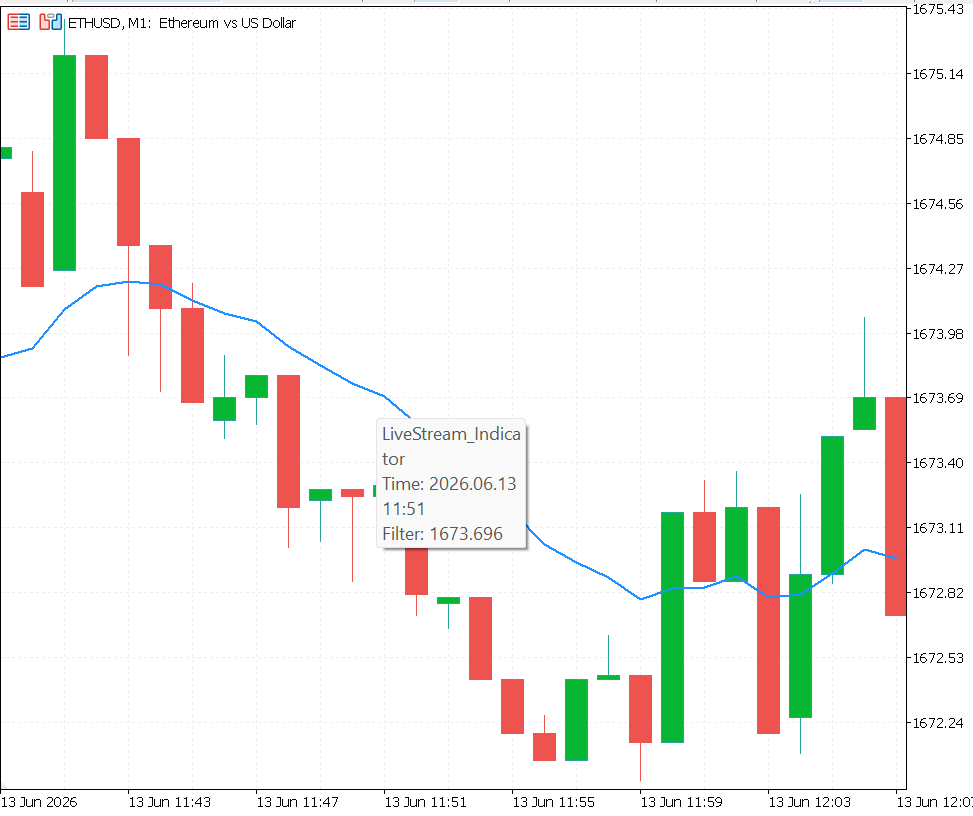
The LiveStream_Indicator attached to an ETHUSD M1 chart in MetaTrader 5. The blue line is the 14‑period EMA, and behind the scenes the indicator exports bar‑by‑bar metrics to a rotating CSV file.
The Python Tail Daemon: live_stream_daemon.py
The Python daemon is a standalone process that consumes the CSV stream without interfering with the terminal. It uses only the Python standard library and can be deployed on any machine with Python 3.8 or higher.
The Complete live_stream_daemon.py File
"""
live_stream_daemon.py
Real-time CSV tail daemon for MetaTrader 5 LiveCSVStreamer output files.

Requires: Python 3.8+, standard library only.

Usage:
    python live_stream_daemon.py

Configure SYMBOL, TIMEFRAME, POLL_INTERVAL, and ROLLING_WINDOW
in the Configuration block below before starting.
"""
import os
import time
import csv
import io
import logging
from datetime import datetime, timezone
from collections import deque

# ── Configuration ─────────────────────────────────────────────────────────────
MT5_APPDATA    = os.path.join(os.environ.get("APPDATA", ""),
                               "MetaQuotes", "Terminal")
SYMBOL         = "ETHUSD"
TIMEFRAME      = "M1"
POLL_INTERVAL  = 5          # Seconds between tail reads
ROLLING_WINDOW = 50         # Bars retained in rolling metric windows
ALERT_LOG      = "stream_alerts.log"

# Anomaly thresholds
WHIPSAW_DENSITY_THRESHOLD = 4     # False flips in last 5 bars
EQUITY_DRAWDOWN_THRESHOLD = 5.0   # Percent decline over last 10 bars
# ─────────────────────────────────────────────────────────────────────────────

logging.basicConfig(
    filename = ALERT_LOG,
    level    = logging.WARNING,
    format   = "%(asctime)s  %(levelname)s  %(message)s",
    datefmt  = "%Y-%m-%d %H:%M:%S"
)

def resolve_active_file(symbol: str, timeframe: str) -> str:
    """
    Resolves the path to today's active streaming CSV file.
    Searches all MetaTrader 5 terminal instance directories and the common
    files folder. Returns the most recently modified match, or None.
    """
    today_str = datetime.now(timezone.utc).strftime("%Y%m%d")
    target    = f"LiveStream_{symbol}_{timeframe}_{today_str}.csv"

    try:
        instances = [
            d for d in os.listdir(MT5_APPDATA)
            if os.path.isdir(os.path.join(MT5_APPDATA, d))
        ]
    except FileNotFoundError:
        raise FileNotFoundError(
            f"MT5 AppData directory not found at:\n  {MT5_APPDATA}\n"
            "Verify the APPDATA environment variable and MT5 installation."
        )

    candidates = []

    for inst in instances:
        candidate = os.path.join(
            MT5_APPDATA, inst, "MQL5", "Files", target
        )
        if os.path.isfile(candidate):
            candidates.append(candidate)

    common_candidate = os.path.join(
         MT5_APPDATA, "Common", "Files", target
    )
    if os.path.isfile(common_candidate):
        candidates.append(common_candidate)

    if not candidates:
        return None

    return max(candidates, key=os.path.getmtime)

class LiveStreamDaemon:
    """
    Tails an active LiveCSVStreamer output file, maintains rolling
    metric windows, checks for signal anomalies, and renders a live
    console dashboard at each polling interval.
    """

    def __init__(self, symbol        : str,
                       timeframe     : str,
                       poll_interval : int = POLL_INTERVAL,
                       rolling_window: int = ROLLING_WINDOW):
        self.symbol         = symbol
        self.timeframe      = timeframe
        self.poll_interval  = poll_interval
        self.rolling_window = rolling_window

        # Tail state
        self.active_file    = None
        self.file_offset    = 0
        self.header_parsed  = False
        self.column_map     = {}

        # Rolling metric windows
        self.equity_window   = deque(maxlen=rolling_window)
        self.slope_window    = deque(maxlen=rolling_window)
        self.whipsaw_deltas  = deque(maxlen=rolling_window)
        self.spread_window   = deque(maxlen=rolling_window)

        # Session-level state
        self.total_bars_seen  = 0
        self.last_false_flips = 0
        self.session_start    = datetime.now(timezone.utc)

    def _resolve_file(self) -> bool:
        path = resolve_active_file(self.symbol, self.timeframe)
        if path is None:
            return False

        if path != self.active_file:
            print(f"\n[Daemon] Active file: {os.path.basename(path)}")
            self.active_file   = path
            self.file_offset   = 0
            self.header_parsed = False
            self.column_map    = {}

        return True

    def _tail_new_rows(self) -> list:
        if not self.active_file or not os.path.isfile(self.active_file):
            return []

        new_rows = []

        with open(self.active_file, "r",
                  encoding="ansi", errors="replace") as f:
            f.seek(self.file_offset)
            new_bytes        = f.read()
            self.file_offset = f.tell()

        if not new_bytes.strip():
            return []

        reader = csv.DictReader(
            io.StringIO(new_bytes),
            fieldnames = list(self.column_map.keys())
                         if self.column_map else None
        )

        for row in reader:
            if not self.header_parsed:
                if "Bar_Time" in row or "Tick_Time" in row:
                    self.column_map    = {k: i
                                          for i, k in enumerate(row.keys())}
                    self.header_parsed = True
                    continue

            if row:
                new_rows.append(row)

        return new_rows

    def _process_bar_row(self, row: dict):
        try:
            equity      = float(row.get("Session_Equity",        0) or 0)
            slope       = int(row.get("Filter_Slope",            0) or 0)
            false_flips = int(row.get("False_Flips_Cumulative",  0) or 0)

            self.equity_window.append(equity)
            self.slope_window.append(slope)

            whipsaw_delta = max(0, false_flips - self.last_false_flips)
            self.whipsaw_deltas.append(whipsaw_delta)
            self.last_false_flips  = false_flips
            self.total_bars_seen  += 1

        except (ValueError, TypeError):
            pass

    def _process_tick_row(self, row: dict):
        try:
            spread = float(row.get("Spread_Points", 0) or 0)
            self.spread_window.append(spread)
        except (ValueError, TypeError):
            pass

    def _check_anomalies(self):
        if len(self.whipsaw_deltas) >= 5:
            recent_whipsaws = sum(list(self.whipsaw_deltas)[-5:])
            if recent_whipsaws >= WHIPSAW_DENSITY_THRESHOLD:
                logging.warning(
                    f"[{self.symbol} {self.timeframe}] High whipsaw density: "
                    f"{recent_whipsaws} false flips in last 5 bars."
                )

        if len(self.equity_window) >= 10:
            recent_equity = list(self.equity_window)
            equity_drop   = recent_equity[-10] - recent_equity[-1]
            equity_pct    = (equity_drop
                             / (recent_equity[-10] + 1e-9)) * 100
            if equity_pct > EQUITY_DRAWDOWN_THRESHOLD:
                logging.warning(
                    f"[{self.symbol} {self.timeframe}] Equity drawdown alert: "
                    f"{equity_pct:.1f}% decline over last 10 bars."
                )

    def _render_dashboard(self):
        equity_now  = self.equity_window[-1]  if self.equity_window  else 0.0
        equity_peak = max(self.equity_window)  if self.equity_window  else 0.0
        equity_dd   = ((equity_peak - equity_now)
                       / (equity_peak + 1e-9)) * 100

        slope_vals   = list(self.slope_window)
        rising_pct   = (slope_vals.count(1)  / len(slope_vals) * 100
                        if slope_vals else 0)
        falling_pct  = (slope_vals.count(-1) / len(slope_vals) * 100
                        if slope_vals else 0)

        avg_spread   = (sum(self.spread_window) / len(self.spread_window)
                        if self.spread_window else 0.0)

        recent_whips  = (sum(list(self.whipsaw_deltas)[-10:])
                        if self.whipsaw_deltas else 0)

        elapsed      = datetime.now(timezone.utc) - self.session_start
        hours, rem   = divmod(int(elapsed.total_seconds()), 3600)
        minutes      = rem // 60

        print("\033[H\033[J", end="")
        print(f"{'=' * 58}")
        print(f"  Live Stream Dashboard  |  "
              f"{self.symbol} {self.timeframe}")
        print(f"  Session: {hours:02d}h {minutes:02d}m  |  "
              f"Bars Seen: {self.total_bars_seen:,}")
        print(f"{'=' * 58}")
        print(f"  Equity Now    : {equity_now:>12.2f}")
        print(f"  Equity Peak   : {equity_peak:>12.2f}")
        print(f"  Rolling DD    : {equity_dd:>11.2f}%")
        print(f"{'─' * 58}")
        print(f"  Filter Slope  :  Rising {rising_pct:.0f}%  |  "
              f"Falling {falling_pct:.0f}%")
        print(f"  Avg Spread    : {avg_spread:>11.1f} pts")
        print(f"  Whipsaws (10b): {recent_whips:>11d}")
        print(f"{'─' * 58}")
        print(f"  Alert Log     :  {ALERT_LOG}")
        print(f"{'=' * 58}")

    def run(self):
        print(f"[Daemon] Starting. Symbol={self.symbol} "
              f"TF={self.timeframe} "
              f"Poll={self.poll_interval}s  "
              f"Window={self.rolling_window} bars")
        print(f"[Daemon] Press Ctrl+C to stop.\n")

        while True:
            try:
                if not self._resolve_file():
                    print(
                        f"[Daemon] Waiting for "
                        f"LiveStream_{self.symbol}_{self.timeframe}_"
                        f"{datetime.now(timezone.utc).strftime('%Y%m%d')}"
                        f".csv ..."
                    )
                    time.sleep(self.poll_interval)
                    continue

                new_rows = self._tail_new_rows()

                for row in new_rows:
                    if "Bar_Time" in row:
                        self._process_bar_row(row)
                    elif "Tick_Time" in row:
                        self._process_tick_row(row)

                if new_rows:
                    self._check_anomalies()

                if self.total_bars_seen > 0:
                    self._render_dashboard()

                time.sleep(self.poll_interval)

            except KeyboardInterrupt:
                print("\n[Daemon] Shutdown requested. Exiting cleanly.")
                break
            except Exception as exc:
                print(f"[Daemon] Unhandled error: {exc}")
                time.sleep(self.poll_interval)


# ── Entry Point ───────────────────────────────────────────────────────────────
if __name__ == "__main__":
    daemon = LiveStreamDaemon(
        symbol         = SYMBOL,
        timeframe      = TIMEFRAME,
        poll_interval  = POLL_INTERVAL,
        rolling_window = ROLLING_WINDOW
    )
    daemon.run()
The File-Tail Pattern vs. Periodic Full Reload
Two strategies exist for consuming a file being written concurrently by another process:
- Periodic full reload re‑reads the entire file from the first byte on every polling cycle. While simple, its cost scales linearly with file size; by the end of a long session, it burns CPU cycles re‑parsing unchanging data.
- File tailing maintains a byte offset cursor at the last read position. Each cycle, the daemon seeks to that offset and reads only the newly appended bytes, then advances the cursor. The cost per cycle depends only on the number of new rows, not the total file size.
The daemon implements file tailing with a configurable polling interval.
Parsing Incoming Rows Incrementally
The resolve_active_file() function locates the file corresponding to the current UTC date. It scans all MetaTrader 5 terminal instance directories under APPDATA\MetaQuotes\Terminal as well as the Common files folder, and returns the most recently modified match.
The LiveStreamDaemon class encapsulates all tail state: the active file path, the byte offset, a flag and column map to skip the header line once, and rolling deques for equity, slope, whipsaw deltas, and spread. Its main methods are:
- _resolve_file() – calls resolve_active_file() and, if the path has changed (due to rotation), resets the tail state.
- _tail_new_rows() – opens the file in read‑only mode with ANSI encoding, seeks to the stored offset, reads any new bytes, and parses them with csv.DictReader. The first encountered header line is used to build a column map; subsequent rows are returned as dicts.
- _process_bar_row(row) – extracts Session_Equity, Filter_Slope, and False_Flips_Cumulative from a bar‑level row, updates the rolling equity and slope windows, computes the whipsaw delta (new false flips since the previous bar), and increments the session bar counter.
- _process_tick_row(row) – extracts Spread_Points and appends it to the spread window.
The Rolling Dashboard Update Loop
The _render_dashboard() method clears the console and prints a live snapshot:
- Session duration and total bars seen.
- Current equity, session peak equity, and rolling drawdown percentage.
- Percentage of the last N bars where the filter slope was rising vs. falling.
- Average spread (from tick data, if available).
- Whipsaw count over the last 10 bars.
The run() method is the infinite polling loop. On each iteration it resolves the file, tails new rows, processes them by record type, checks for anomalies, renders the dashboard, and sleeps for the configured interval.
Signal Anomaly Detection
The _check_anomalies() method evaluates two conditions:
- Whipsaw density: if the total of false flips across the five most recent bars meets or exceeds WHIPSAW_DENSITY_THRESHOLD (default 4), a warning is logged.
- Equity drawdown rate: if session equity drops more than EQUITY_DRAWDOWN_THRESHOLD (default 5%) over the last ten bars, a warning is logged.
Both thresholds are configurable constants at the top of the script. Alerts are written to stream_alerts.log with a UTC timestamp, creating a persistent audit trail of all anomaly events detected during the session.
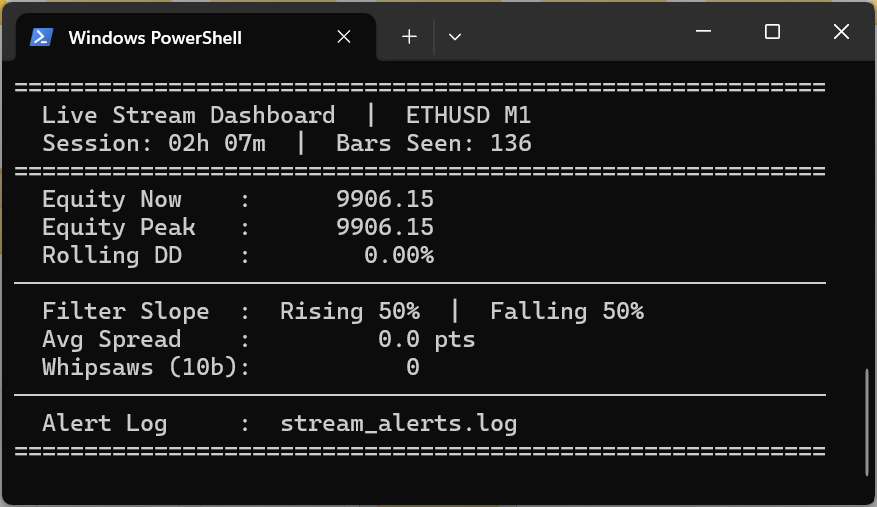
The live console dashboard rendered by the Python daemon in a Windows PowerShell terminal. It updates at every polling interval with current equity, filter slope distribution, average spread, and whipsaw counts.
Practical Deployment Workflow
- Start MetaTrader 5 and attach LiveStream_Indicator.mq5 to the desired chart. Confirm that the Experts log shows [LiveCSVStreamer] Initialized. Active file: LiveStream_<symbol>_<tf>_<date>.csv.
- Verify the output file appears in the MetaTrader 5 common files directory (or the terminal’s local MQL5\Files folder, depending on InpUseCommonFolder).
- Start the Python daemon from a terminal: python live_stream_daemon.py. It will locate the active file within its first polling cycle and begin rendering the dashboard.
- File rotation at midnight UTC is handled automatically by the MQL5 side; the daemon detects the new file on its next poll and seamlessly transitions, carrying forward all session‑level accumulators.
Operational Considerations for Multi-Session Capture
- Archive management: Each day produces one file. A month of H1 operation yields about 30 files of ~480 rows each. These files are immediately compatible with LoadOptResults() from Part 2 and the Python visualization functions from Part 3. Load them with pd.concat([pd.read_csv(f) for f in sorted(glob("LiveStream_ETHUSD_M1_*.csv"))]) to create a multi‑session analysis dataset.
- Multiple instruments: Running the indicator on several charts simultaneously produces independent file streams thanks to the symbol‑timeframe naming. To monitor multiple streams at once, instantiate one LiveStreamDaemon per pair in separate threads or subprocesses.
- Reconnect handling: If the MetaTrader 5 terminal loses its broker connection and reconnects, OnCalculate() may receive a historical backfill of bars. The indicator’s prev_calculated == 0 gate prevents streaming during the initial historical load, but subsequent disconnects that trigger a partial reload will pass through the live gate because prev_calculated is non‑zero. If this distinction matters analytically, add an Is_Backfill boolean to the bar record and set it based on whether the bar time is more than two periods behind the current server time.
- Disk space estimation: A bar‑level record averages ~120 bytes. H1: 24 rows/day ≈ 3 KB/day — negligible. M1: 1,440 rows/day ≈ 170 KB/day. Tick‑level streaming on an active pair during peak hours can generate 50k–200k rows/day, consuming 6–24 MB/day. Plan archive disk space accordingly before enabling tick streaming on high‑frequency instruments.
Conclusion
A backtest produces a static artifact; a live trading session generates a continuous stream of behavioral data. To extract analytical value from that stream, the data must be captured and processed continuously as it occurs.
The architecture developed in this article establishes that real‑time monitoring layer through two core components:
- LiveCSVStreamer.mqh – a drop‑in include file that writes structured metric rows to a rotating daily file, manages live terminal concurrency constraints, and ensures buffered data is committed to disk with minimal I/O overhead. The file‑rotation mechanism keeps storage manageable during extended operations, and the historical‑load gate prevents the daemon from being flooded with backfill data.
- Python Daemon – a background process that consumes the exported data via file‑tailing, maintaining rolling calculations for equity, slope distributions, spread, and whipsaw frequency. An anomaly detection layer monitors for threshold breaches in the background and logs alerts to a persistent file.
The long‑term utility of this pipeline rests on two structural design decisions:
- Schema uniformity – the output CSV format matches the schema used throughout the previous articles, so files integrate directly into prior analytics, normalization, and robustness‑testing modules without data transformation.
- Zero external dependencies – the Python daemon uses only the standard library, ensuring it can be deployed on any machine without additional package installations.
Live monitoring is an observational safety net, not a replacement for backtesting or walk‑forward validation. It verifies in real time whether the behavioral properties established during historical testing persist in live market conditions. An unmonitored strategy reveals structural failures only after a drawdown has occurred; an automated real‑time stream captures early deviations before significant capital loss materializes.
Programs used in the article:
| # | Name | Type | Description |
|---|---|---|---|
| 1 | LiveCSVStreamer.mqh | Include File | Buffers bar/tick metric records in memory and flushes them to daily rotating CSV files with minimal I/O overhead. |
| 2 | LiveStream_Indicator.mq5 | Custom Indicator | Demo indicator that computes an EMA and streams live bar‑level (and optionally tick‑level) data using the include file. |
| 3 | live_stream_daemon.py | Python Script | Tails the active CSV file, maintains rolling metric windows, renders a live console dashboard, and logs signal anomalies. |
| 4 | CSV_Data_Analysis_Part_5.zip | Zip Archive | Zip archive containing all the attached files and their paths relative to the terminal's root folder. |
Warning: All rights to these materials are reserved by MetaQuotes Ltd. Copying or reprinting of these materials in whole or in part is prohibited.
This article was written by a user of the site and reflects their personal views. MetaQuotes Ltd is not responsible for the accuracy of the information presented, nor for any consequences resulting from the use of the solutions, strategies or recommendations described.

 Encoding Candlestick Patterns (Part 3): Frequency Analysis for Single Candlestick Type Structure
 Market Simulation: Getting Started with SQL in MQL5 (V)
 MQL5 Wizard Techniques you should know (Part 98): Using an Unscented Kalman Filter and a Capsule Network in a Custom Signal Class
 From Basic to Intermediate: Object Events (II)

- Free trading apps
- Over 8,000 signals for copying
- Economic news for exploring financial markets
You agree to website policy and terms of use