

Price Action Analysis Toolkit Development (Part 74): Building an MQL5 Expert Advisor from Indicator Buffers
 5 985
5 985
 0
0

Contents
- Introduction
- Integrating the Expert Advisor with the Indicator
- Implementing the Expert Advisor in MQL5
- Backtesting and Validation
- Conclusion
Introduction
In the previous article, we developed a weekend gap trading indicator that generated buy and sell signals together with corresponding take-profit and stop-loss levels. However, an indicator alone cannot place trades. If its signals are not executed manually or by an automated system, they remain visual instructions on the chart, even if they are effective.
In this article, we build an Expert Advisor that reads the indicator’s signals and executes trades automatically while also making use of the stop-loss and take-profit values already defined by the indicator.
Read on to see how the EA is implemented across the following sections.
Integrating the Expert Advisor with the Indicator
In order for an indicator to connect to an Expert Advisor, it must expose buffers that the EA can read through CopyBuffer(). In MQL5, buffers are the indicator’s output arrays that store values such as signal arrows, stop-loss levels, and take-profit levels for each bar. They act as the data channel between the indicator and the EA.
Indicator buffers provide a communication channel between the indicator and the Expert Advisor. The indicator writes calculated values into the buffers, and the Expert Advisor reads those values when needed. The buffers do not perform any actions themselves.
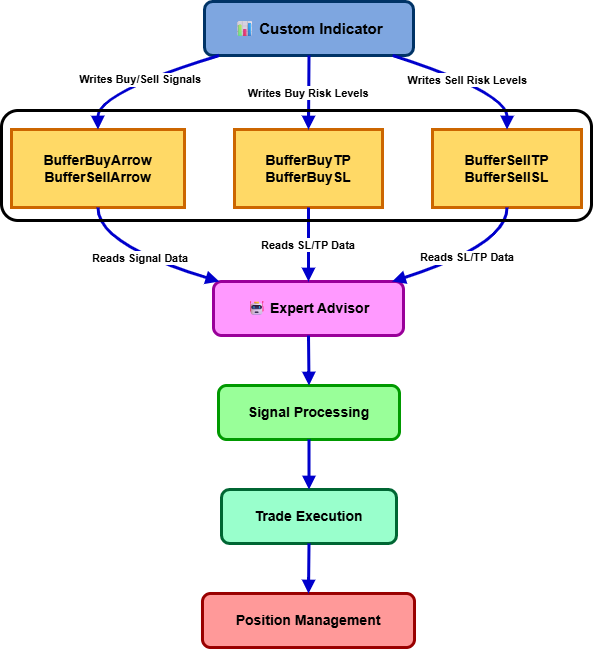
The custom indicator developed in the previous article exposes six buffers that contain all information required by the Expert Advisor. These buffers act as the communication layer between the indicator and the EA, allowing trading decisions to be made without recalculating the weekend gap logic.
The buffers provide the following information:
| Buffer Index | Buffer Name | Purpose |
|---|---|---|
| 0 | BufferBuyArrow | Stores buy signal locations. |
| 1 | BufferSellArrow | Stores sell signal locations. |
| 2 | BufferBuyTP | Stores take-profit levels for buy signals. |
| 3 | BufferBuySL | Stores stop-loss levels for buy signals. |
| 4 | BufferSellTP | Stores take-profit levels for sell signals. |
| 5 | BufferSellSL | Stores stop-loss levels for sell signals. |
These buffers are declared inside the indicator and populated whenever a valid weekend gap trading opportunity is detected.
//+------------------------------------------------------------------+
//| Indicator buffers                                                |
//+------------------------------------------------------------------+
double BufferBuyArrow[];   // Buy arrow prices
double BufferSellArrow[];  // Sell arrow prices
double BufferBuyTP[];      // Buy take profit levels
double BufferBuySL[];      // Buy stop loss levels
double BufferSellTP[];     // Sell take profit levels
double BufferSellSL[];     // Sell stop loss levels
To make these values accessible outside the indicator, each buffer is registered using SetIndexBuffer() during initialization.
//--- set indicator buffers
SetIndexBuffer(0, BufferBuyArrow, INDICATOR_DATA);
SetIndexBuffer(1, BufferSellArrow, INDICATOR_DATA);
SetIndexBuffer(2, BufferBuyTP, INDICATOR_CALCULATIONS);
SetIndexBuffer(3, BufferBuySL, INDICATOR_CALCULATIONS);
SetIndexBuffer(4, BufferSellTP, INDICATOR_CALCULATIONS);
SetIndexBuffer(5, BufferSellSL, INDICATOR_CALCULATIONS);
The buy and sell arrow buffers are visual plotting buffers and therefore use the INDICATOR_DATA type. The remaining four buffers are calculation buffers used to store stop-loss and take-profit information that will later be consumed by the Expert Advisor.
When a signal is generated, the indicator writes the corresponding values into these buffers through the RenderSignalBuffers() function.
if(sig.signalIsBuy)
  {
   BufferBuyArrow[sh] = sig.signalPrice;
   BufferBuyTP[sh]    = NormalizeDouble(sig.signalTP, _Digits);
   BufferBuySL[sh]    = NormalizeDouble(sig.signalSL, _Digits);
  }
else
  {
   BufferSellArrow[sh] = sig.signalPrice;
   BufferSellTP[sh]    = NormalizeDouble(sig.signalTP, _Digits);
   BufferSellSL[sh]    = NormalizeDouble(sig.signalSL, _Digits);
  }
This design allows the indicator to provide far more than simple directional signals. In addition to identifying buy and sell opportunities, it supplies the complete trade structure, including stop-loss and take-profit levels. As a result, the Expert Advisor developed in this article can focus entirely on trade execution and position management while relying on the indicator for signal generation and risk parameters.
After establishing that the indicator must expose buffers, the EA connects to that indicator through iCustom(), which creates the handle used later by CopyBuffer() to read the signal values.
Implementing the Expert Advisor in MQL5
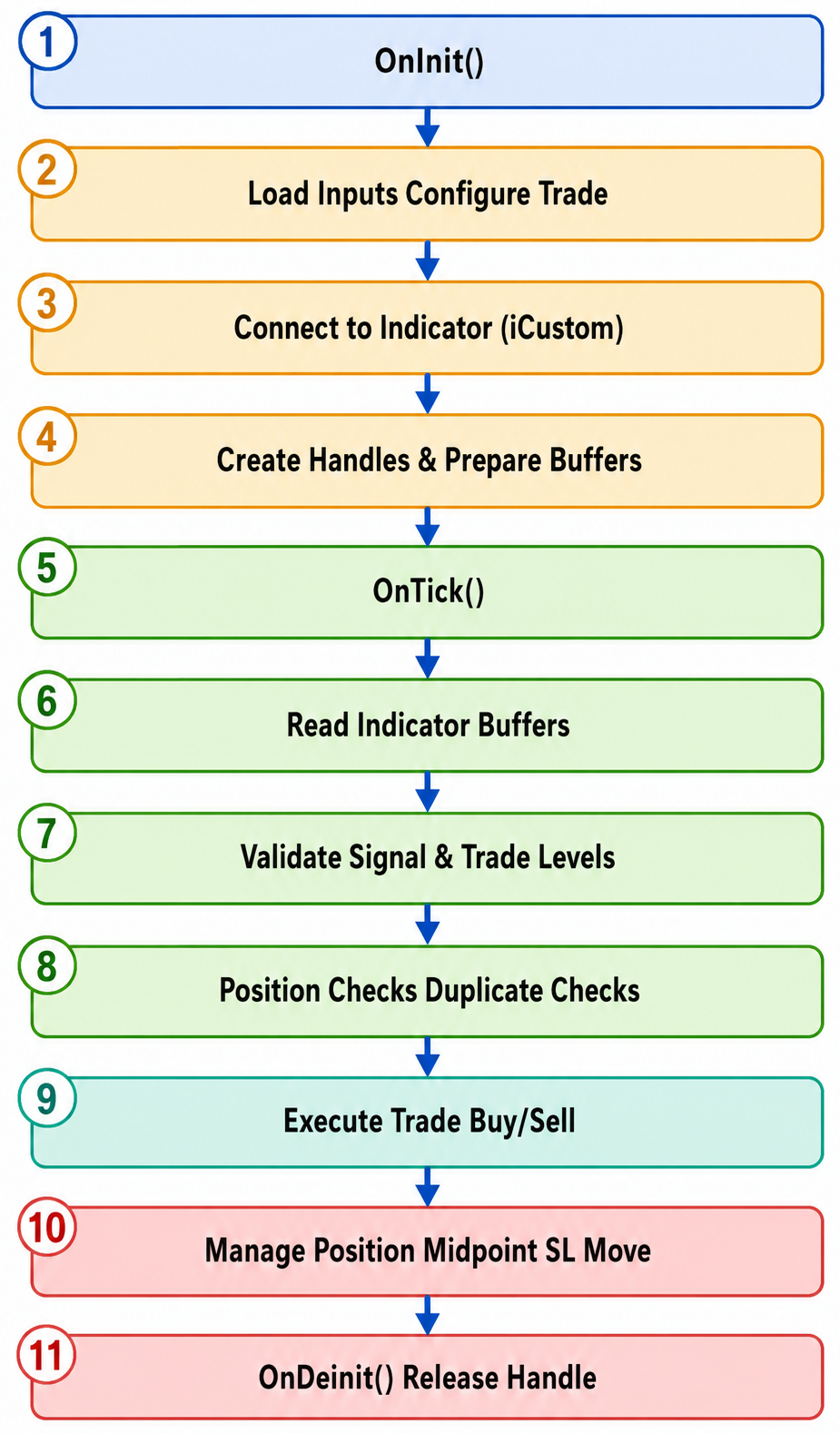
In this section, we build an Expert Advisor that reads the previous indicator's output and executes trades. The indicator already handles the analysis side, so the EA does not repeat the gap-detection logic. Instead, it connects to the indicator, reads the signal buffers, validates each setup, and places trades only when all execution rules are satisfied.
The implementation follows a clear sequence:
- We begin with the inputs and configuration.
- We define the global objects and buffer storage.
- We add the helper utilities and connect to the indicator.
- We validate the trade setup.
- We process trading signals inside the main execution loop.
Input Parameters and Configuration
The implementation begins with the definition of the input parameters. These parameters expose the EA's configurable settings and allow traders to adapt the execution logic without modifying the source code.
The first group of inputs controls the connection to the indicator and the basic trade execution settings. These include the indicator name, position size, slippage tolerance, and the magic number used to identify positions opened by this EA.
//+------------------------------------------------------------------+
//|                                               Gap_Trading_EA.mq5 |
//|                              Copyright 2026, Christian Benjamin. |
//|                           https://www.mql5.com/en/users/lynchris |
//+------------------------------------------------------------------+
#property copyright "Copyright 2026, Christian Benjamin."
#property link      "https://www.mql5.com/en/users/lynchris"
#property version   "1.0"
#property strict

#include <Trade\Trade.mqh>

//+------------------------------------------------------------------+
//| Inputs                                                           |
//+------------------------------------------------------------------+
input string   InpIndicatorName          = "WeekendGapMultiSignal";
input double   InpLotSize                = 1.0;
input int      InpSlippage               = 30;
input long     InpMagicNumber            = 20260609;
input bool     InpUseIndicatorSLTP       = true;
input bool     InpRequireClosedBar       = true;
input bool     InpAllowMultipleSameSignal = false;
input bool     InpCloseOppositePosition   = false;

//+------------------------------------------------------------------+
//| Midpoint stop-loss management                                    |
//+------------------------------------------------------------------+
input bool     InpEnableMidpointSLMove   = true;
input int      InpMidpointSLBufferPoints = 5;
Additional inputs determine how signals should be processed. The trader can choose whether to use the stop-loss and take-profit levels supplied by the indicator, whether signals must originate from closed candles, whether multiple signals from the same bar are permitted, and whether existing positions should be closed when an opposite signal appears.
The final group of parameters controls midpoint stop-loss management. These settings determine whether stop-losses should be moved after price reaches the midpoint between entry and take-profit and how much buffer should be applied when repositioning the stop.
Placing these parameters at the top separates configuration from logic and simplifies maintenance and optimization.
Global Objects and State Management
After defining the inputs, we create the global objects and variables that will be used throughout the EA.
The most important object is the CTrade instance, which provides access to MetaTrader's trading functions. This object is responsible for sending orders, modifying positions, and closing trades.
Next, we define the indicator handle that will later be created through iCustom(). This handle serves as the communication bridge between the EA and the indicator.
//+------------------------------------------------------------------+
//| Global objects and variables                                     |
//+------------------------------------------------------------------+
CTrade   trade;
int      indHandle = INVALID_HANDLE;

double   buyArrowBuffer[];
double   sellArrowBuffer[];
double   buyTPBuffer[];
double   buySLBuffer[];
double   sellTPBuffer[];
double   sellSLBuffer[];

datetime lastProcessedSignalBar = 0;
datetime lastBarTime            = 0;
datetime readyBarTime           = 0;
bool     indicatorReady         = false;
Several arrays are also declared to hold the indicator buffer values. These arrays receive the buy arrows, sell arrows, take-profit levels, and stop-loss levels generated by the indicator.
The section concludes with a small collection of state-tracking variables. These variables record information such as the most recently processed signal bar, the last completed candle, the time at which the indicator became available, and whether the indicator has finished initializing.
Although these variables appear simple, they play a critical role throughout the implementation. Functions such as IsDuplicateSignalBar(), MarkSignalBar(), and OnTick() rely on them to prevent duplicate trades and ensure that signals are processed only once.
Utility Functions
Before implementing the main trading logic, we create a set of supporting utility functions that perform repetitive tasks throughout the EA. These functions encapsulate common operations such as reading indicator data, validating signals, tracking processed bars, and managing existing positions. By isolating these tasks into dedicated helpers, the main execution flow remains cleaner and easier to maintain.
1. Detecting Empty Buffer Values
The first helper, IsEmptyBufferValue(), determines whether a value copied from an indicator buffer represents a valid signal or simply an empty placeholder. Since indicator buffers can contain several special values that indicate the absence of data, this validation step ensures that only meaningful signals are processed by the EA.
//+------------------------------------------------------------------+
//| Check whether a buffer value is empty                            |
//+------------------------------------------------------------------+
bool IsEmptyBufferValue(const double value)
  {
   return (value == EMPTY_VALUE || value == 0.0 || value == DBL_MAX || value == -DBL_MAX);
  }
2. Copying Indicator Buffers
Next, CopyAllBuffers() handles communication with the custom indicator. Rather than calling CopyBuffer() repeatedly throughout the EA, we centralize the entire process into a single helper function. This keeps the indicator-access logic organized and ensures that all six buffers are copied consistently.
//+------------------------------------------------------------------+
//| Copy indicator buffers                                           |
//+------------------------------------------------------------------+
bool CopyAllBuffers(const int shift,const int count)
  {
   if(CopyBuffer(indHandle,0,shift,count,buyArrowBuffer) != count)
      return false;

   if(CopyBuffer(indHandle,1,shift,count,sellArrowBuffer) != count)
      return false;

   if(CopyBuffer(indHandle,2,shift,count,buyTPBuffer) != count)
      return false;

   if(CopyBuffer(indHandle,3,shift,count,buySLBuffer) != count)
      return false;

   if(CopyBuffer(indHandle,4,shift,count,sellTPBuffer) != count)
      return false;

   if(CopyBuffer(indHandle,5,shift,count,sellSLBuffer) != count)
      return false;

   return true;
  }
3. Position and Signal Tracking
The EA also requires a mechanism for tracking existing positions and preventing duplicate entries. The function HasOpenPositionByMagicSymbol() verifies whether a trade already exists for the current symbol and magic number combination. This allows the EA to enforce its position-management rules before attempting a new entry.
//+------------------------------------------------------------------+
//| Check for an existing position by symbol and magic number        |
//+------------------------------------------------------------------+
bool HasOpenPositionByMagicSymbol()
  {
   for(int i = PositionsTotal() - 1; i >= 0; i--)
     {
      ulong ticket = PositionGetTicket(i);
      if(ticket == 0)
         continue;

      if(!PositionSelectByTicket(ticket))
         continue;

      if(PositionGetString(POSITION_SYMBOL) != _Symbol)
         continue;

      if((long)PositionGetInteger(POSITION_MAGIC) != InpMagicNumber)
         continue;

      return true;
     }

   return false;
  }

//+------------------------------------------------------------------+
//| Check whether the signal bar has already been processed          |
//+------------------------------------------------------------------+
bool IsDuplicateSignalBar(const datetime signalBarTime)
  {
   return (signalBarTime == lastProcessedSignalBar);
  }

//+------------------------------------------------------------------+
//| Store the most recently processed signal bar                     |
//+------------------------------------------------------------------+
void MarkSignalBar(const datetime signalBarTime)
  {
   lastProcessedSignalBar = signalBarTime;
  }
To prevent the same signal from being executed multiple times, we implement IsDuplicateSignalBar() and MarkSignalBar(). These functions work together to record the most recently processed signal bar and ensure that each signal is acted upon only once.
4. Managing Opposite Positions
Finally, CloseOppositeIfNeeded() provides optional position-reversal behavior. When enabled through the input settings, the function scans all positions belonging to the EA and closes any trade that conflicts with the newly generated signal direction.
//+------------------------------------------------------------------+
//| Close opposite positions when enabled                            |
//+------------------------------------------------------------------+
void CloseOppositeIfNeeded(const bool isBuy)
  {
   if(!InpCloseOppositePosition)
      return;

   for(int i = PositionsTotal() - 1; i >= 0; i--)
     {
      ulong ticket = PositionGetTicket(i);
      if(ticket == 0)
         continue;

      if(!PositionSelectByTicket(ticket))
         continue;

      if(PositionGetString(POSITION_SYMBOL) != _Symbol)
         continue;

      if((long)PositionGetInteger(POSITION_MAGIC) != InpMagicNumber)
         continue;

      ENUM_POSITION_TYPE type = (ENUM_POSITION_TYPE)PositionGetInteger(POSITION_TYPE);
      if((isBuy && type == POSITION_TYPE_SELL) || (!isBuy && type == POSITION_TYPE_BUY))
         trade.PositionClose(ticket);
     }
  }
This allows the system to transition smoothly from long to short exposure, or vice versa, without leaving opposing positions active simultaneously.
Trade Validation and Risk Checks
Before a signal can be converted into a market order, the EA must verify that the trade is valid.
This responsibility is handled by the StopsAreValidForTrade() function.
When the indicator supplies stop-loss and take-profit levels, this function confirms that those levels are positioned correctly relative to the intended entry price. For example, a buy position must always have a stop-loss below the entry and a take-profit above it.
//+------------------------------------------------------------------+
//| Validate and adjust stop-loss and take-profit levels             |
//+------------------------------------------------------------------+
bool StopsAreValidForTrade(const bool isBuy,const double entry,double &sl,double &tp)
  {
   if(!InpUseIndicatorSLTP)
      return true;

   if(sl <= 0.0 || tp <= 0.0)
      return false;

   double point = _Point;
   int stopsLevelPoints = (int)SymbolInfoInteger(_Symbol,SYMBOL_TRADE_STOPS_LEVEL);
   double minDistance = (double)stopsLevelPoints * point;

   if(isBuy)
     {
      if(tp <= entry)
         return false;
      if(sl >= entry)
         return false;

      if(minDistance > 0.0)
        {
         if((tp - entry) < minDistance)
            tp = entry + minDistance;

         if((entry - sl) < minDistance)
            sl = entry - minDistance;
        }
     }
   else
     {
      if(tp >= entry)
         return false;
      if(sl <= entry)
         return false;

      if(minDistance > 0.0)
        {
         if((entry - tp) < minDistance)
            tp = entry - minDistance;

         if((sl - entry) < minDistance)
            sl = entry + minDistance;
        }
     }

   return true;
  }
The function also checks the broker's minimum stop-distance requirements. If the supplied levels are too close to the current market price, they are adjusted automatically to satisfy the broker's trading rules.
By performing these validations before order placement, the EA avoids unnecessary order rejections and ensures that every trade satisfies the requirements of both the strategy and the trading server.
Midpoint Stop-Loss Management
Once trade execution has been addressed, we implement the position-management component of the EA.
This functionality is contained within the MoveSLToBreakevenOnMidpoint() function.
The purpose of this routine is to reduce risk after a trade begins moving in the desired direction. Instead of waiting for the take-profit target to be reached, the EA continuously monitors open positions and calculates the midpoint between the entry price and the target price.
//+------------------------------------------------------------------+
//| Midpoint stop-loss management                                    |
//+------------------------------------------------------------------+
void MoveSLToBreakevenOnMidpoint()
  {
   if(!InpEnableMidpointSLMove)
      return;

   double point = _Point;
   double bufferPrice = InpMidpointSLBufferPoints * point;
   double epsilon = point / 2.0;

   for(int i = PositionsTotal() - 1; i >= 0; i--)
     {
      ulong ticket = PositionGetTicket(i);
      if(ticket == 0)
         continue;

      if(!PositionSelectByTicket(ticket))
         continue;

      if(PositionGetString(POSITION_SYMBOL) != _Symbol)
         continue;

      if((long)PositionGetInteger(POSITION_MAGIC) != InpMagicNumber)
         continue;

      ENUM_POSITION_TYPE type = (ENUM_POSITION_TYPE)PositionGetInteger(POSITION_TYPE);
      double entry     = PositionGetDouble(POSITION_PRICE_OPEN);
      double tp        = PositionGetDouble(POSITION_TP);
      double currentSL = PositionGetDouble(POSITION_SL);

      if(tp == 0.0)
         continue;

      double midpoint   = 0.0;
      double currentPrice;
      double newSL      = 0.0;

      if(type == POSITION_TYPE_BUY)
        {
         if(tp <= entry)
            continue;

         midpoint = entry + (tp - entry) / 2.0;
         currentPrice = SymbolInfoDouble(_Symbol, SYMBOL_BID);

         if(currentPrice < midpoint)
            continue;

         //--- Calculate new stop-loss above the entry price
         newSL = entry + bufferPrice;

         //--- Ensure broker minimum stop distance requirements are met
         double minStop = SymbolInfoInteger(_Symbol, SYMBOL_TRADE_STOPS_LEVEL) * point;
         if((newSL - entry) < minStop)
            newSL = entry + minStop;

         //--- Prevent stop-loss from crossing the take-profit level
         if(newSL >= tp)
            newSL = tp - point;
        }
      else if(type == POSITION_TYPE_SELL)
        {
         if(entry <= tp)
            continue;

         midpoint = entry - (entry - tp) / 2.0;
         currentPrice = SymbolInfoDouble(_Symbol, SYMBOL_ASK);

         if(currentPrice > midpoint)
            continue;

         //--- Calculate new stop-loss below the entry price
         newSL = entry - bufferPrice;

         //--- Ensure broker minimum stop distance requirements are met
         double minStop = SymbolInfoInteger(_Symbol, SYMBOL_TRADE_STOPS_LEVEL) * point;
         if((entry - newSL) < minStop)
            newSL = entry - minStop;

         //--- Prevent stop-loss from crossing the take-profit level
         if(newSL <= tp)
            newSL = tp + point;
        }
      else
         continue;

      //--- Skip if stop-loss already matches target level
      if(MathAbs(currentSL - newSL) <= epsilon)
         continue;

      if(trade.PositionModify(ticket, newSL, tp))
        {
         Print("Midpoint reached for ", (type == POSITION_TYPE_BUY ? "BUY" : "SELL"),
               " #", ticket,
               " - SL moved from ", DoubleToString(currentSL, _Digits),
               " to ", DoubleToString(newSL, _Digits));
        }
      else
        {
         Print("Failed to modify SL for #", ticket, ", error: ", GetLastError());
        }
     }
  }
When price reaches this midpoint, the function automatically adjusts the stop-loss beyond breakeven using the configured buffer distance.
For buy positions, the stop-loss is moved above the entry price. For sell positions, it is moved below the entry price. Additional validation ensures that the modified stop-loss remains compliant with broker restrictions and does not cross the take-profit level.
This approach allows the strategy to secure profits earlier while still giving the trade room to continue toward its target.
Expert Advisor Initialization
After all supporting components have been prepared, we move to the initialization stage implemented through OnInit().
The first task performed by OnInit() is configuring the trading environment. The EA applies the selected magic number and slippage settings to the CTrade object.
Next, the function loads the custom indicator using iCustom(). If the indicator cannot be found or loaded successfully, initialization fails immediately because the EA depends entirely on the indicator for signal generation.
//+------------------------------------------------------------------+
//| Expert initialization                                            |
//+------------------------------------------------------------------+
int OnInit()
  {
   trade.SetExpertMagicNumber(InpMagicNumber);
   trade.SetDeviationInPoints(InpSlippage);

   indHandle = iCustom(_Symbol, _Period, InpIndicatorName);
   if(indHandle == INVALID_HANDLE)
     {
      Print("Failed to load indicator '", InpIndicatorName, "'. Error: ", GetLastError());
      return INIT_FAILED;
     }

   ArraySetAsSeries(buyArrowBuffer, true);
   ArraySetAsSeries(sellArrowBuffer, true);
   ArraySetAsSeries(buyTPBuffer, true);
   ArraySetAsSeries(buySLBuffer, true);
   ArraySetAsSeries(sellTPBuffer, true);
   ArraySetAsSeries(sellSLBuffer, true);

   Print("EA initialized. Waiting for indicator signals...");
   return INIT_SUCCEEDED;
  }
Once the indicator handle has been created, the buffer arrays are configured as time-series arrays. This ensures that buffer indexing follows the same convention used by MetaTrader price series, where index zero always represents the newest bar.
Finally, the initialization process logs a confirmation message indicating that the EA is ready to begin monitoring for signals.
This stage establishes all external dependencies and prepares the infrastructure required by the rest of the implementation.
Expert Advisor Deinitialization
Resource cleanup is handled through OnDeinit().
When the EA is removed from the chart or the terminal shuts down, the indicator handle created during initialization is released using IndicatorRelease().
//+------------------------------------------------------------------+
//| Expert deinitialization                                          |
//+------------------------------------------------------------------+
void OnDeinit(const int reason)
  {
   if(indHandle != INVALID_HANDLE)
      IndicatorRelease(indHandle);

   Comment("");
  }
The chart comment area is also cleared to remove any information previously displayed by the EA.
Although this stage is relatively small compared to the rest of the implementation, proper cleanup prevents resource leaks and ensures that the platform remains stable during repeated attachment and removal of the EA.
Main Tick Processing
The core execution engine of the Expert Advisor is implemented inside OnTick().
Every market tick received by the terminal causes this function to execute, making it responsible for coordinating all trading activity.
OnTick() first checks that the indicator is ready by testing buffer output. When data becomes available, the EA stores the readiness time and switches to normal operation.
The function then performs new-bar detection using the lastBarTime tracking variable. This design ensures that the EA evaluates signals only once per completed candle, not on every tick.
//+------------------------------------------------------------------+
//| Main tick                                                        |
//+------------------------------------------------------------------+
void OnTick()
  {
   if(indHandle == INVALID_HANDLE)
      return;

   if(!indicatorReady)
     {
      double testBuffer[1];
      if(CopyBuffer(indHandle, 0, 0, 1, testBuffer) == 1)
        {
         indicatorReady = true;
         readyBarTime = iTime(_Symbol, _Period, 1);
         Print("Indicator ready. Monitoring WeekendGapMultiSignal...");
        }
      else
         return;
     }

   datetime currentBarTime = iTime(_Symbol, _Period, 0);
   if(currentBarTime == 0)
      return;

   if(currentBarTime == lastBarTime)
      return;

   lastBarTime = currentBarTime;

   const int signalShift = (InpRequireClosedBar ? 1 : 0);
   datetime signalBarTime = iTime(_Symbol, _Period, signalShift);
   if(signalBarTime == 0)
      return;

   if(signalBarTime <= readyBarTime)
      return;

   if(!CopyAllBuffers(signalShift, 1))
      return;

   bool buySignal  = !IsEmptyBufferValue(buyArrowBuffer[0]);
   bool sellSignal = !IsEmptyBufferValue(sellArrowBuffer[0]);

   if(!buySignal && !sellSignal)
      return;

   if(!InpAllowMultipleSameSignal && IsDuplicateSignalBar(signalBarTime))
      return;

   if(HasOpenPositionByMagicSymbol())
      return;

   bool isBuy = buySignal && !sellSignal;
   if(buySignal && sellSignal)
     {
      Print("Both buy and sell signals detected on the same bar. Skipping to avoid conflict.");
      return;
     }

   CloseOppositeIfNeeded(isBuy);

   double entryPrice = isBuy ? SymbolInfoDouble(_Symbol, SYMBOL_ASK)
                             : SymbolInfoDouble(_Symbol, SYMBOL_BID);

   double sl = 0.0;
   double tp = 0.0;

   if(InpUseIndicatorSLTP)
     {
      if(isBuy)
        {
         tp = buyTPBuffer[0];
         sl = buySLBuffer[0];
        }
      else
        {
         tp = sellTPBuffer[0];
         sl = sellSLBuffer[0];
        }

      if(IsEmptyBufferValue(tp))
         tp = 0.0;

      if(IsEmptyBufferValue(sl))
         sl = 0.0;
     }

   if(!StopsAreValidForTrade(isBuy, entryPrice, sl, tp))
     {
      Print("Signal ignored because SL/TP are invalid for the current entry price. ",
            "Entry=", DoubleToString(entryPrice, _Digits),
            " SL=", DoubleToString(sl, _Digits),
            " TP=", DoubleToString(tp, _Digits),
            " SignalBar=", TimeToString(signalBarTime, TIME_DATE | TIME_MINUTES));
      MarkSignalBar(signalBarTime);
      return;
     }

   string comment = isBuy ? "Weekend Gap Buy" : "Weekend Gap Sell";
   bool success = false;

   if(isBuy)
      success = trade.Buy(InpLotSize, _Symbol, entryPrice, sl, tp, comment);
   else
      success = trade.Sell(InpLotSize, _Symbol, entryPrice, sl, tp, comment);

   if(success)
     {
      MarkSignalBar(signalBarTime);
      Print((isBuy ? "BUY" : "SELL"),
            " | Entry: ", DoubleToString(entryPrice, _Digits),
            " | SL: ", DoubleToString(sl, _Digits),
            " | TP: ", DoubleToString(tp, _Digits),
            " | Signal bar: ", TimeToString(signalBarTime, TIME_DATE | TIME_MINUTES));
     }
   else
     {
      Print("Order failed. Error: ", GetLastError());
     }

   //--- Midpoint stop-loss management
   MoveSLToBreakevenOnMidpoint();
  }
After confirming that a new bar has formed, the EA determines which candle should be evaluated based on the user's signal-confirmation settings. When closed-bar confirmation is enabled, the EA evaluates the most recently completed candle instead of the currently forming one.
The selected signal bar is then compared against the readiness time and duplicate-processing records to ensure that only new signals are considered.
At this point, OnTick() calls CopyAllBuffers() to retrieve the latest indicator output and determine whether a buy or sell signal exists.
This stage effectively acts as the control center of the entire EA, coordinating the transition from market data to trade execution.
Signal Processing and Trade Execution
Once a valid signal has been detected inside OnTick(), the EA proceeds to the execution phase.
The first step is determining the signal direction. The EA examines the buy and sell arrow buffers supplied by the indicator and identifies whether the current setup represents a buy opportunity or a sell opportunity.
Several additional filters are then applied. Duplicate signals are rejected through IsDuplicateSignalBar(), existing positions are checked through HasOpenPositionByMagicSymbol(), and optional opposite-position handling is performed through CloseOppositeIfNeeded().
   bool buySignal  = !IsEmptyBufferValue(buyArrowBuffer[0]);
   bool sellSignal = !IsEmptyBufferValue(sellArrowBuffer[0]);

   if(!buySignal && !sellSignal)
      return;

   if(!InpAllowMultipleSameSignal && IsDuplicateSignalBar(signalBarTime))
      return;

   if(HasOpenPositionByMagicSymbol())
      return;

   bool isBuy = buySignal && !sellSignal;
   if(buySignal && sellSignal)
     {
      Print("Both buy and sell signals detected on the same bar. Skipping to avoid conflict.");
      return;
     }

   CloseOppositeIfNeeded(isBuy);

   double entryPrice = isBuy ? SymbolInfoDouble(_Symbol, SYMBOL_ASK)
                             : SymbolInfoDouble(_Symbol, SYMBOL_BID);

   double sl = 0.0;
   double tp = 0.0;

   if(InpUseIndicatorSLTP)
     {
      if(isBuy)
        {
         tp = buyTPBuffer[0];
         sl = buySLBuffer[0];
        }
      else
        {
         tp = sellTPBuffer[0];
         sl = sellSLBuffer[0];
        }

      if(IsEmptyBufferValue(tp))
         tp = 0.0;

      if(IsEmptyBufferValue(sl))
         sl = 0.0;
     }

   if(!StopsAreValidForTrade(isBuy, entryPrice, sl, tp))
     {
      Print("Signal ignored because SL/TP are invalid for the current entry price. ",
            "Entry=", DoubleToString(entryPrice, _Digits),
            " SL=", DoubleToString(sl, _Digits),
            " TP=", DoubleToString(tp, _Digits),
            " SignalBar=", TimeToString(signalBarTime, TIME_DATE | TIME_MINUTES));
      MarkSignalBar(signalBarTime);
      return;
     }

   string comment = isBuy ? "Weekend Gap Buy" : "Weekend Gap Sell";
   bool success = false;

   if(isBuy)
      success = trade.Buy(InpLotSize, _Symbol, entryPrice, sl, tp, comment);
   else
      success = trade.Sell(InpLotSize, _Symbol, entryPrice, sl, tp, comment);

   if(success)
     {
      MarkSignalBar(signalBarTime);
      Print((isBuy ? "BUY" : "SELL"),
            " | Entry: ", DoubleToString(entryPrice, _Digits),
            " | SL: ", DoubleToString(sl, _Digits),
            " | TP: ", DoubleToString(tp, _Digits),
            " | Signal bar: ", TimeToString(signalBarTime, TIME_DATE | TIME_MINUTES));
     }
   else
     {
      Print("Order failed. Error: ", GetLastError());
     }
The EA then determines the market entry price and retrieves the stop-loss and take-profit values from the indicator buffers when indicator-based risk management is enabled.
Before placing the trade, the proposed levels are passed to StopsAreValidForTrade(). Only if all validation checks succeed does the EA proceed with order placement.
Depending on the signal direction, the EA executes either a buy order through trade.Buy() or a sell order through trade.Sell().
After a successful execution, the signal bar is recorded through MarkSignalBar() to prevent duplicate processing, and detailed trade information is written to the terminal log.
This stage represents the final conversion of indicator output into live market exposure.
Position Management During Runtime
The implementation concludes with ongoing position management.
At the end of each execution cycle, OnTick() invokes MoveSLToBreakevenOnMidpoint().
This ensures that every open position is continuously evaluated against the midpoint protection rules defined earlier. As market prices evolve, the EA automatically adjusts stop-loss levels whenever the required conditions are satisfied.
By integrating this management step directly into the main execution cycle, the EA remains actively involved in risk control long after the original trade has been opened.
Backtesting and Validation
After integrating the Expert Advisor with the custom indicator, the system is able to read the indicator buffers, detect buy and sell signals, retrieve the corresponding stop-loss and take-profit levels, and execute trades automatically. This confirms that the communication between the indicator and the EA is functioning correctly and that trading decisions can be translated into live market orders without manual intervention.
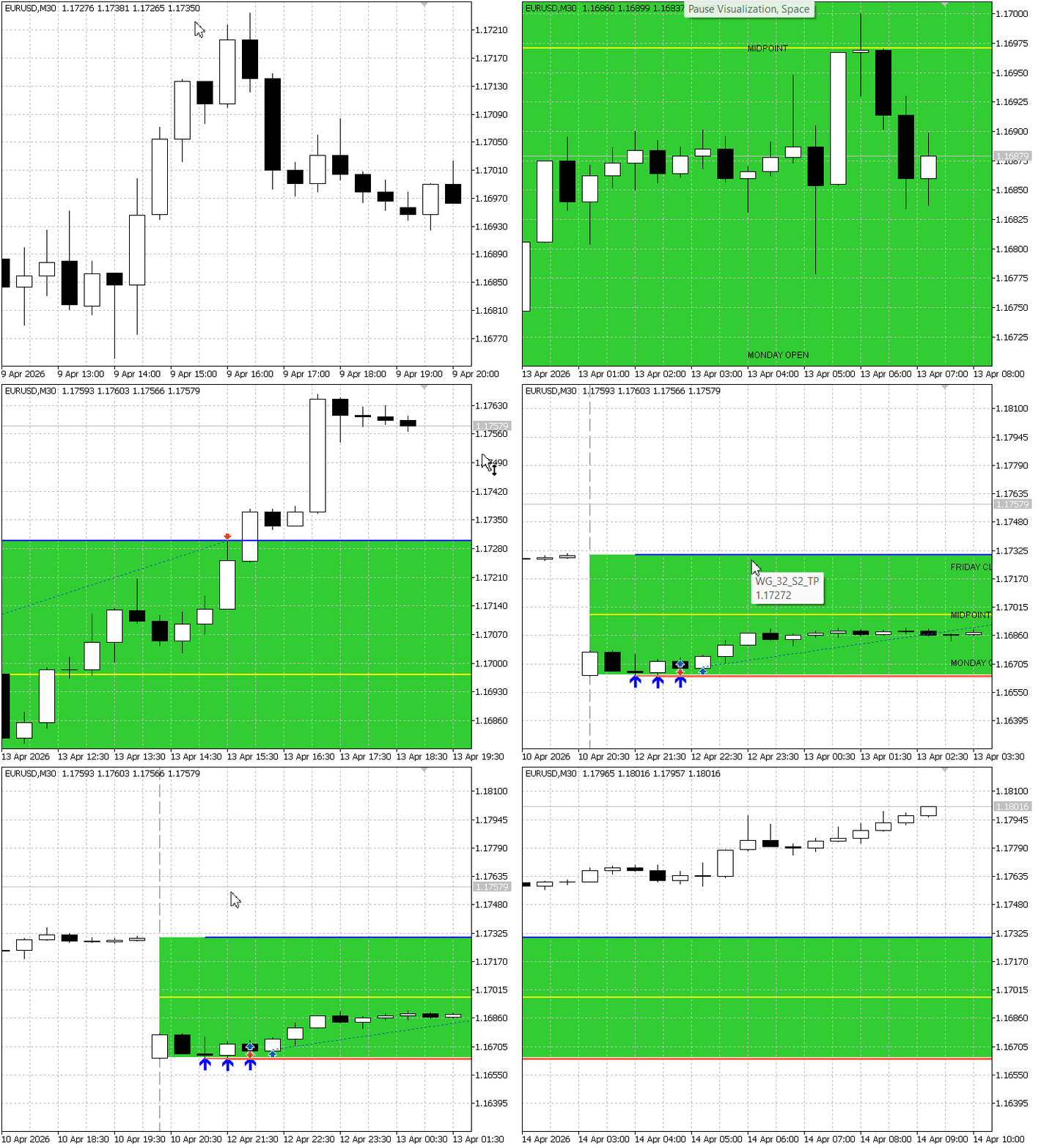
To evaluate the overall performance of the implementation, the Expert Advisor was backtested over a one-year period using historical market data. The complete results are shown in the following diagrams:
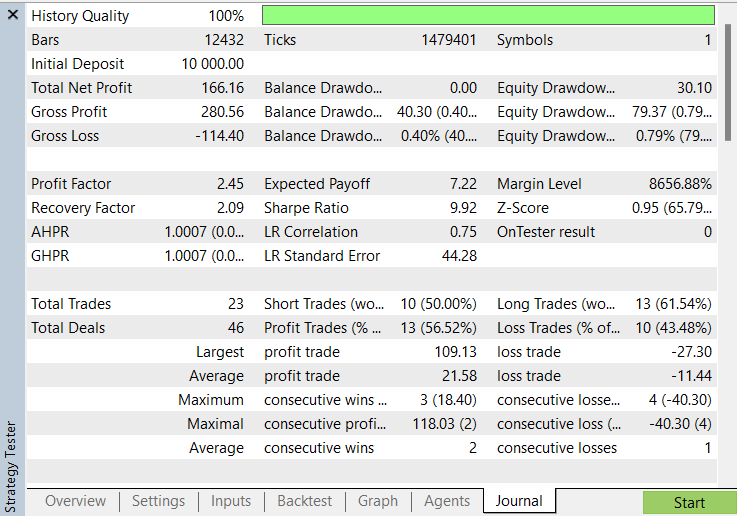
Backtest Analysis
The backtest produced a total net profit of 166.16 from an initial deposit of 10,000, while maintaining a relatively low maximum equity drawdown of 0.79%, indicating controlled risk exposure throughout the test period.
A total of 23 trades were executed, with 13 winning trades and 10 losing trades, resulting in a win rate of 56.52%. Although the win rate is only moderately above 50%, the strategy remained profitable because the average winning trade was significantly larger than the average losing trade.
The Profit Factor of 2.45 indicates that the gross profit generated by winning positions was more than twice the gross loss incurred by losing positions. In practical terms, this suggests that the strategy was able to recover losses efficiently while preserving overall profitability.
The Recovery Factor of 2.09 further demonstrates the system's ability to generate returns relative to the drawdown experienced during the testing period. Combined with the low drawdown values, this suggests that the risk-management rules implemented within the Expert Advisor, including the indicator-derived stop-loss levels and midpoint stop-loss adjustment mechanism, contributed positively to capital preservation.
Overall, the backtest confirms that the Expert Advisor successfully executes the indicator signals, applies the supplied stop-loss and take-profit levels, and manages open positions according to the designed trading logic. The initial results indicate that the indicator-to-EA workflow operates as intended.
Conclusion
In this article, we transformed the weekend gap indicator into a tradable Expert Advisor that can read buffer output, execute orders automatically, and apply the stop-loss and take-profit levels generated by the indicator.
We also added signal filtering, position control, and midpoint stop-loss management so the EA can handle trades in a more structured and disciplined way. The backtest helped confirm that the indicator-to-EA workflow functions correctly from signal detection through order execution and trade management.
Together, these components show how a custom indicator can be converted into a complete automated trading system in MQL5 by separating analysis from execution while keeping the logic connected through indicator buffers.
Attachments
| File | Description |
|---|---|
| WeekendGapMultiSignal.mq5 | Custom indicator that detects weekend gaps, generates buy and sell trading signals, and provides corresponding stop-loss and take-profit levels through indicator buffers. |
| Gap_Trading_EA.mq5 | Expert Advisor that reads signals and risk parameters from the WeekendGapMultiSignal indicator, executes trades automatically, and manages open positions using midpoint stop-loss protection. |
Warning: All rights to these materials are reserved by MetaQuotes Ltd. Copying or reprinting of these materials in whole or in part is prohibited.
This article was written by a user of the site and reflects their personal views. MetaQuotes Ltd is not responsible for the accuracy of the information presented, nor for any consequences resulting from the use of the solutions, strategies or recommendations described.

 Beyond GARCH (Part VI): Fractional Brownian Motion And The Multiplicative Cascade in MQL5
 Building a Traditional Point and Figure Indicator in MQL5
 How to Detect and Normalize Chart Objects in MQL5 (Part 3): Alerting and Automated Trading from Manually Drawn Objects
 Rolling Sharpe Ratio with Statistical Significance Bands in MQL5

- Free trading apps
- Over 8,000 signals for copying
- Economic news for exploring financial markets
You agree to website policy and terms of use