

Building a Synthetic Custom Symbol in MQL5 Using Multi-Symbol Price Averaging
 1 528
1 528
 0
0

Introduction
MetaTrader 5 displays each instrument as a separate symbol. This makes it harder to analyze how related markets move together. For instance, forex pairs are often correlated, but standard charts hide their combined behavior, limiting the trader’s ability to see overall market strength or shared direction. In this article, we will build a synthetic custom symbol in MQL5 by averaging price data from multiple forex pairs.
The goal is to create a single derived instrument that reflects the collective movement of selected markets. This synthetic symbol can be used for correlation analysis, index-style market modeling, and strategy development based on aggregated price action. We will achieve this by collecting OHLC data from multiple symbols, aligning their candle timestamps, and computing averaged values for each bar. The resulting price series will then be used to create and continuously update a custom symbol in MetaTrader 5, covering both historical reconstruction and real-time synchronization.
Project Overview and Implementation Plan
It is important to have a thorough understanding of what we are creating and the methodical process we will use to create it before we begin the actual implementation in MQL5.
What We Are Building
We are building a synthetic custom symbol in MetaTrader 5 that is generated by averaging the OHLC price data of multiple financial instruments into a single continuous price series. Rather than analyzing each market individually, the system combines the price information from several symbols to produce a new derived instrument that behaves like a standard chart within MT5. This allows the synthetic symbol to be used for historical analysis, indicator development, strategy testing, and real-time market monitoring.
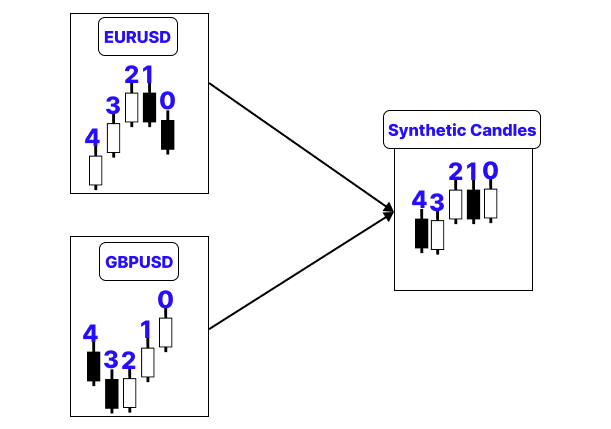
For instance, let’s say we are creating a synthetic custom symbol using two instruments, each of which has five historical bars. Because they reflect the same time, the candles at index 0 of the first and second instruments are paired:
| Price | Instrument A (Index 0) | Instrument B (Index 0) | Synthetic Candle |
|---|---|---|---|
| Open | 1.1050 | 1.3200 | (1.1050 + 1.3200) / 2 = 1.2125 |
| High | 1.1080 | 1.3240 | (1.1080 + 1.3240) / 2 = 1.2160 |
| Low | 1.1030 | 1.3180 | (1.1030 + 1.3180) / 2 = 1.2105 |
| Close | 1.1070 | 1.3220 | (1.1070 + 1.3220) / 2 = 1.2145 |
The calculated data show the open, high, low, and close of the synthetic candle at index 0. The same process is carried out for index 1, index 2, and every subsequent bar until the entire historical record has been examined. The process is the same for three instruments. The only difference is that each OHLC value is the sum of the three prices divided by three.
Implementation Plan
Before we start writing the MQL5 code, let’s look at how the Expert Advisor will create and maintain the synthetic custom symbol.
1. Setting the Input Parameters
First, we define the settings that the user can change.
These settings include:
- the source symbols used in the calculation;
- the custom symbol name;
- the number of historical bars to process;
- volume settings;
- the frequency of real-time updates.
Keeping these values as input parameters makes the EA flexible. The same program can be used with different instruments and configurations without changing the source code.
2. Collecting and Checking the Source Symbols
Next, the EA gathers all selected source symbols into one array.
During this step, it:
- removes empty entries;
- checks whether each symbol is available on the broker’s server;
- automatically adds missing symbols to the Market Watch window.
This validation is important because the synthetic symbol can only be built from valid and accessible market data. If one of the source symbols is missing, the EA stops before producing incorrect results.
3. Creating a Clear Symbol Description
The custom symbol should have a description that explains how it was created.
Instead of displaying only the custom symbol’s name, the EA combines the names of all source instruments into a readable label, for example:
EURUSD + GBPUSD + XAUUSD
This makes it easy to understand which markets are included in the synthetic instrument.
4. Creating and Configuring the Custom Symbol
Before adding price data, the EA checks whether the custom symbol already exists in MetaTrader 5.
If the symbol exists, the EA prepares it for use and continues. If it does not exist, the EA creates it using one of the source symbols as a template.
The new symbol is then configured as a synthetic instrument rather than a normal tradable asset. The EA sets important properties such as:
- the number of decimal digits;
- the point size;
- the trading mode;
- the symbol description.
Finally, the symbol is added to Market Watch so it can be opened, viewed, and used like any other instrument in the platform.
5. Building the Averaged Price Series
This is the main part of the process.
The EA loads historical candle data for every source symbol. Each candle contains:
- time;
- open price;
- high price;
- low price;
- close price;
- tick volume.
The data from different symbols is matched by timestamp. Only candles that exist at the same time across all source instruments are included in the calculation.
For every matching timestamp, the EA adds together the open, high, low, close, and volume values from all symbols. It then divides each total by the number of symbols.
This produces one averaged synthetic candle.
For example, if three source symbols are used, the synthetic close price is calculated as:
Synthetic Close = (Close 1 + Close 2 + Close 3) / 3
The same logic is applied to the open, high, low, and volume values.
6. Rebuilding the Symbol’s History
Once the averaged candles are ready, the EA writes them into the custom symbol.
Before doing this, it clears the symbol’s existing history. This prevents old candles from conflicting with the new settings or calculations.
The newly generated candles are then added as a complete historical price series. As a result, the synthetic symbol receives continuous OHLC data and can be displayed on a normal MetaTrader 5 chart.
7. Updating Live Market Data
Rebuilding the entire history every few seconds would be inefficient. For live updates, the EA processes only the most recent candles.
At each timer event, it:
- loads the latest data from the source symbols;
- calculates the new averaged candles;
- replaces the latest candles in the custom symbol.
This lightweight approach keeps the synthetic instrument synchronized with the underlying markets without recalculating thousands of historical bars.
8. Initialization and Execution Flow
The complete process follows the standard Expert Advisor lifecycle.
During OnInit() , the EA:
- collects and validates the source symbols;
- creates or prepares the custom symbol;
- generates the initial averaged price history;
- starts a timer for live updates.
Once initialization is complete, the timer regularly updates the latest synthetic candles.
When the EA is removed from the chart, OnDeinit() stops the timer and finishes the process cleanly.
With this structure, the synthetic symbol starts with a complete historical dataset and continues to follow current market movements in real time.
Implementation in MQL5
In this section, we bring all the previous design steps together and translate them into a fully working MQL5 Expert Advisor that builds and maintains the synthetic custom symbol inside MetaTrader 5.
Defining Input Parameters
Just as discussed in the implementation plan, this is the first step where we define all key input parameters.
Examples:
//--- Inputs
input string          InpSymbol1          = "EURUSD";     // Source Symbol 1
input string          InpSymbol2          = "GBPUSD";     // Source Symbol 2
input string          InpSymbol3          = "";           // Source Symbol 3 (leave empty to use only 2)
input int             InpBarsToCalculate  = 1000;         // How many bars of history to build
input string          InpCustomSymbolName = "AVRG3";       // Custom symbol name (NO backslash allowed here)
input bool            InpAverageVolume    = true;         // Average volume (false = sum)
input int             InpTimerSeconds     = 1;            // Live update frequency (seconds)
input int             InpLiveRefreshBars  = 3;            // How many recent bars to refresh on each timer tick
Explanation:
These input parameters define how the synthetic custom symbol will be built and updated. The user specifies up to three source symbols (InpSymbol1, InpSymbol2, InpSymbol3), which will be combined to generate the averaged market. InpBarsToCalculate controls how much historical data is processed when creating the initial synthetic price series. InpCustomSymbolName sets the name of the new custom symbol inside MetaTrader 5. InpAverageVolume determines whether volume is averaged across symbols or summed. The live behavior of the system is controlled by InpTimerSeconds, which sets how often the EA updates, while InpLiveRefreshBars defines how many of the most recent candles are recalculated during each update cycle.
Collecting and Selecting Source Symbols
As explained in the implementation plan, this step involves gathering all user-defined symbols, validating their availability, and selecting them in Market Watch.
Example:
//+------------------------------------------------------------------+
//| Collect non-empty source symbols into g_symbols[]                |
//+------------------------------------------------------------------+
bool CollectSymbols()
  {
   string raw[3];  // temporary storage for input symbols

//--- assign user inputs into array for looping
   raw[0] = InpSymbol1;
   raw[1] = InpSymbol2;
   raw[2] = InpSymbol3;

//--- reset global array before collecting new symbols
   ArrayResize(g_symbols, 0);

   for(int i = 0; i < 3; i++)
     {
      string s = raw[i];   // get current symbol

      //--- remove leading and trailing spaces
      StringTrimLeft(s);
      StringTrimRight(s);

      //--- skip empty symbol inputs
      if(s == "")
         continue;

      //--- ensure symbol is available in Market Watch
      if(!SymbolSelect(s, true))
        {
         PrintFormat("ERROR: Could not select symbol '%s' in Market Watch. Check the symbol name.", s);
         return(false);
        }

      //--- verify symbol exists on broker server
      if(!(bool)SymbolInfoInteger(s, SYMBOL_EXIST))
        {
         PrintFormat("ERROR: Symbol '%s' does not exist on this broker.", s);
         return(false);
        }

      //--- add validated symbol to global array
      int n = ArraySize(g_symbols);
      ArrayResize(g_symbols, n + 1);
      g_symbols[n] = s;
     }

//--- store final number of valid symbols
   g_symbolCount = ArraySize(g_symbols);

//--- ensure at least 2 symbols are available for averaging
   if(g_symbolCount < 2)
     {
      Print("ERROR: At least 2 source symbols are required (InpSymbol1 and InpSymbol2).");
      return(false);
     }

   return(true);
  }
Explanation:
The global variables at the top define the basic storage system for the entire symbol-collection process. The dynamic array g_symbols[] will ultimately contain all authorized source symbols that were utilized to create the synthetic instrument. The array's size is not fixed; rather, it is resized later on during execution since the number of active symbols is decided by user input. Additionally, the number of valid symbols that are successfully collected is tracked by an integer named g_symbolCount. This number becomes important in subsequent stages because it controls loops, averaging processes, and alignment logic across several datasets.
Next, the three input parameters are first copied into a temporary array called raw[3] by the CollectSymbols() function. This eliminates the need for repetitive code for separate inputs by processing each symbol using the same logic inside a loop. After that, it resizes g_symbols[] to zero, eliminates any symbols that were previously saved, and gets the array ready to accept a fresh set of verified source symbols.
The first step of the CollectSymbols() function is to transfer the three input arguments into a temporary array called raw[3]. By doing this, repetitive code for different inputs may be avoided, and each symbol can be handled using the same logic inside a loop. After that, it resizes g_symbols[] to zero, deletes any symbols that were previously saved, and gets the array ready to accept a fresh set of validated source symbols.
Each symbol is copied into a local variable called s inside the loop, enabling processing without changing the original array. To eliminate any leading or trailing spaces from the symbol name, the method then calls StringTrimLeft() and StringTrimRight(). This guarantees that user-inputted whitespace won't affect symbol validation or further processing in MetaTrader 5. The code uses if(s == "") to determine whether the symbol string is empty after trimming. When optional inputs (such as InpSymbol3) are not supplied, this step makes sure they are safely ignored. The continue statement stops processing invalid or blank entries by skipping the current iteration and going straight to the next symbol if the symbol is empty.
The function then verifies that the symbol is indeed usable within MetaTrader 5 after confirming that the symbol string is not empty. SymbolSelect(s, true) is used in the first check to try and add the symbol to Market Watch and enable data access. If this process is unsuccessful, the terminal may not be able to load or subscribe to that instrument because of broker limits or an incorrect symbol name. In that scenario, the method uses PrintFormat() to print an error message right away and returns false to halt execution. The program then uses SymbolInfoInteger(s, SYMBOL_EXIST) to complete a second check.
The existence of the symbol on the broker's server is verified by this. This check stops incorrect instruments from being used in computations since even if a symbol name is written correctly, it might not be available on the current broker. The function records an error once more and exits if the symbol is not there.
After that, the symbol is added to the main g_symbols[] array and is deemed valid if both checks are successful. ArrayResize() is used to expand the array by one element after ArraySize(g_symbols) is used to determine the array's current size. Lastly, the new index position is where the verified symbol "s" is kept. The ultimate list of instruments that can be used for the synthetic calculation is progressively constructed by repeating this process for each valid symbol. After processing the loop, the function stores the final number of valid symbols. This is accomplished by using g_symbolCount = ArraySize(g_symbols);, which records the g_symbols[] array's final size following the completion of the filtering, validation, and insertion processes.
The ability to produce the synthetic symbol is confirmed by the last validation step. The function determines whether g_symbolCount is fewer than 2 because the averaging method necessitates at least two source instruments. The function returns false and prints an error notice if there are fewer than two valid symbols available, stopping the system from carrying out erroneous averaging calculations. The function returns true if the criteria are met, which indicates that at least two legitimate symbols have been properly gathered and validated. This confirms that the EA can proceed, because it has a valid set of source instruments.
Creating the Custom Symbol Description
This step defines a clear and readable label for the synthetic symbol by combining all selected source instruments into a single descriptive format.
Example://+------------------------------------------------------------------+ //| Helper: build a readable "A+B+C" string for the description | //+------------------------------------------------------------------+ string JoinSymbols() { string result = ""; // stores final combined symbol string //--- loop through all collected symbols for(int i = 0; i < g_symbolCount; i++) { //--- add separator between symbols (not before first item) if(i > 0) result += "+"; //-- append current symbol to result string result += g_symbols[i]; } //--- return formatted string like "EURUSD+GBPUSD+XAUUSD" return(result); }
Explanation:
This function creates a clear, readable representation of each of the chosen source symbols that are utilized in the synthetic instrument. The final combined output is stored in an empty string named result, which is initialized first. The function then uses g_symbolCount to count the number of available symbols as it iterates over all valid symbols kept in the global array g_symbols[].
It determines if the current index is larger than zero at each iteration. If this is the case, it adds a "+" separator before the following symbol. In contrast to a continuous string, this guarantees that the final format is appropriately structured, such as "EURUSD+GBPUSD+XAUUSD". After then, each symbol is added to the outcome, progressively creating the entire combined phrase. Lastly, the method returns the generated string, which is then utilized to explain the synthetic symbol and make its constituent parts evident.
Creating and Configuring the Custom Symbol
As outlined in the implementation plan, this step is responsible for creating the synthetic symbol in MetaTrader 5 and configuring its basic properties so it can behave as a valid trading instrument.
Example:
bool   g_customSymbolReady = false;

//+------------------------------------------------------------------+
//| Make sure the custom symbol exists, create + configure if not    |
//+------------------------------------------------------------------+
bool EnsureCustomSymbolExists()
  {
//--- check if custom symbol already exists in Market Watch
   if((bool)SymbolInfoInteger(InpCustomSymbolName, SYMBOL_EXIST))
     {
      g_customSymbolReady = true; // mark symbol as ready for use
      return(true);
     }

//--- create custom symbol if it does not exist
   if(!CustomSymbolCreate(InpCustomSymbolName, "", g_symbols[0]))
     {
      PrintFormat("ERROR: CustomSymbolCreate failed for '%s'. Error: %d",
                  InpCustomSymbolName, GetLastError());
      return(false);
     }

//--- set basic symbol properties (inherited from first source symbol)

//--- set symbol description showing combined source instruments
   CustomSymbolSetString(InpCustomSymbolName, SYMBOL_DESCRIPTION,
                         "Average of: " + JoinSymbols());

//--- set number of digits based on first source symbol
   CustomSymbolSetInteger(InpCustomSymbolName, SYMBOL_DIGITS,
                          (int)SymbolInfoInteger(g_symbols[0], SYMBOL_DIGITS));

//--- disable trading on synthetic symbol
   CustomSymbolSetInteger(InpCustomSymbolName, SYMBOL_TRADE_MODE,
                          SYMBOL_TRADE_MODE_DISABLED);

//--- set point value based on first source symbol
   CustomSymbolSetDouble(InpCustomSymbolName, SYMBOL_POINT,
                         SymbolInfoDouble(g_symbols[0], SYMBOL_POINT));

//--- add symbol to Market Watch
   SymbolSelect(InpCustomSymbolName, true);

//--- mark custom symbol as fully ready
   g_customSymbolReady = true;

   return(true);
  }
Explanation:
Before any data is written to the synthetic custom symbol, this function makes sure that it is present in MetaTrader 5 and configured correctly. Using SymbolInfoInteger() with SYMBOL_EXIST, it first determines whether the custom symbol already exists. If it already exists, the function only uses g_customSymbolReady = true to designate it as ready and ends early to prevent needless recreation. Using the first source symbol as a reference template, the function tries to build the symbol using CustomSymbolCreate() if it doesn't already exist. To stop additional invalid activities, if creation fails, it emits an error message right away and halts execution.
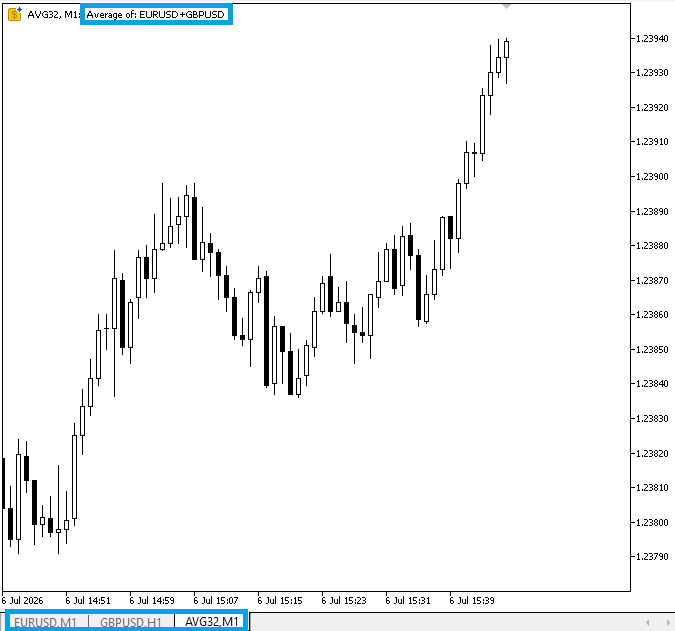
Once the symbol is successfully created, the function configures its basic properties. The description is set using the JoinSymbols() function, which shows a readable combination of all source instruments. The digits and point value are copied from the first source symbol to maintain consistency in price formatting. Trading is also disabled using SYMBOL_TRADE_MODE_DISABLED, since this is a synthetic instrument and not meant for direct execution. To check that the custom symbol is fully initialized and prepared for usage in data processing, the symbol is finally added to Market Watch using SymbolSelect(), designated as ready, and the function returns true.
Building the Averaged Price Series
This step focuses on generating a unified synthetic candle by combining price data from all selected symbols into a single averaged market series.
Example:
//+------------------------------------------------------------------+
//| Pull 'count' most recent bars from every source symbol and       |
//| average them index-by-index into avgRates[].                     |
//| Returns the number of bars actually written.                     |
//+------------------------------------------------------------------+
int BuildAveragedRates(int count, MqlRates &avgRates[])
  {
//--- storage for OHLC data from each symbol
   MqlRates src0[], src1[], src2[];

//--- track how many bars were successfully copied per symbol
   int got[3] = {0, 0, 0};

//--- ensure arrays are in chronological order (oldest ? newest)
   ArraySetAsSeries(src0, false);

//--- copy price data for first symbol
   got[0] = CopyRates(g_symbols[0], InpTimeframe, 0, count, src0);

//--- copy data for second symbol if available
   if(g_symbolCount >= 2)
     {
      ArraySetAsSeries(src1, false);
      got[1] = CopyRates(g_symbols[1], InpTimeframe, 0, count, src1);
     }

//--- copy data for third symbol if available
   if(g_symbolCount >= 3)
     {
      ArraySetAsSeries(src2, false);
      got[2] = CopyRates(g_symbols[2], InpTimeframe, 0, count, src2);
     }

//--- validate that each symbol returned data
   for(int s = 0; s < g_symbolCount; s++)
     {
      if(got[s] <= 0)
        {
         PrintFormat("WARNING: CopyRates returned 0 bars for '%s'. Error: %d",
                     g_symbols[s], GetLastError());
         return(0);
        }
     }

//--- determine the smallest dataset size across all symbols
   int n = got[0];
   for(int s = 1; s < g_symbolCount; s++)
      n = MathMin(n, got[s]);

   if(n <= 0)
      return(0);

//--- reset output array
   ArrayResize(avgRates, 0);

//--- counter for written averaged bars
   int written = 0;

//--- loop through aligned bars
   for(int i = 0; i < n; i++)
     {
      //--- map index for first symbol
      int idx0 = got[0] - n + i;

      //--- reference time used to align all symbols
      datetime refTime = src0[idx0].time;

      bool aligned = true;
      int idx1 = -1, idx2 = -1;

      //--- validate alignment for second symbol
      if(g_symbolCount >= 2)
        {
         idx1 = got[1] - n + i;
         if(idx1 < 0 || idx1 >= got[1] || src1[idx1].time != refTime)
            aligned = false;
        }

      //--- validate alignment for third symbol
      if(aligned && g_symbolCount >= 3)
        {
         idx2 = got[2] - n + i;
         if(idx2 < 0 || idx2 >= got[2] || src2[idx2].time != refTime)
            aligned = false;
        }

      //--- skip bar if timestamps do not match across symbols
      if(!aligned)
         continue;

      //--- initialize sums with first symbol
      double sumOpen  = src0[idx0].open;
      double sumHigh  = src0[idx0].high;
      double sumLow   = src0[idx0].low;
      double sumClose = src0[idx0].close;
      long   sumVol   = src0[idx0].tick_volume;

      //--- add second symbol values
      if(g_symbolCount >= 2)
        {
         sumOpen  += src1[idx1].open;
         sumHigh  += src1[idx1].high;
         sumLow   += src1[idx1].low;
         sumClose += src1[idx1].close;
         sumVol   += src1[idx1].tick_volume;
        }

      //--- add third symbol values
      if(g_symbolCount >= 3)
        {
         sumOpen  += src2[idx2].open;
         sumHigh  += src2[idx2].high;
         sumLow   += src2[idx2].low;
         sumClose += src2[idx2].close;
         sumVol   += src2[idx2].tick_volume;
        }

      //--- create averaged candle
      MqlRates avg;
      ZeroMemory(avg);

      avg.time  = refTime;
      avg.open  = sumOpen  / g_symbolCount;
      avg.high  = sumHigh  / g_symbolCount;
      avg.low   = sumLow   / g_symbolCount;
      avg.close = sumClose / g_symbolCount;

      //--- volume handling (average or sum based on input setting)
      avg.tick_volume = InpAverageVolume
                        ? (long)MathRound((double)sumVol / g_symbolCount)
                        : sumVol;

      avg.real_volume = 0;
      avg.spread      = 0;

      //--- store result in output array
      ArrayResize(avgRates, written + 1);
      avgRates[written] = avg;
      written++;
     }

//--- return number of successfully created bars
   return(written);
  }
Explanation:
The BuildAveragedRates() function is responsible for creating the synthetic price series by combining market data from multiple symbols into a single averaged candlestick structure. The generated synthetic market data is stored as a unified dataset after processing a specific number of bars from each selected instrument. Each instrument has an independent price history; the function handles the data separately before combining it into one synthetic representation. During this process, it also keeps track of the number of available historical data collected from each symbol to ensure that the averaging process is performed using valid market information.
The function verifies that each symbol returned a proper price history by performing a validation check after retrieving the data. The function immediately terminates if any symbol is unable to supply data. The function finds the fewest bars that are available across all symbols after data integrity is verified. This keeps out-of-range errors during processing and guarantees that all datasets are aligned.
Using timestamps to align the data is the subject of the subsequent step. The function compares the reference time from the first symbol with the matching bars in the other symbols for each index point. That bar is entirely omitted if the timestamps do not match. Because it guarantees that only candles representing the same market moment are joined, this step is crucial. The synthetic outcome would combine unrelated price fluctuations in the absence of this alignment. Once alignment is confirmed, the function begins aggregating price values. It sums the open, high, low, close, and volume values from all valid symbols at that specific time index. This creates a combined representation of market activity across all instruments, where each symbol contributes equally to the final result.
After summing, the values are converted into averages by dividing each OHLC component by the number of symbols. This produces a normalized synthetic candle that reflects the general price movement across all selected markets instead of a single instrument. Volume is handled separately depending on the user’s setting, where it can either be averaged or fully summed to reflect total activity. Finally, a new MqlRates structure is created for each valid bar. The averaged OHLC values and processed volume are assigned to this structure, which is then stored in the avgRates[] array. This process repeats for all aligned bars, and the function returns the total number of synthetic candles successfully created.
Rebuilding the Custom Symbol History
As explained in the implementation plan, this step reconstructs the full synthetic price history.
Example:
//+------------------------------------------------------------------+
//| Full rebuild: wipes existing custom symbol history and rebuilds  |
//| it from the last InpBarsToCalculate bars. Called from OnInit,    |
//| so it also runs automatically whenever inputs are changed.       |
//+------------------------------------------------------------------+
bool RebuildHistory()
  {
//--- validate input parameter
   if(InpBarsToCalculate < 1)
     {
      Print("ERROR: InpBarsToCalculate must be at least 1.");
      return(false);
     }

//--- array to store generated synthetic candles
   MqlRates avgRates[];

//--- build averaged price series from all source symbols
   int n = BuildAveragedRates(InpBarsToCalculate, avgRates);

//--- ensure valid data was generated
   if(n <= 0)
     {
      Print("ERROR: Failed to build averaged history, no bars produced.");
      return(false);
     }

//--- delete existing custom symbol history before rebuilding
   CustomRatesDelete(InpCustomSymbolName, 0, LONG_MAX);

//--- write newly generated averaged bars into custom symbol
   int updated = CustomRatesUpdate(InpCustomSymbolName, avgRates);

//--- verify update success
   if(updated <= 0)
     {
      PrintFormat("ERROR: CustomRatesUpdate failed during rebuild. Error: %d",
                  GetLastError());
      return(false);
     }

//--- confirmation log showing result of rebuild process
   PrintFormat("Rebuilt '%s' with %d averaged bars from [%s].",
               InpCustomSymbolName, updated, JoinSymbols());

   return(true);
  }
Explanation:
This function is responsible for fully reconstructing the synthetic custom symbol's historical data. It guarantees that a new and correct dataset created from the most recent averaged price series is constantly reflected in the custom instrument. A safety check on InpBarsToCalculate is the first step in the procedure. Since it would be impossible to create a legitimate history without at least one bar, the function instantly terminates if the value is less than 1. The freshly created synthetic candles will then be stored in an MqlRates array named avgRates[], which is declared by the method. The basic method that creates the averaged OHLC data from all chosen source symbols is then called, BuildAveragedRates(). The number of bars that were successfully formed is kept in n.
To avoid writing blank or incorrect data into the custom symbol, the function ends if no bars are produced. Once valid data is confirmed, the function clears any existing history from the custom symbol using CustomRatesDelete(). This step is important because it removes outdated or previous synthetic data, ensuring that only the latest recalculated dataset remains. After clearing the old history, the function writes the newly generated averaged candles into the custom symbol using CustomRatesUpdate().
This effectively replaces the entire price history of the synthetic instrument with the updated version. The function ends, and an error is issued if the update is unsuccessful. Lastly, the name of the custom symbol, the quantity of bars written, and the list of source symbols utilized are presented in a confirmation message. After that, the function returns true, signifying that the synthetic symbol has been entirely updated and the rebuild procedure was successful.
Updating Live Market Data
Following the implementation plan, this step ensures the synthetic symbol remains up to date by continuously refreshing only the most recent bars as new market data arrives, without rebuilding the full historical dataset.
Example:
//+------------------------------------------------------------------+
//| Lightweight live update: refresh only the last few bars so the   |
//| forming/most recent candles stay in sync without reprocessing    |
//| the whole history on every timer tick.                           |
//+------------------------------------------------------------------+
void UpdateLiveBars()
  {
   int refreshCount = MathMax(InpLiveRefreshBars, 1);
   refreshCount = MathMin(refreshCount, InpBarsToCalculate);

   MqlRates avgRates[];
   int n = BuildAveragedRates(refreshCount, avgRates);
   if(n <= 0)
      return;

   int updated = CustomRatesUpdate(InpCustomSymbolName, avgRates);
   if(updated <= 0)
      PrintFormat("WARNING: Live CustomRatesUpdate failed. Error: %d", GetLastError());
  }
Explanation:
Without reconstructing the complete historical record, this function is responsible for maintaining the synthetic symbol in sync with actual market action. It makes the procedure far more efficient by updating only the most recent bars rather than recalculating every available candle as fresh market data enters. The function begins by determining how many recent bars should be refreshed. It first ensures that the value of InpLiveRefreshBars is never less than one by using MathMax(). It then uses MathMin() to make sure the refresh count does not exceed the total number of historical bars specified by InpBarsToCalculate. This validation prevents invalid requests and keeps the update process within the available data range.
Next, an MqlRates array named avgRates[] is declared to store the newly calculated synthetic candles. The function then calls BuildAveragedRates(), passing the number of bars to refresh. This generates a new set of averaged OHLC data for only the latest candles instead of rebuilding the entire price history. If no valid bars are returned, the function exits immediately because there is nothing to update. Lastly, CustomRatesUpdate() is used to write the newly created candles into the custom symbol. IMetaTrader 5 updates the matching recent bars because the timestamps are provided. A warning message is printed to help identify the issue if the update operation is unsuccessful. The synthetic symbol can stay in line with the most recent market moves thanks to this lightweight update approach, which also reduces needless computation.
System Initialization and Execution Flow
This final stage of the implementation plan initializes the system, starts live updates, and manages the execution lifecycle.
Example:
//+------------------------------------------------------------------+
//| Lightweight live update: refresh only the last few bars so the   |
//| forming/most recent candles stay in sync without reprocessing    |
//| the whole history on every timer tick.                           |
//+------------------------------------------------------------------+
void UpdateLiveBars()
  {
   int refreshCount = MathMax(InpLiveRefreshBars, 1);
   refreshCount = MathMin(refreshCount, InpBarsToCalculate);

   MqlRates avgRates[];
   int n = BuildAveragedRates(refreshCount, avgRates);
   if(n <= 0)
      return;

   int updated = CustomRatesUpdate(InpCustomSymbolName, avgRates);
   if(updated <= 0)
      PrintFormat("WARNING: Live CustomRatesUpdate failed. Error: %d", GetLastError());
  }

//+------------------------------------------------------------------+
//| Expert initialization function                                   |
//+------------------------------------------------------------------+
int OnInit()
  {
//---
   if(!CollectSymbols())
      return(INIT_PARAMETERS_INCORRECT);

   if(!EnsureCustomSymbolExists())
      return(INIT_FAILED);

   if(!RebuildHistory())
      return(INIT_FAILED);

   EventSetTimer(MathMax(InpTimerSeconds, 1));

   PrintFormat("AverageSymbolEA initialized. Watching: [%s] -> %s",
               JoinSymbols(), InpCustomSymbolName);

//---
   return(INIT_SUCCEEDED);
  }

//+------------------------------------------------------------------+
//| Expert deinitialization function                                 |
//+------------------------------------------------------------------+
void OnDeinit(const int reason)
  {
//---
   EventKillTimer();
  }

//+------------------------------------------------------------------+
//| Timer: keeps the most recent bars of the custom symbol in sync   |
//| with live ticks on the source symbols.                           |
//+------------------------------------------------------------------+
void OnTimer()
  {
   if(!g_customSymbolReady)
      return;

   UpdateLiveBars();
  }

//+------------------------------------------------------------------+
//| Expert tick function                                             |
//+------------------------------------------------------------------+
void OnTick()
  {
//---

  }
//+------------------------------------------------------------------+
Explanation:
This section oversees the Expert Advisor's execution lifecycle. The program's entry point, OnInit(), is where the process starts. To verify and store all chosen source symbols, it first calls CollectSymbols(). The initialization is ended right away by returning INIT_PARAMETERS_INCORRECT if this step fails. Next, EnsureCustomSymbolExists() checks whether the synthetic symbol already exists, creating and configuring it if necessary. After that, RebuildHistory() generates the complete synthetic price history and writes it to the custom symbol. If either of these steps fails, the function returns INIT_FAILED, preventing the EA from running with an incomplete setup.
Once the initialization is complete, EventSetTimer() starts a timer using the interval specified by InpTimerSeconds. This timer repeatedly triggers the OnTimer() function, which checks whether the custom symbol is ready before calling UpdateLiveBars() to refresh only the latest synthetic candles. This timer-driven approach keeps the custom symbol synchronized with live market data efficiently. Finally, when the Expert Advisor is removed, the OnDeinit() function is executed. Its only responsibility is to stop the timer using EventKillTimer(), ensuring that all background updates are terminated cleanly.
Conclusion
In this article, we built a synthetic custom symbol in MQL5 by combining multiple market instruments into a single averaged price series. Instead of relying on one symbol, the system aggregates price data from different instruments and transforms them into a unified market structure that reflects overall movement. Step by step, we created a system that:
- collects and validates multiple source symbols;
- ensures all symbols are available in Market Watch;
- creates and configures a custom synthetic symbol;
- builds a complete historical dataset using averaged OHLC values;
- aligns price data across symbols using timestamps;
- generates a consistent synthetic candle series;
- rebuilds and updates the custom symbol history;
- maintains real-time synchronization using lightweight live updates.
As a result, we now have a functional synthetic instrument that behaves like a real trading symbol but is constructed entirely from multiple underlying markets. This allows for broader market perspective, smoother price representation, and alternative data analysis beyond a single instrument. This system can also be extended further into correlation-based strategies, index creation, volatility modeling, or even fully automated trading systems built on synthetic market structures.
Warning: All rights to these materials are reserved by MetaQuotes Ltd. Copying or reprinting of these materials in whole or in part is prohibited.
This article was written by a user of the site and reflects their personal views. MetaQuotes Ltd is not responsible for the accuracy of the information presented, nor for any consequences resulting from the use of the solutions, strategies or recommendations described.

 Entropy-Based Market Efficiency Indicator in MQL5: Measuring Randomness in Price Returns Using Approximate Entropy
 Beyond the Clock (Part 4): Efficacy of Bars on Trending and Mean-Reversion Strategies
 Foundation Models for Trading (Part I): Porting Kronos to Native MQL5
 Market Simulation: Position View (IV)

- Free trading apps
- Over 8,000 signals for copying
- Economic news for exploring financial markets
You agree to website policy and terms of use