

Python + LLM API + MetaTrader 5: Real-World Experience Building an Autonomous Trading Bot
 8 954
8 954
 12
12

Introduction
Most traders have no idea that AI is capable of:
- finding levels,
- identifying candlestick patterns,
- recognizing trends,
- comparing previous sections of the chart,
- drawing well-reasoned conclusions,
- analyzing multiple timeframes,
- correcting its own mistakes when optimizing the prompt.
This is neither an indicator nor an algorithm but an intelligent add-on that can be adapted to your personal trading system.
And most importantly, it does not need to be taught how to program. It understands ordinary human language.
What Are LLMs and Why Are They Changing the Approach to Data Analysis?
Modern large language models (LLMs), such as ChatGPT, DeepSeek, and similar systems, have become versatile assistants in a wide variety of areas of human activity. Their success is based on their ability to process vast amounts of text data and generate meaningful responses to a wide variety of requests.
LLMs are excellent advisors, thanks to their broad perspective and access to up-to-date knowledge. They can help with planning, solving practical problems, and providing advice on business, education, law, and much more.
In programming and technical fields, such models serve as tools for writing, debugging, and optimizing code. They speed up the learning process for beginners and help experts solve complex problems by providing ready-made solutions and explanations.
In addition, LLMs are increasingly being integrated into real-world services and devices: virtual assistants, customer support chatbots, intelligent search and data analysis systems, content generation, and automation of routine processes. This reduces the time and effort people need to spend to obtain information and complete various tasks.
Thus, large language models are becoming a multifunctional tool that helps people better navigate the complex information landscape and interact more effectively with the world.
Can large language models independently analyze the market, make informed decisions, and thereby reduce the influence of emotions when trading in financial, stock, and cryptocurrency markets?
I am exploring this possibility using a combination of Python, MetaTrader 5, and the LLM API.
The script operates autonomously, without any involvement from the trader: it analyzes the market on its own and decides whether to enter a position or stay out of the market.
Hardware Requirements
I used a computer running Windows 10 and Python version 3.10.11. Thanks to the API, computations are performed on the server side, so a powerful computer with a GPU is not required. The system can run on a CPU with minimal hardware requirements, and the most powerful language models are available via the API. I consider this a competitive advantage.
In addition, we will need:
- MetaTrader 5 — a trading terminal for retrieving market data and executing trades;
- An LLM via the OpenRouter API — the “brain” of the system, which analyzes charts and generates trading signals.
What an LLM Is and Why It Is Becoming the “Brain” of a Trading System
Modern large language models (LLMs) — such as ChatGPT, DeepSeek, Claude, Gemini, and others — are generally perceived as ordinary chatbots. We're used to asking them for advice, asking them to write text, or asking them to explain a complex idea. But it is important to understand: at their core, these are not chatbots but powerful data analysis systems that can study information, draw conclusions, and even make decisions. In the context of automated trading, it is the LLM that serves as the brain of the entire system. Let's put it simply.
1. An LLM really does analyze the market
When the script receives data from MetaTrader 5 (OHLCV candles), it sends it to the model via the API. An LLM does not "see" the market visually, but as a table of numbers — which is actually even more convenient for analysis.
When the model receives a set of OHLCV data, it instantly understands the overall structure of price movement, identifies where key support and resistance levels are forming, recognizes candlestick patterns, determines the trend’s direction, distinguishes between impulsive moves and corrections, and identifies false breakouts.
In other words, it does what a trader does manually… but automatically and without emotion.
2. The OpenRouter API is a bridge between Python and AI
The LLM does not run on your computer but on powerful remote servers, and you access it through OpenRouter. This service acts as a sort of transport system: the script sends a request, OpenRouter forwards it to the selected model, receives a response, and returns it to the program.
This approach offers significant advantages. The system does not require the trader to have a powerful computer — all the heavy processing is done in the cloud. Through OpenRouter, you can connect to hundreds of different models, switch to another one at any time with literally a single line of code, and use the most modern and advanced solutions that are typically unavailable locally.
Essentially, traders can integrate world-class artificial intelligence directly into their trading systems without having to worry about hardware limitations.
3. Why the LLM is called the “brain”
In traditional trading bots, the logic is hard-coded:
"if price X exceeds Y — do Z".
Everything is different here.
An LLM does not just compare numbers; it reasons, interprets, assesses probabilities, looks for patterns, and formulates a strategic decision. In other words, there are no “hard-coded rules” in the system — there is an AI trader that reviews the data, assesses the context, makes a decision, and explains why it acted that way.
This makes the system flexible — you can change the strategy simply by modifying the prompt text, rather than rewriting the code.
4. The LLM generates trading signals on its own
After the analysis, the model returns specific output:
ACTION: BUY
ENTRY_PRICE: 1.08530
SL: 1.08380
TP: 1.08890
REASON: Bullish pin bar at support + H1 trend up.
This is a complete trading signal that specifies the trade direction, the decision-making logic, the stop loss, the take profit, the entry price, and an explanation.
In fact, an LLM acts as an internal analyst that never gets tired, does not make mistakes under stress, and does not violate trading discipline.
Project Structure
Download the ZIP file and extract it to a folder of your choice. You will get three files:
LLM-trader-mvp/
├── .env
├── requirements.txt
└── run_mvp.py
How the Script Works
Workflow:
- get quotes from the MetaTrader 5 trading terminal;
- create a prompt and send it to the LLM via the API;
- get a response from the LLM with an analysis;
- extract the values needed to place an order or take no action;
- place an order or wait;
- repeat the cycle.
Step 1: Connecting to the MetaTrader 5 trading terminal
The script connects to the MetaTrader 5 trading terminal via the official MetaTrader 5 library:
# Function for connecting to MT5
def connect_to_mt5():
    try:
        if not mt5.initialize():
            logging.error("MT5 initialize() failed")
            raise Exception("Failed to initialize MT5")
        # If needed, add mt5.login(login=your_login, password=your_password, server=your_server)
        # This may not be required for a demo account, but check in the trading terminal
        logging.info("Successfully connected to MT5")
    except Exception as e:
        logging.error(f"Connection error: {e}")
        raise
This function allows you to retrieve real-time market data and place orders directly from a Python script. With the introduction of a specialized Python library, the platform's functionality has expanded significantly. At the same time, you can still manually manage your position, adjust your stop loss and take profit levels, close trades, enable a trailing stop, and view statistics. All in all, enjoy all the “perks” of a modern trading platform.
Step 2: Retrieving OHLCV data
The script requests historical data (Open, High, Low, Close, Volume) for the last 100 bars:
# Function for retrieving OHLCV data
def get_ohlcv(symbol, timeframe, count=100):
    try:
        rates = mt5.copy_rates_from_pos(symbol, timeframe, 0, count)
        if rates is None:
            logging.error("Failed to get OHLCV data")
            return None
        df = pd.DataFrame(rates)
        df['time'] = pd.to_datetime(df['time'], unit='s')  # Convert time to datetime
        logging.info(f"Retrieved {len(df)} bars for {symbol}")
        return df[['time', 'open', 'high', 'low', 'close', 'tick_volume']]  # Use tick_volume as the volume
    except Exception as e:
        logging.error(f"Error getting OHLCV: {e}")
        return None
This data provides a “snapshot” of the market for LLM analysis. This implementation does not include indicator readings, news, or other market activity data. It might be worth considering what additional data could help improve the quality of the analysis.
Step 3: Analysis using an LLM
The most interesting part is sending data to the language model for analysis:
# Function for analyzing data using the OpenRouter LLM
def analyze_with_llm(api_key, ohlcv_df):
    try:
        client = OpenAI(
            base_url="https://openrouter.ai/api/v1",
            api_key=api_key
        )

        # We build a prompt based on the strategy (without strict formatting constraints, to allow reasoning)
        prompt = """
        You are an intraday trader working both on support/resistance levels and Price Action patterns.
        Analyze provided OHLCV data (time, open, high, low, close, volume).
        Analysis steps:
        1. Define the key support/resistance levels (local max/min for the last 50 bars).
        2. Look for Price Action candle patterns on levels.
        3. If bearish signal is detected, recommend SELL.
           If bullish signal is detected, recommend BUY.
           Otherwise - HOLD.
        4. For a signal, specify the proposed SL (beyond the extremum) and TP (with a 1:2 risk-reward ratio from ENTRY_PRICE).

        Data in CSV format:
        {}

        Response in the format:
        ACTION: BUY/SELL/HOLD
        ENTRY_PRICE: entry price
        SL: stop loss
        TP: take profit
        REASON: short explanation
        """.format(ohlcv_df.to_csv(index=False))  # Convert DF to CSV for the prompt

        completion = client.chat.completions.create(
            extra_headers={
                "HTTP-Referer": "https://www.mql5.com/en/users/baxter_by", # Optional. Site URL for rankings on openrouter.ai.
                "X-Title": "LLM-trader-mvp", # Optional. Site title for rankings on openrouter.ai.
            },
            extra_body={},
            # model="google/gemma-3-27b-it:free",
            model="tngtech/deepseek-r1t2-chimera:free",
            # model="tngtech/deepseek-r1t-chimera:free",
            # model="deepseek/deepseek-chat-v3-0324:free",
            messages=[
                {
                    "role": "user",
                    "content": prompt
                }
            ]
        )

        result = completion.choices[0].message.content.strip()
        logging.info(f"LLM response: {result}")

        # Robust parsing with regular expressions (searches for keys regardless of order or extra text)
        action_match = re.search(r'ACTION:\s*(BUY|SELL|HOLD)', result, re.IGNORECASE)
        entry_match = re.search(r'ENTRY_PRICE:\s*([\d.]+)', result, re.IGNORECASE)
        sl_match = re.search(r'SL:\s*([\d.]+)', result, re.IGNORECASE)
        tp_match = re.search(r'TP:\s*([\d.]+)', result, re.IGNORECASE)
        reason_match = re.search(r'REASON:\s*(.*)', result, re.IGNORECASE)

        action = action_match.group(1).upper() if action_match else 'HOLD'
        entry = float(entry_match.group(1)) if entry_match else 0.0
        sl = float(sl_match.group(1)) if sl_match else 0.0
        tp = float(tp_match.group(1)) if tp_match else 0.0
        reason = reason_match.group(1).strip() if reason_match else 'No reason provided'

        # Validation: if the action is BUY/SELL but the prices are zero, fall back to HOLD
        if action in ['BUY', 'SELL'] and (entry == 0 or sl == 0 or tp == 0):
            action = 'HOLD'
            reason = 'Invalid signal parameters'

        logging.info(f"Parsed signal: {action}, Entry: {entry}, SL: {sl}, TP: {tp}, Reason: {reason}")

        return {'action': action, 'entry': entry, 'sl': sl, 'tp': tp, 'reason': reason}
    except Exception as e:
        logging.error(f"LLM analysis error: {e}")
        return {'action': 'HOLD', 'reason': 'Analysis failed'}
Important: The function includes a line specifying the LLM model, for example:
model="deepseek/deepseek-chat-v3-0324:free" For high-quality analysis, it is best to use more powerful models trained on large datasets, allowing them to provide highly accurate and detailed responses. A list of models can be found at https://openrouter.ai/models.
Searching for the keyword “free” will show free models. These models are suitable for experiments with modest requirements for speed and accuracy; they have limits and often return errors.
- The prompt text contains curly braces '{}'. When making changes to the text, do not delete them; this is where the market information received from the trading terminal is inserted.
- Using regular expressions (robust parsing) to extract data from an LLM response ensures that it works even when the LLM response has non-standard formatting.
Why it works. Modern LLMs are built on the transformer architecture, which excels at identifying complex patterns and contextual relationships in data. By learning from vast datasets — including financial reports, analytical reviews, various trading strategies, historical price quotes, and market discussions — the model has been trained to recognize typical price behavior patterns and technical analysis signals.
Step 4: Placing an order
If the LLM generates a BUY or SELL signal, the script automatically places a market order:
# Function for placing an order
def place_order(symbol, action, volume, entry, sl, tp, deviation=20, magic=234000, comment="LLM-trader"):
    """
    Placing a trading order with an enhanced error handling and relevant prices

    Args:
        symbol: Trading instrument
        action: Action type ('BUY' or 'SELL')
        volume: Lot volume
        entry: Entry price
        sl: Stop loss
        tp: Take profit
        deviation: Maximum price deviation
        magic: "Magic" number for order identification
        comment: Order comment
    """
    print('place_order')

    # Get up-to-date data for the symbol
    symbol_info = get_symbol_info(symbol)
    if symbol_info is None:
        return False

    # Get the current price immediately before sending the order
    tick = mt5.symbol_info_tick(symbol)
    if tick is None:
        logging.error(f"Failed to get tick data for {symbol}")
        return False

    # Set the price based on the order type
    order_type = mt5.ORDER_TYPE_BUY if action == 'BUY' else mt5.ORDER_TYPE_SELL
    if order_type == mt5.ORDER_TYPE_BUY:
        price = tick.ask
        # For a buy order, adjust SL and TP if they are specified
        sl_price = sl if sl > 0 else 0.0
        tp_price = tp if tp > 0 else 0.0
    elif order_type == mt5.ORDER_TYPE_SELL:
        price = tick.bid
        # For a sell order, adjust SL and TP if they are specified
        sl_price = sl if sl > 0 else 0.0
        tp_price = tp if tp > 0 else 0.0
    else:
        logging.error(f"Unsupported order type: {action}")
        return False

    # Prepare the request structure
    request = {
        "action": mt5.TRADE_ACTION_DEAL,  # Operation type: immediate execution (market)
        "symbol": symbol,
        "volume": float(volume),
        "type": order_type,
        "price": price,  # Use the current price
        "sl": sl_price,  # Stop loss price
        "tp": tp_price,  # Take profit price
        "deviation": deviation,  # Allowed price deviation in points
        "magic": magic,
        "comment": comment,
        "type_time": mt5.ORDER_TIME_GTC,  # Order validity period: Good till canceled
        "type_filling": mt5.ORDER_FILLING_FOK,  # Order filling type
    }

    # Send a trade request
    result = mt5.order_send(request)

    # Check the execution result
    if result.retcode != mt5.TRADE_RETCODE_DONE:
        logging.error(f"Order failed, retcode={result.retcode}, comment={result.comment}")
        # Print all the information from the result for debugging
        result_dict = result._asdict()
        for field in result_dict.keys():
            logging.error(f"   {field}={result_dict[field]}")
        return False
    else:
        logging.info(f"Order placed successfully: {action} {volume} lots at {price}, SL: {sl_price}, TP: {tp_price}, Ticket: {result.order}")
        # Print the result information as a dictionary
        result_dict = result._asdict()
        for field in result_dict.keys():
            logging.info(f"   {field}={result_dict[field]}")
        return True
The order includes:
- stop loss (SL) to limit losses,
- take profit (TP) to lock in profits,
- the current market price (Ask for buying, Bid for selling).
For the current strategy, the risk-reward ratio is 1:2.
Step 5: Real-time monitoring
The main loop runs the analysis every N seconds (default: 300 seconds = 5 minutes):
# Main monitoring function
def main_loop(symbol='EURUSD', timeframe=mt5.TIMEFRAME_M5, volume=0.01, api_key='', interval=60, visualize=False):
    connect_to_mt5()
    try:
        while True:
            print('main_loop')
            ohlcv = get_ohlcv(symbol, timeframe)
            if ohlcv is not None:
                signal = analyze_with_llm(api_key, ohlcv)
                if signal['action'] != 'HOLD':
                    place_order(symbol, signal['action'], volume, signal['entry'], signal['sl'], signal['tp'], deviation=20, magic=5115, comment="Liquidity Grab Trade")
                    if visualize:
                        visualize_chart(ohlcv, signal)
                else:
                    logging.info("No signal: HOLD")
            time.sleep(interval)  # Delay in seconds (e.g., 60 for one minute)
    except KeyboardInterrupt:
        logging.info("Script stopped by user")
    except Exception as e:
        logging.error(f"Main loop error: {e}")
    finally:
        mt5.shutdown()
        logging.info("Disconnected from MT5")
The script runs autonomously, constantly analyzing the market and responding to opportunities until the operator stops its execution from the command line by pressing Ctrl+C.
Additional features- Logging: all actions are recorded in the LLM_trader.log file with timestamps for later analysis.
- Configuring trading parameters: the settings block at the end of the script. Change the variables as you see fit.
if __name__ == "__main__":
    SYMBOL = "EURUSD"          # Currency pair
    TIMEFRAME = mt5.TIMEFRAME_M5   # Timeframe (M5 = 5 minutes)
    VOLUME = 0.10              # Lot size (start with the minimum!)
    INTERVAL = 300             # Check interval in seconds (5 minutes)
    VISUALIZE = True           # Create charts (True/False)
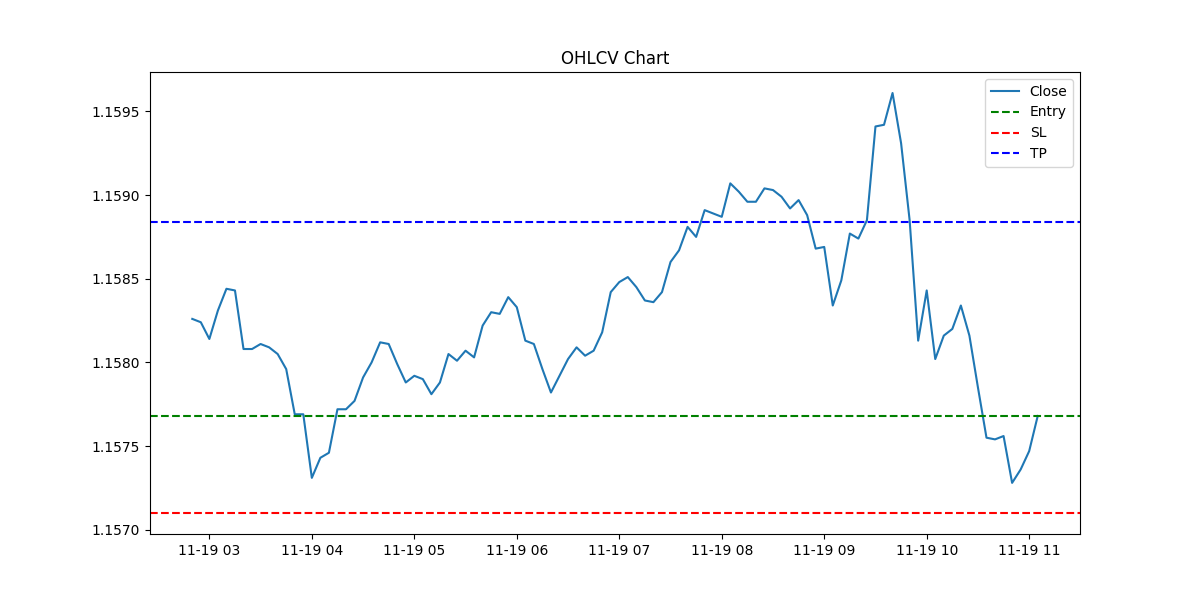
- Visualization: the optional visualize_chart() function creates a chart with marked entry, stop loss (SL), and take profit (TP) levels.
Installation and Setup
1. Installing Python on Windows
Download the installer:
- go to https://www.python.org/downloads/windows/,
- find Python version 3.10.11 (other versions will work as well) and download "Download Windows installer (64-bit)".
Run the installer:
- open the downloaded file and start the installation,
- be sure to check the "Add Python to PATH" box — this will allow you to run Python from the command line,
- choose the standard installation,
- wait until it finishes, then click "Close."
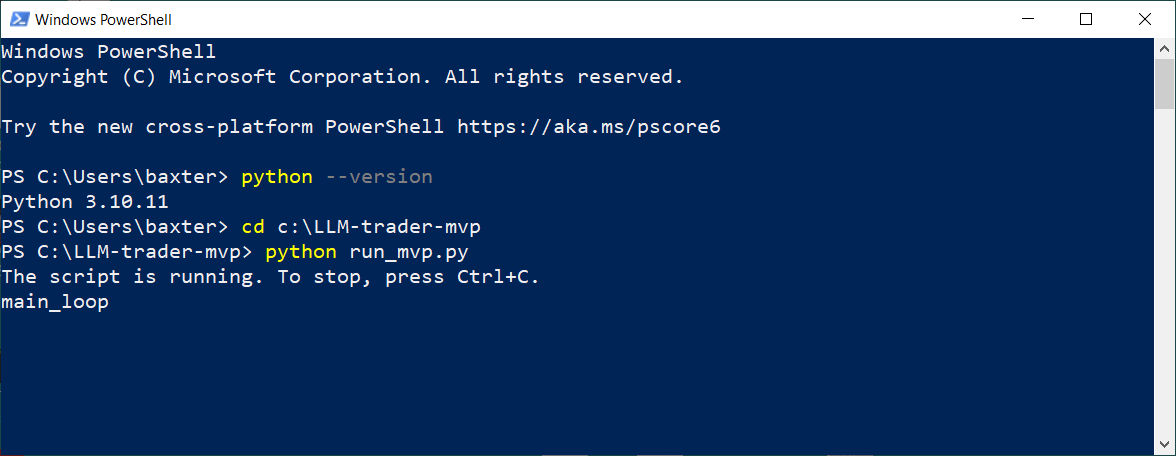
Check the installation: open Command Prompt (cmd) or PowerShell and enter:
python --version
You should see:
Python 3.10.11
2. Obtaining an OpenRouter API Key
OpenRouter is an API aggregator that provides access to more than 300 AI models through a single interface.
Steps to obtain the key:
- Sign up at https://openrouter.ai,
- Go to the "API Keys" section in the menu under your avatar,
- Click "Create API Key",
- Enter a name for the key (for example, "TestKey"),
- Click "Create" and copy the key immediately — it is shown only once,
- Store the key in a secure place.
Configuring the key in the project:
- Find the .env file in the project folder,
- Open it in a text editor,
- Find the line: OPENROUTER_API_KEY=your_actual_api_key_here
- Replace your_actual_api_key_here with your key,
- Save the file.
3. Preparing for trading
Configuring MetaTrader 5:
- Make sure MetaTrader 5 is installed and running,
- Open a demo account and activate it,
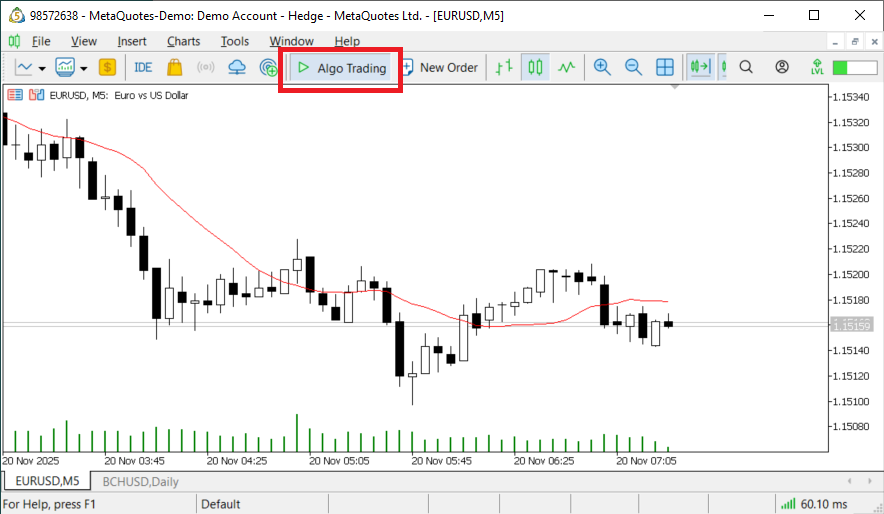
- Click the [Algo Trading] button on the toolbar:
Installing dependencies: open Command Prompt (cmd) or PowerShell and run:
# Navigate to the folder containing the script
cd c:\LLM-trader-mvp
# Install dependencies (one-time setup)
pip install -r requirements.txt
Running the script:
python run_mvp.py
You will see the following messages:
The script is running. To stop, press Ctrl+C.
Loop
Congratulations! The script works! It now:
- connected to MetaTrader 5,
- analyzes the EURUSD chart every 5 minutes,
- writes the results to LLM_trader.log,
- places an order when a signal is detected.
To stop the script: Press Ctrl+C at the command prompt.
Note: in the future, you can run run_mvp.py by double-clicking it, just like a regular application.
4. Performance review
The LLM_trader.log log file is saved in the folder containing the script. It records the following:
- trading stages,
- errors,
- the LLM’s reasoning.
You should carefully review the log and decide whether to modify the code or the prompt to improve the accuracy of analysis and decision-making.
The file is easy to read in regular Windows Notepad.
What Is Next: Development Directions
Improving analysis quality
- More powerful models. Experiments show that the quality of analysis and signals improves significantly when more powerful (paid) LLMs are used. Treat the LLM like your employee; it may need a salary. I've come across free models that provided the correct analysis — for example, a long position — but suggested SELL as the signal.
- Refining the prompt. It is like giving instructions to your trader in your personal hedge fund. The more precisely you define your strategy, the more informed the signals will be. The prompt must be logical, with precise wording that does not contradict itself.
- Model Configuration. When initializing the model in the code, you should use additional parameters to control the model's responses:
- max_tokens — the maximum number of tokens in the response. This helps control the length of the generated text.
- temperature — a parameter that controls the degree of randomness in the generated text. Higher values result in more random text, while lower values make the generation more deterministic.
- n — the number of independent responses the model should generate.
- Higher timeframes. Analyzing the H1, H4, and D1 timeframes will likely improve the quality of the signals.
- Multi-timeframe analysis. What if we pass information from more than just one timeframe into the prompt? For example, have it identify trends and levels on the higher timeframe, and look for candlestick patterns on the lower timeframe.
Performance optimization
Based on my observations, with each iteration, the LLM analyzes the market as if it were seeing it for the first time. Therefore, even when a trade is open, the model may generate signals to open a position. There are several possible solutions:
- You can include additional information about currently open orders in the prompt, such as “A trade is currently open; manage the position”;
- You can limit the number of simultaneously open orders programmatically, at the code level.
This system is not suitable for scalping or high-frequency trading. Depending on the model and communication channel, there may be significant delays between an API request, server-side processing of the request, and the response received by the system. This should be taken into account when developing a strategy.
A request for analysis should be sent immediately after the candle closes. The close of the period is the moment when a decision should be made.
Professional-grade development
A developer will need an integrated development environment (IDE) such as Visual Studio Code or PyCharm to write, debug, and test code.
Conclusion
This approach demonstrates the concept of using an LLM API for automated trading in financial markets. The project is in its early stages and requires further refinement before it can be used on live accounts.
You should consider ways to test the system and the strategy before you start trading on a live account. Most likely, the system will need to be run online for an extended period, with statistics collected and conclusions drawn based on the results. Plenty of room to experiment!
I invite you to join in a constructive discussion in the comments.
The script presented here is a minimum viable product (MVP), a prototype designed to demonstrate the concept. DO NOT use this script for trading on a live account! A basic prompt and the M5 timeframe were chosen for demonstration purposes to generate signals quickly.
Trading in financial markets carries high risks. The author is not liable for any financial losses resulting from the use of the code provided. Use only on demo accounts for training and testing purposes.
Translated from Russian by MetaQuotes Ltd.
Original article: https://www.mql5.com/ru/articles/20354
Warning: All rights to these materials are reserved by MetaQuotes Ltd. Copying or reprinting of these materials in whole or in part is prohibited.
This article was written by a user of the site and reflects their personal views. MetaQuotes Ltd is not responsible for the accuracy of the information presented, nor for any consequences resulting from the use of the solutions, strategies or recommendations described.

 Beyond the Mean and Standard Deviation: A Robust Statistics Library for MQL5 Indicators
 Neural Networks in Trading: Probabilistic Time Series Forecasting (Encoder)
 Institutional-Grade Multi-Currency Portfolio Engine in MQL5 (Part 1): Architecture of a Multi-Currency EA Framework
 Fast Integration of a Large Language Model with MetaTrader 5 (Part II): Fine-Tuning on Real Data, Backtesting, and Live Trading by the Model

- Free trading apps
- Over 8,000 signals for copying
- Economic news for exploring financial markets
You agree to website policy and terms of use
Would anyone be willing to write a good back-tester for the LLM APIs? As it stands, it’s not really clear what we’re discussing :)
Related: 5 LLMs traded autonomously for 8 months using market data and news (the model training approach has not been disclosed).
The script is perfectly fine and, in my opinion, provides a very good foundation for an educational example of how an LLM can be integrated into a trading system. However, I think the biggest room for improvement is not necessarily in the script itself, but in the way market data is presented to the LLM and, especially, in the prompt engineering.
In its current implementation, the prompt is relatively basic and is more of a demonstration of the concept than a complete trading decision-making framework. The LLM receives OHLCV data, looks for support/resistance levels and price-action patterns, and then essentially chooses between BUY, SELL, and HOLD. That is perfectly sufficient to demonstrate the concept, but a real trading system could provide the LLM with much richer market context.
For example, the prompt could define market structure, trend and trend strength, volatility, ATR, momentum, multiple timeframes, distance from support/resistance zones, the quality of the price-action setup, potential risk/reward, and perhaps most importantly explicit conditions under which the LLM must not trade and should return HOLD.
I would also avoid using the LLM simply as a signal generator. Instead, I would use it as a decision layer on top of traditional market data and deterministic trading rules. The strategy can calculate the indicators and relevant features, while the LLM evaluates their combined context and the quality of the overall setup.
I would also separate market analysis from trade execution. The LLM could return a structured decision containing confidence/quality score, market bias, entry zone, invalidation level, and SL/TP proposal, while the EA itself should remain responsible for risk validation, position sizing, spread conditions, trading sessions, and all execution rules.
This creates a much more robust architecture:
Market Data → Feature/Market Structure Layer → LLM Analysis → Decision Layer → Risk Manager → MT5 Execution
In my opinion, the author has already built a good concept and demonstrated the most important part how to connect an LLM to a trading system. With some additional work on prompt engineering, market context, response validation, and the risk layer, this example could quite easily evolve into a solid LLM-assisted trading system.
So I would describe this as a very good starting point rather than a finished trading system, and that is exactly what makes the concept interesting, because there is a lot of room for further development.
First I have tried to run the program; it says it; it says "the script is running...." but no matter how long I left it, no trade
The script is running. To stop, press Ctrl+C.
main_loop
main_loop
main_loop
.
.
.
For me the real issue is I dont know what is being automated here? Going through the code, you have defined all the buy and sell conditions already. You wrote code for it. So the model is supposed to analyze the prompt, write and run it own code to make a judgement call? If you have passed the prompt to claude or chatgpt and ran the resulting python code, the result is equally automated; you can backtest and optimize. The worst of all, you have to run this through Openrouter for which there might be fees and also there might be another fee with the model provider. If you run cluade or the other AI engines through the shell, you can combine it with script to get the same result without OPENROUTER.
Good Luck!
Check out the new article: Python + LLM API + MetaTrader 5: Real-World Experience Building an Autonomous Trading Bot.
Author: Aleh Daikou
Thank you very much Aleh!
Actually I m testing something similar, with a very specifiy skill.md my biggest struggle is with range markets and you gave me couple of ideas!
Cheers!