

From Signal to Trade via a Chain of Agents: LangChain Architecture on Top of MQL5
 658
658
 0
0

Introduction
Integrating an LLM with MetaTrader usually boils down to a simple scenario: the Expert Advisor (EA) asks the model for a "BUY/SELL" answer and executes it. This decision-making scheme falls apart under the first non-standard conditions — a widened spread, the release of important economic data in 10 minutes, already open positions, or a drawdown exceeding the acceptable limit.
The requirements for a practical algorithmic trader are specific here: trade on the M15–H1 timeframes while accounting for the delay in LLM calls (the chain may take 30–90 seconds), check for news within the next 10 minutes, allow no more than 3 open positions with risk per trade at ≈1%, and maintain a history of decisions and their outcomes.
The decision is to separate "thinking" from "execution," pass each decision through three independent filters (Signal → News → Risk), record every decision in SQLite with decision_id and close the loop via the command RESULT. This requirement defines the architecture and verification criteria; it is not merely an abstraction.
Overall Architecture
The system consists of three layers that communicate via a local WebSocket on port 8977. WebSocket was deliberately chosen over HTTP: this full-duplex protocol allows the server to handle multiple EA instances in parallel without blocking. In addition, the WebSocket connection remains open between calls — there is no need to waste time on a handshake on every tick.
- Lower layer — the MQL5 EA. It is solely responsible for collecting market data and executing commands. No decision-making logic. Pure I/O.
- Middle layer — a Python server with LangChain, where the agents live. This is where all the thinking happens: technical analysis, news filtering, risk management, and working with memory.
- Top layer — a language model (Grok is used via langchain-xai, but the architecture allows you to plug in any provider).
MT5 → ANALYZE:SYM:TF:csv|{account} → Signal Agent → News Agent → Risk Agent → {signal, decision_id} → MT5
                                              ↕                                        ↕
                                        SQLite memory                          agent_stats
MT5 → RESULT:SYM:decision_id:pnl → update result in DB
MT5 → MEM_STATUS:SYM:TF → statistics
The data flow is strictly unidirectional: data and context go down the chain, while only the final command plus decision_id come back, which the server later uses to record the trade result. If an agent says "no" at any stage, the chain stops and the EA receives "signal": "hold". Fail-safe by default.
System Requirements → How the Architecture Meets Them| Requirement | Implementation |
|---|---|
| Timeframe: M15–H1, delay: 30–90 seconds | On-bar mode, 90-second timeout, WebSocket without a handshake |
| Checking for news within the next 10 minutes | Separate news agent; checks by time and symbol |
| No more than 3 open positions, 1% risk per trade | Risk agent: reads account_json ; strict rules in the prompt |
| Memory of decisions and their outcomes | SQLite + the RESULT command; statistics are returned to agent_stats |
| Separation of thinking and execution | MQL5 is pure I/O; the Python server makes decisions |
| Ability to change the logic without recompiling the EA | Command Protocol (ANALYZE, RESULT, MEM_STATUS, STATUS, STOP) |
EA on the MQL5 side
The EA runs on the new-bar event, not on every tick. This was done intentionally. An LLM call takes 30–60 seconds for a full chain of three agents. Running three agents on every tick makes no sense; the decision is made once per bar.
//+------------------------------------------------------------------+
//| OnTick                                                           |
//+------------------------------------------------------------------+
void OnTick()
  {
// Checking closed positions to send RESULT
   if(InpSendResults)
      CheckClosedPosition();

// New bar?
   datetime barTime = iTime(_Symbol, PERIOD_CURRENT, 0);
   if(barTime == g_lastBar)
      return;
   g_lastBar = barTime;
   g_barCount++;

   if(g_barCount % InpAnalysisBars != 0)
      return;

// Collecting closing prices
   double prices[];
   ArraySetAsSeries(prices, true);
   int copied = CopyClose(_Symbol, PERIOD_CURRENT, 0, InpPriceBars, prices);
   if(copied < 20)
     {
      PrintFormat("Insufficient bars: %d", copied);
      return;
     }

// CSV of prices (from old to new)
   string csv = "";
   for(int i = copied - 1; i >= 0; i--)
     {
      csv += DoubleToString(prices[i], _Digits);
      if(i > 0)
         csv += ",";
     }

// ANALYZE command with optional account data
   string cmd = "ANALYZE:" + _Symbol + ":" + InpTimeframe + ":" + csv;

// Add account data via "|" for the Risk Agent
   if(InpSendAccount)
     {
      string acc = StringFormat(
                      "|{\"balance\":%.2f,\"equity\":%.2f,"
                      "\"free_margin\":%.2f,\"open_positions\":%d}",
                      AccountInfoDouble(ACCOUNT_BALANCE),
                      AccountInfoDouble(ACCOUNT_EQUITY),
                      AccountInfoDouble(ACCOUNT_MARGIN_FREE),
                      Count_OpenPositions()
                   );
      cmd += acc;
     }

   PrintFormat("▶ ANALYZE (%d bars, TF=%s, LangChain)...", copied, InpTimeframe);
   string response = SendCommand(cmd);

   if(StringLen(response) == 0)
     {
      Print("⚠ No server response (chain of agents may take up to 60 s)");
      return;
     }

   ParseAnalyzeResponse(response);

   if(g_barCount % InpStatusBars == 0)
      RequestMemStatus();

   if(InpShowComment)
      UpdateComment(barTime);

   ExecuteSignal();
  }
The command protocol is simple:
| Command | Format | Description |
|---|---|---|
| ANALYZE | ANALYZE:SYM:TF:csv|{account_json} | Signal request from the chain |
| RESULT | RESULT:SYM:decision_id:pnl | Report the outcome of a closed trade |
| MEM_STATUS | MEM_STATUS:SYM:TF | Request memory statistics |
| STATUS | STATUS | Short ping — a connection check after connecting |
| STOP | STOP | Disconnect from the server |
The EA knows nothing about the agents — it simply sends data, waits for a JSON response, and executes the instructions. This is important: separating responsibilities makes it possible to change the agents' logic without recompiling the EA.
One important engineering detail: commands are divided into quick and long-running ones. ANALYZE is a full chain of three LLM calls that can take up to 90 seconds. All other commands return a response in fractions of a second. Using the same timeout for all of them is a bad idea: either fast commands will have to wait unnecessarily long, or ANALYZE will be cut off. Therefore, the EA has two functions:
string SendCommand(string cmd)   { return WsSend(cmd) ? WsReceive(InpReceiveMs)      : ""; }
string SendQuickCmd(string cmd)  { return WsSend(cmd) ? WsReceive(InpQuickReceiveMs) : ""; }
timeout … InpReceiveMs = 90000 (90 seconds) — for ANALYZE. InpQuickReceiveMs = 5000 (5 seconds) — for RESULT, MEM_STATUS, STATUS, and STOP.
The feedback loop deserves special attention: the EA uses the gtrackTicket[MAXTRACKED] array because multiple positions can be closed in a single tick (for example, when multiple SL orders are triggered simultaneously). After each one is closed, the EA calculates the actual PnL (including swap and commission) and sends it to the server with the RESULT command:
//+------------------------------------------------------------------+
//Sending RESULT to the server
//+------------------------------------------------------------------+
void SendResultForClosed(ulong ticket, int decId, string sym)
  {
   if(ticket == 0 || decId < 0)
      return;

   double profit = GetDealProfitByPosition(ticket);
   if(profit == EMPTY_VALUE)
     {
      Sleep(200);
      profit = GetDealProfitByPosition(ticket);
     }
   if(profit == EMPTY_VALUE)
      return;

   double contract = SymbolInfoDouble(sym, SYMBOL_TRADE_CONTRACT_SIZE);
   double pnlPts   = (contract > 0 && InpLotSize > 0 && g_pipValue > 0)
                     ? profit / (InpLotSize * contract * g_pipValue)
                     : profit;

   string cmd  = StringFormat("RESULT:%s:%d:%.5f", sym, decId, pnlPts);
   string resp = SendCommand(cmd);

   if(StringLen(resp) > 0)
     {
      string outcome = (profit > 0) ? "WIN" : "LOSS";
      PrintFormat("RESULT → decision_id=%d  %s  pnl=%.2f (%.1f pts)",
                  decId, outcome, profit, pnlPts);
     }
  }
This is precisely the mechanism that gives the system memory of results, not just intentions.
Technical indicators on the Python side
The server calculates the full set of indicators from the received price CSV itself — it does not delegate this task to the LLM. This is crucial for performance: the model receives precomputed numbers, not an array of 60 candles with a request to “calculate RSI.”
def calc_indicators(prices: List[float]) -> dict:
    arr = np.array(prices, dtype=float)
    # EMA(20), EMA(50), RSI(14), ATR(14), ATR(20),
    # Bollinger Bands(20), Stochastic(14), z-score(20),
    # MA5/MA20/MA50, trend, price alignment relative to MA20
    # ...
    return {
        "current": ..., "rsi": ..., "ema20": ..., "ema50": ...,
        "atr": ..., "bb_lo": ..., "bb_hi": ...,
        "stoch": ..., "zscore": ...,
        "trend": "up|down|mixed",
        "ma_align": "above|below|mixed",
        "volatility": "high|normal|low"
    }
The signal agent receives a ready-made dictionary with twenty numbers in the prompt. It only has to interpret, not calculate.
Agent chain: three prompts
All three prompts are written in English — this is intentional. In general, LLMs produce more predictable and structured responses in English, especially when it comes to strict JSON output.
The signal agent is aware of its own history. Its system prompt contains agent_stats (aggregated statistics) and memory_context (specific precedents). This creates behavioral patterns: if the win rate is below 40%, the agent automatically lowers its confidence; if the last three trades were losing trades, an additional penalty is applied to confidence.
SIGNAL_PROMPT = ChatPromptTemplate.from_messages([
    ("system", """You are a disciplined quantitative trading agent with persistent memory.

=== YOUR SELF-KNOWLEDGE ===
{agent_stats}

=== HISTORICAL CONTEXT (from your SQLite memory) ===
{memory_context}

=== BEHAVIORAL RULES ===
1. If your win-rate on this instrument is below 40% — be extra conservative.
2. If the last 3 decisions were all losses — reduce confidence by 0.1.
3. If historical context shows repeated failures on one signal type — downgrade it.
4. If volatility is HIGH — prefer hold unless confidence > 0.75.
5. Never ignore your own track record. Adapt.

Return ONLY valid JSON:
{
  "signal":     "buy" | "sell" | "hold",
  "confidence": <0.0–1.0>,
  "ema20":      <number>,
  "ema50":      <number>,
  "rsi14":      <number>,
  "trend":      "up" | "down" | "flat",
  "comment":    "<one sentence in Russian>"
}"""),
    ("human", "{market_data}")
])
The news agent is the second filter in the chain. It assesses the current UTC time and the trading instrument: whether any key statistics are due for release (NFP, CPI, central bank decisions), and whether there are any geopolitical events. When news_risk = "HIGH", the chain is immediately terminated and returns hold — the risk agent is not even called.
The risk agent is the last line of defense. It receives a signal with a confidence level and actual account data (balance, equity, free margin, number of open positions). Strict rules are hard-coded into the system prompt: risk per trade no more than 1% of the balance, a maximum of 3 open positions, a minimum stop loss of 15 pips, and a TP/SL ratio of at least 1:1.5. Volume is calculated using the following formula:
volume = (balance * 0.01) / (sl_pips * 10)
The risk agent returns pips, not stop prices: sl_pips and tp_pips. The EA automatically converts them into price levels based on the current bid/ask and point.
Orchestrator: a sequential chain
The Flask endpoint described in the article has been replaced with a direct WebSocket server — this removes the HTTP overhead and allows multiple EAs to be served in parallel on separate threads. The orchestration logic is the same: a strictly sequential chain with three exit points.
def analyze_with_langchain_memory(symbol, prices, timeframe, account):
    # 1. Calculate indicators with Python code
    ind = calc_indicators(prices)

    # 2. Load context from SQLite
    agent_stats    = memory.get_stats(symbol, timeframe)
    memory_context = memory.get_context(symbol, timeframe, ind["rsi"])

    # 3. Signal agent
    sig_raw = signal_chain.invoke({
        "market_data":    market_data,
        "agent_stats":    agent_stats,
        "memory_context": memory_context,
    })
    signal = parse_llm(sig_raw.content)

    if signal["confidence"] < 0.0001 or signal["signal"] == "hold":
        memory.write_decision(..., signal="hold", ...)
        return {"signal": "hold", "decision_id": decision_id}

    # 4. News agent
    news_raw  = news_chain.invoke({"symbol": symbol, "utc_time": utc_now})
    news      = parse_llm(news_raw.content)

    if news["news_risk"] == "HIGH":
        memory.write_decision(..., signal="hold", news_risk="HIGH", ...)
        return {"signal": "hold", "comment": f"news_risk_HIGH: {news['reason']}"}

    # 5. Risk agent
    risk_raw = risk_chain.invoke({
        "signal_data":  json.dumps(signal),
        "account_data": json.dumps(account),
        "agent_stats":  agent_stats,
    })
    risk = parse_llm(risk_raw.content)

    if not risk["approved"]:
        memory.write_decision(..., signal="hold", ...)
        return {"signal": "hold", "comment": f"risk_rejected: {risk['reason']}"}

    # 6. Write the decision to SQLite and return the command
    decision_id = memory.write_decision(
        symbol=symbol, timeframe=timeframe,
        signal=signal["signal"],
        confidence=signal["confidence"],
        ...
    )

    return {
        "signal":      signal["signal"],
        "confidence":  signal["confidence"],
        "decision_id": decision_id,
        "volume":      risk["volume"],
        "sl_pips":     risk["sl_pips"],
        "tp_pips":     risk["tp_pips"],
        "news_risk":   news["news_risk"],
        "chain_log":   " | ".join(chain_log),
    }
Note: every decision — including “hold” — is recorded in the database. This allows you to analyze not only trades but also missed entries.
Parsing LLM responses
LLMs sometimes wrap JSON in Markdown code blocks or add “thinking” tags (reasoning models). The server handles both cases:
def parse_llm(raw: str) -> dict:
    text = raw.strip()
    # Remove ```json ... ```
    if text.startswith("```"):
        lines = text.splitlines()
        text = "\n".join(lines[1:-1] if lines[-1].strip() == "```" else lines[1:])
    # Remove <think>...</think> for reasoning models
    if "<think>" in text and "</think>" in text:
        text = text[text.find("</think>") + 8:].strip()
    # Extract JSON
    start = text.find("{")
    end   = text.rfind("}") + 1
    if start >= 0 and end > start:
        return json.loads(text[start:end])
    raise ValueError(f"No JSON found in: {text[:100]}")
Execution in the EA
After receiving a response, the EA applies its own confidence threshold (InpMinConf = 0.55) as an additional filter. If the server returns "buy" or "sell" but confidence is below the threshold, the EA switches to "hold" on its own without opening a position.
SL and TP are taken from the Risk Agent's response in pips and converted to price values:
void ExecuteSignal()
  {
   if(g_conf < InpMinConf)
     {
      PrintFormat("HOLD — conf=%.2f below minimum %.2f", g_conf, InpMinConf);
      return;
     }

   if(g_signal == "buy")
     {
      if(PositionExistsByType(POSITION_TYPE_BUY))
         return;
      CloseByType(POSITION_TYPE_SELL);

      double ask   = SymbolInfoDouble(_Symbol, SYMBOL_ASK);
      double point = SymbolInfoDouble(_Symbol, SYMBOL_POINT);

      // Priority: SL/TP from the Risk Agent; otherwise, input parameters
      double vol = InpLotSize;
      int sl_pts = InpSL_Points;
      int tp_pts = InpTP_Points;

      // If the server returns volume and pips, we use them
      // (they have already been normalized by the Risk Agent)
      double sl = (sl_pts > 0) ? ask - sl_pts * point : 0;
      double tp = (tp_pts > 0) ? ask + tp_pts * point : 0;

      if(OpenOrder(ORDER_TYPE_BUY, vol, ask, sl, tp))
        {
         g_totalBuys++;
         g_totalTrades++;
         g_posTicket     = LastOpenTicket();
         g_posDecisionId = g_decisionId;
         g_posSym        = _Symbol;
         g_resultSent    = false;
         PrintFormat("✓ BUY %.2f | SL=%.5f TP=%.5f | decision_id=%d",
                     vol, sl, tp, g_decisionId);
        }
     }
   else
      if(g_signal == "sell")
        {
         if(PositionExistsByType(POSITION_TYPE_SELL))
            return;
         CloseByType(POSITION_TYPE_BUY);

         double bid   = SymbolInfoDouble(_Symbol, SYMBOL_BID);
         double point = SymbolInfoDouble(_Symbol, SYMBOL_POINT);

         double vol = InpLotSize;
         int sl_pts = InpSL_Points;
         int tp_pts = InpTP_Points;

         double sl = (sl_pts > 0) ? bid + sl_pts * point : 0;
         double tp = (tp_pts > 0) ? bid - tp_pts * point : 0;

         if(OpenOrder(ORDER_TYPE_SELL, vol, bid, sl, tp))
           {
            g_totalSells++;
            g_totalTrades++;
            g_posTicket     = LastOpenTicket();
            g_posDecisionId = g_decisionId;
            g_posSym        = _Symbol;
            g_resultSent    = false;
            PrintFormat("✓ SELL %.2f | SL=%.5f TP=%.5f | decision_id=%d",
                        vol, sl, tp, g_decisionId);
           }
        }
      else
        {
         Print("HOLD — signal from chain of agents");
        }
  }
After a position is closed, the EA automatically calculates the actual PnL from the trade history (including swap and commission) and sends it with the RESULT command. This is exactly how the feedback loop is closed: the agent receives information about how each of its decisions ended, and this is stored in SQLite memory for subsequent calls.
Comment on the chart
The EA displays the full picture of the system state on the chart:
╔ LANGCHAIN MEMORY AGENT v1.0 ╗
Time: 2025.01.15 14:00  Bars: 42
Positions: 1  Trades: 7
Equity: 10234.56
─────────────────────────
Signal: buy  conf=0.78
decision_id: 23
Chain: signal=buy conf=0.78 [8.2s] | news=LOW [3.1s] | risk=OK vol=0.01 [6.5s]
Comment: Uptrend confirmed by EMA cross
─────────────────────────
Memory: 18 entries | WR=61% | +2.34 pts
Best: buy  BUY: 5  SELL: 2
The `chain_log` field displays each agent's result and response time — this is built-in real-time monitoring of the chain's performance.
Performance and Latency
Let's be honest: the entire chain of three LLM calls takes 30–60 seconds, depending on the API load. That is why the timeout in the EA is set to InpReceiveMs = 90000 (90 seconds). This is unacceptable for scalping. For intraday trading on the M15–H1 timeframes, this is perfectly normal: a decision is made once per bar, and during that time, the API has time to respond three times.
If speed is a priority, deterministic calculations (EMA, RSI, ATR, levels) are performed on the Python side — without involving the LLM. The agent consults the language model only for the final judgment based on precomputed figures. A further optimization is to run the Signal Agent and the News Agent in parallel using asyncio.gather, since they are independent: one analyzes the price, while the other analyzes news. This cuts the total time roughly in half. The risk agent, however, runs afterward — it depends on the results of both.
System Backtest
The backtest was conducted on EURUSD, on the M15 timeframe, for the period from March 1 to April 14, 2026. Initial deposit: 10,000 USD; fixed lot size: 0.01; stop-loss: 700 points; take-profit: 150 points. Execution conditions — RoboForex ECN account with actual spreads and commissions. InpMinConf = 0.01 is intentionally set low to capture as many entries as possible. In the live configuration, it makes sense to raise the threshold to 0.55–0.65.
Key Metrics
| Metric | Value |
|---|---|
| Net Profit | 32.47 USD |
| Total trades | 99 |
| Win Rate | 85.86% (85 out of 99) |
| Profit Factor | 1.35 |
| Recovery Factor | 1.66 |
| Sharpe Ratio | 2.77 |
| Maximum equity drawdown | 19.52 USD (0.19%) |
| Z-Score | 1.46 (85.57%) |
| LR Correlation | 0.65 |
| Average winning trade | 1.48 USD |
| Average losing trade | -6.61 USD |
| Maximum consecutive losses | 1 |
The win/loss distribution is asymmetric, which is the expected behavior of a system with a TP/SL ratio of 150/700. The agent wins often and by small amounts, and loses rarely but for the full length of the stop. That is precisely why a profit factor of 1.35 with a win rate of 85.86% is not a contradiction, but a direct consequence of the chosen risk configuration.
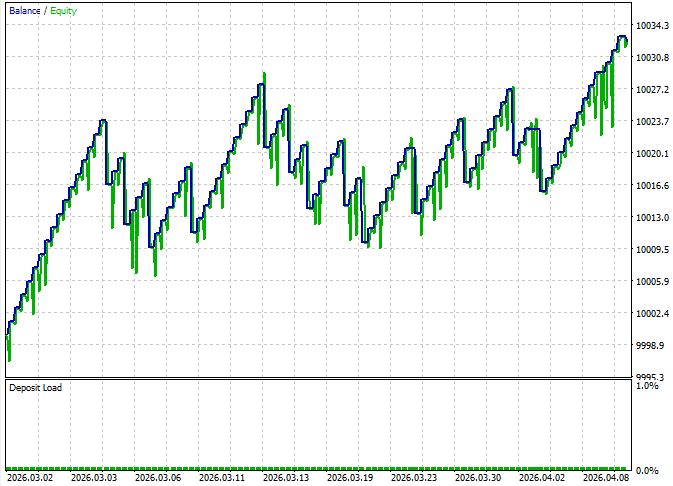
A Sharpe Ratio of 2.77 and a Recovery Factor of 1.66 indicate a stable return curve — this is also confirmed by an LR Correlation of 0.65 (linear growth with moderate dispersion). A Z-Score of 1.46 at an 85.57% confidence level indicates that the result is statistically significant — it is not just a random streak of good luck over a short period.
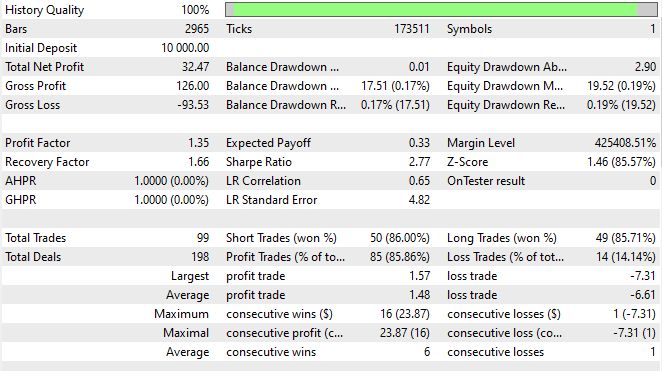
The discipline of the entries is also telling: the maximum number of consecutive losses is one. This is direct evidence of the feedback loop at work: after a loss, the agent adjusts its confidence based on the latest entry in `agent_stats`, and the next decision is made with that failure already taken into account. The long losing streaks typical of deterministic Expert Advisors are mitigated here at the reasoning level.
The long/short balance is practically perfect — 49 long trades versus 50 short trades, with comparable win rates (85.71% and 86.00%). This confirms that the chain has no structural bias in either direction, which is often seen in systems based on fixed rules.
Running
Download Python 3.10 or later from python.org. During installation, be sure to check the "Add python.exe to PATH" box — without it, the subsequent commands won't work.
pip install langchain langchain-xai langchain-core python-dotenv numpy
Create a folder named C:\langchain_trader and place the langchain_memory_server.py file in it.
Open the command prompt and navigate to the project folder:
cd C:\langchain_trader
python -m venv venv
venv\Scripts\activate
(venv) should appear at the beginning of the line — this means the environment is active.
If PowerShell reports an error related to the execution policy, run the following command once and restart the window:
Run:
Set-ExecutionPolicy -Scope CurrentUser -ExecutionPolicy RemoteSigned
With the (venv) environment active, run the following:
pip install langchain langchain-xai langchain-core python-dotenv numpy
Go to console.x.ai, sign up, go to the API Keys section, click Create API Key, and copy the key (it starts with xai-).
In the project folder, run the following command from the command line:
echo XAI_API_KEY=xai-your_key_here > .env
Do this specifically from the command line — Notepad adds the .txt extension, and the file won't work.
All that's left to do is start the server:
python langchain_memory_server.py
The window should display a banner with the line LangChain Memory Agent started on 127.0.0.1:8977. Keep this window open — as long as it is running, the server will accept connections.
Configuring MetaTrader 5
Go to Tools → Options → Expert Advisors and enable:
- the "Allow automated trading" checkbox
- the "Allow WebRequest for the following URLs" checkbox
- Add http://127.0.0.1:8977 to the URL list
Installing the EA in MetaTrader 5
Open File → Open Data Folder, navigate to the MQL5\Experts folder, and copy the LangChain_MemoryEA.mq5 file there.
Return to MetaTrader 5. In the Navigator window, right-click the Expert Advisors section → Refresh.
Compiling the EA
Double-clicking LangChain_MemoryEA in the Navigator will open MetaEditor. Press F7. At the bottom, 0 error(s), 0 warning(s) should appear.
If the editor reports an error for winhttp.mqh, you need MT5 build 2875 or later. Update the terminal by going to Help → Check for Updates.
Launching the EA on a Chart
Open the chart for the desired trading instrument on the H1 timeframe, then drag the EA from the Navigator onto it. On the Dependencies tab, select the “Allow trading” checkbox and click OK.
After you click it, the Algo Trading button will turn green, and the log on the Experts tab will show the entry [OK] WebSocket → 127.0.0.1:8977. The first signal will arrive at the close of the next bar (for H1, at the top of the hour).
Conclusion
We reviewed a reproducible architecture: three layers (MetaTrader 5 — local Python/LangChain — LLM), WebSocket transport, and a limited set of commands (ANALYZE, RESULT, MEM_STATUS, STATUS, STOP).
Practical artifacts: a sequential Signal→News→Risk agent chain, deterministic indicator calculation in Python, persistent memory in SQLite, and RESULT feedback that provides agent_stats.
Minimum working configuration: one symbol/timeframe, on-bar mode, ANALYZE timeout ≈90 s, quick commands ≈5 s, confidence threshold 0.55, risk rules: 1% of balance per trade, max 3 positions, min SL 15 pips.
Checking the system is simple:
- ANALYZE returns JSON with decision_id
- MEM_STATUS returns memory aggregates
- The terminal displays chain_log with timings and risk parameters
- After a position is closed, MetaTrader 5 sends RESULT, and memory is updated
The improvement mechanism is not LLM magic, but a feedback loop plus strict deterministic guardrails: memory reduces repeated mistakes, and the risk agent prevents excessive behavior. The system remains a tool: it requires threshold tuning and monitoring, but provides a reproducible path from requirements to a working setup.
The complete source code of the EA and Python server is available in the attached files.
| File name | File Purpose |
|---|---|
| langchain_memory_server.py | System Server |
| LangChain_MemoryEA.mq5 | System EA |
| winhttp.mqh | Library for terminal-to-server communication over sockets, described in the article |
Translated from Russian by MetaQuotes Ltd.
Original article: https://www.mql5.com/ru/articles/22111
Warning: All rights to these materials are reserved by MetaQuotes Ltd. Copying or reprinting of these materials in whole or in part is prohibited.
This article was written by a user of the site and reflects their personal views. MetaQuotes Ltd is not responsible for the accuracy of the information presented, nor for any consequences resulting from the use of the solutions, strategies or recommendations described.

 Neural Networks in Trading: Iterative Forecast Refinement Models (Key Components)
 How to Implement Metaprompting for Trading Signals in an MQL5 Expert Advisor
 Broker Time vs Real Market Time — Building a DST-Aware Session Clock in MQL5
 Numerical Fidelity Under Fire: Benchmarking Native MQL5, ONNX Runtime, and ALGLIB

- Free trading apps
- Over 8,000 signals for copying
- Economic news for exploring financial markets
You agree to website policy and terms of use