

MQL5 Bootstrap (I): Reusable Functions for Working with Positions and Orders
 2 220
2 220
 1
1

Content
- Introduction
- Position existence checkers
- Position counters
- Closing positions
- Getting recent position information
- Getting oldest position information
- SMA crossover reversal strategy example
- Conclusion
Introduction
Have you ever found yourself rewriting the same functions over and over again during development? If you’ve built more than a few Expert Advisors, Scripts, or Indicators, chances are, you have.
Across different trading systems, certain boilerplate tasks repeat constantly. For example, almost every expert advisor needs trade monitoring and management, trailing stops, breakeven triggers, partial closes, position counting, order detection, deal history inspection, and reliable methods for closing or removing trades. These are not strategy-specific features; they are structural necessities.

While every developer has their own way of writing software code, having to re-create these boilerplate functions on every new program is inefficient and counterproductive for several reasons:
- Increased risk of bugs. Every time you rewrite the same logic, you risk introducing new inconsistencies or subtle mistakes.
For example, a trailing stop that worked perfectly in one EA might behave slightly differently in another because of a small oversight. A position-closing routine may work for one broker but fail for another due to the handling of the filling mode. Reinventing the same logic multiplies the chance of small but costly errors. -
Inconsistent behavior across projects.
Without a shared core library, each EA may handle position detection, order cancellation, risk calculations, trade closing logic, etc., slightly differently. Over time, this inconsistency makes debugging more difficult and code maintenance even more chaotic.
-
Wasted development time. "The time spent on rewriting boilerplate code is the time not spent improving strategy logic, optimizing performance, or innovating" .
As developers, our focus should be on strategy design and system robustness—not repeatedly reimplementing position filters or basic trade utilities.
-
Harder maintenance. If you discover a bug in your position-closing logic and you’ve copied that code across 10 different EAs, you now have 10 separate files to fix.
A centralized reusable module allows you to resolve an issue once and benefit everywhere.
-
Poor scalability. As projects grow larger and more complex, duplicated code becomes harder to manage.
- Reduced code readability. Strategy logic can become buried under repetitive utility code. You've probably seen it, an Expert Advisor so dense and compact that you can't spot the trading logic!
When core utilities are abstracted into reusable libraries and modules under the include folder, our MQL5 programs, such as EAs, become cleaner, more readable, and focused purely on trading logic.
A reusable layer of code promotes a cleaner architecture, separation of concerns, better project organization, and easier collaboration. It is what I call Bootstrap
Inspired by Bootstrap (formerly Twitter Bootstrap). A front-end framework for web developers. It gained massive popularity based on the idea of providing a collection of pre-written CSS and JavaScript components that eliminate the need to design common interface elements from scratch.
In the first article of this series, we are going to write and assemble reusable functions and code for working with positions and orders.
Position Existence Checkers
In strategies based on a single signal or a trade in one direction at a time, such functions are useful as they help in checking if a position exists before deciding to open a new one, or prevent additional trades from being triggered.
//+------------------------------------------------------------------+
//|  Returns true if a position exists filtered by                   |
//|  symbol, magic, type, or ticket                                  |
//+------------------------------------------------------------------+
bool PositionExists(const string symbol="",
                    const long magic=LONG_MAX,
                    const int type=-1,
                    const long ticket=-1)
  {
   bool use_symbol = (symbol != "");
   bool use_magic  = (magic  != LONG_MAX);
   bool use_type   = (type   != -1);
   bool use_ticket = (ticket != -1);

   CPositionInfo pos;

   for(int i = PositionsTotal()-1; i >= 0; --i)
     {
      if(!pos.SelectByIndex(i))
         continue;

      if(use_symbol && pos.Symbol() != symbol)
         continue;
      if(use_magic  && pos.Magic()  != magic)
         continue;
      if(use_type   && (int)pos.PositionType() != type)
         continue;
      if(use_ticket && pos.Ticket() != ticket)
         continue;

      //--- passed all active filters
      return true;
     }
   return false;
  }
To make this function usable in various situations, we give it four optional parameters (symbol, magic, position type, and ticket). This allows users to filter and check for positions with specific parameters.
All arguments are populated with default values, making them optional.
If all active filters are true, the function returns a true value, otherwise, it returns false.
To make our lives much easier, let's derive functions for the same objective, but with specific function names (variants).
A: Checking if a position exists using its magic number
Magic numbers help in distinguishing trades (orders and positions) opened by other expert advisors or strategies. Very often, it happens that we want to check if positions with a certain magic number exist.
//+------------------------------------------------------------------+
//|  Returns true if a position exists with a specified ticket number|
//+------------------------------------------------------------------+
bool PositionExistsByMagic(int magic)
  {
   return PositionExists("", magic);
  }
B: Checking if a position exists on a particular instrument
For symbol-specific operations, the following function becomes handy. It checks if a position exists on a given symbol (instrument).
//+------------------------------------------------------------------+
//|  Returns true if a position exists with a specified symbol       |
//+------------------------------------------------------------------+
bool PositionExistsBySymbol(string symbol)
  {
   return PositionExists(symbol);
  }
C: Checking if a position of a given type exists
//+------------------------------------------------------------------+
//|  Returns true if a position exists with a specified type         |
//+------------------------------------------------------------------+
bool PositionExistsByType(ENUM_POSITION_TYPE type)
  {
   return PositionExists("", LONG_MAX, type);
  }
The above function takes a position type argument and uses it for checking whether a position of a given type exists (true) or not (false).
D: Checking if a position with a given ticket exists
Despite its uses being rare compared to the prior function variants, this function is useful in trading panels for manually closing trades with a specific ticket.
//+------------------------------------------------------------------+
//|  Returns true if a position exists with a specified type         |
//+------------------------------------------------------------------+
bool PositionExistsByType(ENUM_POSITION_TYPE type)
  {
   return PositionExists("", LONG_MAX, type);
  }
Position Counters
Position counters are very useful in almost every expert advisor; not only do they let us know the number of active positions on the market, but they can also be used for detecting if a position exists, just like the method(s) discussed above.
//+------------------------------------------------------------------+
//|  Counts positions filtered by symbol, magic, type, or ticket     |
//+------------------------------------------------------------------+
int PositionCount(const string symbol="",
                  const long magic=LONG_MAX,
                  const int type=-1,
                  const long ticket=-1)
  {
   bool use_symbol = (symbol != "");
   bool use_magic  = (magic  != LONG_MAX);
   bool use_type   = (type   != -1);
   bool use_ticket = (ticket != -1);

   CPositionInfo pos;

   int count = 0;
   for(int i = PositionsTotal()-1; i >= 0; --i)
     {
      if(!pos.SelectByIndex(i))
         continue;

      if(use_symbol && pos.Symbol() != symbol)
         continue;
      if(use_magic  && pos.Magic()  != magic)
         continue;
      if(use_type   && (int)pos.PositionType() != type)
         continue;
      if(use_ticket && pos.Ticket() != ticket)
         continue;

      //--- passed all active filters
      count++;
     }

   return count;
  }
The logic is similar for the most part. However, instead of returning a true value when a position is found, the function counts positions by incrementing a variable called count and returns a final value at the end of the function.
Similarly to the previous methods, we introduce several variants for counting positions based on specific attributes.
A: Counting Positions With a Specific Magic Number
//+------------------------------------------------------------------+
//|         Counts positions with a specified magic number           |
//+------------------------------------------------------------------+
int PositionCountByMagic(int magic)
  {
   return PositionCount("", magic);
  }
B: Counting Positions from A Specific Instrument
//+------------------------------------------------------------------+
//|         Counts positions with a specified symbol                 |
//+------------------------------------------------------------------+
int PositionCountBySymbol(string symbol)
  {
   return PositionCount(symbol);
  }
C: Counting Positions of a Specific Type
//+------------------------------------------------------------------+
//|         Counts positions with a specified type                   |
//+------------------------------------------------------------------+
int PositionCountByType(int type)
  {
   return PositionCount("", LONG_MAX, type);
  }
Closing Positions
The function for closing positions instantly is handy, but not all trades rely on stop losses and take profits for trade exits. And sometimes, it becomes necessary to close a position or many positions and exit the market for whatever reason.
Example of scenarios where closing positions is necessary.
- Before news on forex markets to prevent a highly volatile trading environment that occurs during a news release window.
- When risk limits are reached, i.e., when (account balance, margin, or equity) values have gone below a certain threshold or acceptable values.
//+------------------------------------------------------------------+
//|  Closes positions filtered by symbol, magic, type, or ticket     |
//+------------------------------------------------------------------+
void PositionClose(const long deviation_points=LONG_MAX,
                    const string symbol="",
                    const long magic=LONG_MAX,
                    const int type=-1,
                    const long ticket=-1)
  {
   bool use_symbol = (symbol != "");
   bool use_magic  = (magic  != LONG_MAX);
   bool use_type   = (type   != -1);
   bool use_ticket = (ticket != -1);

   CPositionInfo pos;
   CTrade trade;

   for(int i = PositionsTotal()-1; i >= 0; --i)
     {
      if(!pos.SelectByIndex(i))
         continue;

      if(use_symbol && pos.Symbol() != symbol)
         continue;
      if(use_magic  && pos.Magic()  != magic)
         continue;
      if(use_type   && (int)pos.PositionType() != type)
         continue;
      if(use_ticket && pos.Ticket() != (ulong)ticket)
         continue;

      const string sym = pos.Symbol();

      //---

      trade.SetExpertMagicNumber(magic);
      trade.SetTypeFillingBySymbol(pos.Symbol());

      if (!trade.PositionClose(pos.Ticket(), deviation_points))
          printf("Failed to close position #%I64u", pos.Ticket());
     }
  }
All arguments are optional, i.e., when no filters are passed, the function closes all positions available in the MetaTrader 5 terminal.
To make our lives much easier, we need specified variations of this function.
| Function | Description |
|---|---|
void ClosePositionsBySymbol(string symbol, long deviation_points=LONG_MAX) | This closes a position using its symbol as a filter. |
void ClosePositionsByMagic(int magic, long deviation_points=LONG_MAX) | Closes a position with a specified magic number. |
void ClosePositionsByType(ENUM_POSITION_TYPE type, long deviation_points=LONG_MAX) | Closes a position with a given position type. |
Additionally, we can introduce functions for closing profitable and losing trades, respectively.
| Function | Description |
|---|---|
void CloseProfitablePositions(const long deviation_points=LONG_MAX, const string symbol="", const long magic=LONG_MAX, const int type=-1, const long ticket=-1) | Closes all profitable positions with specified properties. |
void CloseLosingPositions(const long deviation_points=LONG_MAX, const string symbol="", const long magic=LONG_MAX, const int type=-1, const long ticket=-1) | Closes all losing positions with specified properties. |
Getting Recent Position Information
Latest position information is useful for trading systems and strategies that rely on the most recent trade information to decide where and how a new position or order should be placed.
Functions for such tasks are applicable in,
- Pyramiding or grid-based trading strategies. As we know, in such strategies, the next position's opening price calculation depends on where the previous position was placed.
- Time-based strategies. You've probably come across or tried strategies that close trades after a certain amount of time has passed since the position was last opened at some point in time, don't you?
- In money management and lot sizing for grid, or semi-grid trading strategies.
//+------------------------------------------------------------------+
//|  Returns the most recently opened position filtered by           |
//|  symbol, magic, or type                                          |
//+------------------------------------------------------------------+
bool GetRecentPosition(CPositionInfo &pos_info,
                       const string symbol="",
                       const long magic=LONG_MAX,
                       const int type=-1)
  {
   bool use_symbol = (symbol != "");
   bool use_magic  = (magic  != LONG_MAX);
   bool use_type   = (type   != -1);

   ulong recent_ticket = 0;
   ulong last_time_msc = 0;

   CPositionInfo pos;

   for(int i = PositionsTotal()-1; i >= 0; --i)
     {
      if(!pos.SelectByIndex(i))
         continue;

      if(use_symbol && pos.Symbol() != symbol)
         continue;
      if(use_magic  && pos.Magic()  != magic)
         continue;
      if(use_type   && (int)pos.PositionType() != type)
         continue;

      //--- passed all active filters

      ulong t = pos.TimeMsc();
      if (t > last_time_msc)
         {
            last_time_msc = t;
            recent_ticket = pos.Ticket();
         }
     }

   if(recent_ticket == 0)
      return false;

   return pos_info.SelectByTicket(recent_ticket); //--- select the latest position using it's ticket
  }
Unlike prior functions, this one takes the CPositionInfo object argument as reference. This object is populated with the most recent position object.
The function finds the position with the latest timestamp and stores its ticket for use after the loop. Using the most recent ticket, the method SelectByTicket populates the variable called info.
Below is a table containing variations of this function.
| Function | Description |
|---|---|
| GetRecentPositionBySymbol | Gets the newest position using only its symbol as a filter. |
| GetRecentPositionByMagic | Gets the newest position using only its magic number, as a filter. |
| GetRecentPositionByType | Gets the newest position from the terminal using only its position type as a filter. |
Getting Oldest Position Information
While this is less practical (in my opinion) than retrieving the most recent position, it is still useful to have a function that does the opposite.
The logic is opposite compared to its counterpart:
//+-------------------------------------------------------------------+
//|Returns the oldest open position filtered by symbol, magic, or type|
//+-------------------------------------------------------------------+
bool GetOldestPosition(CPositionInfo &pos_info,
                       const string symbol="",
                       const long magic=LONG_MAX,
                       const int type=-1)
  {
   bool use_symbol = (symbol != "");
   bool use_magic  = (magic  != LONG_MAX);
   bool use_type   = (type   != -1);

   ulong oldest_ticket = 0;
   ulong oldest_time_msc = ULONG_MAX;

   CPositionInfo pos;

   for(int i = PositionsTotal()-1; i >= 0; --i)
     {
      if(!pos.SelectByIndex(i))
         continue;

      if(use_symbol && pos.Symbol() != symbol)
         continue;
      if(use_magic  && pos.Magic()  != magic)
         continue;
      if(use_type   && (int)pos.PositionType() != type)
         continue;

      //--- passed all active filters

      ulong t = pos.TimeMsc();
      if (t < oldest_time_msc)
         {
            oldest_time_msc = t;
            oldest_ticket = pos.Ticket();
         }
     }

   if(oldest_ticket == 0)
      return false;

   return pos_info.SelectByTicket(oldest_ticket); //--- select the oldest position using it's ticket
  }
The function finds a position with the shortest opening time in milliseconds. Once found, it is selected and assigned to the referenced variable called info.
Below is a table containing variations of this function.
| Function | Description |
|---|---|
| GetOldestPositionBySymbol | Gets the oldest position using only its symbol as a filter. |
| GetOldestPositionByMagic | Gets the oldest position using only its magic number, as a filter. |
| GetOldestPositionByType | Gets the oldest position from the terminal using only its position type as a filter. |
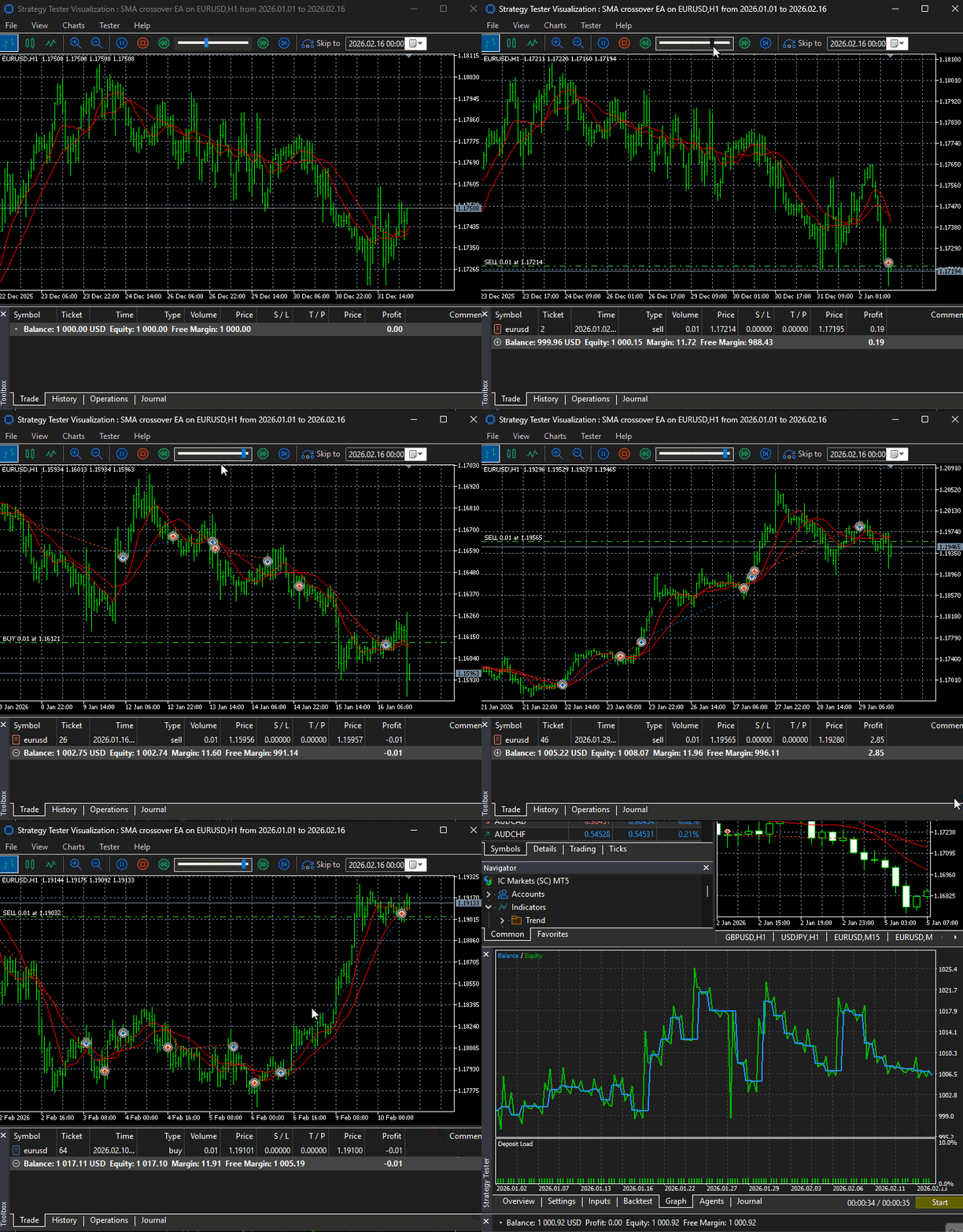
Let's create a simple expert advisor and put some of the functions discussed to the test.
SMA Crossover Reversal Strategy Example
Based on two Simple Moving Averages (SMAs) of period 10 and 20, when a bullish crossover occurs, i.e., SMA (10) crosses above SMA (20), that's a bullish signal — a buy position should be opened, while, a position in the opposite direction (a sell trade) should be closed.
On the other hand, when SMA (10) crosses below the SMA (20), the opposite operation should occur.
The opening of a sell trade and the closing of an opposite position.
SMA crossover EA.mq5
#include <Bootstrap\positions.mqh>
#include <Bootstrap\orders.mqh>

#include <Trade\Trade.mqh>
#include <Trade\SymbolInfo.mqh>

CTrade m_trade;
CSymbolInfo m_symbol;

//+------------------------------------------------------------------+

input int magic_number = 14022026;
input uint slippage = 100;

input uint short_sma_period = 10;
input uint long_sma_period = 20;

//+------------------------------------------------------------------+

int short_handle, long_handle;
double long_sma_buff[], short_sma_buff[];
//+------------------------------------------------------------------+
//| Expert initialization function                                   |
//+------------------------------------------------------------------+
int OnInit()
  {
//---
   if(!m_symbol.Name(Symbol()))
     {
      printf("Failed to get symbolinfo, error = %d", GetLastError());
      return INIT_FAILED;
     }
//---
   m_trade.SetExpertMagicNumber(magic_number);
   m_trade.SetDeviationInPoints(slippage);
   m_trade.SetTypeFillingBySymbol(Symbol());
//---
   short_handle = iMA(Symbol(), Period(), short_sma_period, 0, MODE_SMA, PRICE_CLOSE);
   long_handle = iMA(Symbol(), Period(), long_sma_period, 0, MODE_SMA, PRICE_CLOSE);
   TesterHideIndicators(false);
//ChartIndicatorAdd(0, 0, short_handle);
//ChartIndicatorAdd(0, 0, long_handle);
//---
   ArraySetAsSeries(long_sma_buff, true);
   ArraySetAsSeries(short_sma_buff, true);
   return(INIT_SUCCEEDED);
  }
//+------------------------------------------------------------------+
//| Expert deinitialization function                                 |
//+------------------------------------------------------------------+
void OnDeinit(const int reason)
  {
//---
  }
//+------------------------------------------------------------------+
//| Expert tick function                                             |
//+------------------------------------------------------------------+
void OnTick()
  {
//---
   if(!m_symbol.RefreshRates())
     {
      printf("Failed to fetch latest tick information, error = %d", GetLastError());
      return;
     }
   if(CopyBuffer(long_handle, 0, 0, 2, long_sma_buff) < 0)
      return;
   if(CopyBuffer(short_handle, 0, 0, 2, short_sma_buff) < 0)
      return;
   double curr_long_sma = long_sma_buff[0], prev_long_sma = long_sma_buff[1],
          curr_short_sma = short_sma_buff[0], prev_short_sma = short_sma_buff[1];
//--- long signal
   if(curr_short_sma > curr_long_sma && prev_short_sma < prev_long_sma)
      if(!PositionExists(Symbol(), magic_number, POSITION_TYPE_BUY))
        {
         ClosePositions(slippage, Symbol(), magic_number, POSITION_TYPE_SELL); //close an opposite trade
         m_trade.Buy(m_symbol.LotsMin(), Symbol(), m_symbol.Ask());
        }
//--- short signal
   if(curr_short_sma < curr_long_sma && prev_short_sma > prev_long_sma)
      if(!PositionExists(Symbol(), magic_number, POSITION_TYPE_SELL))
        {
         ClosePositions(slippage, Symbol(), magic_number, POSITION_TYPE_BUY); //close an opposite trade
         m_trade.Sell(m_symbol.LotsMin(), Symbol(), m_symbol.Bid());
        }
  }
Results.
Conclusion
The functions demonstrated in this article come from Bootstrap\positions.mqh(linked in the attachments). They cover the most common “every-EA-needs-this” tasks for open positions: existence checks, counters, bulk closing helpers, and utilities for retrieving the newest or oldest position based on open time.
Because the naming and intent of these helpers are straightforward, I didn’t expand the article with the pending-order equivalents. However, the project includes a dedicated module— Bootstrap\orders.mqh—that provides the same style of reusable wrappers for working with orders (pending orders), including:
- CancelOrders , CancelOrdersByMagic , CancelOrdersBySymbol , CancelOrdersByTicket , CancelOrdersByType
- OldestOrder , RecentOrder
- OrderCount , OrderCountByMagic , OrderCountBySymbol , OrderCountByTicket , OrderCountByType
- OrderExists , OrderExistsByMagic , OrderExistsBySymbol , OrderExistsByTicket , OrderExistsByType
In practical terms, splitting helpers into positions.mqh and orders.mqh matches how MetaTrader 5 itself separates trading objects:
- Positions represent the current net exposure per symbol (and, on netting accounts, typically one position per symbol).
- Orders represent instructions (especially pending orders) that may or may not become deals/positions.
- Closing and cancellation are therefore different operations: positions are closed with trade requests, while pending orders are removed/canceled.
This library is intentionally not a replacement for MQL5’s Standard Library. Many tasks are already implemented in MetaQuotes’ built-in trade classes (for example, CTrade , CPositionInfo , COrderInfo , CHistory* helpers, etc.), and duplicating those would add maintenance cost without adding value. Instead, the goal is to provide a thin, reusable layer that standardizes the repetitive parts you keep re-writing: filtering by symbol, magic number, position type, ticket, and performing bulk operations consistently.
What you should take away is that these helpers are a blueprint and a foundation—a "bootstrap" layer. You’re encouraged to extend it with project-specific utilities such as:
- risk and exposure limits (max positions per symbol/magic, max volume, max drawdown rules),
- partial close routines,
- break-even and trailing-stop frameworks,
- time-in-trade filters,
- spread/slippage guards and filling-mode handling,
- history/deal analytics for smarter execution decisions.
The included "Experts\SMA crossover EA.mq5" is a minimal test EA that demonstrates how the helpers keep strategy code focused on signals (SMA cross) while the library handles the repetitive trading plumbing (checking, counting, closing, and selecting positions).
Best regards.
Attachments Table
| Filename | Description & Usage |
|---|---|
| Bootstrap\orders.mqh | Contains utility functions for working with pending orders. |
| Bootstrap\positions.mqh | Contains utility functions for working with positions. |
| Experts\SMA crossover EA.mq5 | An expert Advisor for testing functions discussed in this article on a simple moving average crossover trading strategy. |
Warning: All rights to these materials are reserved by MetaQuotes Ltd. Copying or reprinting of these materials in whole or in part is prohibited.
This article was written by a user of the site and reflects their personal views. MetaQuotes Ltd is not responsible for the accuracy of the information presented, nor for any consequences resulting from the use of the solutions, strategies or recommendations described.

 MQL5 Wizard Techniques you should know (Part 92): Using B-Tree Indexing and a Bayesian NN in a Custom Signal Class
 Modular Indicator Architecture in MQL5 (Part 1): Stop Copy-Pasting and Start Writing Scalable, Reusable Code
 Position Management: Scaling Into Winners With A Falling-Risk Pyramid
 Encoding Candlestick Patterns (Part 2): Modeling Price Action as an Ordered Sequence

- Free trading apps
- Over 8,000 signals for copying
- Economic news for exploring financial markets
You agree to website policy and terms of use
Check out the new article: MQL5 Bootstrap (I): Reusable Functions for Working with Positions and Orders.
Author: Omega J Msigwa