

Formulating Dynamic Multi-Pair EA (Part 5): Scalping vs Swing Trading Approaches
 10 922
 9
9

Table of contents:
Introduction
Choosing the right trading approach for different market conditions is often challenging. Fast-moving markets can make swing strategies feel too slow, while volatile sessions can quickly stop out scalp trades designed for tight targets. This creates a dilemma—traders either miss high-probability short-term opportunities or overtrade in conditions unsuitable for their chosen strategy. As a result, profits become inconsistent, and systems that work well for one asset or timeframe often fail when applied to others.
This challenge can be overcome by developing a Dynamic Multi-Pair Expert Advisor that integrates both Scalping and Swing Trading modes within a single framework. By allowing the trader to switch between or automate these modes based on market volatility and structure, the EA can adapt its trade logic, stop levels, and time horizons dynamically. This ensures the system remains profitable across varying conditions, balancing quick intraday gains with longer, higher-quality swing setups.
System Overview
Scalping is a trading approach that focuses on taking advantage of very tiny price movements within short timeframes, often seconds to minutes. Traders using this style open and close multiple positions throughout the day, aiming to profit from micro-fluctuations in market price rather than large directional moves. It requires precision, fast execution, and strict discipline, as spreads, slippage, and transaction costs can quickly eat into profits. Scalpers rely heavily on lower timeframes like the 1-minute or 5-minute charts, using technical indicators such as moving averages, volume spikes, and momentum oscillators to time entries and exits with high accuracy.

Swing trading, on the other hand, targets larger price movements that occur over a longer period, typically from several hours to days or even weeks. It focuses on identifying and capturing market swings—the natural up-and-down movements that occur as price reacts to trends, retracements, and key levels of support and resistance. Swing traders rely on a combination of technical analysis, market structure, and sometimes fundamental context to determine high-probability entry points and favorable risk-to-reward setups. This method allows for fewer trades and less screen time compared to scalping, making it well-suited to traders who prefer a more strategic and analytical approach to market behavior.

| Aspect | Scalping | Swing Trading |
|---|---|---|
| Trade Duration | Seconds to minutes | Hours to days (sometimes weeks) |
| Trade Frequency | Dozens to hundreds per day | 1 to 10 trades per week (on average) |
| Goal | Capture small, frequent price moves (50 to 100 pips or $0.50-$1 on metals) | Capture larger market swings (hundreds of pips) |
| Time Commitment | Intense, high screen-time | Moderate, analysis-focused |
| Market Context | Works best in high-volatility, high liquidity markets (e.g. XAUUSD, and majors FX pairs) | Works best in trending or range-extension markets |
| Stop Loss/Take Profit | Very tight SL (50 to 150 pips) / small TP (40 to 100 pips) | Wider SL (200+ pips) / larger TP (1000+ pips) |
| Position Size | Usually larger (since targets are small) | Usually smaller (since the target are wider) |
Getting Started
//+------------------------------------------------------------------+
//|                                            Scalps and Swings.mq5 |
//|                        GIT under Copyright 2025, MetaQuotes Ltd. |
//|                     https://www.mql5.com/en/users/johnhlomohang/ |
//+------------------------------------------------------------------+
#property copyright "GIT under Copyright 2025, MetaQuotes Ltd."
#property link      "https://www.mql5.com/en/users/johnhlomohang/"
#property version   "1.00"
#property description "Dual-mode EA for Scalping and Swing Trading"
#include <Trade/Trade.mqh>
As usual, we start by importing the essential trade library required for our Expert Advisor to execute orders and manage positions.
//+------------------------------------------------------------------+
//| Input Parameters                                                 |
//+------------------------------------------------------------------+
enum ENUM_MODE
{
   MODE_SCALP,  // Scalping
   MODE_SWING   // Swing Trading
};

input ENUM_MODE          TradeMode = MODE_SCALP;          // Trading Mode
input string             TradePairs = "XAUUSD,BTCUSD,US100,GBPUSD"; // Trading Pairs (comma separated)
input bool               UseATR = false;                  // Use ATR for SL/TP

// Scalping Parameters
input double             LotSize_Scalp = 0.1;             // Scalp Lot Size
input int                StopLoss_Scalp = 50;             // Scalp Stop Loss (pips)
input int                TakeProfit_Scalp = 30;           // Scalp Take Profit (pips)
input int                ScalpTrailingStop = 15;          // Scalp Trailing Stop (pips)
input ENUM_TIMEFRAMES    ScalpTimeframe = PERIOD_M5;      // Scalping Timeframe
input int                Scalp_EMA_Fast = 5;              // Scalp Fast EMA
input int                Scalp_EMA_Slow = 20;             // Scalp Slow EMA
input int                Scalp_RSI_Period = 14;           // Scalp RSI Period
input int                Scalp_RSI_Overbought = 55;       // Scalp RSI Overbought
input int                Scalp_RSI_Oversold = 45;         // Scalp RSI Oversold

// Swing Trading Parameters
input double             LotSize_Swing = 0.1;             // Swing Lot Size
input int                StopLoss_Swing = 200;            // Swing Stop Loss (pips)
input int                TakeProfit_Swing = 400;          // Swing Take Profit (pips)
input int                SwingTrailingStop = 100;         // Swing Trailing Stop (pips)
input ENUM_TIMEFRAMES    SwingTimeframe = PERIOD_H4;      // Swing Timeframe
input int                Swing_Lookback = 20;             // Swing Lookback Period
input double             Fib_Level = 0.618;               // Fibonacci Retracement Level
input bool               UseHigherTFConfirmation = true;  // Use D1 Confirmation
input ENUM_TIMEFRAMES    HigherTF = PERIOD_D1;            // Higher Timeframe

// Risk Management
input int                MaxOpenPositions = 4;            // Max Open Positions per Pair
input int                MagicNumber = 12345;             // Magic Number
input int                Slippage = 3;                    // Slippage (points)
We start off by defining the input parameters for a multimode trading system that supports both scalping and swing trading. The first section introduces an enumeration, ENUM_MODE, which allows the user to select between MODE_SCALP and MODE_SWING. This input controls the EA’s behavior—whether it will trade short-term intraday movements or longer-term market swings. The TradePairs input provides flexibility to define multiple instruments (e.g., XAUUSD, BTCUSD, US100, GBPUSD), while the UseATR option allows for adaptive stop-loss and take-profit levels based on volatility rather than fixed pip values.
The scalping parameters define how the EA behaves in fast, high-frequency environments. These include smaller stop-loss and take-profit distances, a shorter timeframe (like M5), and faster-moving indicators such as the 5-period and 20-period EMAs combined with a 14-period RSI. The RSI thresholds are intentionally tight (55 and 45) to detect subtle momentum shifts. The trailing stop value is smaller, keeping trades responsive to intraday volatility. These settings assure quick trade cycles that capture minor price fluctuations without exposing the trader to prolonged market noise.
Conversely, the swing trading parameters are tuned for broader market movements. The EA uses larger stop-loss and take-profit distances to account for higher timeframe volatility and trend continuation. A lookback period of 20 bars and a Fibonacci retracement level (0.618) help identify key correction zones for potential reversals. The higher timeframe confirmation (typically D1) adds trend validation to avoid counter-trend trades. Finally, risk management inputs such as MaxOpenPositions, MagicNumber, and Slippage provide robust control over trade volume, identification, and order precision, ensuring the EA remains consistent and secure across all pairs and conditions.
//+------------------------------------------------------------------+
//| Global Variables                                                 |
//+------------------------------------------------------------------+
string   SymbolList[];
int      TotalPairs;
datetime LastTickTime = 0;
color    TextColor = clrWhite;
CTrade   trade;

int handleEmaFast_Scalp, handleEmaSlow_Scalp, handleRsi_Scalp;

//+------------------------------------------------------------------+
//| Expert initialization function                                   |
//+------------------------------------------------------------------+
int OnInit()
{
    // Initialize trade object
    trade.SetExpertMagicNumber(MagicNumber);
    trade.SetDeviationInPoints(Slippage);

    // Split trading pairs
    SplitString(TradePairs, ",", SymbolList);
    TotalPairs = ArraySize(SymbolList);

    // Validate symbols
    for(int i = 0; i < TotalPairs; i++)
    {
        if(!SymbolInfoInteger(SymbolList[i], SYMBOL_TRADE_MODE))
        {
            Print("Error: Symbol ", SymbolList[i], " is not available for trading");
            return(INIT_FAILED);
        }
    }

    // Create indicator handles for scalping mode
    handleEmaFast_Scalp = iMA(NULL, ScalpTimeframe, Scalp_EMA_Fast, 0, MODE_EMA, PRICE_CLOSE);
    if(handleEmaFast_Scalp == INVALID_HANDLE)
    {
        Print("Failed to create handle for fast EMA (Scalp)");
        return(INIT_FAILED);
    }
    handleEmaSlow_Scalp = iMA(NULL, ScalpTimeframe, Scalp_EMA_Slow, 0, MODE_EMA, PRICE_CLOSE);
    if(handleEmaSlow_Scalp == INVALID_HANDLE)
    {
        Print("Failed to create handle for slow EMA (Scalp)");
        return(INIT_FAILED);
    }
    handleRsi_Scalp = iRSI(NULL, ScalpTimeframe, Scalp_RSI_Period, PRICE_CLOSE);
    if(handleRsi_Scalp == INVALID_HANDLE)
    {
        Print("Failed to create handle for RSI (Scalp)");
        return(INIT_FAILED);
    }

    Print("EA initialized successfully with ", TotalPairs, " pairs");
    Print("Trading Mode: ", EnumToString(TradeMode));

    return(INIT_SUCCEEDED);
}
We then define the global variables and initialization routine for the Expert Advisor. The global variables declare key components such as the list of trading symbols, the total number of pairs, and an instance of the CTrade class for handling trade execution. Additional variables include indicator handles for the scalping mode—fast EMA, slow EMA, and RSI—which will later be used to retrieve real-time data for signal generation. The LastTickTime variable ensures tick processing efficiency, while TextColor defines the default color for chart text elements used in visualization or logging.
In the OnInit() function, the EA begins by setting up the trading environment. It assigns a unique magic number and slippage tolerance to the CTrade object for consistent order management. The input string TradePairs is split into an array using a custom SplitString() function, determining which symbols the EA will operate on. Each symbol is validated to confirm it’s available for trading before proceeding. The function then creates indicator handles for the fast and slow EMAs and the RSI for scalping mode. Each handle is checked for validity, ensuring the EA won’t start with broken indicator references. Once all validations pass, initialization success messages are printed, displaying the number of active pairs and the selected trading mode, confirming that the EA is fully ready for execution.
//+------------------------------------------------------------------+
//| Expert deinitialization function                                 |
//+------------------------------------------------------------------+
void OnDeinit(const int reason)
{
   Comment(""); // Clear chart comment
}

//+------------------------------------------------------------------+
//| Expert tick function                                             |
//+------------------------------------------------------------------+
void OnTick()
{
   // Avoid multiple processing in the same tick
   if(LastTickTime == iTime(_Symbol, _Period, 0)) return;
   LastTickTime = iTime(_Symbol, _Period, 0);

   // Process each trading pair
   for(int i = 0; i < TotalPairs; i++)
   {
      string symbol = SymbolList[i];

      if(TradeMode == MODE_SCALP)
      {
         ScalpModeHandler(symbol);

         if(IsNewBar(symbol, ScalpTimeframe))
         {
            ExecuteScalpTrade(symbol);
         }

         ManageScalpTrades(symbol);
      }
      else if(TradeMode == MODE_SWING)
      {
         if(SwingSignal(symbol))
         {
            if(IsNewBar(symbol, SwingTimeframe))
            {
               ExecuteSwingTrade(symbol);
            }
         }
         ManageSwingTrades(symbol);
      }
   }

   // Update dashboard
   UpdateDashboard();
}

//+------------------------------------------------------------------+
//| Check if new bar formed                                          |
//+------------------------------------------------------------------+
bool IsNewBar(string symbol, ENUM_TIMEFRAMES timeframe)
{
   static datetime lastBarTime = 0;
   datetime currentBarTime = iTime(symbol, timeframe, 0);

   if(currentBarTime != lastBarTime)
   {
      lastBarTime = currentBarTime;
      return true;
   }
   return false;
}
As we know, the OnTick() function serves as the core execution loop of the Expert Advisor, running every time a new tick arrives. It begins by checking if the current tick’s time is identical to the last processed one, preventing redundant operations within the same tick. The EA then iterates through all trading pairs defined in SymbolList, dynamically handling logic for either scalping or swing trading modes based on the selected TradeMode. In scalping mode, it calls ScalpModeHandler() to evaluate signals, executes trades on new bars, and manages existing scalp positions. In swing mode, it detects valid swing signals, places trades accordingly, and updates ongoing positions through ManageSwingTrades(). Finally, the function refreshes the on-screen dashboard to provide real-time trade and performance feedback, ensuring the EA runs efficiently and adaptively across all active pairs.
//+------------------------------------------------------------------+
//| Scalping Signal Function                                         |
//+------------------------------------------------------------------+
void ScalpModeHandler(string symbol)
{
    // Define arrays to hold indicator values
    double emaFastArr[2], emaSlowArr[2], rsiArr[2];

    // Copy values: current and previous
    if(CopyBuffer(handleEmaFast_Scalp, 0, 0, 2, emaFastArr) < 2) return;
    if(CopyBuffer(handleEmaSlow_Scalp, 0, 0, 2, emaSlowArr) < 2) return;
    if(CopyBuffer(handleRsi_Scalp,     0, 0, 2, rsiArr)     < 2) return;

    // Assign named values
    double emaFastCurr = emaFastArr[0];
    double emaFastPrev = emaFastArr[1];
    double emaSlowCurr = emaSlowArr[0];
    double emaSlowPrev = emaSlowArr[1];
    double rsiCurr     = rsiArr[0];

    // Validate (avoid zero or invalid)
    if(emaFastCurr == 0 || emaSlowCurr == 0 || rsiCurr == 0) return;

    // Check open positions for this symbol
    if(CountOpenPositions(symbol) >= MaxOpenPositions) return;

    // BUY signal condition
    if(emaFastCurr > emaSlowCurr && emaFastPrev <= emaSlowPrev && rsiCurr > Scalp_RSI_Overbought)
    {
        ExecuteAdaptiveTrade(ORDER_TYPE_BUY, symbol, LotSize_Scalp);
        Print("Scalp BUY Signal executed for ", symbol);
    }
    // SELL signal condition
    else if(emaFastCurr < emaSlowCurr && emaFastPrev >= emaSlowPrev && rsiCurr < Scalp_RSI_Oversold)
    {
        ExecuteAdaptiveTrade(ORDER_TYPE_SELL, symbol, LotSize_Scalp);
        Print("Scalp SELL Signal executed for ", symbol);
    }
}

//+------------------------------------------------------------------+
//| Swing Trading Signal Function                                    |
//+------------------------------------------------------------------+
bool SwingSignal(string symbol)
{
   int swingHighBar = iHighest(symbol, SwingTimeframe, MODE_HIGH, Swing_Lookback, 1);
   int swingLowBar  = iLowest(symbol, SwingTimeframe, MODE_LOW, Swing_Lookback, 1);
   if(swingHighBar == -1 || swingLowBar == -1) return false;

   double swingHigh     = iHigh(symbol, SwingTimeframe, swingHighBar);
   double swingLow      = iLow(symbol, SwingTimeframe, swingLowBar);
   double currentClose  = iClose(symbol, SwingTimeframe, 0);
   double range         = swingHigh - swingLow;
   if(range == 0) return false;

   double fib618_Up     = swingHigh - Fib_Level * range;
   double fib618_Down   = swingLow + Fib_Level * range;

   bool higherTFBullish = true;
   bool higherTFBearish = true;

   if(UseHigherTFConfirmation)
   {
      int handleEMA = iMA(symbol, HigherTF, 20, 0, MODE_EMA, PRICE_CLOSE);
      if(handleEMA == INVALID_HANDLE) return false;

      double emaVal[1];
      if(CopyBuffer(handleEMA, 0, 0, 1, emaVal) < 1) return false;

      double htEMA20 = emaVal[0];
      double htClose = iClose(symbol, HigherTF, 0);
      higherTFBullish = htClose > htEMA20;
      higherTFBearish = htClose < htEMA20;
   }

   // --- Buy Signal
   if(currentClose <= fib618_Down && currentClose > swingLow && higherTFBullish)
      return true;

   // --- Sell Signal
   if(currentClose >= fib618_Up && currentClose < swingHigh && higherTFBearish)
      return true;

   return false;
}
The ScalpModeHandler() function is responsible for generating and executing short-term trading signals in scalping mode. It retrieves the latest and previous values of the fast EMA, slow EMA, and RSI using CopyBuffer() from pre-initialized indicator handles. These values are used to detect crossover events and momentum conditions, which form the basis of scalp trade signals. Specifically, a buy signal occurs when the fast EMA crosses above the slow EMA and the RSI exceeds the overbought threshold, suggesting upward momentum. Conversely, a sell signal is triggered when the fast EMA crosses below the slow EMA and the RSI drops below the oversold threshold, indicating downward momentum. Before executing any trade, the function ensures the indicator data is valid and that the symbol hasn’t exceeded the maximum number of open positions, maintaining efficient and controlled trade management.
The SwingSignal() function operates on higher timeframes to identify broader market reversals or continuations. It determines the most recent swing high and swing low within a defined lookback period, calculates the trading range, and derives Fibonacci retracement levels to locate potential price reaction zones. Using this information, it checks whether the current market price aligns with key retracement levels that indicate a possible reversal opportunity. If higher timeframe confirmation is enabled, an additional EMA filter ensures that trades are only taken in alignment with the prevailing trend on the larger timeframe. The function then returns a boolean signal (true or false) depending on whether a valid buy or sell setup is detected. This separation of short-term (scalping) and long-term (swing) logic allows the EA to dynamically adapt its strategy to different market conditions with precision.
//+------------------------------------------------------------------+
//| Execute Scalp Trade                                              |
//+------------------------------------------------------------------+
void ExecuteScalpTrade(string symbol)
{
   if(CountOpenPositions(symbol) >= MaxOpenPositions) return;

   int handleEmaFast = iMA(symbol, ScalpTimeframe, Scalp_EMA_Fast, 0, MODE_EMA, PRICE_CLOSE);
   int handleEmaSlow = iMA(symbol, ScalpTimeframe, Scalp_EMA_Slow, 0, MODE_EMA, PRICE_CLOSE);
   int handleRSI     = iRSI(symbol, ScalpTimeframe, Scalp_RSI_Period, PRICE_CLOSE);

   double emaFast[1], emaSlow[1], rsi[1];
   if(CopyBuffer(handleEmaFast, 0, 0, 1, emaFast) < 1) return;
   if(CopyBuffer(handleEmaSlow, 0, 0, 1, emaSlow) < 1) return;
   if(CopyBuffer(handleRSI, 0, 0, 1, rsi) < 1) return;

   double emaF = emaFast[0];
   double emaS = emaSlow[0];
   double rsiV = rsi[0];

   if(emaF > emaS && rsiV > Scalp_RSI_Overbought)
      ExecuteTrade(ORDER_TYPE_BUY, symbol, LotSize_Scalp, StopLoss_Scalp, TakeProfit_Scalp);
   else if(emaF < emaS && rsiV < Scalp_RSI_Oversold)
      ExecuteTrade(ORDER_TYPE_SELL, symbol, LotSize_Scalp, StopLoss_Scalp, TakeProfit_Scalp);
}

//+------------------------------------------------------------------+
//| Execute Swing Trade                                              |
//+------------------------------------------------------------------+
void ExecuteSwingTrade(string symbol)
{
   if(CountOpenPositions(symbol) >= MaxOpenPositions) return;

   // Determine trade direction (simplified logic)
   int swingHighBar = iHighest(symbol, SwingTimeframe, MODE_HIGH, Swing_Lookback, 1);
   int swingLowBar = iLowest(symbol, SwingTimeframe, MODE_LOW, Swing_Lookback, 1);

   if(swingHighBar != -1 && swingLowBar != -1)
   {
      double swingHigh = iHigh(symbol, SwingTimeframe, swingHighBar);
      double swingLow = iLow(symbol, SwingTimeframe, swingLowBar);
      double currentClose = iClose(symbol, SwingTimeframe, 0);
      double range = swingHigh - swingLow;
      double fib618_Down = swingLow + Fib_Level * range;
      double fib618_Up = swingHigh - Fib_Level * range;

      if(currentClose <= fib618_Down && currentClose > swingLow)
      {
         ExecuteTrade(ORDER_TYPE_BUY, symbol, LotSize_Swing, StopLoss_Swing, TakeProfit_Swing);
      }
      else if(currentClose >= fib618_Up && currentClose < swingHigh)
      {
         ExecuteTrade(ORDER_TYPE_SELL, symbol, LotSize_Swing, StopLoss_Swing, TakeProfit_Swing);
      }
   }
}

//+------------------------------------------------------------------+
//| Execute trade with dynamic stop/TP adaption per symbol           |
//+------------------------------------------------------------------+
void ExecuteTrade(ENUM_ORDER_TYPE tradeType, string symbol, double lotSize, int stopLossPips, int takeProfitPips)
{
   //--- Symbol info
   double point  = SymbolInfoDouble(symbol, SYMBOL_POINT);
   int digits    = (int)SymbolInfoInteger(symbol, SYMBOL_DIGITS);
   double tickSize = SymbolInfoDouble(symbol, SYMBOL_TRADE_TICK_SIZE);
   double tickValue = SymbolInfoDouble(symbol, SYMBOL_TRADE_TICK_VALUE);

   double ask = SymbolInfoDouble(symbol, SYMBOL_ASK);
   double bid = SymbolInfoDouble(symbol, SYMBOL_BID);
   double price = (tradeType == ORDER_TYPE_BUY) ? ask : bid;

   //--- Detect pip size automatically (handles forex, gold, crypto, indices)
   double pipSize;
   if(StringFind(symbol, "JPY") != -1)              // JPY pairs (2/3 digits)
      pipSize = (digits == 3) ? point * 10 : point;
   else if(StringFind(symbol, "XAU") != -1 || StringFind(symbol, "GOLD") != -1)  // Metals
      pipSize = 0.10;
   else if(StringFind(symbol, "BTC") != -1 || StringFind(symbol, "ETH") != -1)   // Cryptos
      pipSize = point * 100.0;
   else if(StringFind(symbol, "US") != -1 && digits <= 2)                         // Indices
      pipSize = point;
   else
      pipSize = (digits == 3 || digits == 5) ? point * 10 : point;                // Default Forex

   //--- Convert SL/TP from pips to price distances
   double sl_distance = stopLossPips * pipSize;
   double tp_distance = takeProfitPips * pipSize;

   //--- Determine broker minimum stop levels
   double minStopPoints = 0.0;
   if(SymbolInfoInteger(symbol, SYMBOL_TRADE_STOPS_LEVEL) > 0)
      minStopPoints = SymbolInfoInteger(symbol, SYMBOL_TRADE_STOPS_LEVEL);
   else if(SymbolInfoInteger(symbol, SYMBOL_TRADE_STOPS_LEVEL) > 0)
      minStopPoints = SymbolInfoInteger(symbol, SYMBOL_TRADE_STOPS_LEVEL);
   else
      minStopPoints = 30; // fallback default (points)

   double minStop = minStopPoints * point;

   //--- Ensure SL/TP distances are greater than min stop level
   if(sl_distance < minStop) sl_distance = minStop;
   if(tp_distance < minStop) tp_distance = minStop;

   //--- Calculate final SL/TP prices
   double sl = (tradeType == ORDER_TYPE_BUY) ? price - sl_distance : price + sl_distance;
   double tp = (tradeType == ORDER_TYPE_BUY) ? price + tp_distance : price - tp_distance;

   //--- Normalize prices
   sl = NormalizeDouble(sl, digits);
   tp = NormalizeDouble(tp, digits);
   price = NormalizeDouble(price, digits);

   //--- Safety validation (correct SL/TP relation)
   if((tradeType == ORDER_TYPE_BUY && (sl >= price || tp <= price)) ||
      (tradeType == ORDER_TYPE_SELL && (sl <= price || tp >= price)))
   {
      Print("Invalid SL/TP detected for ", symbol, " — auto-adjusting...");
      if(tradeType == ORDER_TYPE_BUY)
      {
         sl = NormalizeDouble(price - minStop, digits);
         tp = NormalizeDouble(price + minStop * 2, digits);
      }
      else
      {
         sl = NormalizeDouble(price + minStop, digits);
         tp = NormalizeDouble(price - minStop * 2, digits);
      }
   }

   //--- Try executing trade
   if(trade.PositionOpen(symbol, tradeType, lotSize, price, sl, tp, "Adaptive Multi-Pair EA"))
   {
      PrintFormat("%s opened on %s | Lot: %.2f | SL: %.5f | TP: %.5f | TickValue: %.2f",
                  EnumToString(tradeType), symbol, lotSize, sl, tp, tickValue);
   }
   else
   {
      int err = GetLastError();
      PrintFormat("Failed to open %s on %s | Error %d: %s",
                  EnumToString(tradeType), symbol, err, err);
      ResetLastError();
   }
}
The ExecuteScalpTrade() and ExecuteSwingTrade() functions define two distinct execution logics—one for short-term precision entries and another for higher timeframe swing setups. The scalp trade logic focuses on quick entries during high momentum conditions, using fast and slow EMAs along with RSI thresholds to detect short-lived trends. It executes trades immediately when the fast EMA crosses the slow EMA and RSI reaches overbought or oversold conditions, ensuring rapid engagement with volatile movements. Meanwhile, the swing trade function identifies larger market structures by analyzing recent swing highs and lows, then calculating Fibonacci retracement levels to find optimal retracement-based entry zones. This allows the EA to capture medium-term reversals or continuations within broader trends.
The ExecuteTrade() function acts as the core execution engine that adapts to various market instruments by calculating pip sizes, verifying broker constraints, and normalizing prices for safe trade placement. It dynamically adjusts stop loss and take profit levels according to the symbol’s characteristics—whether it’s Forex, gold, crypto, or indices—ensuring each trade respects the broker’s minimum stop levels while maintaining logical SL/TP distances. Together, these three functions form a robust execution system that intelligently adapts to both fast and slow market environments, ensuring precision, safety, and consistency across multiple asset classes.
//+------------------------------------------------------------------+
//| Execute trade with adaptive SL/TP by symbol type                 |
//+------------------------------------------------------------------+
void ExecuteAdaptiveTrade(ENUM_ORDER_TYPE type, string symbol, double lotSize)
{
   double point  = SymbolInfoDouble(symbol, SYMBOL_POINT);
   int digits    = (int)SymbolInfoInteger(symbol, SYMBOL_DIGITS);
   double ask    = SymbolInfoDouble(symbol, SYMBOL_ASK);
   double bid    = SymbolInfoDouble(symbol, SYMBOL_BID);
   double price  = (type == ORDER_TYPE_BUY) ? ask : bid;

   //--- Determine adaptive pip scale per asset
   double pipScale;
   if(StringFind(symbol, "XAU") != -1 || StringFind(symbol, "GOLD") != -1)
      pipScale = 1.0;          // Gold → 1 dollar movement = 1 pip
   else if(StringFind(symbol, "BTC") != -1)
      pipScale = 50.0;         // Crypto → 50-point unit for volatility
   else if(StringFind(symbol, "US") != -1 && digits <= 2)
      pipScale = 10.0;         // Indices (US100, US30)
   else if(StringFind(symbol, "JPY") != -1)
      pipScale = 0.1;          // Yen pairs
   else
      pipScale = 0.0001;       // Standard Forex

   ENUM_TIMEFRAMES tf = ScalpTimeframe;

   //--- Calculate SL/TP dynamically
   double atr = iATR(symbol, tf, 14);
   if(atr <= 0) atr = pipScale * 30;  // Fallback default

   double slDistance = atr * 1.5;     // SL = 1.5x ATR
   double tpDistance = atr * 3.0;     // TP = 3x ATR

   //--- Validate broker min stop distance
   double minStop = 0;
   if(SymbolInfoInteger(symbol, SYMBOL_TRADE_STOPS_LEVEL) > 0)
      minStop = SymbolInfoInteger(symbol, SYMBOL_TRADE_STOPS_LEVEL) * point;
   else if(SymbolInfoInteger(symbol, SYMBOL_TRADE_STOPS_LEVEL) > 0)
      minStop = SymbolInfoInteger(symbol, SYMBOL_TRADE_STOPS_LEVEL) * point;
   else
      minStop = atr * 0.5;

   if(slDistance < minStop) slDistance = minStop;
   if(tpDistance < minStop) tpDistance = minStop * 2;

   //--- Final price calculation
   double sl = (type == ORDER_TYPE_BUY) ? price - slDistance : price + slDistance;
   double tp = (type == ORDER_TYPE_BUY) ? price + tpDistance : price - tpDistance;

   sl = NormalizeDouble(sl, digits);
   tp = NormalizeDouble(tp, digits);

   //--- Trade execution
   if(trade.PositionOpen(symbol, type, lotSize, price, sl, tp, "Scalp-Mode"))
   {
      PrintFormat("%s %s | Lot: %.2f | SL: %.5f | TP: %.5f | ATR: %.5f",
                  EnumToString(type), symbol, lotSize, sl, tp, atr);
   }
   else
   {
      int err = GetLastError();
      PrintFormat("Trade failed on %s | Error %d: %s",
                  symbol, err, GetLastError());
      ResetLastError();
   }
}

//+------------------------------------------------------------------+
//| Dashboard Functions                                              |
//+------------------------------------------------------------------+
void UpdateDashboard()
{
   string dashboardText = "";
   string newLine = "\n";

   dashboardText += "=== MULTI-PAIR TRADING EA ===" + newLine;
   dashboardText += "Trading Mode: " + EnumToString(TradeMode) + newLine;
   dashboardText += "Active Pairs: " + IntegerToString(TotalPairs) + newLine;
   dashboardText += "Account Balance: " + DoubleToString(AccountInfoDouble(ACCOUNT_BALANCE), 2) + newLine;
   dashboardText += "=================================" + newLine;

   // Show status for each pair
   for(int i = 0; i < TotalPairs; i++)
   {
      string symbol = SymbolList[i];
      int positions = CountOpenPositions(symbol);

      dashboardText += symbol + ":" + newLine;
      dashboardText += "  Positions: " + IntegerToString(positions) + newLine;

      // Add signal status with detailed info
      if(TradeMode == MODE_SCALP)
      {
         //bool signal = ScalpModeHandler(symbol);
         double emaFast = iMA(symbol, ScalpTimeframe, Scalp_EMA_Fast, 0, MODE_EMA, PRICE_CLOSE);
         double emaSlow = iMA(symbol, ScalpTimeframe, Scalp_EMA_Slow, 0, MODE_EMA, PRICE_CLOSE);
         double rsi = iRSI(symbol, ScalpTimeframe, Scalp_RSI_Period, PRICE_CLOSE);

         //dashboardText += "  Scalp Signal: " + (signal ? "ACTIVE" : "INACTIVE") + newLine;
         dashboardText += "  EMA Fast: " + DoubleToString(emaFast, 5) + newLine;
         dashboardText += "  EMA Slow: " + DoubleToString(emaSlow, 5) + newLine;
         dashboardText += "  RSI: " + DoubleToString(rsi, 1) + newLine;
      }
      else
      {
         bool signal = SwingSignal(symbol);
         dashboardText += "  Swing Signal: " + (signal ? "ACTIVE" : "INACTIVE") + newLine;
      }
      dashboardText += newLine;
   }

   Comment(dashboardText);
}
//+------------------------------------------------------------------+
The ExecuteAdaptiveTrade() function introduces an intelligent trade execution mechanism that dynamically adjusts stop loss (SL) and take profit (TP) distances based on the unique volatility profile of each asset. By identifying the instrument type—whether gold, crypto, indices, JPY pairs, or standard forex—it applies a suitable pip scale and uses the ATR (Average True Range) indicator to calculate adaptive SL/TP levels. This ensures that trades are neither too tight for volatile markets nor too wide for stable ones, balancing risk and reward in real time. The function also includes safeguards for broker minimum stop distances and autocorrection mechanisms, providing precise, volatility-aware trade placement across multi-asset environments.
The UpdateDashboard() function complements the adaptive trade logic by delivering real-time performance transparency. It displays each trading pair’s active positions, key technical metrics (EMA values, RSI, or swing signal), and the EA’s overall operating mode, allowing traders to visually monitor decision flow and system health directly from the chart. Together, these components create a seamless feedback loop—adaptive execution informed by volatility and a live dashboard for oversight—empowering traders to manage multiple pairs with confidence, efficiency, and a clear understanding of system behavior under different market conditions.
Back Test Results
Scalping parameters:| Input Variable | Parameter |
|---|---|
| Use ATR for SL/TP | True |
| Scalp Lot Size | 0.35 |
| Scalp Stop Loss (pips) | 950 |
| Scalp Take Profit (pips) | 30 |
| Scalp Trailing Stop | 15 |
| Scalping Timeframe | 3 Minutes |
| Scalp Fast EMA | 20 |
| Scalp Slow EMA | 50 |
| Scalp RSI Period | 14 |
| Scalp RSI Overbought | 55 |
| Scalp RSI Oversold | 45 |

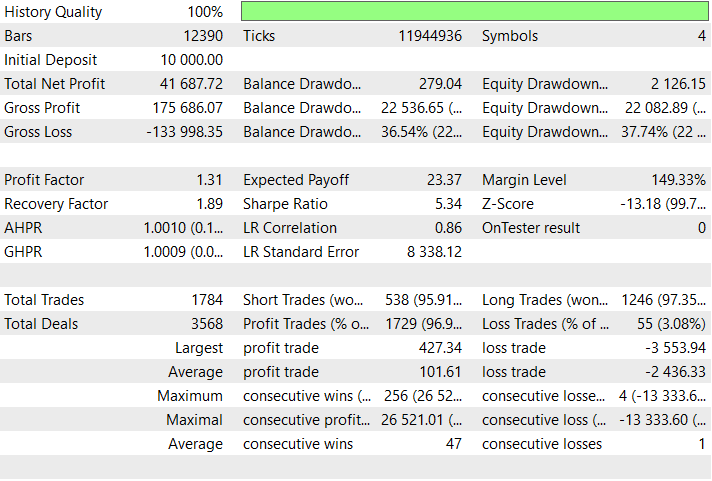
Swing trading parameters:
| Input variable | Parameter |
|---|---|
| Swing Lot Size | 0.45 |
| Swing Stop Loss (pips) | 200 |
| Swing Take Profit (pips) | 1800 |
| Swing Trailing Stop (pips) | 100 |
| Swing Timeframe | 4 Hours |
| Swing Lookback Period | 20 |
| Fibonacci Retracement Level | 0.618 |
| Use D1 Confirmation | true |
| Higher Timeframe | 1 Day |


Conclusion
In summary, we developed a Dynamic Multi-Pair EA capable of switching between scalping and swing trading approaches while adapting to various asset types such as gold, forex, crypto, and indices. The system integrates technical models like EMA crossovers, RSI filters, Fibonacci retracements, and ATR-based volatility measures to intelligently determine trade direction and position management. By implementing adaptive SL/TP levels and a robust multi-symbol structure, the EA ensures optimal risk control, efficient execution, and consistent logic application across diverse market conditions—whether the goal is short-term scalps or longer-term swing setups.
In conclusion, this framework provides traders with a versatile and automated trading solution that dynamically adjusts to market volatility, symbol characteristics, and trading objectives. It empowers users to run a single Expert Advisor that seamlessly handles both aggressive scalping and patient swing strategies, minimizing manual intervention. This unified design enhances execution precision and risk management offers a deeper level of market adaptability—a key advantage for traders seeking consistency and scalability across multiple asset classes.
Warning: All rights to these materials are reserved by MetaQuotes Ltd. Copying or reprinting of these materials in whole or in part is prohibited.
This article was written by a user of the site and reflects their personal views. MetaQuotes Ltd is not responsible for the accuracy of the information presented, nor for any consequences resulting from the use of the solutions, strategies or recommendations described.

 Reimagining Classic Strategies (Part 18): Searching For Candlestick Patterns
 From Novice to Expert: Forex Market Periods
 How can century-old functions update your trading strategies?
 Bivariate Copulae in MQL5 (Part 2): Implementing Archimedean copulae in MQL5

- Free trading apps
- Over 8,000 signals for copying
- Economic news for exploring financial markets
You agree to website policy and terms of use
I believe that there is a mere typographical error in the Scalping image:
downloaded , but back test is failed. its not happening.
Hey, please pay attention to your input symbols. They must match your brokers symbols e.g "EURUSD.m" it has the suffix ".m" with that being said if your brokers symbols have suffix or prefix please type them in the input symbol.
Hello ,
I did run in Demo Mt5, but back test is failed. its not happening. any problem in EA ?
This EA is amazing!! I’ve been using it & the results are beautiful!!! Keep doing what you’re doing & thank you for sharing. One question!! What pair is the back test on?
Hey, thanks for your feedback.
The back test is on the default input symbol settings:
"XAUUSD,BTCUSD,US100,GBPUSD"