From Basic to Intermediate: Subwindows (III)
 78
 0

Introduction
In the previous article, From Basic to Intermediate: Subwindows (II), we looked at some of the errors and issues we might encounter when trying to use an indicator in a subwindow. What's more, we also noticed that MetaTrader 5 handles indicators in a rather ingenious way. All of this is done to avoid potential conflicts between the data that these indicators provide us with as we use them.
As shown in the previous article, with the right knowledge, you can do a great deal in MetaTrader 5. And all of this is done using plain and simple MQL5. Without any frills or unnecessary extras. As many of you have probably already noticed, I'm not really one for sticking to a rigid framework. I like to think outside the box and look at things that many people don't even think are possible. That's why I understand that many of you are probably already looking forward to the opportunity to tackle more challenging tasks. But, as a wise person would say, let's not rush things.
So, let's focus on what this article will cover, setting aside anything that might distract us while we read. Because here we'll see that things aren't quite the way many people imagine them to be.
Subwindows (III)
Subwindows are very useful, especially when used correctly, because they let us organize many things in a simple, convenient, and practical way. However, for the sake of simplicity, MetaTrader 5 limits us to a single method for displaying subwindows. Although this may somewhat limit what we can create, in skilled hands this restriction becomes just a minor detail. We can work within it and keep it that way: not a real limitation, but a challenge to overcome.
Well, it seems that the only real limitations are our imagination and the extent of our knowledge about what can actually be done in MQL5 to control MetaTrader 5 in a certain way. So, let's start with the simplest case—when we tell the MQL5 compiler that we want to use a subwindow.
This was already mentioned at the end of the previous article. However, that only showed a small part of what we can actually do. To make everything perfectly clear, we need to go back to a much simpler example than the one we looked at earlier. So, the easiest way to tell MetaTrader 5 that we want to use a subwindow—or even create one—is simply to use the code provided below.
01. //+------------------------------------------------------------------+
02. #property copyright "Daniel Jose"
03. //+------------------------------------------------------------------+
04. #property description "DEMO Indicator"
05. //+------------------------------------------------------------------+
06. #property indicator_separate_window
07. //+------------------------------------------------------------------+
08. int OnInit(void)
09. {
10.     return INIT_SUCCEEDED;
11. };
12. //+------------------------------------------------------------------+
13. int OnCalculate(const int rates_total, const int prev_calculated, const int begin, const double &price[])
14. {
15.     return rates_total;
16. };
17. //+------------------------------------------------------------------+
Code 01
The sole purpose of Code 01 is to create a subwindow on any chart. To do this, we use the sixth line of code, where we change the indicator's property so that it is placed in a subwindow. Although this is the simplest way, it is not the only one, as we will soon see.
But before I get to that, I need to explain one more very important point. And you can—and should—try this using Code 01 above. The thing is, every time you add an instance of Code 01 to the chart, a new subwindow is created. And depending on the task this indicator is supposed to perform, these additional instances may end up creating far more problems than they solve.
And since we may often want to share this code with other traders who don’t actually know how to use it, it’s not uncommon for them to add the indicator to the same chart more than once, thereby creating far more problems than you, as the code developer, could have anticipated.
When our code is placed in the main chart window, MetaTrader 5 often makes quite ingenious use of our code's settings to check whether an instance matching one already on the chart is being added. If that's the case, the new instance we're trying to create won't be created. However, if MetaTrader 5 determines that we are indeed creating a completely new, distinct instance, it will allow a new instance of our code to appear on the chart.
Well, broadly speaking, that's exactly what happens. However, when we use code that creates or generates a new subwindow on the chart, this mechanism used in MetaTrader 5 does not work. Therefore, you can place multiple instances of Code 01 on a single chart, thereby creating a cascade of subwindows on the current symbol's chart.
Okay, but what if we don't want that to happen? How can we prevent code that is already running on the current symbol from creating new subwindows? To do this, we'll need to use MQL5 tools to analyze the current situation on the chart. Keep in mind that what we'll be covering here is just the very basics of a much broader topic.
First, we need a way to check whether our code is present on the chart. To do this, we need to add something very specific to our code. You can see this in the code below, which is a sort of updated version of Code 01 that we looked at recently.
01. //+------------------------------------------------------------------+
02. #property copyright "Daniel Jose"
03. //+------------------------------------------------------------------+
04. #property description "DEMO Indicator"
05. //+------------------------------------------------------------------+
06. #property indicator_separate_window
07. //+------------------------------------------------------------------+
08. int OnInit(void)
09. {
10.     IndicatorSetString(INDICATOR_SHORTNAME, "Test 123.");
11.
12.     return INIT_SUCCEEDED;
13. };
14. //+------------------------------------------------------------------+
15. int OnCalculate(const int rates_total, const int prev_calculated, const int begin, const double &price[])
16. {
17.     return rates_total;
18. };
19. //+------------------------------------------------------------------+
Code 02
And now, my dear reader, please pay attention to the following. In Code 02, we added a call on the tenth line of code. This call has a very special purpose. This will give our code a display name on the chart. We're talking about the name that appears in double quotation marks. Of course, you should try to make sure this name is unique, since we'll be checking it later to determine whether our code is present on the chart.
But wait a minute. Wouldn't it be easier to use the executable file name to check whether there's an instance of our code on the chart? Well, in theory, yes, that would be easier. However, there is one problem here. When the code is compiled, it can be assigned a specific name to serve as the executable file name. However, this name may conflict with the names of other files, since you may share your code with others. The executable file name might then change, making any attempt to check whether our code is present on the current chart useless.
However, by using this call on line 10 of Code 02, we avoid such problems, since the user is unlikely to be able to change the string we specify here after compilation. Remember that you can use any value—preferably one that you consider unique. And here's the most important thing: this string must be unique.
Okay, but how will this string help us determine whether we already have an instance open on the current chart? Well, now the fun really begins.
Since this string allows us to determine whether our code is present on the chart, we'll add code to perform this check. But before we do that, I need you to understand one more thing. This is done using the code shown below.
1. //+------------------------------------------------------------------+
2. #property copyright "Daniel Jose"
3. //+------------------------------------------------------------------+
4. void OnStart(void)
5. {
6.     Print(ChartGetInteger(0, CHART_WINDOWS_TOTAL));
7. }
8. //+------------------------------------------------------------------+
Code 03
This code will simply show us how many windows currently exist on the chart where it is running. Pay attention to this, dear reader, because I need you to understand very clearly where we are heading. When we run Code 03, we'll get something similar to what is shown below.
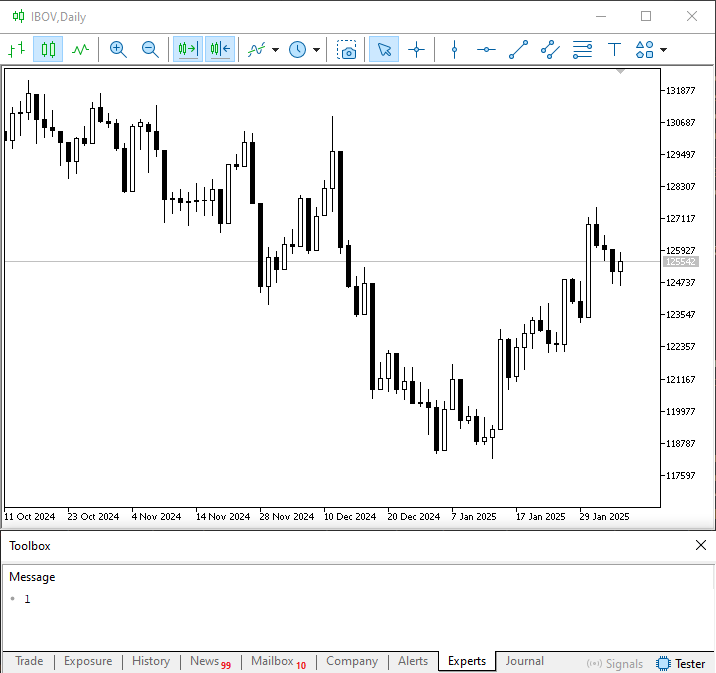
Figure 01
Now, after adding a few subwindows, we'll get what is shown in the following figure.
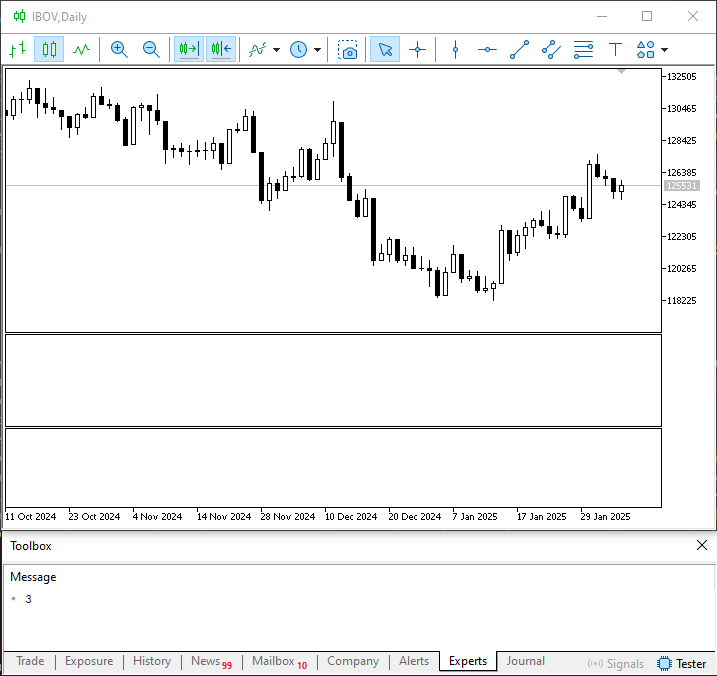
Figure 02
Hmm, that's interesting. So we can use MQL5 to find out how many subwindows there are on the chart. But what happens if we want to find out exactly which indicator is there? So, to do this, we'll modify Code 03 and end up with something similar to what's shown below.
01. //+------------------------------------------------------------------+
02. #property copyright "Daniel Jose"
03. //+------------------------------------------------------------------+
04. void OnStart(void)
05. {
06.     for (int c0 = 0; c0 < (int)(ChartGetInteger(0, CHART_WINDOWS_TOTAL)); c0++)
07.         for (int c1 = (ChartIndicatorsTotal(0, c0) - 1); c1 >= 0; c1--)
08.             PrintFormat("In the sub window [%d] was found this indicator >>%s<<", c0, ChartIndicatorName(0, c0, c1));
09. }
10. //+------------------------------------------------------------------+
Code 04
Now, when we run Code 04, we'll get the result shown below.
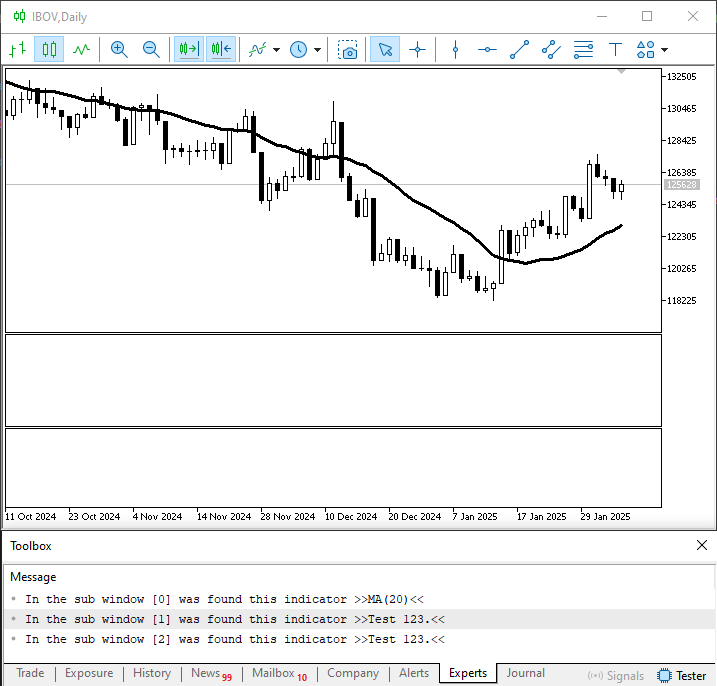
Figure 03
Now take a look at one interesting detail in Figure 03. There, we can see the names of all the indicators on the chart, along with the subwindow in which each one is displayed. However, if you open the list of indicators, you'll see what's shown in the following figure.
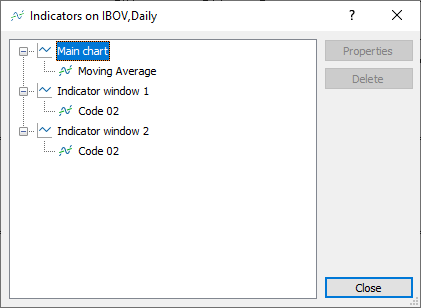
Figure 04
What we can see in the previous figure is quite interesting. Note that Figure 04 lists the executable file names of the indicators on the chart. However, in Figure 03, the name of each indicator is displayed differently. So, I think it's becoming clear that the executable file name doesn't necessarily have to be related to the indicator's name. In fact, this kind of feature makes certain tasks a lot easier. And yes, you should thank the team that came up with and built this feature into MetaTrader 5, because it will really allow us to do certain things in the future. However, my goal here is precisely to help you understand these small details and, in doing so, help you come up with your own solutions.
Okay, but what would happen if we didn't use the tenth line of code in Code 02? Well, dear reader, to demonstrate this, we'll use code 01. So, after adding it to the chart and rerunning Code 04, we would get the result shown below.
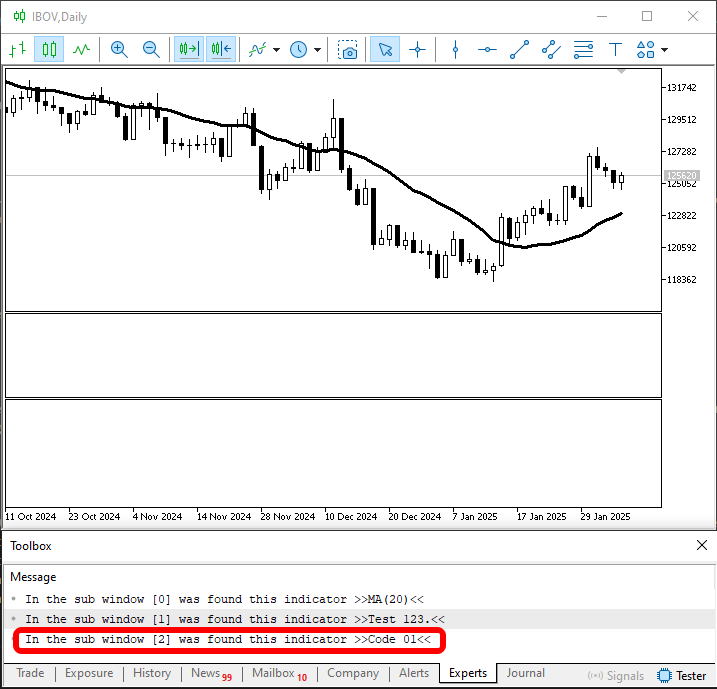
Figure 05
Now, when we open the list of indicators, we can see the following:
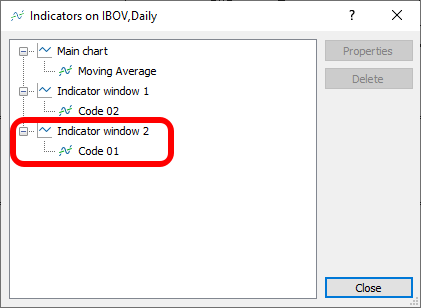
Figure 06
Hmm, I don't get it. What happened here? So, dear reader, you may notice that in both figures I’m highlighting certain information. Now note that, since we did not specify a name for our indicator, the executable file name is used as the identifier when attempting to determine which indicator is present in each window. Nevertheless, I would like to emphasize once again that situations such as the one shown in the previous figures should always be avoided whenever possible. Especially when we really want to maintain a certain degree of control over our code. As we've already noted, a user can change the executable file name, and if they do, we'll end up completely losing control over certain aspects related to our code. That's why it's very important to know how and when to set a short name—and that's exactly what the tenth line of code in Code 02 does.
There are other reasons to use short names for indicators. But I won't go into those reasons right now, because understanding them would require us to do something that I don't think we're ready for yet.
So, now that we've covered the basics of some aspects related to subwindows, we can start working on something a little more complex. This is because there are situations where we should not use these things in the usual way. In fact, we need to make sure they are created differently.
So what should we do? Well, dear reader, usually when we work with indicators, we don't want—or, more precisely, we don't need—them to be duplicated. There are very few situations in which we need a second instance of a particular indicator on the same chart. When such a situation actually arises, we need to know how to get around this limitation. This is because MetaTrader 5 cleverly prevents indicators from being duplicated. You can verify this using the code provided below.
01. //+------------------------------------------------------------------+
02. #property copyright "Daniel Jose"
03. //+------------------------------------------------------------------+
04. #property description "DEMO Indicator"
05. //+------------------------------------------------------------------+
06. const struct stAverange
07. {
08.     int            nPeriods;
09.     ENUM_MA_METHOD Method;
10.     color          cor;
11. }Averange[] =
12. {
13.     {20, MODE_SMA, clrDodgerBlue}
14. };
15. //+----------------+
16. #property indicator_chart_window
17. #property indicator_applied_price   PRICE_CLOSE
18. #property indicator_buffers         Averange.Size();
19. #property indicator_plots           Averange.Size();
20. //+------------------------------------------------------------------+
21. struct stInfos
22. {
23.     double  Buff_iMA[],
24.             f_Expo;
25. }Infos[Averange.Size()];
26. //+------------------------------------------------------------------+
27. int OnInit(void)
28. {
29.     for (uint c = 0; c < Averange.Size(); c++)
30.     {
31.         SetIndexBuffer(c, Infos[c].Buff_iMA, INDICATOR_DATA);
32.         Infos[c].f_Expo = (double) (2.0 / (1.0 + Averange[c].nPeriods));
33.         PlotIndexSetInteger(c, PLOT_DRAW_TYPE, DRAW_LINE);
34.         PlotIndexSetInteger(c, PLOT_LINE_STYLE, STYLE_SOLID);
35.         PlotIndexSetInteger(c, PLOT_LINE_WIDTH, 2);
36.         PlotIndexSetInteger(c, PLOT_LINE_COLOR, Averange[c].cor);
37.         PlotIndexSetString(c, PLOT_LABEL, StringFormat("%s of %d", (Averange[c].Method == MODE_EMA ? "Exponential" : "Arithmetica"), Averange[c].nPeriods));
38.     }
39.
40.     return INIT_SUCCEEDED;
41. };
42. //+------------------------------------------------------------------+
43. int OnCalculate(const int rates_total, const int prev_calculated, const int begin, const double &price[])
44. {
45.     int c0 = 0;
46.     double value;
47.
48.     for (uint c = 0; c < Averange.Size(); c++) switch (Averange[c].Method)
49.     {
50.         case MODE_SMA:
51.             for (int i = rates_total - 1; i > prev_calculated; i--)
52.             {
53.                 value = 0;
54.                 for (int j = 0; (i - j) > 0 && j < Averange[c].nPeriods; j++)
55.                     value += price[i - j];
56.                 Infos[c].Buff_iMA[i] = value / Averange[c].nPeriods;
57.             }
58.             break;
59.     }
60.
61.     return rates_total;
62. };
63. //+------------------------------------------------------------------+
Code 05
No matter how hard you try, you won't be able to place two instances of Code 05 on the same chart. This is simply because MetaTrader 5 would consider a second instance completely redundant in this case. Still, let's make a small change by adding a line of code so we can explore this in more detail. The line of code we'll add will be similar to the tenth line of code in Code 02. Code 05 will therefore be modified as shown in the following snippet.
                   .
                   .
                   .
26. //+------------------------------------------------------------------+
27. int OnInit(void)
28. {
29.     IndicatorSetString(INDICATOR_SHORTNAME, "Averange 20 SMA.");
30.
31.     for (uint c = 0; c < Averange.Size(); c++)
                   .
                   .
                   .
Snippet 01
Now let's add this new code to the chart; once again, no matter how hard you try, you won't be able to create a second instance. However, we added line 29 in Snippet 01, specifically so that running the script in Code 04 would produce the result shown in the following figure.
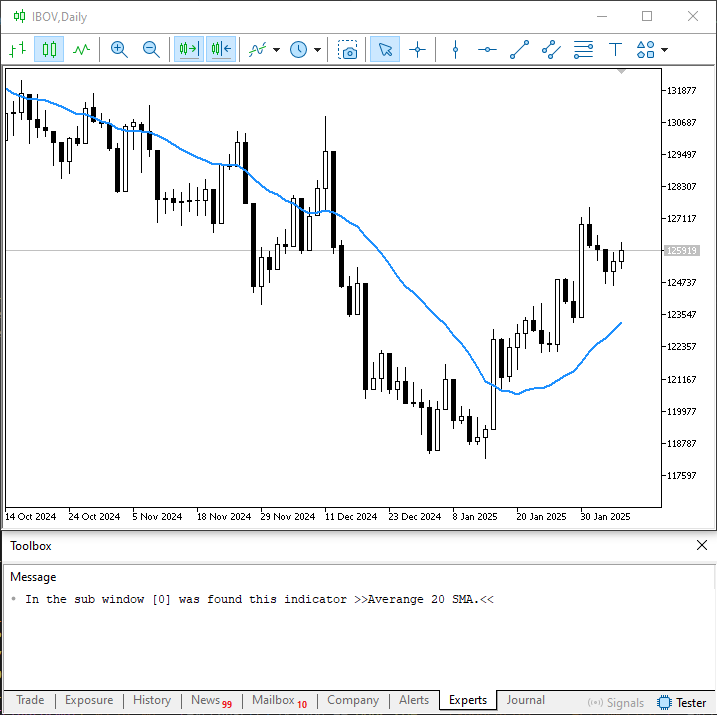
Figure 07
But that was to be expected, given what we've seen so far. Yes, dear reader. But do you actually know why we can't place a second instance of Code 05 on the same chart? Of course I do. I've already tried this, but since we can't change the type of moving average or how it's calculated, MetaTrader 5 ultimately treats Code 05 as something that does not change. Consequently, if we try to create a second instance without making changes to the code that would cause MetaTrader 5 to interpret it differently, we will not be able to create a second instance on the same chart.
Very good—you've essentially given the perfect explanation. But there is another reason, and it has to do with the sixteenth line of code in Code 05. Now, pay close attention. Your explanation of why MetaTrader 5 does not allow you to place a second instance of an indicator on the chart is indeed correct. However, when we change a property of the indicator itself, this rule no longer applies, and we see a different type of behavior. To verify this, simply modify Code 05 as shown in the following code snippet.
                   .
                   .
                   .
11. }Averange[] =
12. {
13.     {20, MODE_SMA, clrDodgerBlue}
14. };
15. //+----------------+
16. #property indicator_separate_window
17. #property indicator_applied_price   PRICE_CLOSE
18. #property indicator_buffers         Averange.Size();
19. #property indicator_plots           Averange.Size();
20. //+------------------------------------------------------------------+
21. struct stInfos
22. {
23.     double  Buff_iMA[],
24.             f_Expo;
25. }Infos[Averange.Size()];
26. //+------------------------------------------------------------------+
27. int OnInit(void)
28. {
29.     IndicatorSetString(INDICATOR_SHORTNAME, "Averange 20 SMA.");
30.
31.     for (uint c = 0; c < Averange.Size(); c++)
                   .
                   .
                   .
Snippet 02
Note that although I am showing a larger section of code in Snippet 02, our focus remains specifically on the sixteenth line of code. And note that on line 29, we're still specifying a string so that we can use it as shown earlier. After compiling and running Code 05 with the modification shown in Snippet 02, we can run Code 04 to obtain the result shown below.
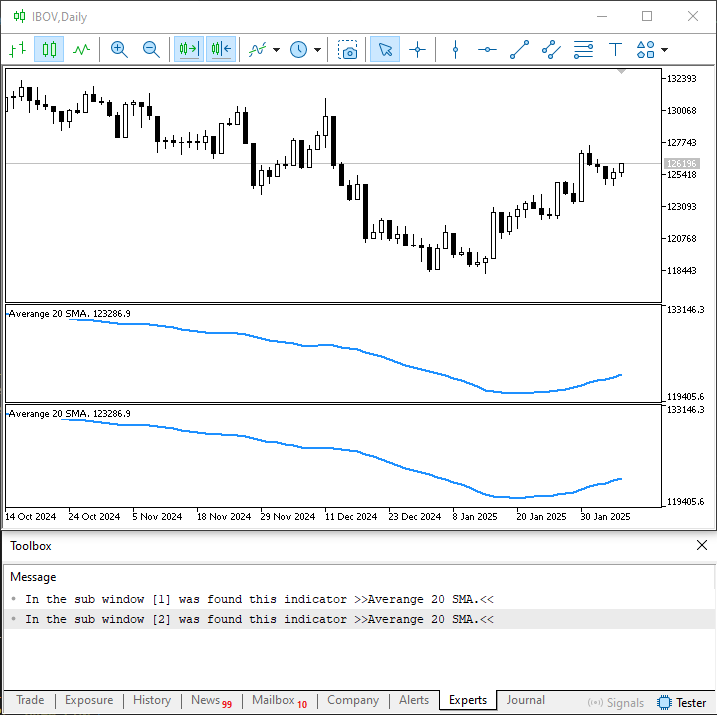
Figure 08
But wait a minute. Why didn't MetaTrader 5 prevent a second instance from being created this time? Well, dear reader, the reason is precisely that we changed a property of the code so that it would create a subwindow. As a rule—and as we saw in the previous article—we can use a subwindow for more complex analysis, such as plotting a moving average. It wouldn't make any sense for MetaTrader 5 to restrict adding indicators to a chart so much that it prevented us from creating a second instance, since that new instance could be used specifically to create a somewhat more complex graphical display.
However, we don't always want a user or trader running one of our programs to be able to create a second instance of a particular indicator. Nevertheless, for the sake of organization, we want to create—or, more precisely, use—a subwindow on the chart. If we ourselves use an indicator based on a similar structure, we understand that we shouldn't try to create a second instance. But other people might try to do that for one reason or another. Therefore, we must create mechanisms that prevent a second instance of our indicator from being created, specifically to ensure that a second subwindow does not appear.
We'll talk about this in detail a little later. But first, why don't we experiment a little with this Code 05, which creates a second subwindow? There are some details that might come in handy in the future, and this is a great opportunity to demonstrate the control we have over certain properties of a subwindow.
For example, did you know that you can specify the height of a subwindow in our source code? This way, everything will be organized properly from the start, making the user's work much easier.
To achieve this, we need to add something to Code 05. What we're going to do is shown in the following snippet.
                   .
                   .
                   .
11. }Averange[] =
12. {
13.     {20, MODE_SMA, clrDodgerBlue}
14. };
15. //+----------------+
16. #property indicator_separate_window
17. #property indicator_height          50
18. #property indicator_applied_price   PRICE_CLOSE
19. #property indicator_buffers         Averange.Size();
20. #property indicator_plots           Averange.Size();
21. //+------------------------------------------------------------------+
22. struct stInfos
23. {
                   .
                   .
                   .
Snippet 03
Now, when we run Code 05 with the changes shown in Snippet 03, the result will be as shown below.
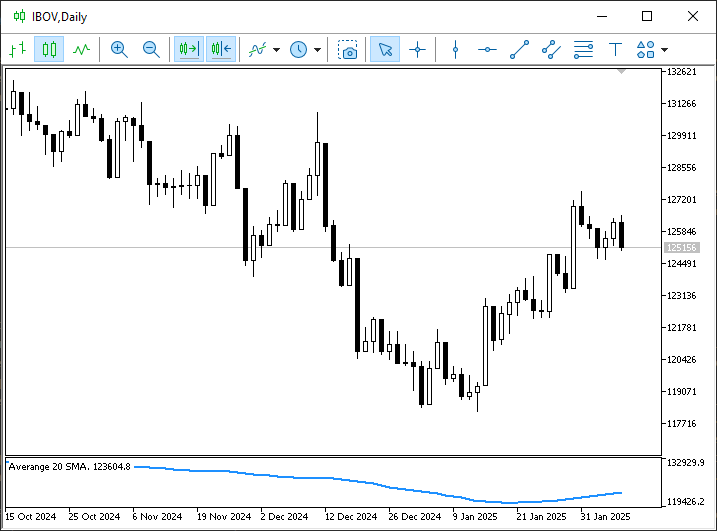
Figure 09
This technique proves to be extremely useful in a wide variety of situations, my dear reader. This is because we set the subwindow's height using the seventeenth line of code in Snippet 03. This height CANNOT BE CHANGED by either the trader or the user of our indicator, since MetaTrader 5 does not allow it to be changed.
Of course, you wouldn't use this construct if you were creating a moving average. I'm doing this here just to show that it's possible. However, such constructs are typically used when implementing and adding controls or objects to a subwindow. In that case, it makes perfect sense to use the seventeenth line of code, since we don't want the user or trader to change the subwindow's height. Otherwise, they may hide some of the controls or objects located there or make them difficult to use. This technique is really interesting, and you can experiment with it extensively.
There is another property that is very useful in a wide variety of situations. It's very easy to use. This can be demonstrated using an empty indicator, as shown in the following code.
01. //+------------------------------------------------------------------+
02. #property copyright "Daniel Jose"
03. //+------------------------------------------------------------------+
04. #property description "DEMO Indicator"
05. //+------------------------------------------------------------------+
06. #property indicator_separate_window
07. #property indicator_height          150
08. #property indicator_maximum         80
09. #property indicator_minimum         15
10. #property indicator_plots           0
11. //+------------------------------------------------------------------+
12. int OnInit(void)
13. {
14.     return INIT_SUCCEEDED;
15. };
16. //+------------------------------------------------------------------+
17. int OnCalculate(const int rates_total, const int prev_calculated, const int begin, const double &price[])
18. {
19.     return rates_total;
20. };
21. //+------------------------------------------------------------------+
Code 06
That's really interesting. That's very interesting, dear reader. You can often waste a lot of time trying to do certain things. Nevertheless, using this simple technique shown in Code 06, we can accomplish a great deal very quickly. But before we get into that, take a look at the result shown in the following figure.
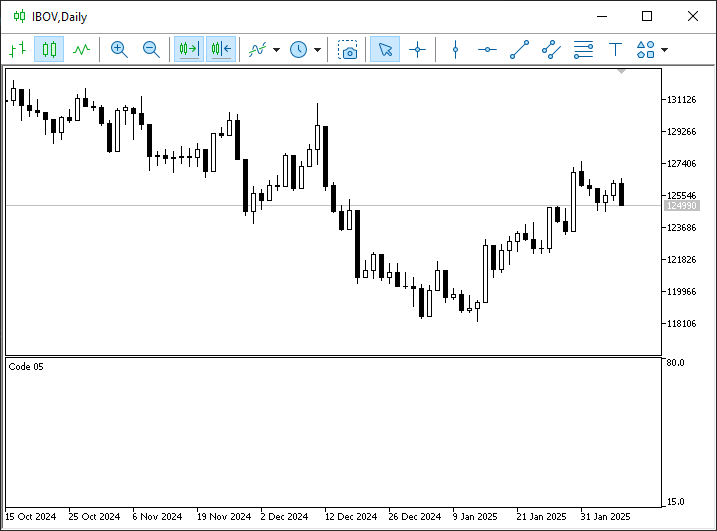
Figure 10
We are specifically interested in these values, which are displayed on the right side of the subwindow. Now, dear reader, pay attention to one thing, as it may prove very useful to you. Note that on line 8 of Code 06, we set the value to be used as the subwindow's maximum value. Similarly, in the ninth line of code, we specify the minimum value. Of course, in many cases there is no need to explicitly set a minimum value, since MetaTrader 5 sets it to zero by default. So here we can do something really interesting. To do this, let's take a look at Code 06, modified as follows.
01. //+------------------------------------------------------------------+
02. #property copyright "Daniel Jose"
03. //+------------------------------------------------------------------+
04. #property description "DEMO Indicator"
05. //+------------------------------------------------------------------+
06. #property indicator_separate_window
07. #property indicator_height          150
08. #property indicator_maximum         indicator_height
09. #property indicator_plots           0
10. //+------------------------------------------------------------------+
11. int OnInit(void)
12. {
13.     return INIT_SUCCEEDED;
14. };
15. //+------------------------------------------------------------------+
16. int OnCalculate(const int rates_total, const int prev_calculated, const int begin, const double &price[])
17. {
18.     return rates_total;
19. };
20. //+------------------------------------------------------------------+
Code 07
But what kind of madness are you planning? Don't worry, dear reader; you'll understand everything in a moment. First, let's run Code 07. The result is shown below.
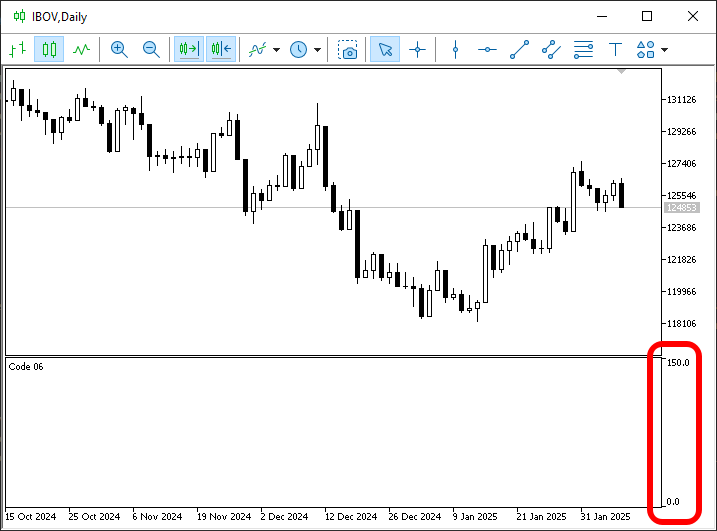
Figure 11
Now, note that in Figure 11, I have deliberately highlighted one detail. So what does that mean in practice? So, my dear reader, remember when I mentioned that in some cases it’s convenient for an indicator to have a certain height? This is exactly what Figure 11 shows us. Note that line 7 of Code 07 specifies the height of the subwindow in pixels. Immediately after that, on line 8 of code, we instruct the compiler to use this same height as the upper limit to be applied and displayed in the indicator.
So what? How can this help us in practice? Please take a moment to consider what we have just done, my dear reader. Since the height of the subwindow is specified on line 7, using that same height as the indicator's maximum value means that each pixel will correspond to a specific value, which we can easily see using the indicator itself.
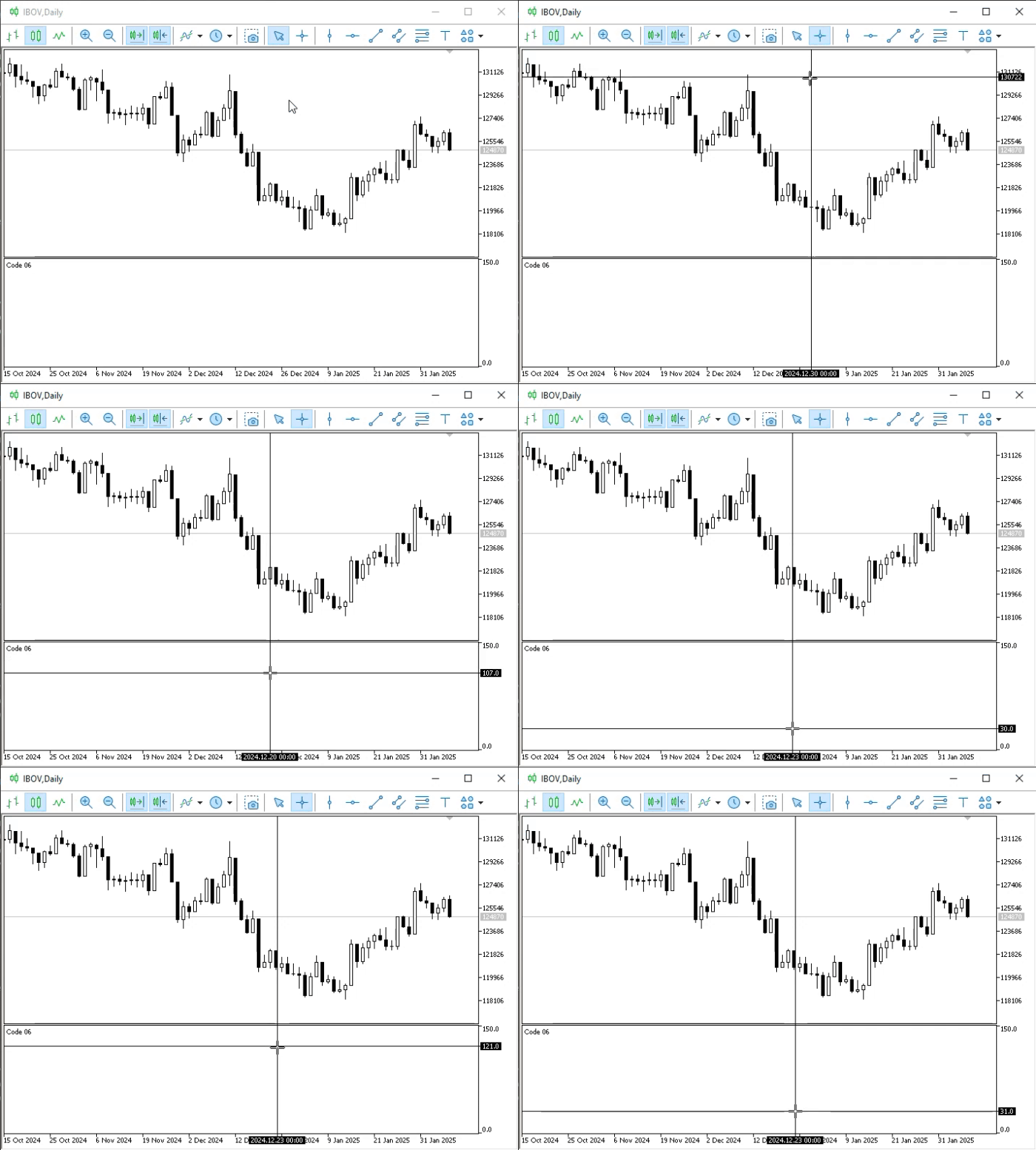
Hmm, I don't quite get it yet. Could you explain that in a little more detail? Well, I'm not going to explain it; I'd rather show you, because that'll be much more interesting. Take a look at the animation below.
Animation 01
Note the values on the right-hand side when we are inside the subwindow. Now think about this: you want to align the various controls within the subwindow so that they are arranged in the best possible way. What's the easiest way to do this? By programming? Yes, maybe. But it will be much faster to implement a graphical interface using various buttons, text, and charts. Wouldn't you agree that this would be faster if you could go into the subwindow and, using the method shown in Animation 01, take the values displayed on the right and apply them to the controls? This will allow you to arrange graphical objects within the subwindow very quickly, since all you need to do is check what value is displayed and specify it as the control's position.
There's a much faster way to do this. This is exactly the method I explained in two fairly old articles that I published here in the community. You can view them here:
Multiple indicators on one chart (Part 05): Turning MetaTrader 5 into a RAD system (I)
Multiple indicators on one chart (Part 06): Turning MetaTrader 5 into a RAD system (II)
To be honest, when I wrote those articles, I didn't realize that many of the people who would read them weren't programmers—and perhaps still aren't. Because of this, a significant portion of those explanations ended up being too superficial, and many of you were unable to truly benefit from the knowledge presented there.
The same thing happened with my other early articles. In the weeks and months following those publications, many of you who still follow my work today asked me to explain specific aspects of various pieces of code I had written in greater detail. That is why this series was created. I hope you're enjoying this series and that it's helping you learn effectively.
Concluding Thoughts
In this article, we explored some features that can help you determine whether it’s worth using a subwindow if your goal is to work in MQL5 as simply, quickly, and conveniently as possible. However—and this is precisely the crux of the matter—we won't always be able to take these simpler, easier paths. There are many situations in which we will indeed need to take a somewhat more in-depth approach and draw on a slightly higher level of knowledge.
However, what will truly determine the time required to develop a specific application is not a programmer’s level of knowledge, but their creativity—the ability to see solutions where no one else does. And that is something I cannot impart to you or to anyone else, dear reader. It depends entirely on how hard you work to develop your creativity to the point where you can simplify tasks that would be much more time-consuming for others.
In the next article, we'll begin examining precisely this type of problem, where the simplest solution isn't always the most appropriate one.
| MQ5 File | Description |
|---|---|
| Indicators\Code 01 | Basic Demonstration |
| Indicators\Code 02 | Basic Demonstration |
| Indicators\Code 03 | Basic Demonstration |
| Indicators\Code 04 | Basic Demonstration |
| Indicators\Code 05 | Basic Demonstration |
| Indicators\Code 06 | Basic Demonstration |
| Scripts\Code 01 | Basic Demonstration |
| Scripts\Code 02 | Basic Demonstration |
Translated from Portuguese by MetaQuotes Ltd.
Original article: https://www.mql5.com/pt/articles/17117
Warning: All rights to these materials are reserved by MetaQuotes Ltd. Copying or reprinting of these materials in whole or in part is prohibited.
This article was written by a user of the site and reflects their personal views. MetaQuotes Ltd is not responsible for the accuracy of the information presented, nor for any consequences resulting from the use of the solutions, strategies or recommendations described.