

How to Obtain Synchronized Arrays for Use in Portfolio Trading Algorithms
 1 106
1 106
 11
11

Introduction
As traders gain experience, they almost inevitably come to realize the need to analyze and use a portfolio of trading instruments. Let's list some examples of portfolio trading and portfolio analysis:
- spread trading: spot versus futures on the same underlying;
- analysis of correlations among instruments;
- various hedging trading strategies;
- analysis of the co-movement of instruments (for example, the so-called “strength” of currencies).
All of the portfolio trading and/or portfolio analysis methods listed above require that the data (bars) for the instruments being processed be time-synchronized with one another. Otherwise, the result may differ significantly from the real-world outcome and from what was intended in the mathematical data-processing algorithm. This is especially relevant on exchanges, where there are many illiquid instruments with numerous missing bars.
Formulation and Discussion of the Problem
Problem statement: we need to create a class library that solves the problem of synchronizing data between portfolio instruments within a specified time interval. The output should consist of data arrays (OHLCV bars) of the same size, with the same (synchronized) opening times for all bars within the specified time interval. As input, the user asynchronously passes arrays of unsynchronized data (OHLCV bars) for the portfolio instruments.
When synchronizing data arrays with OHLCV bars, there are two possible approaches:
- If any instrument in the portfolio does not have a bar for a given point in time (the bar opening time), then we assume that this bar is also absent for all other instruments. A bar is added and marked as "empty" for this instrument. In other words, on this bar, we essentially see a "gap" in the portfolio or on the chart.
- In the case described above, we fill in the missing bar with the previous bar for that instrument. This approach seems more correct: it is logical that if an instrument’s price did not change during that interval, then all OHLC prices for the missing bar should equal the previous bar’s closing price. In this case, the volume is zero because there were no trades.
We implement both approaches to ensure greater flexibility. Let's take a closer look at the synchronization principle (see Fig. 1):
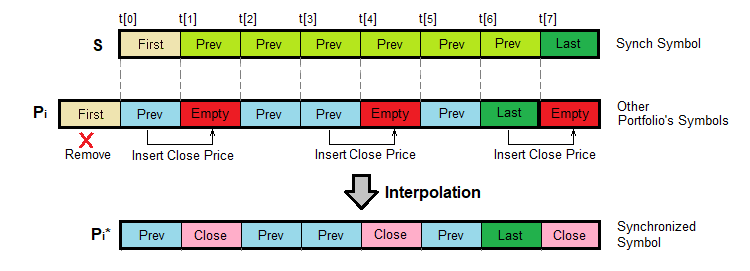
Fig. 1. Data synchronization algorithm (OHLCV bar arrays)
Synch Symbol (S) — synchronization symbol (usually the chart symbol for indicators and Expert Advisors). A time series consisting of eight bars, with bar opening times t[0]...t[7], is shown schematically. Let's assume that the synchronization symbol has no "gaps." The first bar is highlighted in light yellow and labeled First — it corresponds to the time t[0]. The most recent bar is highlighted in dark green and labeled Last — it corresponds to the time t[7]. The remaining bars between the first and the last are highlighted in light green and labeled Prev.
Other Portfolio's Symbols (Pi) — these are all the other symbols in our portfolio that we need to synchronize with symbol S. They are processed using the same algorithm — the figure shows a schematic representation of one such time series. The bar notations are the same as for symbol S. The differences are as follows: first, this time series contains empty bars — shown in red and labeled Empty. These are bars where there were no "ticks" — that is, no changes in the Bid, Ask, or Last prices — during the interval of the timeframe selected on the chart. Second, the length (number of bars) of this time series, including empty bars, is greater than the length of the synchronization symbol series.
Therefore, we need to perform two operations on the Pi series: fill in the "gaps" in the Pi series and trim the leftmost bar (see Fig. 1) to align its length with the length of the synchronization series. As we move through the S series, we compare the time points from t[7] to t[0] with the time points in the Pi series and in the series of all other portfolio symbols. If we detect a missing bar in the Pi series, we insert an artificially created bar in its place — either an empty bar with prices set to zero, or a bar with prices equal to the Close price of the previous non-empty bar. It depends on the synchronization mode selected by the user.
After that, we delete the First element from the Pi series to make the lengths of the S and Pi series equal. In this example, there is only one such bar (to be deleted).
As a result of this processing, we obtain a Pi* series that has the same length as the S series and contains bars whose times fully correspond to the synchronization series S. The artificially created bars in Fig. 1 are highlighted in pink and labeled “Close” — this emphasizes that they contain the Close price of the previous bar.
Another question that needs to be answered is: which portfolio symbol should be used to synchronize all the others? Several approaches are also possible here:
- The synchronization symbol is specified by the user. However, it is important to understand that an incorrectly selected synchronization symbol can lead to artifacts on the indicator chart and/or incorrect results in calculations based on the user's algorithm.
- The synchronization symbol is automatically taken from the chart on which the indicator or Expert Advisor is running. This method is not suitable for services that have been added to the MetaTrader 5 terminal relatively recently, since they are not linked to a chart.
In most cases, it is recommended to choose the chart symbol for synchronization and run the indicator/Expert Advisor on the most liquid instrument in the portfolio. This is almost the only option if we are developing a portfolio indicator linked to a chart.
There is one more factor to consider when synchronizing: the order of the data in the arrays. It can be either forward — the newest bar is at the end of the array — or reverse — the newest bar is at the beginning of the array (at index zero). We implement automatic handling of the data direction.
And one last point: new bars for individual instruments appear asynchronously. The following options for handling this situation are proposed:
- Wait for a new bar to appear on all instruments, and only then process the data according to the user-defined algorithm.
- Recalculate the last bar several times (once for each instrument) as a new bar appears on each instrument in the portfolio. In this case, the previous bar is used in the calculations for “lagging” instruments.
It seems that the second option is preferable in most cases, since it allows the portfolio processing result (and possibly a trading signal) to be obtained without delay. The flip side of the coin is that the signal may change several times when one or more new bars appear.
The recommended logic is as follows: if all the instruments in the portfolio are liquid, use the first option (wait for new bars to appear on all instruments). If, however, the portfolio contains illiquid instruments, use the second option (with the missing-bar interpolation mode).
Analysis of the Available Software Libraries Included in the MetaTrader 5 Terminal
The Standard Library Generic contains the associative arrays CHashMap and CSortedMap. They allow you to create your own container classes for storing heterogeneous data in [Key-Value] form. In our case, the key will obviously be a point in time (more precisely, the bar opening time). Associative arrays provide very fast access to elements by key (time). Furthermore, each key (time) is unique within the array. This is exactly what we need to synchronize bars by time.
Since synchronizing data arrays will involve inserting, deleting, and adding elements (bars) at arbitrary positions, we need to obtain data arrays (bars) sorted by key. Therefore, it would be best to use the CSortedMap class. It provides automatic key-based sorting when the contents of the element array change. The implementation of CSortedMap is based on so-called "red-black trees," which provide a balance between data access speed and memory usage.
Therefore, to implement our plan, we will need a container class for storing data (bars) and a data manipulation class (data manager) for interacting with the “outside world” — loading data arrays, retrieving synchronized data arrays, setting and retrieving various parameters, etc.
Designing the CSymbolData Container Class for Storing Data
The CSymbolData class inherits from the standard CObject class so that the standard libraries included with the terminal can be used. The complete code is contained in the "TimeSyncManager.mqh" file, which is attached to this article. A simplified version of the code is provided below.
Let's take a closer look at the specifics of the implementation:
We have added the enumerated data type ENUM_BAR_TYPE, which can be used to determine the bar type in an array of symbol data. Three types of bars are defined: a real bar (retrieved from the terminal), an empty bar (initially missing from the time series), and an interpolated bar (derived from the previous real bar). We will need this data type when implementing the synchronization algorithm with interpolation of missing bars.
enum ENUM_BAR_TYPE
{
  ENUM_BAR_LIVE,                                                      // a real bar
  ENUM_BAR_INTERPOLATED,                                              // bar obtained by interpolation from the previous one
  ENUM_BAR_EMPTY                                                      // missing bar (empty)
};
All time-series data available in the terminal is stored in the CSymbolData class as sorted associative arrays of the template type CSortedMap<Key, Value>, where Key in all arrays is the bar open time, and Value is the OHLCV data of the time series.
This data container structure provides fast access by a specified time both to the entire data array and to an individual bar within it. In addition, if necessary, indexed access to individual elements of the time series (bars) can be easily implemented.
In addition to the standard time-series data arrays, an array has been added to store the type of each bar:
- CSortedMap<datetime, ENUM_BAR_TYPE> bar_type;
Otherwise, the data set matches the fields of the MqlRates structure built into the MetaTrader 5 terminal. To avoid further complicating access to the data members, they have been made public.
//  Data container:
class CSymbolData : public CObject
{
protected:
  string          symbol;                                             // symbol name
  ENUM_TIMEFRAMES data_timeframe;                                     // data timeframe
  datetime        new_bar_time;                                       // time when the latest new bar appeared

public:
  CSortedMap<datetime, double>          open;                         // Open prices
  CSortedMap<datetime, double>          high;                         // High prices
  CSortedMap<datetime, double>          low;                          // Low prices
  CSortedMap<datetime, double>          close;                        // Close prices
  CSortedMap<datetime, long>            tick_volume;                  // tick volume
  CSortedMap<datetime, long>            real_volume;                  // real (exchange-traded) volume
  CSortedMap<datetime, int>             spread;                       // spread
  CSortedMap<datetime, datetime>        time;                         // time
  CSortedMap<datetime, ENUM_BAR_TYPE>   bar_type;                     // bar type


public:
  //  Constructor:
  CSymbolData(const string _symbol_name, const ENUM_TIMEFRAMES _data_timeframe)
  :
  symbol(_symbol_name),
  data_timeframe(_data_timeframe),
  new_bar_time(0)
  {
  }
  //  Constructor without parameters:
  CSymbolData()
  :
  symbol(NULL),
  data_timeframe(PERIOD_CURRENT),
  new_bar_time(0)
  {
  }
  //  Adding data bars:
  int  AddFullData(const MqlRates& _rates[], const int _src_start_index, const int _count, const bool _keep_old_data = false)
  {
    int   size = MathMin(_count, (int)_rates.Size());
    if(size > 0)
    {
      //  Take into account the data ordering direction in the input array:
      bool as_series = ArrayGetAsSeries(_rates);
      if(as_series == true)
      {
        ArraySetAsSeries(_rates, false);
      }

      int start_index = _src_start_index;
      if(_src_start_index <= 0)
      {
        start_index = 0;
      }

      //  Data transfer cycle:
      datetime  dt ;
      int       index;
      for(int i = 0; i < size; i++)
      {
        index = start_index + i;
        dt = _rates[index].time;
        this.open.Add(dt, _rates[index].open);
        this.high.Add(dt, _rates[index].high);
        this.low.Add(dt, _rates[index].low);
        this.close.Add(dt, _rates[index].close);
        this.tick_volume.Add(dt, _rates[index].tick_volume);
        this.real_volume.Add(dt, _rates[index].real_volume);
        this.spread.Add(dt, _rates[index].spread);
        this.bar_type.Add(dt, ENUM_BAR_LIVE);
        this.time.Add(dt, dt);
      }

      //  Time when the latest new bar appeared:
      this.new_bar_time = _rates[start_index + size - 1].time;

      //  Restore the data ordering direction in the input array:
      ArraySetAsSeries(_rates, as_series);
      return(size);
    }

    return(0);
  }
  //  Update and/or add (if necessary) the most recent bars:
  int  UpdateLastData(const MqlRates& _rates[], const int _start_index, const int _count)
  {
    int   size = MathMin(_count, (int)_rates.Size());
    if(size > 0)
    {
      //  Take into account the data ordering direction in the input array:
      bool as_series = ArrayGetAsSeries(_rates);
      if(as_series == false)
      {
        ArraySetAsSeries(_rates, true);
      }
      datetime  dt;
      int       index;

      //  Data transfer cycle:
      for(int i = 0; i < size; i++)
      {
        index = _start_index + i;
        dt = _rates[index].time;

        //  If a bar with this time is already in the list, we simply UPDATE its data:
        if(this.time.ContainsKey(dt) == true)
        {
          this.open.TrySetValue(dt, _rates[index].open);
          this.high.TrySetValue(dt, _rates[index].high);
          this.low.TrySetValue(dt, _rates[index].low);
          this.close.TrySetValue(dt, _rates[index].close);
          this.tick_volume.TrySetValue(dt, _rates[index].tick_volume);
          this.real_volume.TrySetValue(dt, _rates[index].real_volume);
          this.spread.TrySetValue(dt, _rates[index].spread);
        }
        //  There is no bar with this time in the list, so we add a NEW BAR:
        else
        {
          this.open.Add(dt, _rates[index].open);
          this.high.Add(dt, _rates[index].high);
          this.low.Add(dt, _rates[index].low);
          this.close.Add(dt, _rates[index].close);
          this.tick_volume.Add(dt, _rates[index].tick_volume);
          this.real_volume.Add(dt, _rates[index].real_volume);
          this.spread.Add(dt, _rates[index].spread);
          this.bar_type.Add(dt, ENUM_BAR_LIVE);
          this.time.Add(dt, dt);

          //  Time when the latest new bar appeared:
          this.new_bar_time = _rates[index].time;
        }
      }

      //  Restore the data ordering direction in the input array:
      ArraySetAsSeries(_rates, as_series);
      return(size);
    }

    return(0);
  }
};
The main public methods for loading external data into a container:
int  AddFullData(const MqlRates& rates[], const int src_start_index, const int count, const bool keep_old_data = false)
int  UpdateLastData(const MqlRates& rates[], const int src_start_index, const int count)
- Method CSymbolData::AddFullData:
Designed to load an array of MqlRates structures into internal arrays. In this case, the horizontal layout of the array of structures (where each individual data slice is stored in a separate structure) is converted to a vertical layout, split into separate arrays of OHLCV prices.
This is more convenient for our purposes, since we are no longer tied to the format of the MqlRates structure. This makes it easy to add computed data arrays in parallel with existing OHLCV bars without changing the class logic. For example, you can easily add an array of one of the typical price variants, calculated as the sum of the bar's four prices divided by four: (O+H+L+C)/4. Etc.
The following is passed as input to the CSymbolData::AddFullData method:
- [in] MqlRates rates[] — an array of structures that can be filled by the standard MQL5 function CopyRates;
- [in] int src_start_index — the starting index from which data is taken from the data source, the rates[] array;
- [in] int count — specifies how many bars to load into the container's internal arrays from the input rates[] array;
- [in] bool keep_old_data — a flag controlling whether the internal arrays are cleared before loading data (if true, new data is appended to the end of the existing data).
We take into account the direction of the data arrangement in the rates[] array using the following code:
bool as_series = ArrayGetAsSeries(rates);
if(as_series == true)
{
  ArraySetAsSeries(rates, false);
}
For the synchronizer to work properly, time in the array must increase from the first element to the last — the newest element must be at the end of the array.
The data loading logic is as follows: we iterate through the rates[] array element by element in a loop and use the CSortedMap::Add method to add OHLCV data to our internal associative arrays. The key is the value of the MqlRates::time field.
After loading the specified number of bars, we record the time when the latest new bar appeared — this is the opening time of the last bar in the data array:
this.new_bar_time = rates[start_index + size - 1].time;
The method CSymbolData::AddFullData returns the number of data bars actually loaded, or zero if the operation fails.
- The method CSymbolData::UpdateLastData:
Designed to update or add a specified number of the most recent bars to the container's internal arrays. It is typically called from the event handler for a new tick in the MetaTrader 5 terminal.
The method CSymbolData::UpdateLastData takes the following input:
- [in] MqlRates rates[] — an array of structures containing the last bar (or the last few bars), which, for example, can be filled by the built-in MQL5 function CopyRates;
- [in] int src_start_index — the starting index from which data is taken from the data source, the rates[]; array
- [in] int count — specifies how many bars to load into the container's internal arrays from the input array rates[].
The fundamental difference between the method CSymbolData::UpdateLastData and the previous one is that here we first check whether a bar with that time already exists in our internal arrays. If a bar with that time already exists, we update (overwrite) the OHLCV data values in the existing element (bar) with the new ones. The time (key), of course, remains unchanged.
If there is no bar with that time, we add a new bar to the arrays and update the recorded time when the latest new bar appeared. The check for the bar's existence and the update/add operation are performed using the following code:
if(this.time.ContainsKey(dt) == true)
{
  this.open.TrySetValue(dt, _rates[index].open);
  this.high.TrySetValue(dt, _rates[index].high);
  this.low.TrySetValue(dt, _rates[index].low);
  this.close.TrySetValue(dt, _rates[index].close);
  this.tick_volume.TrySetValue(dt, _rates[index].tick_volume);
  this.real_volume.TrySetValue(dt, _rates[index].real_volume);
  this.spread.TrySetValue(dt, _rates[index].spread);
}
else
{
  this.open.Add(dt, _rates[index].open);
  this.high.Add(dt, _rates[index].high);
  this.low.Add(dt, _rates[index].low);
  this.close.Add(dt, _rates[index].close);
  this.tick_volume.Add(dt, _rates[index].tick_volume);
  this.real_volume.Add(dt, _rates[index].real_volume);
  this.spread.Add(dt, _rates[index].spread);
  this.bar_type.Add(dt, ENUM_BAR_LIVE);
  this.time.Add(dt, dt);

  this.new_bar_time = _rates[index].time;
}
The method CSymbolData::UpdateLastData returns the number of data bars actually loaded or updated, or zero if the operation fails.
The main public methods for retrieving data from the container:
- A group of methods for retrieving the full data array CSymbolData::GetFullXXXX.
int  GetFullOpen(double& dst[], const int dst_start_index)
int  GetFullHigh(double& dst[], const int dst_start_index)
int  GetFullLow(double& dst[], const int dst_start_index)
int  GetFullClose(double& dst[], const int dst_start_index)
int  GetFullTickVolume(long& dst[], const int dst_start_index)
int  GetFullRealVolume(long& dst[], const int dst_start_index)
int  GetFullSpread(int& dst[], const int dst_start_index)
Allows you to copy the entire contents of the internal data array into the specified destination array. All methods in this group are called in the same way; the only difference is the data type. Let's look at an example using the method CSymbolData::GetFullClose:
The method CSymbolData::GetFullClose takes the following input:
- [out] double& dst[] — the destination array into which the Close[] price array is written. This array may also be an indicator buffer;
- [in] int dst_start_index — the starting index in the destination array from which data will be written.
The code of the CSymbolData::GetFullClose method is shown below:
  // =====================================================================
  //  Get Close[] data:
  // =====================================================================
  #define COPY_FULL_DATA(data_type, data_src, data_dst, dst_start) \
  {\
    if(data_src.Count() > 0) \                                          // if the data has been loaded
    {\
      bool as_series = ArrayGetAsSeries(data_dst); \
      if(as_series == true) \                                           // take into account the data ordering direction in the input array
      { ArraySetAsSeries(data_dst, false); } \
      datetime    dt[]; \
      data_type   val[]; \
      int data_copied = data_src.CopyTo(dt, val); \
      for(int i = 0; i < data_src.Count(); i++) \                       // copy the specified number of data elements
      {\
        data_dst[dst_start + i] = val[i]; \                             // copy as many data elements as are actually available
      }\
      ArraySetAsSeries(data_dst, as_series); \                          // restore the data ordering direction in the input array
      return(data_copied); \
    }\
    return(0);\
  }
  // =====================================================================
  int  GetFullClose(double& dst[], const int dst_start_index)
  {
    COPY_FULL_DATA(double, this.close, dst, dst_start_index);
  }
  // =====================================================================
Since the methods are essentially the same for all types of OHLCV data (the only difference is in the data types), we have implemented the method bodies as the COPY_FULL_DATA macro with the following parameters:
#define COPY_FULL_DATA(data_type, data_src, data_dst, dst_start) The purpose of the macro parameters is as follows:
- [in] data_type — the type of the destination data array. It can be one of the following types: "double" (for Open/High/Low/Close prices), "long" (for TickVolume and RealVolume), "int" (for Spread);
- [in] data_src — the name of the internal array for the corresponding data type: this.open/this.high/this.low/this.close/this.tick_volume/this.real_volume/this.spread;
- [out] data_dst — the destination data array dst[];
- [in] dst_start — the index from which data will be written to the destination array.
The CSymbolData::GetFullXXXX methods return the number of data items (bars) actually copied, or zero if the operation fails. The data ordering direction in the dst[] array is taken into account automatically.
- A group of methods for retrieving a specified number of the latest data items by time from an array CSymbolData::GetLastXXXX.
void  GetLastTime(const int count, datetime& dst[], const int dst_start_index)
void  GetLastOpen(const int count, double& dst[], const int dst_start_index)
void  GetLastHigh(const int count, double& dst[], const int dst_start_index)
void  GetLastLow(const int count, double& dst[], const int dst_start_index)
void  GetLastClose(const int count, double& dst[], const int dst_start_index)
void  GetLastTickVolume(const int count, long& dst[], const int dst_start_index)
void  GetLastRealVolume(const int count, long& dst[], const int dst_start_index)
void  GetLastSpread(const int count, int& dst[], const int dst_start_index)
Allows a specified number of bars to be retrieved from the internal data array into the destination array passed in the input parameters. All methods in this group are called in the same way; the only difference is the data type. Let's look at an example using the CSymbolData::GetLastClose method:
The method CSymbolData::GetLastClose takes the following input:
- [in] int count — the number of data items to be written to the destination array;
- [out] double& dst[] — the destination array into which the Close[] price array is written. This array may also be an indicator buffer;
- [in] int dst_start_index — the starting index in the destination array from which data will be written.
  // =====================================================================
  //  Copy only the most recently updated data:
  // =====================================================================
  #define COPY_LAST_DATA(data_type, data_src, count, data_dst, dst_start) \
  {\
    if(data_src.Count() > 0) \                                          // if the data has been loaded
    {\
      bool as_series = ArrayGetAsSeries(data_dst); \
      if(as_series == true) \                                           // take into account the direction in which the data is arranged in the input array
      { ArraySetAsSeries(data_dst, false); } \
      datetime    dt[]; \
      data_type   val[]; \
      data_src.CopyTo(dt, val); \
      for(int i = 0; i < count; i++) \                                  // copy the specified number of data elements
      {\
        data_dst[dst_start + i] = val[this.time.Count() - count + i]; \
      }\
      ArraySetAsSeries(data_dst, as_series); \                          // restore the data ordering direction in the input array
    }\
  }
  // =====================================================================
  //  Get updated Close[] data:
  // =====================================================================
  void  GetLastClose(const int _count, double& _dst[], const int _dst_start_index)
  {
    COPY_LAST_DATA(double, this.close, _count, _dst, _dst_start_index);
  }
  // =====================================================================
Since, for all OHLCV data types, the methods are essentially the same (differing only in data types) — we implemented the method bodies as the COPY_LAST_DATA macro with the following parameters:
#define COPY_LAST_DATA(data_type, data_src, count, data_dst, dst_start) The purpose of the macro parameters is as follows:
- [in] data_type — the type of the destination data array. It can be one of the following types: "double" (for Open/High/Low/Close prices), "long" (for TickVolume and RealVolume), "int" (for Spread);
- [in] data_src — the name of the internal array for the corresponding data type: this.open/this.high/this.low/this.close/this.tick_volume/this.real_volume/this.spread;
- [in] count — the number of data items (array elements) copied to the destination array;
- [out] data_dst — the destination data array dst[];
- [in] dst_start — the index from which data will be written to the destination array.
The number of data points is counted starting from the last element of the array data_src[]. The direction in which data is arranged in the dst[] array is taken into account automatically.
The CSymbolData::GetLastXXXX methods return the number of data items (bars) actually copied, or zero if the operation fails.
Designing the CTimeSyncManager Synchronizer Class
The purpose of the CTimeSyncManager class is to receive data from multiple instruments, synchronize it, and provide full access to arrays of synchronized data. The full code of the CTimeSyncManager class is located in the "TimeSyncManager.mqh" file, which is attached to this article. A simplified version of the code is provided below.
Let's take a closer look at the specifics of the implementation. We have added the following enumerated data types:
enum ENUM_SYNC_BARS_TYPE
{
  ENUM_SYNC_BARS_INTERPOLATED,                                        // replace an empty bar with the previous one
  ENUM_SYNC_BARS_EMPTY                                                // add an empty bar
};
- ENUM_SYNC_BARS_TYPE — allows you to specify the type of bar synchronization to be used. Determines how "missing" bars will be replaced — either with empty bars or by using the Close price of the previous real bar (see the example in Fig. 1).
enum ENUM_SYNC_SYMBOL_TYPE
{
  ENUM_SYNC_SYMBOL_CUSTOM,                                            // synchronize according to the specified setting
  ENUM_SYNC_SYMBOL_AUTO                                               // automatic synchronization
};
- ENUM_SYNC_SYMBOL_TYPE — allows you to specify the method for selecting a synchronization symbol. Used in the indicator/Expert Advisor settings: either the name of the synchronization symbol is specified directly, or the symbol of the chart on which the indicator/Expert Advisor is attached is selected automatically.
enum ENUM_NEW_BARS_TYPE
{
  ENUM_NEW_BARS_WAITING_ALL,                                          // wait for a new bar to appear on all instruments
  ENUM_NEW_BARS_UPDATE_ALL                                            // when a new bar appears, take the previous bar for the other instruments (if there is no new one)
};
- ENUM_NEW_BARS_TYPE — allows you to specify the mode for generating an event when a new bar appears. Used in the indicator/Expert Advisor settings: either we wait for a new bar to appear on all portfolio instruments and only then record that an aggregate new bar has appeared, or we start the data processing algorithm in the indicator/Expert Advisor whenever a new bar appears for each portfolio instrument.
Simplified code for the CTimeSyncManager class is shown below:
class CTimeSyncManager
{
protected:
  ENUM_SYNC_BARS_TYPE     sync_bars_type;                             // bar synchronization type
  ENUM_SYNC_SYMBOL_TYPE   sync_symbol_type;                           // selecting a symbol for bar synchronization
  ENUM_NEW_BARS_TYPE      new_bars_type;                              // type of waiting for new bars to appear

protected:
  bool  is_syncronized_FLAG;                                          // true - all data is synchronized

protected:
  CSymbolData*            sync_symbol_data;                           // synchronization symbol
  CSymbolData*            symbols_data_Array[];                       // portfolio instruments

public:
  // =====================================================================
  //  Constructor:
  // =====================================================================
  CTimeSyncManager()
  :
  sync_bars_type(ENUM_SYNC_BARS_INTERPOLATED),
  sync_symbol_type(ENUM_SYNC_SYMBOL_CUSTOM),
  new_bars_type(ENUM_NEW_BARS_WAITING_ALL),
  is_syncronized_FLAG(false),
  sync_symbol_data(NULL)
  {
  }
  // =====================================================================
  //  Add the synchronization symbol together with its data:
  // =====================================================================
  int  SyncSymbolAddFullData(const string _symbol, const ENUM_TIMEFRAMES _data_timeframe, const MqlRates& _rates[], const int _src_start, const int _count, const bool _keep_old_data = false)
  {
    this.is_syncronized_FLAG = false;

    if(this.sync_symbol_data == NULL)
    {
      this.sync_symbol_data = new CSymbolData(_symbol, _data_timeframe);
    }

    //  Add the data itself to the list:
    return(this.sync_symbol_data.AddFullData(_rates, _src_start, _count, _keep_old_data));
  }
  // =====================================================================
  //  Add/update the last bars of the synchronization symbol:
  // =====================================================================
  int  SyncSymbolUpdateLastData(const MqlRates& _rates[], const int _src_start, const int _count)
  {
    this.is_syncronized_FLAG = false;

    return(this.sync_symbol_data.UpdateLastData(_rates, _src_start, _count));
  }
  // =====================================================================
  //  Add a symbol with data to the list:
  // =====================================================================
  int  SymbolAddFullData(const string _symbol, const ENUM_TIMEFRAMES _data_timeframe, const MqlRates& _rates[], const int _src_start, const int _count, const bool _keep_old_data = false)
  {
    this.is_syncronized_FLAG = false;

    if(this.symbols_data_Array.Size() > 0)
    {
      for(int i = 0; i < (int)this.symbols_data_Array.Size(); i++)
      {
        //  Search for the symbol among those already added:
        if(this.symbols_data_Array[i].GetSymbolName() == _symbol)
        {
          return(this.symbols_data_Array[i].AddFullData(_rates, _src_start, _count, _keep_old_data));
        }
      }
    }

    //  If we got here, it means the symbol was not found in the list or the list is empty:
    CSymbolData*  curr_symbol = new CSymbolData(_symbol, _data_timeframe);

    //  Add the data:
    int sz = curr_symbol.AddFullData(_rates, _src_start, _count, _keep_old_data);

    //  Add the symbol itself to the list:
    ArrayResize(this.symbols_data_Array, this.symbols_data_Array.Size() + 1);
    this.symbols_data_Array[this.symbols_data_Array.Size() - 1] = curr_symbol;

    return(sz);
  }
  // =====================================================================
  //  Add/update the last bars of a symbol:
  // =====================================================================
  void  SymbolUpdateLastData(const string _symbol, const MqlRates& _rates[], const int _src_start, const int _count)
  {
    this.is_syncronized_FLAG = false;

    if(this.symbols_data_Array.Size() > 0)
    {
      //CSymbolData*  curr_symbol;
      for(int i = 0; i < (int)this.symbols_data_Array.Size(); i++)
      {
        //  Search for the symbol among those already added:
        if(this.symbols_data_Array[i].GetSymbolName() == _symbol)
        {
          this.symbols_data_Array[i].UpdateLastData(_rates, _src_start, _count);
          break;
        }
      }
    }
  }
};
All processed data arrays are stored in containers of type CSymbolData — a type described earlier in this article. We allocated a separate container object to store the synchronization symbol:
CSymbolData* sync_symbol_data; // synchronization symbol This was done so that it does not have to be searched for each time the data synchronization methods are called. The other portfolio symbols are stored in containers grouped into a single array of pointers to objects. This is convenient for iterating through elements in loop statements:
CSymbolData* symbols_data_Array[]; // portfolio instruments
Public methods for loading data into internal containers:
int   SyncSymbolAddFullData(const string symbol, const ENUM_TIMEFRAMES data_timeframe, const MqlRates& rates[], const int src_start, const int count, const bool keep_old_data = false)
int   SyncSymbolUpdateLastData(const MqlRates& rates[], const int src_start, const int count)
int   SymbolAddFullData(const string symbol, const ENUM_TIMEFRAMES data_timeframe, const MqlRates& rates[], const int src_start, const int count, const bool keep_old_data = false)
void  SymbolUpdateLastData(const string symbol, const MqlRates& rates[], const int src_start, const int count)
They must be called from the indicator/Expert Advisor code after the corresponding data has been received in the terminal. There are two groups of methods: initial full loading of data intended for display and/or calculations, and a group of methods for processing and updating the last bar (adding a new bar) when the next tick is received by the indicator or Expert Advisor.
The CTimeSyncManager::SyncSymbolAddFullData method allows you to load the initial data for the synchronization symbol into an internal container for further processing. It has the following parameters:
- [in] string symbol — the name of the synchronization symbol. It is taken from the MetaTrader 5 terminal subsystem. This parameter must be specified as text; an empty value is not allowed.
- [in] ENUM_TIMEFRAMES data_timeframe — the timeframe of the data array being loaded rates[]. It may differ from the timeframe of the chart to which the indicator or Expert Advisor is attached. It must be the same for all data arrays loaded into the containers.
- [in] MqlRates& rates[] — an input array containing data (bars).
- [in] int src_start — the starting index from which data will be taken from the input array rates[].
- [in] int count — the number of bars to load from the input array rates[].
- [in] bool keep_old_data — a flag that controls whether previously loaded data (if present in the containers) is cleared. If set to true, the previous data is retained.
The method CTimeSyncManager::SyncSymbolUpdateLastData allows you to update the data in the synchronization symbol container when a new tick (or ticks) arrives for the latest bar, or to add a new bar if one appears. It has the following parameters:
- [in] MqlRates& rates[] — an input array containing data (bars). It usually contains one bar. Or two when a new bar appears.
- [in] int src_start — the starting index from which data will be taken from the input array rates[]. Usually, it is zero.
- [in] int count — the number of bars to load from the input array.
The method CTimeSyncManager::SymbolAddFullData allows you to load the initial data for the remaining symbols in the portfolio into internal containers for further processing. It has the following parameters:
- [in] string symbol — the name of the symbol in the portfolio. It is taken from the MetaTrader 5 terminal subsystem. This parameter must be specified as text — an empty value is not allowed.
- [in] ENUM_TIMEFRAMES data_timeframe — the timeframe of the data array being loaded rates[]. It may differ from the timeframe of the chart to which the indicator or Expert Advisor is attached. It must be the same for all data arrays loaded into the containers.
- [in] MqlRates& rates[] — an input array containing data (bars).
- [in] int src_start — the starting index from which data will be taken from the input array rates[].
- [in] int count — the number of bars to load from the input array rates[].
- [in] bool keep_old_data — a flag that controls whether previously loaded data (if present in the containers) is cleared. If set to true, the previous data is retained.
Method CTimeSyncManager::SymbolUpdateLastData allows you to update the data in the container for the other instruments in the portfolio when a new tick (or ticks) arrives for the most recent bar, or to add a new bar if one appears. It has the following parameters:
- [in] string symbol — the name of the symbol in the portfolio. It is taken from the MetaTrader 5 terminal subsystem. This must be specified as text — an empty value is not allowed.
- [in] MqlRates& rates[] — an input array containing data (bars). As a rule, it consists of one bar, or two when a new bar appears.
- [in] int src_start — the starting index from which data will be taken from the input array rates[]. Usually, it is zero.
- [in] int count — the number of bars to load from the input array rates[].
Keep in mind that ticks are sent to an indicator or Expert Advisor only for the symbol of the chart on which it is installed, and do not coincide with the appearance of new ticks on other instruments. Next, we will look at some examples of portfolio indicators and discuss this point.
Methods for accessing synchronized data:
- A group of methods for retrieving the full data array CTimeSyncManager::GetFullXXXX for a given symbol:
int  GetFullOpen(const string symbol, double& dst[], const int dst_start_index)
int  GetFullHigh(const string symbol, double& dst[], const int dst_start_index)
int  GetFullLow(const string symbol, double& dst[], const int dst_start_index)
int  GetFullClose(const string symbol, double& dst[], const int dst_start_index)
int  GetFullTickVolume(const string symbol, long& dst[], const int dst_start_index)
int  GetFullRealVolume(const string symbol, long& dst[], const int dst_start_index)
int  GetFullSpread(const string symbol, int& dst[], const int dst_start_index)
They allow you to retrieve the full array of synchronized data — the data is copied to an output array, which can be an indicator buffer (only for retrieving Open/High/Low/Close prices). All methods in this group are called in the same way; the only difference is in the type of the output array dst[].
Let's look at the method parameters using CTimeSyncManager::GetFullClose as an example:
- [in] string symbol — the name of the symbol in the portfolio. It is taken from the MetaTrader 5 terminal subsystem. This must be specified as text — an empty value is not allowed.
- [out] double& dst[] — the output destination array for synchronized data.
- [in] int dst_start_index — the starting index from which data will be copied into the output array dst[].
The code of the CTimeSyncManager::GetFullClose method is shown below:
  // =====================================================================
  #define GET_FULL_DATA(symbol, dst, dst_start_index, Func) \
  {\
    if(symbol == this.sync_symbol_data.GetSymbolName()) \               // if this is the SYNCHRONIZATION SYMBOL
    { return(this.sync_symbol_data.Func(dst, dst_start_index)); } \
    if(this.symbols_data_Array.Size() > 0) \                            // if it is NOT THE SYNCHRONIZATION SYMBOL
    {\
      for(int i = 0; i < (int)this.symbols_data_Array.Size(); i++) \
      {\
        if(this.symbols_data_Array[i].GetSymbolName() == symbol) \      // search for the symbol among those already added
        { return(this.symbols_data_Array[i].Func(dst, dst_start_index)); } \
      }\
    }\
    return(0); \
  }
  // =====================================================================
  //  Retrieve the Close data for a given symbol as an array:
  // =====================================================================
  int  GetFullClose(const string _symbol, double& _dst[], const int _dst_start_index)
  {
    GET_FULL_DATA(_symbol, _dst, _dst_start_index, GetFullClose);
  }
Since the methods are essentially the same for all types of OHLCV data (the only difference is in the data types), we have implemented the method bodies as the GET_FULL_DATA macro with the following parameters:
#define GET_FULL_DATA(symbol, dst, dst_start_index, Func) The purpose of the macro parameters is as follows:
- [in] symbol — the name of the symbol in the portfolio.
- [out] dst — destination array dst[];
- [in] dst_start_index — the index from which data will be written to the destination array;
- [in] Func — the textual name of the method in the container that should be used to retrieve data.
Methods CTimeSyncManager::GetFullXXXX return the number of data items actually copied, or zero if the operation fails.
- A group of methods for retrieving the latest data CTimeSyncManager::GetLastXXXX for a given symbol:
void  GetLastTime(const string symbol, const int count, datetime& dst[], const int dst_start_index)
void  GetLastOpen(const string symbol, const int count, double& dst[], const int dst_start_index)
void  GetLastHigh(const string symbol, const int count, double& dst[], const int dst_start_index)
void  GetLastLow(const string symbol, const int count, double& dst[], const int dst_start_index)
void  GetLastClose(const string symbol, const int count, double& dst[], const int dst_start_index)
void  GetLastSpread(const string symbol, const int count, int& dst[], const int dst_start_index)
void  GetLastTickVolume(const string symbol, const int count, long& dst[], const int dst_start_index)
void  GetLastRealVolume(const string symbol, const int count, long& dst[], const int dst_start_index)
These functions allow you to retrieve a specified number of the most recent synchronized data entries — they are copied into the output array, starting with its last element. The output array can be an indicator buffer (only for retrieving Open/High/Low/Close prices). All methods in this group are called in the same way; the only difference is in the type of the output array dst[].
Let's look at the method parameters using CTimeSyncManager::GetLastClose as an example:
The code of the CTimeSyncManager::GetLastClose method is shown below:
- [in] string symbol — the name of a symbol in a portfolio from the MetaTrader 5 terminal subsystem. This must be specified as text — an empty value is not allowed.
- [in] int count — the number of bars to be copied to the output array dst[].
- [out] double& dst[] — the output destination array for synchronized data.
- [in] int dst_start_index — the initial index from which data will be copied into the output array dst[].
  // =====================================================================
  void  GetLastClose(const string symbol, const int count, double& dst[], const int dst_start_index)
  {
    //  If this is the synchronization symbol:
    if(symbol == this.sync_symbol_data.GetSymbolName())
    {
      this.sync_symbol_data.GetLastClose(count, dst, dst_start_index);
    }

    //  If this is NOT the synchronization symbol:
    if(this.symbols_data_Array.Size() > 0)
    {
      for(int i = 0; i < (int)this.symbols_data_Array.Size(); i++)
      {
        //  Search for the symbol among those already added:
        if(this.symbols_data_Array[i].GetSymbolName() == symbol)
        {
          this.symbols_data_Array[i].GetLastClose(count, dst, dst_start_index);
          break;
        }
      }
    }
  }
Code explanation: first, the code checks whether the name of the specified symbol matches the synchronization symbol. If they match, a method of the CSymbolData object for the synchronization symbol is called. If there is no match, the system searches for the specified symbol among the remaining symbols in the portfolio. If successful, the corresponding method is called from the CSymbolData object for the found symbol.
- A set of methods for synchronizing full arrays of loaded data:
bool  SyncAllData(const ENUM_SYNC_BARS_TYPE sync_bars_type)
bool  CustomSyncAllData(const ENUM_SYNC_BARS_TYPE sync_bars_type)
Allows you to synchronize all data added to the containers. Data must be loaded for the synchronization symbol and at least one other portfolio symbol; otherwise, synchronization is impossible. The main method CTimeSyncManager::SyncAllData, which in turn calls the CTimeSyncManager::CustomSyncAllData method. This is done to further expand the class's capabilities.
The parameters of the CTimeSyncManager::SyncAllData method are as follows:
- [in] ENUM_SYNC_BARS_TYPE sync_bars_type — specifies the bar synchronization type. Filling with an empty bar or the previous value.
The synchronization algorithm itself is divided into three stages:
The first stage is to move from left to right (in ascending time order) through the time array (with keys) of the synchronization symbol and look for the same time (key) in the other symbols. If the symbol being synchronized does NOT have a bar with the required time, we add such a bar to the synchronized array with the “empty bar” flag — ENUM_BAR_EMPTY. The code snippet that performs this stage is shown below. The index “k” is the current symbol index in the CTimeSyncManager::symbols_data_Array[] array.
for(int sync_symbol_key_index = 0; sync_symbol_key_index < sync_symbol_key_size; sync_symbol_key_index++)
{
  sync_symbol_time = sync_symbol_key[sync_symbol_key_index];

  if(this.symbols_data_Array[k].time.ContainsKey(sync_symbol_time) != true)
  {
    this.symbols_data_Array[k].open.Add(sync_symbol_time, 0);
    this.symbols_data_Array[k].high.Add(sync_symbol_time, 0);
    this.symbols_data_Array[k].low.Add(sync_symbol_time, 0);
    this.symbols_data_Array[k].close.Add(sync_symbol_time, 0);
    this.symbols_data_Array[k].tick_volume.Add(sync_symbol_time, 0);
    this.symbols_data_Array[k].real_volume.Add(sync_symbol_time, 0);
    this.symbols_data_Array[k].bar_type.Add(sync_symbol_time, ENUM_BAR_EMPTY);
    this.symbols_data_Array[k].spread.Add(sync_symbol_time, 0);
    this.symbols_data_Array[k].time.Add(sync_symbol_time, sync_symbol_time);

    to_delete_count++;
  }
}
Since the data container arrays are based on sorted associative arrays, the bar we add is inserted in the correct position, sorted in ascending order by time (the key).
The second stage is to remove any “extra” elements (if present) from the beginning of the array. They appear when empty bars are added — the length of the array increases. To equalize the array lengths, we need to remove the “oldest” bars. The code snippet that performs this stage is shown below. The index “k” is the current symbol index in the CTimeSyncManager::symbols_data_Array[] array.
if(to_delete_count > 0)
{
  datetime  _symbol_key[];
  datetime  _symbol_val[];
  this.symbols_data_Array[k].time.CopyTo(_symbol_key, _symbol_val);

  for(int i = to_delete_count - 1; i >= 0; i--)
  {
    this.symbols_data_Array[k].open.Remove(_symbol_key[i]);
    this.symbols_data_Array[k].high.Remove(_symbol_key[i]);
    this.symbols_data_Array[k].low.Remove(_symbol_key[i]);
    this.symbols_data_Array[k].close.Remove(_symbol_key[i]);
    this.symbols_data_Array[k].tick_volume.Remove(_symbol_key[i]);
    this.symbols_data_Array[k].real_volume.Remove(_symbol_key[i]);
    this.symbols_data_Array[k].bar_type.Remove(_symbol_key[i]);
    this.symbols_data_Array[k].spread.Remove(_symbol_key[i]);
    this.symbols_data_Array[k].time.Remove(_symbol_key[i]);
  }
}
The third stage is to replace the empty bars added at the first stage with the values of the previous real bar. This is done only if the sync_bars_type parameter is set to the bar interpolation synchronization type, ENUM_SYNC_BARS_INTERPOLATED. The code snippet that performs this stage is shown below. The index “k” is the current symbol index in the CTimeSyncManager::symbols_data_Array[] array.
if(_sync_bars_type == ENUM_SYNC_BARS_INTERPOLATED)
{
  datetime        _symbol_bt_key[];
  ENUM_BAR_TYPE   _symbol_bt_val[];
  this.symbols_data_Array[k].bar_type.CopyTo(_symbol_bt_key, _symbol_bt_val);

  for(int i = 1; i < (int)_symbol_bt_key.Size(); i++)
  {
    if(_symbol_bt_val[i] == ENUM_BAR_EMPTY)
    {
      //  Retrieve the values of the previous bar:
      this.symbols_data_Array[k].close.TryGetValue(_symbol_bt_key[i - 1], prev_value_dbl);
      this.symbols_data_Array[k].spread.TryGetValue(_symbol_bt_key[i - 1], prev_value_int);

      this.symbols_data_Array[k].open.TrySetValue(_symbol_bt_key[i], prev_value_dbl);
      this.symbols_data_Array[k].high.TrySetValue(_symbol_bt_key[i], prev_value_dbl);
      this.symbols_data_Array[k].low.TrySetValue(_symbol_bt_key[i], prev_value_dbl);
      this.symbols_data_Array[k].close.TrySetValue(_symbol_bt_key[i], prev_value_dbl);
      this.symbols_data_Array[k].spread.TrySetValue(_symbol_bt_key[i], prev_value_int);
      this.symbols_data_Array[k].bar_type.TrySetValue(_symbol_bt_key[i], ENUM_BAR_INTERPOLATED);
    }
  }
}
Here, iteration over the elements in the loop starts with the second element (the starting index "i" is equal to one) so that the previous element can be accessed.
The method returns true if synchronization is successful, or zero if it fails.
- A set of methods for synchronizing the most recently loaded data (bars):
bool  SyncLastBars(const int count, const ENUM_SYNC_BARS_TYPE sync_bars_type)
bool  CustomSyncLastBars(const int count, const ENUM_SYNC_BARS_TYPE sync_bars_type)
Allows synchronizing a specified number of the most recently added data items in the containers. Data must be loaded for the synchronization symbol and at least one other portfolio symbol; otherwise, synchronization is pointless. The main method CTimeSyncManager::SyncLastBars, which in turn calls the CTimeSyncManager::CustomSyncLastBars method. This is done to further expand the class's capabilities.
The parameters of the method CTimeSyncManager::SyncLastBars are as follows:
- [in] int count — specifies the number of latest bars that need to be synchronized. The count starts from the end of the arrays.
- [in] ENUM_SYNC_BARS_TYPE sync_bars_type — specifies the bar synchronization type. Filling with an empty bar or the previous value.
The algorithm for synchronizing the latest bars is exactly the same as the one described above. It is also carried out in three stages, and the method returns true if synchronization is successful. In this case, only the specified number of the most recent bars is processed.
The methods return true if synchronization is successful.
Practical Application
When using the classes described here in practice, there are two possible development approaches.
The first option — is to use an object of type CTimeSyncManager in your development to retrieve arrays of synchronized data. This could be either a custom class containing a field of type CTimeSyncManager*, or a global variable of the same type in the main code of the indicator/Expert Advisor. We will develop an indicator to display synchronized instrument charts (see Figs. 2 and 3).
- Step-by-step procedure for the first option:
Step 1. Add an include directive for the file containing the synchronization class definitions to the main indicator code:
#include "TimeSyncManager.mqh"
Step 2. Add a global variable to the main indicator code:
CTimeSyncManager* time_sync_manager_Ptr;
Step 3. In the OnInit function, add code to create the object:
time_sync_manager_Ptr = new CTimeSyncManager(28, MaxBars); Step 4. In the OnDeinit function, add code to delete the object:
if(CheckPointer(time_sync_manager_Ptr) == POINTER_DYNAMIC)
{
  delete(time_sync_manager_Ptr);
}
Step 5. In the OnCalculate function, depending on the purpose of the indicator, add code for data loading, synchronization, and retrieval. For the "TestSync-MultyChart.mq5" indicator shown in Figures 2 and 3. The simplified code looks like this:
int OnCalculate(...)
{
  if(rates_total <= 0)
  {
    copied = 0;
    headge_copied = 0;
    return(0);
  }

  // First calculation
  if(prev_calculated == 0)
  {
    //  Retrieve bars for the synchronization symbol (chart symbol):
    copied = CopyRates(Symbol(), Period(), 0, MaxBars, curr_rates);
    if(copied > 0)
    {
      //  Load the initial data for the synchronization symbol:
      required = MathMin(copied, MaxBars);
      added = time_sync_manager_Ptr.SyncSymbolAddFullData(Symbol(), Period(), curr_rates, 0, required, false);

      //  If a hedge symbol is specified:
      if(HeadgeSymbol != "")
      {
        headge_copied = CopyRates(HeadgeSymbol, Period(), 0, MaxBars/*iBars(HeadgeSymbol, PERIOD_CURRENT)*/, curr_rates);;
        if(headge_copied > 0)
        {
          //  Load the initial data for the synchronization symbol:
          required = MathMin(headge_copied, MaxBars);
          headge_added = time_sync_manager_Ptr.SymbolAddFullData(HeadgeSymbol, Period(), curr_rates, 0, required, false);

          // Synchronize the bar arrays:
          time_sync_manager_Ptr.SyncAllData(SyncBarsType);

          //  Retrieve the specified number of bars (synchronized)—time in the 'Time[]' array increases from left to right:
          time_sync_manager_Ptr.GetFullOpen(HeadgeSymbol, OpenBuffer, ArraySize(OpenBuffer) - headge_added);
          time_sync_manager_Ptr.GetFullHigh(HeadgeSymbol, HighBuffer, ArraySize(HighBuffer) - headge_added);
          time_sync_manager_Ptr.GetFullLow(HeadgeSymbol, LowBuffer, ArraySize(LowBuffer) - headge_added);
          time_sync_manager_Ptr.GetFullClose(HeadgeSymbol, CloseBuffer, ArraySize(CloseBuffer) - headge_added);
          ...
        }
      }
      else
      {
        ...
      }
    }
  }
  //  A new tick has arrived for the chart symbol—process the latest bar(s):
  else
  {
    //  Retrieve the latest bars for the synchronization symbol (chart symbol):
    if(GetLastBar(Symbol(), Period(), 0, rates_total - prev_calculated + 1, last_rates) == true)
    {
      //  Processing current bars:
      copied = time_sync_manager_Ptr.SyncSymbolUpdateLastData(last_rates, 0, rates_total - prev_calculated + 1);
      if(copied > 0)
      {
        //  If a hedge symbol is specified:
        if(HeadgeSymbol != "")
        {
          //  Retrieve the latest bars for the hedge symbol:
          if(GetLastBar(HeadgeSymbol, Period(), 0, rates_total - prev_calculated + 1, last_rates) == true)
          {
            time_sync_manager_Ptr.SymbolUpdateLastData(HeadgeSymbol, last_rates, 0, (int)last_rates.Size());

            // Synchronize the latest bars:
            time_sync_manager_Ptr.SyncLastBars(rates_total - prev_calculated + 1, SyncBarsType);

            time_sync_manager_Ptr.GetLastOpen(HeadgeSymbol, (int)last_rates.Size(), OpenBuffer, ArraySize(OpenBuffer) - (int)last_rates.Size());
            time_sync_manager_Ptr.GetLastHigh(HeadgeSymbol, (int)last_rates.Size(), HighBuffer, ArraySize(HighBuffer) - (int)last_rates.Size());
            time_sync_manager_Ptr.GetLastLow(HeadgeSymbol, (int)last_rates.Size(), LowBuffer, ArraySize(LowBuffer) - (int)last_rates.Size());
            time_sync_manager_Ptr.GetLastClose(HeadgeSymbol, (int)last_rates.Size(), CloseBuffer, ArraySize(CloseBuffer) - (int)last_rates.Size());
            ...
          }
        }
      }
    }
  }

  return(rates_total);
}
MaxBars — the number of displayed indicator bars.
OpenBuffer/HighBuffer/LowBuffer/CloseBuffer — these are arrays of indicator buffers for displaying OHLC bars. The complete indicator code, including comments, can be found in the "TestSync-MultyChart.mq5" file attached to this article.
The second option is to use a data handler class in your application that inherits from CTimeSyncManager for calculations and retrieving arrays of synchronized data. We will develop an indicator to display the value of the portfolio of instruments (see Fig. 4).
- Step-by-step procedure for the second option:
Step 1. Develop a class by inheriting it from the synchronization class:
class MultiCurrencyManager : public CTimeSyncManager
Step 2. Add an include directive for the file containing the descriptions of the classes inherited from the synchronization class to the main indicator code:
#include "MultyCurrencyManager.mqh"
Step 3. Add a global variable to the main indicator code:
MultiCurrencyManager* time_sync_manager_Ptr;
Step 4. In the OnInit function, add code to create the object:
time_sync_manager_Ptr = new MultiCurrencyManager(28, MaxBars);
Step 5. In the OnDeinit function, add code to delete the object:
if(CheckPointer(time_sync_manager_Ptr) == POINTER_DYNAMIC)
{
  delete(time_sync_manager_Ptr);
}
Step 6. In the OnCalculate function, depending on the indicator's purpose, add code to load, synchronize, and retrieve data. For the "SyncTest-MultyChart.mq5" indicator shown in Figs. 2 and 3. The simplified code looks like this:
int OnCalculate(const int rates_total, const int prev_calculated, ...)
{
  if(rates_total <= 0)
  {
    ArrayFill(headge_copied_Array, 0, (int)headge_copied_Array.Size(), 0);
    return(0);
  }

  // Initial calculation
  if(prev_calculated == 0)
  {
    restarts_count++;
    restart_time = TimeCurrent();

    //  Retrieve bars for the synchronization symbol (chart symbol):
    headge_copied_Array[0] = CopyRates(symbol_name_Array[0], Period(), 0, MaxBars, curr_rates);
    if(headge_copied_Array[0] > 0)
    {
      //  Load the initial data for the synchronization symbol:
      required = MathMin(headge_copied_Array[0], MaxBars);
      added = time_sync_manager_Ptr.SyncSymbolAddFullData(symbol_name_Array[0], Period(), curr_rates, 0, required, false);

      //  If a hedge symbol is specified:
      if(symbol_name_Array.Size() > 1)
      {
        //  Loading data:
        for(int i = 1; i < (int)symbol_name_Array.Size(); i++)
        {
          headge_copied_Array[i] = CopyRates(symbol_name_Array[i], Period(), 0, MaxBars, curr_rates);;
          if(headge_copied_Array[i] > 0)
          {
            //  Load the initial data for the synchronization symbol:
            required = MathMin(headge_copied_Array[i], MaxBars);
            headge_added = time_sync_manager_Ptr.SymbolAddFullData(symbol_name_Array[i], Period(), curr_rates, 0, required, false);
          }
        }

        //  Check whether data has been loaded:
        if(CheckLoading(headge_copied_Array) == true)
        {
          //  Synchronize the bar arrays:
          time_sync_manager_Ptr.SyncAllData(ENUM_SYNC_BARS_INTERPOLATED);

          //  Calculate the portfolio:
          time_sync_manager_Ptr.CalculateBasketFull();

          //  Retrieve the specified number of bars (synchronized)—time in the 'Time[]' array runs from left to right:
          time_sync_manager_Ptr.GetFullBasketOpen(OpenBuffer, ArraySize(OpenBuffer) - headge_added);
          time_sync_manager_Ptr.GetFullBasketHigh(HighBuffer, ArraySize(HighBuffer) - headge_added);
          time_sync_manager_Ptr.GetFullBasketLow(LowBuffer, ArraySize(LowBuffer) - headge_added);
          time_sync_manager_Ptr.GetFullBasketClose(CloseBuffer, ArraySize(CloseBuffer) - headge_added);
          ...
          }
        }
      }
    }
  }
...
  return(rates_total);
}
MaxBars — the number of bars displayed by the indicator.
OpenBuffer/HighBuffer/LowBuffer/CloseBuffer — these are arrays of indicator buffers for displaying OHLC bars. The complete indicator code, including comments, can be found in the "SyncTest-MultyCurrency.mq5" file attached to this article.
Practical Use: An Example of a Synchronized Multi-Chart Indicator
This is an example of the first use case for the CTimeSyncManager class.
This indicator allows you to display an OHLC chart for the instrument specified in the settings in a separate indicator window, synchronized with the main chart. The full code for the indicator is provided in the "TestSync-MultyChart.mq5" file attached to this article.
The indicator's output is shown in Fig. 2. Here, the XAGUSD and XAUUSD charts are displayed alongside the main chart of the AUDUSD symbol. This is a typical example for checking synchronization, since the XAGUSD and XAUUSD instruments have no data from midnight to 1:00 a.m.
It can be seen that twelve bars were added during this interval (one hour consists of twelve five-minute bars) using the closing price of the previous real bar (the mode is set to ENUM_SYNC_BARS_INTERPOLATED). For these bars, all four OHLC prices are equal to the Close price, so they look like doji candles.
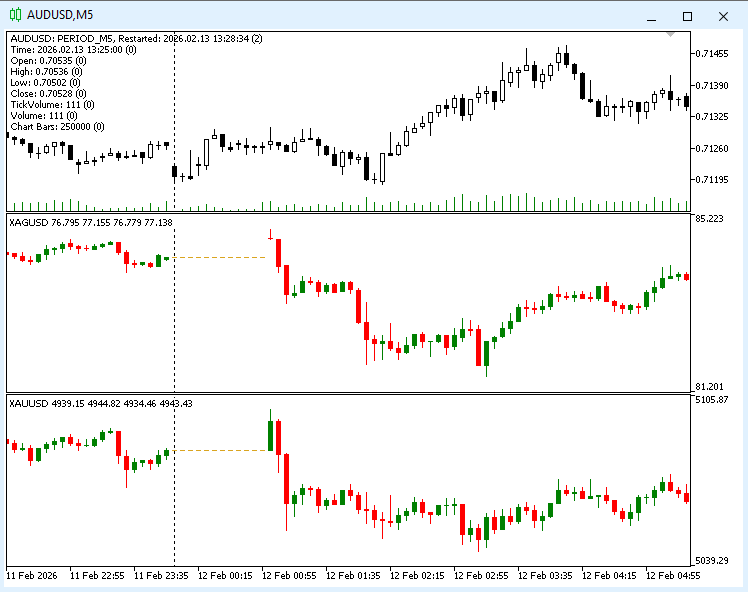
Fig. 2. Synchronized charts for multiple FOREX instruments
Figure 3 shows another example of how the TestSync-MultyChart indicator works. Here, the moderately liquid OJH8 futures contract, traded on the Moscow Exchange (MOEX), is synchronized with the relatively liquid AFKS stock. For comparison, the chart for the OJH8 instrument is shown below — this is how it looks in a separate window.
The blue arrow on the left points to the same bar on both charts. In this case, the indicator is configured to insert empty bars instead of interpolating (the mode is set to ENUM_SYNC_BARS_EMPTY), and the blue arrow on the right points to the section of the chart where there are missing bars for the OJH8 instrument.
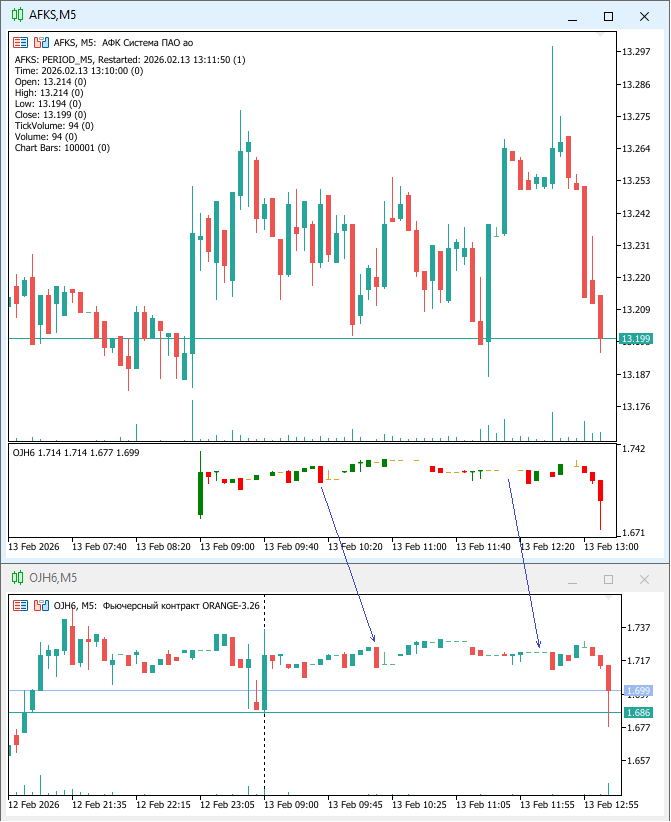
Fig. 3. Synchronized display of MOEX exchange charts with "gaps"
Practical Application: An Example of a Portfolio Value Indicator
This is an example of the second way to use the class CTimeSyncManager.
This indicator allows you to display an OHLC chart of the value of the instrument portfolio specified in the parameters in a separate indicator window, synchronized with the main chart. The full code for the indicator is included in the "SyncTest-MultyCurrency.mq5" file attached to this article.
The result of the indicator's operation is shown in Figure 4. Here, alongside the main EURGBP symbol chart, a chart showing the value of the following portfolio of instruments is displayed: BUY 0.01 EURGBP + SELL 0.01 EURUSD + BUY 0.01 GBPUSD. The portfolio structure is specified in the indicator settings as a string: "EURGBP,1;EURUSD,-1;GBPUSD,1".

Fig. 4. Synchronized display of a FOREX instrument portfolio
Conclusion
Using associative arrays from the MetaTrader 5 terminal's built-in library, we have created a fairly efficient, flexible mechanism for obtaining synchronized time-series data arrays that can be easily integrated into existing programs. Key advantages of the approach:
- Eliminating data desynchronization errors — ensuring accurate results from portfolio algorithms.
- Easy to integrate into existing projects — object-oriented code is used.
- Fairly fast access to data — based on associative arrays.
The table lists the files attached to the article:
| File name | Description |
|---|---|
| TimeSyncManager.mqh | A file containing class code for synchronizing data arrays |
| SyncTest-MultyChart.mq5 | A file containing the code for a test indicator that displays a synchronized multi-currency chart |
| SyncTest-MultyCurrency.mq5 | A file containing the code for a test indicator that displays a synchronized chart of the instrument portfolio value |
| MultyCurrencyManager.mqh | A file containing class code for calculating the portfolio value of instruments |
Translated from Russian by MetaQuotes Ltd.
Original article: https://www.mql5.com/ru/articles/21106
Warning: All rights to these materials are reserved by MetaQuotes Ltd. Copying or reprinting of these materials in whole or in part is prohibited.
This article was written by a user of the site and reflects their personal views. MetaQuotes Ltd is not responsible for the accuracy of the information presented, nor for any consequences resulting from the use of the solutions, strategies or recommendations described.



I haven’t finished reading it yet, but I already have a question about the use of associative arrays. Since all the sequences are sorted from the outset, wouldn’t it be simpler (and more efficient) to perform the merge in a single pass, incrementing the iterators within each of the arrays? For read access – using an index – the data structure remains unchanged – it should be faster than an associative array.
You’re making a query for 18 February 2026 at 00:00 using M1 bars. EURUSD has a bar at the start of the interval, but GBPUSD does not. How should the GBPUSD bar at the start of the interval be filled?
As can be seen from the implementation, there will be NaNs – by design, so to speak; I’ve observed this in the test logs as well. In such cases, you can instruct the AI to either look for the previous data point or skip such an incomplete start.
Here is a version that the AI has optimised for speed by pre-building a general timeline and also added a follow-up query for an earlier bar where necessary.
PS. The AI gets confused with its own variants because it churns them out at the drop of a hat, and here in the comment we’re referring to the end of the filling cycle, not the start. Next time, we’ll need to agree with the AI to label each version with a unique number or name ;-) to simplify references.
PPS. And the SymbolData.cursor field – a leftover from the previous version – is superfluous and needs to be removed.
PPPS. By the way, it named the local variable `m_prev`, whilst the prefix is obviously used in some coding styles only for class members ;-), so that’s another minor formatting bug. Keep a close eye on it.
Here is a version that the AI has optimised for speed and to which it has added a follow-up query for an earlier bar where necessary.
How much faster is it to write the required code using AI?
I suppose it depends very much on the task. I reckon I’d probably write this example manually about twice as slowly, but with complete confidence that it would work.
In other cases, AI has been a great help in solving non-trivial problems (due to features in most software and programming languages), resulting in a greater time saving.