

Creating an HTML Dashboard for Strategy Tester and Prop Firm Challenge Analysis in MQL5
 1 842
1 842
 0
0

Introduction
A profitable Strategy Tester run alone does not answer whether an Expert Advisor would pass a prop‑firm style challenge. Prop challenges are rule sets — profit target, daily loss limit, overall drawdown limit, minimum trading days, and sometimes a strict time window — and a single backtest start date can be misleading.
This article presents a practical, reusable evaluation layer: a small MQL5 module that monitors balance and equity during a test, normalizes them to a configurable “virtual” challenge account, and simulates either a single attempt or a rolling series of attempts (daily/weekly/monthly starts).
The evaluator reports whether each simulated attempt would have respected the specified rules, why it failed or remained incomplete, and produces two immediate outputs: a concise terminal summary and a shareable HTML dashboard. The module is intentionally a testing aid, not a certified replica of any firm's legal rulebook.
Defining the analysis goal
The goal is to build a reusable evaluator that can be added to an Expert Advisor with minimal integration work. During the test, it simulates one or more challenge attempts and produces a readable report at the end. In this article, a "challenge" refers to the rule set, while an "attempt" refers to one simulated run under those rules.
I deliberately use the word simulate. This module neither enforces broker rules nor attempts to replicate a specific company. Prop firms can use different definitions for daily loss limits, overall drawdown limits, time limits, and target confirmation. The aim is to build a practical evaluator framework, not a legal or contractual replica of any commercial challenge.
The module works with a virtual challenge balance. The real tester account might start with 10,000 or 50,000, while the challenge is evaluated as if it were a 100,000 account.
Normalizing the tester account to a virtual challenge account
Here is how real account values are converted into virtual challenge values.
double vBal = m_initialBalance * (rBal / m_challenges[i].startRealBalance);
double vEq  = m_initialBalance * (rEq / m_challenges[i].startRealBalance);
The conversion uses proportional normalization. The real balance at the start of the challenge is used as the common conversion base for both virtual balance and virtual equity. If the real account is 2 percent above its starting balance, the virtual balance is also 2 percent above the configured challenge balance. If open positions move equity, virtual equity moves proportionally too.
With the goal defined, the next step is to express the challenge model through configurable inputs.
Setting the challenge rules
The inputs are grouped into account model, risk limits, evaluation mode, and output options. Keeping them as EA inputs makes it easy to test the same strategy under different challenge assumptions.
input group "═══ Prop Firm Evaluation ═══"
input bool                    InpPropEnable            = true;
input double                  InpPropInitialBalance    = 100000.0;
input double                  InpPropProfitTargetPct   = 8.0;
input double                  InpPropMaxDailyLossPct   = 5.0;
input double                  InpPropMaxOverallLossPct = 10.0;
input int                     InpPropDurationDays      = 30;
input int                     InpPropMinTradingDays    = 5;
input ENUM_PROP_DD_MODE       InpPropDDMode            = PROP_DD_EQUITY;
input ENUM_PROP_DAILY_LOSS_MODE InpPropDailyLossMode   = DAILY_LOSS_EQUITY;
input ENUM_PROP_EVAL_MODE     InpPropEvalMode          = EVAL_ROLLING;
input ENUM_PROP_ROLLING_FREQ  InpPropRollingFreq       = FREQ_MONTHLY;
input bool                    InpPropWriteHTML         = true;
The values shown above are only an example configuration. The user can change the initial challenge balance, profit target, daily loss limit, overall drawdown limit, and minimum trading days. Two settings are especially important: whether the overall drawdown limit is checked on equity or balance, and whether the daily loss reference is based on the starting equity or balance of the day.
The evaluator supports single mode and rolling mode. In single mode, one challenge attempt starts and the next one begins only after the current attempt ends. In rolling mode, a new attempt starts every day, week, or month, which helps measure start-date sensitivity.
Breach conditions are checked before a pass is confirmed. Drawdown breaches are evaluated until the profit target is first reached. From that point, the attempt is treated as target-reached, reflecting the practical assumption that the objective ends once the target is met.
If a stricter rulebook requires drawdown checks to continue until the pass is formally confirmed, this condition can be adjusted accordingly.
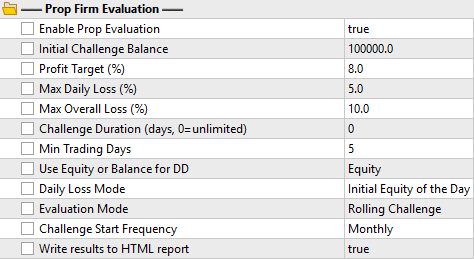
Image 1: PropEvaluator's external inputs in the Strategy Tester
Once the inputs are in place, each simulated attempt needs a compact internal state.
Preparing the MQL5 data structures
Each challenge attempt needs its own state: start time, end time, status, failure reason, trading days, daily loss reference, and final result. I store this information in one structure and keep all attempts in the same array.
struct SChallenge
  {
   int                    id;                // Challenge attempt identifier
   datetime               startTime;         // Start time of the attempt
   datetime               endTime;           // End time of the attempt
   double                 startRealBalance;  // Real balance at challenge start
   ENUM_CHALLENGE_STATUS  status;            // Current status of the attempt
   ENUM_FAILURE_REASON    failReason;        // Reason for failure if failed
   ENUM_INCOMPLETE_REASON incompleteReason;  // Reason for incomplete if timed out
   int                    tradingDays;       // Number of trading days counted
   int                    lastTradingDay;    // Last counted trading day (YYYYMMDD)
   double                 dailyStartValue;   // Daily starting value for loss calc
   int                    lastProcessedDay;  // Last processed calendar day (YYYYMMDD)
   double                 maxEquity;         // Maximum virtual equity reached
   double                 minEquity;         // Minimum virtual equity reached
   double                 finalBalance;      // Final virtual balance at end
   double                 finalEquity;       // Final virtual equity at end
   bool                   isTargetReached;   // Whether profit target was hit
  };
lastTradingDay prevents the same day from being counted twice. lastProcessedDay detects a new day and updates the daily loss reference. dailyStartValue stores the virtual balance or equity from which the daily loss limit is calculated.
Status, failure reason, and incomplete reason are represented as enumerations. The module uses separate enums for failure and incomplete outcomes: a failed challenge records a drawdown breach, while an incomplete challenge records whether it expired by timeout or by end of test.
enum ENUM_CHALLENGE_STATUS       // Challenge attempt status
  {
   STATUS_ACTIVE,                // Active
   STATUS_PASSED,                // Passed
   STATUS_FAILED,                // Failed
   STATUS_INCOMPLETE             // Incomplete
  };

enum ENUM_FAILURE_REASON         // Reason for challenge failure
  {
   REASON_NONE,                  // No failure
   REASON_DAILY_DRAWDOWN,        // Daily drawdown breach
   REASON_OVERALL_DRAWDOWN       // Overall drawdown breach
  };

enum ENUM_INCOMPLETE_REASON      // Reason for incomplete status
  {
   INCOMPLETE_NONE,              // No incomplete reason
   INCOMPLETE_TIMEOUT,           // Challenge duration expired
   INCOMPLETE_END_OF_TEST        // Backtest ended before completion
  };
The structure and enums are encapsulated inside CPropEvaluator. The EA only has to initialize the evaluator, call it on every tick, and finalize it at the end of the test.
After the data structures are prepared, the evaluator must simulate the logic for each attempt.
Starting a new challenge
When a new challenge attempt starts, the module stores the real balance at that moment. That value becomes the reference point used to normalize future balance and equity into the virtual challenge account. Here is the core initialization logic.
//+------------------------------------------------------------------+
//| Starts a new simulated challenge attempt and normalizes balances |
//+------------------------------------------------------------------+
void CPropEvaluator::StartNewChallenge(datetime now, double currentBal)
  {
   int size = ::ArraySize(m_challenges);
   ::ArrayResize(m_challenges, size + 1, 100);

   m_totalSimulated++;

   MqlDateTime dt;
   ::TimeToStruct(now, dt);
   int currentDay = dt.year * 10000 + dt.mon * 100 + dt.day;

   m_challenges[size].id               = m_totalSimulated;
   m_challenges[size].startTime        = now;
   m_challenges[size].endTime          = 0;
   m_challenges[size].startRealBalance = currentBal > 0 ? currentBal : 1.0;
   m_challenges[size].status           = STATUS_ACTIVE;
   m_challenges[size].failReason       = REASON_NONE;
   m_challenges[size].incompleteReason = INCOMPLETE_NONE;
   m_challenges[size].tradingDays      = 0;
   m_challenges[size].lastTradingDay   = 0;
   m_challenges[size].dailyStartValue  = m_initialBalance;
   m_challenges[size].lastProcessedDay = currentDay;
   m_challenges[size].maxEquity        = m_initialBalance;
   m_challenges[size].minEquity        = m_initialBalance;
   m_challenges[size].finalBalance     = m_initialBalance;
   m_challenges[size].finalEquity      = m_initialBalance;
   m_challenges[size].isTargetReached  = false;
  }
The fallback to 1.0 is only a safety guard against division by zero in abnormal cases. On the first day, dailyStartValue is initialized from the virtual initial balance and later updated when a new day is detected.
Single challenge and rolling challenge mode
Single mode answers one direct question: did this specific attempt pass, fail, or remain incomplete? Rolling mode is more useful for research because it creates a distribution of outcomes across different starting dates. The mode selection logic from the evaluator's OnTick-handling code is shown below.
if(m_evalMode == EVAL_SINGLE)
  {
   if(!m_singleStarted)
     {
      StartNewChallenge(now, rBal);
      m_singleStarted = true;
     }
  }
else
   if(m_evalMode == EVAL_ROLLING)
     {
      bool start = false;
      if(m_rollingFreq == FREQ_DAILY)
        {
         if(currentDay != m_lastStartDayKey)
           {
            start = true;
            m_lastStartDayKey = currentDay;
           }
        }
      else
         if(m_rollingFreq == FREQ_WEEKLY)
           {
            int currentWeekKey = (int)((now + 259200) / 604800);
            if(currentWeekKey != m_lastStartWeekKey)
              {
               start = true;
               m_lastStartWeekKey = currentWeekKey;
              }
           }
         else
            if(m_rollingFreq == FREQ_MONTHLY)
              {
               int currentMonthKey = dt.year * 100 + dt.mon;
               if(currentMonthKey != m_lastStartMonthKey)
                 {
                  start = true;
                  m_lastStartMonthKey = currentMonthKey;
                 }
              }

      if(start)
        {
         StartNewChallenge(now, rBal);
        }
     }
The daily key includes year, month, and day. The monthly key includes year and month. The weekly key is based on elapsed weeks and does not reset at year boundaries. This avoids confusing a new period with an earlier one that shares the same day or month number.
For example, a monthly rolling test over fifteen years can simulate around 180 attempts. That does not guarantee future behavior, but it gives more information than one isolated start date.
Detecting trading days
Many challenges require a minimum number of trading days. In this implementation, a day is counted as a trading day when there is at least one open position or when the real balance has changed since the previous tick.
bool isTradingToday = (::PositionsTotal() > 0) || (rBal != m_lastRealBalance);
m_lastRealBalance = rBal;

if(isTradingToday && m_challenges[i].lastTradingDay != currentDay)
  {
   m_challenges[i].lastTradingDay = currentDay;
   m_challenges[i].tradingDays++;
  }
This is a simplified account-level activity proxy rather than a formal rulebook definition, so it should be treated as an approximation. PositionsTotal() observes the whole account, not a specific symbol, strategy, or magic number. For strategy-specific counting, this part should be replaced with a history-based detector that filters deals by symbol and magic number.
The approximation may differ materially from a specific prop firm's rules. A strategy that keeps positions open overnight may overcount trading days, because an open position still exists on the account when the next calendar day begins.
Handling the daily starting value
A daily loss limit is separate from the overall drawdown limit. It usually resets its reference at the beginning of each trading day, so the evaluator stores that reference in dailyStartValue.
if(currentDay != m_challenges[i].lastProcessedDay)
  {
   double vBalToday = m_initialBalance * (rBal / m_challenges[i].startRealBalance);
   double vEqToday  = m_initialBalance * (rEq / m_challenges[i].startRealBalance);

   m_challenges[i].dailyStartValue = (m_dailyLossMode == DAILY_LOSS_EQUITY) ? vEqToday : vBalToday;
   m_challenges[i].lastProcessedDay = currentDay;
  }
m_dailyLossMode decides whether the daily reference is based on virtual equity or virtual balance.
Calculating target and drawdown limits
Once virtual balance and virtual equity are known, the evaluator calculates the profit target, the overall drawdown limit, and the daily loss limit.
double targetVal    = m_initialBalance * (1.0 + m_profitTargetPct / 100.0);
double overallLimit = m_initialBalance * (1.0 - m_maxOverallLossPct / 100.0);
double dailyLimit   = m_challenges[i].dailyStartValue - m_initialBalance * (m_maxDailyLossPct / 100.0);

double currentValForDD = (m_ddMode == PROP_DD_EQUITY) ? vEq : vBal;
if(!m_challenges[i].isTargetReached)
  {
   if(currentValForDD < overallLimit)
     {
      m_challenges[i].status       = STATUS_FAILED;
      m_challenges[i].failReason   = REASON_OVERALL_DRAWDOWN;
      m_challenges[i].endTime      = now;
      m_challenges[i].finalBalance = vBal;
      m_challenges[i].finalEquity  = vEq;
      m_failedCount++;
      m_overallBreachCount++;
      continue;
     }
   if(currentValForDD < dailyLimit)
     {
      m_challenges[i].status       = STATUS_FAILED;
      m_challenges[i].failReason   = REASON_DAILY_DRAWDOWN;
      m_challenges[i].endTime      = now;
      m_challenges[i].finalBalance = vBal;
      m_challenges[i].finalEquity  = vEq;
      m_failedCount++;
      m_dailyBreachCount++;
      continue;
     }
  }
The comparison uses <, so the attempt fails when the selected value falls below the limit. If failure must occur exactly at the limit, the comparison can be changed to <=. If the overall drawdown limit should be checked only on closed balance, m_ddMode can be set to balance mode.
Passing, failing, and expiring
A challenge attempt can pass, fail because of a drawdown breach, or remain incomplete if the required conditions are not met before it expires or before the test ends. Here is the core evaluation and expiration logic.
if(vEq >= targetVal && !m_challenges[i].isTargetReached)
  {
   m_challenges[i].isTargetReached = true;
  }

if(m_challenges[i].isTargetReached && m_challenges[i].tradingDays >= m_minTradingDays)
  {
   m_challenges[i].status       = STATUS_PASSED;
   m_challenges[i].endTime      = now;
   m_challenges[i].finalBalance = vBal;
   m_challenges[i].finalEquity  = vEq;
   m_passedCount++;
   continue;
  }
Target detection is equity-based in this implementation, because the condition uses vEq. A balance-based model can use vBal instead.
Expiration is checked only if m_durationDays is greater than zero. If m_durationDays is zero, the challenge has no time limit.
if(m_durationDays > 0)
  {
   if(now - m_challenges[i].startTime >= m_durationDays * 86400)
     {
      if(m_challenges[i].isTargetReached && m_challenges[i].tradingDays >= m_minTradingDays)
        {
         m_challenges[i].status       = STATUS_PASSED;
         m_challenges[i].endTime      = now;
         m_challenges[i].finalBalance = vBal;
         m_challenges[i].finalEquity  = vEq;
         m_passedCount++;
        }
      else
        {
         m_challenges[i].status           = STATUS_INCOMPLETE;
         m_challenges[i].incompleteReason = INCOMPLETE_TIMEOUT;
         m_challenges[i].endTime          = now;
         m_challenges[i].finalBalance     = vBal;
         m_challenges[i].finalEquity      = vEq;
         m_incompleteCount++;
        }
     }
  }
When an attempt expires without meeting all pass conditions, its status is set to STATUS_INCOMPLETE and the incompleteReason is recorded as INCOMPLETE_TIMEOUT. This separates timeout from active failures, making the report more informative.
Finalizing active challenges
When the backtest ends, some attempts may still be active. OnDeinit() finalizes them using the last available tester account state. Attempts that already met the target and minimum trading days are counted as Passed; the others are counted as STATUS_INCOMPLETE with the reason set to INCOMPLETE_END_OF_TEST.
The following excerpt shows the finalization logic. The full implementation in the attached file includes the complete PrintReport() and WriteHTML() calls.
//+------------------------------------------------------------------+
//| Finalizes incomplete challenges and outputs evaluation reports   |
//+------------------------------------------------------------------+
void CPropEvaluator::OnDeinit(void)
  {
   if(!m_enable)
      return;

   datetime now  = ::TimeCurrent();
   double   rBal = ::AccountInfoDouble(ACCOUNT_BALANCE);
   double   rEq  = ::AccountInfoDouble(ACCOUNT_EQUITY);

//--- Finalize any still active challenges
   int totalChallenges = ::ArraySize(m_challenges);
   for(int i = 0; i < totalChallenges; i++)
     {
      if(m_challenges[i].status == STATUS_ACTIVE)
        {
         double vBal = m_initialBalance * (rBal / m_challenges[i].startRealBalance);
         double vEq  = m_initialBalance * (rEq / m_challenges[i].startRealBalance);

//--- Check if it actually met the conditions at the very end
         if(m_challenges[i].isTargetReached && m_challenges[i].tradingDays >= m_minTradingDays)
           {
            m_challenges[i].status       = STATUS_PASSED;
            m_challenges[i].endTime      = now;
            m_challenges[i].finalBalance = vBal;
            m_challenges[i].finalEquity  = vEq;
            m_passedCount++;
           }
         else
           {
            m_challenges[i].status           = STATUS_INCOMPLETE;
            m_challenges[i].incompleteReason = INCOMPLETE_END_OF_TEST;
            m_challenges[i].endTime          = now;
            m_challenges[i].finalBalance     = vBal;
            m_challenges[i].finalEquity      = vEq;
            m_incompleteCount++;
           }
        }
     }

//--- Print Report
   PrintReport();

//--- Write HTML Report
   if(m_writeHTML)
     {
      WriteHTML();
     }
  }
This prevents late rolling attempts from disappearing just because the tested period ended before they had enough time to reach a final result.
Including the evaluator in an Expert Advisor
The module is written as an .mqh file, so the same logic can be reused in different Expert Advisors.
#include "PropEvaluator.mqh"
I create one global evaluator instance at the EA level, because the module observes the whole account during the test.
CPropEvaluator g_propEvaluator;
The evaluator is configured and initialized in OnInit(), after the normal EA setup. As per Object-Oriented Programming (OOP) best practices, the module is completely self-contained and does not read the EA's global input variables directly. Instead, the EA passes the input parameters to the evaluator instance using public setters before calling Init(). The following excerpts show only the integration calls; the full EA code would include its own initialization, strategy logic, and cleanup.
//+------------------------------------------------------------------+
//| Expert initialization function                                   |
//+------------------------------------------------------------------+
int OnInit()
  {
//--- normal EA initialization here

   g_propEvaluator.SetEnable(InpPropEnable);
   g_propEvaluator.SetInitialBalance(InpPropInitialBalance);
   g_propEvaluator.SetProfitTargetPct(InpPropProfitTargetPct);
   g_propEvaluator.SetMaxDailyLossPct(InpPropMaxDailyLossPct);
   g_propEvaluator.SetMaxOverallLossPct(InpPropMaxOverallLossPct);
   g_propEvaluator.SetDurationDays(InpPropDurationDays);
   g_propEvaluator.SetMinTradingDays(InpPropMinTradingDays);
   g_propEvaluator.SetDDMode(InpPropDDMode);
   g_propEvaluator.SetDailyLossMode(InpPropDailyLossMode);
   g_propEvaluator.SetEvalMode(InpPropEvalMode);
   g_propEvaluator.SetRollingFreq(InpPropRollingFreq);
   g_propEvaluator.SetWriteHTML(InpPropWriteHTML);

   g_propEvaluator.Init();

   ::Print("EA initialized successfully.");
   return INIT_SUCCEEDED;
  }
During the backtest, it must be called on every tick. In a portfolio EA, I first let the strategies process the tick and then call the evaluator, so it reads the updated account state.
//+------------------------------------------------------------------+
//| Expert tick function                                             |
//+------------------------------------------------------------------+
void OnTick()
  {
   for(int i = 0; i < 4; i++)
     {
      strategies[i].ProcessTick();
     }

   g_propEvaluator.OnTick();
  }
At the end of the test, OnDeinit() finalizes active attempts, prints the terminal report, and writes the HTML dashboard if enabled.
//+------------------------------------------------------------------+
//| Expert deinitialization function                                 |
//+------------------------------------------------------------------+
void OnDeinit(const int reason)
  {
   for(int i = 0; i < 4; i++)
      strategies[i].Deinit();

   ::EventKillTimer();
   CleanDashboard();

   g_propEvaluator.OnDeinit();
  }
The evaluator reads balance and equity with AccountInfoDouble(), so it does not need to know why trades were opened or how exits were managed.
double rBal = ::AccountInfoDouble(ACCOUNT_BALANCE);
double rEq  = ::AccountInfoDouble(ACCOUNT_EQUITY);
The accuracy of this model still depends on tester quality, tick modeling, commissions, swaps, spreads, and account state updates.
In summary, the minimal integration requires five steps:
- Include PropEvaluator.mqh in the EA source file.
- Create a global CPropEvaluator instance.
- Call its Init() method inside the EA's OnInit() function.
- Call its OnTick() method inside the EA's OnTick() function, after your strategy logic.
- Call its OnDeinit() method inside the EA's OnDeinit() function.
Printing a terminal report
Before generating the HTML dashboard, the evaluator prints a text summary in the Experts journal. This is useful during development because the main result can be checked without opening the browser report.
The snippet below shows the main counts and rates. The full module also prints diagnostic statistics such as average trading days, time to pass, maximum and minimum virtual equity, average final equity, and failure reason counts.
SDiagnostics d = ComputeDiagnostics();

::Print("Total Challenges Simulated: ", ::IntegerToString(m_totalSimulated));
::Print("Passed: ", ::IntegerToString(m_passedCount));
::Print("Failed: ", ::IntegerToString(m_failedCount));
::Print("Incomplete: ", ::IntegerToString(m_incompleteCount));
::Print("Pass Rate: ", ::DoubleToString(d.passRate, 2), "%");
::Print("Failure Rate: ", ::DoubleToString(d.failRate, 2), "%");
::Print("Incomplete Rate: ", ::DoubleToString(d.incRate, 2), "%");
A typical terminal summary is shown below, as it appears in the Experts journal after a rolling evaluation run.
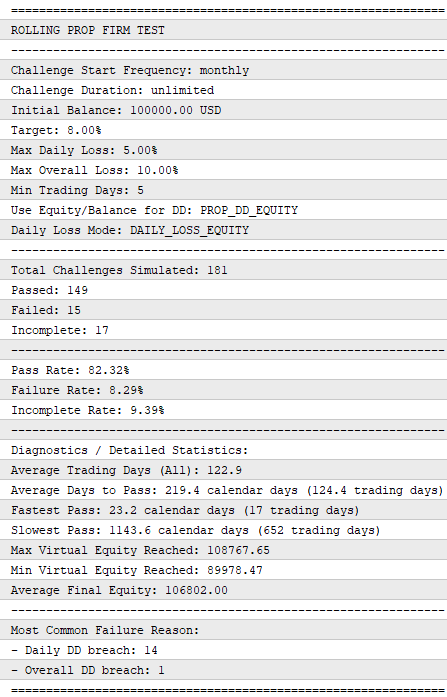
Image 2: Terminal summary in the Experts journal
Generating the HTML report
The terminal report is useful for diagnostics, but the HTML dashboard is easier to read and share. At the end of the test, the module opens a local file and writes a complete HTML page with summary cards, diagnostic statistics, and a challenge history table.
string filename = "PropFirm_Dashboard_" + ::MQLInfoString(MQL_PROGRAM_NAME) + ".html";
int fileHandle = ::FileOpen(filename, FILE_WRITE | FILE_TXT | FILE_ANSI);
if(fileHandle == INVALID_HANDLE)
  {
   ::Print("PropFirm: Failed to open file for writing HTML: ", filename);
   return;
  }
MQL5 file functions are sandboxed. The file is created in the terminal's Files directory (or in the tester agent's files directory in the Strategy Tester). The printed path is only a convenience message. With this filename, each new run of the same EA overwrites the previous report. If unique reports are needed, append the date or test parameters to the filename.
The page is assembled line by line using FileWrite(). Here is how the summary cards are generated. For clarity, only the card block is shown here; the full implementation in the attached file contains the complete CSS, header, diagnostics grid, chart section, and challenge history table.
::FileWrite(fileHandle, "<div class='grid'>");
::FileWrite(fileHandle, "  <div class='card'><h3>Simulated</h3><div class='value'>" + ::IntegerToString(m_totalSimulated) + "</div><div class='subtext'>Total Challenges</div></div>");
::FileWrite(fileHandle, "  <div class='card'><h3>Passed</h3><div class='value text-green'>" + ::IntegerToString(m_passedCount) + "</div><div class='subtext'>" + ::DoubleToString(d.passRate, 2) + "% Pass Rate</div></div>");
::FileWrite(fileHandle, "  <div class='card'><h3>Failed</h3><div class='value text-red'>" + ::IntegerToString(m_failedCount) + "</div><div class='subtext'>" + ::DoubleToString(d.failRate, 2) + "% Failure Rate</div></div>");
::FileWrite(fileHandle, "  <div class='card'><h3>Incomplete</h3><div class='value text-blue'>" + ::IntegerToString(m_incompleteCount) + "</div><div class='subtext'>" + ::DoubleToString(d.incRate, 2) + "% Incomplete</div></div>");
::FileWrite(fileHandle, "</div>");
The full implementation can contain a larger CSS block for the light dashboard style, a diagnostics grid with average trading days and time-to-pass statistics, and a detailed challenge history table where each row displays the attempt ID, dates, status, failure or incomplete reason, trading days, and equity extremes.
The resulting dashboard is shown below.
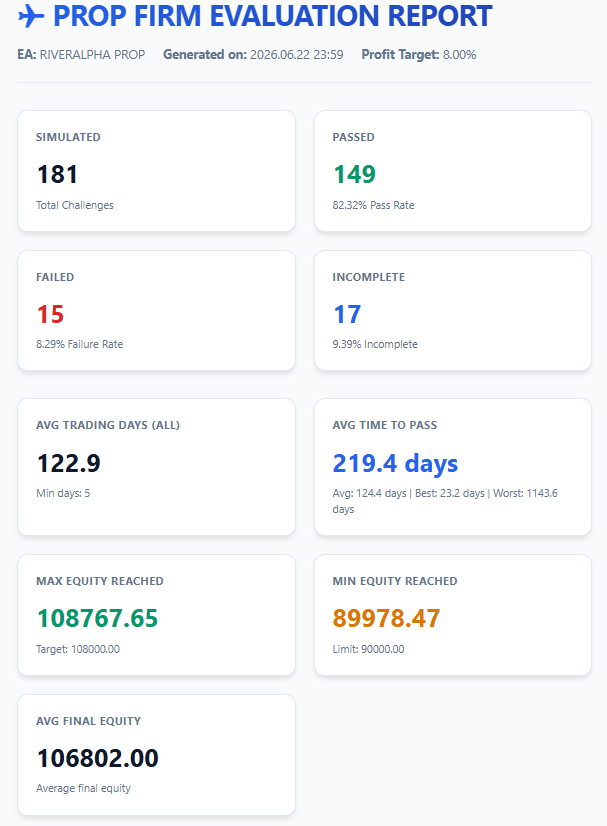
Image 3: HTML dashboard with summary cards and key statistics
Optional visual charts
The working version also includes two client-side charts: one for the distribution of Passed, Failed, and Incomplete attempts, and one for pass speed distribution by calendar days.
If the dashboard loads Chart.js from a CDN, the HTML file is not fully self-contained. The report is still generated locally by MQL5, but the chart library is external. For a fully offline report, remove the CDN dependency and keep cards, tables, or CSS-based visuals only.
//--- Scripts for Charting : this part is optional. Remove it if the report must remain fully offline.
::FileWrite(fileHandle, "<script src='https://cdn.jsdelivr.net/npm/chart.js'></script>");
::FileWrite(fileHandle, "<script>");
::FileWrite(fileHandle, "const ctx1 = document.getElementById('statusChart').getContext('2d');");
::FileWrite(fileHandle, "new Chart(ctx1, {");
::FileWrite(fileHandle, "  type: 'doughnut',");
::FileWrite(fileHandle, "  data: {");
::FileWrite(fileHandle, "    labels: ['Passed', 'Failed', 'Incomplete'],");
::FileWrite(fileHandle, "    datasets: [{");
::FileWrite(fileHandle, "      data: [" + ::IntegerToString(m_passedCount) + ", " + ::IntegerToString(m_failedCount) + ", " + ::IntegerToString(m_incompleteCount) + "],");
::FileWrite(fileHandle, "      backgroundColor: ['#10b981', '#ef4444', '#3b82f6'],");
::FileWrite(fileHandle, "      borderColor: '#ffffff',");
::FileWrite(fileHandle, "      borderWidth: 2");
::FileWrite(fileHandle, "    }]");
::FileWrite(fileHandle, "  }");
::FileWrite(fileHandle, "});");
::FileWrite(fileHandle, "</script>");
The chart section is shown in the following image.
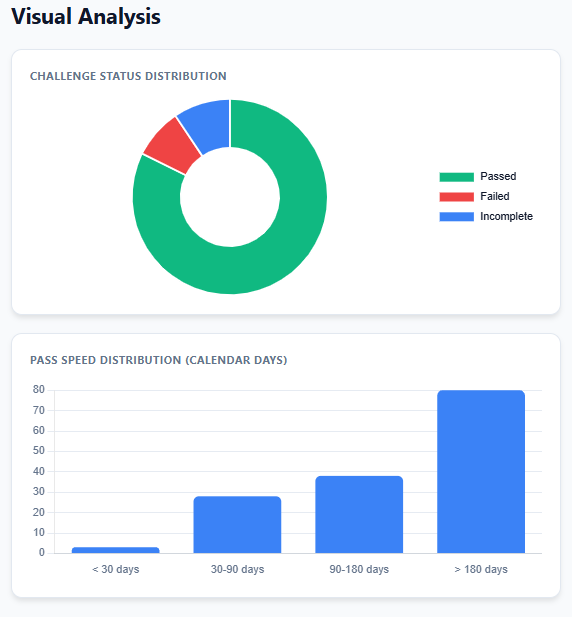
Image 4: Optional visual charts powered by Chart.js
Interpreting the dashboard
The dashboard should change how the test is read. A normal Strategy Tester result may look positive, but the evaluator can show that only a small percentage of monthly attempts passed, or that most failures came from daily loss limit breaches rather than overall drawdown limit breaches.
- If failures are mostly caused by overall drawdown limit breaches, exposure or stop logic may need work.
- If attempts remain incomplete because of trading days, the issue may be trade frequency or challenge duration.
- If results depend heavily on the starting month, rolling evaluation exposes that dependence.
It turns a vague impression into a concrete diagnostic.
A simple example
In one illustrative monthly rolling test across a long historical sample, the standard backtest ends in profit, with reasonable drawdown and a profit factor above 1. The evaluator is enabled with a 100,000 initial challenge balance, 8 percent target, 5 percent daily loss limit, 10 percent overall drawdown limit, unlimited duration, and 5 minimum trading days.
In the example report, the dashboard shows 180 total attempts: 149 Passed, 15 Failed, and 17 remained Incomplete. That result is useful, but it still has to be read together with failure reasons, average time to pass, and minimum equity reached during the attempts.
The strategy may be profitable over time, but the dashboard shows whether its return path is compatible with the selected challenge model. The challenge history table for this example run is shown below.
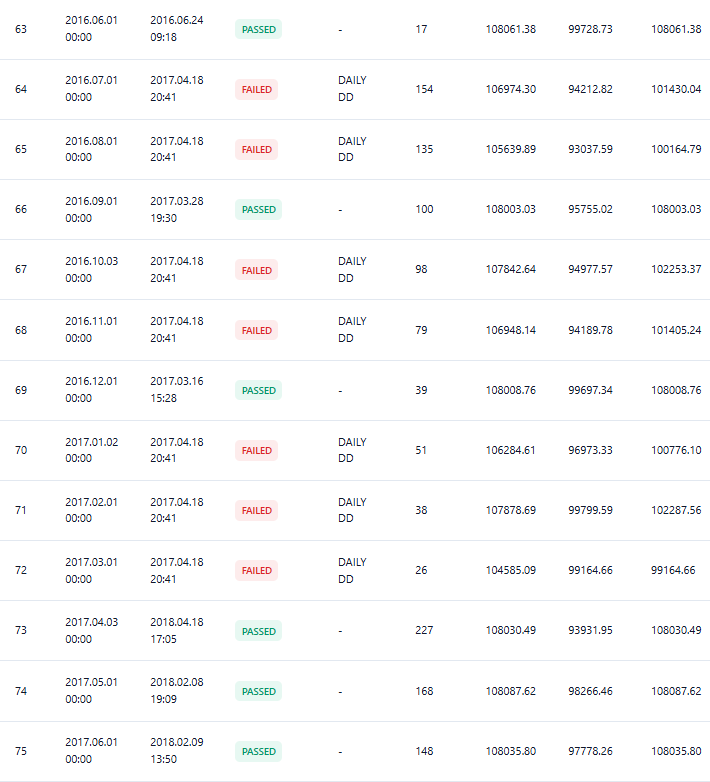
Image 5: Challenge history table showing each attempt and its result
Limitations
No evaluator should be treated as absolute truth. This implementation is a generic evaluator framework, not a certified match to any specific prop firm rulebook. Its precision depends on backtest quality, broker conditions, tick data, commissions, swaps, spreads, and execution assumptions.
The daily loss limit is another important limitation. The module updates the daily starting value when a new date is detected from TimeCurrent(), but a real rulebook may require a specific server cut-off time, time zone, or end-of-day equity reference.
Intraday equity excursions are only as reliable as the tester modeling quality. Rolling evaluation also remains historical simulation: a system that passed many historical attempts can still fail in the future.
Possible improvements
The current version is intentionally compact, but several extensions would make it more flexible:
- For filtering, the evaluator could support magic number, symbol, or strategy group selection.
- For export, CSV or JSON output would make deeper analysis easier in Python, Excel, or another tool.
- For reporting, a pure CSS equity curve could keep the dashboard fully offline.
- For automation, the module could send a report notification or the saved report path to Telegram, or save a copy in the common files folder for multi-terminal workflows.
Conclusion
The PropEvaluator complements the Strategy Tester by converting an overall backtest into a rule‑based assessment of challenge fitness. By normalizing real tester balances to a virtual challenge size, tracking per‑attempt state (start/end, trading days, daily reference, max/min equity), and supporting single and rolling modes, the module makes it straightforward to answer: “Would this strategy have met these exact constraints — and if not, why?”
Integration is minimal (include the .mqh, create an instance, and call Init → OnTick → OnDeinit), and outputs include a terminal summary plus an HTML dashboard with per‑attempt history, failure reasons (daily vs. overall drawdown), and basic diagnostics.
Important assumptions and limitations are explicit: the evaluator is a practical simulator (not a legal replica), equity/ balance reference choices and the default behavior of suspending drawdown checks after a target is first reached are configurable, and accuracy depends on backtest data quality and account modeling. Used in rolling mode, the evaluator reveals start‑date sensitivity and provides a more actionable diagnostic than a single backtest curve.
Warning: All rights to these materials are reserved by MetaQuotes Ltd. Copying or reprinting of these materials in whole or in part is prohibited.
This article was written by a user of the site and reflects their personal views. MetaQuotes Ltd is not responsible for the accuracy of the information presented, nor for any consequences resulting from the use of the solutions, strategies or recommendations described.

 Automating Classic Market Methods in MQL5 (Part 2): Wyckoff Cause and Effect—Point and Figure Price Targets
 Lazy-Loading Indicator Handles in MQL5: A Resource Manager Pattern for Multi-Timeframe EAs
 MQL5 Wizard Techniques you should know (Part 99): Using a KD-Tree and an Echo State Network in a Custom Money Management Class
 MetaTrader 5 Machine Learning Blueprint (Part 18): Sequential Bootstrap, Corrected — Clone, Class Erasure, and the Comparison Toolkit

- Free trading apps
- Over 8,000 signals for copying
- Economic news for exploring financial markets
You agree to website policy and terms of use