XAU SL Lock Manager
- 专家
- 版本: 2.1
- 更新: 23 九月 2026
- 激活: 9

XAU SL Lock Manager
Gold Profit Lock Manager is a trade-management Expert Advisor for MetaTrader 5, designed to manage the Stop Loss of existing gold positions through a structured profit-locking system.
The EA does not analyze the market, generate entry signals or open trades on live and demo accounts. Its purpose is to take over Stop Loss management after a position is already open.
It can manage manual trades as well as positions opened by other Expert Advisors. Each position is monitored independently according to its own entry price, current Stop Loss and price movement.
How the Management Logic Works
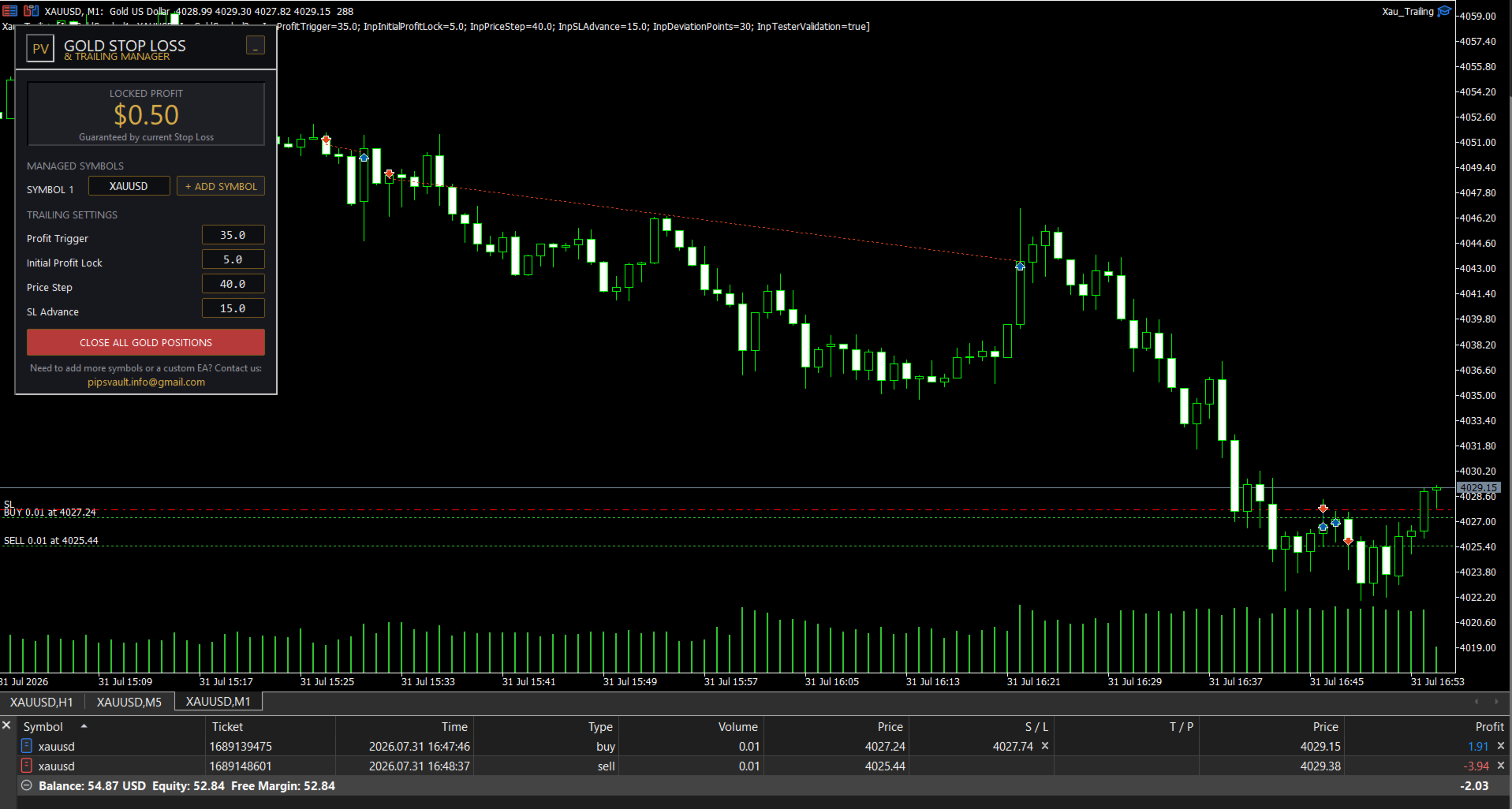
The default configuration uses four parameters:
| Parameter | Default value |
|---|---|
| Profit Trigger | 35 pips |
| Initial Profit Lock | 5 pips |
| Price Step | 40 pips |
| SL Advance | 15 pips |
When a position reaches 35 pips in profit, the EA moves the Stop Loss to 5 pips above the entry price for BUY positions or 5 pips below the entry price for SELL positions.
After activation, each additional 40-pip favorable price movement advances the Stop Loss by another 15 pips.
Example
| Position movement | Protected level |
|---|---|
| +35 pips | SL at +5 pips |
| +75 pips | SL at +20 pips |
| +115 pips | SL at +35 pips |
| +155 pips | SL at +50 pips |
The Stop Loss can only move in the direction that improves the position. It is never moved backward by the EA.
Manual Stop Loss Control
Manual control remains available at all times.
When the user moves the Stop Loss to a more favorable level, the EA recognizes the new level and uses it as the next management base.
This means that:
- a manually improved Stop Loss is preserved;
- Break Even can become the new base;
- the EA continues its step-based trailing logic from the updated level;
- an existing protected level is never reduced.
Stop Loss changes made by another Expert Advisor are handled in the same way when they improve the position.
Position Recovery
The latest management base is stored individually for every position.
After a MetaTrader restart, VPS restart, chart reload or temporary disconnection, the EA:
- Detects the existing managed positions.
- Loads the saved management state.
- Reads the current market price and current Stop Loss.
- Continues management from the most favorable valid level.
If price has already passed one or more trailing steps while the terminal was offline, the EA can move the Stop Loss directly to the level corresponding to the current price.
It does not move the Stop Loss backward to rebuild missed intermediate steps.
Locked Profit Display
The interface displays the estimated monetary value currently protected by the Stop Loss across all managed positions.
Only profit protected above the position entry price is included.
Positions without a profitable Stop Loss contribute zero to the displayed protected amount.
The value is recalculated using:
- current position volume;
- entry price;
- Stop Loss price;
- symbol tick size;
- symbol tick value;
- account currency conversion provided by MetaTrader.
Main Features
- Manages existing BUY and SELL positions
- Supports manual trades
- Supports trades opened by other Expert Advisors
- No Magic Number filtering
- Manages every position independently
- Supports hedging and netting accounts
- Supports up to two configured symbols
- Compatible with broker symbol suffixes and prefixes
- Configurable profit trigger and trailing steps
- Initial profit-lock function
- Step-based Stop Loss advancement
- Manual Stop Loss override recognition
- Break Even recognition
- Persistent position-state storage
- Automatic recovery after terminal or VPS restart
- Stop Loss never moves backward
- Broker stop-level and freeze-level validation
- Automatic retry when a Stop Loss modification is temporarily unavailable
- Estimated protected-profit display
- Compact dark chart interface
- Drag-and-drop panel
- Minimized panel mode
- Confirmation-protected Close All function
Managed Positions
The EA manages all open market positions belonging to the configured symbols, including:
- manually opened positions;
- positions opened by another Expert Advisor;
- pending orders after they become market positions.
The EA does not modify pending orders before activation.
Each position is handled separately according to its own:
- ticket;
- entry price;
- direction;
- volume;
- Stop Loss;
- saved trailing base.
Close All Function
The chart panel includes a confirmation-protected Close All button.
This function closes only positions belonging to the symbols currently configured inside the EA.
Positions on unrelated symbols are not affected.
Interface
The chart panel provides direct access to:
- managed symbols;
- Profit Trigger;
- Initial Profit Lock;
- Price Step;
- SL Advance;
- protected-profit value;
- Close All function.
The interface can be moved around the chart and minimized when additional chart space is required.
Settings are applied directly from the panel without requiring the EA to be removed and reattached.
Recommended Setup
| Setting | Recommendation |
|---|---|
| Platform | MetaTrader 5 |
| Primary instrument | XAUUSD / Gold |
| Timeframe | Any |
| Account mode | Hedging or Netting |
| Position source | Manual or automated |
| Minimum deposit | Not fixed |
| VPS | Recommended for continuous management |
| AutoTrading | Must be enabled |
| Number of managed symbols | Maximum 2 |
The EA can be attached to any chart timeframe because its management logic is based on live position and price information rather than candle signals.
For continuous Stop Loss management, MetaTrader should remain connected and AutoTrading should remain enabled.
Symbol Configuration
Broker symbol names may differ.
Common examples include:
XAUUSD XAUUSD.a XAUUSDm GOLD GOLD.pro
Enter the exact symbol name displayed in the broker’s Market Watch.
A second symbol can be added directly from the interface when required.
Important Information
Gold Profit Lock Manager is a position-management utility. It is not an entry strategy and does not predict market direction.
The EA does not open trading positions during normal live or demo operation.
Stop Loss execution remains subject to broker and market conditions, including:
- spread;
- slippage;
- liquidity;
- price gaps;
- execution speed;
- stop levels;
- freeze levels;
- symbol specifications;
- connection availability.
During fast market movement or a price gap, a Stop Loss may be executed at a price different from the requested level.
The protected-profit value shown on the panel is an estimate based on the current Stop Loss and the symbol information supplied by MetaTrader. Final execution results may differ.
Users are responsible for testing the EA with their own broker, symbol specifications and account conditions before live use.