Delete Only Pending Orders

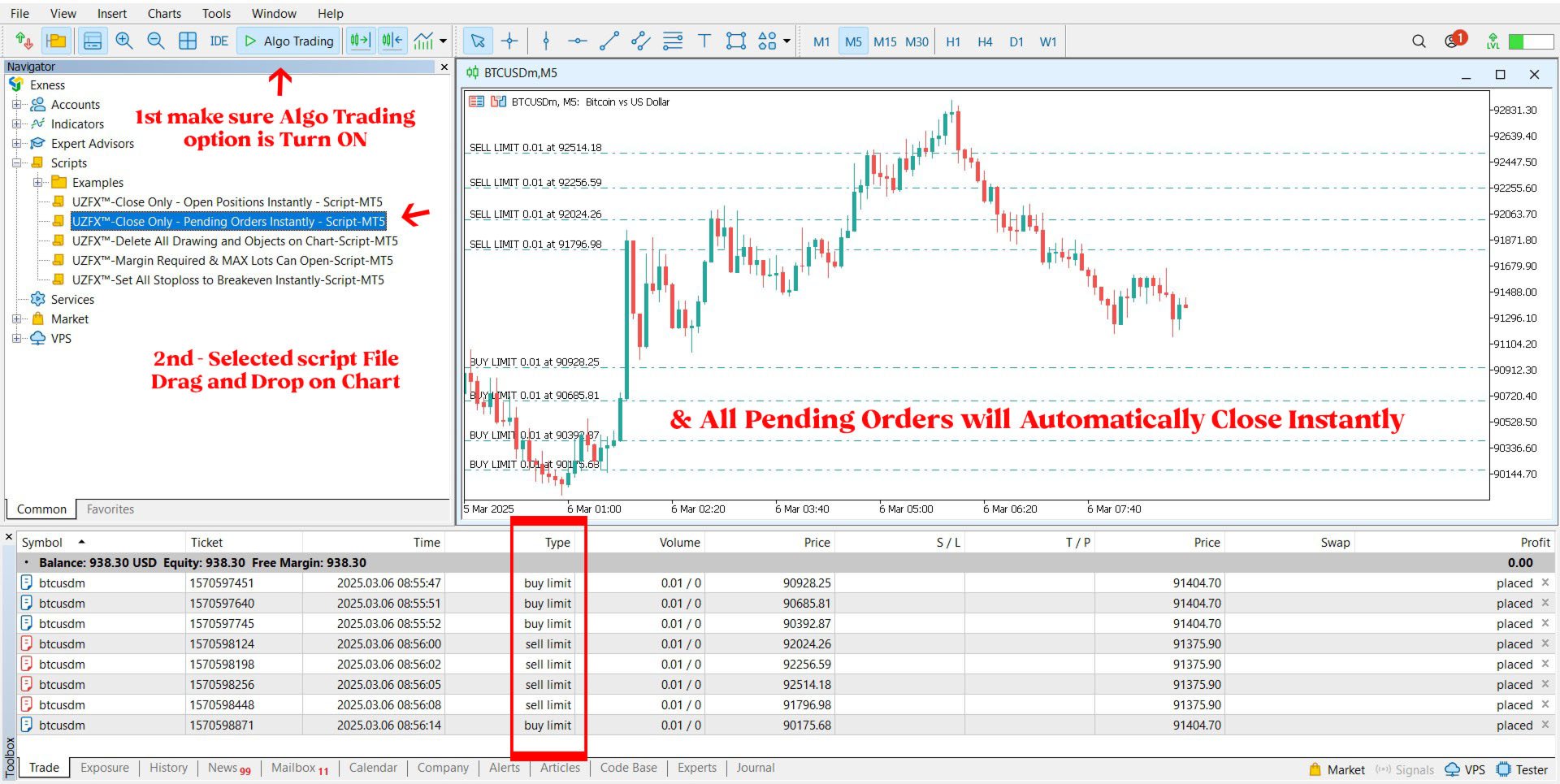
适用于 MetaTrader 5 (MT5) 的 UZFX™ - 仅删除挂单脚本是一款简单而有效的工具,可自动删除交易账户中的所有挂单(限价买入、限价卖出、止损买入、止损卖出)。该脚本非常适合希望在不影响活跃市场头寸的情况下即时清除挂单的交易者。


查看我的所有其他 MT4/MT5 指标和 EA >> 这里

功能:

删除所有挂单(买入限价单、卖出限价单、买入止损单、卖出止损单)。

不影响未结市场头寸。

通过专家选项卡提供实时执行反馈。

帮助交易者快速重置挂单策略,无需手动干预。

使用方法:

将脚本附加到 MT5 图表。

脚本将自动扫描并删除所有挂单。

注意:

该脚本不会关闭有效交易,只会删除挂单。

运行脚本前,请确保您要删除所有挂单。

它适用于账户中的所有交易符号,而不仅仅是所附图表。

开发者: UZFX-LABS

Version: 1.00

Year: 2025


下载 mt4 脚本 : 133840
推荐产品
适用于 MetaTrader 5 (MT5) 的 UZFX - 所需保证金和最大手数脚本旨在帮助交易者快速确定开立 1 手头寸所需的保证金,并根据其当前账户净值计算可交易的最大手数。该工具对于风险管理和头寸大小至关重要,可帮助交易者有效规划交易。 功能 计算对所选符号开仓 1 手交易所需的保证金。 根据可用资金确定交易者可以开仓的最大手数。 使用当前卖出价精确计算保证金。 使用评论功能直接在图表上显示结果。 帮助交易者在管理杠杆和风险的同时优化仓位大小。 使用方法: 将脚本附加到所需交易符号的图表上。 脚本将计算并显示结果: 1 手所需保证金 基于可用资金的最大可交易手数 结果将显示在图表的左上角。 注意 脚本使用买入订单类型计算保证金。 最大手数是根据净值计算的,而不是自由保证金。 本脚本不进行交易;纯粹用于提供信息。 开发者:Usman Zabir - UZ 乌斯曼-扎比尔 - UZFX 版本: 1.00 年份: 2025 网站: https://www.mql5.com/en/users/forextycoons

FREE
适用于 MetaTrader 5 (MT5) 的 UZFX - 即时关闭所有未结买单和卖单脚本是一款功能强大的工具,交易者只需执行一次操作,即可立即关闭所有活跃的市场头寸。该脚本是紧急交易管理的理想工具,可帮助交易者在剧烈波动、新闻事件或策略调整期间快速退出市场。 功能 关闭所有符号的所有未结买入和卖出头寸。 使用最新的买入价/卖出价,执行准确。 帮助交易者即时退出市场,只需极少的手动操作。 使用方法 将脚本附加到 MT5 图表。 脚本将扫描并关闭所有未平仓的买入和卖出头寸。 专家选项卡中将显示每个平仓订单的确认信息。 注意 该脚本不会删除挂单,只会关闭活跃的市场头寸。 它适用于所有交易符号,而不仅仅是所附图表。 运行脚本前,请确保您要关闭所有仓位,因为脚本会立即执行。 开发者:Usman Zabir - UZ 乌斯曼-扎比尔 - UZFX 版本: 1.00 年份: 2025 网站: https://www.mql5.com/en/users/forextycoons
FREE
NATS (Niguru Automatic Trailing Stop) will help you achieve more profits, by setting the trailing stop automatically. Pair this NATS application with EA, or can also be used as a complement to manual trading. A trailing stop is a powerful tool in trading that combines risk management and profit optimization.  A trailing stop is a type of market order that sets a stop-loss at a percentage below the market price of an asset, rather than a fixed number. It dynamically adjusts as the asset’s pric
FREE
适用于 MetaTrader 5 (MT5) 的 UZFX - Set Stop Loss to Breakeven Instantly 脚本是一款功能强大的工具,允许交易者将所有未结头寸的止损点快速移动至其入场价格,确保无风险交易。该脚本尤其适用于有效管理活跃交易,确保一旦头寸出现有利变动,交易者就能免受潜在损失。 (访问简介并查看所有其他 MT4/MT5 产品) (请不要忘记给予评论) 功能: 自动将所有未结头寸的止损设置为盈亏平衡(入市价格)。 通过确保利润和尽量减少潜在损失来加强风险管理。 使用方法 将脚本附加到图表上;它将自动调整所有未结头寸。 如果某个仓位的止损已达到盈亏平衡点,则将跳过该仓位。 注意: 该脚本仅修改现有交易,不会下新订单。 它适用于所有未结头寸,与符号无关。 确保经纪商允许以准确的入市价格修改止损。
FREE
UZFX - 删除图表上的所有图形和对象是一个简单而功能强大的Metatrader 5(MT5)脚本,旨在立即从活动图表中删除所有绘图对象。该脚本对于需要从技术分析图,趋势线,斐波那契工具,文本标签和其他对象中快速清除图表的交易者很有用,而无需手动删除它们。 特征: 在活动图表上删除所有对象和图纸。 立即使用单个执行。 显示成功和失败删除的确认消息。 帮助交易者保持清洁无杂乱的图表以进行更好的分析。 用法: 将脚本连接到要删除所有对象的图表上。 脚本将自动循环遍历所有对象并删除它们。 专家选项卡中的一条消息将确认成功删除对象。 注意:此脚本不会影响图表上运行的开放订单,指标或专家顾问,而仅删除仅图形对象。 开发人员:Usman Zabir -UZFX 版本:1.00 年:2025年 网站:https:// www.mql5.com/en/users/forextycoons
FREE
CloseAllOrders at once
Lamont Simone Reynecke
Simple program i created, to help close all your orders instantly when you are busy scalping the market or if you want to avoid news days but still have a lot of orders and pending orders open and can't close them in time.. with this script all you're problems will be solved. Simple drag and drop and the script automatically does it's thing, quick and easy  also a very good tool to use when scalping
FREE
Overview AlgoNLP.mqh   is a standalone MQL5 library that converts   human-written trading instructions   into   structured trade intents   that your Expert Advisor (EA) or indicator can understand. Example input: Buy gold at 2370 with TP 0.3% and SL 1% Output intent: Side: BUY | Type: LIMIT | Symbol: XAUUSD | Entry: 2370 | TP: 0.3% | SL: 1% | Lot: 0.00 This enables you to build   chat-controlled   or   Telegram-integrated EAs   that can interpret plain English commands and execute structured
FREE
Trading Notes   is an innovative tool designed for traders to streamline their decision-making process by allowing them to write and display important reminders or short details directly over their trading charts. This essential feature ensures that traders have quick access to their personalized checklist before opening any positions, enhancing their trading efficiency and accuracy. MT4 Version -  https://www.mql5.com/en/market/product/120613 Key Features: Five Customizable Input Fields:   Trad
FREE
This simple logging library is designed to provide clear and contextual log output with minimal hassle. It exposes five  methods: LogError Message (message) LogWarn Message (message) LogInfo Message (message) LogDebug Message (message) LogTrace Message (message) Each method prints the provided message to the console only if the severity level meets or exceeds the current threshold set by a global variable logLevel. This means you control the verbosity of your application's logs by adjusting logL
FREE
The MetaCOT 2 CFTC ToolBox Demo is a special version of the fully functional MetaCOT 2 CFTC ToolBox MT5 library. The demo version has no restrictions, however, unlike the fully functional version, it outputs data with a delay. The library provides access to the CFTC (U.S. Commodity Futures Trading Commission) reports straight from the MetaTrader terminal. The library includes all indicators that are based on these reports. With this library you do not need to purchase each MetaCOT indicator sepa
FREE
K Trade Lib5
Kaijun Wang
2 (1)
MT4/5通用交易库(  一份代码通用4和5 ) #import "K Trade Lib5.ex5"    //简单开单    long OrderOpen( int type, double volume, int magic, string symbol= "" , string comment= "" , double opprice= 0 , double sl= 0 , double tp= 0 , int expiration= 0 , bool slsetmode= false , bool tpsetmode= false );    //复杂开单    void SetMagic( int magic, int magic_plus= 0 ); void SetLotsAddMode(int mode=0,double lotsadd=0);    long OrderOpenAdvance( int mode, int type, double volume, int step, int magic, string symbol= "" , string comm
FREE
MarketPro toolkit
Johannes Hermanus Cilliers
Start earning profits by copying All trades are sent by our successful Forex trader & are extremely profitable. You can earn profits by copying trades daily Trial Period included You'll also get access to extremely powerful trading education which is designed in a simple way for you to become a profitable trader, even if you have no trading experience. https://ec137gsj1wp5tp7dbjkdkxfr4x.hop.clickbank.net/?cbpage=vip
FREE
Axilgo PipPiper CoPilot
Theory Y Technologies Pty Ltd
5 (2)
Axilgo Pip Piper CoPilot Elevate your trading game with the Axilgo Pip Piper CoPilot, the first in our revolutionary Pip Piper Series. This all-inclusive toolset is meticulously crafted for serious traders, focusing on key areas such as Risk Management, Trade Management, Prop Firm Rule Compliance, and Advanced Account Management . With CoPilot, you’re not just investing in a tool—you’re gaining a strategic partner in the intricate world of trading. Important Notice: To ensure you receive the fu
FREE
Sniper Utility Rimani sempre aggiornato sui tuoi trade, ovunque tu sia. Sniper Utility invia notifiche immediate ogni volta che uno dei tuoi ordini raggiunge il Take Profit o lo Stop Loss . Perfetta per trader attivi che desiderano monitorare le proprie operazioni senza dover controllare costantemente il terminale. ️ Funzionalità principali Notifica istantanea alla chiusura dell’ordine (TP o SL) Compatibile con notifiche push su dispositivi mobili Supporto per ordini manuali, EA e p
AP Fibonacci Retracement PRO (MT5) Overview AP Fibonacci Retracement PRO is a trend-continuation pullback EA. It waits for a confirmed swing, calculates the Fibonacci retracement zone, and looks for entries in the direction of the original move. No grid, no martingale. Strategy logic Detects the last valid swing high/low using Fractals on the selected signal timeframe. Calculates the retracement zone between 38.2% and 61.8% (configurable). On a closed bar, if price is inside the zone (with opti
FREE
Lib5 EAPadPRO for MT5
Vladislav Andruschenko
4.5 (6)
用于将信息面板添加到您的 MetaTrader 5 EA 的库。 我们不能保证程序的信息和界面会让您在交易中获利,但我们可以肯定地说,即使是最简单的程序界面也能增强第一印象。 将我们的面板添加到您的 智能交易系统的 详细说明和说明在我们的博客中:   LIB - EAPADPRO 分步说明 我们面板的详细说明和使用 EAPADPRO 的说明 MetaTrader 4 库版本 添加的过程包括 10 个步骤 ,我们的文章中详细介绍了它们。 安装库 从此站点安装库; 打开您的智能交易系统; 打开我们的示例和安装代码的分步指南,文件 Exp - EAPADPRO LIBRARY TEST(可以在博客中找到)   ; 按照建议中的说明执行每个步骤,或使用我们网站上的分步说明。 EAPADPRO 个性化 本段描述了您可以在我们的面板中更改的所有内容: versionea   - 面板中显示的智能交易系统版本; BMPLOGO   - 显示在面板上的 BMP 60x60 顾问的徽标; icon   - 您的专家的图标,显示在专家的属性中; defEANAME - 面板中显示的您的智能 交易系统的名
FREE
MACD Colored ZeroLag
Farzin Sadeghi Bonjar
4.7 (10)
It is the MQL5 version of zero lag MACD that was available for MT4 here: https://www.mql5.com/en/code/9993 Also there was a colored version of it here but it had some problems: https://www.mql5.com/en/code/8703 I fixed the MT4 version which has 95 lines of code. It took me 5 days to write the MT5 version.(reading the logs and testing multiple times and finding out the difference of MT5 and MT4!) My first MQL5 version of this indicator had 400 lines of code but I optimized my own code again and n
FREE
Second Level Candles And Alligator Indicators 每12秒产生一个K线,而且自带Alligator指标,对超短线选手交易非常有帮助。程序启动时可能不成功,是因为MT5 MqlTick 数据加载少的原因。可以通过修改显示的数据参数避免,比如display=100,程序正常之后再将参数调大 display=300 。如果数据不正常,也可以采用重新加载的方式解决。 如果您对这个指标有任何建议,请联系作者。  Second Level Candles And Alligator Indicators  produced a candle per 12 seconds,include Alligator, it's helpful to Short-Term Trading。You'd better reload the indicator every start MT5 or change display parameter to reslove data bug. Please attach author when  you had some su
FREE
Enthiran MT5 Slave CopyTrader
Orifox Technologies Private Limited
Enthiran Slave CopyTrader for MT5 Mirror Trades Across Multiple Accounts with Precision and Speed Enthiran CopyTrader is a powerful MT5 Expert Advisor that allows you to replicate trades from one MetaTrader 5 account (Master) to one or multiple accounts (Slaves) with complete control over trade size, symbol mapping, and execution speed. To download Master Copier visit this link Whether you manage investor accounts, signal services, or prop firm strategies, this tool helps you maintain synchroni
FREE
- وصف المنتج - مؤشر احترافي متكامل لا يعد KING Fusion MACD-Vol من KING TRADING EA مجرد MACD آخر — فهو عبارة عن مجموعة أدوات تداول كاملة تجمع بين مؤشرات احترافية متعددة في نافذة فرعية واحدة أنيقة. لم تعد بحاجة إلى تحميل مخططك بأدوات منفصلة. يجمع هذا المؤشر بين: MACD مع خطوط مزدوجة ورسم بياني مكبر رسم بياني ملون ومثبت بالحجم ملصقات ديناميكية مع قيم المؤشرات في الوقت الفعلي (ATR، ADX، RSI، Volume) عداد تنازلي للبار التنبيهات المتقاطعة (مرئية + صوتية) كل ما تحتاجه من الوضوح والسرعة والدقة -
FREE
Exp Assistant 5
Vladislav Andruschenko
4.77 (121)
自动设置、止损、止盈、追踪止损、盈亏平衡水平,实现 虚拟 止损和止盈。 经验助理 将帮助您组织职位维护。 该程序(EA 交易)旨在自动设置 真实或虚拟   交易时您的仓位的 止损和止盈 水平。 您可以从图表上的控制面板轻松管理 EA 交易的所有操作。 如果您在为未平仓头寸设置止损、止盈、 追踪止损 或 盈亏平衡 时遇到任何困难 ,或者如果您更喜欢手动交易,您可以使用助手。 它将自动执行必要的操作,例如为您的交易设置止损和获利、打开追踪止损以及在需要时将止损移至盈亏平衡。 该助手还具有基于 抛物线 Sar 指标的追踪止损功能。 MT4 版本 详细描述 +DEMO +PDF 如何购买 如何安装     如何获取日志文件     如何测试和优化     Expforex 的所有产品 我们的助手的9个主要功能: 打开买入卖出; 止损/止盈集; 设置追踪止损; 一套收支平衡; 抛物线追踪止损; 虚拟止损和止盈; 虚拟栏杆止损和盈亏平衡; 显示当前柱的结束时间; 显示有关帐户的有用信息; 对于实时图表上的一键交易,您可以下载实用程序 VirtualTradePad for MetaTrade
FREE
MultiTimeframe Info Feed (MIF) Indicator Description: MultiTimeframe Info Feed (MIF) is a smart MQL5 indicator that displays a dynamic, real-time info panel directly on your chart, offering powerful insight into current market conditions. Key features include: Real-time display of Open, High, Low, Close, and live Tick price Tick Rate (ticks per second) for assessing market activity Auto-calculated Entry Price on new candle formation Signal direction detection (BUY / SELL) Price action pattern re
FREE
Exact Neuron Genuine Algo Genius Engaged
Toha Arekaatera Akutina Gage
3.8 (5)
!! THE FIRST FREE NEURAL NETWORK EA WITH EXCELLENT AND REALISTIC RESULTS.!! Another beautiful work of art, guys you don't know the powerful creations that are created by my developer Nardus Van Staden. Check him out guys and gals, he is the real deal, an amazing person and a professional when it comes to coding and business, if you want work done!, hit him up! you can get in contact with him HERE . THE FOLLOWING PRODUCT IS A FREE VERSION OF A PAID VERSION THAT IS TO COME, PROFITS ARE GOING TO B
FREE
Static Text display
Muhammad Saad Khan
静态文本显示 是一个轻量且用户友好的 MetaTrader 5 专家顾问(EA),旨在通过在您的图表上直接显示激励性交易提示来启发和教育交易者。凭借优雅的居中黑色背景和等宽字体白色文本,该 EA 以轮换片段形式提供简洁、可操作的建议,帮助您专注于纪律交易。适合初学者和经验丰富的交易者,它倡导风险管理、耐心和策略开发等关键原则。 主要功能: 动态提示显示 :将用户定义的交易提示分割为 50-60 个字符的可读片段,每隔几秒轮换一次(持续时间可自定义)。 专业设计 :在图表顶部中心显示提示,带有黑色背景,确保可读性和均匀填充。 响应式定位 :在图表大小调整或切换时自动调整文本和背景对齐。 可自定义设置 :根据您的偏好调整字体大小、文本颜色、背景颜色和显示持续时间。 开关控制 :无需移除 EA 即可轻松启用或禁用显示。 轻量高效 :资源占用极低,不影响平台性能。 为什么选择静态文本显示? 无论您是想提升交易纪律还是寻求每日动力,此 EA 始终将核心交易智慧置于显眼位置。默认提示强调风险管理、策略测试和情绪控制,但您可以自定义文本以匹配您的交易理念。适合重视教育和一致性的交易者。 输入参数:
FREE
Exact Time — detailed time on the seconds chart. The utility shows the opening time of the selected candle. This is necessary when working with seconds charts. For example, it can be used on a seconds chart built using the Seconds Chart utility. Inputs Base corner — the chart corner to which an object Is attached. X distance — the horizontal distance from the chart corner. Y distance — the vertical distance from the chart corner. Text font — font name Font size — font size Color — text color
FREE
Active Symbol is a tool that works together with our Trade Panel. Since version 1.2 our panel can manage multiple symbols without having to open it in all of them, just one. This tool make this possible, because with it the actual or remote symbol information are saved for our Trade Panel to use. Remember to enable the panel control mode in the all symbols function. If you have some problemas with the shortcut buttons on chart on unpinned mode of Trade Panel try change the tickets digits option.
FREE
The CloseByPercentLossOrProfit Expert Advisor closes all positions as the total profit of loss for the entire account reaches a specified value. The profit or loss is specified as percentage of the account balance. In addition, the Expert Advisor can delete pending orders. Allow AutoTrading before running the Expert Advisor. Instructions: Run the Expert Advisor on the chart. Input parameters: Language of messages displayed (EN, RU, DE, FR, ES) - the language of output messages (English, Russian,
FREE
Introducing Grid Master MT5, your ultimate trading utility designed to revolutionize the management of single or multiple orders with unparalleled ease and effectiveness. Evaluation version of Grid Master MT5 Some limitations are applied: - Maximum of 3 open positions and 1 pending order per side (Buy/Sell) - Trailing Stop feature disabled - Economic calendar and news protection disabled - Trade event push notifications disabled Features: Clean and user friendly UI: With the benefits of fellow
FREE
Quantum Simulator – Discover the Power of Quantum Dynamic Risk Quantum Simulator is an Expert Advisor designed to demonstrate the effectiveness of the Quantum function, fully integrated into the RiskGuard Management system. Through a simple interface, you can simulate an equity curve starting from a fixed balance of €100,000 , using your own custom statistics: Win Rate (%) Average Risk/Reward Ratio Number of Trades Maximum Allowed Drawdown (Optional) Minimum Accepted Drawdown The EA performs a
FREE
Tetris for MT5
Taras Slobodyanik
3 (1)
The Tetris — the most famous time killer is now on MT. Game develops active logic, attention and speed of decision making. This is a classic version of the game, no frills, but you can still adjust the size of the glass, the scale of the game, the color of the figures, and the desired speed. The game is made as an indicator. Control Keys: 'W,A,S,D' or 'Cursor' or 'NumPad'. S — Start new game. C — Continue previous game. P — pause on / off. Space  — drop a figure. Esc — exit to menu.
FREE
该产品的买家也购买
该库将允许您使用任何 EA 来管理交易,并且非常容易集成到任何 EA 上,您可以使用描述中提到的脚本代码以及显示完整过程的视频演示示例自行完成。 - 下限价、止损限价和止盈限价订单 - 下达市场订单、SL 市场订单、TP 市场订单 - 修改限价订单 - 取消订单 - 查询订单 - 更改杠杆、保证金 - 获取位置信息 和更多... 租赁加密货币图表是可选的,除非您的 MT5 上没有币安图表。 对于脚本演示:单击此处 如果您想与交易面板进行交易,您可能对此产品感兴趣 该产品是加密图表的插件 该库将允许您使用任何 EA 来管理交易,并且非常容易集成到任何 EA 上,您可以使用描述中提到的脚本代码以及显示完整过程的视频演示示例自行完成。 - 下限价、止损限价和止盈限价订单 - 下达市场订单、SL 市场订单、TP 市场订单 - 修改限价订单 - 取消订单 - 查询订单 - 更改杠杆、保证金 - 获取位置信息 和更多... 租赁加密货币图表是可选的,除非您的 MT5 上没有币安图表。 对于脚本演示: 单击此处 如果您想与交易面板进行交易, 您可能对
WalkForwardOptimizer MT5
Stanislav Korotky
3.78 (9)
WalkForwardOptimizer library allows you to perform rolling and cluster walk-forward optimization of expert advisers (EA) in MetaTrader 5. To use the library include its header file WalkForwardOptimizer.mqh into your EA source code, add call provided functions as appropriate. Once the library is embedded into EA, you may start optimization according to the procedure described in the User guide . When it's finished, intermediate results are saved into a CSV file and some special global variables.
MetaCOT 2 CFTC ToolBox is a special library that provides access to CFTC (U.S. Commodity Futures Trading Commission) reports straight from the MetaTrader terminal. The library includes all indicators that are based on these reports. With this library you do not need to purchase each MetaCOT indicator separately. Instead, you can obtain a single set of all 34 indicators including additional indicators that are not available as separate versions. The library supports all types of reports, and prov
Native Websocket
Racheal Samson
5 (6)
An   easy to use, fast,  asynchronous   WebSocket library  for MQL5. It supports: ws://   and   wss://  (Secure "TLS" WebSocket) text   and   binary   data It handles: fragmented message  automatically (large data transfer) ping-pong   frames  automatically (keep-alive handshake) Benefits: No DLL required. No OpenSSL installation required. Up to 128 Web Socket Connections from a single program. Various Log Levels for error tracing Can be synchronized to MQL5 Virtual Hosting . Completely native t
If you're a trader looking to use Binance.com and Binance.us exchanges directly from your MetaTrader 5 terminal, you'll want to check out Binance Library MetaTrader 5. This powerful tool allows you to trade all asset classes on both exchanges, including Spot, USD-M   and COIN-M futures, and includes all the necessary functions for trading activity. Important: you need to have source code to properly implement the library. With Binance Library MetaTrader 5, you can easily add instruments from Bi
The library is dedicated to help manage your trades, calculate lot, trailing, partial close and other functions. Lot Calculation Mode 0: Fixed Lot. Mode 1: Martingale Lot (1,3,5,8,13) you can use it in different way calculate when loss=1 ,when profit=0. Mode 2: Multiplier Lot (1,2,4,8,16) you can use it in different way calculate when loss=1 ,when profit=0. Mode 3: Plus Lot (1,2,3,4,5) you can use it in different way calculate when loss=1 ,when profit=0. Mode 4: SL/Risk Lot calculate based on s
This is a simplified and effective version of the library for walk forward analysis of trading experts. It collects data about the expert's trade during the optimization process in the MetaTrader tester and stores them in intermediate files in the "MQL5\Files" directory. Then it uses these files to automatically build a cluster walk forward report and rolling walk forward reports that refine it (all of them in one HTML file). Using the WalkForwardBuilder MT5 auxiliary script allows building othe
OrderBook History Library
Stanislav Korotky
3 (2)
Order Book, known also as Market Book, market depth, Level 2, - is a dynamically updated table with current volumes of orders to buy and to sell specific financial instument at price levels near Bid and Ask. MetaTrader 5 provides the means for receiving market book from your broker, but in real time only, without access to its history. The library OrderBook History Library reads market book state in the past from archive files, created by OrderBook Recorder . The library can be embedded into you
BitMEX Trading API
Romeu Bertho
5 (1)
Cryptocurrency analysis has never been easier with Crypto Charts for MetaTrader 5. Now, trading on BitMEX has never been easier with BitMEX Trading API for MetaTrader 5. BitMEX Trading API library was built to be as easy to use as possible. Just include the library into your Expert Advisor or Script, call the corresponding methods and start trading! Features Trade on BitMEX and BitMEX Testnet. Build and automate your strategies. Concern more with the trading strategy logic and less with the co
Teclado trader, é uma BIBLIOTECA que você pode chamar no OnChartEvent para abrir posição de compra/venda/zerar, os botões padrões são: V = venda C = compra Z = zerar posições a mercado S = zerar posições opostas e depois a mercado X = zerar posições opostas Além da função de teclado, é possível mostrar os estados do ExpertAdvisor usando o MagicId, com informação de: lucro mensal, semanal, diario, e posição aberta, para isto use o OnTick, ou qualquer outro evento (OnTimer / OnTrade / OnBookEven
Goliath Mt5
Nicolokondwani Biscaldi
Goliath MT5 - scalper fully automated Expert Advisor for medium-volatile forex markets P roperties: The Library trades 10 currency pairs (USDCHF, EURCHF, EURGBP, AUDUSD, USDCAD, GBPUSD, EURUSD, NZDUSD, CADCHF, EURAUD, EURCAD, AUDJPY) The Library does not use martingale The Library sets a fixed stop loss and take profit for all orders The Library only trades a user input volume The Library can be installed on any currency pair and any timeframe Recommendations: Before using on a real account, t
Binance Library
Hadil Mutaqin SE
5 (1)
The library is used to develop automatic trading on Binance Spot Market from MT5 platform. Support all order types: Limit, Market, StopLimit and StopMarket Support Testnet mode Automatically display the chart on the screen Usage: 1. Open MQL5 demo account 2. Download Header   file and EA sample   https://drive.google.com/uc?export=download&id=1kjUX7Hyy02EiwTLgVi8qdaCNvNzazjln Copy Binance.mqh to folder \MQL5\Include Copy  BinanceEA-Sample.mq5 to folder \MQL5\Experts 3. Allow WebRequest from MT5
Gold plucking machine   Gold plucking machine   is an Expert Advisor designed specifically for trading gold. The operation is based on opening orders using the Fast and Slow lines indicator, thus the EA works according to the "Trend Follow" strategy, which means following the trend. Use grid strategy to place orders without stop loss operation, so please make sure the account has sufficient funds. magic number        -  is a special number that the EA assigns to its orders. Lot Multiplier     
Gold plucking machine S   Gold plucking machine  S Gold plucking machine S   is an Expert Advisor designed specifically for trading gold. The operation is based on opening orders using the Fast and Slow lines indicator, thus the EA works according to the "Trend Follow" strategy, which means following the trend. Use grid strategy to place orders without stop loss operation, so please make sure the account has sufficient funds. magic number        -  is a special number that the EA assigns to its
The library is used to develop automatic trading on Binance Futures Market from MT5 platform. Support Binance Futures USD-M and COIN-M Support Testnet mode Support all order types: Limit, Market, StopLimit, StopMarket, StopLoss and TakeProfit Automatically display the chart on the screen Usage: 1. Open MQL5 demo account 2. Download Header file and EA sample https://drive.google.com/uc?export=download&id=17fWrZFeMZoSvH9-2iv4WDJhcyxG2eW17 Copy BinanceFutures.mqh to folder \MQL5\Include Copy  Bina
MT4/5通用交易库(  一份代码通用4和5 ) #ifdef __MQL5__      #define KOD_TICKET ulong      #define KOD_MAGIC   long #else        #define KOD_TICKET long      #define KOD_MAGIC   int #endif class ODLIST; #import "K Trade Lib Pro 5.ex5"       //祝有个美好开始,运行首行加入    void StartGood() ;    //简单开单    long OrderOpen( int type, double volume, int magic, string symbol= "" , string comment= "" , double opprice= 0 , double sl= 0 , double tp= 0 , int expiration= 0 , bool slsetmode= false , bool tpsetmode= false );    //复杂开单
1. 这是什么 MT5系统自带的优化结果非常少,有时候我们需要研究更多的结果,这个库可以让你在回测优化时可以输出更多的结果。也支持在单次回测时打印更多的策略结果。 2. 产品特色 优化的输出的结果非常多。 可以自定义CustomMax。 输出结果在Common文件夹。 根据EA名称自动命名,且同一个EA多次回测会自动更新名称,不会覆盖上一次的结果。 函数非常简单,你一眼就可以看懂。 #import "More BackTest Results.ex5" // Libraries Folder, Download from the market. //---Set CustomMax void iSetCustomMax( string mode); //---Display multiple strategy results when backtesting alone (not opt). void iOnDeinit(); //--- void iOnTesterInit(); double iOnTester(); void iOnTesterPass( string lang
T5L Library is necessary to use the EAs from TSU Investimentos, IAtrader and others. It contains all the functions framework needed to Expert Advisors working properly.  ツ - The Expert Advisors from  TSU Investimentos does not work without this library,  the T5L library can have updates during the year - At this Library you will find several funcionalities like order sends, buy and sell, trigger entry points check, candlestick analyses, supply and demmand marking and lines, and much more. 
AO Core
Andrey Dik
3.67 (3)
AO Core is the core of the optimization algorithm, it is a library built on the author's HMA (hybrid metaheuristic algorithm) algorithm. Pay attention to the MT5 Optimization Booster product , which makes it very easy to manage the regular MT5 optimizer . An example of using AO Core is described in the article: https://www.mql5.com/ru/articles/14183 https://www.mql5.com/en/blogs/post/756510 This hybrid algorithm is based on a genetic algorithm and contains the best qualities and properties of p
EA Toolkit
Esteban Thevenon
EA Toolkit   is a library that allows any developer to quickly and easily program Advisor experts. It includes many functions and enumerations such as trailing stop, lot, stop loss management, market trading authorisations, price table updates, trading conditions and many more. Installation + Documentation : You will find all the information to install this library and the documentation of its functions on this GitHub : https://github.com/Venon282/Expert-Advisor-Toolkit WARNING : The installat
这个库用于key 和 value 数组进行排序, 我们常常需要对值进行排序。 像python语言里面的 sorted(key_value.items(), key = lambda kv:(kv[ 1 ], kv[ 0 ])) 导入函数 #import "SortedByValue.ex5" bool SortedByDouble( long       &key[], double    & value []); bool SortedByDouble( string    &key[], double    & value []); bool SortedByInteger( long      &key[], long      & value []); bool SortedByInteger( string   &key[], long      & value []); bool SortedByDateTime( long     &key[],datetime & value []); bool SortedByDateTime( string &key[],da
GetFFEvents MT5 I tester capability
Hans Alexander Nolawon Djurberg
Want to get all events like Previous/Forecast/Actual values for each news to analyze/predict it? By this simple library you can do it easily,Just import/integrate the library into your system,then get all possible values for each news   Even In Strategy Tester   . Note: Please add the address " https://www.forexfactory.com/ " of news feed at your MT5 tab > Tools > Options > Expert Advisors > Check Allow web request for listed URL. Since the WebRequest() function can't be called from indicator ba
A Simple Moving Average (SMA) is a statistical indicator used in time series analysis. This indicator represents the arithmetic mean of a sequence of values over a specific period of time. SMA is used to smooth short-term fluctuations in data, helping to highlight the overall trend or direction of changes. This aids analysts and traders in better understanding the general dynamics of the time series and identifying potential trends or changes in direction.  More information you can find in Wiki 
Hello everyone! I am a professional MQL programmer , Making EAs, Indicators and Trading Tools for my clients all over the world. I build 3-7 programs every week but I seldomly sell any ready-made Robots. Because I am fastidious and good strategy is so few...  this EA is the only one so far I think its good enough to be published here.  As we all know, the Ichimoku indicator has become world popular for decades, but still, only few people knows the right way of using it, and if we check the clo
Applying these methods, I managed to arrive at a nuanced conclusion that is crucial to understanding the importance of unique strategies in contemporary trading. Although the neural network advisor showed impressive efficiency in the initial stages, it proved to be highly unstable in the long run. Various factors such as market fluctuations, trend changes, external events, etc. cause its operation to be chaotic and eventually lead to instability. With these experiences, I accepted the challenge
Introducing "TG Risk Service Manager" — your comprehensive toolkit for swift and precise risk management and lot size calculations in the dynamic world of trading. Designed to streamline development processes and enhance trading strategies, this indispensable library equips developers with essential tools for optimizing risk assessment and trade profitability. Metatrader4 Version |  All Products  |  Contact   Key Features: Efficient Lot Size Calculation : Harness the power of precise lot size c
Introducing "TG Trade Service Manager" — your all-in-one solution for seamless trade management in both MQL4 and MQL5 environments. With a focus on speed, reliability, and convenience, this powerful library simplifies the complexities of trade execution and management, empowering developers with a single interface for enhanced efficiency. Metatrader4 Version   |   All Products   |   Contact   Key Features: Unified Interface : TG Trade Service Manager" provides a unified interface for   MQL4   an
OpenAI Library MT5
VitalDefender Inc.
该库旨在提供一种尽可能简单的方法,直接在MetaTrader上使用OpenAI的API。 要深入了解库的潜力,请阅读以下文章: https://www.mql5.com/en/blogs/post/756098 The files needed to use the library can be found here: Manual 重要提示:要使用EA,需要添加以下URL以允许访问OpenAI API  如附图所示 要使用该库,需要包含以下Header,您可以在以下链接找到:  https://www.mql5.com/en/blogs/post/756108 #import "StormWaveOpenAI.ex5" COpenAI *iOpenAI(string); CMessages *iMessages(void); CTools *iTools(void); #import 这就是您需要的所有信息,以便轻松使用该库。 以下是如何轻松使用该库并与OpenAI的API交互的示例 #include <StormWaveOpenAI.mqh>       //--- 包含用于AP
This trailing stop application will helping trader to set the trailing stop value for many open positions, that apply a grid or martingale strategy as a solution. So if you apply a grid or martingale strategy (either using an EA or trading manually), and you don't have an application to set a trailing stop, then this application is the solution. For EAs with a single shot strategy, just use the FREE trailing stop application which I have also shared on this forum.
Relative Average Cost of Open Positions Indicator Description:   The “Relative Average Cost of Open Positions” indicator is a powerful tool designed for traders who engage in mean reversion strategies. It calculates the average entry price for both buy and sell positions, considering the total volume of open trades. Here are the key features and advantages of this indicator: Mean Reversion Trading: Mean reversion strategies aim to capitalize on price movements that revert to their historical ave
作者的更多信息
适用于 MetaTrader 5 (MT5) 的 UZFX - 即时关闭所有未结买单和卖单脚本是一款功能强大的工具,交易者只需执行一次操作,即可立即关闭所有活跃的市场头寸。该脚本是紧急交易管理的理想工具,可帮助交易者在剧烈波动、新闻事件或策略调整期间快速退出市场。 功能 关闭所有符号的所有未结买入和卖出头寸。 使用最新的买入价/卖出价,执行准确。 帮助交易者即时退出市场,只需极少的手动操作。 使用方法 将脚本附加到 MT5 图表。 脚本将扫描并关闭所有未平仓的买入和卖出头寸。 专家选项卡中将显示每个平仓订单的确认信息。 注意 该脚本不会删除挂单,只会关闭活跃的市场头寸。 它适用于所有交易符号,而不仅仅是所附图表。 运行脚本前,请确保您要关闭所有仓位,因为脚本会立即执行。 开发者:Usman Zabir - UZ 乌斯曼-扎比尔 - UZFX 版本: 1.00 年份: 2025 网站: https://www.mql5.com/en/users/forextycoons
FREE
适用于 MetaTrader 5 (MT5) 的 UZFX - Set Stop Loss to Breakeven Instantly 脚本是一款功能强大的工具,允许交易者将所有未结头寸的止损点快速移动至其入场价格,确保无风险交易。该脚本尤其适用于有效管理活跃交易,确保一旦头寸出现有利变动,交易者就能免受潜在损失。 (访问简介并查看所有其他 MT4/MT5 产品) (请不要忘记给予评论) 功能: 自动将所有未结头寸的止损设置为盈亏平衡(入市价格)。 通过确保利润和尽量减少潜在损失来加强风险管理。 使用方法 将脚本附加到图表上;它将自动调整所有未结头寸。 如果某个仓位的止损已达到盈亏平衡点,则将跳过该仓位。 注意: 该脚本仅修改现有交易,不会下新订单。 它适用于所有未结头寸,与符号无关。 确保经纪商允许以准确的入市价格修改止损。
FREE
UZFX {SSS} 剥头皮智能信号MT5是一款专为剥头皮交易者、日内交易者和波段交易者设计的高性能无重绘交易指标,满足其在快速波动市场中获取精准实时信号的需求。该指标由UZFX-LABS研发,融合价格行为分析、趋势确认与智能过滤技术,可在所有货币对和时间周期内生成高概率买卖信号。 核心功能 智能信号识别——精准捕捉强劲趋势反转与延续形态 多周期套利交易——所有时间框架均可完美运行 可定制警报——每条信号均可接收弹窗/邮件/手机通知(支持配置) 清晰视觉箭头——图表上醒目的蓝色(买入)与红色(卖出)箭头 自适应信号强度——可调节信号强度以适应短/中/长期交易。 用户友好界面——图表显示简洁,无重绘或滞后信号。 工作原理 UZFX SSS指标通过扫描价格行为识别: 看涨反转——价格在下跌趋势后突破关键阻力位。 看跌反转——价格在上升趋势后跌破关键支撑位。 趋势延续信号——确认当前趋势方向的强劲动能。 该指标采用专有算法过滤虚假信号,确保优质交易布局。 交易者青睐此指标的原因 高精度——减少噪音,仅聚焦最强信号。 无重绘特性——信号仅在K线收盘后显现,确保可靠性。 策略适配性强—
Total TP SL and Timer Indicator MT5
Muhammad Usman Siddique
5 (1)
UzFx-Total TP'SL & Timer-MT5指标旨在实时追踪所有已开仓及挂单交易的总止盈(TP)与止损(SL)值。此外,它还包含一个K线倒计时器,用于显示当前K线收盘的剩余时间。 核心功能: 自动计算所有活跃交易及挂单的预期盈亏总额。 显示当前K线收盘剩余时间,助力交易者高效管理进出场时机。 支持自定义文本颜色、字号及位置以提升可视性。 简约轻量化设计,不干扰图表布局。 用户设置: 可选择止盈/止损显示颜色。 自定义K线计时器文字颜色。 调整字体大小及图表位置。 应用场景: 适用于希望快速掌握风险回报水平而无需手动核查每笔订单的交易者。 适合依赖K线收盘时间精准执行交易的短线交易者和日内交易者。 通过直观监控潜在盈亏水平,强化风险管理能力。
FREE
适用于 MetaTrader 5 (MT5) 的 UZFX - 所需保证金和最大手数脚本旨在帮助交易者快速确定开立 1 手头寸所需的保证金,并根据其当前账户净值计算可交易的最大手数。该工具对于风险管理和头寸大小至关重要,可帮助交易者有效规划交易。 功能 计算对所选符号开仓 1 手交易所需的保证金。 根据可用资金确定交易者可以开仓的最大手数。 使用当前卖出价精确计算保证金。 使用评论功能直接在图表上显示结果。 帮助交易者在管理杠杆和风险的同时优化仓位大小。 使用方法: 将脚本附加到所需交易符号的图表上。 脚本将计算并显示结果: 1 手所需保证金 基于可用资金的最大可交易手数 结果将显示在图表的左上角。 注意 脚本使用买入订单类型计算保证金。 最大手数是根据净值计算的,而不是自由保证金。 本脚本不进行交易;纯粹用于提供信息。 开发者:Usman Zabir - UZ 乌斯曼-扎比尔 - UZFX 版本: 1.00 年份: 2025 网站: https://www.mql5.com/en/users/forextycoons
FREE
适用于 MetaTrader 4 (MT4) 的 UZFX - Set Stop Loss to Breakeven Instantly 脚本是一款功能强大的工具,允许交易者将所有未结头寸的止损点快速移动至其入场价格,确保无风险交易。该脚本尤其适用于有效管理活跃交易,确保一旦头寸出现有利变动,交易者就能免受潜在损失。 (访问简介并查看所有其他 MT4/MT5 产品) (请不要忘记给予评论) 功能: 自动将所有未结头寸的止损设置为盈亏平衡(入市价格)。 通过确保利润和尽量减少潜在损失来加强风险管理。 使用方法 将脚本附加到图表上;它将自动调整所有未结头寸。 如果某个仓位的止损已达到盈亏平衡点,则将跳过该仓位。 注意: 该脚本仅修改现有交易,不会下新订单。 它适用于所有未结头寸,与符号无关。 确保经纪商允许以准确的入市价格修改止损。
FREE
UZFX - 删除图表上的所有图形和对象是一个简单而功能强大的Metatrader 5(MT5)脚本,旨在立即从活动图表中删除所有绘图对象。该脚本对于需要从技术分析图,趋势线,斐波那契工具,文本标签和其他对象中快速清除图表的交易者很有用,而无需手动删除它们。 特征: 在活动图表上删除所有对象和图纸。 立即使用单个执行。 显示成功和失败删除的确认消息。 帮助交易者保持清洁无杂乱的图表以进行更好的分析。 用法: 将脚本连接到要删除所有对象的图表上。 脚本将自动循环遍历所有对象并删除它们。 专家选项卡中的一条消息将确认成功删除对象。 注意:此脚本不会影响图表上运行的开放订单,指标或专家顾问,而仅删除仅图形对象。 开发人员:Usman Zabir -UZFX 版本:1.00 年:2025年 网站:https:// www.mql5.com/en/users/forextycoons
FREE
The   UZFX - Close All Open Buy & Sell Orders Instantly   script for MetaTrader 4 (MT4) is a powerful tool that enables traders to   immediately close all active market positions   with a single execution. This script is ideal for emergency trade management, helping traders quickly exit the market during high volatility, news events, or strategy adjustments. Features: Closes   all open Buy and Sell positions   across all symbols. Uses the latest   Bid/Ask price   for accurate execution. Helps t
FREE
Daily Trade Guard MT4 EA
Muhammad Usman Siddique
UZFX 日常交易守护专家顾问(EA)是一款简单直观且功能强大的 MetaTrader 4(MT4)账户与风险管理工具,旨在通过监控每日盈亏限额来保护您的交易账户。由(UZFX LABS)——一位值得信赖的外汇专家——创建,该专家顾问(EA)不会开仓交易,而是专注于执行您的风险管理规则,在达到限额时停止交易。它帮助所有级别的交易者专业管理资金,确保交易中的纪律性和安全性。 查看我所有的其他 MT4/MT5 指标和 EA >> 这里 关键功能 1. 监控每日盈亏限额 设置自定义每日盈利(默认:$200)和亏损(默认:-$150)限额。EA会主动跟踪账户表现,当达到限额时停止交易,关闭所有持仓并取消待处理订单以保护资金。 2. 交易时间控制 定义每日交易开始时间(默认:00:00)。这使EA与您的首选市场时段同步,确保交易仅在最佳时段(如伦敦或纽约时段)进行。 3. 专业资金管理 EA不执行交易,但监控账户以执行所有符号的限额。它阻止新交易,通过防止过度交易或冒险操作,确保资金的专业管理。 4. 实时警报与显示 在图表上查看实时账户统计数据,支持自定义文字大小、颜色及位置(例如左上角或右
FREE
UzFx-Total TP'SL & Timer-MT4指标旨在实时追踪所有已开仓及挂单交易的总止盈(TP)与止损(SL)值。此外,它还包含一个K线倒计时器,用于显示当前K线收盘的剩余时间。 核心功能: 自动计算所有活跃交易与挂单的预期盈亏总额。 显示当前K线收盘剩余时间,助力交易者高效管理进出场时机。 支持自定义文本颜色、字号及位置以提升可视性。 简约轻量化设计,不干扰图表布局。 用户设置: 可选择止盈/止损显示颜色。 自定义K线计时器文字颜色。 调整字体大小及图表位置。 应用场景: 适用于希望快速掌握风险回报水平而无需手动核查每笔订单的交易者。 适合依赖K线收盘时间精准执行交易的短线交易者和日内交易者。 通过直观监控潜在盈亏水平,强化风险管理能力。
FREE
实时交易与历史可视化工具是一款强大的MetaTrader 5指标,旨在通过清晰直观的视觉提示帮助交易者追踪持仓与平仓记录。无论您正在监控实时交易还是分析历史表现,该工具都能在图表上直接呈现直观可定制的入场/离场点位、盈亏状况及交易统计数据。 核心功能: 动态连线直观呈现活跃交易:连接入场点与当前价格 实时更新盈亏数据 历史交易可视化:带入场/出场标记及趋势线 一键查看交易详情(盈亏、盈亏点数、仓位规模) 按交易类型(买/卖)筛选并限定历史数据展示 可选摘要表:展示近期交易盈亏概览 简洁有序的布局,快速评估交易表现 智能刷新率控制,低CPU占用率 适用人群: 日内交易者与短线交易者——快速评估持仓与近期交易 波段交易者——回顾历史交易进行形态分析 所有策略类型——兼容任何交易风格 立即获取实时交易与历史可视化工具,让您的交易清晰明了!
FREE
The   UZFX - Delete All Drawing and Objects on Chart Instantly   is a simple yet powerful MetaTrader 4 (MT4) script designed to instantly remove all drawing objects from the active chart. This script is useful for traders who need to quickly clear their charts from technical analysis drawings, trend lines, Fibonacci tools, text labels, and other objects without manually deleting them one by one. Features: Deletes all objects and drawings on the active chart. Works instantly with a single execut
FREE
UzFx-本地货币转换器-MT5是一款功能强大且易于使用的指标,专为希望同时追踪美元和本地货币浮动及每日盈亏(P&L)的交易者设计。该工具通过用户自定义汇率提供实时转换功能,帮助交易者更有效地可视化交易表现。 核心功能 • 实时显示美元与本地货币的盈亏数据 每日盈亏计算——追踪当日已平仓交易的盈亏数据 支持将盈亏转换为指定本地货币(如PKR、INR、AED等) 汇率自定义——手动设置汇率实现精准转换 每日亏损限额监控——触及日亏损限额时自动预警 午夜自动重置——每个交易日自动清零当日盈亏数据。 可调整界面布局——修改图表上的字体大小、颜色及位置。 为何使用此指标? 避免不必要的手动换算与计算错误。 清晰呈现未平仓及已平仓交易的盈利状况。 通过追踪每日止损限额实现更优风险管理。 注:本指标不执行交易操作,仅用于盈亏监控与货币转换。
FREE
UzFx-本地货币转换器-MT4是一款功能强大且易于使用的指标,专为希望同时追踪美元和本地货币浮动及每日盈亏(P&L)的交易者设计。该工具通过用户自定义汇率提供实时转换,帮助交易者更有效地可视化交易表现。 核心功能 • 实时显示美元与本地货币的盈亏数据 每日盈亏计算——追踪当日已平仓交易的盈亏数据 支持将盈亏转换为指定本地货币(如PKR、INR、AED等) 汇率自定义——手动设置汇率实现精准转换 每日止损监控——触及日止损限额时自动预警 午夜自动重置——每个交易日自动清零当日盈亏数据。 可调整界面布局——修改图表上的字体大小、颜色及位置。 为何使用此指标? 避免不必要的手动换算与计算错误。 清晰呈现未平仓及已平仓交易的盈利状况。 通过追踪每日止损限额实现更优风险管理。 注:本指标不执行交易操作,仅用于盈亏监控与货币转换。
FREE
适用于 MetaTrader 4 (MT4) 的 UZFX - 仅删除挂单脚本是一款简单而有效的工具,可自动删除交易账户中的所有挂单(限价买入、限价卖出、止损买入、止损卖出)。该脚本非常适合希望在不影响活跃市场头寸的情况下即时清除挂单的交易者。 查看我的所有其他 MT4/MT5 指标和 EA >> 这里 功能: 删除所有挂单(买入限价单、卖出限价单、买入止损单、卖出止损单)。 不影响未结市场头寸。 通过专家选项卡提供实时执行反馈。 帮助交易者快速重置挂单策略,无需手动干预。 使用方法: 将脚本附加到 MT5 图表。 脚本将自动扫描并删除所有挂单。 专家选项卡中将显示每个已删除订单的确认信息。 注意: 该脚本不会关闭有效交易,只会删除挂单。 运行脚本前,请确保您要删除所有挂单。 该脚本适用于账户中的所有交易符号,而不仅仅是所附图表。
FREE
UZFX-Alpha Strike Signals MetaTrader 5指标是一款综合性工具,旨在简化交易决策并增强纪律性。它能自动识别高概率买卖信号,消除情绪化操作与猜测成分。 该指标在生成每个信号时,都会在图表上直接提供完整的交易方案。它根据可定制的风险回报比率,精确绘制入场点、止损位及多达五个止盈位。这种内置结构确保每笔交易都附带预设的退出策略,这是实现持续风险管理的基础。 交易者核心优势 清晰可执行的信号 在图表上生成明确的买入/卖出箭头信号。 通过客观入场标准消除情绪化决策。 完整交易管理 为每个信号自动绘制精确入场点、止损位及多达五个止盈位。 根据近期价格波动合理计算止损位 提供多重止盈目标,支持分批获利了结与持续盈利 适配所有交易风格 可调节信号强度,兼容各类周期 较低设置(3-6)适用于H4/D1等高周期波段交易 高设置(7-10)优化适用于M5、M15等低周期短线交易与剥头皮策略。 集成风险管理 为每笔交易预设风险回报比。 确保潜在收益始终覆盖潜在风险。 通过严格风险管控培养纪律性交易习惯。 全面警报系统 通过弹窗、邮件或手机推送
UZFX SWS {剥头皮盈利信号} Pro v1.0是由Usman Zabir(UZFX实验室)专为剥头皮交易者、日内交易者及波段交易者开发的强力无重绘指标,旨在快速波动的市场中提供精准入场信号。该指标专为追求可靠实时信号、杜绝延迟与虚假重绘的交易者而设计。 核心功能包括: 清晰的视觉箭头标示近期及历史信号(可选点状显示过往信号) 自动计算并绘制交易线:入场点、止损位(基于近期震荡高低点)及多档止盈位(风险回报比1:1、2:1、3.5:1——完全可自定义)。 图表信息面板实时显示最新信号详情、入场价、止损位及止盈位。 全面警报系统:弹窗提示、声音提示、推送通知及邮件提醒。 图表自定义选项(颜色、背景、K线样式)。 内置许可证过期系统保障安全分发(可通过更新日期续期)。 适用于所有货币对、大宗商品及时间周期,UZFX SWS PRO助力交易者识别盈利性短线机会,并实现增强型风险回报管理。 无重绘 | 精准信号 | 专业交易可视化
筛选:
无评论
回复评论