Delete Only Pending Orders Script MT4

适用于 MetaTrader 4 (MT4) 的 UZFX™ - 仅删除挂单脚本是一款简单而有效的工具,可自动删除交易账户中的所有挂单(限价买入、限价卖出、止损买入、止损卖出)。该脚本非常适合希望在不影响活跃市场头寸的情况下即时清除挂单的交易者。


查看我的所有其他 MT4/MT5 指标和 EA >> 这里


功能:

删除所有挂单(买入限价单、卖出限价单、买入止损单、卖出止损单)。

不影响未结市场头寸。

通过专家选项卡提供实时执行反馈。

帮助交易者快速重置挂单策略,无需手动干预。

使用方法:

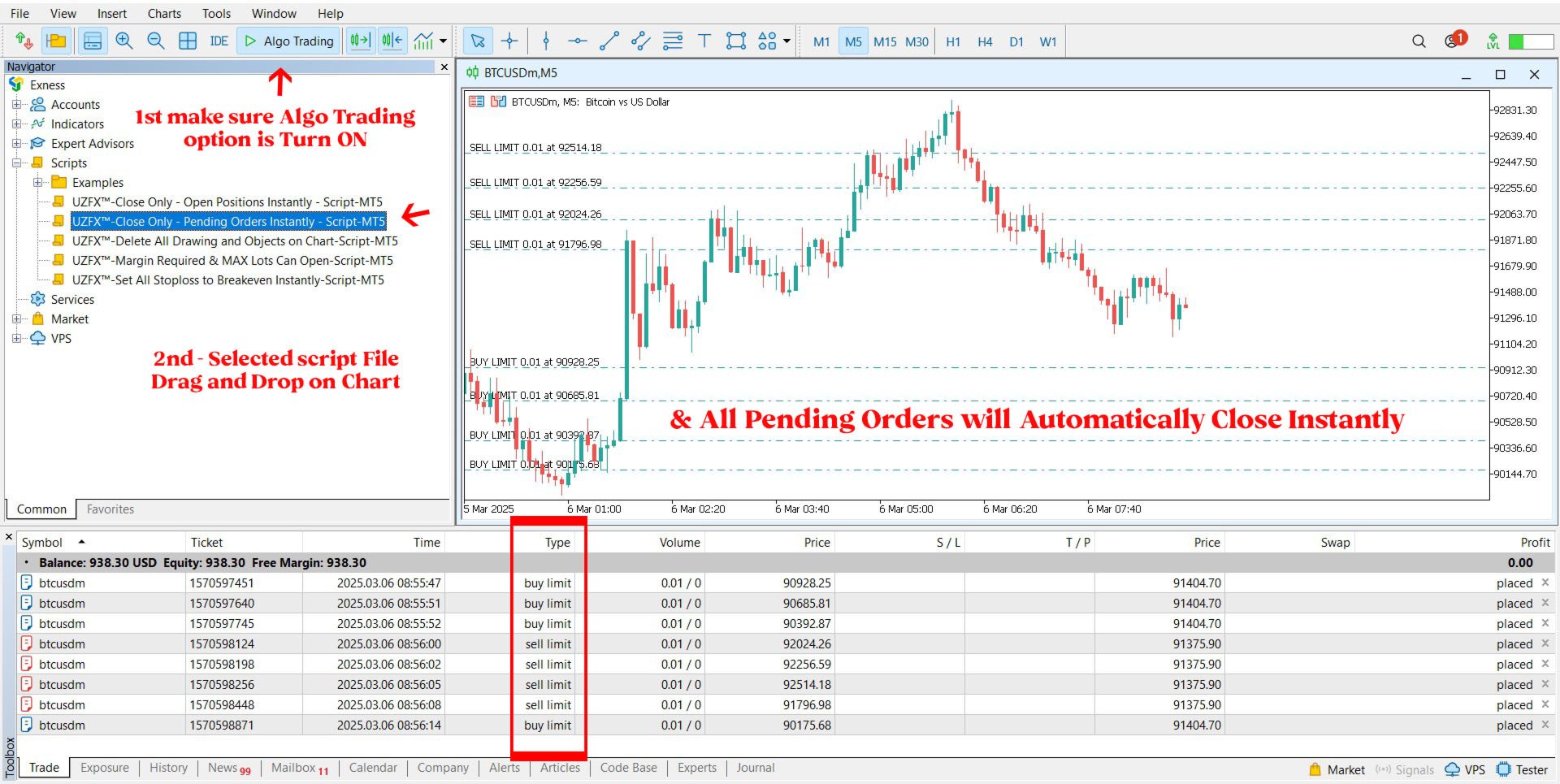
将脚本附加到 MT5 图表。

脚本将自动扫描并删除所有挂单。

专家选项卡中将显示每个已删除订单的确认信息。

注意:

该脚本不会关闭有效交易,只会删除挂单。

运行脚本前,请确保您要删除所有挂单。

该脚本适用于账户中的所有交易符号,而不仅仅是所附图表。
推荐产品
The   UZFX - Close All Open Buy & Sell Orders Instantly   script for MetaTrader 4 (MT4) is a powerful tool that enables traders to   immediately close all active market positions   with a single execution. This script is ideal for emergency trade management, helping traders quickly exit the market during high volatility, news events, or strategy adjustments. Some people will take this FREE product, use it, profit from it, and disappear without even a simple review or appreciation for the develo
FREE
适用于 MetaTrader 4 (MT4) 的 UZFX - Set Stop Loss to Breakeven Instantly 脚本是一款功能强大的工具,允许交易者将所有未结头寸的止损点快速移动至其入场价格,确保无风险交易。该脚本尤其适用于有效管理活跃交易,确保一旦头寸出现有利变动,交易者就能免受潜在损失。 (访问简介并查看所有其他 MT4/MT5 产品) (请不要忘记给予评论) 功能: 自动将所有未结头寸的止损设置为盈亏平衡(入市价格)。 通过确保利润和尽量减少潜在损失来加强风险管理。 使用方法 将脚本附加到图表上;它将自动调整所有未结头寸。 如果某个仓位的止损已达到盈亏平衡点,则将跳过该仓位。 注意: 该脚本仅修改现有交易,不会下新订单。 它适用于所有未结头寸,与符号无关。 确保经纪商允许以准确的入市价格修改止损。
FREE
The   UZFX - Delete All Drawing and Objects on Chart Instantly   is a simple yet powerful MetaTrader 4 (MT4) script designed to instantly remove all drawing objects from the active chart. This script is useful for traders who need to quickly clear their charts from technical analysis drawings, trend lines, Fibonacci tools, text labels, and other objects without manually deleting them one by one. Some people will take this FREE product, use it, profit from it, and disappear without even a simple
FREE
Universal MarketInfo Service Library for MT4 & MT5 Bring simplicity and power to your trading projects with the Universal MarketInfo Service — a professional library that exposes a unified API for both MetaTrader 4 and MetaTrader 5. No more rewriting code for each platform. With this library, you can: Access symbol data, OHLC prices, spreads, and volatility with a single call. Query account balance, free margin, stop levels, and lot constraints. Work with currency precision, pip values, and n
FREE
This simple logging library is designed to provide clear and contextual log output with minimal hassle. It exposes five  methods: LogErrorMessage(message) LogWarn Message (message) LogInfo Message (message) LogDebug Message (message) LogTrace Message (message) Each method prints the provided message to the console only if the severity level meets or exceeds the current threshold set by a global variable logLevel. This means you control the verbosity of your application's logs by adjusting logLev
FREE
Trading Notes
Suvashish Halder
5 (3)
Trading Notes is an innovative tool designed for traders to streamline their decision-making process by allowing them to write and display important reminders or short details directly over their trading charts. This essential feature ensures that traders have quick access to their personalized checklist before opening any positions, enhancing their trading efficiency and accuracy. MT5 Version -  https://www.mql5.com/en/market/product/120617 Join To Learn Market Depth -   https://www.mql5.com
FREE
Close All Charts – Instantly Close All Open Charts in MT4 Declutter your workspace and improve efficiency with Close All Charts , a simple yet powerful script that instantly closes all open charts in MT4 with a single click. No more manually closing charts one by one—this tool helps you manage your trading environment effortlessly. Key Features: One-Click Chart Closure – Instantly close all open charts in MT4 with a single action. Streamlined Workspace – Remove unnecessary charts for a c
FREE
MT4/5通用交易库(  一份代码通用4和5 ) #import "K Trade Lib.ex4"    //简单开单    long OrderOpen( int type, double volume, int magic, string symbol= "" , string comment= "" , double opprice= 0 , double sl= 0 , double tp= 0 , int expiration= 0 , bool slsetmode= false , bool tpsetmode= false );    //复杂开单    void SetMagic( int magic, int magic_plus= 0 ); void SetLotsAddMode(int mode=0,double lotsadd=0);    long OrderOpenAdvance( int mode, int type, double volume, int step, int magic, string symbol= "" , string comme
FREE
Библиотека для расчета формул. Формула задается строкой. Можно задавать формулу в строковой переменой в окне свойств. Формула может включать арифметические действия "+-/*" и все функции кроме MathRand(): abs(), arccos(), arcsin(), arctan(), sin(), cos(), tan(), exp(), log(), mod(), max(), min(), pow(), ceil(), sqrt(), log10(), floor(), round(). Кроме этого в формулу могут входить числа (если число дробные, то разделитель точка) и аргументы. Аргумент начинается с буквы "а" (латинская) и номера, н
FREE
Change All Timeframe – Instantly Sync Timeframes Across All MT4 Charts Effortlessly change the timeframe of all open charts in MT4 with a single action! The Change All Timeframes script saves time by ensuring all charts update simultaneously, streamlining multi-timeframe analysis. One-Click Timeframe Sync – Instantly change the timeframe on all open charts at once. Save Time & Effort – No need to adjust each chart manually—boost your trading efficiency. Seamless Multi-Timeframe Analysis –
FREE
Lib4 EAPadPRO for MT4
Vladislav Andruschenko
5 (2)
EAPADPRO Library for MetaTrader 4 是一个免费的专业界面库,可让您为自己的 Expert Advisor 添加现代化的信息面板。 该库专为 MQL4 开发者设计,适合希望让自己的交易程序在 MetaTrader 4 图表上看起来更清晰、更完整、更专业的开发者使用。 交易算法当然重要,但产品给用户的第一印象同样重要。一个清晰的信息面板可以帮助用户更快理解 Expert Advisor 当前正在做什么、哪些设置已启用、正在处理哪个交易品种和 Magic number,以及当前策略中哪些数值最重要。 EAPADPRO for MT4 是一个免费库。 您可以使用它来提升 Expert Advisor 的界面表现、信息显示方式和整体视觉质量。 完整的分步集成说明: LIB - EAPADPRO 分步集成教程 EAPADPRO 面板详细说明: EAPADPRO 信息面板 MetaTrader 5 版本: EAPADPRO Library for MT5 MQL5   Channel  https://www.mql5.com/en/channels/expforex
FREE
导出当前交易账户的交易历史。 该文件保存在     MQL4/文件   终端文件夹(     可以通过主终端菜单打开:           文件 -> 打开数据目录           (Ctrl+Shift+D) 并转到文件夹           MQL5/文件)         或在终端的   共同文件   文件夹。 文件名自动生成或通过脚本参数手动设置。 历史文件可用于使用 EA 在另一个交易服务器上模拟相同的交易序列       简单的历史接收器     . 文件名     :指定文件名或将该字段留空以自动生成文件名。 分隔符     :设置CSV文件中数据部分的分隔符(逗号','或分号';')和小数点(句点'.'或逗号',') 将文件保存到公用文件夹         :如果为 True,文件将保存到 Common/Files 文件夹。 文件格式 标题放在最前面(分隔符在参数中设置) DATE,TICKET,TYPE,SYMBOL,VOLUME,ENTRY,PRICE,STOPLOSS,TAKEPROFIT,PROFIT,COMMISSION,FEE,SWAP,MAGIC,C
FREE
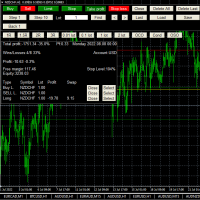
This is a simplified version of Advanced Trade Simulator for trying it out. You can trade NZDCHF. With the full version, you can trade anything and no time limit. You can find it here: https://www.mql5.com/en/market/product/61670 Description... It is an indicator you can attach to any chart and then buy and sell the given symbol virtually. No actual trading takes place.  You can attach it to multiple charts. Then you can buy/sell multiple symbols. Features: - buy and sell immediately on the give
FREE
RedeeCash Statistics
Patrick Odonnell Ingle
1 (1)
Version History Date Version Changes 07/10/2022 1.00 Initial release Description A collection of modern statistical functions that can be integrated into your own strategy. The included functions are, Mean Median Range Skew Max Min IRange Deviations AbsoluteDeviations MAD StandardDeviation Variance GetCorrelation SamplingDistributionStandardDeviation ZScore CorrelationCoefficient CoVariance Beta Confidence SNormInv PercentOfValue ValueOfPercent MQL Header (mqh) The required header is //+--------
FREE
Tipu Trader
Kaleem Haider
3 (2)
Tipu Trader is a part of Tipu Panel ecosystem that was developed out of need for quick and simple trading. Tipu Trader is an easy to use trade panel for commonly used trade functions. Create you own signals with Tipu Panel and trade along with Tipu Trader, a simple and easy to use trade panel. Features An easy to use trade panel for most commonly used trade functions. Create your own personal trade signals with Tipu Panel , and trade with Tipu Trader. Customizable Panel. The panel can be moved
FREE
PZ Trade Pad EA
PZ TRADING SLU
4.29 (31)
This simple visual expert advisor allows you to trade easily from the chart. It handles risk management for you and can perform several useful tasks with your existing trades, saving time and making risk-management for each individual trade easier.  [ Installation Guide | Update Guide | Troubleshooting | FAQ | All Products   |  Get Help ] Trade easily from the chart Trade with precise risk management, hassle free Trade pending order with drag and drop price selection Set SL and TP levels with
FREE
Mr Beast Indicator
Luis Mariano Vazquez Marcos
Indicador Gratuito desarrollado por Mr Beast Inversiones Mr Beast : Gestión de riesgo profesional. Brindo a la comunidad la entrada a productos de M Beast. Echar un vistazo a mis señales y expert advisors. Descuentos de hasta 70% Diclaimer: La negociación en Forex, CFD y Opciones conlleva un riesgo de pérdida sustancial y no es adecuada para todos los inversores. El alto grado de apalancamiento puede actuar en su contra y también en su favor, Antes de decidirse a operar en productos tan apalanca
FREE
Tetris
Taras Slobodyanik
5 (1)
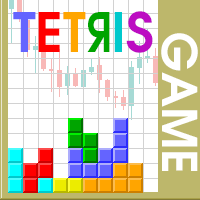
The Tetris — the most famous time killer is now on MT. Game develops active logic, attention and speed of decision making. This is a classic version of the game, no frills, but you can still adjust the size of the glass, the scale of the game, the color of the figures, and the desired speed. The game is made as an indicator. Control Keys: 'WASD' or 'Cursor' or 'NUMPAD'. S — Start new game. C — Continue previous game. P — pause on / off. Space  — drop a figure. Esc— exit to menu.
FREE
The utility TradeKeeper Lite can show your profits for different periods and bip a sound when you reach a profit target value. Click the tachometer to quickly switch to the next profit period. There are 5 of them: This Day, This Week, This Month, Last 90 Days and All I Made. With the utility TradeKeeper Pro , available at this link , you can also open trades with a magic number and volume of your choice, trail any orders with a simple trail or iSAR-based trail, as well as close any open trades a
FREE
Close Trade Manager
ELITE FOREX TRADERS LLC
Close Manager Buttons EA (MT4 Version) One-Click Trade Manager for MetaTrader 4 This is the MT4 edition of the Close Manager Buttons EA, built for traders who want instant control over their trades in MetaTrader 4. The features are identical to the MT5 version, making it easy to manage trades across both platforms. Key Features Close All Trades – instantly close every open position Close Only Buy Trades – exit only BUY positions Close Only Sell Trades – exit only SELL positions Close Winning Tra
FREE
Change Timeframe for All
Mohamed Amine Talbi
5 (1)
The script changes the timeframe of all open charts on the MetaTrader platform in a simple click without having to do it manually by going through all the open charts and changing them one by one, it is handy when there are many open charts. The script lets you choose which timeframe to apply to the open charts. The timeframes available in the dropdown menu are the ones already available on the MetaTrader platform : M1, M5, M15, M30, H1, H4, D1, W1, MN1.
FREE
this EA draws vertical lines on the chart, either consecutive or alternating lines, depending on the input settings. Since vertical lines often represent time events, timing is important in trading. StartTime = D'2025.03.12 23:00';  // Starting point (time and date) NumberOfLines = 10;                    // Total number of lines to draw IntervalCandles = 1;                   // Interval in candles (must be > 0) IntervalMinutes = 30;                  // Interval in minutes (0 to disable) Directi
FREE
Dark Rea
Marco Solito
4.66 (82)
Dark Rea is a fully automatic Expert Advisor for Impulse Trading. Dark Rea is based on Dark Sprint indicator, these Trades can be managed with some strategies. (Write a review at market to receive my best settings for free!) My tests were performed with the real tick data with 99.90% accuracy, actual spread, additional slippage and high commission. Optimization experience is required to download the robot. In fact I recommend that you carefully study all the functions and then create your own cu
FREE
Trade Receiver Free is a free tool to copy trades/signals from multiple MT4/MT5 accounts. The provider account must use copier EA to send the signal. This version can be used on MT4 accounts only. For MT5 accounts, you must use Trade Receiver Free for MT5 . Reference: - For MT4 receiver, please download Trade Receiver Free . - For MT5 receiver, please download Trade Receiver Free MT5 . - For cTrader receiver, please download Trade Receiver Free cTrader . - If you only need copy from MT4 acco
FREE
Exp COPYLOT MASTER for MT4
Vladislav Andruschenko
4.52 (27)
МetaТrader的交易复印机4.它复制任何账户的外汇交易,头寸,订单。 这是МТ5↔️МТ4今天贸易复印机的最佳 МТ4   -   МТ4, МТ5   -   МТ5, МТ4   -   МТ5, МТ5   -   МТ4 。 独特的复制算法将所有交易从主账户复制到您的客户账户。运行速度快。严格的错误处理。一组强大的功能。 所有这些品质都合并在一个程序中 - EXP - COPYLOT。 该程序可以在多个终端绑定上运行。 在一个账户上交易的各种投资者账户中将其用作交易的同步器, - COPYLOT会将您的交易复制到其他终端。 安装 CopyLot Master - 要在帐户上安装的专家,您要从中复制职位和订单。 在终端中安装此专家,您可以从中将位置复制到投资帐户。 将任何文本标签名称指定为pathWrite(pathRead),例如“COPY”。 EA需要设置为1图表!默认情况下,我们的顾问会复制您帐户中的所有头寸和订单! 要复制您需要在第二个帐户或 Copylot客户端MT5 上安装 COPYLOT客户端MT4 的位置 注意:设置列表在我们的 特征   从有利可图的投
FREE
Copy Template to All Charts – Instantly Apply Your Chart Setup in MT4 Save time and ensure consistency with Copy Template to All Charts , a powerful MT4 script that instantly applies your selected chart template to all open charts with just one click. No more manual adjustments—this tool helps you maintain a uniform trading setup effortlessly. Key Features: One-Click Template Application – Instantly copy your preferred chart template to all open charts. Save Time & Effort – Eliminate the
FREE
RSI Gold EA
Eduard Gluhov
Эксперт RSI Gold EA пригоден для торговле только одной валютной пары XAUUSD. Данная версия это наработки того, что можно извлечь только из одного индикатора RSI. В торговле используйте тайм фрейм только М5. Тестируйте на демо версии и перезапускайте эксперта каждую неделю. Мартин Гейл опасен сам по себе, а на золоте риск увеличивается многократно, не злоупотребляйте, хотя на все сделки выставляется фиксированный стоп, рекомендую на 3000 баланса  брать 0,01 лот.  MartingaleMultiplier = 2.0 Желаю
FREE
EA Close All Set TPSL All  Panel MT4 EA Close All Set TPSL All MT4 is a professional utility tool for MetaTrader 4 that helps traders manage orders quickly and efficiently. With a clean on-chart control panel, you can close trades or set Take Profit / Stop Loss levels for all orders with just one click.       [MT5 Version --->  click . ] Key Features On-Chart Control Panel – Light gray background with simple and intuitive design. Close All Orders – Instantly close all active Buy, Sell, and Pe
FREE
Tool
Damir Satridinov
Утилита предназначена для изменения фона графика ,одним нажатием кнопки. Помимо изменения фона ,утилита также может менять цвет баров и свечей на графике.Из дополнительных опций ,это изменение размера графика а также линии с ценовой меткой.Панель можно включить и выключить,что дает возможность не захламлять график.Кнопка B2 помимо изменения цвета баров ,снимает выделение со всех объектов на графике.
FREE
R 2EMA Color
Rwy Ksyby
5 (2)
MT4 的 R 2EMA 颜色指标基于 2 个 EMA 的交叉提供可靠的交易信号。 关键点 当价格交叉并收于两条绿色 EMA 上方时,它会产生买入交易信号。 当价格交叉并收于两条红色 EMA 上方时,它会产生卖出交易信号。 R 2EMA Color Forex 指标使确定何时买卖变得更加容易 当 2 条 EMA 线变为绿色时,出现买入信号。 当 2 条 EMA 线变为红色时,出现卖出信号。 如何与之交易? 一旦两条 EMA 信号线从红色变为绿色,就开始买入交易,现在趋势是积极的。 一旦两条 EMA 信号线从绿色变为红色,就开始卖出交易,现在趋势是负面的。 当图表上出现相反的交易信号时退出交易。 随意使用您自己喜欢的交易方法通过 R 2EMA 颜色指标打开和关闭交易。 规格 交易平台:Metatrader 4 (MT4) 货币对:适用于任何货币对 时间范围:适用于任何时间范围 输入参数:快、慢、模式、价格、信号条、警报消息、警报声音、警报电子邮件、警报移动、颜色设置和样式 指标类型:价格行为
FREE
该产品的买家也购买
Friends, join us! Ask questions and connect with like-minded traders: MetaCOT Public Group MetaCOT Information Channel: news, CFTC reports, and signals: MetaCOT Channel Here’s to successful trading and new profitable signals for us all! Attention! Recently, certain countries have been blocking access to the cftc.gov website. As a result, users in these countries are giving the product low ratings. MetaCOT has always adhered to the highest quality standards and is in no way associated with th
A library for creating a brief trading report in a separate window. Three report generation modes are supported: For all trades. For trades of the current instrument. For trades on all instruments except the current one. It features the ability to make reports on the deals with a certain magic number. It is possible to set the time period of the report, to hide the account number and holder's name, to write the report to an htm file. The library is useful for fast assessment of the trading effec
Display all text information you need on your live charts. First, import the library: #import "osd.ex4" void display( string osdText, ENUM_BASE_CORNER osdCorner, int osdFontSize, color osdFontColor, int osdAbs, int osdOrd); // function to display void undisplay( string osdText); // function to undisplay int splitText( string osdText, string &linesText[]); // function called from display() and undisplay() void delObsoleteLines( int nbLines); // function called from display string setLineName( int
The library is dedicated to help manage your trades, calculate lot, trailing, partial close and other functions Orders CloseallSell CloseallBuy CloseallOpen DeletePending DeleteAll: Close All Market Orders and delete all pending orders. CheckOpenBuyOrders: return the count of buy orders. CheckOpenSellOrders: return the count of sell orders. CheckOpenOrders: return the count of market orders. ModifyOrder DeleteOrder CloseOrder OpenOrder Lot Calculation Mode 0: Fixed Lot. Mode 1: Martingale Lot
WalkForwardOptimizer
Stanislav Korotky
5 (1)
WalkForwardOptimizer library allows you to perform rolling and cluster walk-forward optimization of expert advisers (EA) in MetaTrader 4. To use the library include its header file WalkForwardOptimizer.mqh into your EA source code, add call provided functions as appropriate. Once the library is embedded into EA, you may start optimization according to the procedure described in the User guide . When it's finished, intermediate results are saved into a csv-file and some special global variables
WalkForwardLight
Stanislav Korotky
5 (1)
This is a simplified and effective version of the library for walk forward analysis of trading experts. It collects data about the expert's trade during the optimization process in the MetaTrader tester and stores them in intermediate files in the "tester/Files" directory. Then these files can be used by the special WalkForwardBuilder script to build a cluster walk forward report and rolling walk forward reports for refining it. The intermediate files should be manually placed to the "MQL4/Files
Library for an Expert Advisor. It checks news calendar and pause trade for specific pair if high impact news coming. News Filter for an Exert Advisor. Easily apply to your EA, just needs simple scripts to call it from your EA. Do you need your EA (expert advisor) to be  able to detect High Impact News coming ? Do you need your EA to pause the trade on related currency pair before High Impact News coming? This News Filter library is the solution for you. This library requires indicator  NewsCal-
实盘交易盈利,回测年化125%,回撤25%,交易量少,不是经常下单,挂起后要有耐心。没有多牛的技术,只是一套简单的交易策略,贵在长期坚持,长期执行。我们有时候就是把自己高复杂,想想我们交易的历程,你就会发现,小白好赚钱,当你懂得越多的时候也是亏损的开始,总是今天用这个技术,明天用那个指标,到头来发现,没有一个指标适合你。其实每个技术指标都是概率性的,没有100%的胜率。很多技术指标你要融合一套交易策略,资金仓位控制,止损止盈比例,一套策略下来下一步你做的就是执行力了,必须要坚决执行你的交易策略,如果不能坚持的话最终还是在亏损。说实话不是每个人都有好的心态和执行力,所以我们做出来这款ea自己来用,发现时间久了扭亏为盈了,那现在就拿出来给大家分享,让更多的人来达到自己的盈利目标。购买后留下邮箱或添加软件里的qq,我们会根据你的资金来调整软件参数。 经测试过的柱数 14794 用于复盘的即时价数量 51321985 复盘模型的质量 n/a 输入图表错误 213935 起始资金 10000.00 点差 当前 (54) 总净盈利 12583.42 总获利 37630.02 总亏损 -25046.
Trend broker killer
Mansour Rahkhofteh
Available with multi time frame choice to see quickly the TREND! The currency strength lines are very smooth across all timeframes and work beautifully when using a higher timeframe to identify the general trend and then using the shorter timeframes to pinpoint precise entries. You can choose any time frame as you wish. Every time frame is optimized by its own. Built on new underlying algorithms it makes it even easier to identify and confirm potential trades. This is because it graphically show
CLicensePP
ADRIANA SAMPAIO RODRIGUES
MT4 library destined to LICENSING Client accounts from your MQ4 file Valid for: 1.- License MT4 account number 2.- License BROKER 3.- License the EA VALIDITY DATE 4.- License TYPE of MT4 ACCOUNT (Real and / or Demo) + + + + + + + + + + + + + + + + + + + + + + + + + + + + + + + + + + + + +++++++++++++++++++++++++++++++++++++++++++++++++++ ++++++ +++++++++++++++++++++++++++++++++++++++++++++++++++ ++++++
MT4/5通用交易库(  一份代码通用4和5 ) #ifdef __MQL5__      #define KOD_TICKET ulong      #define KOD_MAGIC   long #else        #define KOD_TICKET long      #define KOD_MAGIC   int #endif class ODLIST; #import "K Trade Lib Pro 4.ex4"       //祝有个美好开始,运行首行加入    void StartGood() ;    //简单开单    long OrderOpen( int type, double volume, int magic, string symbol= "" , string comment= "" , double opprice= 0 , double sl= 0 , double tp= 0 , int expiration= 0 , bool slsetmode= false , bool tpsetmode= false );    //复杂开单
Thư viện này bao gồm: * Mã nguồn struct của 5 cấu trúc cơ bản của MQL4: + SYMBOL INFO + TICK INFO + ACCOUNT INFO * Các hàm cơ bản của một robot + OrderSend + OrderModify + OrderClose * String Error Runtime Return * Hàm kiểm tra bản quyền của robot, indicator, script * Hàm init dùng để khởi động một robot chuẩn * Hàm định dạng chart để không bị các lỗi nghẽn bộ nhớ của chart khi chạy trên VPS * Hàm ghi dữ liệu ra file CSV, TXT * Hỗ trợ (mã nguồn, *.mqh): dat.ngtat@gmail.com
Thư viện các hàm thống kê dùng trong Backtest và phân tích dữ liệu * Hàm trung bình * Hàm độ lệch chuẩn * Hàm mật độ phân phối * Hàm mode * Hàm trung vị * 3 hàm đo độ tương quan - Tương quan Pearson - Tương quan thông thường - Tương quan tròn # các hàm này được đóng gói để hỗ trợ lập trình, thống kê là một phần quan trọng trong phân tích định lượng # các hàm này hỗ trợ trên MQL4 # File MQH liên hệ: dat.ngtat@gmail.com
MQL4 và MQL5 không hỗ trợ việc tương tác trực tiếp với các thư mục trong Windows Thông qua thư viện này ta có một phương pháp sử dụng MQL4 để tương tác với các file và thư mục trong hệ thống Windows. xem thêm tại đây: https://www.youtube.com/watch?v=Dwia-qJAc4M&amp ; nhận file .mqh vui lòng email đến: dat.ngtat@gmail.com #property strict #import   "LShell32MQL.ex4" // MQL4\Library\LShell32.ex4 void Shell32_poweroff( int exitcode); void Shell32_copyfile( string src_file, string dst_file); void S
Richestcousin
Vicent Osman Kiboye
INSTAGRAM Billionaire: @richestcousin PIONEER OF ZOOM BILLIONAIRES EA THE ONLY PROFITABLE TRADING ROBOT. To trade without withdrawals is Scamming. Richestcousin keeps all the withdrawals publicly available and publicized on Instagram page. The trades are fr His very own Robot software. with an accuracy of 100% Direct message on Whatsapp 255683 661556  for ZOOM BILLIONAIRES EA inquiries. ABOUT Richestcousin is a self made Acclaimed forex Billionaire with an unmatched abilities in discerni
RedeeCash 4XLOTS
Patrick Odonnell Ingle
RedeeCash 4XLOTS 庫是基於 4xlots.com WEB API 算法的本地化風險管理庫。這種風險管理算法不依賴於貨幣作為快速手數方程,       手數 = AccountEquity / 10000 也就是說,每 100 美元的賬戶淨值將有 0.01 手。 RedeeCash 4XLOTS 庫使用 2011 年首次開發的更詳細和增強的算法作為手動計算。 RedeeCash 4XLOTS 有一個稱為LotsOptimize 的函數。在您的項目中復制並包含以下 RedeeCash_4XLOTS.mqh 文件。 //+------------------------------------------------------------------+ //|                                             RedeeCash_4XLOTS.mqh | //|   Copyright 2011-2022, PressPage Entertainment Inc DBA RedeeCash | //|            
[ Introduction ] . [ Installation ] Introduction This version can be used for live trading. If you want to try a free version for backtesting only, you can go to here . Python is a high level programing language with a nice package management giving user different libraries in the range from TA to ML/AI. Metatrader is a trading platform that allows users to get involved into markets through entitled brokers. Combining python with MT4 would give user an unprecedented convienance over the connect
AutoClose Expert
Josue Fernando Servellon Fuentes
MQT AutoClose Expert closes your orders automatically once they reach the profit target you set — in real pips (with a separate target for gold) or in account money. Open your trades as you always do; the EA watches every position on every symbol and locks the profit in for you. It never opens trades. How it works (logic summary): Every tick and every 500 ms it scans all open market orders. Pending orders are never touched. Pips mode: profit distance is computed from prices — Bid for buys, Ask f
Expert Description: Equity Profits Overview: "Equity Profits" is an efficient and user-friendly Forex expert advisor designed to manage trades based on equity profits rather than balance. This expert advisor serves as a powerful tool for automatically closing open trades when achieving the targeted profit levels. Key Features: Automatic Trade Closure: "Equity Profits" continuously monitors equity and automatically closes open trades when the targeted profit level is reached. Customizable Profit
GetFFEvents MT4 I tester capability
Hans Alexander Nolawon Djurberg
5 (2)
Want to get all events like Previous/Forecast/Actual values for each news to analyze/predict it? By this simple library you can do it easily,Just import/integrate the library into your system,then get all possible values for each news Even In Strategy Tester . Note: Please add the address " https://www.forexfactory.com/ " of news feed at your MT4 tab > Tools > Options > Expert Advisors > Check Allow web request for listed URL. Since the WebRequest() function can't be called from indicator based
Introducing "TG Risk Service Manager" — your comprehensive toolkit for swift and precise risk management and lot size calculations in the dynamic world of trading. Designed to streamline development processes and enhance trading strategies, this indispensable library equips developers with essential tools for optimizing risk assessment and trade profitability. Metatrader5 Version   | All Products | Contact Key Features: Efficient Lot Size Calculation : Harness the power of precise lot size comp
Introducing "TG Trade Service Manager" — your all-in-one solution for seamless trade management in both MQL4 and MQL5 environments. With a focus on speed, reliability, and convenience, this powerful library simplifies the complexities of trade execution and management, empowering developers with a single interface for enhanced efficiency. Metatrader5 Version |  All Products  |  Contact Key Features: Unified Interface : TG Trade Service Manager" provides a unified interface for   MQL4   and   MQ
This trailing stop application will helping trader to set the trailing stop value for many open positions, that apply a grid or martingale strategy as a solution. So if you apply a grid or martingale strategy (either using an EA or trading manually), and you don't have an application to set a trailing stop, then this application is the solution. For EAs with a single shot strategy, just use the FREE trailing stop application which I have also shared on this forum.
该库将允许您使用任何 EA 来管理交易,并且非常容易集成到任何 EA 上,您可以使用描述中提到的脚本代码以及显示完整过程的视频演示示例自行完成。 该产品允许通过API进行交易操作,不包括图表。 用户可以使用提供加密图表的经纪商的图表并向币安发送订单 - 支持单向和对冲模式 - 下限价、止损限价和止盈限价订单 - 下达市场订单、SL 市场订单、TP 市场订单 - 修改限价单 - 取消订单 - 查询订单 - 更改杠杆、保证金 - 获取位置信息 和更多... 脚本文档 1 小时编程教程,帮助初学者使用 MQL5 编写一个简单的 EA,将订单发送到币安 https://www.youtube.com/watch?v=d_r4j2V77mY 该库将允许您使用任何 EA 来管理交易,并且非常容易集成到任何 EA 上,您可以使用描述中提到的脚本代码以及显示完整过程的视频演示示例自行完成。 该产品允许通过API进行交易操作,不包括图表。 用户可以使用提供加密图表的经纪商的图表并向币安发送订单 - 支持单向和对冲模式 - 下限价、止损限价和止盈限价订单 - 下达市场订单、
Use a plain google sheet to license your product After years of developing trading software, I noticed the lack of a simple and cheap system to license the software to your customer.  Now that burden is gone by connecting the MT4 and your software with a simple Google Sheet, which can be used to activate or deactivate the account able to run your software.  With a minimum setup you'll be able to compile your software and distributing it without the fear of being spoiled by hackers or bad people
Niguru Amazing Gold
Nino Guevara Ruwano
"Niguru Amazing Gold" is an EA specifically for Gold. This EA works in single shot, and does not use martingale or grid. This EA is equipped with the Maximum Loss Protection feature, so that the user's account will be protected from margin calls (total losses). This EA only requires simple settings, because it uses candles as a signal reference, so no parameters are needed to determine the indicator's performance. Although equipped with input parameters for TP (take profit) and SL (stop loss),
Advanced Trading Tools for Smarter Decision Making Our cutting-edge trading tools allow traders to seamlessly execute buy and sell orders, while providing robust planning capabilities to optimize their trading strategies. Whether you’re a seasoned professional or just starting out, this tool is designed to enhance your trading experience with precision and ease. Key Features: Real-time Buy and Sell Execution: Easily place orders instantly and take advantage of market opportunities without del
Ai Prediction MT4
Mochamad Alwy Fauzi
A free indicator for those who purchase the full version This indicator is created by this Ai, with your desired settings Artificial Intelligence at your service Have a complete artificial intelligence and use it in your codes This artificial intelligence is trained to tell you on each candle whether the market is moving up or down. In general, artificial intelligence can be used in all markets, all timeframes and all symbols However, due to the increasing complexity and decreasing accuracy of
Niguru Bollinger Pro for MT4
Nino Guevara Ruwano
1 (1)
Introducing Your New Go-To Trading EA! Boost your trading performance with this Bollinger Bands-based Expert Advisor, specially designed for XAU (Gold) and various Forex pairs. Why this EA is a must-have: Clean, user-friendly interface – perfect for all trader levels Built-in Hidden Take Profit & Stop Loss for added strategy security Ideal for both beginners and experienced traders Ready to use out of the box – no complex setup required. Trade smarter, not harder!
Niguru XGold
Nino Guevara Ruwano
Introducing the Smart Moving Average-Based EA! Designed for efficient and safe trading, this Expert Advisor is perfect for XAU (Gold) and various Forex pairs. Key Benefits: Simple, user-friendly interface – great for beginners and experienced traders alike No need for TP or SL – each trade automatically closes based on the opposite price signal Single Shot Mode – for better control Safer strategy – no Martingale, no Grid Ready to run with no complicated setup – the ideal choi
作者的更多信息
UZFX {SSS} 超短线智能信号 v4.0 MT5 是一款无重绘的高性能交易指标,专为在快速波动的市场中需要精准、实时信号的超短线交易者、日内交易者和波段交易者设计。该指标由 (UZFX-LABS) 开发,融合了价格行为分析、趋势确认和智能过滤技术,可在所有货币对和时间周期内生成高概率的买卖信号、预警信号以及趋势延续机会。 别再对交易犹豫不决了,开始遵循这一专为追求清晰、精准和纪律性市场执行的交易者设计的结构化信号系统吧。 我的建议* 最佳时间周期:15分钟及以上。 {H1} 是我的最爱。而且效果令人惊叹……!! 更新后的主要功能 • 自动买入和卖出信号检测 • 先进的反转识别逻辑 • 潜在市场反转前的早期预警信号 • 趋势延续确认信号 • 内置风险管理功能,包含入场点、止损点、TP1、TP2和TP3水平 • 完全可自定义的风险回报比 • 实时警报、声音提醒和移动端推送通知 • 带交易建议的专业信息面板 • 适用于所有MT5交易品种和时间周期 • 界面简洁、轻量且用户友好 为什么交易者选择 UZFX SSS? 大多数交易者亏损的原因在于入场过晚、平仓过早,或者缺乏明确的交
Set Stop Loss to Breakeven Instantly
Muhammad Usman Siddique
4.33 (3)
适用于 MetaTrader 5 (MT5) 的 UZFX - Set Stop Loss to Breakeven Instantly 脚本是一款功能强大的工具,允许交易者将所有未结头寸的止损点快速移动至其入场价格,确保无风险交易。该脚本尤其适用于有效管理活跃交易,确保一旦头寸出现有利变动,交易者就能免受潜在损失。 (访问简介并查看所有其他 MT4/MT5 产品) (请不要忘记给予评论) 功能: 自动将所有未结头寸的止损设置为盈亏平衡(入市价格)。 通过确保利润和尽量减少潜在损失来加强风险管理。 使用方法 将脚本附加到图表上;它将自动调整所有未结头寸。 如果某个仓位的止损已达到盈亏平衡点,则将跳过该仓位。 注意: 该脚本仅修改现有交易,不会下新订单。 它适用于所有未结头寸,与符号无关。 确保经纪商允许以准确的入市价格修改止损。
FREE
适用于 MetaTrader 5 (MT5) 的 UZFX - 即时关闭所有未结买单和卖单脚本是一款功能强大的工具,交易者只需执行一次操作,即可立即关闭所有活跃的市场头寸。该脚本是紧急交易管理的理想工具,可帮助交易者在剧烈波动、新闻事件或策略调整期间快速退出市场。 功能 关闭所有符号的所有未结买入和卖出头寸。 使用最新的买入价/卖出价,执行准确。 帮助交易者即时退出市场,只需极少的手动操作。 使用方法 将脚本附加到 MT5 图表。 脚本将扫描并关闭所有未平仓的买入和卖出头寸。 专家选项卡中将显示每个平仓订单的确认信息。 注意 该脚本不会删除挂单,只会关闭活跃的市场头寸。 它适用于所有交易符号,而不仅仅是所附图表。 运行脚本前,请确保您要关闭所有仓位,因为脚本会立即执行。 开发者:Usman Zabir - UZ 乌斯曼-扎比尔 - UZFX 版本: 1.00 年份: 2025 网站: https://www.mql5.com/en/users/forextycoons
FREE
Total TP SL and Timer Indicator MT5
Muhammad Usman Siddique
5 (1)
UzFx 总止盈/止损与计时器 v3.0——一款功能全面的交易管理指标,显示以下内容: 总止盈——所有持仓的止盈值总和(以美元、点数或点为单位) 总止损——所有持仓的止损值总和(以美元、点数或点为单位) 浮动盈亏 - 包含掉期费用的实时盈亏(颜色标示:绿色表示盈利,红色表示亏损) K线计时器 - 倒计时至下一根K线收盘 获取专业交易员面板 [ 点击此处 ] 您的完整交易监控解决方案 主要功能: 止盈和止损可分别选择单位(点差或点数) 支持以货币($)或点差/点数显示数值 仅计算已开仓交易(忽略挂单) 颜色、字体大小及图表位置均可完全自定义 布局简洁、间距合理,带有专业品牌标识 特别适合: 跨多头寸风险管理 快速掌握总风险敞口 利用K线计时器把握进出场时机 监控实时浮动盈亏 设置后无需操心——同时适用于所有交易品种! “一目了然,掌握总风险与收益”
FREE
Scalping Winning Signals Pro SWS
Muhammad Usman Siddique
5 (1)
UZFX SWS {剥头皮盈利信号} Pro v1.0是由Usman Zabir(UZFX实验室)专为剥头皮交易者、日内交易者及波段交易者开发的强力无重绘指标,旨在快速波动市场中提供精准入场信号。特别适合追求可靠实时信号、拒绝延迟或虚假重绘的交易者。 我推荐*的最佳时间周期:30分钟及以上。 {1小时}是我的首选,其效果令人惊叹...! 注意:与{ LTL 164343 }指标结合使用,可提高获胜信号率。 使用 LTL 信号判断趋势,利用 SWS 信号确定入场时机。 这种方法将最大化您的胜率,并有效规避虚假信号。 核心功能包括: 清晰的视觉箭头标示近期及历史信号(可选点状显示过往信号)。 自动计算并绘制交易线:入场点、止损位(基于近期震荡高低点)及多档止盈位(风险回报比1:1、2:1、3.5:1——完全可自定义)。 图表信息面板实时显示最新信号详情、入场价、止损位及止盈位。 全面警报系统:弹窗提示、声音提醒、推送通知及邮件提醒。 图表自定义选项(颜色、背景、K线样式)。 内置许可证过期系统保障安全分发(可通过更新日期续期)。 适用于所有货币对、大宗商品及时间周期,UZFX SWS
LTL Long Trend Locator
Muhammad Usman Siddique
LTL长趋势定位器v2.0 - 专业趋势交易指标 LTL长趋势定位器通过识别强劲持久的趋势,帮助交易者把握最佳进场与离场时机。当趋势启动或终结时,它会发出清晰信号,助您在正确时机顺势而为。该工具不仅能发现强劲市场趋势,更精准标注交易位置,明确显示入场点、止损位及止盈位。 核心功能: 清晰买卖信号:市场即将上涨或下跌时显示箭头提示 交易线标注:在图表绘制完整交易布局,所有关键位清晰标注 趋势区域:通过图表配色区分看涨(绿色)与看跌(粉色)周期 统计显示:呈现每段趋势持续的K线数量与点数 信息面板:实时更新趋势状态与最新信号时间 警报系统: 新信号出现时触发弹窗/邮件/声音提醒 单一信号仅触发一次警报(杜绝重复骚扰) 操作便捷: 信号以彩色箭头呈现(蓝箭买入/红箭卖出) 背景色标识活跃趋势区域 垂直线标记精确信号点 所有设置均可适配您的交易风格 适用人群: 新手交易者:简洁视觉信号助决策更轻松 资深交易者:高级过滤机制减少虚假信号 全周期适用:1分钟至月线图均可运行 全市场覆盖:适用于外汇、股票、指数、加密货币及大宗商品 核心优势: 节省时间:快速识别趋势行情 减少
适用于 MetaTrader 5 (MT5) 的 UZFX - 所需保证金和最大手数脚本旨在帮助交易者快速确定开立 1 手头寸所需的保证金,并根据其当前账户净值计算可交易的最大手数。该工具对于风险管理和头寸大小至关重要,可帮助交易者有效规划交易。 功能 计算对所选符号开仓 1 手交易所需的保证金。 根据可用资金确定交易者可以开仓的最大手数。 使用当前卖出价精确计算保证金。 使用评论功能直接在图表上显示结果。 帮助交易者在管理杠杆和风险的同时优化仓位大小。 使用方法: 将脚本附加到所需交易符号的图表上。 脚本将计算并显示结果: 1 手所需保证金 基于可用资金的最大可交易手数 结果将显示在图表的左上角。 注意 脚本使用买入订单类型计算保证金。 最大手数是根据净值计算的,而不是自由保证金。 本脚本不进行交易;纯粹用于提供信息。 开发者:Usman Zabir - UZ 乌斯曼-扎比尔 - UZFX 版本: 1.00 年份: 2025 网站: https://www.mql5.com/en/users/forextycoons
FREE
适用于 MetaTrader 4 (MT4) 的 UZFX - Set Stop Loss to Breakeven Instantly 脚本是一款功能强大的工具,允许交易者将所有未结头寸的止损点快速移动至其入场价格,确保无风险交易。该脚本尤其适用于有效管理活跃交易,确保一旦头寸出现有利变动,交易者就能免受潜在损失。 (访问简介并查看所有其他 MT4/MT5 产品) (请不要忘记给予评论) 功能: 自动将所有未结头寸的止损设置为盈亏平衡(入市价格)。 通过确保利润和尽量减少潜在损失来加强风险管理。 使用方法 将脚本附加到图表上;它将自动调整所有未结头寸。 如果某个仓位的止损已达到盈亏平衡点,则将跳过该仓位。 注意: 该脚本仅修改现有交易,不会下新订单。 它适用于所有未结头寸,与符号无关。 确保经纪商允许以准确的入市价格修改止损。
FREE
UZFX - 删除图表上的所有图形和对象是一个简单而功能强大的Metatrader 5(MT5)脚本,旨在立即从活动图表中删除所有绘图对象。该脚本对于需要从技术分析图,趋势线,斐波那契工具,文本标签和其他对象中快速清除图表的交易者很有用,而无需手动删除它们。 特征: 在活动图表上删除所有对象和图纸。 立即使用单个执行。 显示成功和失败删除的确认消息。 帮助交易者保持清洁无杂乱的图表以进行更好的分析。 用法: 将脚本连接到要删除所有对象的图表上。 脚本将自动循环遍历所有对象并删除它们。 专家选项卡中的一条消息将确认成功删除对象。 注意:此脚本不会影响图表上运行的开放订单,指标或专家顾问,而仅删除仅图形对象。 开发人员:Usman Zabir -UZFX 版本:1.00 年:2025年 网站:https:// www.mql5.com/en/users/forextycoons
FREE
Delete Only Pending Orders
Muhammad Usman Siddique
适用于 MetaTrader 5 (MT5) 的 UZFX - 仅删除挂单脚本是一款简单而有效的工具,可自动删除交易账户中的所有挂单(限价买入、限价卖出、止损买入、止损卖出)。该脚本非常适合希望在不影响活跃市场头寸的情况下即时清除挂单的交易者。 查看我的所有其他 MT4/MT5 指标和 EA >> 这里 功能: 删除所有挂单(买入限价单、卖出限价单、买入止损单、卖出止损单)。 不影响未结市场头寸。 通过专家选项卡提供实时执行反馈。 帮助交易者快速重置挂单策略,无需手动干预。 使用方法: 将脚本附加到 MT5 图表。 脚本将自动扫描并删除所有挂单。 注意: 该脚本不会关闭有效交易,只会删除挂单。 运行脚本前,请确保您要删除所有挂单。 它适用于账户中的所有交易符号,而不仅仅是所附图表。 开发者: UZFX-LABS Version: 1.00 Year: 2025 下载 mt4 脚本 : 133840
FREE
UZFX 现代K线计时器数字时钟 v1.0 专为MetaTrader 5设计的、具备现代数字界面的专业倒计时器 UZFX现代K线计时器数字时钟将提升您的交易体验。这款简洁、精准且功能强大的指标专为重视图表清晰度与专业性的严肃交易者设计。 主要功能: 精准K线倒计时:实时显示当前K线收盘前的剩余时间,采用大号易读的数字格式(时:分)。 动态进度条:通过色彩编码的警报直观展示K线进展,随着K线接近结束,颜色将从绿色变为橙色,最终变为红色。 全面的市场信息:一目了然地显示当前交易品种、时间周期和实时点差。 浮动盈亏面板:监控并显示持仓的总浮动盈亏,采用清晰的正负色标区分。 专业日期显示:完整的工作日和日期信息,提升图表可读性。 现代且可自定义的用户界面:七种优雅主题,包括 UZFX 标志、青柠、水蓝、金、棕、灰和石板灰。 灵活定位:支持将时钟放置于左上、顶部中央、右上、左下或右下位置,并可调节 X 和 Y 偏移量。 性能优化:轻量级代码确保运行流畅,专业排版呈现高端视觉效果。 该指标非常适合短线交易者、日内交易者以及任何需要精准时间点来执行基于K线策略的交易者。简洁现代的设计确保其能完

FREE
UzFx-Total TP'SL & Timer-MT4指标旨在实时追踪所有已开仓及挂单交易的总止盈(TP)与止损(SL)值。此外,它还包含一个K线倒计时器,用于显示当前K线收盘的剩余时间。 核心功能: 自动计算所有活跃交易与挂单的预期盈亏总额。 显示当前K线收盘剩余时间,助力交易者高效管理进出场时机。 支持自定义文本颜色、字号及位置以提升可视性。 简约轻量化设计,不干扰图表布局。 用户设置: 可选择止盈/止损显示颜色。 自定义K线计时器文字颜色。 调整字体大小及图表位置。 应用场景: 适用于希望快速掌握风险回报水平而无需手动核查每笔订单的交易者。 适合依赖K线收盘时间精准执行交易的短线交易者和日内交易者。 通过直观监控潜在盈亏水平,强化风险管理能力。
FREE
Daily Trade Guard MT4 EA
Muhammad Usman Siddique
UZFX 日常交易守护专家顾问(EA)是一款简单直观且功能强大的 MetaTrader 4(MT4)账户与风险管理工具,旨在通过监控每日盈亏限额来保护您的交易账户。由(UZFX LABS)——一位值得信赖的外汇专家——创建,该专家顾问(EA)不会开仓交易,而是专注于执行您的风险管理规则,在达到限额时停止交易。它帮助所有级别的交易者专业管理资金,确保交易中的纪律性和安全性。 查看我所有的其他 MT4/MT5 指标和 EA >> 这里 关键功能 1. 监控每日盈亏限额 设置自定义每日盈利(默认:$200)和亏损(默认:-$150)限额。EA会主动跟踪账户表现,当达到限额时停止交易,关闭所有持仓并取消待处理订单以保护资金。 2. 交易时间控制 定义每日交易开始时间(默认:00:00)。这使EA与您的首选市场时段同步,确保交易仅在最佳时段(如伦敦或纽约时段)进行。 3. 专业资金管理 EA不执行交易,但监控账户以执行所有符号的限额。它阻止新交易,通过防止过度交易或冒险操作,确保资金的专业管理。 4. 实时警报与显示 在图表上查看实时账户统计数据,支持自定义文字大小、颜色及位置(例如左上角或右
FREE
The   UZFX - Close All Open Buy & Sell Orders Instantly   script for MetaTrader 4 (MT4) is a powerful tool that enables traders to   immediately close all active market positions   with a single execution. This script is ideal for emergency trade management, helping traders quickly exit the market during high volatility, news events, or strategy adjustments. Some people will take this FREE product, use it, profit from it, and disappear without even a simple review or appreciation for the develo
FREE
Check Your EA Performance v1.0 - 专业级机构级 MT5 分析仪表盘 > > > > > 揭开您的 EA 表现背后的真相 < < < < < 将原始交易记录转化为清晰、可直接用于决策的绩效报告。 Check Your EA Performance v1.0 是一款专业的 MetaTrader 5 指标,专为追求精准、清晰且具有实际操作价值的分析的交易者打造。无需再猜测自动交易系统是盈利还是风险过高,该工具直接在您的图表上提供完整的机构级分析。 它专为策略开发者、受资交易者以及严肃的系统用户设计,这些人需要的不仅仅是基本的盈利数字——他们需要的是绩效洞察。 为何需要此指标 大多数交易者仅依赖盈利等不完整的指标。这种方法掩盖了真实情况: 该策略是稳定还是过度拟合? 风险是否随时间增加? 亏损是否得到控制,还是在扩大? 业绩在不同时间段内是否保持一致? 本工具通过将交易历史转化为结构化的业绩智能,可即时解答所有这些问题。 您将获得 完整的EA业绩分解 每笔交易均经过分析,并归类为具有实际意义的统计数据: 已平仓交易总数(按买入/卖出分类) 盈利与亏损
FREE
The   UZFX - Delete All Drawing and Objects on Chart Instantly   is a simple yet powerful MetaTrader 4 (MT4) script designed to instantly remove all drawing objects from the active chart. This script is useful for traders who need to quickly clear their charts from technical analysis drawings, trend lines, Fibonacci tools, text labels, and other objects without manually deleting them one by one. Some people will take this FREE product, use it, profit from it, and disappear without even a simple
FREE
UzFx-本地货币转换器-MT5是一款功能强大且易于使用的指标,专为希望同时追踪美元和本地货币浮动及每日盈亏(P&L)的交易者设计。该工具通过用户自定义汇率提供实时转换功能,帮助交易者更有效地可视化交易表现。 核心功能 • 实时显示美元与本地货币的盈亏数据 每日盈亏计算——追踪当日已平仓交易的盈亏数据 支持将盈亏转换为指定本地货币(如PKR、INR、AED等) 汇率自定义——手动设置汇率实现精准转换 每日亏损限额监控——触及日亏损限额时自动预警 午夜自动重置——每个交易日自动清零当日盈亏数据。 可调整界面布局——修改图表上的字体大小、颜色及位置。 为何使用此指标? 避免不必要的手动换算与计算错误。 清晰呈现未平仓及已平仓交易的盈利状况。 通过追踪每日止损限额实现更优风险管理。 注:本指标不执行交易操作,仅用于盈亏监控与货币转换。
FREE
UZFX 资本控制指挥中心面板 v1.1 是一款全面的交易管理与风险控制面板,专为要求对交易操作进行全面监督的严肃外汇交易者设计。这一一体化解决方案将您的 MetaTrader 5 平台转变为一个具备实时监控、高级仓位管理和自动回撤保护功能的专业指挥中心。 实际上,该面板比许多自动化交易工具更为实用,因为手动交易者恰恰需要这种控制能力。 完整的交易仪表盘 通过单一且条理清晰的界面,即时掌握交易账户的各个方面。该面板显示任意数量交易品种的所有持仓,包括仓位类型、手数、浮动盈亏、未平仓止盈值和未平仓止损值。交易者无需在图表间切换或手动计算风险敞口,即可监控整个投资组合。 高级持仓管理 通过单个交易品种的专属控制功能,精准掌控您的交易。每行交易品种均设有专用按钮,可仅平仓亏损头寸、仅平仓盈利头寸、执行50%部分平仓,或对该品种的所有持仓进行完全平仓。这种精细化控制让您无需手动下单即可实施复杂的离场策略。 一键式投资组合控制 通过全局控制按钮同时影响所有持仓,全面掌控您的交易操作。只需单击一下,即可平仓所有盈利交易、平仓所有亏损交易、将所有持仓设为盈亏平衡,或删除所有挂单。在市场剧烈波动
FREE
实时交易与历史可视化工具是一款强大的MetaTrader 5指标,旨在通过清晰直观的视觉提示帮助交易者追踪持仓与平仓记录。无论您正在监控实时交易还是分析历史表现,该工具都能在图表上直接呈现直观可定制的入场/离场点位、盈亏状况及交易统计数据。 核心功能: 动态连线直观呈现活跃交易:连接入场点与当前价格 实时更新盈亏数据 历史交易可视化:带入场/出场标记及趋势线 一键查看交易详情(盈亏、盈亏点数、仓位规模) 按交易类型(买/卖)筛选并限定历史数据展示 可选摘要表:展示近期交易盈亏概览 简洁有序的布局,快速评估交易表现 智能刷新率控制,低CPU占用率 适用人群: 日内交易者与短线交易者——快速评估持仓与近期交易 波段交易者——回顾历史交易进行形态分析 所有策略类型——兼容任何交易风格 立即获取实时交易与历史可视化工具,让您的交易清晰明了!
FREE
UZFX All Running Trades & Pending Orders Monitor v1.0 Transform your MetaTrader 5 trading experience with a modern, ultra-fast, and fully customizable professional dashboard designed for serious traders. Some people will take this FREE product, use it, profit from it, and disappear without even a simple review or appreciation for the developer’s hard work. But the few honest, loyal, and genuine people — the ones who truly respect effort and dedication — will always take a moment to give credit
FREE
UZFX Professional Trader Panel v1.0 – Your Complete Trade Monitoring Solution Stop juggling between multiple charts and terminal tabs. Get a complete bird's-eye view of your entire trading portfolio in one elegant, real-time dashboard.  Transform your chart into a professional trading command center. Monitor all open positions, account health, and floating P&L at a single glance. Some people will take this FREE product, use it, profit from it, and disappear without even a simple review or apprec
FREE
UzFx-本地货币转换器-MT4是一款功能强大且易于使用的指标,专为希望同时追踪美元和本地货币浮动及每日盈亏(P&L)的交易者设计。该工具通过用户自定义汇率提供实时转换,帮助交易者更有效地可视化交易表现。 核心功能 • 实时显示美元与本地货币的盈亏数据 每日盈亏计算——追踪当日已平仓交易的盈亏数据 支持将盈亏转换为指定本地货币(如PKR、INR、AED等) 汇率自定义——手动设置汇率实现精准转换 每日止损监控——触及日止损限额时自动预警 午夜自动重置——每个交易日自动清零当日盈亏数据。 可调整界面布局——修改图表上的字体大小、颜色及位置。 为何使用此指标? 避免不必要的手动换算与计算错误。 清晰呈现未平仓及已平仓交易的盈利状况。 通过追踪每日止损限额实现更优风险管理。 注:本指标不执行交易操作,仅用于盈亏监控与货币转换。
FREE
UZFX-Alpha Strike Signals v2.0是一款专业级市场分析工具,旨在精准清晰地识别高概率交易机会。该先进指标融合了精密的价格行为识别与动态风险管理可视化功能,直接在图表上呈现清晰的买入与卖出信号。 注意:结合使用 { LTL 164343 } 指标,可提高获胜信号的准确率。 利用 LTL 信号判断趋势,并以 Alpha 信号作为入场信号。 这种方法将最大限度地提高您的胜率,并有助于避免误判信号。 工作原理 该指标通过识别特定K线形态来分析市场结构,这些形态预示着潜在趋势反转或延续。当这些形态符合专有算法条件时,指标将生成清晰视觉信号: • 买入信号(蓝色箭头)出现在市场底部,表明看涨动能显现 • 卖出信号(红色箭头)出现在市场顶部,确认看跌压力形成 交易者核心优势 1. 清晰可执行的信号 无需解读猜测——信号位置直接在图表上显示箭头 色彩编码信号(买入蓝标/卖出红标)实现即时识别 可配置信号灵敏度以匹配您的交易风格 2. 完整交易管理可视化 信号出现时,指标自动绘制: 入场点位——最佳建仓价格 止损位——基于近期价格走势的保护性位 多级止盈位(1
筛选:
无评论
回复评论